IONX CMUE5-A Communications Manager Unit User Manual Working T4 Install

IONX LLC Communications Manager Unit Working T4 Install

Exhibit D Users Manual per 2 1033 b3

IONX Support Center 1-800-621-8442, supportcenter@ionxlive.com _____________________________________________________________________________________ 303350 Installation Manual E-Series CMU    Confidential Revision Date: 9-July-18    Revision: H Process Owner:  Engineering    Page 1 of 47         IONX Technical Data            Installation Manual for the Edge E-Series Communications Management Unit (CMU)                      IONX LLC 515 S. Franklin St. West Chester, PA 19382 www.ionxlive.com 484.653.2600
IONX Support Center 1-800-621-8442, supportcenter@ionxlive.com _____________________________________________________________________________________ 303350 Installation Manual E-Series CMU    Confidential Revision Date: 9-July-18    Revision: H Process Owner:  Engineering    Page 2 of 47 1) Warnings These instructions are not designed to imply or replace any operating or safety rules.  It is the responsibility of the installer to understand and follow all company safety practices.  WARNING In order to comply with hazardous classification, only those items specifically listed can be used and must be used only as shown. Substitution of components may affect intrinsic safety. WARNING Installation shall be carried out in accordance with the applicable code of practice by suitably-trained personnel. WARNING  Repair  of  this  equipment  shall  be  carried  out  in  accordance  with  the applicable code of practice. WARNING  Any  machining,  drilling,  and/or  sanding  related  to  the  installation of  this system should be pre-approved by the authorized department before work is started.     WARNING If the equipment is likely to come into contact with aggressive substances, then it is the responsibility of the user to take suitable precautions that prevent it from being adversely affected, thus ensuring that the type of protection is not compromised. WARNING RF Device: Unit cannot be painted or coated with any material. Coating can adversely  affect  the  performance  of  the  device.  Unit  shall  be  masked  appropriately  if  post installation coating is required.     WARNING  EXPLOSION  HAZARD:  The  equipment  temperature  Class  is  T4  and  only certified for use in ambient temperatures. Product is rated from -40C to +55C and should not be used outside this range in an explosive environment.    WARNING EXPLOSION HAZARD: Installation shall be carried out in accordance with the applicable code of practice by suitable trained personnel.      WARNING POTENTIAL ELECTROSTATIC CHARGING HAZARD: Under certain extreme circumstances,  the  non-metallic  parts  incorporated  in  the  enclosure  of  this  equipment  may generate an ignition-capable level of electrostatic charge.  Therefore the equipment shall not be installed in a location where the external conditions are conducive to the build-up of electrostatic charge on such surfaces.  This is particularly important if the equipment is installed in a zone 0 location. WARNING POTENTIAL ELECTROSTATIC CHARGING HAZARD: Suitable for hose down cleaning only. Do not clean unit with a dry cloth. Static can be generated when two dry parts are rubbed together.     WARNING  DO  NOT  OPEN  WHEN  EXPLOSIVE  ATMOSPHERE  IS  PRESENT.  Battery replacement shall be done in an area known to be non-hazardous. Use only replaceable battery pack IONX model 303382 (19 mAH) or 303406 (76 mAH). See battery replacement procedure in Appendix F. WARNING Products contain Primary Lithium batteries. Proper disposal procedures are required  at  end  of  life  conditions.  Use  local  regulatory  disposal  method  for  lithium  Thionyl chloride batteries. For example, disposal procedure 49 CFR 173.185.
IONX Support Center 1-800-621-8442, supportcenter@ionxlive.com _____________________________________________________________________________________ 303350 Installation Manual E-Series CMU    Confidential Revision Date: 9-July-18    Revision: H Process Owner:  Engineering    Page 3 of 47 1) Avertissements Ces instructions ne sont pas conçues pour impliquer ou remplacer des règles d'utilisation ou de sécurité.  Il est de la responsabilité de l'installateur de comprendre et de suivre toutes les pratiques de sécurité de l'entreprise. Instructions complètes pour utiliser CMU en français en attente.   AVERTISSEMENT Afin de se conformer à la classification des matières dangereuses, seuls les éléments spécifiquement énumérés peuvent être utilisés et doivent être utilisés uniquement comme indiqué. La substitution de composants peut affecter la sécurité intrinsèque. AVERTISSEMENT L'installation  doit  être  effectuée  conformément  au  code  de  pratique applicable par du personnel dûment formé. AVERTISSEMENT La réparation de cet équipement  doit être effectuée  conformément au code de pratique applicable. AVERTISSEMENT Tout usinage, perçage et / ou ponçage lié à l'installation de ce système doit être préalablement approuvé par le service autorisé avant le début des travaux.    AVERTISSEMENT Si l'équipement est susceptible d'entrer en contact avec des substances agressives, il est de la responsabilité de l'utilisateur de prendre les précautions appropriées qui empêchent qu'il soit affecté de manière négative, garantissant ainsi que le type de protection n'est pas compromis. ATTENTION Dispositif  RF:  L'unité  ne  peut  être  peinte  ou  revêtue  d'aucun  matériau.  Le revêtement peut nuire aux performances de l'appareil. L'unité doit être masquée de manière appropriée si un revêtement post-installation est requis.     ATTENTION DANGER  D'EXPLOSION:  La  classe  de  température  de  l'équipement  est  T4  et seulement certifiée pour une utilisation à des températures ambiantes. Le produit est évalué de -onnement explosif.    ATTENTION DANGER D'EXPLOSION: L'installation doit être effectuée conformément au code de pratique en vigueur par du personnel qualifié.       ATTENTION DANGER  DE  CHARGE  ÉLECTROSTATIQUE  POTENTIEL:  Dans  certaines circonstances  extrêmes,  les  pièces  non  métalliques  incorporées  dans  l'enveloppe  de  cet  équipement peuvent générer un niveau de charge électrostatique capable d'amorçage. Par conséquent, l'équipement ne doit pas être installé dans un endroit où les conditions externes favorisent l'accumulation de charges électrostatiques sur ces surfaces. Ceci est particulièrement important si l'équipement est installé dans un emplacement de la zone 0. ATTENTION DANGER DE CHARGE ÉLECTROSTATIQUE POTENTIEL: Convient uniquement au nettoyage par tuyau. Ne nettoyez pas l'appareil avec un chiffon sec. Statique peut être généré lorsque deux parties sèches sont frottées ensemble.     ATTENTION NE PAS OUVRIR LORSQU'UNE ATMOSPHÈRE EXPLOSIVE EST PRÉSENTE. Le remplacement de la batterie doit être effectué dans une zone connue comme non dangereuse. Utilisez uniquement une batterie remplaçable IONX modèle 303382 (19 mAH) ou 303406 (76 mAH). Voir la procédure de remplacement de la batterie à l'annexe F. ATTENTION Les  produits  contiennent  des  batteries  au  lithium  primaire.  Des  procédures d'élimination appropriées sont  requises en fin de vie. Utiliser une méthode d'élimination  réglementaire locale pour les piles au lithium-chlorure de thionyle. Par exemple, procédure d'élimination 49 CFR 173.185.
IONX Support Center 1-800-621-8442, supportcenter@ionxlive.com _____________________________________________________________________________________ 303350 Installation Manual E-Series CMU    Confidential Revision Date: 9-July-18    Revision: H Process Owner:  Engineering    Page 4 of 47 2 Unpacking the CMU Required Tools/Materials  Tool Name (Part No) Description  3/8” Magnetic Drive Socket  Securing self-drilling screws T-27 Tamper-Resistant Torx driver   Securing CMU to bracket   If using a knife to cut the tape, do not let the blade extend more than ½ inch inside of the cardboard box. 2.1 Inspect shipping box/s to make sure there is no damage.   2.2    Carefully unpack the shipping box making sure to open the top of the box. There will be instruction guide/s for modules associated with the system order.  2.3    Open shipping box/s and verify that the internal contents match the shipping receipt.    Contact IONX Support Center (Appendix C) in the event of any above problems. [WDL1]         [This space left blank intentionally]
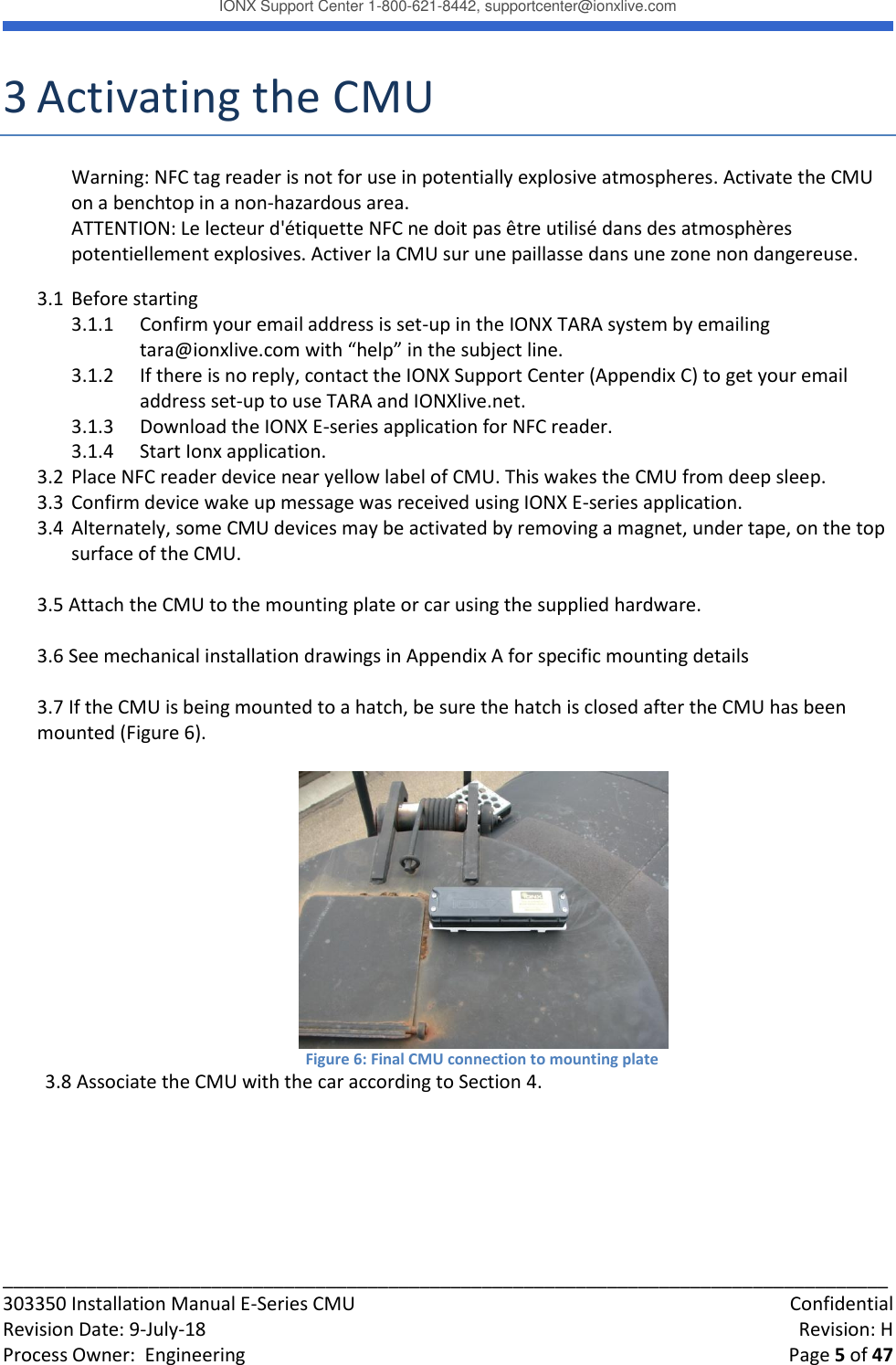
IONX Support Center 1-800-621-8442, supportcenter@ionxlive.com _____________________________________________________________________________________ 303350 Installation Manual E-Series CMU    Confidential Revision Date: 9-July-18    Revision: H Process Owner:  Engineering    Page 5 of 47 3 Activating the CMU Warning: NFC tag reader is not for use in potentially explosive atmospheres. Activate the CMU on a benchtop in a non-hazardous area.  ATTENTION: Le lecteur d'étiquette NFC ne doit pas être utilisé dans des atmosphères potentiellement explosives. Activer la CMU sur une paillasse dans une zone non dangereuse. 3.1 Before starting 3.1.1 Confirm your email address is set-up in the IONX TARA system by emailing tara@ionxlive.com with “help” in the subject line.   3.1.2 If there is no reply, contact the IONX Support Center (Appendix C) to get your email address set-up to use TARA and IONXlive.net. 3.1.3 Download the IONX E-series application for NFC reader. 3.1.4 Start Ionx application. 3.2 Place NFC reader device near yellow label of CMU. This wakes the CMU from deep sleep. 3.3 Confirm device wake up message was received using IONX E-series application. 3.4 Alternately, some CMU devices may be activated by removing a magnet, under tape, on the top surface of the CMU.   3.5 Attach the CMU to the mounting plate or car using the supplied hardware.  3.6 See mechanical installation drawings in Appendix A for specific mounting details  3.7 If the CMU is being mounted to a hatch, be sure the hatch is closed after the CMU has been mounted (Figure 6).   Figure 6: Final CMU connection to mounting plate 3.8 Associate the CMU with the car according to Section 4.
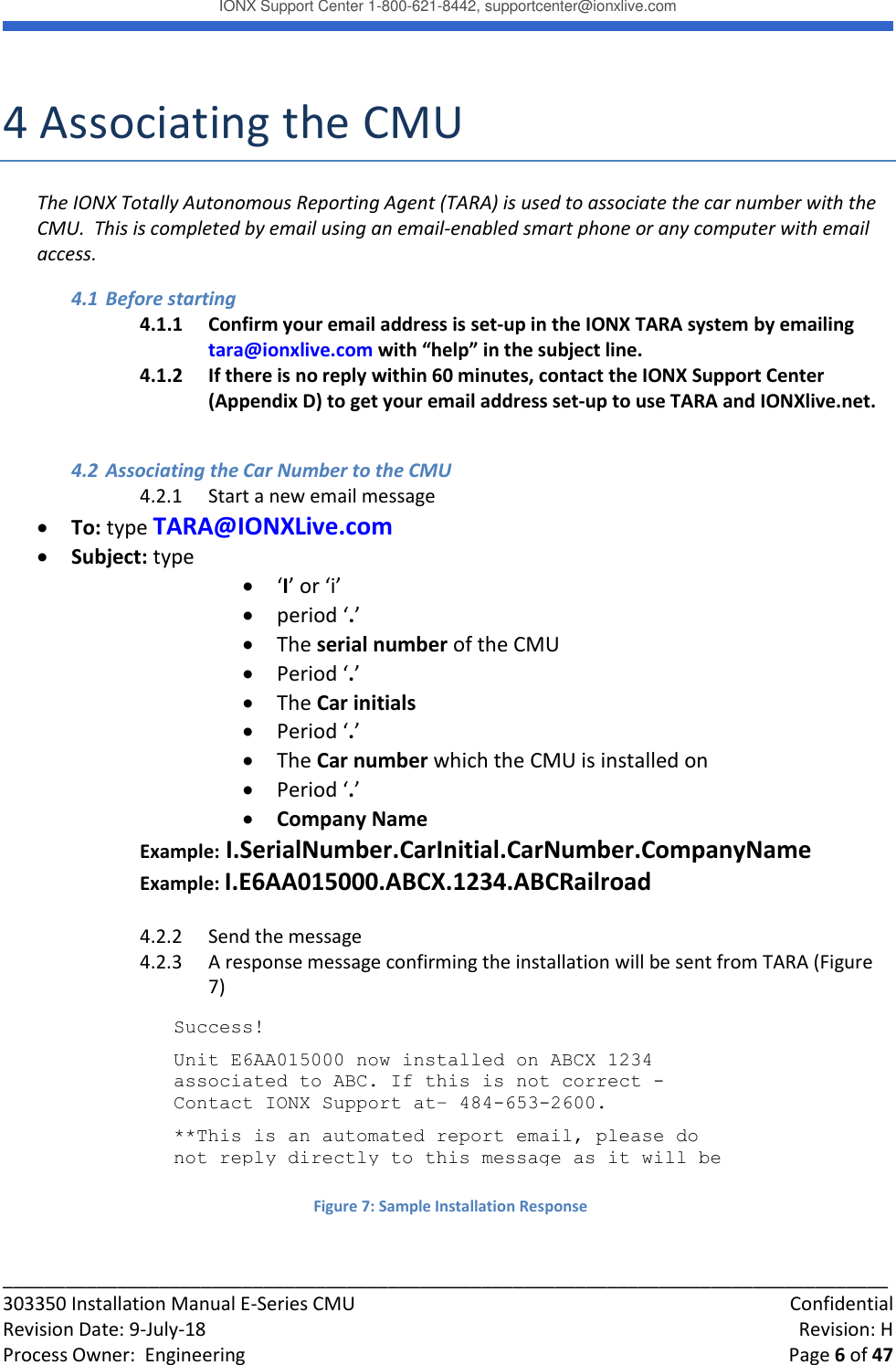
IONX Support Center 1-800-621-8442, supportcenter@ionxlive.com _____________________________________________________________________________________ 303350 Installation Manual E-Series CMU    Confidential Revision Date: 9-July-18    Revision: H Process Owner:  Engineering    Page 6 of 47  4 Associating the CMU The IONX Totally Autonomous Reporting Agent (TARA) is used to associate the car number with the CMU.  This is completed by email using an email-enabled smart phone or any computer with email access. 4.1 Before starting 4.1.1 Confirm your email address is set-up in the IONX TARA system by emailing tara@ionxlive.com with “help” in the subject line.   4.1.2 If there is no reply within 60 minutes, contact the IONX Support Center (Appendix D) to get your email address set-up to use TARA and IONXlive.net.  4.2 Associating the Car Number to the CMU 4.2.1 Start a new email message  To: type TARA@IONXLive.com  Subject: type   ‘I’ or ‘i’   period ‘.’   The serial number of the CMU   Period ‘.’  The Car initials  Period ‘.’  The Car number which the CMU is installed on  Period ‘.’  Company Name Example: I.SerialNumber.CarInitial.CarNumber.CompanyName Example: I.E6AA015000.ABCX.1234.ABCRailroad  4.2.2 Send the message 4.2.3 A response message confirming the installation will be sent from TARA (Figure 7)        Success!  Unit E6AA015000 now installed on ABCX 1234 associated to ABC. If this is not correct - Contact IONX Support at– 484-653-2600. **This is an automated report email, please do not reply directly to this message as it will be discarded.   Figure 7: Sample Installation Response
IONX Support Center 1-800-621-8442, supportcenter@ionxlive.com _____________________________________________________________________________________ 303350 Installation Manual E-Series CMU    Confidential Revision Date: 9-July-18    Revision: H Process Owner:  Engineering    Page 7 of 47 4.2.4 The CMU is associated with the car number.  The installation is complete.  The car now can be released into service. 4.3 For replacing a device on a car, start a new email message  To: type TARA@IONXLive.net  Subject: type  o ‘R’ or ‘r’  o period ‘.’  o The serial number of the old replaced CMU  o Period ‘.’ o The serial number of the new CMU being installed o Period ‘.’ o The Car initials o Period ‘.’ o The Car number which the CMU is installed on  Example: R.OldSerialNumber.NewSerialNumber.CarInitial.CarNumber Example: R.E5AC011001.E4AB011000.ABCX.1234 4.3.1 An email response message confirming the replacement will be sent from TARA.  4.3.2 To see details of all TARA email service commands, go to Appendix C.    4.4 Using the TARA web site  4.4.1 Click on the link below and log in using the same credentials you use to access the IONX web site:-  https://www.ionxlive.net/IonxLiveMassTARA/  Note: If you receive the error message ‘User is not a valid TARA user’, please contact IONX support to be added to the list of valid TARA users.           [This space left blank intentionally]
IONX Support Center 1-800-621-8442, supportcenter@ionxlive.com _____________________________________________________________________________________ 303350 Installation Manual E-Series CMU    Confidential Revision Date: 9-July-18    Revision: H Process Owner:  Engineering    Page 8 of 47 4.4.2 After logging in, you should see the following screen. This is the ‘Install’ tab and should be used if installing a device on a new car. If replacing a device on a car, please see the ‘Replace’ command instructions in section 6.3.3.               [This space left blank intentionally]
IONX Support Center 1-800-621-8442, supportcenter@ionxlive.com _____________________________________________________________________________________ 303350 Installation Manual E-Series CMU    Confidential Revision Date: 9-July-18    Revision: H Process Owner:  Engineering    Page 9 of 47 4.4.3 If installing only one device, fill in the serial number of the CMU to be installed, the car name and number (format ABCD 123456) and choose the customer name from the dropdown. Then press the ‘Install’ button.       The following message should be displayed:-  'Success! Unit <Serial Number> is now installed on <Car Mark> associated to <Customer>. If this is not correct - Contact customer support at IONX - 484-653-2600.'  If the above message is not displayed and an error message displayed which you do not understand, please capture the message and send to IONX Support for further investigation.  Note that IONX installers will have access to all customers from the dropdown list.   [This space left blank intentionally]
IONX Support Center 1-800-621-8442, supportcenter@ionxlive.com _____________________________________________________________________________________ 303350 Installation Manual E-Series CMU    Confidential Revision Date: 9-July-18    Revision: H Process Owner:  Engineering    Page 10 of 47 4.4.4 If installing multiple devices, please use the section at the bottom of the page. Up to five (5) devices can be installed at one time. Success messages will be displayed for all installed devices and they will be removed from the table. Unsuccessful installs will still remain in the table for correction and error messages will be displayed for them.            [This space left blank intentionally]
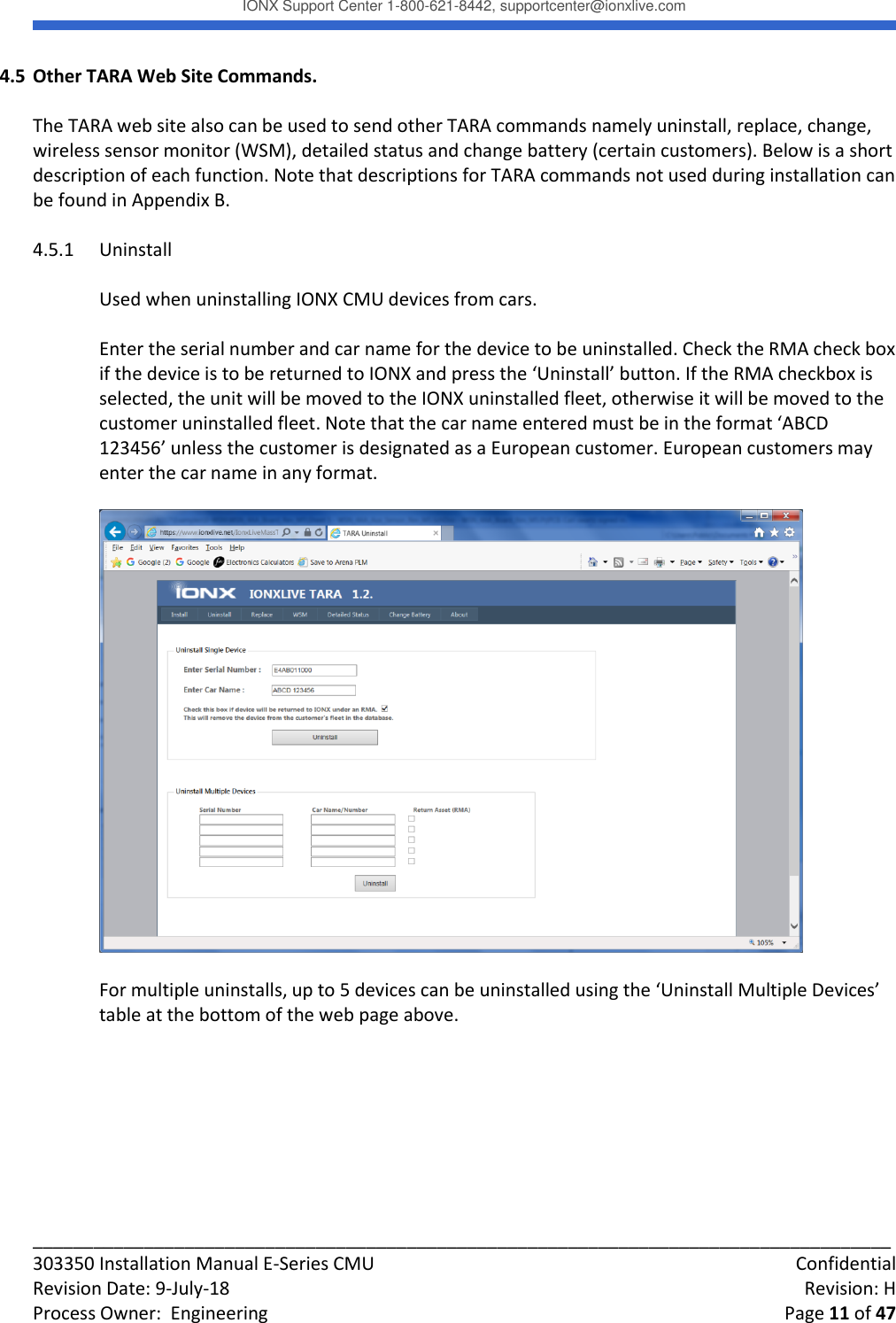
IONX Support Center 1-800-621-8442, supportcenter@ionxlive.com _____________________________________________________________________________________ 303350 Installation Manual E-Series CMU    Confidential Revision Date: 9-July-18    Revision: H Process Owner:  Engineering    Page 11 of 47 4.5 Other TARA Web Site Commands.  The TARA web site also can be used to send other TARA commands namely uninstall, replace, change, wireless sensor monitor (WSM), detailed status and change battery (certain customers). Below is a short description of each function. Note that descriptions for TARA commands not used during installation can be found in Appendix B.  4.5.1 Uninstall  Used when uninstalling IONX CMU devices from cars.  Enter the serial number and car name for the device to be uninstalled. Check the RMA check box if the device is to be returned to IONX and press the ‘Uninstall’ button. If the RMA checkbox is selected, the unit will be moved to the IONX uninstalled fleet, otherwise it will be moved to the customer uninstalled fleet. Note that the car name entered must be in the format ‘ABCD 123456’ unless the customer is designated as a European customer. European customers may enter the car name in any format.    For multiple uninstalls, up to 5 devices can be uninstalled using the ‘Uninstall Multiple Devices’ table at the bottom of the web page above.
IONX Support Center 1-800-621-8442, supportcenter@ionxlive.com _____________________________________________________________________________________ 303350 Installation Manual E-Series CMU    Confidential Revision Date: 9-July-18    Revision: H Process Owner:  Engineering    Page 12 of 47 4.5.2 Change battery. See Appendix F.  4.5.3 Replace  Used when replacing an IONX CMU device on a car with another IONX CMU.  Enter old CMU serial number (to be replaced), new CMU serial number (replacement) and car name. Press the ‘Replace’ button. Note that the car name must be of the format ‘ABCD 123456’ unless the customer is designated as a European customer.               [This space left blank intentionally]
IONX Support Center 1-800-621-8442, supportcenter@ionxlive.com _____________________________________________________________________________________ 303350 Installation Manual E-Series CMU    Confidential Revision Date: 9-July-18    Revision: H Process Owner:  Engineering    Page 13 of 47 4.5.4 Wireless Sensor Monitor (WSM) – For information purposes only.  Car sets are CMU devices plus Wireless Sensor Nodes (WSNs). WSM is used to determine if a CMU is awake and all WSNs have joined the network.   Following the instructions on the web page and then enter the IONX CMU serial number and press the ‘Monitor’ button.     A table of the WSNs (serial number, node number and status) for the car set should be displayed.         [This space left blank intentionally]
IONX Support Center 1-800-621-8442, supportcenter@ionxlive.com _____________________________________________________________________________________ 303350 Installation Manual E-Series CMU    Confidential Revision Date: 9-July-18    Revision: H Process Owner:  Engineering    Page 14 of 47 5 Miscellaneous   Translations available upon request. Traductions disponibles sur demande.              [This space left blank intentionally]
IONX Support Center 1-800-621-8442, supportcenter@ionxlive.com _____________________________________________________________________________________ 303350 Installation Manual E-Series CMU    Confidential Revision Date: 9-July-18    Revision: H Process Owner:  Engineering    Page 15 of 47 Appendix A: Mechanicals A.1  E4S and E5S Dimensions  Warning: Mounting bracket is required for CMU-E4S and CMU-E5S models when commissioning for use in potentially explosive atmosphere. IONX part number 302262, Isolation mount bracket for ExS, is approved for use in explosive atmosphere. Attention: Le support de montage est requis pour les modèles CMU-E4S et CMU-E5S lors de la mise en service pour une utilisation dans une atmosphère potentiellement explosive. Le numéro de pièce IONX 302262, support de montage d'isolation pour ExS, est approuvé pour une utilisation en atmosphère explosive.        [This space left blank intentionally]
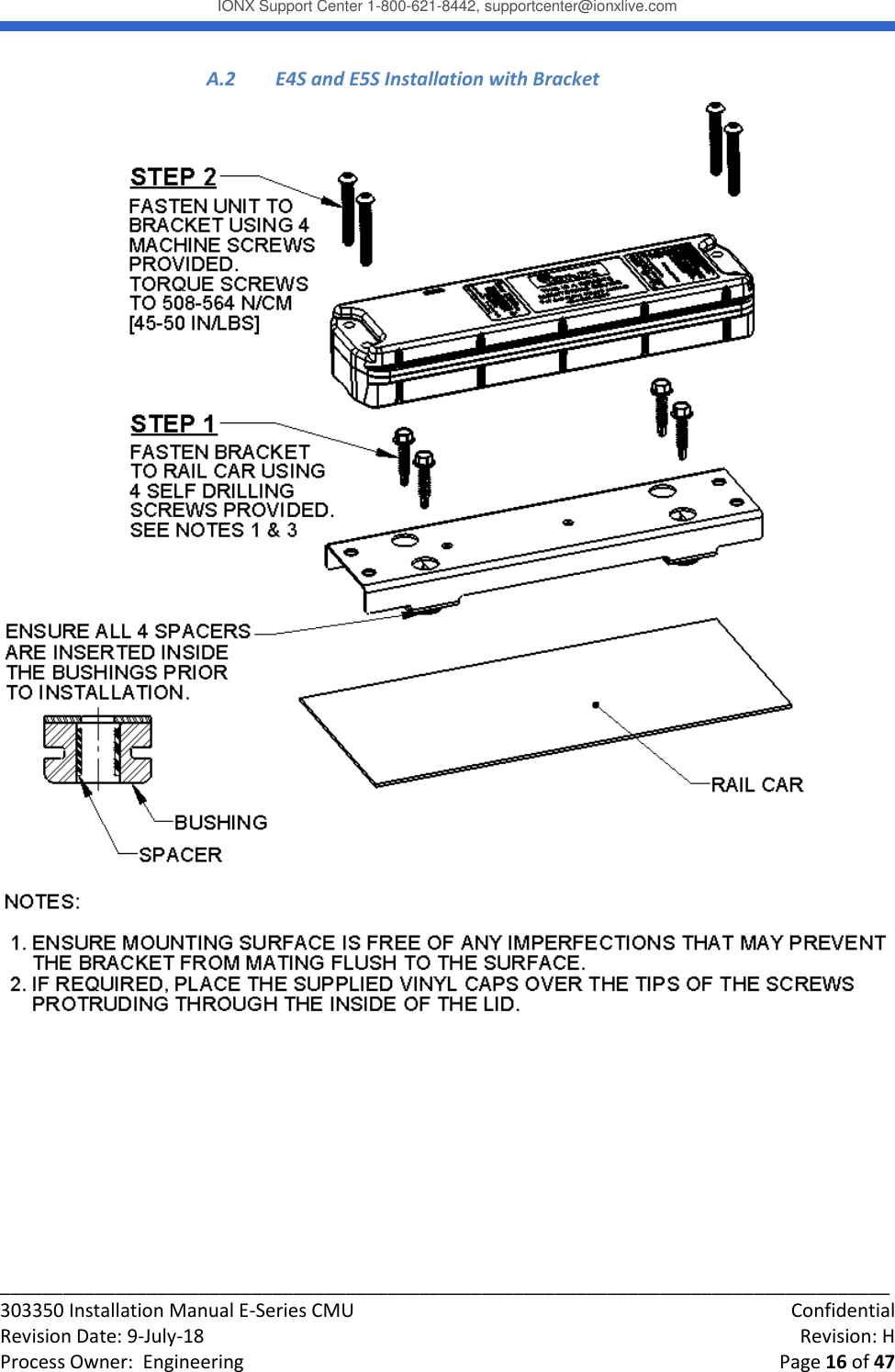
IONX Support Center 1-800-621-8442, supportcenter@ionxlive.com _____________________________________________________________________________________ 303350 Installation Manual E-Series CMU    Confidential Revision Date: 9-July-18    Revision: H Process Owner:  Engineering    Page 16 of 47 A.2  E4S and E5S Installation with Bracket
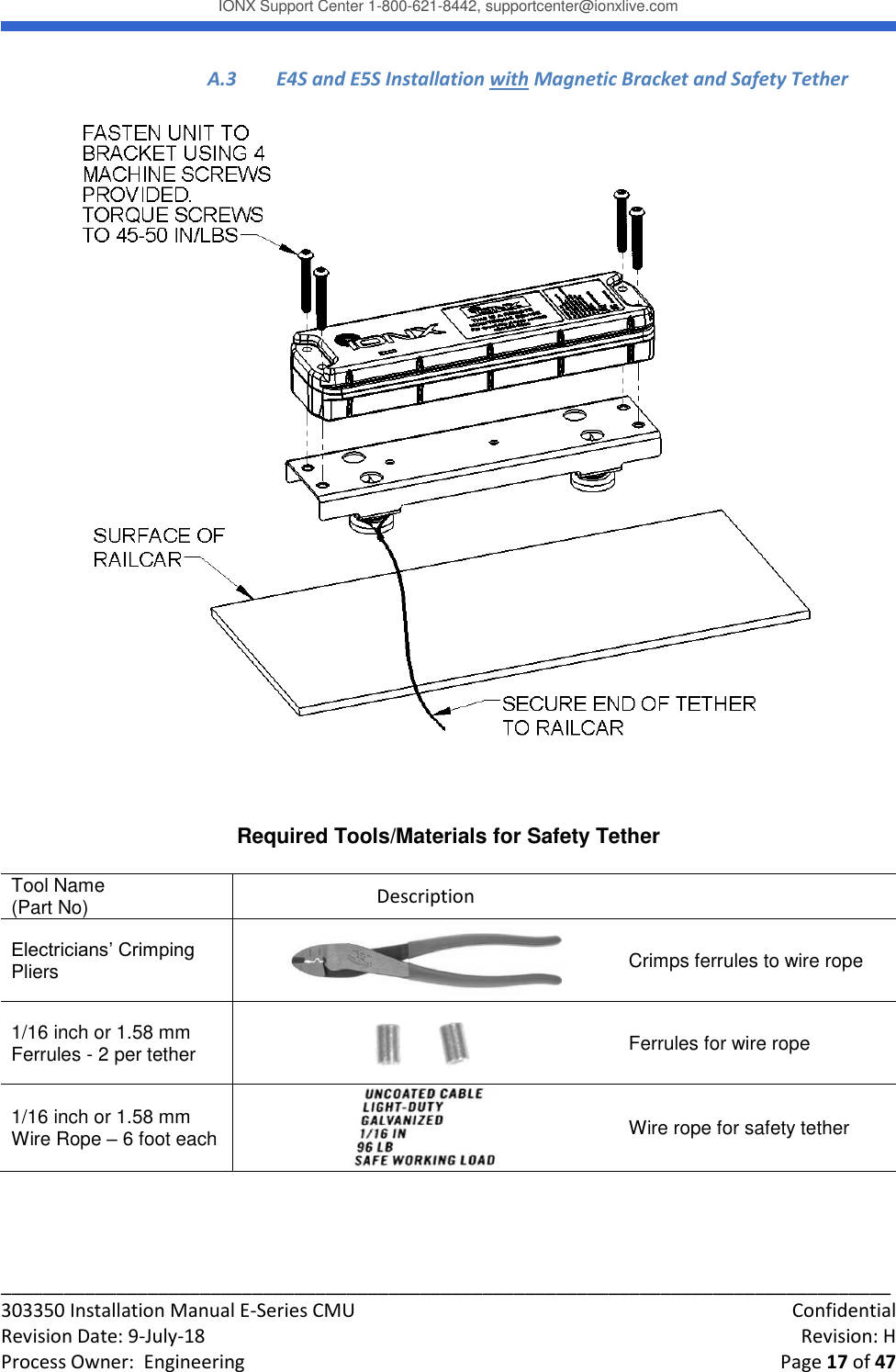
IONX Support Center 1-800-621-8442, supportcenter@ionxlive.com _____________________________________________________________________________________ 303350 Installation Manual E-Series CMU    Confidential Revision Date: 9-July-18    Revision: H Process Owner:  Engineering    Page 17 of 47 A.3  E4S and E5S Installation with Magnetic Bracket and Safety Tether      Required Tools/Materials for Safety Tether  Tool Name (Part No) Description  Electricians’ Crimping Pliers   Crimps ferrules to wire rope  1/16 inch or 1.58 mm Ferrules - 2 per tether   Ferrules for wire rope 1/16 inch or 1.58 mm Wire Rope – 6 foot each   Wire rope for safety tether
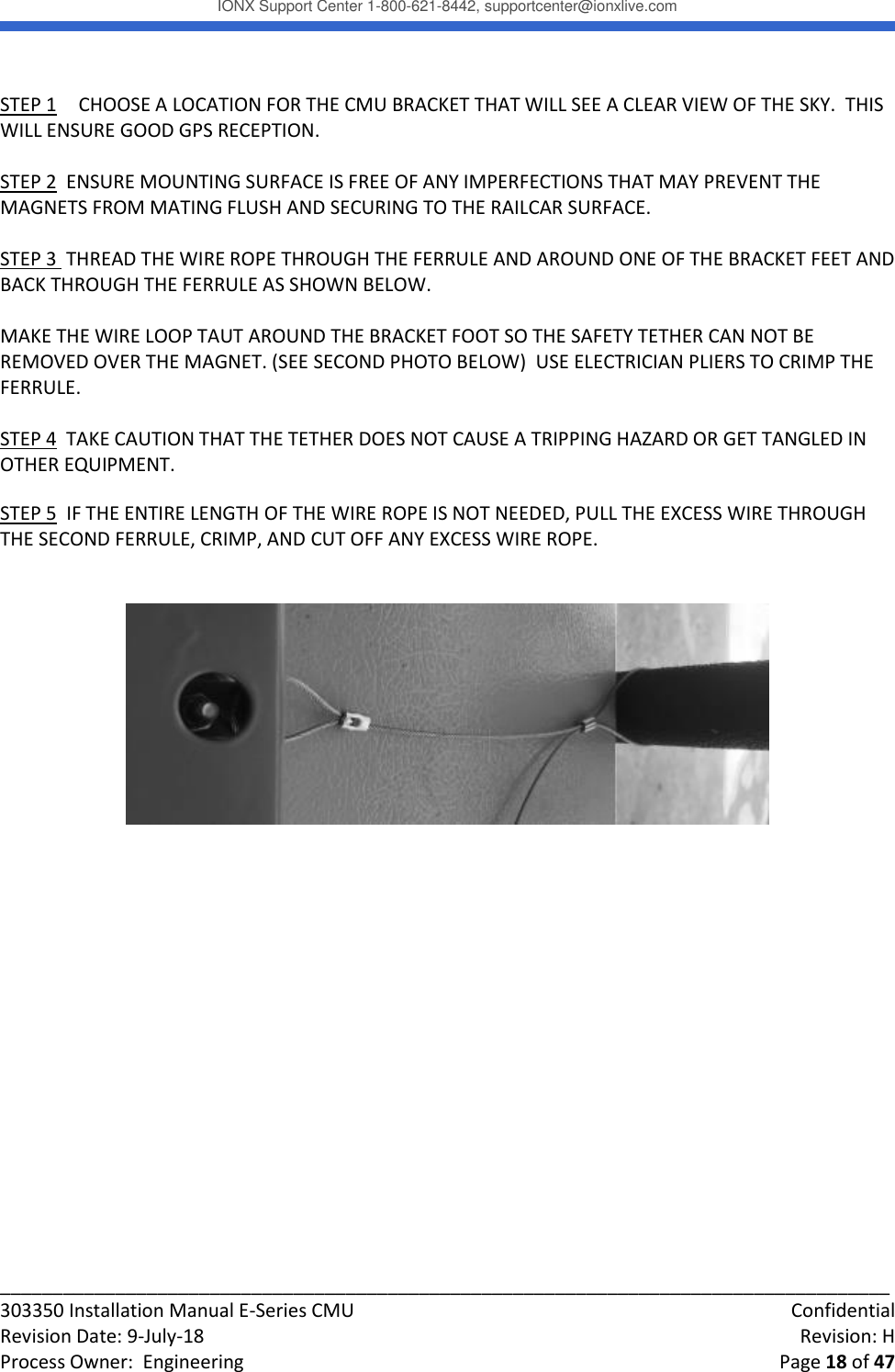
IONX Support Center 1-800-621-8442, supportcenter@ionxlive.com _____________________________________________________________________________________ 303350 Installation Manual E-Series CMU    Confidential Revision Date: 9-July-18    Revision: H Process Owner:  Engineering    Page 18 of 47  STEP 1    CHOOSE A LOCATION FOR THE CMU BRACKET THAT WILL SEE A CLEAR VIEW OF THE SKY.  THIS WILL ENSURE GOOD GPS RECEPTION.  STEP 2  ENSURE MOUNTING SURFACE IS FREE OF ANY IMPERFECTIONS THAT MAY PREVENT THE MAGNETS FROM MATING FLUSH AND SECURING TO THE RAILCAR SURFACE.  STEP 3  THREAD THE WIRE ROPE THROUGH THE FERRULE AND AROUND ONE OF THE BRACKET FEET AND BACK THROUGH THE FERRULE AS SHOWN BELOW.    MAKE THE WIRE LOOP TAUT AROUND THE BRACKET FOOT SO THE SAFETY TETHER CAN NOT BE REMOVED OVER THE MAGNET. (SEE SECOND PHOTO BELOW)  USE ELECTRICIAN PLIERS TO CRIMP THE FERRULE.  STEP 4  TAKE CAUTION THAT THE TETHER DOES NOT CAUSE A TRIPPING HAZARD OR GET TANGLED IN OTHER EQUIPMENT.    STEP 5  IF THE ENTIRE LENGTH OF THE WIRE ROPE IS NOT NEEDED, PULL THE EXCESS WIRE THROUGH THE SECOND FERRULE, CRIMP, AND CUT OFF ANY EXCESS WIRE ROPE.
IONX Support Center 1-800-621-8442, supportcenter@ionxlive.com _____________________________________________________________________________________ 303350 Installation Manual E-Series CMU    Confidential Revision Date: 9-July-18    Revision: H Process Owner:  Engineering    Page 19 of 47   DIFFERENT TYPES OF PLIERS THAT CAN BE USED - SHOWS THE FERRULES IN EACH PLIER TYPE          [This space left blank intentionally]
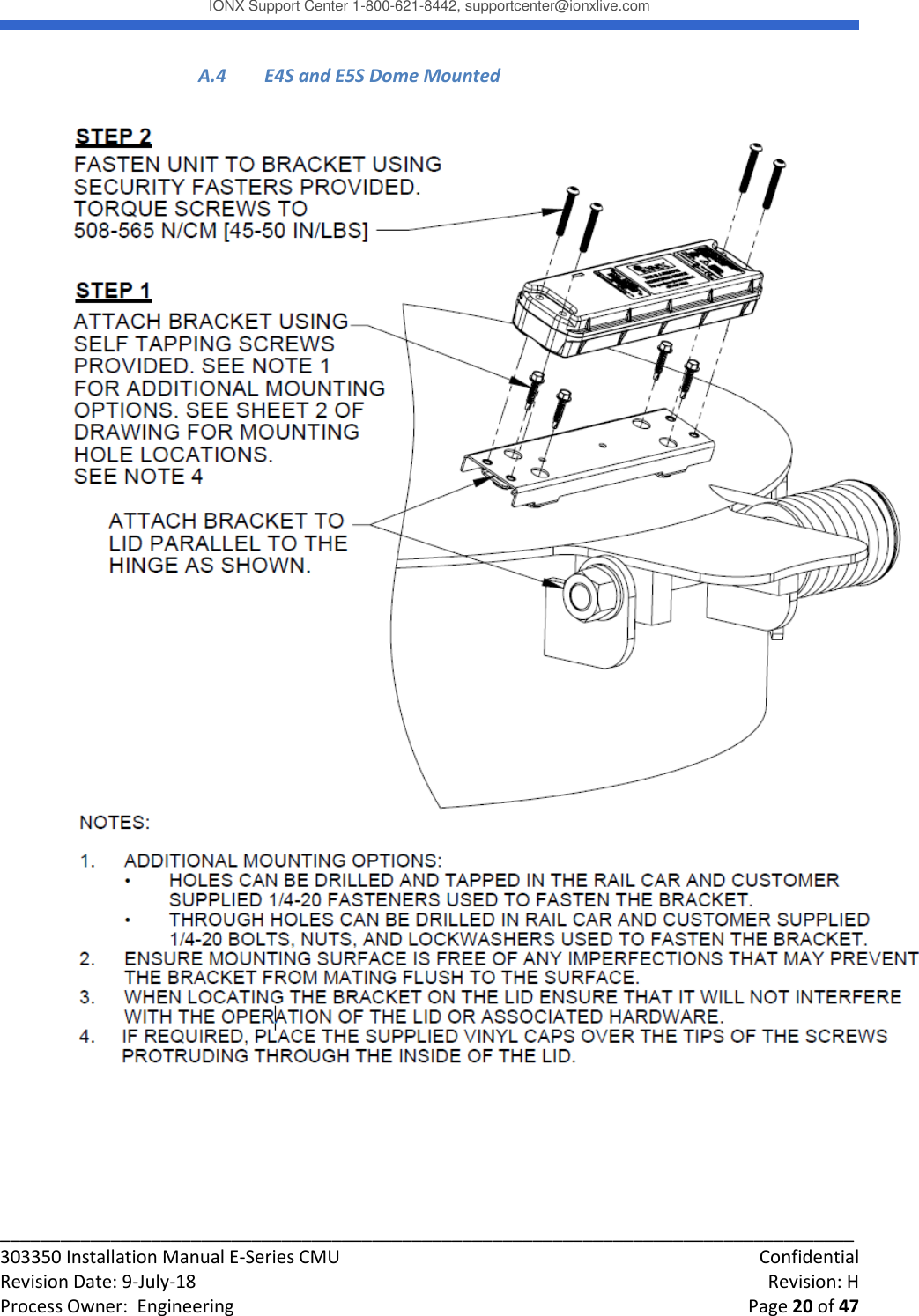
IONX Support Center 1-800-621-8442, supportcenter@ionxlive.com _____________________________________________________________________________________ 303350 Installation Manual E-Series CMU    Confidential Revision Date: 9-July-18    Revision: H Process Owner:  Engineering    Page 20 of 47 A.4  E4S and E5S Dome Mounted
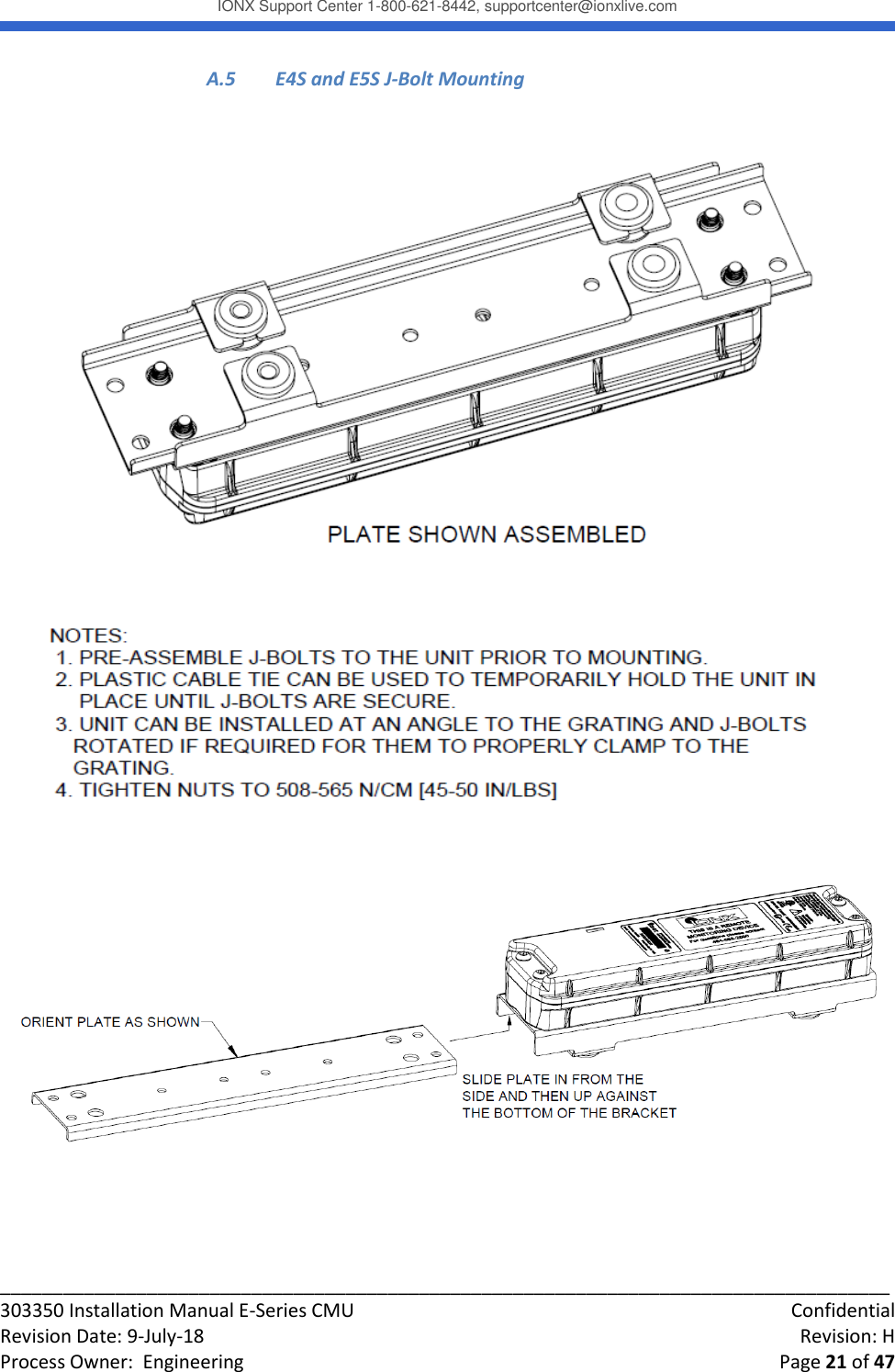
IONX Support Center 1-800-621-8442, supportcenter@ionxlive.com _____________________________________________________________________________________ 303350 Installation Manual E-Series CMU    Confidential Revision Date: 9-July-18    Revision: H Process Owner:  Engineering    Page 21 of 47 A.5  E4S and E5S J-Bolt Mounting
IONX Support Center 1-800-621-8442, supportcenter@ionxlive.com _____________________________________________________________________________________ 303350 Installation Manual E-Series CMU    Confidential Revision Date: 9-July-18    Revision: H Process Owner:  Engineering    Page 22 of 47     [This space left blank intentionally]
IONX Support Center 1-800-621-8442, supportcenter@ionxlive.com _____________________________________________________________________________________ 303350 Installation Manual E-Series CMU    Confidential Revision Date: 9-July-18    Revision: H Process Owner:  Engineering    Page 23 of 47 A.6  E4X, E5X and E6S Dimensions       [This space left blank intentionally]
IONX Support Center 1-800-621-8442, supportcenter@ionxlive.com _____________________________________________________________________________________ 303350 Installation Manual E-Series CMU    Confidential Revision Date: 9-July-18    Revision: H Process Owner:  Engineering    Page 24 of 47 A.7  E4X, E5X and E6S Installation with Bracket       [This space left blank intentionally]
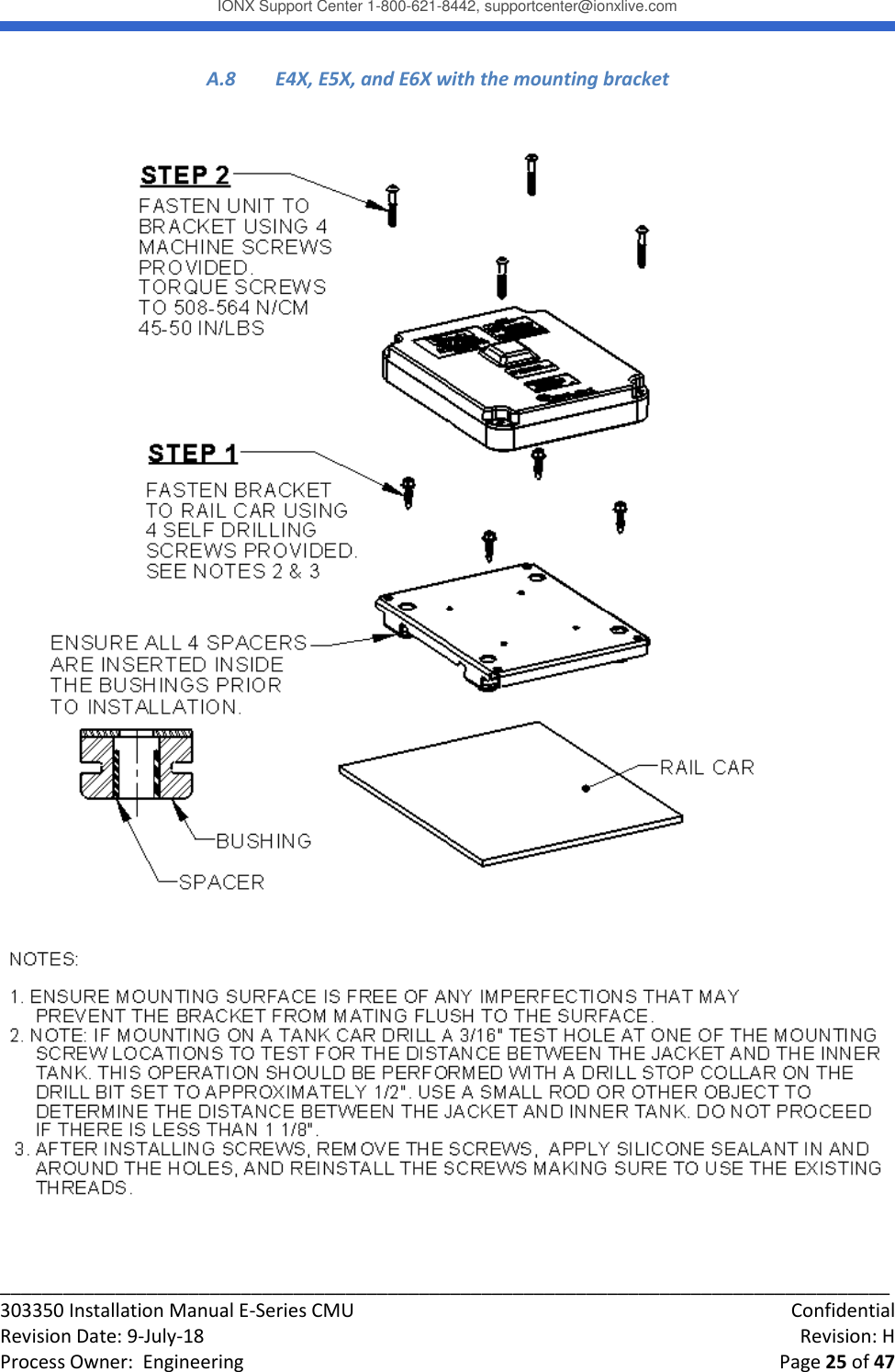
IONX Support Center 1-800-621-8442, supportcenter@ionxlive.com _____________________________________________________________________________________ 303350 Installation Manual E-Series CMU    Confidential Revision Date: 9-July-18    Revision: H Process Owner:  Engineering    Page 25 of 47 A.8  E4X, E5X, and E6X with the mounting bracket
IONX Support Center 1-800-621-8442, supportcenter@ionxlive.com _____________________________________________________________________________________ 303350 Installation Manual E-Series CMU    Confidential Revision Date: 9-July-18    Revision: H Process Owner:  Engineering    Page 26 of 47  A.9  E4X, E5X, and E6X Dome Mounted    [This space left blank intentionally]
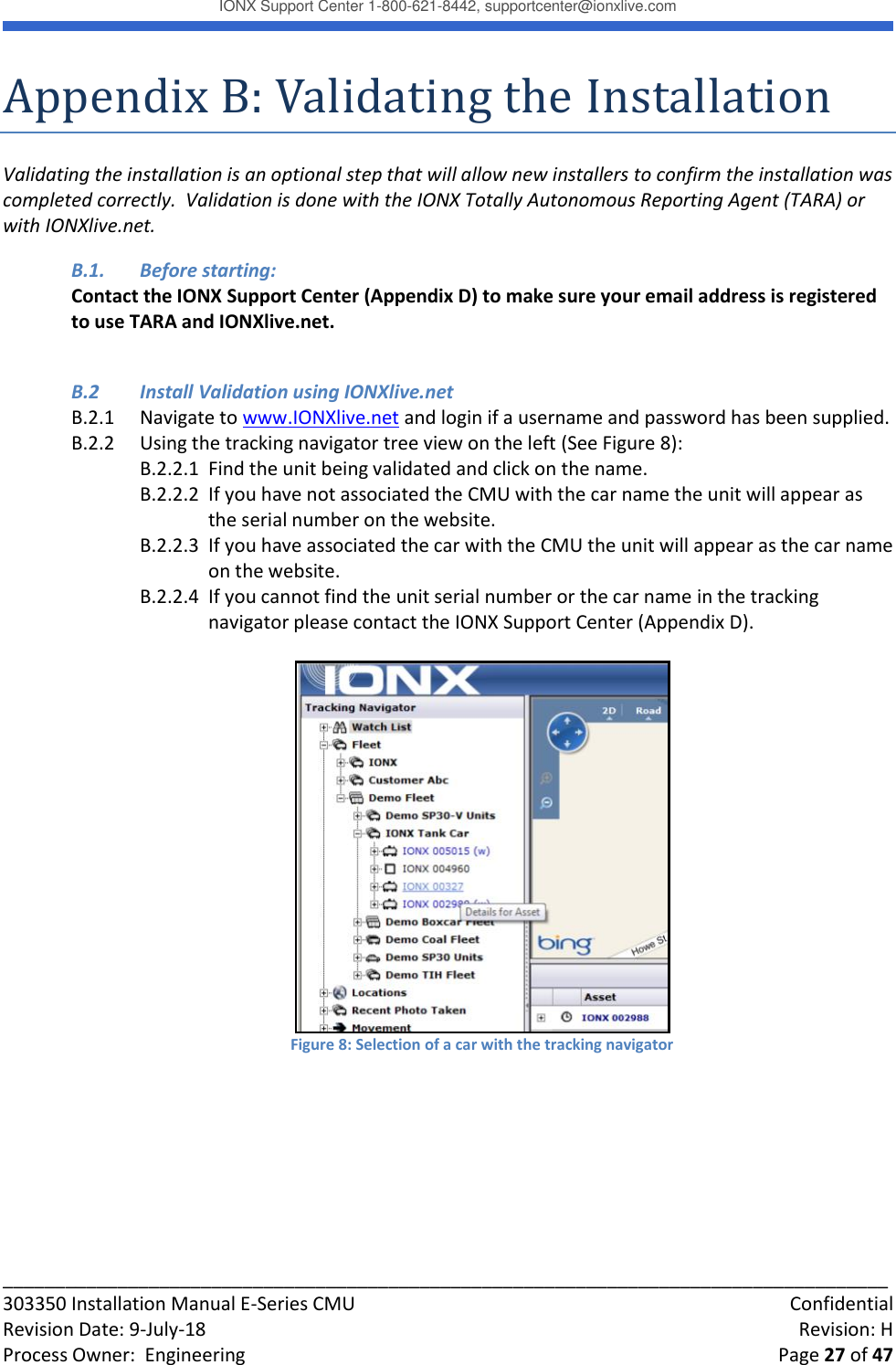
IONX Support Center 1-800-621-8442, supportcenter@ionxlive.com _____________________________________________________________________________________ 303350 Installation Manual E-Series CMU    Confidential Revision Date: 9-July-18    Revision: H Process Owner:  Engineering    Page 27 of 47 Appendix B: Validating the Installation Validating the installation is an optional step that will allow new installers to confirm the installation was completed correctly.  Validation is done with the IONX Totally Autonomous Reporting Agent (TARA) or with IONXlive.net.  B.1.  Before starting: Contact the IONX Support Center (Appendix D) to make sure your email address is registered to use TARA and IONXlive.net.   B.2  Install Validation using IONXlive.net B.2.1  Navigate to www.IONXlive.net and login if a username and password has been supplied. B.2.2  Using the tracking navigator tree view on the left (See Figure 8): B.2.2.1  Find the unit being validated and click on the name.   B.2.2.2  If you have not associated the CMU with the car name the unit will appear as the serial number on the website.  B.2.2.3  If you have associated the car with the CMU the unit will appear as the car name on the website.  B.2.2.4  If you cannot find the unit serial number or the car name in the tracking navigator please contact the IONX Support Center (Appendix D).   Figure 8: Selection of a car with the tracking navigator
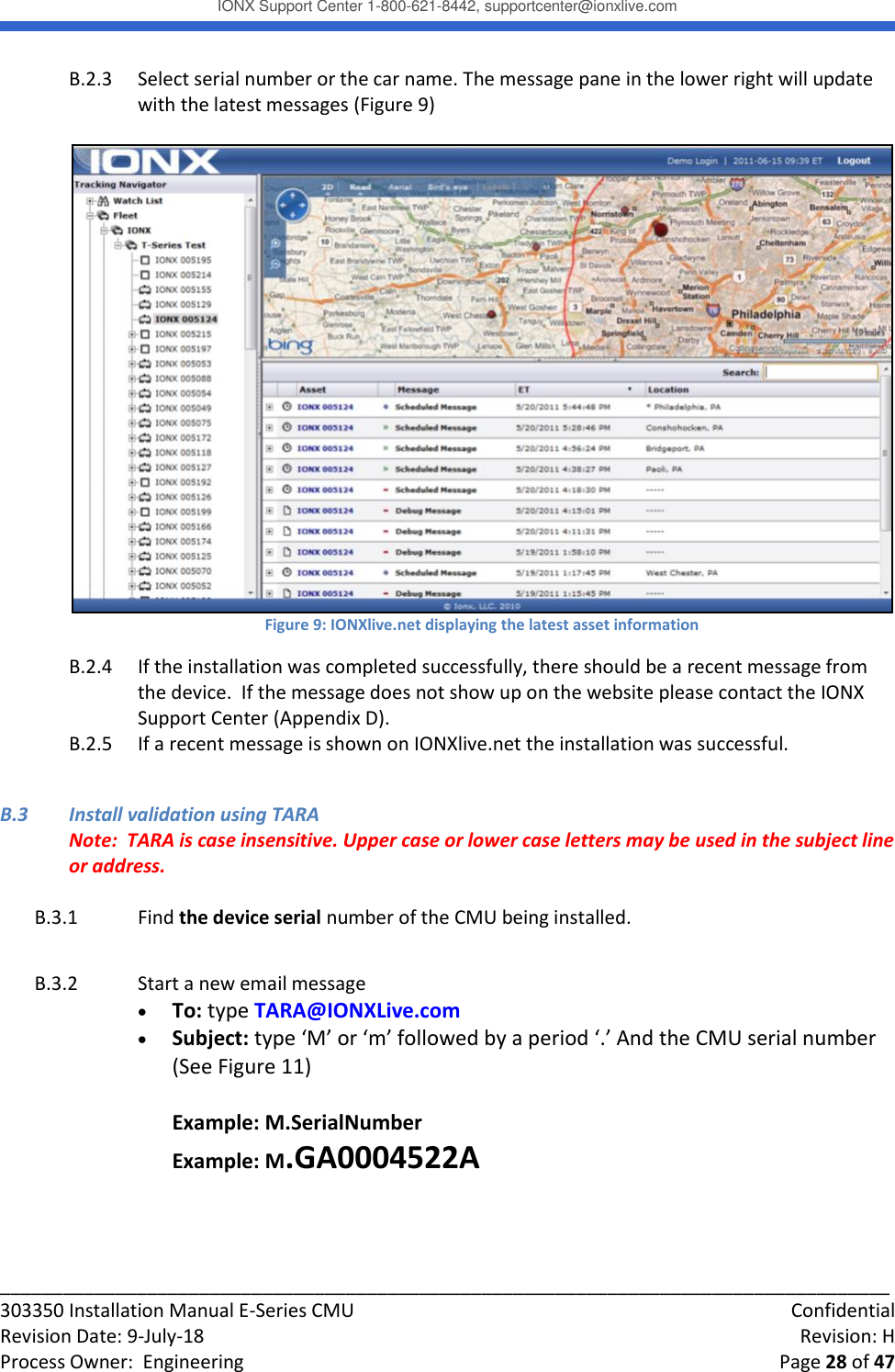
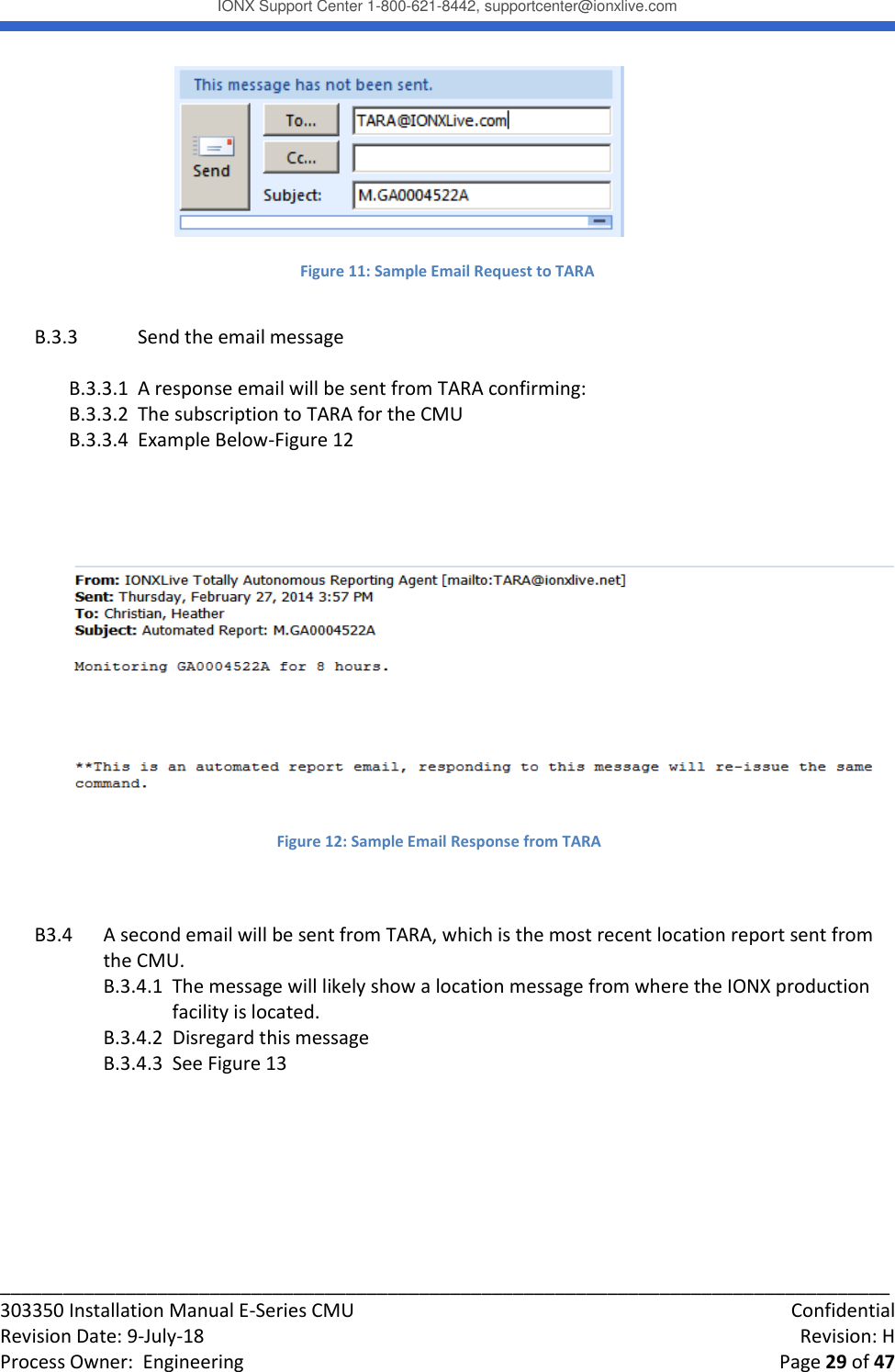
IONX Support Center 1-800-621-8442, supportcenter@ionxlive.com _____________________________________________________________________________________ 303350 Installation Manual E-Series CMU    Confidential Revision Date: 9-July-18    Revision: H Process Owner:  Engineering    Page 28 of 47 B.2.3  Select serial number or the car name. The message pane in the lower right will update with the latest messages (Figure 9)   Figure 9: IONXlive.net displaying the latest asset information B.2.4  If the installation was completed successfully, there should be a recent message from the device.  If the message does not show up on the website please contact the IONX Support Center (Appendix D). B.2.5  If a recent message is shown on IONXlive.net the installation was successful.  B.3  Install validation using TARA Note:  TARA is case insensitive. Upper case or lower case letters may be used in the subject line or address.  B.3.1  Find the device serial number of the CMU being installed.  B.3.2  Start a new email message  To: type TARA@IONXLive.com  Subject: type ‘M’ or ‘m’ followed by a period ‘.’ And the CMU serial number (See Figure 11)  Example: M.SerialNumber Example: M.GA0004522A
IONX Support Center 1-800-621-8442, supportcenter@ionxlive.com _____________________________________________________________________________________ 303350 Installation Manual E-Series CMU    Confidential Revision Date: 9-July-18    Revision: H Process Owner:  Engineering    Page 29 of 47   Figure 11: Sample Email Request to TARA  B.3.3  Send the email message  B.3.3.1  A response email will be sent from TARA confirming: B.3.3.2  The subscription to TARA for the CMU B.3.3.4  Example Below-Figure 12     B3.4  A second email will be sent from TARA, which is the most recent location report sent from the CMU. B.3.4.1  The message will likely show a location message from where the IONX production facility is located. B.3.4.2  Disregard this message B.3.4.3  See Figure 13   Figure 12: Sample Email Response from TARA
IONX Support Center 1-800-621-8442, supportcenter@ionxlive.com _____________________________________________________________________________________ 303350 Installation Manual E-Series CMU    Confidential Revision Date: 9-July-18    Revision: H Process Owner:  Engineering    Page 30 of 47   Figure 13: Sample TARA Message  B.3.5  TARA now is configured to monitor the CMU.  Repeat the process for all the CMUs being installed today  B.3.6  The installation was successful if you find TARA emails for power up messages time stamped the same time the CMU was activated.        [This space left blank intentionally]
IONX Support Center 1-800-621-8442, supportcenter@ionxlive.com _____________________________________________________________________________________ 303350 Installation Manual E-Series CMU    Confidential Revision Date: 9-July-18    Revision: H Process Owner:  Engineering    Page 31 of 47   Appendix C: Replace command The IONX Totally Autonomous Reporting Agent (TARA) is used to associate the car number with the CMU.  If an IONX GPS device has already been installed on the car and associated, the replace command will be used.  This is completed by email using an email-enabled smart phone or any computer with email access. C.1 Before starting C.1.1  Confirm your email address is set-up in the IONX TARA system by emailing tara@ionxlive.com with “help” in the subject line.   C.1.2  If there is no reply, contact the IONX Support Center (Appendix D) to get your email address set-up to use TARA and IONXlive.net. C.2 Associating the Car Number to the CMU.    C.2.1  Start a new email message   To: type TARA@IONXLive.net  Subject: type  o ‘R’ or ‘r’  o period ‘.’  o The serial number of the old replaced CMU  o Period ‘.’ o The serial number of the new CMU being installed o Period ‘.’ o The Car initials o Period ‘.’ o The Car number which the CMU is installed on  Example: R.OldSerialNumber.NewSerialNumber.CarInitial.CarNumber Example: R.1234A. E6AA015000.ABCX.1234 C.2.2   Send the message
IONX Support Center 1-800-621-8442, supportcenter@ionxlive.com _____________________________________________________________________________________ 303350 Installation Manual E-Series CMU    Confidential Revision Date: 9-July-18    Revision: H Process Owner:  Engineering    Page 32 of 47    C.2.3  A response message confirming the installation will be sent from TARA.  See example email in below:          C.2.4  The CMU is associated with the car number.  The installation is complete.  The car now can be released into service.         [This space left blank intentionally]    Success!  Unit 1234A has been replaced by E6AA015000 for ABCX.1234. If this has been done in error - Contact Customer Service at IONX - 484-653-2600.  **This is an automated report email, responding to this message will re-issue the same command.  Sample Installation Response
IONX Support Center 1-800-621-8442, supportcenter@ionxlive.com _____________________________________________________________________________________ 303350 Installation Manual E-Series CMU    Confidential Revision Date: 9-July-18    Revision: H Process Owner:  Engineering    Page 33 of 47   Appendix D: General Information D1. IONX Support Center An IONX Customer Service Representative can be reached via the following communication methods: Phone (local):      +1-484-653-2600, press 1 for Customer Service Phone (toll-free):   +1-888-519-4050 Fax:      +1-484-653-2601 Email:       supportcenter@ionxlive.com   D2. Forcing the CMU to call If there is a problem verifying messages on the website or through TARA, the CMU can be forced to call for 24 hours after removing the installation magnet. Place the installation magnet onto the indentation, where it was located, at the time of shipping for 30-seconds then remove. The CMU should send a report within 15-minutes.  If TARA is active for the CMU and no reports are received by email or on the website, contact the IONX Support Center.       [This space left blank intentionally]
IONX Support Center 1-800-621-8442, supportcenter@ionxlive.com _____________________________________________________________________________________ 303350 Installation Manual E-Series CMU    Confidential Revision Date: 9-July-18    Revision: H Process Owner:  Engineering    Page 34 of 47  D4. Overview of CMU physical features                  [This space left blank intentionally]    Intrinsic Safety Certification  IONX Contact Information Reed Switch
IONX Support Center 1-800-621-8442, supportcenter@ionxlive.com _____________________________________________________________________________________ 303350 Installation Manual E-Series CMU    Confidential Revision Date: 9-July-18    Revision: H Process Owner:  Engineering    Page 35 of 47 Appendix E: Trouble Shooting E1.  Missed Wake-up Message If the wakeup message does not show up through TARA within 30-minutes of the magnet being removed, another message can be forced to be transmitted within 24 hours of the installation magnet being removed. See Appendix D3 –General Information on “Forcing the CMU to Call.”  E2.  Opening and closing the hatch is not triggering an alarm E.2.1 If CMU was not installed in its final position within the 5-minute mounting period window     after removing the installation magnet, an open/close hatch will not trigger an alarm.   Contact the IONX Support Center (Appendix D) so a Customer Service Representative can correct the home position of the CMU.   E.2.2 The CMU configuration is not set correctly.  The CMU may not have been configured to report open/close or tilt alarms inside facilities where authorized personal will typically be handling cars.  Contact the IONX Support Center (Appendix D) so a Customer Service Representative can check the configuration of the CMU.  E3.  Unit does not appear on IONXlive.net E.3.1 If the asset does not appear on IONXlive.net it could be a limitation of the user’s login id.  Contact the IONX Support Center (Appendix D) so a Customer Service Representative can check the permission level and adjust accordingly.   E.3.2 Initially the asset will be shown on IONXlive.net as the CMU serial number.  When the CMU is associated to an asset, the CMU serial number will be replaced by the car name.    E4.  Power up message missing on IONXlive.net If the CMU misses a power up message but has a recent message showing the current location, then the CMU is OK to install.       [This space left blank intentionally]
IONX Support Center 1-800-621-8442, supportcenter@ionxlive.com _____________________________________________________________________________________ 303350 Installation Manual E-Series CMU    Confidential Revision Date: 9-July-18    Revision: H Process Owner:  Engineering    Page 36 of 47 Appendix F: Battery Replacement Required Tools/Materials   Tool Name (Part No) Description  T-20 Torx driver with torque capability of 22-24 in/lbs    7.2V Power Supply or Wall Wart            [This space left blank intentionally]
IONX Support Center 1-800-621-8442, supportcenter@ionxlive.com _____________________________________________________________________________________ 303350 Installation Manual E-Series CMU    Confidential Revision Date: 9-July-18    Revision: H Process Owner:  Engineering    Page 37 of 47 Warning: Case can build up electrostatic charge. Clean the case by spraying with water. Do not use cloth to clean the CMU. Remove CMU to area known to be non-hazardous. Attention: Le boîtier peut accumuler une charge électrostatique. Nettoyez le boîtier en pulvérisant de l'eau. N'utilisez pas de chiffon pour nettoyer le CMU. Retirer la CMU dans une zone connue comme non dangereuse. Warning: Do not open CMU in potentially explosive atmosphere. ATTENTION: N'ouvrez pas la CMU dans une atmosphère potentiellement explosive. F.1. Turn the CMUS unit over and remove the 4 T-20 Torx screws (IONX P/N 300842) that hold the lid in place. See Figure F.1 below.  Figure F.1 F.2. Carefully turn the unit over, being sure to hold the lid in place, as you do so.     [This space left blank intentionally]  T20 Screws (300842)
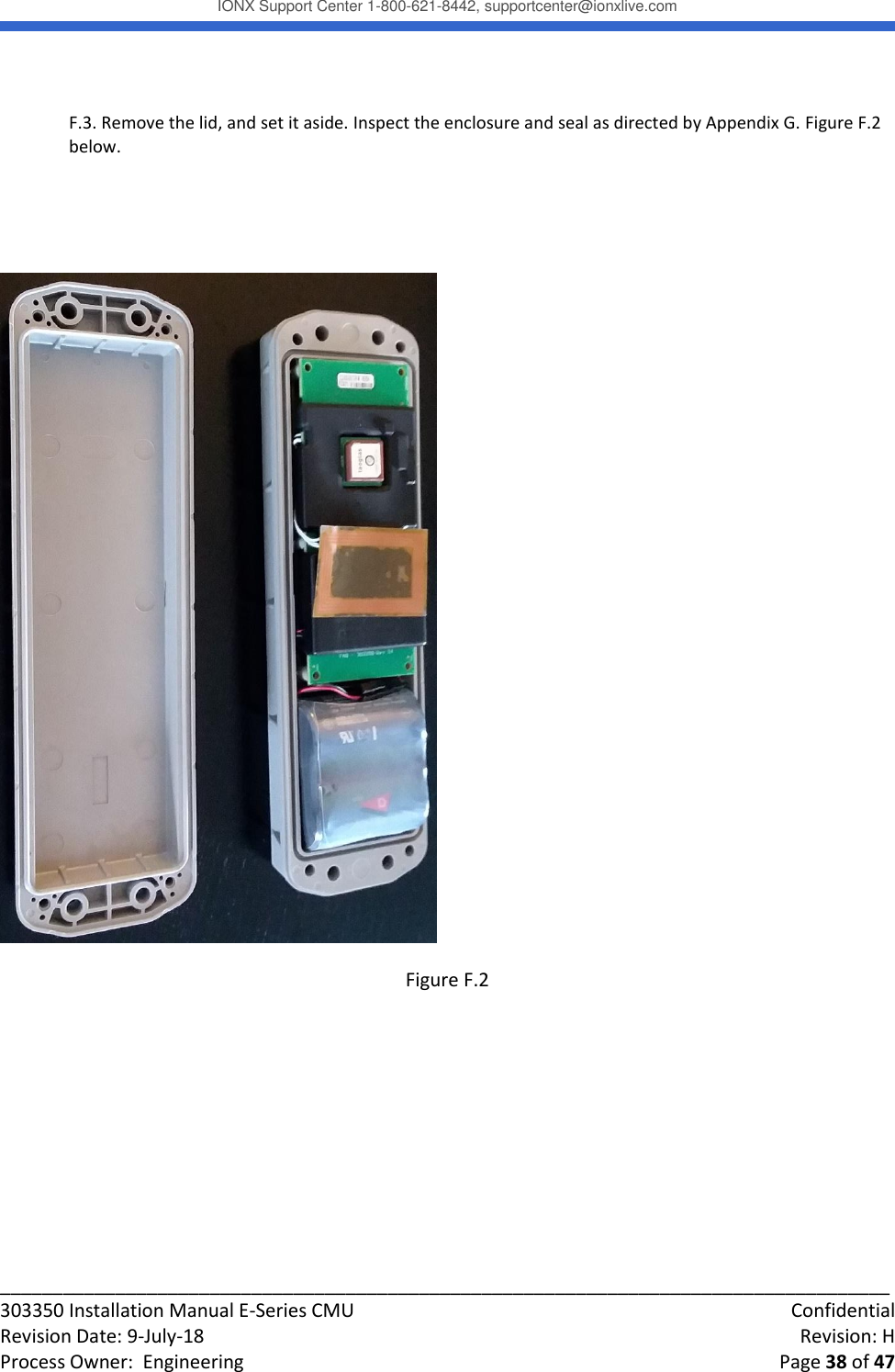
IONX Support Center 1-800-621-8442, supportcenter@ionxlive.com _____________________________________________________________________________________ 303350 Installation Manual E-Series CMU    Confidential Revision Date: 9-July-18    Revision: H Process Owner:  Engineering    Page 38 of 47  F.3. Remove the lid, and set it aside. Inspect the enclosure and seal as directed by Appendix G. Figure F.2 below.    Figure F.2
IONX Support Center 1-800-621-8442, supportcenter@ionxlive.com _____________________________________________________________________________________ 303350 Installation Manual E-Series CMU    Confidential Revision Date: 9-July-18    Revision: H Process Owner:  Engineering    Page 39 of 47 F.4. Carefully lift the power cable from beside the main board and disconnect the battery. Figure F3.  Figure F.3 F.5. Remove the battery pack, and set aside. WARNING: DO NOT PLACE USED HAZARDOUS BATTERY PACKS IN THE TRASH.  THESE SHOULD BE TAKEN TO A RECYLCING FACILITY THAT CAN PROPERLY DISPOSE OF THEM.  ATTENTION: NE PLACEZ PAS LES PACKS DE BATTERIE DANGEREUX UTILISES DANS LA POUBELLE. CES DERNIERS DOIVENT ETRE UTILISES DANS UNE INSTALLATION DE RECYCLAGE QUI PEUT LES DISPOSER CORRECTEMENT.. F.6. Connect a 7.2V power supply or wall wart to the power cable of the core module for a minimum of 5 minutes (preferably more) to pre-charge the core, and prevent errors once the new battery is connected.       [This space left blank intentionally]
IONX Support Center 1-800-621-8442, supportcenter@ionxlive.com _____________________________________________________________________________________ 303350 Installation Manual E-Series CMU    Confidential Revision Date: 9-July-18    Revision: H Process Owner:  Engineering    Page 40 of 47 F.7. Disconnect the power supply and select a new battery pack to install. WARNING: BATTERY PACK 303382: USE ONLY ON IONX MODELS E4S and E5S. WARNING: BATTERY PACK 303406: USE ONLY ON IONX MODELS E4X, E5X, and E6X. ATTENTION: BATTERY PACK 303382: N'UTILISER QUE SUR LES MODÈLES IONX E4S et E5S. ATTENTION: BATTERY PACK 303406: À UTILISER UNIQUEMENT SUR LES MODÈLES IONX E4X, E5X et E6X.  From your email account (the one you have registered for the IONXLive web site with), start a new email:  Enter ‘TARA@ionxlive.net’ in the ‘To’ recipient text box.  In the ‘Subject’ line of the email, enter the command for TARA in the following format: o B.CMUSerialNumber.OldBatterySerialNumber.NewBatterySerialNumber  When done, press ‘Send’.  See Figure F.4 below.  Figure F.4 F.8. Within a few minutes, TARA will email back with either an error message or a message to say that the command was successful. If successful, continue with Step 0 below. If an error message is received, start over at Step 0 above. If the error message persists, contact IONX Customer Service at (800) 621-8442. [This space left blank intentionally]
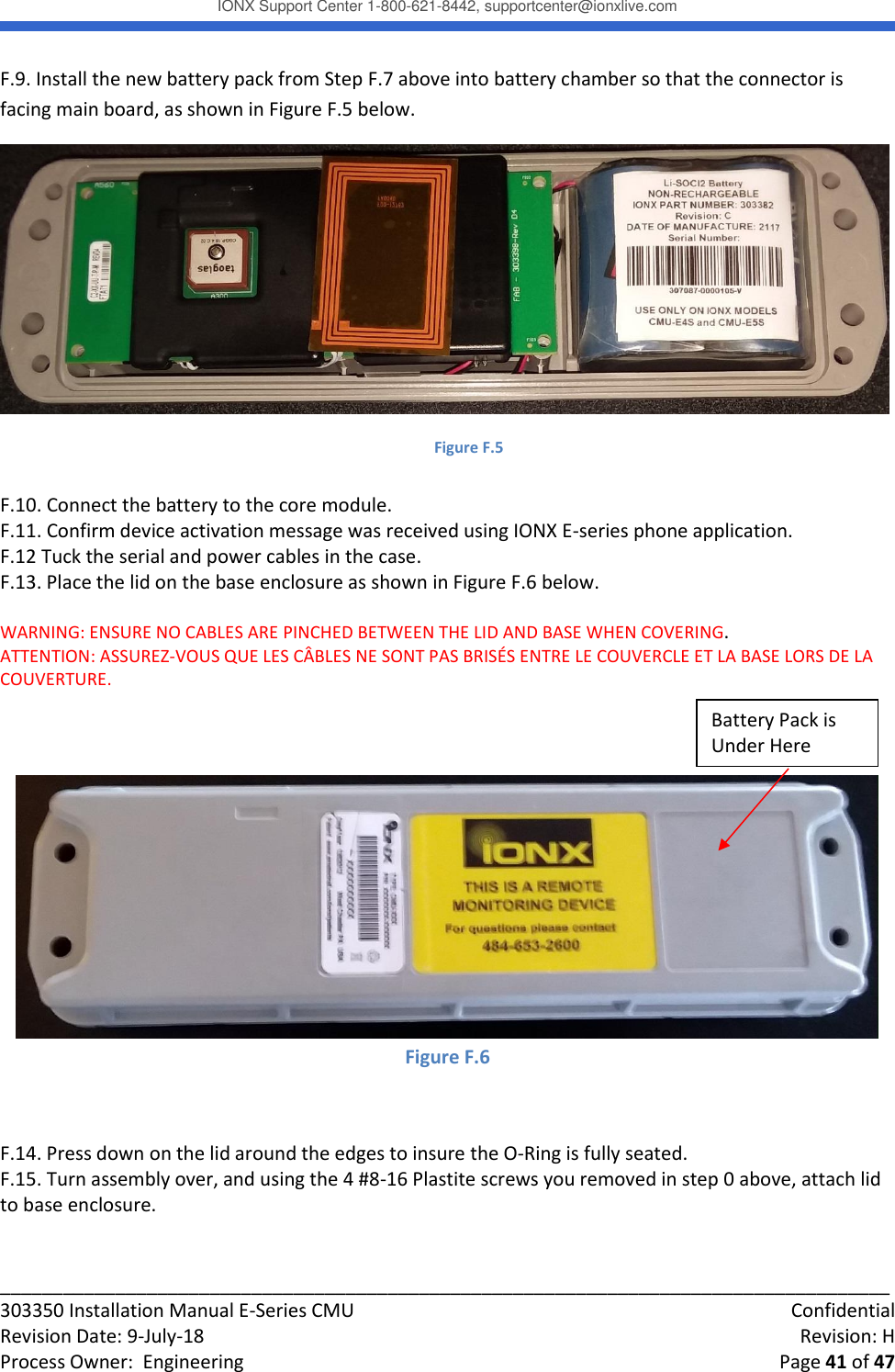
IONX Support Center 1-800-621-8442, supportcenter@ionxlive.com _____________________________________________________________________________________ 303350 Installation Manual E-Series CMU    Confidential Revision Date: 9-July-18    Revision: H Process Owner:  Engineering    Page 41 of 47 F.9. Install the new battery pack from Step F.7 above into battery chamber so that the connector is facing main board, as shown in Figure F.5 below.  Figure F.5 F.10. Connect the battery to the core module. F.11. Confirm device activation message was received using IONX E-series phone application. F.12 Tuck the serial and power cables in the case. F.13. Place the lid on the base enclosure as shown in Figure F.6 below.  WARNING: ENSURE NO CABLES ARE PINCHED BETWEEN THE LID AND BASE WHEN COVERING. ATTENTION: ASSUREZ-VOUS QUE LES CÂBLES NE SONT PAS BRISÉS ENTRE LE COUVERCLE ET LA BASE LORS DE LA COUVERTURE. Figure F.6  F.14. Press down on the lid around the edges to insure the O-Ring is fully seated. F.15. Turn assembly over, and using the 4 #8-16 Plastite screws you removed in step 0 above, attach lid to base enclosure. Battery Pack is Under Here
IONX Support Center 1-800-621-8442, supportcenter@ionxlive.com _____________________________________________________________________________________ 303350 Installation Manual E-Series CMU    Confidential Revision Date: 9-July-18    Revision: H Process Owner:  Engineering    Page 42 of 47 WARNING: SLOWLY TURN THE SCREWS COUNTER-CLOCKWISE UNTIL YOU FEEL THEM CLICK INTO THE EXISTING THREAD BEFORE TIGHTENING TO ENSURE HOLE IS NOT RE-THREADED.  FAILURE TO DO THIS WILL STRIP THE THREADS. MISE EN GARDE: TOURNER LENTEMENT LES VIS DANS LE SENS ANTIHORAIRE JUSQU'À CE QUE VOUS VOUS SENTEZ CLIQUER DANS LE FILET EXISTANT AVANT DE LE SERRER POUR VOUS ASSURER QUE LE TROU NE SOIT PAS RETIRÉ. LE FAIT DE NE PAS FAIRE CECI FERMERA LES FILS.. F.16. Tighten screws to a torque of 22.0-24.0 in/lbs.    [This space left blank intentionally]
IONX Support Center 1-800-621-8442, supportcenter@ionxlive.com _____________________________________________________________________________________ 303350 Installation Manual E-Series CMU    Confidential Revision Date: 9-July-18    Revision: H Process Owner:  Engineering    Page 43 of 47 Appendix G: Inspection of Equipment for Return to Service G.1. Enclosure base and lid shall be free of cracks. G.2. Oring shall be free of cracks. If any part of the oring is removed, the oring gland must be cleaned to be free of particulates.  G.3. Clean enclosure base top of oring surface with damp cloth. G.4. Clean enclosure lid oring bump out with damp cloth. G.5. Inspect power wires. Insulation shall be free of cracks. G.6 Inspect NFC antenna and wire. Both shall be free of cracks. G.7 Inspect circular Gore vent under enclosure base. Gore vent shall show no evidence of peeling, puncture or cracking. G.8 E6X version only: Inspect coax cable and antenna. Both shall be free of cracks. G.9 Replace any parts that fail inspection.            [This space left blank intentionally]
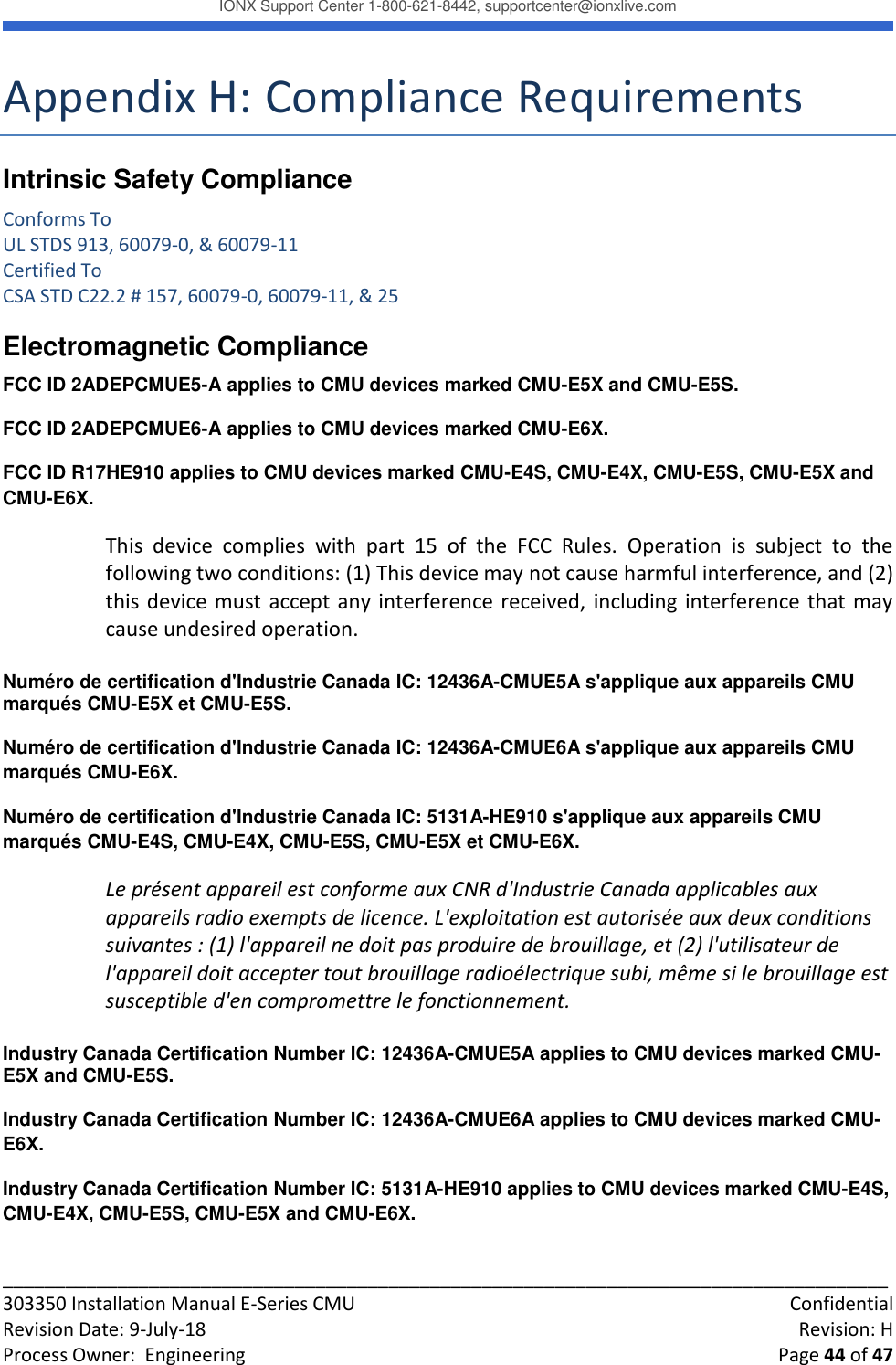
IONX Support Center 1-800-621-8442, supportcenter@ionxlive.com _____________________________________________________________________________________ 303350 Installation Manual E-Series CMU    Confidential Revision Date: 9-July-18    Revision: H Process Owner:  Engineering    Page 44 of 47 Appendix H: Compliance Requirements Intrinsic Safety Compliance Conforms To UL STDS 913, 60079-0, & 60079-11 Certified To CSA STD C22.2 # 157, 60079-0, 60079-11, & 25 Electromagnetic Compliance FCC ID 2ADEPCMUE5-A applies to CMU devices marked CMU-E5X and CMU-E5S. FCC ID 2ADEPCMUE6-A applies to CMU devices marked CMU-E6X. FCC ID R17HE910 applies to CMU devices marked CMU-E4S, CMU-E4X, CMU-E5S, CMU-E5X and CMU-E6X. This  device  complies  with  part  15  of  the  FCC  Rules.  Operation  is  subject  to  the following two conditions: (1) This device may not cause harmful interference, and (2) this device must accept any interference received, including interference that may cause undesired operation.  Numéro de certification d'Industrie Canada IC: 12436A-CMUE5A s'applique aux appareils CMU marqués CMU-E5X et CMU-E5S.  Numéro de certification d'Industrie Canada IC: 12436A-CMUE6A s'applique aux appareils CMU marqués CMU-E6X. Numéro de certification d'Industrie Canada IC: 5131A-HE910 s'applique aux appareils CMU marqués CMU-E4S, CMU-E4X, CMU-E5S, CMU-E5X et CMU-E6X. Le présent appareil est conforme aux CNR d'Industrie Canada applicables aux appareils radio exempts de licence. L'exploitation est autorisée aux deux conditions suivantes : (1) l'appareil ne doit pas produire de brouillage, et (2) l'utilisateur de l'appareil doit accepter tout brouillage radioélectrique subi, même si le brouillage est susceptible d'en compromettre le fonctionnement.  Industry Canada Certification Number IC: 12436A-CMUE5A applies to CMU devices marked CMU-E5X and CMU-E5S.  Industry Canada Certification Number IC: 12436A-CMUE6A applies to CMU devices marked CMU-E6X. Industry Canada Certification Number IC: 5131A-HE910 applies to CMU devices marked CMU-E4S, CMU-E4X, CMU-E5S, CMU-E5X and CMU-E6X.
IONX Support Center 1-800-621-8442, supportcenter@ionxlive.com _____________________________________________________________________________________ 303350 Installation Manual E-Series CMU    Confidential Revision Date: 9-July-18    Revision: H Process Owner:  Engineering    Page 45 of 47 This device complies with Industry Canada’s license-exempt RSSs. Operation is subject to the following two conditions: (1) This device may not cause interference; and (2) This device must accept any interference, including interference that may cause undesired operation of the device.         [This space left blank intentionally]
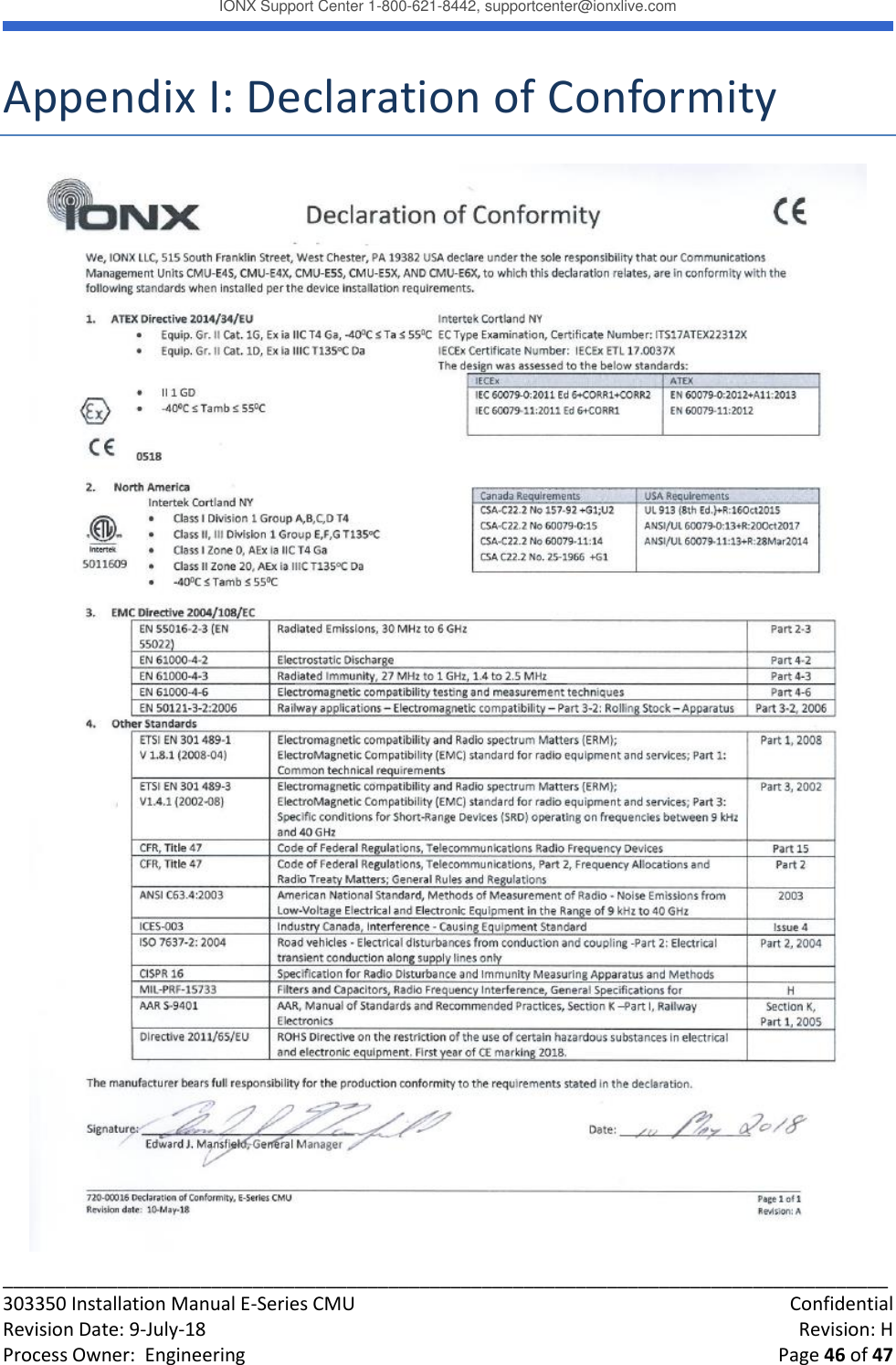
IONX Support Center 1-800-621-8442, supportcenter@ionxlive.com _____________________________________________________________________________________ 303350 Installation Manual E-Series CMU    Confidential Revision Date: 9-July-18    Revision: H Process Owner:  Engineering    Page 46 of 47 Appendix I: Declaration of Conformity
IONX Support Center 1-800-621-8442, supportcenter@ionxlive.com _____________________________________________________________________________________ 303350 Installation Manual E-Series CMU    Confidential Revision Date: 9-July-18    Revision: H Process Owner:  Engineering    Page 47 of 47       IONX LLC 515 S. Franklin St. West Chester, PA 19382 www.ionxlive.com 484.653.2600

Navigation menu