IZZO GOLF C80037 SMART GLASSES User Manual C80037

IZZO Golf, Inc. SMART GLASSES C80037

User Manual

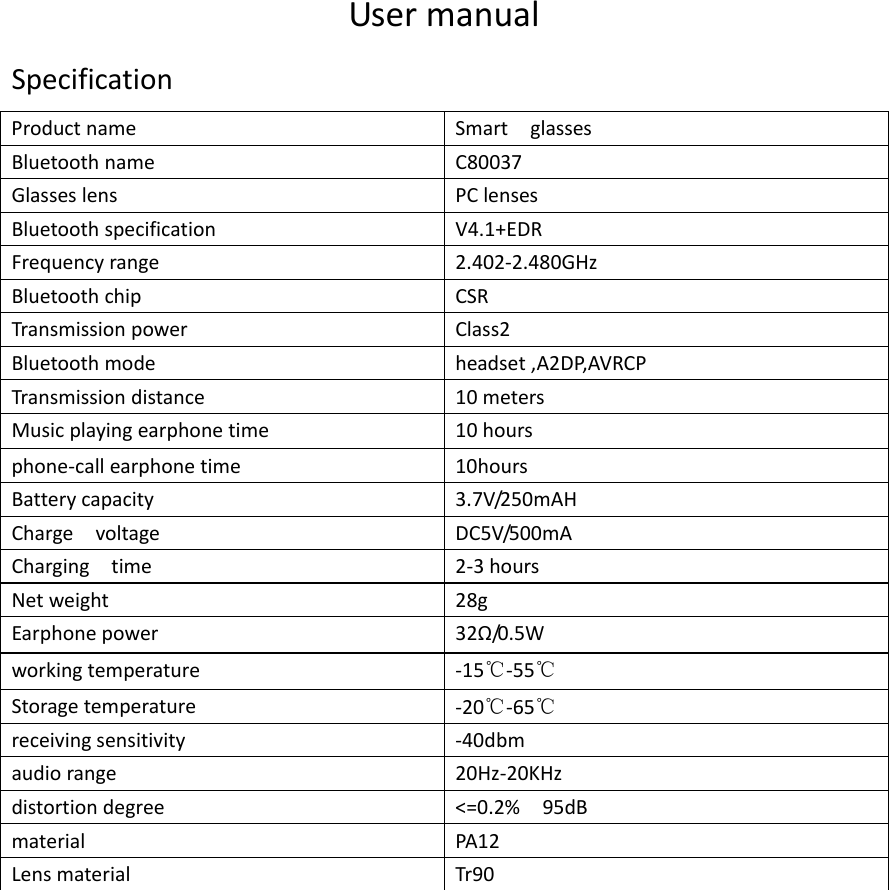
UsermanualSpecificationProductname SmartglassesBluetoothnameC80037GlasseslensPClensesBluetoothspecificationV4.1+EDRFrequencyrange2.402‐2.480GHzBluetoothchipCSRTransmissionpowerClass2Bluetoothmodeheadset,A2DP,AVRCPTransmissiondistance10metersMusicplayingearphonetime10hoursphone‐callearphonetime10hoursBatterycapacity3.7V/250mAHChargevoltageDC5V/500mAChargingtime2‐3hoursNetweight 28gEarphonepower 32Ω/0 . 5 W workingtemperature‐15℃‐55℃ Storagetemperature‐20℃‐65℃ receivingsensitivity‐40dbm audiorange20Hz‐20KHzdistortiondegree<=0.2%95dBmaterialPA12LensmaterialTr90
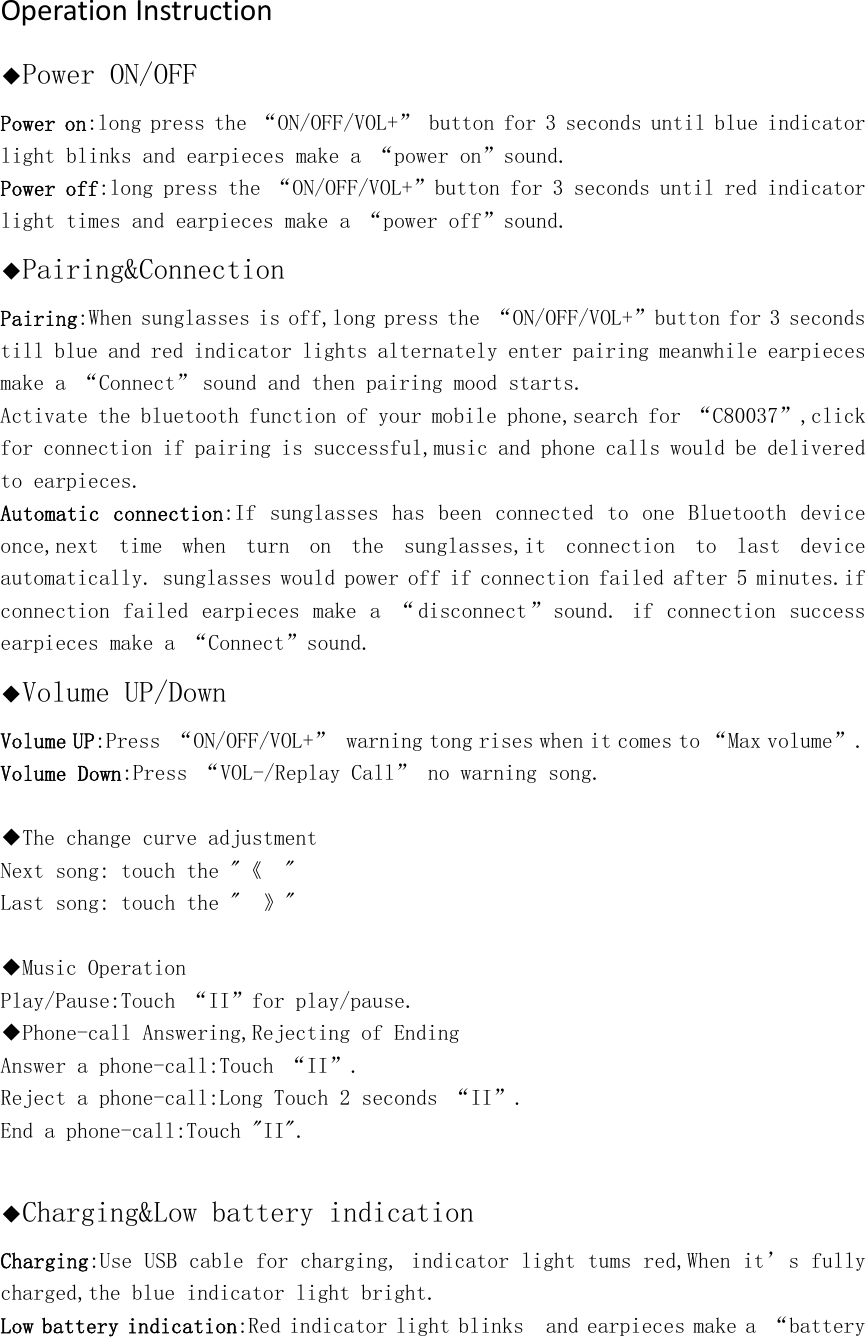
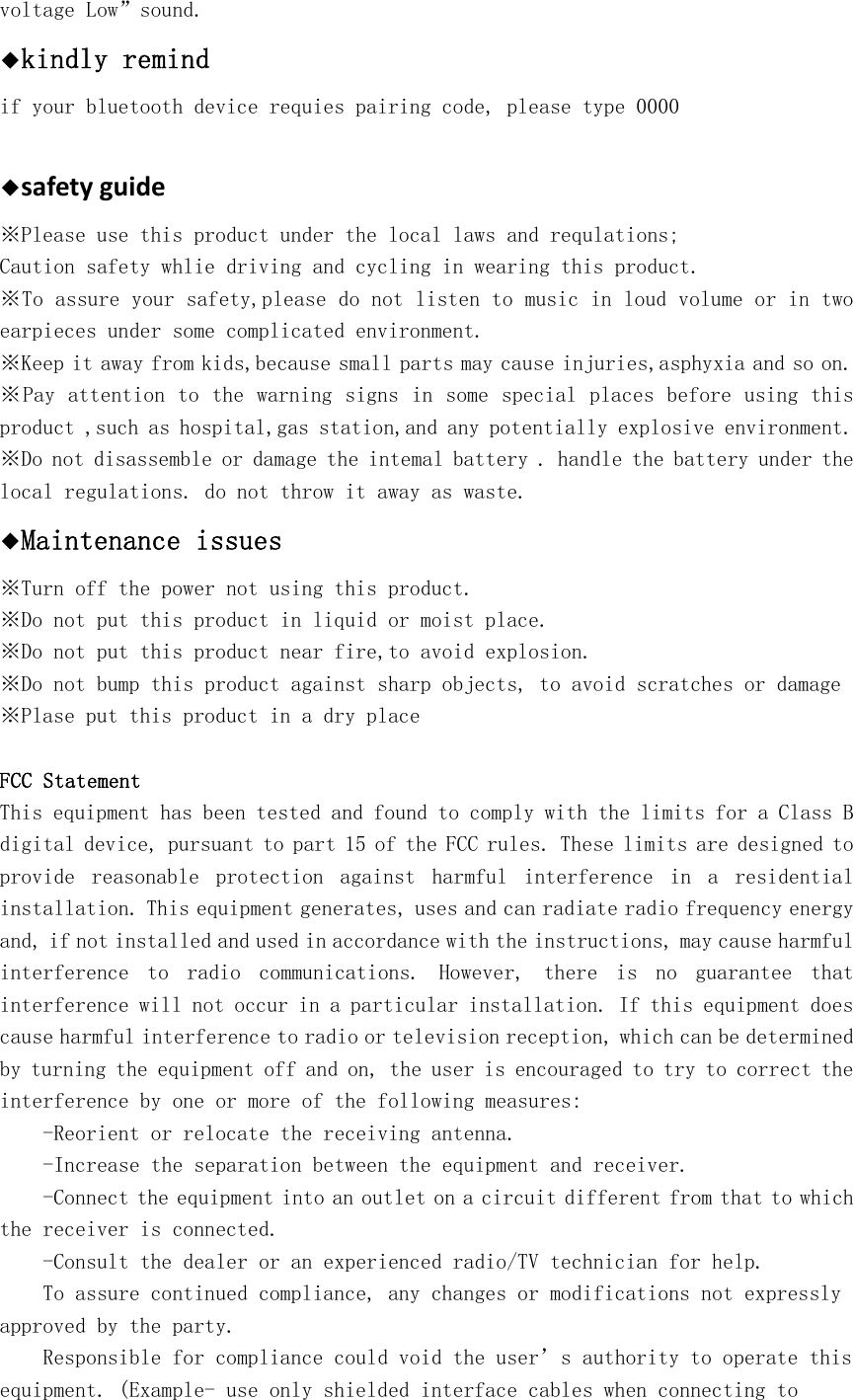
OperationInstruction◆Power ON/OFF Power on:long press the “ON/OFF/VOL+” button for 3 seconds until blue indicator light blinks and earpieces make a “power on”sound.  Power off:long press the “ON/OFF/VOL+”button for 3 seconds until red indicator light times and earpieces make a “power off”sound.  ◆Pairing&Connection Pairing:When sunglasses is off,long press the “ON/OFF/VOL+”button for 3 seconds till blue and red indicator lights alternately enter pairing meanwhile earpieces make a “Connect”sound and then pairing mood starts. Activate the bluetooth function of your mobile phone,search for “C80037”,click for connection if pairing is successful,music and phone calls would be delivered to earpieces. Automatic  connection:If sunglasses has been connected to one Bluetooth device once,next  time  when  turn  on  the  sunglasses,it  connection  to  last  device automatically. sunglasses would power off if connection failed after 5 minutes.if connection failed earpieces make a “ disconnect”sound. if connection success earpieces make a “Connect”sound.◆Volume UP/Down Volume UP:Press “ON/OFF/VOL+” warning tong rises when it comes to “Max volume”. Volume Down:Press “VOL-/Replay Call” no warning song.  ◆The change curve adjustment Next song: touch the "《  "  Last song: touch the "  》"    ◆Music Operation Play/Pause:Touch “II”for play/pause. ◆Phone-call Answering,Rejecting of Ending Answer a phone-call:Touch “II”. Reject a phone-call:Long Touch 2 seconds “II”. End a phone-call:Touch "II".  ◆Charging&Low battery indication Charging:Use USB cable for charging, indicator light tums red,When it’s fully charged,the blue indicator light bright.  Low battery indication:Red indicator light blinks  and earpieces make a “battery
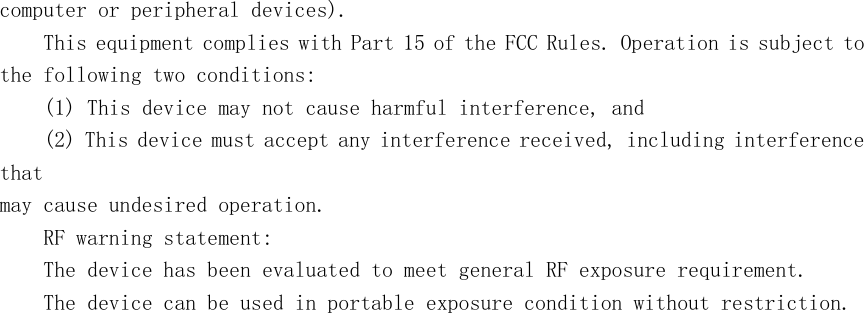
voltage Low”sound.  ◆kindly remind if your bluetooth device requies pairing code, please type 0000  ◆safetyguide※Please use this product under the local laws and requlations; Caution safety whlie driving and cycling in wearing this product. ※To assure your safety,please do not listen to music in loud volume or in two earpieces under some complicated environment. ※Keep it away from kids,because small parts may cause injuries,asphyxia and so on. ※Pay attention to the warning signs in some special places before using this product ,such as hospital,gas station,and any potentially explosive environment. ※Do not disassemble or damage the intemal battery . handle the battery under the local regulations. do not throw it away as waste. ◆Maintenance issues ※Turn off the power not using this product. ※Do not put this product in liquid or moist place. ※Do not put this product near fire,to avoid explosion. ※Do not bump this product against sharp objects, to avoid scratches or damage ※Plase put this product in a dry place FCC Statement This equipment has been tested and found to comply with the limits for a Class B digital device, pursuant to part 15 of the FCC rules. These limits are designed to provide  reasonable  protection  against  harmful  interference  in  a  residential installation. This equipment generates, uses and can radiate radio frequency energy and, if not installed and used in accordance with the instructions, may cause harmful interference  to  radio  communications.  However,  there  is  no  guarantee  that interference will not occur in a particular installation. If this equipment does cause harmful interference to radio or television reception, which can be determined by turning the equipment off and on, the user is encouraged to try to correct the interference by one or more of the following measures: -Reorient or relocate the receiving antenna. -Increase the separation between the equipment and receiver. -Connect the equipment into an outlet on a circuit different from that to which the receiver is connected. -Consult the dealer or an experienced radio/TV technician for help. To assure continued compliance, any changes or modifications not expressly approved by the party. Responsible for compliance could void the user’s authority to operate this equipment. (Example- use only shielded interface cables when connecting to
computer or peripheral devices). This equipment complies with Part 15 of the FCC Rules. Operation is subject to the following two conditions: (1) This device may not cause harmful interference, and (2) This device must accept any interference received, including interference that may cause undesired operation. RF warning statement: The device has been evaluated to meet general RF exposure requirement. The device can be used in portable exposure condition without restriction.

Navigation menu