IZZO GOLF SPORT SWAMI SPORT User Manual SwamiSport QuickGuide Final FCC
IZZO Golf SWAMI SPORT SwamiSport QuickGuide Final FCC
User manual
QUICK START GUIDE POWERED BY
3. GETTING STARTED
4. PLAY GOLF!
5. REGISTRATION
6. USER GUIDE
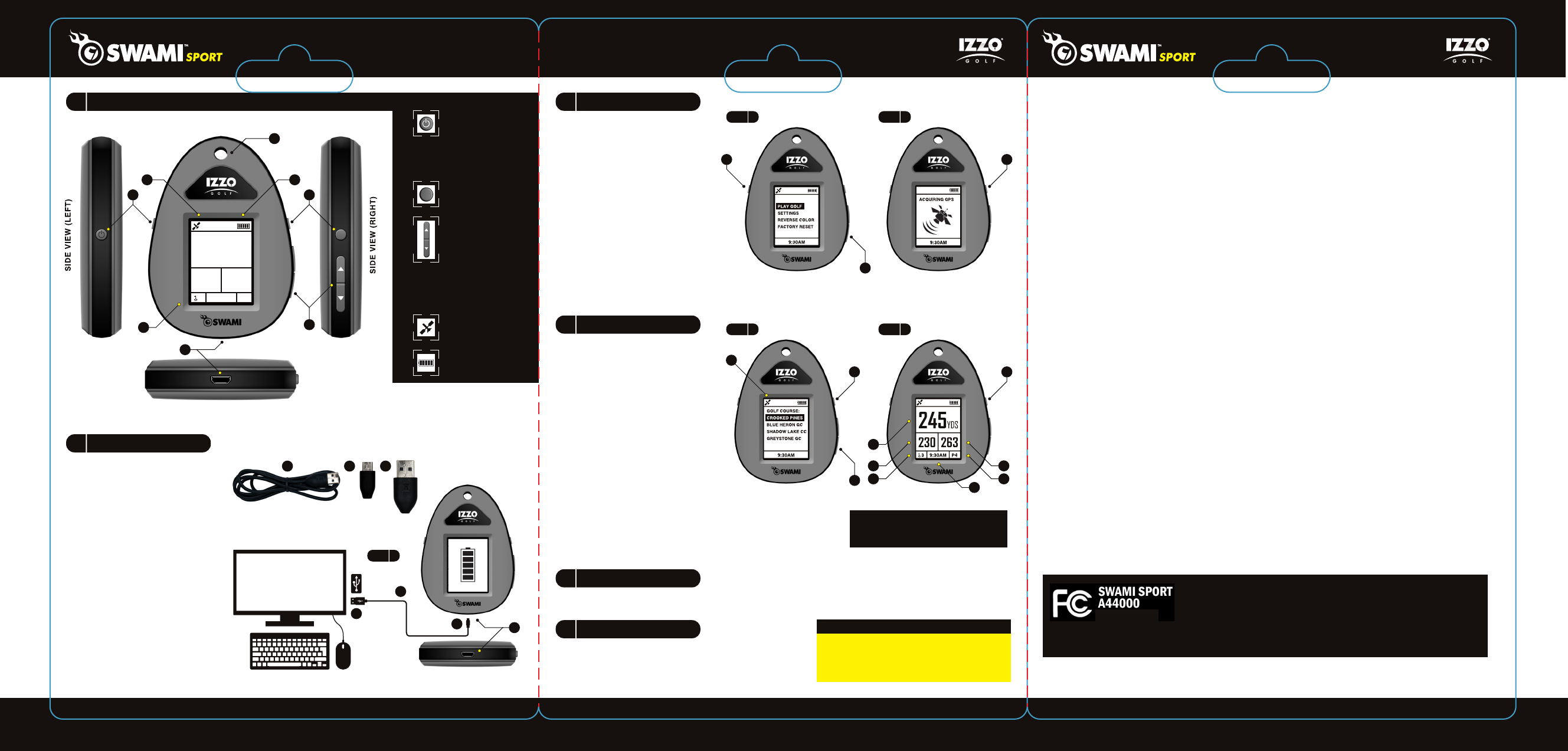
Take Charging Cable ( I ) that is
included in the package and insert
Micro USB Connector (J) into the
Charging Port (D), located on the
bottom of the device (Fig. 1).
Take the USB Connector (K) end
of the cable and insert into your
computer’s USB port. (Fig. 1).
Note: Computer must be turned
on in order for device to charge.
When device is connected, the
Display Screen (E) will turn on
and display the Battery Icon (H)
with the bars blinking. This
indicates the device is charging
(Fig. 1).
Charge device for 4 hours before
use for full charge. Battery life is
approx. 8 hours when fully
charged.
D
E
F
B
C
A
BOTTOM VIEW
FRONT VIEW
A. Power On
Press button once, display
screen will turn on.
Power Off
Press and hold button until
display screen turns off.
B. Select Key
Press to select desired
options and features.
G. Satelitte Icon
Displays if GPS has
satelitte connection.
H. Battery Icon
Displays battery life.
C. Up/Down Keys
Press to navigate between
holes, courses or options.
D. Charging Port
E. Display Screen
F. Caribiner Attachment Hole
HG
D
BOTTOM VIEW
FRONT VIEW
JI
FIG. 1
K
J
K
I
Turn On your Swami Sport by
pressing the Power (A) key once.
The screen will turn on and bring
you to the Main Menu. (Fig.1)
To toggle between options on the
Main Menu, use the Up/Down
Keys (C). To select desired
option, press the Select Key (B).
To return to the Main Menu at
anytime, press and hold the
Select Key (B) for 3 seconds
and then release.
To start round, select the Play
Golf option on the Main Menu
by pressing the Select Key (B)
once (Fig. 1). The GPS will
begin acquiring signal (Fig. 2).
FIG. 1 FIG. 2
B
C
A
245YDS
230 263
3 9:30AM P4
FIG. 3 FIG. 4
B
C
B
After GPS has found a signal, the
surrounding courses in the area will
populate in a list. Use the Up/Down
Keys (C) to toggle between courses.
Press the Select Key (B) to choose
the desired course. (Fig. 3)
Note: The Satelitte Icon (G), located
in the top left corner will appear when
there is a signal during play mode.
(Fig. 3)
After the desired course is selected
the screen will display Hole Yardages,
Hole Number, Hole Par and Time for
that course. (Fig. 4)
Note: You must be at the course selected to view hole yardages.
To navigate between holes, use the Up/Down Keys (C).
When finished Turn Off the device. Press and hold the Power (A)
key until display screen turns off, then release.
To register your Swami Sport and qualify for the limited 1 year
warranty, please visit: www.izzo.com/swamiregistration
The full Swami Sport User Guide goes into detail of all the
features the device offers. The User Guide is available in
PDF format and is downloadable at:
www.izzo.com/products/swami-sport
G
2 3
4 6
5
1
1. Center of Green
2. Front of Green
3. Back of Green
4. Hole Number
5. Time
6. Hole Par
FOR ALL WARRANTY/USE QUESTIONS, DO
NOT RETURN THIS UNIT TO THE RETAILER.
PLEASE CALL IZZO CUSTOMER SERVICE AT
1-800-284-1220 OR VISIT WWW.IZZO.COM.
WARRANTY
2. CHARGING DEVICE
1. DEVICE LAYOUT
FCC STATEMENT
Modifications not expressly approved by Izzo Golf could void authority to operate the
equipment.
This device complies with Part 15 of the FCC Rules. Operation is subject to the
following two conditions:
1) This device may not cause harmful interference.
2) This device must accept any interference received, including interference that may
cause undesired operation.Changes or modifications not expressly approved by the
party responsible for compliance could void the user's authority to operate the
equipment.
NOTE: This equipment has been tested and found to comply with the limits for a
Class B digital device, pursuant to Part 15 of the FCC Rules. These limits are
designed to provide reasonable protection against harmful interference in a residen-
tial installation.
This equipment generates uses and can radiate radio frequency energy and, if not
installed and used in accordance with the instructions, may cause harmful interfer-
ence to radio communications. However, there is no guarantee that interference will
not occur in a particular installation. If this equipment does cause harmful interfer-
ence to radio or television reception, which can be determined by turning the equip-
ment off and on, the user is encouraged to try to correct the interference by one or
more of the following measures:
• Reorient or relocate the receiving antenna.
• Increase the separation between the equipment and receiver.
• Connect the equipment into an outlet on a circuit different from that to which the
receiver is connected.
• Consult the dealer or an experienced radio/TV technician for help.
This device complies with part 15 of the FCC Rules.
Operation is subject to the following two conditions: (1)
This device may not cause harmful interference, and (2)
this device must accept any interference received, including interference that may
cause undesired operation.
FCC ID: R06-SPORT