Icom I718 Users Manual IC 718 Instruction
2015-02-05
: Icom Icom-I718-Users-Manual-357623 icom-i718-users-manual-357623 icom pdf
Open the PDF directly: View PDF  .
.
Page Count: 64
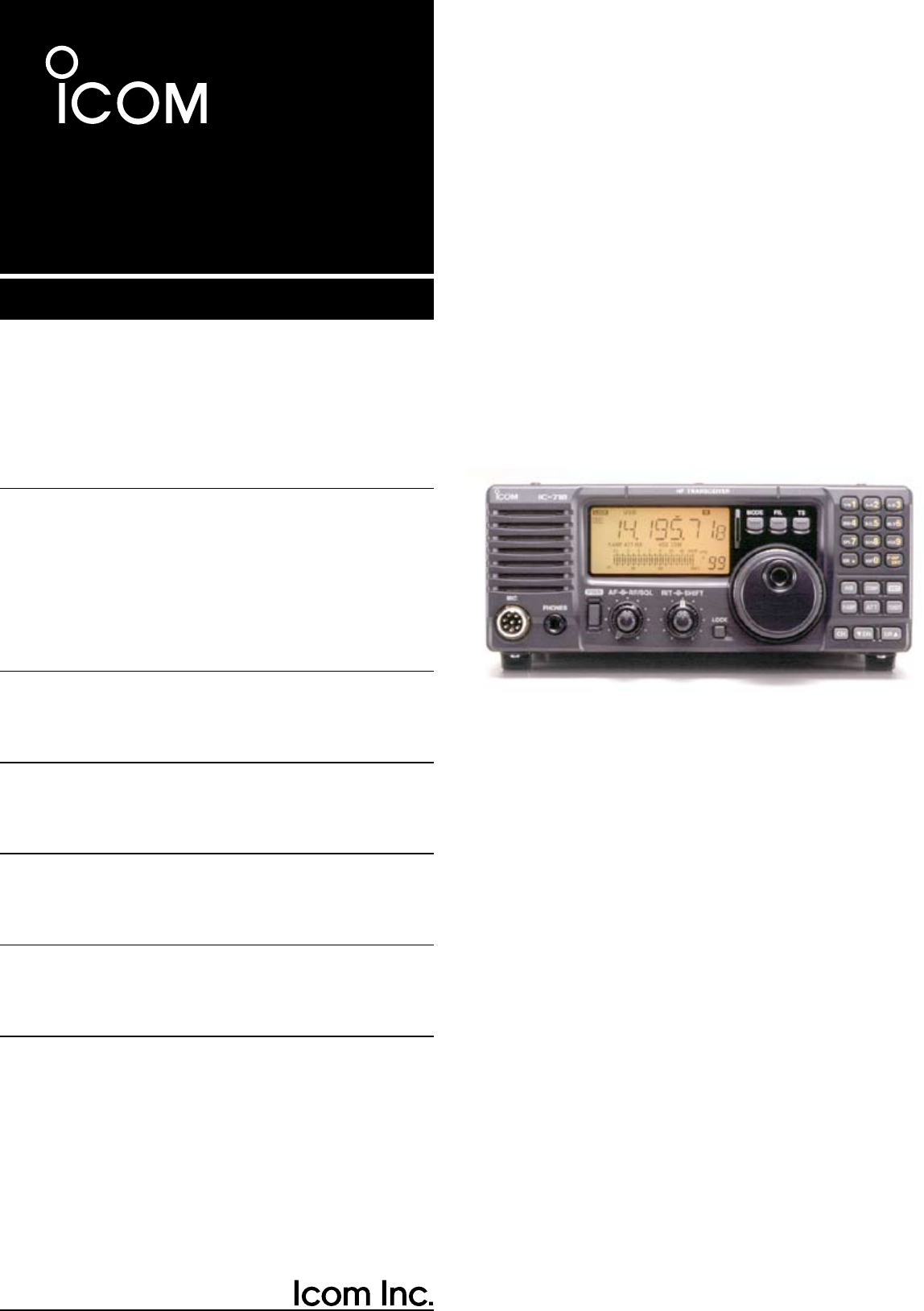
INSTRUCTION MANUAL
HF ALL BAND TRANSCEIVER
i718

i
IMPORTANT
READ THIS INSTRUCTION MANUAL
CAREFULLY before attempting to operate the
transceiver.
SAVE THIS INSTRUCTION MANUAL. This
manual contains important safety and operating
instructions for the IC-718.
EXPLICIT DEFINITIONS
PRECAUTIONS
R WARNING HIGH VOLTAGE! NEVER
attach an antenna or internal antenna connector
during transmission. This may result in an electric
shock or burn.
R NEVER apply AC to the [DC13.8V] jack on the
transceiver rear panel. This could cause a fire or ruin
the transceiver.
R NEVER apply more than 16 V DC, such as a 24
V battery, to the [DC13.8V] jack on the transceiver
rear panel. This could cause a fire or ruin the
transceiver.
R NEVER let metal, wire or other objects touch
any internal part or connectors on the rear panel of
the transceiver. This may result in an electric shock.
NEVER expose the transceiver to rain, snow or any
liquids.
AVOID using or placing the transceiver in areas with
temperatures below –10°C (+14°F) or above +60°C
(+140°F). Be aware that temperatures on a vehicle’
s dashboard can exceed 80°C (+176°F), resulting in
permanent damage to the transceiver if left there for
extended periods.
AVOID placing the transceiver in excessively dusty
environments or in direct sunlight.
AVOID placing the transceiver against walls or putting
anything on top of the transceiver. This will obstruct
heat dissipation.
During mobile operation, DO NOT operate the
transceiver without running the vehicle’s engine.
When transceiver power is ON and your vehicle’s
engine is OFF, the vehicle’s battery will soon become
exhausted.
Make sure the transceiver power is OFF before
starting the vehicle. This will avoid possible damage
to the transceiver by ignition voltage spikes.
During maritime mobile operation, keep the
transceiver and microphone as far away as possible
from the magnetic navigation compass to prevent
erroneous indications.
BE CAREFUL! The heatsink will become hot when
operating the transceiver continuously for long
periods.
BE CAREFUL! If a linear amplifier is connected, set
the transceiver’s RF output power to less than the
linear amplifier’s maximum input level, otherwise, the
linear amplifier will be damaged.
Use Icom microphones only (supplied or optional).
Other manufacturer’s microphones have different
pin assignments, and connection to the IC-718 may
damage the transceiver.
WORD
R
WARNING
CAUTION
NOTE
DEFINITION
Personal injury, fire hazard or electric
shock may occur.
Inconvenience only.
No risk of personal injury, fire or
electric shock.
Equipment damage may occur.
q
w
er
1
1
TABLE OF CONTENTS
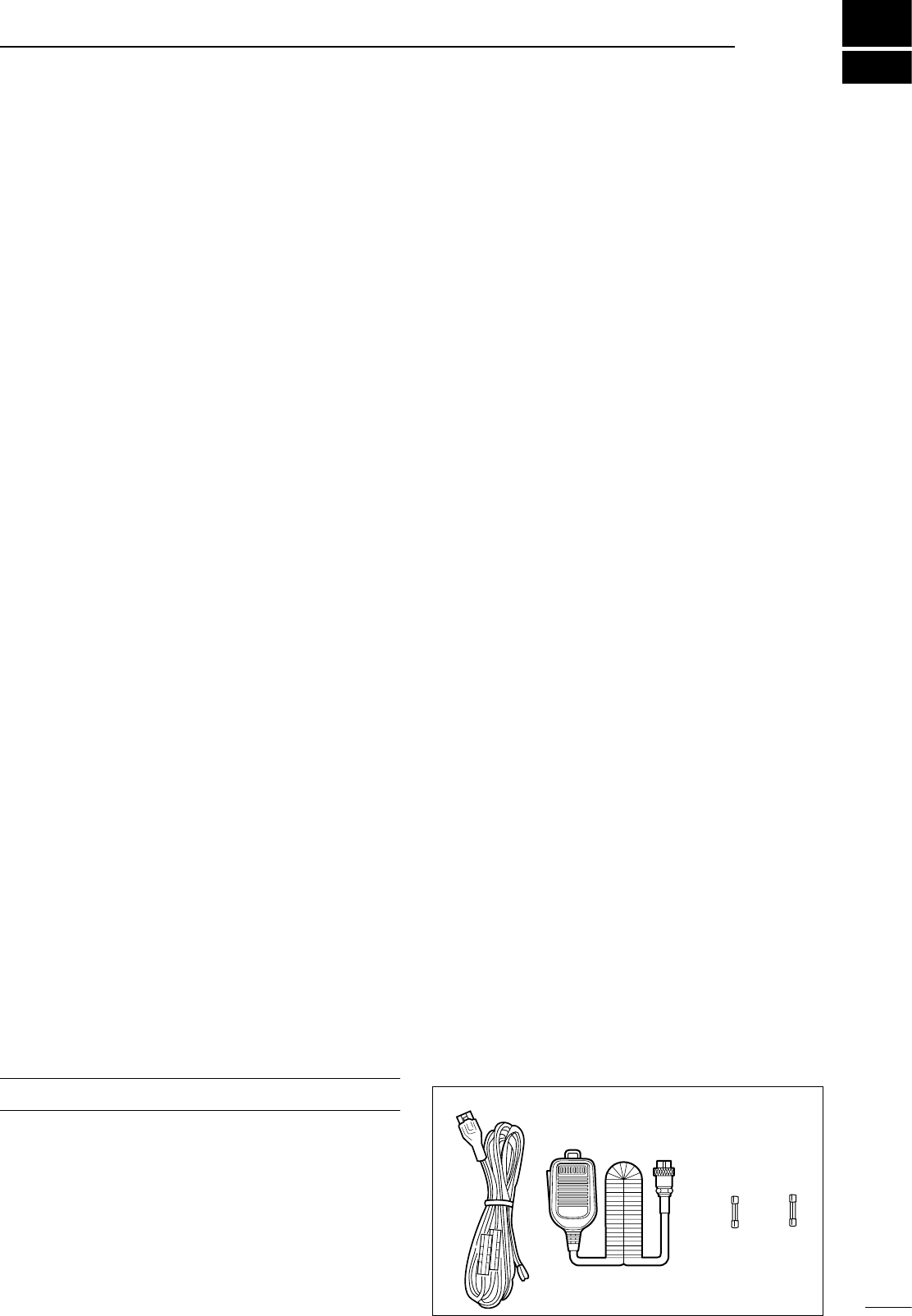
The transceiver comes with the following accessories.
Qty.
q DC power cable ................................................... 1
w Hand microphone (HM-36) ................................. 1
e Fuse (FGB 20 A; for DC cable) ........................... 1
r Fuse (FGB 4 A; internal use) .............................. 1
SUPPLIED ACCESSORIES
IMPORTANT ............................................................ i
EXPLICIT DEFINITIONS .......................................... i
PRECAUTIONS ........................................................ i
1 TABLE OF CONTENTS ...................................... 1
SUPPLIED ACCESSORIES .................................... 1
2 PANEL DESCRIPTION ................................... 2–8
n Front panel ....................................................... 2
n Function display ............................................... 5
n Rear panel ........................................................ 6
n Microphone (HM-36) ........................................ 8
3 INSTALLATION AND CONNECTIONS ........ 9–14
n Unpacking ........................................................ 9
n Selecting a location .......................................... 9
n Grounding ........................................................ 9
n Antenna connection ......................................... 9
n Required connections .................................... 10
n Advanced connections ................................... 11
n Power supply connections ............................. 12
n Liner amplifier connections ............................. 13
n External antenna tuners ................................. 14
4 FREQUENCY SETTING .............................. 15–19
n When first applying power .............................. 15
n Initial setting ................................................... 15
n VFO description ............................................. 16
n Frequency setting ........................................... 17
n Dial lock function ............................................ 19
5 RECEIVE AND TRANSMIT ......................... 20–34
n Mode selection ............................................... 20
n Squelch and RF gain ...................................... 20
n Function for receive ........................................ 21
n DSP function (option) ..................................... 23
n Filter selection ................................................ 24
n Filter setting .................................................... 25
n Function for transmit ...................................... 26
n Split frequency operation ............................... 30
n SWR ............................................................... 30
n Function for CW ............................................. 31
n Function for RTTY .......................................... 33
6 MEMORY OPERATION .............................. 35–38
n Memory channels ........................................... 35
n Memory channel selection .............................. 35
n Memory channel programming ....................... 36
n Frequency transferring ................................... 37
n Memory clearing ............................................. 38
7 SCANS ........................................................ 39–40
n Scan types ..................................................... 39
n Preparation ..................................................... 39
n Programmed scan operation .......................... 40
n Memory scan operation .................................. 40
8 SET MODE .................................................. 41–47
n General .......................................................... 41
n Quick set mode items ................................ 42-43
n Initial set mode items ................................ 44-47
9 INSTALLATION AND CONNECTIONS ...... 48–51
n Opening the transceiver’s case ...................... 48
n Optional bracket and carrying handle.............. 48
n CR-338 HIGH STABILITY CRYSTAL UNIT ........ 49
n UT-102 VOICE SYNTHESIZER UNIT ................ 49
n UT-106 DSP RECEIVE UNIT ............................ 50
n Optional IF filters ............................................ 50
n AT-180 internal switch description ................. 51
10 MAINTENANCE ........................................ 52–53
n Troubleshooting ............................................. 52
n Fuse replacement .......................................... 53
n Resetting the CPU ......................................... 53
11 SPECIFICATIONS .......................................... 54
12 OPTIONS .................................................. 55–56
13 CONTROL COMMAND ............................ 57–58
n Remote jack (CI-V) information ...................... 57
14 INTERNAL VIEWS .......................................... 59
n Top view ......................................................... 59
n Bottom view .................................................... 59
15 INSTALLATION NOTES ................................. 60
n DECLARATION OF CONFORMITY ............... 61
n Front panel
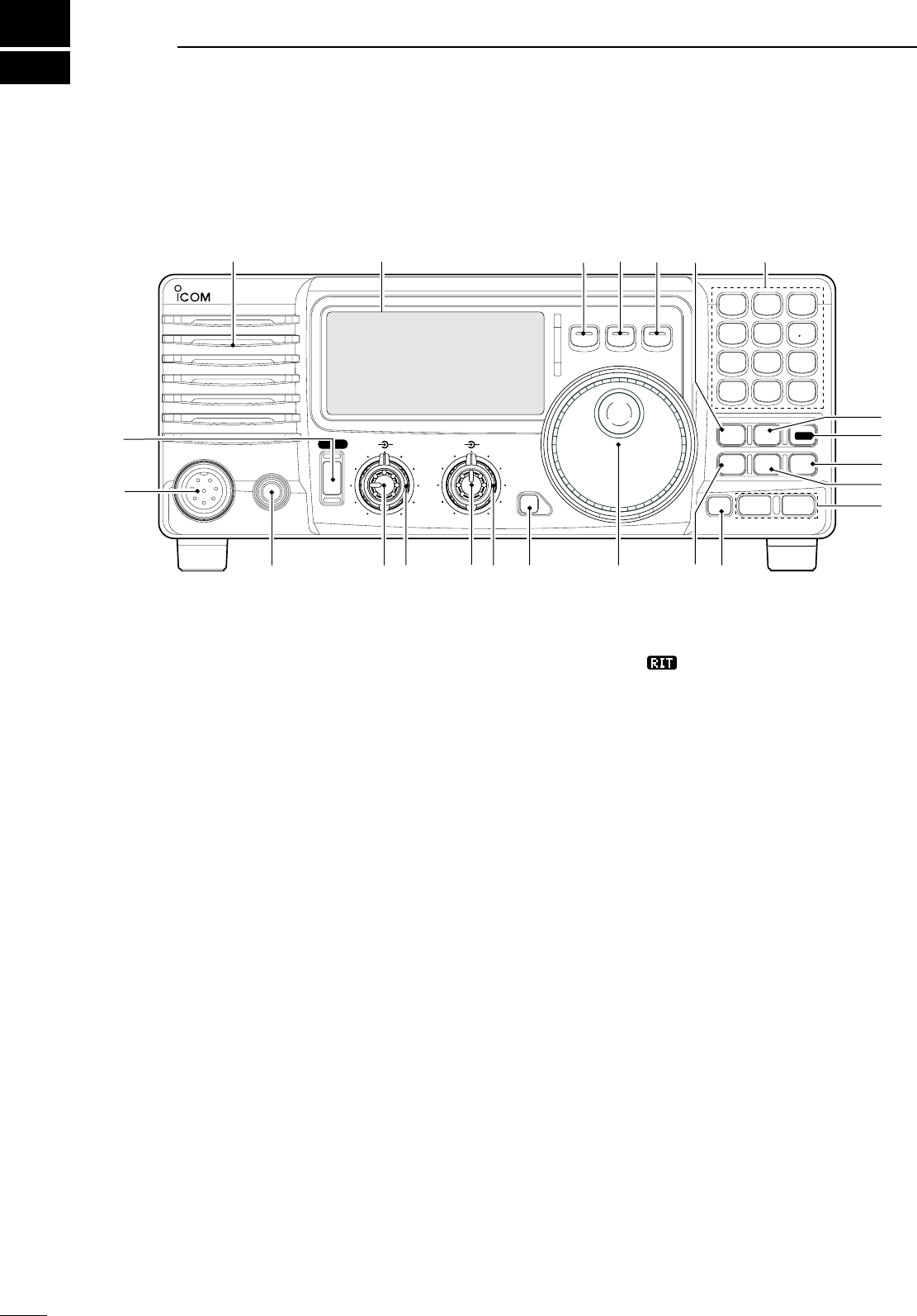
q POWER SWITCH [PWR]
Push momentarily to turn power ON.
• Turn the optional DC power supply ON in advance.
Push for 1 sec. to turn power OFF.
While pushing and holding [SET], push [PWR]
to enter the initial set mode. (p. 41)
w MICROPHONE CONNECTOR [MIC]
Accepts supplied or optional microphone.
• See p. 55 for appropriate microphones.
• See p. 8 for microphone connector information.
e HEADPHONE JACK [PHONES] (p. 11)
Accepts headphones (8 Ω).
• When headphones are connected, the internal speaker
or connected external speaker does not function.
r AF CONTROL [AF] (inner control)
Varies the audio output level from the speaker.
t RF GAIN/SQUELCH CONTROL [RF/SQL]
(outer control; pgs. 20, 44)
Adjusts the squelch threshold level. The squelch
removes noise output from the speaker (closed
condition) when no signal is received.
• The squelch is available for all modes.
• The control can be set as the squelch plus RF gain
controls or squelch control only (RF gain is fixed at
maximum) in initial set mode.
y RIT CONTROLS [RIT] (Inner control; p. 21)
Shifts the receive frequency without changing
the transmit frequency.
•
Rotate the control clockwise to incerase the frequency,
or rotate the control counterclockwise to decrease the
frequency. “
RIT
” appears on the display.
• The shift frequency range is ±1.2 kHz.
u IF SHIFT CONTROLS [SHIFT]
(Outer control; p.
21)
Shifts the center frequency of the receivers’s IF
pass-band.
•
Rotate the control colckwise to shift the center
frequency higher, or rotate the control counterclockwise
to shift the center frequency lower.
i LOCK SWITCH [LOCK] (p. 19)
Push momentarily to turn the dial lock function ON
and OFF.
• The dial lock function electronically locks the main dial.
• When the optional UT-102 VOICE SYNTHESIZER UNIT is
installed (p. 49), push for 1 sec. to have the frequency,
etc. announced.
• UT-102 operation can be adjusted in initial set mode
(p. 46).
o MAIN DIAL
Changes the displayed frequency, selects quick/
initial set mode items, etc.
!0 PREAMP SWITCH [P.AMP] (p. 21)
Push momentarily to turn the preamp ON or OFF.
!1 CH SWITCH [CH] (p. 35)
Push momentarily to turn the memory channel
select function ON or OFF.
• [MEMO] blinks while memory channel select function is
turned on.
2
2
PANEL DESCRIPTION
MIC
IC-718
PHONES
RF/SQL AF SHIFT RIT
LOCK
MODE
FIL
TS
PWR
TUNER
COMP
P.AMP
NB
ATT
SET
CH
ENT
F-INP
V/M
1
MW
4
A=B
2
M -CL
5
SCN
8
ANF
0
NR
.
A/B
3
VOX
97
SPL
M V
6
Z DN UP Y
Speaker Function Display @1 @0 !9 !7
!5
!4
!6
!3
!2
!0
!8
!1
oi
uy
tre
w
q

3
2
PANEL DESCRIPTION
• Push several times (or push and hold) [√ DN]/[UP ∫]
until desired memory channel appears.
• After pushing [F-INP/ENT], push desired memory
channel number from the keypad, then push [FINP/
ENT] again to select the memory channel directory.
• Push [CH] to exit the memory channel select function.
!2 MEMORY CHANNEL (BAND) UP/DOWN
SWITCHES [√ DN]/[UP ∫] (p. 35)
Push one or more times to select the memory
channel, while [MEMO] indicator is blinking.
Push to select a band.
Push to select the quick/initial set mode items
while quick/initial set mode is selected.
!3 ATTENUATOR SWITCH [ATT] (p. 22)
Push to toggle the 20 dB attenuator function ON
and OFF.
!4 TUNER SWITCH [TUNER] (pgs. 28, 29)
Push momentarily to toggle the automatic
antenna tuner function ON/OFF.
• An optional antenna tuner must be connected.
Push for 1 sec. to manually tune the tuner.
• An optional antenna tuner must be connected.
• When the tuner cannot tune the antenna, the tuning
circuit is bypassed automatically after 20 sec.
!5 SET SWITCH [SET]
Push for 1 sec. to enter the quick set mode. (p.
41)
Pushing and holding [SET], and then push
[POWER] to enter the initial set mode. (p. 41)
Push to toggle the meter function; (p. 26)
• PO: indicates the relative RF output power.
• ALC: Indicates ALC level.
• SWR: indicates the SWR over the transmission line.
!6 MIC COMPRESSOR SWITCH [COMP] (p. 27)
Toggles the Mic. compressor function ON and OFF.
!7 KEYPAD
The keypad can be used for several functions as
discribed below:
• [F-INP/ENT], keypad then [F-INP/ENT].
— Direct frequency input. (pgs. 4, 7)
•
[CH], [F-INP/ENT], keypad then [F-INP/ENT] then [V/M]
— Memory channel selection. (pgs. 4, 35)
• [V/M], [A=B], [A/B], [MW], [M-CL], [M≈V], [SPL],
[SCAN], [VOX], [NR] (option) and [ANF] (option)
switch. (p. 4)
!8 NOISE BLANKER SWITCH [NB] (p. 22)
Toggles the noise blanker ON and OFF. The
noise blanker reduces pulse-type noise such as
that generated by automobile ignition systems.
This function is not effective against non pulse-
type noise.
Push [NB] for 1 sec to enter the noise blanker
level setting condition.
!9 QUICK TUNING STEP SWITCH [TS] (pgs. 18, 19)
Selects a quick tuning step or turns the quick
tuning step OFF.
• While the quick tuning indicator () is displayed,
the frequency can be changed in kHz step.
While the quick tuning step is OFF, it turns the 1
Hz step ON and OFF when pushed for 1 sec.
• 1 Hz indication appears and the frequency can be
changed in 1 Hz steps.
While the kHz quick tuning step is selected, it enters
tuning step set mode when pushed for 1 sec.
@0 FILTER SWITCH [FIL] (p. 24)
Push momentarily to toggle between the pre-
programmed normal, wide and narrow IF filters
for the selected operating mode.
@1 MODE SWITCHES [LSB/USB]/[CW/CW-R]/
[RTTY/RTTY-R]/[AM] (p. 20)
Push to toggle an operating mode.
• Push[MODE] for 1 sec. during SSB mode to toggle
between LSB or USB.
• Push [MODE] for 2 sec. during CW or RTTY mode, to
toggle between CW and CW reverse or RTTY and
RTTY reverse. “ ” appears on the display.
4
2PANEL DESCRIPTION
n Front panel (continued)
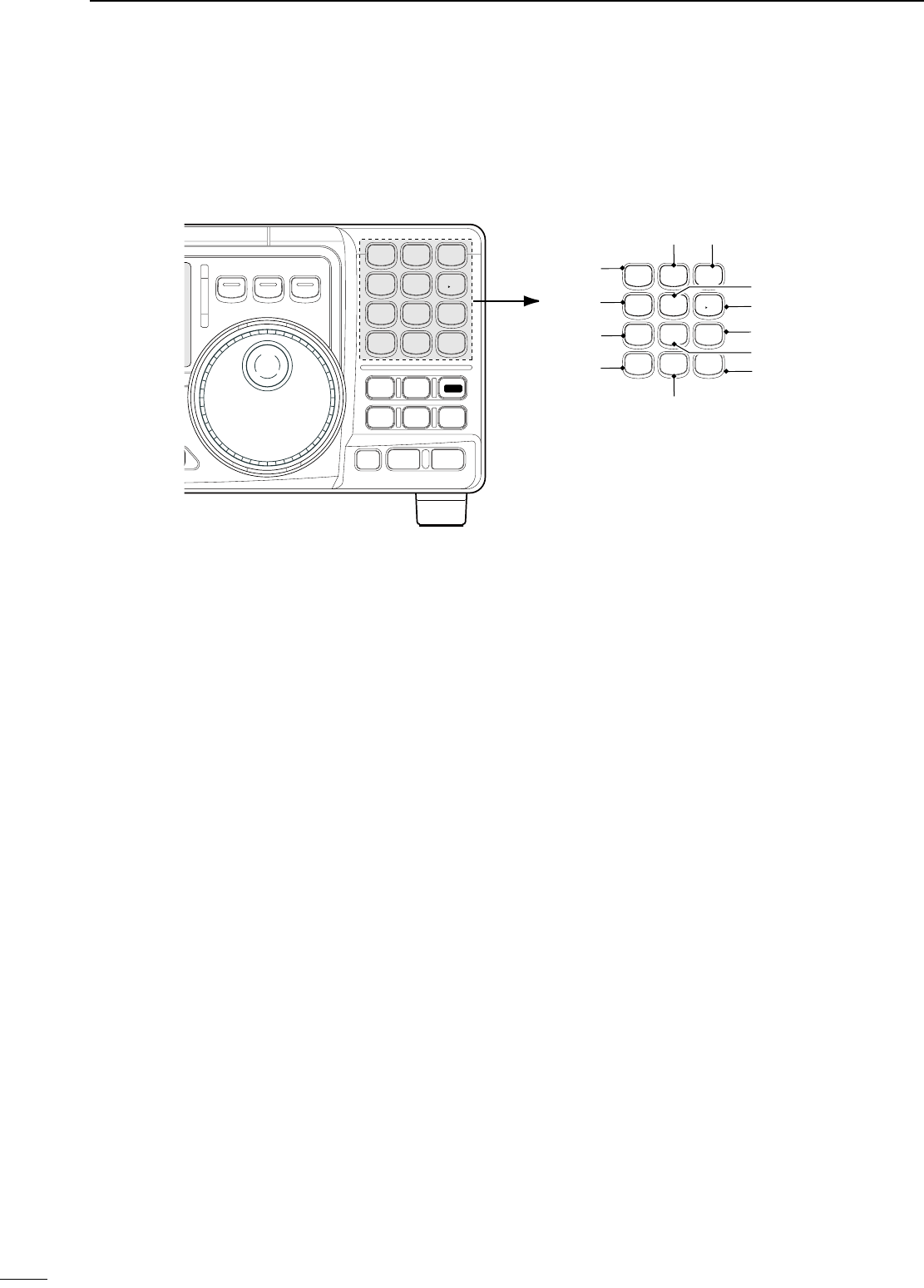
@2 VFO/MEMORY SWITCH/1 [V/M•1] (pgs. 16, 35)
Toggles the operating mode between VFO
mode or memory mode when pushed.
@3 MEMORY WRITE SWITCH/4 [MW•4] (p. 36)
Stores the displayed frequency and operating
mode into the selected memory channel when
pushed for 1 sec.
@4 SPLIT SWITCH/7 [SPL•7] (p. 30)
Turns the split frequency operation ON or OFF
when pushed.
@5 NR SWITCH/. [NR• . ] (p. 23)
Toggles the optional noise reduction function ON
or OFF when pushed. Functions in all modes.
• An optional UT-106 DSP UNIT is required.
• [NR] appears on the display.
Enters noise reduction level set mode when
pushed for 1 sec.
@6 ANF SWITCH/0 [ANF•0] (p. 23)
Toggles the Automatic Notch Filter function ON or
OFF. Functions in SSB and AM modes.
• An optional UT-106 DSP UNIT is required.
• [ANF] appears on the display.
@7 FRQUENCY INPUT/ENTER SWITCH
[F-INP/ENT]
[F-INP/ENT], then keypad then [F-INP/ENT]
— Direct frequency input. (p. 17)
[CH] then [F-INP/ENT], then keypad then
[F-INP/ENT]. Push [CH].
— Direct memory number selection. (p. 35)
@8 SCAN SWITCH/8 [SCAN•8] (p. 39)
Push momentarily to start/stop the programmed
scan in VFO mode.
Push momentarily to start/stop the memory scan
in memory mode.
@9 VOX SWITCH/9 [VOX•9] (p. 27)
Turn the VOX function ON or OFF when pushed
in SSB modes.
#0 M≈V SWITCH/6 [MV•6] (p. 37)
Transfers the memory contents to VFO when
pushed for 1 sec.
#1 MEMORY CLEAR SWITCH/5 [M=CL•5] (p. 38)
Clears the selected readout memory channel
contents when pushed for 1 sec. in memory mode.
• [BLANK] appears above the memory channel number.
#2 VFO SELECT SWITCH/3 [A/B•3] (p. 16)
Toggles between VFO A or VFO B in VFO
mode.
Toggl es betwe en transmission V FO and
reception VFO during split operation.
#3 VFO EQUALIZATION SWITCH/2 [A=B•2]
Equalize the frequency and operating mode of the
two VFO’s.
•
The VFO B frequency and operating mode are equalized
with the VFO A frequency and operating mode.
ENT
F-INP
V/M
1
MW
4
A=B
2
M =CL
5
SCN
8
ANF
0
NR
.
A/B
3
VOX
97
SPL
M V
6
#1
#3 #2
#0
@9
@8
@7
@6
@3
@4
@5
@2
MIC
IC-718
PHONES
SQL AF SHIFT RIT
LOCK
MODE
FILTER
TS
PWR
TUNER
COMP
P.AMP
UP
NB
ATT
SET
CH
DN
ENT
F-INP
V/M
1
MW
4
A=B
2
M =CL
5
SCN
8
ANF
0
NR
.
A/B
3
VOX
97
SPL
M V
6
Z Y
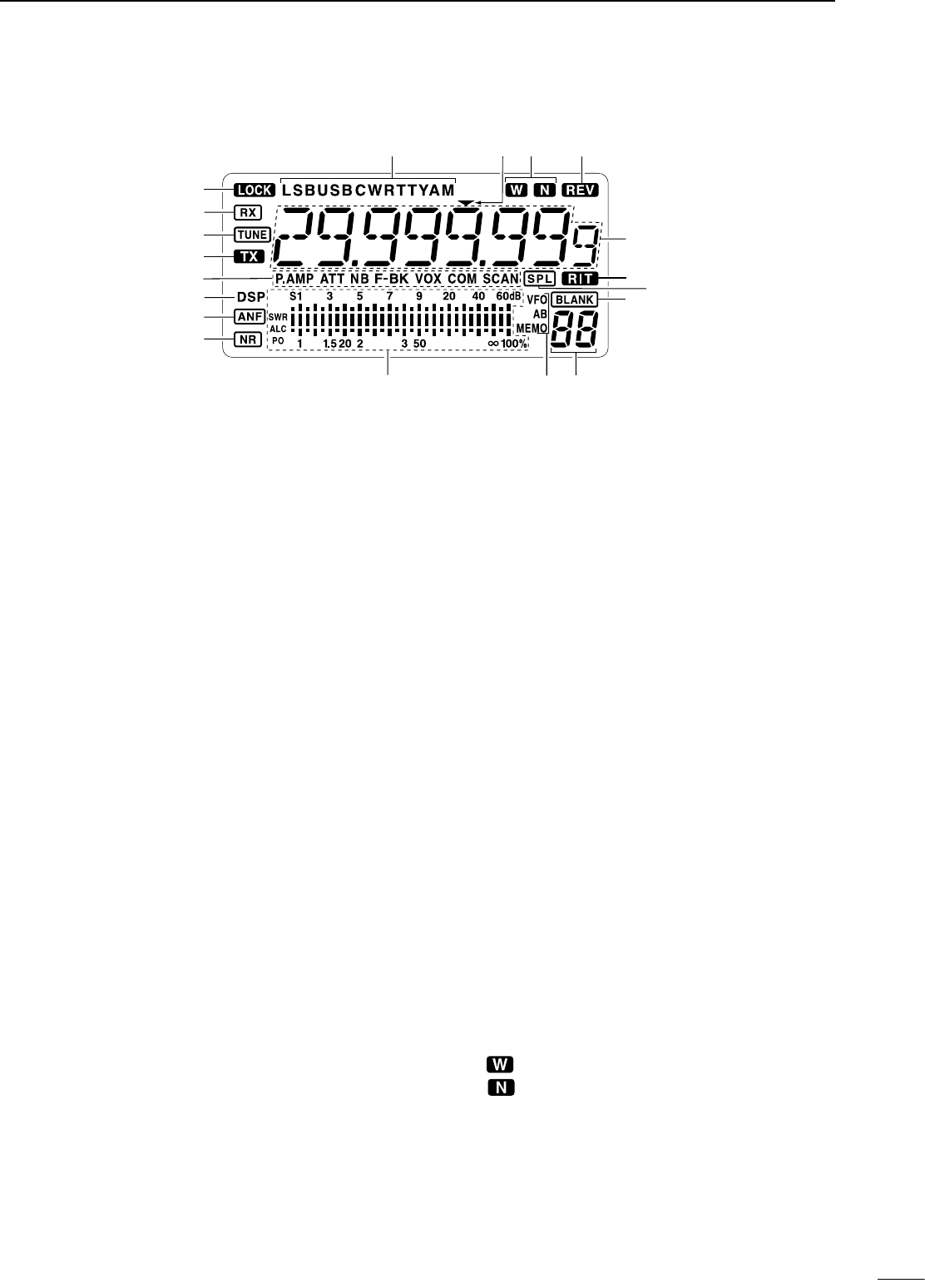
n Function display
q LOCK INDICATOR (p. 19)
Appears when the dial lock function is in use.
w RECEIVE INDICATOR
Appears while receiving a signal or when the
squelch is open.
e TUNE INDICATOR
Appears while the automatic tuning function is
activated.
r TRANSMIT INDICATOR
Appears while transmitting.
t FUNCTION INDICATORS
“P.AMP” appears when antenna preamp is in
use.
“ATT” appears when the attenuator function is in
use.
“NB” appears when the Noise Blanker function
is turned ON.
“BK” appears when the semi break-in function is
selected in quick set mode.
“F-BK” appears when the full break-in function
activates in CW mode. (p. 31)
“VOX” appears when the VOX function is
selected in quick set mode.
“COM” appears when the speech compressor
activates in SSB mode.
“SCAN” appears when the scan function is
activated.
• Flashes when scan is paused.
y DSP UNIT INDICATOR
Appears when an optional UT-106 DSP UNIT is
installed.
u
AUTOMATIC NOTCH FILTER INDICATOR (p. 23)
Appears when the optional Automatic Notch Filter
function is in use.
i NOISE REDUCTION INDICATOR (p. 23)
Appears when the optional Noise Reduction
function is in use.
o SIGNAL/SQL/RF-GAIN METER
Functions as an S-meter while receiving.
Functions as a Power, ALC or SWR meter while
transmitting. (p. 26)
!0 VFO/MEMORY INDICATOR (p. 16)
“VFO A” or “B” appears when VFO mode is
selected.
“MEMO” appears when memory mode is selected.
!1 MEMORY CHANNEL NUMBER READOUT (p. 35)
Shows the selected memory channel number.
!2 BLANK INDICATOR (p. 38)
Shows that the displayed memory channel is not
programmed.
• This indicator appears both in VFO and memory mode.
!3 SPLIT INDICATORS (p. 30)
Appears when the split frequency operation is in
use.
!4 RIT INDICATOR (p. 21)
Appears when the RIT function is in use.
!5 FREQUENCY READOUT
Shows the operating frequency.
!6 REVERSE INDICATOR (p. 20)
Appears when the CW reverse or RTTY reverse
mode is selected.
!7
WIDE/NARROW FILTER INDICATORS (pgs. 24, 25)
“ ” appears when the wide IF filter is selected.
“ ” appears when the narrow IF filter is
selected.
!8 PROGRAMMABLE TUNING STEP INDICATORS
Appears when the programmable tuning step is
selected.
!9 MODE INDICATORS (p. 20)
Indicates the selected operating mode.
5
2
PANEL DESCRIPTION
!9 !6
!7
!8
o!1!0
r
e
w
!4
!2
!5
!3
t
q
y
u
i
6
2PANEL DESCRIPTION
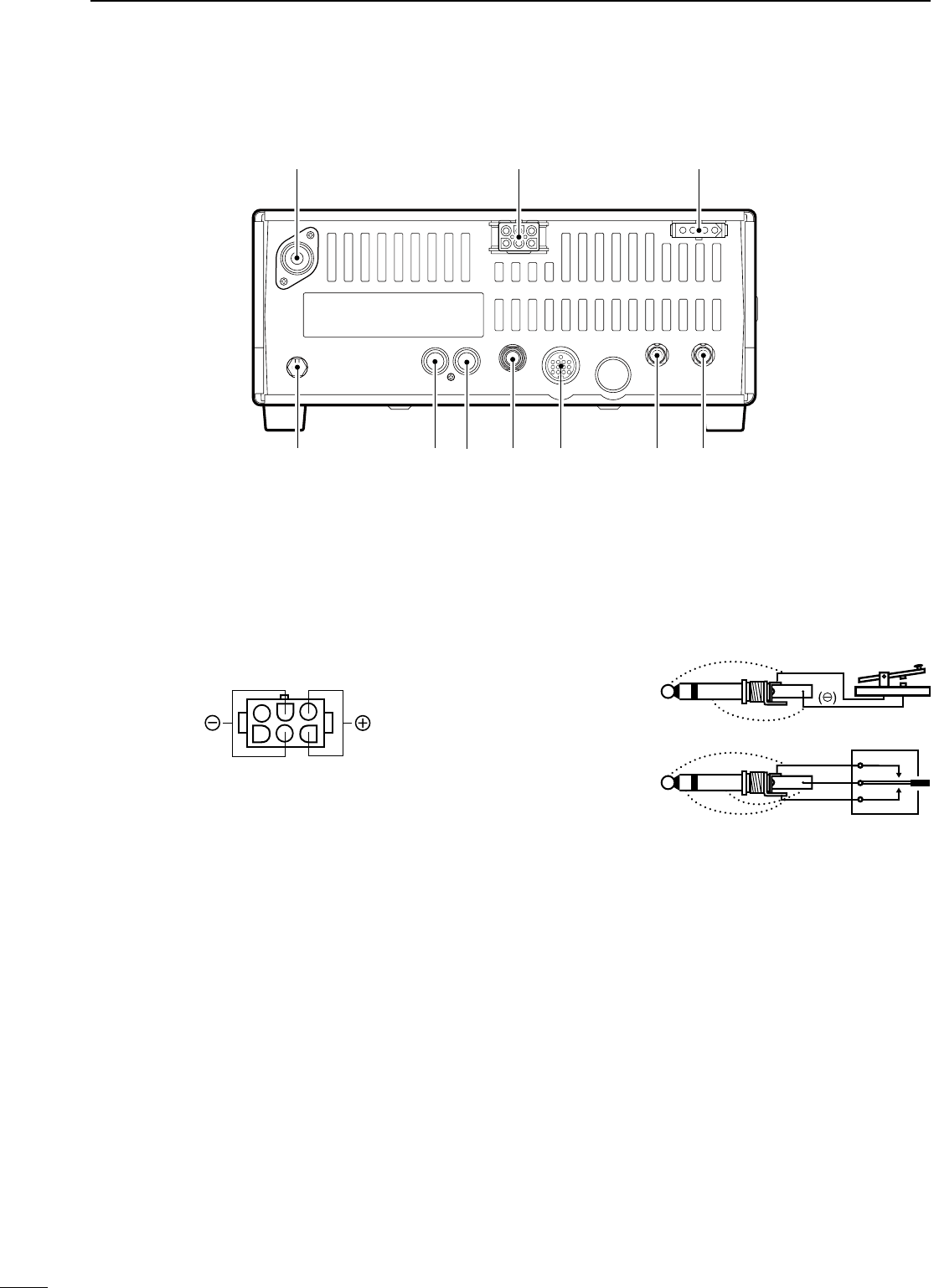
n Rear panel
q ANTENNA TERMINAL [ANT] (p. 10)
Connects a 50 Ω antenna with a PL-259 connector
and a 50 Ω coaxial cable.
w DC POWER SOCKET [DC 13.8V] (p. 12)
Accepts 13.8V DC through the supplied DC power
cable.
e TUNER CONTROL SOCKET [TUNER] (p. 14)
Accepts the control cable from an optional AH-4
AUTOMATIC ANTENNA TUNER.
r CI-V REMOTE CONTROL JACK [REMOTE] (p. 57)
Designed for use with a personal computer for
remote operation of transceiver functions.
t EXTERNAL SPEAKER JACK [EXT SP] (p. 11)
Connects an 8 Ω external speaker, if desired.
• When an external speaker is connected, the internal
speaker does not function.
y ACCESSORY SOCKET [ACC] (p. 7)
Enables connection to external equipment such as
an optional AT-180 AUTOMATIC ANTENNA TUNER,
a TNC for data communications or a liner amplifier,
etc.
u ELECTRONIC KEYER JACK [KEY]
Accepts a paddle to activate the internal electronic
keyer.
• Selection between the internal electronic keyer and
straight key operation can be made in initial set mode.
i ALC INPUT JACK [ALC]
Connects to the ALC output jack of a non-Icom
linear amplifier.
o SEND CONTROL JACK [SEND] (p. 14)
Goes to ground while transmitting to control
external equipments such as a liner amplifier.
• Max. control level: 16 V DC/2 A
!0 GROUND TERMINAL [GND] (p. 9)
Connects the terminal to ground.
q w e
rtyuio!
0
Rear panel view
When connecting
a straight key
When connecting
a paddle
(dot)
(com)
(dash)
(⊕)
7
2
PANEL DESCRIPTION
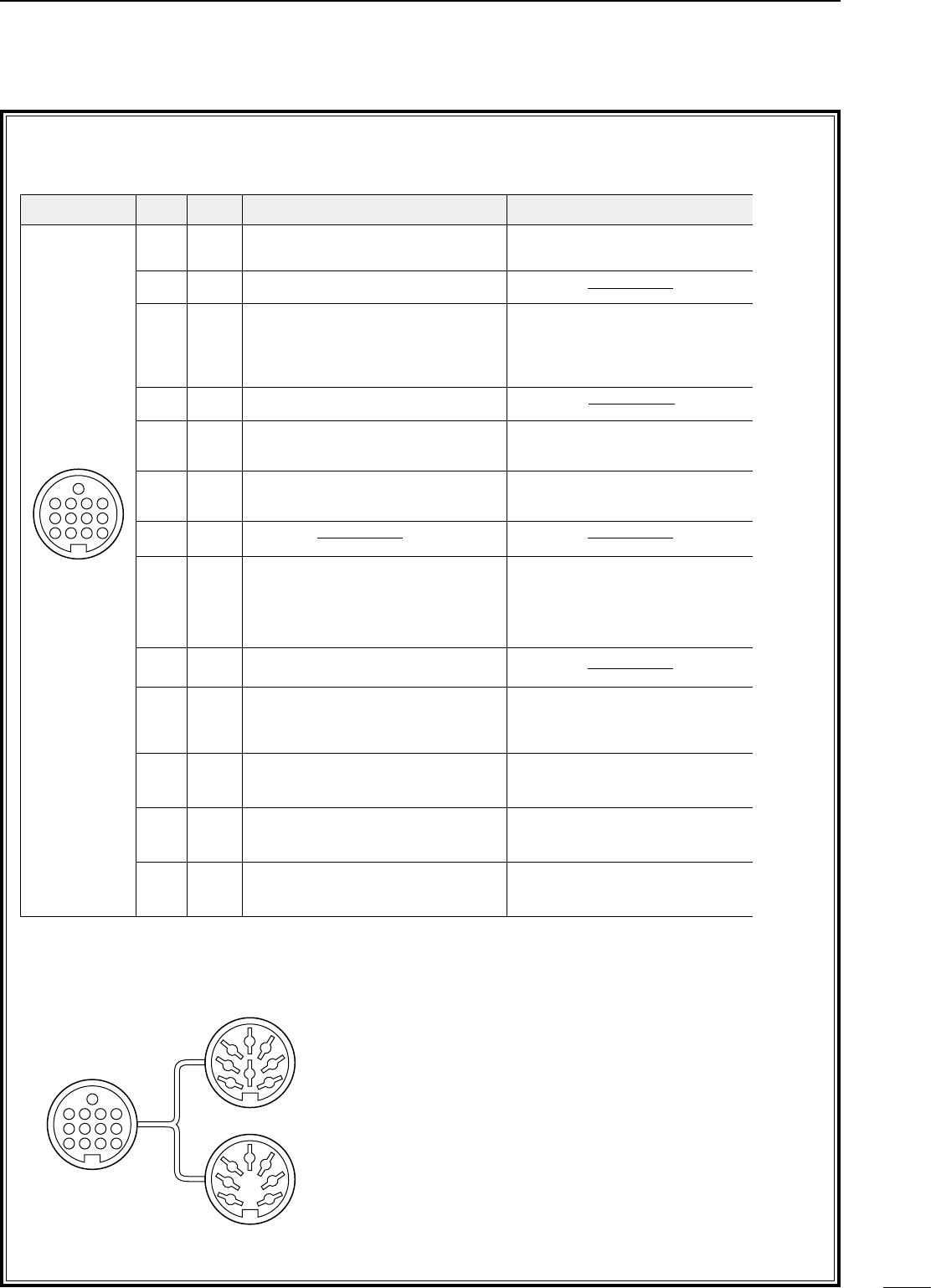
D ACC SOCKET INFORMATION
• ACC socket
• When connecting the ACC conversion cable (OPC-599)
ACC PIN # NAME DESCRIPTION SPECIFICATIONS COLOR
1 8 V Regulated 8 V output. Output voltage : 8 V ±0.3 V
Output current : Less than 10 mA brown
2 GND Connects to ground. red
3 SEND
Input/output pin.
Goes to ground when transmitting.
When grounded, transmits.
Ground level : –0.5 V to 0.8 V
Input current : Less than 20 mA orange
4 BDT Data line for the optional AT-180. yellow
5 BAND Band voltage output.
(Varies with amateur band) Output voltage : 0 to 8.0 V green
6 ALC ALC voltage input. Control voltage : –4 to 0 V
Input impedance : More than 10 kΩblue
7 NC purple
8 13.8 V 13.8 V output when power is ON. Output current : Max. 1 A gray
9 TKEY Key line for the AT-180. white
10 FSKK RTTY keying input. Ground level : –0.5 to 0.8 V
Input current : Less than 10 mA black
11 MOD Modulator input.
Input impedance : 10 kΩ
Input level : Approx. 100 mV
rms
pink
12 AF AF detector output.
Fixed, regardless of [AF] position.
Output impedance : 4.7 kΩ
Output level : 100 to 300 mV rms
light
blue
13 SQLS Squelch output.
Goes to ground when squelch opens.
SQL open :Less than 0.3 V/5 mA
SQL closed : More than 6.0 V/100 µA
light
green
Rear panel
view
1 2 3 4
8765
9
10 11 12
13
ACC 1
ACC 2
q FSKK t AF
w GND y SQLS
e SEND u 13.8 V
r MOD i ALC
q 8 V t ALC
w GND y NC
e SEND u 13.8 V
r BAND
1
1
2
2
3
3
4
4
8
8
7
7
6
6
5
5
9
10 11 12
13
1
2
3
4
76
5
8
2PANEL DESCRIPTION
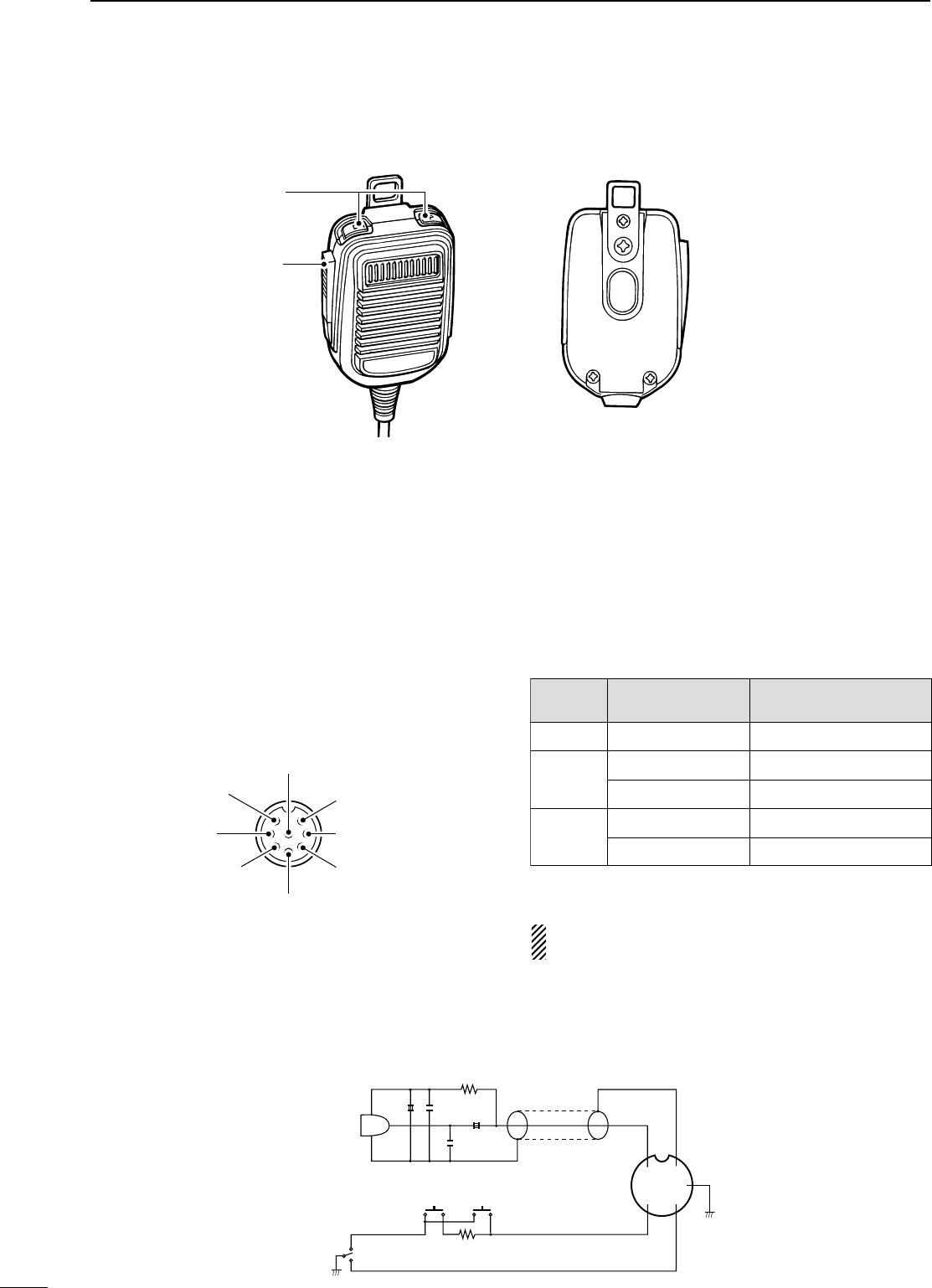
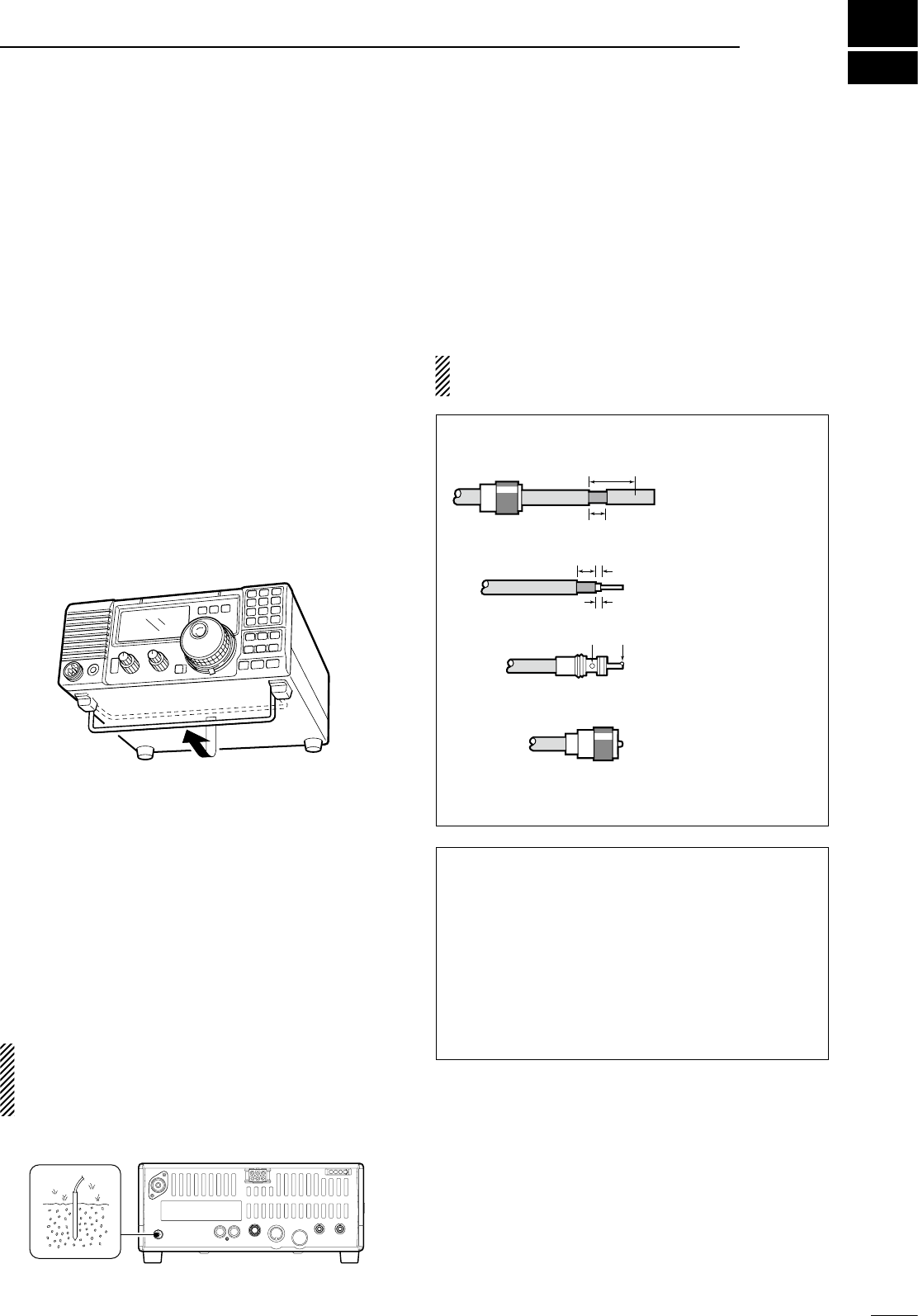
n Microphone (HM-36)
q UP/DOWN SWITCHES [UP]/[DN]
Change the selected readout frequency or memory
channel.
• Continuous pushing changes the frequency or memory
channel number continuously.
• The [UP]/[DN] switch can simulate a key paddle.
Preset in the CW PADDL in initial set mode. (p. 31)
w PTT SWITCH
Push and hold to transmit; release to receive.
q
w
• MICROPHONE CONNECTOR
(Front view)
CAUTION: DO NOT short pin 2 to ground as this
can damage the internal 8 V regulator.
y GND (PTT ground)
t PTT
r Main readout squelch switch
q Microphone input
w +8 V DC output
e Frequency up/down
u GND
(Microphone ground)
i Main readout AF output
(varies with [AF]/[BAL])
Max. 10 mA
Ground
Ground through 470 Ω
“LOW” level
“HIGH” level
+8 V DC output
Frequency up
Frequency down
Squelch open
Squelch closed
[MIC]
PIN NO.
w
e
r
FUNCTION DESCRIPTION
• HM-36 SCHEMATIC DIAGRAM
+
+
q
w
ert
y
u
i
4700p
4700p
10µ
0.33µ
MICROPHONE
MIC
ELEMENT
2k
470
DOWN UP
PTT
RECEIVE
TRANSMIT
MICROPHONE CABLE MICROPHONE PLUG
3
9
INSTALLATION AND CONNECTIONS
n Unpacking
After unpacking, immediately report any damage to the
delivering carrier or dealer. Keep the shipping cartons.
For a description and a diagram of accessory
equipment included with the IC-718, see ‘Supplied
accessories’ on p. 1 of this manual.
n Selecting a location
Select a location for the transceiver that allows
adequate air circulation, free from extreme heat, cold,
or vibrations, and away from TV sets, TV antenna
elements, radios and other electro-magnetic sources.
The base of the transceiver has an adjustable stand
for desktop use. Set the stand to one of two angles
depending on your operating conditions.
n Grounding
To prevent electrical shock, television interference
(TVI), broadcast interference (BCI) and other
problems, ground the transceiver through the
GROUND terminal on the rear panel.
For best results, connect a heavy gauge wire or strap
to a long earth-sunk copper rod. Make the distance
between the [GND] terminal and ground as short as
possible.
R WARNING: NEVER connect the
[GND] terminal to a gas or electric pipe, since the
connection could cause an explosion or electric
shock.
n Antenna connection
For radio communications, the antenna is of critical
importance, along with output power and sensitivity.
Select antenna(s), such as a well-matched 50
Ω
antenna, and feedline. 1.5:1 or better of Voltage
Standing Wave Ratio (VSWR) is recommended for your
desired band. Of course, the transmission line should be
a coaxial cable.
CAUTION: Protect your transceiver from
lightning by using a lightning arrestor.
Antenna SWR
Each antenna is tuned for a specified frequency
range and SWR may be increased out-of-range.
When the SWR is higher than approx. 2.0:1, the
transceiver’s power drops to protect the final
transistor. In this case, an antenna tuner is useful
to match the transceiver and antenna. Low SWR
allows full power for transmitting even when using
the antenna tuner. The IC-718 has an SWR meter to
monitor the antenna SWR continuously
.
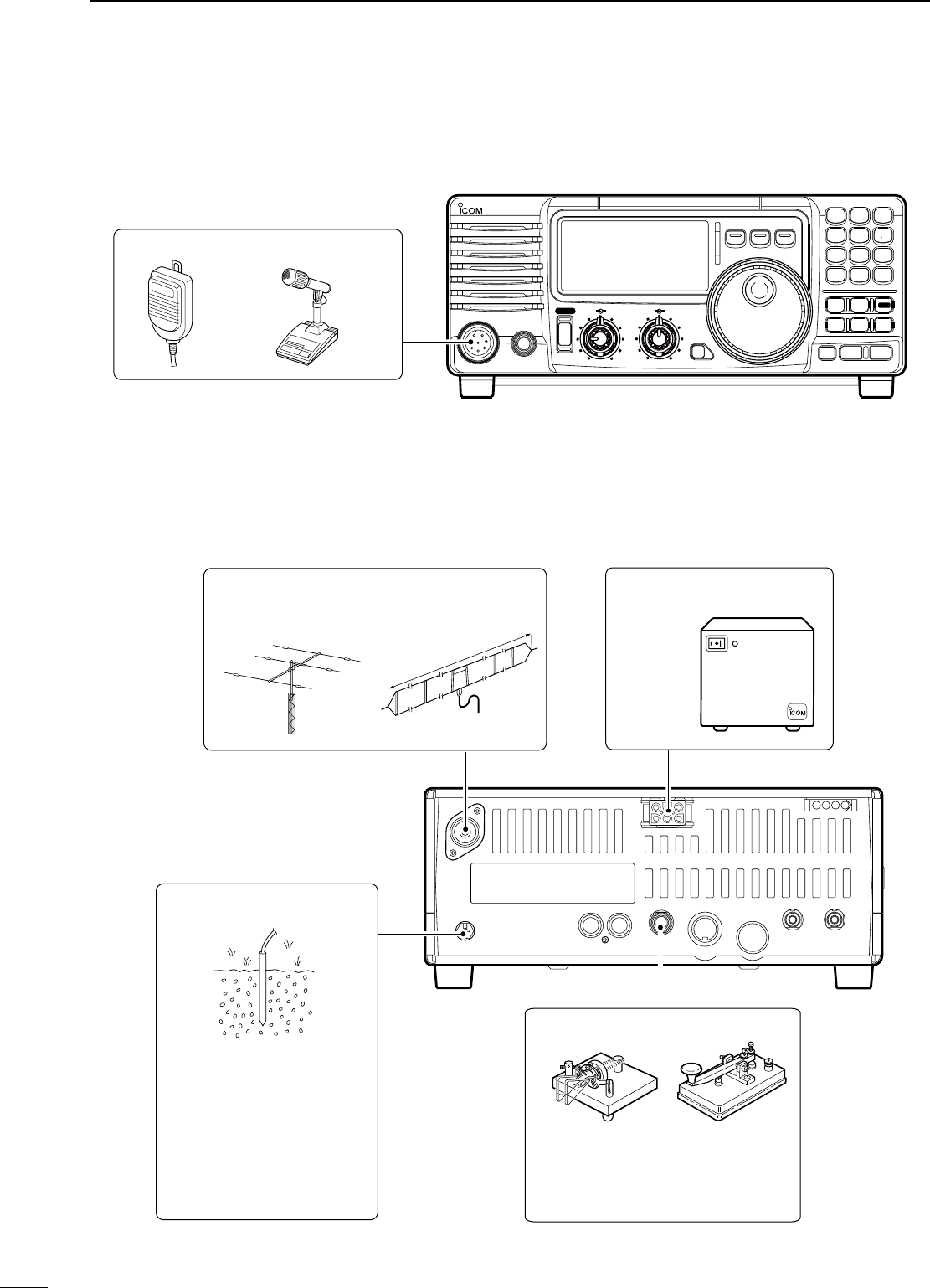
PL-259 CONNECTOR INSTALLATION EXAMPLE
30 mm ≈ 9⁄8 in 10 mm ≈ 3⁄8 in 1–2 mm ≈ 1⁄16 in
30 mm
10 mm (soft solder)
10 mm
1–2 mm
solder solder
Soft
solder
Coupling ring
Slide the coupling ring
down. Strip the cable
jacket and soft solder.
Slide the connector
body on and solder it.
Screw the coupling
ring onto the
connector body.
Strip the cable as
shown at left. Soft
solder the center
conductor.
q
w
e
r
10
3INSTALLATION AND CONNECTIONS
n Required connections
MIC
i718
PHONES
RF/SQL AF SHIFT RIT
LOCK
MODE
FIL
TS
PWR
TUNER
Y
Z
COMP
P.AMP
UP
NB
ATT
SET
CH
DN
ENT
F-INP
V/M
1
MW
4
A=B
2
M - CL
5
SCN
8
ANF
0
NR
.
A/B
3
VOX
97
SPL
M V
6
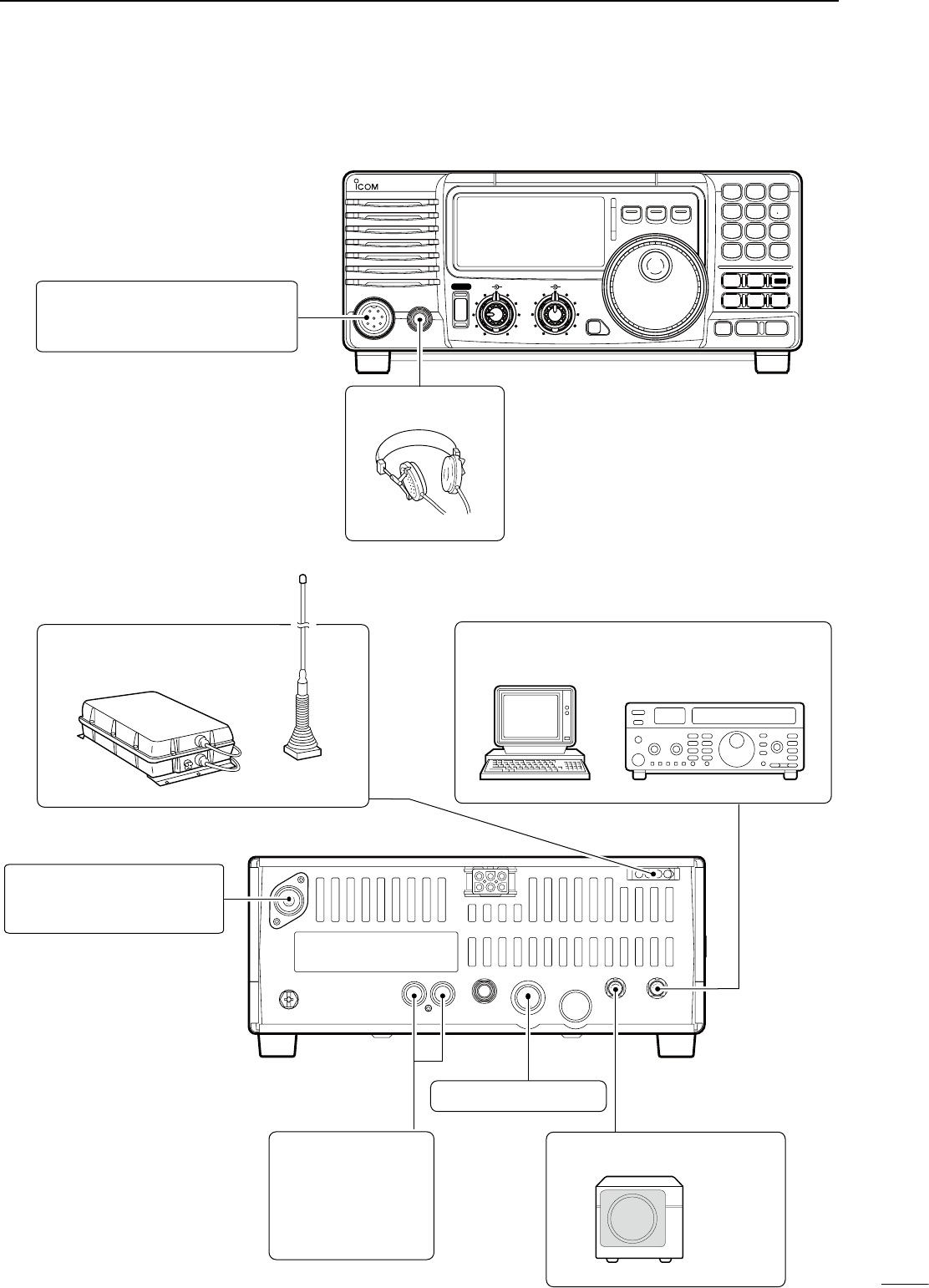
MICROPHONES (p. 55)
SM-20HM-36
GROUND (p. 9)
Use the heaviest gauge wire
or strap available and make
the connection as short as
possible.
Grounding prevents electrical
shocks, TVI and other
problems.
ANTENNA (p. 56)
[Example]: 1.8–30 MHz bands
DC POWER SUPPLY
PS-85
CW KEY
A straight key can be used when the
internal electronic keyer is turned
OFF in “CW PADDL” in initial set
mode. (p. 31)
approx. 24.5 m; 80.3 ft
AH-710
• Front panel
• Rear panel
11
3
INSTALLATION AND CONNECTIONS
n Advanced connections
MIC
IC-718
PHONES
RF/SQL AF SHIFT RIT
LOCK
MODE
FIL
TS
PWR
TUNER
Y
Z
COMP
P.AMP
UP
NB
ATT
SET
CH
DN
ENT
F-INP
V/M
1
MW
4
A=B
2
M - CL
5
SCN
8
ANF
0
NR
.
A/B
3
VOX
97
SPL
M V
6
MIC
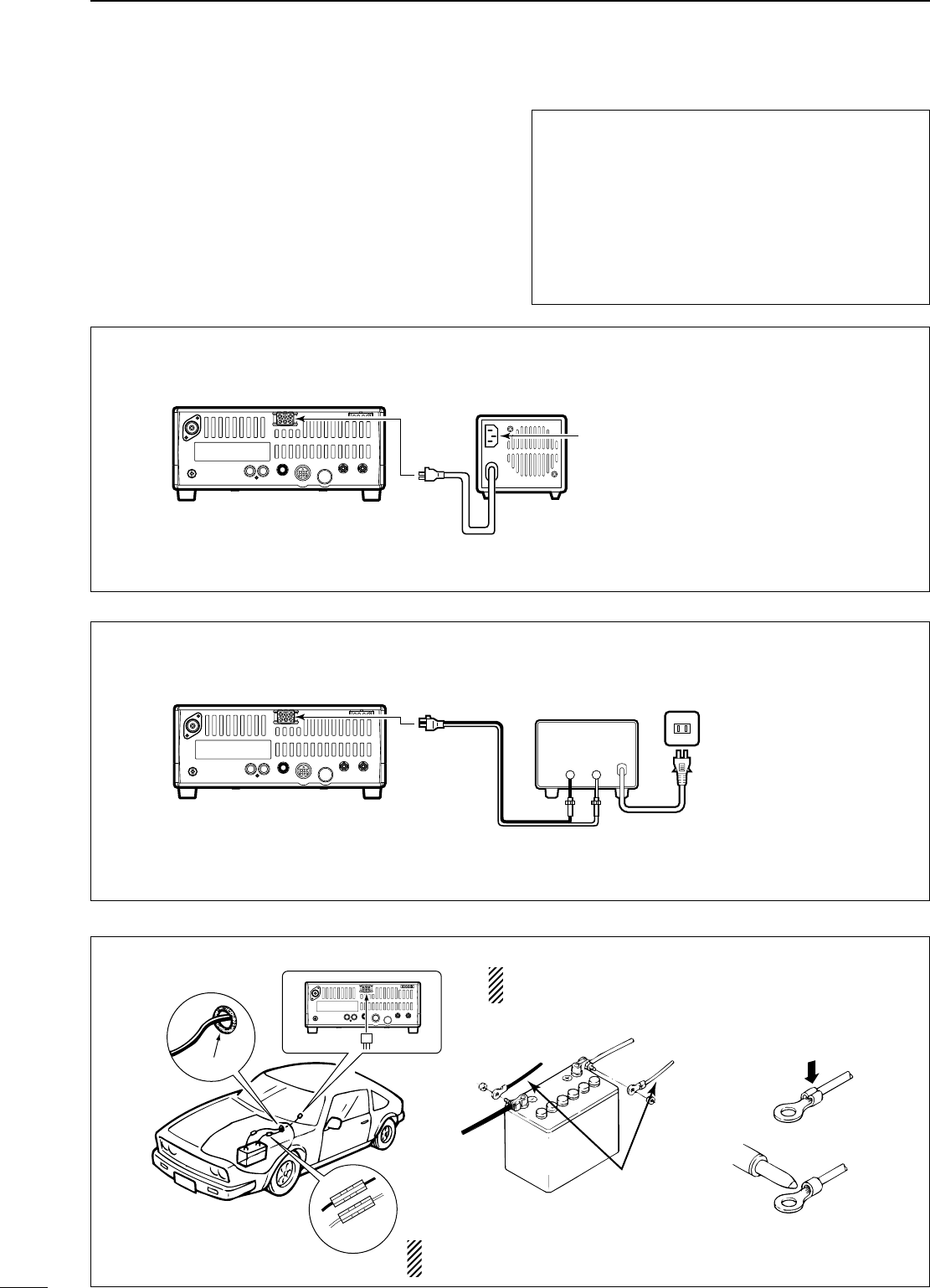
The AFSK modulation signal can be
input from [MIC]. (p. 33)
HEADPHONES
• Front panel
ANTENNA (p. 13)
Connects a liner amprifier, etc.
[REMOTE] (p. 57)
Used for computer control and transceive operation.
[SEND], [ALC]
(p. 14)
Used for connecting a
non-Icom linear ampli-
fier.
EXTERNAL SPEAKER (p. 55)
SP-21, etc
ACC SOCKETS (p. 7)
AH-4 (p. 55)
AH-2b
or long wire
with
• Rear panel
12
3INSTALLATION AND CONNECTIONS
n Power supply connections
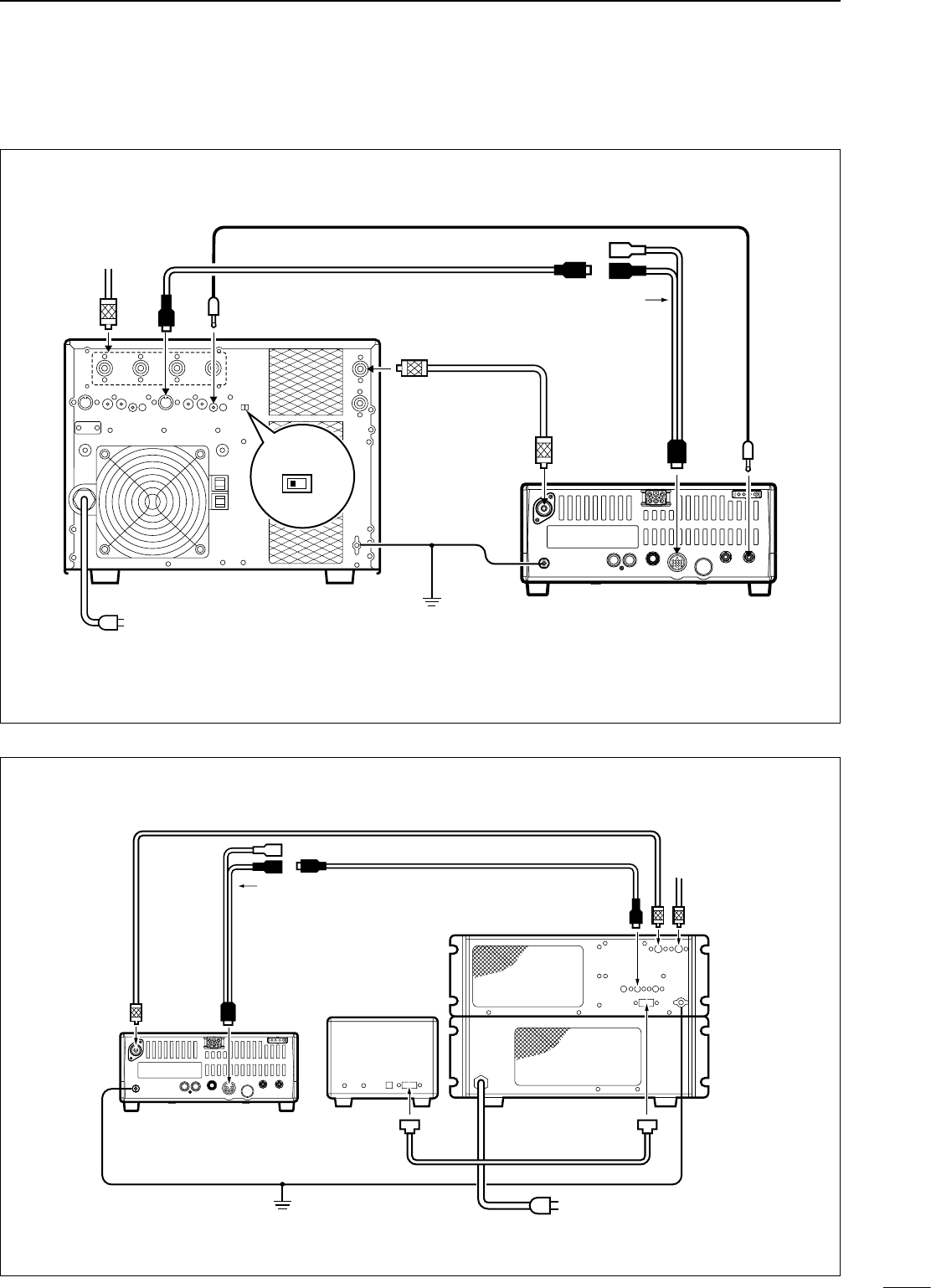
Use an optional PS-85 DC POWER SUPPLY when
operating the IC-718 with AC power. Refer to the
diagrams below.
CAUTION: Before connecting the DC power
cable, check the following important items. Make
sure:
• The [POWER] switch is OFF.
• Output voltage of the power source is 12–15 V
when you use a non-Icom power supply.
• DC power cable polarity is correct.
Red : positive + terminal
Black : negative _ terminal
CONNECTING A VEHICLE BATTERY
12 V
battery
Supplied
DC power cable
+ red
_ black Crimp
Solder
Grommet
Fuses
NOTE: Use terminals for
the cable connections.
CONNECTING NON-ICOM DC POWER SUPPLY
1 2 3 4
8765
9
10 11 12
13
1 2 3 4
8765
9
10 11 12
13
PS-85
Connect to an AC outlet
using the supplied AC cable.
DC power cable
DC power
socket
DC power
socket
DC power supply AC outlet
AC cable
20 A fuses
Supplied
DC power cable
13.8 V 20 A
_+
black
red
+
_
CONNECTING PS-85 DC POWER SUPPLY
1 2 3 4
8765
9
10 11 12
13
1 2 3 4
8765
9
10 11 12
13
PS-85
Connect to an AC outlet
using the supplied AC cable.
DC power cable
DC power
socket
to DC power
socket
DC power supply AC outlet
AC cable
20 A fuses
Supplied
DC power cable
13.8 V 25 A
Black
_
Red
+
NEVER connect to
a 24 V battery.
NEVER connect to a battery without supplied DC fuses,
otherwise the fire hazard may occur.
13
3
INSTALLATION AND CONNECTIONS
n Linear amplifier connections
CONNECTING THE IC-PW1
1 2 3 4
8765
9
10 11 12
13
ANT
ACC-1
ACC REMOTE
REMOTE
INPUT1
GND
GND
IC-PW1
IC-718
Ground
AC outlet
(Non-European versions : 100–120/220–240 V
European version : 230 V)
Coaxial cable
(supplied with the IC-PW1)
ACC cable (supplied with the IC-PW1)
Remote control cable (supplied with the IC-PW1)
To an
antenna
EXCITER
1 1&2
OPC-599 conversion cable
(option)
CONNECTING THE IC-4KL
1 2 3 4
8765
9
10 11 12
13
IC-718
Ground
IC-4KL
Remote
controller
Coaxial cable
(supplied with the IC-4KL)
ACC cable
(supplied with the IC-4KL)
ACC
IC-4KL
Remote control cable
(supplied with the IC-4KL)
AC outlet
(220–240 V)
To an
antenna
ANT
ACC
OPC-599 conversion cable
(option)
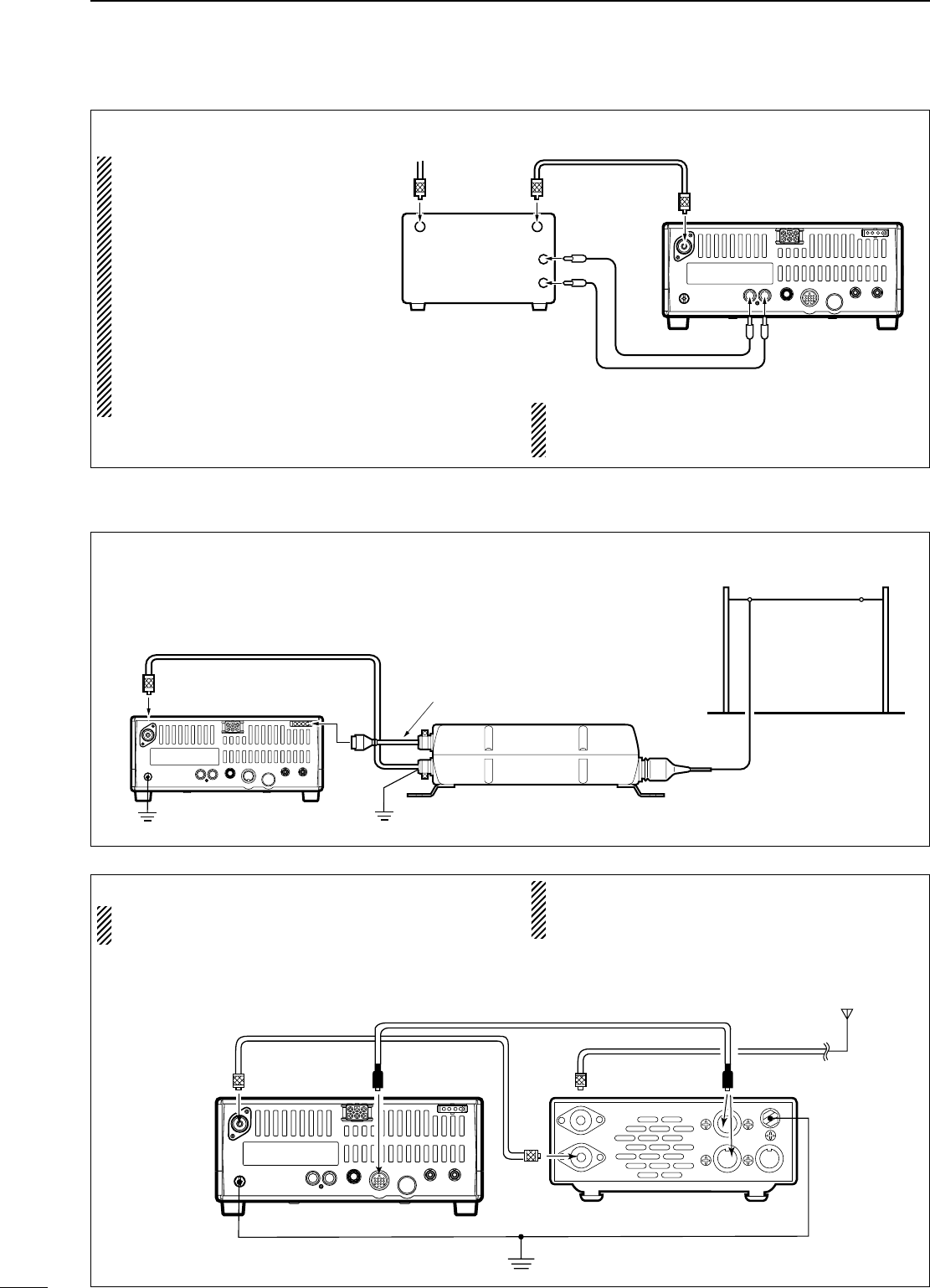
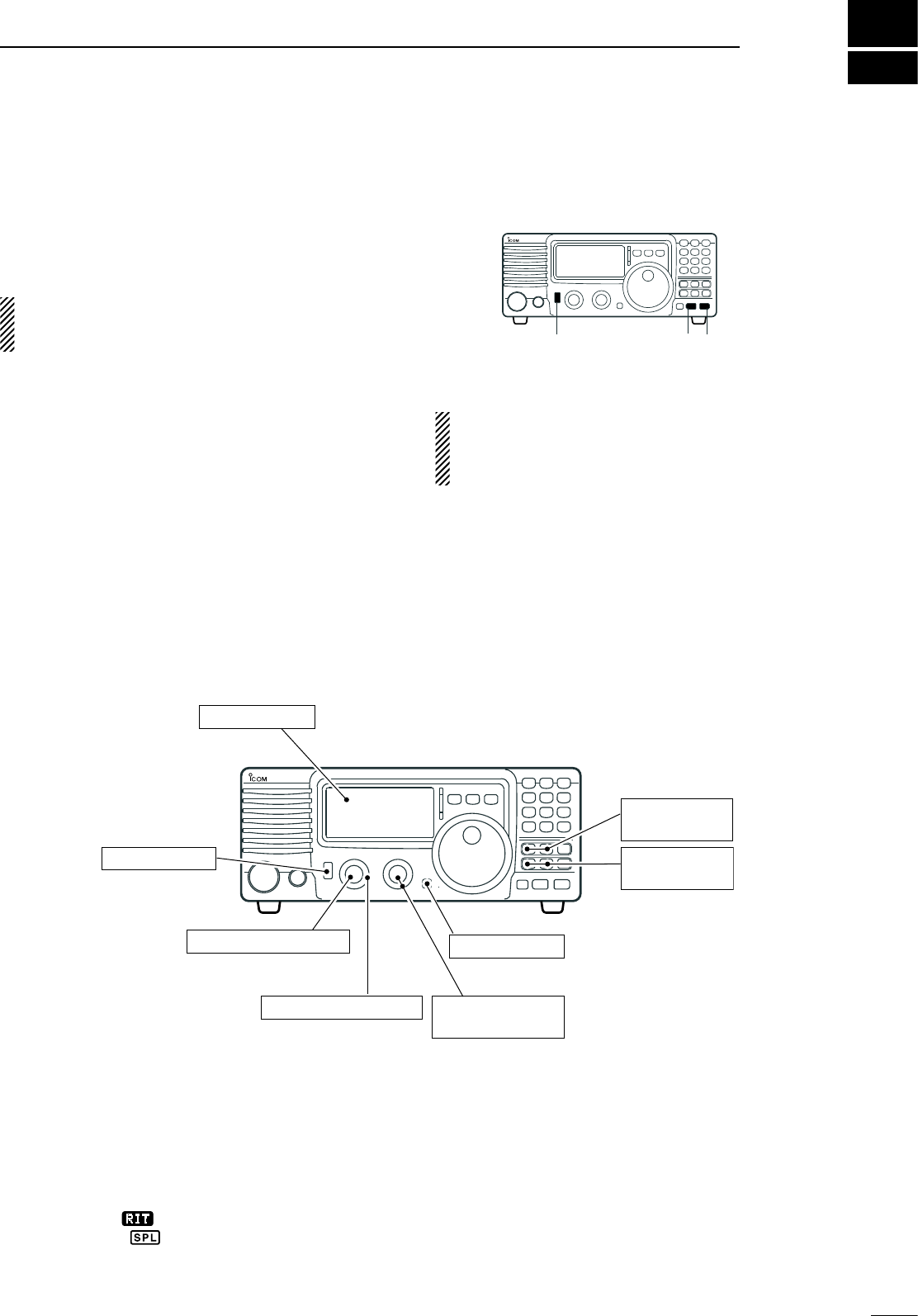
CONNECTING THE AT-180 (p. 28)
DO NOT! connect AT-180 and AH-4 at the same
time. Both tuners will not function correctly.
Turn the IC-718’s power OFF when connecting
the AT-180, otherwise, the CPU may malfunction
and the AT-180 may not function properly.
14
3INSTALLATION AND CONNECTIONS
n External antenna tuners
CONNECTING A NON-ICOM LINER AMPLIFIER
R WARNING:
Set the transceiver output
power and linear amplifier
ALC output level referring
to the linear amplifier
instruction manual.
The ALC input level must
be in the range 0 V to –4 V,
and the transceiver does not
accept positive voltage. Non-
matched ALC and RF power
settings could cause a fire or
ruin the linear amplifier.
1 2 3 4
8765
9
10 11 12
13
RF OUTPUT RF INPUT
ALC
SEND
50 Ω coaxial cable
IC-718
ANT
ALC
SEND
To an
antenna
Non-Icom linear amplifier
The specifications for the SEND relay are 16 V
DC 2 A. If this level is exceeded, a large external
relay must be used.
CONNECTING THE AH-4 (p. 29)
Coaxial cable (from the AH-4)
Long wire or optional AH-2b
Ground
IC-718 AH-4
Control cable
Ground
1 2 3 4
8765
9
10 11 12
13
Ground
HF
antenna
[ANT] [ACC] [ACC]AT-180
ACC cable supplied with the AT-180
Coaxial cable supplied
with the AT-180
IC-718
one of two
connectors
4
15
FREQUENCY SETTING
n When first applying power (CPU resetting)
Before first applying power, make sure all
connections required for your system are complete
by referring to Chapter 3. Then, reset the transceiver
using the following procedure.
Resetting CLEARS all programmed contents in
memory channels and returns programmed values
in quick/initial set mode to default values.
q Make sure the transceiver power is OFF.
w While pushing and holding [∫ UP] and [√ DN],
push [PWR] for 1 sec. to turn power ON.
• The internal CPU is reset.
• The transceiver displays its initial VFO frequencies
when resetting is complete.
e All quick/initial set mode settings are returned to
default values. (p. 41)
n Initial settings
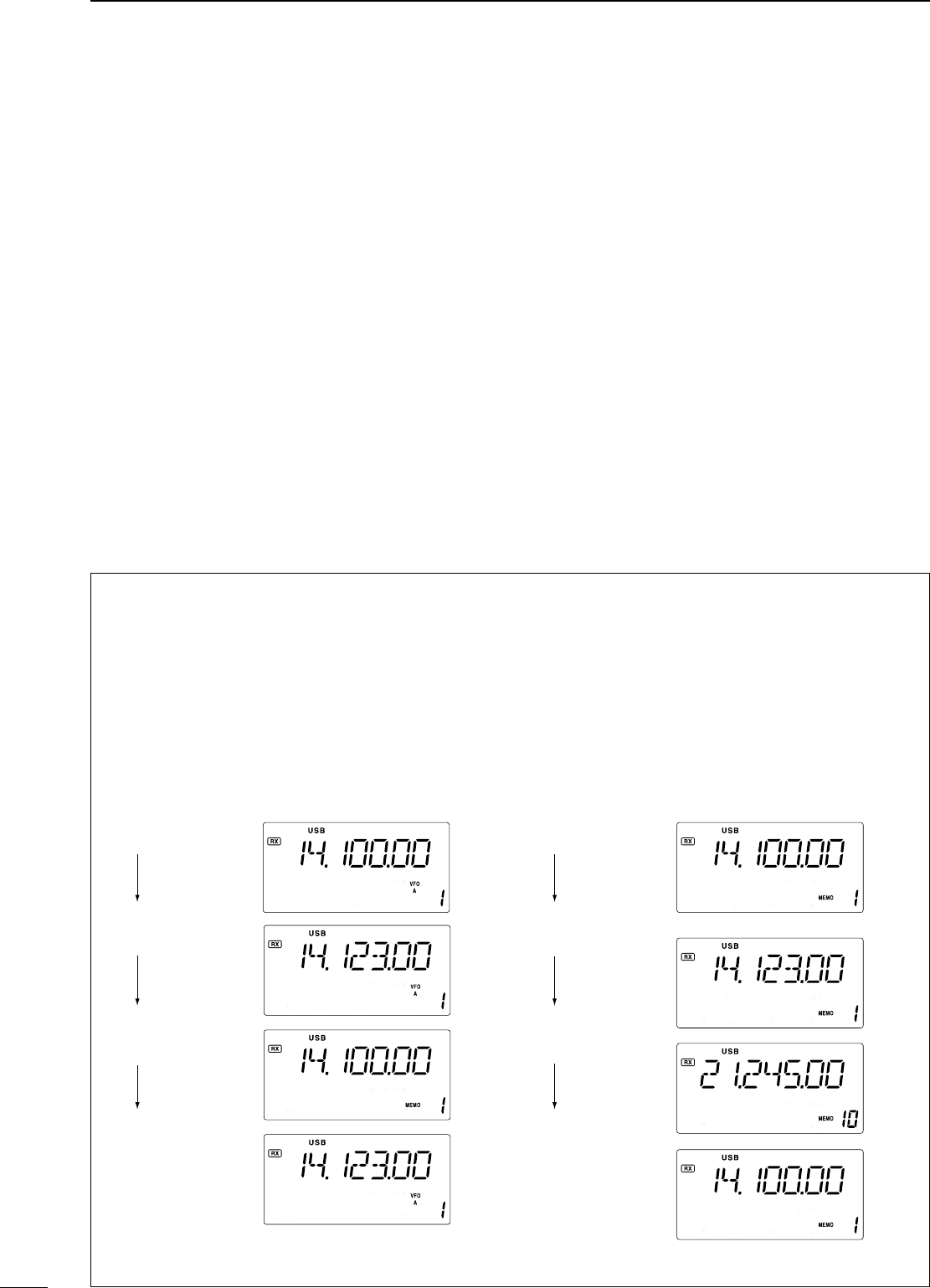
After resetting the transceiver, set controls and
switches as shown in the figure below.
[PWR] [Z][Y]
[METER]: Po
[LOCK]: OFF
[POWER]: OFF [P.AMP], [ATT],:
OFF
[RIT]: Center
[IF SHIFT]: Center
[AF]: Max. CCW
[RF/SQL]: 12 o'clock
[NB], [COMP]:
OFF
Turn power ON, then check the display. If any of the
following indicators appear, turn them OFF as follows:
• Quick tuning step indicator “Z” : Push [TS].
• 1 Hz frequency readout :
Push [TS] for 1 sec.
( while quick tuning
step is OFF)
• RIT indicator “
RIT
” : Center.
• Split indicator “ ” : Push [SPL].
Under cooler temperatures, the LCD may appear
dark and unstable after turning power ON. This is
normal and does not indicate any equipment
malfunction.
CCW : counterclockwise
16
4FREQUENCY SETTING
n VFO description
VFO is an abbreviation of Variable Frequency
Oscillator, and traditionally refers to an oscillator.
The IC-718 VFO can store a frequency and an
operating mode.
You can call up a desired frequency to the VFO with
the keypad or the memory transfer function (see p. 37).
You can also change the frequency with the tuning dial
and select the operating mode with the [MODE] switch
or call up previously accessed frequency and modes
with the band stacking register (p. 18).
The IC-718 has two VFOs, specially suited for split
frequency opration. The VFOs are called VFO A and
VFO B. You can call up the desired VFO.
• Differences between VFO mode and memory mode
VFO MODE
Each VFO shows a frequency and operating mode.
If the frequency or operating mode is changed, the
VFO automatically memorizes the new frequency or
new operating mode.
When the VFO is selected from another VFO
or memory mode, the last-used frequency and
operating mode for that VFO appears.
[EXAMPLE]
MEMORY MODE (pgs. 35–38)
Each memory channel shows a frequency and
operating mode like a VFO. Even if the frequency
or mode is changed, the memory channel does not
memorize the new frequency or operating mode.
When the memory channel is selected from another
memory channel or VFO mode, the memorized
frequency and operating mode appear.
[EXAMPLE]
VFO is selected.
The frequency
is changed.
Memory mode
is selected.
VFO is selected
again.
Memory channel 1
is selected.
The frequency
is changed.
Another memory
channel is selected.
Memory channel 1
is selected again.
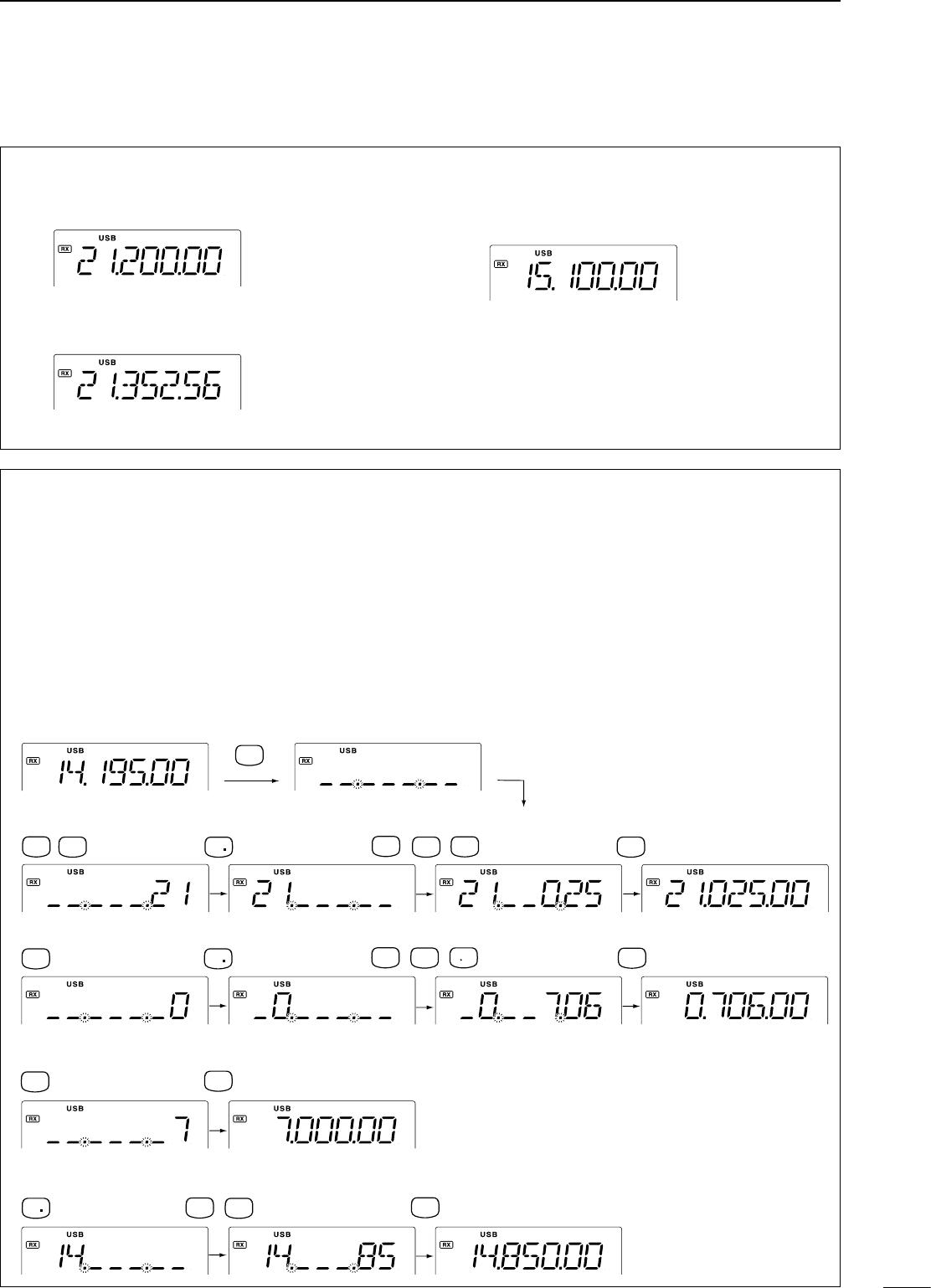
Changed frequency (14.123 MHz) does not appear and
memorized frequency (14.100 MHz) appears instead.
Changed frequency (14.123 MHz) appears.
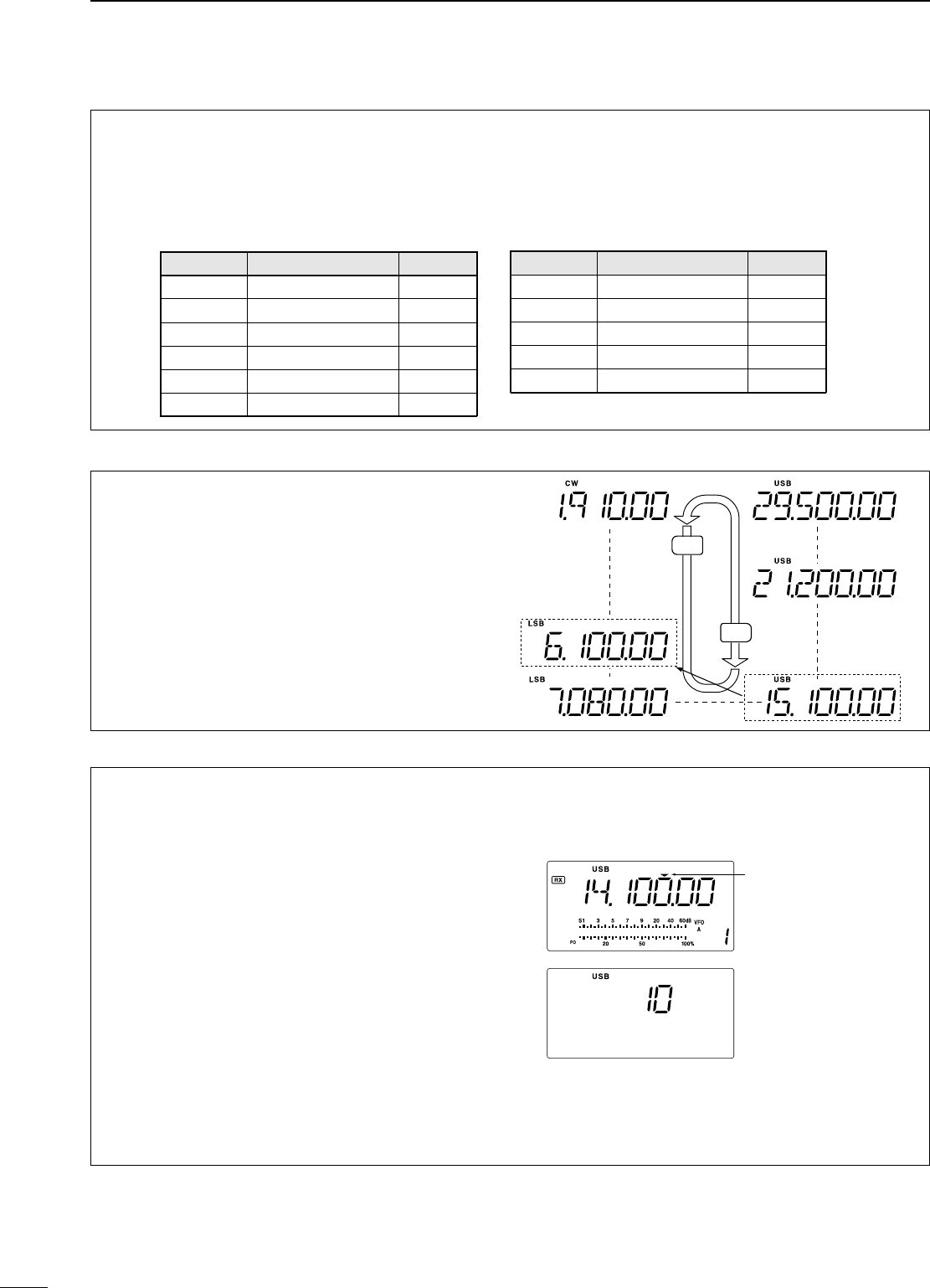
D Direct frequency entry with keypad
The transceiver has a keypad for direct frequency
entry as described below.
q Push [F-INP/ENT], then push the numeral keys
on the keypad to enter the MHz digits for the
desired frequency.
• If a key is mistakenly pushed, push [SET] (or any key
except keypad) and start again from the beginning.
• When entering the same MHz digits as the displayed
frequency, this step can be skipped.
w Push [•] on the keypad.
e Push the numeral keys to enter the frequency
digits below 1 MHz.
• If a key is mistakenly pushed, push [SET] (or any key
except keypad) and start again from the beginning.
r Push [F-INP/ENT] to set the input frequency.
•
When pushing [F-INP/ENT] after entering the MHz
digits, zeros are automatically entered for the kHz digits.
17
4
FREQUENCY SETTING
D Using the tuning dial
q Push [∫ UP] or [√ DN] one or more times to
select the desired ham band.
w Select the desired operating mode with the mode
switch. (p. 20).
e Rotate the tuning dial to set the desired frequency
• For general coverage receiver use
The IC-718 has a general coverage receiver band.
q Push [∫ UP] or [√ DN] one or more times to
select the general coverage receiver band.
Note: Even if you select the ham band, you can set the
transceiver to the general coverage frequency. When
the displayed frequency exits the transmit frequency
range (ham band), a band edge beep may be emitted
(depends on initial set mode programming).
•To set to 21.025 MHz
•To set to 706 KHz (0.706 MHz)
•To set to 7 MHz
•To change 14.195 to 14.850 MHz
•Start
ENT
F-INP
V/M
1
NR ANF
0
A=B
2
M =CL
5
ENT
F-INP
A=B
2
NR
7
SPL
ANF
0
M V
6
ENT
F-INP
ANF
0
ENT
F-INP
7
SPL
ENT
F-INP
SCN
8
M =CL
5
NR
n Frequency setting
[EXAMPLE]
18
4FREQUENCY SETTING
D Band selection
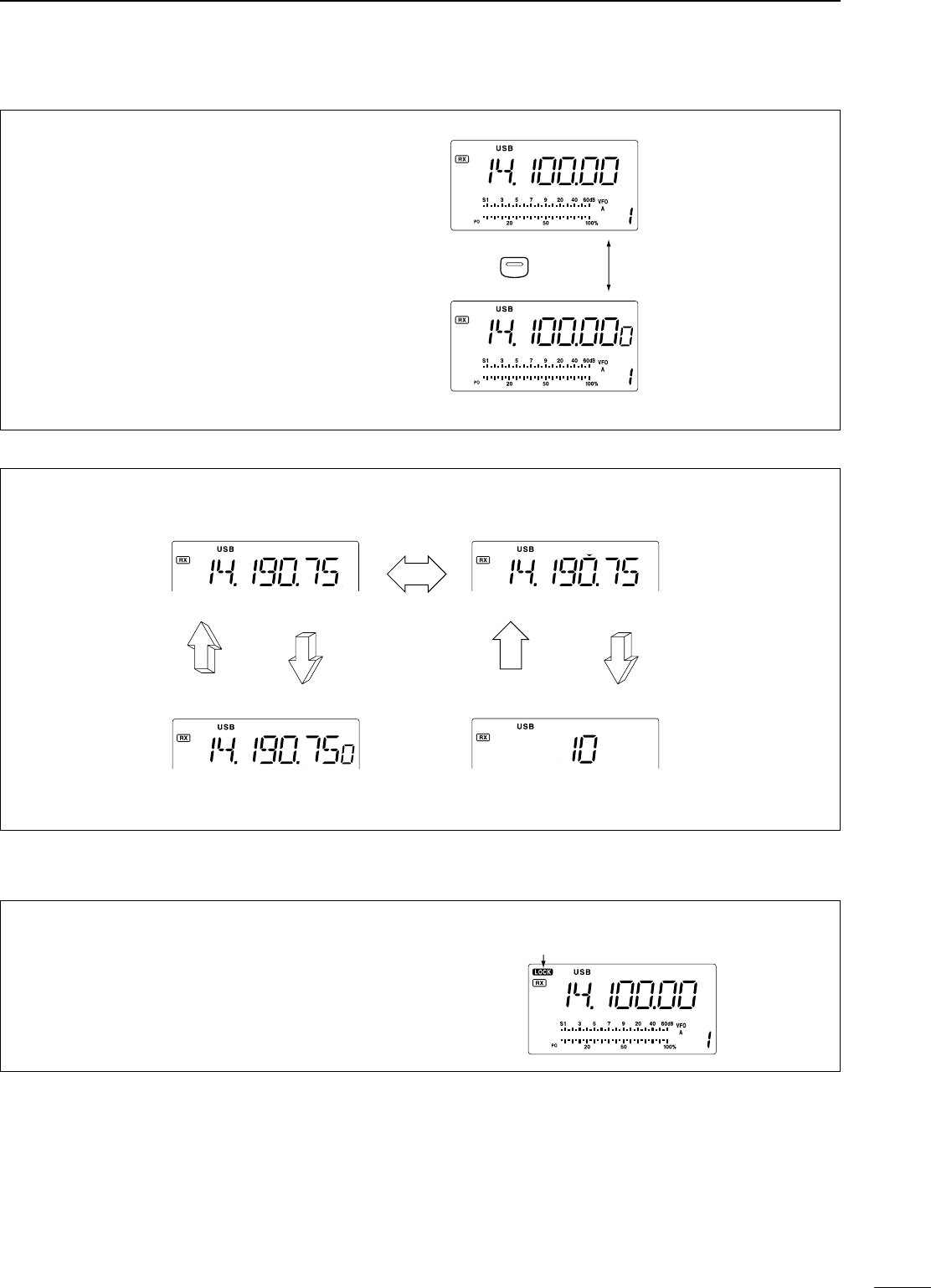
All HF ham bands and a general coverage receiver
band are included in the IC-718.
Push [∫ UP]/[√ DN] to select the desired band.
• Pushing [∫ UP]/[√ DN] continuously scrolls through the
available bands.
Note: For example, if 6.10000 MHz is resistered as
the General coverage frequency, then the General
coverage band automatically positions itself between
3.5 MHz and 7 MHz band.
D Programmable tuning steps
Programmable tuning steps are available to suit your
operating requirements.
These tuning steps are:
• Selectable from 0.1, 1, 5, 9, 10, 100 kHz
q
Push [TS], the programmable tuning step indicator,
“,” then appears above the 1 kHz.
• Rotating the tuning dial changes the frequency
according to the set tuning step.
w Push [TS] for 2 sec. while the programmable
tuning step indicator appears to enter the tuning
step set mode.
e Rotate the tuning dial to set the desired tuning
step.
r Push [TS] to exit the tuning step set mode.
t Rotate the tuning dial to change the frequency
according to the set tuning step.
Programmable tuning
step indicator
10 KHz tuning steps is
selected.
DN
UP
General (new)
General (old)
Y
Z
D Band stacking resister
The band stacking register automatically stores the
last frequency and mode used for each band. This
is convenient for contest operation, etc. The tables
below shows the band stacking register default
settings for each band.
BAND BAND BAND
1.9 MHz 1.91000 MHz CW
3.5 MHz 3.55000 MHz LSB
7 MHz 7.05000 MHz LSB
10 MHz 10.12000 MHz CW
14 MHz 14.10000 MHz USB
General 15.10000 MHz USB
BAND BAND BAND
18 MHz 18.10000 MHz USB
21 MHz 21.20000 MHz USB
24 MHz 24.95000 MHz USB
28 MHz 28.50000 MHz USB
29 MHz 29.50000 MHz USB
19
4
FREQUENCY SETTING
10 Hz tuning
1 Hz tuning
momentarily
1 sec.1 sec.
1 sec.
Programmable step tuning
(100 Hz –100 kHz)
Selectable for each mode.
momentarily
[TS] SWITCH FLOW CHART
n Dial lock function
The dial lock function prevents accidental changes
caused by the tuning dial. The lock function
electronically locks the dial.
Push [LOCK] momentarily to toggle the lock function
ON and OFF.
• “LOCK” appears in the function display while the lock
function is activated.
“LOCK” appears while the lock
function is activated.
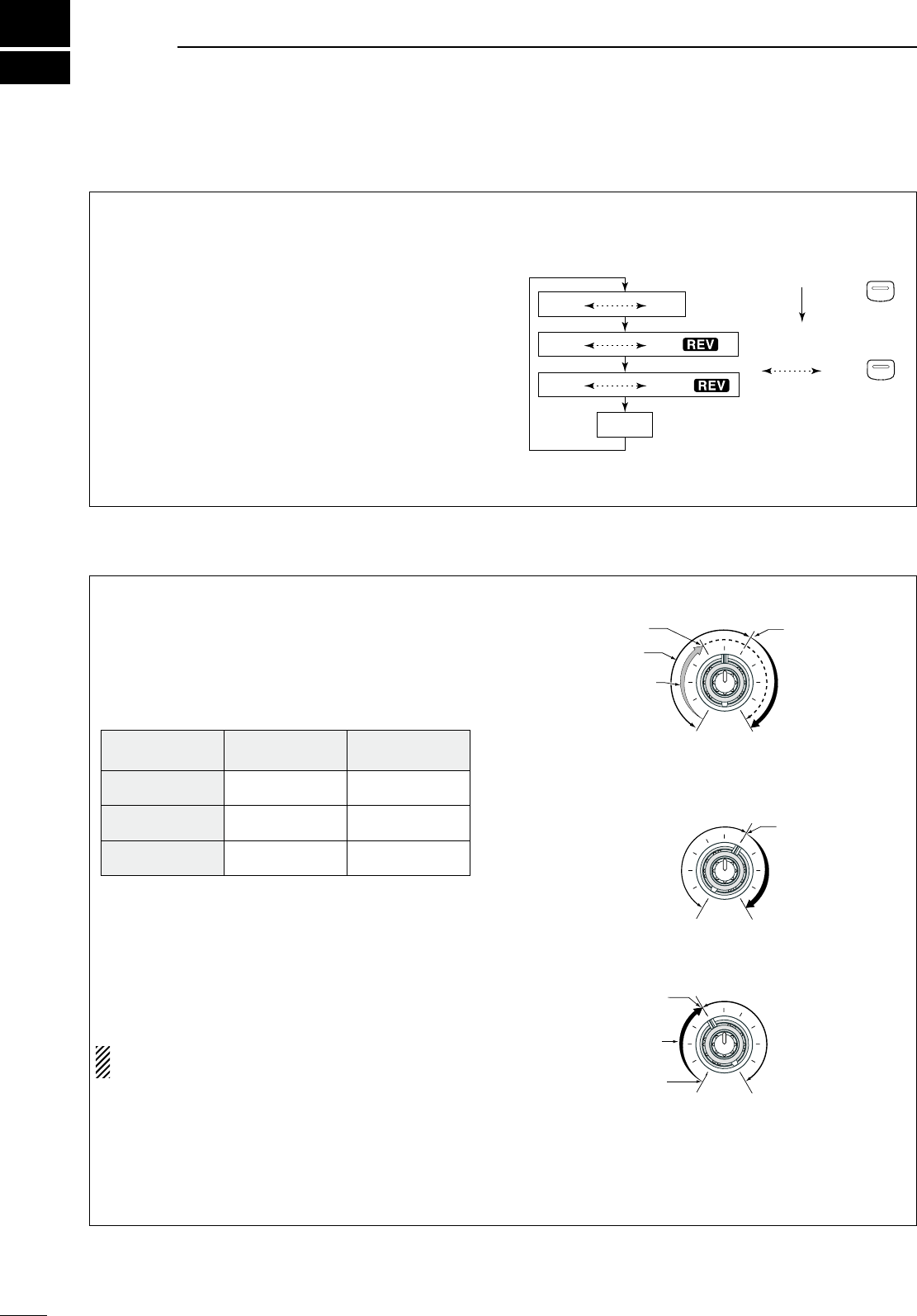
D 1 Hz and 10 Hz tuning steps
When the programmable tuning step, “,” disappear,
rotating the tuning dial changes the frequency in
increments of 1 or 10 Hz.
q
Push [TS] one or more times until the programmable
tuning step indicator “” disappears.
w Push [TS] for 1 sec. to toggle between the 1 and
10 Hz step settings.
• When the 1 Hz step is selected, the 1 Hz digit
appears in the frequency indication; when the 10 Hz
step is selected, the 1 Hz digit disappears from the
frequency indication.
TS
Rotating the tuning dial
changes the frequency
in 10 Hz steps.
Rotating the tuning dial
changes the frequency
in 1 Hz steps.
Push for 1 sec.
5
20
n Mode selection
The following modes are available in the IC-718:
SSB (LSB/USB), CW, CW REV (CW reverse), RTTY,
RTTY REV (RTTY reverse) and AM.
Push [MODE] one or more times to select desired
operation mode.
Push [MODE] for 1 sec. to toggle between USB
and LSB. (SSB mode only)
Push [MODE] for 1 sec. to toggle between CW
and CW reverse or RTTY and RTTY reverse. (CW
and RTTY mode only)
• The selected mode is indicated in the function display.
Note: If desired mode cannot be selected, it’s use
may inhibited by initial set mode. (p. 44)
OPERATING MODE SELECTION
OPERATING MODE SELECTION
Push
momentarily
Push
for 1 sec.
USB LSB
CW CW
RTTY RTTY
AM
MODE
MODE
The IC-718 uses the same control, [RF/SQL], to
adjust either the RF gain or the squelch. [RF/SQL]
adjusts either the RF gain or the squelch depending
on the operating mode selected and the condition of
the RF/SQL item in initiaset mode (p. 44).
• [RF/SQL] control priority
* The RF gain is set to maximum level when the [RF/SQL]
is set as [SQL] control.
The RF (Radio Frequency) gain is used to adjust the
receiver gain.
• Shallow rotation moves the S-meter to the right indicating
the signal strength which can be received.
The recommended position for RF gain is the 12
o’clock position since this sets RF gain to the max.
The SQUELCH removes noise output from the
speaker (closed condition) when no signal is received.
The squelch is available for the other modes.
• A segment appears in the S-meter to indicate the
S-meter squelch level.
• When set as the [RF/SQL] control
Set mode
setting
USB, LSB,
CW, RTTY AM
At (AUTO) RF GAIN SQL*
Sq (SQL)
rS (RF/SQL)
(default)
SQL*
RF/SQL RF/SQL
SQL*
Minimum RF gain
Adjustable range
RF gain adjustable
range
Maximum RF gain
Maximum RF gain
Squelch is open. S-meter squelch
S-meter squelch
threshold
Shallow Deep
Squelch is open.
S-meter squelch
S-meter squelch
threshold
• When set as the [SQL] control
• When set as the [RF] control
n RF gain and Squelch
RECEIVE AND TRANSMIT
21
5
RECEIVE AND TRANSMIT
n Function for receive
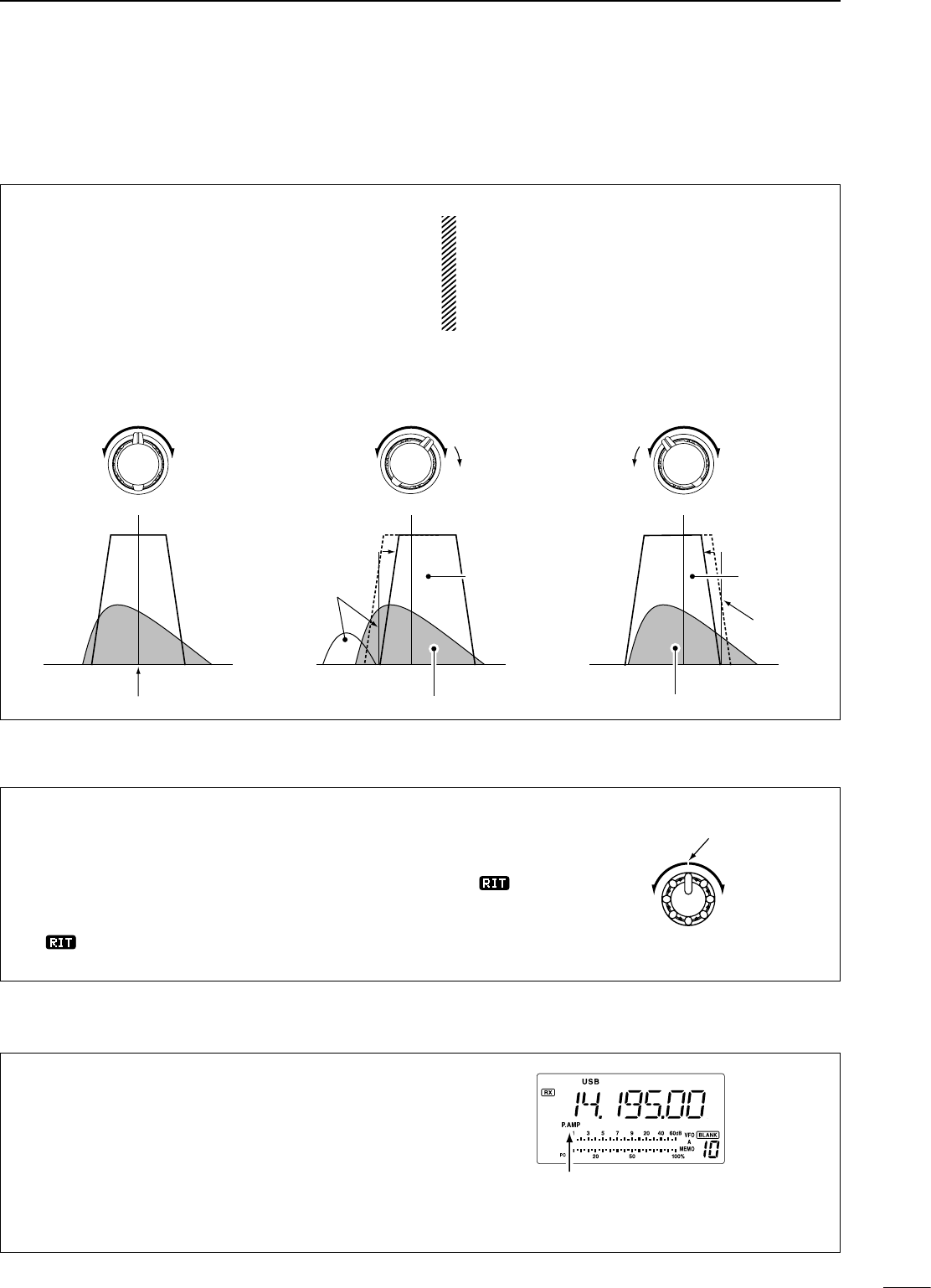
The IF shift function electronically narrows the
passband frequency of the IF (intermediate frequency)
and cuts out higher or lower frequency components of
the IF to reject interference. The function shifts the IF
frequency up to ±1.2 KHz in SSB/CW/RTTY modes
and up ±250 Hz in CW-narrow/RTTY narrow modes.
The IF shift is not available in AM mode.
IF SHIFT OPERATION EXAMPLE
• Adjust the [SHIFT] control for a minimum
interference signal level.
• When IF shift is used, the audio tone may be
changed.
• Set the IF shift control to its center position when
there is no interference.
SHIFT SHIFTSHIFT
IF center frequency
Interference
Desired signal
Passband
Both controls at
center position
Cutting a lower
passband
Cutting higher
passbands
Interference
Desired signal
Passband
ï IF shift function
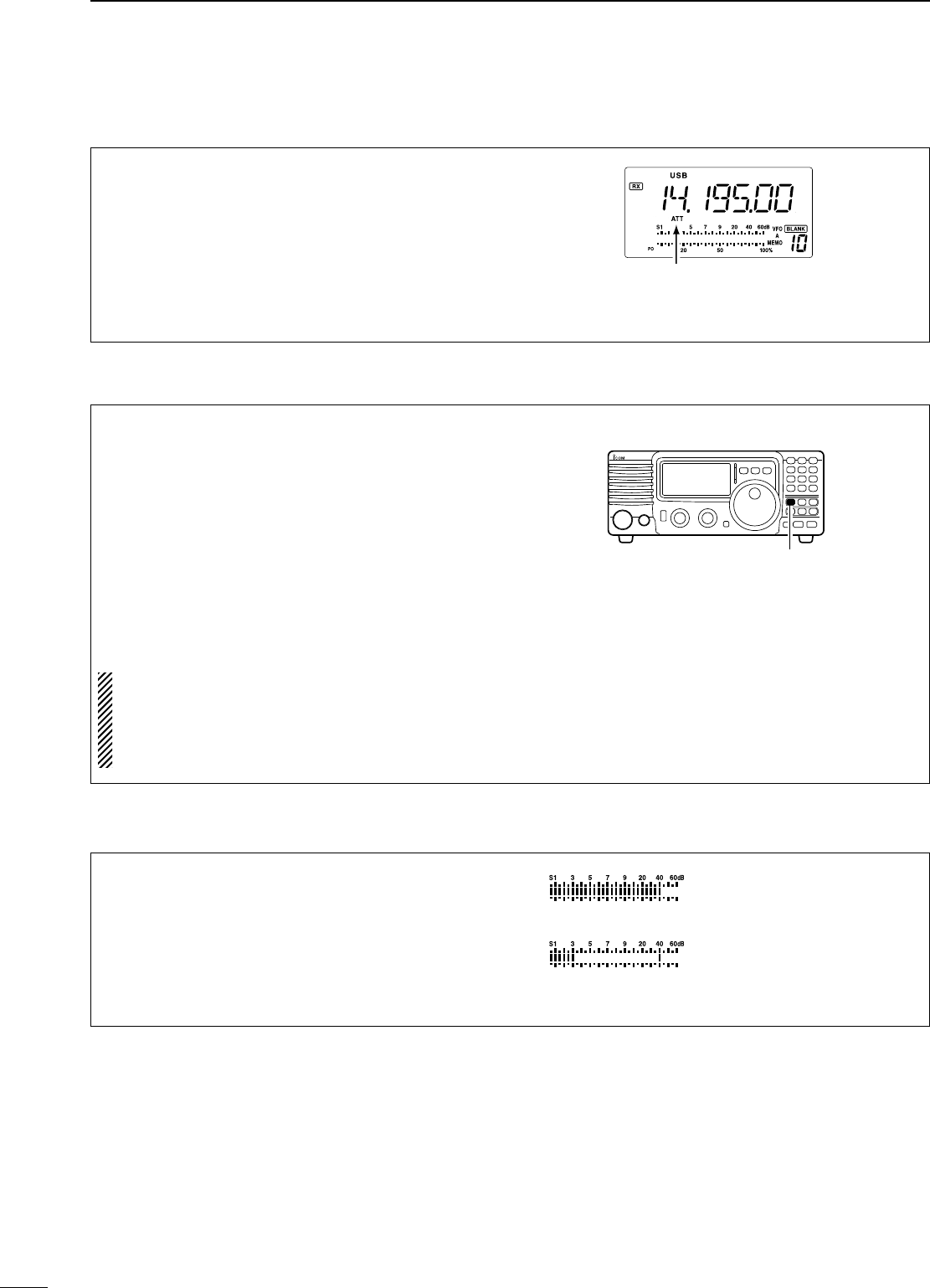
ï RIT function
The RIT (Receive Incremental Tuning) function
compensates for off-frequencies of communicating
stations. The function shifts the receive frequency up
to 1.2 KHz without moving the transmit frequency.
q Rotate the RIT control to cancel the off-
frequencies.
• “
RIT
” appears on the display.
• The transmit frequencies are not shifted.
w T o c a n c e l t h e R I T
function, rotate the RIT
control to the center
position.
• “
RIT
” disappears.
RIT off position
ï Preamp
The preamp amplifies received signals in the front
end circuit to improve the S/N ratio and sensitivity.
Turn this function ON when receiving weak signals.
Push [P.AMP] to toggle between preamp or turn
the preamp OFF.
• Preamp functions below 1.59999 MHz, but sensitivity
may reduce in some cases.
Appears when the
preamp ON.
22
5RECEIVE AND TRANSMIT
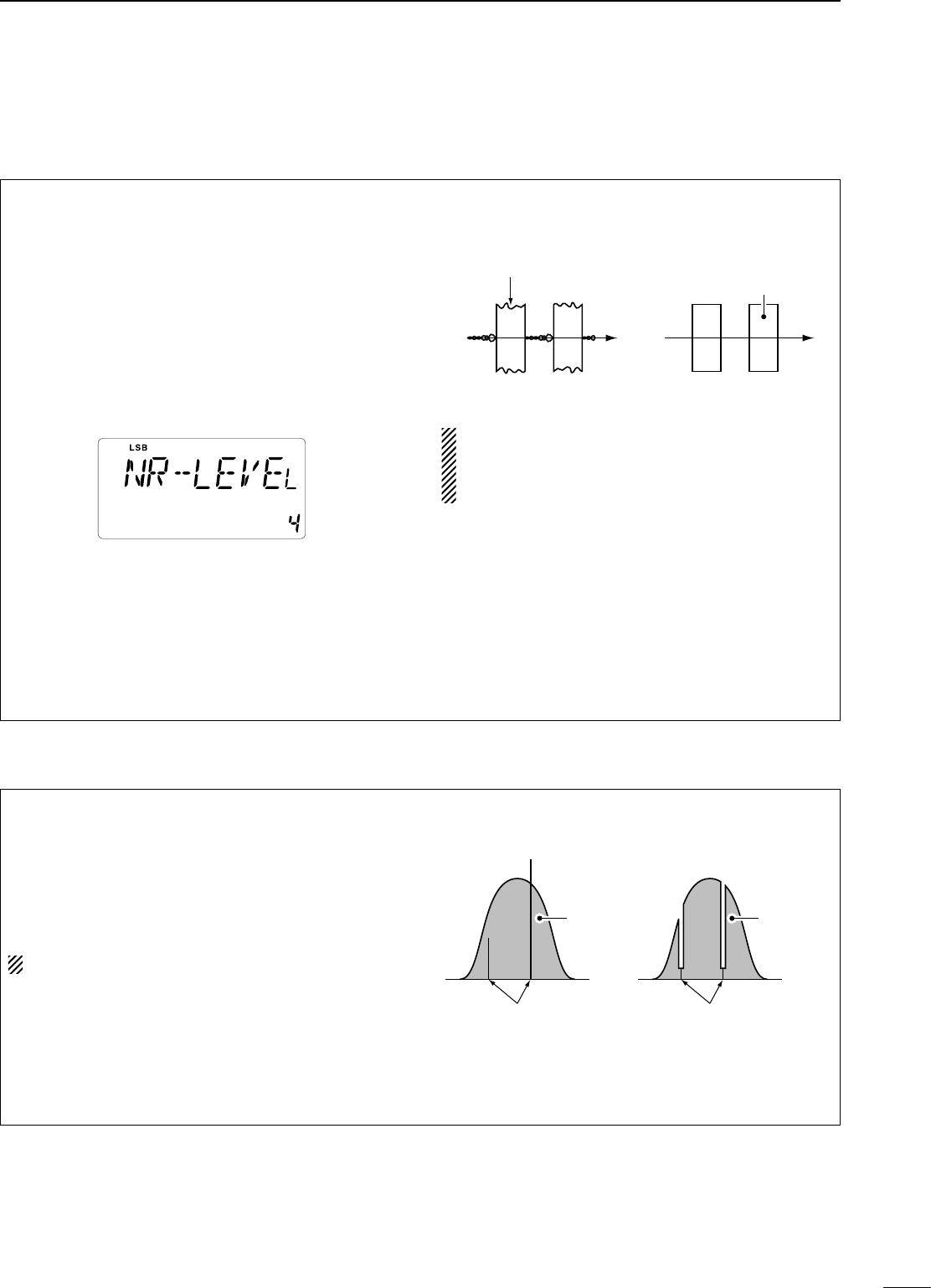
ï Attenuator
The attenuator prevents desired signals from distorting
when very strong signals are near the desired
frequency or when very strong electric fields, such as
from broadcasting stations, are near your location.
Push [ATT] to toggle the 20 dB attenuator function
ON and OFF.
• “ATT” appears when the attenuator is turned ON.
Appears when the
attenuator ON.
ï Peak meter hold
The peak meter hold function freezes the highest
displayed bar segment in any meter function for about
0.5 sec. so that you can more easily read the meter.
This function can be turned ON and OFF in initial set
mode (p. 45).
Initial reception of a signal
results in an S-meter reading
of 40 dB.
The highest indicated bar
remains displayed for 0.5 sec.
even when the signal strength
decreases.
ï Noise blanker
The noise blanker reduces pulse-type noise such as
that generated by automobile ignition systems.
q Push the [NB] switch to turn the noise blanker ON
or OFF.
w Push the [NB] for 1 sec. to enter the noise blanker
level setting condition.
e Rotate the tuning dial to adjust the noise blanker
level.
r Push [NB] to exit the setting condition.
t Push [NB] again to turn the noise blanker function
OFF.
• [NB] indicator disappears.
• When using the noise blanker, received signals
may be distorted if they are excessively strong.
• The noise blanker function in AM mode can
be deactivated depending on initial set mode
setting. (p. 45)
Y
Y
[NB] switch
23
5
RECEIVE AND TRANSMIT
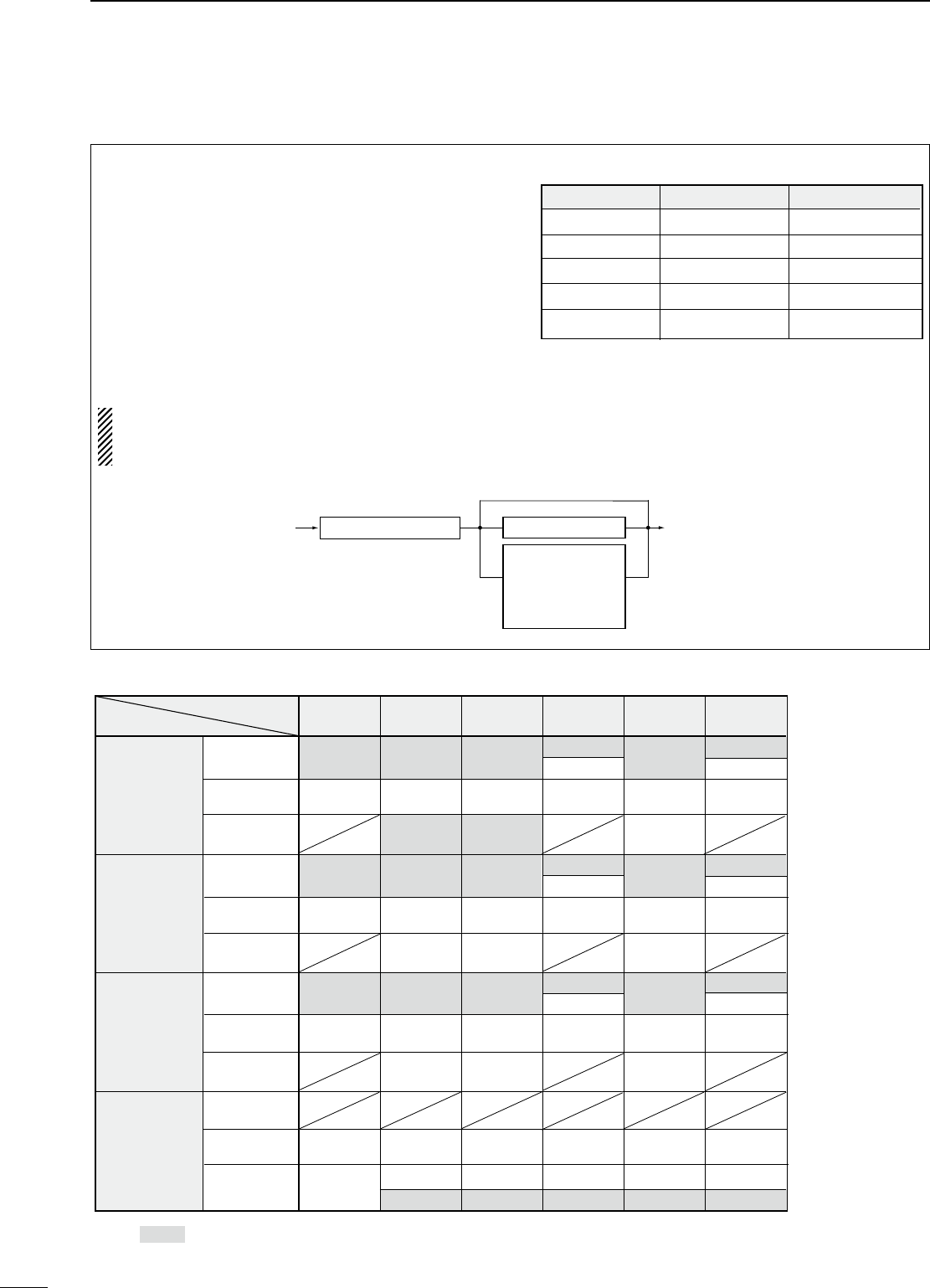
ï ANF (Automatic Notch Filter) function
When an optional UT-106 is installed (DSP appears
in the function display), an auto notch function can
be used.
The function automatically attenuates more than
3 beat tones, tuning signals, etc., even if they are
moving.
The auto notch functions in SSB mode only.
q Select SSB mode.
w Push [ANF] to turn the auto notch function ON.
• [ANF] indicator appears.
e Push [ANF] again to cancel the function.
• [ANF] indicator disappears.
Unwanted tone
frequency
Desired
signal (AF)
Desired
signal (AF)
Particular frequency
is attenuated
Auto notch OFF Auto notch ON
n DSP function (Requires an optional UT-106 DSP UNIT)
When an optional UT-106 is installed (DSP appears
in the function display), noise reduction function can
be used.
The noise reduction function reduces noise
components and picks out desired signals which
are buried in noise. The received AF signals are
converted to digital signals and then the desired
signals are separated from the noise.
q Push [NR] to turn the noise reduction ON.
• [NR] indicator appears.
w Push [NR] for 1 sec. to enter the noise reduction
level setting condition.
e Rotate the tuning dial to adjust the noise
reduction level.
r Push [NR] to exit the setting condition.
t Push [NR] again to turn the noise reduction OFF.
• [NR] indicator disappears.
• Noise reduction example
Higher setting of the [NR] level results in audio
signal masking or distortion. Set the [NR] level for
maximum clarity. The noise reduction function is
available in all modes.
Noise reduction OFF Noise reduction activated
Desired
signal (CW)
Noise components
ï NR (Noise reduction) function
24
5RECEIVE AND TRANSMIT
n Filter selection
The filter selection switches the IF passband width
as shown in the table at right.
The filter selection is automatically memorized in
each mode.
q Select the desired mode with the mode switches.
w Push [FIL] one or more times to select the desired
filter combination.
•
ã or ç does not appear while in normal IF filter mode.
• ç appears when the wide IF filter is selected.
• ã appears when the narrow IF filter is selected.
When an optional filter is installed, set the optional
filter in initial set mode. An optional filter is not
selected by default.
• Optional filter variations
FL-65 (2.4 kHz)*
FL-257 (3.3 kHz)**
FL-96 (2.8 kHz)**
FL-222 (1.8 kHz)**
FL-52A (500 Hz)**
FL-53A (250 Hz)**
2nd IF signal 2nd IF signal/DET
455 kHz IF filter
CFWS450HT (6 kHz)***
Through
* AM; Narrow,
SSB/CW/RTTY; Normal
*** AM; Normal,
SSB/CW/RTTY; Wide
** OPTION
Name
FL-52A
FL-53A
FL-96
FL-222
FL-257
Band width
500 Hz/-6dB
250 Hz/-6dB
2.8 KHz/-6dB
1.8 KHz/-6dB
3.3 KHz/-6dB
Mode
CW/RTTY-N
CW/RTTY-N
SSB-W
SSB-N
SSB-W
no FL-52A FL-53A FL-96 FL-222 FL-257
SSB
WIDE 6 K* 6 K* 6 K* 6 K* 6 K* 6 K*
NORMAL 2.4 K 2.4 K 2.4 K 2.4 K 2.4 K 2.4 K
NARROW 500* 250* 1.8 K
CW
WIDE 6 K* 6 K* 6 K* 6 K* 6 K* 6 K*
NORMAL 2.4 K 2.4 K 2.4 K 2.4 K 2.4 K 2.4 K
NARROW 500 250 1.8 K
RTTY
WIDE 6 K* 6 K* 6 K* 6 K* 6 K* 6 K*
NORMAL 2.4 K 2.4 K 2.4 K 2.4 K 2.4 K 2.4 K
NARROW 500 250 1.8 K
AM
WIDE
NORMAL 6 K 6 K 6 K 6 K 6 K 6 K
NARROW 2.4 K 2.4 K 2.4 K 2.4 K 2.4 K 2.4 K
500* 250* 2.8 K* 1.8 K* 3.3 K*
2.8 K
2.8 K
2.8 K
( Hz )
3.3 K
3.3 K
3.3 K
Note: *This selection can be used when the expanded filter
selection function is turned on in the initial set mode. (see right)
• Filter construction
• Filter selection table
25
5
RECEIVE AND TRANSMIT
n Filter setting
When an optional filter is installed, set the optional
filters in initial set mode. Optional filters are not
selected by default. (p. 47)
D Optional filter setting
q While pushing and holding [SET], push [POWER]
to enter initial set mode.
w Push [UP Y] or [Z DN] one or more times until
“FIL” appears on the display.
e Rotate the tuning dial to select the installed filter.
• “no,” “52A,” “53A,” “96,” “222” and “257” indicate no
optional filter, FL-52A, FL-53A, FL-96, FL-222 and
FL-257, indicate respectively for 455 kHz IF filter
selection.
r Push [PWR] to exit initial set mode.
D Expanded filter selection
The selectable filter combinations can be expanded
by setting the expanded filter selection to ON. Then
extra wide or narrow filter can be selected on desired
mode.
q While pushing and holding [SET], push [PWR] to
enter initial set mode.
w Push [UP Y] or [Z DN] one or more times until
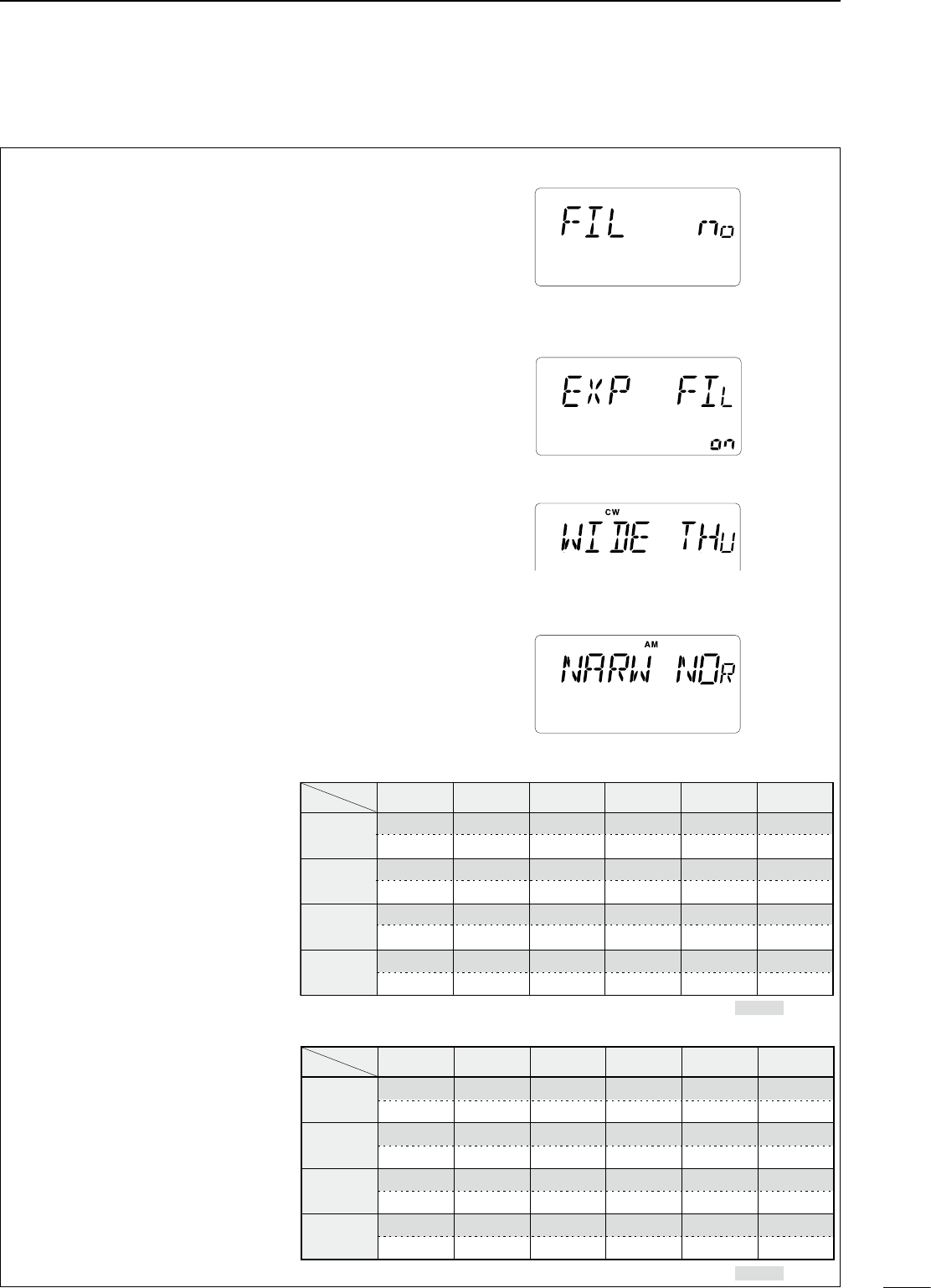
“EXP FIL” appears.
e Rotate the tuning dial to turn the expanded filter
selection ‘on’.
• If ‘on’ is selected, the expanded filter selection can be
used.
• Wide/narrow filter selecting
r Push [UP Y] one or more times
until “WIDE ” or “NAR ”
appears on the display.
t Push [MODE] one or more times
to select the desired mode.
y Rotate the tuning dial to select a
filter.
u Repeat steps t and y to select
IF filters for other modes, if
desired.
• The filter combinations are stored
depending on operating modes.
i Push [POWER] to exit initial set
mode.
no FL-52A FL-53A FL-96 FL-222 FL-257
SSB
no no no 96 (2.8 K) no 257(3.3 k)
THU (6 K) THU (6 K) THU (6 K) THU (6 K) THU (6 K) THU (6 K)
CW
no no no 96 (2.8 K) no 257(3.3 k)
THU (6 K) THU (6 K) THU (6 K) THU (6 K) THU (6 K) THU (6 K)
RTTY
no no no 96 (2.8 K) no 257(3.3 k)
THU (6 K) THU (6 K) THU (6 K) THU (6 K) THU (6 K) THU (6 K)
AM
– – – – – – – – – – – – – – – – – –
no FL-52A FL-53A FL-96 FL-222 FL-257
SSB
– – – no no – – – 222 (1.8 K) – – –
52A (500) 53A (250)
CW
– – – 52A (500) 53A (250) – – – 222 (1.8 K) – – –
RTTY
– – – 52A (500) 53A (250) – – – 222 (1.8 K) – – –
AM NOR (2.4 K)
52A (500) 53A (250) 96 (2.8 K) 222 (1.8 K) 257 (3.3 K)
NOR (2.4 K) NOR (2.4 K) NOR (2.4 K) NOR (2.4 K)
NOR (2.4 K)
: default
: default
no FL-52A FL-53A FL-96 FL-222 FL-257
SSB
no no no 96 (2.8 K) no 257(3.3 k)
THU (6 K) THU (6 K) THU (6 K) THU (6 K) THU (6 K) THU (6 K)
CW
no no no 96 (2.8 K) no 257(3.3 k)
THU (6 K) THU (6 K) THU (6 K) THU (6 K) THU (6 K) THU (6 K)
RTTY
no no no 96 (2.8 K) no 257(3.3 k)
THU (6 K) THU (6 K) THU (6 K) THU (6 K) THU (6 K) THU (6 K)
AM
– – – – – – – – – – – – – – – – – –
no FL-52A FL-53A FL-96 FL-222 FL-257
SSB
– – – no no – – – 222 (1.8 K) – – –
52A (500) 53A (250)
CW
– – – 52A (500) 53A (250) – – – 222 (1.8 K) – – –
RTTY
– – – 52A (500) 53A (250) – – – 222 (1.8 K) – – –
AM NOR (2.4 K)
52A (500) 53A (250) 96 (2.8 K) 222 (1.8 K) 257 (3.3 K)
NOR (2.4 K) NOR (2.4 K) NOR (2.4 K) NOR (2.4 K)
NOR (2.4 K)
: default
: default
• Narrow filter setting table
• Wide filter setting table
• Optional filter selection
• Expanded filter selection “on”
• Wide filter setting
• Narrow filter setting
26
5RECEIVE AND TRANSMIT
ï Meter function
The bar meter in the function display acts as an
S-meter (for relative signal strength) during receive
and can be selected for one of three functions during
transmit.
• Push [SET] one or more times to select the PO,
ALC and SWR meter mode.
DISPLAY
INDICATION MEASUREMENT
Po
Indicates the relative RF output power.
ALC
Indicates the ALC level. When the
meter movement shows the input signal
level exceeds the allowable level, the
ALC limits the RF power. In such cases,
reduce the microphone gain (see
above).
SWR
Indicates the SWR over the transmis-
sion line.
n Function for transmit
• Setting output power
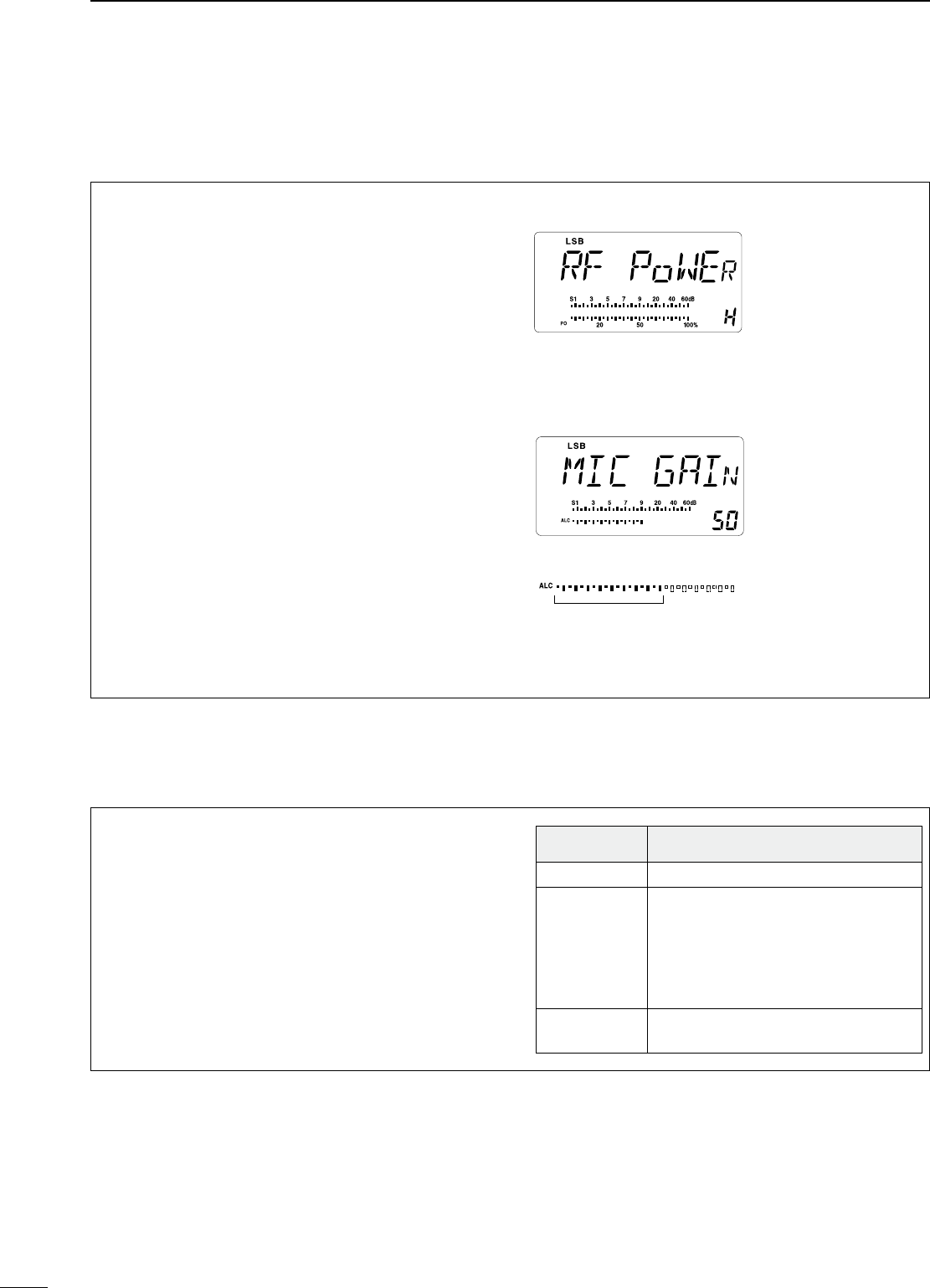
q Push [SET] for 1 sec. to select quick set mode.
w Push [∫ UP]/[√ DN] one or more times to select
“RF Power”.
e Rotate the main dial to select the desired output.
• Output power is displayed in 101 steps (L, 1–99 and
H) but is continuously selectable.
• Available power
SSB/CW/RTTY: 2 (or less) –100 W
AM : 2 (or less) –40 W*
*Carrier power
• Setting microphone gain
Microphone gain must be adjusted properly so that
your signal does not distort when transmitted.
q Select SSB or another phone mode.
w Push [SET] for 1 sec. to enter the quick set mode.
e Push [∫ UP]/[√ DN] one or more times to select
“MIC GAIN”.
r When speaking into the microphone adjust the
mic gain so that the ALC meter does not peak
past the ALC zone.
t Push [SET] to exit quick set mode.
Maximum output
power is selected.
Microphone gain is
set to 50.
ï Output power and microphone gain
ALC zone
27
5
RECEIVE AND TRANSMIT
IC-718 has a built-in, low distortion Mic compressor
circuit. This circuit increases your average talk power
in SSB mode and is especially useful for DX’ing
when the receiving station is having difficulty copying
your signal.
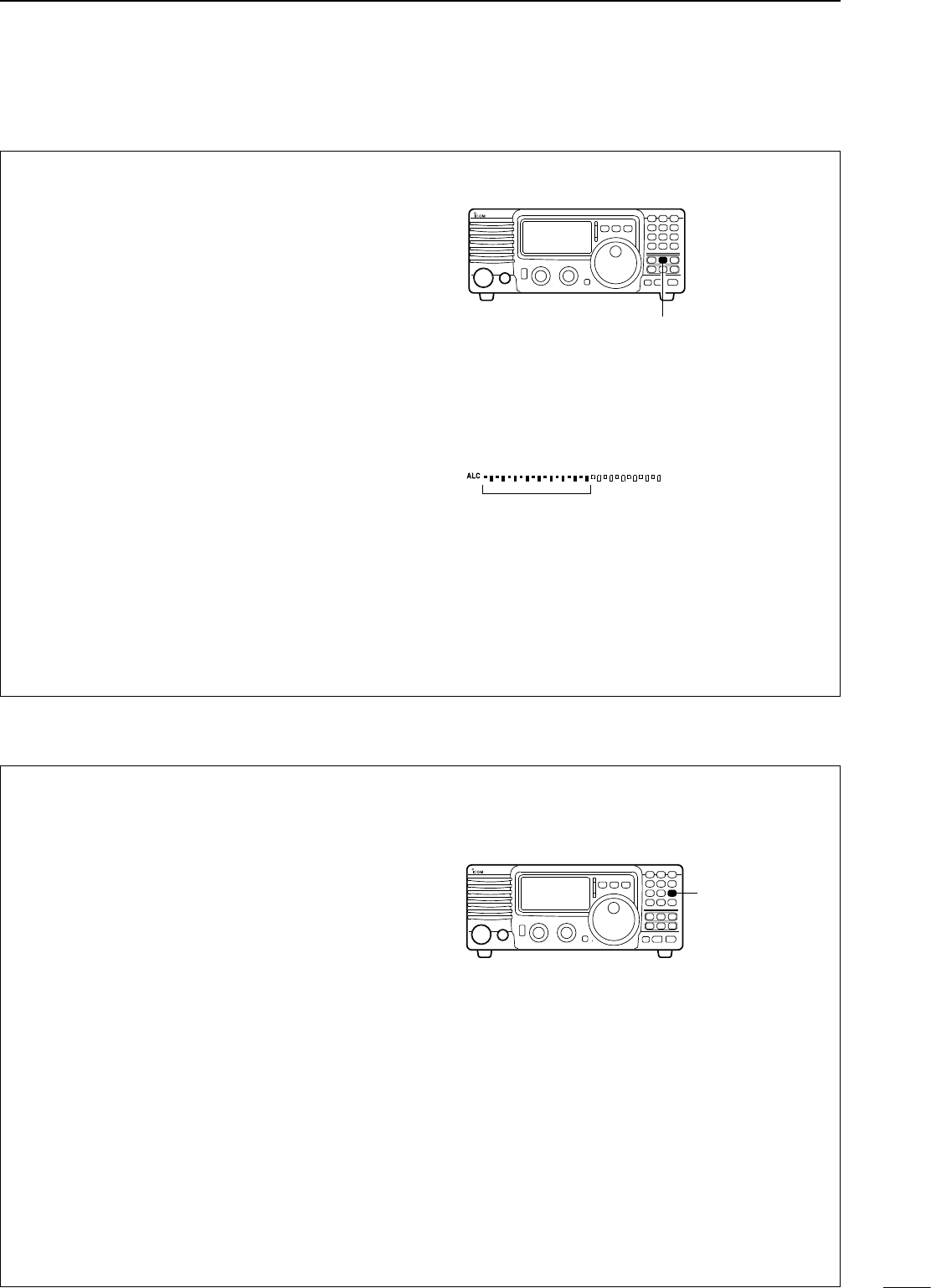
q Selecting USB or LSB mode.
w Select the mic gain display in quick set mode.
• Push [SET] for 1 sec. to select quick set mode.
• Push [∫ UP]/[√ DN] one or more times to select “MIC
GAIN”.
e Adjust the mic gain by rotating the main [DIAL].
•
While transmitting at your normal voice level, the ALC
meter should read at about the middle of the ALC zone.
• Be sure the mic gain is in the range of 20 to 50.
r Push [SET] to exit the quick set mode.
t Push [COMP] to turn mic compressor ON.
y Push [SET] one or more times to select the ALC
meter.
u While speaking into the microphone at a normal
voice level, confirm the ALC level so that the ALC
meter peak does not past the ALC zone.
• If the ALC meter peak past the ALC zone, re-adjust
the mic. gain.
Note: When the ALC meter peaks above the ALC
zone, your transmited voice may be distorted.
Y
Y
[COMP] switch
ï Microphone compressor
Adjust [MIC GAIN] so that the ALC
meter reads within the ALC zone.
ALC zone
The VOX (Voice-operated Transmission) function
toggles between transmit and receive with your
voice. This function provides an opportunity to input
log entries into your computer, etc. while operating.
q Push [VOX] to turn the function ON.
w Select “VOX Gain” in quick set mode.
• Push [SET] for 1 sec. to select quick set mode.
• Push [∫ UP]/[√ DN] one or more times to select
“VOX GAIN”
e While speaking into the microphone, adjust [VOX
GAIN] until the transceiver is transmitting.
r Select “VOX Delay” in quick set mode.
• Push [∫ UP]/[√ DN] one or more times to select
“VOX Delay”
t While speaking into the microphone, adjust [VOX
DELAY] as desired.
y Select “ANTI-VOX” in quick set mode.
• Push [∫ UP]/[√ DN] one or more times to select “AN
VOX”
u If the receive audio from the speaker toggles the
transceiver to transmit during receive, adjust the
“ANTI-VOX” to the point where it has no effect.
i Push [SET] to exit the quick set mode.
ï VOX operation
Y
Y
[VOX] switch
The AT-180 automatic antenna tuner matches the
IC-718 to the connected antenna automatically. Once
the tuner matches an antenna, the variable capacitor
angles are memorized as a preset point for each
frequency range (100 kHz steps). Therefore, when you
change the frequency range, the variable capacitors
are automatically preset to the memorized point.
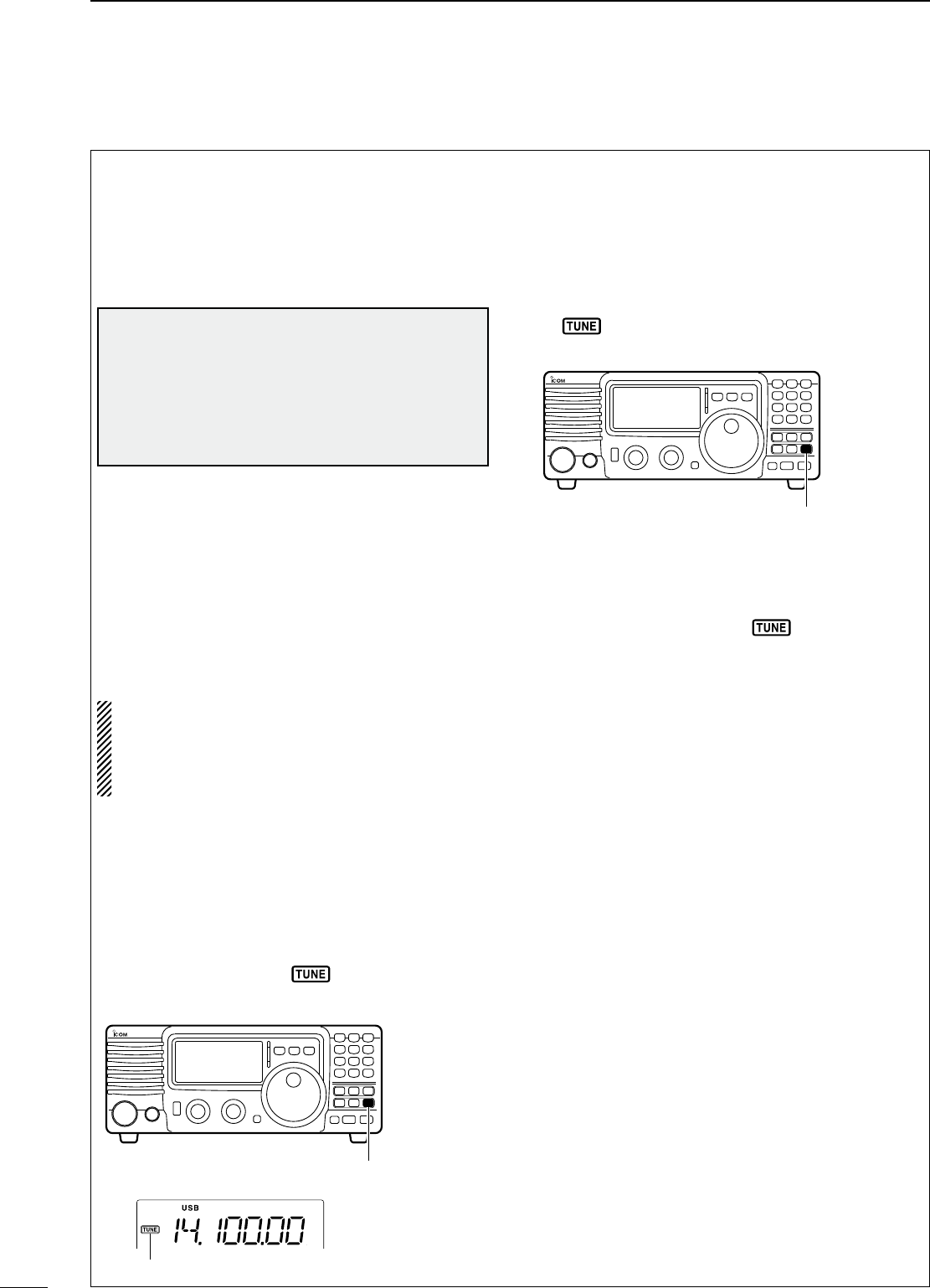
TUNER OPERATION
• Tuner type setting (p.46)
q Push [PWR] for 1 sec. to turn power OFF.
w While pushing and holding [SET], push [PWR] to
turn power ON.
e Push [UP Y] or [Z DN] one or more times to
select [TUNER].
r Rotate the main dial to select “18”.
• AT-180 AUTOMATIC ANTENNA TUNER is selected.
NOTE: NEVER select “4” (AH-4 AUTOMATIC
ANTENNA TUNER), otherwise the transceiver
transmits automatically when turning the power ON.
Push [TUNER] to cancel unexpected tramsmission.
Then, re-select the tuner type correctly.
y Push [PWR] for 1 sec. to turn power OFF.
u Push [PWR] to turn power ON again.
• AUTO TUNE:
Push [TUNER] to turn the tuner ON. The antenna is
tuned automatically during transmission when the
antenna SWR is higher than 1.5:1.
• When the tuner is OFF, “ ” goes out.
• MANUAL TUNING
During SSB operation on HF bands at low voice
levels, the AT-180 may not be tuned correctly. In such
cases, manual tuning is helpful.
Push and hold [TUNER] for 1 sec. to start manual
tuning.
• CW mode is selected, a side tone is emitted, and “
” blinks; then, the previous mode is selected.
If the tuner cannot reduce the SWR to less than
1.5:1 after 20 sec. of tuning, “ ” goes out. In this
case, check the following:
• the antenna connection and feedline
• the antenna SWR (p. 26; meter function)
• Through inhibit
The AT-180 has a through inhibit condition. When
selecting this condition, the tuner can be used at
poor SWR’s. In this case, automatic tuning in the
HF bands activates only when exceeding SWR 3:1.
Therefore, manual tuning is necessary each time
you change the frequency. Although termed “through
inhibit,” the tuner will be “through” if the SWR is
higher than 3:1 after tuning.
CONVENIENT
• Tuner sensitive condition
If you require critical tuning at any time during
transmission, select the tuner sensitive condition.
See p. 51 for selection.
• Automatic tuner start
If you want to turn OFF the tuner under conditions
of VSWR 1.5:1 or less, use “automatic tuner on” and
turn the tuner OFF. See p. 46 for turning the function
ON and OFF.
28
5RECEIVE AND TRANSMIT
CAUTION: NEVER transmit with the tuner ON
when no antenna is connected. This will be damage
both the transceiver and the antenna tuner.
DO NOT! connect the AT-180 and AH-4 at
the same time. Both turners will not be function
correctly.
Y
Y
[TUNER]
Y
Y
[TUNER]
Tuning indicator;
Blinks: Tuning now
Appears: Tune is completed
Disappears: Tune is not completed
Push and hold 1 sec. to start manual
tuning.
ï Optional AT-180 AUTOMATIC ANTENNA TUNER operation
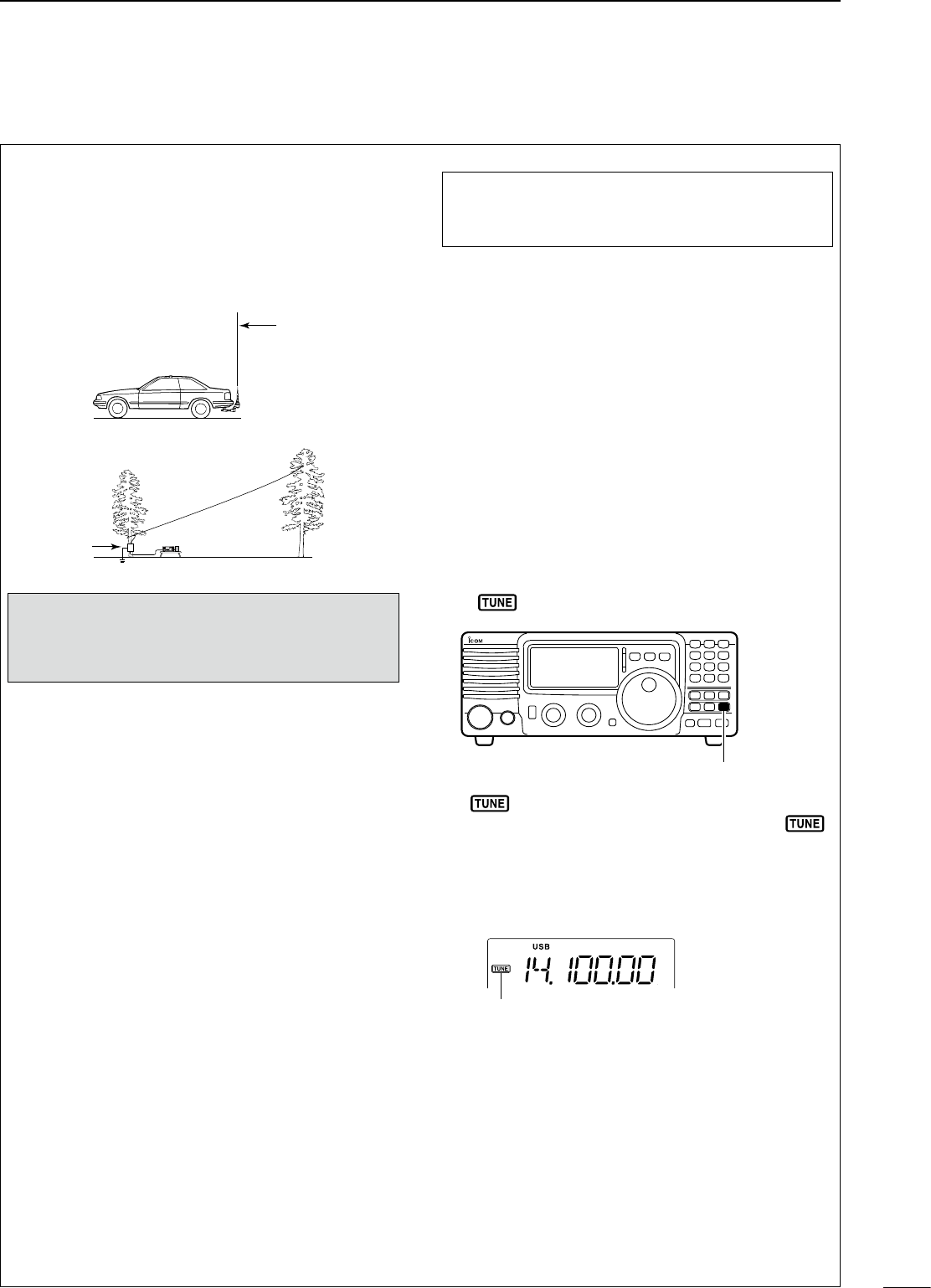
29
5
RECEIVE AND TRANSMIT
The AH-4 matches the IC-718 to a long wire antenna
more than 7 m/23 ft long (3.5 MHz and above).
• See p. 14 for connection.
• See the AH-4 instruction manual for AH-4
installation and antenna connection details.
NEVER operate the AH-4 without an antenna wire.
The tuner and transceiver will be damaged.
NEVER operate the AH-4 when it is ungrounded.
Transmitting before tuning may damage the transceiver.
Note that the AH-4 cannot tune when using a 1⁄2 λ long
wire or multiple of the operating frequency.
TUNER OPERATION
• Tuner type setting (p.46)
q Push [PWR] for 1 sec. to turn power OFF.
w While pushing and holding [SET], push [PWR] to
turn power ON.
e Push [UP Y] or [Z DN] one or more times to
select [TUNER].
r Rotate the main dial to select “4”.
• AH-4 AUTOMATIC ANTENNA TUNER is selected.
y Push [PWR] for 1 sec. to turn power OFF.
u Push [PWR] to turn power ON again.
• MANUAL TUNING
q Set the desired frequency in an HF band.
• The IC-718 will not transmit outside of the ham bands,
the AH-4 tuner will tune all frequencies 3.5 to 30 MHz.
w Push and hold [TUNER] for 1 sec.
• “ ” blinks and “CW” appears while tuning.
e “ ” lights constantly when tuning is complete.
• When the connected wire cannot be tuned, the “ ”
goes out, the AH-4 is bypassed and the antenna wire
is connected to the antenna connector on the
transceiver directly.
r To bypass the AH-4 manually, push [TUNER].
CONVENIENT
• PTT tune function
The AH-4 is always tuned when the PTT is pushed
after the frequency is changed (more than 1%).
This function removes the “push and hold [TUNER]”
operation and activates first transmission on the new
frequency. This function is turned ON in initial set
mode (p. 46).
For mobile operation
For outdoor operation
Long wire
Optional AH-2b
antenna element
AH-4
R WARNING: HIGH VOLTAGE!
NEVER touch the antenna element while tuning or
transmitting.
Tuning is required for each frequency. Be sure to
re-tune the antenna before transmitting when you
change the frequency–even slightly.
Y
Y
[TUNER]
ï Optional AH-4 AUTOMATIC ANTENNA TUNER operation
Tuning indicator;
Blinks: Tuning now
Appears: Tune is completed
Disappears: Tune is not completed
AH-4 setting example:
30
5RECEIVE AND TRANSMIT
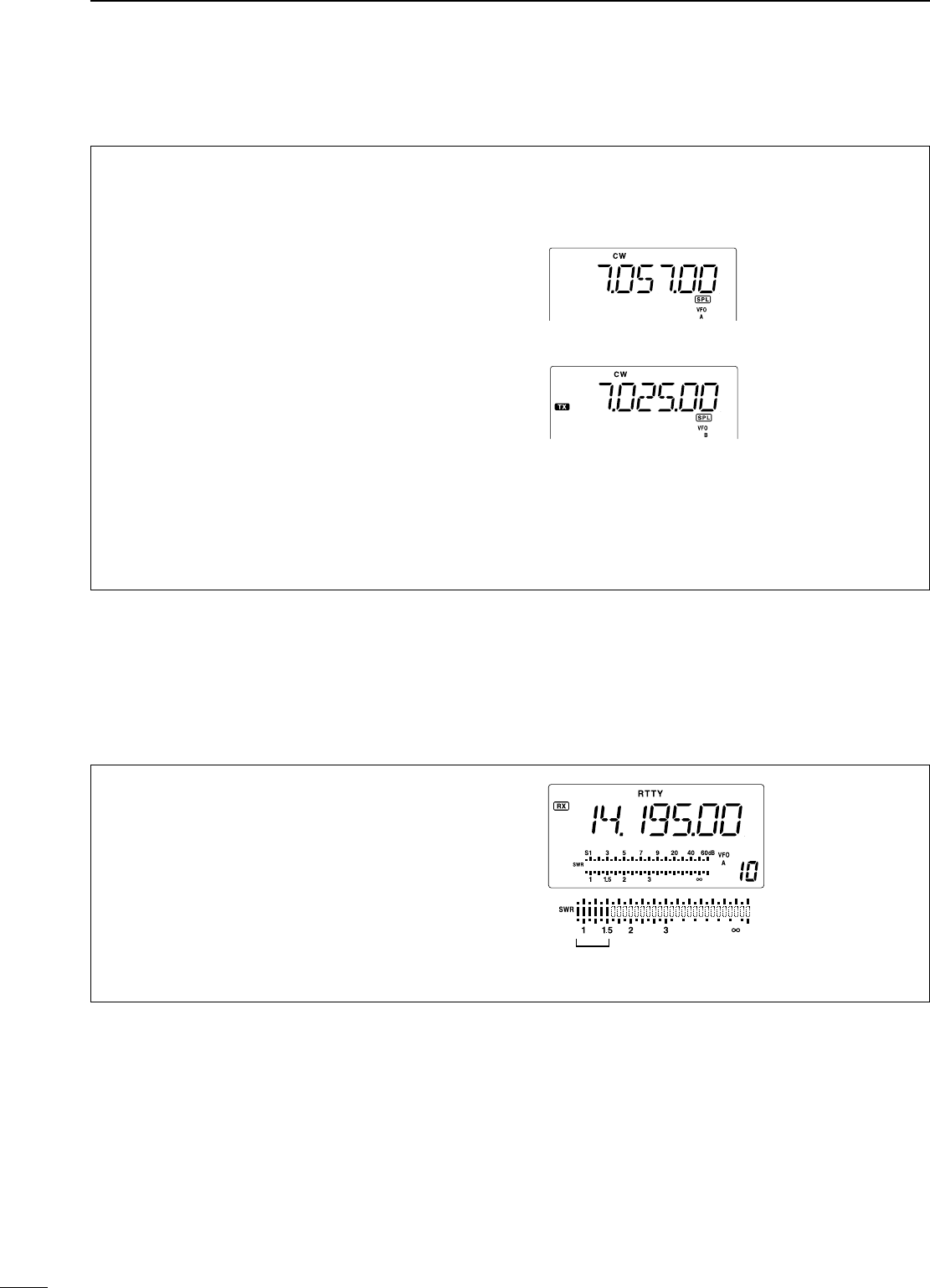
n Split frequency operation
Split frequency operation allows you to transmit and
receive on two different frequencies. Split frequency
operation uses two frequencies, one in VFO A and
the other in VFO B.
Following is an example of setting 7.057 MHz, CW
mode in VFO A (for receive) and 7.025 MHz, CW
mode in VFO B (for transmit).
q Select VFO B and set the frequency to 7.025
MHz/ CW.
w Push [A/B] to select VFO A and set the frequency
to 7.057 MHz/CW.
e Push [SPL] to turn the split frequency operation
ON.
• Split operation is now set for receive 7.057 MHz/CW
and transmit 7.025 MHz/CW.
• To change the receive frequency, rotate the main dial,
to change the transmit frequency, rotate the main dial
during transmit mode.
To exchange the transmit and receive frequencies,
push [A/B].
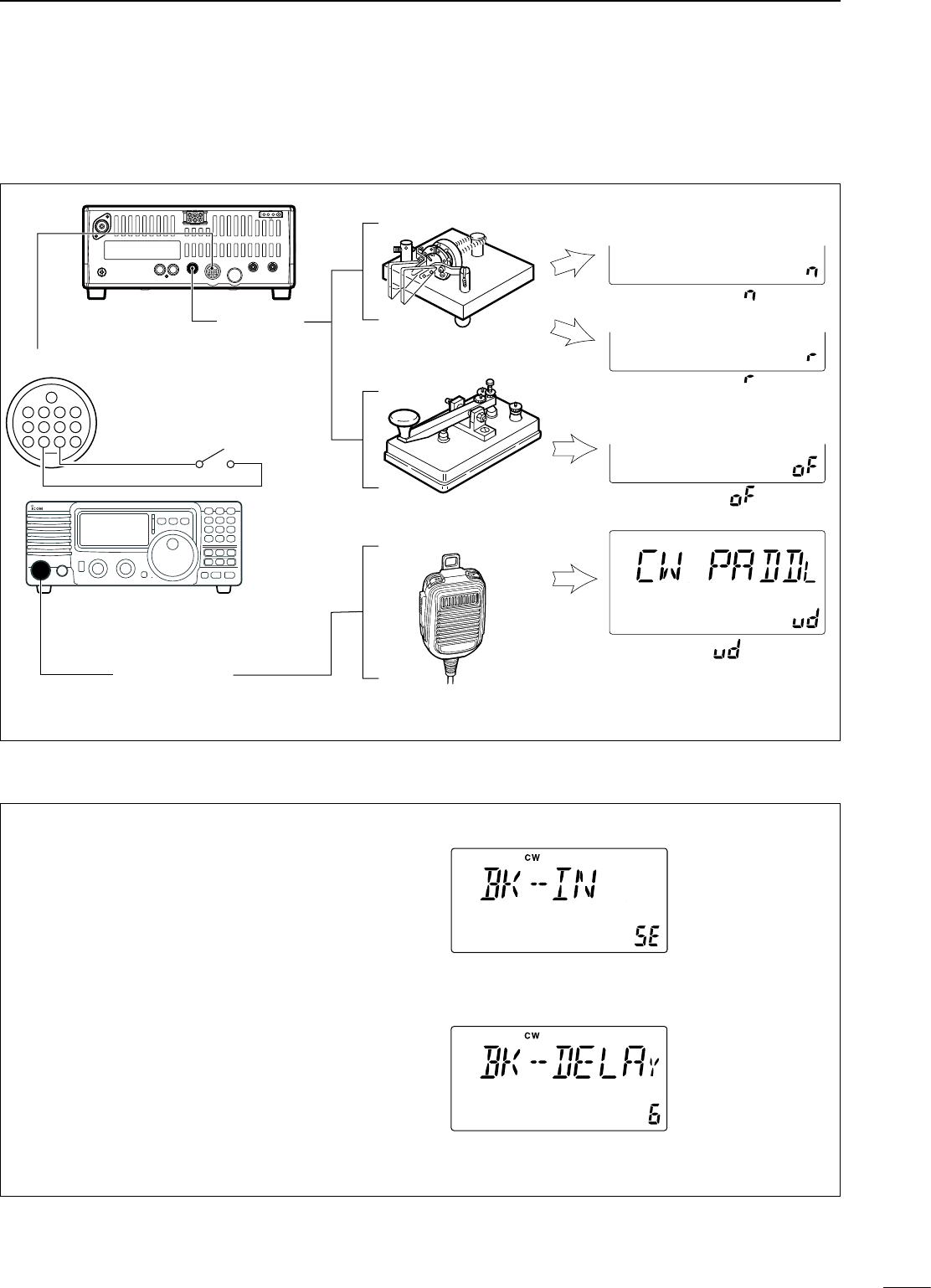
n SWR
The IC-718 has a built-in circuit of measuring antenna
SWR—no external equipment or special adjustments
are necessary.
ï Measuring SWR
q Confirm that the output power is over 30 W.
w Push [SET] one or more times to select the SWR
meter.
e Push [MODE] one or more times to select CW or
RTTY operation.
• Key down or push [PTT] to transmit; then read
the actual SWR from the meter:
≤ 1.5 well matched antenna
≥ 1.5 check antenna or cable connection, etc.
The best match is in this range.
31
5
RECEIVE AND TRANSMIT
n Function for CW
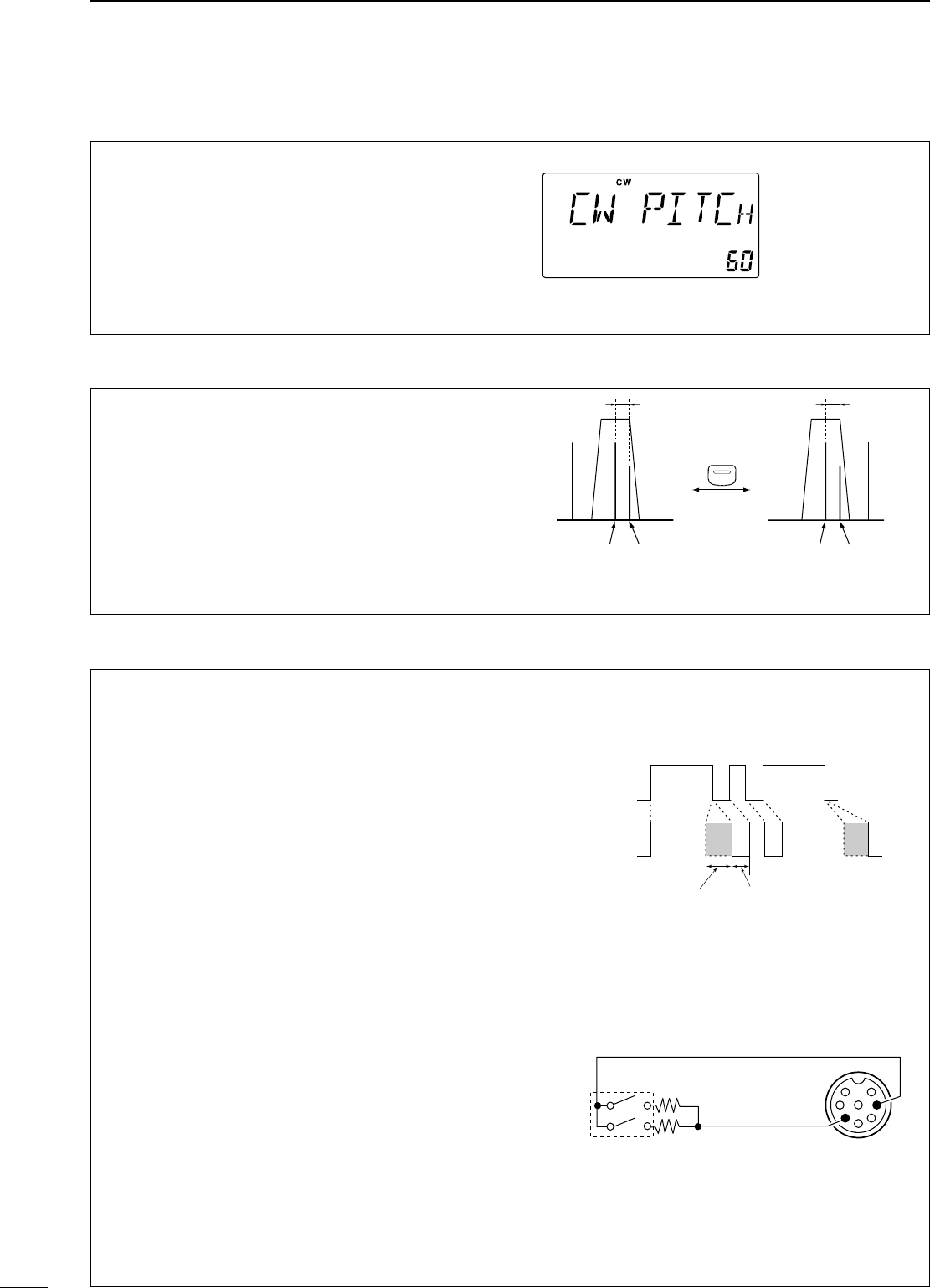
ï Connection for CW
1 2 3 4
8765
9
10 11 12
13
Paddle
[ELEC KEY]
[MICROPHONE]
See p. 32 for connection details:
Paddle operation from front panel
MIC connector.
Straight key
Microphone
Initial set mode setting (p. 45)
4
8
12
[ACC]
1 2 3
765
9
10 11
13
For no break-in operation:
Connect an external switch such as
a foot switch; or use the RTTY
SEND terminal for all bands.
(See p. 33)
: normal
: reverse
: off
: UP/DN key
ï CW operation
q Connect a paddle or straight key as above.
w Select CW (or CW-REV) mode with [MODE].
e Set CW break-in operation as semi break-in, full
break-in or OFF. (See p. 42)
• Push [SET] for 1 sec. to enter quick set mode.
• Push [∫ UP]/[√ DN] one or more times until “BK–IN”
appears, then rotate the main dial to select the desired
condition:
FL: full break-in
SE: semi break-in
oF: no break-in
r Set the CW delay time when semi break-in
operation is selected. (See p. 43)
• Push [SET] for 1 sec. to enter quick set mode; push
[∫ UP]/[√ DN] one or more times until “BK–DELAY”
appears, then rotate the main dial to set the desired
delay time.
CW mode and semi
break-in operation
is selected.
Delay time of 6 dots
is selected in quick
set mode for semi
break-in operation.
32
5RECEIVE AND TRANSMIT
ï CW pitch control
The received CW audio pitch and monitored CW
audio pitch can be adjusted to suit your preferences
(300 to 900 Hz) with out changing the operating
frequency.
q Push [SET] for 1 sec. to enter quick set mode.
w Push [∫ UP]/[√ DN] one or more times until “CW
PITCH” appears, then rotate the main dial to set
the desired pitch.
ï CW reverse mode
The CW-R (CW Reverse) mode receives CW signals
with a reverse side CW carrier point like that of LSB
and USB modes. Use this mode when interference
signals are near the desired signal and you want to
change the interference tone.
q Push [MODE] one or more times to select CW
mode.
w Push [MODE] for 1 sec. to toggle between CW
and CW-R modes.
BFO
1/3 octave
Push for 1 sec.
Desired signal
(600 Hz)
CW mode (USB side)
Interference
(800 Hz)
BFO
1/2 octave
Desired signal
(600 Hz)
CW REV mode (LSB side)
Interference
(400 Hz)
MODE
ï Electronic CW keyer
The IC-718 has an electronic keyer. Both keying
speed and weight (the ratio of dot : space : dash)
can be set in quick set mode.
• Setting the electronic keyer
q Push [MODE] one or more times to select CW
mode.
w While pushing and holding [SET], push [POWER]
to enter initial set mode.
e Push [∫ UP]/[√ DN] one or more times until “CW
PADDL” appears, then rotate the main dial to
select the paddle type.
• When “ud” is selected, the up/down switches on the
microphone can be use as a paddle.
• When using up/down switches as a paddle, squeeze
keying function is not available.
r Push [∫ UP]/[√ DN] one or more times until “KEY
RAT” appears, then rotate the main dial to select
the desired weight.
• Key weight can be select from 2.8 to 4.5.
t Push [∫ UP]/[√ DN] one or more times until “KEY
SPD” appears, then rotate the main dial to select
the desired weight.
• Key weight can be select from 6 to 60.
Paddle operation from front panel MIC connector
Connect a CW paddle as at right to operate an
electronic keyer from the front panel MIC connector.
• This function is available from the front panel mic
connector only.
• Be sure to select item “n,”“r,”or “oF” in CW PADDL in
initial set mode.
• Connect straight key to “DOT” side.
This shows the
default setting for
the CW pitch control
(600 Hz).
KEYING WEIGHT EXAMPLE: morse code “K”
*SPACE and DOT length can be adjusted with “KEY SPD”
in the quick set mode only.
DASH
Weight setting:
1:1:3 (default)
Weight setting:
Adjusted
DASH
DOT
(Fixed*)
Adjustable range SPACE (Fixed*)
front panel
MIC connector
MIC U/D
CW
paddle
DOT E
DASH
y
3.9 kΩ ±5%
2.2 kΩ ±5% e
Paddle operation
33
5
RECEIVE AND TRANSMIT
n Function for RTTY
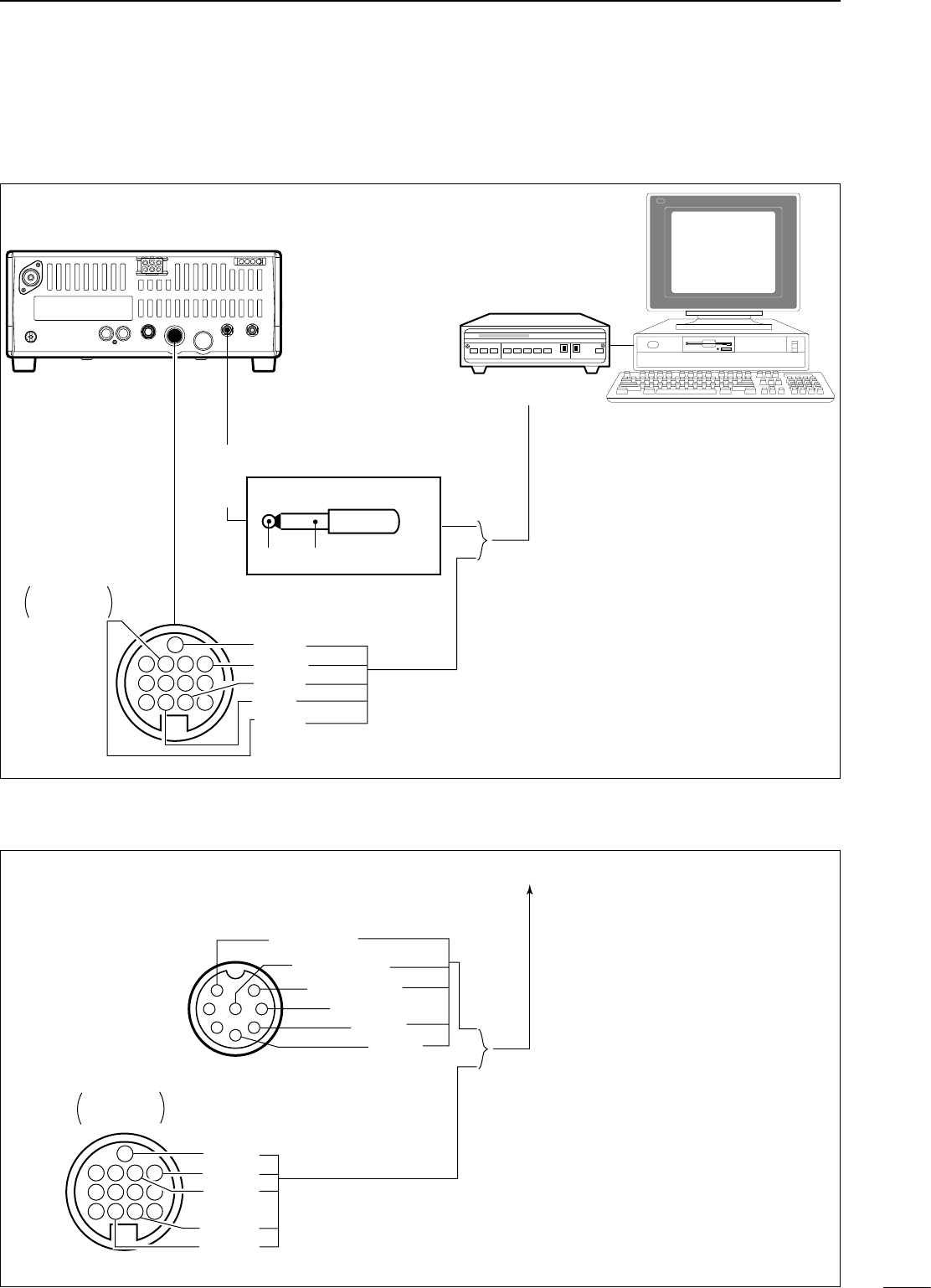
ï Connection for RTTY(FSK)
Rear panel TU or TNC
Personal computer
Rear panel
view
Use either the ACC or one of the two
1
/
8
˝ plugs.
*1Connect SQL line when required.
SQL*1
AF out
SEND
GND
FSKK
GND
AF
2-conductor
1
/
8
˝ plug
[ACC]
[EXT SP]
1 2 3 4
5 6 7 8
9 10 11 12
13
ï Connection for AFSK
To a TU or TNC
and personal computer.
Use either the ACC or microphone connector.
SQL*
1
AF out
AF in
SEND
GND
1 2 3 4
5 6 7 8
9 10 11 12
13
Rear panel
view
*
1Connect SQL line when required.
q Mic input
[MIC] connector
(Front panel view)
1
2
345
6
7
8
i AF output
u Mic GND
y PTT GND
t PTT
r SQL
[ACC] connector
34
5RECEIVE AND TRANSMIT
ï RTTY (FSK) operation
q Connect a terminal unit as at p. 34.
w Select RTTY (or RTTY-R) mode with [MODE].
e Select the desired FSK tone and shift frequencies
as below.
r Set the desired frequency with the main dial.
t Operate the connected PC or TNC (TU).
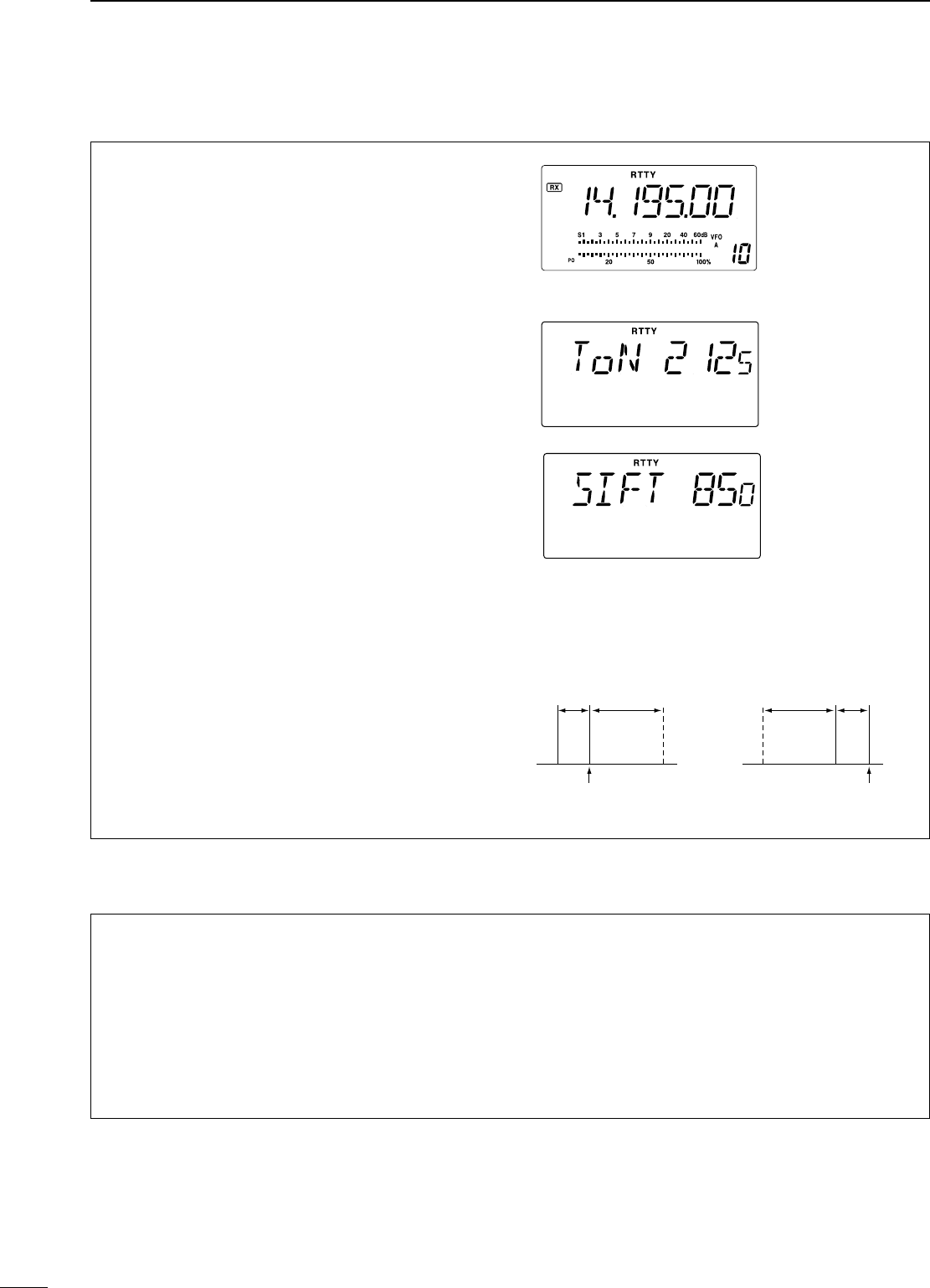
PRESETTING FOR RTTY
• Tone frequency
q Push [SET] for 1 sec. to enter quick set mode.
w Push [∫ UP]/[√ DN] one or more times until
“TON 2125” appears, then rotate the main dial to
select the desired tone frequency.
• Sift frequency
q Push [SET] for 1 sec. to enter quick set mode.
w Push [∫ UP]/[√ DN] one or more times until
“SIFT 170” appears, then rotate the main dial to
select the desired tone frequency.
• RTTY reverse mode
Received characters are occasionally garbled when
the receive signal is reversed between MARK and
SPACE. This reversal can be caused by incorrect
TNC connections, settings, commands, etc.
To receive a reversed RTTY signal correctly, select
RTTY-R (RTTY reverse) mode.
• Push [MODE] for 1 sec. to select RTTY-R (RTTY
reverse) mode.
ï RTTY (AFSK) operation
q Connect a terminal unit as p. 33.
w Select SSB (LSB) mode with [MODE].
• Generally, LSB is used on the HF bands.
e Select the desired FSK tone/shift frequencies and
keying polarity the same way as FSK operation.
r Set the desired frequency with the main dial.
t Operate the connected PC or TNC (TU).
RTTY mark frequency
is set to 2125 Hz.
2125, 1615 and 1275
Hz are available.
RTTY sift frequency is
set to 850 Hz.
850, 425, 200 and
170 Hz are available.
RTTY mode
is selected.
ReverseNormal
BFO
170
Hz
2125
Hz 170
Hz
2125
Hz
BFO
mark
space
displayed freq.displayed freq.
mark
space
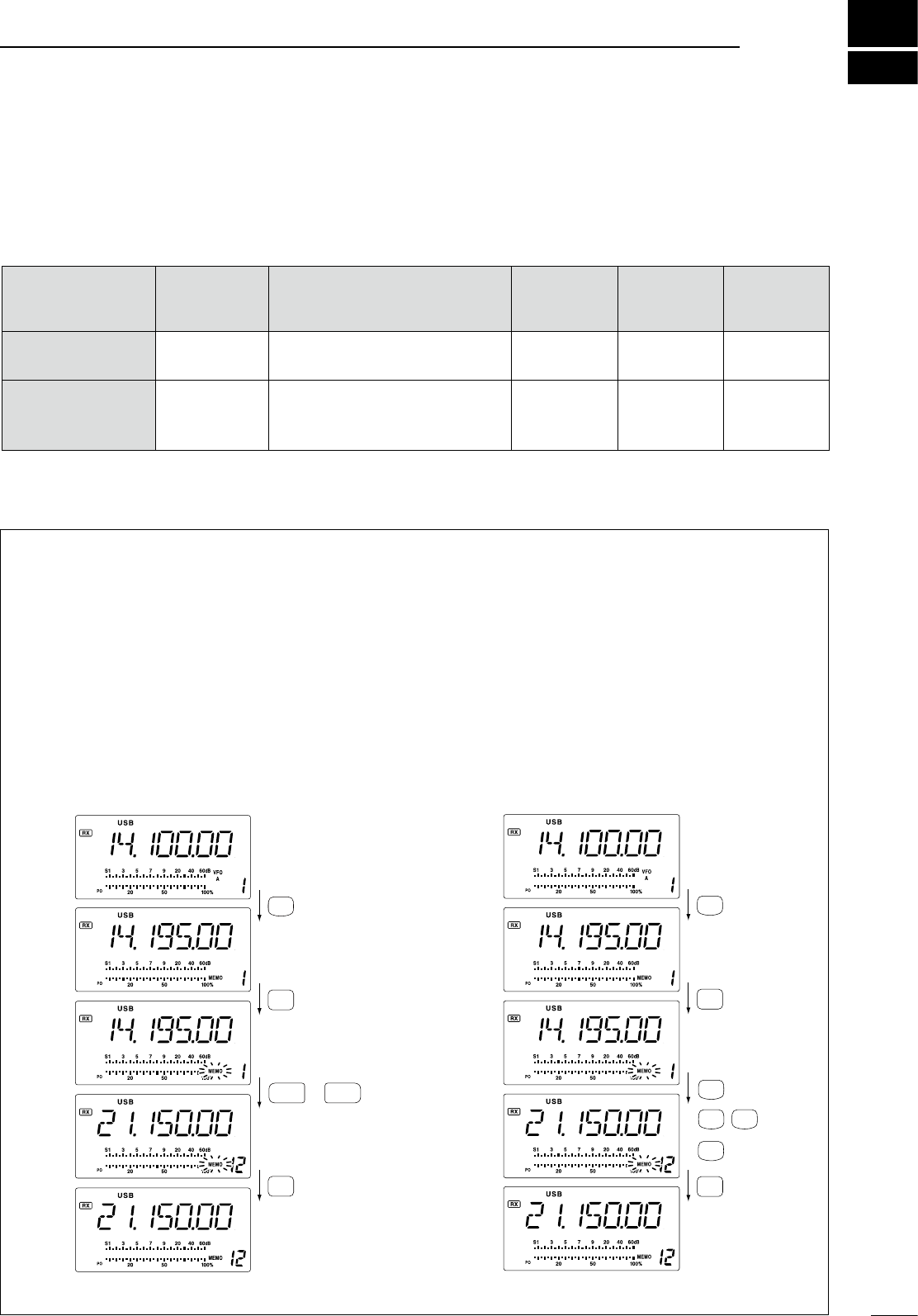
6
MEMORY OPERATION
35
n Memory channels
The transceiver has 101 memory channels. The
memory mode is very useful for quickly changing to
often-used frequencies.
All 101 memory channels are tuneable which means
the programmed frequency can be tuned temporarily
with the tuning dial, etc. in memory mode.
n Memory channel selection
MEMORY
CHANNEL
MEMORY
CHANNEL
NUMBER
CAPABILITY TRANSFER
TO VFO
OVER-
WRITING CLEAR
Regular memory
channels 1–99 One frequency and one mode in
each memory channel. Yes Yes Yes
Scan edge
memory
channels
P1, P2
One frequency and one mode in
each memory channel as scan
edges for programmed scan.
Yes Yes No
D Using the [UP Y] or [Z DN] keys
q Push [V/M] to select memory mode.
• “MEMO” appears.
w Push [CH] to enter memory CH select mode.
• “MEMO” blinks.
e Push [UP Y] or [Z DN] several times to select the
desired memory channel.
• Push and hold [UP Y] or [Z DN] for continuous
selection.
r Push [CH] to exit memory CH select mode.
t To return to VFO mode, push [V/M] again.
D Using the keypad
q Push [V/M] to select memory mode.
• “MEMO” appears.
w Push [CH] to enter memory CH select mode.
• “MEMO” blinks.
e Push [F-INP/ENT], then push the desired memory
channel number using the keypad.
r Push [F-INP/ENT] to select the desired memory
channel.
t Push [CH] to exit memory CH select mode.
V/M
1
UP
DN
or
CH
CH
Y
Z
V/M
1
CH
ENT
F-INP
V/M
1
A=B
2
CH
ENT
F-INP
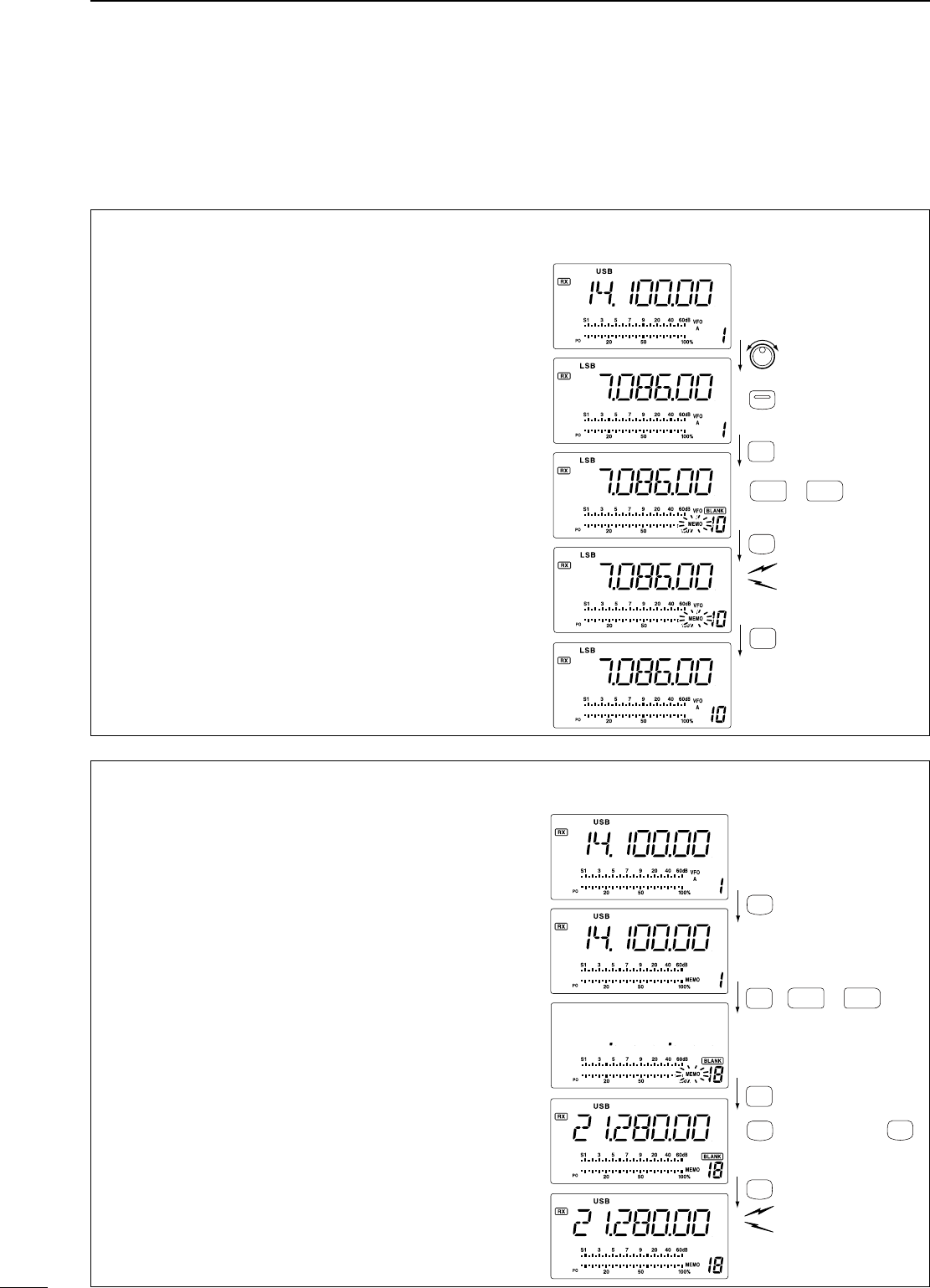
6MEMORY OPERATION
36
Memory channel programming can be performed
either in VFO mode or in memory mode.
n Memory channel programming
D Programming in memory mode
q Select the desired memory channel with [UP Y]
or [Z DN] in memory mode.
• “BLANK” appears if the selected memory channel is a
blank channel (and does not have contents).
w Set the desired frequency and operating mode in
memory mode.
• To program a blank channel, use direct frequency
entry with the keypad in advance.
e Push [MW] for 1 sec. to program the displayed
frequency and operating mode into the memory
channel.
• Preamp setting, attenuator on/off,and AGC setting
can also be programmed into a memory channel.
[EXAMPLE]: Programming 21.280 MHz/CW into
memory channel 18.
D Programming in VFO mode
q Set the desired frequency and operating mode in
VFO mode.
w Push [CH], then push [UP Y] or [Z DN] several
times to select the desired memory channel.
• “MEMO” blinks.
• “BLANK” appears if the selected memory channel is a
blank channel.
e Push [MW] for 1 sec. to program the displayed
frequency and operating mode into the memory
channel.
r Push [CH] to exit memory channel select mode.
[EXAMPLE]: Programming 7.086 MHz/LSB into
memory channel 10.
CH
or keypad
Push for 1 sec.
Beep
Beep
Beep
MW
4
MODE
or
DN UP
CH
ZY
CH
ENT
F-INP
V/M
1
[2], [1], [.], [2], [8]
Push for 1 sec.
Beep
Beep
Beep
MW
4
or
DN UP
CH
then
ENT
F-INP
ZY
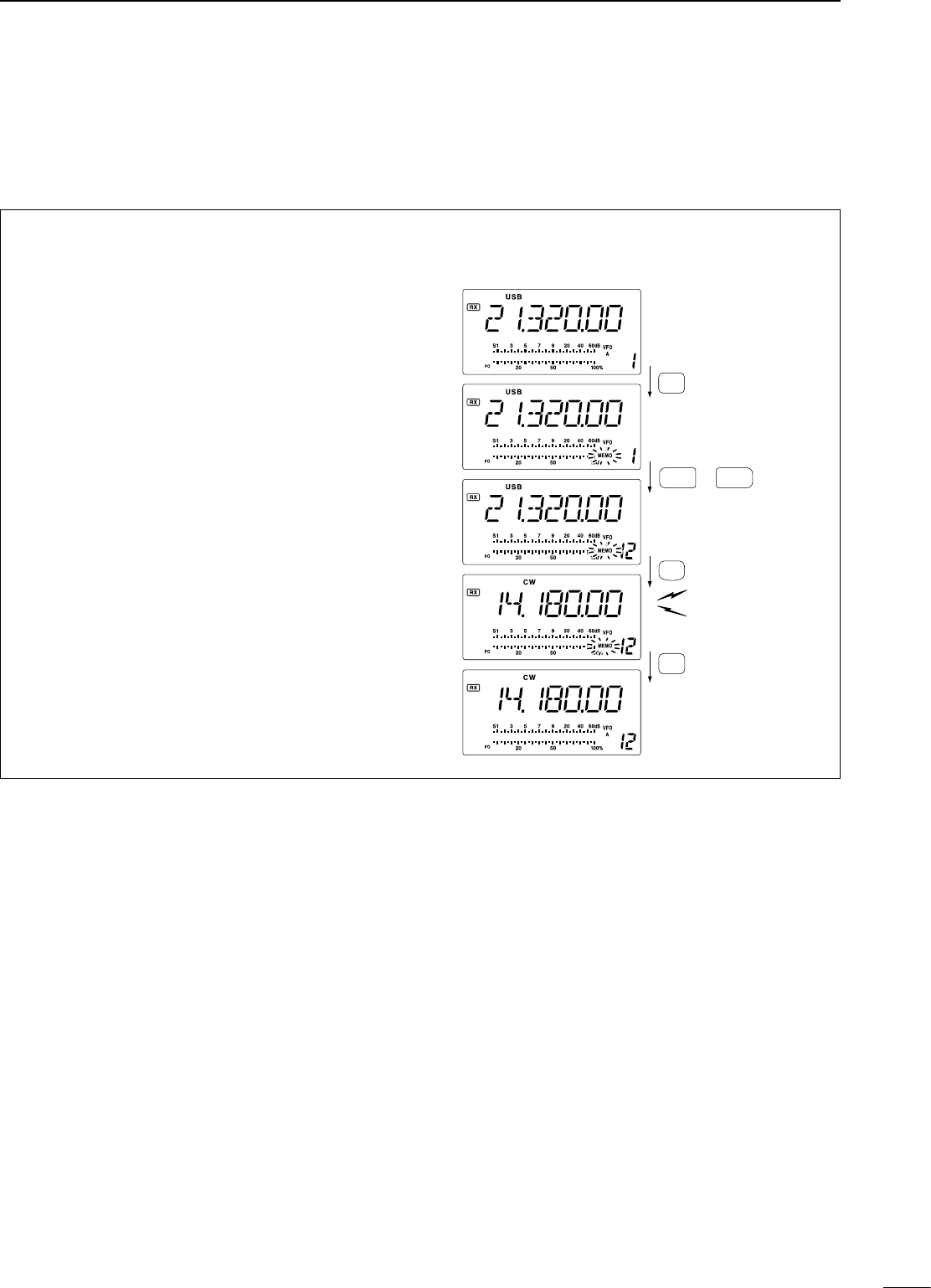
6
MEMORY OPERATION
37
n Frequency transferring
The frequency and operating mode in a memory
channel can be transferred to the VFO.
Frequency transferring can be performed in either
VFO mode or memory mode.
D Transferring in VFO mode
This is useful for transferring programmed contents
to VFO.
q Select VFO mode with [V/M].
w Push [CH], then select the memory channel to be
transferred with [UP Y] or [Z DN].
• “BLANK” appears if the selected memory channel is a
blank channel.
e Push [M≈V] for 1 sec. to transfer the frequency
and operating mode.
• Transferred frequency and operating mode appear on
the frequency readout.
r Push [CH] to exit memory channel select mode.
TRANSFERRING EXAMPLE IN VFO MODE
Operating frequency : 21.320 MHz/USB (VFO)
Contents of M-ch 12 : 14.180 MHz/CW
UP
DN
or
CH
Push for 1 sec.
Beep
Beep
Beep
M
V
6
Y
CH
ZY
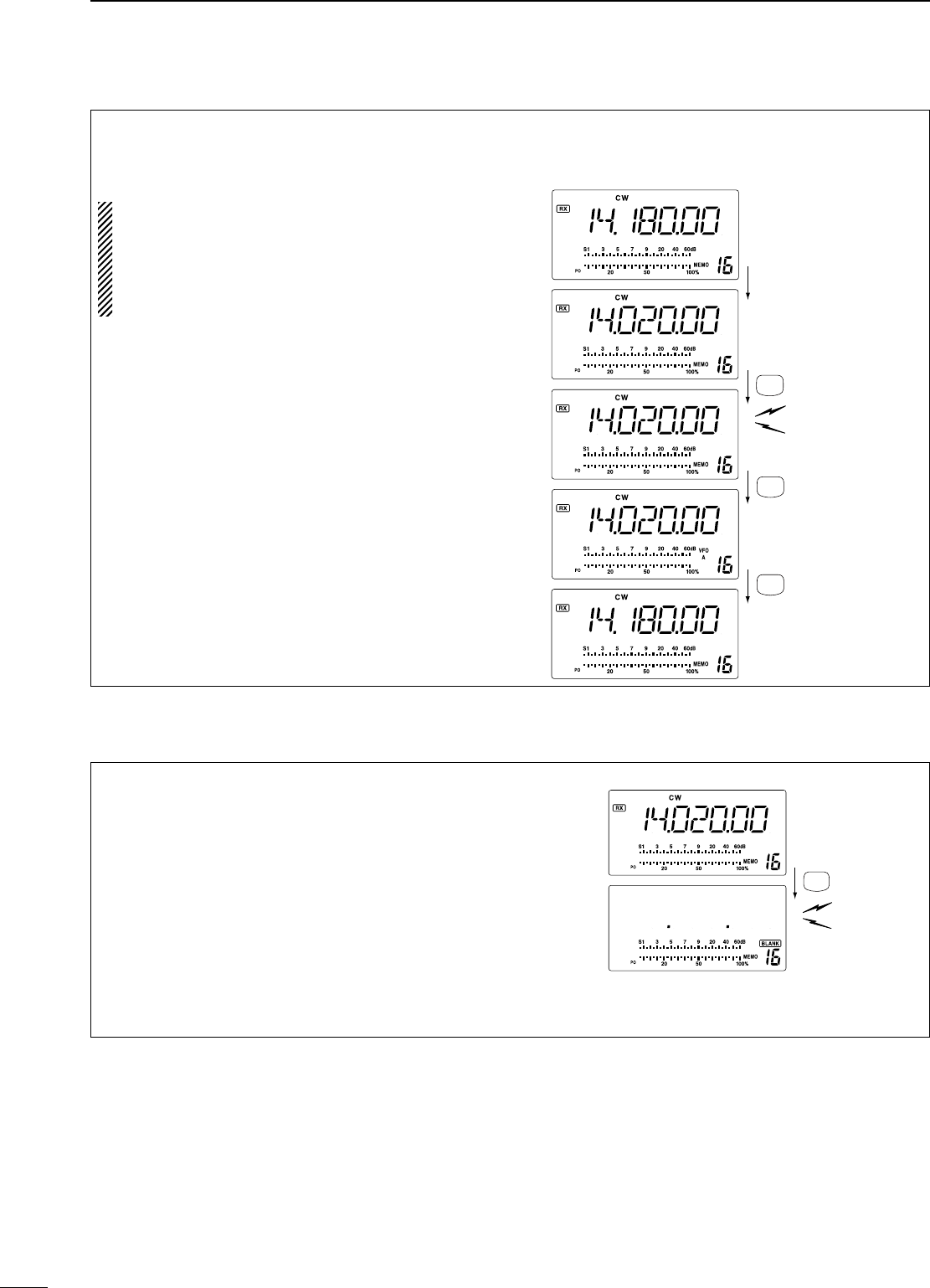
6MEMORY OPERATION
38
n Memory clearing
Any unnecessary memory channels can be cleared.
The cleared memory channels become blank
channels.
q Select memory mode with [V/M].
w Push [CH], then select the memory channel to be
cleared with [UP Y] or [Z DN].
e Push [M-CL] for 1 sec. to clear the contents.
• The programmed frequency and operating mode
disappear.
• “BLANK” appears.
r To clear other memory channels, repeat steps w
and e.
Push for 1 sec.
Beep
Beep
Beep
M -CL
5
D Transferring in memory mode
This is useful for transferring frequency and
operating mode while operating in memory mode.
When you have changed the frequency or
operating mode in the selected memory channel:
• Displayed frequency and mode are transferred.
• Programmed frequency and mode in the
memory channel are not transferred, and they
remain in the memory channel.
q Push [CH], then select the memory channel to
be transferred with [UP Y] or [Z DN] in memory
mode.
• And, set the frequency or operating mode if required.
w Push [M≈V] for 1 sec. to transfer the frequency
and operating mode.
• Displayed frequency and operating mode are
transferred to the VFO.
e To return to VFO mode, push [V/M] momentarily.
TRANSFERRING EXAMPLE IN MEMORY MODE
Operating frequency : 14.020 MHz/CW (M-ch 16)
Contents of M-ch 16 : 14.018 MHz/CW
Push for 1 sec.
Beep
Beep
Beep
M V
6
Z
V/M
1
V/M
1
Rotate dial.
VFO A is displayed.VFO A is displayed.
M-ch 16 is displayed.
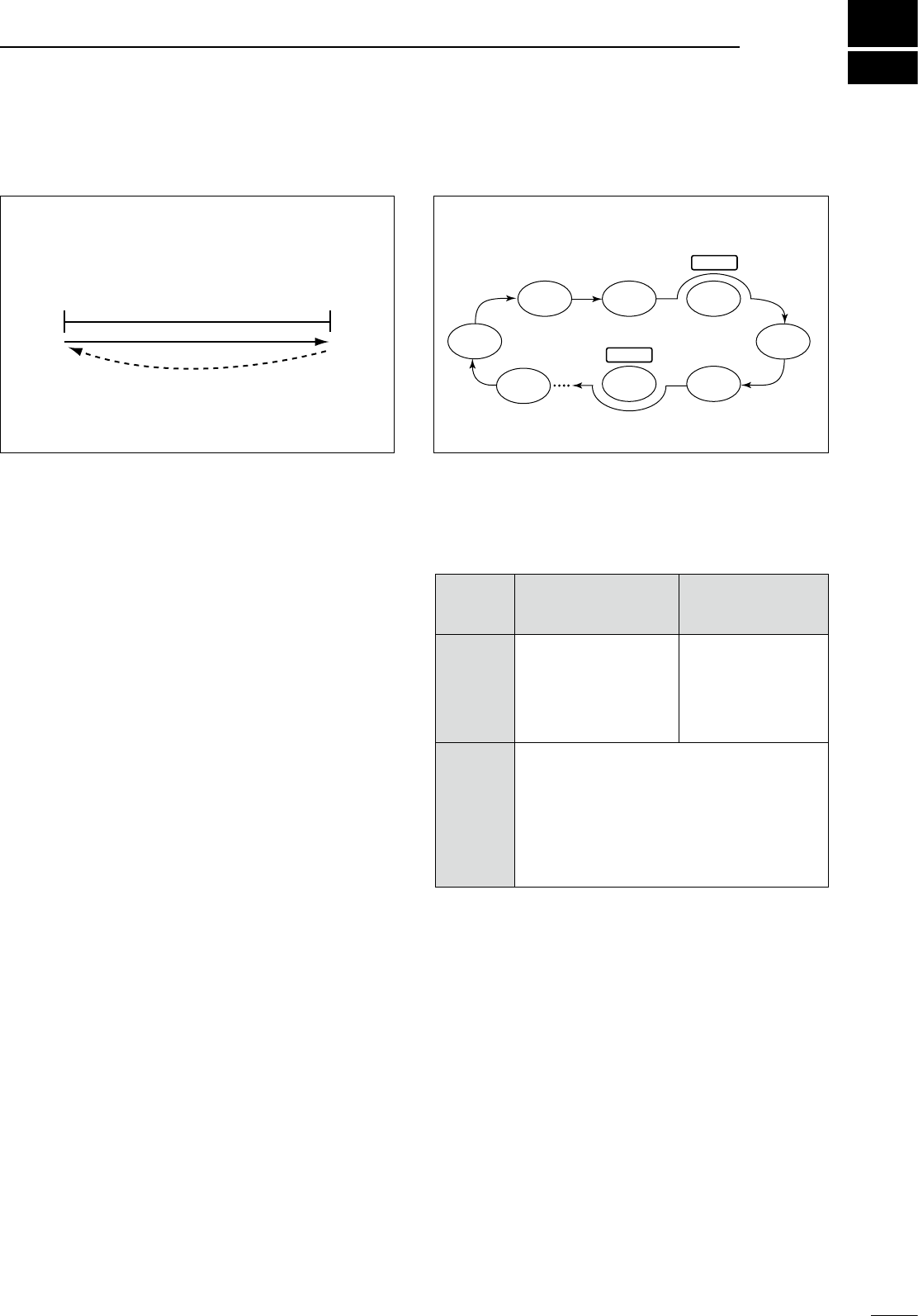
SCANS 7
39
n Scan types
nPreparation
• Channels
For programmed scan/auto memory write scan:
Program scan edge frequencies into scan edge
memory channels P1 and P2.
For memory scan:‑
Program 2 or more memory channels except scan
edge memory channels.
• Scan resume ON/OFF
You can select the scan to resume or cancel when
detecting a signal, in set mode. Scan resume ON/OFF
must be set before operating a scan. See p. 45 for
ON/OFF setting and scan resume condition details.
• Scan speed
Scan speed can be selected from 2 levels, high or
low, in Initial set mode. See p. 45 for details.
• Squelch condition
PROGRAMMED SCAN
Repeatedly scans between two scan edge frequencies
(scan edge memory channels P1 and P2).
This scan operates in VFO mode.
Scan
Scan edge
P1 or P2
Scan edge
P2 or P1
Jump
This scan operates in memory mode.
MEMORY SCAN
Repeatedly scans all programmed memory channels.
Mch 5
Mch 2 Mch 3 Mch 4
Mch 6Mch 7
BLANK
BLANK
Mch 1
Mch 99
Scan squelch condition.1.eps
Scan
start
with
Programmed scan Memory scan
Squelch
open
The scan continues
until it is stopped man-
ually, and does not
pause even if it detects
signals.
Scan pauses on
each channel when
the scan resume is
ON; not applicable
when OFF.
Squelch
open
closed
Scan stops when detecting a signal.
If you set scan resume ON in Initial set mode,
the scan pauses for 10 sec. when detecting a
signal, then resumes. When a signal disap-
pears while scan is paused, scan resumes 2
sec. later.
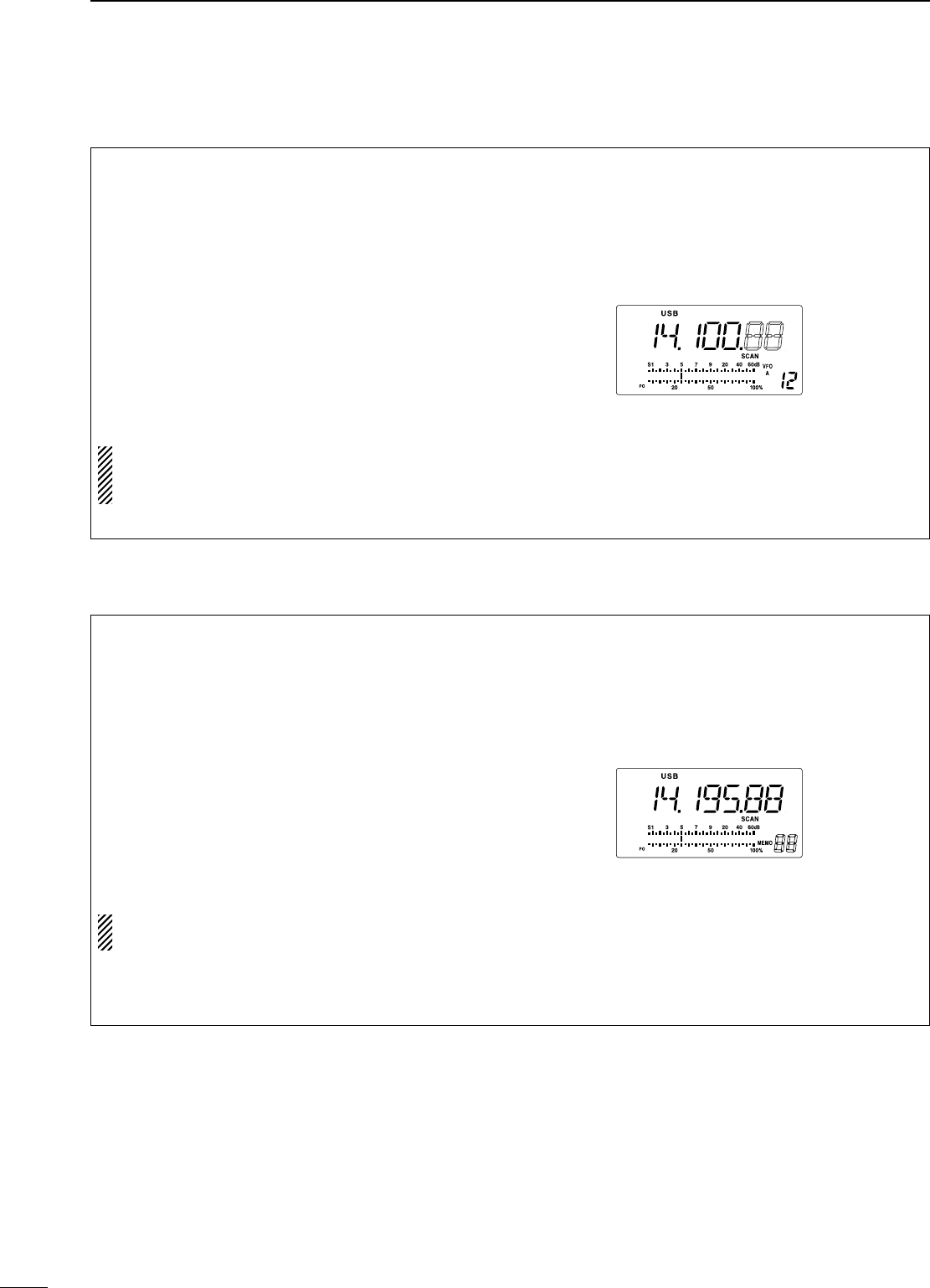
7SCANS
40
n Programmed scan operation
q Select VFO mode with [V/M].
w Select the desired operating mode.
• The operating mode can also be changed while
scanning.
e Set [RF/SQL] open or closed.
• See previous page for scan condition.
• If the [RF/SQL] control function is set as RF control,
the squelch always opens. See pgs. 15, 20 for details.
r Push [SCAN] to start the programmed scan.
• “SCAN” appears while scanning.
t When the scan detects a signal, the scan stops,
pauses or ignores it depending on the resume
setting and the squelch condition.
y To cancel the scan, push [SCAN].
If the same frequencies are programmed into the
scan edge memory channel P1 and P2,
programmed scan does not start.
n Memory scan operation
q Select memory mode with [V/M].
w Select the desired operating mode.
• The operating mode can also be changed while
scanning.
e Set [RF/SQL] open or closed.
• See previous page for scan condition.
• If the [RF/SQL] control function is set as RF control,
the squelch always opens. See pgs. 14, 30 for details.
r Push [SCAN] to start the memory scan.
• “SCAN” appears while scanning.
t When the scan detects a signal, the scan stops,
pauses or ignores it depending on the resume
setting and the squelch condition.
y To cancel the scan, push [SCAN].
2 or more memory channels must be programmed
for memory scan to start.
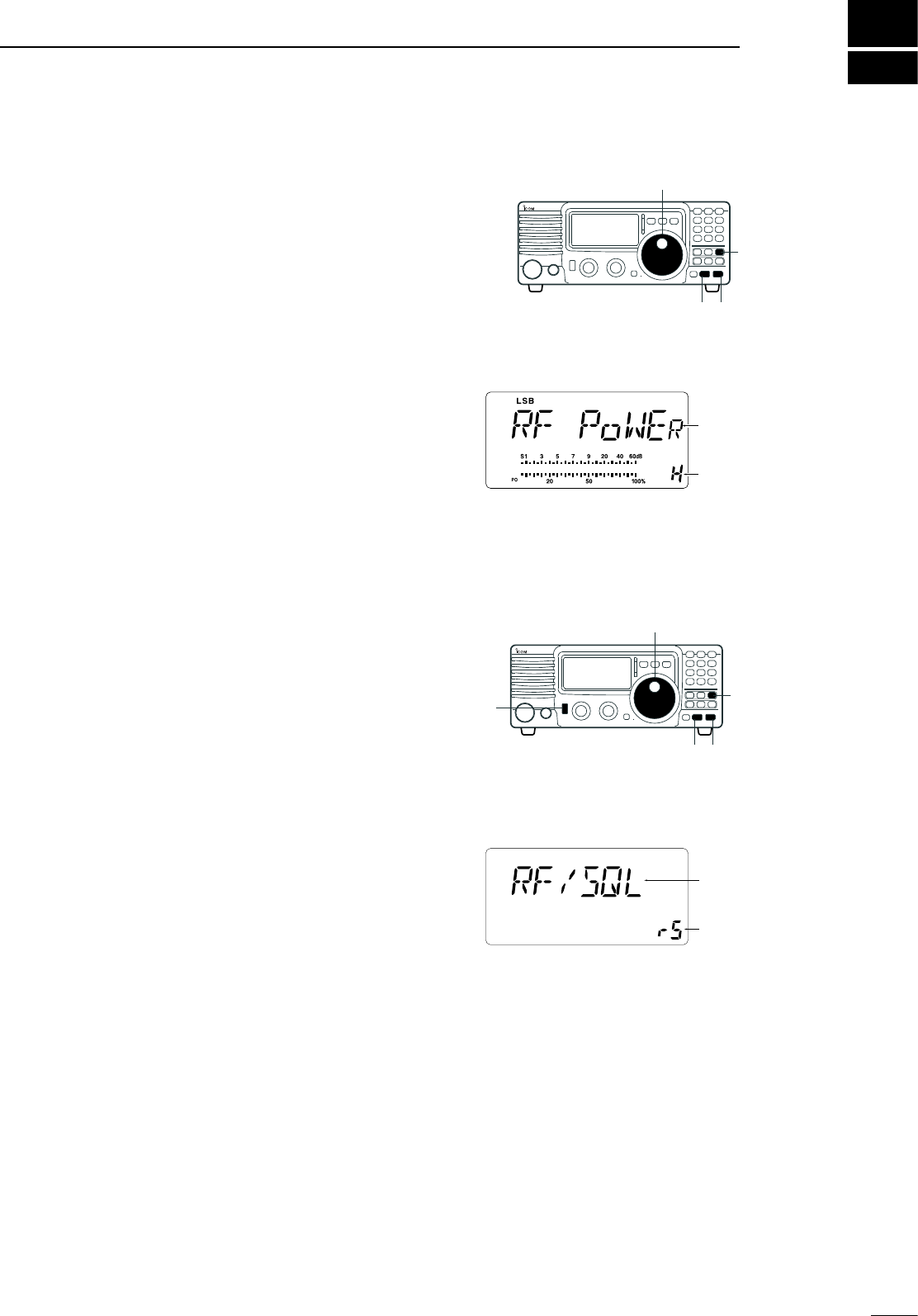
8
41
SET MODE
n General
Set mode is used for programming infrequently
changed values or conditions of functions. The IC-718
has 2 separate set modes: quick set mode and initial
set mode.
D Quick set mode operation
q While power is ON, push [SET] for 1 sec.
•
Quick set mode is selected and one of its items appears.
w Push [UP Y] or [Z DN] to select the desired item.
e Rotate the main dial to set the values or conditions
for the selected item.
r Repeat w and e to set other items.
t To exit quick set mode, push [SET] momentarily.
D Initial set mode operation
q Push [POWER] for 1 sec. to turn power OFF.
w While pushing and holding [SET], push [POWER]
to turn power ON.
• Initial set mode is selected and one of its items appears.
e Push [UP Y] or [Z DN] to select the desired item.
r Rotate the main dial to set the values or conditions
for the selected item.
t Repeat e and r to set other items.
y To exit initial set mode, push [PWR] for 1 sec. to
turn power OFF.
u Push [PWR] to turn power ON again.
• The conditions selection in intial set mode are now
effective.
Item
Value of
Condition
Item
Value of
Condition
[DISPLAY EXAMPLE: INITIAL SET MODE]
[DISPLAY EXAMPLE: QUICK SET MODE]
[DIAL]
[Z][Y]
[SET]
[DIAL]
[PWR]
[Z][Y]
[SET]
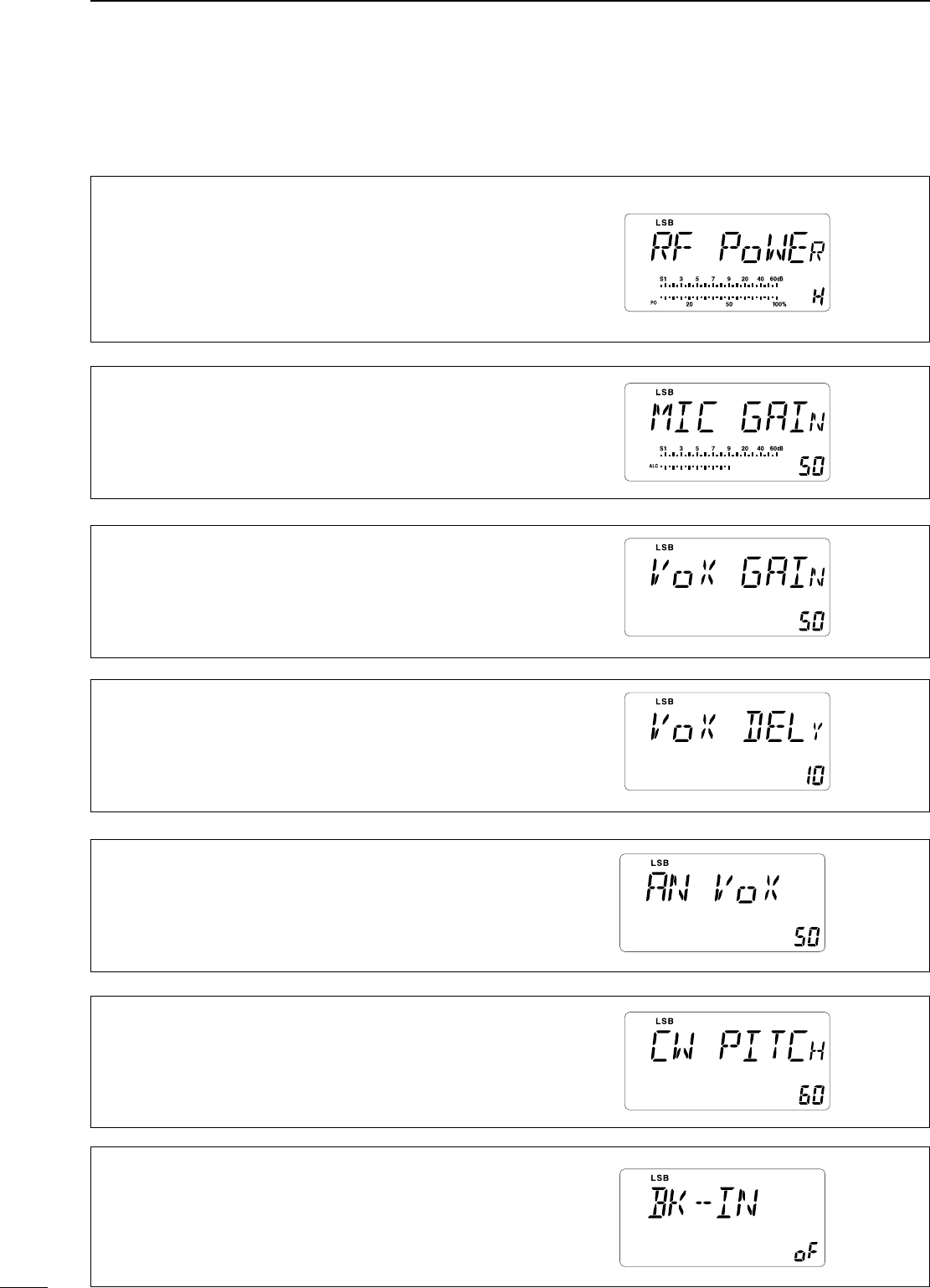
42
8SET MODE
• RF power
This item adjusts the RF output power. The RF output
power can be adjusted from L, 1 to 99 and H for indication,
however, it can be adjusted continuously.
•The default is H (maximum power).
Note that while adjusting the output power, the power
meter is displayed automatically.
• Mic gain
This item adjusts microphone gain from 0 to 99 and H for
indication, however, it can be adjusted continuously.
The default is 50.
• VOX gain
This item adjusts the VOX gain for the VOX (voice
activated transmit) function.
The default is 50.
• Anti VOX level
This item adjusts the ANTI-VOX gain for the VOX (voice
activated transmit).
The default is 50.
• CW pitch
This item adjusts CW pitch. CW pitch is adjustable from
300 Hz to 900 Hz in 10 Hz steps.
The default is 60 (600 Hz).
• VOX delay
This item adjusts VOX (voice activated transmit) delay
time. The delay time can be adjusted from 0 to 2 sec. in
0.1 sec. units.
The default is 10 (1.0 sec).
n Quick set mode items
• BK-IN
This item selects break-in type for CW operation. There
are three selectable values:
oF : No break-in operation available (default).
SE : Semi break-in operation available.
FL : Full break-in operation available.
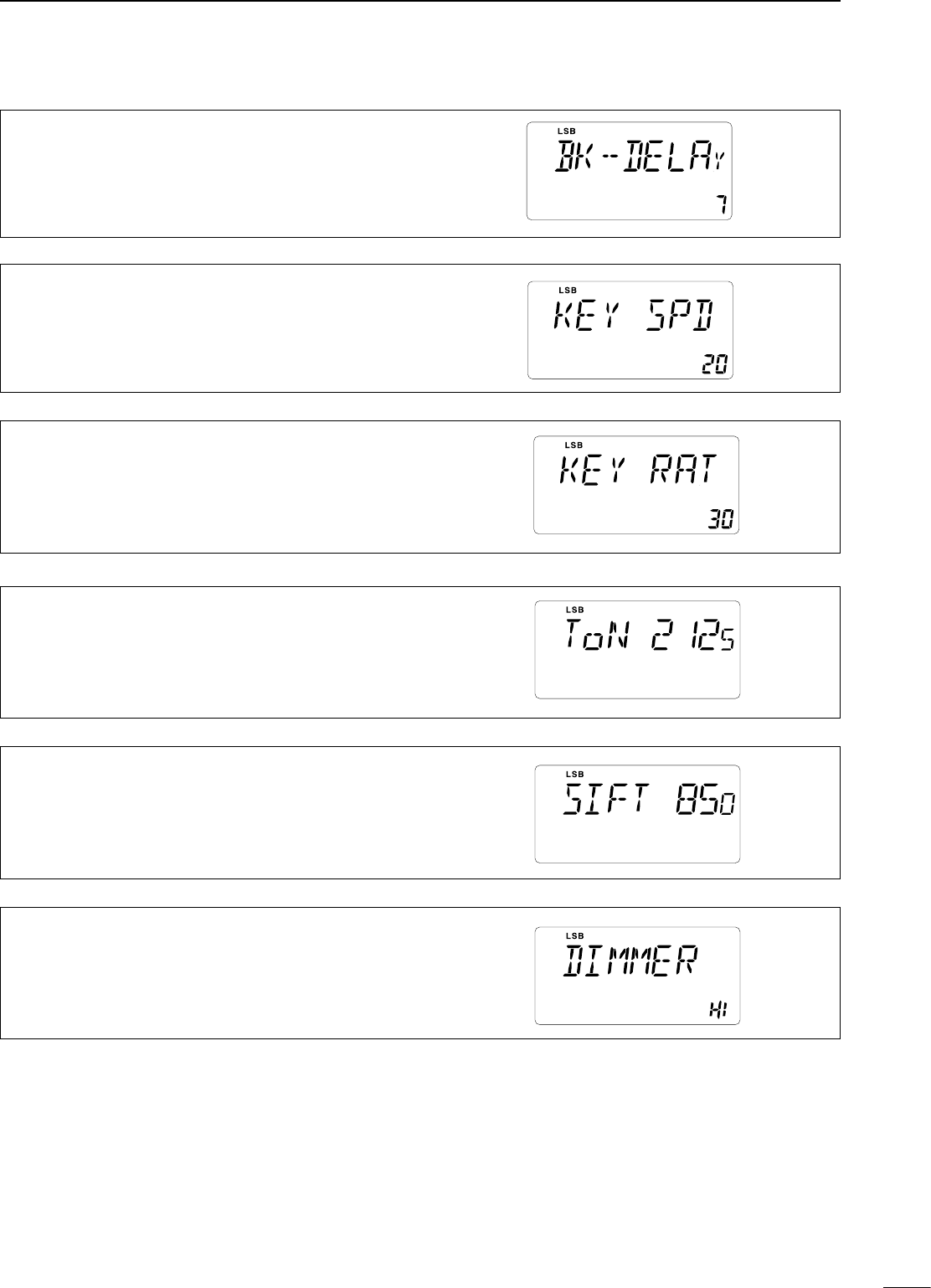
8
SET MODE
43
• BK-IN delay
This item adjusts break-in delay time for CW semi
break-in operation. The delay time is selectable from 2.0
to 13 (dots).
The default is 7.
• Key speed
This item adjusts the CW key speed. The key speed can
be selected from 6 to 60* wpm.
The default is 20 wpm.
* 40, 44, 47, 50, 52, 54, 56, 57, 59 can not be selected.
• Key ratio
This item sets the CW key ratio (or weight). The ratio can
be selected from 2.8 to 4.5.
The default is 30 (3.0).
• RTTY shift
This item adjusts RTTY shift. There are 4 selectable
values: 170, 200, 425 and 850.
The default is 170 Hz.
• Dimmer
This item selects LCD back light brightness. There are 3
selectable values: Off, Low and High.
The default is HI (High).
• RTTY mark tone
This item selects RTTY tone. There are 3 selectable
values: 1275, 1615 and 2125 Hz.
The default is 2125 Hz.
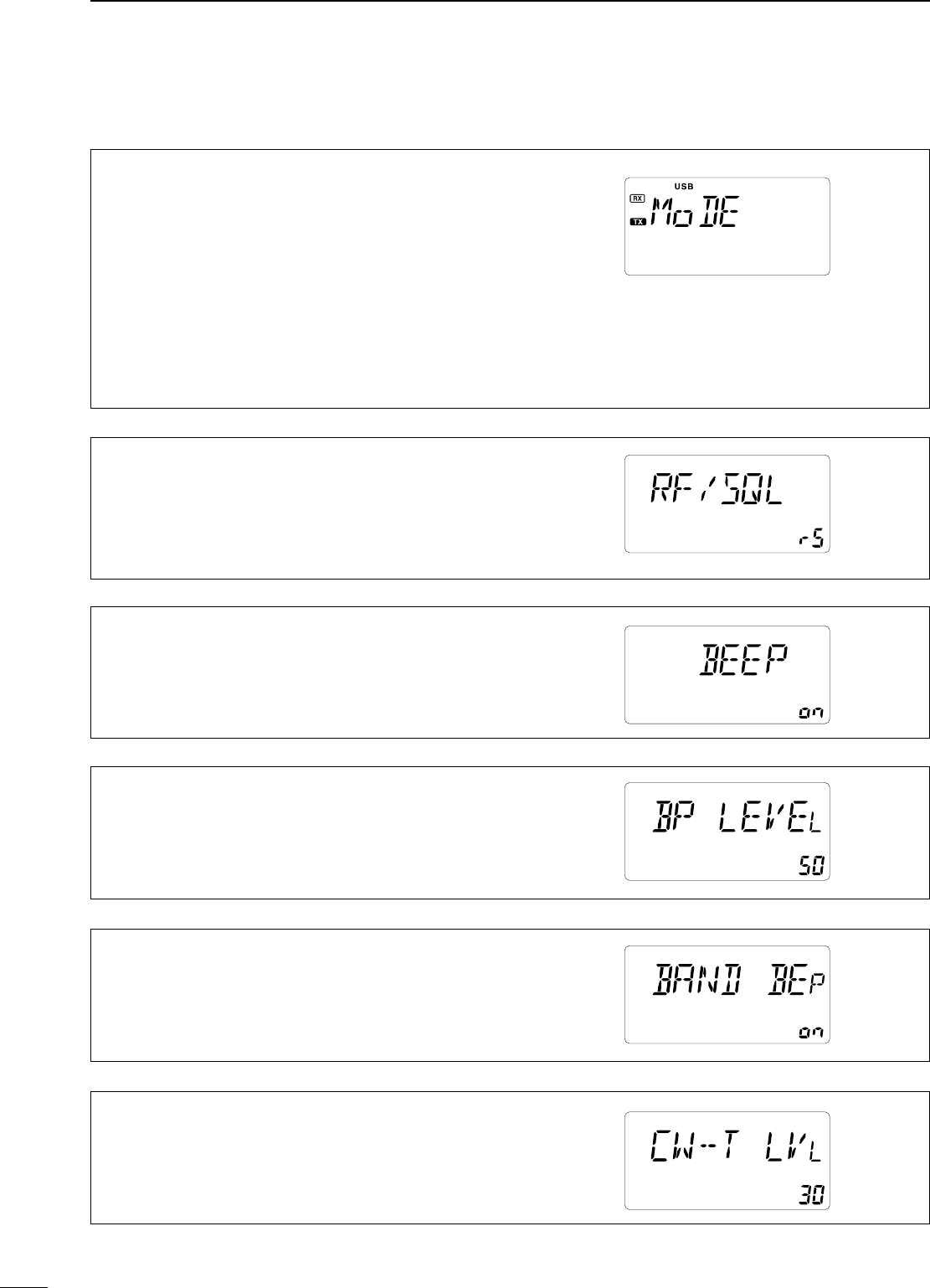
8SET MODE
44
• Mode select
This item is available in all modes, and allows you to
simplify operation by inhibiting the selection of unneeded
operating modes during normal operation. For example if
you are operating mobile and only plan on using LSB and
USB modes, use “MODE SELECTION” to inhibit access
to all other modes (CW, RTTY and AM), thereby making
selection of LSB and USB quick and easy.
The default is on for all operating modes. To toggle an
operating mode on or off, push [MODE] one or more times
until the desired mode is displayed. Then rotate the main
dial to set on or off.
• RF/SQL VR
The [RF/SQL] control can be set as the RF/squelch control
or automatic (acts as squelch in AM modes; as RF in SSB/
CW/RTTY modes) or the squelch control. (See p. 20)
The default is rS (RF/squelch).
• Beep level
This item adjusts the confirmation beep level.
The default is 50.
• Band edge beep
A beep sounds when an operating frequency enters
or exits a transmit frequency range. This functions
independent of the confirmation beep setting.
The default is on.
• Side-tone level
This item adjusts the CW side-tone level.
The default is 30.
• Beep
A beep sounds each time a switch is pushed to confirm it.
This function can be turned OFF for silent operation.
The default is on.
n Initial set mode items
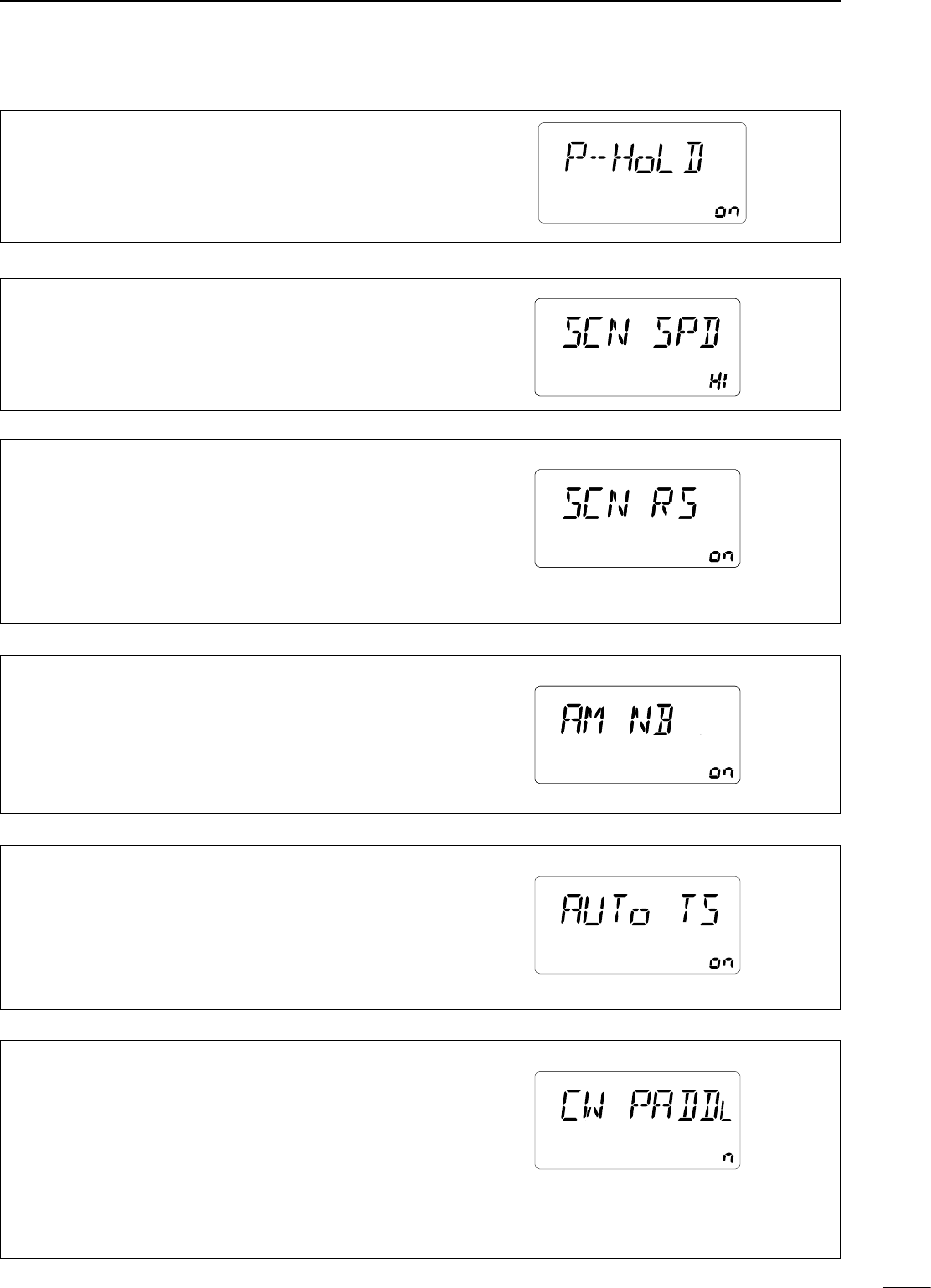
8
SET MODE
45
• Meter peak hold
This item selects meter peak hold function on or off.
The default is on.
• Scan resume
This item sets the scan resume function ON or OFF.
ON: scan resumes 10 sec. after stopping on a signal
(or 2 sec. after a signal disappears); OFF: scan soes
not resume after stopping on a signal. For the priority
watch, setting to OFF pauses the watch until the signal
disappears and scan resumes.
The default is on.
• AM Noise blanker
When this item is set to ON, the noise blanker
function is available on AM mode. This is useful when
communicating in AM mode (the noise blanker function
should not be used when listening to regular AM
broadcasts as it may degrade the receive audio).
The default is on.
• Auto TS
This item sets auto tuning speed. The tuning dial normally
changes the frequency 2.5 KHz/revolution in 10 Hz tuning
step. When auto tuning step is turned on this increases
to 50 KHz/revolution in 50 Hz tuning step during quick
rotation of the dial.
The default is on.
• Scan speed
This item sets the rate at which channels or frequencies
are scanned during scan operations. High or Low can be
selected.
The default is HI (High).
• Key type
This item adjusts the CW paddle type. Four selections are
available.
• n : normal (for electronic keyer use)
• r : reverse (for electronic keyer use)
• oF : Turns OFF the electronic keyer (for straight key use)
• ud : For using the microphone’s [UP]/[DN] keys insted
of the paddle.
The default is n (normal).
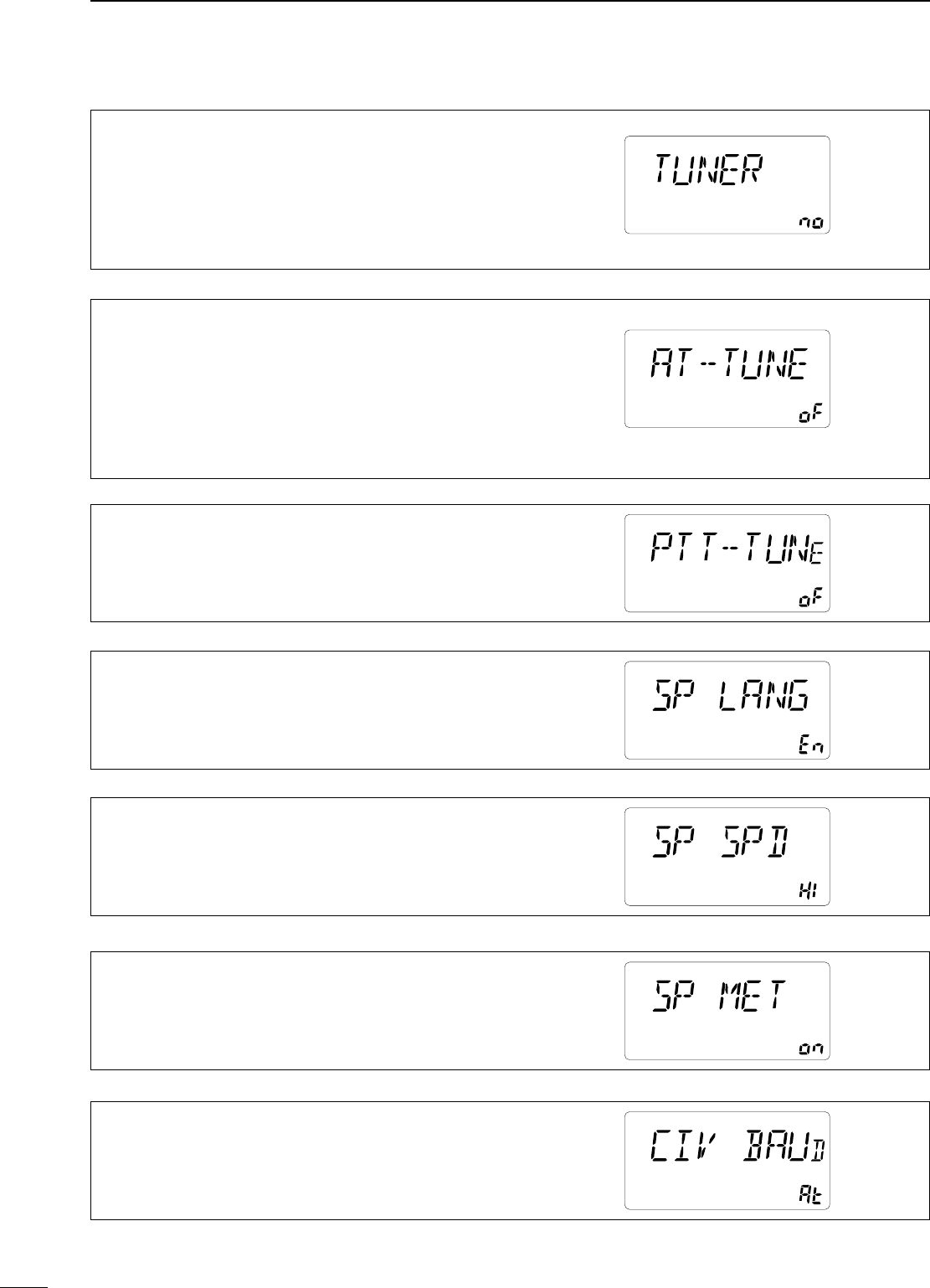
8SET MODE
46
• Tuner type
This item selects optional antenna tuner type.Three
selections are available.
• no : No optional tuner connected.
• 4 : The optional AH-4 antenna tuner is connected.
• 18 : The optional AT-180 antenna tuner is connected
The default is no.
• Auto tune
The optional AT-180 ANTENNA TUNER has an automatic
start capability which starts tuning if the SWR is higher
than 1.5—3.
When “off” is selected, the tuner remains OFF even
when the SWR is poor (1.5—3). When “on” is selected,
automatic tune starts even when the tuner is turned OFF.
The default is oF (OFF).
• PTT tune
When an optional AH-4 or AT-180 AUTOMATIC ANTENNA
TUNER is connected, tuning can be started automatically at
the moment the PTT is pushed.
The default is oF (OFF).
• Speech language
When an optional UT-102 VOICE SYNTHESIZER UNIT is
installed, you can select between English and Japanese
as the language.
The default is En (English).
• Speech speed
When an optional UT-102 VOICE SYNTHESIZER UNIT is
installed, you can select faster or slower synthesizer output.
The default is HI (High).
• Speech S-meter level
When an optional UT-102 is installed, the synthesizer can
be set to read the frequency/mode only (OFF), or both the
frequency/mode and S-meter level (ON).
The default is on.
• CI-V baud rate
This item sets the data transfer rate. When “Auto” is
selected, the baud rate is automatically set according to
the connected controller or remote controller.
The default is At (Auto).
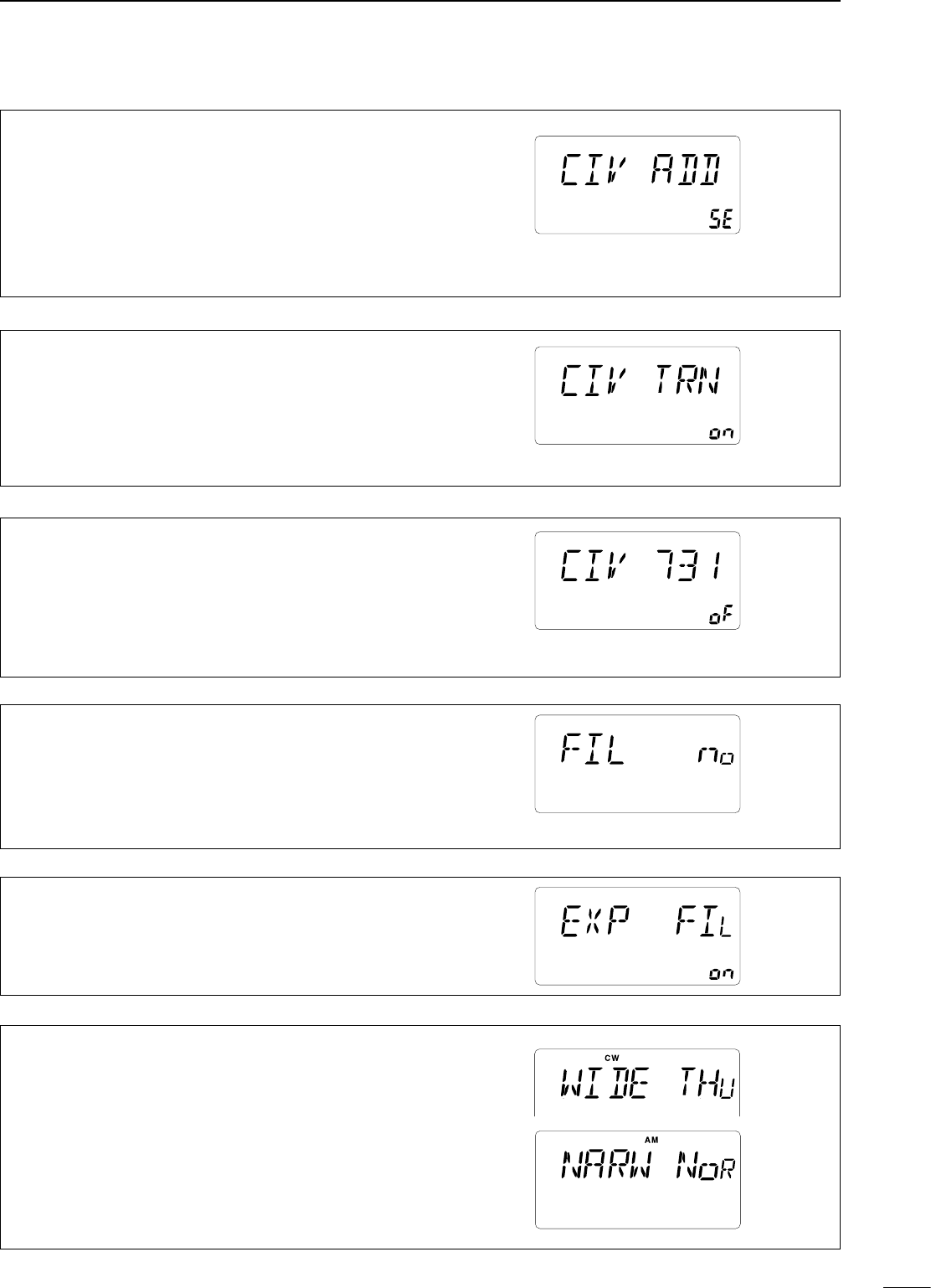
8
SET MODE
47
• CI-V address
To distinguish equipment, each CI-V transceiver has its
own Icom standard address in hexadecimal code. The
IC-718’s address is 5E.
When 2 or more IC-718s are connected to an optional
CT-17 CI-V LEVEL CONVERTER, rotate the main dial to select
a different address for each IC-718 in the range 01H to 7FH.
The default is 5E.
• CI-V Transceive
Transceive operation is possible with the IC-718
connected to other Icom HF transceivers or receivers.
When “on”is selected, changing the frequency, operating
mode, etc. on the IC-718 automatically changes those of
connected transceivers (or receivers) and vice versa.
The default is on.
• CI-V 731 mode
When connecting the IC-718 to the IC-735 for transceive
operation, you must change the operating frequency data
to 4 bytes.
• This item MUST be set to “on” when operating transceiver with
the IC-735.
The default is oF (off).
• OPTION Filter
When an optional IF filer is installed, this selection is
necessary, otherwise the filters cannot be selected.
Selections available are FL-96, FL-222, FL-52A, FL-53A,
FL-257 and none (default). See p. 24 for usable filters for
each mode and see P. 50 for filter installation.
• Expand Filter
When an optional IF filter is installed, this selection
expands filter and filter selection (W/N) key combination
on operating mode independently.
The default is oF (off).
• Filter select (Wide/Narrow)
When an optional IF filter is installed, you can arrange the
filter and filter selection key combination. (p. 25)
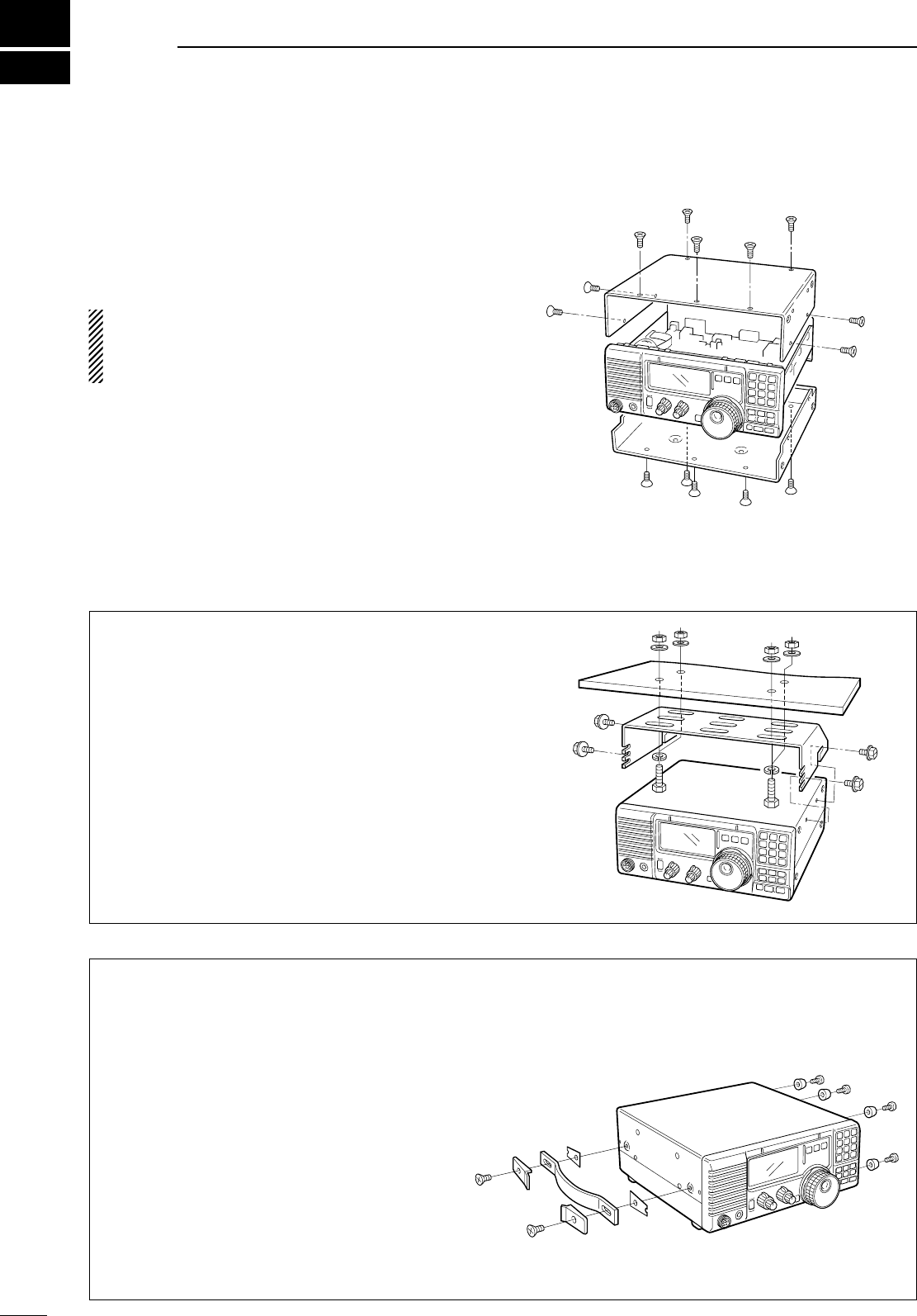
9
48
INSTALLATION AND CONNECTIONS
n Opening the transceiver’s
case
Follow the case and cover opening procedures
shown here when you want to install an optional unit
or adjust an internal unit, etc.
CAUTION: DISCONNECT the DC power cable
from the IC-718 before performing any work on the
transceiver. Otherwise, there is danger of electric
shock and/or equipment damage.
q Remove the 5 screws from the top of the
transceiver and 4 screws from the sides, then lift
up the top cover.
w Remove the 5 screws from the bottom of the
transceiver, then remove the bottom cover.
n Optional bracket and carrying handle
D Mounting bracket
An optional IC-MB5 MOBILE MOUNTING BRACKET is
available to install the radio under a table, on a wall,
in a vehicle, etc.
Select an area to mount the receiver keeping in mind
that the weight of the transceiver is approx. 3.80kg.
D Carrying handle
An optional handle allows you to easily carry and
transport the transceiver.
Attach the MB-23 CARRYING HANDLE with the
supplied rubber feet as shown.
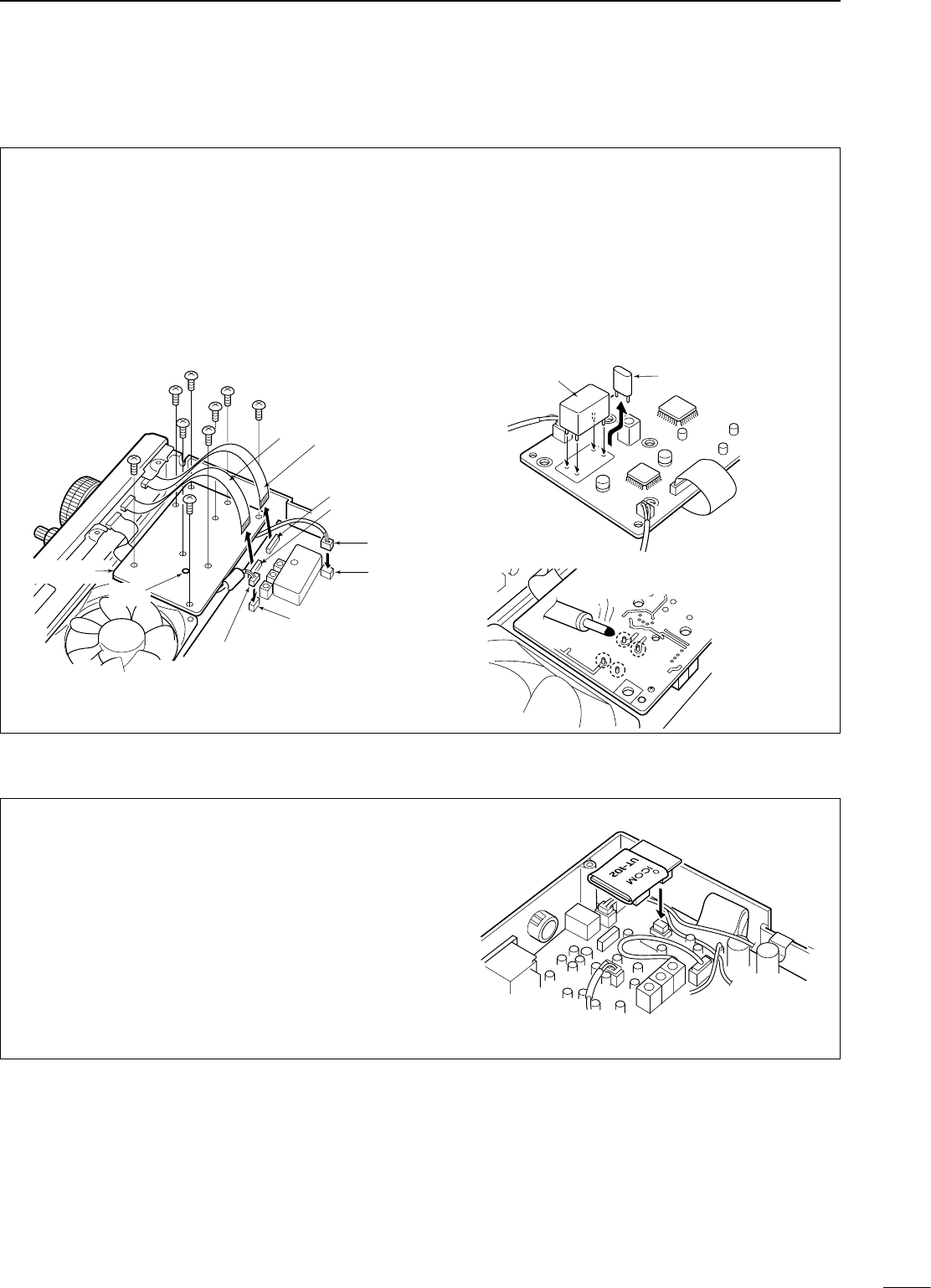
49
9
INSTALLATION AND CONNECTIONS
The UT-102 announces the received frequency, mode,
S-meter level and current time in a clear, electronically-
generated voice, in English (or Japanese).
Push [LOCK] for 1 sec. to announce the frequency,
etc.
q Remove the bottom cover as shown above.
w
Remove the protective paper attached to the
bottom of the UT-102 to expose the adhesive strip.
e Plug UT-102 into J2501 on the MAIN unit as
shown at right.
r Return the bottom cover to its original position.
n CR-338 high stability crystal unit
By installing the CR-338, the total frequency stability
of the receiver will be improved.
q Remove the bottom cover as shown in the
diagram before.
w Disconnect W2 from J4401 (MAIN unit) and W3
from J4201 (MAIN unit).
e Remove 9 screws from the PLL unit, disconnect
P4 from J201 (MAIN unit) and P2 from J401
(MAIN unit), then remove the PLL unit.
r Remove the supplied internal crystal and replace
with the CR-338.
t Return the PLL unit, plugs and flat cables to their
original positions.
y Adjust the reference frequency at C16 using a
frequency counter if desired.
• Connect the frequency counter to P. 2 (PLL unit).
u Return the bottom cover to its original position.
CR-338 Internal crystal
PLL unit
W 3
W 2
J 4201
J 4401
P 4
J 201
J 401
P 2; Frequency check point
(Connect a frequency counter
and adjust the frequency to
64.00000 MHz with C 16.)
C 16 MAIN unit
PLL unit
n UT-102 voice synthesizer unit
Solder 4 leads
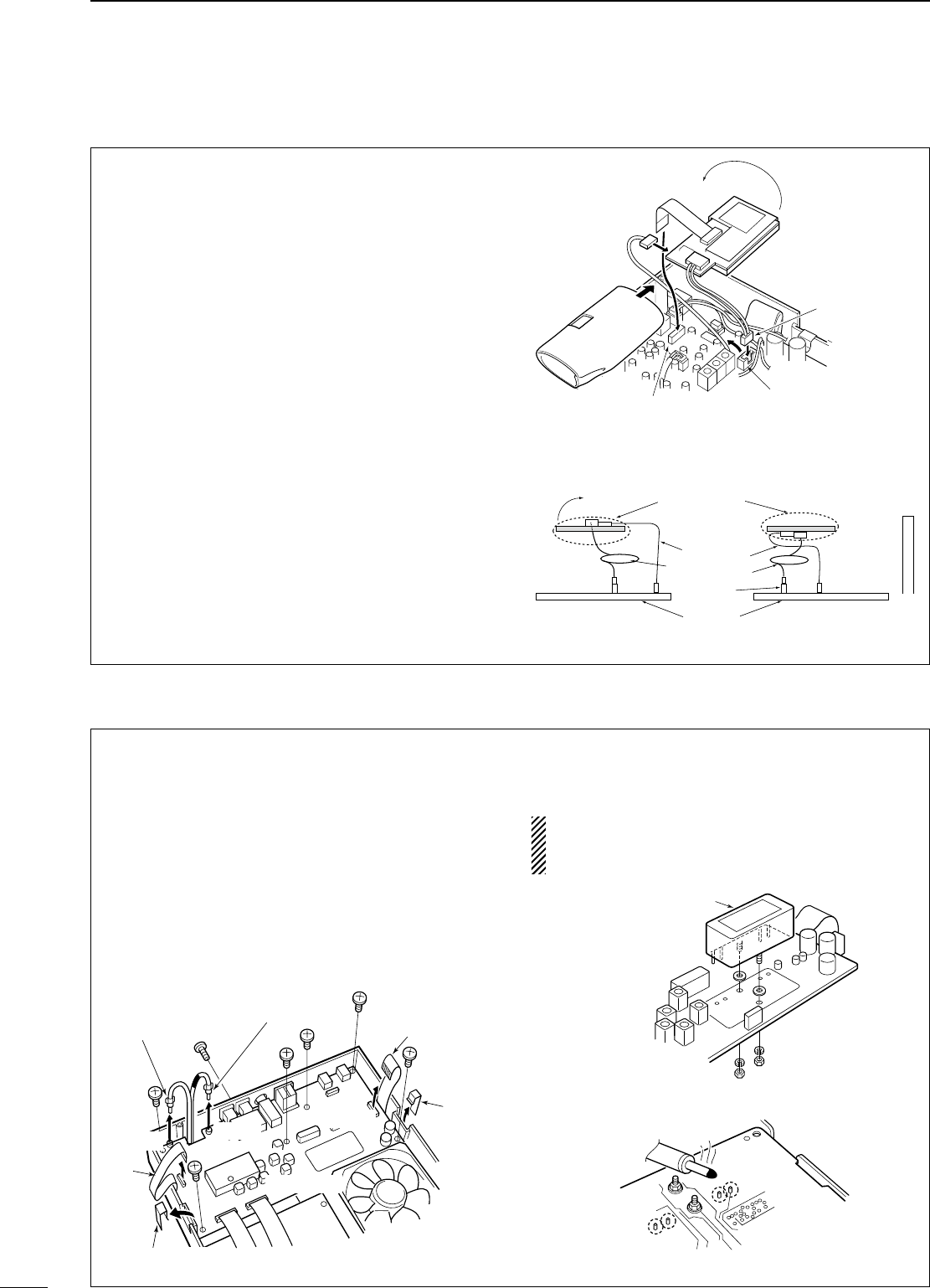
50
9INSTALLATION AND CONNECTIONS
n UT-106 DsP receive unit
n Optional IF filters
The UT-106 provides AF DSP functions such as
noise reduction and auto notch.
q Remove the bottom cover.
w Slide the insulating case onto the UT-106 as
shown right. (Fig. 1)
e Remove the connection cable (P2601) from
J2602 on the MAIN unit. Connect the cable into
J1 on the UT-106.
r Plug the connection cable (P1) from the UT-106
to J2602 on the MAIN unit.
t Plug the flat cable into J3 on the UT-106 and to
J2603 on the MAIN unit.
• Take care regarding the conductor direction.
y Turn the UT-106 unit over. (Fig. 2)
• No need to fix with an adhesive strip, etc.
u Put the UT-106 on the MAIN unit.
• No need to fix with an adhesive strip, etc.
• Ensure that the surplus cable from UT-106 is stored
under the unit.
i Return the bottom cover to its original position.
UT-106
P 1 (from UT-106)
J 2602
J 2603
P 2601
insulating case
flat cable
MAIN unit
J 2603
Main unit
Rear panel
UT-106
Flat cable*
insulating case
* Supplied with UT-106
Turn the unit over
UT-106
�
Surplus cable
J 2602
J 2602
Several IF filters are available for the IC-718. You can
install 1 filter for 455 kHz IF. Choose the appropriate
filter for your operating needs. (pgs, 24−25)
D Installation
q Remove the bottom cover as shown on the p. 48.
w
Remove 7 screws, connection cable p1 from J1,
p5 from J701, W4 from J4101 and W5 from J4001
and 2 Tr-clampers as shown in the diagram below.
e Install the desired 455 KHz filter as shown in the
diagram below.
r
Mounting the filter with supplied washers and nuts.
t Solder the 4 leads.
y Return the MAIN unit and bottom cover to their
original positions.
After filter installation, specify the installed filter
using initial set mode. (p. 47) Otherwise, the
installed filter will not function properly.
Tr-clamper
W 4
W 5
P 5
P 1
J 701
J 1
J 4101
MAIN unit
Tr-clamper
Optional IF filter
Solder 4 leads
UT-106
P 1 (from UT-106)
J 2602
J 2603
P 2601
insulating case
flat cable
MAIN unit
J 2603
Main unit
Rear panel
UT-106
Flat cable*
insulating case
* Supplied with UT-106
Turn the unit over
UT-106
�
Surplus cable
J 2602
J 2602
Fig. 1
Fig. 2
• Turn the unit over
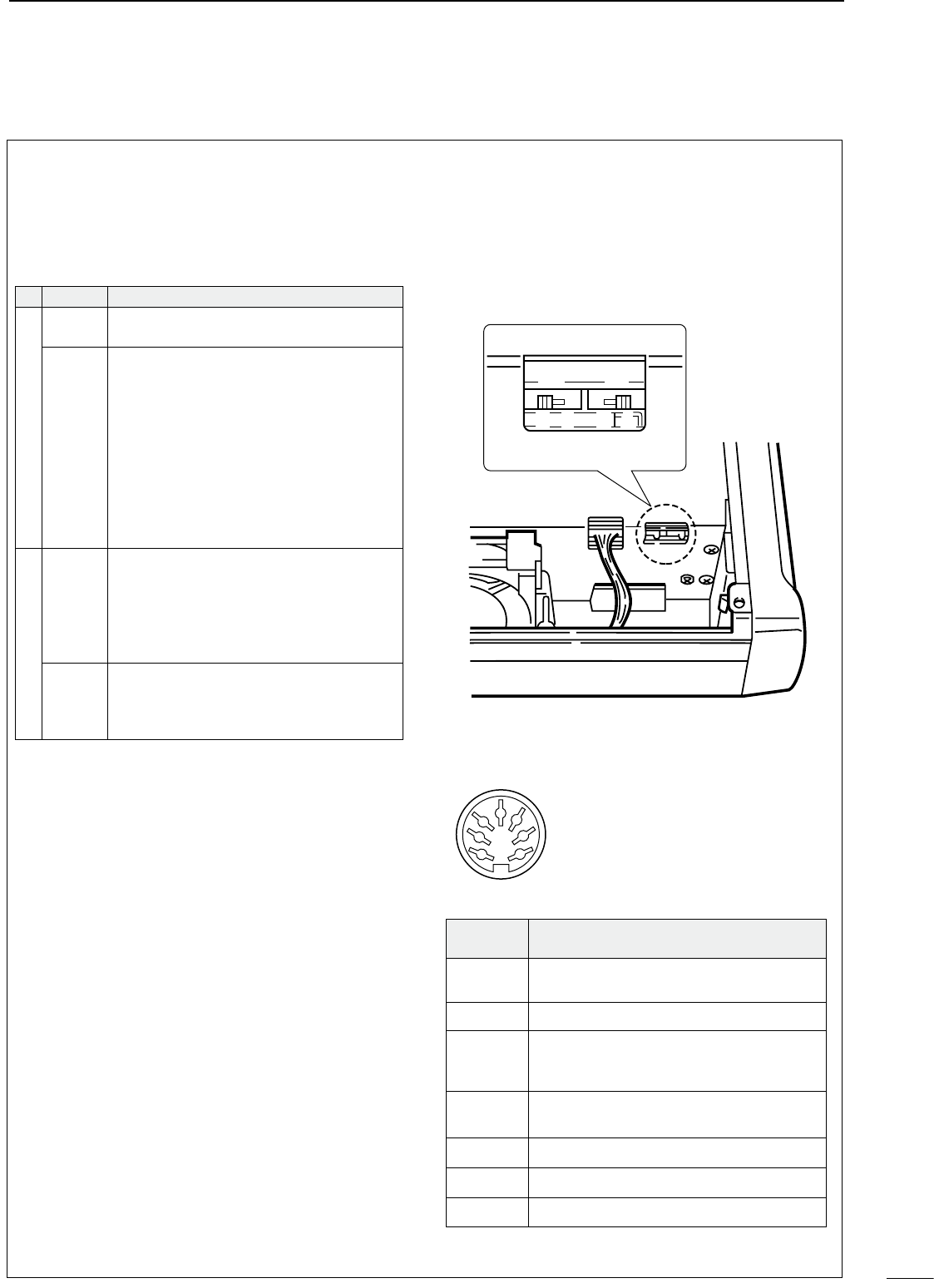
51
9
INSTALLATION AND CONNECTIONS
62
�AT-180 internal switch description
The optional AT-180 has 3 operating conditions for
HF band operation. Select a suitable condition
according to your antenna system.
qRemove the top cover of the AT-180.
wSet the tuner switches to the desired positions
according to the table below.
•Speci cations for the AT-180
• Frequency coverage : 1.9–54 MHz
• Input impedance : 50 Ω
• Maximum input : 120 W
power
• Minimum tuning : 8 W
power
• Matching impedance : 16.7–150 Ω(HF band)
range 20–125 Ω(50 MHz band)
• Tuning accuracy : Less than SWR 1.5:1
• Insertion loss : Less than 1.0 dB
(after tuning)
• Power supply : 13.8 V DC/1 A (supplied from
requirements the transceiver’s ACC socket)
• Dimensions (mm/in) : 167(W) ×58.6(H) ×225(D)
6
9
⁄
16
(W) ×2
5
⁄
17
(H) ×8
7
⁄
8
(D)
• Weight : 2.4 kg; 5 lb 4 oz
• Supplied accessories: coaxial cable (1 m),
ACC cable (DIN 13 pins)
•AT-180 inside top cover
•Connector information for ACC(2) socket
S2 S1
D C B A
ACC 2
1
2
3
4
76
5
PIN NO./
NAME DESCRIPTION
q8 V Regulated 8 V output.
(10 mA max.)
wGND Connects to ground.
eSEND
Input/output pin.
Goes to ground when transmitting (20 mA
max). When grounded, transmits.
rBAND Band voltage output.
(Varies with amateur band; 0 to 8.0 V).
tALC ALC output voltage (–4 to 0 V).
yNC No connection.
u13.8V
13.8 V output when power is ON (1 A max).
SW Position Operation
S1
A
(default)
The tuner operating condition is set by S2
described below.
B
THROUGH INHIBIT
The tuner tunes the antenna even when
the antenna has poor SWR (up to VSWR
3:1 after tuning). In this case, manual tun-
ing is necessary each time you change the
frequency although the tuner automatically
starts tuning when the VSWR is higher
than 3:1. This setting is called “through
inhibit,” however, the tuner is set to
“through” if the VSWR is higher than 3:1
after tuning.
S2
C
TUNER SENSITIVE CONDITION
The tuner tunes each time you transmit
(except SSB mode). Therefore, the lowest
SWR is obtained at any given time.
For SSB mode, the same condition is as
D
(default)
NORMAL CONDITION
The tuner tunes when the SWR is higher
than 1.5:1. Therefore, the tuner activates
only when tuning is necessary.
10
OPTIONAL INSTALLATIONS/SETTINGS
the “D” position below.
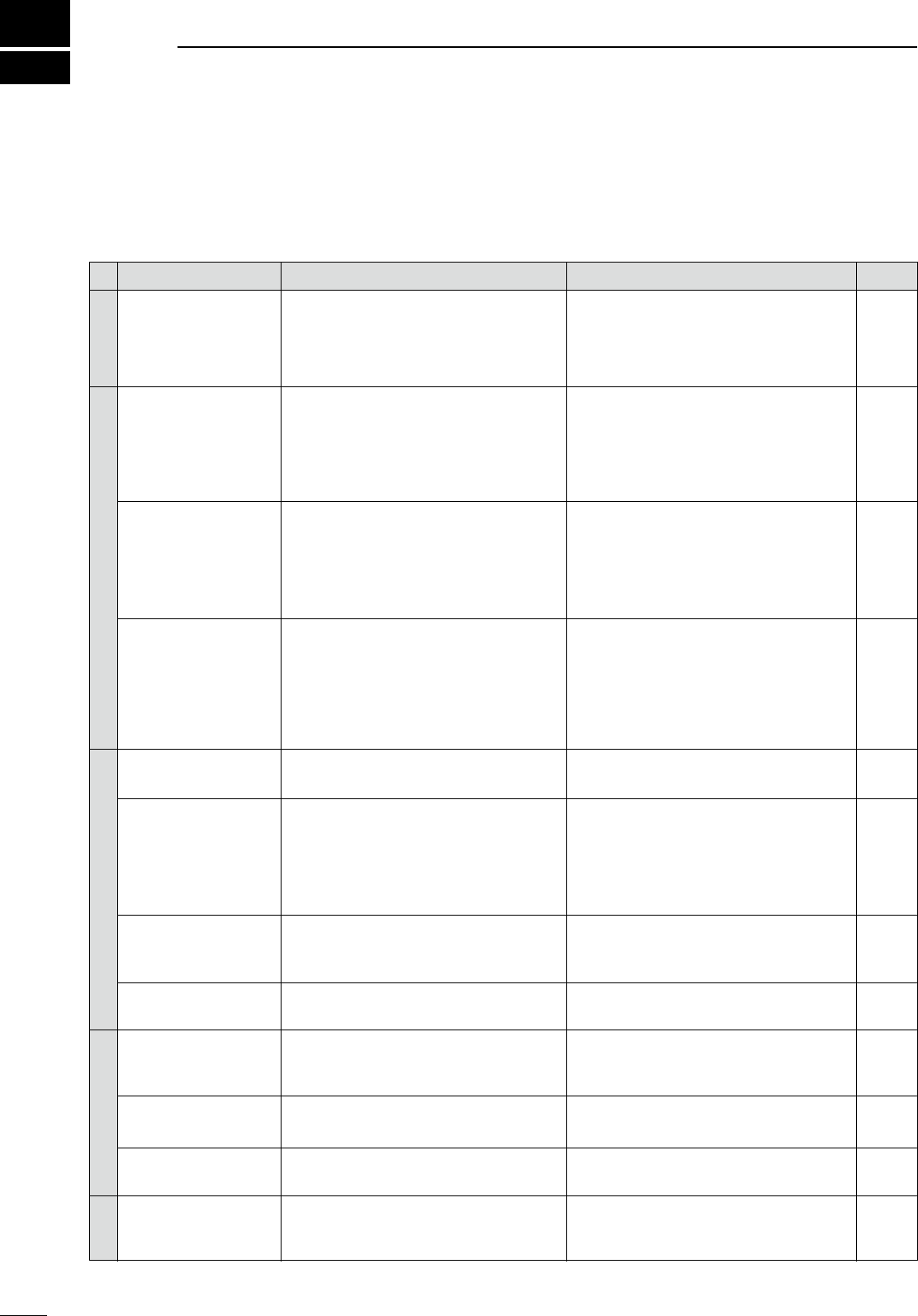
10
52
MAINTENANCE
n Troubleshooting
The following chart is designed to help you correct
problems which are equipment malfunctions.
If you are not able to locate the cause of a problem
or solve it through the use of this chart, contact your
nearest Icom Dealer or Service Center.
PROBLEM POSSIBLE CAUSE SOLUTION REF.
DISPLAY
POWER
RECEIVE
TRANSMIT
SCAN
Power does not come on
when the [POWER] switch
is pused.
No sounds comes from
the speaker.
Sensitivity is low.
Receive audio is distorted.
Transmitting is impossible.
Output power is too low.
No contact possible with
another station.
Transmitted signals are
distorted.
Programmed scan does
not stop.
Programmed scan does
not start.
Memory scan does not
start.
The displayed frequency
does not change prooerly.
p. 12
p. 53
p. 2
p. 2
p. 6
—
—
p. 3
p. 3
p. 20
p. 21
p. 21
p. 22
p. 23
p. 17
p. 42
p. 42
p. 10
p. 3
p. 21
pgs. 7,
31, 32
p. 2
p. 27
p. 3
p. 30
p. 40
p. 40
p. 6
p. 41
p. 53
• Reconnect the DC power cable correctly.
•
Check for the cause, then replace the fuse
with a spare one.
(Fuses are installed in the DC power cable
and the internal PA unit.)
• Rotate [AF] clockwise to obtain a sutable lis-
tening level.
• Rotate [RF/SQL] to 10 o’clock position to open
the squelch.
•
Check the SEND line of an external unit, if de-
sired.
• Reconnect to the antenna connector.
• Connect an antenna suitable for the operating
frequency.
• Push [TUNER] for 2 sec. to manually tune the
antenna.
• Push [ATT] to select “ATT” OFF.
• Select a suitable operating mode.
• Rotate the SHIFT control to center position.
• Push [NB] to turn the function OFF.
• Push [P.AMP] to turn the function OFF.
• Set the [NR] control for maximum readability.
• Set the frequency to a ham band.
• Set [RF POWER] to a suitable position.
• Set [MIC GAIN] to a suitable position.
• Select an antenna suitable for the operating
frequency.
• Push [TUNE] for 2 sec. to manually tune the
antenna.
• Push [RIT] to turn the function OFF.
• Push [SPLIT] to turn the function OFF.
• Set [MIC GAIN] to a suitable position.
• Turn [COMP] OFF.
• Set [RF/SQL] to the threshold point.
• Reset [RF/SQL] control assigned and set it to
the threshold point.
•
Program different frequencies in scan edge
memory channels P1 and P2.
• Program 2 or more memory channels.
• Push [LOCK] to deactivate the function.
• Push [SET] to exit the quick set mode.
• Reset the CPU.
• DC power cable is improperly connected.
• Fuse is blown.
• Power supply not turned ON.
• Volume level is too low.
• The squelch is closed.
•
The transceiver is in the transmitting condition.
• The antenns is not connected properly.
• The antenna is for another band is connected.
• The antenna is not properly tuned.
• The attenuator is activated.
• The operating mode is not selected correctly.
• IF SHIFT function is activated.
• Noise blanker function is activated.
• Preamp is activated.
• The noise reduction is activated and the [NR]
control is set too high.
• The operating frequency is not set to a ham
band.
• [RF POWER] is set too low.
• [MIC GAIN] is set too low.
• The antenna for another band is selected.
• The antenna is not properly tuned.
• RIT function is activated.
• Split frequency function is activated.
• [MIC GAIN] too high.
• [COMP] function is activated.
• Squelch is open.
• [RF/SQL] is assigned to RF gain control and
squelch is open.
•
The same frequencies have been programmed
in scan edge memory channels P1 and P2.
• 2 or more memory channels have not been
programmed.
• The dial lock function is activated.
• A quick set mode screen is selected.
• The internal CPU has mulfunctioned.
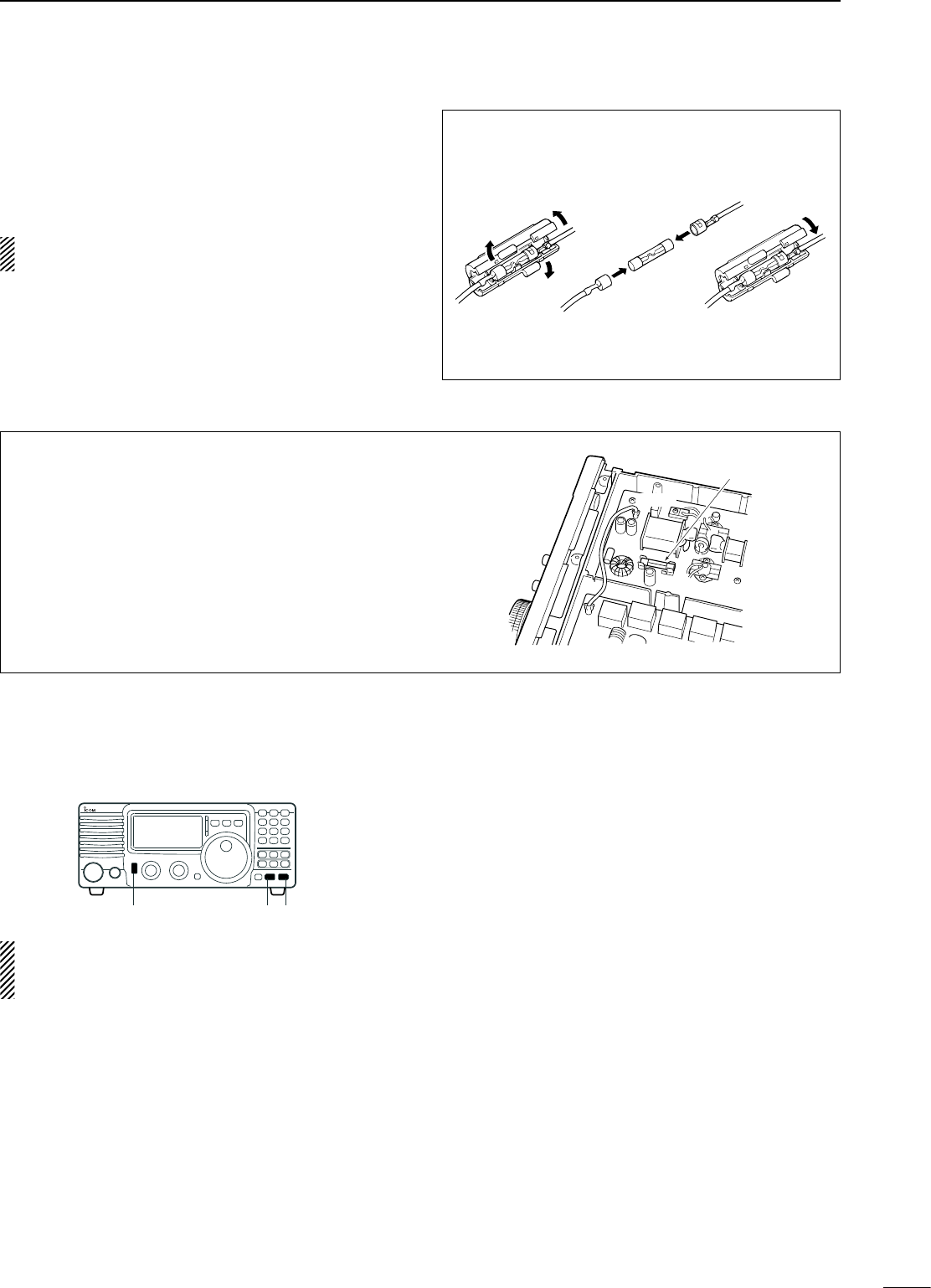
53
10
MAINTENANCE
CIRCUITRY FUSE REPLACEMENT
The 13.8 V DC from the DC power cable is applied
to all units in the IC-718 through the circuitry fuse.
This fuse is installed in the MAIN unit.
q Remove the top cover as shown on p. 48
w Replace the circuitry fuse as shown in the
diagram at right.
e Replace the top cover.
FGB 4 A
PA unit
n Fuse replacement
If a fuse blows or the transceiver stops functioning,
try to find the source of the problem, and replace the
damaged fuse with a new, rated fuse.
CAUTION:-DISCONNECT the DC power cable
from the transceiver when changing a fuse.
The IC-718 has 2 types of fuses installed for
transceiver protection.
• DC power cable fuses �������� FGB 20 A
• Circuitry fuse ������������ FGB 4 A
DC POWER CABLE FUSE REPLACEMENT
20 A
fuse
n Resetting the CPU
Resetting CLEARS all programmed contents in
memory channels and returns programmed values
in set mode to their defaults.
When first applying power or when the function
seems to be displaying erroneous information, reset
the CPU as follows:
q Make sure transceiver power is OFF.
w While pushing [UP Y] and [Z DN], push [PWR] to
turn power ON.
• The internal CPU is reset.
• The transceiver displays its initial VFO frequencies
when resetting is complete.
[PWR] [Z][Y]

11
54
SPECIFICATIONS
D General
• Frequency coverage : Receive
0.03–29.999999 MHz*1
Transmit
1.800– 1.999999 MHz*2
3.500– 3.999999 MHz*2
7.000– 7.300000 MHz
10.100–10.150000 MH
14.000–14.350000 MHz
18.068–18.168000 MHz
21.000–21.450000 MHz
24.890–24.990000 MHz
28.000–29.700000 MHz
*1Guaranteed range: 0.5–29.999999 MHz
*2Varies according to version
• Mode : USB, LSB, CW, RTTY, AM,
• Number of memory : 101 (99 regular, 2 scan edges)
channels
• Frequency stability :
Less than ±200 Hz from 1
min. to 60 min. after power
on. After that rate of stability
less than ±30 Hz/hr. at +25°C
(+77°F). Temperature
fluctuations 0°C to +50°C
(+32°F to +122°F) less than ±
350 Hz.
• Power supply : 13.8 V DC ±15%
requirement (negative ground)
• Current drain : Receive
(at 13.8 V DC) Standby 1.3 A
Max. audio 2.0 A
Transmit
Max. power 20.0A
•
Operatable temp. range
: –10°C to +60°C; +14°F to
+140°F
• Antenna connector : SO-239 (50 Ω)
• Dimensions :
240(W) × 95(H) × 239(D) mm
(projections not included)
97⁄16(W) × 33⁄4(H) × 913⁄32(D) in
• Weight (approx.) : 3.8 kg; 8 lb 6 oz
• ACC connector : 13-pin
• REMOTE connector : 2-conductor 3.5 (d) mm (1⁄8˝)
D Transmitter
• Output power :
SSB, CW, RTTY 2–100 W
AM 2–40 W
• Modulation system :
SSB Balanced modulation
AM Low level modulation
• Spurious emissions : Less than –50 dB below
peak output power
*Spurious freq.; Below 30 MHz: –50 dB
Above 50 MHz: –60 dB
NOTE: Limit in dB decreases linearly with thw logarithm of
frequency in the range 30 MHz to 50 MHz.
• Carrier suppression : More than 40 dB
• Unwanted sideband : More than 50 dB
• Microphone connector : 8-pin connector (600 Ω)
• Key connector : 3-conductor 6.5 (d) mm (1⁄4˝)
• SEND/ALC connector : Phono (RCA)
D Receiver
• Receive system : Double-conversion
superheterodyne system
• Sensitivity :
SSB, CW, RTTY 0.16 µV (1.8–29.999999 MHz)
AM 13 µV (0.5–1.799999 MHz)
2 µV (1.8–29.999999 MHz)
• Squelch sensitivity (threshold):
SSB, CW, RTTY Less than 5.6 µV
• Selectivity :
SSB, CW, RTTY More than 2.1 kHz/–6 dB
Less than 4.5 kHz/–60 dB
AM More than 6 kHz/–6 dB
Less than 20 kHz/–40 dB
• Spurious and image rejection ratio:
More than 70 dB
(1.8–29.999999 MHz)
• RIT variable range : ±1200 Hz
• Audio output power : More than 2.0 W at 10%
(at 13.8 V DC) distortion with an 8 Ω load
• PHONES connector :
3-conductor 6.35 (d) mm (1⁄4˝)
• External SP connector : 2-conductor 3.5 (d) mm (1⁄8˝)
/8 Ω
All stated specifications are typical and subject to
change without notice or obligation.
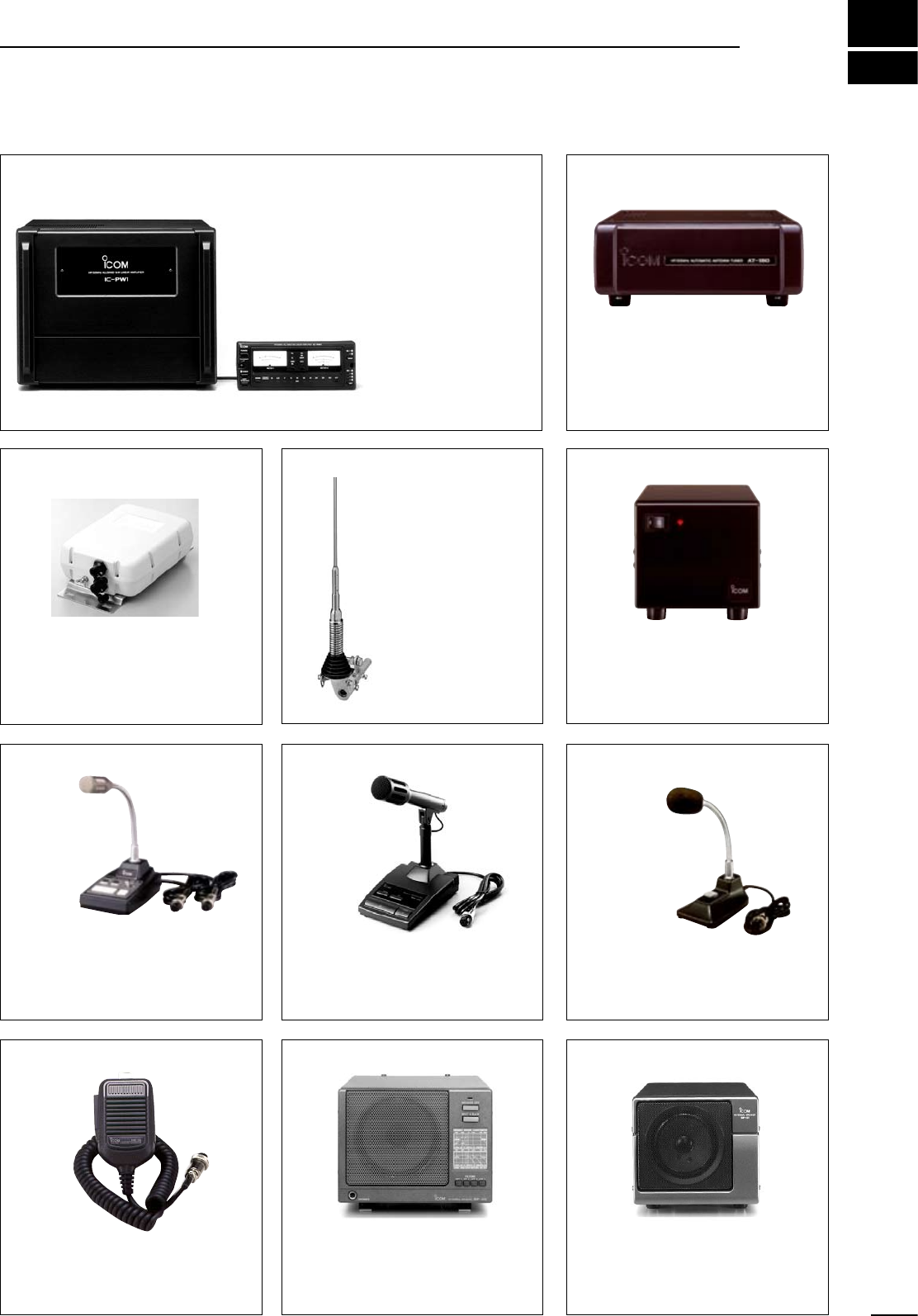
AT-180 HF + 50 MHz
AUTOMATIC ANTENNA TUNER
Fully automatic antenna tuner with
preset memories for each 100 kHz.
Unique “Automatic tuner on ” function
is available. See p. 51 for AT-180
specifications.
12
55
OPTIONS
IC-PW1 HF + 50 MHz 1 KW LINER AMPLIFIER
Full-duty 1 kW linear
amplifier including an
automatic antenna
tuner. Has automatic
tuning and band
selection capability.
Full break-in (QSK)
operation is possible.
The amplifier/power
supply unit and the
remote control unit are
separated.
AH-4 HF + 50 MHz AUTOMATIC
ANTENNA TUNER
Specially designed to tune a long
wire antenna for portable or mobile
HF operation. The PTT tuner start
function provides simple operation.
• Input power rating: 120 W
SP-20 EXTERNAL SPEAKER
4 audio filters; headphone jack; can
connect to 2 transceivers.
• Input impedance: 8 Ω
• Max. imput power: 5 W
HM-36 HAND MICROPHONE
Hand microphone equipped with
[UP]/[DOWN] switches.
Same as supplied.
SM-8 DESKTOP MICROPHONE
Including 2 connection cables
for simultaneous connection of 2
transceivers. Has [UP]/[DOWN]
switches. .
AH-2b ANTENNA ELEMENT
A 2 . 5 m l o n g
antenna element
for mobile operation
with the AH-4.
• Frequency
coverage:
3.5–28 MHz bands
with the AH-4
SM-20 DESKTOP MICROPHONE
Unidirectional, electret microphone
for base station operation. Includes
[UP]/[DOWN] switches and a low cut
function.
SM-6 DESKTOP MICROPHONE
Electret condenser-type desktop
microphone.
PS-85 DC POWER SUPPLY
Light weight switching regulator
system power supply.
• Output voltage: 13.8 V DC
• Max. current drain: 20 A
SP-21 EXTERNAL SPEAKER
Designed for base station operation.
Input impedance: 8 Ω
Max. input power: 5 W
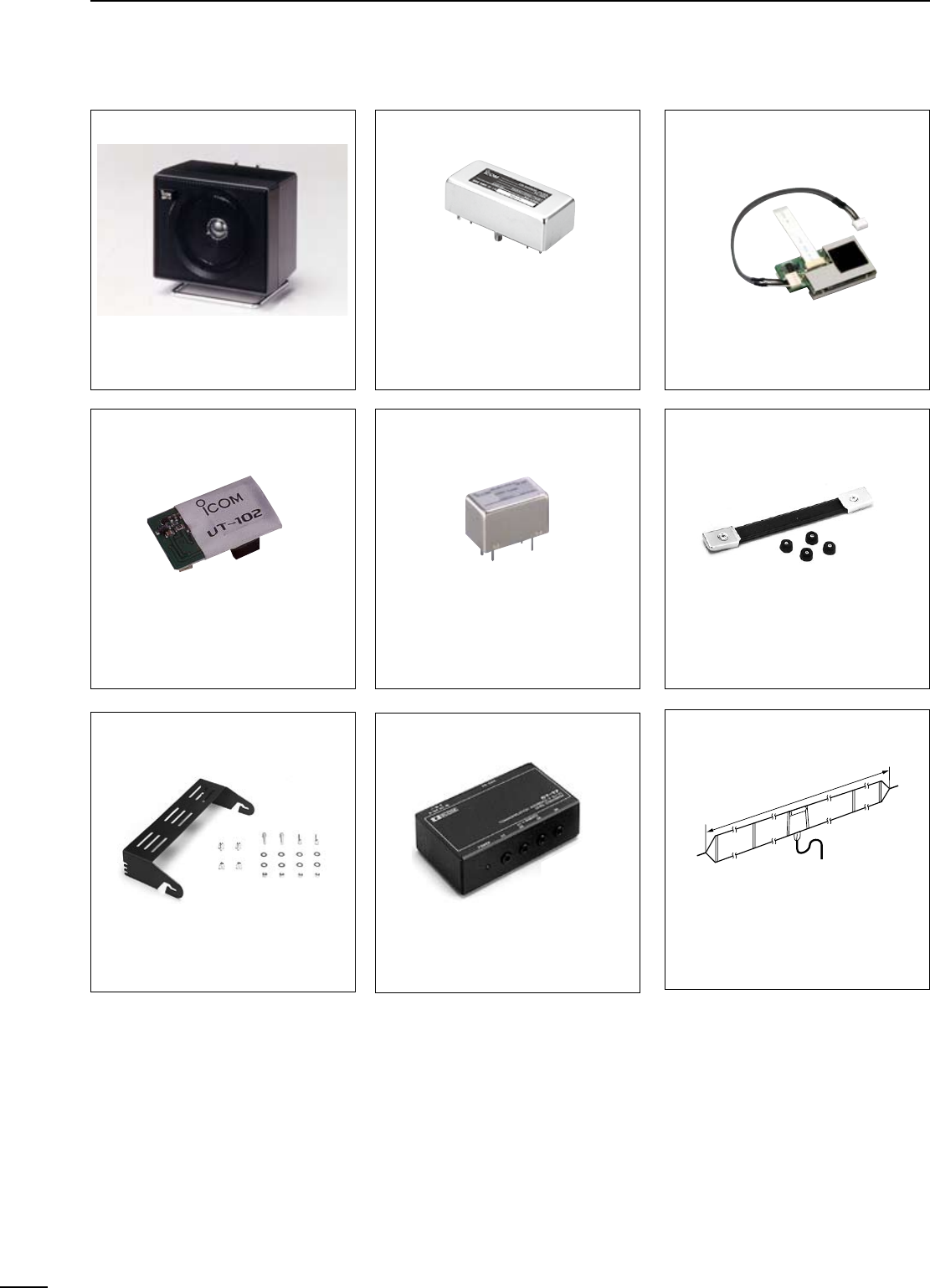
CT-17 CI-V LEVEL
CONVERTER
For remote receiver control using
a personal computer. You can
change frequencies, operating mode,
memory channels, etc.
56
12 OPTIONS
OPC-599 ADAPTER CABLE
13-pin, ACC connector to 7-pin + 8-pin ACC connector.
SP-7 EXTERNAL SPEAKER
Compact speaker for base station
operation. Height can be adjusted for
your convenience.
UT-102 VOICE SYNTHESIZER
Announces the receive frequency,
mode, S-meter level and current time
in a clear, electronically-generated
voice, in English (or Japanese).
FL-52A, FL-53A, FL-96, FL-222
and FL-257 455 KHz FILTERS
• FL-52A: 500 Hz/–6dB (CW/RTTY
narrow)
• FL-53A: 250 Hz/–6dB (CW narrow)
• FL-96: 2.8 KHz/–6dB (SSB wide)
• FL-222:
1.8 KHz/–6dB (SSB narrow)
• FL-257: 3.3 KHz/–6dB (SSB wide)
UT-106 DSP RECEIVE UNIT
Provides AF DSP functions such as
noise reduction and auto notch.
CR-338 HIGH-STABILITY
CRYSTAL UNIT
Contains a temperature-
compensating oven heater and
crystal unit for improved frequency
stability.
• Frequency stability: ±0.5 ppm
MB-23 CARRYING HANDLE
Carrying handle, convenient for
portable operation.
AH-710 FOLDED DIPOLE
ANTENNA
Covers from 1.9–30 MHz bands. Has
an SO-239 connector. 30 m (98.4 ft)
coaxial cable with PL-259 connector
is supplied.
approx. 24.5 m; 80.3 ft
IC-MB5 MOBILE MOUNTING
BRACKET
Transceiver mounting bracket for
mobile operation.
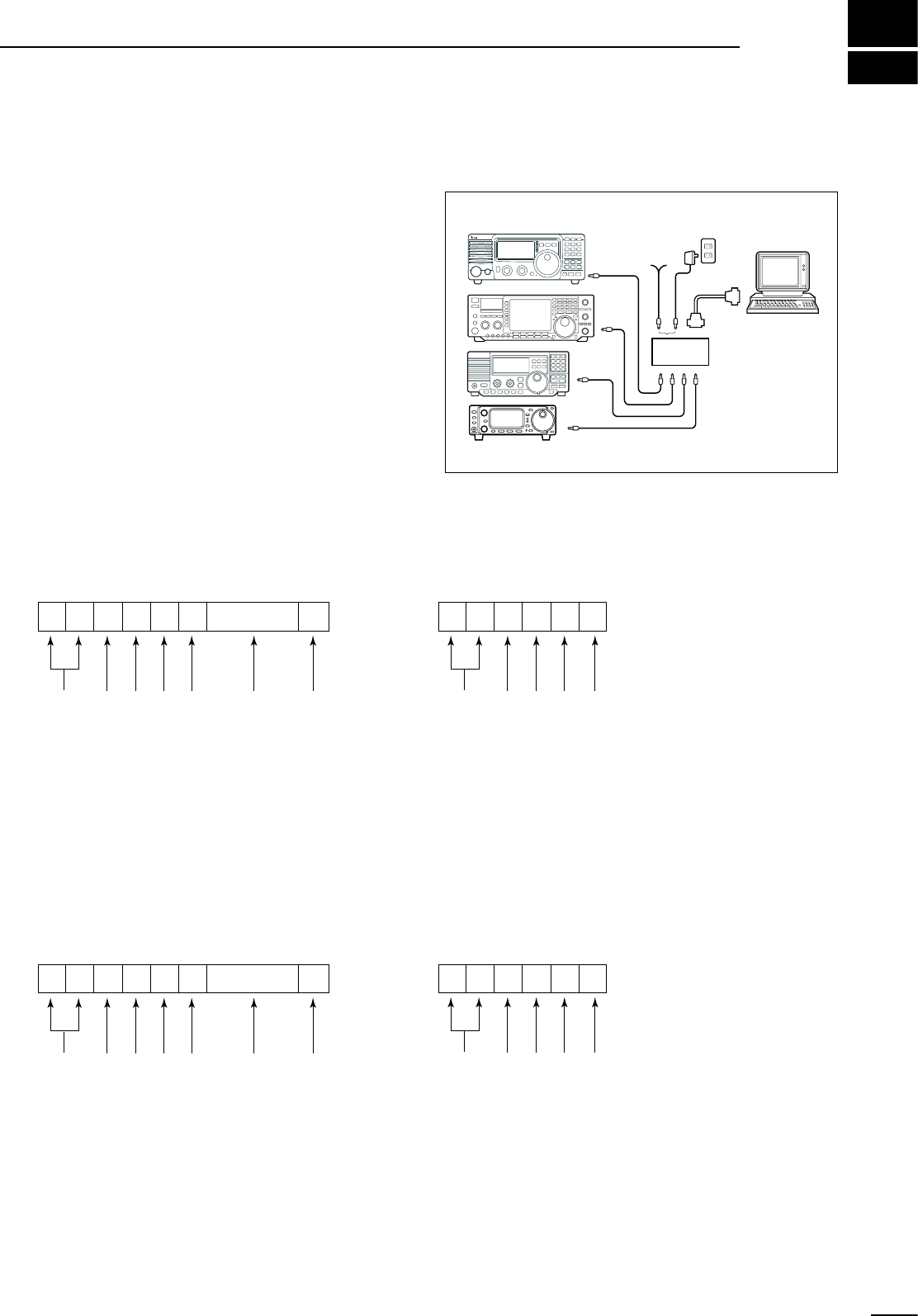
13
57
CONTROL COMMAND
• CI-V connection example
The transceiver can be connected through an
optional CT-17 CI-V LEVEL CONVERTER to a personal
computer equipped with an RS-232C port. The Icom
Communications Interface-V (CI-V) controls the
following functions of the transceiver.
Up to 4 Icom CI-V transceivers or receivers can be
connected to a personal computer equipped with an
RS-232C port. See p. 32 for setting the CI-V condition
using set mode.
• Data format
The CI-V system can be operated using the following
data formats. Data formats differ according to
command numbers. A data area or sub command is
added for some commands.
CONTROLLER TO IC-718
FE
FE
FE 5E E0 Cn Sc Data area FD
Preamble code (fixed)
Transceiver’s default address
Controller’s default address
Command number
(see table at right)
Sub command number
(see table at right)
BCD code data for frequency or
memory number entry
End of message code (fixed)
OK MESSAGE TO CONTROLLER
FE FE E0 5E FB FD
Preamble code (fixed)
Controller’s default address
Transceiver’s default address
OK code (fixed)
End of message code (fixed)
NG MESSAGE TO CONTROLLER
FE FE E0 5E FA FD
Preamble code (fixed)
Controller’s default address
Transceiver’s default address
NG code (fixed)
End of message code (fixed)
IC-718 TO CONTROLLER
FE E0 5E Cn Sc Data area FD
Preamble code (fixed)
Controller’s default address
Transceiver’s default address
Command number
(see table at right)
Sub command number
(see table at right)
BCD code data for frequency or
memory number entry
End of message code (fixed)
q w e r t y u
q w e r t y u
n Remote jack (CI-V) information
9–15
V DC
personal
computer
ct-17
BC-25
(optional)
mini-plug cable
IC-718
58
13 CONTROL COMMAND
• Command table
Sub commandCommand Description
—00 Send frequency data
01 Send mode data
—03 Read frequencies
—04 Read operating mode
05 Set operating frequency
00
01
A0
B0
Set VFO
Set VFO A
Set VFO B
VFO A=B
VFO A B
07
—0B Memory clear
00
01
D0
D3
0E
Scan stop
Prog/Memo Scan Start
Resume OFF
Resume ON
0F SPLIT OFF
SPLIT ON
01
02
03
06
09
0A
0B
0C
0F
10 Set TS
15
02 Read Upper/Lower frequencies
06 Set mode
08 Set Memory
Set Memory CH
09 Memory write
0A Memory VFO
00
01
11
14
ATT
AF Gain
RF Gain
SQL Level
NR Level
CW Pitch
RF Power
MIC Gain
KEY Speed
BK-IN Delay
16
19
02
22
40
41
44
46
47
00
01
02
Read SQL Open/Close
Read SIG (S-meter) level
PRE-AMP
NB
NR
Auto Notch
COMP
VOX
BK-IN
Read ID
—
—
—
—
—
—
—
—
—
—
—
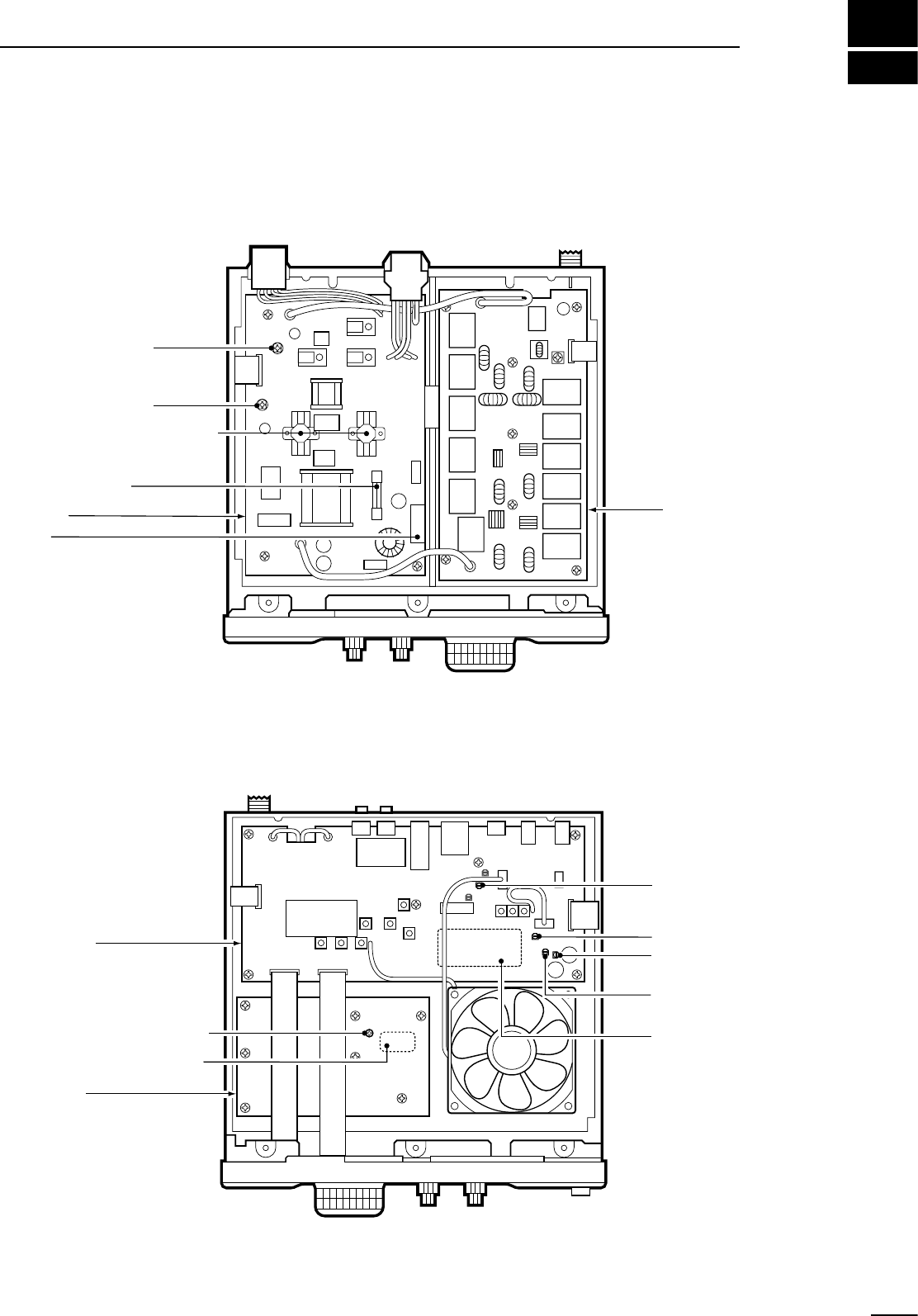
14
59
INTERNAL VIEW
FILTER unit
Final amplifier (2SC2094x2)
PA unit
Caution:
The transceiver has been
thoroughly tested and
adjusted at the factory
before being shipped.
The transceiver warranty
does not cover any
problems caused by
unauthorized internal
adjustment.
Fuse (FGB 4 A)
R 25
Final ID adj. (R 24)
Drive ID adj. (R 21)
PLL unit
MAIN unit
Carrier suppression adj.
(R 2303)
IC APC adj. (R 1720)
Tx power adj. (R 1707)
AM Tx carrier adj.
(R 1730)
Reference freq. adj. (C 16)
Optional crystal (CR-338)
Optional IF filter
(See p. 24)
n Top view
n Bottom view
15
60
INSTALLATION NOTES
For amateur base station installations, it is
recommended that the forwards clearance in front of
the antenna array is calculated relative to the EIRP
(Effective Isotropic Radiated Power). The clearance
height below the antenna array can be determined in
most cases from the RF power at the antenna input
terminals.
As different exposure limits have been recommended
for different frequencies, a relative table shows a
guideline for installation considerations.
Below 10 MHz, the recommended limits are specified
in terms of V/m or A/m fields as they are likely to fall
within the near-field region. Similarly, at antennae
may be physically short in terms of electrical length
and that the installation will require some antenna
matching device which can create high intensity
magnetic fields. Analysis of such MF installations
is best considered in association with published
guidance notes such as the FCC OET Bulletin 65
Edition 97-01 and its annexes relative to amateur
transmitter installations. Further information can be
found at http://www.arrl.org/
• Typical amateur radio installation
Exposure distance assumes that the predominant
radiation pattern is forwards and that radiation
vertically downwards is at unity gain (sidelobe
suppresion is equal to main lobe gain). This is true of
almost every gain antenna today. Exposed persons
are assumed to be beneath the antenna array and
have a typical height to 1.8 m.
The figures assume the worst case emission of
constant carrier.
For the bands 10 MHz and higher the following power
density limits are recommended :
10–30 MHz 2 W/sq m
Watts (EIRP)/ Clearance heights
1 2.1 (m)
10 2.8
25 3.4
100 5
1000 12
Watts (EIRP)/ Forward clearance
100 2 (m)
1,000 6.5
10,000 20
100,000 65
In all cases any possible risk depends on the
transmitter being activated for long periods. (actual
recommendation limits are specified as an average
of 6 minutes) Normally the transmitter is not active for
long periods of time. Some radio licenses will require
that a timer circuit automatically cuts the transmitter
after 1–2 minutes etc.
Similarly some types of transmitter, SSB, CW, AM,
etc. have a lower ‘average’ output power and the
perceived risk is even lower.
Versions of the IC-718 which display the “CE”
symbol on the serial number seal, comply with
the essential requirements of the European
Radio and Telecommunication Terminal
Directive 1999/5/EC.
This warning symbol indicates that this
equipment operates in non-harmonised
frequency bands and/or may be subject to
licensing conditions in the country of use. Be
sure to check that you have the correct version
of this radio or the correct programming of
this radio, to comply with national licensing
requirement.
Country Codes
1 Austria AT
2 Belgium BE
3 Bulgaria BG
4 Croatia HR
5 Czech Republic CZ
6 Cyprus CY
7 Denmark DK
8 Estonia EE
9 Finland FI
10 France FR
11 Germany DE
12 Greece GR
13 Hungary HU
14 Iceland IS
15 Ireland IE
16 Italy IT
17 Latvia LV
Country Codes
18 Liechtenstein LI
19 Lithuania LT
20 Luxembourg LU
21 Malta MT
22 Netherlands NL
23 Norway NO
24 Poland PL
25 Portugal PT
26 Romania RO
27 Slovakia SK
28 Slovenia SI
29 Spain ES
30 Sweden SE
31 Switzerland CH
32 Turkey TR
33 United Kingdom GB
List of Country codes (ISO 3166-1)
61
15
INSTALLATION NOTES
Version and Frequency coverage
EUR (#03)
Tx
1.800000
3.500000
7.000000
10.100000
14.000000
18.068000
21.000000
24.890000
28.000000
– 1.999999
– 3.800000
– 7.100000
– 10.150000
– 14.350000
– 18.168000
– 21.450000
– 24.990000
– 29.700000
Rx
0.500000 – 29.999999
(Unit: MHz)
FRA (#05)
Tx
1.810000
3.500000
7.000000
10.100000
14.000000
18.068000
21.000000
24.890000
28.000000
– 1.850000
– 3.800000
– 7.100000
– 10.150000
– 14.350000
– 18.168000
– 21.450000
– 24.990000
– 29.700000
Rx
1.810000
3.500000
7.000000
10.100000
14.000000
18.068000
21.000000
24.890000
28.000000
– 1.850000
– 3.800000
– 7.100000
– 10.150000
– 14.350000
– 18.168000
– 21.450000
– 24.990000
– 29.700000
ITA (#04)
Tx
1.800000
3.400000
6.900000
9.900000
13.900000
17.900000
20.900000
24.400000
28.000000
– 1.999999
– 3.999999
– 7.499999
– 10.499999
– 14.499999
– 18.499999
– 21.499999
– 25.099999
– 29.999999
Rx
0.500000 – 29.999999
ESP (#06)
Tx
1.830000
3.500000
7.000000
10.100000
14.000000
18.068000
21.000000
24.890000
28.000000
– 1.850000
– 3.800000
– 7.100000
– 10.150000
– 14.350000
– 18.168000
– 21.450000
– 24.990000
– 29.700000
Rx
1.830000
3.500000
7.000000
10.100000
14.000000
18.068000
21.000000
24.890000
28.000000
– 1.850000
– 3.800000
– 7.100000
– 10.150000
– 14.350000
– 18.168000
– 21.450000
– 24.990000
– 29.700000
DECLARATION
OF CONFORMITY
We Icom Inc. Japan
1-1-32, Kamiminami, Hirano-ku
Osaka 547-0003, Japan
Kind of equipment: HF
ALL BAND TRANSCEIVER
Type-designation:
Version (where applicable):
Signature
H. Ikegami
General Manager
Authorized representative name
Icom (Europe) GmbH
Himmelgeister straße 100
D-40225 Düsseldorf
Place and date of issue
Düsseldorf 17th July 2007
i718
Declare on our sole responsibility that this equipment complies with the
essential requirements of the Radio and Telecommunications Terminal
Equipment Directive, 1999/5/EC, and that any applicable Essential Test
Suite measurements have been performed.
This compliance is based on conformity according to Annex III of the
directive 1999/5/EC using the following harmonised standards:
i) EN 301 489-1 V1.4.1 (August 2000)
ii) EN 301 489-15 V1.2.1 (August 2002)
iii) EN 301 783-2 V1.1.1 (September 2000)
iv) EN 60950-1: 2001
1-1-32 Kamiminami, Hirano-ku, Osaka 547-0003, Japan
A-5649D-1EX-y
Printed in Japan
© 2000–2007 Icom Inc.
< Intended Country of Use >
AT
FI
IT
PL
GB
RO
BE
FR
LV
PT
IS
TR
CY
DE
LT
SK
LI
HR
CZ
GR
LU
SI
NO
DK
HU
MT
ES
CH
EE
IE
NL
SE
BG
< Intended Country of Use >
AT
FI
IT
PL
GB
RO
BE
FR
LV
PT
IS
TR
CY
DE
LT
SK
LI
HR
CZ
GR
LU
SI
NO
DK
HU
MT
ES
CH
EE
IE
NL
SE
BG
< Intended Country of Use >
AT
FI
IT
PL
GB
RO
BE
FR
LV
PT
IS
TR
CY
DE
LT
SK
LI
HR
CZ
GR
LU
SI
NO
DK
HU
MT
ES
CH
EE
IE
NL
SE
BG
< Intended Country of Use >
AT
FI
IT
PL
GB
RO
BE
FR
LV
PT
IS
TR
CY
DE
LT
SK
LI
HR
CZ
GR
LU
SI
NO
DK
HU
MT
ES
CH
EE
IE
NL
SE
BG
IC-718 #03
(Europe)
IC-718 #04
(Italy)
IC-718 #05
(France)
IC-718 #06
(Spain)
Printed on recycle paper with soy ink.
