Infrasys INFRASYS-HB 2.4GHz DSSS Transmitter - Base Station User Manual HT manual

Infrasys HK Ltd 2.4GHz DSSS Transmitter - Base Station HT manual

User Manual

INFRASYS (HK) LTD.Page 1 of 5Chili - User ManualDISCLAIMERThe Chili system, including HT100 & HB100 are manufactured for, distributed and sold by Infrasys (HK) Ltd. Infrasys and Chili logo trademarks are owned by Infrasys (HK) Ltd. The information is provided in this manual is provided “AS IS” without warranty of any kind, either expressed orimplied.  Product specifications and physical appearance of the products are subject to change. Infrasys reservesthe copyrights of any part of the content of this manual.HT100 & HB100 have been tested and found to comply with the limits for a Class B digital device, pursuant to Part15 of the FCC Rules.  These limits are designed to provide reasonable protection against harmful interference in aresidential installation.  This equipment generates, uses and can radiate radio frequency energy and, if notinstalled and used in accordance with the instructions, may cause harmful interference to radio communications.However, there is no guarantee that interference will not occur in a particular installation.  If this equipment doescause harmful interference to radio or television reception, which can be determined by turning the equipment offand on, the user is encouraged to try to correct the interference by one or more of the following measures:  Reorient or relocate the receiving antenna,  Increase the separation between the equipment and receiver,  Connect the equipment into an outlet on a circuit different from that to which the receiver is connected,  Consult the dealer or an experienced radio/TV technician for help.Also, shielded cables must be used with this unit to ensure compliance with the Class B FCC limits.Warning: changes or modifications to this unit not expressly approved by the party responsible for compliancecould void the user’s authority to operate the equipment.Table of Contents:INTRODUCTIONFUNCTION KEYSBATTERY INSTALLATIONREMOVAL OF COLOR COVERPRODUCT SPECIFICATIONS
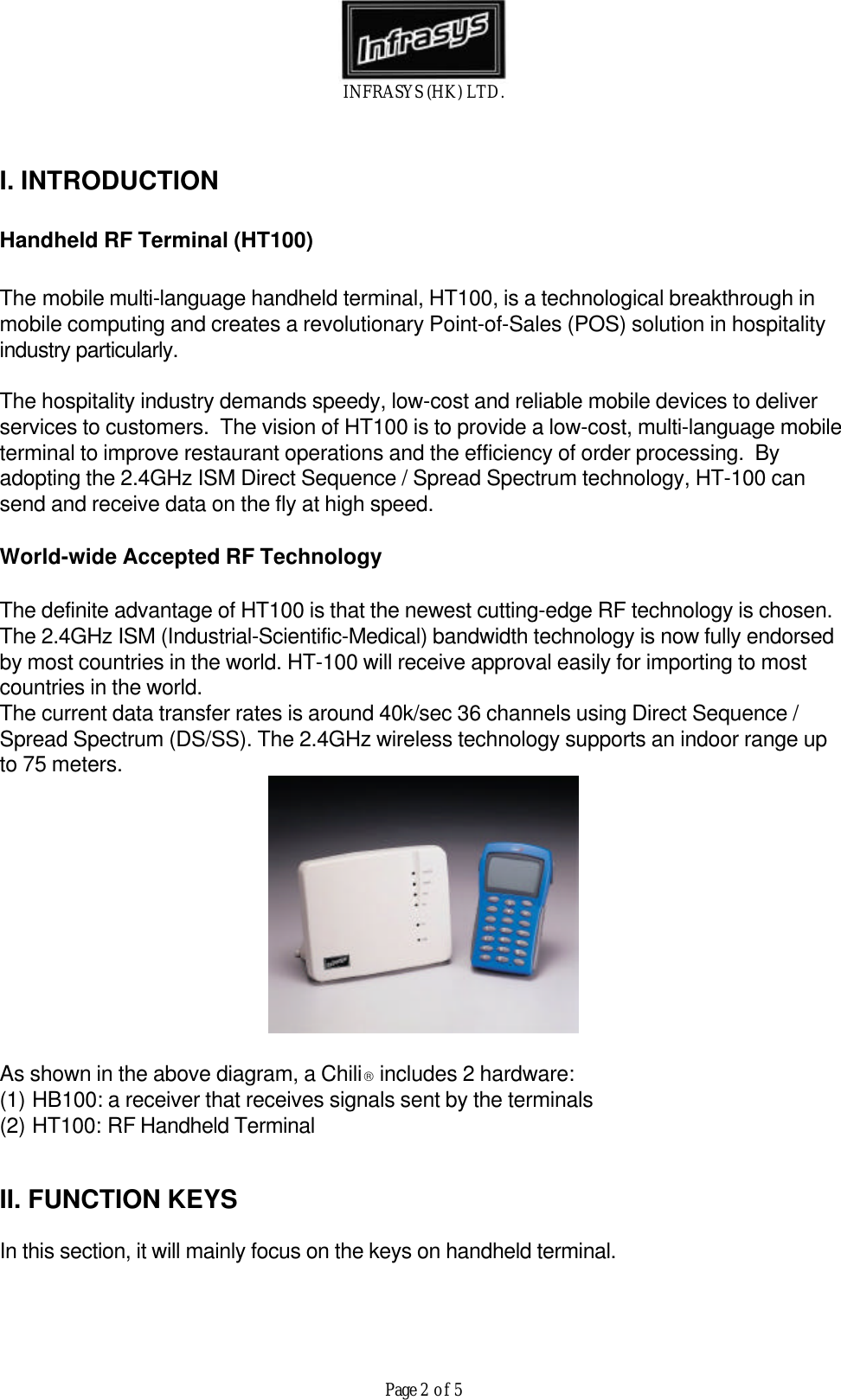
INFRASYS (HK) LTD.Page 2 of 5I. INTRODUCTIONHandheld RF Terminal (HT100)The mobile multi-language handheld terminal, HT100, is a technological breakthrough inmobile computing and creates a revolutionary Point-of-Sales (POS) solution in hospitalityindustry particularly.The hospitality industry demands speedy, low-cost and reliable mobile devices to deliverservices to customers.  The vision of HT100 is to provide a low-cost, multi-language mobileterminal to improve restaurant operations and the efficiency of order processing.  Byadopting the 2.4GHz ISM Direct Sequence / Spread Spectrum technology, HT-100 cansend and receive data on the fly at high speed.World-wide Accepted RF TechnologyThe definite advantage of HT100 is that the newest cutting-edge RF technology is chosen.The 2.4GHz ISM (Industrial-Scientific-Medical) bandwidth technology is now fully endorsedby most countries in the world. HT-100 will receive approval easily for importing to mostcountries in the world.The current data transfer rates is around 40k/sec 36 channels using Direct Sequence /Spread Spectrum (DS/SS). The 2.4GHz wireless technology supports an indoor range upto 75 meters.As shown in the above diagram, a Chili includes 2 hardware:(1) HB100: a receiver that receives signals sent by the terminals(2) HT100: RF Handheld TerminalII. FUNCTION KEYSIn this section, it will mainly focus on the keys on handheld terminal.
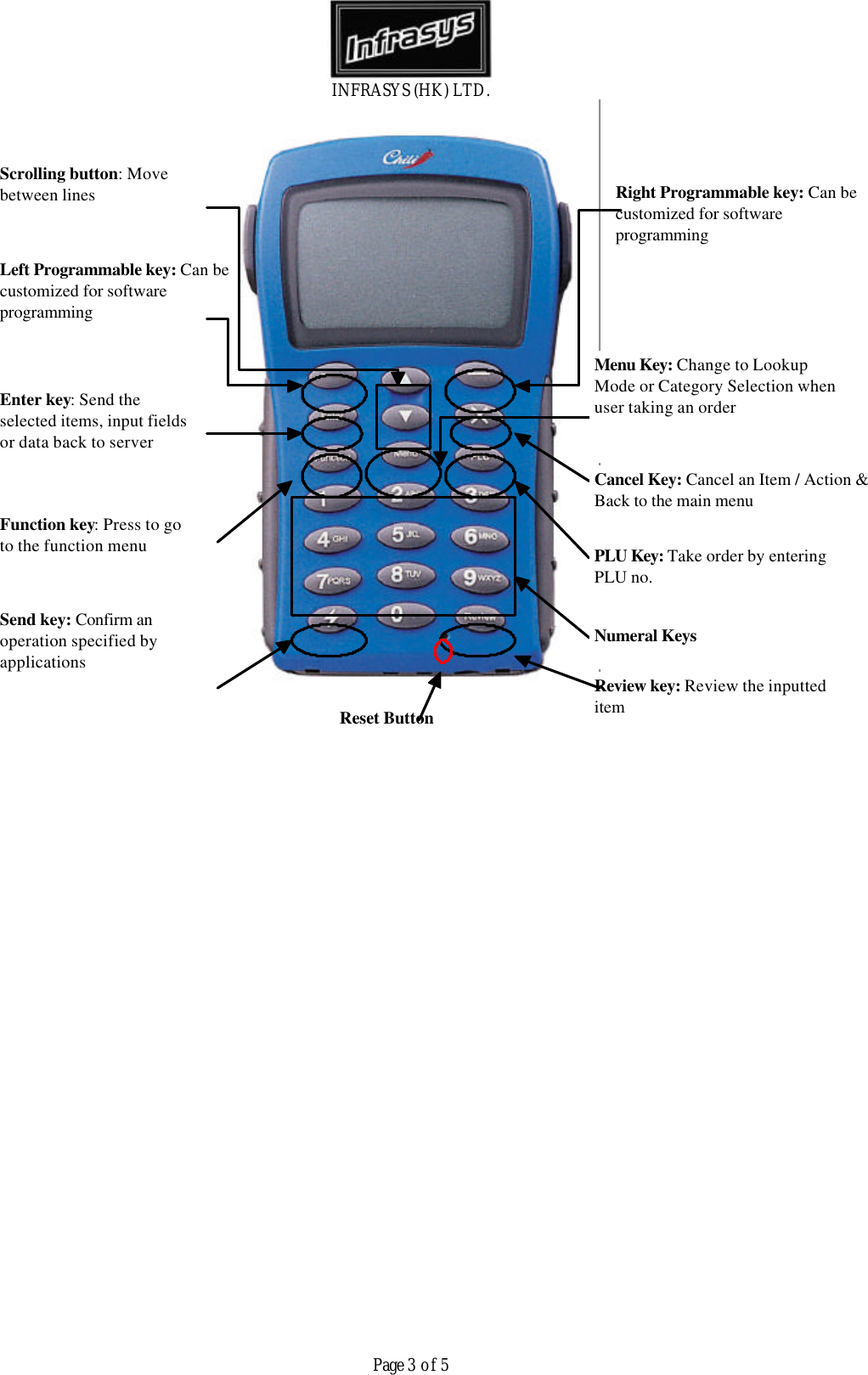
INFRASYS (HK) LTD.Page 3 of 5Left Programmable key: Can becustomized for softwareprogrammingSend key: Confirm anoperation specified byapplicationsReview key: Review the inputteditemPLU Key: Take order by enteringPLU no.Function key: Press to goto the function menuEnter key: Send theselected items, input fieldsor data back to serverNumeral KeysCancel Key: Cancel an Item / Action &Back to the main menuRight Programmable key: Can becustomized for softwareprogrammingMenu Key: Change to LookupMode or Category Selection whenuser taking an orderScrolling button: Movebetween linesReset Button
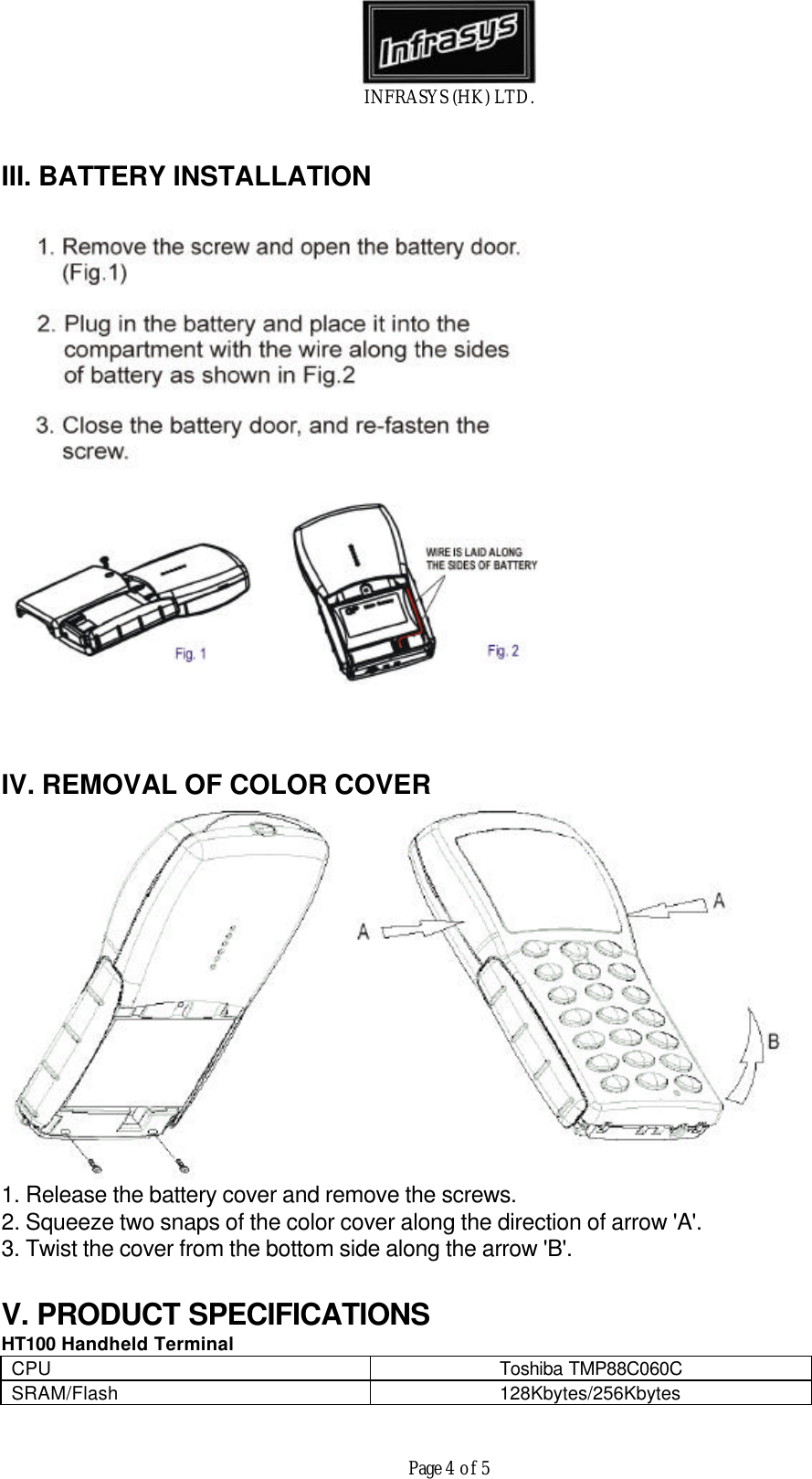
INFRASYS (HK) LTD.Page 4 of 5III. BATTERY INSTALLATIONIV. REMOVAL OF COLOR COVER1. Release the battery cover and remove the screws.2. Squeeze two snaps of the color cover along the direction of arrow 'A'.3. Twist the cover from the bottom side along the arrow 'B'.V. PRODUCT SPECIFICATIONSHT100 Handheld TerminalCPU Toshiba TMP88C060CSRAM/Flash 128Kbytes/256Kbytes
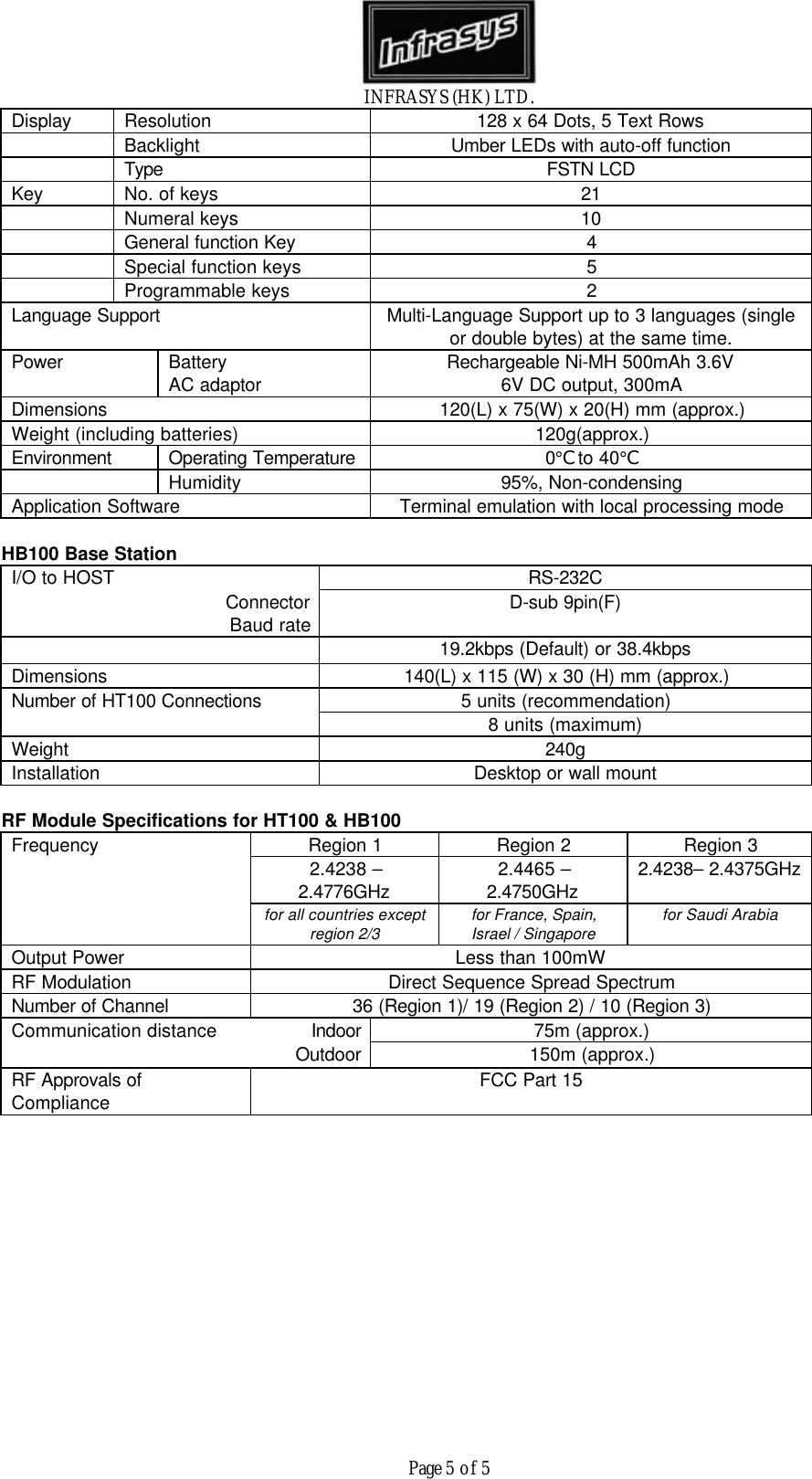
INFRASYS (HK) LTD.Page 5 of 5Display Resolution 128 x 64 Dots, 5 Text RowsBacklight Umber LEDs with auto-off functionType FSTN LCDKey No. of keys 21Numeral keys 10General function Key 4Special function keys 5Programmable keys 2Language Support Multi-Language Support up to 3 languages (singleor double bytes) at the same time.Power BatteryAC adaptor Rechargeable Ni-MH 500mAh 3.6V6V DC output, 300mADimensions 120(L) x 75(W) x 20(H) mm (approx.)Weight (including batteries) 120g(approx.)Environment Operating Temperature 0°C to 40°CHumidity 95%, Non-condensingApplication Software Terminal emulation with local processing modeHB100 Base StationI/O to HOST RS-232CConnectorBaud rate D-sub 9pin(F)19.2kbps (Default) or 38.4kbpsDimensions 140(L) x 115 (W) x 30 (H) mm (approx.)Number of HT100 Connections 5 units (recommendation)8 units (maximum)Weight 240gInstallation Desktop or wall mountRF Module Specifications for HT100 & HB100Frequency Region 1 Region 2 Region 32.4238 –2.4776GHz 2.4465 –2.4750GHz 2.4238– 2.4375GHzfor all countries exceptregion 2/3for France, Spain,Israel / Singaporefor Saudi ArabiaOutput Power Less than 100mWRF Modulation Direct Sequence Spread SpectrumNumber of Channel 36 (Region 1)/ 19 (Region 2) / 10 (Region 3)Communication distance Indoor 75m (approx.)Outdoor 150m (approx.)RF Approvals ofCompliance FCC Part 15

Navigation menu