Innovation Lab 050301BT2 Bluetooth Stereo Audio Receiver User Manual Blue Tango Arial
Innovation Lab Corp. Bluetooth Stereo Audio Receiver Blue Tango Arial
User Manual
B
Bl
lu
ue
et
to
oo
ot
th
h
S
St
te
er
re
eo
o
A
Au
ud
di
io
o
R
Re
ec
ce
ei
iv
ve
er
r,
,
S
Su
up
pp
po
or
rt
ts
s
A
A2
2D
DP
P
P
Pr
ro
of
fi
il
le
e
S
St
ta
an
nd
da
ar
rd
d.
.
R
Ré
éc
ce
ep
pt
te
eu
ur
r
a
au
ud
di
io
o
s
st
té
ér
ré
éo
o
B
Bl
lu
ue
et
to
oo
ot
th
h,
,
p
pr
re
en
nd
d
e
en
n
c
ch
ha
ar
rg
ge
e
l
la
a
n
no
or
rm
me
e
p
pr
ro
of
fi
il
l
A
A2
2D
DP
P.
.
B
Bl
lu
ue
et
to
oo
ot
th
h
S
St
te
er
re
eo
o
A
Au
ud
di
io
or
re
ec
ce
ei
iv
ve
er
r,
,
u
un
nt
te
er
rs
st
tü
üt
tz
zt
t
A
A2
2D
DP
P-
-S
St
ta
an
nd
da
ar
rd
d.
.
B
Bl
lu
ue
et
to
oo
ot
th
hA
A2
2D
DP
P
B
Bl
lu
ue
et
to
oo
ot
th
hA
A2
2D
DP
P
B
Bl
lu
ue
et
to
oo
ot
th
hA
A2
2D
DP
P
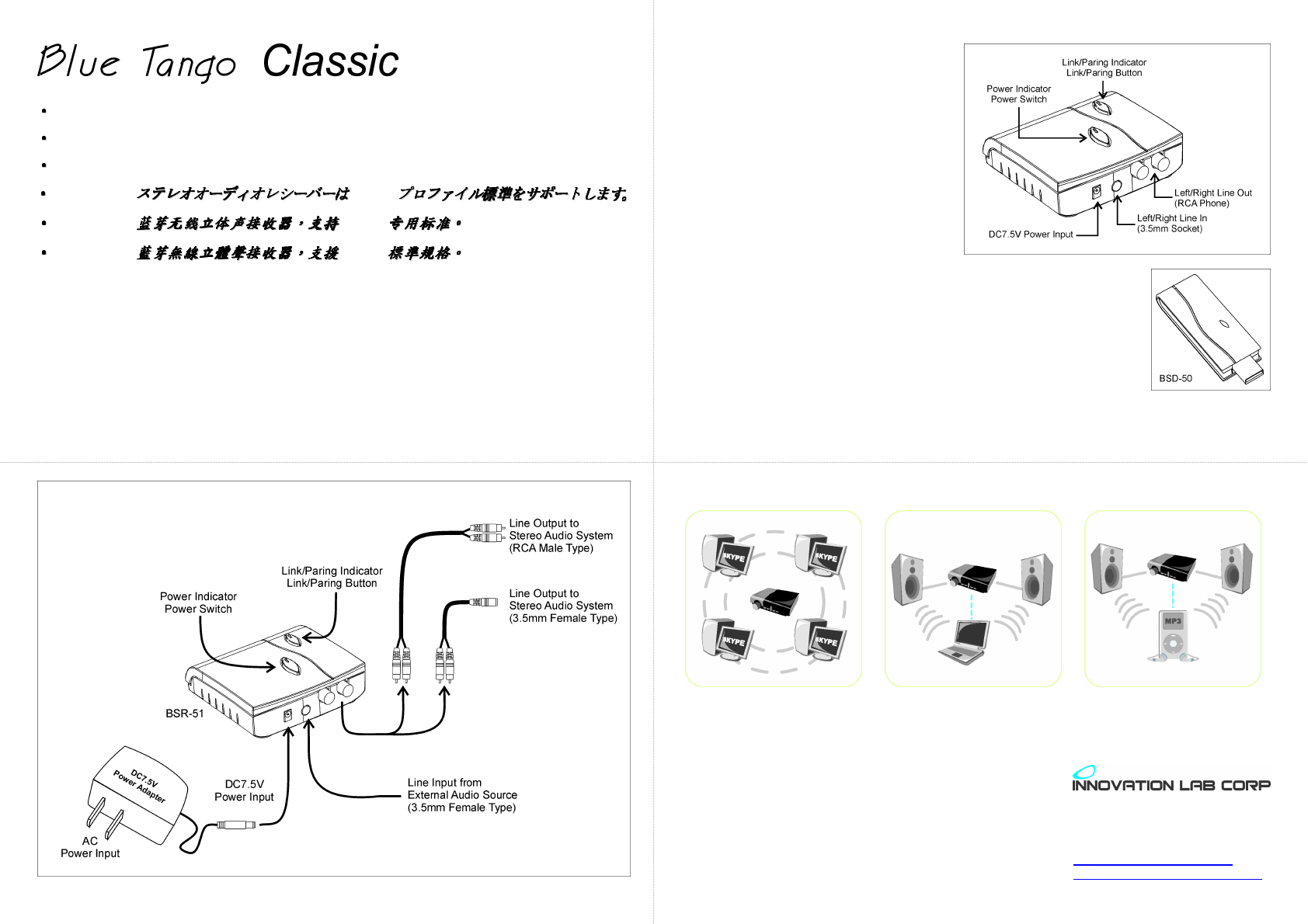
Simple Connection:
Please follow the illustration below to connect your Bluetooth Wireless Stereo Audio System. (As the BSR-51
is an un-powered receiver only, a set of stereo audio amplifier system is required to broadcast your wireless
audio.)
1. Connect the audio output from the rear panel of BSR-51 Receiver to the audio input of your stereo audio
system. Power on your stereo audio system and select the correct input channel.
2. Plug the AC end of the DC7.5V power adapter to AC power source. Plug the other DC end to the DC7.5V
power input connector at the rear panel of BSR-51.
3. Switch on the power of the BSR-51, now it is ready at your service.
Easy Operation:
1. After finished the connection with your stereo
audio system and power adapter, switched
the power on, the “Power Indicator” lights on.
2. Power on your PC. Remove the protection
cap that was originally covered on the USB
head of BSD-50 Transmitter (Plug-and-Play
device, no driver required). Plug the BSD-50
Transmitter into one of the USB ports in your
PC.
(This Bluetooth Transmitter currently supports
the Operating System of Windows
98SE/ME/NT/2000/XP, Mac-10.0 and later,
Linux-RedHat.)
3. Both the “Link/Paring” indicator on BSR-50 and BSD-50 lights on with one-blink
interval for not linking, or lights on with four-blink interval for having linked.
4. Press the “Paring Button” for more than one second. The BSR-51 Receiver
starts paring with BSD-50 Transmitter. The “Link/Paring” indicator keeps blinking
for paring, and then stops for having linked after a short while with four-blink
interval. (Nor more paring needed for next operation.)
5. To activate the external line-in audio source, simply plug it into the 3.5mm
Left/Right Line In Socket, the external audio source is automatically selected.
6. Now you can play the audio source on your PC through this Bluetooth Wireless Stereo Audio System
together with your stereo audio system.
Versatile Application:
Skype Conference/Presentation SOHO Audio Source Wireless Receiver
10F, 285 Tiding Blvd Sec 2,
Taipei, Taiwan, 114
Tel: 886-2-26592368
Fax: 886-2-26593268
www.innovationlab.com.tw
services@innovationlab.com.tw

Blue Tango BSR-51 Specification
Specification
Standards Bluetooth specification V1.1
compliant.
Bluetooth A2DP profile (AV Profile)
Frequency Band 2402 ~ 2480 MHz
Rx Sensitivity < -80dBm (BER 0.1%)
Distance > 10m (open space)
Audio Connector Audio Stereo jack 3.5MM
Audio Streaming Format SBC 44.1kHz
Audio Frequency Range 20Hz ~ 20kHz
Audio S/N > 85dB
Audio THD < -83dB
Audio Output Power > 20mWrms
Power supply
Environmental Range Operating temperature:-10 ~ +50℃

Receiver Pairing Button
Action Precondition
Function
Long press ‘PAIR’ button over 3
seconds then release it.
(Long Press)
Standby Enter pairable mode to wait someone
to pair with it.
This process has 60 second time out
Transmitter Pairing Button
Action Precondition
Function
Long press the ‘PAIR’ button over
3 seconds then release it.
(Long Press)
None Enter Searching/Paring mode to
search an A2DP SINK device and pair
with it.
This process has a time out 60
seconds.
Press the ‘PAIR’ button then
release it.
(Short Press)
Audio
Streaming
Leave Audio Streaming mode and
enter Standby mode.
In this case, audio streaming is
terminated and the RF connection is
disconnected.

Federal Communication Commission Interference Statement
The equipment has been tested and found to comply with the limits for Class B Digital Device, pursuant to part 15 of the FCC Rules. These limits are
designed to provide reasonable protection against harmful interference in a residential installation. This equipment generates, uses and can radiate radio
frequency energy and, if not installed and used in accordance with the instruction, may cause harmful interference to radio communication. However,
there is no guarantee that interference will not occur in a particular installation. If this equipment does cause harmful interference to radio or television
reception, which can be determined by turning the equipment off and on, the user is encouraged to try to correct the interference by one or more of the
following measures:
z Reorient of relocate the receiving antenna.
z Increase the separation between the equipment and receiver.
z Connect the equipment into an outlet on a circuit different from that to which the receiver is connected.
z Consult the dealer or an experienced radio/TV technician for help.
THIS DEVICE COMPLIES WITH PART 15 OF THE FCC RULES. OPERATION IS SUBJECT TO THE FOLLOWING TWO CONDITIONS: (1)
THIS DEVICE MAY NOT CAUSE HARMFUL INTERFERENCE AND (2) THIS DEVICE MUST ACCEPT ANY INTERFERENCE RECEIVED,
INCLUDING INTERFERENCE THAT MAY CAUSE UNDESIRED OPERATION.
Caution: Any changes or modifications not expressly approved by the party responsible for compliance could void the user’s authority to operate this
equipment.
Important note: To comply with FCC RF exposure compliance requirements, only use the antenna that is equipped with this device. This device and its
antenna must not be co-located or operating in conjunction with any other antenna or transmitter.