Innovative Concepts and Design ALP-XP800 BLUETOOTH SPEAKER User Manual

Innovative Concepts and Design LLC BLUETOOTH SPEAKER

User Manual

ALP-XP800XPEDITIONUSER MANUALIntroductionThank you for purchasing our ALP-XP800 Xpedition. We are con-dent that the Altec Lansing family of  products will make your life easier by using the latest technological advancements in sound repro-duction and will raise the bar for pro audio products.SupportAt Altec Lansing, our highest priority is making your experience unforgettable. Need help with setting up, troubleshooting, or looking for some tips? We’re here for you, Monday through Friday 9AM to 5PM EST.1-888-703-2307 alteclansing.com
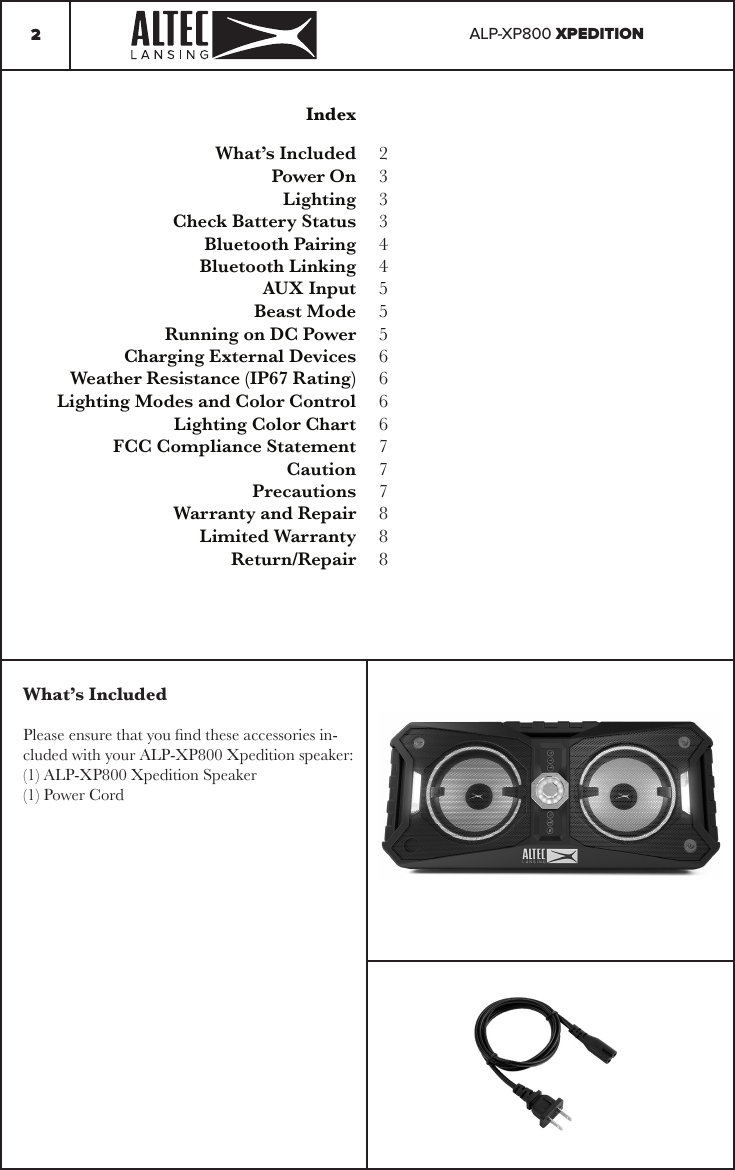
ALP-XP800 XPEDITION2IndexWhat’s Included Power OnLightingCheck Battery StatusBluetooth PairingBluetooth LinkingAUX InputBeast ModeRunning on DC PowerCharging External DevicesWeather Resistance (IP67 Rating)Lighting Modes and Color ControlLighting Color ChartFCC Compliance StatementCautionPrecautionsWarranty and RepairLimited WarrantyReturn/Repair2333445556666777888What’s IncludedPlease ensure that you nd these accessories in-cluded with your ALP-XP800 Xpedition speaker:(1) ALP-XP800 Xpedition Speaker(1) Power Cord
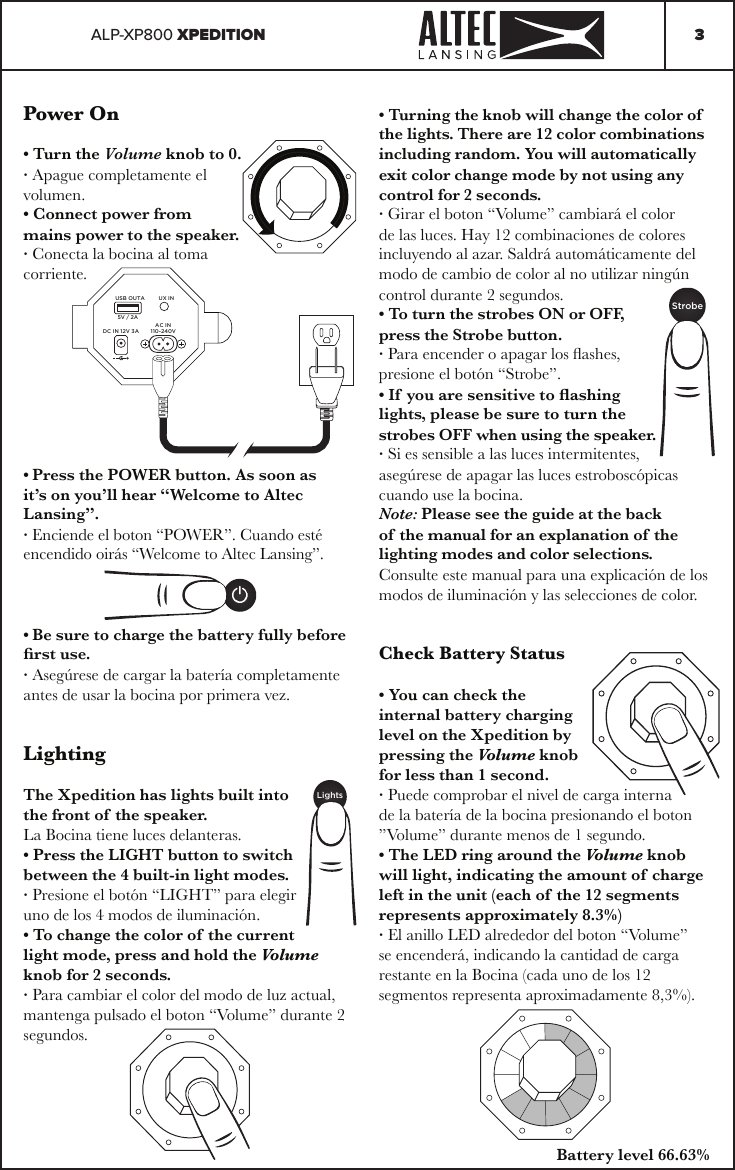
ALP-XP800 XPEDITION 3Power On• Turn the Volume knob to 0.· Apague completamente el volumen.• Connect power from mains power to the speaker.· Conecta la bocina al toma corriente.• Press the POWER button. As soon as it’s on you’ll hear “Welcome to Altec Lansing”.· Enciende el boton “POWER”. Cuando esté encendido oirás “Welcome to Altec Lansing”.• Be sure to charge the battery fully before rst use.· Asegúrese de cargar la batería completamente antes de usar la bocina por primera vez.LightingThe Xpedition has lights built into the front of the speaker.La Bocina tiene luces delanteras.• Press the LIGHT button to switch between the 4 built-in light modes.· Presione el botón “LIGHT” para elegir uno de los 4 modos de iluminación.• To change the color of the current light mode, press and hold the Volume knob for 2 seconds.· Para cambiar el color del modo de luz actual, mantenga pulsado el boton “Volume” durante 2 segundos.USB OUTA UX INDC IN 12V 3AAC IN110-240V5V / 2A• Turning the knob will change the color of  the lights. There are 12 color combinations including random. You will automatically exit color change mode by not using any control for 2 seconds.· Girar el boton “Volume” cambiará el color de las luces. Hay 12 combinaciones de colores incluyendo al azar. Saldrá automáticamente del modo de cambio de color al no utilizar ningún control durante 2 segundos.• To turn the strobes ON or OFF, press the Strobe button.· Para encender o apagar los ashes, presione el botón “Strobe”.• If you are sensitive to ashing lights, please be sure to turn the strobes OFF when using the speaker.· Si es sensible a las luces intermitentes, asegúrese de apagar las luces estroboscópicas cuando use la bocina.Note: Please see the guide at the back of the manual for an explanation of the lighting modes and color selections.Consulte este manual para una explicación de los modos de iluminación y las selecciones de color.LightsStrobeCheck Battery Status• You can check the internal battery charging level on the Xpedition by pressing the Volume knob for less than 1 second.· Puede comprobar el nivel de carga interna de la batería de la bocina presionando el boton ”Volume” durante menos de 1 segundo.• The LED ring around the Volume knob will light, indicating the amount of charge left in the unit (each of the 12 segments represents approximately 8.3%)· El anillo LED alrededor del boton “Volume” se encenderá, indicando la cantidad de carga restante en la Bocina (cada uno de los 12 segmentos representa aproximadamente 8,3%).Battery level 66.63%
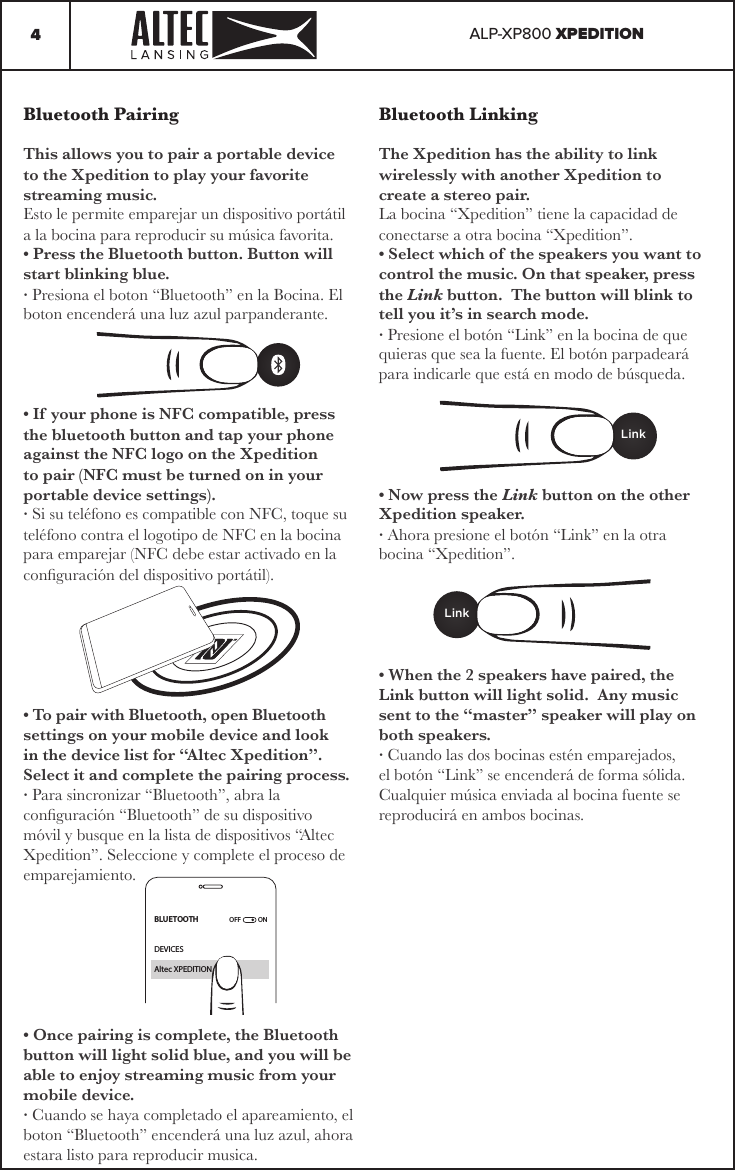
ALP-XP800 XPEDITION4Bluetooth LinkingThe Xpedition has the ability to link wirelessly with another Xpedition to create a stereo pair.La bocina “Xpedition” tiene la capacidad de conectarse a otra bocina “Xpedition”.• Select which of the speakers you want to control the music. On that speaker, press the Link button.  The button will blink to tell you it’s in search mode.· Presione el botón “Link” en la bocina de que quieras que sea la fuente. El botón parpadeará para indicarle que está en modo de búsqueda.• Now press the Link button on the other Xpedition speaker.· Ahora presione el botón “Link” en la otra bocina “Xpedition”.• When the 2 speakers have paired, the Link button will light solid.  Any music sent to the “master” speaker will play on both speakers.· Cuando las dos bocinas estén emparejados, el botón “Link” se encenderá de forma sólida. Cualquier música enviada al bocina fuente se reproducirá en ambos bocinas.Bluetooth PairingThis allows you to pair a portable device to the Xpedition to play your favorite streaming music.Esto le permite emparejar un dispositivo portátil a la bocina para reproducir su música favorita.• Press the Bluetooth button. Button will start blinking blue.· Presiona el boton “Bluetooth” en la Bocina. El boton encenderá una luz azul parpanderante.• If your phone is NFC compatible, press the bluetooth button and tap your phone against the NFC logo on the Xpedition to pair (NFC must be turned on in your portable device settings).· Si su teléfono es compatible con NFC, toque su teléfono contra el logotipo de NFC en la bocina para emparejar (NFC debe estar activado en la conguración del dispositivo portátil).• To pair with Bluetooth, open Bluetooth settings on your mobile device and look in the device list for “Altec Xpedition”.  Select it and complete the pairing process.· Para sincronizar “Bluetooth”, abra la conguración “Bluetooth” de su dispositivo móvil y busque en la lista de dispositivos “Altec Xpedition”. Seleccione y complete el proceso de emparejamiento.• Once pairing is complete, the Bluetooth button will light solid blue, and you will be able to enjoy streaming music from your mobile device.· Cuando se haya completado el apareamiento, el boton “Bluetooth” encenderá una luz azul, ahora estara listo para reproducir musica.BLUETOOTHOFF  ONDEVICESAltec XPEDITIONLinkLink
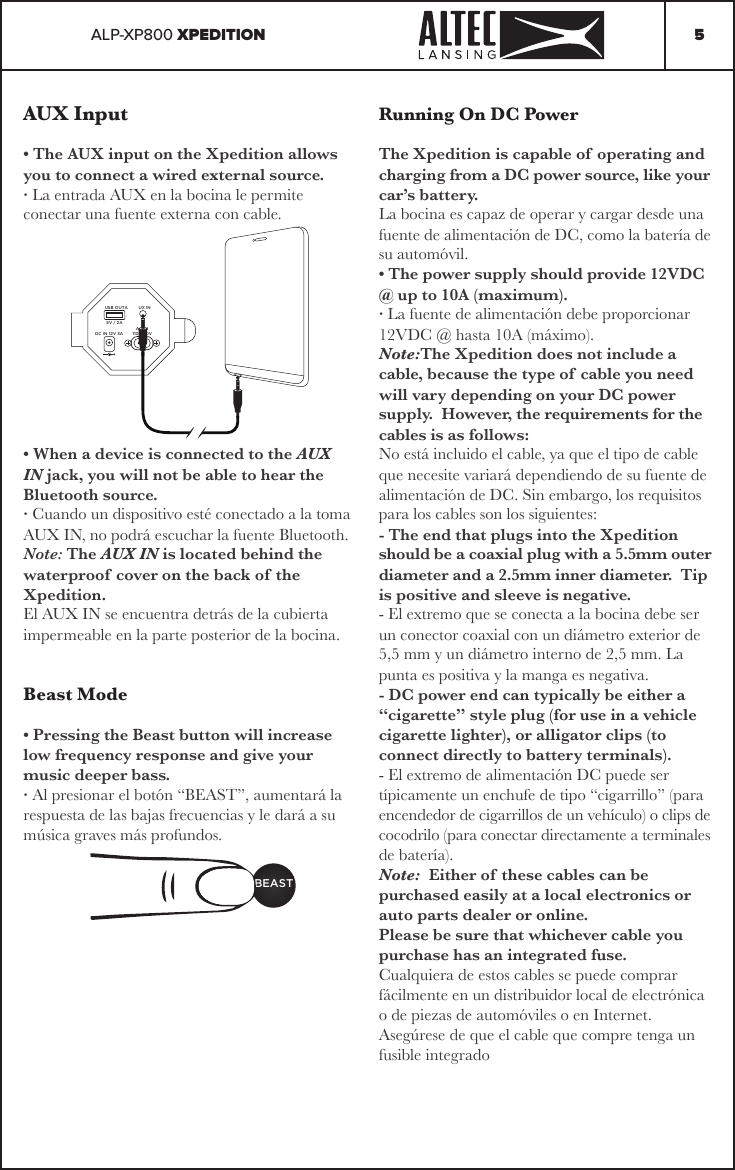
ALP-XP800 XPEDITION 5AUX Input• The AUX input on the Xpedition allows you to connect a wired external source.· La entrada AUX en la bocina le permite conectar una fuente externa con cable.• When a device is connected to the AUX IN jack, you will not be able to hear the Bluetooth source.· Cuando un dispositivo esté conectado a la toma AUX IN, no podrá escuchar la fuente Bluetooth.Note: The AUX IN is located behind the waterproof  cover on the back of the Xpedition.El AUX IN se encuentra detrás de la cubierta impermeable en la parte posterior de la bocina.Beast Mode• Pressing the Beast button will increase low frequency response and give your music deeper bass.· Al presionar el botón “BEAST”, aumentará la respuesta de las bajas frecuencias y le dará a su música graves más profundos.BEASTUSB OUTA UX INDC IN 12V 3AAC IN110-240V5V / 2ARunning On DC PowerThe Xpedition is capable of  operating and charging from a DC power source, like your car’s battery.  La bocina es capaz de operar y cargar desde una fuente de alimentación de DC, como la batería de su automóvil. • The power supply should provide 12VDC @ up to 10A (maximum). · La fuente de alimentación debe proporcionar 12VDC @ hasta 10A (máximo).Note:The Xpedition does not include a cable, because the type of cable you need will vary depending on your DC power supply.  However, the requirements for the cables is as follows:No está incluido el cable, ya que el tipo de cable que necesite variará dependiendo de su fuente de alimentación de DC. Sin embargo, los requisitos para los cables son los siguientes:- The end that plugs into the Xpedition should be a coaxial plug with a 5.5mm outer diameter and a 2.5mm inner diameter.  Tip is positive and sleeve is negative.- El extremo que se conecta a la bocina debe ser un conector coaxial con un diámetro exterior de 5,5 mm y un diámetro interno de 2,5 mm. La punta es positiva y la manga es negativa.- DC power end can typically be either a “cigarette” style plug (for use in a vehicle cigarette lighter), or alligator clips (to connect directly to battery terminals).- El extremo de alimentación DC puede ser típicamente un enchufe de tipo “cigarrillo” (para encendedor de cigarrillos de un vehículo) o clips de cocodrilo (para conectar directamente a terminales de batería).Note:  Either of these cables can be purchased easily at a local electronics or auto parts dealer or online.Please be sure that whichever cable you purchase has an integrated fuse.Cualquiera de estos cables se puede comprar fácilmente en un distribuidor local de electrónica o de piezas de automóviles o en Internet.Asegúrese de que el cable que compre tenga un fusible integrado
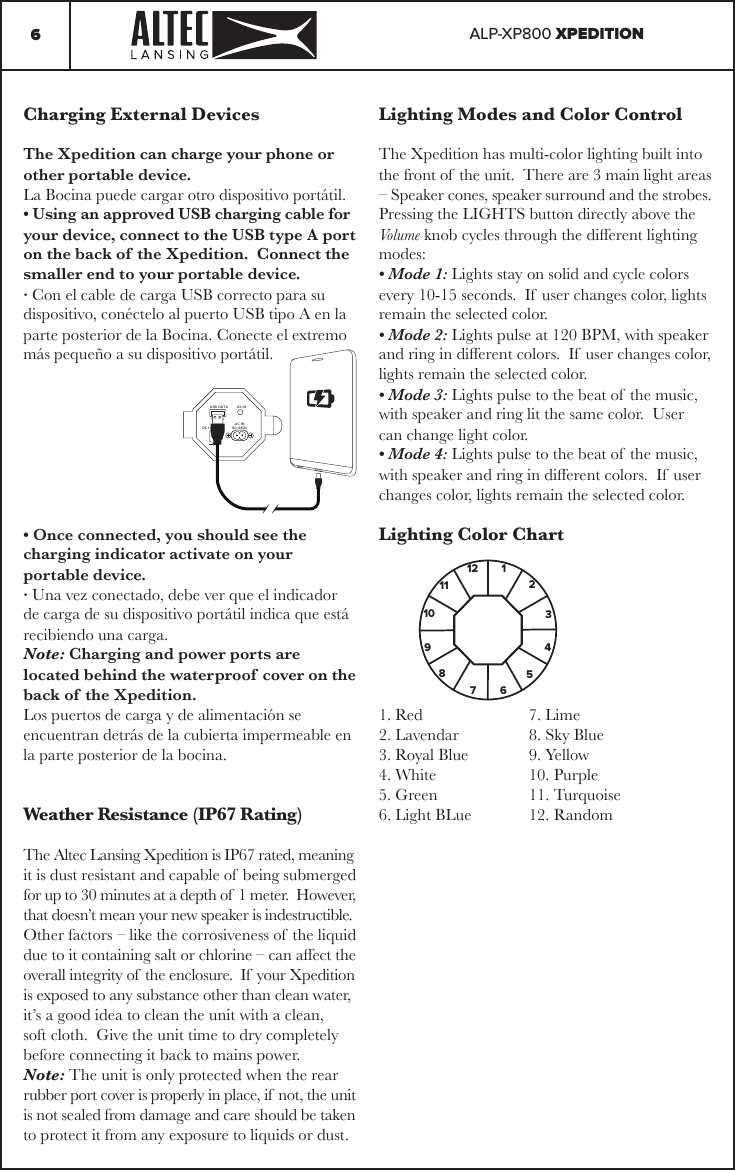
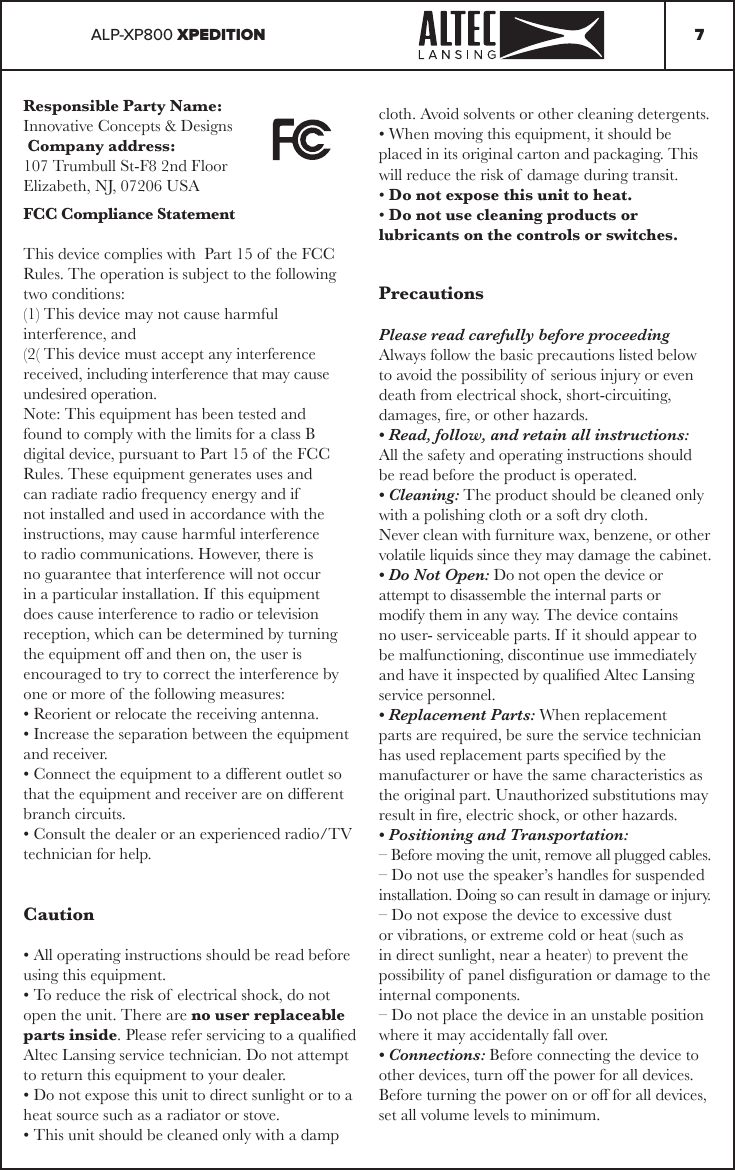
ALP-XP800 XPEDITION6Charging External DevicesThe Xpedition can charge your phone or other portable device.La Bocina puede cargar otro dispositivo portátil.• Using an approved USB charging cable for your device, connect to the USB type A port on the back of the Xpedition.  Connect the smaller end to your portable device.· Con el cable de carga USB correcto para su dispositivo, conéctelo al puerto USB tipo A en la parte posterior de la Bocina. Conecte el extremo más pequeño a su dispositivo portátil.• Once connected, you should see the charging indicator activate on your portable device.· Una vez conectado, debe ver que el indicador de carga de su dispositivo portátil indica que está recibiendo una carga.Note: Charging and power ports are located behind the waterproof  cover on the back of the Xpedition.Los puertos de carga y de alimentación se encuentran detrás de la cubierta impermeable en la parte posterior de la bocina.Weather Resistance (IP67 Rating)The Altec Lansing Xpedition is IP67 rated, meaning it is dust resistant and capable of  being submerged for up to 30 minutes at a depth of  1 meter.  However, that doesn’t mean your new speaker is indestructible.  Other factors – like the corrosiveness of  the liquid due to it containing salt or chlorine – can aect the overall integrity of  the enclosure.  If  your Xpedition is exposed to any substance other than clean water, it’s a good idea to clean the unit with a clean, soft cloth.  Give the unit time to dry completely before connecting it back to mains power.Note: The unit is only protected when the rear rubber port cover is properly in place, if  not, the unit is not sealed from damage and care should be taken to protect it from any exposure to liquids or dust.USB OUTA UX INDC IN 12V 3AAC IN110-240V5V / 2ALighting Modes and Color ControlThe Xpedition has multi-color lighting built into the front of  the unit.  There are 3 main light areas – Speaker cones, speaker surround and the strobes.Pressing the LIGHTS button directly above the Volume knob cycles through the dierent lighting modes:• Mode 1: Lights stay on solid and cycle colors every 10-15 seconds.  If  user changes color, lights remain the selected color.• Mode 2: Lights pulse at 120 BPM, with speaker and ring in dierent colors.  If  user changes color, lights remain the selected color.• Mode 3: Lights pulse to the beat of  the music, with speaker and ring lit the same color.  User can change light color.• Mode 4: Lights pulse to the beat of  the music, with speaker and ring in dierent colors.  If  user changes color, lights remain the selected color.Lighting Color Chart1. Red    7. Lime 2. Lavendar  8. Sky Blue3. Royal Blue  9. Yellow4. White    10. Purple5. Green    11. Turquoise6. Light BLue  12. Random89101112 1234567
ALP-XP800 XPEDITION 7Responsible Party Name:Innovative Concepts & Designs Company address:107 Trumbull St-F8 2nd FloorElizabeth, NJ, 07206 USAFCC Compliance StatementThis device complies with  Part 15 of the FCC Rules. The operation is subject to the following two conditions:(1) This device may not cause harmful interference, and(2( This device must accept any interference received, including interference that may cause undesired operation.Note: This equipment has been tested and found to comply with the limits for a class B digital device, pursuant to Part 15 of  the FCC Rules. These equipment generates uses and can radiate radio frequency energy and if  not installed and used in accordance with the instructions, may cause harmful interference to radio communications. However, there is no guarantee that interference will not occur in a particular installation. If  this equipment does cause interference to radio or television reception, which can be determined by turning the equipment o and then on, the user is encouraged to try to correct the interference by one or more of  the following measures:• Reorient or relocate the receiving antenna.• Increase the separation between the equipment and receiver.• Connect the equipment to a dierent outlet so that the equipment and receiver are on dierent branch circuits.• Consult the dealer or an experienced radio/TV technician for help.Caution• All operating instructions should be read before using this equipment.• To reduce the risk of  electrical shock, do not open the unit. There are no user replaceable parts inside. Please refer servicing to a qualied Altec Lansing service technician. Do not attempt to return this equipment to your dealer.• Do not expose this unit to direct sunlight or to a heat source such as a radiator or stove.• This unit should be cleaned only with a damp cloth. Avoid solvents or other cleaning detergents.• When moving this equipment, it should be placed in its original carton and packaging. This will reduce the risk of  damage during transit.• Do not expose this unit to heat.• Do not use cleaning products or lubricants on the controls or switches.PrecautionsPlease read carefully before proceedingAlways follow the basic precautions listed below to avoid the possibility of  serious injury or even death from electrical shock, short-circuiting, damages, re, or other hazards.• Read, follow, and retain all instructions: All the safety and operating instructions should be read before the product is operated.• Cleaning: The product should be cleaned only with a polishing cloth or a soft dry cloth.Never clean with furniture wax, benzene, or other volatile liquids since they may damage the cabinet.• Do Not Open: Do not open the device or attempt to disassemble the internal parts or modify them in any way. The device contains no user- serviceable parts. If  it should appear to be malfunctioning, discontinue use immediately and have it inspected by qualied Altec Lansing service personnel.• Replacement Parts: When replacement parts are required, be sure the service technician has used replacement parts specied by the manufacturer or have the same characteristics as the original part. Unauthorized substitutions may result in re, electric shock, or other hazards.• Positioning and Transportation:– Before moving the unit, remove all plugged cables.– Do not use the speaker’s handles for suspended installation. Doing so can result in damage or injury.– Do not expose the device to excessive dust or vibrations, or extreme cold or heat (such as in direct sunlight, near a heater) to prevent the possibility of  panel disguration or damage to the internal components.– Do not place the device in an unstable position where it may accidentally fall over.• Connections: Before connecting the device to other devices, turn o the power for all devices. Before turning the power on or o for all devices, set all volume levels to minimum.
Limited WarrantyA. Altec Lansing guarantees its products to be free from defects in materials and workmanship for one (1) year from the original purchase date. B. This limited warranty does not cover damage or failure caused by abuse, misuse, abnormal use, faulty installation, improper maintenance or any repairs other than those provided by Altec Lansing.C. There are no obligations of  liability on the part of  Altec Lansing for consequential damages arising out of  or in connection with the use or performance of  the product or other indirect damages with respect to loss of  property, revenues, of  prot, or costs of  removal, installation, or reinstallation. All implied warranties for Altec Lansing, including implied warranties for tness, are limited in duration to one (1) year from the original date of  purchase, unless otherwise mandated by local statutes.Return/RepairA. In the U.S.A., please call our helpful Customer Service Representatives at (888) 703-2307, and they will be happy to give you a Return Authorization Number (RA#) and the address of  an authorized service center closest to you.B. After receiving an RA#, include a copy of the original sales receipt, with defective product and a description of  the defect. Send by insured freight to: Altec Lansing and use the address provided by your customer service representative. Your RA# must be written on the outside of  the package, or processing will be delayed indenitely!C. Service covered under warranty will be paid for by Altec Lansing and returned to you. For non-war-rantied products, Altec Lansing will repair your unit after payment is received. Repair charges do not include return freight. Freight charges will be added to the repair charges.D. On warranty service, you pay for shipping to Altec Lansing, we pay for return shipping within the continental United States. Alaska, Hawaii, Puerto Rico, Canada, Bahamas, and the Virgin Islands will be charged for freight.E. Please allow 2-3 weeks for return of  your product. Under normal circumstances your product will spend no more than 10 working days at Altec Lansing. We are not responsible for shipping times.Parts of the design of  this product may be protected by worldwide patents. Information in this manual is subject to change without notice and does not represent a commitment on the part of the vendor. Altec Lansing shall not be liable for any loss or damage whatsoever arising from the use of  information or any error contained in this manual. No part of  this manual may be reproduced, stored in a retrieval system or transmitted, in any form or by any means, electronic, electrical, mechanical, optical, chemical, including photocopying and recording, for any purpose without the express written permission of  Altec Lansing. It is recommended that all maintenance and service on this product is performed by Altec Lansing or its authorized agents. Altec Lansing will not accept liability for loss or damage caused by maintenance or repair performed by unauthorized personnel.Warranty and Repair:All Altec Lansing products are designed and manufactured to the highest standards in the industry. With proper care and maintenance, your product will provide years of  reliable service.

Navigation menu