User Manual
INV-17W User Manual Page 1
IG9F’GA5BI5@
17
”
Wide
TFT Display
INNOVIEW Co., Ltd

INV-17W User Manual Page 2
FCC RF
INTERFERENCE STATEMENT
NOTE :
This equipment has been tested and found to comply with the limits for a
Class B digital device, pursuant to Part 15 of the FCC Rules. These limits
are designed to provide reasonable protection against harmful interference
in a residential installation.
This equipment generates, uses and can radiate radio frequency energy
and, if not installed and used in accordance with the instructions, may cause
harmful interference to radio communications. However, there is no
guarantee that interference will not occur in a particular installation.
If this equipment does cause harmful interference to radio or television
reception which can be determined by turning the equipment off and on, the
user is encouraged to try to correct the interference by one or more of the
following measures.
- Reorient or relocate the receiving antenna.
- Increase the separation between the equipment and receiver.
- Connect the equipment into an outlet on a circuit different from that to
which the receiver is connected.
- Consult the dealer or an experienced radio, TV technical for help.
- Only shielded interface cable should be used.
Caution
Do not change or modify the product without permission
or authority of manufacturer. It may cause undesirable
operations, permanent damages or harmful interferences.
Notice
·
Design and specification are subject to change without notice for
product improvement purposes.
INV-17W User Manual Page 3
CONTENTS
Package Check List --------------------------------------------------------------------------------------------------- 4
Connection
For PAL ---------------------------------------------------------------------------------------------------------------- 5
For NTSC ------------------------------------------------------------------------------------------------------------- 6
TV, VCR, DVD and Cable Box ------------------------------------------------------------------------------------------ 7
PC --------------------------------------------------------------------------------------------------------------------------- 9
Remote Control --------------------------------------------------------------------------------------------------------- 11
Manual Control ----------------------------------------------------------------------------------------------------------- 12
OSD Operation
Picture Setting ---------------------------------------------------------------------------------------------------------- 13
TV Setting --------------------------------------------------------------------------------------------------------------- 14
Av Settings -------------------------------------------------------------------------------------------------------------- 15
Option Settings --------------------------------------------------------------------------------------------------------- 16
Utility Settings ------------------------------------------------------------------------------------------------------------ 17
Advanced Setting ------------------------------------------------------------------------------------------------------ 18
Teletext Operation ------------------------------------------------------------------------------------------------------- 19
Specification ------------------------------------------------------------------------------------------------------------- 20
INV-17W User Manual Page 4
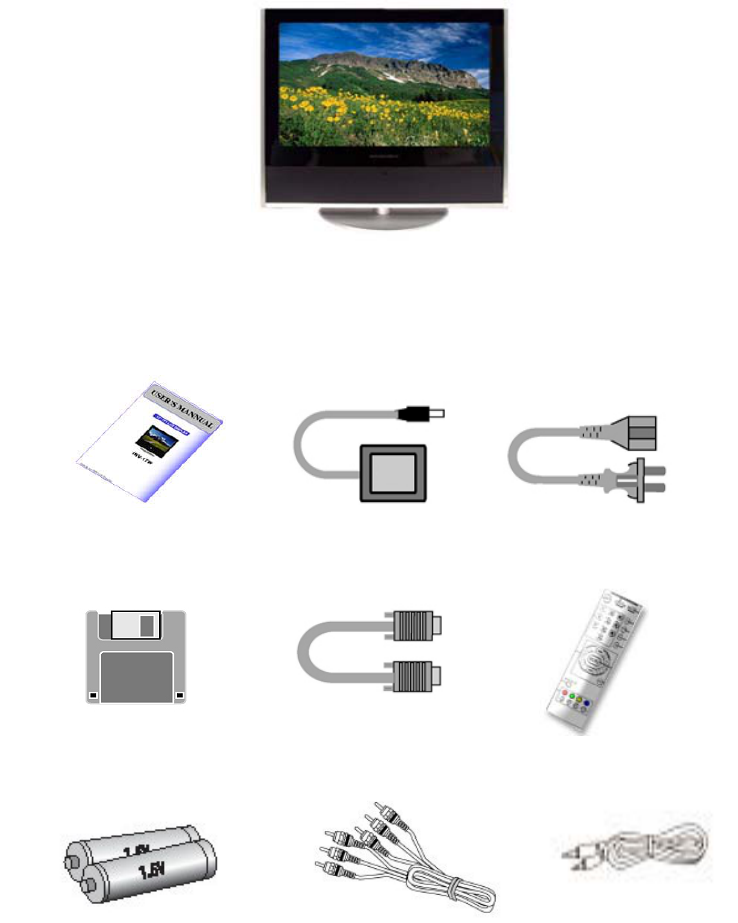
Packing List
LCD Display
Remote Control
Power Code
DC Adapter
Manual
VGA Cable
Drive Diskette
Batteries (Type AAA)
Audio Cable
RCA Cable
INV-17W User Manual Page 5
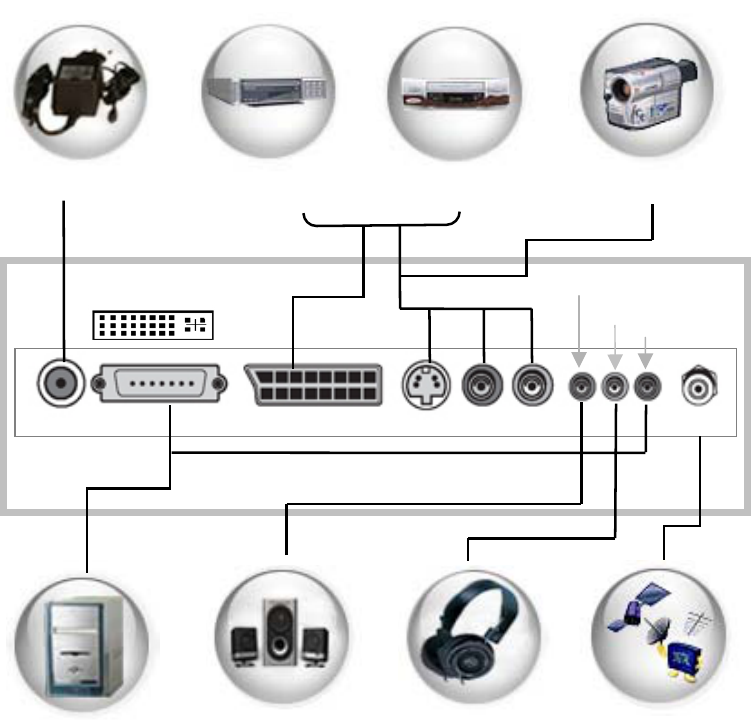
CONNTECTION
1. For PAL
DC IN Analog RGB SCART S-video Audio R/L ANT
Head phone OUT
Speaker Out
PC Audio IN
DC Adapter DVD VCR Camcorder
PC Speaker system Headphone TV Cable
(with amplifier)
DVI
Rear of LCD Dis
p
la
y
INV-17W User Manual Page 6
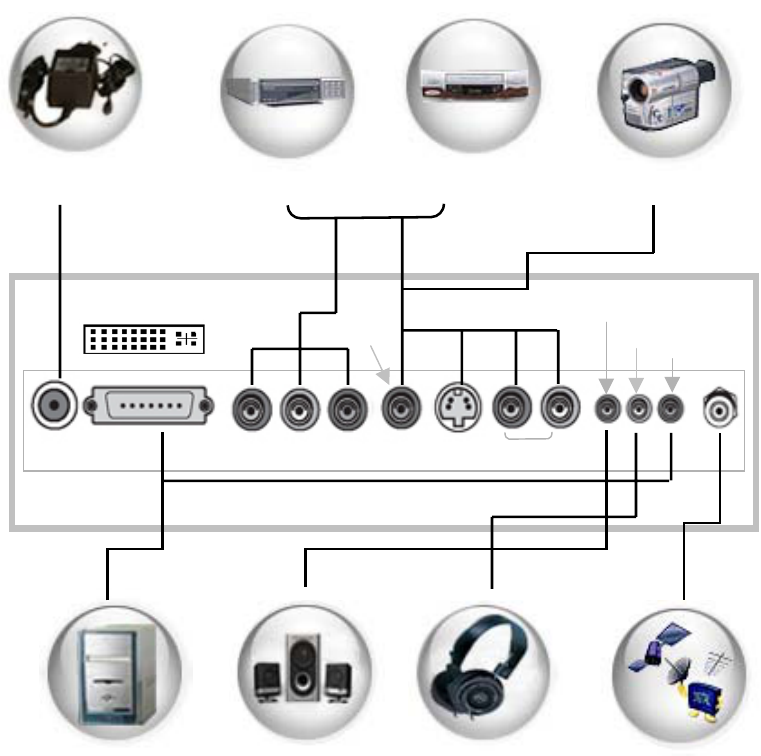
2. For NTSC
DC Adapter DVD VCR Camcorder
DVI
DC IN Analog RGB Pr Y Pb S-Video Audio R/L ANT
Video
Rear of LCD Dis
p
la
y
Speaker Out
PC Audio IN
Head phone OUT
PC Speaker system Headphone TV Cable
(with amplifier)
INV-17W User Manual Page 7
TV, VCR, DVD and Cable Box (for PAL)
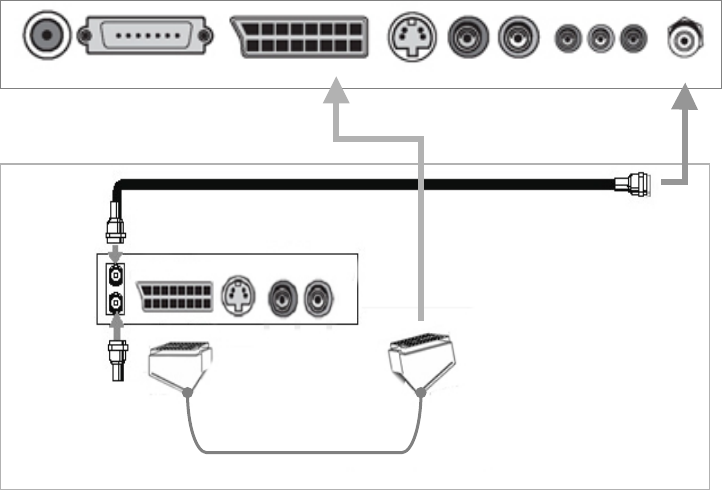
1. Connect antenna or TV coax wire to ANT.
2. Connect the AV equipment(VCR, DVD player, etc.) to corresponding jacks(Scart, S-VIDEO, C-VIDEO,
AUDIO, etc)
DC IN Analog RGB SCART S-video Audio R/L ANT
OUT
IN
SCART Cable
SCART AUDIO R/L
Coaxial Cable
Rear of LCD Dis
p
la
y
From Cable
INV-17W User Manual Page 8
TV, VCR, and Cable Box (for NTSC)
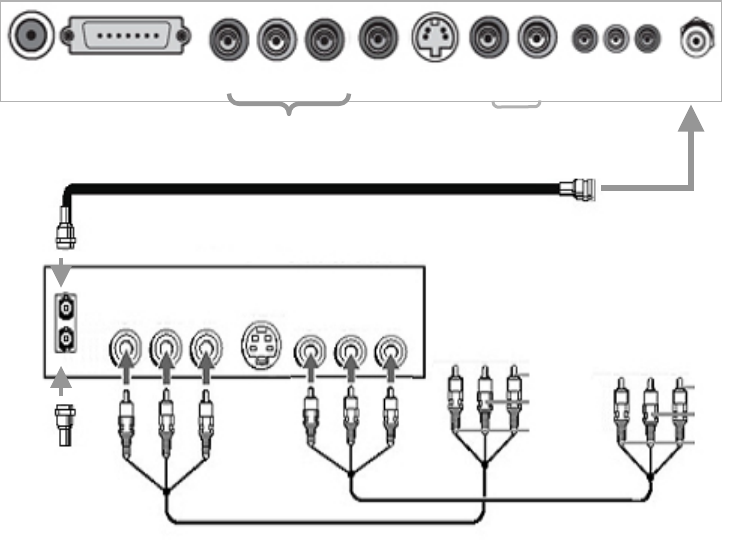
1. Connect antenna or TV coax wire to ANT.
2. Connect the AV equipment(VCR, DVD player, etc.) to corresponding jacks(PrYPb component, S-
VIDEO, C-VIDEO, AUDIO, etc)
DC IN Analog RGB Pr Y Pb Audio R/L ANT Video
Rear of LCD Dis
p
la
y
Pr Y Pb Video Audio R/L
Coaxial Cable
OUT
IN
From Cable
Video Cable
Video / Audio Cable
INV-17W User Manual Page 9
PC to LCD Display
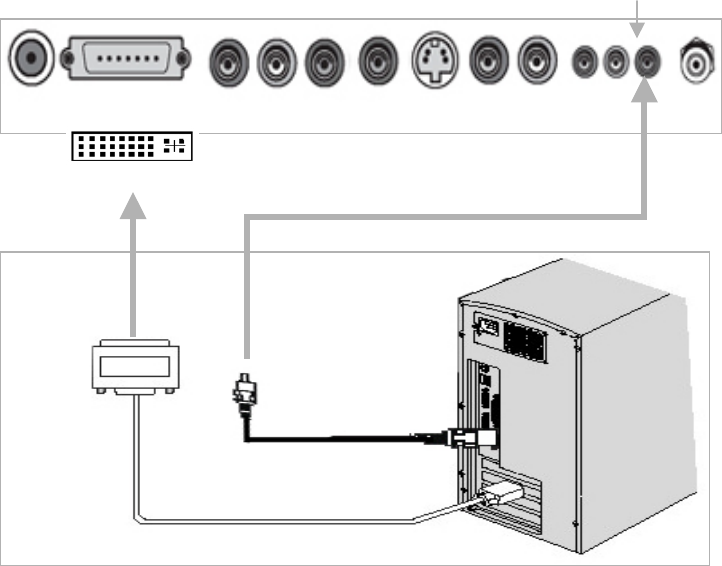
To connect the PC to the LCD Display, connect RGB Analog Connector or DVI-I connector.
For sharp and superior image Connect the DVI-In (Option)
Connect Sound cable to PC Audio In of the LCD display.
Note
When connecting computer to the display, source has to be in Analog RGB mode in case of using RGB Analog
connector or DVI mode in case of DVI-I cable is being used.
This display complies with the DDC plug and play standard, and automatically detects all the display information
when it is connected with a DVI-I cable.
To connect with RGB Analog cable, follow the on screen instructions and insert diskette when it is required
Note
Not all video graphics cards support 1280 x 768 wide aspect resolution.
Some devices may require updated driver
Please consult your video graphic manufacturer.
PC Audio IN
Analog VGA or DVI Cable
Sound Cable
or
DCIN AnalogRGB
Rear of LCD Dis
p
la
y
DVI
INV-17W User Manual Page 10
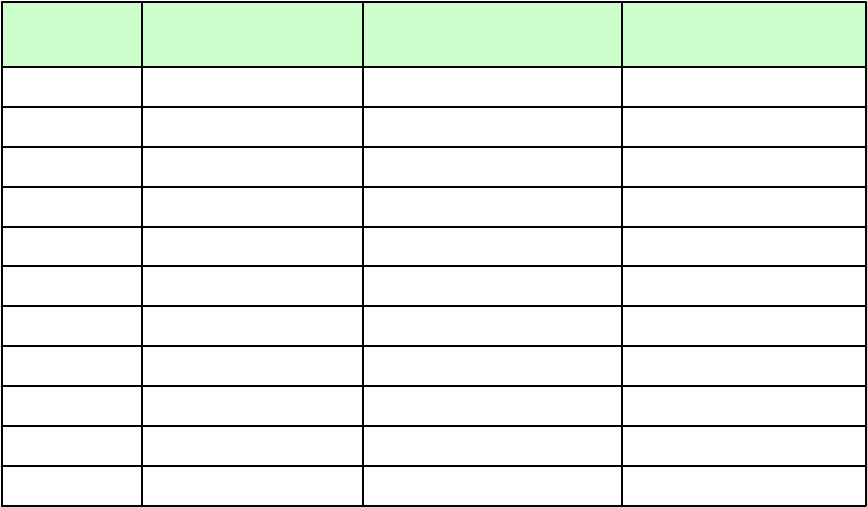
Preset PC Mode Timing Table
Recommended to set this display to 1280x768 at 60 Hz.
70 56.5 1024x768 8
60 37.9 800x600 4
75 37.5 640x480 3
60 47.7 1280x768 10
75 60 1024x768 9
60 48.4 1024x768 7
75 46.9 800x600 6
72 48.1 800x600 5
70 31.5 720x400 3
72 37.9 640x480 2
60 31.5 640x480 1
Vertical
Fre
q
uenc
y
(
Hz
)
Horizontal
Fre
q
uenc
y
(
kHz
)
Resolution
(
Dots x lines
)
No
INV-17W User Manual Page 11
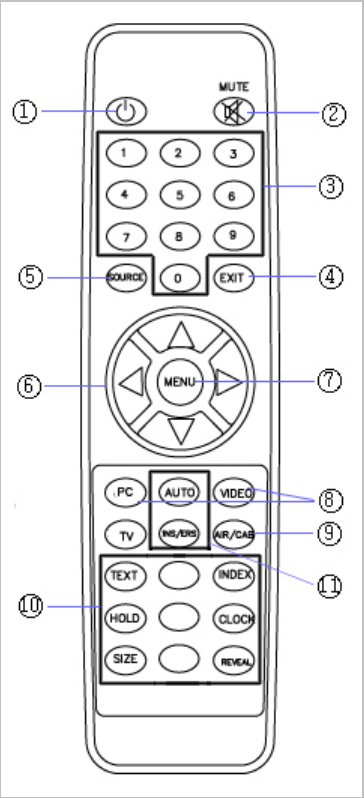
Remote Control
All the functions can be controlled with the remote controller. Some functions can also be
Controlled by the buttons on the side of LCD Display.
Before you use the remote controller, please insert the batteries.
○
1POWER : Turn LCD display On/OFF
○
2MUTE : Turn the sound On/OFF
○
3Key Pad : Change channel number.
Change Teletext (PAL) pages.
○
4EXIT : Exit OSD(On Screen Display) Menu
○
5SOURCE : Change the Input Source
- Analog RGB, DVI, Composite Video,
Component Video, S-Video, TV
○
6CH, VOL : CHc CHd :- Increase and decrease Channel
in TV mode.
- move up and down Mode in OSD.
VOL e VOL f - Decrease and increase volume
- Select the desired setting in OSD.
○
7MENU : Access to OSD Menu.
○
8PC/VIDEO/TV : Switch Source directly.
○
9Select Antenna source for the TV(i.e. Cable or Terrestrial)
○
10 Teletext(PAL only) : Switch Teletext Mode/Mix Mode/TV Mode.
○
11 RED BUTTON(AUTO)
This command is available in PC Mode.
GREEN BUTTON(ADD/DEL)
This command is available in TV Mode.
Add and delete channel in favorite & valid channel mode of
the OSD Menu.
* ETC: Red, Green, Yellow, Blue buttons are available in
Teletext mode.
INV-17W User Manual Page 12
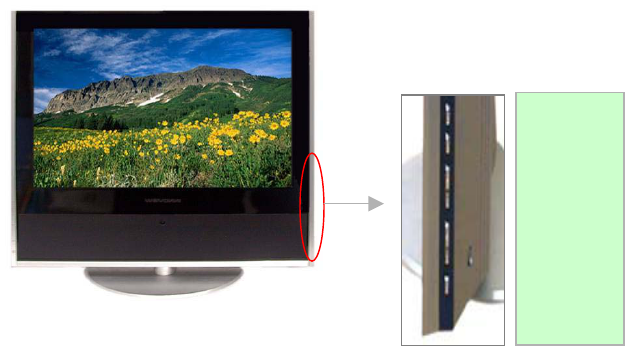
Manual Control
User can control easily this display with Remote control and OSD Button on the right side of the display.
1. MENU
2. SOURCE
3. CH +
4. CH –
5. VOL +
6. VOL –
7. POWER
INV-17W User Manual Page 13
OSD Operation
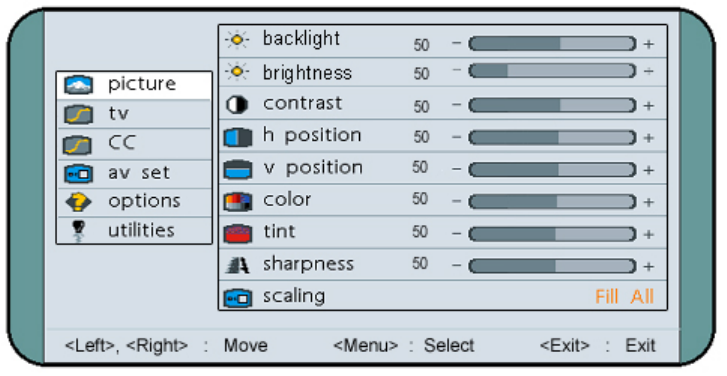
Picture Setting
1. Press Menu button on the Remote control or on the side of the LCD display.
2. Use CHd or CHc to select main menu.
3. Press Menu button to enter sub manu. .
4. Use CHd or CHc to move the cursor to the desired source.
5. Use VOLe or VOLf to change the value.
6. Press Exit to escape from the OSD Menu.
Description of Picture Settings
□ Backlight
Change the level of intensity back light.
□ Brightness
Change the brightness of the LCD Display
□ Contrast
Change the contrast of the LCD Display
□ H(Horizontal) Position
Change the horizontal Position
□ V(Vertical) Position
Change the vertical image position
□ Color
Change the color saturation of the LCD Display
□ Tint
Changes the red tones in the LCD Display
□ Sharpness
Adjust the clarity of the images.
□ Scaling
Fill all : the whole screen is stretched to fit the display area.
Normal : Set the picture to 4 :3 normal mode.
Wide : Set the picture to 16 : 9 wide mode.
INV-17W User Manual Page 14
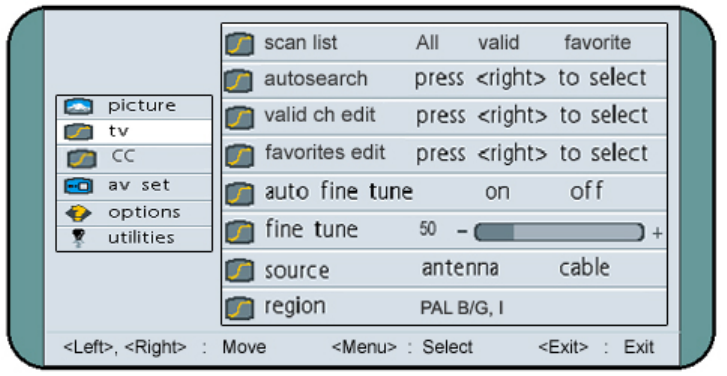
TV Setting
Description of TV Settings
□ Scan list
Enter the sub title of Scan list to edit channels.
All : In this mode user can watch all the cannels.
Valid : In this mode user can watch the desired channels among the auto searched channels.
Favorite : In this mode user can watch renumbered favorite channels.
□ Autosearch
Search for channels automatically
□ Valid ch(channel) edit
User can select and save the desired channels among broadcasted channels.
□ favorites edit
User can select and renumber (fromNo.1 to No. 9) the favorite channels among valid channels.
□ Auto fine tune
Automatically fine tunes for all the channels.
□ Fine Tune
If Auto fine Tune is Off, manually fine tune the channels.
□ Source
Select whether it is Cable reception or terrestrial line.
□ Region
Select whether it is PAL, SECAM or NTSC.
INV-17W User Manual Page 15
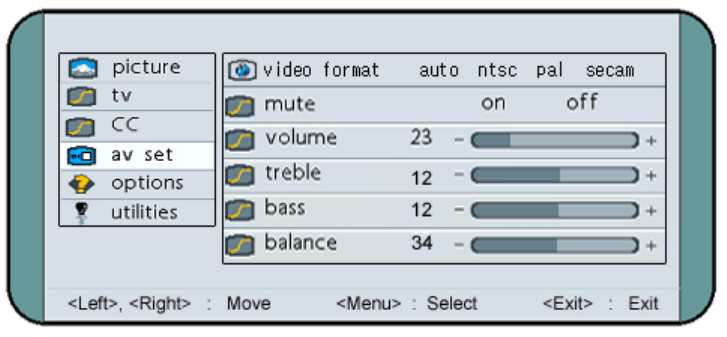
AV SET Setting
Description of Av Settings
□ Video format
Change Video format (not available in PC mode).
□ Mute
Turn on or off the sound.
□ Volume
Increase or Decrease the sound.
□ Treble
Change the high pitched sound.
□ Bass
Change the low pitched sound.
□ Balance
Change the balance of left and right in speaker out.
INV-17W User Manual Page 16
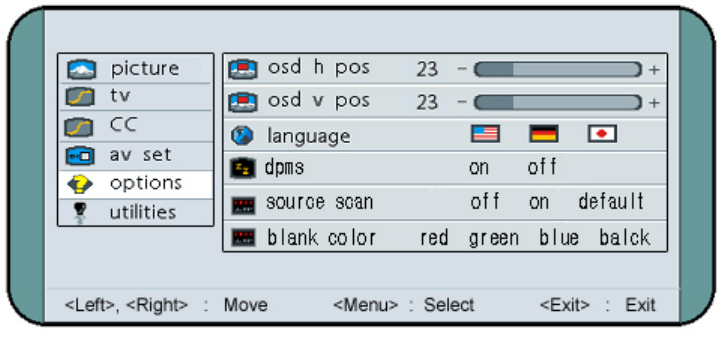
Option Setting
Description of Option Settings
□ OSD H(Horizontal)Position
Change the horizontal position of the OSD.
□ OSD V(Vertical)Position
Change the Vertical position of the OSD.
□ Language
Change the language of the OSD.
□ DPMS
Support Display Power Management Signaling or not.
□ Source Scan
Automatically scan the available source (PC, Composite video, component video, S-video & TV)
□ Blank Color
The color of the screen while it is searching for source.
INV-17W User Manual Page 17
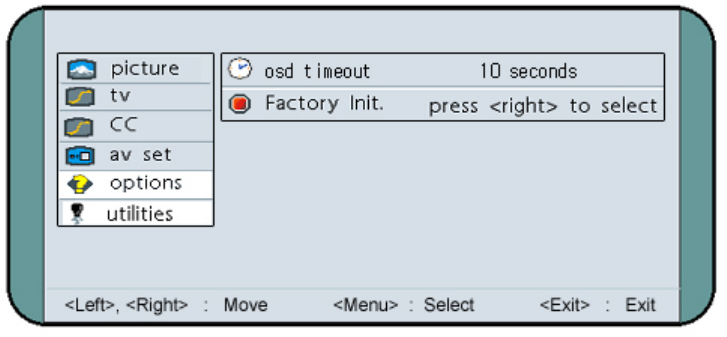
Utilities Setting
Description of Utilities Settings
□ OSD Timeout
Set the time which OSD menu disappears.
□ Factory Init.
Revert the setting to factory default.
INV-17W User Manual Page 18
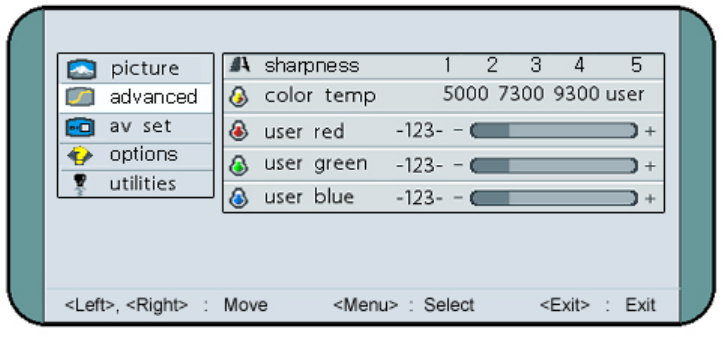
Advanced Setting
Description of Advanced Settings
□ Sharpness
Change the clarity of the screen image.
Sharp 1 -> 2 -> 3 -> 4 -> 5 Soft
□ Color Temp(Temperature)
Provide four preset color adjustments.
Warm 5000 -> 7300 -> 9300 Cool
User : user can adjust each of Red, Green, Blue.
This Mode is available under PC and Video mode.
INV-17W User Manual Page 19
TELETEXT OPERATION
Teletext is a free service broadcasted by most TV stations, which provide up to a minute information on news,
weather forecast, and television programs as well as many other topics.
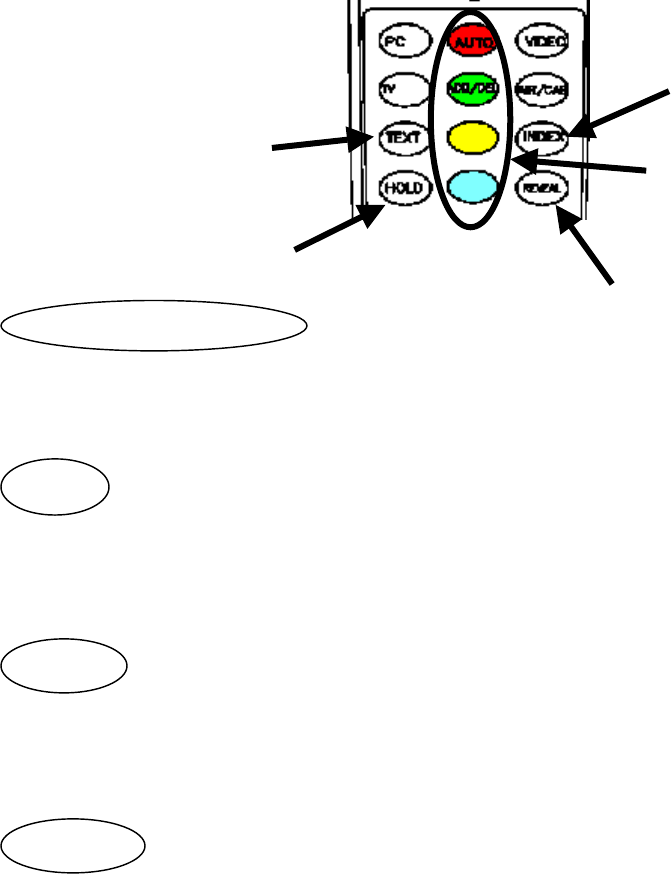
Press Teletext button on the remote to enable the Teletext services.
To view display in Mix mode i.e. TV background and Teletext foreground, press Teletext button twice.Press the
same button three times to return to the TV mode.
The functions on these buttons depend on the four color bars on the bottom of
the Screen. Press the matching color to enable that function.
Press this button to display concealed information, such as solutions of riddles
or puzzles. Press this button again to remove the information from the display.
Press this button to prevent that automatic page change occurs.
If Teletext page consists of 2 or more sub pages,. Press the button again to refresh it.
Return to index page.
4 color
TEXT
HOLD
REVEAL
INDEX
REV Reveal
INDEX
HOLD
4 COLOR BUTTONS

INV-17W User Manual Page 20
SPECIFICATION
FCC, CE, UL, TUV Certification
7.2kg / 8.5kg Net/Gross(Kg) Weight
450 X 410 X 180 /505 X 510 X 240 Net/Box(W x H x D)mm : Dimension
Teletext, V-CHIP Control, PIP(Option) Other
AC 100 ~ 240V/DC5V
36W
Under 5W
Input Voltage
Power Consumption
Stand
-
by mode
POWER
x 2
Speaker(3W)
Surround Sound
AUDIO
Type1 : 15pin D-sub, Component(YPrPb), Composite
(NTSC) S-video, Sound Input L/R, Speaker Out,
Headphone, PC sound In, RF(TV), DVI(Option)
Type2 : 15pin D-sub, SCART, S-Video, Sound Input L/R,
(PAL) Speaker Out, Headphone, PC sound In,
RF(TV), DVI(Option)
INPUT
TERMINAL
FS181Channel for NTSC
FVS 100Channel for PAL/SECAM
Detachable TV Tuner
TV//PC/DVD Support
Tuning
TV/VIDEO
TFT active matrix wide color
16:9
400 :1
450 cd/㎡
1280 x 768(WXGA)
0.291mm x 0.291mm RGB
16.7M
16ms
Type(LG)
Aspect Ratio
Contrast
Brightness
Resolution
Cell Pitch
Colors
Respond Time
LCD PANEL