Inspira Technologies DCG-N10 Tablet PC User Manual part 2
Inspira Technologies LLC Tablet PC part 2
Contents
- 1. User manual part 1
- 2. User manual part 2
User manual part 2
ENGLISH
7
Charge the Tablet
The Tablet comes with a built-in rechargeable lithium-polymer battery. It is recommended to fully charge
the battery before first use.
• To charge the Tablet, plug the charger to an electrical socket with the other end of the adapter
inserted to the microUSB input slot on the Tablet (Refer to Step 1 on the previous page).
• You may continue to use the Tablet while it is charging. You may stop charging any time even
when it is not 100% charged.
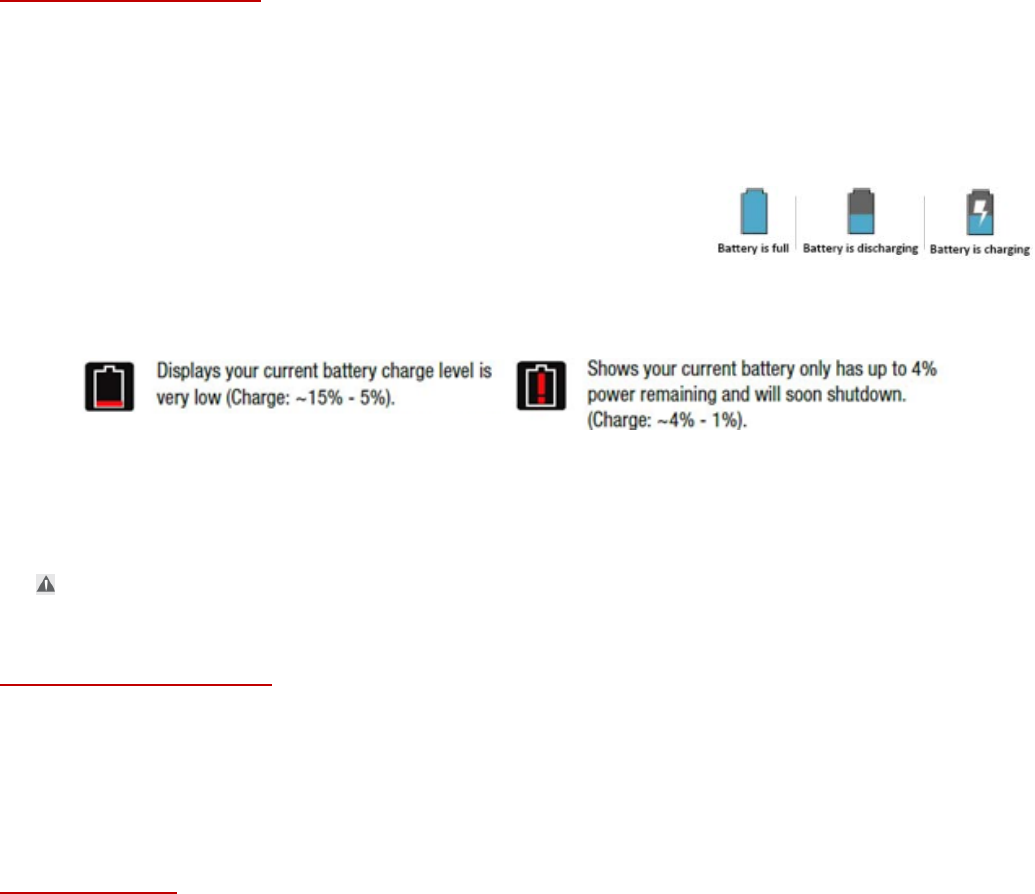
• If the Tablet is powered on, the battery charge status will be
indicated at the top right corner of the screen by the battery
meter. If the Tablet is powered off, it will charge until the
battery is full.
• When the battery life runs out, the battery meter turns red and the device needs to be charged
soon. It will continue to operate as usual until it drops to 0%.
• Disconnect the power adapter when the Tablet is fully charged.
Note: When the Tablet is connected to a computer via the USB cable, the battery will charge via the USB
socket, but at a much slower rate than the power adapter supplied.
Do not use any other power adapters than the one supplied. Using an incompatible power adapter
could damage the tablet and poses the potential risk of fire.
Turn on the Tablet
• Press the power key circled in red for 5 seconds.
• Wait for about 30 seconds for Android to load and start.
• The Tablet will guide you through the basic setup.
Initial setup
• On the welcome page, scroll to select the desired language.
• Tap the arrow circled in green to proceed.
• Select a Wi-Fi network, i.e. the wireless network for Internet connection
• Enter the password and wait for the connection and system check. It may take up to 2 minutes.
• Sign in to your Google account
If you have an existing Google account
Enter your Google email and press Next
Enter your Google account password and press Next
Accept the Terms of Service and Privacy Policy
If you do not have a Google account yet
Select “Or create a new account”
Enter you first name and last name and press Next
FCC Statement
This equipment has been tested and found to comply with the limits for a Class B digital
device, pursuant to Part 15 of the FCC Rules. These limits are designed to provide reasonable
protection against harmful interference in a residential installation. This equipment generates
uses and can radiate radio frequency energy and, if not installed and used in accordance with
the instructions, may cause harmful interference to radio communications. However, there is no
guarantee that interference will not occur in a particular installation. If this equipment does
cause harmful interference to radio or television reception, which can be determined by turning
the equipment off and on, the user is encouraged to try to correct the interference by one or
more of the following measures:
-- Reorient or relocate the receiving antenna.
-- Increase the separation between the equipment and receiver.
-- Connect the equipment into an outlet on a circuit different from that to which the receiver is
connected.
-- Consult the dealer or an experienced radio/TV technician for help.
§ 15.21 Information to user.
Any Changes or modifications not expressly approved by the party responsible for compliance
could void the user's authority to operate the equipment.
§ 15.19 Labelling requirements.
This device complies with part 15 of the FCC Rules. Operation is subject to the following two
conditions: (1) This device may not cause harmful interference, and (2) this device must accept
any interference received, including interference that may cause undesired operation.
IC STATEMENT
This device complies with Industry Canada’s licence-exempt RSSs. Operation is subject to the
following two conditions:
(1) This device may not cause interference; and
(2) This device must accept any interference, including interference that may cause
undesired operation of the device.
Le présent appareil est conforme aux CNR d'Industrie Canada applicables aux appareils radio
exempts de licence. L'exploitation est autorisée aux deux conditions suivantes: (1) l'appareil ne
doit pas produire de brouillage, et (2) l'utilisateur de l'appareil doit accepter tout brouillage
radioélectrique subi, même si le brouillage est susceptible d'en compromettre le
fonctionnement.
IC SAR warning:
The information listed above provides the user with information needed to make him or her
aware of a RF exposure, and what to do to assure that this radio operates within the RSS
exposure limits of this radio.
The device complies with RF specifications when the device used at 5mm from your body.
Third-party belt-clips, holsters, and similar accessories used by this device should not contain
any metallic components. Body-worn accessories that do not meet these requirements may not
comply with RF exposure requirements and should be avoided.