Insportline Zidaho Qs8480C Quick Start Guide 822428 ManualsLib Makes It Easy To Find Manuals Online! User Manual
2016-11-23
User Manual: Insportline Insportline-Zidaho-Qs8480C-Quick-Start-Guide-822428
Open the PDF directly: View PDF  .
.
Page Count: 22
1
USER MANUAL – EN
IN 7562 Motorized Treadmill inSPORTline Zidaho (QS8480C)

2
CONTENTS
TIPS FOR SAFETY ................................................................................................................................................ 3
SPECIAL TIPS FOR SAFETY........................................................................................................................... 4
PACKING DETAILS ............................................................................................................................................. 4
EXPLODED VIEW ................................................................................................................................................ 6
PARTS LIST ........................................................................................................................................................... 6
TREADMILL STRUCTURE ................................................................................................................................. 8
ASSEMBLY ........................................................................................................................................................... 9
USE ....................................................................................................................................................................... 11
SAFETY KEY .................................................................................................................................................. 11
FOLDING / UNFOLDING ............................................................................................................................... 12
INSTRUCTION FOR CONSOLE ........................................................................................................................ 13
PANEL KEYS AND FUNCTIONS.................................................................................................................. 13
DISPLAYED WINDOW .................................................................................................................................. 15
PROGRAMS ..................................................................................................................................................... 16
MAINTENANCE ................................................................................................................................................. 17
CLEANING ...................................................................................................................................................... 19
CAUTIONS, DEPOSITING ............................................................................................................................. 19
GUIDES FOR MALFUNCTION ......................................................................................................................... 19
TERMS AND CONDITIONS OF WARRANTY, WARRANTY CLAIMS ....................................................... 21

3
Special tips:
Before installation and operation, please read this operation manual carefully and save this manual for future
reference.
WARRANTY
We make sure that this item is made of high quality materials.
In normal use, if any problem, we will take charge of maintenance.
The warranty time for this item is 1 year (From the day you buy it). If any quality problem about this item,
please contact with our services within 1 year. Don’t deal with quality problem by yourself without any
authorization.
If the product you purchased has problems as follows, the manufacturer’s warranty is not effective:
Improper operating, negligence, accident
Improper treatment when problems.
Use the spare parts which are not from us.
Damage from other reasons.
For easy-wear parts, we don’t provide maintenance and replace for normal use, such as belt.
This warranty is only valid for home use, and is not suitable for gym or other professional exercise.
If you want to buy spare parts, please contact with our service and provide this manual.
TIPS FOR SAFETY
We have considered more for safety when we design and produce this item. However, in case of any
unhappiness, please pay attention to these tips. We don’t assume responsibility if any accident caused by follow
tips.
According to your health condition, please exercise properly. Overload or improper exercise will
damage your health.
While running, you should dress properly. Don’t dress too loosely in case your clothes are entangled by
the machine .And please wear sport shoes. Don’t let your children or pet play near it to avoid
unnecessary injury.
This machine is not suitable for children. For patients or the disabled to use, they have to follow the
guides by their guardians or doctors.
Don’t use this machine when in outdoor, high humidity condition or sun.
Please pull the plug off from socket and keep the safe key, when the treadmill is unused.
This machine is for home use, not suitable for professional exercise or testing, and also not suitable for
medical purpose.
The heart rate on this machine is not suitable for medical.
If any damage for power wire, please ask manufacturer or professional service to replace it in case of
any danger.
Please check all the parts before using. Make sure that all the nuts or screws are fastened.
Place your treadmill on the clean, flat and solid floor. Make sure that there is not anything pointy, water
or hot near to the machine.
Please stop exercising immediately and consult your doctor if you’re feel giddy, surfeit, thorax ache or
other symptoms.
Make sure that hands are not near to running parts. Don’t put your hands or foots under the running belt.
When running this machine, it is only for one person to use it!
4
Please use the spare parts from us, it is not acceptable if you use spare parts from others.
This machine is HC level, max weight shall be less than 120 kg.
Please consult your doctor at first before running, if you have one of the following diseases.
1. Cardiopathy, hypertension, sugar diabetes, respiratory disease, smoking, and other chronic
diseases, complication disease.
2. If you are over 35 years old and heavier than common weight.
3. Women in pregnant or in breasting period.
SPECIAL TIPS FOR SAFETY
Please use qualified socket. If the plug and the socket is not compatible, please ask electrician to handle
it and don’t do anything for the plug.
The voltage for this machine is 220V-240V AC.
Don’t let power wire touch roller, and also don’t put power wire on the running belt. Don’t use
damaged plug.
Before cleaning, moving and maintaining the machine, please pull off the plug for the socket.
Warning: If don’t pull off, it will cause injury or damage for the machine.
PACKING DETAILS
Warning: Carefully install the product, avoid making any damage.
Notice:
1) Carefully read the instructions before installation. Operate in accordance with procedures.
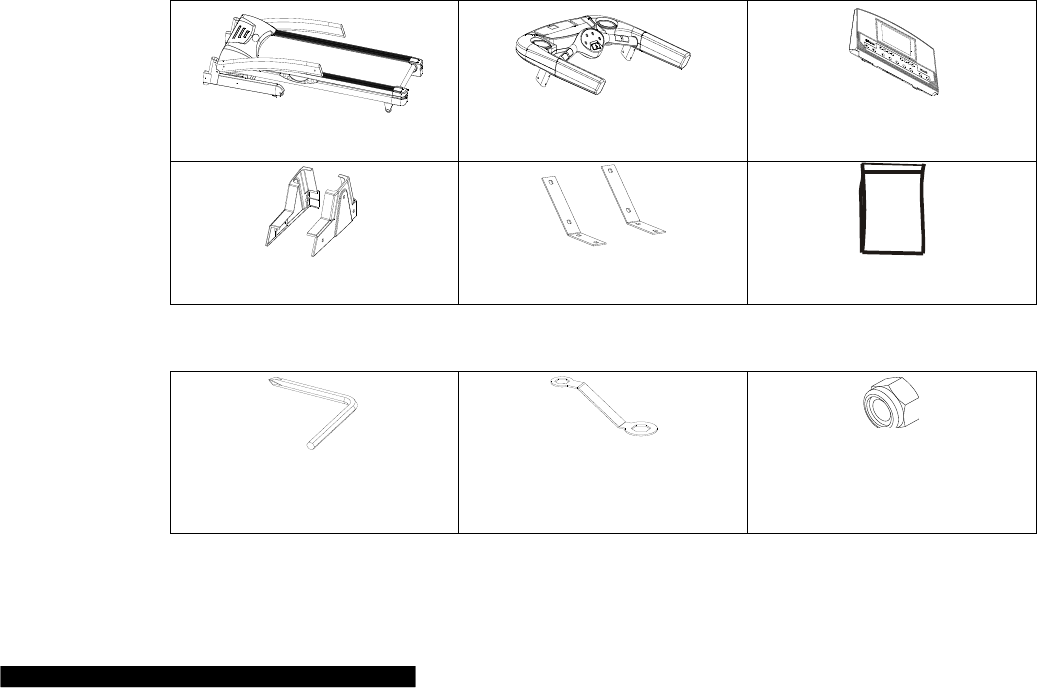
2) Check components in the package
3) Remove all paper boxes and foams used as fasteners.
4) Check all the following components. If there is missing or problematic parts, please contact the dealer
Frame
Meter set
Meter board set
Decorating cover at base
Meter stator
Hardware tool bag
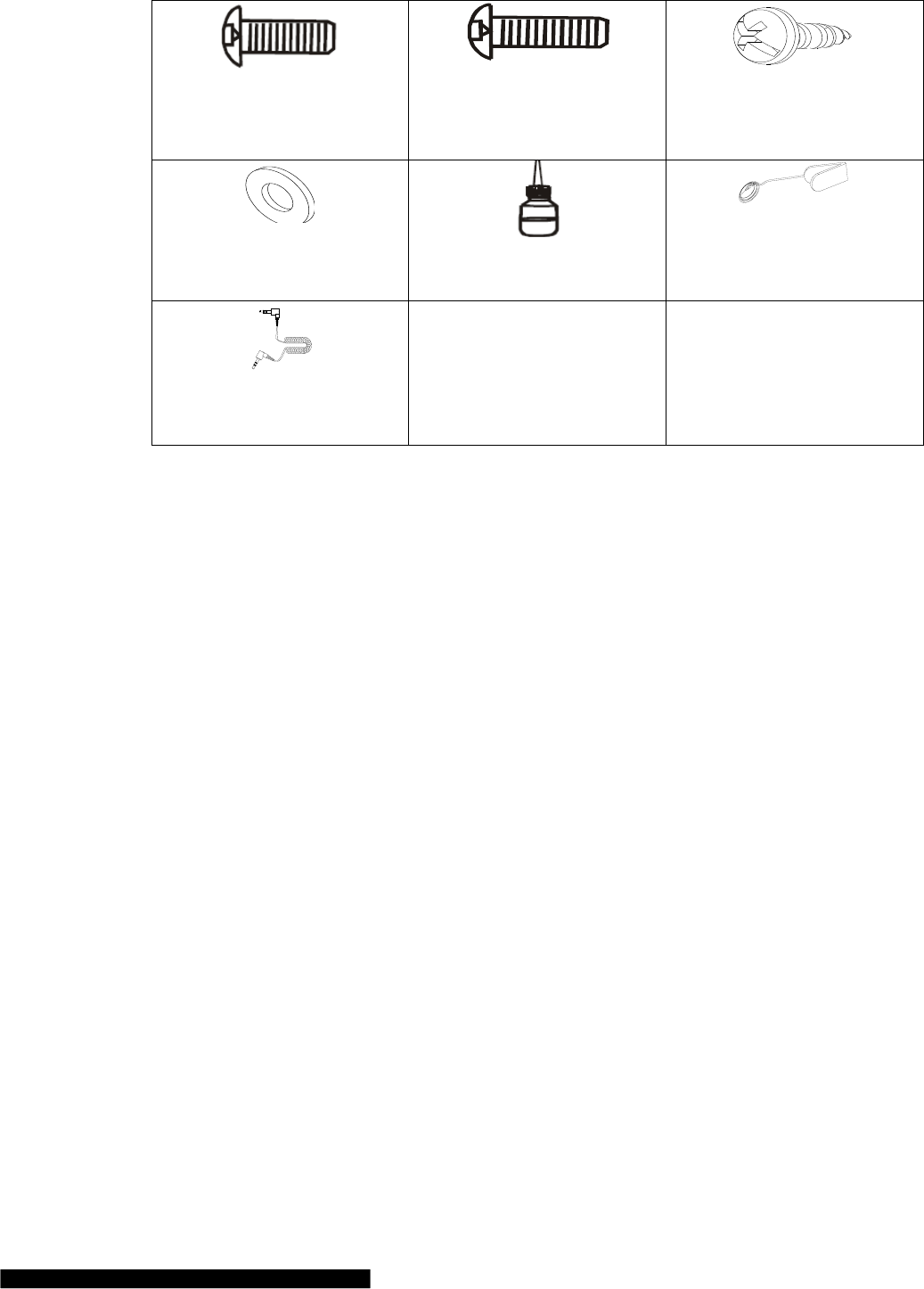
HARDWARE TOOL BAG
Multi-wrench,
1 pc
Homemade wrench,
1 pc
Nut,
2 pcs
5
Umbrella-type allen screw
M8*20,
8 pcs
Umbrella-type allen screw
M8*60,
2 pcs
Umbrella-type cross tapping
screw M4.2*15,
12 pcs
Washer,
10 pcs
Lubricant
Safety key
MP3 connector,
1 pc
6
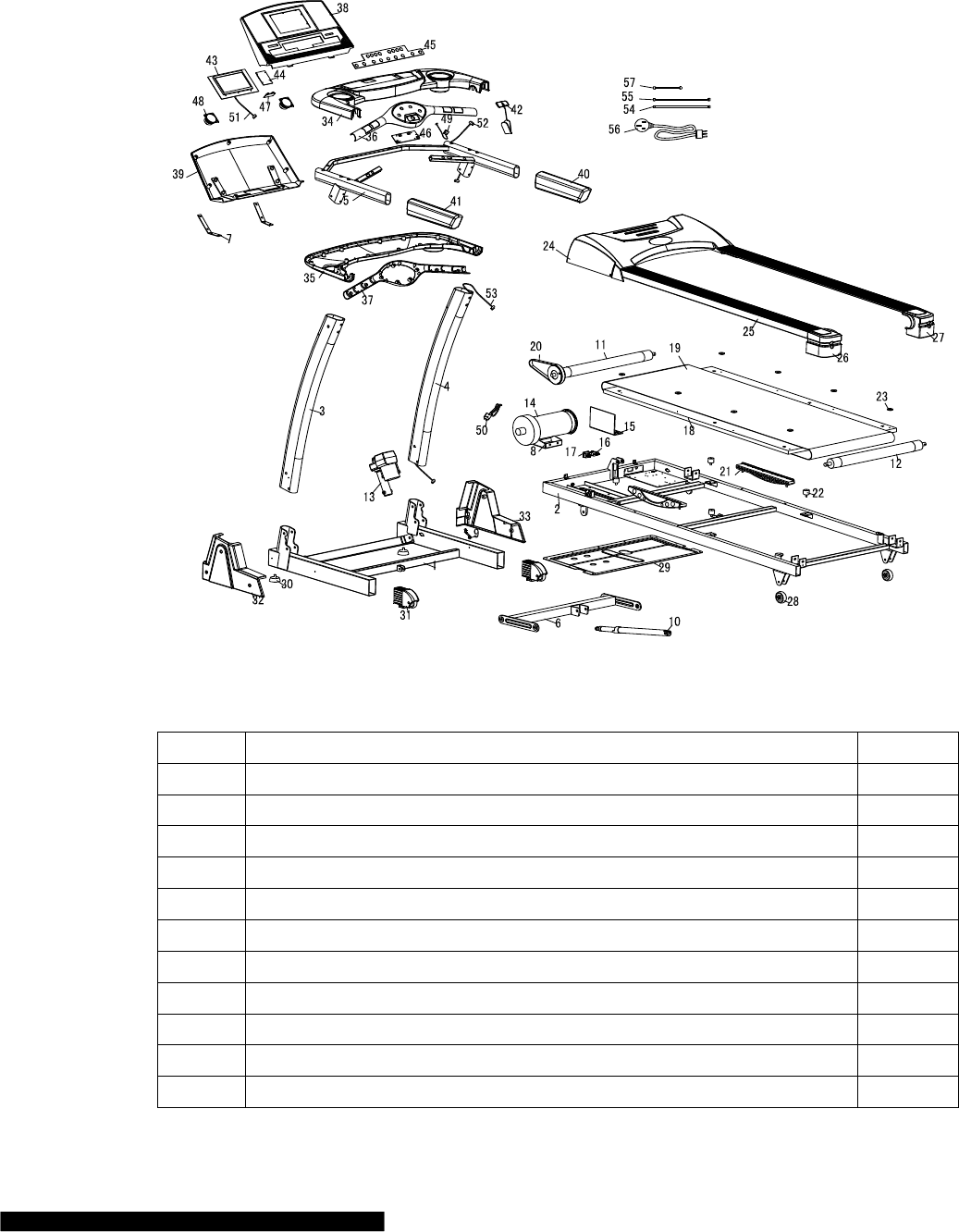
EXPLODED VIEW
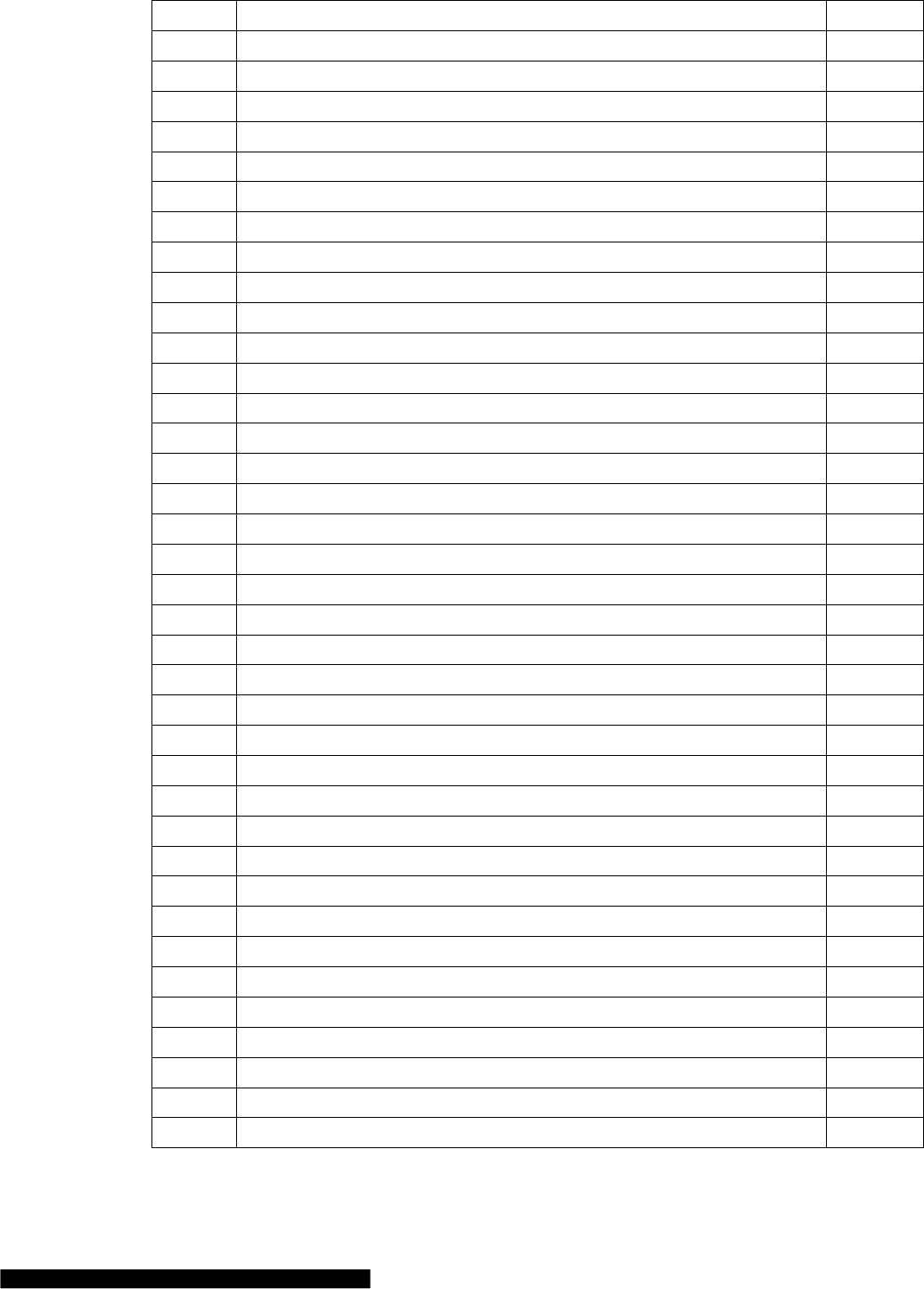
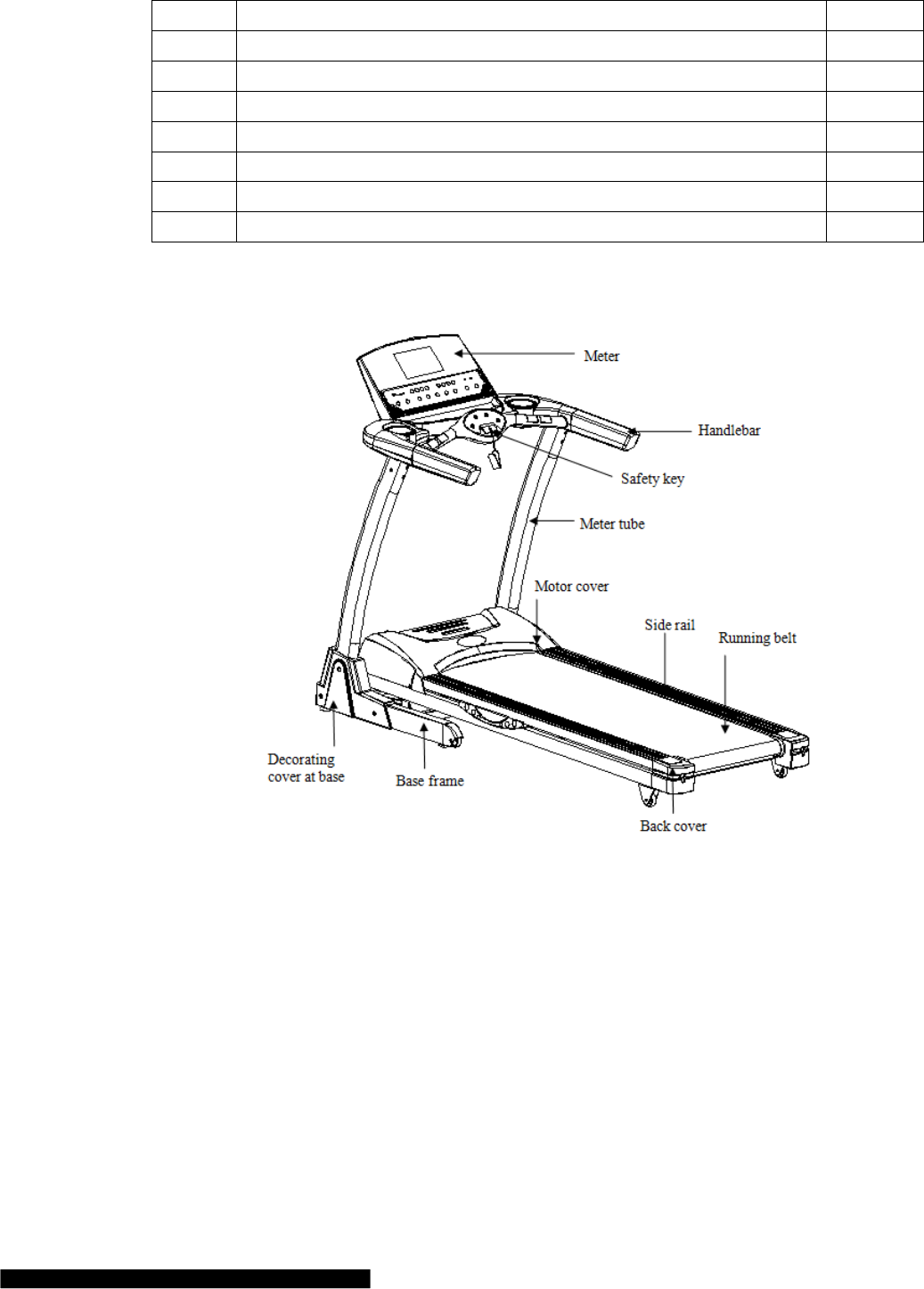
These are all the components used in installation. All components are listed in the following form.
PARTS LIST
No.
Component
Quantity
1
Base frame
1
2
frame
1
3
Left pillar accessory
1
4
Right pillar accessory
1
5
Dashboard frame
1
6
Incline frame
1
7
Meter stator
2
8
Motor stator
1
9
Safety brace for base frame
1
10
pressure rod
1
11
Front roller
1
7
12
Back roller
1
13
Incline motor
1
14
Motor
1
15
PCB
1
16
Power switch
1
17
Overload protector
1
18
Running board
1
19
Running belt
1
20
Multislot belt
1
21
Long bumper
2
22
Bumper
4
23
Locating pad for side rail
8
24
Motor cover
1
25
Side rail
2
26
Left back cover
1
27
Right back cover
1
28
Rubber transport wheel
2
29
Lower cover of motor
1
30
Adjusting pad
2
31
Transporting wheel set at base
2
32
Left decorative cover at base
1
33
Right decorative cover at base
1
34
Upper cover of meter
1
35
Lower cover of meter
1
36
Upper cover of heart rate sensor
1
37
Lower cover of heart rate sensor
1
38
Upper cover of meter board
1
39
Lower cover of meter board
1
40
Right handlebar cover
1
41
Left handlebar cover
1
42
Safety key
1
43
Console board
1
44
Amplifier board
1
45
Touch key board
1
46
Button key board
1
47
MP3 module
1
48
Speaker
2
49
Reed pipe for safety key
1
8
50
Speed reed pipe sensor wire
1
51
Upper communication line
1
52
Middle communication line
1
53
Lower communication line
1
54
Green connecting line
1
55
Red connecting line
1
56
Power wire
1
57
Red connecting line
1
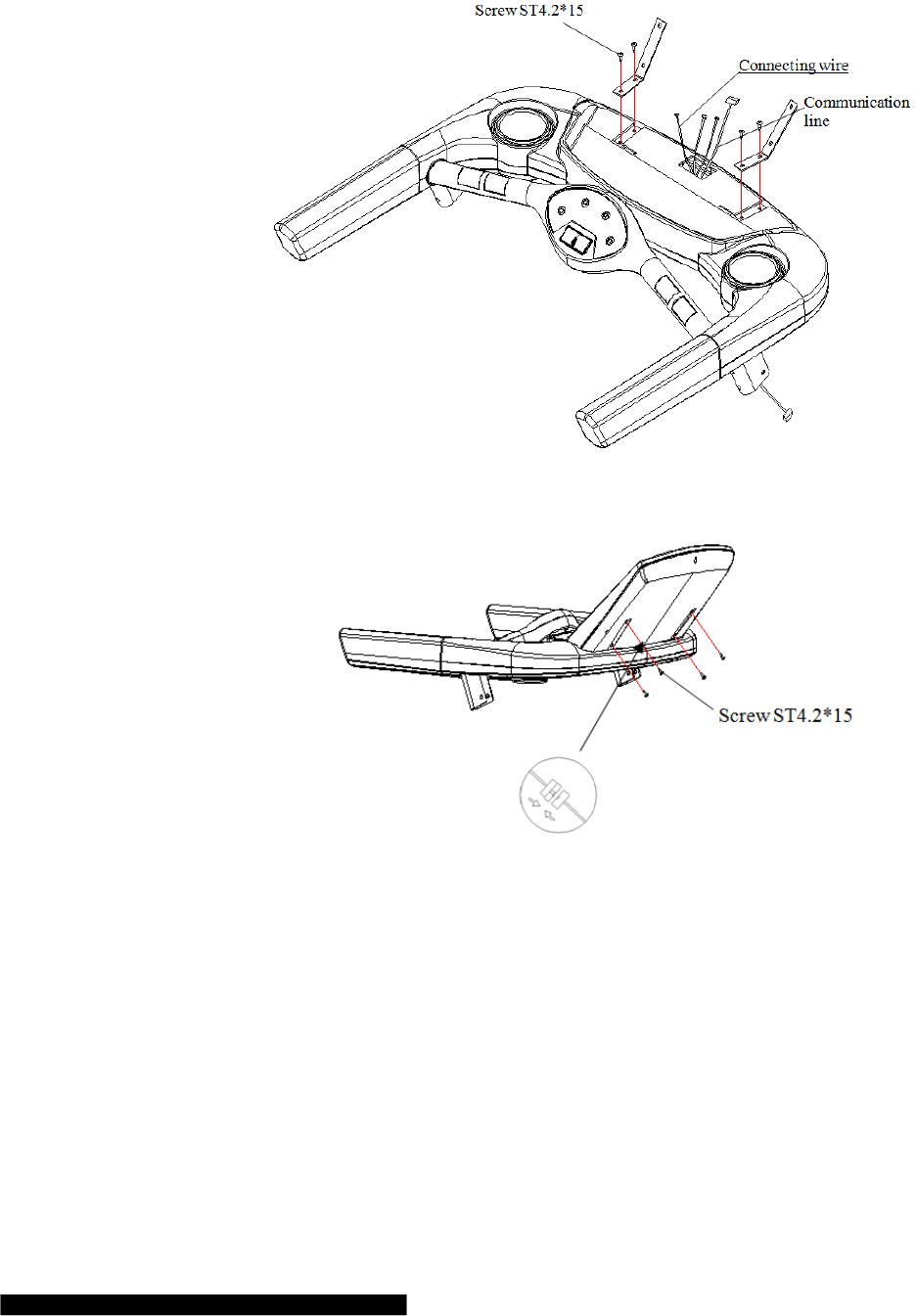
TREADMILL STRUCTURE
9
ASSEMBLY
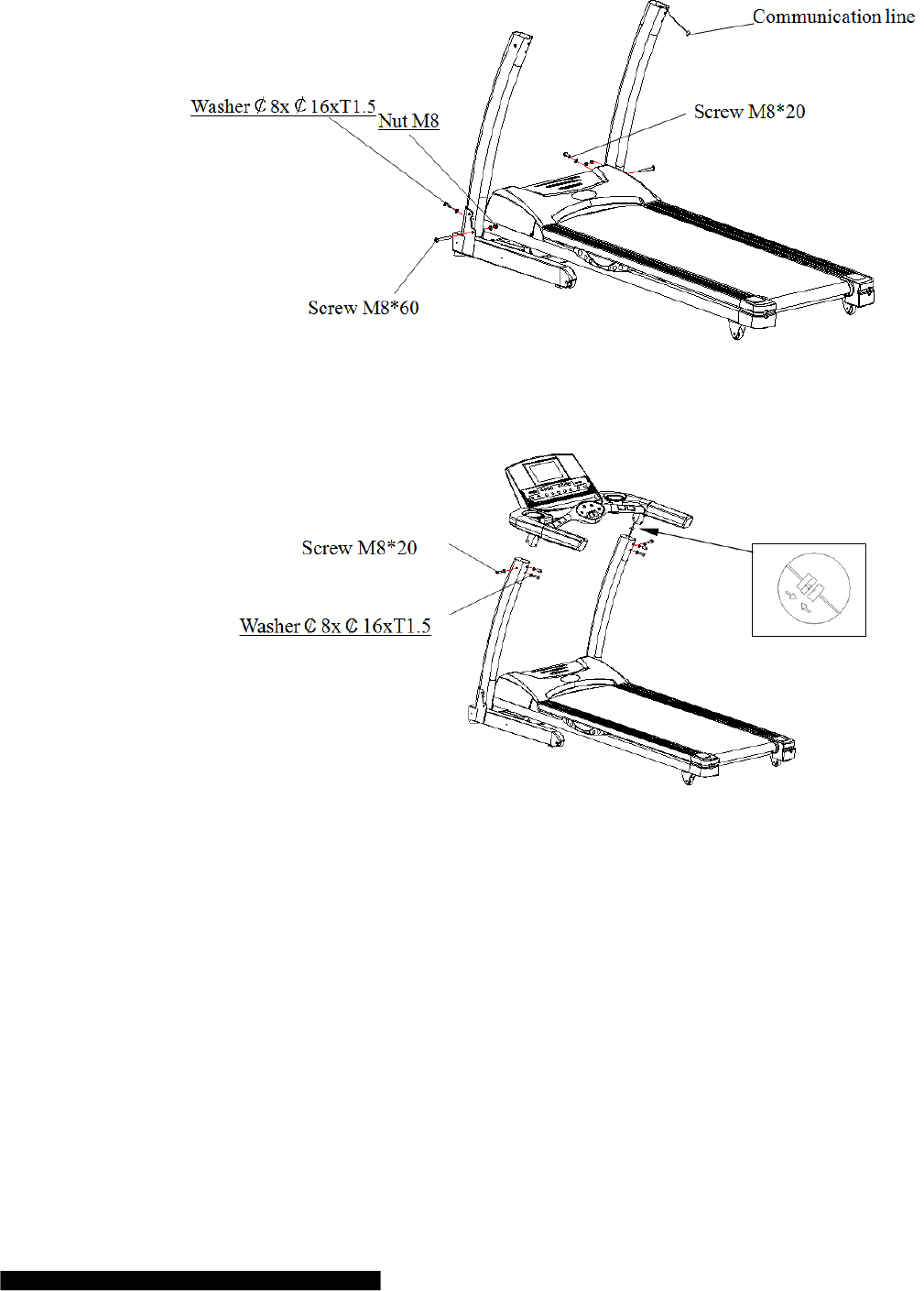
STEP 1: Set meter stator on upper cover of meter
Set meter stator on upper cover of meter. Use 4 pcs of Screw ST4.2*15 to solid meter stator. (Fasten screws).
STEP 2: Put meter board on meter stator
a) Make sure that communication lines and connecting lines are connected correctly, in case they are
connected in reverse.
b) Put meter board on meter stator, use 4 pcs of Screw ST4.2*15 to solid meter board. (Fasten screws)
10
STEP 3: Set meter tube at base frame
Set meter tube at base frame, use 2 pcs of Screw M8*20 and 2 pcs of washer, 2 pcs of Screw M8*60, 2 pcs of
washer and 2 pcs of nut to solid the meter tube (Don’t fasten screw at first)
STEP 4: Put meter on the meter tube
a) Make sure that communication lines are connected correctly, in case they are connected in reverse.
b) Put meter on the meter tube. Use 6 pcs of Screw M8*20 with 6 pcs of washer to solid the meter.( Don’t
fasten screw at first )
After the machine is power on, push “Start”, if everything goes well, then fasten screws mentioned in front steps.
11
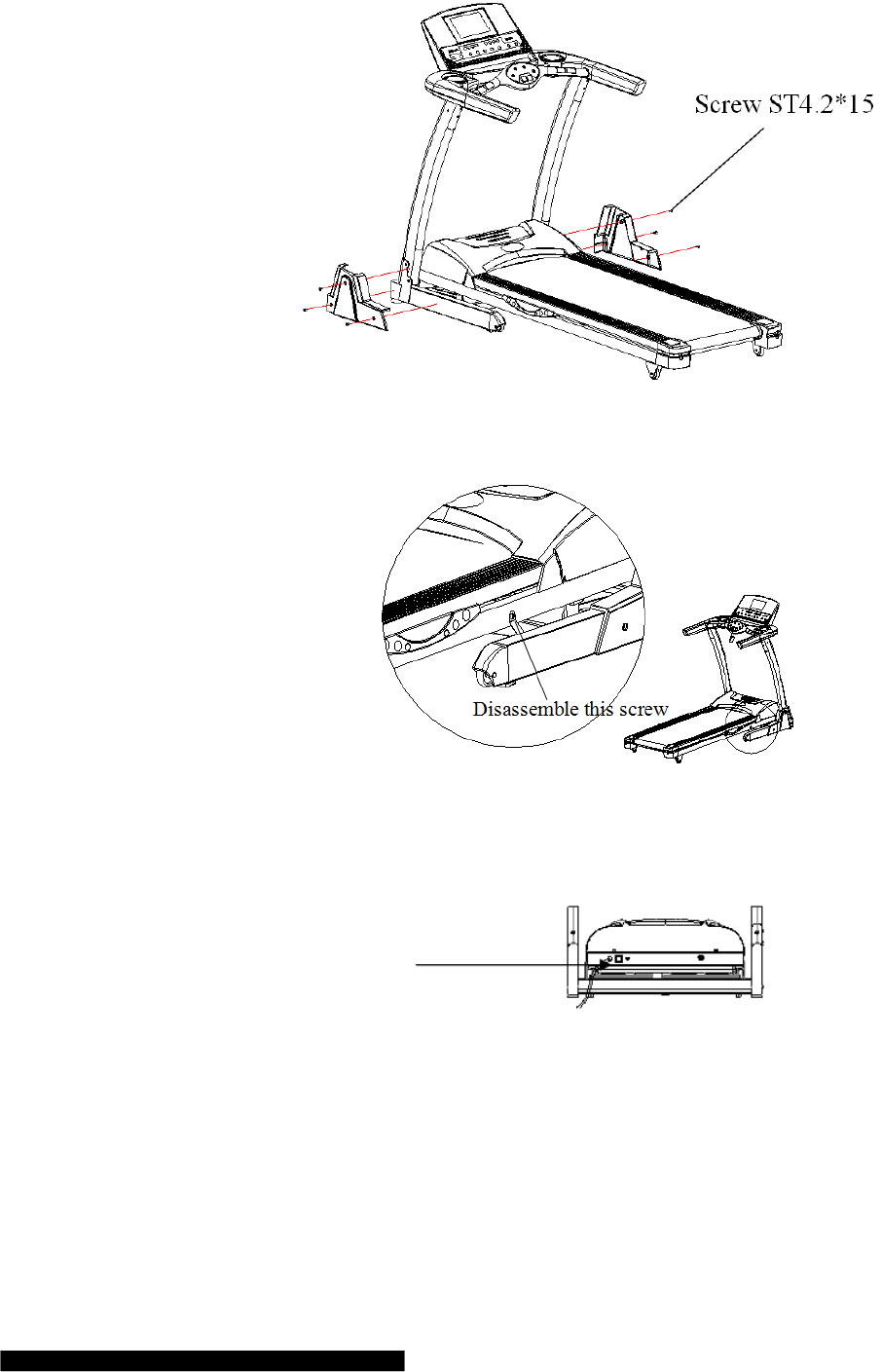
STEP 5: Install decorating cover at base
Use 6 pcs of Screw ST4.2*15 to solid left and right decorating cover at base.
Step 6: Disassemble connecting screw for base frame
USE
Insert the power plug into the socket and switch on the machine. The switch light will be on and you will hear a
voice “Di”. You will find the meter light will also be on.
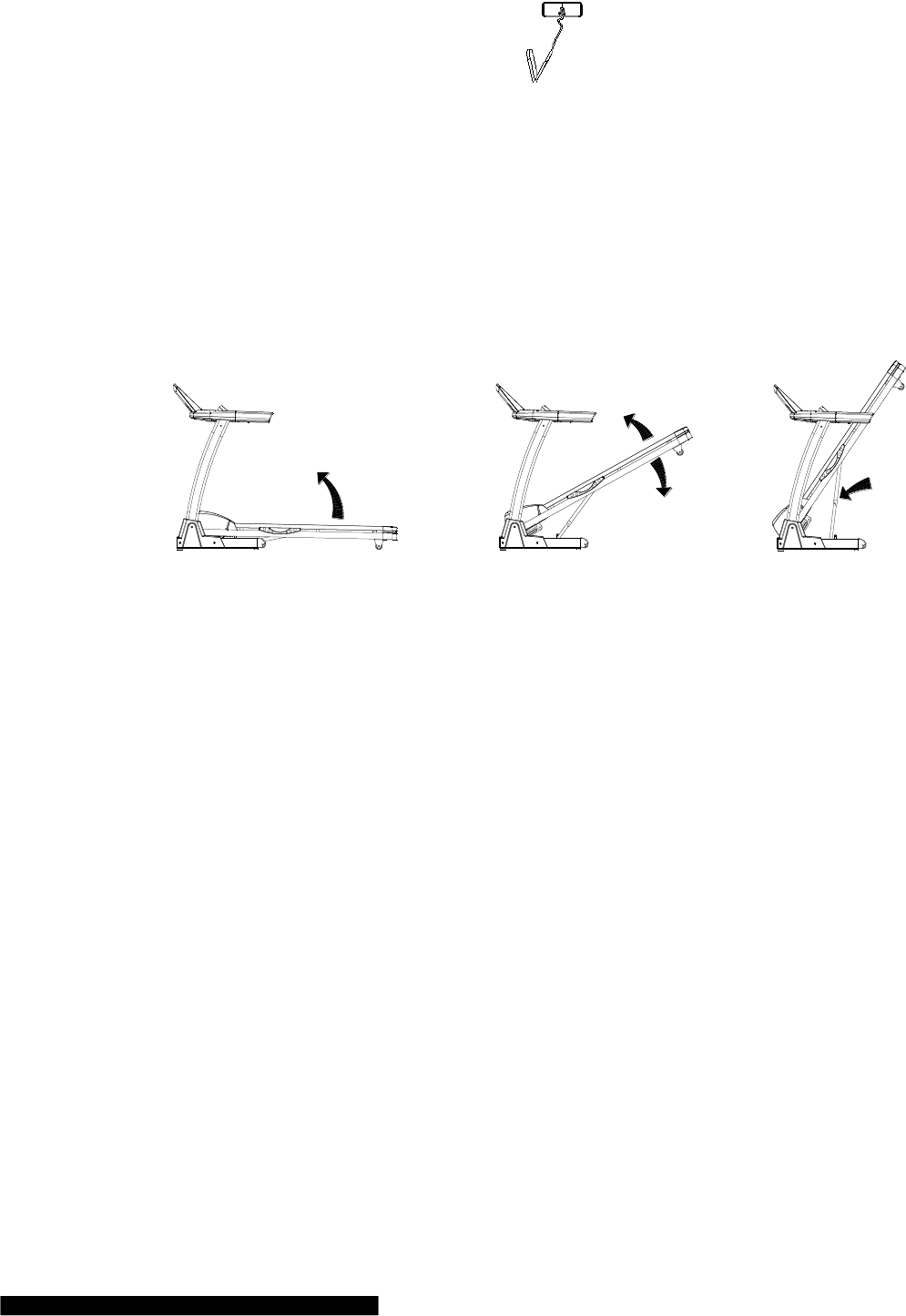
SAFETY KEY
The machine can work only when you put safety key at the appointed position. Make sure the other end of the
safety key has been nipped to your clothes. In this way, you can pull the safe key for the machine’s sudden stop
under the dangerous condition. Then you will not be injured. If you need to reuse the machine, you could put
safety key back.
12
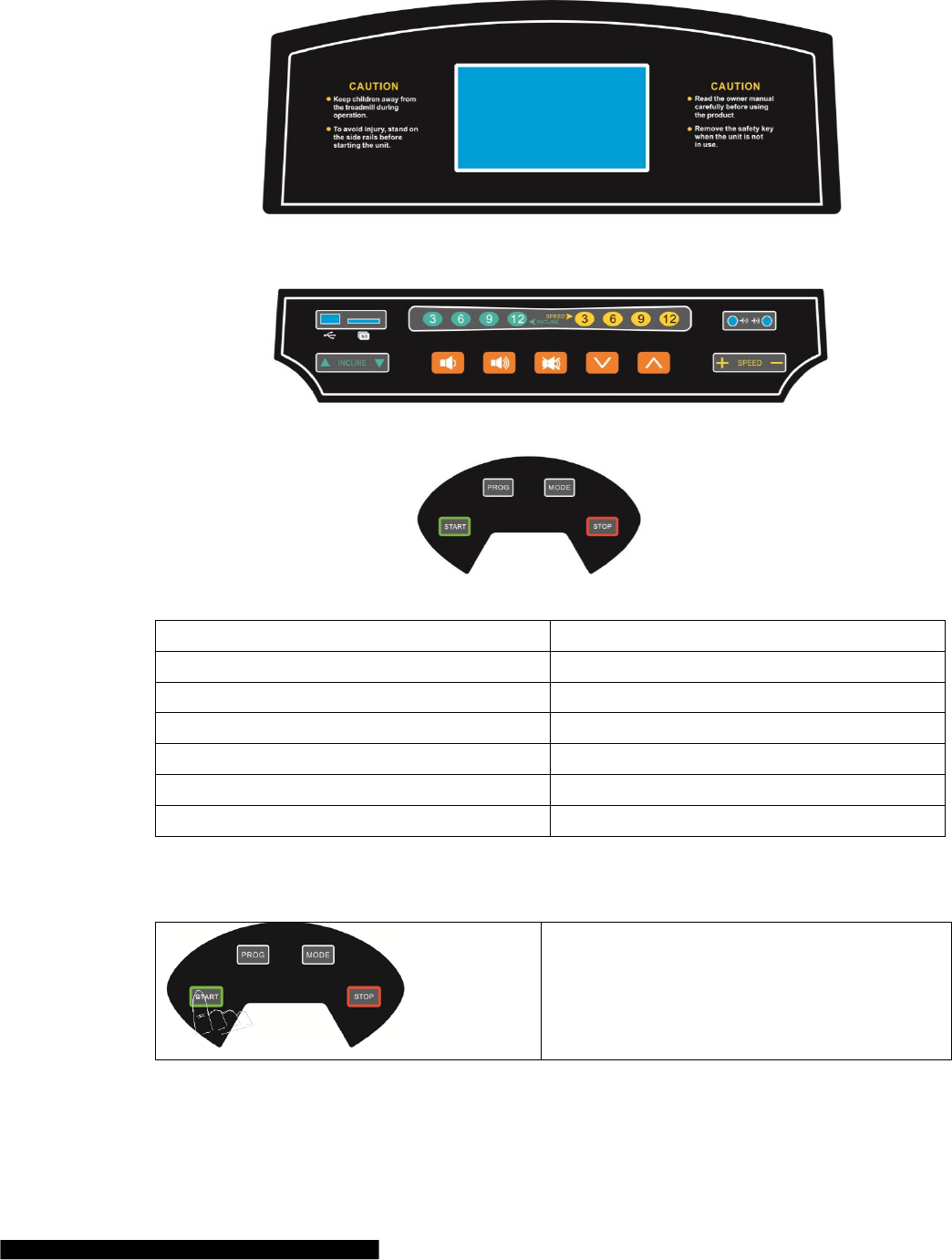
FOLDING / UNFOLDING
Folding:
Folding will help to save space.
Before folding, please switch off and pull off the plug.
Use your hand to lift the running board until it has been locked.
Unfolding:
Step on the supporting tube and pull running board with your hands. The running board will fall to the ground
slowly.
13
INSTRUCTION FOR CONSOLE
Tech info:
Time
00:00-99:59 Min
Speed
0.0-20.0 km/h
Incline
0-20 %
Distance
0.00-99.9 km
Calorie
0-999 KCAL
Heart rate
40-250 / Min
Program
P1-P99, U1-U3, BODYFAT
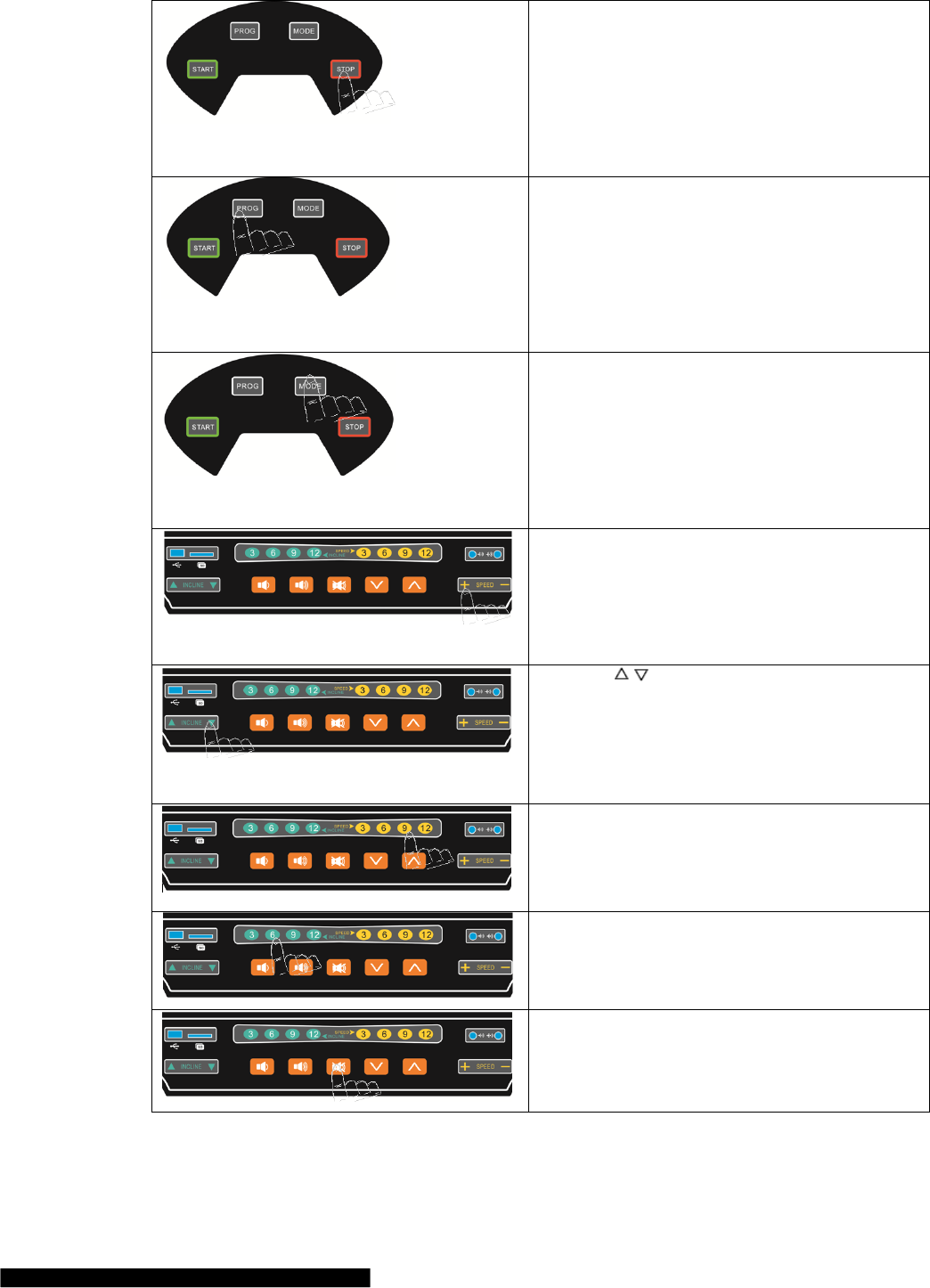
PANEL KEYS AND FUNCTIONS
START Key:
Press "Start" Key, there will be 3 seconds countdown
displayed on the window! After countdown, the machine
will run at the speed of 1.0km/h.
14
STOP Key:
Under running condition, press “stop” key, it will slow
down then stop.
Reset:
Press "Stop" Key for a long time, the machine will be
reset and start for new exercise record when you press
"Start ".
PROG. Key
Under ready condition, Press "PROG.", you could select
program P1-P99, U1-U3 and BODY FAT.
P1-P99 is preset program, U1-U3 is user-defined
program, BODY FAT is body fat test.
When you finished selecting, you have to press “ start
”to start it !
MODE Key
Under ready condition, Press "MODE.", you could
select15:00, 1.0 or 50.
15:00 is time countdown, 1.0 is distance countdown,50
is calorie countdown.
When you have selected, you have to press “start”to start
it!
SPEED + - Key
Under ready condition, it is used for setting some data.
Under running condition, it is used for setting speed,
speed difference is 0.1 km/h for each time. When we
press it for above 0.5 seconds, it will progressive
increase or reduce automatically.
INCLINE Key
Under ready condition, it is used for setting some data.
Under running condition, it is used for setting incline,
incline difference is 1% for each press. When we press it
for above 0.5 seconds, it will progressive increase or
reduce automatically.
SPEED direct key
Use these keys, you could set speed for 3 km/h, 6km/h,
9km/h, 12km/h directly.
INCLINE direct key
Use these keys, you could set incline for
3%,6%,9%,12% directly.
Music Voice on/off key
You could use this key to turn on or off the voice of
music.
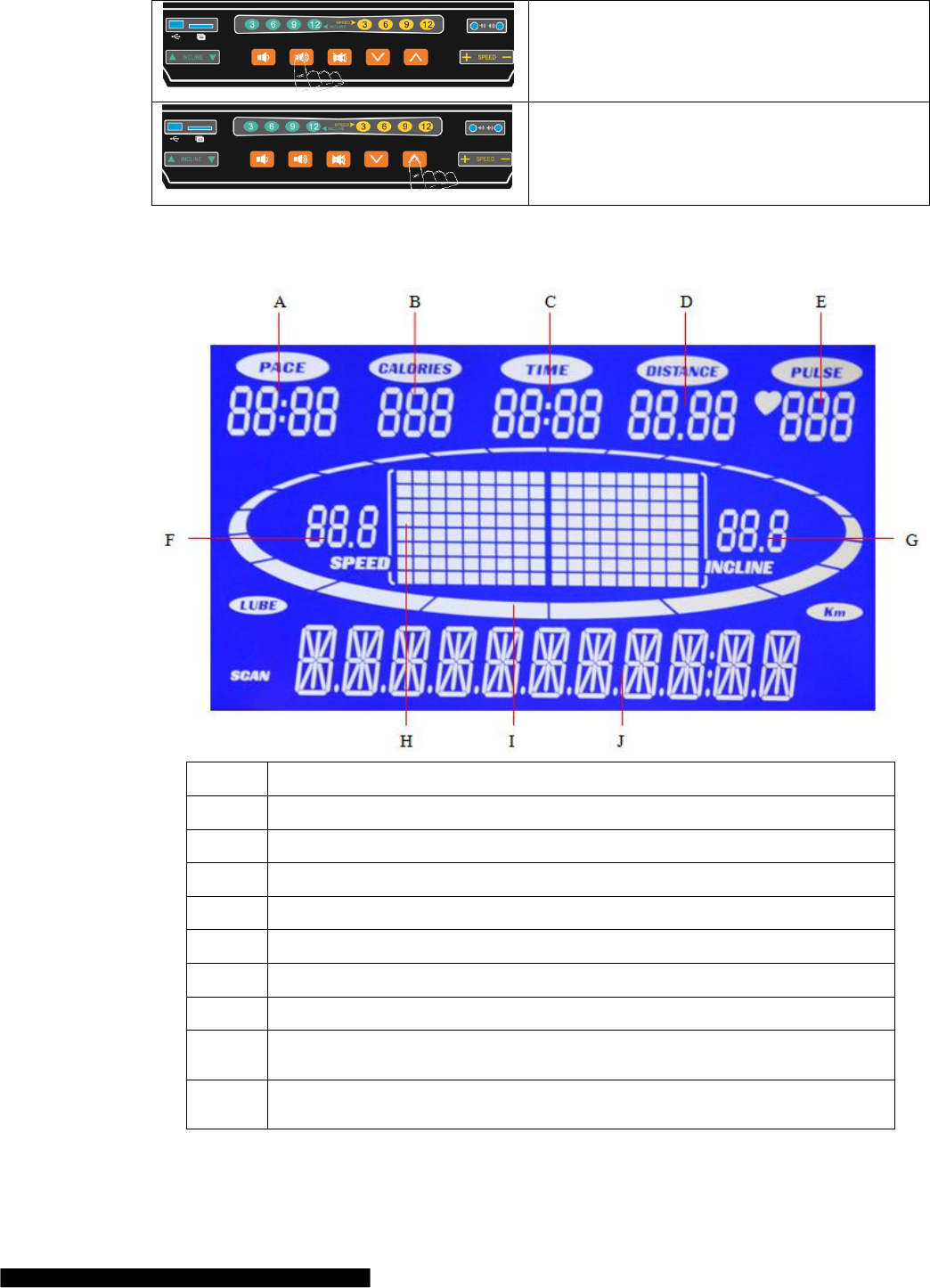
15
Music Voice + - key
You could use these two keys to change the voice of
music.
Music Select key
You could use these two keys to select next or last
music.
DISPLAYED WINDOW
A
PACE: Display the time rate;
B
CALORIES: Display running calories
C
TIME: Display running time
D
DISTANCE: Display running distance
E
PULSE: Display running heart rates; Display P1-P99, U1-U3, F1-F3
F
SPEED: Display running speed
G
INCLINE: Display running incline
H
Display program picture
I
Display runway and number of turns DIST: Display running distance ; BMI: Display body
fat test data
J
SCAN: Display flowing warning words; Display BODYFAT; Display SEX, MAN,
WOMAN, AGE, WEIGHT, HEIGHT

16
PROGRAMS
QUICK START (FOR MANUAL MODE)
Turn on power switch, Put safe key in the right position.
Press “START” Key, there will be 3 seconds countdown displayed on the window! After countdown,
the machine will run at the speed of 1.0km/h.
According to your needs, you could use “SPEED+”, “SPEED-” to change speed, use “INCLINE△”,
“INCLINE▽” to change incline.
When you put your hands on the handlebar’s heart pulse for 5-8 seconds, it will display heart rate on the
screen.
MANUAL MODE
Under ready condition, Press "Start" Key, the machine will run at the speed of 1.0km/h and incline
0%.The other window will forward count from 0. Press “INCLINE direct key, “SPEED direct key”,
“INCLINE△”, “INCLINE▽”, “SPEED+”, “SPEED-”, you could change speed and incline.
Under ready condition, press “MODE” to come into time countdown mode. Window “Time” displays
“15:00” and shining, you could press “SPEED+”, “SPEED-” to set exercise time from 5:00—99:00.
When on distance countdown mode, press “MODE” to enter. Window “ DIST” displays “1.0” and
shining, you could press “SPEED+”, “SPEED-” to set exercise distance from 0.5—99.5
When on calorie countdown mode, press “MODE” to enter. Window “ CAL” displays “50” and
shining, you could press “SPEED+”, “SPEED-” to set calorie from 10—995.
After finish setting time, distance or calorie mode, you could press “start” to start the machine. There
will be 3 seconds countdown displayed on the window! After countdown, the machine will run at the
speed of 1.0km/h. You could press “INCLINE△”, “INCLINE▽”, “SPEED+”, “SPEED-” to adjust
speed and incline. Press “stop”, the machine will stop slowly.
PRESET PROGRAM
There are 99 built-in programs P1-P99,Under ready condition, press “PROG.” Key continuously, Window
“PULSE” will display “P1-P99”, U1-U3.Window “SCAN” will display HRC, BODYFAT. P1-P99 are built-in
programs. After selecting specific program, Window “Time” are shining and displaying“10:00” and shining, you
could press “INCLINE△”. “INCLINE▽”, “SPEED+”, “SPEED-” to set exercise time from 5:00—99:00. After
setting, press “START” to start the machine. Built-in programs have 18 parts, the time for each part=setting time
/ 18. When machines come into next part, there will be a voice “Bi-Bi- Bi” for 3 times to remind you, and speed
and incline will be changed according to the built-in programs. No matter whether you have pressed
“INCLINE△”、“INCLINE▽”、“SPEED+”、 “SPEED-” to change speed and incline in front parts. After
finishing one program, there will be voice “Bi- Bi-Bi” for 3 times, the machine stop slowly and “End” will be
displayed on the window. 5 seconds later, the machine will come into ready condition.
USER-DEFINED PROGRAM
Setting for user-defined program:
Under ready condition, press “PROG.” Key continuously, Window “PULSE” will display “P1-P99”, U1-
U3.Window “SCAN” will display HRC, BODYFAT. U1-U3 are user-defined program. After selecting U1 or
U3, press “MODE” to set, “SPEED+”, “SPEED-” to set speed, “INCLINE△”, “INCLINE▽” to set incline.
After setting, press “MODE” key to finish one part and come into next part. After finishing setting for 18 parts,
press “start” to start the machine. User-defined program will be kept in the machine forever unless you reset
them. These data can’t be lost even outage.
Special explain:
Every mode has 18 parts. You can only press “START” key to start the machine after finishing all parts’ setting
and total exercise time setting.
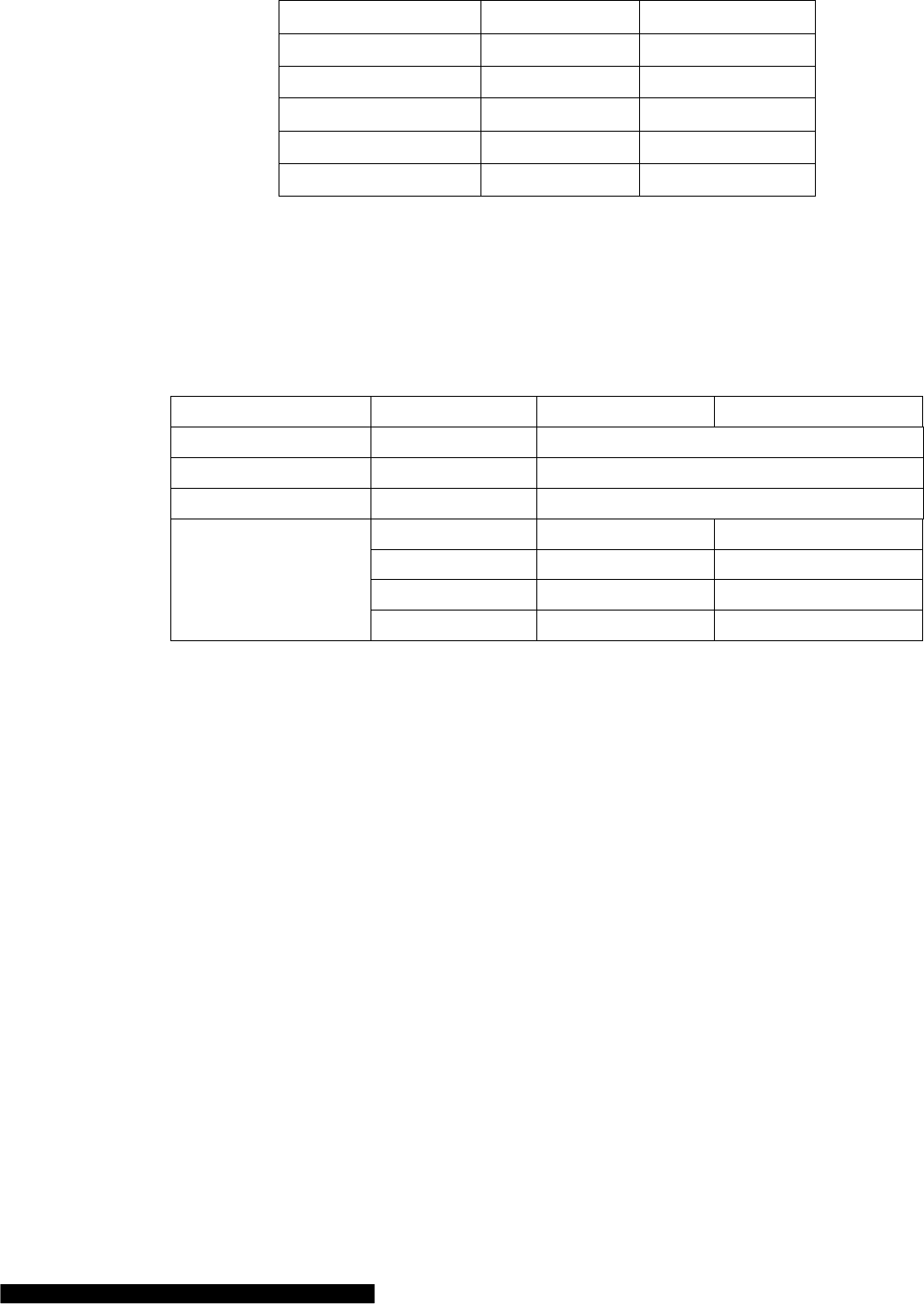
Data range:
Parameter
Setting range
Displayed range
17
Time (minute:second)
5:00-99:00
0:00-99:59
Incline (%)
0-20
0-20
Speed (KM/H)
1.0-20
1.0-20
Distance (KM)
0.5-99.5
0.00-99.9
Heart rate (time/minute)
N/A
40-250
Calorie (cal)
10-995
0-999
BODY FAT TEST
Under ready condition, press “PROG.” Key continuously to come into BODYFAT. Press “MODE” key, you
could find “F-1-SEX”,”F-2-AGE”,”F-3-HEIGHT”,”F-4-WEIGHT”,”P”-BODYFAT” displayed on the window.
Press “SPEED+”, “SPEED-” to set. After setting, press “MODE” to come into “BODYFAT”. At this time, put
your hand on the heart pulse for 5-8 seconds, there will be body fat date displayed on the window. You could
find whether your weight and height matches. (This data only for reference, can’t be used for medical data)
F-1
SEX
MAN
WOMAN
F-2
AGE
10------99
F-3
HEIGHT
100----240
F-4
WEIGHT
20-----160
P
BODYFAT
≤19
Underweight
BODYFAT
=(20---25)
Normal weight
BODYFAT
=(25---29)
Overweight
BODYFAT
≥30
Obesity
POWER SAVE MODE
Our machine have power save function. When you turn on power switch for 10 minutes and don’t press any key,
the machine will come into power save mode and there is no light on the screen. You could press any key into
ready condition.
MAINTENANCE
Identification ways for the degree of tightness of running belt and poly V-belt:
When the running belt skips, please follow the steps as follows to make sure which belt needs to be adjusted,
running belt or poly V-belt.
a) Unplug all power supply, screw and remove the Base cover.
b) Turn the speed to be around 3km/h, step on the running belt by pressure and try your best to make the
running belt stop. If running belt stops, together with the front roll, but the motor still runs, under this
condition, it means the poly V-belt needs to be adjusted.
c) Turn the speed to be around 3km/h, step on the running belt by pressure and try your best to make the
running belt stop. If running belt stops, but front roll still runs, under this condition, it means the
running belt needs to be adjusted.
The adjustment steps for poly V-belt:
a) Unplug all power supply and take off the base cover.
b) Loosen the four screws for the motor, adjust the V-belt tension bolts in clockwise direction, and then
tighten back the four screws for the motor.
18
Adjustment running belt:
a) Turn the speed to be 6km/h. for running
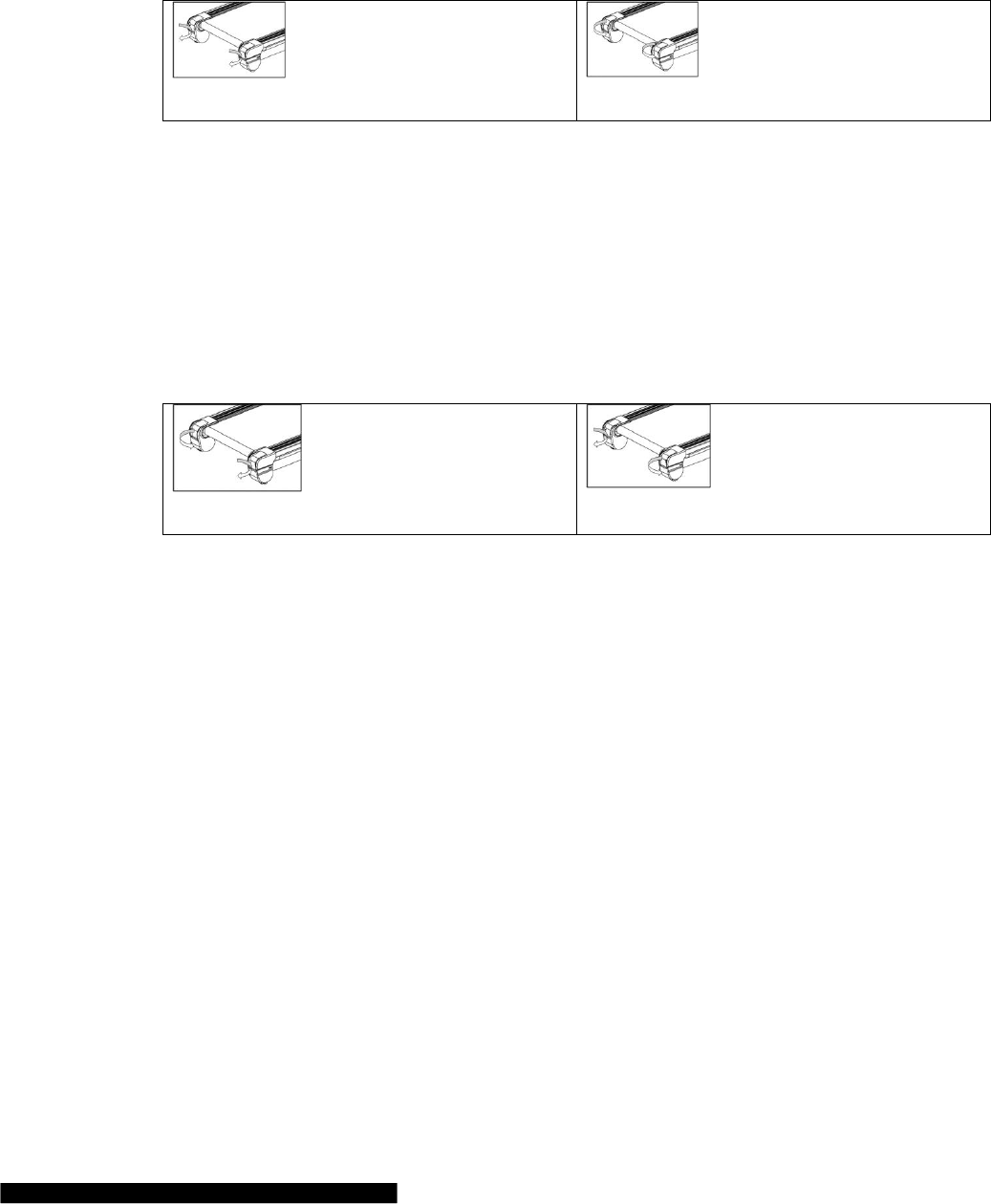
b) Turn the both tension screws located at the end of the treadmill on the right and left sides, half a turn
clockwise using the Allen key. (Diagram1 and Diagram 2)
c) After adjustment, running belt still slips; please repeat the steps as above.
Tighten the running belt (Diagram 1)
Loosen the running belt (Diagram 2)
The adjustment steps for running belt deflection:
The running belt will be deflected more or less under using. Then it needs to be adjusted. The steps are as
follows:
a) Place the treadmill on a horizontal floor, turn the speed to be 6 km/h for running.
b) If the running belt is deflected to the right, adjust the bolt on the right by turning it for half a turn
clockwise, then adjust the bolt on the left by turning it half an anti-clockwise.(see Diagram 3)
c) If the running belt is deflected to the left, adjust the bolt on the left by turning it for half a turn
clockwise, then adjust the bolt on the right by turning it half a turn anti-clockwise.(see Diagram 4)
d) After the adjustment, the running belt still keeps deflecting, please repeat the steps above.
The adjustment for right deflection (Diagram 3)
The adjustment for left deflection (Diagram 4)
Running board lubrication- Silicone oil has been provided (White Bottle)
The treadmill is brand-new and has been pre-factory lubricated. Lubrication is not necessary directly after
purchase.
Lubrication needs constant maintenance termly after purchase. The friction between the running board and
running belt has a great effect on the treadmills’ life. So please lubricate your machine termly (every one month).
The steps are as follows:
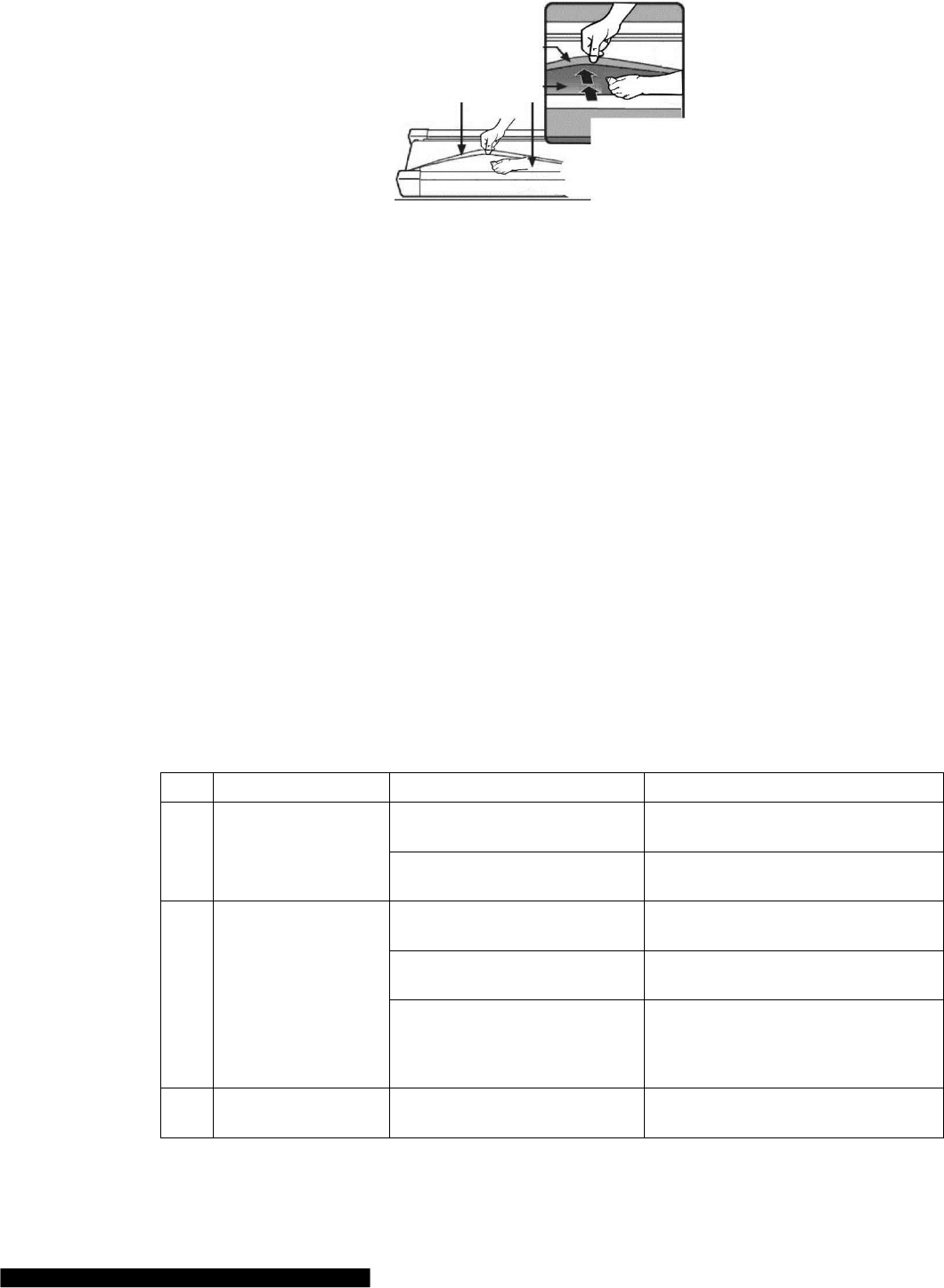
Step 1. Please unplug power supply for the treadmill and loosen the belt (Belt tension screw located at the end of
the treadmill).
Step 2. After loosening the screw, lift up the running belt and clean in-between the running board. Squeeze the
small white bottle of SILICONE oil which was supplied with your purchase and wipe it evenly across the board.
Step 3. After lubricating the board, screw the belt tension back to its correct tension. Tighten evenly on both
sides. When it is almost tensioned, run the treadmill at 1km without any load. Adjust both tension screws to
make the belt in the centre of the back roller. Run the treadmill at 5km for 3mins.
Step 4. Stop the treadmill and start to walk on it at 5km/h. Lastly fine tension both screws until it’s running
smoothly with your weight on.
19
CLEANING
a) Please power off and pull the plug out before cleaning.
b) Wipe out the dust stuck on the surface and running board frequently.
c) Please clean the surface of frame and running belt with a soft cloth dipped with suds, don’t use things
like eradicator and naphtha.(After cleaning, please dry it for use)
d) Please take the protecting cover off every two month, use vacuum dust-collector to suck the dust
remaining inside of the protecting cover.(The dust will make the components of circuitry board short
circuit )
CAUTIONS, DEPOSITING
Cautions
Please make sure that the plug has been pulled out before cleaning or maintenance.
Depositing
The treadmill should be deposited indoor in case of being damp. Water can’t be spattered and nothing can be laid
and inserted on the treadmill.
Please keep the air a little humid in winter. And please void the big static electricity, it may disturb the operation
of meters or even damage them.
GUIDES FOR MALFUNCTION
Analyzing and eliminating malfunction
Item
Malfunction
Reasons
Solution
1
Treadmill can’t be
started
The safe key isn’t in the right
position
Put the safe key in the right position
The electrical switch is placed to
“0”
Turn the electrical switch to “1”
2
Meter can’t display
Check the machine whether it is in
power
Check the power cord are connected well
and switch on
The upper communication is
broken
Replace it!
The meter and upper
communication line are not
connected well
Disassembly meter and check the upper
communication line, make sure that
meter and communication line are
connected well.
3
Heart rate can’t be
displayed
The pole of heart rate sensor is not
wet enough
Wet the pole with water or liquor for
hard contact lenses
20
Disturbed by electromagnetism
Stay away from electromagnetism
4
Incline doesn’t work
The motor wire is not well
connected
Open the motor cover and reconnect it
5
Running belt runs
faster or slower than
what has been
displayed
Unadjusted
Readjust it
6
Running belt slips
Running belt is not tight enough
Please read “Maintenance: The
adjustment steps for poly V-belt /
Adjustment running belt“
7
Running belt is
deflected
The running belt is unadjusted.
Please read “Maintenance: The
adjustment steps for running belt
deflection”
8
Displayed E01 on the
screen
The sensor wire or motor are
broken
Remove the motor cover and change the
sensor wire, motor in return
9
Displayed E02 on the
screen
over power voltage protection
Use normal voltage.
10
Displayed E03 on the
screen
over current protection
Check whether it is overloading
Check whether the drive motor can run
normally. If not, replace motor.
11
Displayed E04 on the
screen
The motor is not in power
The motor wire are not connected well or
the motor are broken
12
Displayed E06 on the
screen
Connection error
Changing the upper or lower connection
line
13
Displayed E09 on the
screen
Incline error
The incline motor wire are not connected
well or the incline motor are broken
14
Displayed E0P on the
screen
Speed error
Setting parameter wrong or sensor wire
broken
15
Displayed E0C on the
screen
Short-circuit protection
PCB MOS broken or motor broken
16
Displayed E07 on the
screen
Safety key off
Put safety key on the meter or change the
safety key or reed pipe for safety key
17
Displayed E0E on the
screen
Eeprom error
Upper or lower communication line
broken or PCB broken
If you still can’t solve the problems after taking the solutions above, we hope that you can contact our dealer or
company as soon as possible.

21
TERMS AND CONDITIONS OF WARRANTY, WARRANTY CLAIMS
General Conditions of Warranty and Definition of Terms
All Warranty Conditions stated hereunder determine Warranty Coverage and Warranty Claim Procedure.
Conditions of Warranty and Warranty Claims are governed by Act No. 40/1964 Coll. Civil Code, Act No.
513/1991 Coll., Commercial Code, and Act No. 634/1992 Coll., Consumer Protection Act, as amended, also in
cases that are not specified by these Warranty rules.
The seller is SEVEN SPORT s.r.o. with its registered office in Borivojova Street 35/878, Prague 13000,
Company Registration Number: 26847264, registered in the Trade Register at Regional Court in Prague, Section
C, Insert No. 116888.
According to valid legal regulations it depends whether the Buyer is the End Customer or not.
“The Buyer who is the End Costumer” or simply the “End Costumer” is the legal entity that does not conclude
and execute the Contract in order to run or promote his own trade or business activities.
“The Buyer who is not the End Customer” is a Businessman that buys Goods or uses services for the purpose of
using the Goods or services for his own business activities. The Buyer conforms to the General Purchase
Agreement and business conditions to the extent specified in the Commercial Code.
These Conditions of Warranty and Warranty Claims are an integral part of every Purchase Agreement made
between the Seller and the Buyer. All Warranty Conditions are valid and binding, unless otherwise specified in
the Purchase Agreement, in the Amendment to this Contract or in another written agreement.
Warranty Conditions
Warranty Period
The Seller provides the Buyer a 24 months Warranty for Goods Quality, unless otherwise specified in the
Certificate of Warranty, Invoice, Bill of Delivery or other documents related to the Goods. The legal warranty
period provided to the Consumer is not affected.
By the Warranty for Goods Quality, the Seller guarantees that the delivered Goods shall be, for a certain period
of time, suitable for regular or contracted use, and that the Goods shall maintain its regular or contracted
features.
The Warranty does not cover defects resulting from:
User’s fault, i.e. product damage caused by unqualified repair work, improper assembly, insufficient insertion of
seat post into frame, insufficient tightening of pedals and cranks
Improper maintenance
Mechanical damages
Regular use (e.g. wearing out of rubber and plastic parts, joints etc.)
Unavoidable event, natural disaster
Adjustments made by unqualified person
Improper maintenance, improper placement, damages caused by low or high temperature, water, inappropriate
pressure, shocks, intentional changes in design or construction etc.
Warranty Claim Procedure
The Buyer is obliged to check the Goods delivered by the Seller immediately after taking the responsibility for
the Goods and its damages, i.e. immediately after its delivery. The Buyer must check the Goods so that he
discovers all the defects that can be discovered by such check.
When making a Warranty Claim the Buyer is obliged, on request of the Seller, to prove the purchase and validity
of the claim by the Invoice or Bill of Delivery that includes the product’s serial number, or eventually by the
documents without the serial number. If the Buyer does not prove the validity of the Warranty Claim by these
documents, the Seller has the right to reject the Warranty Claim.
If the Buyer gives notice of a defect that is not covered by the Warranty (e.g. in the case that the Warranty
Conditions were not fulfilled or in the case of reporting the defect by mistake etc.), the Seller is eligible to

22
require a compensation for all the costs arising from the repair. The cost shall be calculated according to the
valid price list of services and transport costs.
If the Seller finds out (by testing) that the product is not damaged, the Warranty Claim is not accepted. The
Seller reserves the right to claim a compensation for costs arising from the false Warranty Claim.
In case the Buyer makes a claim about the Goods that is legally covered by the Warranty provided by the Seller,
the Seller shall fix the reported defects by means of repair or by the exchange of the damaged part or product for
a new one. Based on the agreement of the Buyer, the Seller has the right to exchange the defected Goods for a
fully compatible Goods of the same or better technical characteristics. The Seller is entitled to choose the form of
the Warranty Claim Procedures described in this paragraph.
The Seller shall settle the Warranty Claim within 30 days after the delivery of the defective Goods, unless a
longer period has been agreed upon. The day when the repaired or exchanged Goods is handed over to the Buyer
is considered to be the day of the Warranty Claim settlement. When the Seller is not able to settle the Warranty
Claim within the agreed period due to the specific nature of the Goods defect, he and the Buyer shall make an
agreement about an alternative solution. In case such agreement is not made, the Seller is obliged to provide the
Buyer with a financial compensation in the form of a refund.
SEVEN SPORT, s.r.o.
Borivojova 35/878 130 00 Praha 3, Czech Rebublic CRN: 268 47 264, VAT ID: CZ26847264
Orders: +420 556 300 970, objednavky@insportline.cz
Warranty Claims: +420 556 770 190, Mobile: +420 604 853 019, reklamace@insportline.cz
Service: +420 556 770 190, Mobile: +420 604 853 019, servis@insportline.cz
Fax: +420 556 770 192, (Service +420 556 770 191)
Web: www.insportline.cz, www.worker.cz, www.worker-moto.cz
INSPORTLINE, s.r.o.
Bratislavska 36, 911 05 Trencin, Slovakia CRN: 36311723, VAT ID: SK2020177082
Orders: +421(0)326 526 701, +421(0)917 649 192, objednavky@insportline.sk
Warranty Claims: +421(0)326 526 701, +421(0)918 408 519, reklamacie@insportline.sk
Fax: +421(0)326 526 705
Web: www.insportline.sk, www.worker.sk, www.worker-moto.sk
Date of Sale: Stamp and Signature of Seller:
