Quick Installation Guide I2
2017-12-08
: Intellian I2 Quick Installation Guide i2_Quick_Installation_Guide i2 d
Open the PDF directly: View PDF  .
.
Page Count: 1
Copyright ® Intellian Technologies, Inc.
Doc#. 2014CD-QG0425- V1.1
Intellian i2
Quick Installation Guide
1. Select a location for the antenna.
2. Prepare the mount
3. Prepare the Antenna
4. Secure the Antenna
5. Connect the System Cables
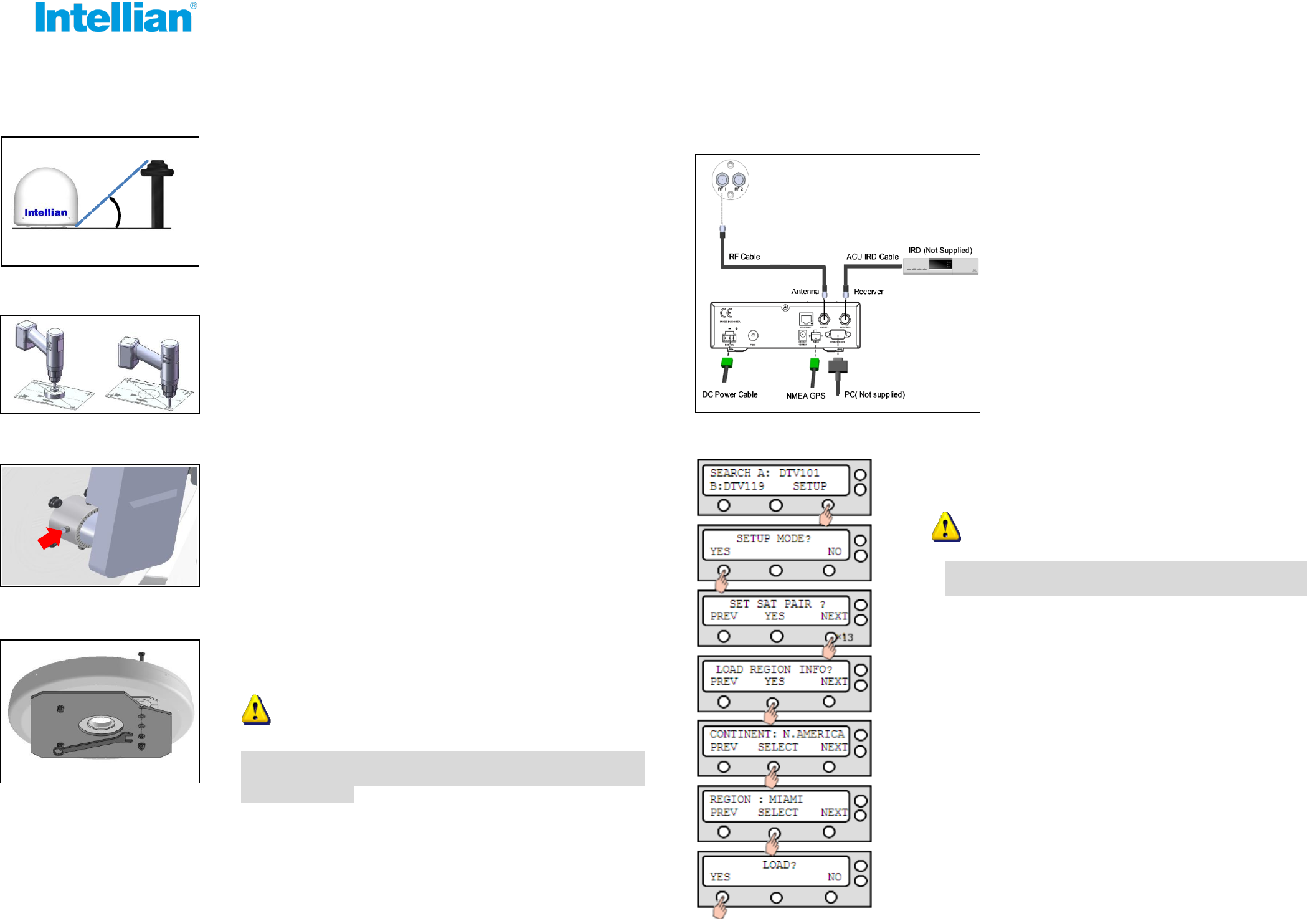
6. Set Region (Nation/City) in ACU
- Make sure nearby objects do not block the antenna.
- Avoid unnecessary motion by locating the antenna as near
as to the centerline of the boat.
Antenna Unit
15°
Obstacle
- Attach the installation template to the mounting surface using
adhesive tape.
- Remove the shaded center portion by using a hole saw.
- Drill 4 bolt holes.
- Open the antenna upper dome and remove the foam transit
restraints from the antenna base.
- Adjust the LNB Skew Angle (Linear Polarization Only).
USA/Japan/Korea is not required to adjust.
Loosen screws of the connection of LNB and feed horn.
Tighten screws after adjusting the LNB position.
- Connect the RF Cable from the RF 1
connector on the antenna to the ANT.
RF1 connector on the rear of ACU.
- Connect the ACU IRD Cable from the
RECEIVER connector on the rear of the
ACU to RF on the IRD.
- Connect the power cable from the DC
power connector on the rear of ACU to a
power source of DC (10.8~15.6V).
- Turn on the ACU power and you will see USA DTV101
and DTV 119 as the default.
The system functions will be abnormal if you do
not set a correct continent and region.
- Please select your region (Nation/City) after selecting
the continent. Once the SET REGION has been done,
you will not need to adjust GPS and the target tracking
satellites. The setting steps as below.
Enter SETUP MODE and Press NEXT 13 times to
enter LOAD REGION INFO menu.
Select CONTINENT and Press NEXT to select
alternative continents.
Select REGION and Press NEXT to select
alternative Nation/City.
Press YES to load the region setting.
- Secure the antenna to the mount base using bolts, spring
washers, and flat washers.
Be sure to put the radome on while operating the
system. The system functions will be abnormal if the
radome is off.
WARNINGWARNING
WARNINGWARNING
