Quick Installation Guide I9W
2017-12-08
: Intellian I9W Quick Installation Guide i9W_Quick_Installation_Guide i9 d
Open the PDF directly: View PDF  .
.
Page Count: 1
Copyright ® Intellian Technologies, Inc.
Document Number: 2014H1_QG0616_V1_1
Intellian i9W
Quick Installation Guide
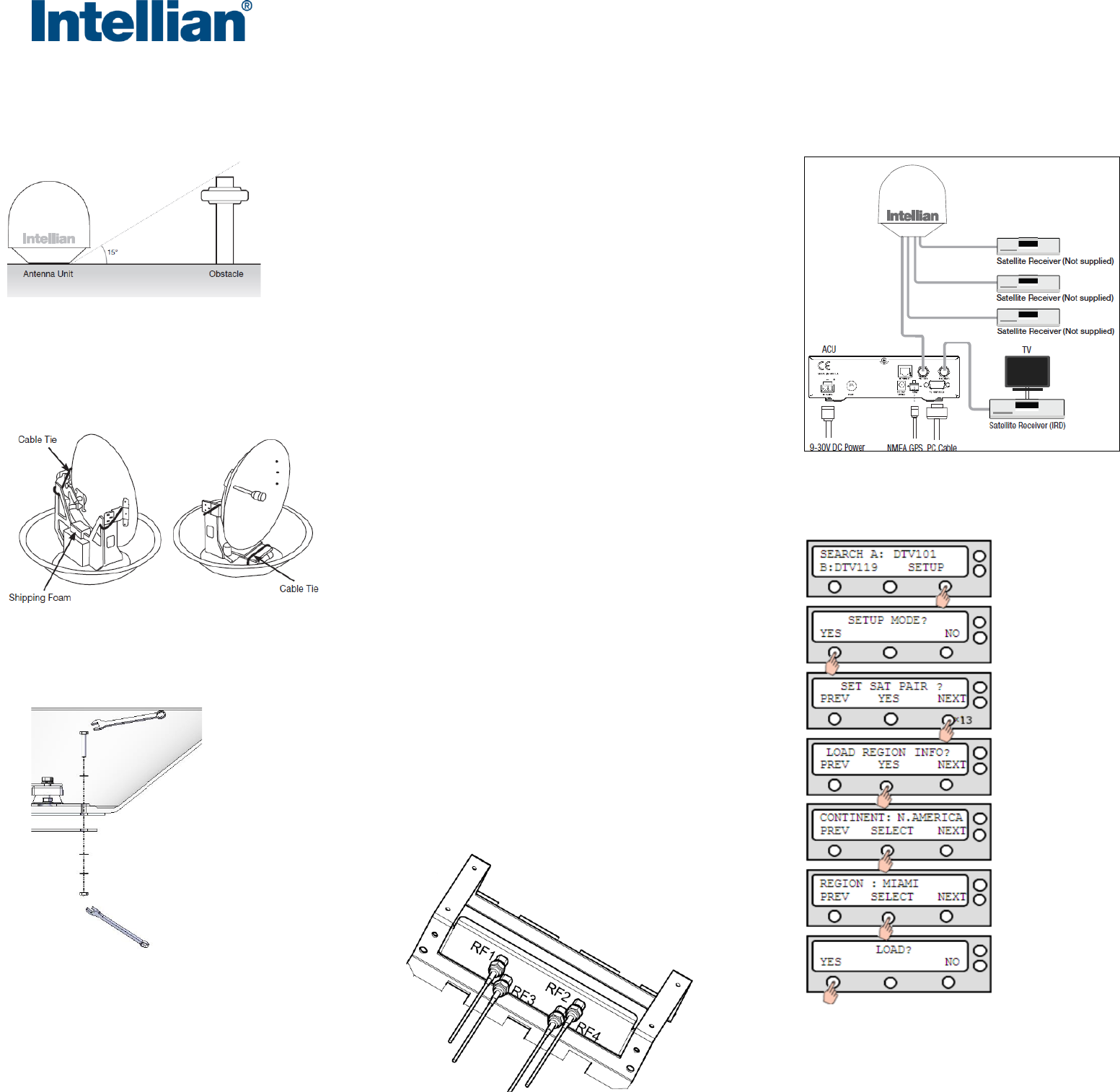
1. Selection of Antenna Installation Site
2. Mounting Preparation
3. Remove Shipping Restraint
4. Secure Antenna &
Connect RF Cables
5. Connect the System Cables
6. Load Satellite Library to ACU
The antenna should be installed in a place where there is
all round clear view of the horizon.
The mounting platform should be flat, rigid and not
subjected to excessive vibration.
Do not install the antenna near the radar especially on
the same plane.
Referring to the supplied mounting template, mark where
the antenna will be mounted onboard.
Secure the antenna to the mount base using the Intellian
supplied bolts, spring washers, and flat washers.
Connect the RF cables to the RF connectors on the
connector bracket (located inside of the radome bottom).
Ensure the RF cable labeled with RF1 connects properly to
the antenna control unit.
Reinstall the top radome.
Connect the RF cable labeled with RF1 from
the antenna to the ANT. RF1 connector on
the ACU.
Connect the RF cable from the RECEIVER
connector on the ACU to the RF connector
on the receiver.
Connect the power cable from the DC power
connector on ACU to a power source of DC
(9-30 V DC).
It’s required to load the satellite library based on your
current location (Continent & Region)that you are in.
Turn on ACU power and you will see USA DTV101
and DTV 119 as the default.
Enter Setup Mode and Press “YES” button until “Load
Region Info ?” menu is shown. Press “YES” button to
enter the menu.
Select “CONINENT”. Press “NEXT/ PREV” button to
show alternative continents and press “YES” button to
select the continent you are in.
Select “REGION”. Press “NEXT/ PREV” button to
show alternative regions and press “YES” button to
select the region you are in.
Press “YES” button to load the library settings.
Do not turn off the ACU power during the uploading of
the library.
Open the top radome and remove the shipping
restraints.
