Intelsat Inflight ATGB Air-To-Ground TransceiverModular User Manual
Gogo LLC Air-To-Ground TransceiverModular
User Manual
The master version of this document resides on the Gogo LLC Configuration Management Server.
Printed copies are considered uncontrolled, until verified as current by comparing with the master. It is the responsibility of the user to verify the
most current revision.
Gogo LLC Confidential and Proprietary
Template D13480, Rev E
CURRENT REVISION
REV ECO NUMBER EFFECTIVE DATE ORIGINATOR
A C01395 2008-01-16 Brad Schnair
B C01462 2008-02-21 Brad Schnair
C C01794 2008-08-18 Brad Schnair
D C02220 2008-11-20 Brad Schnair
E C05139 2010-04-15 Brad Schnair
F C 2014-12-31 Joseph Tobin
INFORMATION IN THIS DOCUMENT IS
PROPRIETARY. IT IS ISSUED IN
CONFIDENCE AND SHALL NOT BE USED AS
A BASIS FOR MANUFACTURE WITHOUT
WRITTEN PERMISSION FROM GOGO LLC
Gogo LLC
1250 N. Arlington Heights Rd.
Suite 500
Itasca, IL 60143
Gogo LLC
814 Thorndale Avenue
Bensenville, IL 60106
APPROVALS: TITLE:
PREPARED BY
JOSEPH TOBIN
ABS OPERATIONAL
USER’S MANUAL
DOCUMENT APPROVALS ARE ELECTRONIC
AND ARE MAINTAINED IN THE
CONFIGURATION MANAGEMENT DATABASE
SYSTEM (AGILE)
SIZE
A
CAGE CODE
1NQ67
DOCUMENT NUMBER
D12751
REV
F SH 1 OF 30
Itasca, IL
Bensenville, IL
SIZE
A
CAGE CODE
1NQ67
DOCUMENT NUMBER
D12751
REV
F SH 2 of 28
Title: ABS OPERATIONAL USER’S MANUAL
The master version of this document resides on the Gogo LLC Configuration Management Server. Printed copies are considered uncontrolled,
until verified as current by comparing with the master. It is the responsibility of the user to verify the most current revision.
Gogo LLC Confidential and Proprietary
Template D13480, Rev E
Change History
Revision Date Description of Change Approval
A 2008-01-16 New/Initial Release Brad Schnair
B 2008-02-21 Added menu-based software reset, section 12 Brad Schnair
C 2008-08-18 ABS Master Switch: Added statement
regarding system start-up time
Section 4 - Placing a Call: Added statement
regarding availability of Direct Dialing
Section 10 - Setup Menu, Option 2 ABS Status:
Added description of features now available
Section 11 - ABS Corded SIP Handset Icons:
Added description of ABS Link Status Icon
Brad Schnair
D 2008-11-20 ABS Master Switch: Removed reference to
switch illumination
Section 1 - Powering On: Added statements for
Rev E (or earlier) handsets and Rev F (or later)
handsets
Section 1 - Added instructions for powering Off
Section 2 - Idle Displays: Added description of
Display Blanking and recovery
Section 4 - Placing a Call: Added instructions
for ending a direct-dialed call that has been
blocked
Section 7 - Receiving a Call: Added statement
regarding the availability of incoming calls
Section 10, Option 1, Item 6 - Display Blanking
Timer: Added statement that the “Never”
option is not recommended
Section 13 (new) - Comm Control Menu:
Inserted section that adds description of FCN 8
menu for control of WiFi SSIDs
Brad Schnair
Itasca, IL
Bensenville, IL
SIZE
A
CAGE CODE
1NQ67
DOCUMENT NUMBER
D12751
REV
F SH 3 of 28
Title: ABS OPERATIONAL USER’S MANUAL
The master version of this document resides on the Gogo LLC Configuration Management Server. Printed copies are considered uncontrolled,
until verified as current by comparing with the master. It is the responsibility of the user to verify the most current revision.
Gogo LLC Confidential and Proprietary
Template D13480, Rev E
Change History (continued)
Revision Date Description of Change Approval
E 2010-04-15 Section 1 - Replaced Display #1 picture with
“Axxess” boot screen
Section 1 - Removed note about display
blanking during handset boot-up
Section 1 - Added guidance that handsets may
power off during brief power interruptions
Section 2 - Deleted references to TM radio link
Sections 2, 4, and 7 - Added guidance that
phone calls are not supported below 10,000
feet AGL
Section 12 - Changed section name from
“Handset Software Reboot” to “Handset
Reboot”. Added preferred handset reboot
method for Revision F (or later) handsets.
Removed the previous revision’s Section 13
“Communication Control Menu” and set the
FCN 8 menu status back to “For Future Use”
Brad Schnair
F 2014-12-31 Updated Template
Replaced Aircell with Gogo
Pg 4 - Removed Aircell Logo
Pg 6 - Added Transmitter Section
Joseph Tobin

Itasca, IL
Bensenville, IL
SIZE
A
CAGE CODE
1NQ67
DOCUMENT NUMBER
D12751
REV
F SH 4 of 28
Title: ABS OPERATIONAL USER’S MANUAL
The master version of this document resides on the Gogo LLC Configuration Management Server. Printed copies are considered uncontrolled,
until verified as current by comparing with the master. It is the responsibility of the user to verify the most current revision.
Gogo LLC Confidential and Proprietary
Template D13480, Rev E
ABS Operational
User’s Manual
Revision F
Dec 31, 2014

Itasca, IL
Bensenville, IL
SIZE
A
CAGE CODE
1NQ67
DOCUMENT NUMBER
D12751
REV
F SH 5 of 28
Title: ABS OPERATIONAL USER’S MANUAL
The master version of this document resides on the Gogo LLC Configuration Management Server. Printed copies are considered uncontrolled,
until verified as current by comparing with the master. It is the responsibility of the user to verify the most current revision.
Gogo LLC Confidential and Proprietary
Template D13480, Rev E
Table of Contents
Transmitters ................................................................................................................................................. 6
ABS Master Switch ...................................................................................................................................... 7
ABS Breakers ............................................................................................................................................... 7
ABS Corded SIP Handset ............................................................................................................................ 8
1.Powering On and Off ......................................................................................................................... 9
2.Idle Displays ...................................................................................................................................... 10
3.Locking and Unlocking the Handset .............................................................................................. 12
4.Placing a Call .................................................................................................................................... 13
5.Call Progress ..................................................................................................................................... 14
6.Ending a Call .................................................................................................................................... 14
7.Receiving a Call ................................................................................................................................ 15
8.In-Call Functions .............................................................................................................................. 16
9.Volume and Brightness .................................................................................................................... 17
10.Setup Menu ....................................................................................................................................... 19
11.ABS Corded SIP Handset Icons ..................................................................................................... 25
12.Handset Reboot ................................................................................................................................ 26
13.Keypad Function Reference ............................................................................................................ 27
14.Menu Reference ................................................................................................................................ 28

Itasca, IL
Bensenville, IL
SIZE
A
CAGE CODE
1NQ67
DOCUMENT NUMBER
D12751
REV
F SH 6 of 28
Title: ABS OPERATIONAL USER’S MANUAL
The master version of this document resides on the Gogo LLC Configuration Management Server. Printed copies are considered uncontrolled,
until verified as current by comparing with the master. It is the responsibility of the user to verify the most current revision.
Gogo LLC Confidential and Proprietary
Template D13480, Rev E
Transmitters
The ABS Systems may contain the following transmitters:
Air-To-Ground Modem: 894-896 MHz
Air-To-Ground Modem B: 894-896 MHz
Kandu: 14-14.5 GHz
Terrestrial Modem: Cellular & PCS Bands
Cabin Wireless Access Point: 2.4 GHz & 5 GHz
M-Cabin Wireless Access Point: 2.4 GHz & 5 GHz
802.11N Cabin Wireless Access Point: 2.4 GHz & 5 GHz
These transmitters have received appropriate regulat ory certifications beyond the required civil
aviation certifications, e.g. FCC, IC, CE. In order to insure proper operation under these
certifications, the end user is not able to m odify or re-configure any of the devices, m odify
cabling, or change antenna locations without Gogo’s written instructions to do so. Contact Gogo
for any configuration changes. Unauthorized changes may void the certifcation of the products.
ed the user can reasonably be expected to have the ca

Itasca, IL
Bensenville, IL
SIZE
A
CAGE CODE
1NQ67
DOCUMENT NUMBER
D12751
REV
F SH 7 of 28
Title: ABS OPERATIONAL USER’S MANUAL
The master version of this document resides on the Gogo LLC Configuration Management Server. Printed copies are considered uncontrolled,
until verified as current by comparing with the master. It is the responsibility of the user to verify the most current revision.
Gogo LLC Confidential and Proprietary
Template D13480, Rev E
ABS Master Switch
The ABS Master Power Switch is utilized to enable and disable the ABS System. It is located within the cabin in a
location accessible by the flight crew. When the Master Power Switch is disabled, power is removed from all
components of the ABS System. When the Master Power Switch is enabled, power is applied to all components of
the ABS System. After power is applied to the ABS system, it may take up to 15 minutes for the system to become
operational.
ABS Breakers
The ABS system contains breakers that can be used to disable the ABS System. The breakers are located within
the flight deck for access by the flight crew. Refer to aircraft specific flight manual supplement on location of the
breakers.
Itasca, IL
Bensenville, IL
SIZE
A
CAGE CODE
1NQ67
DOCUMENT NUMBER
D12751
REV
F SH 8 of 28
Title: ABS OPERATIONAL USER’S MANUAL
The master version of this document resides on the Gogo LLC Configuration Management Server. Printed copies are considered uncontrolled,
until verified as current by comparing with the master. It is the responsibility of the user to verify the most current revision.
Gogo LLC Confidential and Proprietary
Template D13480, Rev E
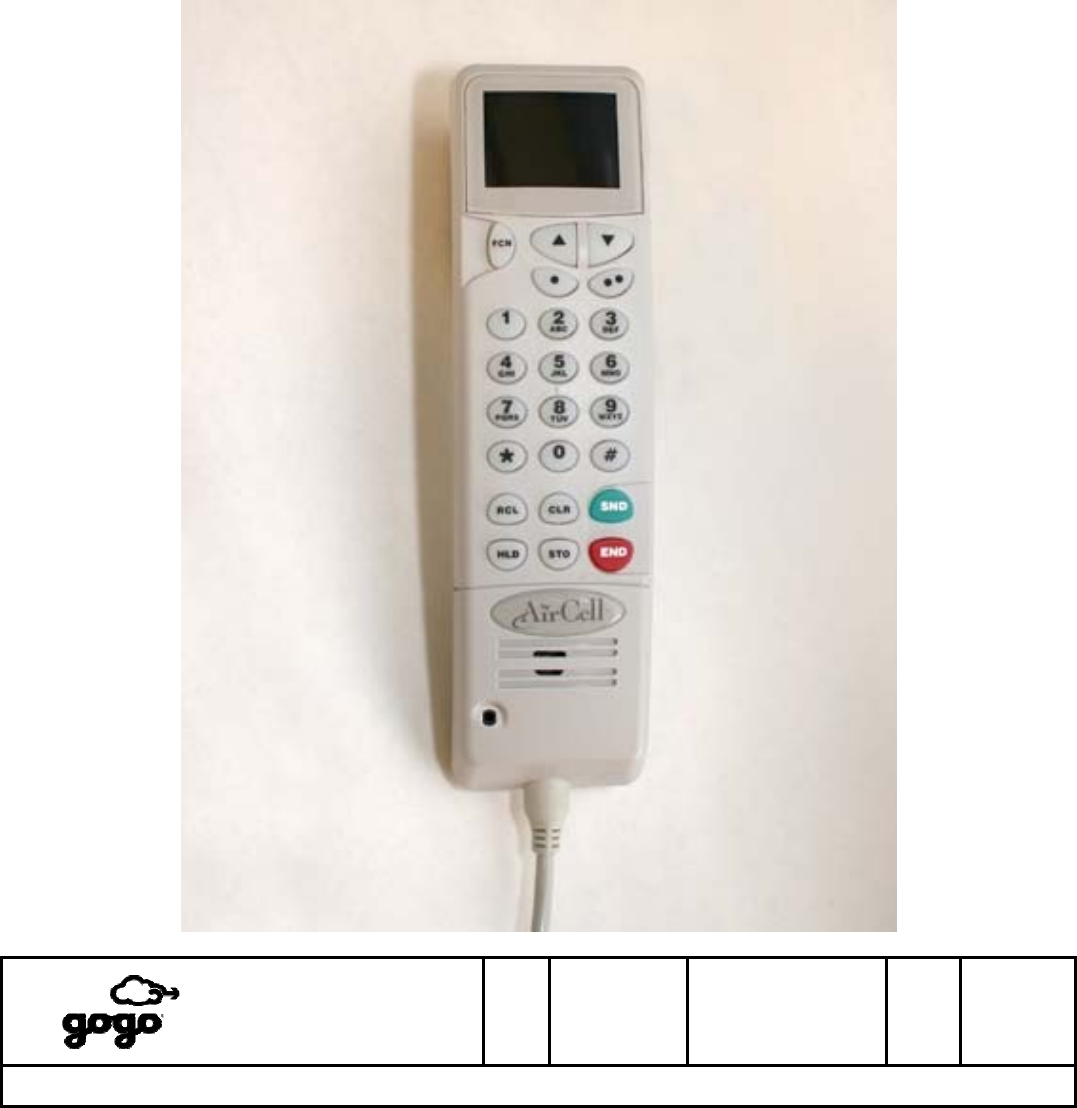
ABS Corded SIP Handset
The Gogo ABS Corded SIP Handset (“the handset”) is a full-sized handset used to support Air-to-Ground
telephone communications when using the Gogo ABS system. The handset is also capable of displaying ABS
system status and controlling a limited number of ABS system functions.
The handset approximate dimensions are: 7.8” Length, 2.1” Width, 1.8” Height, not including the coil cord.
Itasca, IL
Bensenville, IL
SIZE
A
CAGE CODE
1NQ67
DOCUMENT NUMBER
D12751
REV
F SH 9 of 28
Title: ABS OPERATIONAL USER’S MANUAL
The master version of this document resides on the Gogo LLC Configuration Management Server. Printed copies are considered uncontrolled,
until verified as current by comparing with the master. It is the responsibility of the user to verify the most current revision.
Gogo LLC Confidential and Proprietary
Template D13480, Rev E
Gogo ABS Corded SIP Handset
1. Powering On and Off
Powering ON
Handsets of Revision F (or higher): After ABS system power is applied, press and hold the SND key on the
handset until the screen illuminates.
Handsets of Revision E (or lower): The handset automatically powers on when ABS system power is applied.
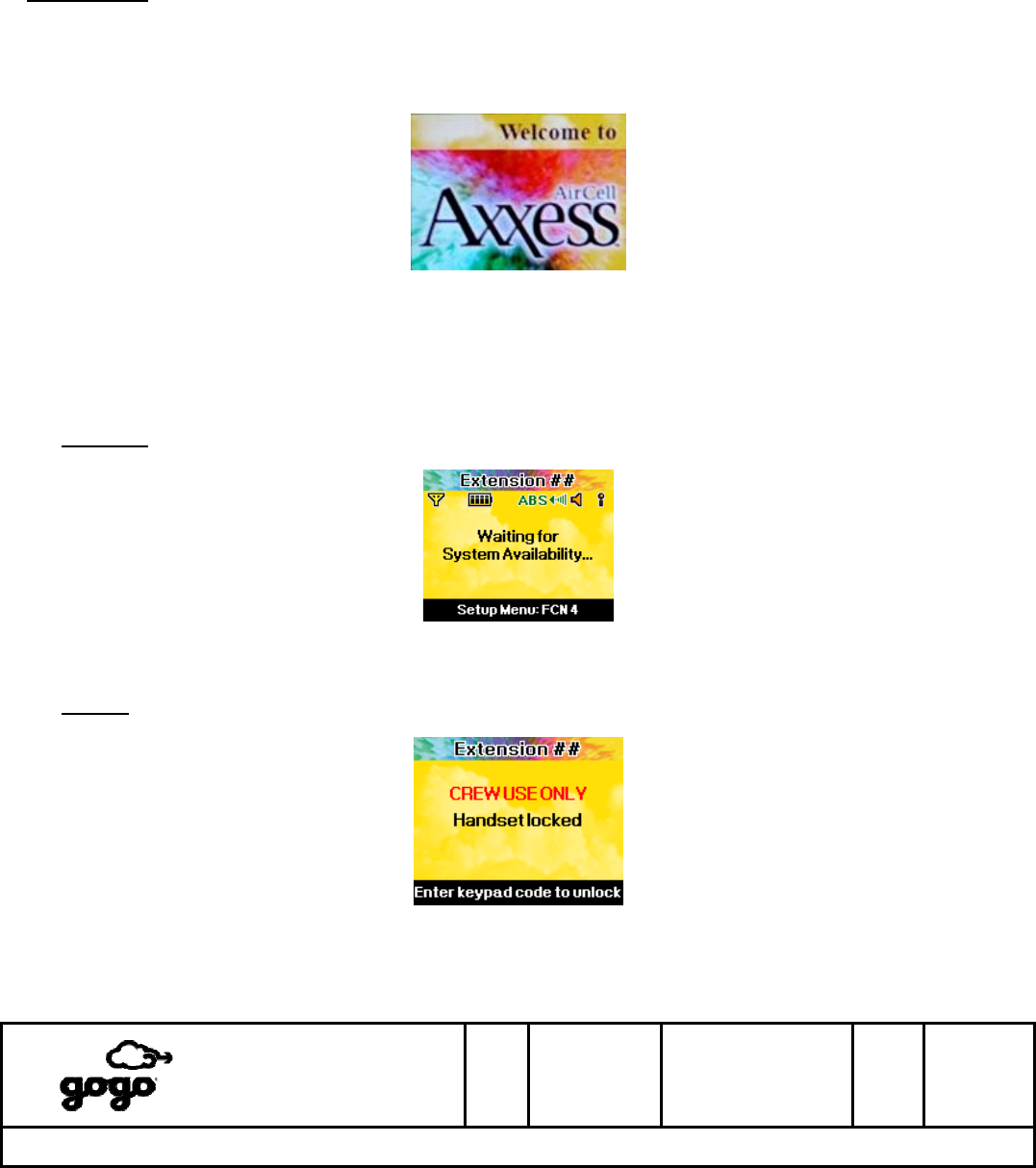
While the handset is initializing (approximately 20 seconds), the following screen will be displayed:
Display #1 - Initializing
After initialization, the handset will attempt to register with the Aircell VoIP server. During this process, one of two
screens will be displayed depending upon whether or not the handset has been locked. (See section 3 for details
on handset locking and unlocking.)
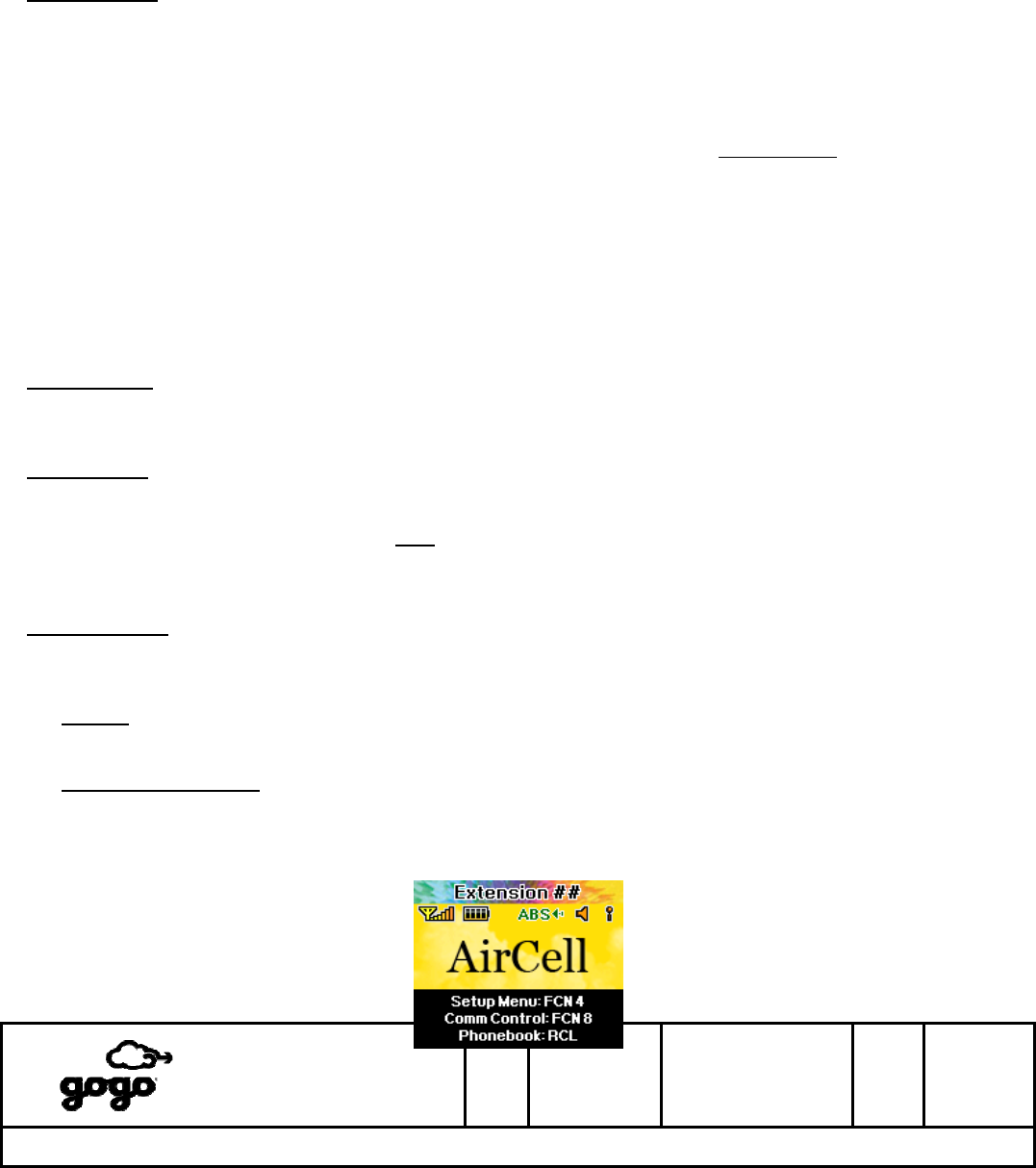
Unlocked: The handset is attempting to connect to the Aircell VoIP server. Phone calls are not supported
while this screen is displayed, but the Setup Menu is accessible.
Display #2 - Handset is unlocked, Waiting to connect to VoIP Server
Locked: Whenever the handset is locked, this screen is displayed. Usage of the handset is prevented until
the handset is unlocked.
Display #3 - Handset is locked
Itasca, IL
Bensenville, IL
SIZE
A
CAGE CODE
1NQ67
DOCUMENT NUMBER
D12751
REV
F SH 10 of
28
Title: ABS OPERATIONAL USER’S MANUAL
The master version of this document resides on the Gogo LLC Configuration Management Server. Printed copies are considered uncontrolled,
until verified as current by comparing with the master. It is the responsibility of the user to verify the most current revision.
Gogo LLC Confidential and Proprietary
Template D13480, Rev E
Once the handset has attempted to connect to the Aircell VoIP server, the handset will enter an Idle mode. See
section 2.
1. Powering On and Off (continued)
Powering OFF
Handsets of Revision F (or higher): Press and hold the END key on the handset until the screen goes dark
(approximately 7 seconds). The handset will also power off when ABS system power is removed. The handset
may power off during transitions between internal and external aircraft power, but only if power is interrupted for
longer than 200ms.
Handsets of Revision E (or lower): The handset powers off only when ABS system power is removed.
NOTE: Once powered off, the handset can only be powered on per the Powering ON instructions on the
previous page.
2. Idle Displays
Blank Display
After 30-60 seconds of inactivity, the Display Blanking Timer (Section 10, Option 6) will cause the handset display
to go dark. Press the END key to recover the display.
IMPORTANT! - Always use the END key first to recover the display. Use of other keys may trigger a handset
function, such as last number redial.
Handsets of Revision F (or higher) only: If the END key does not recover the display, it is likely that the
handset is powered Off. Press and hold the SND key to power On.
Active Displays
When the handset is powered on and is not involved in a phone call or menu session, the handset will be in one of
four possible Idle modes as shown below.
Locked: Usage of the handset is prevented until the handset is unlocked. See Display #3 on the previous
page.
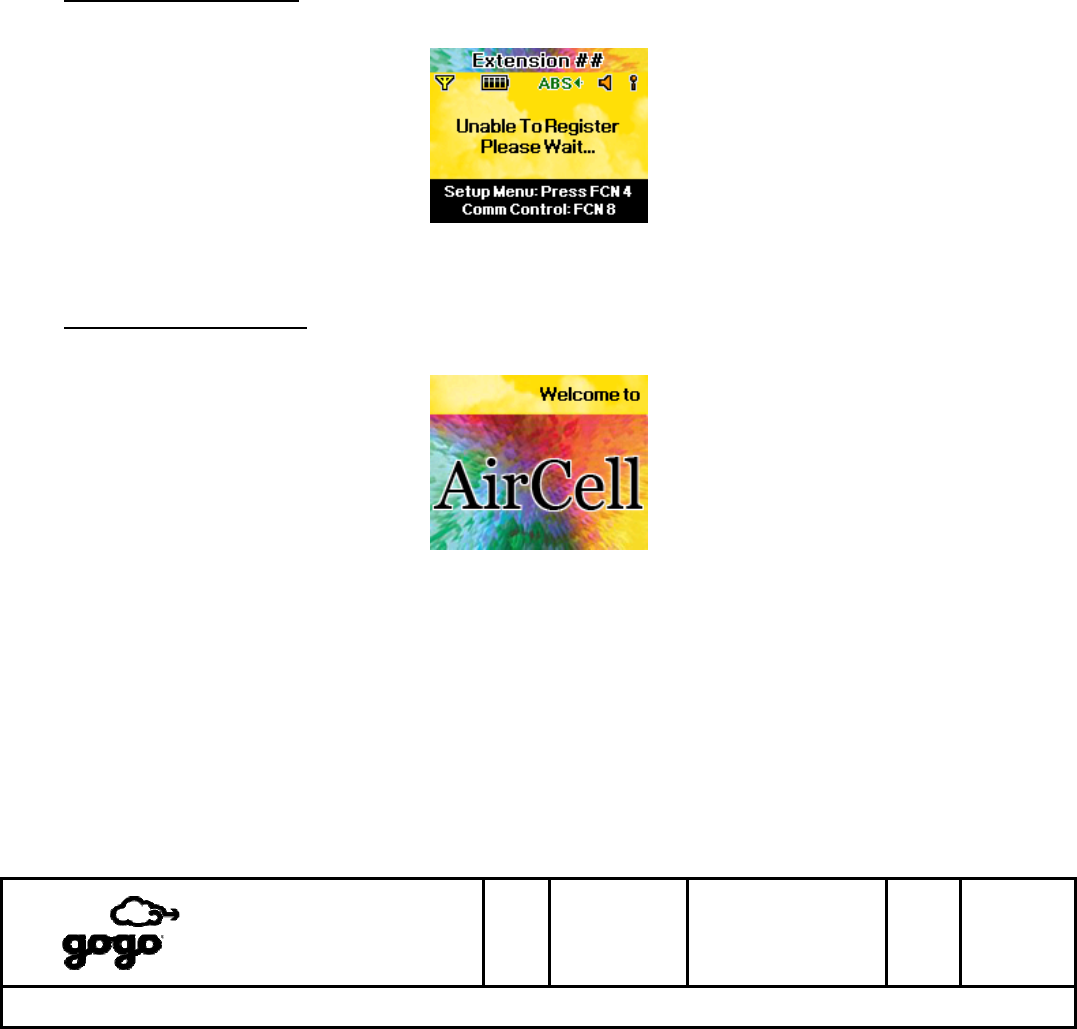
Unlocked, Connected: The handset is unlocked and can communicate with the Aircell VoIP server. This is
the only mode that supports phone calls. All user menus are accessible. This mode is possible only when the
ABS system has established an external connection via the ATG radio link at an altitude above 10,000 feet
AGL. During normal system usage, phone calls are not supported below 10,000 feet AGL.
Itasca, IL
Bensenville, IL
SIZE
A
CAGE CODE
1NQ67
DOCUMENT NUMBER
D12751
REV
F SH 11 of
28
Title: ABS OPERATIONAL USER’S MANUAL
The master version of this document resides on the Gogo LLC Configuration Management Server. Printed copies are considered uncontrolled,
until verified as current by comparing with the master. It is the responsibility of the user to verify the most current revision.
Gogo LLC Confidential and Proprietary
Template D13480, Rev E
Display #4 - Idle mode (Unlocked, Connected)
2. Idle Displays (continued)
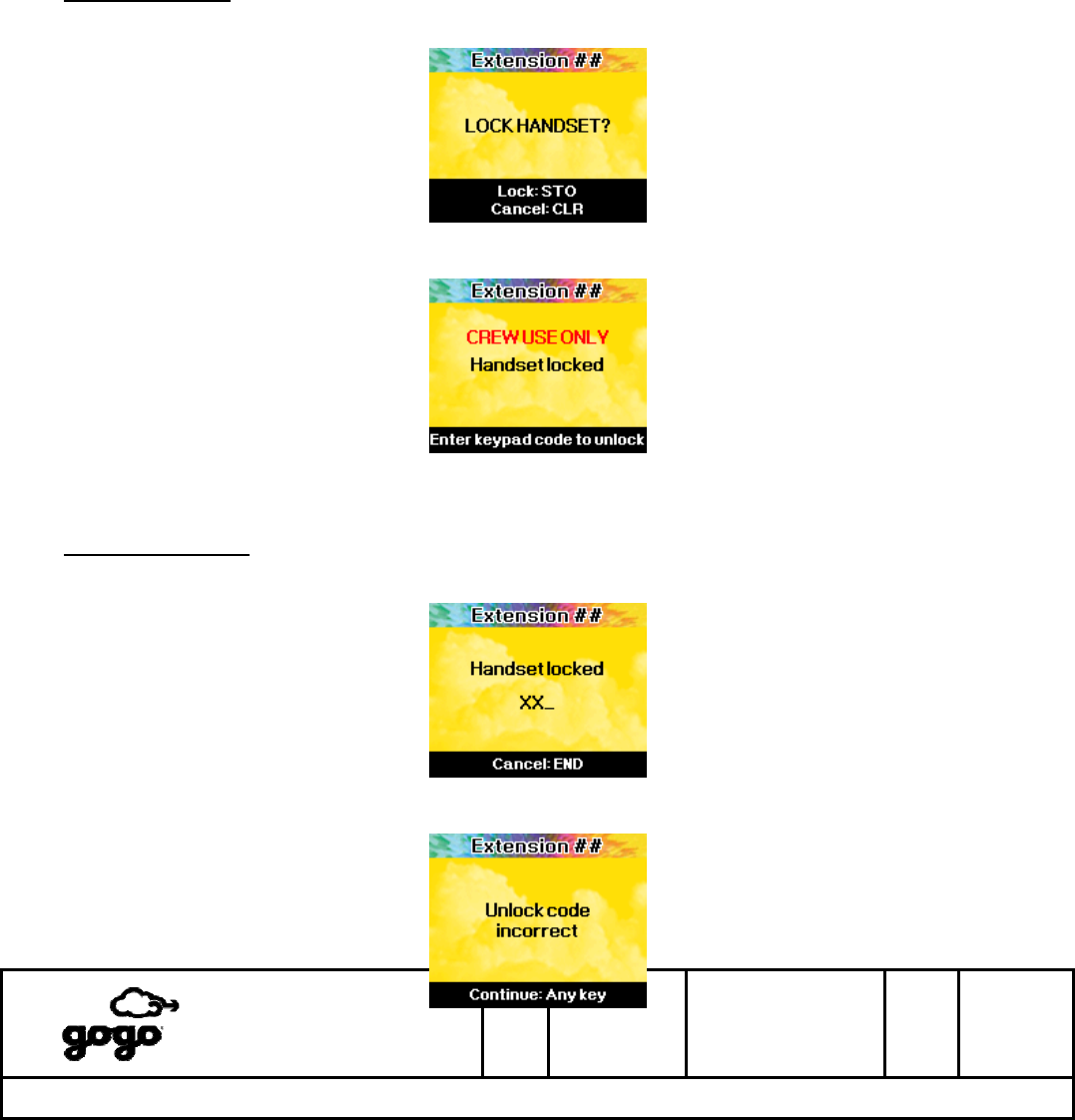
Unlocked, Disconnected: The handset is unlocked, but cannot communicate with the Aircell VoIP server.
(ATG radio link not established.) Phone calls are not supported, but all user menus are accessible.
Display #5 - Idle mode (Unlocked, Disconnected)
Unlocked, No IP Address: The handset is unlocked, but has not been assigned an IP Address by the ABS
system. Phone calls are not supported. User menus are accessible, but most functions will not be available.
Display #6 - Idle mode (Unlocked, No IP Address)
Itasca, IL
Bensenville, IL
SIZE
A
CAGE CODE
1NQ67
DOCUMENT NUMBER
D12751
REV
F SH 12 of
28
Title: ABS OPERATIONAL USER’S MANUAL
The master version of this document resides on the Gogo LLC Configuration Management Server. Printed copies are considered uncontrolled,
until verified as current by comparing with the master. It is the responsibility of the user to verify the most current revision.
Gogo LLC Confidential and Proprietary
Template D13480, Rev E
3. Locking and Unlocking the Handset
To prevent unauthorized usage, the handset supports a manual LOCK function. It is not possible to use the
handset when it is locked. The handset remains locked even after a exercising a power cycle (power off, then on).
Lock the handset: The handset must be in an Unlocked Idle mode. Press FCN, then 5, to access the Lock
screen. Press STO to lock the handset (Display #3), or press END to cancel the lock request.
Display #7 - Locking the handset
Display #3 - Handset is locked
Unlock the handset: When the handset is locked, enter the correct 3-digit Unlock code to unlock the handset
and return to an Unlocked Idle mode. If the wrong code is entered, the handset will display “Unlock code
incorrect” and return to Display #3.
Display #8 - Entering the Unlock code
Itasca, IL
Bensenville, IL
SIZE
A
CAGE CODE
1NQ67
DOCUMENT NUMBER
D12751
REV
F SH 13 of
28
Title: ABS OPERATIONAL USER’S MANUAL
The master version of this document resides on the Gogo LLC Configuration Management Server. Printed copies are considered uncontrolled,
until verified as current by comparing with the master. It is the responsibility of the user to verify the most current revision.
Gogo LLC Confidential and Proprietary
Template D13480, Rev E
Display #9 - Incorrect Unlock code
4. Placing a Call
The Aircell ABS Corded SIP Handset is operated in a manner similar to a cellular telephone. There is no dial tone,
and the SND and END keys are used to start/stop a phone call.
NOTE: During normal system usage, phone calls are not supported below 10,000 feet AGL.
There are three methods for placing a phone call, as shown below.
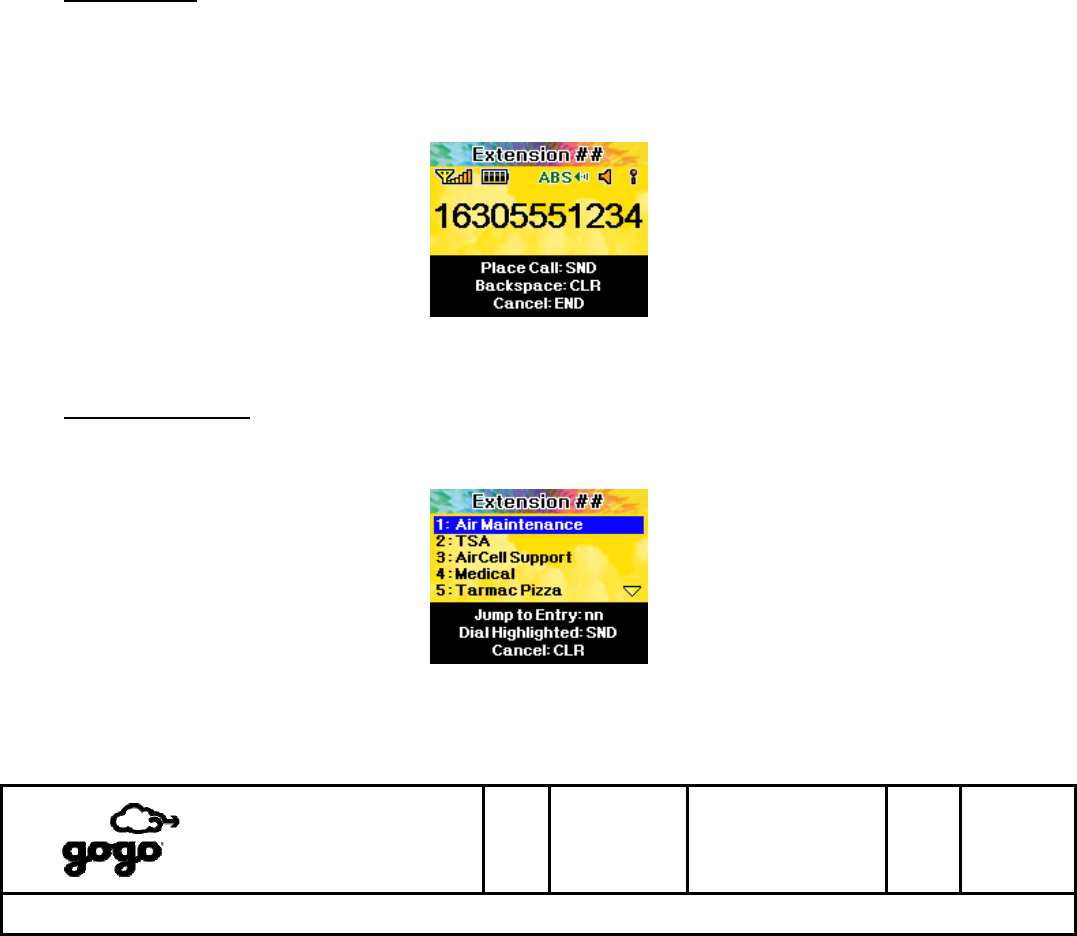
Direct Dialing: From the Unlocked, Connected Idle mode (Display #4), enter a phone number using the
keypad. Use the CLR key to backspace and erase incorrect digits. Press SND to place the call, or press END
to cancel and return to Unlocked Idle mode.
NOTE: Direct-dialed calls may be blocked by the Aircell ground network at the discretion of Aircell or the
airline customer. Press END to abort a direct-dialed call that has been blocked.
Display #10 - Direct Dialing
Phonebook Dialing: From the Unlocked, Connected Idle mode (Display #4), press RCL to access the
Phonebook. Use the ▲/▼ keys to scroll the blue highlight bar up/down until the desired entry is selected.
Press SND to place the call, or press END to cancel and return to Unlocked Idle mode.
Display #11 - Phonebook Dialing
Itasca, IL
Bensenville, IL
SIZE
A
CAGE CODE
1NQ67
DOCUMENT NUMBER
D12751
REV
F SH 14 of
28
Title: ABS OPERATIONAL USER’S MANUAL
The master version of this document resides on the Gogo LLC Configuration Management Server. Printed copies are considered uncontrolled,
until verified as current by comparing with the master. It is the responsibility of the user to verify the most current revision.
Gogo LLC Confidential and Proprietary
Template D13480, Rev E
Last Number Redial: From the Unlocked, Connected Idle mode (Display #4), press SND to place a call to the
last number that was dialed.
5. Call Progress
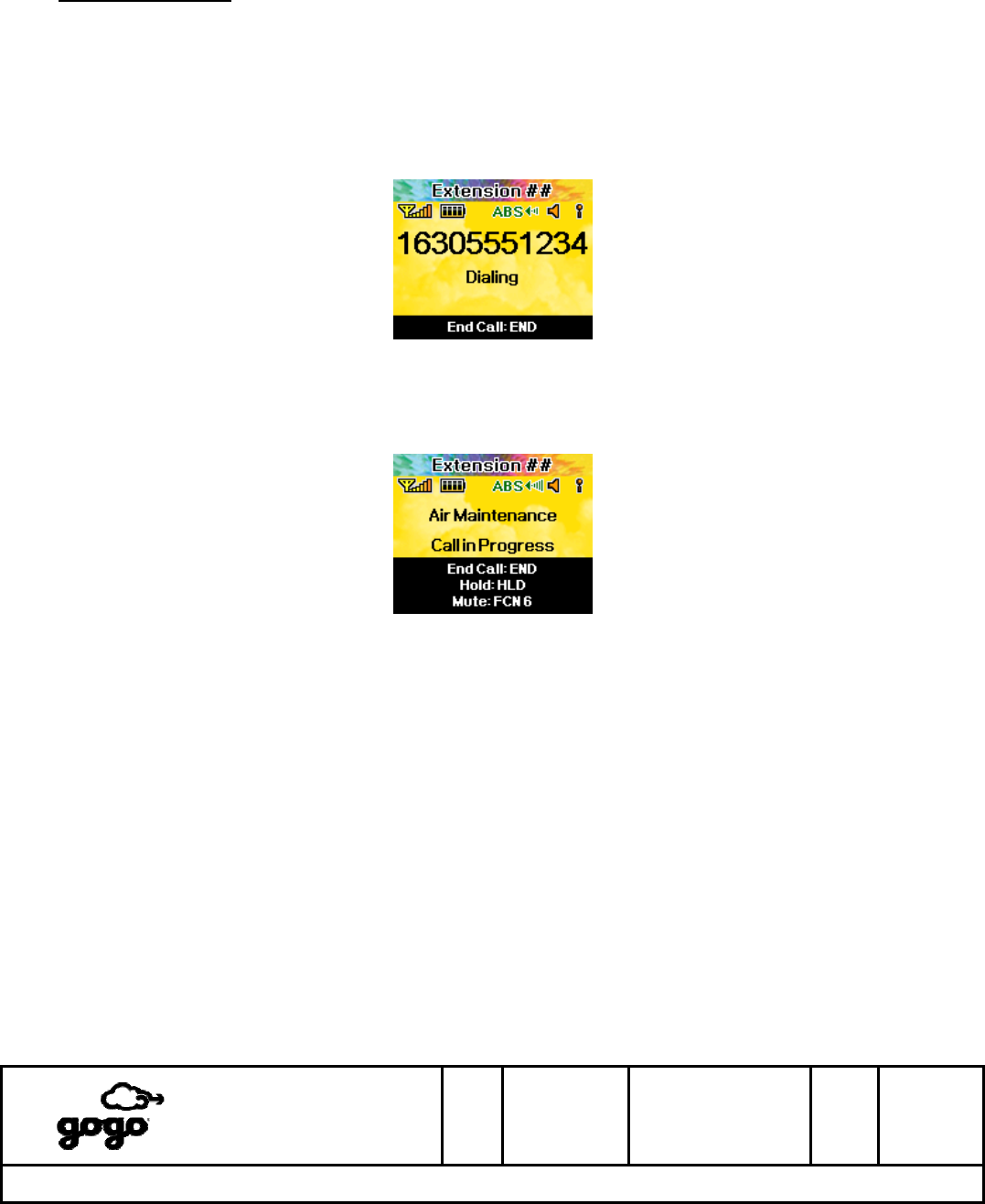
As the call is being set up through the Aircell VoIP network, and when the called party is ringing, the following
screen is displayed. The word “Dialing” flashes at a slow rate. Press END to cancel the call and return to
Unlocked Idle mode.
Display #12 - Call Setup (Dialing)
After call setup is complete and the called party has answered, the following screen is displayed.
Display #13 - Call in Progress
6. Ending a Call
Press END to hang up and return to Unlocked Idle mode. All other methods of call termination, including called
party hung up and loss-of-signal, will end the call and return to the Unlocked Idle mode.
Itasca, IL
Bensenville, IL
SIZE
A
CAGE CODE
1NQ67
DOCUMENT NUMBER
D12751
REV
F SH 15 of
28
Title: ABS OPERATIONAL USER’S MANUAL
The master version of this document resides on the Gogo LLC Configuration Management Server. Printed copies are considered uncontrolled,
until verified as current by comparing with the master. It is the responsibility of the user to verify the most current revision.
Gogo LLC Confidential and Proprietary
Template D13480, Rev E
7. Receiving a Call
If the handset has a connection to the Aircell VoIP server, it is capable of receiving an incoming phone call. The
handset display and keypad will illuminate when an incoming call is received. While ringing, the handset is capable
of providing an Audible Ringer, a Visual Ringer, or both. See sections 9, 10, and 11 for ringer options.
NOTE: During normal system usage, phone calls are not supported below 10,000 feet AGL. Incoming calls
may be blocked by the Aircell ground network at the discretion of Aircell or the airline customer.
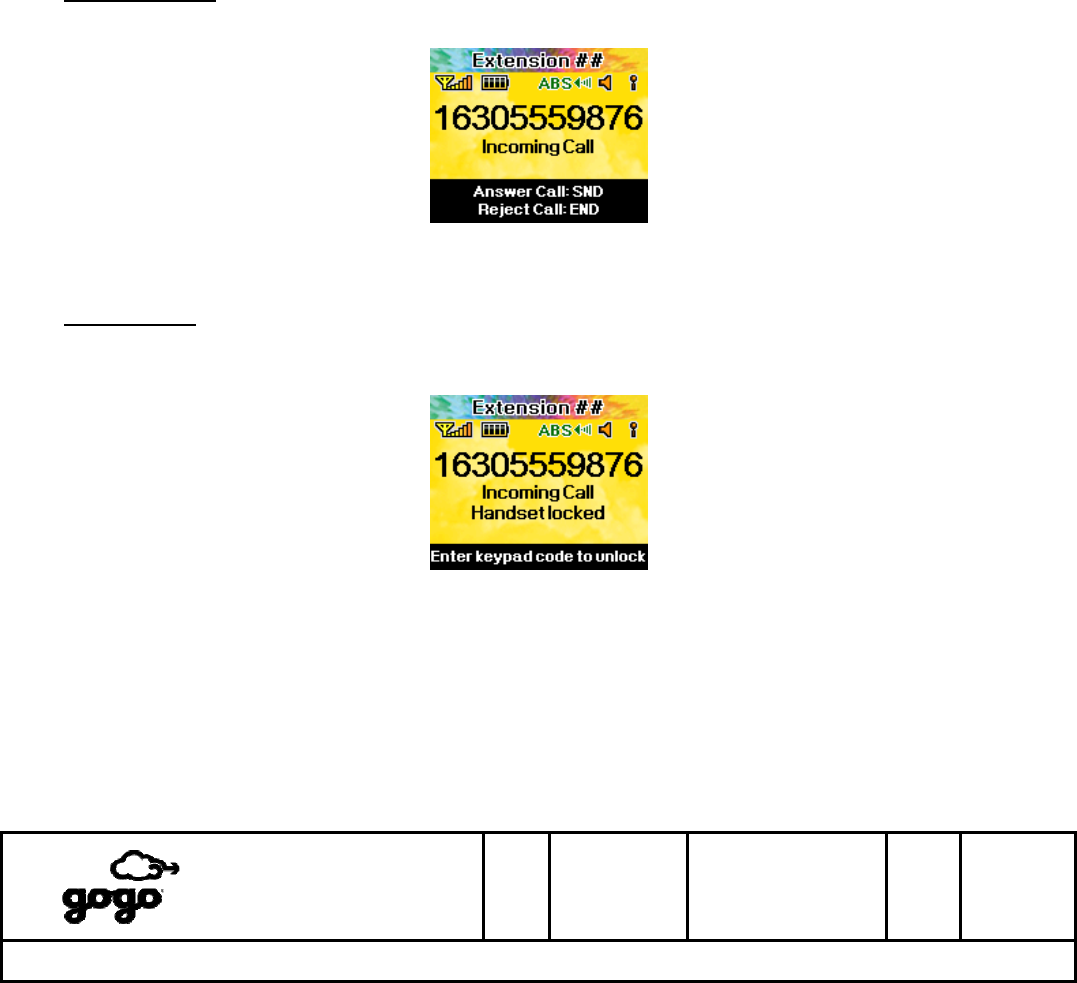
While Unlocked: If the handset is unlocked, the following screen is displayed. The words “Incoming Call”
flash at a slow rate. Press SND to answer the incoming call, or press END to reject the incoming call.
Display #14 - Incoming Call (Unlocked)
While Locked: If the handset is locked, the following screen is displayed. The words “Incoming Call” and
“Handset Locked” flash at a slow rate. The handset must be unlocked by entering the correct 3-digit Unlock
code before the incoming call can be answered. Once the handset is unlocked, the incoming call will proceed
as shown above (Display #14).
Display #15 - Incoming Call (Locked)
Itasca, IL
Bensenville, IL
SIZE
A
CAGE CODE
1NQ67
DOCUMENT NUMBER
D12751
REV
F SH 16 of
28
Title: ABS OPERATIONAL USER’S MANUAL
The master version of this document resides on the Gogo LLC Configuration Management Server. Printed copies are considered uncontrolled,
until verified as current by comparing with the master. It is the responsibility of the user to verify the most current revision.
Gogo LLC Confidential and Proprietary
Template D13480, Rev E
8. In-Call Functions
The following functions are available when a phone call is in progress.
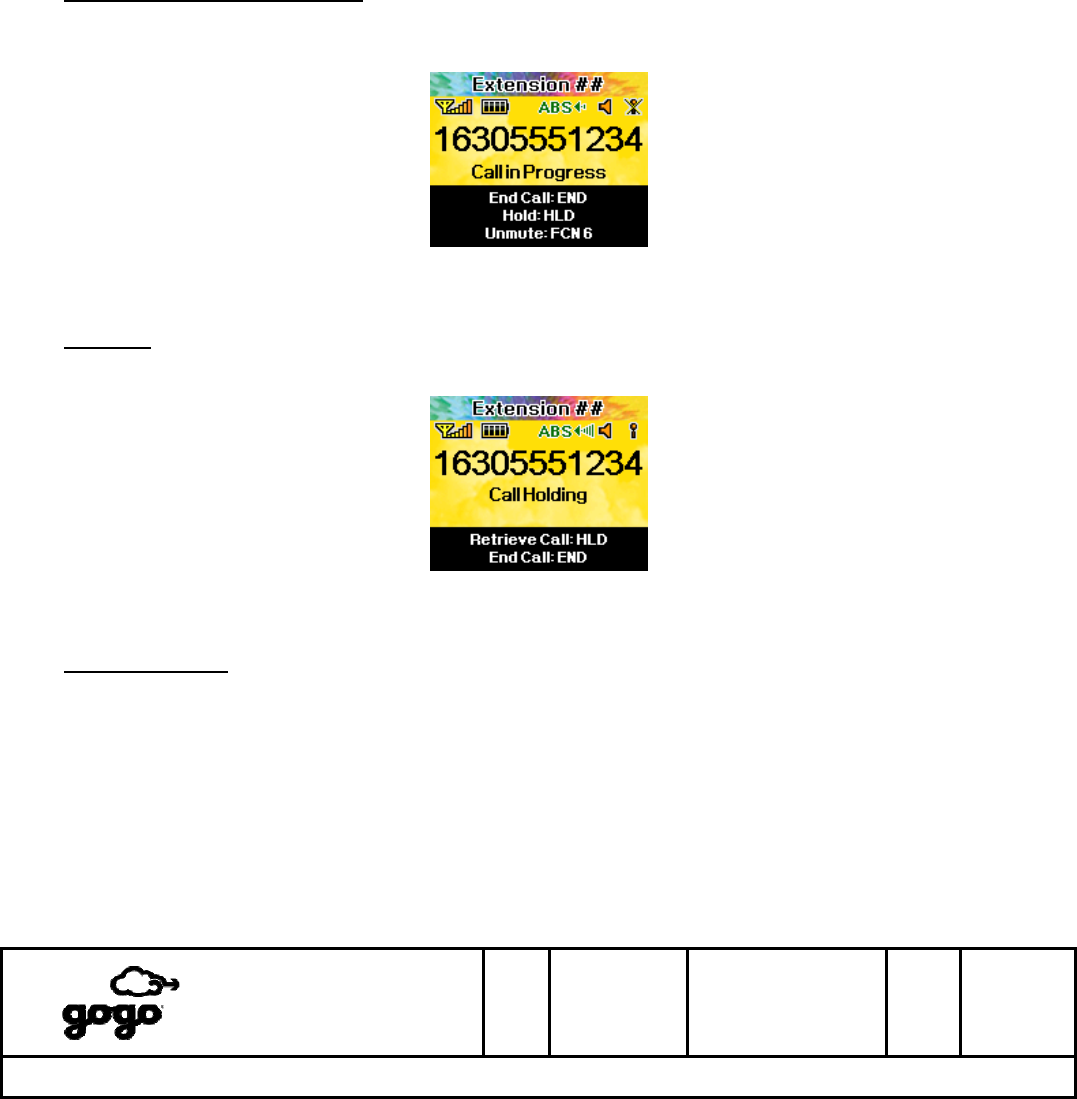
Microphone (mouthpiece) Mute: Press FCN, then 6 to mute the microphone. The other party will no longer
be able to hear the handset. Press FCN, then 6 again to unmute the microphone and allow the other party to
hear the handset. The current microphone status is shown as an icon near the upper-right corner of the
display (see section 11).
Display #16 - Microphone muted
Call Hold: Press HLD to place a call on hold. The words “Call Holding” flash at a slow rate. Press HLD again
to restore the call, or press END to hang up the call.
Display #17 - Call on hold
Display Blanking: 90 seconds into a phone call, the Handset display will go blank (dark). This is normal
behavior.

Itasca, IL
Bensenville, IL
SIZE
A
CAGE CODE
1NQ67
DOCUMENT NUMBER
D12751
REV
F SH 17 of
28
Title: ABS OPERATIONAL USER’S MANUAL
The master version of this document resides on the Gogo LLC Configuration Management Server. Printed copies are considered uncontrolled,
until verified as current by comparing with the master. It is the responsibility of the user to verify the most current revision.
Gogo LLC Confidential and Proprietary
Template D13480, Rev E
9. Volume and Brightness
The following volume and screen brightness adjustments are available during handset operation. These
adjustments may be accessed as described here, or via the FCN 4 setup menu (section 10).
Earpiece Volume: During a phone call or Unlocked Idle mode, use the ▲/▼ keys to access the Earpiece
Volume screen and adjust the earpiece volume up/down. When the desired volume is reached, press STO to
save the new volume setting. Press END to abort volume adjustment and return to the previous volume
setting.
Display #18 - Earpiece Volume adjustment
Audible Ringer Volume: From an Unlocked Idle mode, press FCN, then 1 to access the Ringer Volume
screen. Use the ▲/▼ keys to adjust the ringer volume up/down. The minimum setting (all bars green) will
mute the audible ringer. When the desired volume is reached, press STO to save the new volume setting.
Press END to abort volume adjustment and return to the previous volume setting. The current audible ringer
status is shown as an icon near the upper-right corner of the display (see section 11).
Display #19 - Ringer Volume adjustment
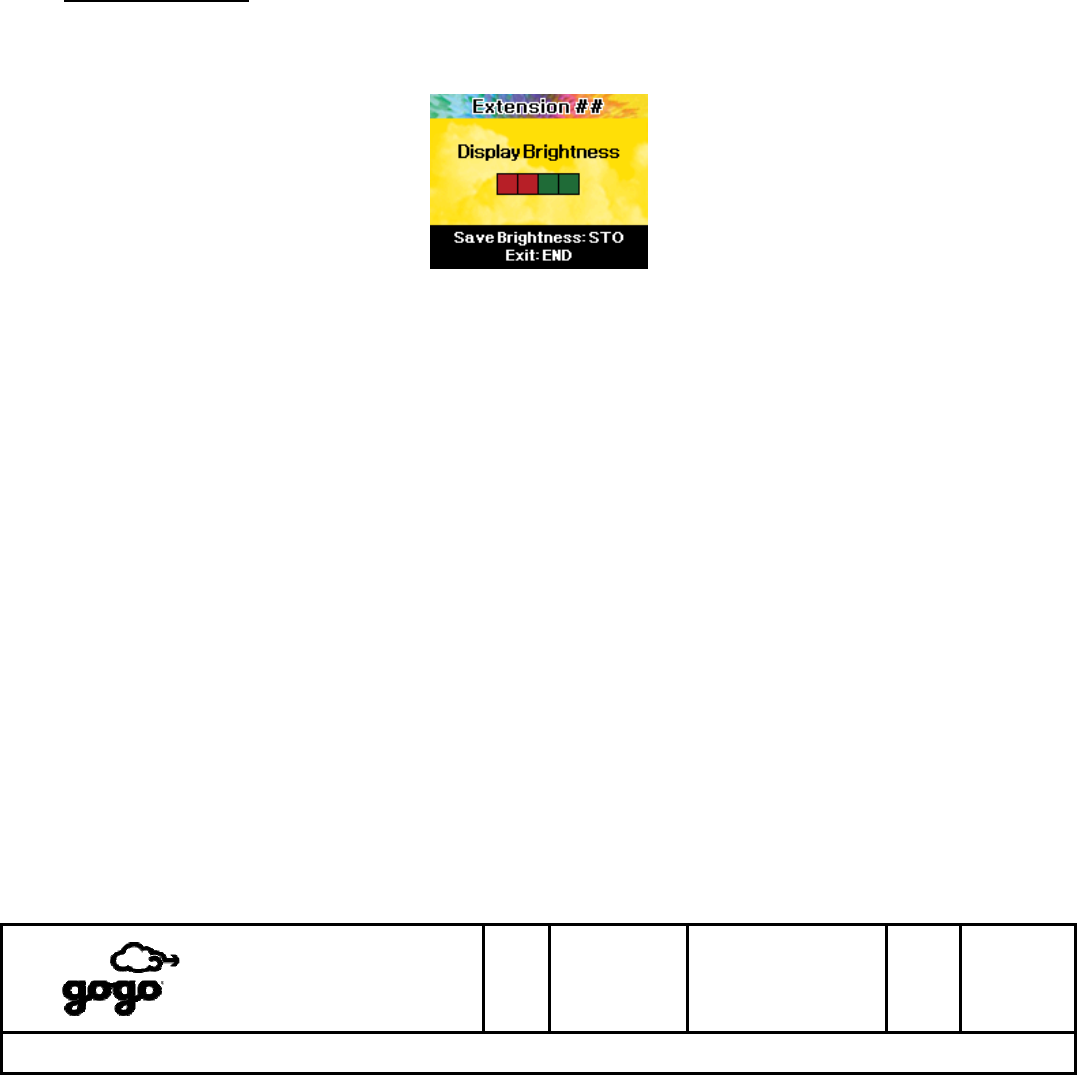
Keytone Volume (sound when keys are pressed): From an Unlocked Idle mode, press FCN, then 2 to
access the Keytone Volume screen. Use the ▲/▼ keys to adjust the keytone volume up/down. The minimum
setting (all bars green) will mute the keytones. When the desired volume is reached, press STO to save the
new volume setting. Press END to abort volume adjustment and return to the previous volume setting.
Itasca, IL
Bensenville, IL
SIZE
A
CAGE CODE
1NQ67
DOCUMENT NUMBER
D12751
REV
F SH 18 of
28
Title: ABS OPERATIONAL USER’S MANUAL
The master version of this document resides on the Gogo LLC Configuration Management Server. Printed copies are considered uncontrolled,
until verified as current by comparing with the master. It is the responsibility of the user to verify the most current revision.
Gogo LLC Confidential and Proprietary
Template D13480, Rev E
Display #20 - Keytone Volume adjustment
9. Volume and Brightness (continued)
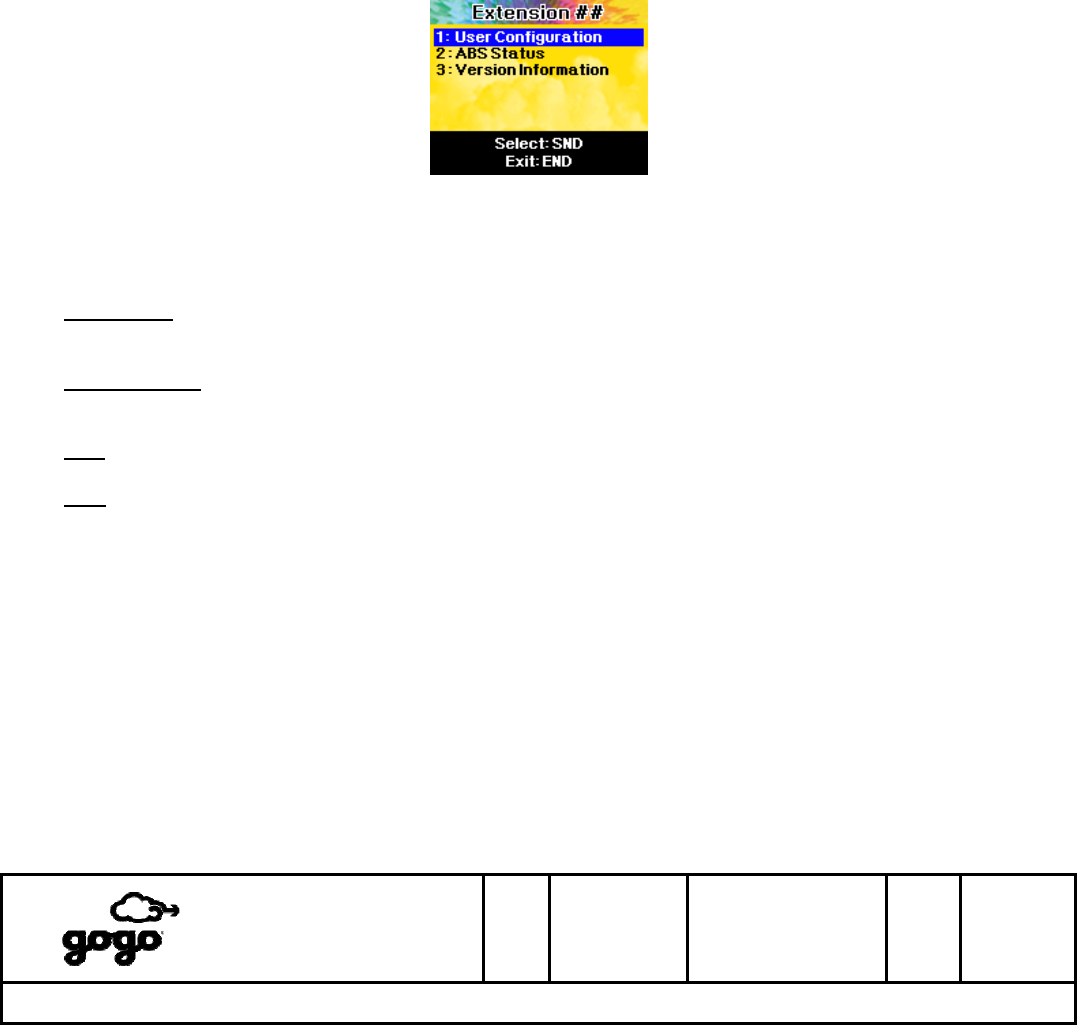
Display Brightness: From an Unlocked Idle mode, press FCN, then 3 to access the Display Brightness
screen. Use the ▲/▼ keys to adjust the display brightness up/down. When the desired brightness is reached,
press STO to save the new brightness setting. Press END to abort brightness adjustment and return to the
previous brightness setting.
Display #21 - Display Brightness adjustment
Itasca, IL
Bensenville, IL
SIZE
A
CAGE CODE
1NQ67
DOCUMENT NUMBER
D12751
REV
F SH 19 of
28
Title: ABS OPERATIONAL USER’S MANUAL
The master version of this document resides on the Gogo LLC Configuration Management Server. Printed copies are considered uncontrolled,
until verified as current by comparing with the master. It is the responsibility of the user to verify the most current revision.
Gogo LLC Confidential and Proprietary
Template D13480, Rev E
10. Setup Menu
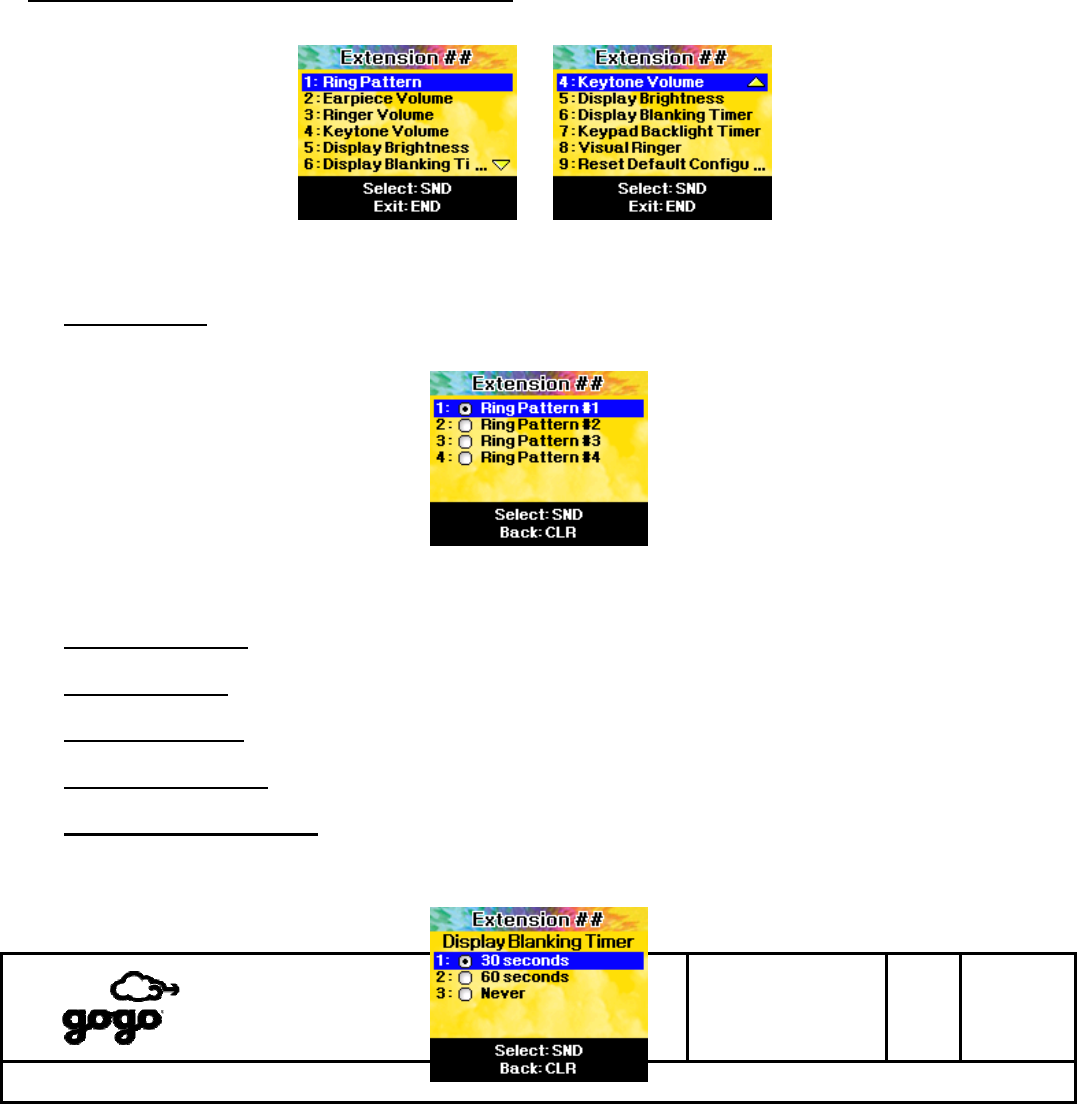
The handset offers access to user-preference settings and system status via the Setup Menu. From an Unlocked
Idle mode, press FCN, then 4 to access the Setup Menu.
Display #22 - FCN 4, Setup Menu (Top Level)
While traversing menu screens, the following navigation methods are available.
(▲/▼ keys): Scroll the blue highlight bar up/down until the desired option is selected. Press SND to access or
set the desired option.
(Keypad Digit): Instead of scrolling and using SND to choose a menu option, press a number on the keypad
that corresponds to the desired menu option to directly access it.
CLR: Abort the current menu and go back to the previous menu screen.
END: Abort all menus and return to Unlocked Idle mode.
Itasca, IL
Bensenville, IL
SIZE
A
CAGE CODE
1NQ67
DOCUMENT NUMBER
D12751
REV
F SH 20 of
28
Title: ABS OPERATIONAL USER’S MANUAL
The master version of this document resides on the Gogo LLC Configuration Management Server. Printed copies are considered uncontrolled,
until verified as current by comparing with the master. It is the responsibility of the user to verify the most current revision.
Gogo LLC Confidential and Proprietary
Template D13480, Rev E
Setup Menu, Option 1 - User Configuration
This option contains user-preference settings.
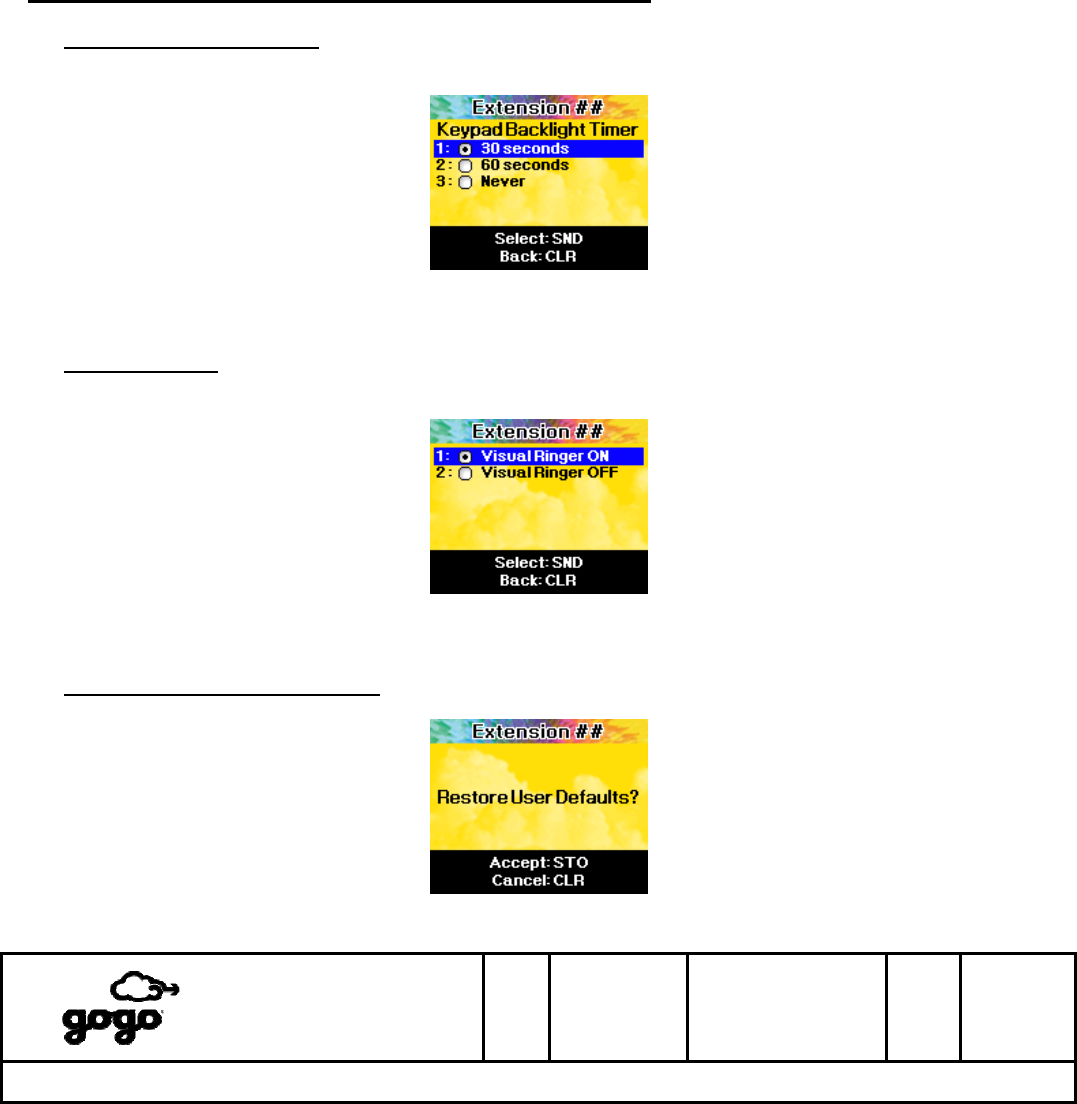
Display #23 - FCN 4_1, User Configuration Menu
1: Ring Pattern - This option chooses the ring pattern (ringtone) used for the audible ringer during an incoming
call. This setting may be overridden via signaling from the Aircell VoIP server.
Display #24 - FCN 4_1_1, Ring Pattern
2: Earpiece Volume - This option is identical to Section 9, Display #18.
3: Ringer Volume - This option is identical to Section 9, Display #19.
4: Keytone Volume - This option is identical to Section 9, Display #20.
5: Display Brightness - This option is identical to Section 9, Display #21.
6: Display Blanking Timer - This option sets the length of time after the last keypress (in any Idle mode)
before the handset display goes blank. The “Never” option will keep the handset display visible at all times
when idle, but this will result in appreciable screen burn-in and is not recommended.
Itasca, IL
Bensenville, IL
SIZE
A
CAGE CODE
1NQ67
DOCUMENT NUMBER
D12751
REV
F SH 21 of
28
Title: ABS OPERATIONAL USER’S MANUAL
The master version of this document resides on the Gogo LLC Configuration Management Server. Printed copies are considered uncontrolled,
until verified as current by comparing with the master. It is the responsibility of the user to verify the most current revision.
Gogo LLC Confidential and Proprietary
Template D13480, Rev E
Display #25 - FCN 4_1_6, Display Blanking Timer
Setup Menu, Option 1 - User Configuration (continued)
7: Keypad Backlight Timer - This option sets the length of time after the last keypress (in any mode) before
the keypad backlighting (orange LEDs) goes off. The “Never” option will keep the keypad backlighting on at all
times.
Display #26 - FCN 4_1_7, Keypad Backlight Timer
8: Visual Ringer - This option controls the Visual Ringer feature. When set to “On”, the handset display and
keypad will slowly flash when an incoming call is received.
Display #27 - FCN 4_1_8, Visual Ringer
9: Restore Default Configuration - This option will restore User Configuration options 1 through 8 back to
factory values. Press STO to activate.
Display #28 - FCN 4_1_9, Restore Default Configuration
Itasca, IL
Bensenville, IL
SIZE
A
CAGE CODE
1NQ67
DOCUMENT NUMBER
D12751
REV
F SH 22 of
28
Title: ABS OPERATIONAL USER’S MANUAL
The master version of this document resides on the Gogo LLC Configuration Management Server. Printed copies are considered uncontrolled,
until verified as current by comparing with the master. It is the responsibility of the user to verify the most current revision.
Gogo LLC Confidential and Proprietary
Template D13480, Rev E
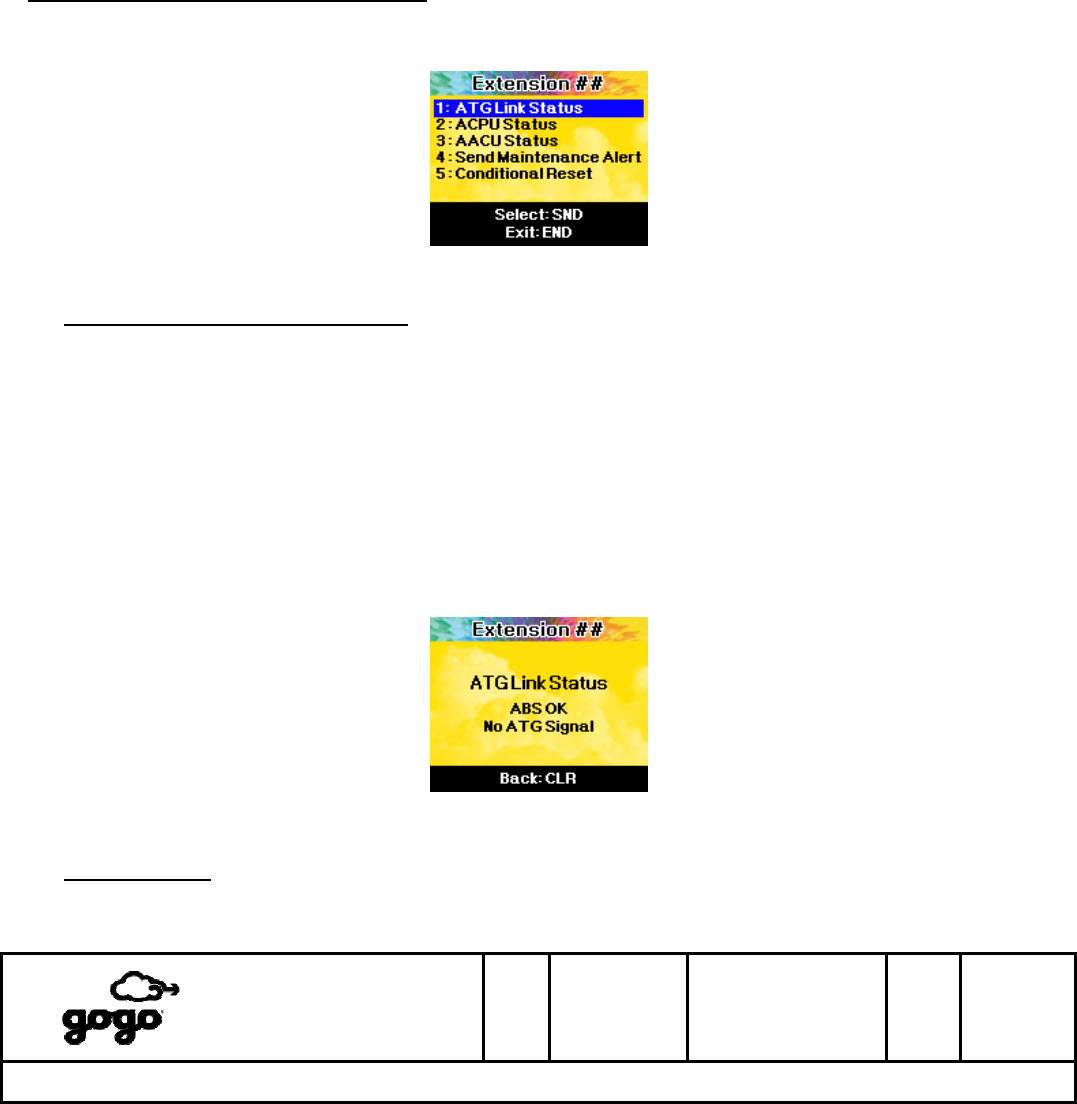
Setup Menu, Option 2 - ABS Status
This option displays the operational status of various ABS components. Additionally, a Maintenance Alert message
can be sent to the Aircell Network Operations Center (NOC), or a Conditional Reset of the ABS system can be
commanded.
Display #29 - FCN 4_2, ABS Status Menu
1: ATG (Air-to-Ground) Link Status - This option displays the current status of the ATG radio link. This
status screen provides the same information as the ATG Link Icon (Section 11), but in a verbose format.
Possible displays are:
ABS OK - No ATG Signal - The ABS system is operating normally, but the ATG radio link is not
currently established.
ABS OK - ATG Signal Level: (x)/5 - The ABS system is operating normally, and the ATG radio link is
currently connected with a relative strength of “x” out of 5 units. (1 = very weak, 5 = very strong)
ABS Fault - The ABS system has detected a fault, and may be attempting auto-recovery procedures. If
this condition persists for more than 10 minutes, airline personnel may manually reset the ABS
system. If a manual reset does not recover the ABS system, please contact Aircell Airline Technical
Support for service. 1-877-GOGO-FLY (1-877-464-6359)
Display #30 - FCN 4_2_1, ATG Link Status
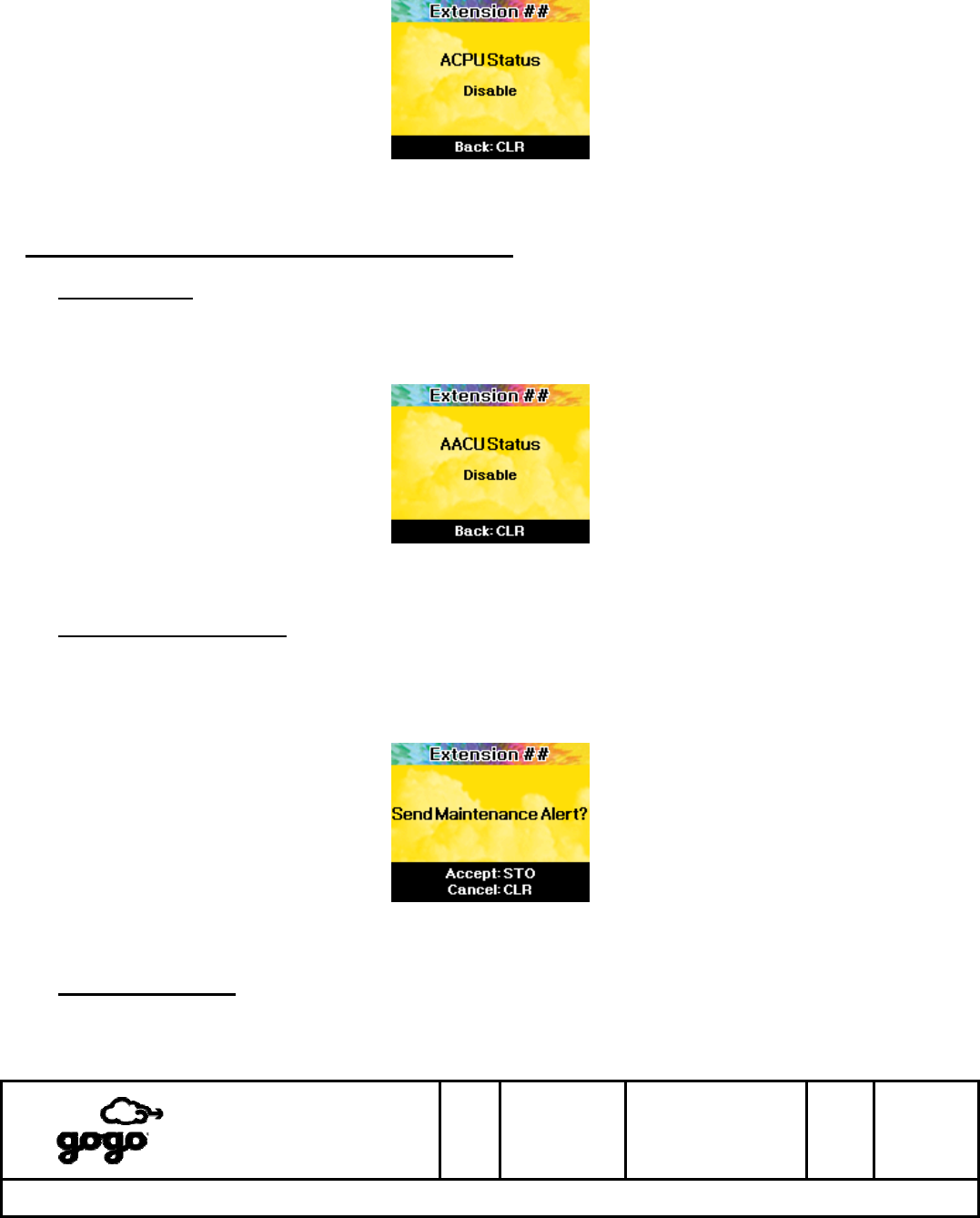
2: ACPU Status - This option displays the current status of the ACPU device. Possible displays are:
Enable - The ACPU device is operating normally.
Disable - The ACPU device has encountered a fault.
Itasca, IL
Bensenville, IL
SIZE
A
CAGE CODE
1NQ67
DOCUMENT NUMBER
D12751
REV
F SH 23 of
28
Title: ABS OPERATIONAL USER’S MANUAL
The master version of this document resides on the Gogo LLC Configuration Management Server. Printed copies are considered uncontrolled,
until verified as current by comparing with the master. It is the responsibility of the user to verify the most current revision.
Gogo LLC Confidential and Proprietary
Template D13480, Rev E
Display #31 - FCN 4_2_2, ACPU Status
Setup Menu, Option 2 - ABS Status (continued)
3: AACU Status - This option displays the current status of the AACU device. Possible displays are:
Enable - The AACU device is operating normally.
Disable - The AACU device has encountered a fault.
Display #32 - FCN 4_2_3, AACU Status
4: Send Maintenance Alert - If airline personnel suspect an intermittent service problem with the ABS system,
this option can be used to send a Maintenance Alert message to the Aircell Network Operations Center (NOC)
via the ATG radio link. This message will alert the Aircell NOC that the ABS system on a particular aircraft may
be experiencing problems. Once this option is selected, press STO to send the Maintenance Alert message, or
press CLR to return to the previous menu.
Display #33 - FCN 4_2_4, Send Maintenance Alert
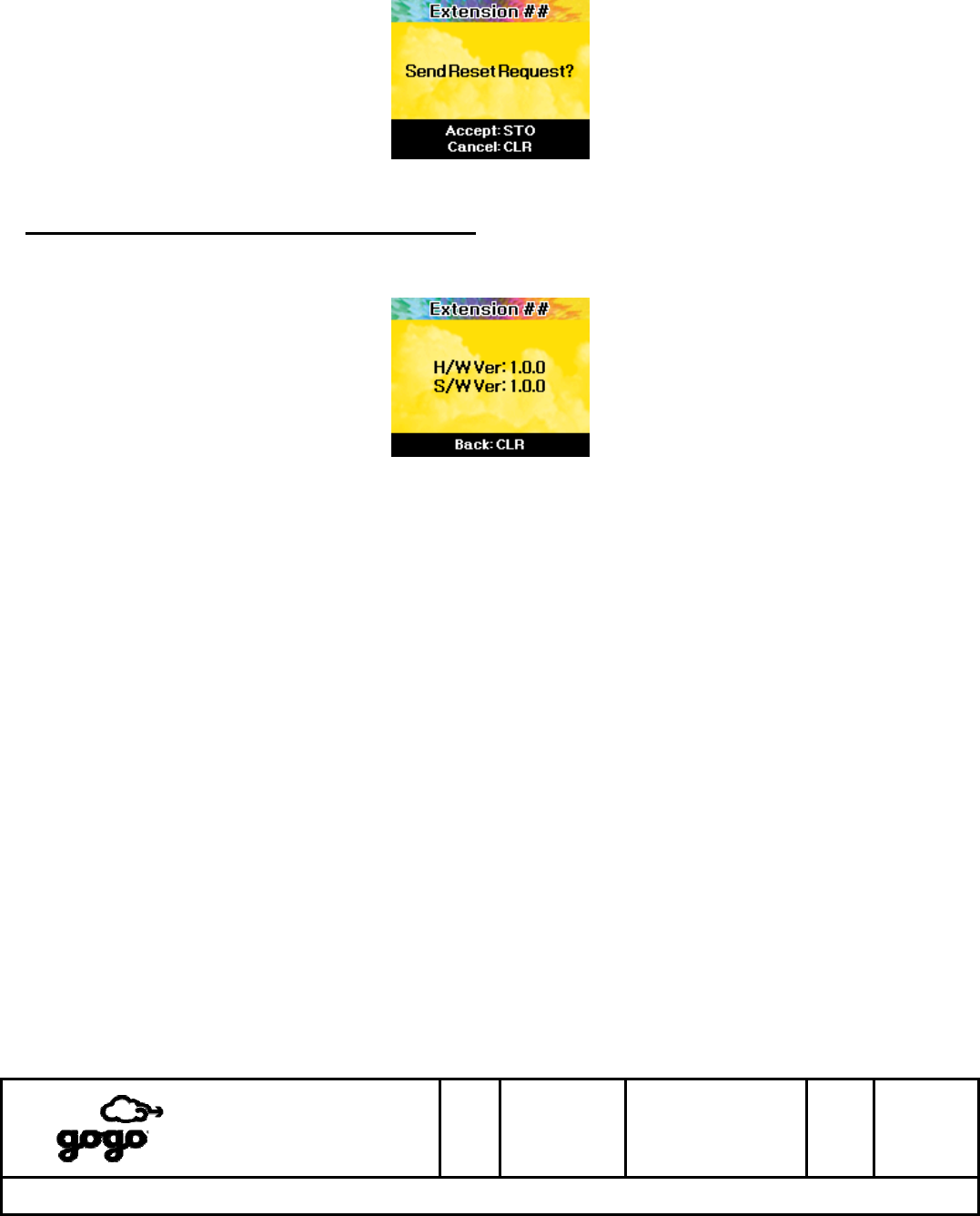
5: Conditional Reset - If airline personnel suspect that the ABS system is in an impaired state, this option can
be used to prompt the ABS system to initiate a software reset. The ABS system will then evaluate the current
operational state, send an alert message to the Aircell NOC, and initiate a reset if warranted. Once this option
is selected, press STO to request a reset, or press CLR to return to the previous menu.
Itasca, IL
Bensenville, IL
SIZE
A
CAGE CODE
1NQ67
DOCUMENT NUMBER
D12751
REV
F SH 24 of
28
Title: ABS OPERATIONAL USER’S MANUAL
The master version of this document resides on the Gogo LLC Configuration Management Server. Printed copies are considered uncontrolled,
until verified as current by comparing with the master. It is the responsibility of the user to verify the most current revision.
Gogo LLC Confidential and Proprietary
Template D13480, Rev E
Display #34 - FCN 4_2_5, Conditional Reset
Setup Menu, Option 3 - Version Information
This option displays the current hardware (H/W) and software (S/W) versions of the handset. Press CLR to return
to the previous menu, or END to return to Unlocked Idle mode.
Display #35 - FCN 4_3, Version Information
Itasca, IL
Bensenville, IL
SIZE
A
CAGE CODE
1NQ67
DOCUMENT NUMBER
D12751
REV
F SH 25 of
28
Title: ABS OPERATIONAL USER’S MANUAL
The master version of this document resides on the Gogo LLC Configuration Management Server. Printed copies are considered uncontrolled,
until verified as current by comparing with the master. It is the responsibility of the user to verify the most current revision.
Gogo LLC Confidential and Proprietary
Template D13480, Rev E
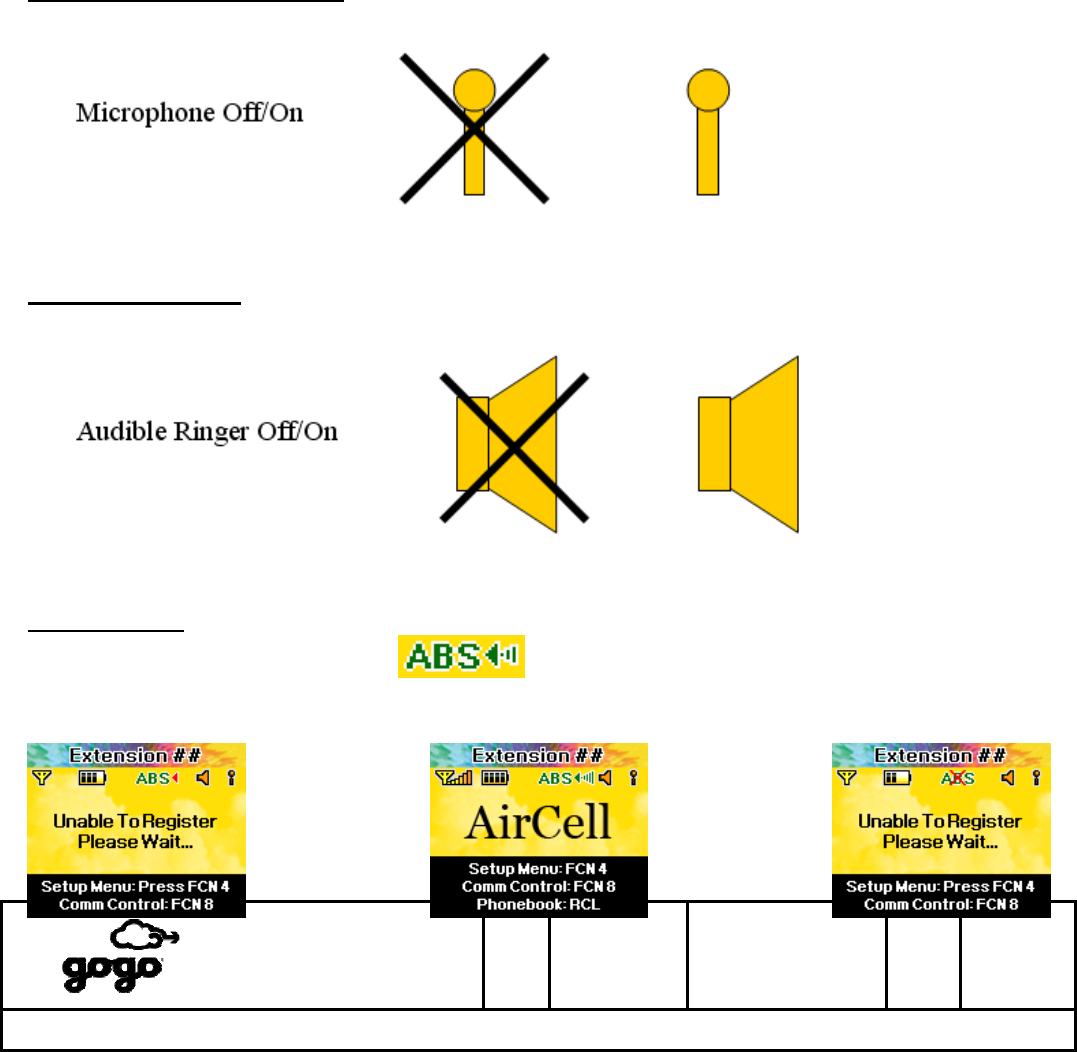
11. ABS Corded SIP Handset Icons
Microphone (mouthpiece) Status: The current microphone status (muted/unmuted, Section 8) is shown as an
icon near the upper-right corner of the display.
Audible Ringer Status: The current audible ringer status (muted/unmuted, Section 9) is shown as an icon near
the upper-right corner of the display.
ATG Link Status: The current ATG Link status is shown as an icon near the upper-center of the display. Note the
appearance of the ABS Link Status Icon.
See Section 10, Option 2_1 for a full description of ATG Link states.
Itasca, IL
Bensenville, IL
SIZE
A
CAGE CODE
1NQ67
DOCUMENT NUMBER
D12751
REV
F SH 26 of
28
Title: ABS OPERATIONAL USER’S MANUAL
The master version of this document resides on the Gogo LLC Configuration Management Server. Printed copies are considered uncontrolled,
until verified as current by comparing with the master. It is the responsibility of the user to verify the most current revision.
Gogo LLC Confidential and Proprietary
Template D13480, Rev E
ABS OK ABS OK ABS Fault
No ATG Signal ATG Signal Level: (x)/5
(x) = number of signal bars
12. Handset Reboot
If the aircraft is above the ABS service altitude and the Aircell ABS Corded SIP Handset is consistently unable to
place or receive phone calls, a Handset Reboot may be warranted.
Handsets of Revision F (or higher): Press and hold the END key on the handset until the screen goes dark
(approximately 7 seconds). Release the END key. Now press and hold the SND key on the handset until the
screen illuminates. Release the SND key. The handset should return to service in approximately 30 seconds.
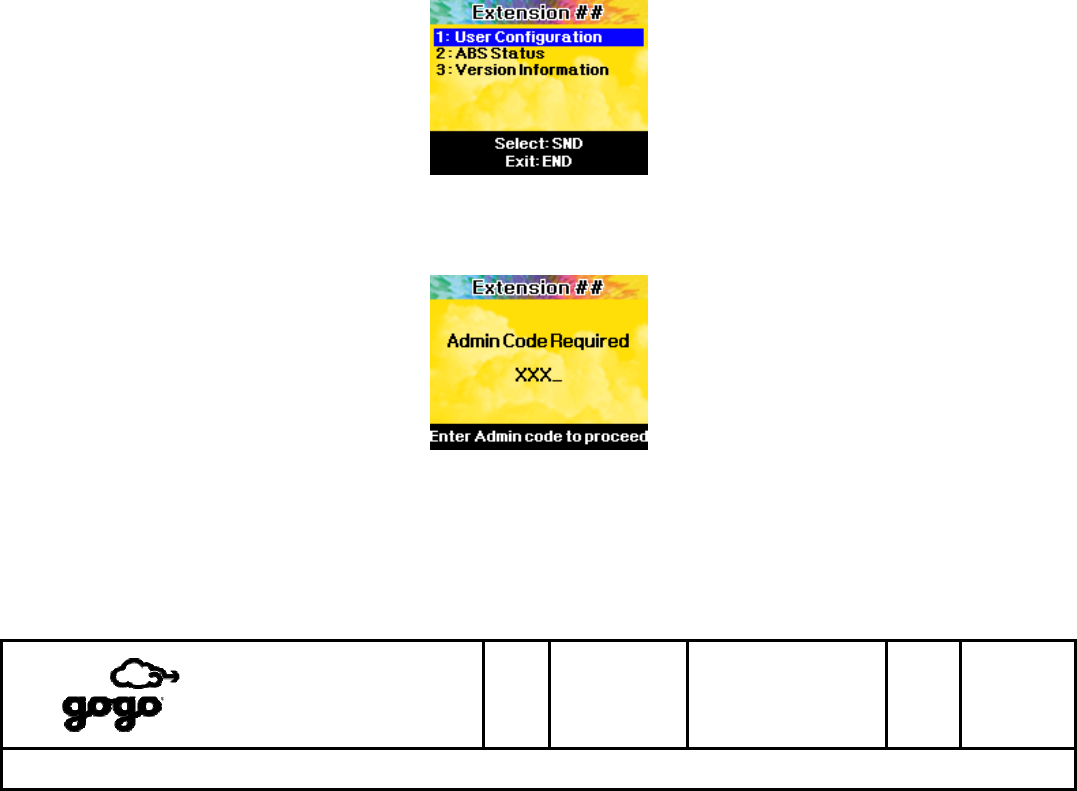
Handsets of Revision E (or lower): From an Unlocked Idle mode, press FCN, then 4 to access the Setup Menu.
Display #22 - FCN 4, Setup Menu (Top Level)
Press the 4 key again to request the hidden Admin menu. You will be required to supply the Admin Code before
proceeding.
Display #36 - FCN 4_4, Admin menu code entry
An error message will be displayed if the incorrect code is entered. Press END at any time to return to an
Unlocked Idle mode.
If the correct Admin Code has been entered, a new menu screen will be displayed. Press 9 to reboot the handset.
The handset should return to service in approximately 30 seconds.
Itasca, IL
Bensenville, IL
SIZE
A
CAGE CODE
1NQ67
DOCUMENT NUMBER
D12751
REV
F SH 27 of
28
Title: ABS OPERATIONAL USER’S MANUAL
The master version of this document resides on the Gogo LLC Configuration Management Server. Printed copies are considered uncontrolled,
until verified as current by comparing with the master. It is the responsibility of the user to verify the most current revision.
Gogo LLC Confidential and Proprietary
Template D13480, Rev E
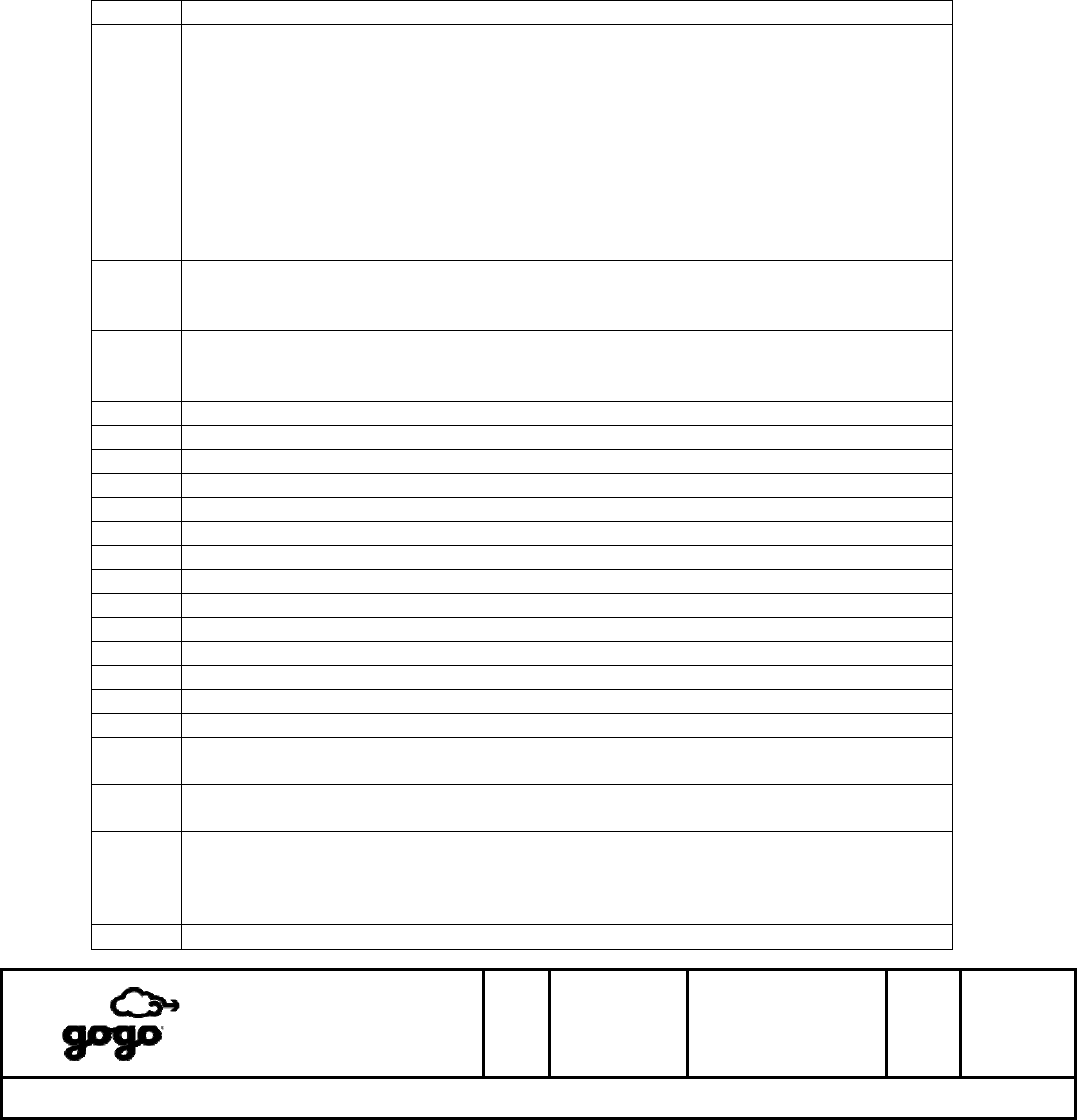
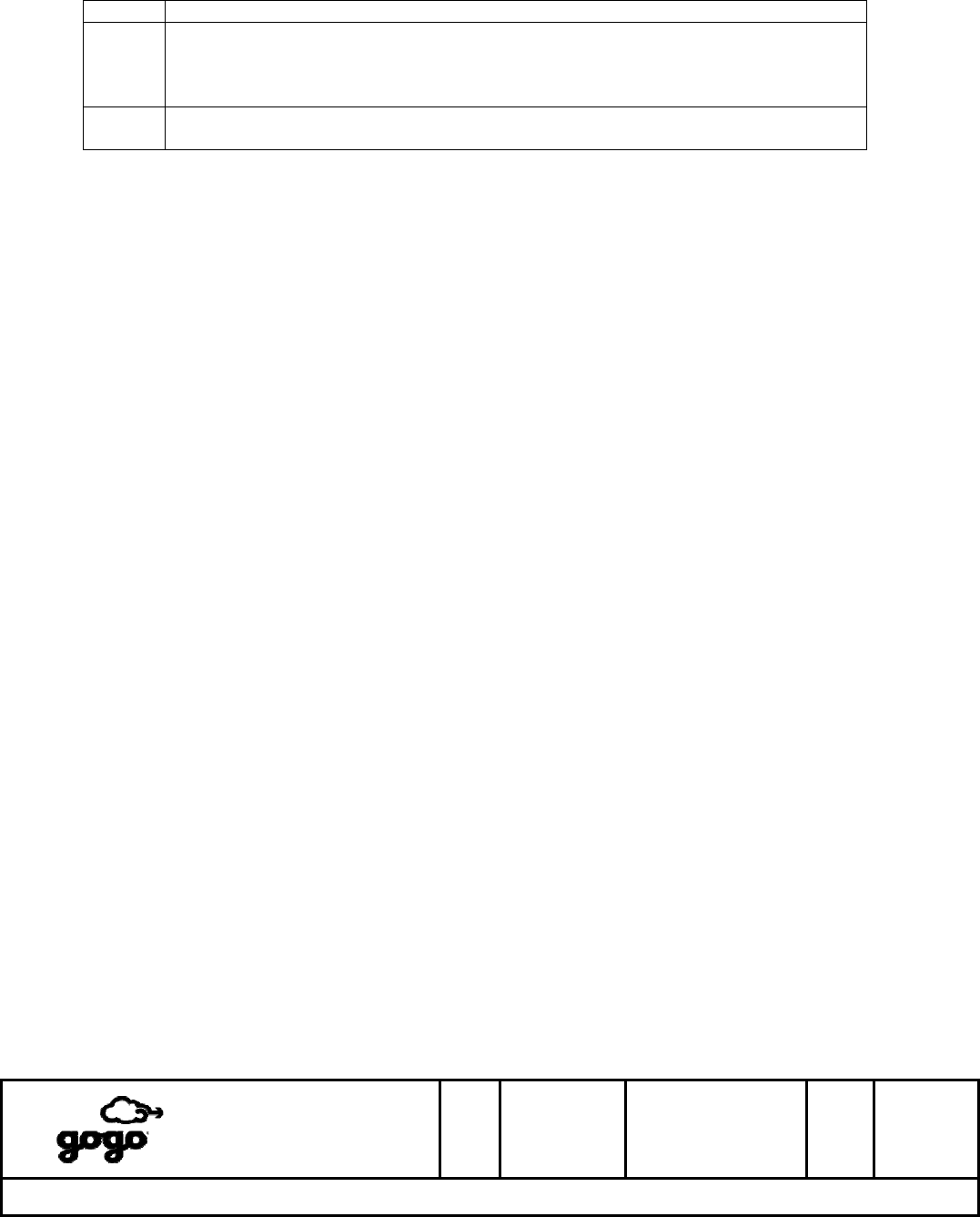
13. Keypad Function Reference
KEY FUNCTION
FCN FCN 0: Toggle Do Not Disturb (DND) Mode [For Future Use]
FCN 1: Ringer Volume Control
FCN 2: Key Tone Volume Control
FCN 3: OLED Display Brightness Control
FCN 4: Setup Menu
FCN 5: Keypad Lock
FCN 6: Microphone Mute
FCN 7: Undefined
FCN 8: Communication Control Menu [For Future Use]
FCN 9: Undefined
▲ 1. Increase audio volume (press ▲ during a call)
2. Increase numeric parameters (volume, brightness, timers, etc)
3. Scroll up through menus and lists
▼ 1. Decrease audio volume (press ▼ during a call)
2. Decrease numeric parameters (volume, brightness, timers, etc)
3. Scroll down through menus and lists
● (Inactive)
● ● (Inactive)
1 Dialing digit “1”
2 ABC Dialing digit “2”
3 DEF Dialing digit “3”
4 GHI Dialing digit “4”
5 JKL Dialing digit “5”
6 MNO Dialing digit “6”
7 PRS Dialing digit “7”
8 TUV Dialing digit “8”
9 WXY Dialing digit “9”
* Dialing digit “*”
0 Oper Dialing digit “0”
# Dialing digit “#”
RCL Access the Phonebook to allow dialing of a stored name (RCL, ▲ or ▼, SND) or
(RCL, ##, SND)
CLR 1. Clear the last digit entered
2. Go to previous menu level without saving settings from current menu screen
SND 1. Initiate a call (direct-dialed or phonebook)
2. Answer a call when the Handset is ringing
3. Last number redial - From idle screen, press once to redial
4. Select highlighted menu item
HLD 1. Place an active call on Hold
Itasca, IL
Bensenville, IL
SIZE
A
CAGE CODE
1NQ67
DOCUMENT NUMBER
D12751
REV
F SH 28 of
28
Title: ABS OPERATIONAL USER’S MANUAL
The master version of this document resides on the Gogo LLC Configuration Management Server. Printed copies are considered uncontrolled,
until verified as current by comparing with the master. It is the responsibility of the user to verify the most current revision.
Gogo LLC Confidential and Proprietary
Template D13480, Rev E
2. Return to a call that is on Hold
STO 1. Store audio volume, ringer volume, keypad volume, or OLED display brightness
as new value.
2. Initiate storage dialog for direct-dialed number (add to phonebook)
3. Enter/confirm entries during menu and phonebook dialogs
END 1. End the active call (hang up)
2. Cancel menu and dialing operations (return to idle state)
14. Menu Reference
The following User menus are visible and available via the appropriate FCN key:
FCN 4 - Setup Menu
1. User Configuration
1.1. Ring Pattern (1-4)
1.2. Earpiece Volume (1-6) [same as ▲/▼ during call]
1.3. Ringer Volume (0-6, 0=off) [same as FCN 1]
1.4. Keytone Volume (0-6, 0=off) [same as FCN 2]
1.5. Display Brightness (1-4) [same as FCN 3]
1.6. Display Blanking Timer (30sec/60sec/never)
1.7. Keypad Backlight Timer (30sec/60sec/never)
1.8. Visual Ringer (on/off)
1.9. Reset Default Configuration (items 1.1 through 1.8 only)
2. ABS Status
2.1. ATG Link Status
2.2. ACPU Status
2.3. AACU Status
2.4. Send Maintenance Alert
2.5. Conditional Reset
3. Version Information (display HW and SW version numbers)
FCN 8 - Communication Control Menu [For Future Use]
1. PAX WiFi Network
1.1. PAX WiFi Network ON
1.2. PAX WiFi Network OFF
2. Crew WiFi Network
2.1. Crew WiFi Network ON
2.2. Crew WiFi Network OFF