Invacare Tracer Exir Users Manual 1110547A_01_02
Tracer EXIR to the manual 8b201bf7-0958-4618-af16-883607912c43
2015-02-02
: Invacare Invacare-Tracer-Exir-Users-Manual-433470 invacare-tracer-exir-users-manual-433470 invacare pdf
Open the PDF directly: View PDF  .
.
Page Count: 44
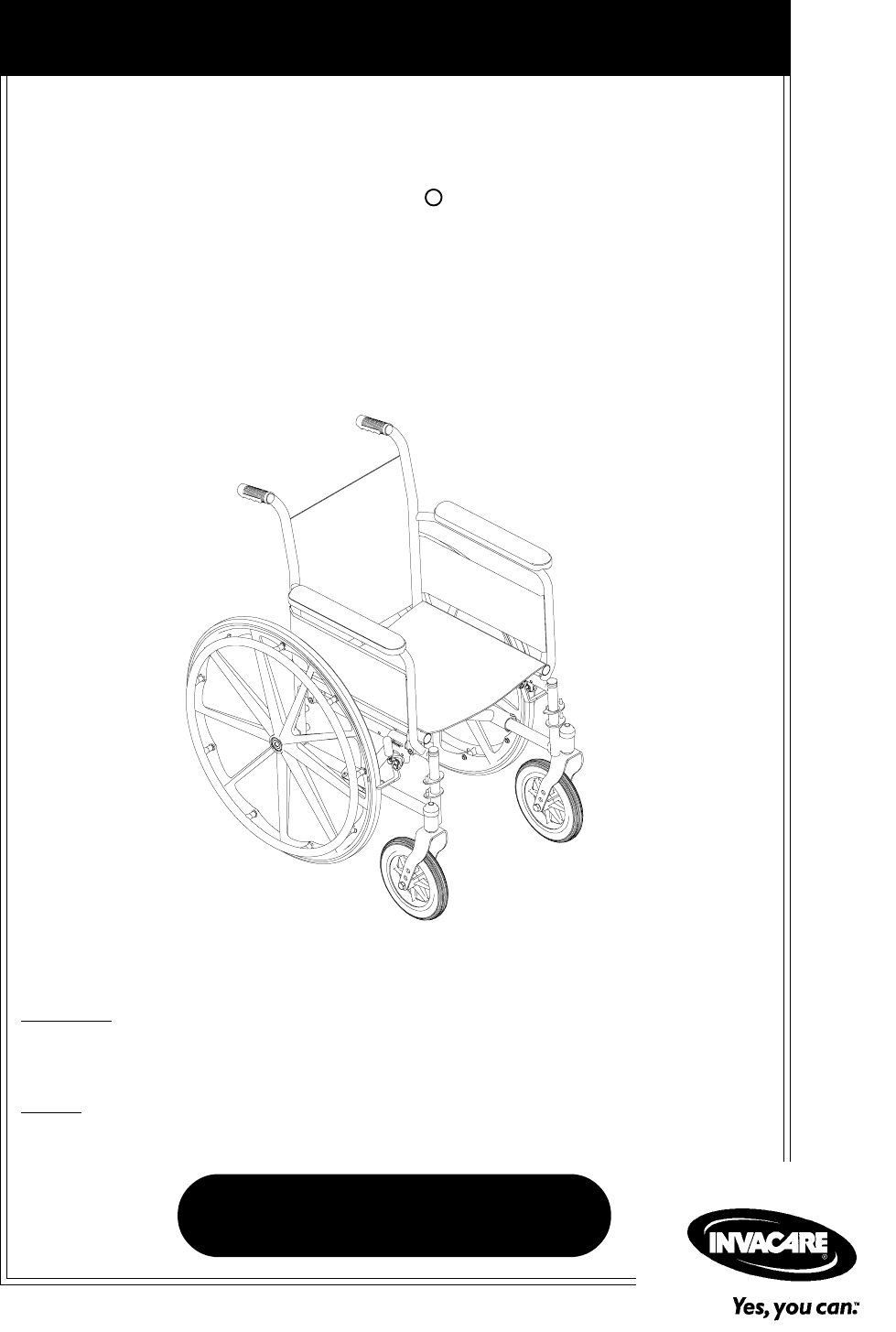
DEALER: THIS MANUAL MUST BE GIVEN TO THE USER OF
THE WHEELCHAIR.
USER: BEFORE USING THIS WHEELCHAIR, READ THIS
MANUAL AND SAVE FOR FUTURE REFERENCE.
Owner's Operator And Maintenance Manual
Tracer EXI
R
For more information regarding
Invacare products, parts, and services,
please visit: www.invacare.com

Tracer® EXI 2Part No. 1110547
WARNING
WARNING
WARNING
DO NOT OPERATE THIS EQUIPMENT WITHOUT
FIRST READING AND UNDERSTANDING THIS
MANUAL. IF YOU ARE UNABLE TO UNDERSTAND
THE WARNINGS, CAUTIONS, AND
INSTRUCTIONS, CONTACT A
HEALTHCARE PROFESSIONAL, DEALER OR A
QUALIFIED TECHNICIAN BEFORE ATTEMPTING
TO USE THIS EQUIPMENT - OTHERWISE INJURY
OR DAMAGE MAY RESULT.
SAVE THESE INSTRUCTIONS

Part No. 1110547 3Tracer® EXI
CONTENTS
CONTENTS
TABLE OF CONTENTS
SPECIAL NOTES................................................................................ 5
LABEL LOCATIONS ........................................................................... 6
SPECIFICATIONS .............................................................................. 7
SECTION 1 - GENERAL GUIDELINES................................................. 8
STABILITY...................................................................................................................................................... 8
OPERATING INFORMATION ...............................................................................................................9
TIRE PRESSURE........................................................................................................................................ 10
WEIGHT TRAINING ............................................................................................................................. 10
WEIGHT LIMITATION.......................................................................................................................... 10
SAFETY/HANDLING OF WHEELCHAIRS...................................................................................... 11
SECTION 2 - SAFETY INSPECTION .................................................. 18
SAFETY INSPECTION CHECKLIST .................................................................................................... 18
TROUBLESHOOTING ............................................................................................................................ 19
MAINTENANCE ....................................................................................................................................... 19
SECTION 3 - FRONT RIGGINGS ....................................................... 21
INSTALLING/REMOVING THE FOOTREST .................................................................................... 21
FOOTREST HEIGHT ADJUSTMENT ................................................................................................ 22
RAISING/LOWERING THE ELEVATING LEGREST ASSEMBLY ............................................. 24
HEEL LOOP REPLACEMENT .............................................................................................................. 24
SECTION 4 - ARMS ........................................................................ 26
REMOVING AND INSTALLING ARMREST ................................................................................... 26
SECTION 5 - SEAT AND BACK ....................................................... 27
REPLACING BACK UPHOLSTERY ................................................................................................... 27
REPLACING SEAT UPHOLSTERY ..................................................................................................... 27
ADJUSTING THE SEAT WIDTH ....................................................................................................... 28
SECTION 6 - REAR WHEELS ........................................................... 31
REMOVING/INSTALLING THE REAR WHEELS .......................................................................... 31
REPLACING REAR WHEEL HANDRIM .......................................................................................... 32
REPLACING/REPAIRING REAR WHEEL TIRE/TUBE ................................................................. 32
SECTION 7 - FRONT CASTERS ....................................................... 33
INSTALLING/REPLACING FORK ASSEMBLIES ............................................................................ 33
ADJUSTING FORKS ............................................................................................................................... 33
REPLACING FRONT CASTERS ......................................................................................................... 34
REPLACING/REPAIRING FRONT CASTER TIRE/TUBE ........................................................... 34

Tracer® EXI 4Part No. 1110547
CONTENTS
CONTENTS
SECTION 8 - ANTI-TIPPERS/WHEEL LOCKS .................................... 35
INSTALLING/ADJUSTING THE ANTI-TIPPERS........................................................................... 35
WHEEL LOCK ADJUSTMENT ........................................................................................................... 37
SECTION 9 - SEAT-TO-FLOOR HEIGHT ........................................... 39
CHANGING SEAT-TO-FLOOR HEIGHT ....................................................................................... 39
SECTION 10 - OPTIONS ................................................................. 41
INSTALLING THE SEAT POSITIONING STRAP ......................................................................... 41
NOTES........................................................................................... 42
LIMITED WARRANTY .................................................................... 43

Part No. 1110547 5Tracer® EXI
SPECIAL NOTES
WARNING/CAUTION notices as used in this manual apply to hazards or
unsafe practices which could result in personal injury or property damage.
NOTICE
THE INFORMATION CONTAINED IN THIS DOCUMENT IS SUBJECT
TO CHANGE WITHOUT NOTICE.
WHEELCHAIR USER
As a manufacturer of wheelchairs, Invacare endeavors to supply a wide
variety of wheelchairs to meet many needs of the end user. However, final
selection of the type of wheelchair to be used by an individual rests solely
with the user and his/her healthcare professional capable of making such a
selection.
WHEELCHAIR TIE-DOWN RESTRAINTS AND SEAT RESTRAINTS
Invacare recommends that wheelchair users NOT be transported in
vehicles of any kind while in wheelchairs. As of this date, the Department of
Transportation has not approved any tie-down systems for transportation
of a user while in a wheelchair, in a moving vehicle of any type.
It is Invacares position that users of wheelchairs should be transferred into
appropriate seating in vehicles for transportation and use be made of the
restraints made available by the auto industry. Invacare cannot and does
not recommend any wheelchair transportation systems.
AS REGARDS RESTRAINTS - SEAT POSITIONING STRAPS - IT IS THE
OBLIGATION OF THE DME DEALER, THERAPISTS AND OTHER
HEALTHCARE PROFESSIONALS TO DETERMINE IF A SEATING
RESTRAINT IS REQUIRED TO ENSURE THE SAFE OPERATION OF
THIS EQUIPMENT BY THE USER. SERIOUS INJURY CAN OCCUR IN
THE EVENT OF A FALL FROM A WHEELCHAIR.
SPECIAL NOTES
SPECIAL NOTES
Tracer® EXI 6Part No. 1110547
IMPORTANT NOTICE
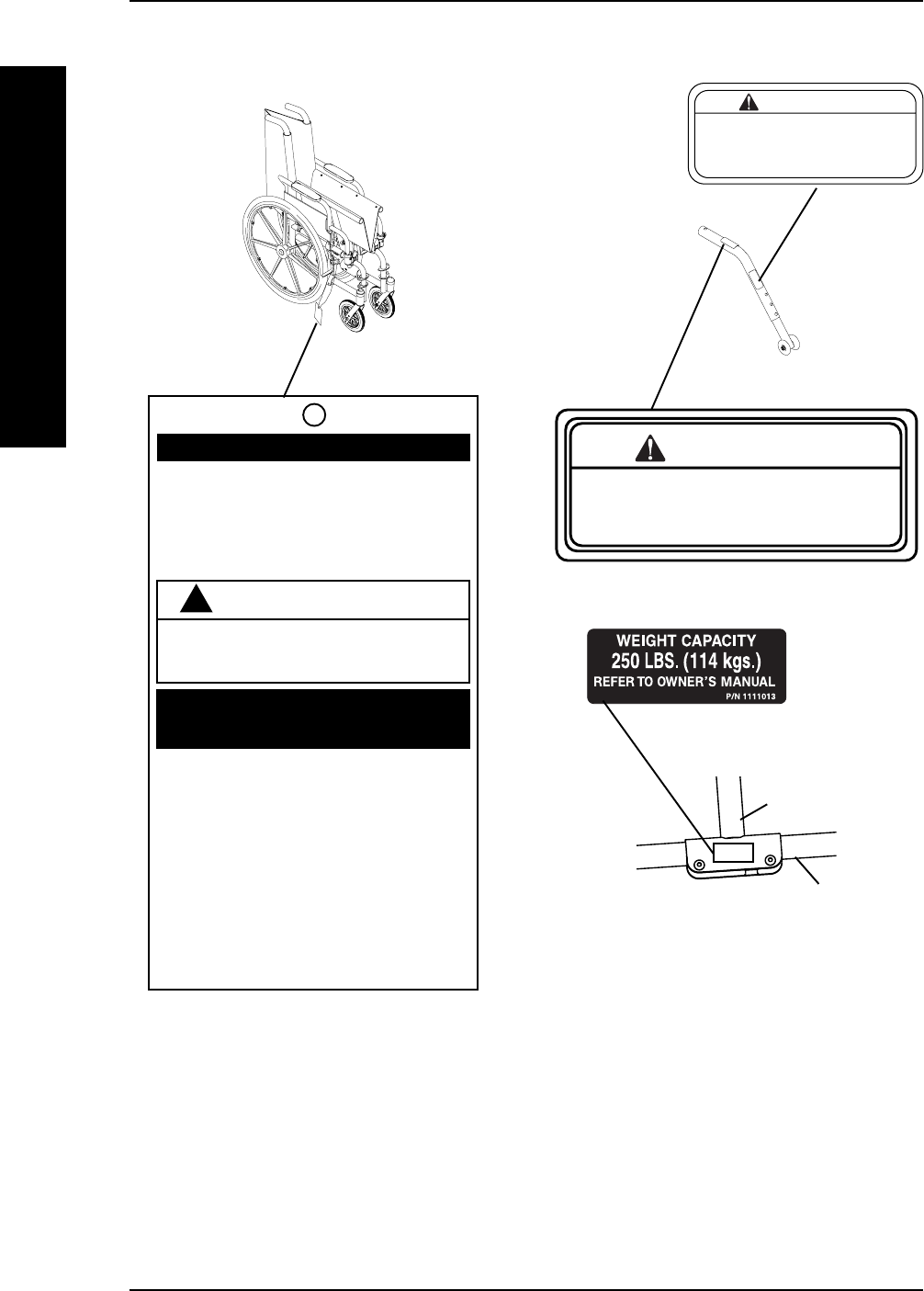
The wheel locks on this wheelchair have been
pre-set at the factory to comply with the
Veterans Administration functional Standard
8320.01 of the Federal Register, paragraph
3.2.4.5.3. If these wheel locks do not meet
your needs, follow instructions below.
!
CAUTION
Any wheel lock adjustments should embed
wheel lock shoe at least 1/8" into tire when
locked (3/16" on pneumatic tires).
INSTRUCTIONS FOR WHEEL
LOCK ADJUSTMENTS
1. Loosen wheel lock mounting fastener,
which runs through mounting bracket and
frame.
2. Slide clamp toward rear wheel until wheel
lock shoe is embedded into tire material at
least 1/8" when handle is engaged to the
lock position (3/16" for pneumatic tires).
3. Tighten mounting fastener to secure
mounting bracket in desired location and
recheck lock shoe embedding.
4. Inspect for correct locking action BEFORE
actual use.
00078X021-0394
LABEL LOCATIONS
LABEL LOCATIONS
LABEL LOCATIONS
WARNING
DO NOT OPERATE WITHOUT
THE ANTI-TIP TUBES
INSTALLED.
REV. 5/98 P/N 60106X144
Refer to Owner's Manual
for proper anti-tipper
setting.
1085379
WARNING
Crossmember
Lower Frame
Tube

Part No. 1110547 7Tracer® EXI
TRACER EXI
Overall Width
Permanent Arm: 23-1/4, 25-1/4, 27-1/4-inches
Removable Arm: 24-1/2, 26-1/2, 28-1/2-inches
Overall Depth: 31-7/8-inches
(without Front Riggings)
Seat Width: 16, 18 and 20-inches
Seat Depth
SA Frame: 16-inches
FF Frame: 16-inches
SEAT-TO-FLOOR**
(With 24-inch Wheels)
Adult (SA Frame): 19-1/2-inches
Adult (FF Frame): 21-inches
Hemi (SA Frame): 17-1/2-inches
Back Height: 16-inches
Back Style: Fixed
Arm Styles: Fixed Height; Desk or Full Length; Permanent or Removable
Front Riggings: Swingaway Footrests, Elevating Legrests (Not Available on FF Frame )
Rear Axle: Permanent
Rear Wheels: 20, 22 and 24*-inch Composite* Urethane*, Pneumatic or
Pneumatic-Flat Free Insert
Handrims: Composite*, Chrome Plated Steel, Black Painted Aluminum
Wheel Locks: Push to Lock* (Adult), Pull to Lock* (Hemi)
Caster Size: 6x1-inch Urethane (N/A FF Frame), 8x1-inch Solid Rubber*
8x1-1/4-inch Pneumatic or Pneumatic-Flat Free Insert,
Upholstery: Vinyl - Midnight Blue or Black*
Weight*** (approx.)
SA Frame
Permanent Arm: 36 pounds
Removable Arm: 36 pounds
FF Frame: 37 pounds
Shipping Weight***
(approx.)
SA Frame
Permanent Arm: 45-1/2 pounds
Removable Arm: 45-1/2 pounds
FF Frame: 46-1/2 pounds
* NOTE: These options are standard for this model.
** NOTE: The seat-to-floor heights are based on urethane tires. If wheelchair is equipped with
pneumatic (properly inflated) or solid rubber tires, add 1/4-inch to the measurements listed above.
These heights can vary +/- 1/4-inch due to tire wear and manufacturing tolerances.
***NOTE: Weights based on 18-inch wide wheelchair without front riggings. Weights will vary
depending on how wheelchair is equipped.
SPECIFICATIONS
SPECIFICATIONS
SPECIFICATIONS

Tracer® EXI 8Part No. 1110547
SECTION 1 GENERAL GUIDELINES
GENERAL GUIDELINES
STABILITY - ALL MODELS
WARNING
The size/position of the front casters, size/position of the rear wheels, use
of anti-tipper model, as well as the user condition directly relate to the
stability of the wheelchair. Any change to one (1) or any combination of
the six (6) may cause the wheelchair to decrease in stability. These
adjustments MUST be performed by a qualified technician.
Caster Size
Caster Position
Wheel Size
Wheel Position
Anti-Tippers
User Condition
Caster Size üüüüü
Caster Position üüüüü
Wheel Size üü üüü
Wheel Position üüü üü
User Condition üüüüü
NOTE: When changes to the left hand column occur, follow across the chart and refer to the proce-
dure that is checked (ü) to maintain the proper stability, safety and handling of the wheelchair.
Seat-to-floor heights have specific positions depending on rear wheel size,
rear wheel position, front caster size and front caster position. These
adjustments MUST be performed by a qualified technician.
Anti-tippers are specific to the different seat-to-floor heights. Refer to the
chart in INSTALLING/ADJUSTING THE ANTI-TIPPERS in SECTION 8 of
this manual for correct usage and adjustment. If these requirements cannot
be achieved, do not use the wheelchair. Contact a qualified technician.
If changing the seat-to-floor height the correct anti-tippers MUST be
ordered to maintain a 1-1/2 to 2-inch ground clearance.
Anti-tippers MUST be fully engaged. Ensure that the release button of
the anti-tipper fully protrudes out of the hole on the bottom of the
wheelchair frame.
Ensure both anti-tippers are adjusted to the same height.
Anti-tippers MUST BE attached at all times. Inasmuch as the anti-tippers
are an option on this wheelchair (you may order with or without the anti-
tippers), Invacare strongly recommends ordering the anti-tippers as an
additional safeguard for the wheelchair user.
Section 1 - General Guidelines includes the following:
Stability
Operating Information
Tire Pressure
Weight Training
Weight Limitation
Safety/Handling of Wheelchairs

Part No. 1110547 9Tracer® EXI
OPERATING INFORMATION
WARNING
Unless otherwise noted, all service and adjustments should be performed
while the wheelchair is unoccupied.
After ANY adjustments, repair or service and BEFORE use, make sure all
attaching hardware is tightened securely - otherwise injury or damage
may result.
To determine and establish your particular safety limits, practice bending,
reaching and transferring activities in several combinations in the
presence of a qualified healthcare professional BEFORE attempting active
use of the wheelchair.
ALWAYS wear your Seat Positioning Strap. Inasmuch as the SEAT
POSITIONING STRAP is an option on this wheelchair (You may order
with or without the Seat Positioning Strap), Invacare strongly
recommends ordering the Seat Positioning Strap as an additional
safeguard for the wheelchair user.
ALWAYS verify that hand grips on the rear cane are secure prior to use
when an assistant is used to propel the chair.
DO NOT sit or transfer into the wheelchair unless the wheelchair is fully
open.
DO NOT TRAVERSE, CLIMB or GO DOWN ramps or slopes greater
than 9°.
DO NOT operate on roads, streets or highways.
DO NOT attempt to move up or down an incline with a water, ice or oil
film.
DO NOT attempt to ride over curbs or obstacles. Doing so may cause
your wheelchair to tip over and cause bodily harm to you or damage to
the wheelchair.
DO NOT attempt to reach objects if you have to move forward in the
seat.
DO NOT attempt to reach objects if you have to pick them up from the
floor by reaching down between your knees.
DO NOT lean over the top of the back upholstery. This will change your
center of gravity and may cause you to tip over.
DO NOT shift your weight or sitting position toward direction you are
reaching as the wheelchair may tip over.
WHEEL LOCKS ARE NOT BRAKES. DO NOT attempt to stop a moving
wheelchair with the wheel locks.
DO NOT tilt the wheelchair without assistance.
DO NOT use an escalator to move a wheelchair between floors. Serious
bodily injury may occur.
SECTION 1
GENERAL GUIDELINES
GENERAL GUIDELINES

Tracer® EXI 10 Part No. 1110547
TIRE PRESSURE
WARNING
DO NOT use your wheelchair unless it has the proper tire pressure
(p.s.i.). DO NOT overinflate the tires. Failure to follow these instructions
may cause the tire to explode and cause bodily harm. The recommended
tire pressure is listed on the side wall of the tire.
Replacement of a pneumatic tire or tube MUST be performed by a
qualified technician.
WEIGHT TRAINING
WARNING
Invacare DOES NOT recommend the use of its wheelchairs as a weight
training apparatus. Invacare wheelchairs have NOT been designed or
tested as a seat for any kind of weight training. If occupant uses said
wheelchair as a weight training apparatus, Invacare shall NOT be liable
for bodily injury and the warranty is void.
WEIGHT LIMITATION
WARNING
The Tracer EXI wheelchair has a weight limitation of 250 lbs. (114 kg.).
SECTION 1 GENERAL GUIDELINES
GENERAL GUIDELINES
WARNING (CONTINUED)
Before attempting to transfer in or out of the wheelchair, every
precaution should be taken to reduce the gap distance. Turn both casters
parallel to the object you are transferring onto. When transferring to and
from the wheelchair, ALWAYS ENGAGE BOTH WHEEL LOCKS.
DO NOT use parts, accessories, or adapters other than those authorized
by Invacare.
DO NOT attempt to lift the wheelchair by any removable (detachable)
parts. Lifting by means of any removable (detachable) parts of a
wheelchair may result in injury to the user and/or assistant or damage to
the wheelchair.
DO NOT stand on the frame of the wheelchair.
DO NOT use the footplate as a platform. When getting in or out of the
wheelchair, make sure that the footplates are in the upward position.
ALWAYS use the handrims for self-propulsion. Inasmuch as the
HANDRIMS are an option on this wheelchair (you may order with or
without the handrims), Invacare strongly recommends ordering the
handrims as an additional safeguard for the wheelchair user.

Part No. 1110547 11 Tracer® EXI
SAFETY/HANDLING OF WHEELCHAIRS
Safety and Handling of the wheelchair requires the close attention of the wheelchair user
as well as the assistant. This manual points out the most common procedures and tech-
niques involved in the safe operation and maintenance of the wheelchair. It is important to
practice and master these safe techniques until you are comfortable in maneuvering around
the frequently encountered architectural barriers.
Use this information only as a basic guide. The techniques that are discussed on the
following pages have been used successfully by many users.
Individual wheelchair users often develop skills to deal with daily living activities that may
differ from those described in this manual. Invacare recognizes and encourages each indi-
vidual to try what works best for him/her in overcoming architectural obstacles that they
may encounter, however ALL WARNINGS and CAUTIONS given in this manual MUST be
followed. Techniques in this manual are a starting point for the new wheelchair user and
assistant with safety as the most important consideration for all.
STABILITY AND BALANCE
WARNING
ALWAYS wear your seat/chest positioning strap. Inasmuch as the SEAT/
CHEST POSITIONING STRAP is an option on this wheelchair (You may
order with or without the Seat/Chest Positioning Strap), Invacare strongly
recommends ordering the Seat/Chest Positioning Strap as an additional
safeguard for the wheelchair user.
To assure stability and proper operation of your wheelchair, you must at all times maintain
proper balance. Your wheelchair has been designed to remain upright and stable during
normal daily activities as long as you do not move beyond the center of gravity.
Virtually all activities which involve movement in the wheelchair have an effect on the center
of gravity. Invacare recommends using seat/chest positioning straps for additional safety while
involved in activities that shift your weight.
DO NOT lean forward out of the wheelchair any further than the length of the armrests.
Make sure the casters are pointing in the forward position whenever you lean forward. This
can be achieved by advancing the wheelchair and then reversing it in a straight line.
COPING WITH EVERYDAY OBSTACLES
Coping with the challenge of everyday obstacles can be alleviated somewhat by learning how
to manage your wheelchair. Keep in mind your center of gravity to maintain stability and
balance.
A NOTE TO WHEELCHAIR ASSISTANTS
When assistance to the wheelchair user is required, remember to use good body mechanics.
Keep your back straight and bend your knees whenever tipping the wheelchair or traversing
curbs, or other impediments.
SECTION 1
GENERAL GUIDELINES
GENERAL GUIDELINES
Tracer® EXI 12 Part No. 1110547
WARNING
DO NOT attempt to lift the wheelchair by any removable (detachable)
parts. Lifting by means of any removable (detachable) parts of a wheelchair
may result in injury to the user and/or assistant or damage to the wheelchair.
Always verify that hand grips on the rear cane are secure PRIOR to use when an
assistant is used to propel or lift the chair. Check for any signs of looseness or
deterioration and if found, contact a qualified technician. DO NOT attempt to
move the wheelchair by pulling on the hand grips if they are found to be unsecure
or have deteriorated.
Also, be aware of detachable parts such as armrests or legrests. These must NEVER be used
to move the wheelchair or as lifting supports, as they may be inadvertently released, result-
ing in possible injury to the user and/or assistant(s).
When learning a new assistance technique, have an experienced assistant help you before
attempting it alone.
PERCENTAGE OF WEIGHT DISTRIBUTION
WARNING
DO NOT attempt to reach objects if you have to move forward in the seat
or pick them up from the floor by reaching down between your knees.
The size/position of the front casters, size/position of the rear wheels, use
of anti-tipper model, as well as the user condition directly relate to the
stability of the wheelchair. Any change to one (1) or any combination of
the six (6) may cause the wheelchair to decrease in stability. These
adjustments MUST be performed by a qualified technician.
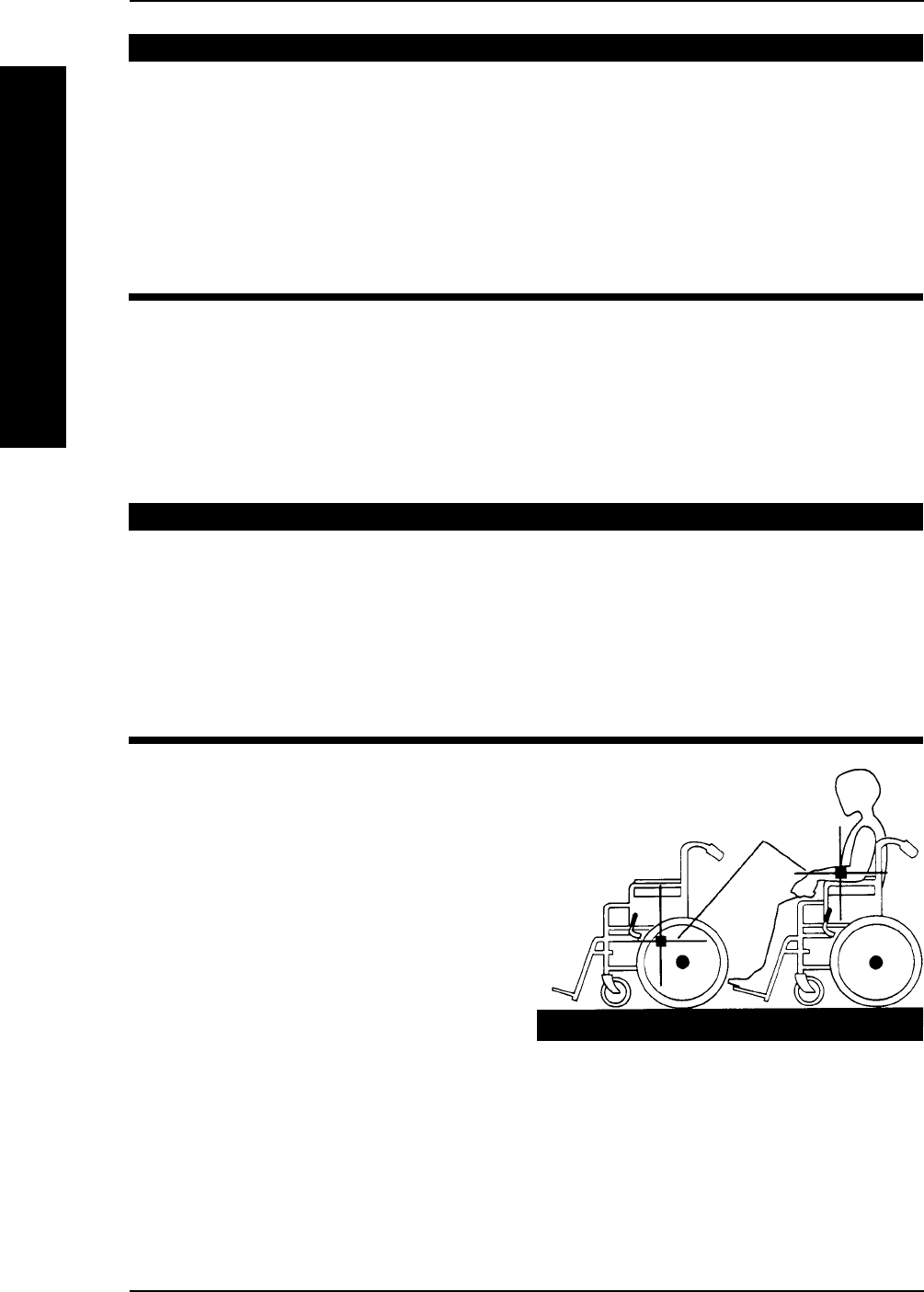
Many activities require the wheelchair
owner to reach, bend and transfer in and
out of the wheelchair. These movements will
cause a change to the normal balance, the
center of gravity, and the weight distribution
of the wheelchair. To determine and estab-
lish your particular safety limits, practice
bending, reaching and transferring activities
in several combinations in the presence of a
qualified healthcare professional BEFORE
attempting active use of the wheelchair.
Proper positioning is essential for your
safety. When reaching, leaning, or bending forward, it is important to use the front casters as
a tool to maintain stability and balance.
CENTER OF
GRAVITY
UNOCCUPIED OCCUPIED
SECTION 1 GENERAL GUIDELINES
GENERAL GUIDELINES
Part No. 1110547 13 Tracer® EXI
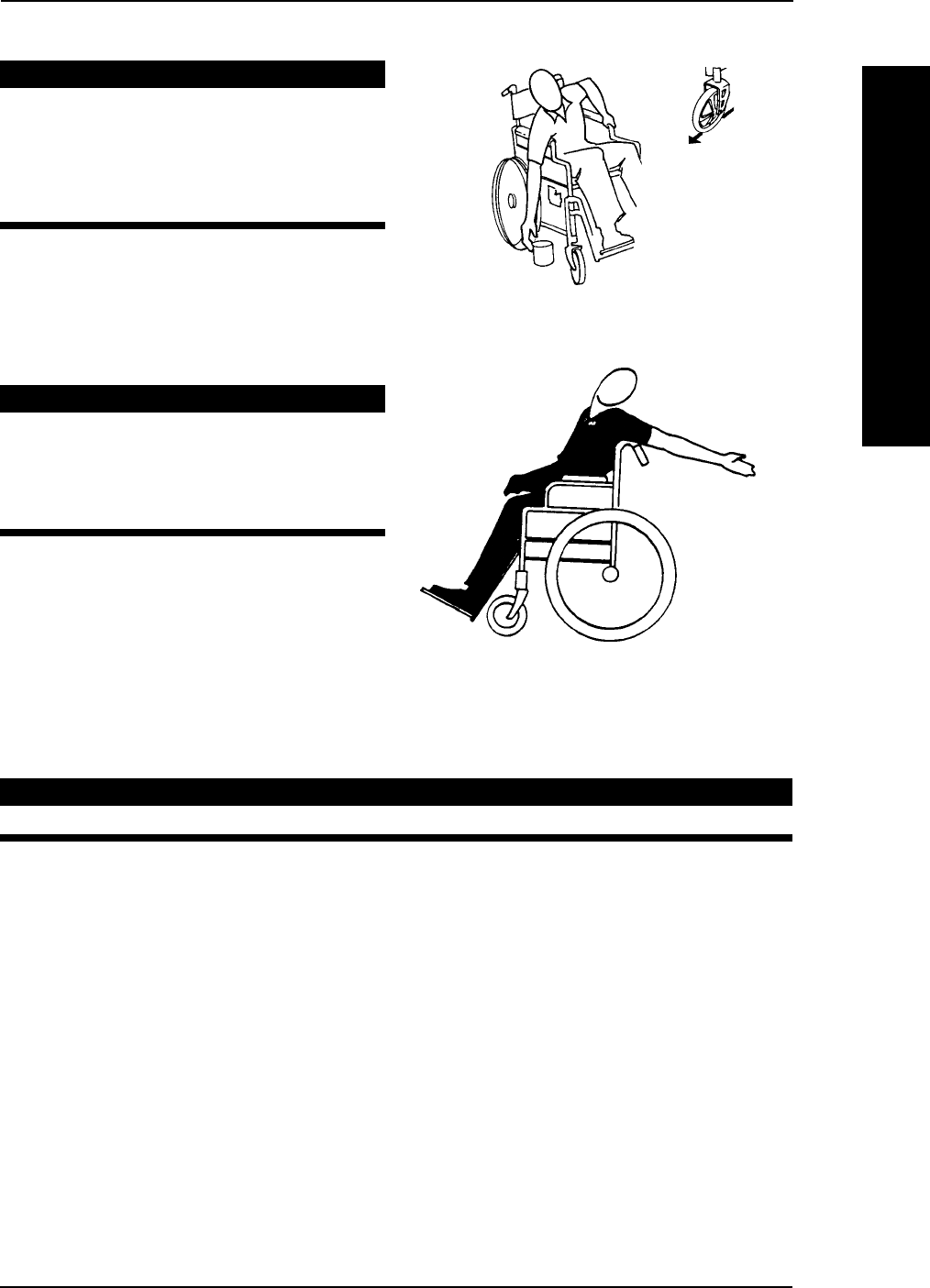
Reaching, Leaning and Bending - Forward.
WARNING
DO NOT attempt to reach objects
if you have to move forward in the
seat or pick them up from the floor
by reaching down between your
knees.
Position the front casters so that they are
extended as far forward as possible and
engage wheel locks.
Reaching, Leaning - Backwards.
WARNING
DO NOT lean over the top of the
back upholstery. This will change
your center of gravity and may
cause you to tip over.
Position wheelchair as close as possible to
the desired object. Point front casters
forward to create the longest possible
wheelbase. Reach back only as far as your
arm will extend without changing your
sitting position.
TIPPING
WARNING
DO NOT tip the wheelchair without assistance.
When tipping the wheelchair, an assistant should grasp the back of the wheelchair on a non-
removable (non-detachable) part. Inform the wheelchair occupant before tipping the wheel-
chair and remind him/her to lean back. Be sure the occupants feet and hands are clear of all
wheels and/or pinch points.
After mastering the techniques of tipping the wheelchair, use one (1) of the following
methods to tackle curbs, short stairs, etc.
SECTION 1
GENERAL GUIDELINES
GENERAL GUIDELINES
Tracer® EXI 14 Part No. 1110547
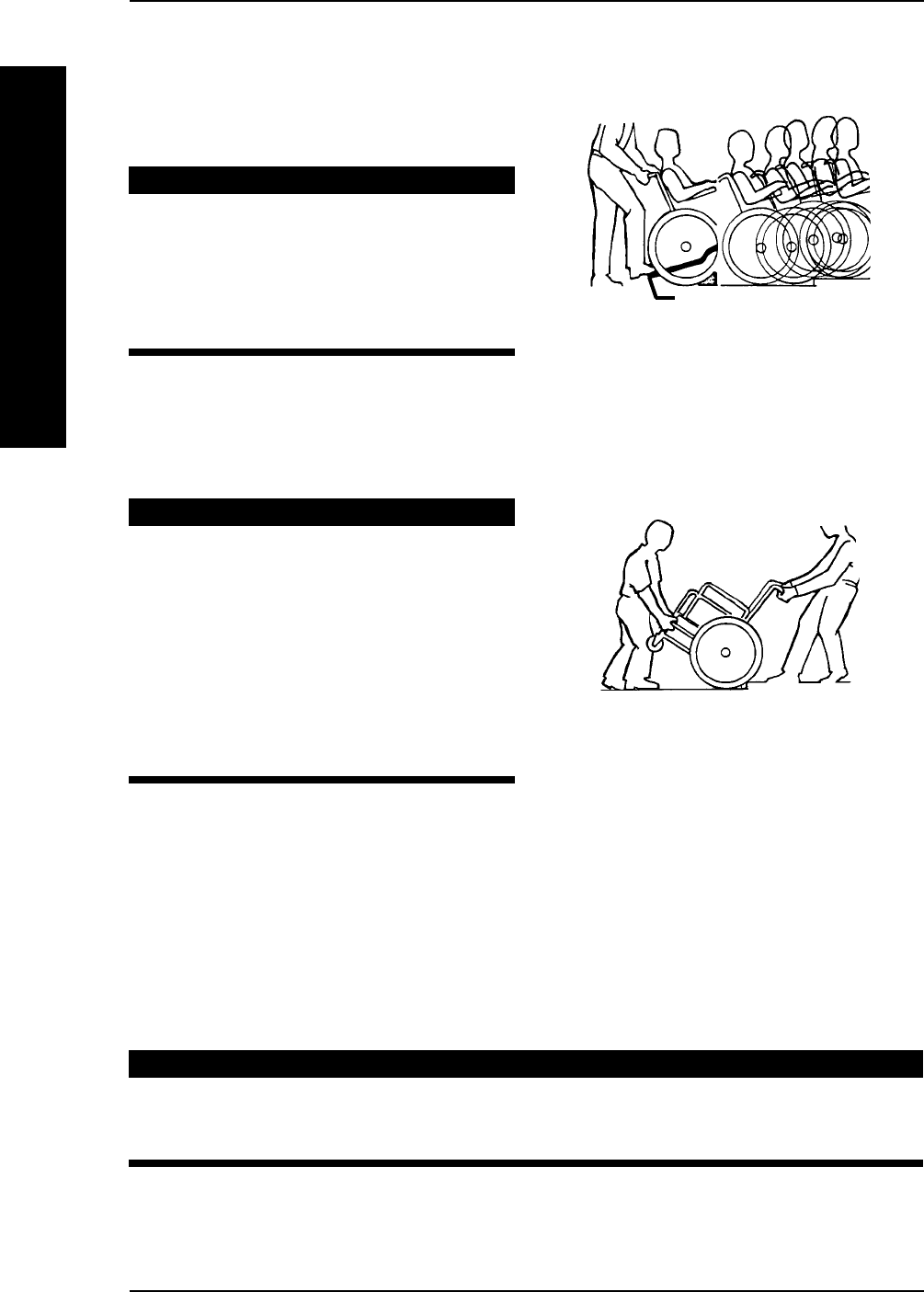
TIPPING - CURBS: METHOD 1 - WHEELCHAIR WITH STEP TUBES:
Place foot on the step tube and begin to tilt the wheelchair toward you. Apply a continu-
ous downward motion until the balance point is achieved and the front casters clear the
curb. At this point, the assistant will feel a
difference in the weight distribution.
WARNING
When lowering the front casters of
the wheelchair, DO NOT let the
wheelchair drop the last few inches to
the ground. This could result in injury
to the occupant and/or damage to the
wheelchair.
Roll the wheelchair forward and slowly lower the front of the wheelchair in one continuous
movement onto the sidewalk. Do not let the wheelchair drop the last few inches to the
ground. This could result in injury to the occupant. Push the wheelchair forward until the
rear wheels roll up and over the curb.
TIPPING - CURBS: METHOD 2 - WHEELCHAIR WITHOUT STEP TUBE
WARNING
Always verify that hand grips on the
rear cane are secure PRIOR to use
when an assistant is used to propel or
lift the chair. Check for any signs of
looseness or deterioration and if
found, contact a qualified technician.
DO NOT attempt to move the
wheelchair by pulling on the hand
grips if they are found to be unsecure
or have deteriorated.
This method requires two (2) assistants. The second assistant should be positioned at the
front of the wheelchair lifting upward on a non-removable (non-detachable) part of the
wheelchair frame when lifting the wheelchair and stabilizing the wheelchair when the wheel-
chair is being lowered to the ground.
The first assistant should stand on the sidewalk and turn the wheelchair so that the rear wheels
are against the curb. Turn the anti-tippers so the anti-tip wheels are pointing up. The wheel-
chair should be tilted back to the balance point and, in one continuous upward movement, the
rear wheels should be pulled up and over the curb. DO NOT return the front casters to the
ground until the wheelchair has been pulled backward far enough for the front casters to clear
the edge of the curb.
WARNING
When lowering the front casters of the wheelchair, DO NOT let the
wheelchair drop the last few inches to the ground. This could result in injury to
the occupant and/or damage to the wheelchair.
Roll the wheelchair backward and SLOWLY lower the wheelchair in one continuous movement.
DO NOT let the wheelchair drop the last few inches to the ground. This could result in injury to the
occupant. Turn the anti-tippers so the anti-tip wheels are facing down.
SECTION 1 GENERAL GUIDELINES
GENERAL GUIDELINES
METHOD 2 - WHEELCHAIR
WITHOUT STEP TUBE
METHOD 1 - WHEELCHAIR WITH
STEP TUBES
Step Tube

Part No. 1110547 15 Tracer® EXI
STAIRWAYS
WARNING
ALWAYS wear your seat/chest positioning strap. Inasmuch as the SEAT/
CHEST POSITIONING STRAP is an option on this wheelchair (You may
order with or without the Seat/Chest Positioning Strap), Invacare strongly
recommends ordering the Seat/Chest Positioning Strap as an additional
safeguard for the wheelchair user.
DO NOT attempt to lift a wheelchair by lifting on any removable
(detachable) parts. Lifting by means of any removable (detachable) parts of a
wheelchair may result in injury to the user and/or assisstant or damage to
the wheelchair.
Always verify that hand grips on the rear cane are secure PRIOR to use when
an assistant is used to propel or lift the chair. Check for any signs of looseness
or deterioration and if found, contact a qualified technician. DO NOT
attempt to move the wheelchair by pulling on the hand grips if they are
found to be unsecure or have deteriorated.
EXTREME CAUTION is advised when it is necessary to move an occupied
wheelchair up or down the stairs. Invacare recommends that, if possible, the
user be removed from the wheelchair prior to moving. Invacare
recommends using two (2) assistants and making thorough preparations.
Make sure to use ONLY secure, non-detachable parts for hand-held
supports.
Follow this procedure for moving the wheelchair between floors when an eleva-
tor is NOT available:
1. If necessary, rotate the anti-tippers so the wheels are facing up.
2. After the wheelchair has been tilted back to the balance point, one assistant (in the rear)
backs the wheelchair up against the first step, while securely grasping a non-removable
(non-detachable) part of the wheelchair for leverage.
3. The second assistant, with a firm hold on a non-detachable part of the framework, lifts
the wheelchair up and over the stair and steadies the wheelchair as the first assistant
places one (1) foot on the next stair and repeats STEP 1.
4. The wheelchair should not be lowered until the last stair has been negotiated and the
wheelchair has been rolled away from the stairway.
5. If necessary, rotate the anti-tippers so the wheels are facing down.
ESCALATORS? SORRY!
DO NOT use an escalator to move a wheelchair between floors. Serious
bodily injury may occur.
SECTION 1
GENERAL GUIDELINES
GENERAL GUIDELINES

Tracer® EXI 16 Part No. 1110547
UNFOLDING AND FOLDING THE WHEELCHAIR
WARNING
Keep hands and fingers clear of moving parts to avoid injury.
DO NOT sit or transfer into the wheelchair unless it is fully open and the seat
frame rails are fully seated into the side frame H-blocks.
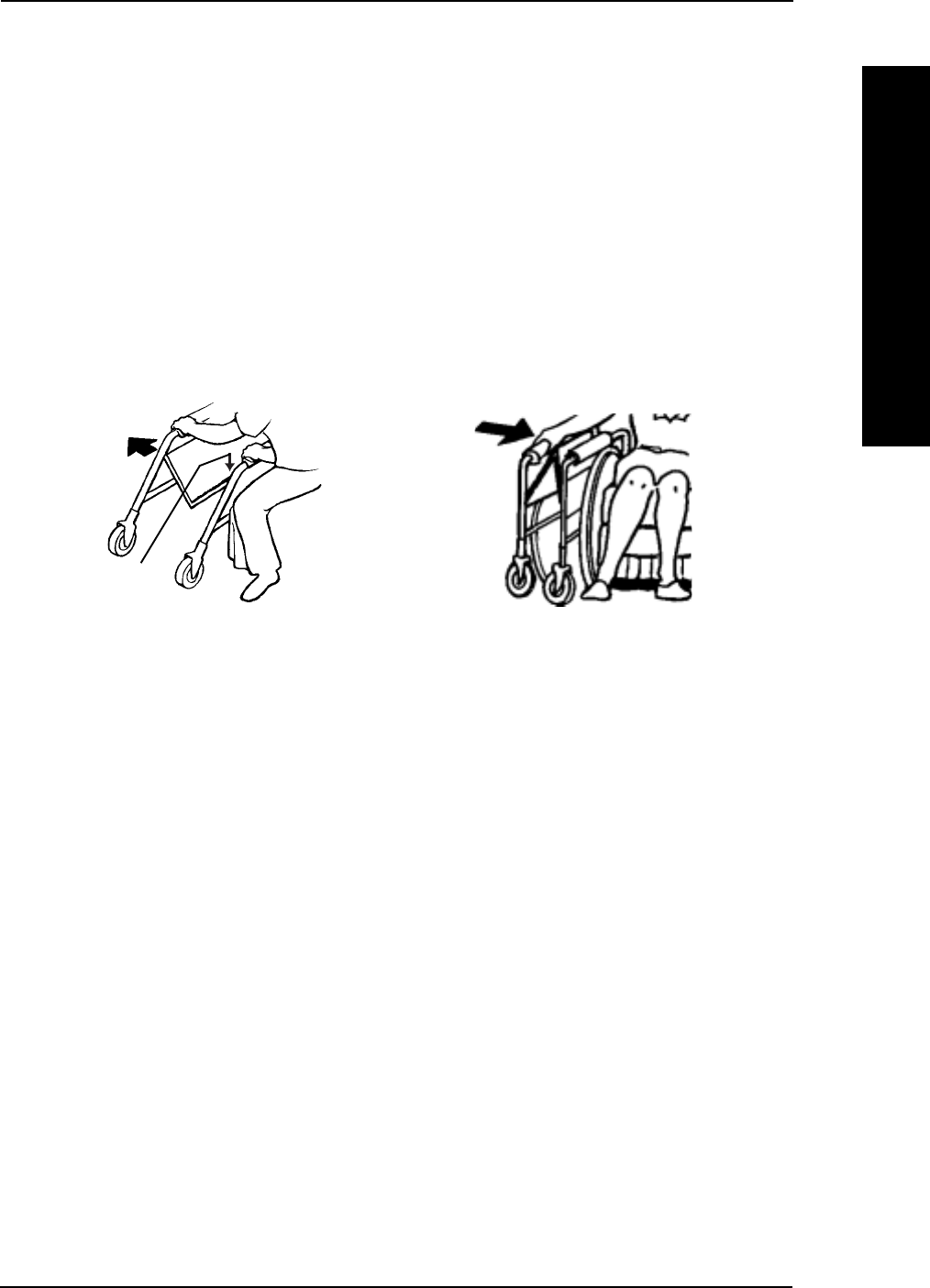
Unfolding.
1. Open the wheelchair by grasping the back cane of the wheelchair closest to you.
2. Tilt the wheelchair towards you (raising the opposite wheel and caster off the ground/
floor).
3. Push downward on the TOP of the seat rail closest to you where the seat upholstery is
attached until the wheelchair is fully open.
4. Engage both wheel locks, open the footrest/legrest for clearance and transfer into the
wheelchair. Refer to TRANSFERRING TO AND FROM OTHER SEATS in this section
of the manual.
TRANSFERRING TO AND FROM OTHER SEATS
WARNING
BEFORE attempting to transfer in or
out of the wheelchair, every
precaution should be taken to reduce
the gap distance. Turn both casters
parallel to the object you are
transferring onto. Also be certain the
wheel locks are engaged to help
prevent the wheels from moving.
CAUTION
When transferring, position yourself as far back as possible in the seat. This
will help prevent broken screws, damaged upholstery and the possibility of
the wheelchair tipping forward.
NOTE: This activity may be performed independently provided you have adequate mobility and upper
body strength.
Position the wheelchair as close as possible along side the seat to which you are transferring,
with the front casters parallel to it. Remove or flip up the armrest. Engage wheel locks. Shift
body weight into seat with transfer.
During independent transfer, little or no seat platform will be beneath you. Use a transfer
board if at all possible.
SECTION 1 GENERAL GUIDELINES
GENERAL GUIDELINES
Part No. 1110547 17 Tracer® EXI
Folding.
1. Swing footrest/legrest and calfpads (if equipped) in locked position to the front of
the wheelchair.
2. Pivot footplates upward to vertical position.
3. With both hands, grasp the middle of the seat upholstery at the front and back edge
and lift up.
4. Continue to close the wheelchair by grasping the back cane furthest from you and
pulling the armrest towards you.
NOTE: If wheelchair is equipped with carry straps, the wheelchair may be closed by pulling up on
the straps.
FOLDING
UNFOLDING
SECTION 1
GENERAL GUIDELINES
GENERAL GUIDELINES
Press DOWN
On Seat Rail

Tracer® EXI 18 Part No. 1110547
SECTION 2 SAFETY INSPECTION
SAFETY INSPECTION CHECKLIST
NOTE: Every six (6) months or as necessary, take your wheelchair to a qualified technician for a thorough
inspection and servicing. Regular cleaning will reveal loose or worn parts and enhance the smooth opera-
tion of your wheelchair. To operate properly and safely, your wheelchair must be cared for just like any
other vehicle. Routine maintenance will extend the life and efficiency of your wheelchair.
Section 2 - Safety Inspection includes the following:
Safety Inspection Checklist Troubleshooting Maintenance
SAFETY INSPECTION
Initial adjustments should be made to suit your personal body structure needs and preferences.
Thereafter follow these maintenance procedures:
ITEM Initially Weekly Monthly Periodically
GENERAL
Wheelchair rolls straight (no excessive drag or pull to one side). X X
Inspect for loose/missing/broken hardware in all locations. X X
FRAME AND CROSSBRACES
Inspect for bent frame or crossbraces. X X
WHEEL LOCKS
Do not interfere with tires when rolling. X X
Pivot points free of wear and looseness. X X
Wheel locks easy to engage. X X
Wheel locks prevent wheelchair from moving when engaged. X X
SEAT AND BACK
Inspect upholstery for rips or sagging. X X
Inspect for loose or broken hardware. X X
Inspect cane hand grips for wear/looseness/deterioration. X X
TIRES
Inspect for flat spots, cracks and wear. X X
If pneumatic tires check for proper inflation. X X
CAUTION: As with any vehicle, the wheels and
tires should be checked periodically for cracks and
wear, and should be replaced if damaged.
REAR WHEELS
No excessive side movement or binding when lifted and spun. X X
Inspect wheels for cracks and wear (hub and rim). X X
Inspect for cracked, bent or broken spokes. X X
HANDRIMS
Inspect for signs of rough edges or peeling. X X
FRONT CASTERS/FORKS
Inspect wheel/fork assembly for proper tension by
spinning caster; caster should come to a gradual stop. X X
Adjust bearing system if wheel wobbles noticeably or
binds to a stop. Ensure wheel bearings are clean and
free of moisture. X X
Check headtube locknuts for tightness. X X
Inspect casters for cracks and wear (hub and rim). X X
Inspect for cracked or broken spokes. X X
CAUTION: As with any vehicle, the wheels and
tires should be checked periodically for cracks and
wear, and should be replaced if damaged.
CLEANING
Clean upholstery and armrests. X X

Part No. 1110547 19 Tracer® EXI
TROUBLESHOOTING
MAINTENANCE
MAINTENANCE SAFETY PRECAUTIONSMAINTENANCE SAFETY PRECAUTIONS
MAINTENANCE SAFETY PRECAUTIONSMAINTENANCE SAFETY PRECAUTIONS
MAINTENANCE SAFETY PRECAUTIONS
WARNING
After ANY adjustments, repair or service and BEFORE use, make sure all
attachment hardware is tightened securely - otherwise, injury or damage
may result.
CAUTION
DO NOT overtighten hardware attaching to the frame. This could cause
damage to the frame tubing.
SUGGESTED MAINTENANCE PROCEDURES
1. Before using your Tracer EXI wheelchair, make sure all nuts and bolts are tight. Check
all parts for damage or wear and replace. Check all parts for proper adjustment.
WARNING
DO NOT use the wheelchair unless it has the proper tire pressure (p.s.i.).
DO NOT overinflate the tires. Failure to follow these instructions may
cause the tire to explode and cause bodily harm.
2. If tires are pneumatic, recommended tire pressure is listed on the sidewall of the
tire.
CAUTION
As with any vehicle, the rear wheels, casters and tires should be checked
periodically for cracks and wear, and should be replaced if damaged.
3. The rear wheels, casters and tires should be checked periodically for cracks and
wear, and should be replaced by a qualified technician if damaged.
4. Periodically check handrims to ensure they are secured to the rear wheels. If loose,
have them tightened by a qualified technician.
5. Periodically adjust wheel locks as tires wear. Refer to WHEEL LOCK ADJUST-
MENT in SECTION 8 of this manual.
SECTION 2
SAFETY INSPECTION
SAFETY INSPECTION
Chair Chair Sluggish Squeaks
Veers 3 Turn or Caster and Looseness
Right/Left Wheels Performance Flutter Rattles in Chair SOLUTIONS
X X X X If pneumatic, check tires for
correct and equal pressure.
X X X X X Check for loose stem nuts and
bolts.

Tracer® EXI 20 Part No. 1110547
SECTION 2 SAFETY INSPECTION
SAFETY INSPECTION
SAFETY INSPECTION
6. Periodically check caster and rear wheel bearings to make sure they are clean and
free from moisture. Use a Teflon® lubricant if necessary.
WARNING
When cleaning rear cane or hand grip areas use only a clean towel lightly
dampened with cool water. Verify that grips are dry prior to use. Use of
soap or ammonia based cleaning solutions will result in the hand grips
sliding off the cane assembly. Failure to observe this warning may result
in injury to the user or bystanders.
7. Hand grips should be checked monthly for wear/looseness. Clean if desired.
8. Check upholstery for sagging, rips or tears.

Part No. 1110547 21 Tracer® EXI
FRONT RIGGINGS
FRONT RIGGINGS
SECTION 3
Section 3 - Front Riggings includes the following:
Installing/Removing the Front Riggings
Footplate Height Adjustment
Adjusting the Elevating Legrest Assembly
Heel Loop Replacement
WARNING
After ANY adjustments, repair or service and BEFORE use, make sure all
attaching hardware is tightened securely - otherwise injury or damage may
occur.
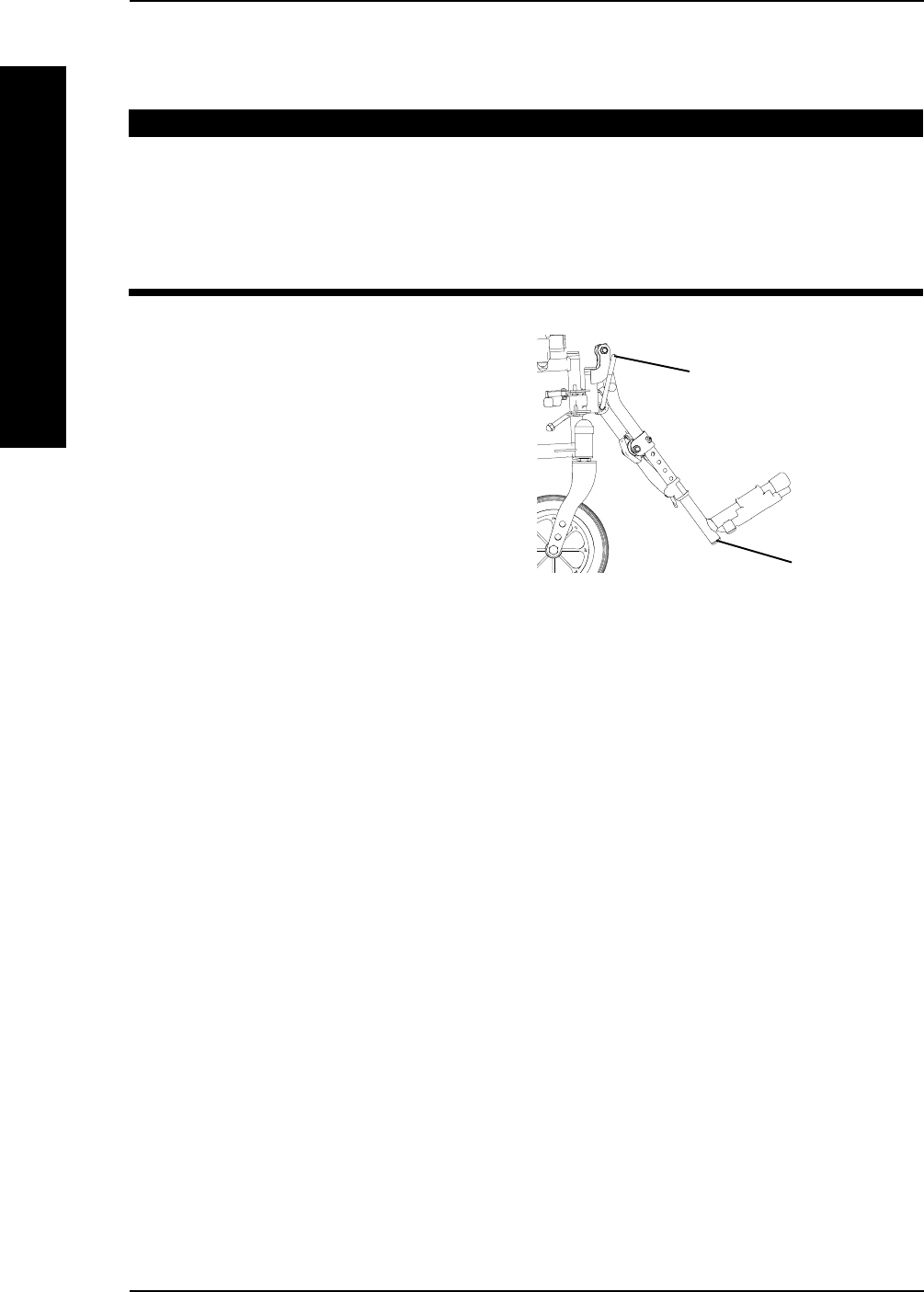
INSTALLING/REMOVING THE FRONT RIGGINGS
(FIGURE 1)
NOTE: This procedure applies to the swingaway footrests and the elevating legrest.
INSTALLING
1. Turn the front rigging assembly to the
side (open front rigging is perpendicu-
lar to wheelchair).
2. Install the hinge plates on the front
rigging assembly onto the hinge pins on
the wheelchair frame.
3. Push the front rigging assembly to-
wards the inside of the wheelchair
until it locks into place.
NOTE: The footplate will be on the inside of the
wheelchair when locked in place.
4. Repeat this procedure for the other
footplate assembly.
5. To release the front rigging, push the front rigging release lever inward, rotate front
rigging outward.
REMOVING
1. Push the front rigging release lever inward
2. Rotate swingaway front rigging assembly outward.
3. Lift the swingaway front rigging assembly off of the hinge pins.
FIGURE 1 - INSTALLING/REMOVING
THE SWINGAWAY front rigging
Hinge Pins
Front Rigging
Assembly
Hinge
Plates
Front Rigging Release
Lever
Footplate
NOTE: Swingaway footrests shown.
Tracer® EXI 22 Part No. 1110547
SECTION 3 FRONT RIGGINGS
FRONT RIGGINGS
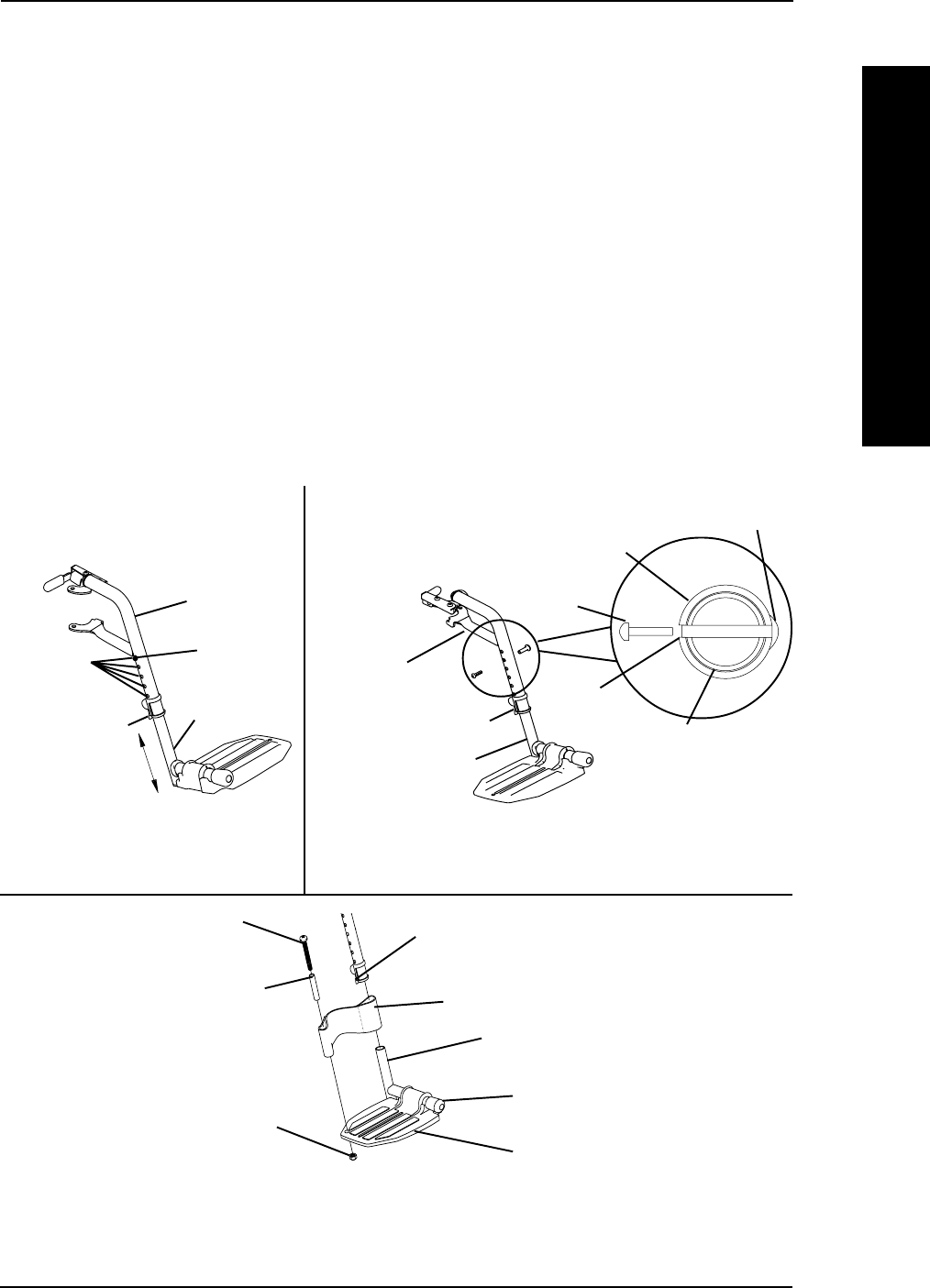
FOOTPLATE HEIGHT ADJUSTMENT
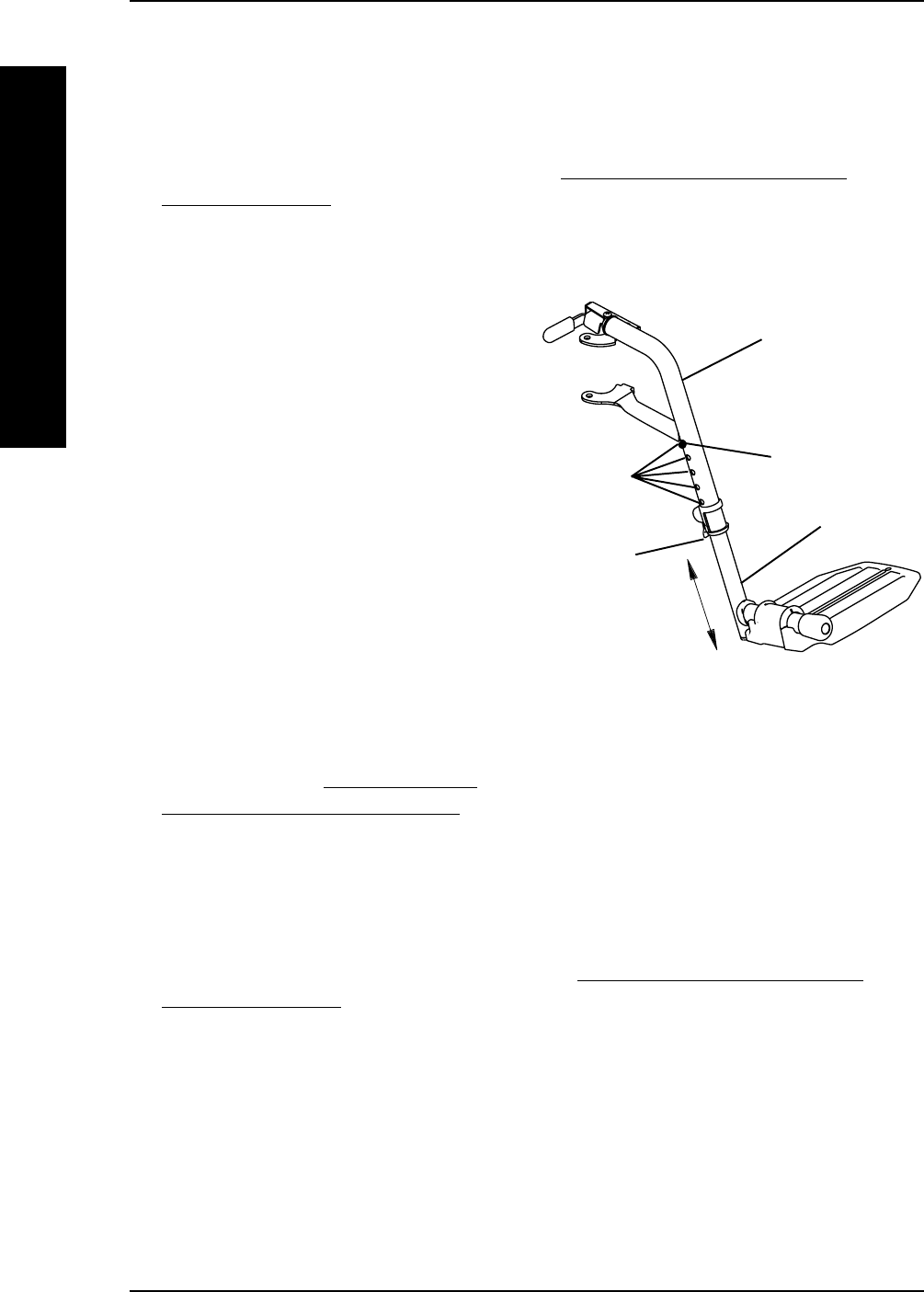
SPRING BUTTON HEIGHT ADJUSTMENT (FIGURE 2)
NOTE: This procedure applies to the swingaway front riggings and swingaway elevating legrest.
1. Remove the front rigging assembly. Refer to INSTALLING/REMOVING THE
FRONT RIGGING in this section of the manual.
NOTE: Lay the front rigging assembly on a flat surface to simplify this procedure.
2. Pull the cam lock lever UP to UN-
LOCKED position.
NOTE: The elevating legrest has two (2) sets of
release buttons, one (1) set above the other.
Each set will be visible one at a time allowing
finer footplate height adjustment.
3. Push IN the release buttons and reposi-
tion the footplate assembly to the
desired height.
4. Ensure that the release buttons fully
protrude from holes on both sides of
the front rigging support.
5. Rotate cam lock lever DOWN to
LOCKED position.
6. Repeat this procedure for the other
footplate, if necessary.
7. Reinstall the swingaway front rigging
assembly. Refer to INSTALLING/RE-
MOVING THE FRONT RIGGING in
this section of the manual.
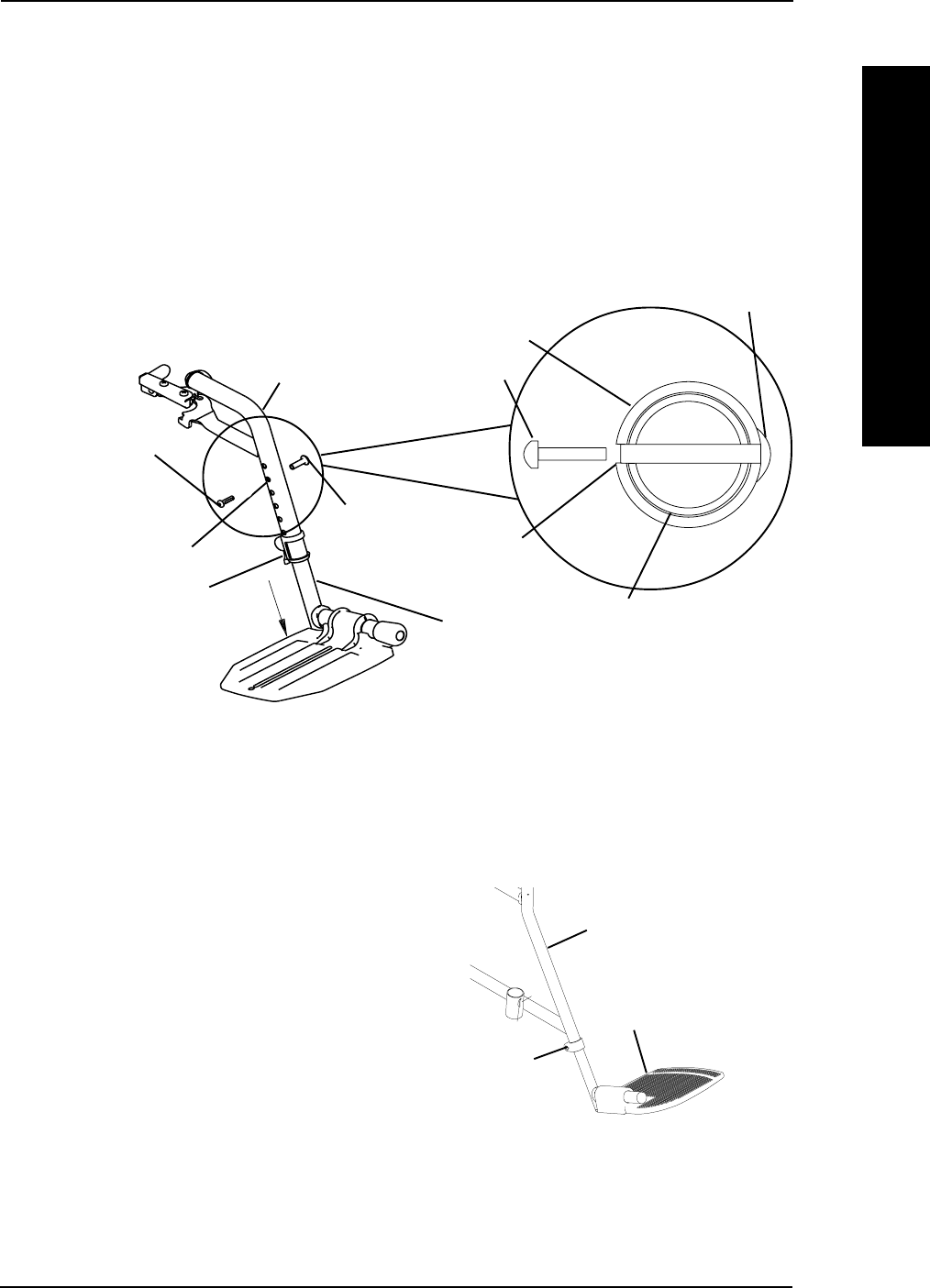
BOLT-IN-PLACE HEIGHT ADJUSTMENT (FIGURE 3)
NOTE: This procedure applies to the swingaway footrests and swingaway elevating legrest.
1. Remove the swingaway front rigging. Refer to INSTALLING/REMOVING THE
FRONT RIGGINGS in this section of the manual.
NOTE: Lay the front rigging assembly on a flat surface to simplify this procedure.
2. Pull the cam lock lever UP to UNLOCKED position.
3. Using a screw driver to hold the riv nut in position, remove the button head screw
from the rive nut.
4. Remove the riv nut and button head screw securing the footplate assembly to the
front rigging support.
5. Adjust the footplate assembly height by aligning the desired adjustment holes in the
upper front rigging support and lower footrest assembly.
FIGURE 2 - FOOTPLATE HEIGHT
ADJUSTMENT - SPRING BUTTON
HEIGHT ADJUSTMENT
NOTE: Swingaway footrest shown.
Front Rigging
Support
Footplate
Assembly
Cam Lock
Lever
Release Button
Adjustment
Holes
Part No. 1110547 23 Tracer® EXI
SECTION 3FRONT RIGGINGS
FRONT RIGGINGS
FIGURE 3 - FOOTPLATE HEIGHT ADJUSTMENT - BOLT-IN-PLACE
HEIGHT ADJUSTMENT
6. From the outside of the swingaway front rigging, insert the riv nut through both the
front rigging support and the footplate assembly.
7. From the inside of the swingaway front rigging, insert the button head screw through
the appropreate adjustment hole and thread into the riv nut.
8. Using a screwdriver to hold the riv nut in position, securely tighten the button head
screw. Torque to 32 in-lbs.
9. Rotate cam lock lever DOWN to LOCKED position.
10. Repeat STEPS 1-8 to adjust the remaining footrest.
OUTSIDE OF
SWINGAWAY
FRONT
RIGGING
Riv Nut
INSIDE OF
SWINGAWAY
FRONT
RIGGING
Button Head Screw
Footplate
Assembly
Front Rigging
Support
Cam Lock Lever
Adjustment Hole
NOTE: Swingaway footrests shown.
Riv Nut
Button Head
Screw
Footplate Assembly
Front Rigging
Support
Adjustment
Hole
FIXED FRAME (FIGURE 4)
1. Remove impact guards and/or calf strap,
if necessary.
2. Loosen, but do not remove the bolt
and locknut that secure the lower
footrest assembly to the upper footrest
support.
3. Reposition the lower footrest assembly
to the desired height.
4. Securely tighten the bolt and locknut.
5. Repeat this procedure for the other footrest, if necessary.
6. Replace impact guards and/or calf strap, if necessary.
Bolt and
Locknut
Wheelchair
Frame
Footplate
Assembly
FIGURE 4 - FOOTPLATE HEIGHT
ADJUSTMENT - FIXED FRAME
Tracer® EXI 24 Part No. 1110547
SECTION 3 FRONT RIGGINGS
FRONT RIGGINGS
HEEL LOOP REPLACEMENT (FIGURE 6)
1. Pull the cam lock lever UP to UNLOCKED position.
2. Perform one (1) of the following as shown in DETAIL "A" of FIGURE 6:
A. FOOTPLATES WITH SPRING BUTTONS:Push IN the release buttons and
remove the footplate assembly from the front rigging support.
B. BOLT-IN-PLACE FOOTPLATES:
Using a screw driver to hold the riv nut in position, remove the button head
screw from the rive nut.
Remove the riv nut and button head screw securing the footplate assembly to
the front rigging support.
3. Remove the mounting screw, spacer and locknut that secure the heel loop to the
footplate.
4. Remove EXISTING heel loop from slide tube.
5. Install NEW heel loop onto slide tube.
6. Install the mounting screw, spacer and locknut to secure the heel loop to the
footplate Tighten until the spacer is secure.
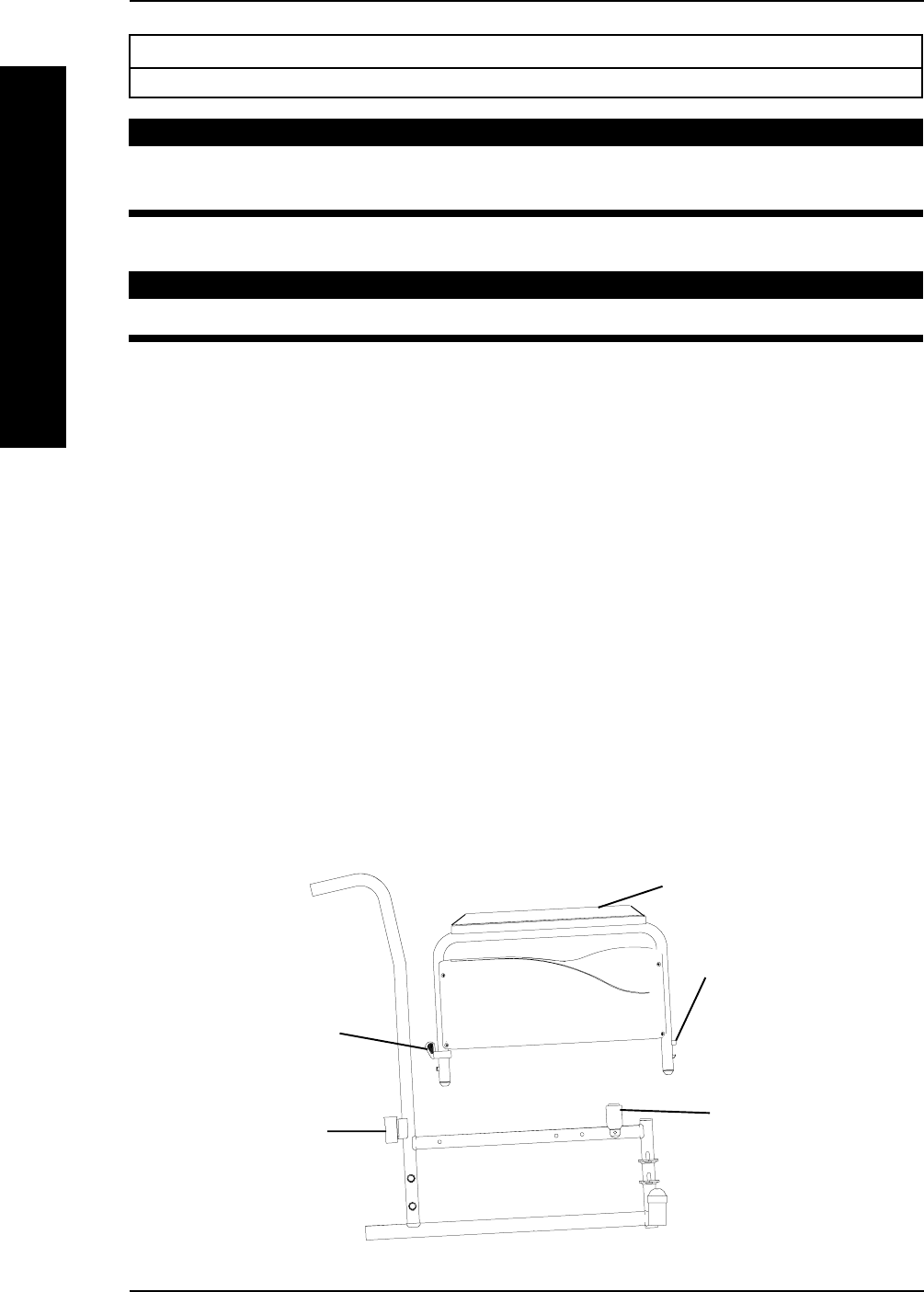
RAISING/LOWERING THE ELEVATING LEGREST
ASSEMBLY (FIGURE 5)
WARNING
Ensure hands and fingers are clear of elevating legrest mechanism BEFORE
pushing release lever to lower the elevating legrest. Otherwise injury may
occur due to pinch points.
The wheelchair users leg MUST be supported by an assistant BEFORE
attempting to lower legrest.
1. To raise the elevating legrest, the
assistant should grab hold of the
support tube and raise elevating leg-
rests until the desired height is ob-
tained.
2. To lower the elevating legrest, per-
form the following:
A. Support user leg with one (1) hand.
B. Push release lever downward with
other hand.
C. Gently, lower user leg down and
rest against the legrest.
FIGURE 5 - ADJUSTING THE
ELEVATING LEGREST ASSEMBLY
Support Tube
Release
Lever
Part No. 1110547 25 Tracer® EXI
SECTION 3FRONT RIGGINGS
FRONT RIGGINGS
FIGURE 6 - HEEL LOOP REPLACEMENT
Spacer
Locknut
Cam Lock Lever
Heel Loop
Slide Tube
Mounting Screw
Footplate Assembly
Footplate
OUTSIDE OF
SWINGAWAY
FRONT
RIGGING
INSIDE OF
SWINGAWAY
FRONT
RIGGING
NOTE: Swingaway
footrests shown.
Footplate Assembly
Front Rigging
Support
Cam Lock Lever
Riv Nut
Button Head
Screw
Footplate
Assembly
Front Rigging
Support
Adjustment
Hole
NOTE: Swingaway footrest shown.
Front Rigging
Support
Footplate
Assembly
Cam Lock Lever
Release
Button
Adjustment
Holes
DETAIL "A"
BOLT-IN-PLACE
FOOTPLATES
FOOTPLATES WITH
SPRING BUTTONS
7. Insert the lower footrest assembly into the upper footrest assembly to desired
height.
8. Perform one (1) of the following as shown in DETAIL "A" of FIGURE 6:
A. FOOTPLATES WITH SPRING BUTTONS: Ensure that the release buttons fully
protrude from holes on both sides of the upper footrest support.
B. BOLT-IN-PLACE FOOTPLATES:
From the outside of the swingaway front rigging, insert the riv nut through
both the front rigging support and the footplate assembly.
From the inside of the swingaway front rigging, insert the button head screw
through the appropreate adjustment hole and thread into the riv nut.
. Using a screwdriver to hold the riv nut in position, securely tighten the
button head screw. Torque to 32 in-lbs.
9. Rotate cam lock lever DOWN to LOCKED position.
Tracer® EXI 26 Part No. 1110547
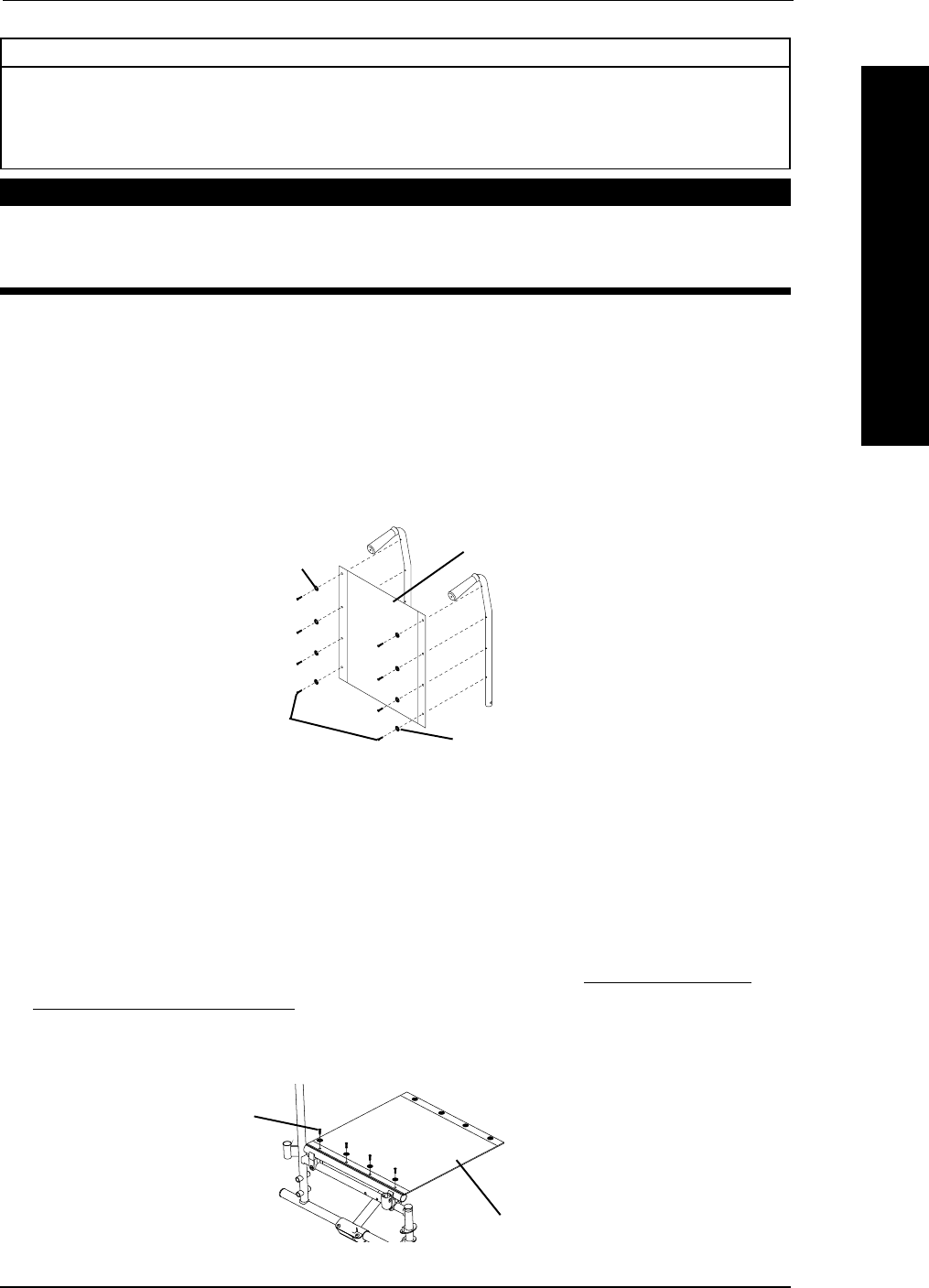
Armrest
Release
Button
Armrest
Release
Handle
Armrest
REAR
Arm
Socket
FRONT
Arm
Socket
FIGURE 1 - REMOVING/INSTALLING STANDARD ARMREST
SECTION 4 ARMS
ARMS
Section 4 - Arms includes the following:
Removing/Installing Standard Armrest
WARNING
After ANY adjustments, repair or service and BEFORE use, make sure all
attaching hardware is tightened securely - otherwise injury or damage may occur.
REMOVING AND INSTALLING ARMREST (FIGURE 1)
WARNING
Make sure the armrest is securely locked BEFORE using the wheelchair.
NOTE: This procedure applies to wheelchairs with removable arms only.
REMOVING ARMREST
1. Push down on armrest to ensure it is fully seated in front and rear sockets.
NOTE: This step is needed to prevent the release buttons from hanging up on sockets.
2. Unlock the rear armrest by rotating the armrest release lever towards the inside of the wheelchair.
3. Press IN the armrest release button at the front of the armrest.
4. While pressing in the armrest release button, remove the armrest from the arm
sockets by pulling straight up.
INSTALLING ARMREST
NOTE: Rear armrest release lever must be in the unlocked position when installing the armrest.
1. Position the armrest just above the front and rear arm sockets.
2. Push arm down evenly at the front and rear until the front armrest release button snaps into the
front arm socket.
3. Lock rear armrest by turning the armrest release lever towards the outside of the wheelchair.
4. Ensure armrest is locked securely in the arm sockets by gently lifting up. If not locked, repeat
STEPS 1-3.
Part No. 1110547 27 Tracer® EXI
Phillips Screws
Section 5 - Seat and Back includes the following:
Replacing Back Upholstery
Replacing Seat Upholstery
Adjusting Seat Width
WARNING
After ANY adjustments, repair or service and BEFORE use, make sure all
attaching hardware is tightened securely - otherwise injury or damage
may occur.
REPLACING BACK UPHOLSTERY (FIGURE 1)
1. Remove the eight (8) phillips screws and washers that secure the existing back
upholstery to the back canes.
2. Remove existing back upholstery from the back canes.
3. Securely tighten the new back upholstery to the back canes with the phillips screws
and washers.
FIGURE 1 - REPLACING BACK UPHOLSTERY
Phillips
Screws
Washers
Washers
Back Upholstery
REPLACING SEAT UPHOLSTERY (FIGURE 2)
1. Remove the eight (8) phillips screws and washers that secure the existing seat
upholstery to the crossbraces.
2. Remove the existing seat upholstery from the crossbraces.
3. Ensure positioning of seat positioning strap (if used). Refer to INSTALLING THE
SEAT POSITIONING STRAP in SECTION 10 of this manual.
4. Install new seat upholstery by reversing STEPS 1-2.
FIGURE 2 - REPLACING SEAT UPHOLSTERY
Seat Upholstery
SEAT AND BACK SECTION 5
SEAT AND BACK
Tracer® EXI 28 Part No. 1110547
SEAT AND BACKSECTION 5
SEAT AND BACK
ADJUSTING THE SEAT WIDTH
EXI WITH SWINGAWAY FRONT RIGGINGS (FIGURE 3)
NOTE: When adjusting the seat width of the wheelchair, the back and seat upholstery MUST be
changed. If applicable, the headrest pillow and headrest upholstery MUST be changed as well.
1. Remove the existing back and seat upholstery from the wheelchair. Refer to RE-
PLACING BACK UPHOLSTERY and REPLACING THE SEAT UPHOLSTERY in this
section of the manual.
2. Remove the four (4) button screws and locknuts that secure the two (2) pivot links
to the wheelchair frame and crossbraces.
3. Remove the two (2) button screws, locknuts and crossbrace saddle that secure the
bottom of the crossbrace to the wheelchair frame. Repeat for other crossbrace.
4. Remove the hex screw, coved washers, washers and locknut that secure the two (2)
crossbraces together. See DETAIL "B".
NOTE: Note the orientation of the coved washers, washers and locknut for assembling the NEW
crossbraces. See DETAIL "B".
5. Assemble the two (2) NEW crossbraces together with the existing hex screw,
coved washers, washers and locknut. Securely tighten. Refer to DETAIL "B" for
hardware orientation.
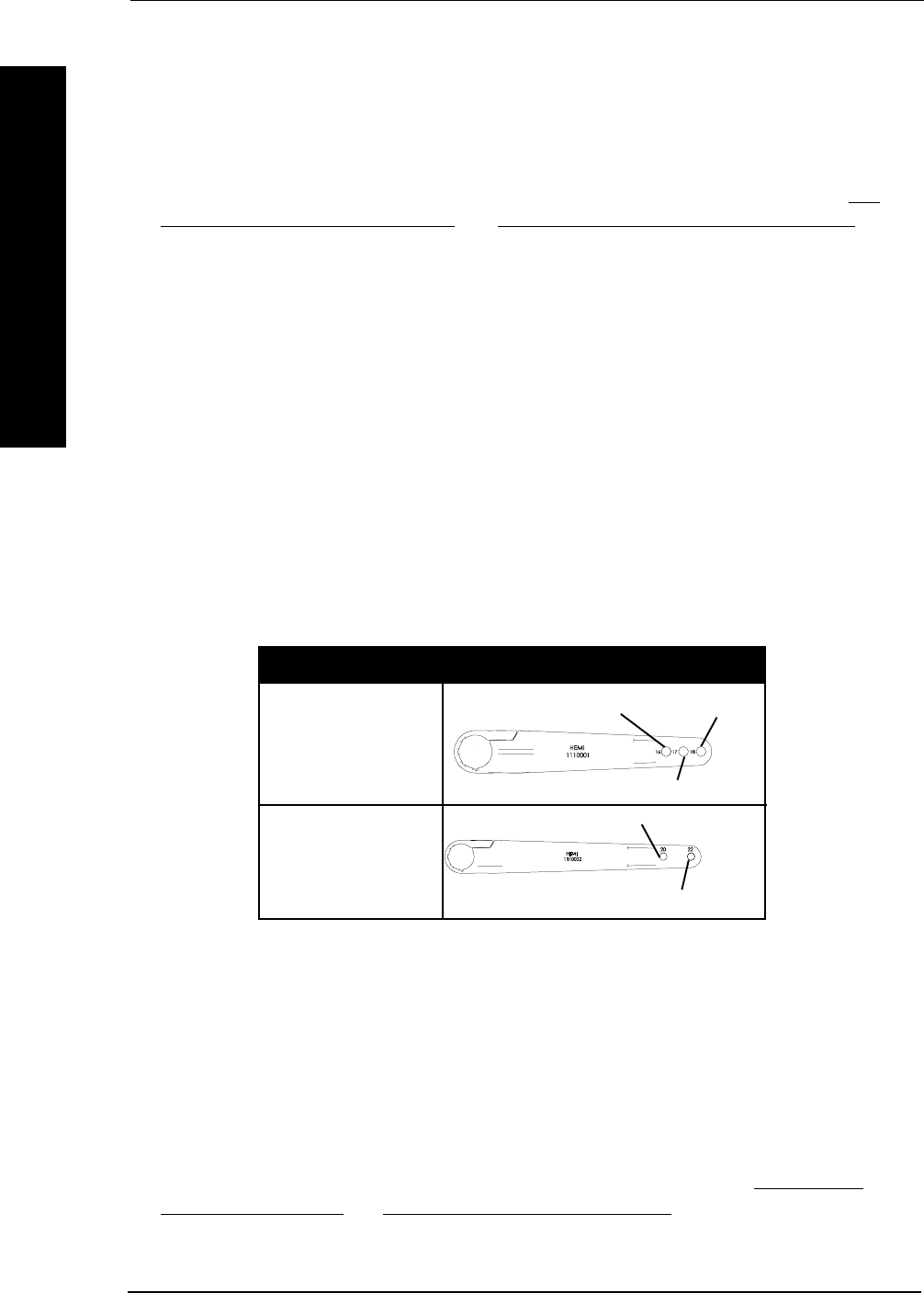
6. Determine the correct pivot link and mounting hole to use with the desired seat
width. See chart below.
16-INCH
18-INCH
20-INCH
16-Inch 18-Inch
DO NOT USE
20-Inch
DO NOT USE
7. Secure the pivot links to the crossbraces and wheelchair frame with the four (4) button
screws and locknuts. Securely tighten.
NOTE: Position crossbrace saddle on wheelchair frame using the washer on the underside of the wheelchair
frame as a reference. See DETAIL "A" for proper positioning of the crossbrace saddle.
8. Reinstall the two (2) button screws, locknuts and crossbrace saddle that secures the bottom
of the NEW crossbrace to the wheelchair frame. Refer to DETAIL "B" for hardware orien-
tation. Repeat for opposite crossbrace. Securely tighten.
9. Install the NEW back and seat upholstery onto the wheelchair. Refer to REPLACING
BACK UPHOLSTERY and REPLACING SEAT UPHOLSTERY in this section of the manual.
SEAT WIDTH PIVOT LINK
X
X
Part No. 1110547 29 Tracer® EXI
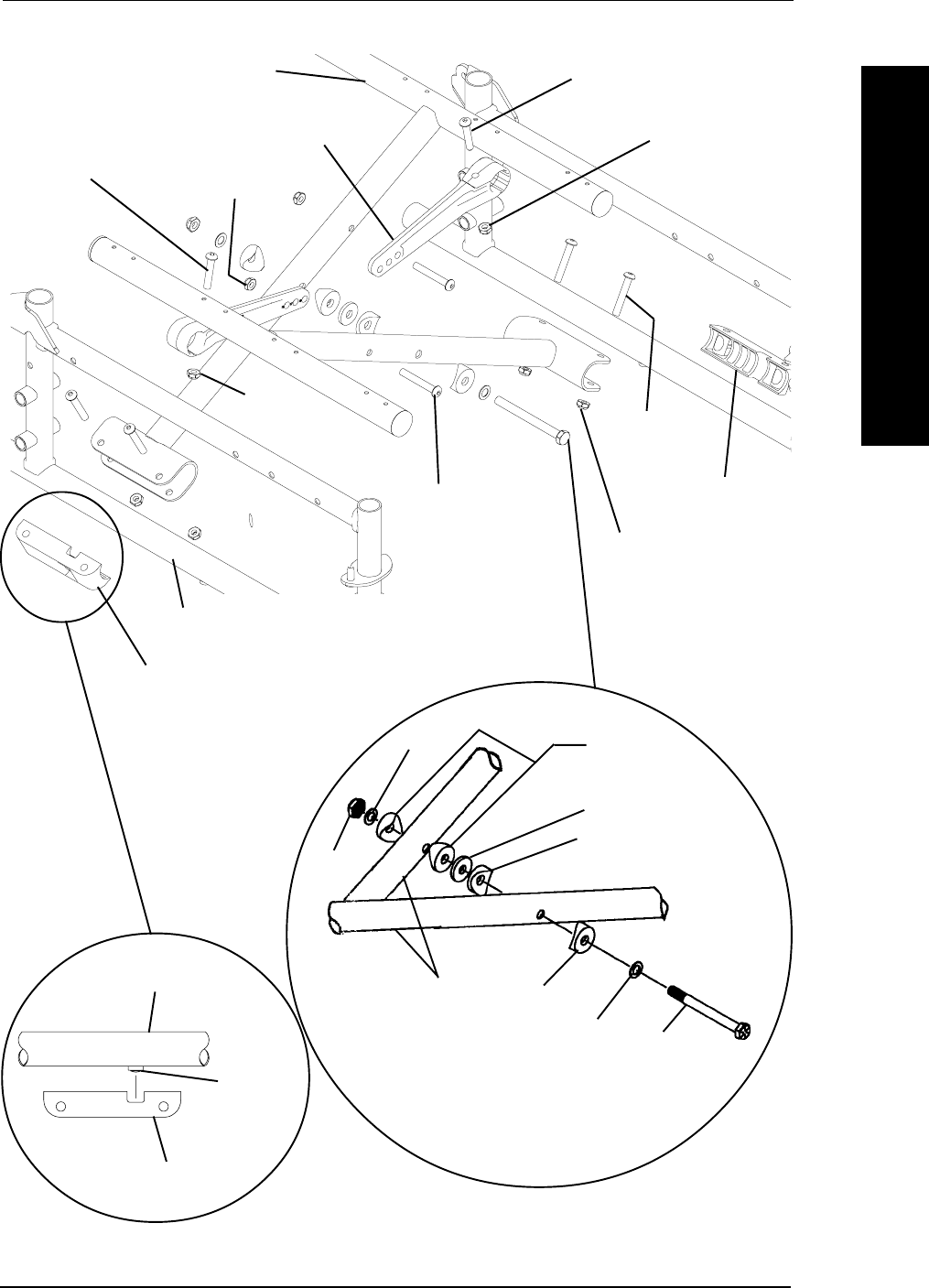
FIGURE 3 - ADJUSTING THE SEAT WIDTH - EXI WITH SWINGAWAY
FRONT RIGGINGS
Crossbrace
Saddle
Washer
Wheelchair
Frame
Crossbrace
Saddle
(STEPS 3,8)
Crossbrace
(STEPS 4,5)
Button Screw
(STEPS 3,8)
Crossbrace
Saddle
(STEPS 3,8)
Locknut
(STEPS 3,8)
Pivot Link
(STEPS 2,7)
Locknut
(STEPS 2,7)
Locknut
(STEPS 2,7)
Button Screw
(STEPS 2,7)
Wheelchair
Frame
Locknut
(STEPS 2,7)
Button Screw
(STEPS 2,7)
DETAIL
"A"
Button Screw
(STEPS 2,7)
Hex Screw
Washer Coved
Washers
Locknut
Washer
Coved
Washers Washer
Coved
Washer
DETAIL "B" -
CROSSBRACE HARDWARE
(STEPS 4,5)
Crossbraces
SECTION 5SEAT AND BACK
SEAT AND BACK
Tracer® EXI 30 Part No. 1110547
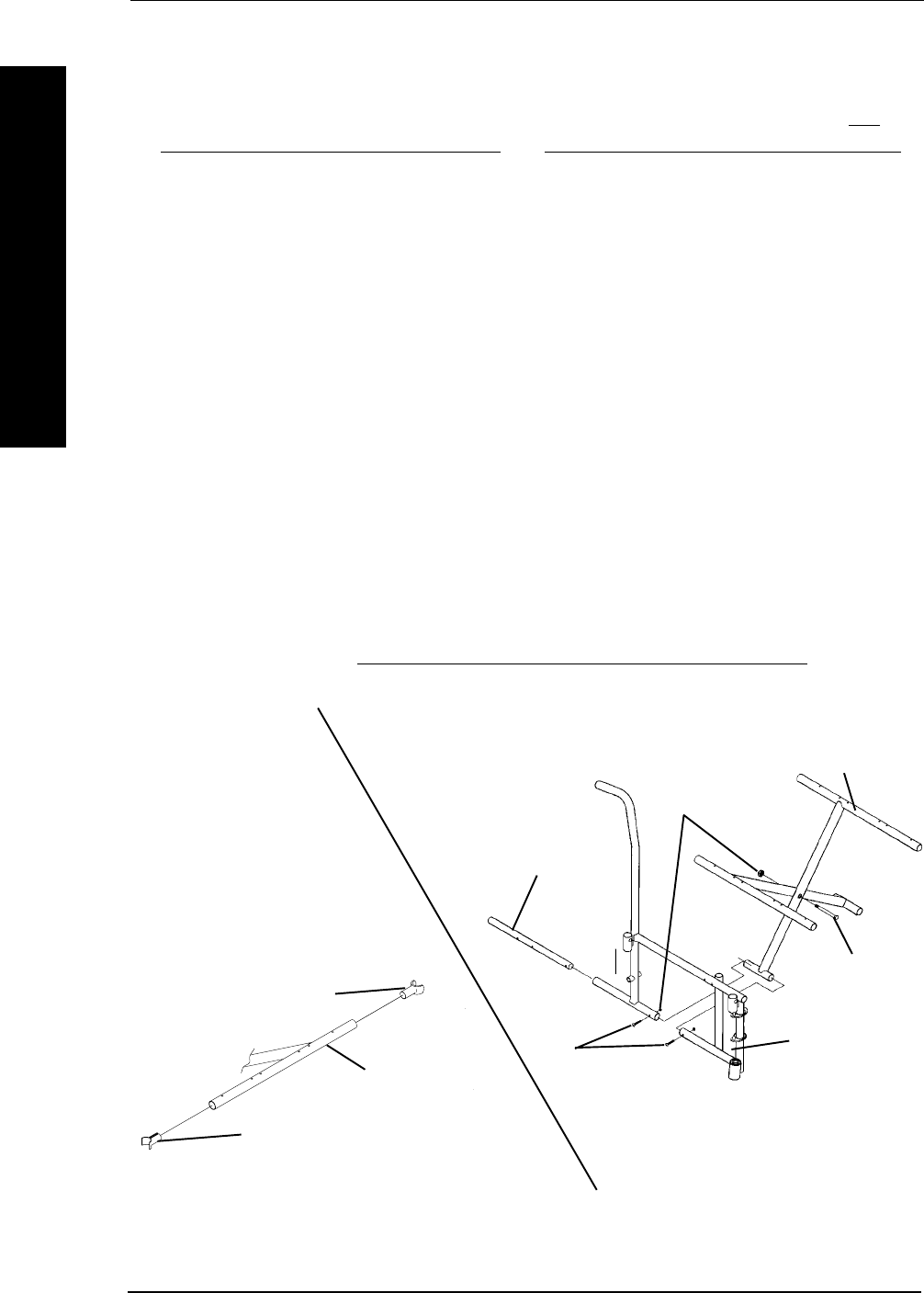
EXI WITH FIXED FRAME (FIGURE 4)
Removing Lower Mounting Hardware (DETAIL "A").
1. Remove the existing back and seat upholstery from the wheelchair. Refer to RE-
PLACING THE BACK UPHOLSTERY and REPLACING THE SEAT UPHOLSTERY
in this section of the manual.
NOTE: If adjusting the seat width of the wheelchair, back and seat upholstery as well as the
crossbraces MUST be replaced.
2. Remove the four (4) screws and locknuts that secure the insert tube to the lower
wheelchair frame.
3. Remove the inserts from the rear of the wheelchair.
4. Remove the hex screw and locknut that secure the two (2) existing crossbraces
together.
Removing Upper Mounting Hardware (DETAIL "B").
1. While pushing down on the rear seat guide, pull up the front seat guide until the
front seat guide releases from the wheelchair frame.
2. Pull the crossbrace away from the rear seat guide.
3. Repeat STEPS 1-2 for opposite crossbrace.
4. Reverse STEPS 1-3 to assemble the upper mounting hardware.
5. Reverse STEPS 1-4 in REMOVING LOWER MOUNTING HARDWARE in this
section of the manual to reassemble the wheelchair.
Rear Seat Guide
Front Seat Guide
FIGURE 4 - ADJUSTING SEAT WIDTH - EXI WITH FIXED FRAME
Crossbrace
Hex Screw
Locknut
Wheelchair
Frame
Screw
Crossbrace
Insert Tube
DETAIL "A" - REMOVING LOWER
MOUNTING HARDWARE
DETAIL "B" -
REMOVING UPPER
MOUNTING
HARDWARE
SECTION 5 SEAT AND BACK
SEAT AND BACK

Part No. 1110547 31 Tracer® EXI
REAR WHEELS SECTION 6
Section 6 - Rear Wheels includes the following:
Removing/Installing the Rear Wheels
Replacing Rear Wheel Handrim
Replacing/Repairing Rear Wheel Tire/Tube
WARNING
After ANY adjustments, repair or service and BEFORE use, make sure all
attaching hardware is tightened securely - otherwise injury or damage may
occur.
REMOVING/INSTALLING THE REAR WHEELS
WARNING
If changing the size of the rear wheel or a change in the SEAT-TO-
FLOOR HEIGHT is desired, this procedure MUST be performed by a
qualified technician.
Make sure both rear wheels are the same size and are installed into the
same respective mounting hole BEFORE using the wheelchair, otherwise
injury may occur.
PERMANENT AXLES (FIGURE 1)
NOTE: If replacing the same size rear wheel, note the mounting position on the wheelchair frame
for proper reinstallation of the NEW rear wheel.
1. Remove the dust cap (SA Frame ONLY), hex screw, washer (SA Frame ONLY),
spacer (if installed) and locknut that secure the rear wheel to the wheelchair frame.
NOTE: The spacer is used on wheelchairs with removable arms ONLY.
2. Repeat STEP 1 for the opposite rear wheel.
3. To reinstall the rear wheel(s) onto the wheelchair, reverse STEPS 1-2. Torque
locknut to 40 FT-LBS.
4. Adjust wheel locks. Refer to WHEEL LOCK ADJUSTMENT in SECTION 8 of this
manual.
REAR WHEELS
FIGURE 1 - REMOVING/INSTALLING THE REAR WHEELS -
PERMANENT AXLES
Locknut
Dust Cap
(SA Frame ONLY)
Axle Mounting Hole
Rear Wheel
Hex Screw Spacer (Wheelchairs with
Removable Arms ONLY)
Wheelchair
Frame
Washer
(SA Frame ONLY)

Tracer® EXI 32 Part No. 1110547
REPLACING REAR WHEEL HANDRIM (FIGURE 2)
1. Remove the rear wheel from the
wheelchair. Refer to REMOVING/
INSTALLING THE REAR WHEELS in
this section of the manual.
2. Remove the mounting screws and
washers (not shown) that secure the
handrim to the rear wheel.
3. Remove the existing handrim.
4. Install the NEW handrim by reversing
the above steps.
5. Reinstall rear wheel to the wheelchair.
Refer to REMOVING/INSTALLING THE
REAR WHEELS in this section of the manual.
6. Repeat the procedure for the opposite rear wheel if necessary.
REPLACING/REPAIRING REAR WHEEL TIRE/TUBE
WARNINGWARNING
WARNINGWARNING
WARNING
Replacement of rear wheel tire or tube MUST be performed by a quali-
fied technician.
CAUTION
As with any vehicle, the wheels and tires should be checked periodically
for cracks and wear, and should be replaced if damaged.
Handrim
Mounting Screw
FIGURE 2 - REPLACING REAR
WHEEL HANDRIM
Rear
Wheel
REAR WHEELS
SECTION 6 REAR WHEELS
REAR WHEELS
Part No. 1110547 33 Tracer® EXI
FRONT CASTERS SECTION 7
FRONT CASTERS
Section 7 - Front Casters includes the following:
Installing/Replacing Fork Assemblies
Adjusting Forks
Replacing Front Casters
Replacing/Repairing Front Caster Tire/Tube
WARNING
After ANY adjustments, repair or service and BEFORE use, make sure all
attaching hardware is tightened securely - otherwise injury or damage may
occur.
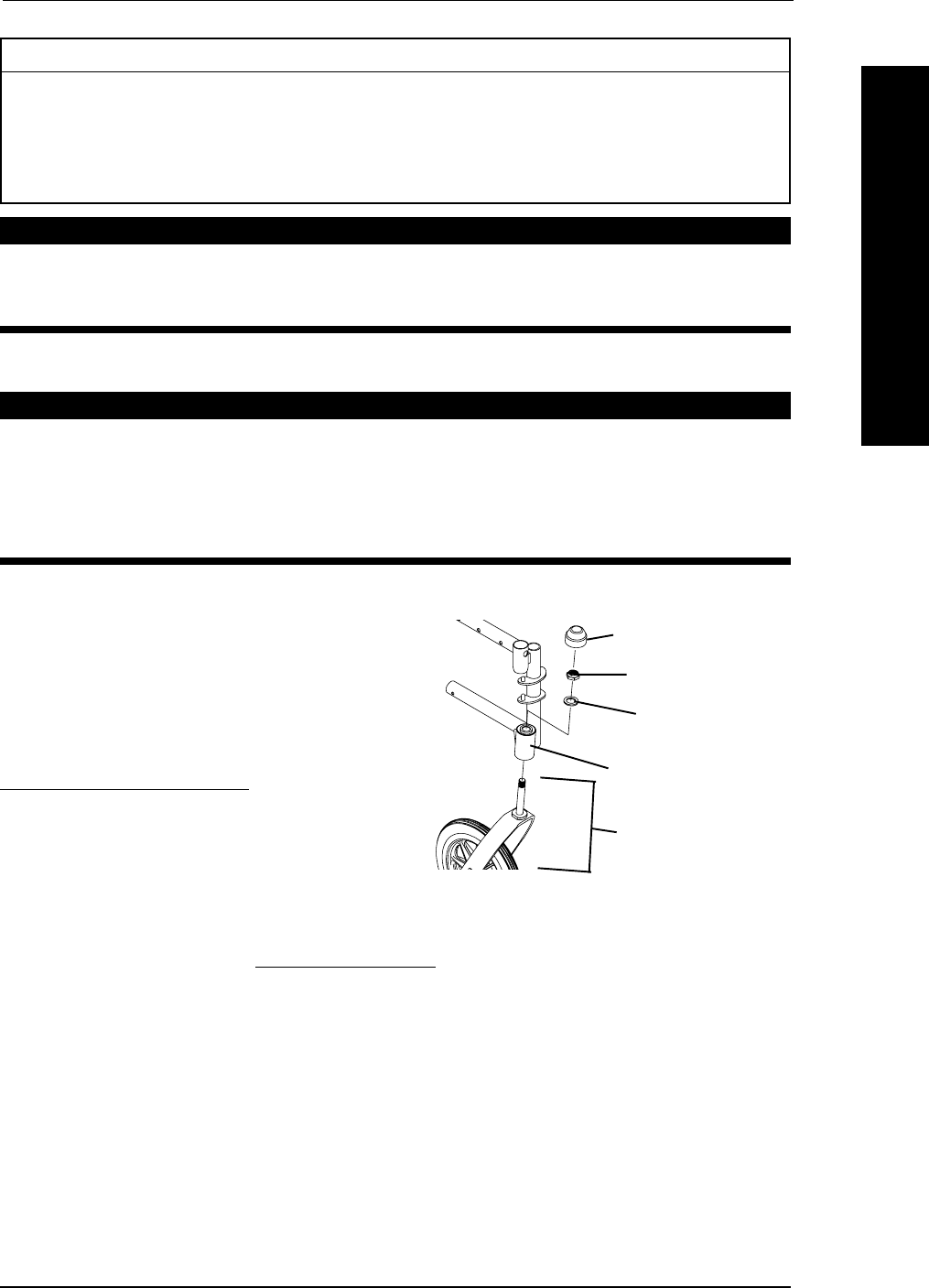
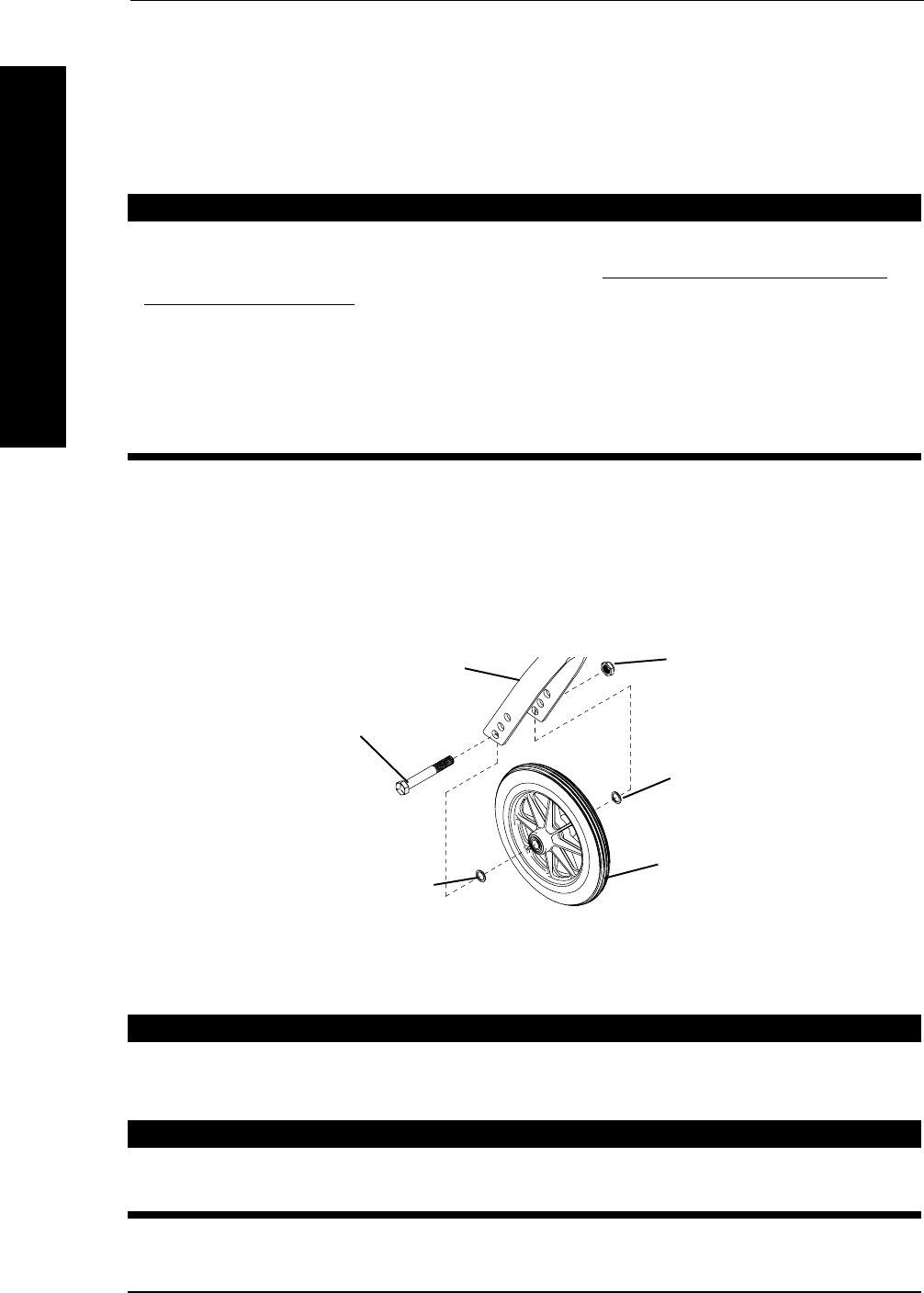
INSTALLING/REPLACING FORK ASSEMBLIES (FIGURE 1)
WARNING
If converting from six-inch fork to an eight-inch fork or vice versa, there
are SEAT-TO-FLOOR height adjustments that must be made. A qualified
technician MUST perform these adjustments if this is the case.
Make sure both fork/caster assemblies are the same size BEFORE using
the wheelchair, otherwise injury may occur.
NOTE: This procedure can be performed if replacing the exact same size front caster.
1. Remove the dust cover.
2. Remove the locknut and nylon washer that
secures the fork to the caster headtube.
3. Drop the front caster and fork out of
the caster headtube.
NOTE: If caster replacement is desired, refer to
REPLACING FRONT CASTERS in this section of
the manual.
4. Slide in the new fork assembly.
5. Reassemble by reversing STEPS 1-3.
6. Repeat STEPS 1-5 for the opposite
fork assembly.
7. Adjust the forks. Refer to ADJUSTING FORKS in this section of the manual.
ADJUSTING FORKS (FIGURE 1)
1. To properly tighten caster journal system and guard against flutter, perform the follow-
ing check:
a. Tip back of wheelchair to floor.
b. Pivot both forks and casters to top of their arc simultaneously.
c. Let casters drop to bottom of arc (wheels should swing once to one-side, then
immediately rest in a straight downward position).
d. Adjust locknuts according to freedom of caster swing.
e. Repeat STEPS C-D until wheels swing once to one-side, then immediately rest in
a downward position.
FIGURE 1 - INSTALLING/
REPLACING FORK ASSEMBLIES
Locknut
Dust Cover
Fork Assembly
Nylon Washer
Caster Headtube
Tracer® EXI 34 Part No. 1110547
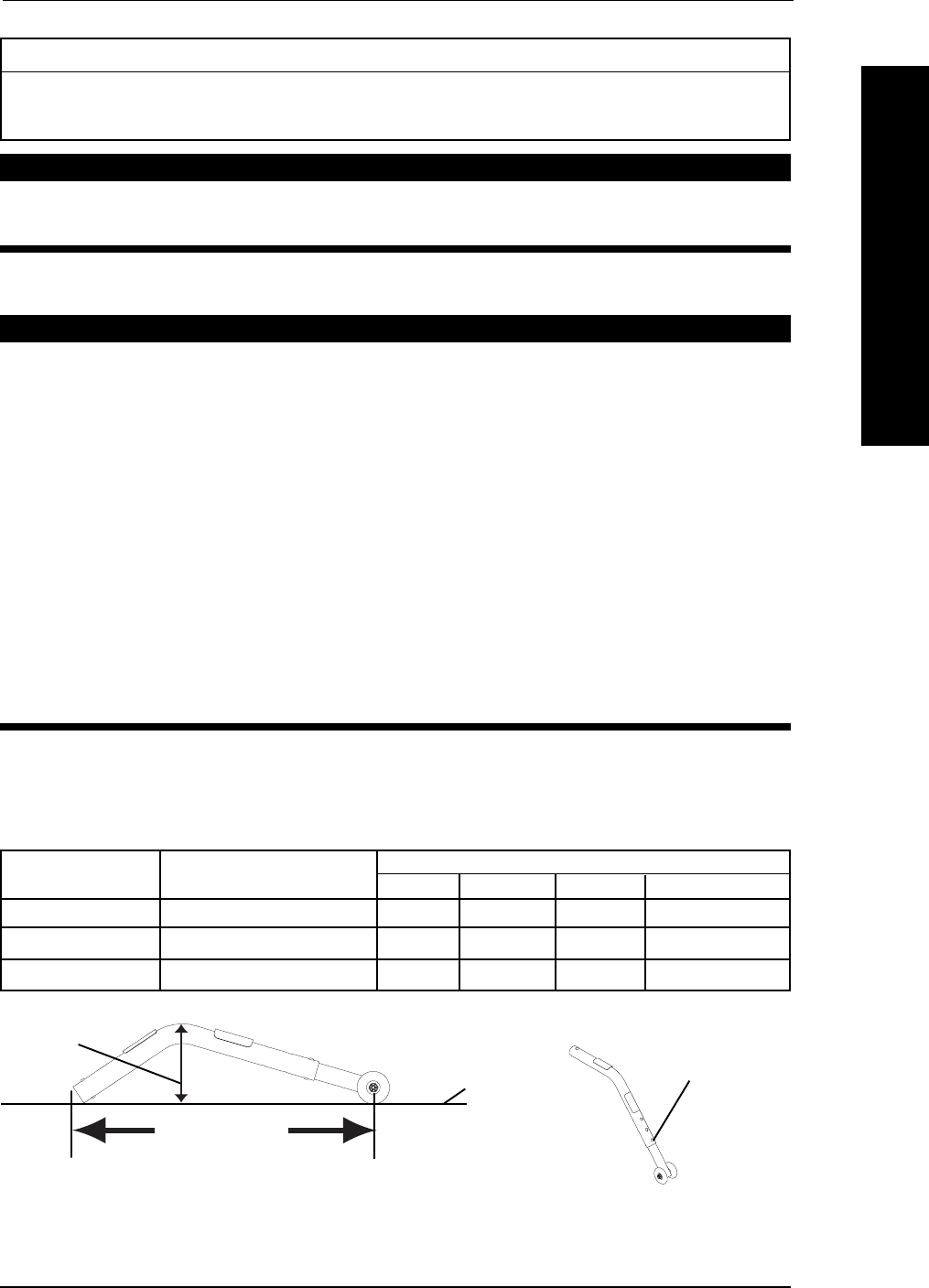
REPLACING FRONT CASTERS (FIGURE 2)
WARNING
If converting from six-inch casters to eight-inch casters or vice versa, the
fork assemblies MUST be replaced. Refer to INSTALLING/REPLACING
FORK ASSEMBLIES in this section of the manual. In addition, there are
SEAT-TO-FLOOR height adjustments that must be made. A qualified
technician MUST perform these adjustments if this is the case.
Make sure both front casters are the same size and are installed into the
same respective mounting hole BEFORE using the wheelchair, otherwise
injury may occur.
NOTE: If replacing the same size front caster, note the mounting position on the fork assembly for
proper reinstallation of the NEW front caster.
1. Remove the hex screw, washers and locknut that secure the front caster to the fork.
NOTE: Washers are only used with 6 and 8-inch casters with precision bearings.
2. To reinstall the new front caster onto the fork, reverse STEP 1.
REPLACING/REPAIRING FRONT CASTER TIRE/TUBE
WARNINGWARNING
WARNINGWARNING
WARNING
Replacement of front caster tire or tube MUST be performed by a quali-
fied technician.
CAUTION
As with any vehicle, the wheels and tires should be checked periodically
for cracks and wear, and should be replaced if damaged.
2. Test wheelchair for maneuverability.
3. Readjust locknuts if necessary, and repeat STEPS 1-2 until correct.
4. Snap dust cover over the locknut and stem.
FIGURE 2 - REPLACING FRONT CASTERS
Washer (if applicable)
Hex Screw
Washer (if applicable) Front Caster
Locknut
6 or 8-inch Fork
SECTION 7 FRONT CASTERS
FRONT CASTERS
Part No. 1110547 35 Tracer® EXI
ANTI-TIPPERS/WHEEL LOCKS SECTION 8
ANTI-TIPPERS/WHEEL LOCKS
Section 8 - Anti-tippers/Wheel Locks includes the following:
Installing/Adjusting the Anti-Tippers
Using/Adjusting the Disk Wheel Locks
WARNING
After ANY adjustments, repair or service and BEFORE use, make sure all attach-
ing hardware is tightened securely - otherwise injury or damage may occur.
INSTALLING/ADJUSTING THE ANTI-TIPPERS
WARNING
Anti-tippers are specific to the different seat-to-floor angles and/or seat-
to-floor heights. Refer to the chart in this section of the manual for cor-
rect usage and adjustment. If these requirements CANNOT be achieved,
DO NOT use the wheelchair. Contact a qualified technician. Any changes
to the seat-to-floor angle or seat-to-floor height may require different
anti-tippers.
If so equipped, anti-tippers MUST be attached at all times. Inasmuch as the
anti-tippers are an option for this wheelchair (You may order with or with-
out the anti-tippers), Invacare strongly recommends ordering the anti-
tippers as a safeguard for the wheelchair user.
Anti-tippers MUST be fully engaged and release buttons fully protruding
out of adjustment holes.
Ensure both anti-tippers are adjusted to the same mounting hole.
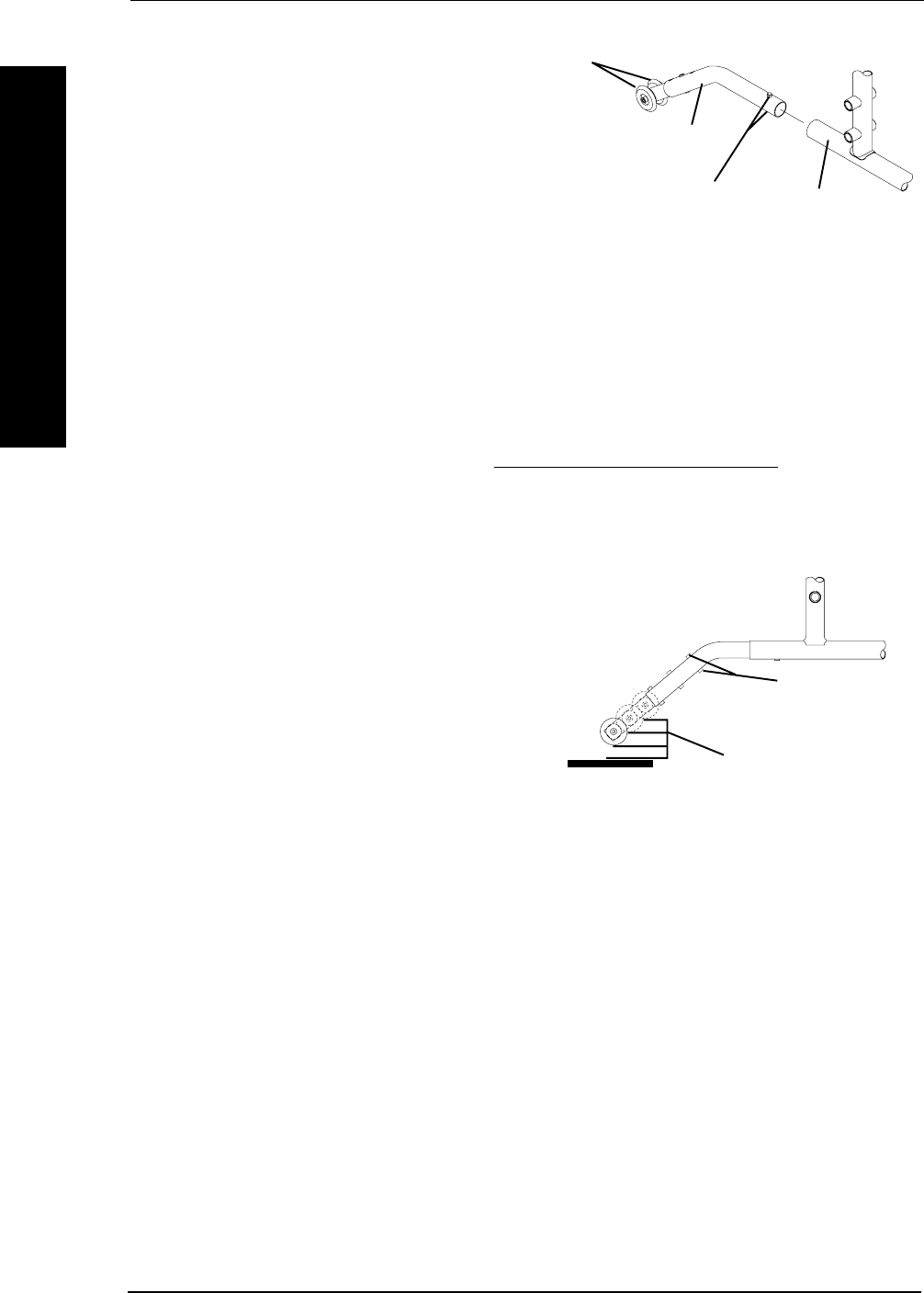
INSTALLING THE ANTI-TIPPERS (FIGURES 1 AND 2)
NOTE: To ensure the correct model anti-tipper is used refer to FIGURE 1. Measurements for anti-
tippers are approximate and are taken with extension tube in BOTTOM hole position.
FIGURE 1 - ANTI-TIPPER LENGTH
Wheelchair Seat-to-Floor Height Anti-tipper (measurements in inches)
Model in inches Length Height Model Part Number
Tracer EXI 17-1/2 to 19-1/2 13-1/2 3-1/4 1360 1058836
Tracer EXI 15-1/2 to 17-1/2 11-5/8 2-3/4 1360A 1058752
Tracer EXI FF 21 12 2-3/4 9758 1086190
Flat Surface
Anti-Tipper Height
Bottom Position
Anti-Tipper Length
Tracer® EXI 36 Part No. 1110547
SECTION 8 ANTI-TIPPERS/WHEEL LOCKS
ANTI-TIPPERS/WHEEL LOCKS
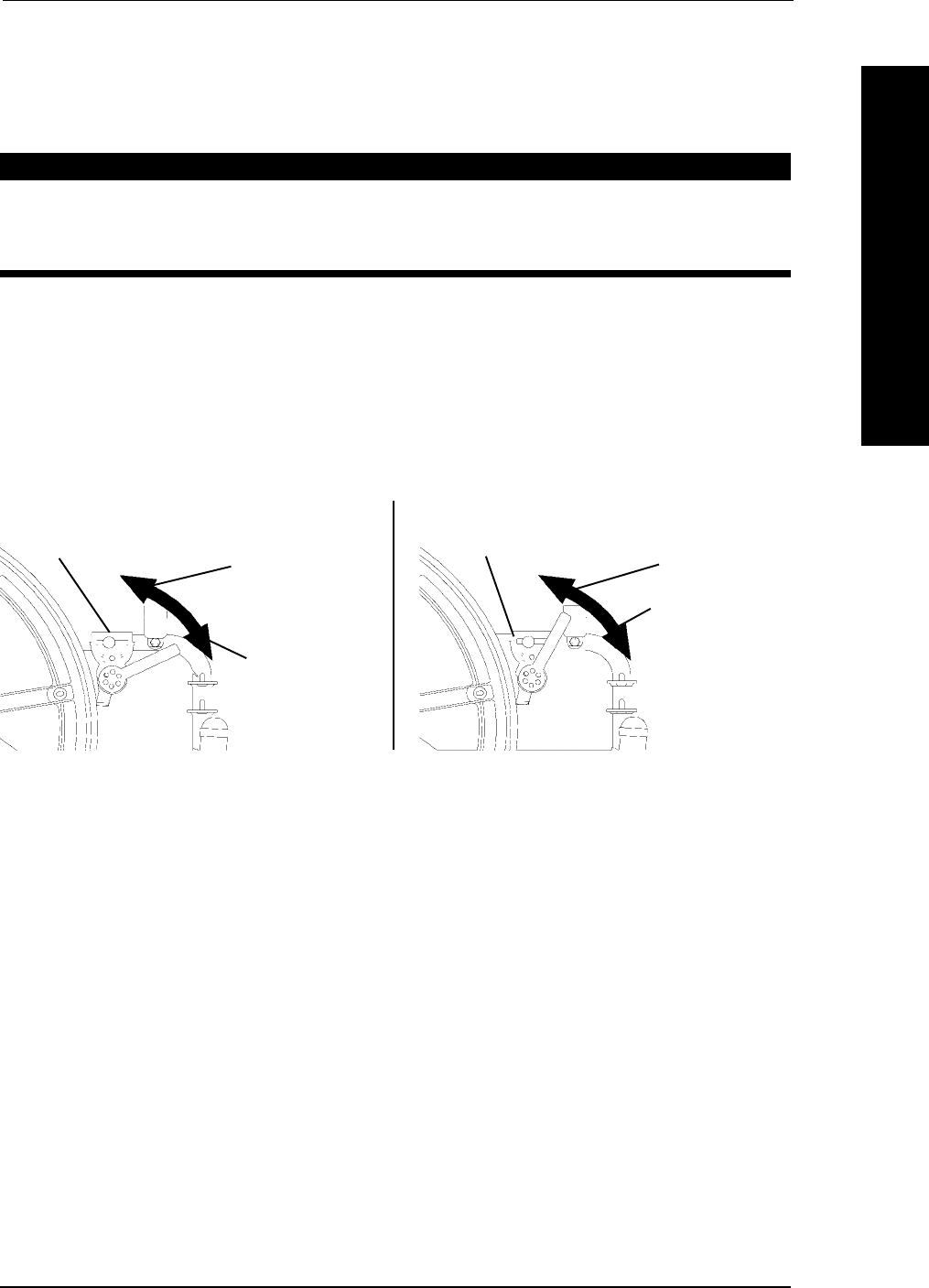
FIGURE 2 - INSTALLING THE
ANTI-TIPPERS
Anti-Tipper
Release Buttons Rear Frame Tubing
Anti-Tipper Wheels
1-1/2 to 2-inch Clearance
FIGURE 3 - ADJUSTING THE
ANTI-TIPPERS
Release Buttons
1. Depress the release buttons and insert
the anti-tippers with the anti-tipper
wheels pointing toward the ground/floor
into the wheelchair frame tubing as
shown in FIGURE 2.
2. Ensure that the release button of the
anti-tipper fully protrudes out of the
hole in the bottom of the wheelchair
frame tubing.
3. Place the wheelchair on a flat surface.
4. Measure the distance between the bottom of the anti-tipper wheels and the ground/
floor.
NOTE: A 1-1/2 to 2-inch clearance between the bottom of the anti-tipper wheels and the ground/
floor MUST be maintained at all times.
5. If the distance between the bottom of anti-tipper wheels and the ground/floor is not 1-1/2
to 2-inches, adjust anti-tippers. Refer to ADJUSTING THE ANTI-TIPPERS in this section of
the manual.
ADJUSTING THE ANTI-TIPPERS (FIGURE 3)
NOTE: A 1-1/2 to 2-inch clearance between the
bottom of the anti-tipper wheels and the ground/
floor MUST be maintained at all times.
1. Place the wheelchair on a flat surface.
NOTE: If adjusting anti-tippers on recliner mod-
els, ensure back canes are in the upright posi-
tion BEFORE making adjustments.
2. Press the release buttons on the
wheeled portion of the anti-tipper and
slide it up or down to the desired adjustment hole.
3. Check to make sure that the release buttons are fully engaged in adjustment holes.
4. Ensure both anti-tippers are adjusted to the same height.
5. Measure the distance between the bottom of the anti-tipper wheels and the ground/
floor.
6. If the distance between the bottom of anti-tipper wheels and the ground/floor is not 1-1/2
to 2-inches, repeat STEPS 2-5 until the distance is 1-1/2 to 2-inches.
7. If the 1-1/2 to 2-inch distance cannot be achieved with the anti-tippers, a different
model may be required. Contact an Invacare dealer or qualified technician.
Part No. 1110547 37 Tracer® EXI
SECTION 8ANTI-TIPPERS/WHEEL LOCKS
ANTI-TIPPERS/WHEEL LOCKS
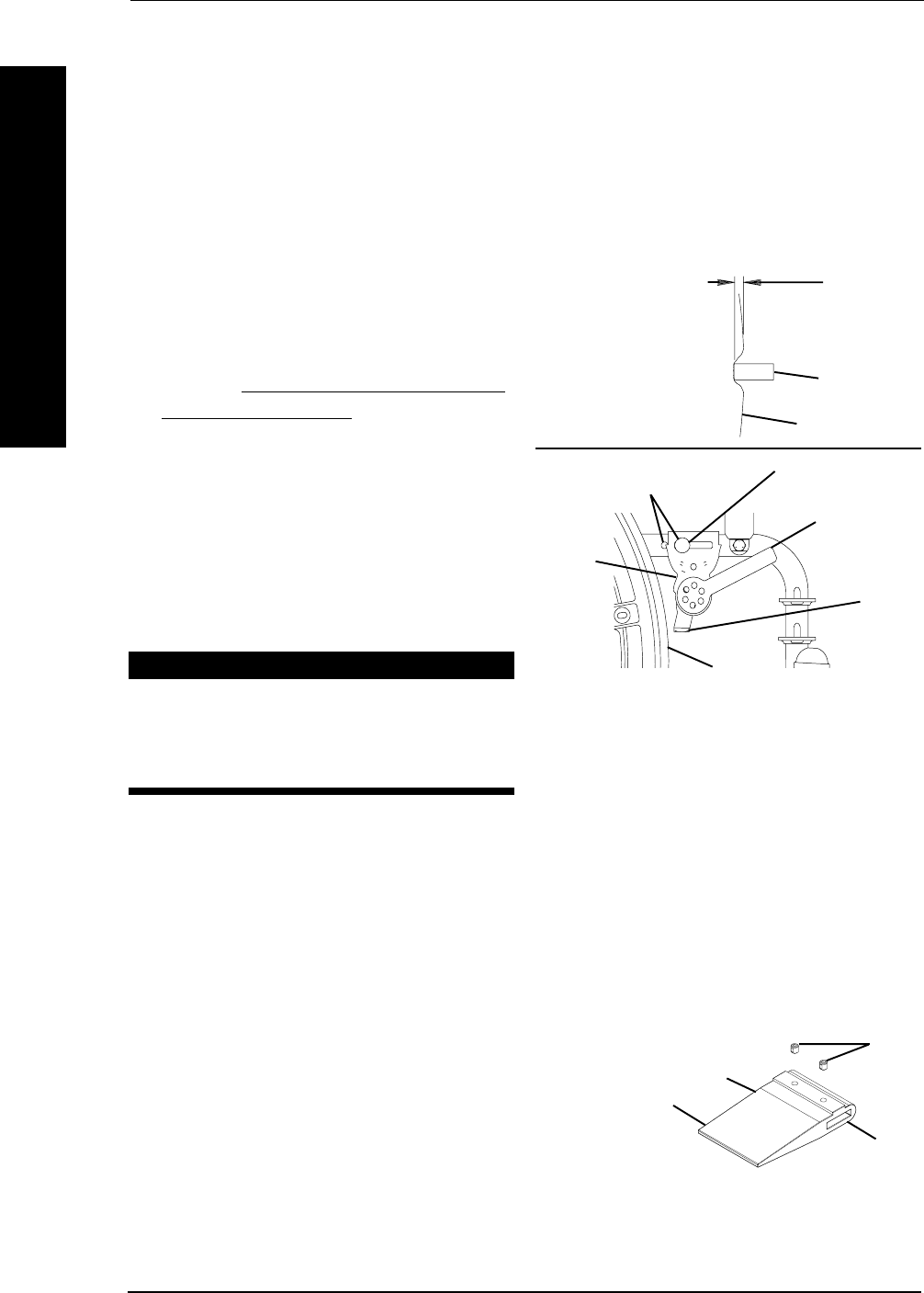
USING/ADJUSTING THE DISK WHEEL LOCKS
USING THE PATIENT OPERATED DISK WHEEL LOCKS
(FIGURE 3)
WARNING
DO NOT attempt to stop a moving wheelchair with the wheel locks.
WHEEL LOCKS ARE NOT BRAKES - otherwise injury or damage may
occur.
NOTE: Position wheelchair on a flat, level surface to perform this procedure.
1. Ensure the wheelchair is not moving before engaging the wheel locks.
2. Perform one (1) of the following:
A. Push-to-Lock - To engage, push the wheel lock handle foward.
B. Pull-to-Lock - To engage, pull the wheel lock handle backward.
3. Disengage the wheel locks by reversing STEP 2.
FIGURE 3 - USING THE DISK WHEEL LOCKS
ADJUSTING THE DISK WHEEL LOCKS (FIGURE 4)
NOTE: If wheels are pneumatic, before adjusting or replacing the wheel lock assemblies, ensure
that the tires are inflated to the recommended psi on the side wall of tire. The recommended tire
pressure is located on the side wall of the tire.
1. Disengage the wheel locks.
2. Loosen the bolt and locknut that secure the wheel lock to the wheelchair frame.
3. Reposition the wheel lock so that when engaged, the wheel lock shoe embeds the
tire 1/8-inch (3/16-inch for pneumatic tires) and HOLDS the occupied wheelchair in
place when pushed.
4. Securely tighten the bolt and locknut attaching the wheel lock to the wheelchair
frame.
5. Engage the wheel lock.
6. Measure the distance the wheel lock is embedded into the tire as shown in DETAIL
"A" of FIGURE 4.
PULL TO LOCK
UNLOCKED
POSITION
LOCKED
POSITION
Wheel Lock
PUSH TO LOCK
UNLOCKED
POSITION
LOCKED
POSITION
Wheel Lock
Tracer® EXI 38 Part No. 1110547
ANTI-TIPPERS/WHEEL LOCKSSECTION 8
ANTI-TIPPERS/WHEEL LOCKS
NOTE: Any wheel lock adjustment should embed the wheel lock shoe at least 1/8-inch (3/16-inch
if pneumatic tire) into the tire when engaged.
7. Repeat STEPS 1-6 until the wheel lock shoe embeds the tire 1/8-inch (3/16-inch for
other tires) and HOLDS the wheelchair in place when pushed.
8. If the measurement of 1/8-inch (3/16-inch for other tires) can not be achieved,
remove the bolt and locknut that secure the wheel lock to the wheelchair frame and
mount the wheel lock in the remaining mounting position.
9. Repeat STEPS 1-7
10. If wheel lock is unable to properly
engage the wheel it may be necessary
to install wheel lock shoe extensions.
Refer to INSTALLING WHEEL LOCK
SHOE EXTENSIONS in this sectoion
of the manual.
11. Repeat STEPS 1-7
12. Repeat STEPS 1-10 for the opposite
wheel lock.
13. Engage both wheel locks and ensusre
the occupied wheelchair is held in
place when pushed.
WARNING
If wheel locks do not hold the occu-
pied wheelchair in place contact a
qualified technician. - other wise
injury or damage may occur.
FIGURE 4 - ADJUSTING THE
PATIENT OPERATED WHEEL
LOCKS
DETAIL "A" -
WHEEL LOCK
SHOE
ENGAGEMENT
1/8-inch
(3/16-inch
pneumatic tires)
Tire
Wheel Lock
Shoe
Wheel Lock Handle
Bolt and Locknut
Mounting Positions
Wheel
Lock
Shoe
Rear
Wheel
Wheel
Lock
INSTALLING WHEEL LOCK SHOE EXTENSIONS
(FIGURE 5)
1. Loosen the two (2) set screws on the wheel lock shoe extension until the set screws
do not protrude into the slot.
2. Insert the disk wheel lock shoe into the slot in the shoe extension.
NOTE: Ensure the pointed end of the
wheel lock shoe extension is facing toward
the rear wheel.
3. Position the wheel lock shoe exten-
sion so the outside edge is flush with
the end of the wheel lock shoe.
4. Securely tighten the two (2) set screws
to secure the wheel lock shoe exten-
sion to the wheel lock shoes.
Slot
Set
Screws
Pointed End of
Wheel Lock Shoe
Extension
Wheel Lock Shoe Extension
FIGURE 5 - INSTALLING WHEEL
LOCK SHOE EXTENSION

Part No. 1110547 39 Tracer® EXI
Section 9 - Seat-to-Floor Height includes the following:
Changing Seat-To-Floor Height
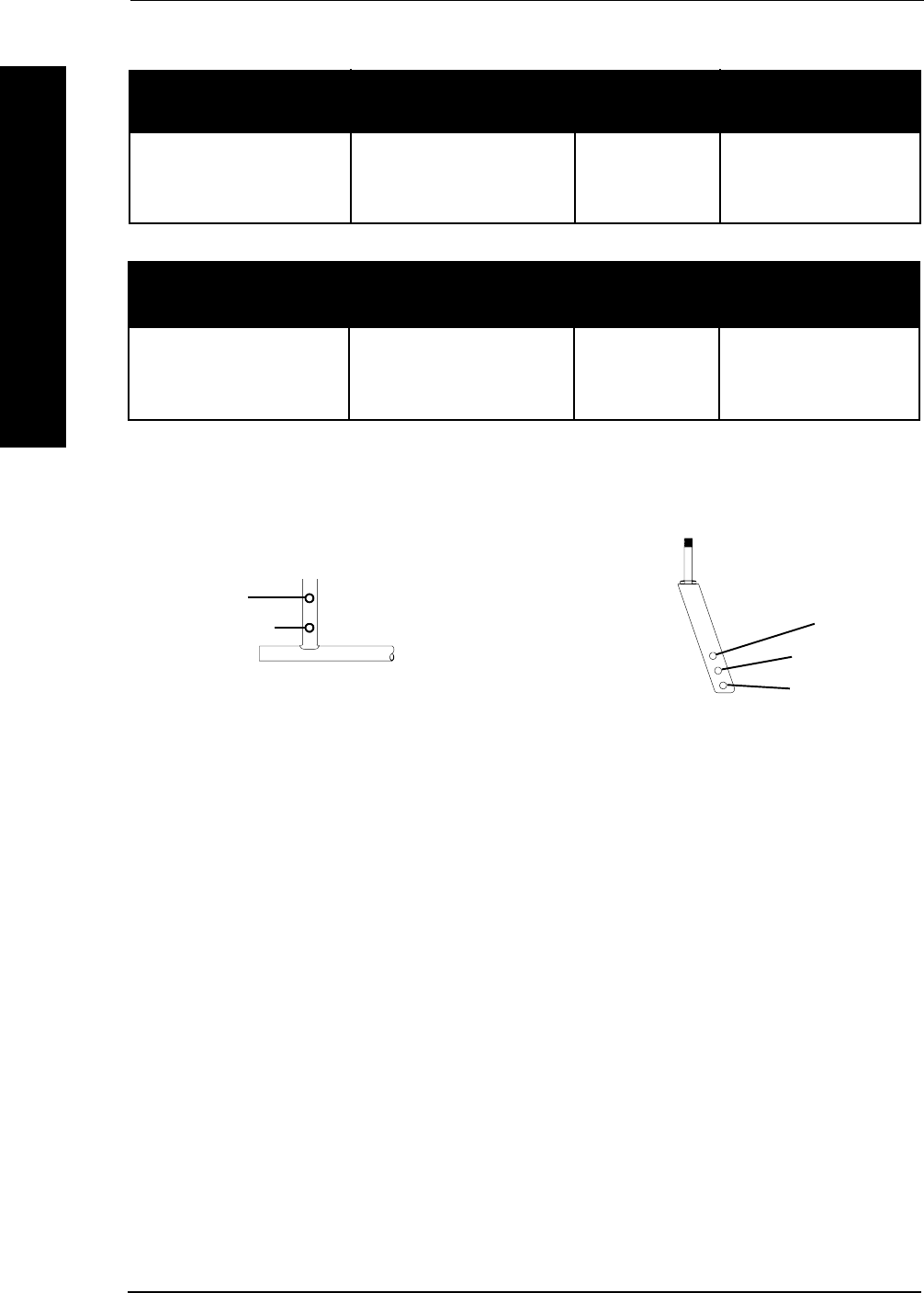
CHANGING SEAT-TO-FLOOR HEIGHT (FIGURE 1)
WARNING
The size/position of the front casters, size/position of the rear wheels, use
of anti-tipper model, as well as the user condition directly relate to the
stability of the wheelchair. Any change to one (1) or any combination of the
six (6) may cause the wheelchair to decrease in stability. These adjust-
ments MUST be performed by a qualified technician.
Seat-to-floor heights have specific positions depending on rear wheel size,
rear wheel position, front caster size and front caster position. These
adjustments MUST be performed by a qualified technician.
If changing the seat-to-floor height the correct anti-tippers MUST be or-
dered to maintain a 1-1/2 to 2-inch ground clearance.
1. Refer to the following chart in FIGURE 1 to determine mounting positions for front
casters/forks and rear wheels for the desired obtainable seat-to-floor height:
2. Remove the rear wheels from the wheelchair. Refer to REMOVING/INSTALLING
THE REAR WHEELS in SECTION 6 of this manual.
3. If necessary, replace the front casters and forks with the casters and forks indicated
in the chart. Refer to REPLACING FRONT CASTERS and INSTALLING/REPLAC-
ING FORK ASSEMBLIES in SECTION 7 of this manual.
4. Reinstall the rear wheels onto the wheelchair in the mounting position indicated in
the chart. Refer to REMOVING/INSTALLING THE REAR WHEELS in SECTION 6 of
this manual.
5. Adjust anti-tippers according to NEW seat-to-floor height. Refer to ADJUSTING
THE ANTI-TIPPERS in SECTION 8 of this manual.
WARNING
After ANY adjustments, repair or service and BEFORE use, make sure all
attaching hardware is tightened securely - otherwise injury or damage
may result.
NOTE: Seat-to-floor height is not adjustable for Tracer EXI wheelchairs with the fixed frame
option (FF). This procedure is for EXI wheelchairs with swingaway footrests ONLY.
SEAT-TO-FLOOR HEIGHT SECTION 9
SEAT-TO-FLOOR HEIGHT
Tracer® EXI 40 Part No. 1110547
6 OR 8-INCH FORK
MOUNTING POSITIONS
TOP
MIDDLE
BOTTOM
REAR WHEEL MOUNTING
POSITIONS -
ADULT/HEMI FRAME STYLE
TOP
BOTTOM
FIGURE 1 - CHANGING SEAT-TO-FLOOR HEIGHT
*6-INCH FRONT CASTERS
SEAT-TO-FLOOR FRONT CASTER REAR REAR WHEEL
HEIGHT MOUNTING WHEEL MOUNTING
(in inches) POSITION SIZE POSITION
15-1/2 TOP 20-inch TOP
16-1/2 MIDDLE 22-inch TOP
17-1/2 BOTTOM 24-inch TOP
17-1/2 BOTTOM 20-inch BOTTOM
*8-INCH FRONT CASTERS
SEAT-TO-FLOOR FRONT CASTER REAR REAR WHEEL
HEIGHT MOUNTING WHEEL MOUNTING
(in inches) POSITION SIZE POSITION
17-1/2 TOP 20-inch BOTTOM
17-1/2 TOP 24-inch TOP
18-1/2 MIDDLE 22-inch BOTTOM
19-1/2 BOTTOM 24-inch BOTTOM
* NOTE: 6-inch and 8-inch front casters require different forks.
SECTION 9 SEAT-TO-FLOOR HEIGHT
SEAT-TO-FLOOR HEIGHT
Part No. 1110547 41 Tracer® EXI
Section 10 - Options includes the following:
Installing the Seat Positioning Strap
WARNING
After ANY adjustments, repair or service and BEFORE use, make sure all attach-
ing hardware is tightened securely - otherwise injury or damage may occur.
OPTIONS SECTION 10
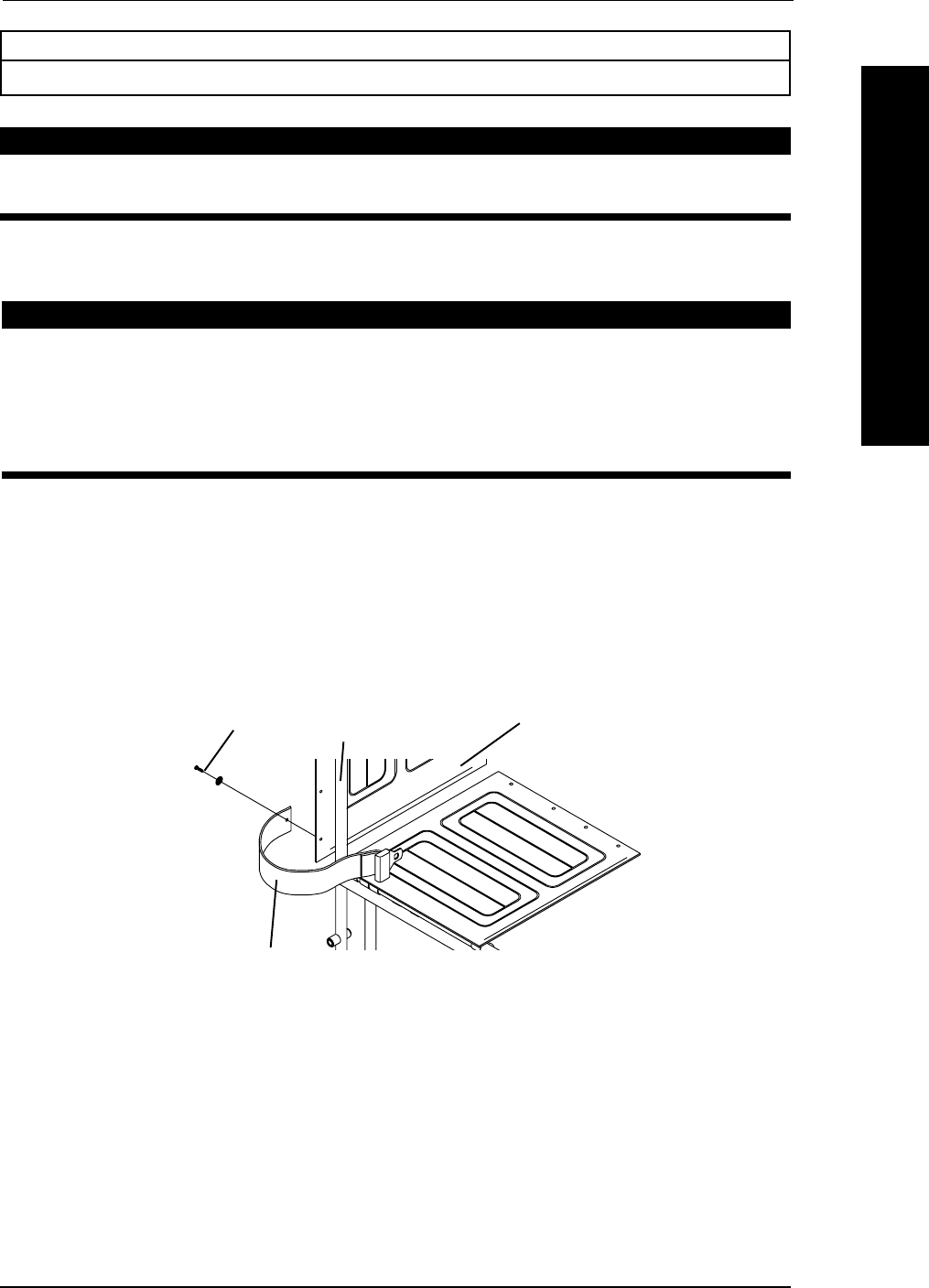
INSTALLING THE SEAT POSITIONING STRAP (FIGURE 1)
WARNING
ALWAYS wear your positioning strap. Inasmuch as the SEAT POSI-
TIONING STRAP is an option on this wheelchair (You may order with or
without the seat restraint), Invacare strongly recommends ordering the
SEAT POSITIONING STRAP as an additional safeguard for the wheel-
chair user.
1. Remove the bottom back upholstery screw from the wheelchair.
2. Position the seat positioning strap half between the back cane and back upholstery.
3. Secure the back upholstery and seat positioning strap to the wheelchair with the
existing back upholstery screw.
4. Repeat STEPS 1-3 for the opposite side of the wheelchair.
FIGURE 1 - INSTALLING THE SEAT POSITIONING STRAP
Back Cane Back Upholstery
Back
Upholstery
Screw
Seat Positioning Strap
OPTIONS

Tracer® EXI 42 Part No. 1110547
NOTESNOTES
NOTESNOTES
NOTES
NOTES
NOTES

Part No. 1110547 43 Tracer® EXI
LIMITED WARRANTY
PLEASE NOTE: THE WARRANTY BELOW HAS BEEN DRAFTED TO COMPLY WITH
FEDERAL LAW APPLICABLE TO PRODUCTS MANUFACTURED AFTER JULY 4, 1975.
This warranty is extended only to the original purchaser/user of our products.
This warranty gives you specific legal rights and you may also have other legal rights which
vary from state to state.
Invacare warrants its product to be free from defects in materials and workmanship for a
period of one (1) year from date of purchase. The side frames and crossmembers are
warranted for the lifetime of the original purchaser/users. If within such warranty period
any such product shall be proven to be defective, such product shall be repaired or
replaced, at Invacares option. This warranty does not include any labor or shipping
charges incurred in replacement part installation or repair of any such product. Invacares
sole obligation and your exclusive remedy under this warranty shall be limited to such
repair and/or replacement.
For warranty service, please contact the dealer from whom you purchased your Invacare
product. In the event you do not receive satisfactory warranty service, please write directly
to Invacare at the address at the bottom of this page. Provide dealers name, address, the
product model number, date of purchase, indicate nature of the defect and, if the product
is serialized, indicate the serial number. Do not return products to our factory without our
prior consent.
LIMITATIONS AND EXCLUSIONS: THE FOREGOING WARRANTY SHALL NOT
APPLY TO SERIAL NUMBERED PRODUCTS IF THE SERIAL NUMBER HAS BEEN
REMOVED OR DEFACED, PRODUCTS SUBJECTED TO NEGLIGENCE, ACCIDENT,
IMPROPER OPERATION, MAINTENANCE OR STORAGE, PRODUCTS MODIFIED
WITHOUT INVACARES EXPRESS WRITTEN CONSENT INCLUDING, BUT NOT
LIMITED TO, MODIFICATION THROUGH THE USE OF UNAUTHORIZED PARTS OR
ATTACHMENTS; PRODUCTS DAMAGED BY REASON OF REPAIRS MADE TO ANY
COMPONENT WITHOUT THE SPECIFIC CONSENT OF INVACARE, OR TO A PROD-
UCT DAMAGED BY CIRCUMSTANCES BEYOND INVACARES CONTROL, AND
SUCH EVALUATION WILL BE SOLELY DETERMINED BY INVACARE. THE WAR-
RANTY SHALL NOT APPLY TO PROBLEMS ARISING FROM NORMAL WEAR OR
FAILURE TO ADHERE TO THESE INSTRUCTIONS.
THE FOREGOING EXPRESS WARRANTY IS EXCLUSIVE AND IN LIEU OF ANY
OTHER WARRANTIES WHATSOEVER, WHETHER EXPRESS OR IMPLIED, INCLUD-
ING THE IMPLIED WARRANTIES OF MERCHANTABILITY AND FITNESS FOR A
PARTICULAR PURPOSE, AND THE SOLE REMEDY FOR VIOLATIONS OF ANY
WARRANTY WHATSOEVER, SHALL BE LIMITED TO REPAIR OR REPLACEMENT OF
THE DEFECTIVE PRODUCT PURSUANT TO THE TERMS CONTAINED HEREIN. THE
APPLICATION OF ANY IMPLIED WARRANTY WHATSOEVER SHALL NOT EXTEND
BEYOND THE DURATION OF THE EXPRESS WARRANTY PROVIDED HEREIN.
INVACARE SHALL NOT BE LIABLE FOR ANY CONSEQUENTIAL OR INCIDENTAL
DAMAGES WHATSOEVER.
THIS WARRANTY SHALL BE EXTENDED TO COMPLY WITH STATE/PROVINCIAL
LAWS AND REQUIREMENTS.
WARRANTY
WARRANTY

Invacare Corporation www.invacare.com
USA Canada
One Invacare Way 570 Matheson Blvd E Unit 8 Invacare and Tracer are registered
Elyria, Ohio USA Mississauga Ontario trademarks of Invacare Corporation.
44036-2125 L4Z 4G4 Canada Yes, you can. is a trademark of Invacare
800-333-6900 800-668-5324 Corporation.
Teflon is a registered trademark of E.I.
Du Pont De Nemours and Company.
© 2002 Invacare Corporation
Part No. 1110547 Rev B 07/03
MADE IN MEXICO
