JIANJIAN INTELLIGENT TECHNOLOGY H47W REMOTE CONTROL AIRCRAFT SERIES User Manual

GUANGDONG JIANJIAN INTELLIGENT TECHNOLOGY CO.,LTD REMOTE CONTROL AIRCRAFT SERIES Users Manual

User Manual

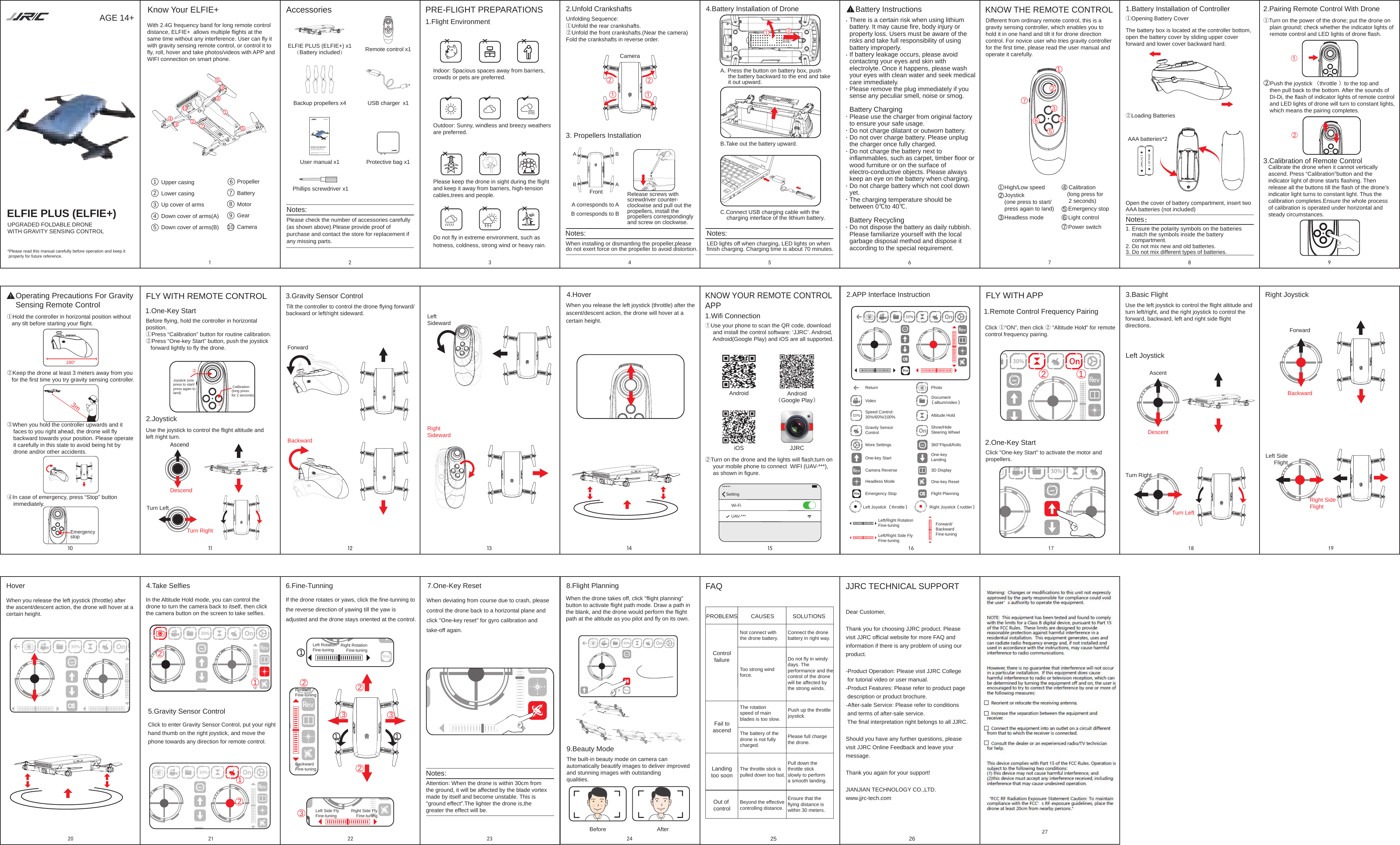
Know Your ELFIE+ ELFIE PLUS (ELFIE+) x1(Battery included)B.Take out the battery upward.A. Press the button on battery box, push      the battery backward to the end and take      it out upward.Upper casingLower casingUp cover of arms    Down cover of arms(A)Down cover of arms(B)2123456167 8 917 18 19!!Backup propellers x4 USB charger  x1User manual x1 Phillips screwdriver x1Headless modeProtective bag x1Propeller Battery  MotorGear    Camera3.Gravity Sensor Control10 11 13 1412 1533445Emergency stop5677234578910CameraAABBRelease screws with screwdriver counter-clockwise and pull out the propellers, install thepropellers correspondingly and screw on clockwise.2.JoystickUse the joystick to control the flight altitude and left /right turn.121Joystick (one press to start/press again to land)High/Low speed  Calibration (long press for 2 seconds) Joystick (one  press to start/ press again to land) Calibration (long press for 2 seconds)6 Light controlPower switchFLY WITH REMOTE CONTROL②Push the joystick (throttle )to the top and     then pull back to the bottom. After the sounds of     Di-Di, the flash of indicator lights of remote control    and LED lights of drone will turn to constant lights,     which means the pairing completes.20 21 23 24 25 2622Remote control x1iOS JJRCAndroid Android(Google Play)FLY WITH APP12222233 311 111UPGRADED FOLDABLE DRONE WITH GRAVITY SENSING CONTROLAGE 14+*Please read this manual carefully before operation and keep it  properly for future reference.ELFIE PLUS (ELFIE+)2②Loading BatteriesOperating Precautions For Gravity Sensing Remote Control+-1.5V“AAA”+-1.5V“AAA”①②3mEmergency stop180°With 2.4G frequency band for long remote control distance, ELFIE+  allows multiple flights at the same time without any interference. User can fly itwith gravity sensing remote control, or control it tofly, roll, hover and take photos/videos with APP andWIFI connection on smart phone.Accessories PRE-FLIGHT PREPARATIONS1.Flight EnvironmentIndoor: Spacious spaces away from barriers, crowds or pets are preferred.Outdoor: Sunny, windless and breezy weathers are preferred.Please keep the drone in sight during the flight and keep it away from barriers, high-tension cables,trees and people.Do not fly in extreme environment, such as hotness, coldness, strong wind or heavy rain.Unfolding Sequence:①Unfold the rear crankshafts.②Unfold the front crankshafts.(Near the camera)Fold the crankshafts in reverse order.2.Unfold Crankshafts3. Propellers InstallationA corresponds to AB corresponds to BWhen installing or dismantling the propeller,pleasedo not exert force on the propeller to avoid distortion.Notes: Notes:Front4.Battery Installation of DroneC.Connect USB charging cable with thecharging interface of the lithium battery.KNOW THE REMOTE CONTROL 2.Pairing Remote Control With Drone①Turn on the power of the drone; put the drone onplain ground; check whether the indicator lights ofremote control and LED lights of drone flash.AscendDescendTurn RightTurn LeftForwardBackwardLeft Sideward Right Sideward4.HoverKNOW YOUR REMOTE CONTROLAPP1.Wifi Connection①Use your phone to scan the QR code, downloadand install the control software: ‘JJRC’. Android,Android(Google Play) and iOS are all supported.Wi-FiUAV-***Setting②Turn on the drone and the lights will flash;turn onyour mobile phone to connect  WIFI (UAV-***),as shown in figure.2.APP Interface InstructionReturn PhotoVideo  Document(album/video)Speed Control:30%/60%/100% Altitude HoldGravity Sensor ControlShow/Hide Steering WheelMore Settings 360°Flips&RollsOne-key Start One-key LandingCamera Reverse 3D DisplayHeadless Mode One-key ResetEmergency Stop Flight PlanningLeft Joystick (throttle)  Right Joystick(rudder)Left/Right Rotation Fine-tuningLeft/Right Side Fly Fine-tuningForward/Backward Fine-tuning2.One-Key StartClick "One-key Start" to activate the motor and propellers.AscentDescentLeft JoystickTurn RightTurn LeftRight JoystickBackwardForwardRight Side FlightLeft SideFlight3.Basic FlightUse the left joystick to control the flight altitude and turn left/right, and the right joystick to control the forward, backward, left and right side flight directions.When you release the left joystick (throttle) after the ascent/descent action, the drone will hover at acertain height.Hover 4.Take SelfiesIn the Altitude Hold mode, you can control the drone to turn the camera back to itself, then click the camera button on the screen to take selfies.Click to enter Gravity Sensor Control, put your right hand thumb on the right joystick, and move the phone towards any direction for remote control.5.Gravity Sensor Control6.Fine-TunningIf the drone rotates or yaws, click the fine-tunning to the reverse direction of yawing till the yaw is adjusted and the drone stays oriented at the control.Left Rotation Fine-tuning Right RotationFine-tuningForward Fine-tuningBackward Fine-tuningLeft Side Fly Fine-tuning Right Side FlyFine-tuning7.One-Key ResetWhen deviating from course due to crash, please control the drone back to a horizontal plane and click "One-key reset" for gyro calibration and take-off again.Notes:Attention: When the drone is within 30cm from the ground, it will be affected by the blade vortex made by itself and become unstable. This is "ground effect".The lighter the drone is,thegreater the effect will be.8.Flight PlanningWhen the drone takes off, click "flight planning" button to activate flight path mode. Draw a path in the blank, and the drone would perform the flight path at the altitude as you pilot and fly on its own.9.Beauty ModeThe built-in beauty mode on camera can automatically beautify images to deliver improved and stunning images with outstanding qualities.AfterBeforeFAQPROBLEMS CAUSES SOLUTIONS ControlfailureNot connect with the drone battery. Connect the drone battery in right way.Too strong wind force.Do not fly in windy days. The performance and the control of the drone will be affected by the strong winds.Fail toascendThe rotation speed of mainblades is too slow.Push up the throttle joystick.The battery of the drone is not fully charged.Please full charge the drone. Landingtoo soonOut of controlThe throttle stick is pulled down too fast.Pull down the throttle stick slowly to perform a smooth landing.Beyond the effectivecontrolling distance.JJRC TECHNICAL SUPPORTDear Customer,Thank you for choosing JJRC product. Please visit JJRC official website for more FAQ and information if there is any problem of using our product.-Product Operation: Please visit JJRC Collegefor tutorial video or user manual.-Product Features: Please refer to product pagedescription or product brochure.-After-sale Service: Please refer to conditionsand terms of after-sale service.The final interpretation right belongs to all JJRC.Should you have any further questions, please visit JJRC Online Feedback and leave your message.Thank you again for your support!JIANJIAN TECHNOLOGY CO.,LTD.www.jjrc-tech.com①Hold the controller in horizontal position withoutany tilt before starting your flight.②Keep the drone at least 3 meters away from youfor the first time you try gravity sensing controller.③When you hold the controller upwards and itfaces to you right ahead, the drone will flybackward towards your position. Please operateit carefully in this state to avoid being hit bydrone and/or other accidents.④In case of emergency, press “Stop” buttonimmediately.Before flying, hold the controller in horizontal position.①Press “Calibration” button for routine calibration.②Press “One-key Start” button, push the joystickforward lightly to fly the drone.Tilt the controller to control the drone flying forward/backward or left/right sideward.1.Battery Installation of Controller①Opening Battery CoverThe battery box is located at the controller bottom,open the battery cover by sliding upper cover forward and lower cover backward hard.Different from ordinary remote control, this is a gravity sensing controller, which enables you to hold it in one hand and tilt it for drone direction control. For novice user who tries gravity controller for the first time, please read the user manual and operate it carefully.1.One-Key Start When you release the left joystick (throttle) after theascent/descent action, the drone will hover at a certain height.1.Remote Control Frequency PairingLED lights off when charging, LED lights on when finish charging. Charging time is about 70 minutes.Calibrate the drone when it cannot vertically ascend. Press “Calibration”button and the indicator light of drone starts flashing. Then release all the buttons till the flash of the drone’s indicator light turns to constant light. Thus the calibration completes.Ensure the whole process of calibration is operated under horizontal and steady circumstances. 3.Calibration of Remote ControlClick ①“ON”, then click ② “Altitude Hold” for remotecontrol frequency pairing.Open the cover of battery compartment, insert two AAA batteries (not included)1. Ensure the polarity symbols on the batteriesmatch the symbols inside the batterycompartment.2. Do not mix new and old batteries.3. Do not mix different types of batteries.Notes:AAA batteries*2Ensure that the flying distance is within 30 meters.16②①There is a certain risk when using lithium battery. It may cause fire, body injury or property loss. Users must be aware of the risks and take full responsibility of using battery improperly.If battery leakage occurs, please avoid contacting your eyes and skin with electrolyte. Once it happens, please wash your eyes with clean water and seek medical care immediately.Please remove the plug immediately if you sense any peculiar smell, noise or smog.Battery ChargingPlease use the charger from original factoryto ensure your safe usage.Do not charge dilatant or outworn battery. Do not over charge battery. Please unplug the charger once fully charged.Do not charge the battery next to inflammables, such as carpet, timber floor orwood furniture or on the surface of electro-conductive objects. Please always keep an eye on the battery when charging.Do not charge battery which not cool down yet. The charging temperature should be between 0℃to 40℃.Battery RecyclingDo not dispose the battery as daily rubbish. Please familiarize yourself with the local garbage disposal method and dispose it according to the special requirement.Battery InstructionsPlease check the number of accessories carefully(as shown above).Please provide proof of purchase and contact the store for replacement if any missing parts.Notes: 1 12212UPGRADED FOLDABLE DRONE WITH GRAVITY SENSING CONTROLAGE 14+*Please read this manual carefully before operation and keep it  properly for future reference.ELFIE PLUS (ELFIE+)31047289165

Navigation menu