JJPlus JA25AP AP User Manual JA25AP manual 0408

JJPlus Corporation AP JA25AP manual 0408

User Manual

Address: 11F, No. 780, Chung Cheng Rd., Chung Ho City, 235, Taipei Hsien, TaiwanTel: +886-2-3234-0466   Fax: +886-2-3234-0467www.jjplus.comJA25AP’s  User ManualIndexChapter 1 : Computer Settings1-1  Computer set the fixed IP.................................................... 11-2  Access to setup page.......................................................... 2Chapter 2 : How to get the JA25AP’s setting information?2-1  System Status.................................................................... 32-2  Wireless Status................................................................. 32-3  Security Status.................................................................. 3Chapter 3 : How to set the JA25AP’s Network information?3-1  Wireless Setting ............................................................... 43-1.5 Encryption Setting .......................................................... 63-2  IP Setting ........................................................................ 7Chapter 4 : JA25AP’s Device Function4-1  Bandwidth Setting ............................................................ 84-2  Firmware Upgrade ........................................................... 84-3  Device Reboot...... ........................................................... 104-4  Factory Setting..... ........................................................... 104-5  Hostname ........................................................................ 10Chapter 5 : Security Management for networks.5-1  Access Control................................................................. 115-2  SNMP.............................................................................. 115-3  Password....................................................................... 11Chapter 6 : Country Code.6-1  Country conde settings..................................................... 12Basic Application : Bridge................................................................................. 13Router................................................................................. 13
Address: 11F, No. 780, Chung Cheng Rd., Chung Ho City, 235, Taipei Hsien, TaiwanTel: +886-2-3234-0466   Fax: +886-2-3234-0467www.jjplus.com 1Chapter 1 : Computer setting.1-1. Computer set as the fixed IP :  a. From the [Start Menu] select [Settings] ġġ   select [Control Panel]            select [Network and Internet .....]      select [Network Connections]           Select [Ethernet Icon]     click and press right button of the mouse,       and select [properties].  b. In [General] tab, Please select [Internet Protocol (TCP/IP)]           click [Properties].  c. Select both [Use the following IP address] and [Use the following DNS server       addresses]. Enter the IP address between 192.168.1.2~192.168.1.254 range ;       subnet mask is 255.255.255.0      click [OK].  d. Return back to [Local Area Connection Properties] screen            click [OK] to close it.a1 a2 a3a4bc
Address: 11F, No. 780, Chung Cheng Rd., Chung Ho City, 235, Taipei Hsien, TaiwanTel: +886-2-3234-0466   Fax: +886-2-3234-0467www.jjplus.com1-2. Access the setup page :  a. Launch the web browser (this section take IE6.0 for instance).  b. Type “ 192.168.1.1 ” in the address tab then press enter.  c. It shows up the login page, type “admin” in [password]      click [login]2
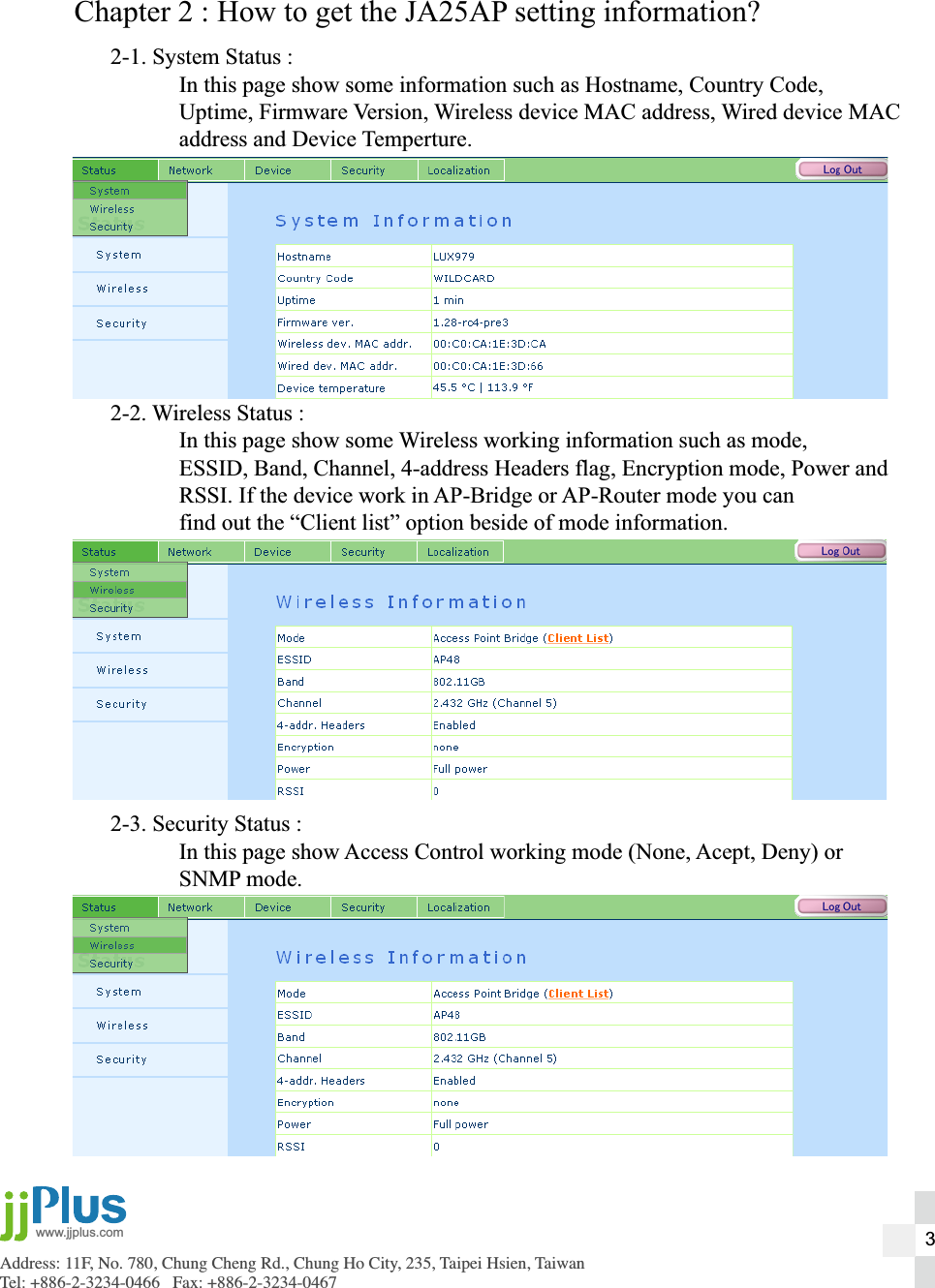
Address: 11F, No. 780, Chung Cheng Rd., Chung Ho City, 235, Taipei Hsien, TaiwanTel: +886-2-3234-0466   Fax: +886-2-3234-0467www.jjplus.comChapter 2 : How to get the JA25AP setting information?2-1. System Status :  In this page show some information such as Hostname, Country Code,  Uptime, Firmware Version, Wireless device MAC address, Wired device MAC  address and Device Temperture.2-2. Wireless Status :  In this page show some Wireless working information such as mode,   ESSID, Band, Channel, 4-address Headers flag, Encryption mode, Power and  RSSI. If the device work in AP-Bridge or AP-Router mode you can  find out the “Client list” option beside of mode information.2-3. Security Status :  In this page show Access Control working mode (None, Acept, Deny) or  SNMP mode.3
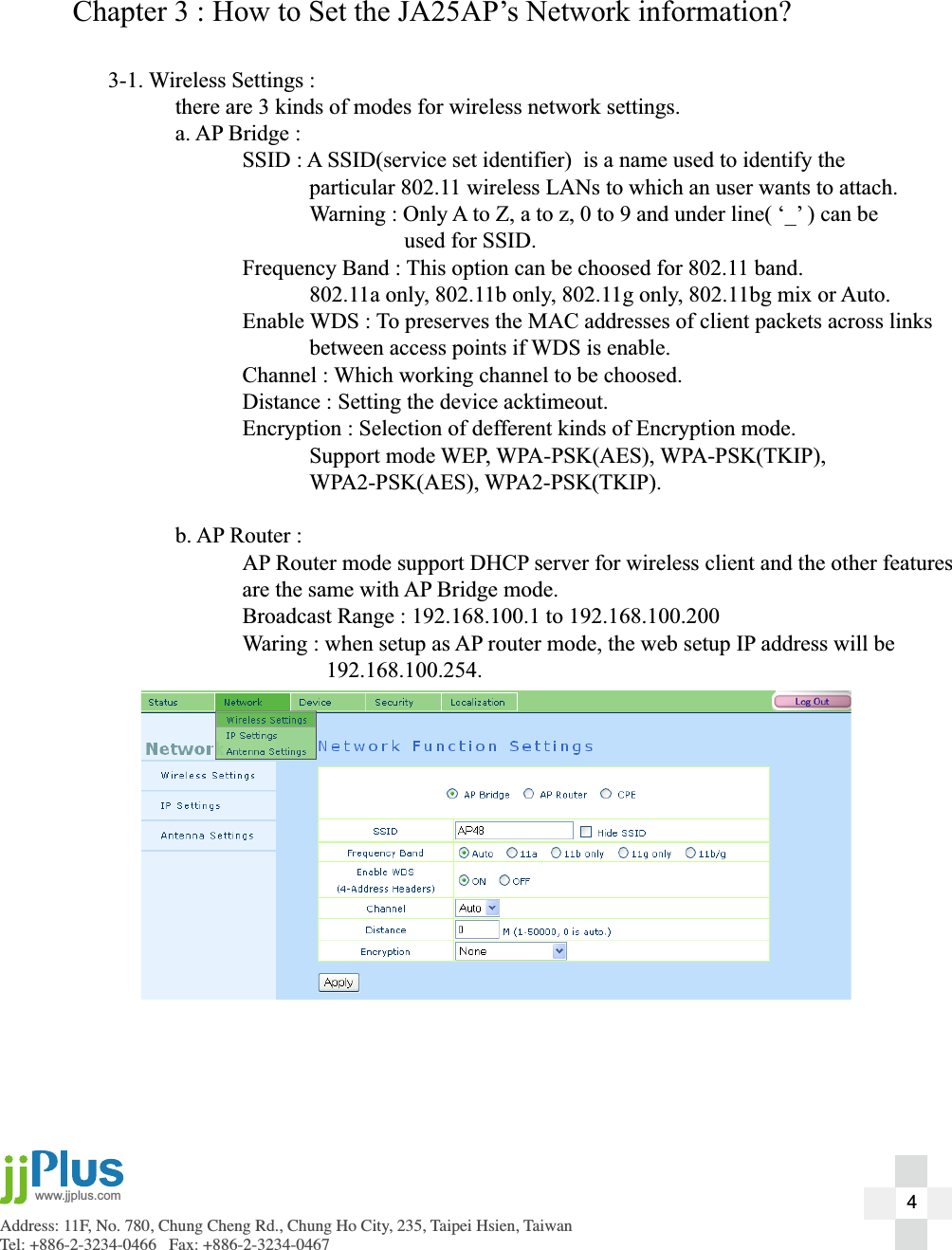
Address: 11F, No. 780, Chung Cheng Rd., Chung Ho City, 235, Taipei Hsien, TaiwanTel: +886-2-3234-0466   Fax: +886-2-3234-0467www.jjplus.comChapter 3 : How to Set the JA25AP’s Network information?3-1. Wireless Settings :  there are 3 kinds of modes for wireless network settings.  a. AP Bridge :    SSID : A SSID(service set identifier)  is a name used to identify the       particular 802.11 wireless LANs to which an user wants to attach.      Warning : Only A to Z, a to z, 0 to 9 and under line( ‘_’ ) can be             used for SSID.    Frequency Band : This option can be choosed for 802.11 band.      802.11a only, 802.11b only, 802.11g only, 802.11bg mix or Auto.    Enable WDS : To preserves the MAC addresses of client packets across links       between access points if WDS is enable.    Channel : Which working channel to be choosed.     Distance : Setting the device acktimeout.    Encryption : Selection of defferent kinds of Encryption mode.   Support mode WEP, WPA-PSK(AES), WPA-PSK(TKIP),    WPA2-PSK(AES), WPA2-PSK(TKIP).  b. AP Router :    AP Router mode support DHCP server for wireless client and the other features    are the same with AP Bridge mode.    Broadcast Range : 192.168.100.1 to 192.168.100.200    Waring : when setup as AP router mode, the web setup IP address will be      192.168.100.254.4
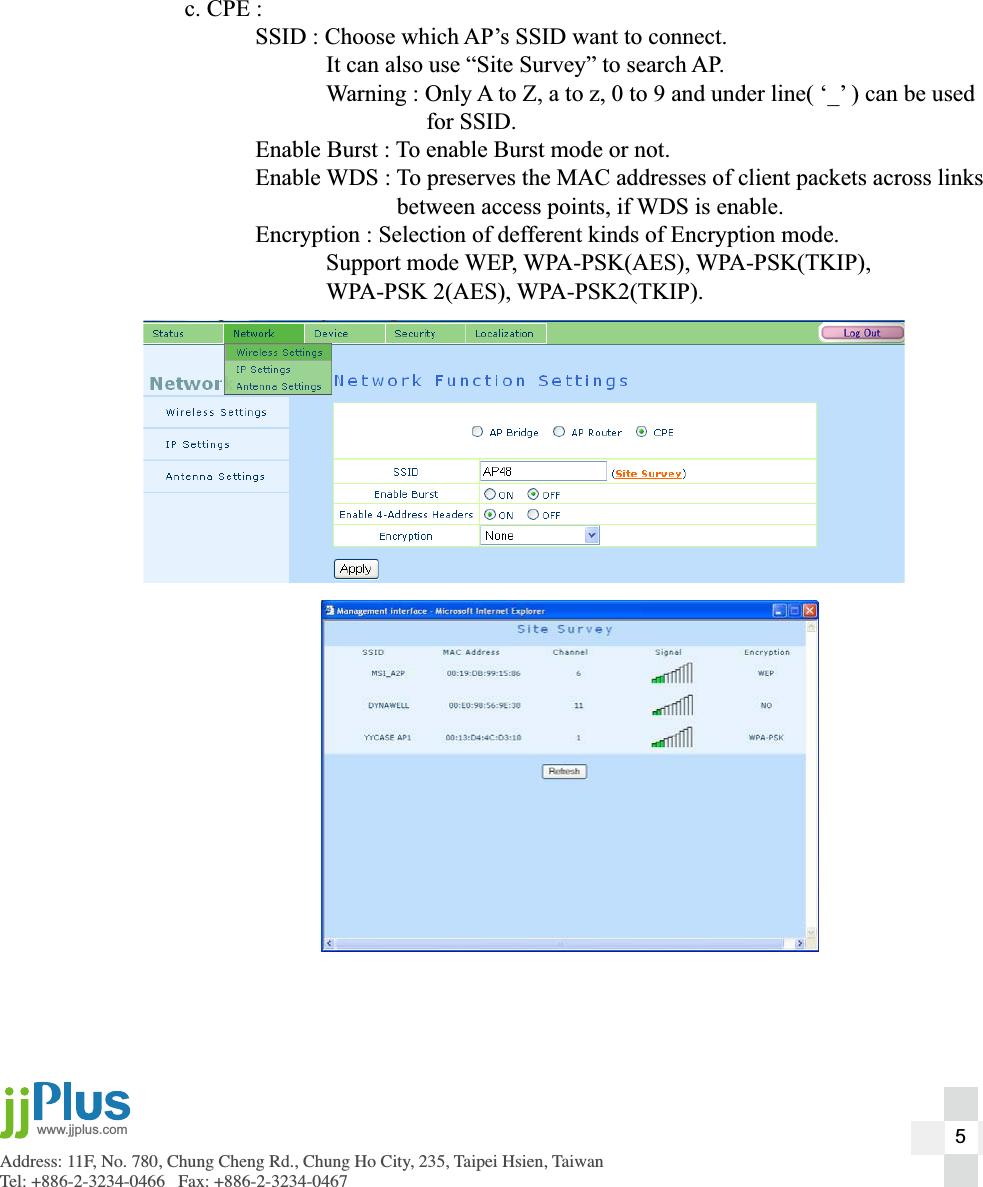
Address: 11F, No. 780, Chung Cheng Rd., Chung Ho City, 235, Taipei Hsien, TaiwanTel: +886-2-3234-0466   Fax: +886-2-3234-0467www.jjplus.com  c. CPE :    SSID : Choose which AP’s SSID want to connect.       It can also use “Site Survey” to search AP.       Warning : Only A to Z, a to z, 0 to 9 and under line( ‘_’ ) can be used             for SSID.    Enable Burst : To enable Burst mode or not.    Enable WDS : To preserves the MAC addresses of client packets across links         between access points, if WDS is enable.    Encryption : Selection of defferent kinds of Encryption mode.   Support mode WEP, WPA-PSK(AES), WPA-PSK(TKIP),    WPA-PSK 2(AES), WPA-PSK2(TKIP).5
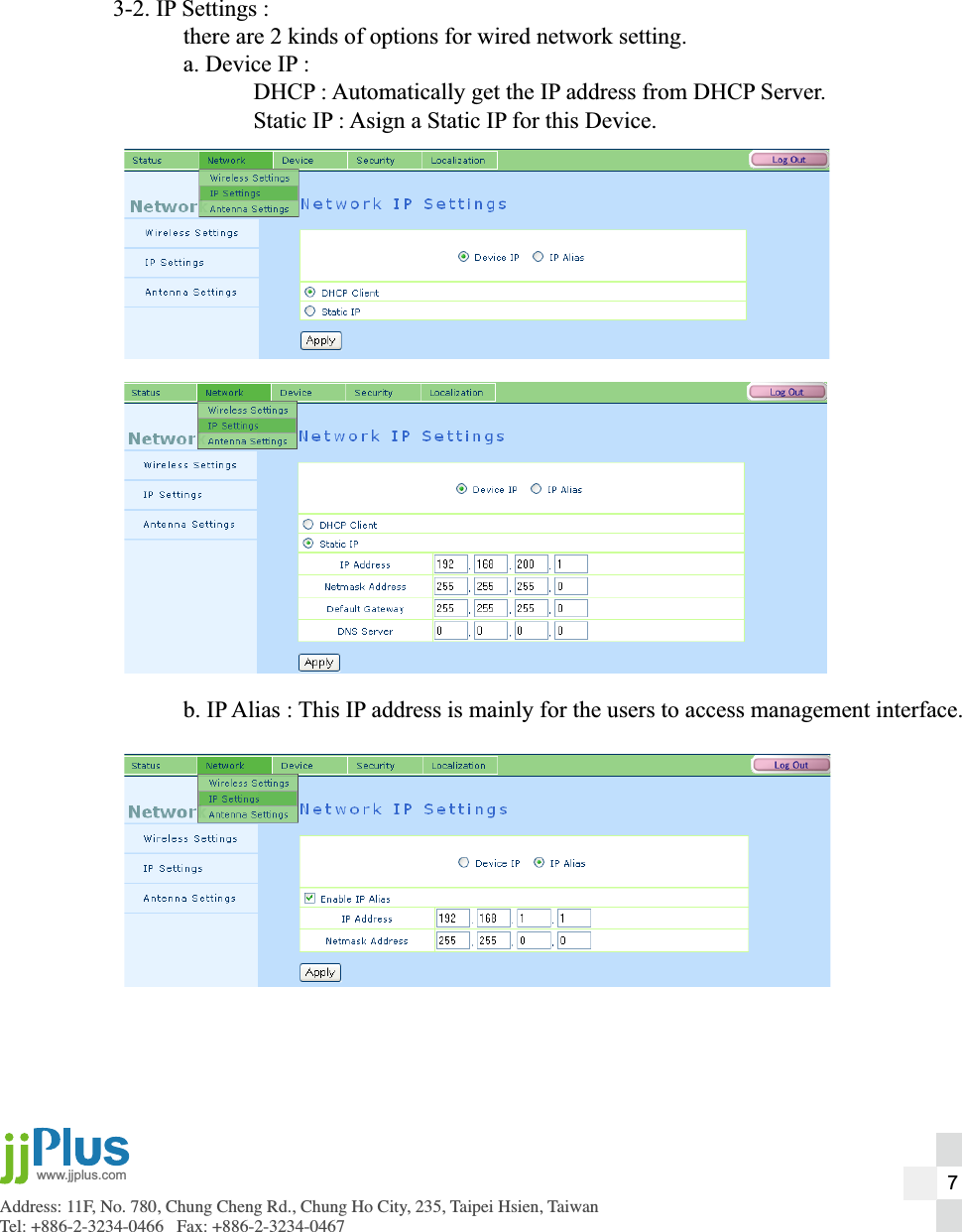
Address: 11F, No. 780, Chung Cheng Rd., Chung Ho City, 235, Taipei Hsien, TaiwanTel: +886-2-3234-0466   Fax: +886-2-3234-0467www.jjplus.com3-2. IP Settings :  there are 2 kinds of options for wired network setting.  a. Device IP :    DHCP : Automatically get the IP address from DHCP Server.    Static IP : Asign a Static IP for this Device.   b. IP Alias : This IP address is mainly for the users to access management interface.7
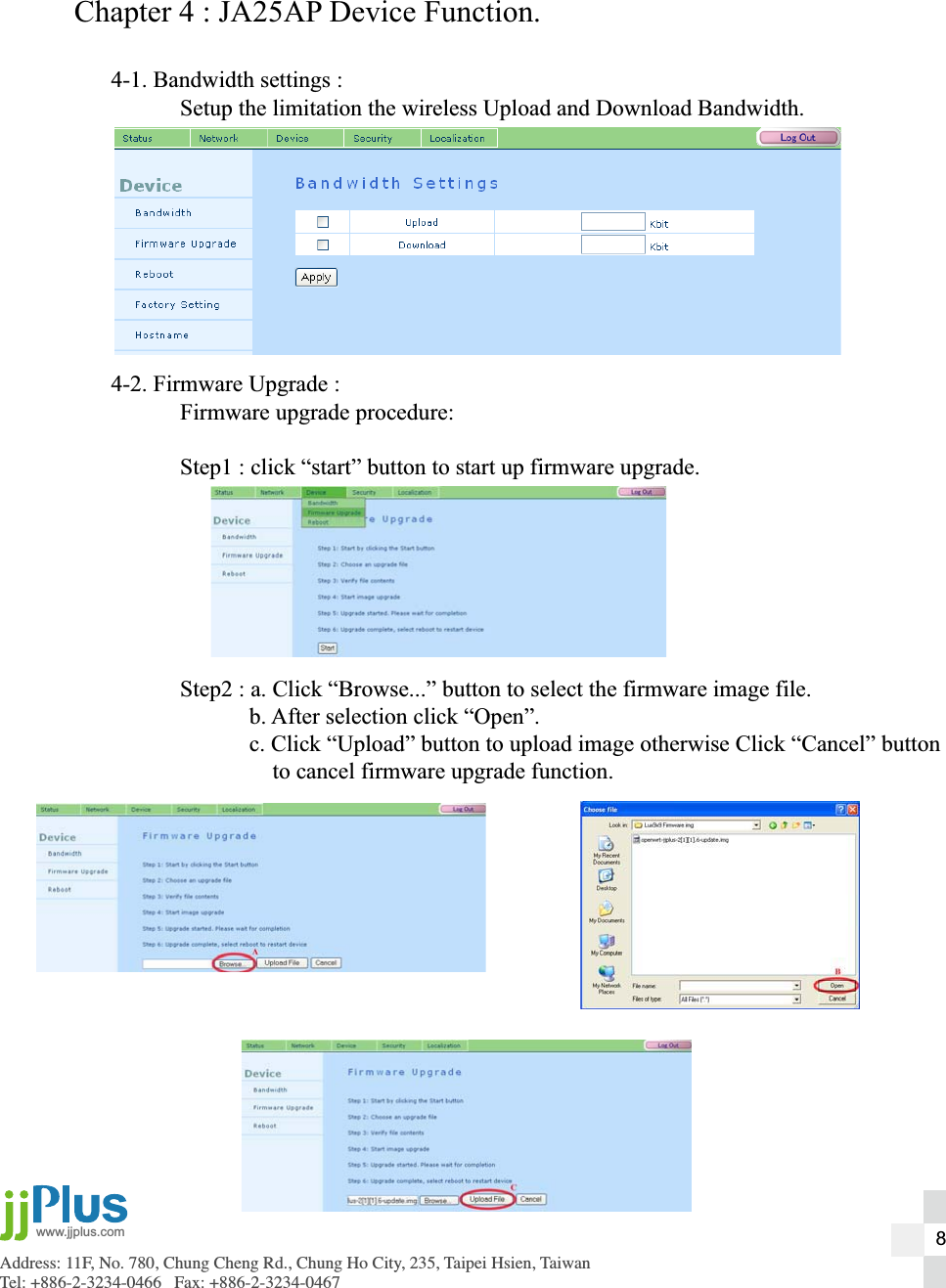
Address: 11F, No. 780, Chung Cheng Rd., Chung Ho City, 235, Taipei Hsien, TaiwanTel: +886-2-3234-0466   Fax: +886-2-3234-0467www.jjplus.comChapter 4 : JA25AP Device Function.4-1. Bandwidth settings :  Setup the limitation the wireless Upload and Download Bandwidth.4-2. Firmware Upgrade :  Firmware upgrade procedure:  Step1 : click “start” button to start up firmware upgrade.  Step2 : a. Click “Browse...” button to select the firmware image file.    b. After selection click “Open”.    c. Click “Upload” button to upload image otherwise Click “Cancel” button        to cancel firmware upgrade function.8
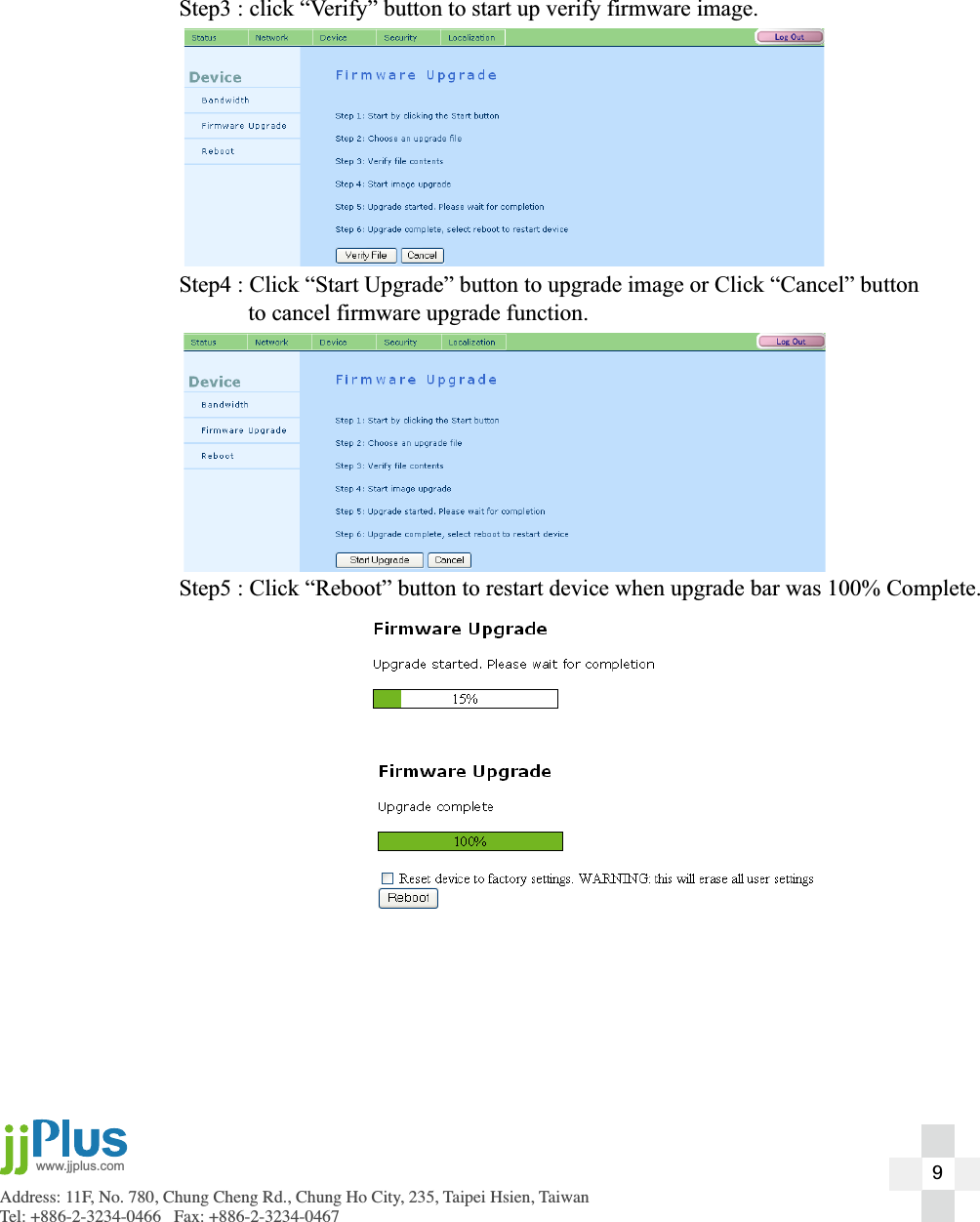
Address: 11F, No. 780, Chung Cheng Rd., Chung Ho City, 235, Taipei Hsien, TaiwanTel: +886-2-3234-0466   Fax: +886-2-3234-0467www.jjplus.com  Step3 : click “Verify” button to start up verify firmware image.  Step4 : Click “Start Upgrade” button to upgrade image or Click “Cancel” button    to cancel firmware upgrade function.  Step5 : Click “Reboot” button to restart device when upgrade bar was 100% Complete.9
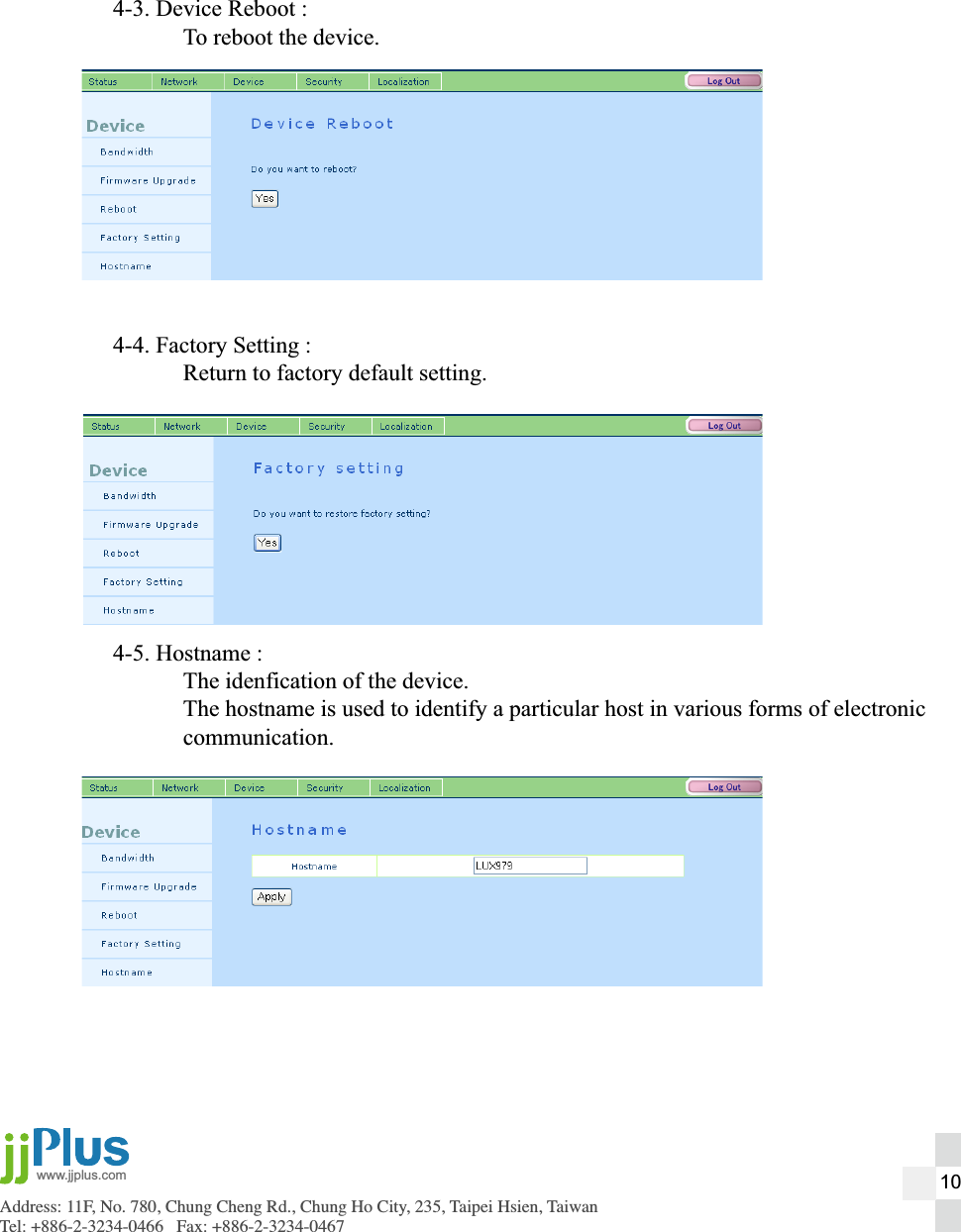
Address: 11F, No. 780, Chung Cheng Rd., Chung Ho City, 235, Taipei Hsien, TaiwanTel: +886-2-3234-0466   Fax: +886-2-3234-0467www.jjplus.com4-3. Device Reboot :  To reboot the device.4-4. Factory Setting :  Return to factory default setting.4-5. Hostname :  The idenfication of the device.  The hostname is used to identify a particular host in various forms of electronic communication. 10
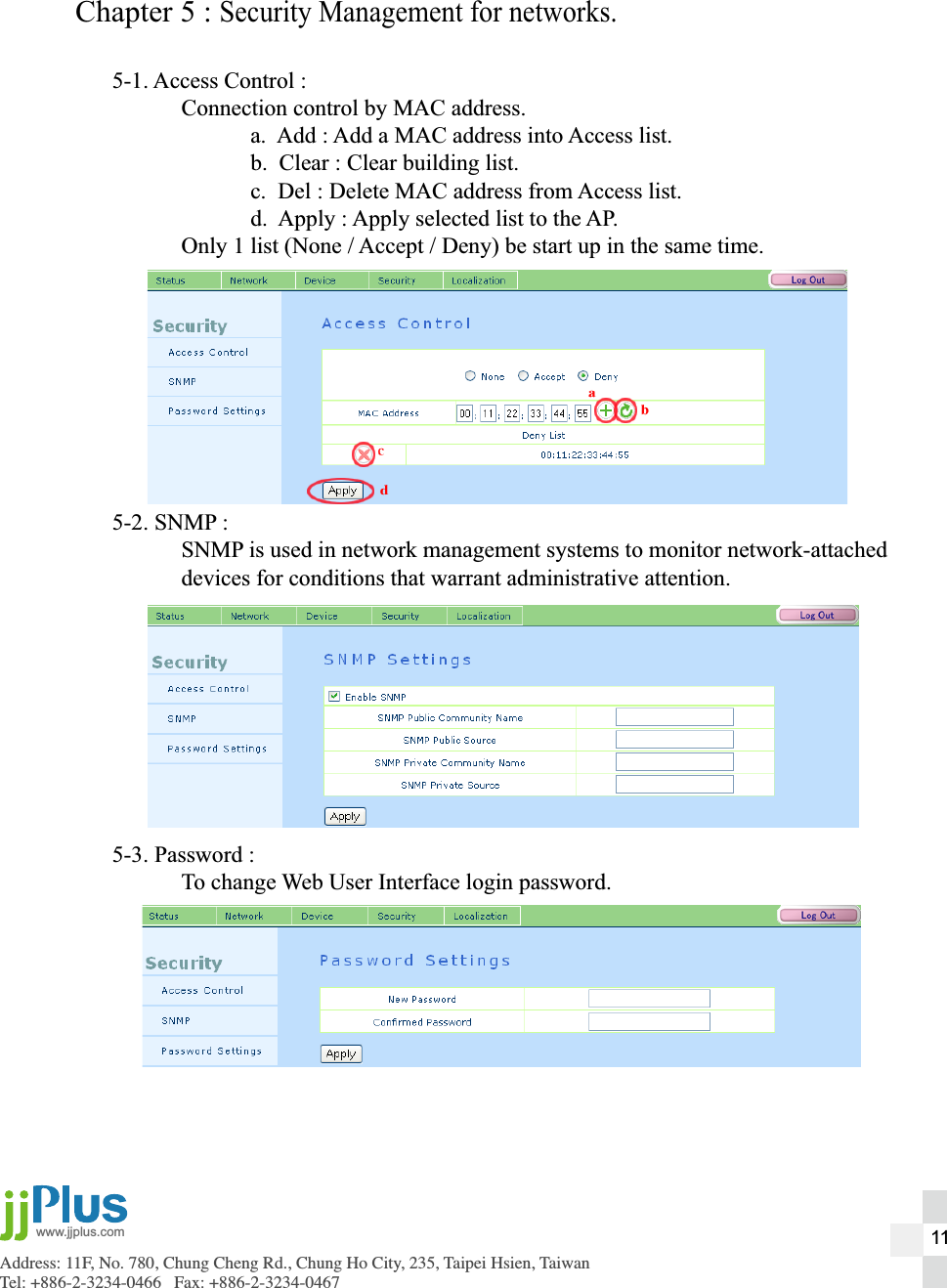
Address: 11F, No. 780, Chung Cheng Rd., Chung Ho City, 235, Taipei Hsien, TaiwanTel: +886-2-3234-0466   Fax: +886-2-3234-0467www.jjplus.comChapter 5 : Security Management for networks.5-1. Access Control :  Connection control by MAC address.    a.  Add : Add a MAC address into Access list.    b.  Clear : Clear building list.    c.  Del : Delete MAC address from Access list.    d.  Apply : Apply selected list to the AP.  Only 1 list (None / Accept / Deny) be start up in the same time.5-2. SNMP :  SNMP is used in network management systems to monitor network-attached  devices for conditions that warrant administrative attention.5-3. Password :  To change Web User Interface login password.11
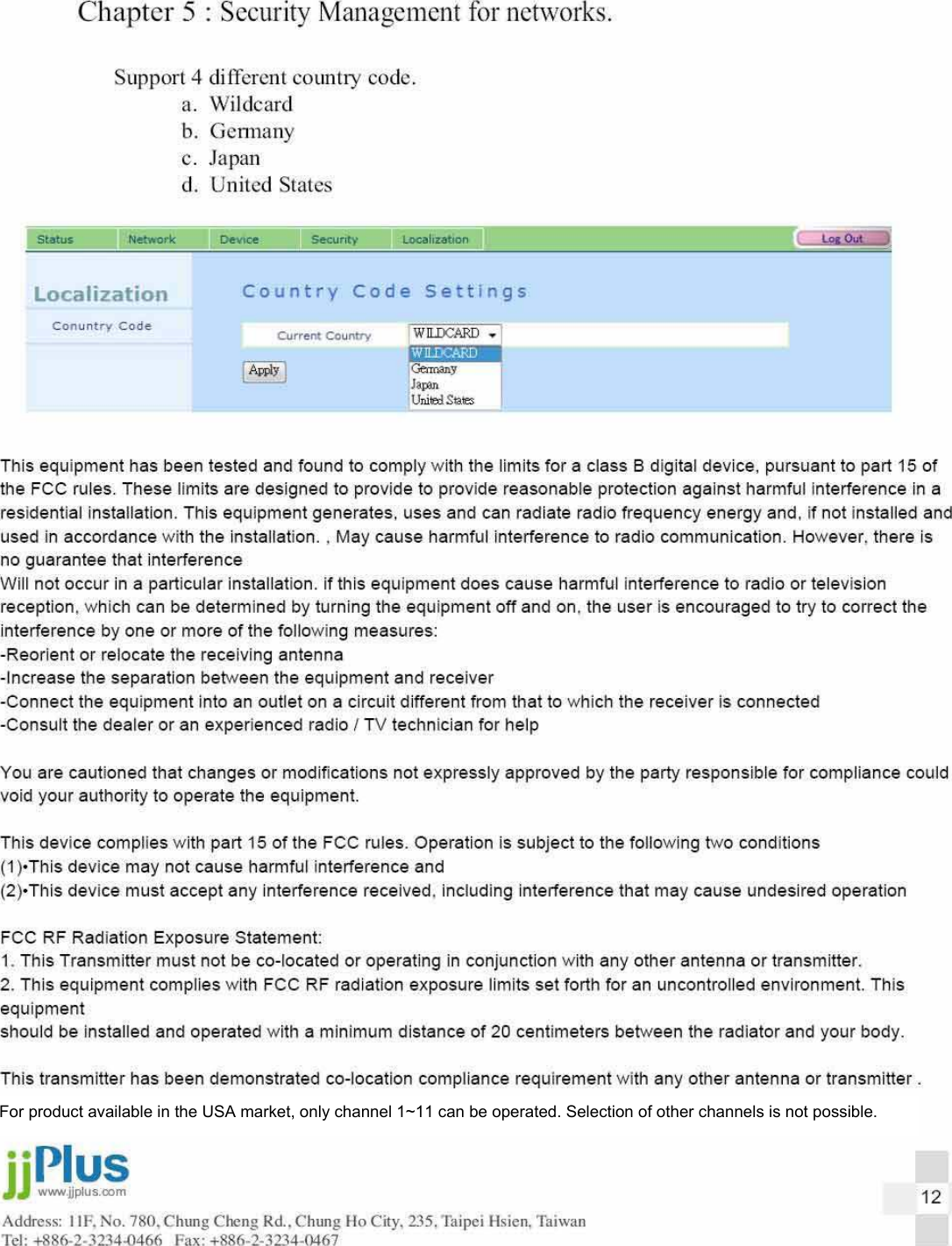
For product available in the USA market, only channel 1~11 can be operated. Selection of other channels is not possible.
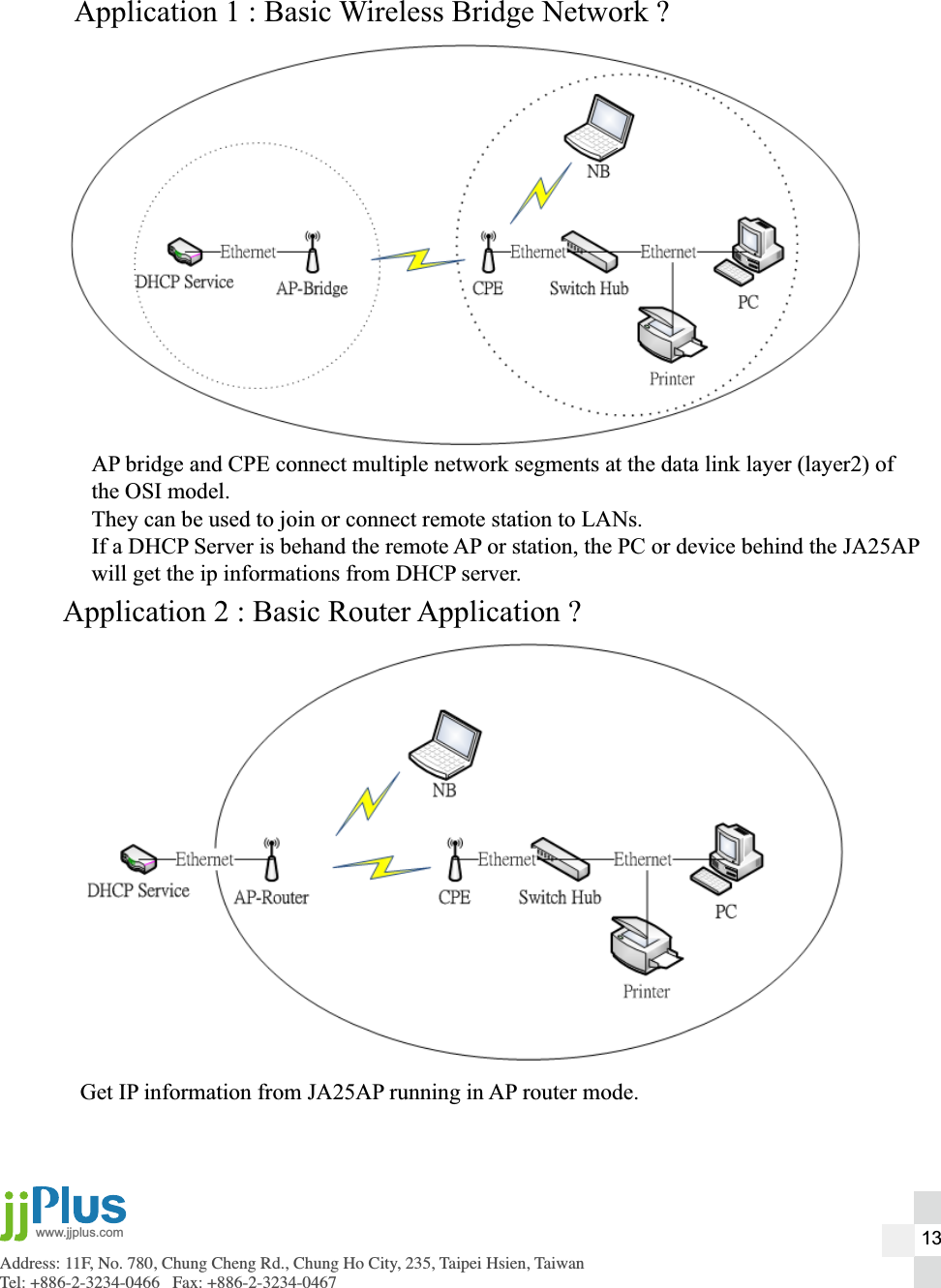
Address: 11F, No. 780, Chung Cheng Rd., Chung Ho City, 235, Taipei Hsien, TaiwanTel: +886-2-3234-0466   Fax: +886-2-3234-0467www.jjplus.comApplication 1 : Basic Wireless Bridge Network ?AP bridge and CPE connect multiple network segments at the data link layer (layer2) ofthe OSI model.They can be used to join or connect remote station to LANs.If a DHCP Server is behand the remote AP or station, the PC or device behind the JA25APwill get the ip informations from DHCP server.13Application 2 : Basic Router Application ?Get IP information from JA25AP running in AP router mode.

Navigation menu