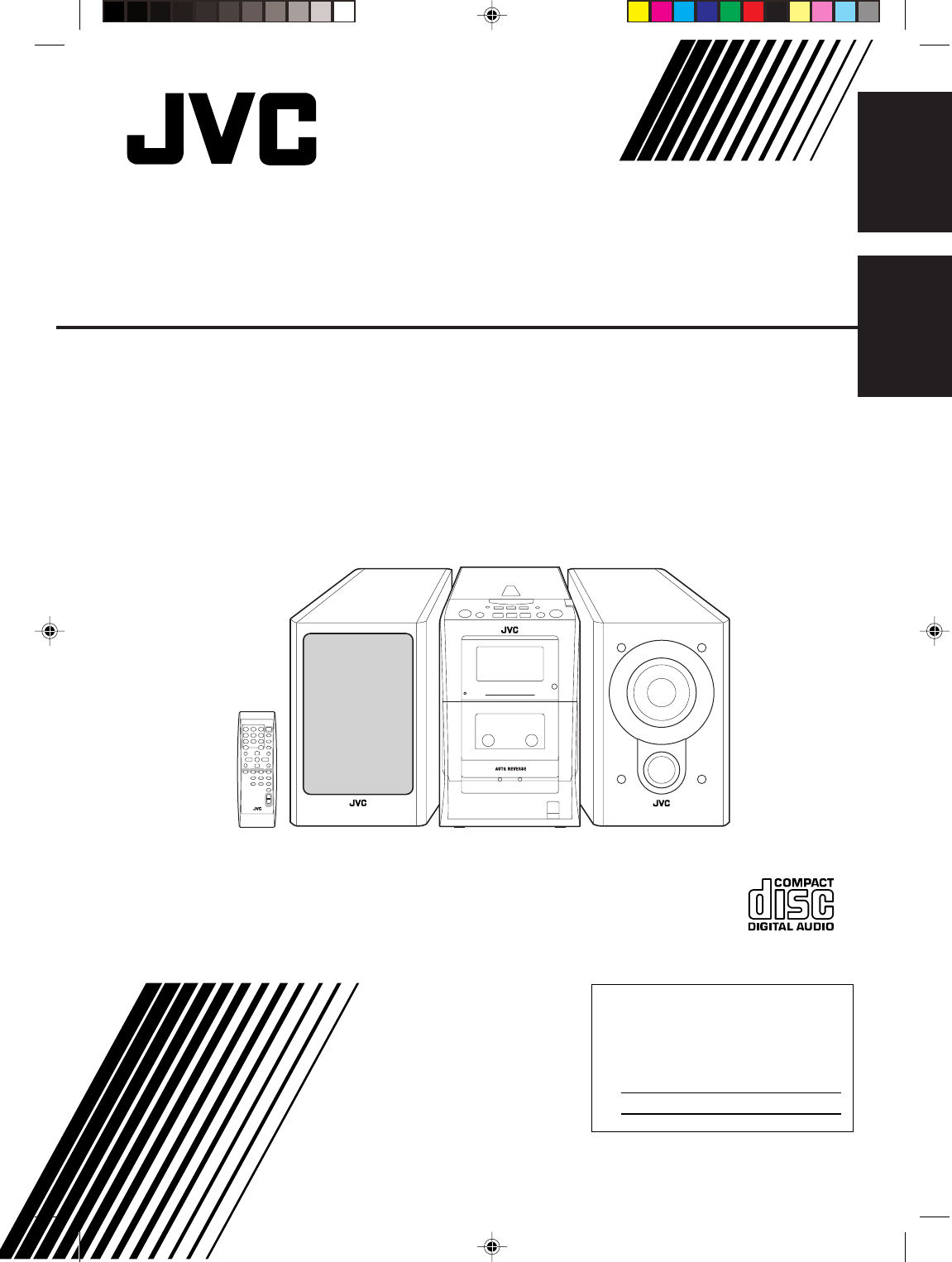
JVC FS H30 H35/FS H30[C] User Manual H30, H35 GVT0101 002C
FS-H35 FS-H35 GVT0101-002C English, French,
User Manual: JVC FS-H30 FS-H30, FS-H35 English, French,
Open the PDF directly: View PDF  .
.
Page Count: 56
For Customer Use:
Enter below the Model No. and Serial No.
which are located either on the rear, bot-
tom or side of the cabinet. Retain this
information for future reference.
Model No.
Serial No.
FS-H35— Consists of CA-FSH35 and SP-UXH35
FS-H30— Consists of CA-FSH30 and SP-UXH30
COMPACT COMPONENT SYSEM
SYSTEME DE COMPOSANTS COMPACT
INSTRUCTIONS
MANUEL D’INSTRUCTIONS
GVT0101-002C
[C]
COMPACT COMPONENT SYSTEM
English
Français
COVER_FS-H30[C]fff.pm6 03.3.3, 2:26 PM1
G-1
Warnings, Cautions and Others
Mises en garde, précautions et indications diverses
CAUTION— (standby/on) button!
Disconnect the mains plug to shut the power off completely
(all lamps and indications go off). The (standby/on)
button in any position does not disconnect the mains line.
• When the unit is on standby, the STANDBY lamp lights
red.
• When the unit is turned on, the STANDBY lamp goes off.
The power can be remote controlled.
ATTENTION—Touche (attente/sous tension)
Déconnectez la fiche secteur pour mettre l’appareil
complètement hors tension (tous les témoins et toutes les
indications s’éteignent). La touche (attente/sous
tension) dans n’importe quelle position ne déconnecte pas
l’appareil du secteur.
• Quand l’appareil est en mode d’attente, le témoin
STANDBY est allumé en rouge.
• Quand l’appareil est sous tension, le témoin STANDBY
s’éteint.
L’alimentation ne peut pas être commandée à distance.
CAUTION
To reduce the risk of electrical shocks, fire, etc.:
1. Do not remove screws, covers or cabinet.
2. Do not expose this appliance to rain or moisture.
ATTENTION
Afin d’éviter tout risque d’électrocution, d’incendie, etc.:
1. Ne pas enlever les vis ni les panneaux et ne pas ouvrir
le coffret de l’appareil.
2. Ne pas exposer l’appareil à la pluie ni à l’humidité.
CAUTION: TO REDUCE THE RISK OF ELECTRIC SHOCK,
DO NOT REMOVE COVER (OR BACK).
NO USER SERVICEABLE PARTS INSIDE.
REFER SERVICING TO QUALIFIED SERVICE PERSONNEL.
RISK OF ELECTRIC SHOCK
DO NOT OPEN
The lightning flash with arrowhead symbol,
within an equilateral triangle is intended to
alert the user to the presence of uninsulated
"dangerous voltage" within the product's
enclosure that may be of sufficient
magnitude to constitute a risk of electric
shock to persons.
The exclamation point within an equilateral
triangle is intended to alert the user to the
presence of important operating and
maintenance (servicing) instructions in the
literature accompanying the appliance.
CAUTION
For U.S.A.
This equipment has been tested and found to comply with the limits
for a Class B digital device, pursuant to part 15 of the FCC Rules.
These limits are designed to provide reasonable protection against
harmful interference in a residential installation.
This equipment generates, uses and can radiate radio frequency
energy and, if not installed and used in accordance with the
instructions, may cause harmful interference to radio
communications. However, there is no guarantee that interference
will not occur in a particular installation. If this equipment does cause
harmful interference to radio or television reception, which can be
determined by turning the equipment off and on, the user is
encouraged to try to correct the interference by one or more of the
following measures:
Reorient or relocate the receiving antenna.
Increase the separation between the equipment and receiver.
Connect the equipment into an outlet on a circuit different from that
to which the receiver is connected.
Consult the dealer or an experienced radio/TV technician for help.
WARNING: TO REDUCE THE RISK OF FIRE
OR ELECTRIC SHOCK, DO NOT EXPOSE
THIS APPLIANCE TO RAIN OR MOISTURE.
SAFETY_FS-H30[C]f.pm6 03.2.5, 5:41 PM1
G-2
Note to CATV system installer:
This reminder is provided to call the CATV system
installer’s attention to Section 820-40 of the NEC
which provides guidelines for proper grounding and,
in particular, specifies that the cable ground shall be
connected to the grounding system of the building, as
close to the point of cable entry as practical.
For Canada/pour le Canada
CAUTION: TO PREVENT ELECTRIC SHOCK,
MATCH WIDE BLADE OF PLUG TO WIDE SLOT,
FULLY INSERT.
ATTENTION: POUR EVITER LES CHOCS
ELECTRIQUES, INTRODUIRE LA LAME LA PLUS
LARGE DE LA FICHE DANS LA BORNE
CORRESPONDANTE DE LA PRISE ET POUSSER
JUSQUAU FOND.
For Canada/pour le Canada
THIS DIGITAL APPARATUS DOES NOT EXCEED
THE CLASS B LIMITS FOR RADIO NOISE EMIS-
SIONS FROM DIGITAL APPARATUS AS SET OUT
IN THE INTERFERENCE-CAUSING EQUIPMENT
STANDARD ENTITLED “DIGITAL APPARATUS,”
ICES-003 OF THE DEPARTMENT OF COMMUNI-
CATIONS.
CET APPAREIL NUMERIQUE RESPECTE LES
LIMITES DE BRUITS RADIOELECTRIQUES
APPLICABLES AUX APPAREILS NUMERIQUES DE
CLASSE B PRESCRITES DANS LA NORME SUR
LE MATERIEL BROUILLEUR: “APPAREILS
NUMERIQUES”, NMB-003 EDICTEE PAR LE
MINISTRE DES COMMUNICATIONS.
SAFETY_FS-H30[C]fff.pm6 03.3.3, 2:28 PM2
1
English
Introduction
About This Manual
This manual is organized as follows:
• The manual mainly explains operations using the
buttons on the remote control.
You can use the buttons both on the remote
control and on the main unit for the same
operations if they have the same or similar names
(or marks), unless mentioned otherwise.
• Basic and common information that is the same for
many functions is grouped in one place, and is not
repeated for each procedure. For instance, we do not
repeat the information about turning on/off the unit,
setting the volume, changing the sound effects, and
others, which are explained in the section “Common
Operations” on pages 10 and 11.
• The following symbols are used in this manual:
Gives you warning and caution to
prevent damage or risk of fire/electric
shock.
Furthermore, it gives you information
about what is not good for obtaining
the best possible performance from the
unit.
Gives you information and hints you
should know.
Precautions
Installation
• Install in a place which is level, dry and neither too
hot nor too cold—between 5˚C and 35˚C.
• Install the unit in a location with adequate
ventilation to prevent internal heat buildup in the
unit.
• Leave sufficient distance between the unit and the
TV.
• Keep the speakers away from the TV to avoid
interference with TV.
DO NOT install the unit in a location near
heat sources, or in a place subject to direct
sunlight, excessive dust or vibration.
We would like to thank you for purchasing one of our JVC products.
Before operating this unit, read this manual carefully and thoroughly to obtain
the best possible performance from your unit, and retain this manual for future
reference.
Power sources
• When unplugging the unit from the wall outlet,
always pull on the plug, not the AC power cord.
DO NOT handle the AC power cord with
wet hands.
Moisture condensation
Moisture may condense on the lens inside the unit in
the following cases:
• After starting heating in the room
• In a damp room
• If the unit is brought directly from a cold to a warm
place
Should condensation occur, the unit may malfunction.
In this case, leave the unit turned on for a few hours
until the moisture evaporates, unplug the AC power
cord, then plug it in again.
Others
• Should any metallic object or liquid fall into the unit,
unplug the power cord and consult your dealer
before operating any further.
• If you are not going to operate the unit for an
extended period of time, unplug the power cord.
DO NOT disassemble the unit since there
are no user serviceable parts inside.
If anything goes wrong, unplug the power cord and
consult your dealer.
EN01-13_FS-H30[C]f.pm6 03.2.5, 6:42 PM1

2
English
Contents
Location of the Buttons ............................................... 3
Main Unit .......................................................................... 3
Remote Control ................................................................. 5
Getting Started............................................................. 6
Supplied Accessories ......................................................... 6
Connecting Antennas ........................................................ 6
Connecting Speakers ......................................................... 7
Connecting Other Equipment ............................................ 8
Putting the Batteries into the Remote Control .................. 9
Common Operations ................................................. 10
Setting the Clock ............................................................. 10
Turning On the Power ..................................................... 11
Adjusting the Volume ...................................................... 11
Adjusting the Tone (Bass/Treble).................................... 11
Reinforcing the Bass Sound ............................................ 11
Listening to FM and AM Broadcasts ....................... 12
Tuning in to a Station ...................................................... 12
Presetting Stations ........................................................... 12
Tuning in to a Preset Station ........................................... 13
Playing Back Discs ..................................................... 14
Playing Back the Entire Disc—Normal Play .................. 14
Basic Disc Operations ..................................................... 15
Programming the Playing Order of the Tracks
—Program Play......................................................... 15
Playing at Random—Random Play ................................ 16
Repeating Tracks—Repeat Play ...................................... 16
Playing Back Tapes .................................................... 17
Playing Back a Tape ........................................................ 17
Recording ................................................................... 18
Recording on a Tape ........................................................ 18
Disc Direct Recording ..................................................... 19
One Track Recording ...................................................... 19
Using the Timers ........................................................ 20
Using Daily Timer and Recording Timer ........................ 20
Using Snooze Timer ........................................................ 22
Using Sleep Timer ........................................................... 22
Maintenance ............................................................... 23
Troubleshooting ......................................................... 25
Specifications .............................................................. 26
EN01-13_FS-H30[C]f.pm6 03.2.5, 6:42 PM2
3
English
COMPACT COMPONENT SYSTEM
STANDBY
w
q
e
r
t
Top view
Front view
TIMER/SNOOZE
MULTI CONTROL
ONE TOUCH
REC AHB PRO
VOLUME
AUX
TAPE CD
TUNER
BAND
COMPACT
DIGITAL AUDIO
PHONES
4¢
7
OPEN
9
7
p
1
2
5
6
8
4
3
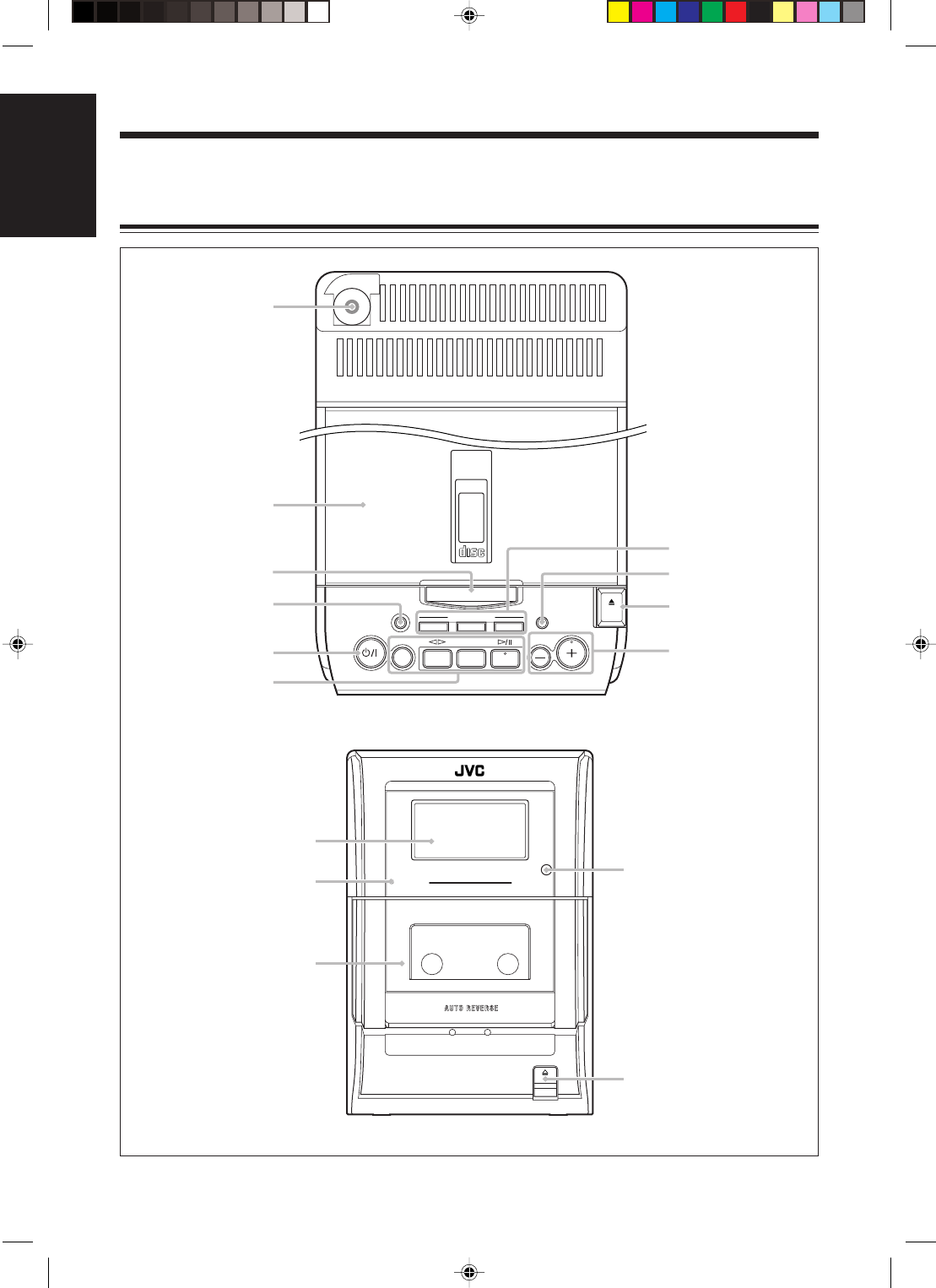
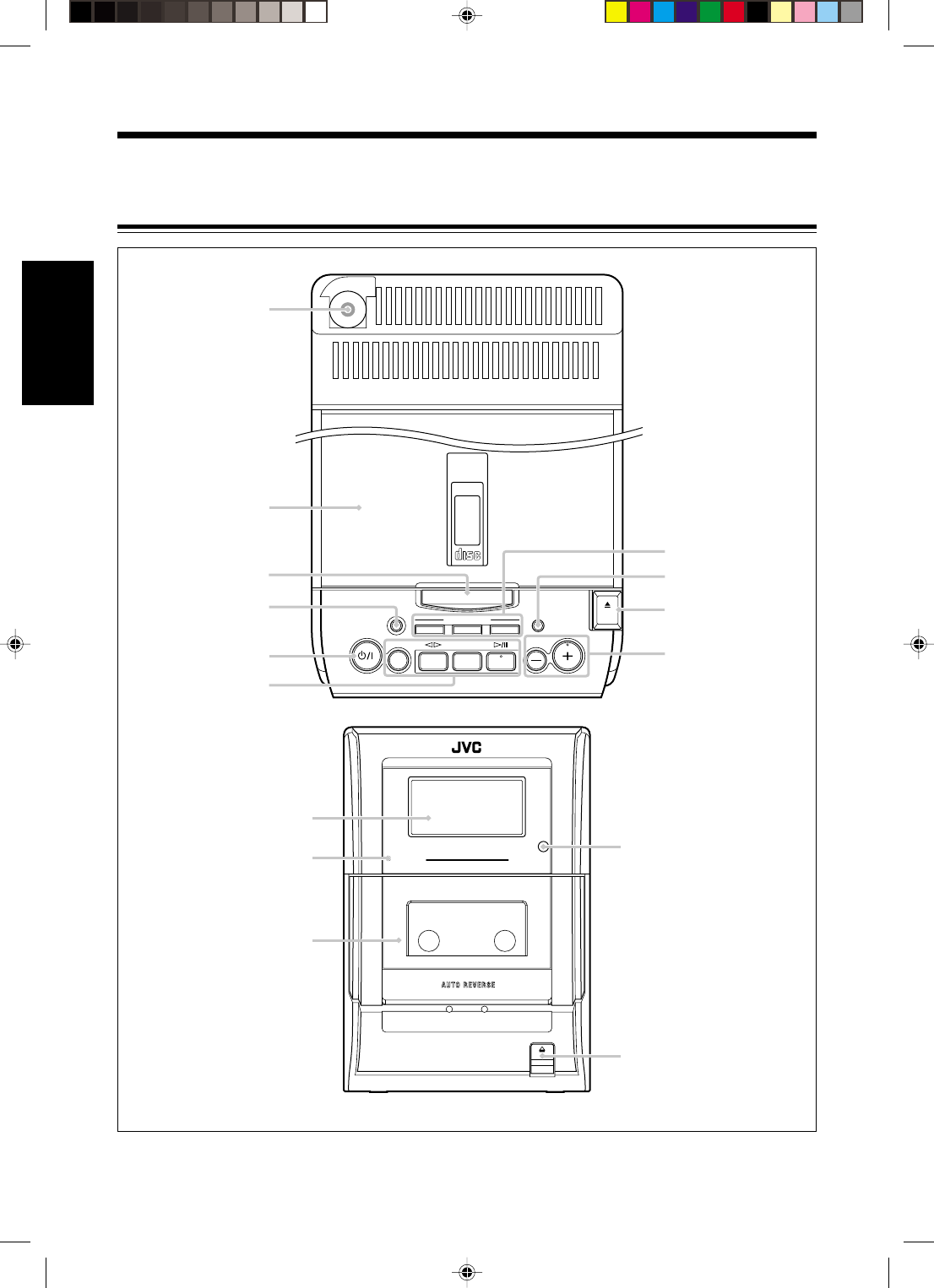
Become familiar with the buttons on your unit.
Main Unit
Location of the Buttons
EN01-13_FS-H30[C]f.pm6 03.2.5, 6:42 PM3
4
English
Main unit
1PHONES jack (11)
2Disc cover
3TIMER/SNOOZE button (10, 20 – 22)
4ONE TOUCH REC (recording) button (18, 19)
5 (standby/on) button (11, 21)
6Source buttons
•AUX, @ # TAPE, BAND TUNER, and
#/8 CD
Pressing one of these buttons also turns on the
unit.
7MULTI CONTROL buttons
•4 (reverse skip), 7 (stop), and ¢ (forward
skip)
8AHB (Active Hyper Bass) PRO button (11)
90 OPEN (disc cover open) button (14)
pVOLUME + / – buttons (11)
qDisplay window
wSTANDBY lamp (11)
eCassette holder
rRemote sensor
t) (cassette holder open) button (17 – 19)
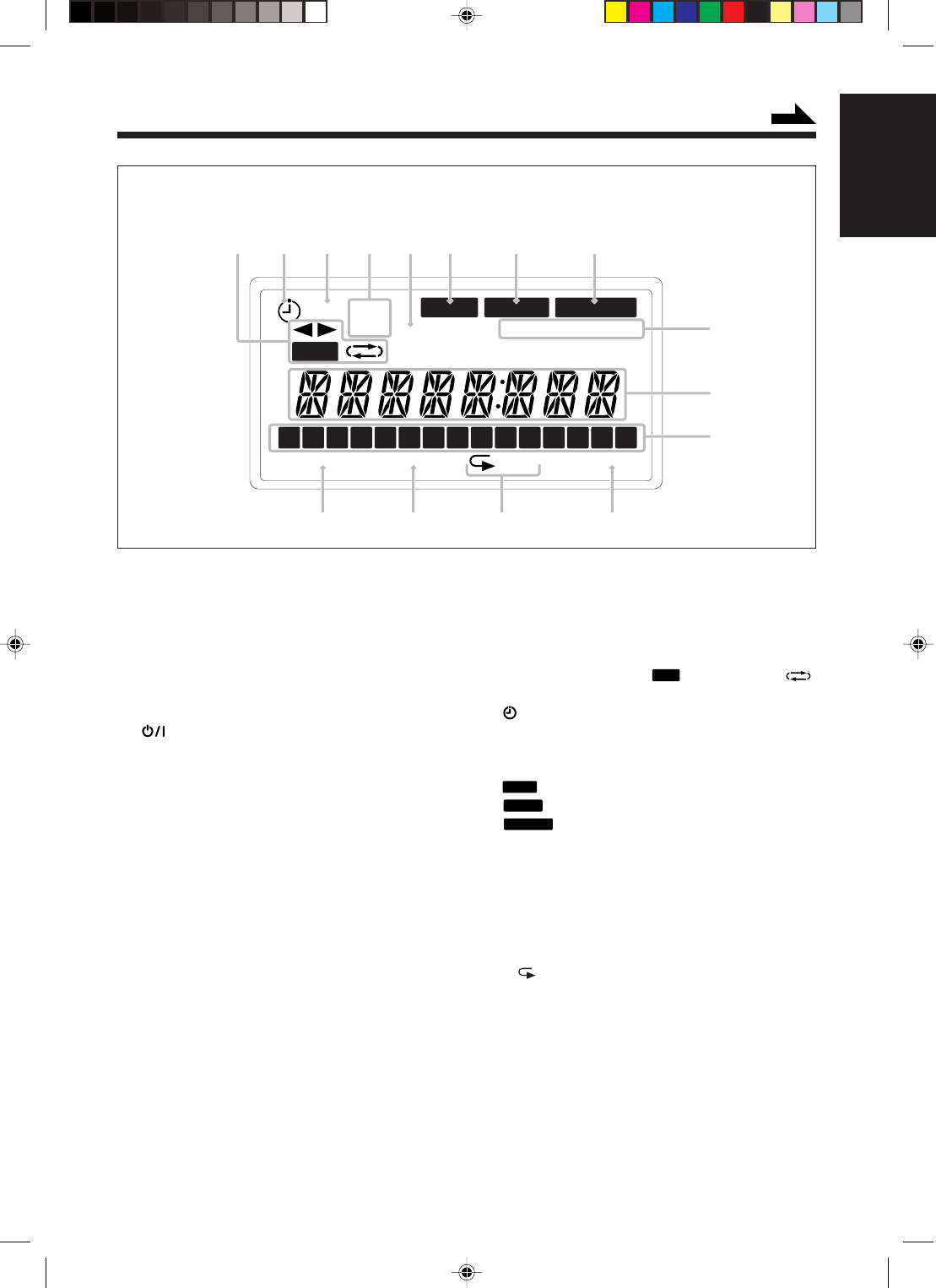
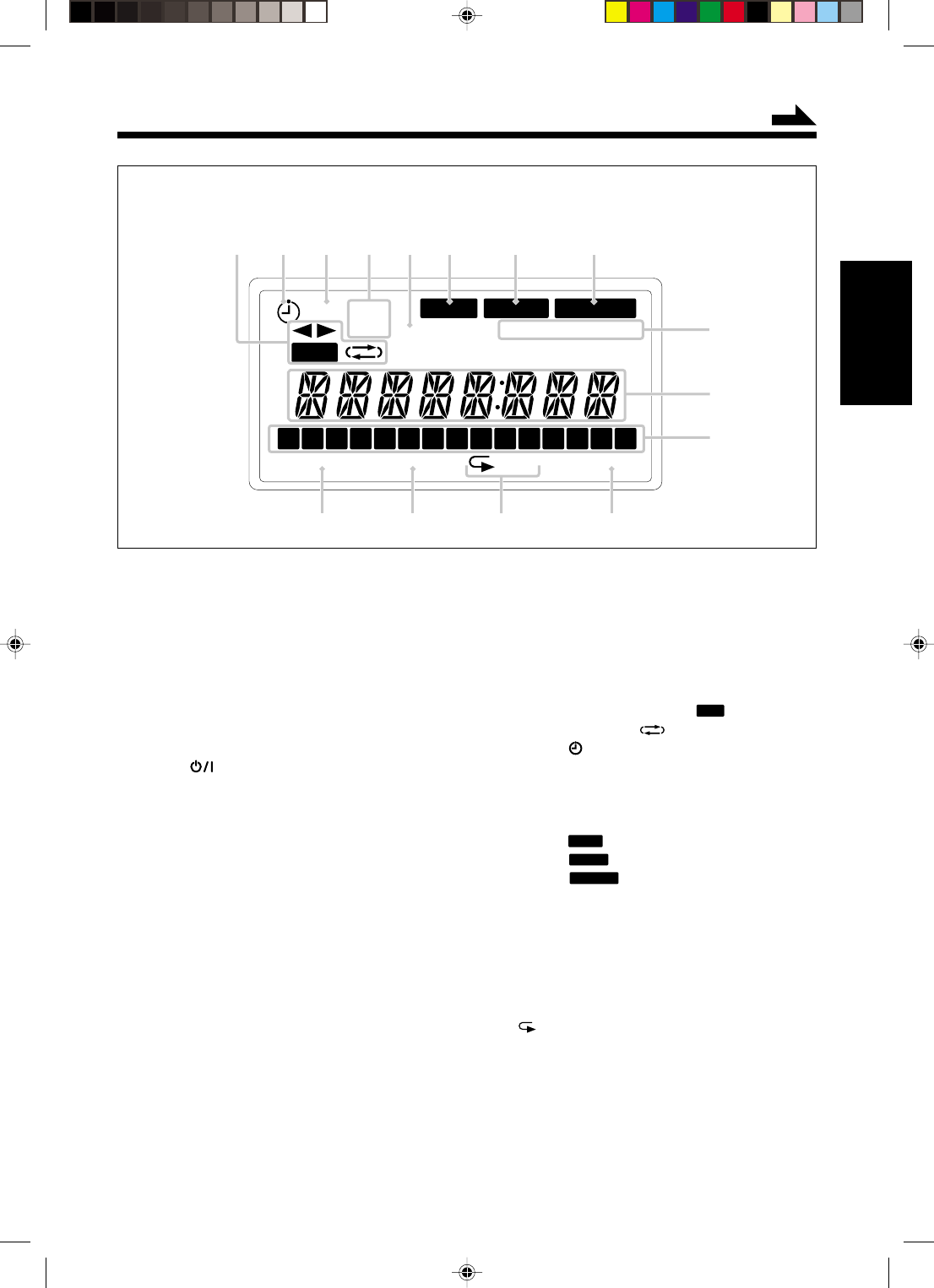
Display window
1Tape operation indicators
•2 3 (tape direction),
REC
(recording), and
(reverse mode)
2 (timer) indicator
3REC (recording timer) indicator
4ON/OFF (timer on-time/off-time) indicators
5CLOCK indicator
6
BASS
indicator
7
SLEEP
indicator
8
SNOOZE
indicator
9MONO and STEREO indicators
pMain display
•Shows the source name, frequency, etc.
qTrack calender indicators
wPROGRAM indicator
eRANDOM indicator
rRepeat indicators
• and ALL
tOVER indicator
PROGRAM RANDOM ALL OVER
MONOCLOCKOFF
REC ON STEREO
BASS
REC
SLEEP SNOOZE
1 2 3 4 5 6 7 8 9 10 11 12 13 14 15
1234
567 8
9
p
q
rtwe
Display window
See the pages in parentheses for details.
Continued
EN01-13_FS-H30[C]f.pm6 03.2.5, 6:42 PM4
5
English
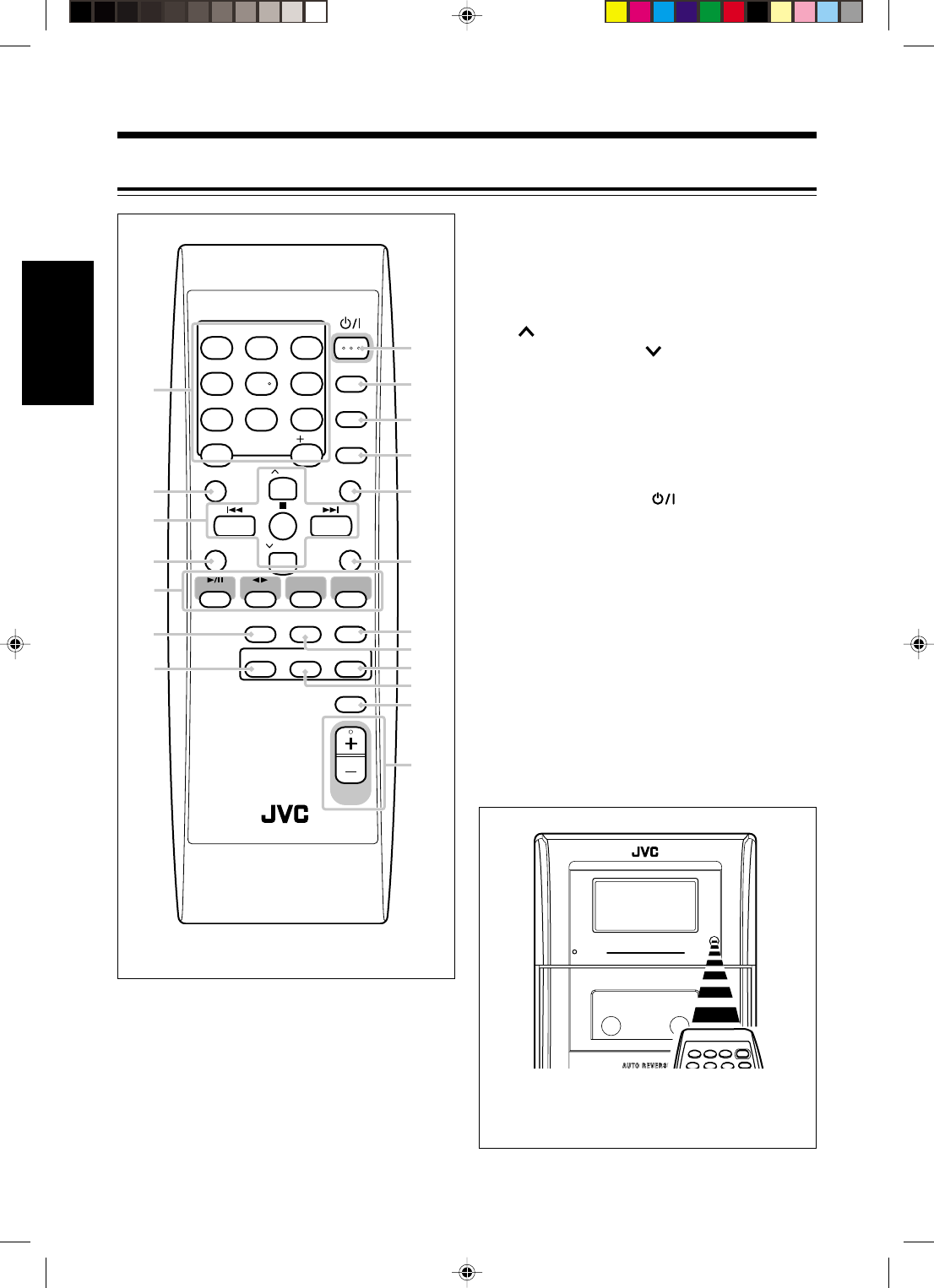
Remote Control
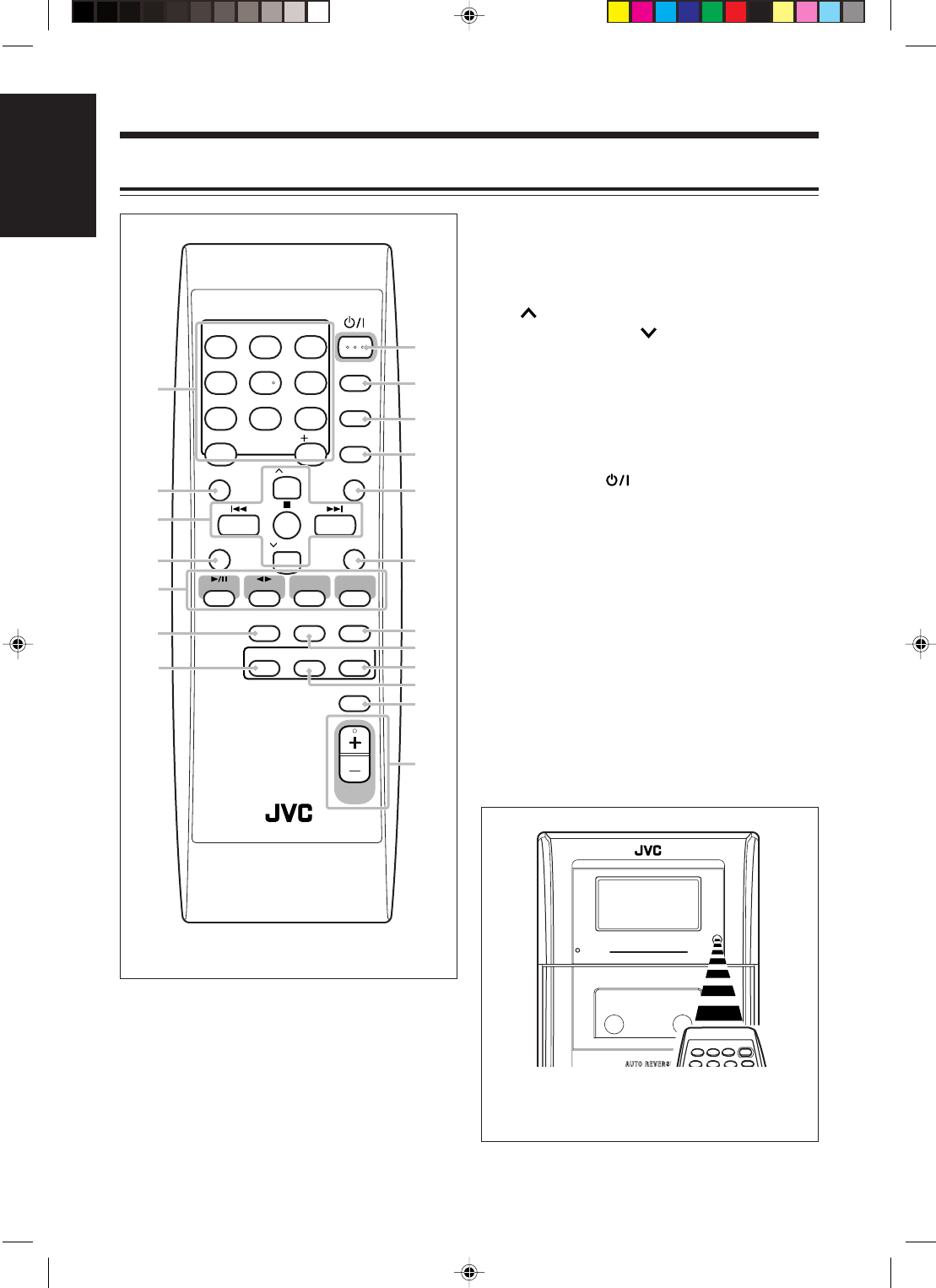
See the pages in parentheses for details.
1Number buttons
2BASS button (11)
3Multi control buttons
• UP, 4 (reverse skip), 7 (stop), ¢
(forward skip), and DOWN
4SET button (13)
5Source buttons
•3/8 CD, 2 3 TAPE, TUNER, and AUX
Pressing one of these buttons also turns on the
unit.
6REV.MODE (reverse mode) button (17 – 19)
7PRGM (program) button (15)
8STANDBY/ON button (11, 21)
9DISPLAY button (10)
pCLOCK/TIMER button (10, 20, 21)
qSLEEP button (22)
wTREBLE button (11)
eCANCEL button (16)
rAUTO PRESET button (12)
tFM MODE button (12)
yREPEAT button (16)
uRANDOM button (16)
iAHB (Active Hyper Bass) PRO button (11)
oVOLUME + / – button (11)
When using the remote control, point it at the
remote sensor on the front panel.
STANDBY/ON
DISPLAY
CLOCK
/TIMER
SLEEP
TREBLE
UP
DOWN
BASS
CANCELSET
CD TAPE TUNER AUX
REPEAT
VOLUME
RANDOM
AHB PRO
REV.MODE FM MODE AUTO
PRESET
PRGM
1
4
7
10
2
5
8
3
6
9
10
8
9
p
q
r
t
u
y
i
o
w
e
4
7
3
2
1
5
6
COMPACT COMPONENT SYSTEM
STANDBY
EN01-13_FS-H30[C]f.pm6 03.2.5, 6:43 PM5
6
English
Getting Started
Supplied Accessories
Make sure that you have all the following items.
The number in parentheses indicates the quantity of
each piece supplied.
•AM loop antenna (1)
•FM antenna (1)
•AC power cord (1)
•Remote control (1)
•Batteries (2)
If anything is missing, consult your dealer
immediately.
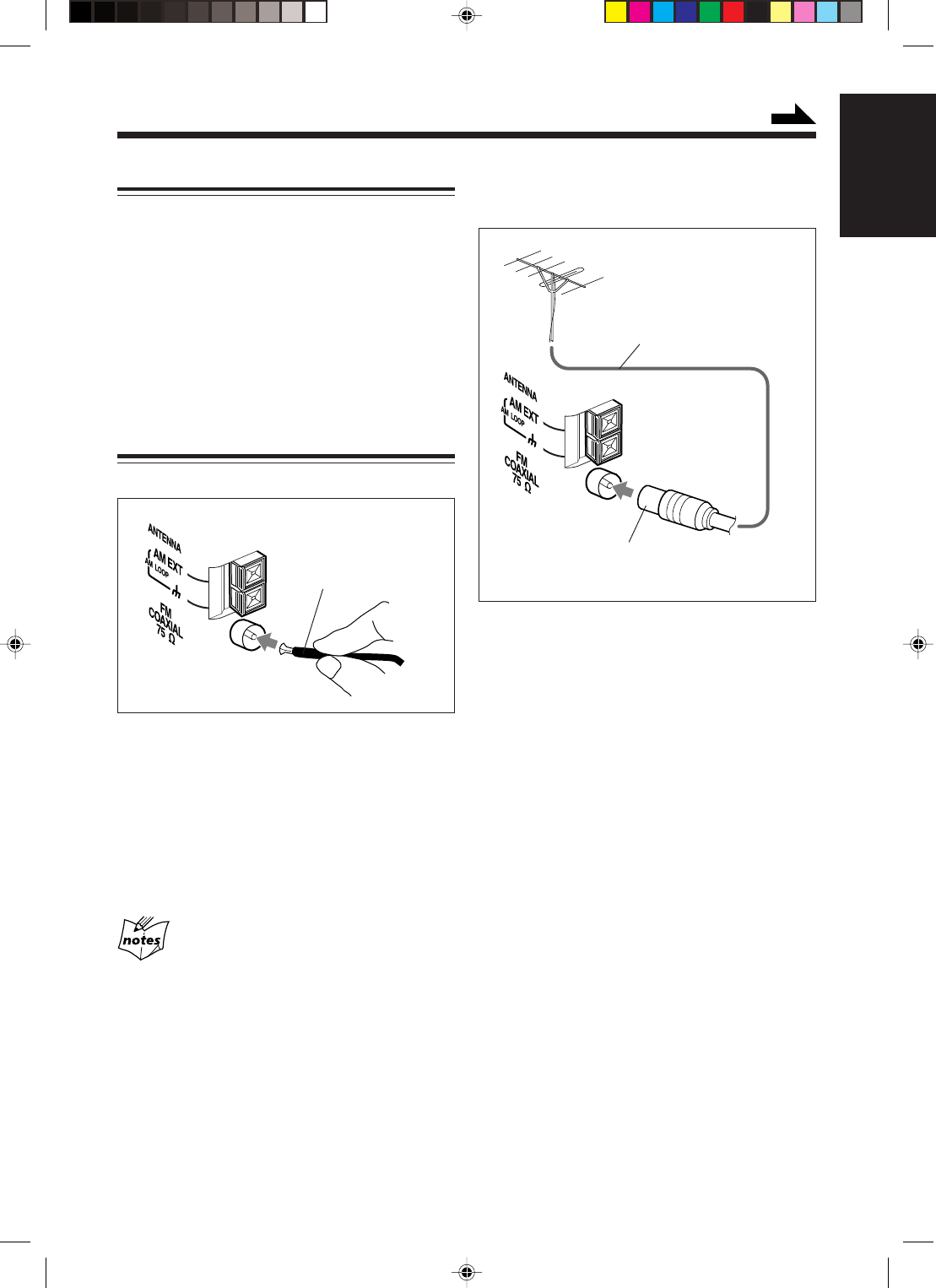
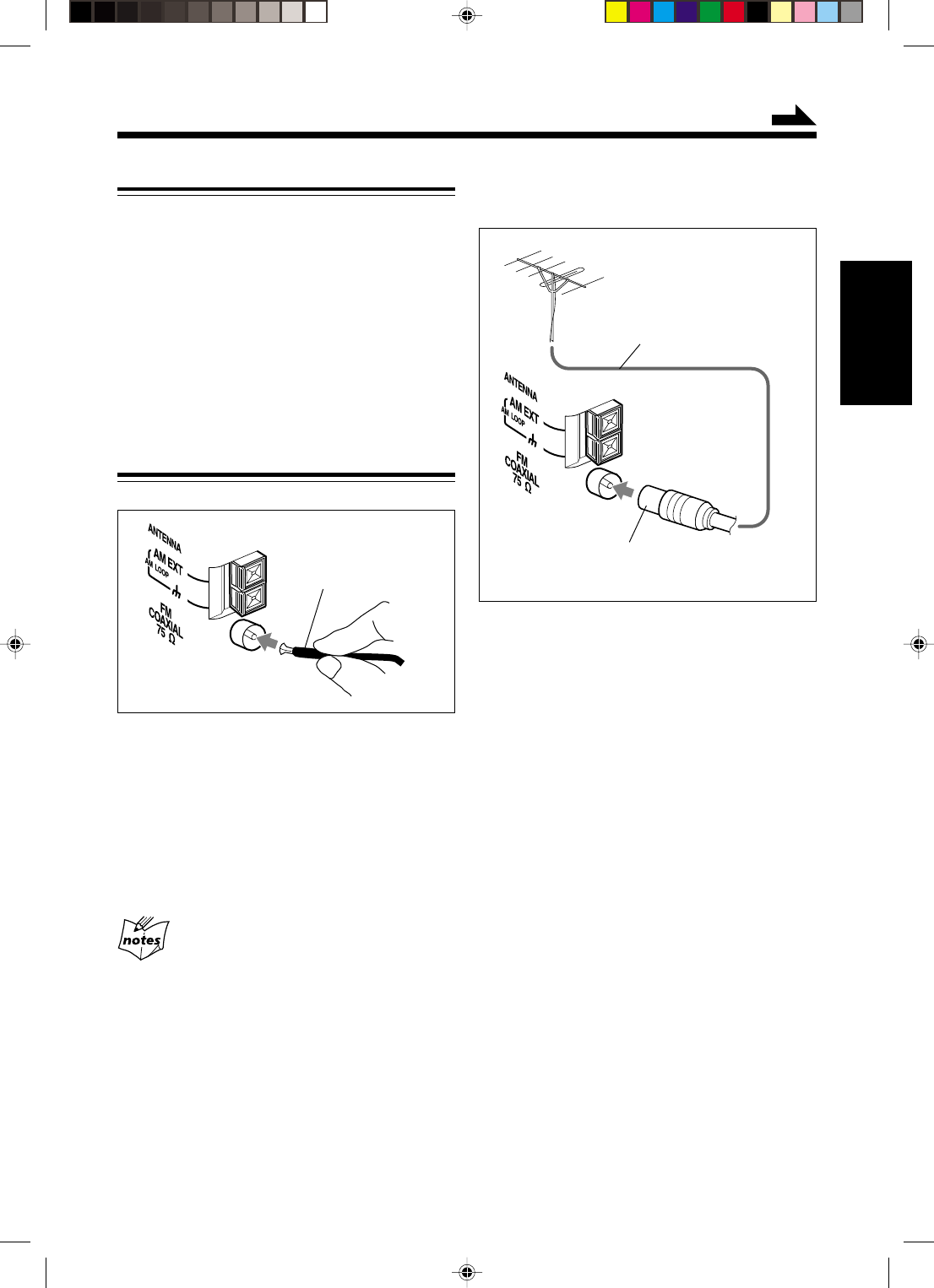
Connecting Antennas
FM antenna
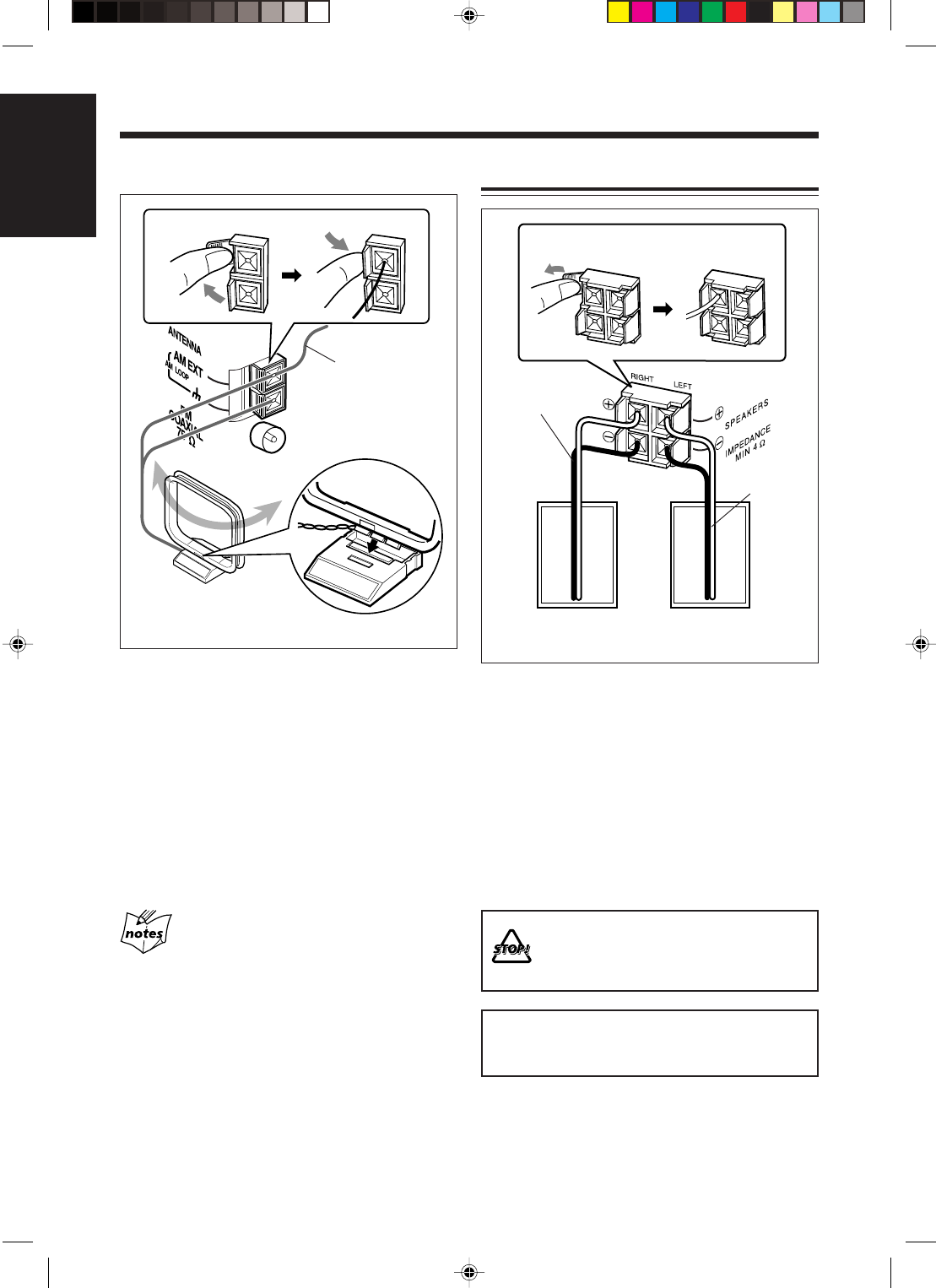
1Attach the FM antenna to the FM
COAXIAL 75 Ω terminal.
2Extend the FM antenna.
3Fasten it up in the position which gives
you the best reception, then fix it on the
wall, etc.
About the supplied FM antenna
The FM antenna supplied with this unit can be used as
temporary measure. If reception is poor, you can connect an
outdoor FM antenna.
FM antenna (supplied)
Outdoor FM antenna
(not supplied)
A 75 Ω antenna with coaxial type connector
should be used.
Coaxial cable (not supplied)
To connect an outdoor FM antenna
Before connecting the antenna, disconnect the supplied
FM antenna.
Continued
EN01-13_FS-H30[C]f.pm6 03.2.5, 6:43 PM6
7
English
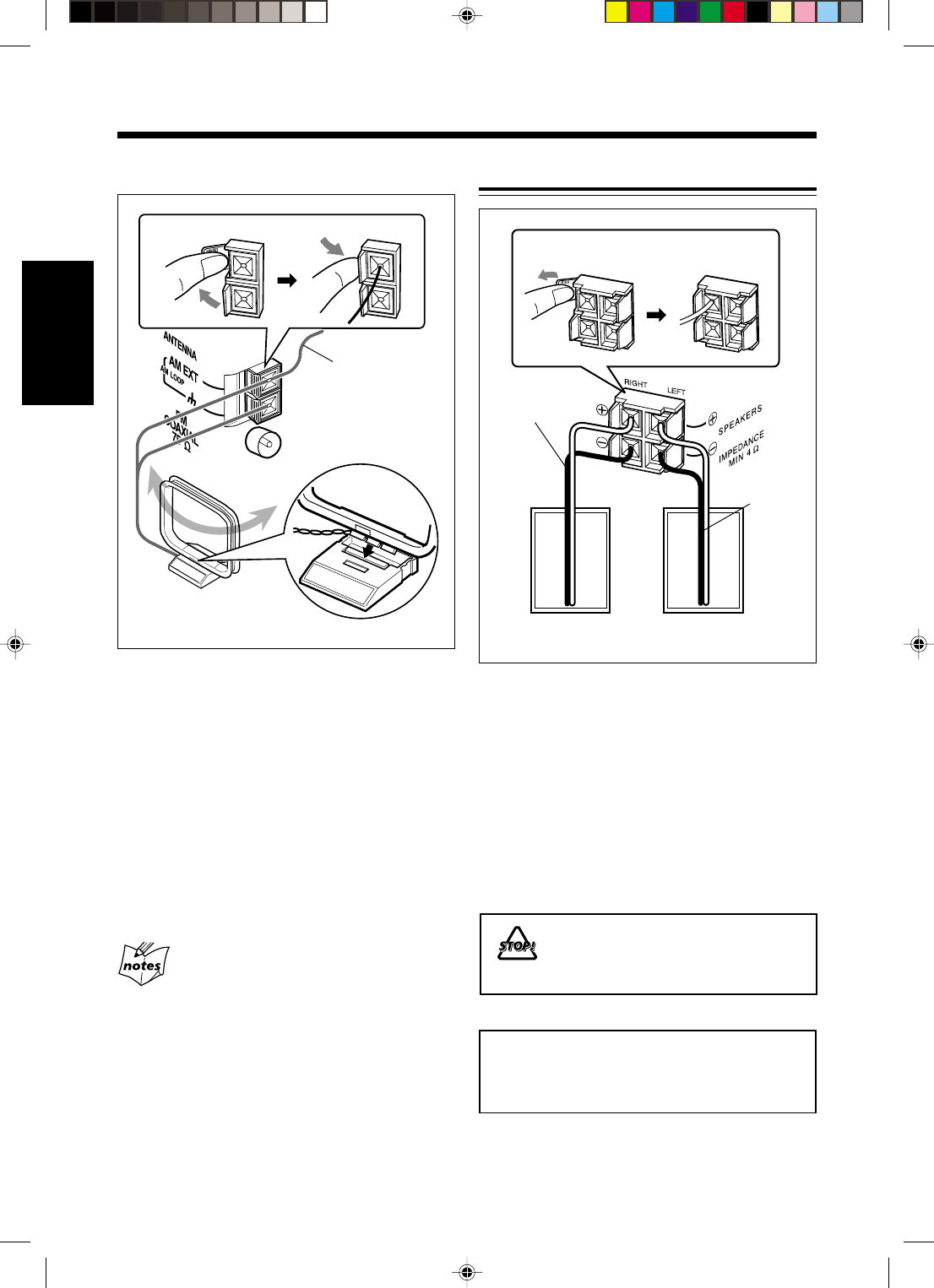
1Connect the AM loop antenna to the
AM LOOP terminals as illustrated.
2Turn the AM loop antenna until you
have the best reception.
To connect an outdoor AM antenna
When reception is poor, connect a single vinyl-covered
wire to the AM EXT terminal and extend it
horizontally. The AM loop antenna must remain
connected.
For better reception of both FM and AM
•Make sure the antenna conductors do not touch any other
terminals and connecting cords.
•Keep the antennas away from metallic parts of the unit,
connecting cords, and the power cord.
AM antenna
Vinyl-covered wire
(not supplied)
AM loop antenna
(supplied)
1
2
Connecting Speakers
1Press and hold the clamp of the
speaker terminal on the rear of the
unit.
2Insert the end of the speaker cord into
the terminal.
Match the polarity between the unit and the
speaker terminals: ª to ª and · to ·.
3Release your finger from the clamp.
• DO NOT connect speakers while the
power is on.
• DO NOT connect more than one speaker
to each speaker teminal.
IMPORTANT: Use only speakers with the same
speaker impedance as shown on the speaker
terminals on the rear of the unit.
Speaker cord
Speaker cord
Right speaker Left speaker
12
EN01-13_FS-H30[C]f.pm6 03.2.5, 6:43 PM7
8
English
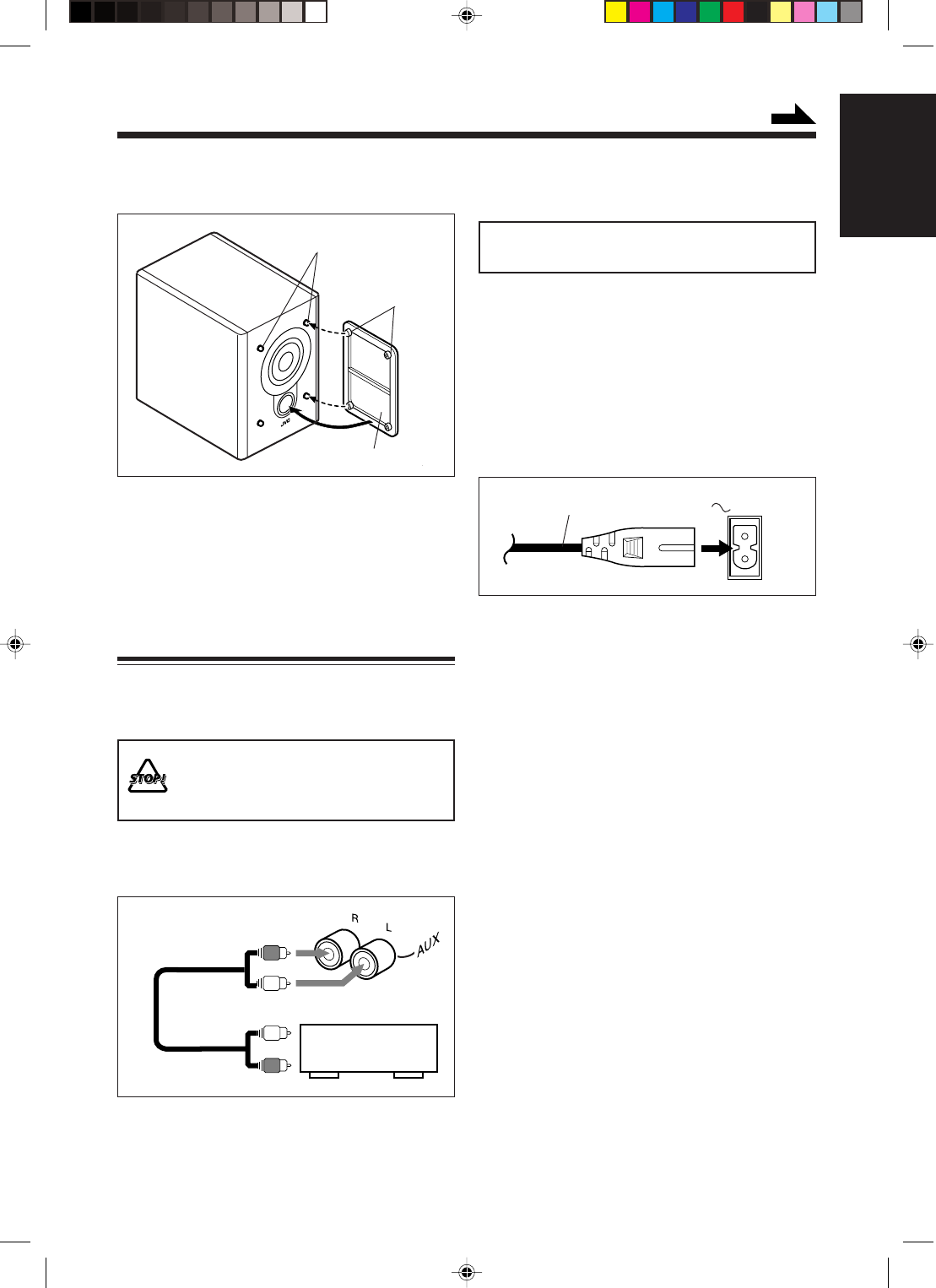
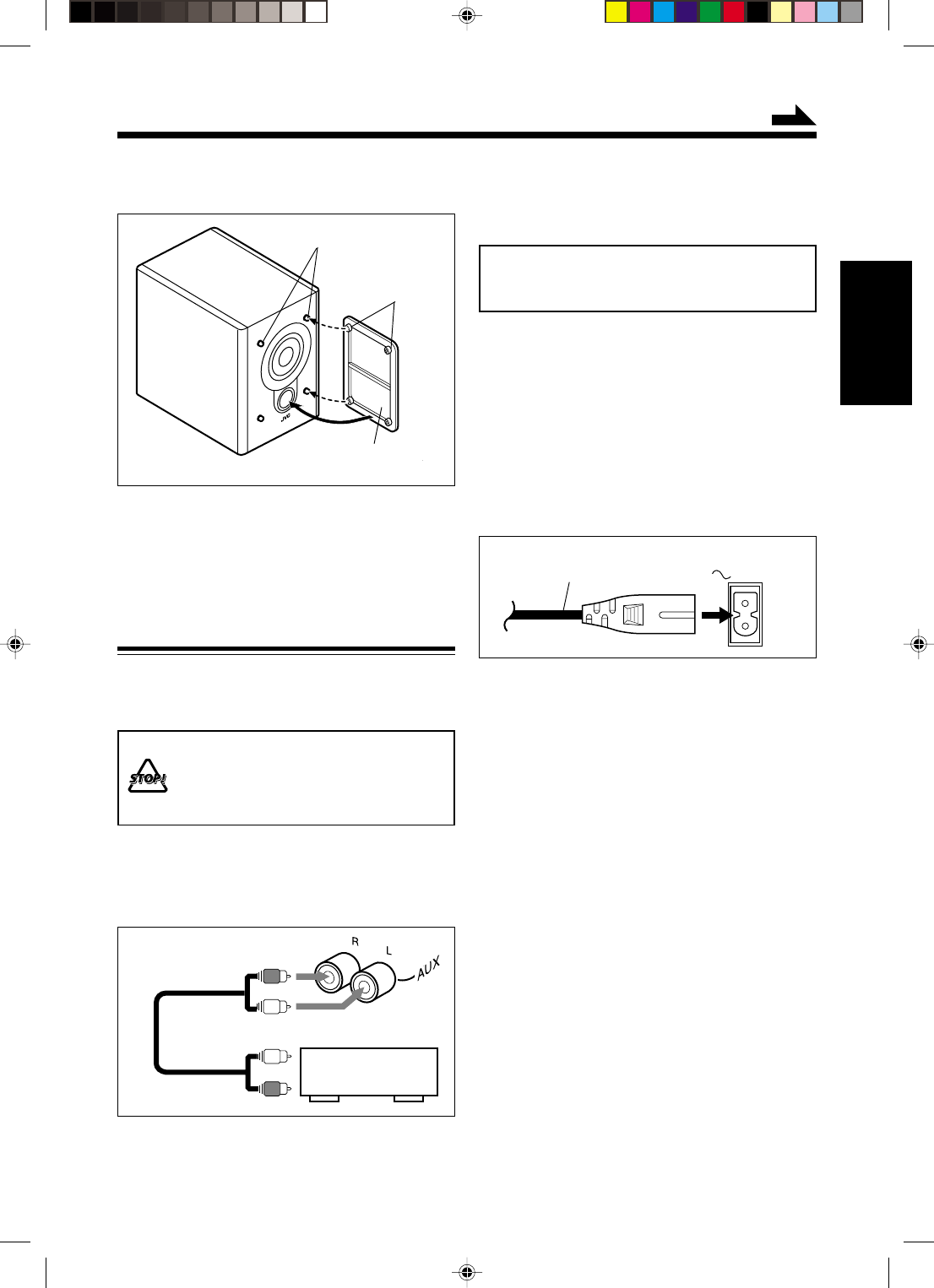
Speaker grille
To remove the speaker grille, insert your fingers at
the top of the speaker grille, pull towards you. Then
pull the bottom towards you.
To attach the speaker grille, follow the illustration
above.
Connecting Other Equipment
To connect an audio equipment
You can connect audio equipment—used only as a
playback device.
• DO NOT connect any equipment while
the power is on.
• DO NOT plug in any equipment until all
connections are complete.
Be sure that the plugs of the audio cords are colored:
White plugs and jacks are for left audio signals, and
red ones for right audio signals.
Holes
Projections
To remove the speaker grilles
The speaker grilles are removable.
L
R
L
R
To audio output
Audio equipment
NOW you are ready to plug in the unit
and any other connected equipment.
IMPORTANT: Be sure to check all connections to
be done before plugging the power cord.
This unit can be supplied with power through the AC
IN connector (at home) or the DC IN connector (in a
car).
• Do not connect the unit using the AC IN connector
and the DC IN connector at the same time for safe
and correct use.
To connect the AC power cord
Connect the AC power cord to the AC IN connector
and a wall outlet.
Continued
For playing other equipment through this unit,
connect between the audio output jacks on the other
equipment and AUX jacks by using audio cords (not
supplied).
AC IN
AC power cord (supplied)
EN01-13_FS-H30[C]f.pm6 03.2.6, 4:36 PM8
9
English
Putting the Batteries into the Remote
Control
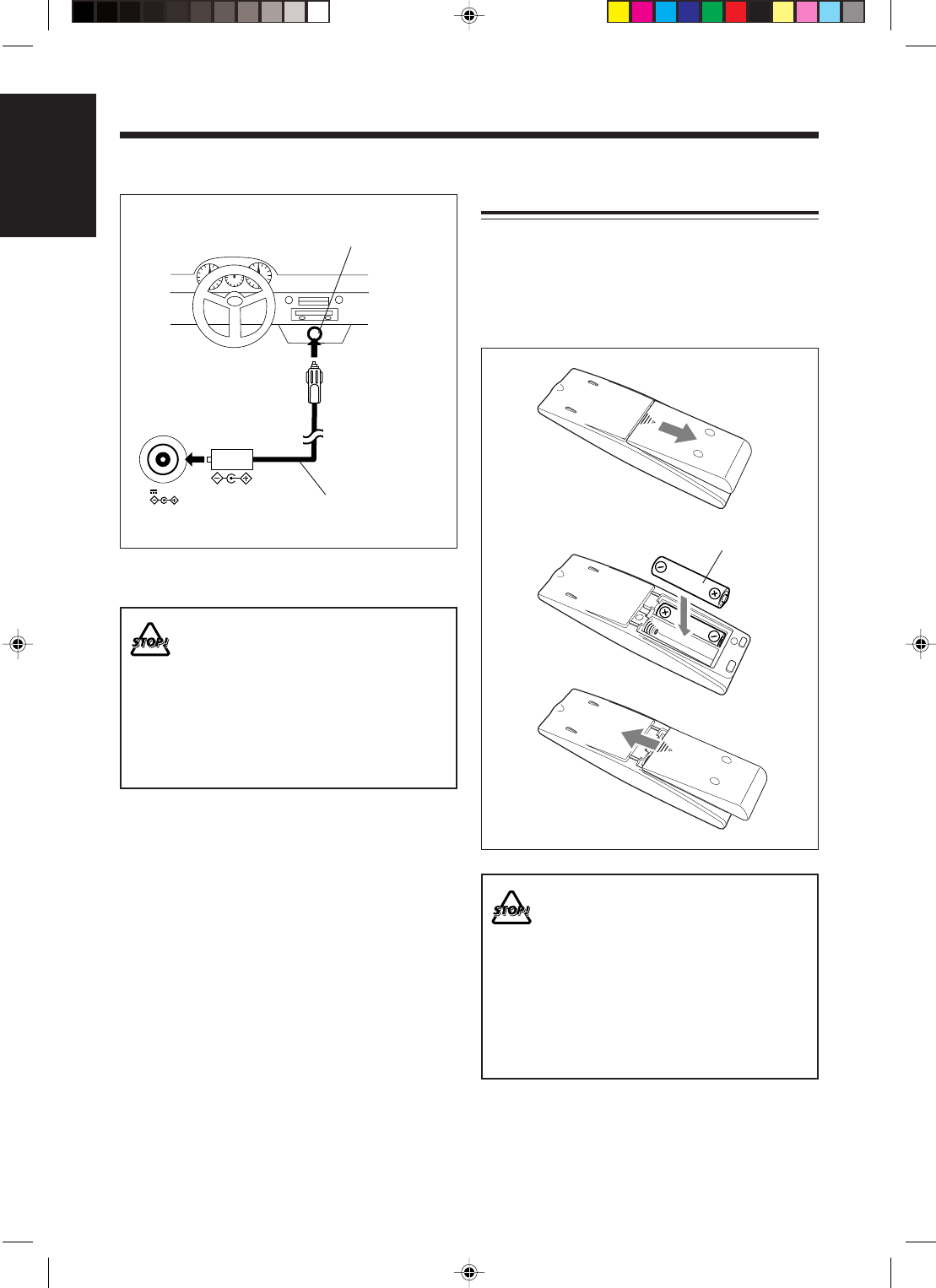
Insert the batteries—R6(SUM-3)/AA(15F)—into the
remote control, by matching the polarity (+ and –) on
the batteries with the + and – markings on the battery
compartment.
When the remote control can no longer operate the
unit, replace both batteries at the same time.
• DO NOT use an old battery together with
a new one.
• DO NOT use different types of batteries
together.
• DO NOT expose batteries to heat or
flame.
• DO NOT leave the batteries in the battery
compartment when you are not going to
use the remote control for an extended
period of time. Otherwise, the remote
control will be damaged from battery
leakage.
R6(SUM-3)/AA(15F)
1
3
2
12V 4A
DC IN
To car’s cigarette
lighter socket (12 V)
Car adapter
(JVC model: CA-R120)
Connect a car adapter to the DC IN (12 V, 4 A)
connector and the cigarette lighter socket.
•DO NOT connect the car adapter to the
cigarette lighter socket before connecting
it to the DC IN connector. Otherwise, a
short-circuit may occur if the adapter plug
makes contact with any metal part inside
the car.
•DO NOT use this unit for a long time in a
car while the car ignition switch is turned
“OFF” (or set to “ACC”). Otherwise, the
car battery will be exhausted.
When using the unit in your car
EN01-13_FS-H30[C]ff.pm6 03.2.19, 4:50 PM9
10
English
Common Operations
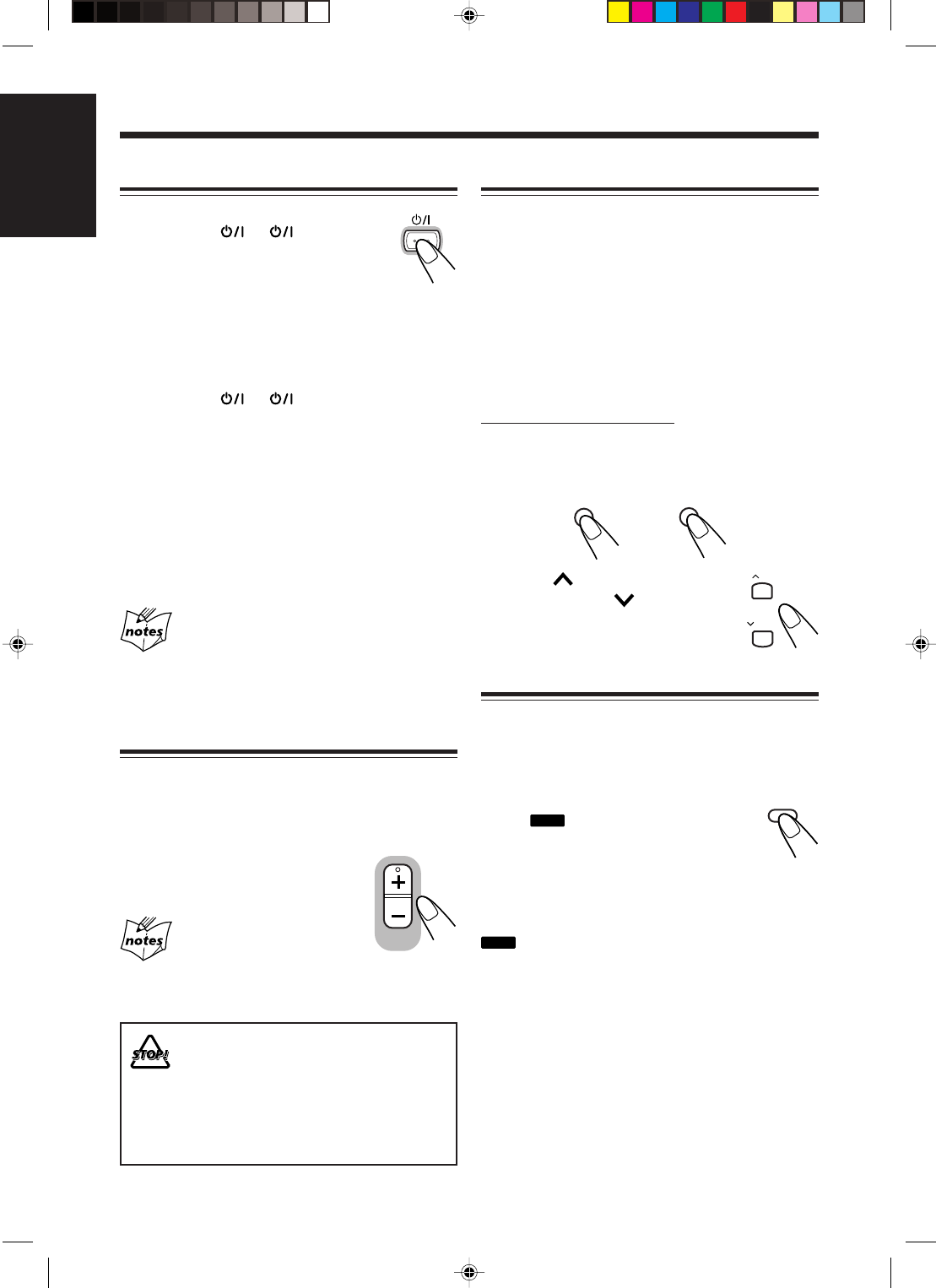
Setting the Clock
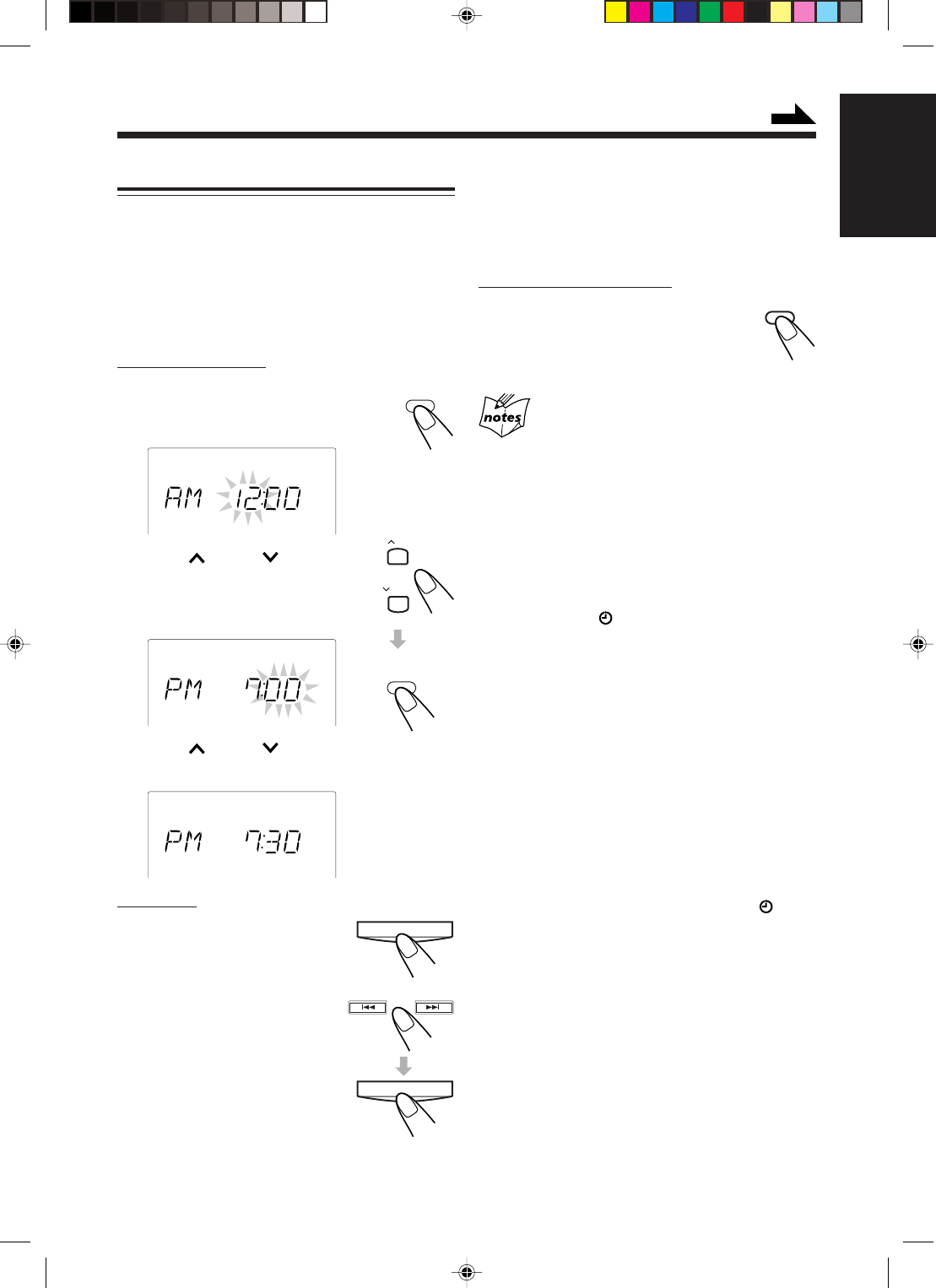
Before operating the unit any further, first set the unit’s
clock. When you plug in the power cord, the CLOCK
indicator and “AM 12:00” start flashing on the display.
You can set the clock whether the unit is on or off.
•There is a time limit in doing the following steps. If
the setting is canceled before you finish, start over
from step
1
.
On the remote control:
1
Press CLOCK/TIMER.
The hour digits start flashing on the
display.
2
Press UP or DOWN to
adjust the hour, then press
CLOCK/TIMER.
The minute digits start flashing.
3
Press UP or DOWN to adjust the
minute, then press CLOCK/TIMER.
On the unit:
1
Press TIMER/SNOOZE.
The hour digits start flashing on
the display.
2
Press ¢ or 4 to
adjust the hour, then
press TIMER/SNOOZE.
The minute digits start flashing.
CLOCK
/ TIMER
CLOCK
CLOCK
CLOCK
TIMER/SNOOZE
DISPLAY
3
Press ¢ or 4 to adjust the minute,
then press TIMER/SNOOZE.
To check the clock time during play
On the remote control ONLY:
Press DISPLAY (grey-colored).
•Each time you press the button, the
source indication and the clock time
alternate on the display.
•When you unplug the power cord or if a power failure
occurs
The clock is reset to “AM 12:00” right away. If this
happens, set the clock again.
•The clock may gain or lose 1 to 2 minutes per month
If this happens, reset the clock.
To change the clock
1 Make sure the (timer) indicator is not lit on
the display.
•If it is lit, press and hold CLOCK/TIMER (or
TIMER/SNOOZE on the unit) until it goes off.
2 Press CLOCK/TIMER (or TIMER/SNOOZE
on the unit) repeatedly until the unit enters the
clock setting mode (the hour digits start flashing
on the display).
First time you press CLOCK/TIMER (or TIMER/
SNOOZE on the unit), the unit enters the timer
setting mode. (See page 20.)
3 Repeat steps
2
and
3
of the procedure of
“Setting the Clock.”
4 Press and hold CLOCK/TIMER (or TIMER/
SNOOZE on the unit) again so that the
(timer) indicator goes off.
UP
DOWN
CLOCK
/ TIMER
TIMER/SNOOZE
Continued
EN01-13_FS-H30[C]f.pm6 03.2.5, 6:43 PM10
11
English
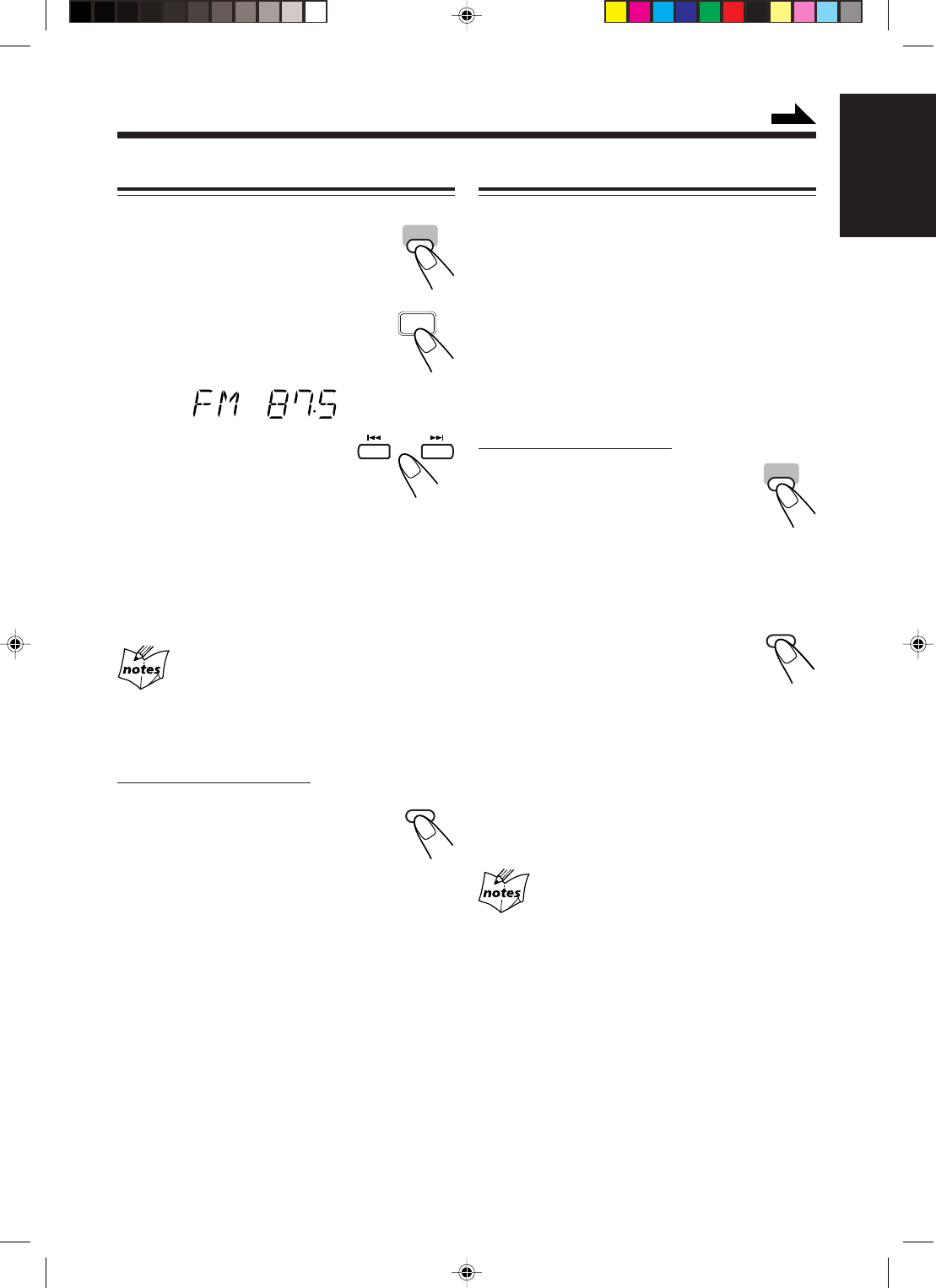
Adjusting the Tone (Bass/Treble)
You can adjust the bass level (low frequency range)
and the treble level (high frequency range) within a
range of –5 to +5.
When shipped, the bass level set to “BASS 0” and the
treble level set to “TREBLE +1.”
•This function only affects the playback sound, and
does not affect your recording.
•There is a time limit in doing the following steps. If
the setting is canceled before you finish, start over
from step
1
.
On the remote control ONLY:
1
Press BASS to adjust the bass level or
press TREBLE to adjust the treble
level.
2
Press UP to increase the
level or press DOWN to
decrease it.
Reinforcing the Bass Sound
You can reinforce the bass sound to maintain rich, full
bass at low volume—Active Hyper Bass Pro.
•This function only affects the playback sound, and
does not affect your recording.
To get the effect, press AHB PRO so
that the
BASS
indicator lights up on the
display.
•Each time you press the button, the
bass reinforcement alternates between on (AHB ON)
and off (AHB OFF).
To cancel the effect, press AHB PRO again so that the
BASS
indicator goes off.
Turning On the Power
To turn on the unit, press
STANDBY/ON (or on the unit).
The STANDBY lamp on the unit goes off.
•When you press the source button
—3/8 CD, 2 3 TAPE, TUNER (or
BAND TUNER on the unit) and AUX, the unit
automatically turns on and starts playback if the
source is ready.
To turn off the unit (standby), press
STANDBY/ON (or on the unit) again.
The STANDBY lamp on the unit lights on.
•The CLOCK indicator and “AM 12:00” flash on the
display until you set the built-in clock. After setting
the clock, the clock time will appear on the display
while the unit is on standby.
•A little power is always consumed even while the
unit is on standby.
To switch off the power supply completely, unplug
the power cord.
When you unplug the power cord or if a power
failure occurs
The clock is reset to “AM 12:00” right away, while the tuner
preset stations (see page 12) will be erased in a few days.
Adjusting the Volume
You can adjust the volume level only while the unit is
turned on. The volume level can be adjusted between
“VOL MIN” and “VOLUME 1” – “VOLUME 40
(VOL MAX).”
Press VOLUME + to increase the
volume or press VOLUME – to
decrease it.
For private listening
Connect headphones to the PHONES jack. No sound comes
out of the speakers. Be sure to turn down the volume before
connecting or putting on headphones.
DO NOT turn the unit off (standby) with the
volume set to an extremely high level;
otherwise, the sudden blast of sound can
damage your hearing, speakers and/or
headphones when you turn on the unit or
start playing any source next time.
REMEMBER you cannot adjust the volume
level while the unit is on standby.
VOLUME
BASS
TREBLE
UP
DOWN
AHB PROAHB PRO
STANDBY/ON
EN01-13_FS-H30[C]f.pm6 03.2.5, 6:43 PM11
12
English
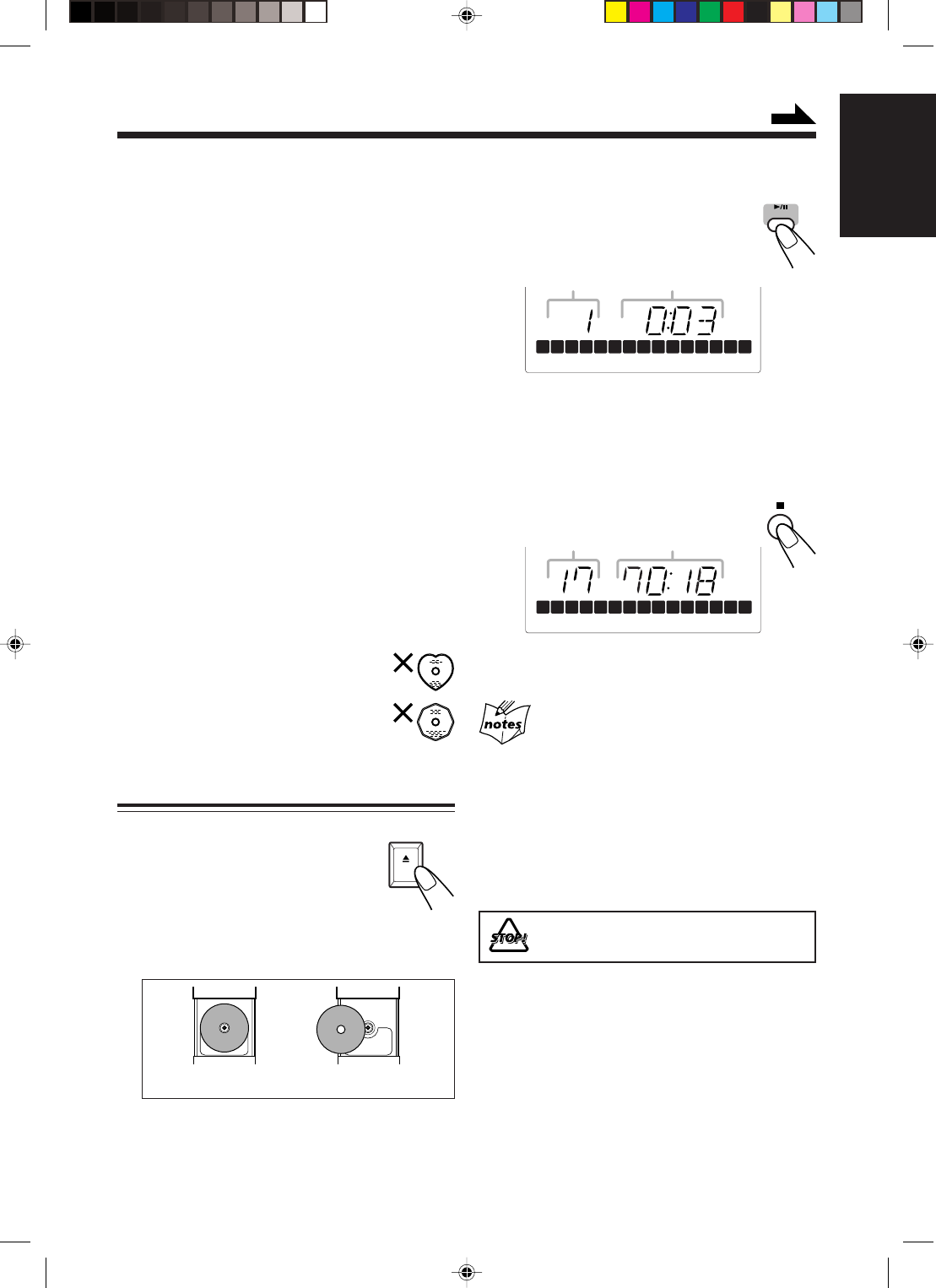
Tuning in to a Station
1
Press TUNER (or BAND
TUNER on the unit) to select
the band.
The unit automatically turns on and
tunes in to the previously received
station—either FM or AM.
•Each time you press the button, the
band alternates between FM and AM.
2
Press and hold ¢ or
4 for more than 1
second.
The unit starts searching for
stations and stops when a station of sufficient
signal strength is tuned in.
•If a program is broadcast in stereo, the
STEREO indicator lights up.
To stop searching, press ¢ or 4.
When you press ¢ or 4 briefly and
repeatedly
The frequency changes step by step.
To change the FM reception mode
On the remote control ONLY:
When an FM stereo broadcast is hard to
receive or noisy, press FM MODE so that
the MONO indicator lights up on the
display. Reception will improve.
To restore the stereo effect, press FM MODE again
so that the MONO indicator goes off. In stereo mode,
you can hear stereo sound when a stereo program is
broadcast.
Presetting Stations
You can preset 30 FM and 15 AM stations—using
either automatic presetting or manual presetting.
In some cases, test frequencies have been already
memorized for the tuner since the factory examined the
tuner preset function before shipment. This is not a
malfunction.
To preset stations automatically—Automatic
presetting
You need to preset stations separately for the FM and
AM bands.
On the remote control ONLY:
1
Press TUNER to select the
band.
The unit automatically turns on and
tunes in to the previously received
station—either FM or AM.
•Each time you press the button, the band
alternates between FM and AM.
2
Press and hold AUTO
PRESET for more than 2
seconds.
Local stations with strong signals are
searched for and stored in memory automatically.
When automatic presetting is over, the station
stored in preset number 1 is tuned in.
•Storing new stations erase the previously stored
one.
3
Repeat steps
1
and
2
to store stations
for the other band.
When you cannot automatically store stations
you want
Stations with weak signals cannot be detected with automatic
presetting. To store such stations, use manual presetting.
Listening to FM and AM Broadcasts
TUNER
TUNER
BAND
FM MODE
AUTO
PRESET
AUTO
PRESET
TUNER
Continued
EN01-13_FS-H30[C]f.pm6 03.2.5, 6:43 PM12

13
English
To preset stations manually—Manual presetting
You need to preset stations separately for the FM and
AM bands.
•There is a time limit in doing the following steps. If
the setting is canceled before you finish, start over
from step
2
.
On the remote control ONLY:
1
Tune in to the station you want to
preset.
•See “Tuning in to a Station” on page 12.
2
Press SET.
3
Press UP or DOWN
to select a preset number.
4
Press SET again.
The tuned station in step
1
is stored in the preset
number selected in step
3
.
•Storing a new station on a used number erases
the previously stored one.
When you unplug the power cord or if a power
failure occurs
The tuner preset stations will be erased in a few days. If this
happens, preset the stations again.
Tuning in to a Preset Station
On the remote control ONLY:
1
Press TUNER to select the
band.
The unit automatically turns on
and tunes in to the previously
received station—either FM or AM.
•Each time you press the button, the band
alternates between FM and AM.
2
Press UP or DOWN
to select a preset number.
UP
DOWN
1
4
7
10
2
5
8
3
6
9
10
TUNER
UP
DOWN
To tune in to a preset station directly using the
number buttons
On the remote control ONLY:
Pressing the number button(s)
allows you to select the preset
number you want.
Ex.: For preset number 5, press 5.
For preset number 15, press
+10, then 5.
For preset number 20, press
+10, then 10.
For preset number 30, press
+10, +10, then 10.
SET
EN01-13_FS-H30[C]f.pm6 03.2.5, 6:43 PM13
14
English
Playing Back Discs
This unit has been designed to play back the following
discs—CD, CD-R, and CD-RW.
When playing a CD-R or CD-RW
User-edited CD-Rs (CD-Recordable) and CD-RWs
(CD-ReWritable) can be played only if they are
already “finalized.”
• Usually you can play back your original CD-Rs or
CD-RWs recorded in music CD format. However,
sometimes they may not play depending on their
characteristics or recording conditions.
• Before playing CD-Rs or CD-RWs, read their
instructions or cautions carefully.
• Some CD-Rs or CD-RWs may not play on this unit
because of their disc characteristics, damage or stain
on them, or if the player’s lens is dirty.
• CD-RWs may require a longer readout time. This is
because the reflectance of CD-RWs is lower than for
regular discs.
General notes
In general, you will have the best performance by
keeping your discs and the mechanism clean.
• Store discs in their cases, and keep them in cabinets
or on shelves.
• Keep the unit’s disc cover closed when
not in use.
Continued use of irregular shape discs
(heart-shape, octagonal, etc.) can damage
the unit.
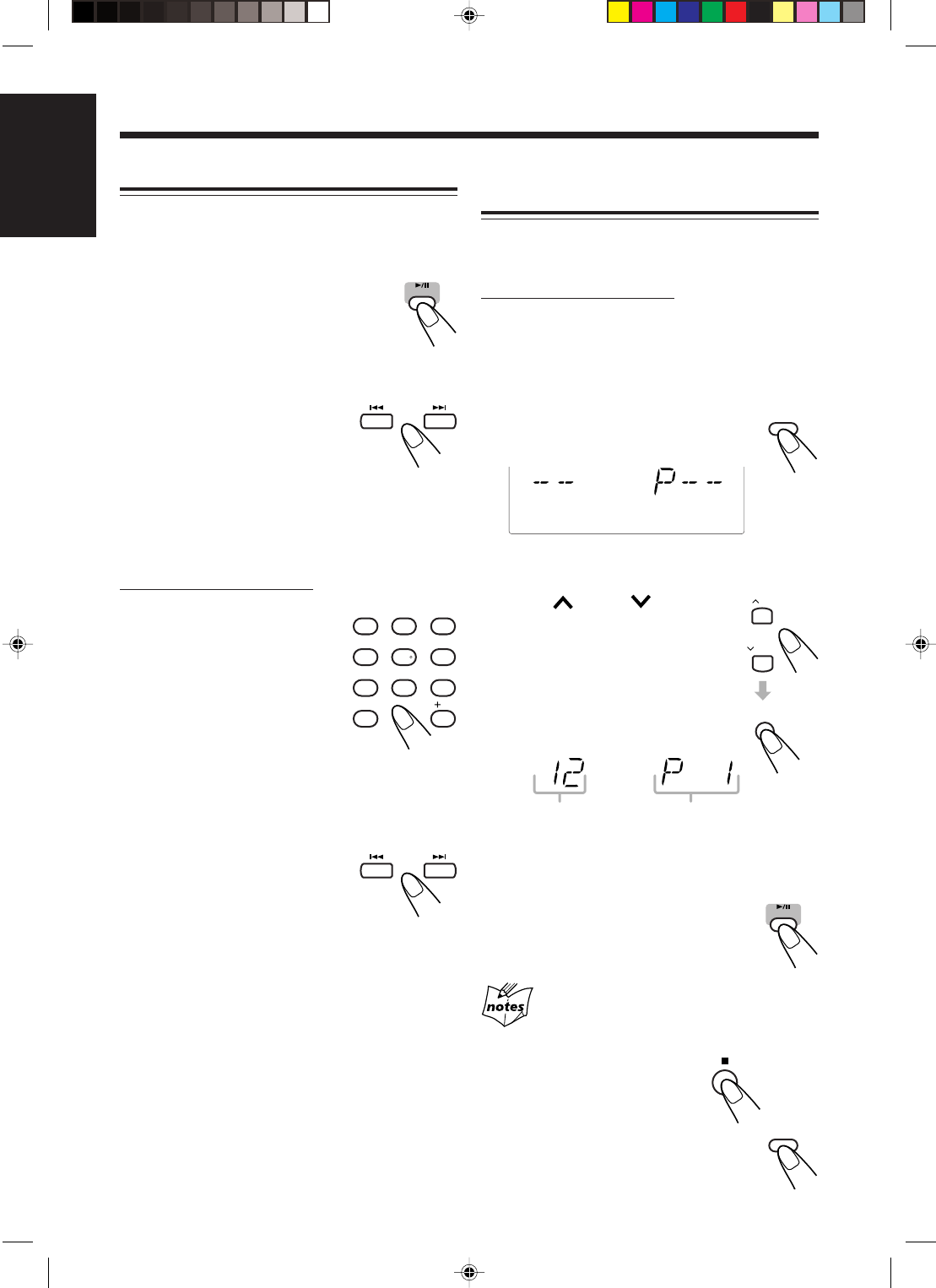
Playing Back the Entire Disc—Normal Play
1
Press 0 OPEN on the unit.
The disc cover opens.
• You can insert a disc while
listening to another source.
2
Place a disc correctly with its label side
up.
3
Close the disc cover gently.
4
Press 3/8 CD.
The unit automatically turns on and the
first track of the disc starts playing.
• The track number that has already played
disappears from the track calender on the
display.
• The disc automatically stops when the last track
has finished playing.
To stop playing, press 7.
To remove the disc, press 0 OPEN on the unit.
• If the disc cannot be read correctly (because it is
scratched, for example) or an unreadable CD-R or CD-
RW is inserted
Playback will not start.
• If no disc is inserted
“NO DISC” appears on the display.
• If the loaded disc has more than 15 tracks
The OVER indicator lights on the display.
DO NOT try to open the disc cover by hand
as it will be damaged.
CORRECT INCORRECT
OPEN
CD
OVER
REC
1 2 3 4 5 6 7 8 9 10 11 12 13 14 15
Total track number Total playing time
OVER
REC
1 2 3 4 5 6 7 8 9 10 11 12 13 14 15
Track number Elapsed playing time
Continued
EN14-17_FS-H30[C]f.pm6 03.2.5, 5:45 PM14
15
English
Basic Disc Operations
While playing a disc, you can do the following
operations.
To stop playing for a moment
During play, press 3/8 CD.
While pausing, the elapsed playing time
flashes on the display.
To resume playing, press 3/8 CD again.
To go to another track
Before or during play, press ¢ or
4 repeatedly.
•¢ : Skips to the beginning of the
next or succeeding tracks.
•4 : Goes back to the beginning of
the current or previous tracks.
To go to another track directly using the number
buttons
On the remote control ONLY:
Pressing the number button(s)
before or during play allows you
to start playing the track number
you want.
Ex.: For track number 5, press 5.
For track number 15, press
+10, then 5.
For track number 20, press
+10, then 10.
For track number 32, press
+10, +10, +10, then 2.
To locate a particular point in a track
During play, press and hold ¢ or
4.
•¢ : Fast-forwards the tracks.
•4 : Fast-reverses the tracks.
Programming the Playing Order of the
Tracks—Program Play
You can arrange the order in which tracks play before
you start playing. You can program up to 20 tracks.
On the remote control ONLY:
1
Load a disc.
• If the current playing source is not the CD
player, press 3/8 CD, then 7 before going to
the next step.
2
Press PRGM (program).
The PROGRAM indicator lights up
on the display.
• If a program has been stored in memory, the
program is called up.
3
Press UP or DOWN
to select the track number,
then press SET.
• You can select the track number
directly using the number
button(s). (See “To go to another
track directly using the number
buttons.”)
4
Repeat step
3
to program other tracks
you want.
5
Press 3/8 CD.
The tracks are played in the order you
have programed.
If you try to program a 21st track
“FULL” will appear on the display.
To stop playing, press 7.
To exit from Program Play, press
PRGM (program) before or after playing.
• The PROGRAM indicator goes off.
CD
1
4
7
10
2
5
8
3
6
9
10
PRGM
PROGRAM
Track number Program step number
CD
PRGM
UP
DOWN
SET
EN14-17_FS-H30[C]f.pm6 03.2.5, 5:45 PM15
16
English
To skip the current track, press ¢.
• You cannot go back to the previous
track by pressing 4.
To stop playing, press 7.
To exit from Random Play, press
RANDOM before or after playing.
Random Play is canceled and Normal Play
resumes.
• The RANDOM indicator goes off.
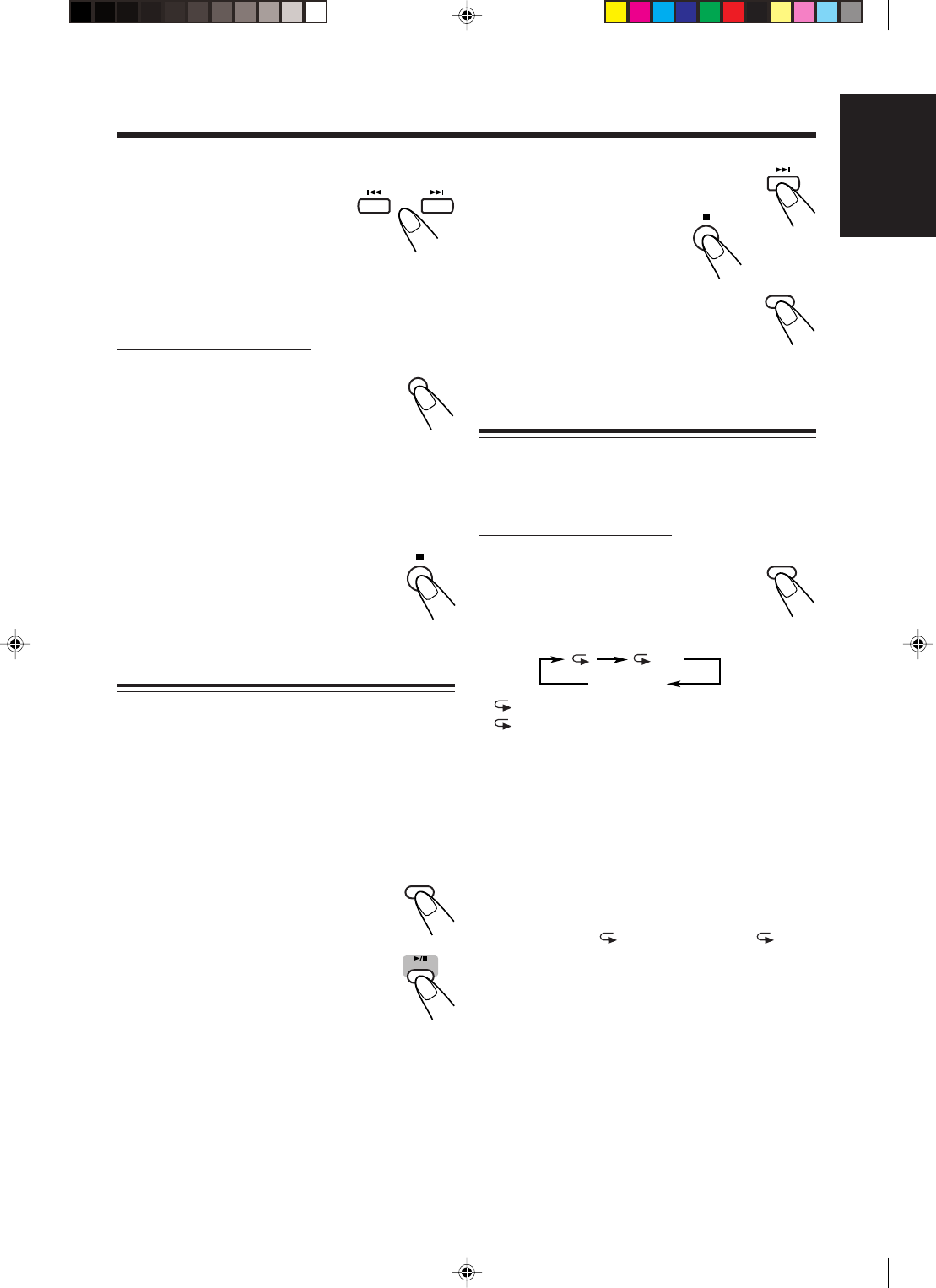
Repeating Tracks—Repeat Play
You can have all the tracks, the program or individual
track currently playing, repeat as many times as you
like.
On the remote control ONLY:
To repeat playing, press REPEAT before
or during play.
• Each time you press the button, Repeat
Play changes as follows, and the
following repeat indicator lights up on the display:
: Repeats one track.
ALL : In Normal Play, repeats all the tracks.
In Program Play, repeats all the tracks in
the program.
In Random Play, repeats all the tracks in
random order.
To cancel Repeat Play, press REPEAT repeatedly
until the repeat indicator goes off.
• Repeat Play remains in effect even when you select
another play mode (Normal, Program or Random
Play).
• In Random Play, cannot be selected. If has
been selected when you press RANDOM, it is
canceled.
To check the program contents
You can check the program
contents by pressing ¢ or 4
before or after playback.
•¢ : To check the contents in
the programmed order.
•4 : To check the contents in the reverse order.
To modify the program
On the remote control ONLY:
Before or after playing, you can erase the
last programed track by pressing CANCEL.
• Each time you press the button, the last
programed track is erased from the
program.
To add tracks in the program before playing, simply
select the track numbers you want to add by following
step
3
of the programming procedure.
To erase the program, press 7 before or
after playing.
• Pressing 0 OPEN to open the disc cover
will also erase the programed tracks.
Playing at Random—Random Play
The tracks will play in no particular order when you
use this mode.
On the remote control ONLY:
1
Load a disc.
• If the current playing source is not the CD
player, press 3/8 CD, then 7 before going to
the next step.
2
Press RANDOM.
The RANDOM indicator lights up on
the display.
3
Press 3/8 CD.
The tracks are randomly played.
Random Play ends when all the tracks
are played once.
CANCEL
RANDOM
CD
REPEAT
Canceled
ALL
RANDOM
EN14-17_FS-H30[C]f.pm6 03.2.5, 5:45 PM16

17
English
Playing Back Tapes
You can play back type I tapes.
Playing Back a Tape
1
Press ) for cassette deck on the unit.
The cassette holder opens.
2
Put a cassette in with the exposed part
of the tape down.
3
Close the cassette holder cover gently.
4
Press 2 3 TAPE.
The unit automatically turns on and
the tape starts playing. The tape
direction indicator (3 or 2) flashes
slowly on the display.
• Each time you press the button, the tape
direction changes:
3: plays the front side.
2: plays the reverse side.
When the tape plays to the end, the deck
automatically stops if the Reverse Mode is set to
or . (See “To play both sides—Reverse
Mode.”)
If no cassette is inserted when you press
2 3 TAPE
“NO TAPE” appears on the display.
To stop playing, press 7.
To fast-wind to the left or to the
right, press ¢ or 4 while the
tape is not running.
The tape direction indicator (3 or 2)
starts flashing rapidly on the display.
To remove the cassette, press ) on
the unit.
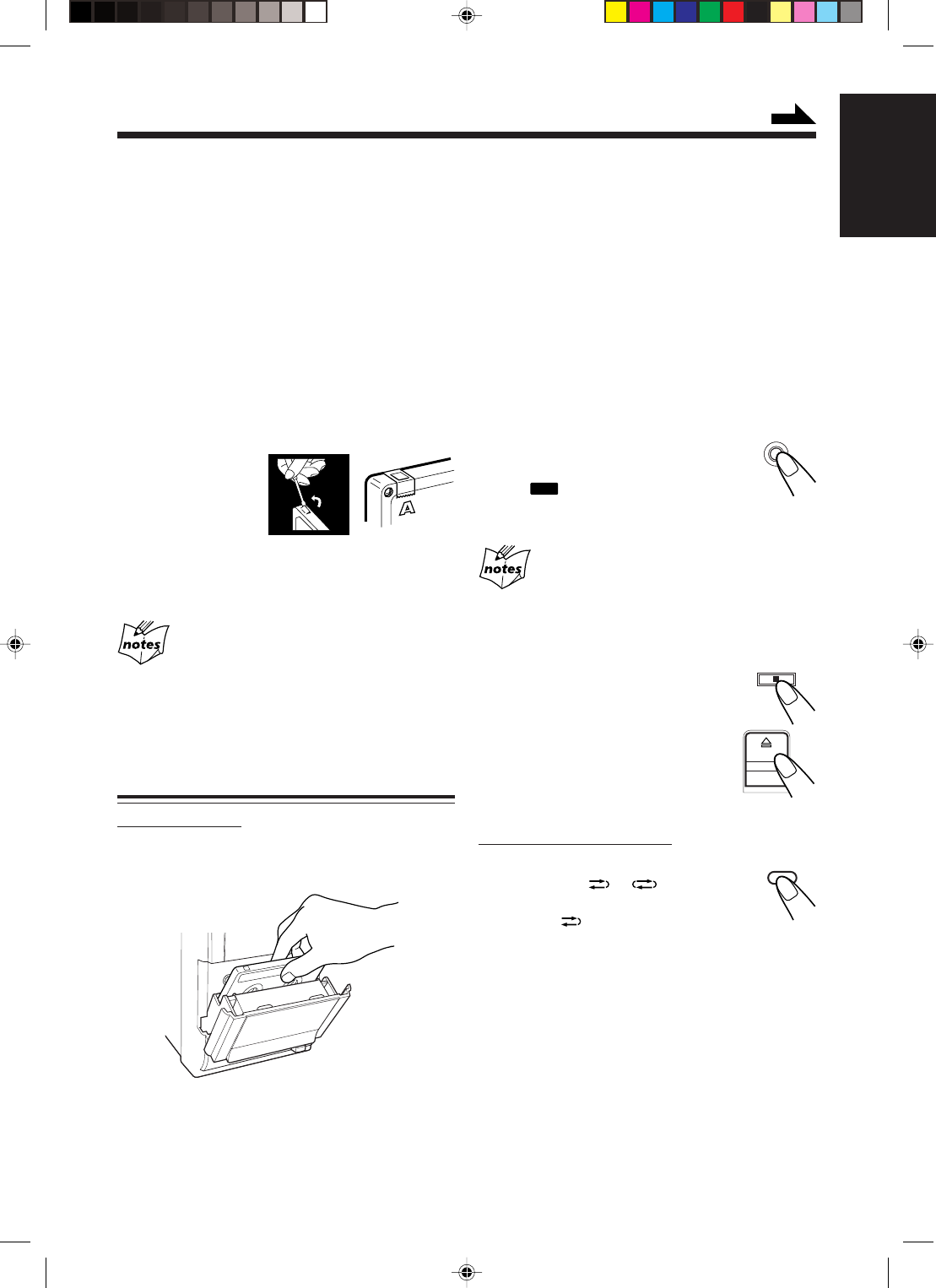
To play both sides—Reverse Mode
You can set the deck to play just one side of a tape,
both sides once, or both sides continuously.
On the remote control ONLY:
Press REV.MODE (reverse mode).
• Each time you press the button, the
Reverse Mode changes as follows:
: The deck automatically stops after playing
both sides of the tape. Stops when playback
in the 2 direction is finished.
: The deck continues to play both sides of the
tape until 7 is pressed.
: The deck automatically stops after playing
one side of the tape.
The use of C-120 or thinner tape is not
recommended, since characteristic
deterioration may occur and this tape easily
jams in the pinch-rollers and the capstans.
REV.MODE
TAPE
EN14-17_FS-H30[C]f.pm6 03.2.5, 5:45 PM17
18
English
Recording
2
Close the cassette holder gently and
check the recording direction for the
tape.
• If the tape direction is not correct, press 2 3
TAPE twice then 7 to change the tape direction.
• If you want to record on both sides of a tape, see
“To record on both sides—Reverse Mode.”
3
Start playing the source—FM, AM or
auxiliary equipment connected to AUX
jacks.
• When the source is the CD player, see “Disc
Direct Recording” on page 19.
4
Press ONE TOUCH
REC (recording).
The
REC
(recording) indicator
lights up on the display and recording starts.
• If no cassette is inserted when you press REC
“NO REC” appears on the display.
• If a protected tape is inserted when you press REC
“NO REC” appears on the display.
To stop while recording, press 7.
To remove the cassette, press ) on the
unit.
To record on both sides—Reverse Mode
On the remote control ONLY:
Press REV.MODE (reverse mode)
repeatedly until or is lit.
• When using the Reverse Mode for
recording, lights up and start
recording in the forward (3) direction first.
Otherwise, recording will stop when recording is
done only on one side (reverse) of the tape.
IMPORTANT:
• It may be unlawful to record or play back
copyrighted material without the consent of the
copyright owner.
• The recording level is automatically set correctly, so
it is not affected by the other sound settings. Thus,
during recording you can adjust the sound you are
actually listening to without affecting the recording
level.
• If recordings you have made have excessive noise or
static, the unit may be too close to a TV. Increase the
distance between the TV and the unit.
• You can use type I tape for recording.
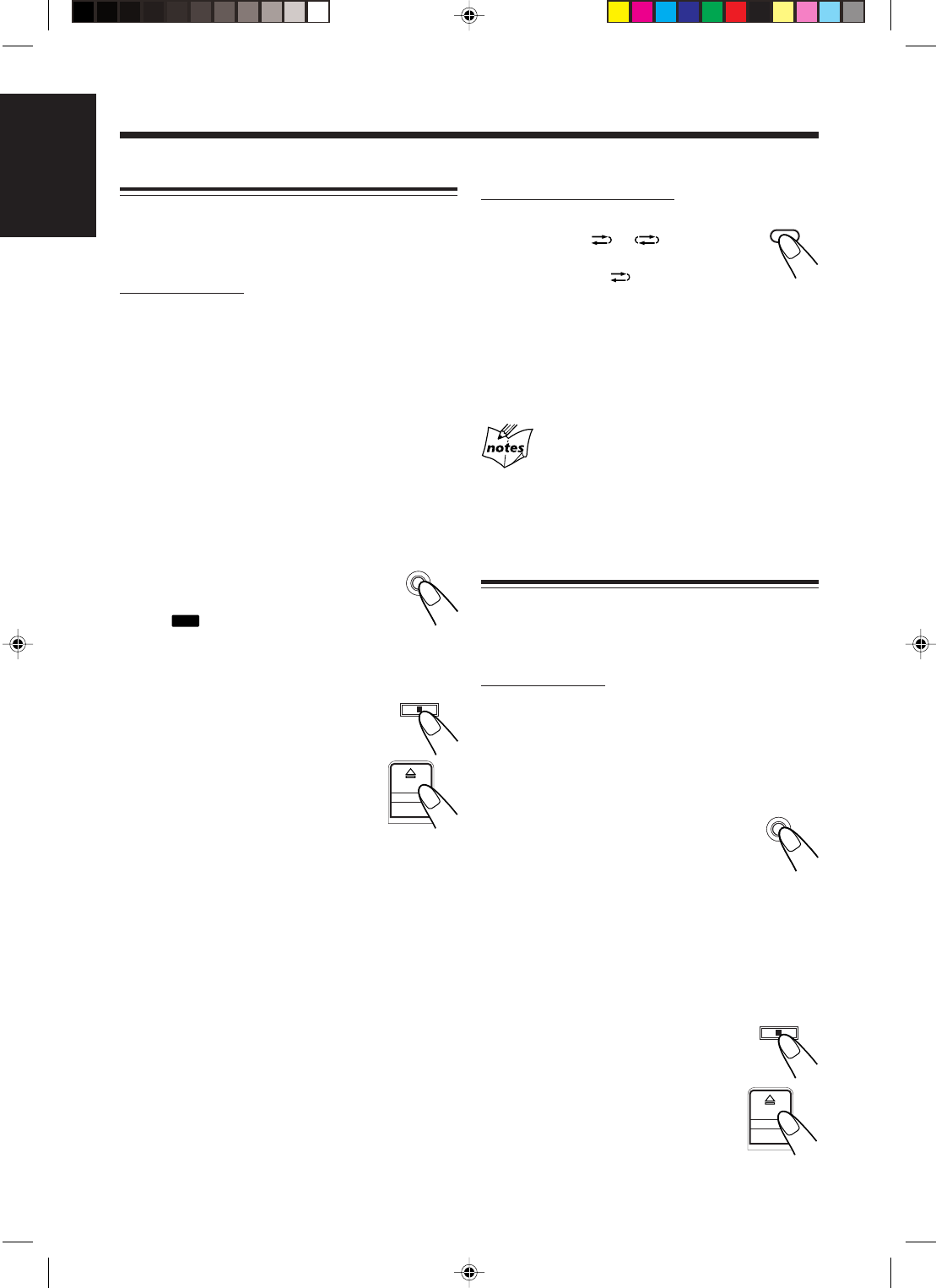
To protect your recording
Cassettes have two
small tabs on the
back to protect from
unexpected erasure
or re-recording.
To protect your recording, remove these tabs.
To re-record on a protected tape, cover the holes with
adhesive tape.
At the start and end of cassette tapes
There is leader tape which cannot be recorded onto. Thus,
when recording discs or radio broadcasts, wind the leader tape
first to ensure that the recording will be made without any
loss.
Recording on a Tape
On the unit ONLY:
1
Put a recordable cassette in with the
exposed part of the tape down.
ONE TOUCH
REC
REV.MODE
Continued
EN18-26_FS-H30[C]f.pm6 03.2.5, 6:54 PM18
19
English
Disc Direct Recording
Everything on the disc goes onto the tape in the order it
is on the disc, or according to the order you have set in
Program Play.
On the unit ONLY:
1
Put a recordable cassette in with the
exposed part of the tape down.
2
Load a disc.
• If the current playing source is not the CD
player, press 3/8 CD, then 7 before going to
the next step.
— If you do not want pauses of about 4 seconds
recorded between selections, press 3/8 CD
twice. Otherwise, a non-recorded pause will
be automatically inserted between selections.
• If you want to record on both sides of a tape, see
“To record on both sides—Reverse Mode.”
3
Press ONE TOUCH
REC (recording).
The
REC
(recording) indicator
lights up on the display and recording starts.
After recording, the CD player and cassette deck
automatically stop.
To stop while recording, press 7.
The tape stops after 4 seconds.
To remove the cassette, press ) on the
unit.
To record on both sides—Reverse Mode
On the remote control ONLY:
Press REV.MODE (reverse mode)
repeatedly until or is lit.
• When using the Reverse Mode for Disc
Direct Recording, lights up and start
recording in the forward (3) direction first. When
the tape reaches its end while recording a song in the
forward direction (3), the last song will be re-
recorded at the beginning of the reverse side (2).
If you start recording on the reverse side (2),
recording will stop when recording is done only on
one side (reverse) of the tape.
When making Sleep Timer settings while doing
Disc Direct Recording
Set enough time to allow for the disc to finish playing;
otherwise, the power will go off before recording is
completed.
One Track Recording
This recording method is convenient when you record
tracks while playing the disc. You can record just your
favorite songs on the tape.
On the unit ONLY:
1
Put a recordable cassette in with the
exposed part of the tape down.
2
Play the track on the disc you wish to
record.
3
Press ONE TOUCH
REC (recording).
The CD player returns to the
beginning of that track and the track is recorded on
the tape.
After recording, the CD player and cassette deck
automatically stop.
4
Repeat steps
2
and
3
to record other
tracks you want.
To stop while recording, press 7.
The tape stops after 4 seconds.
To remove the cassette, press ) on the
unit.
ONE TOUCH
REC
REV.MODE
ONE TOUCH
REC
EN18-26_FS-H30[C]f.pm6 03.2.5, 6:54 PM19
20
English
Using the Timers
There are four timers available—Daily Timer,
Recording Timer, Snooze Timer, and Sleep Timer.
Before using the timers, you need to set the unit’s
clock (see page 10).
Using Daily Timer and Recording Timer
You can set the timer whether the unit is on or off.
How the timer actually works
When the on-time comes, the unit automatically turns
on (the [timer] indicator flashes just before the on-
time and continues flashing while the timer is
operating). Then, when the off-time comes, the unit
automatically turns off (standby).
The timer setting remains in memory until you change
it.
• When the (timer) indicator is lit on the display,
the timer acts as the Daily Timer. Once the timer has
been set, it will be activated at the same time
everyday until the timer is turned off.
• When the (timer) and the REC indicators are lit
on the display, the timer acts as the Recording Timer.
After the timer-recording finishes, the details of the
setting remain stored but the timer is turned off.
Before you start...
When using “ TUNER” as the source to play, make
sure to select the desired station before turning off the
power.
• There is a time limit in doing the following steps. If
the setting is canceled before you finish, start over
from step
1
.
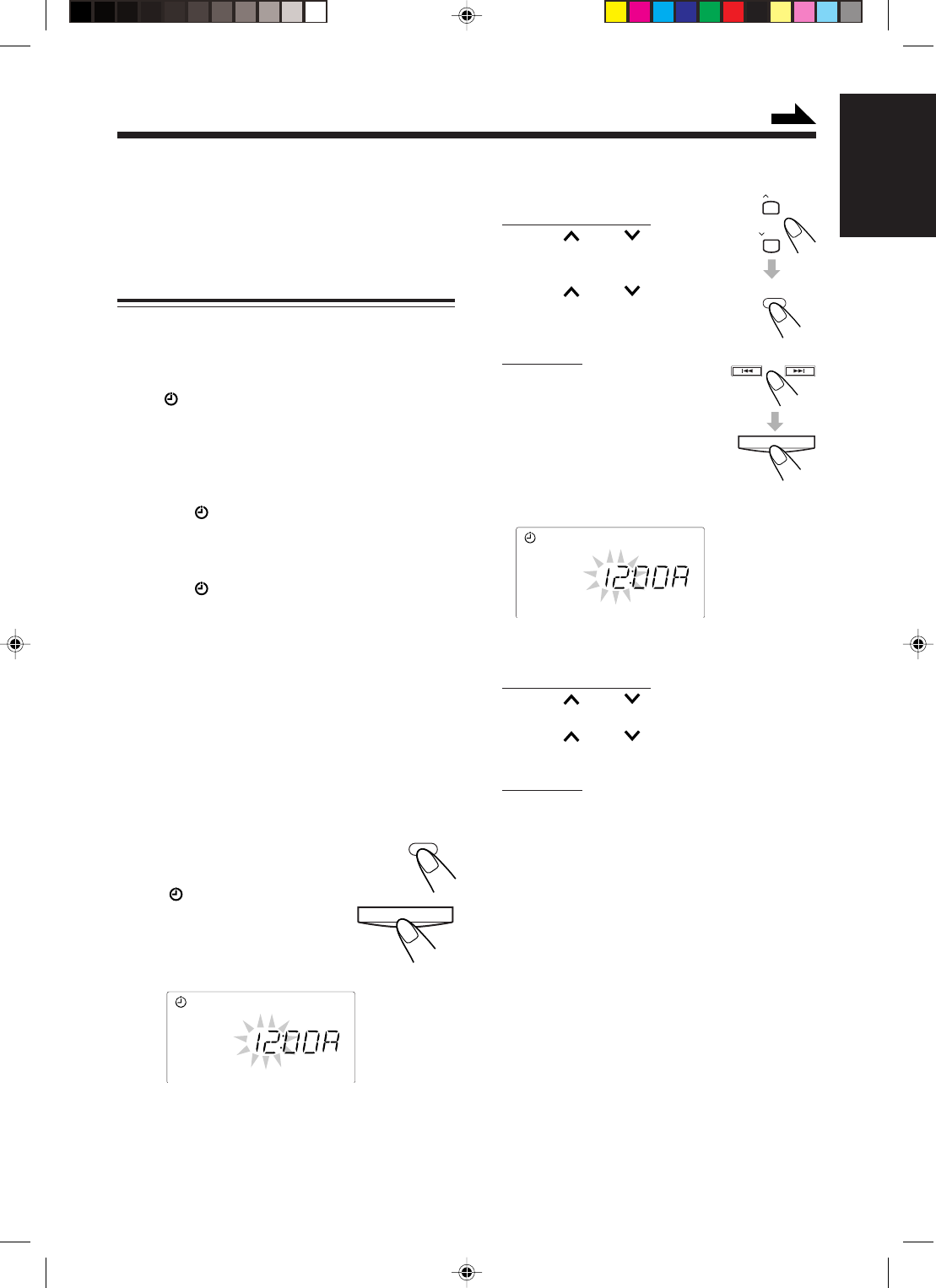
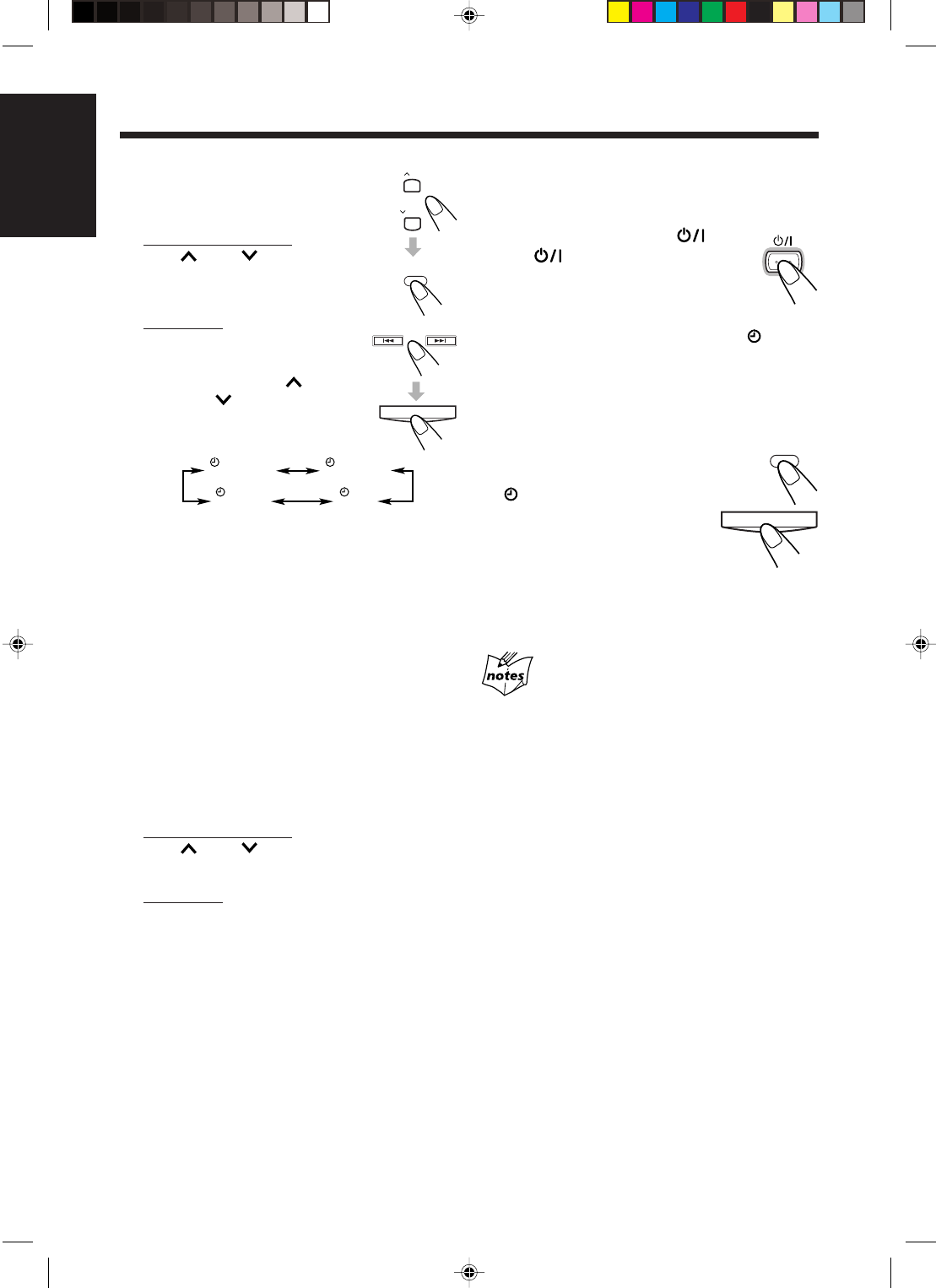
1
Press CLOCK/TIMER
(or TIMER/SNOOZE on
the unit).
The (timer) and the ON
indicators light up and the
current on-time flashes on the
display.
The unit enters on-time setting mode.
2
Set the on-time when you want the unit
to turn on.
On the remote control:
1) Press UP or DOWN to set
the hour, then press
CLOCK/TIMER.
2) Press UP or DOWN to set
the minute, then press
CLOCK/TIMER.
On the unit:
1) Press ¢ or 4 to set the
hour, then press TIMER/
SNOOZE.
2) Press ¢ or 4 to set the
minute, then press
TIMER/SNOOZE.
The OFF indicator lights up and the unit enters
off-time setting mode.
3
Set the off-time when you want the unit
to turn off (standby).
On the remote control:
1) Press UP or DOWN to set the hour, then
press CLOCK/TIMER.
2) Press UP or DOWN to set the minute,
then press CLOCK/TIMER.
On the unit:
1) Press ¢ or 4 to set the hour, then press
TIMER/SNOOZE.
2) Press ¢ or 4 to set the minute, then press
TIMER/SNOOZE.
The unit enters the timer selecting mode.
ON
OFF
UP
DOWN
CLOCK
/ TIMER
TIMER/SNOOZE
Continued
CLOCK
/ TIMER
TIMER/SNOOZE
EN18-26_FS-H30[C]f.pm6 03.2.5, 6:54 PM20
21
English
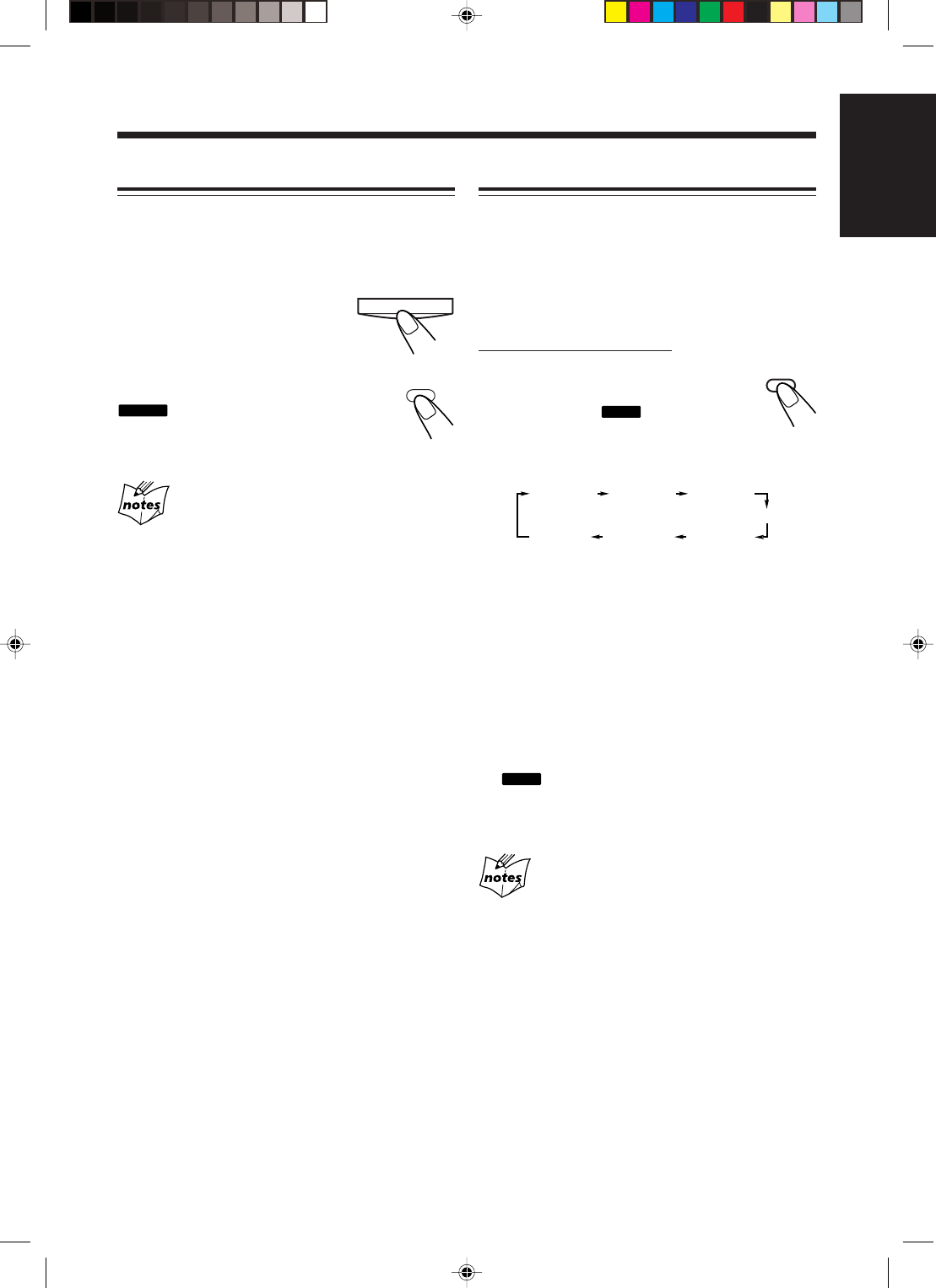
4
Select the timer (Daily
Timer or Recording Timer)
with the source to play.
On the remote control:
Press UP or DOWN to
select the timer, then press
CLOCK/TIMER.
On the unit:
Press ¢ or 4 to select the
timer, then press TIMER/SNOOZE.
• Each time you press UP
(¢) or DOWN (4), the
timer mode and the source
change as follows:
TUNER : tunes in to the last station you were
listening to. (Daily Timer)
REC TUNER : records the last station you were
listening to. (Recording Timer)
• Put a recordable cassette into the deck.
CD : plays a disc. (Daily Timer)
• Load a disc.
TAPE : plays a tape. (Daily Timer)
• Make sure that the tape is in the cassette
deck.
• Make sure that the tape direction is
correct.
The unit enters the volume level setting mode.
5
Select the volume level.
On the remote control:
Press UP or DOWN to set the volume level,
then press CLOCK/TIMER.
On the unit:
Press ¢ or 4 to set the volume level, then
press TIMER/SNOOZE.
• You can select the volume level
(“VOLUME – –” and “VOLUME 0” to
“VOLUME 40”).
If you select “VOLUME – –,” the volume is set
to the previous level when the unit was turned
off.
• To turn off the volume while the Recording
Timer (REC TUNER) is working, set the volume
level “VOLUME 0.”
The unit enters the clock setting mode.
TUNER TUNER
REC
CDTAPE
6
Adjust the clock if you need.
• See “Setting the Clock” on page 10.
7
Press STANDBY/ON
(or on the unit) to turn
off the unit (standby) if you
have set the timer with the
unit turned on.
• When the timer turns on the unit, the (timer)
indicator starts flashing. (If the Recording Timer
is selected in step
4
, the REC indicator also
starts flashing.)
To deactivate the timer temporarily,
press and hold CLOCK/TIMER (or
TIMER/SNOOZE on the unit) until
the (timer) indicator on the display
goes off.
To activate or change the timer
(with the previous setting), follow
steps
1
to
7
on pages 20 and 21.
• If you want to change the timer setting after the
Daily Timer be used, first deactivate the timer.
• If the unit is turned on when the timer on-time comes
Timer does not work.
• When you unplug the power cord or if a power failure
occurs
The timer will be canceled. You need to set the clock first,
then the timer again.
STANDBY/ON
UP
DOWN
CLOCK
/ TIMER
TIMER/SNOOZE
CLOCK
/ TIMER
TIMER/SNOOZE
EN18-26_FS-H30[C]f.pm6 03.2.5, 6:54 PM21
22
English
Using Sleep Timer
With the Sleep Timer, you can fall asleep to music. You
can set the Sleep Timer when the unit is turned on.
How the Sleep Timer actually works
The unit automatically turns off after the specified time
length passes.
On the remote control ONLY:
1
Press SLEEP.
The time length until the shut-off time
appears and the
SLEEP
indicator lights
up on the display.
• Each time you press the button, the time length
changes as follows:
2
Wait for about 5 seconds after
specifying the time length.
To check the remaining time until the shut-off time,
press SLEEP once so that the remaining time until the
shut-off time appears for about 5 seconds.
To change the shut-off time, press SLEEP repeatedly
until the desired time length appears on the display.
To cancel the setting, press SLEEP repeatedly until
the
SLEEP
indicator goes off.
• The Sleep Timer is also canceled when you turn off
the unit.
• If you set the Sleep Timer after the Daily Timer starts
playing the selected source
The Daily Timer is canceled. When the Sleep Timer shut-
off time comes, the unit will be turned off.
• If you set the Sleep Timer after the Recording Timer
starts recording
The Recording Timer is canceled, but recording continues
until the Sleep Timer shuts off the power.
SLEEP 10
Canceled
SLEEP 20 SLEEP 30
SLEEP 60
SLEEP 90SLEEP120
SLEEP
Using Snooze Timer
The Snooze Timer turns off the unit (standby) only for
5 minutes while the Daily Timer is in operation.
• You can set the Snooze Timer only while the Daily
Timer is in operation.
Press TIMER/SNOOZE on
the unit (or CLOCK/TIMER
on the remote control) while
the Daily Timer is in operation.
The unit turns off (standby) and the
SNOOZE
indicator lights up on the display.
After 5 minutes, the unit automatically
turns on.
• If the unit is turned on when the Snooze Timer is
working
The Snooze Timer and the Daily Timer will be canceled.
• If you set the Snooze Timer when there is less than 5
minutes until the Daily Timer off-time
The unit will not turn on even when 5 minutes passed.
• When you unplug the power cord or if a power failure
occurs
The timer will be canceled. You need to set the clock first,
then the timer again.
TIMER/SNOOZE
CLOCK
/ TIMER
EN18-26_FS-H30[C]f.pm6 03.2.5, 6:54 PM22
23
English
Maintenance
To get the best performance from the unit, keep your discs, tapes, and mechanism clean.
Cleaning the unit
• Stains on the unit
Should be wiped off with a soft cloth. If the unit is
heavily stained, wipe it with a cloth soaked in water-
diluted neutral detergent and wrung well, then wipe
clean with a dry cloth.
• Since the unit may deteriorate in quality, become
damaged or have its paint peel, be careful about
the following.
—DO NOT wipe it with a rough cloth.
—DO NOT wipe it strongly.
—DO NOT wipe it with thinner or benzine.
—DO NOT apply any volatile substances such as
insecticides to it.
—DO NOT allow any rubber or plastic to remain in
contact with it for a long time.
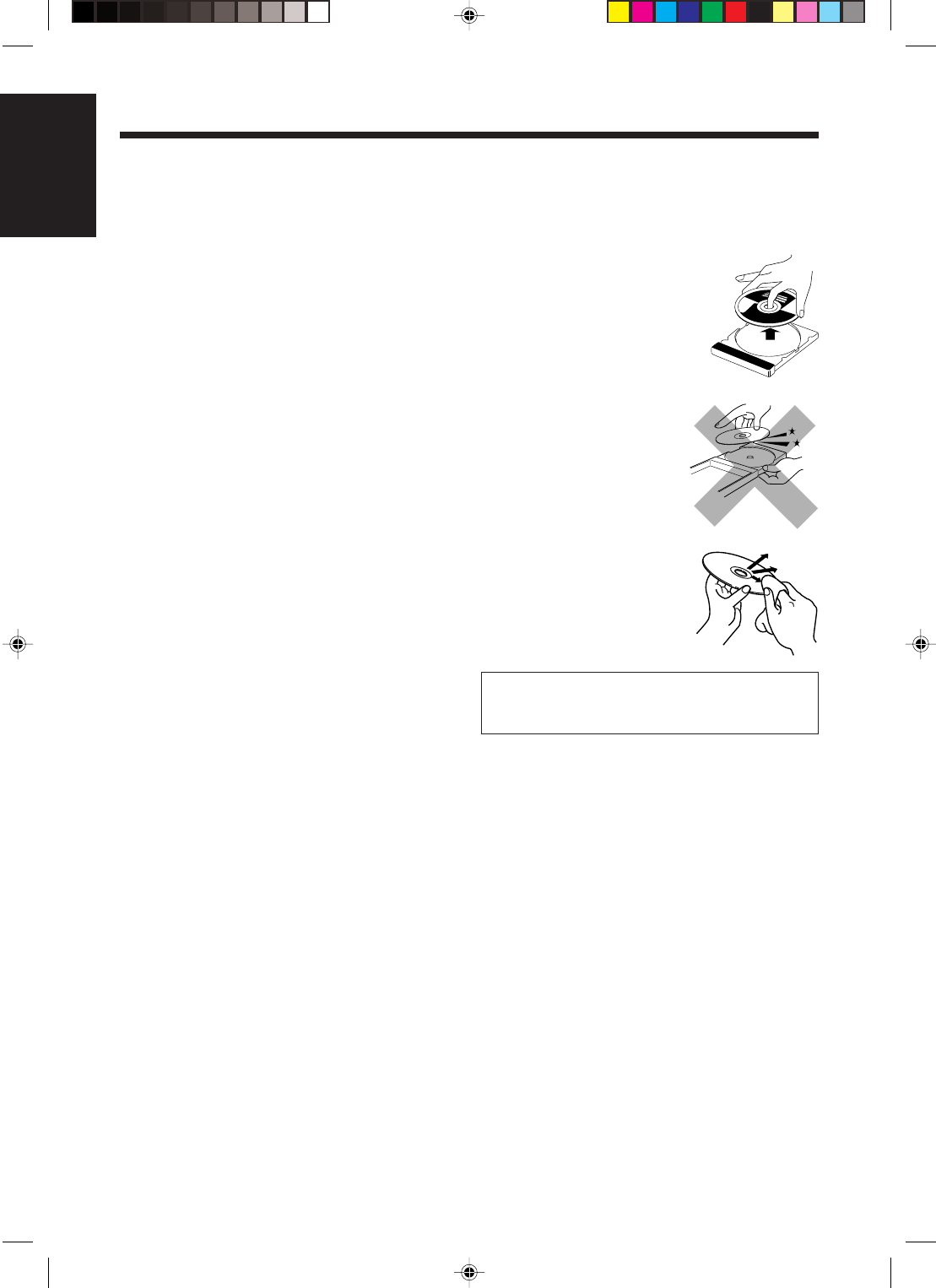
Handling discs
• Remove the disc from its case
by holding it at the edge while
pressing the center hole lightly.
• Do not touch the shiny surface
of the disc, or bend the disc.
• Put the disc back in its case
after use to prevent warping.
• Be careful not to scratch the
surface of the disc when
placing it back in its case.
• Avoid exposure to direct
sunlight, temperature
extremes, and moisture.
To clean the disc
Wipe the disc with a soft cloth
in a straight line from center to
edge.
DO NOT use any solvent—such as conventional
record cleaner, spray, thinner, or benzine—to clean
the disc.
EN18-26_FS-H30[C]f.pm6 03.2.5, 6:54 PM23
24
English
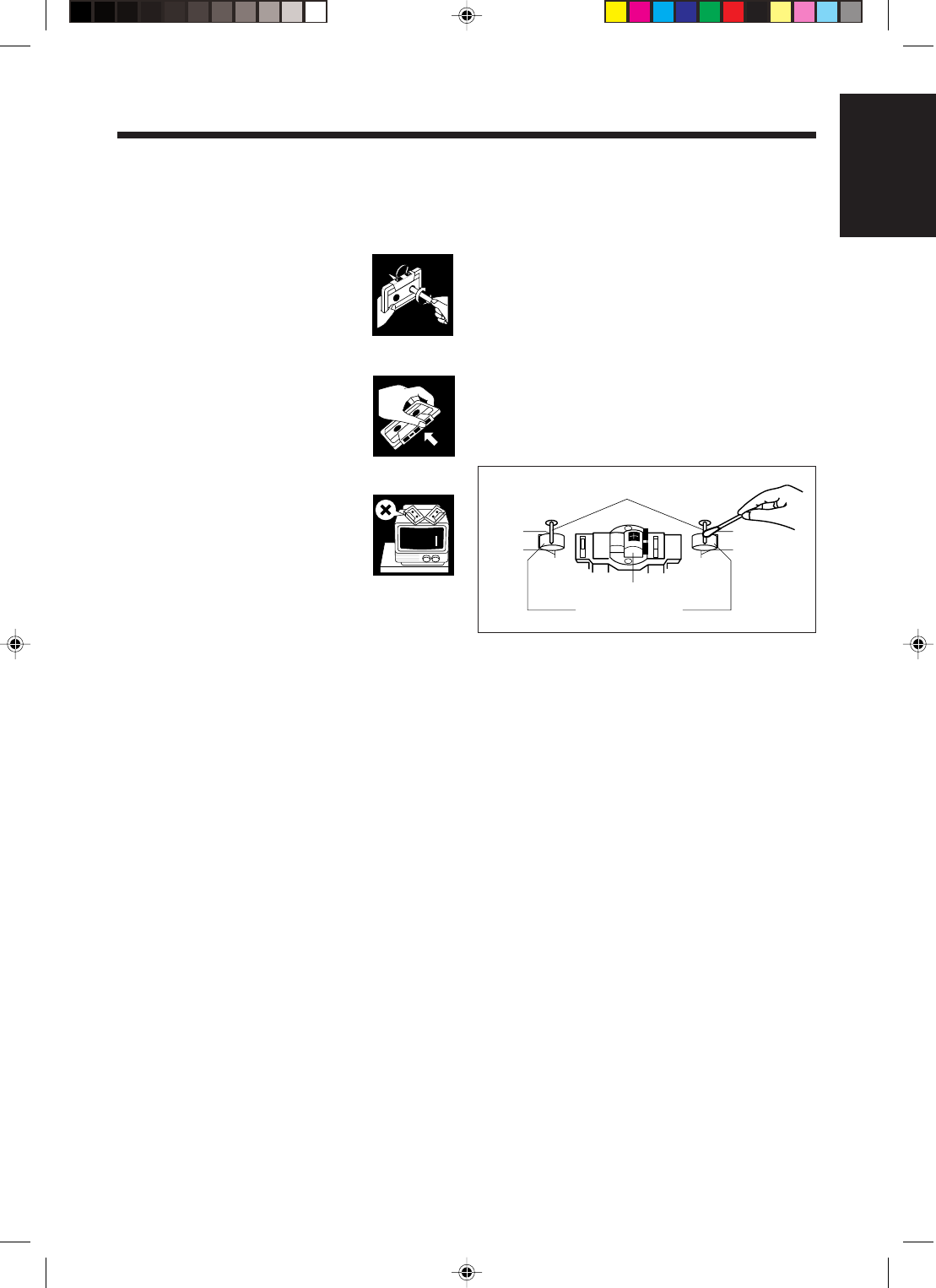
Handling cassette tapes
• If the tape is loose in its cassette,
take up the slack by inserting a
pencil in one of the reels and
rotating.
• If the tape is loose, it may get
stretched, cut, or caught in the
cassette.
• Be careful not to touch the tape
surface.
• Avoid storing tapes in the
following places:
—In dusty places
—In direct sunlight or heat
—In moist areas
—On a TV or speaker
—Near a magnet
Heads
Capstans
Pinch Rollers
To keep the best recording and playback sound
quality
If the heads, capstans, and pinch rollers of the cassette
deck become dirty, the following will occur:
• Impaired sound quality
• Discontinuous sound
• Fading
• Incomplete erasure
• Difficulty in recording
To clean the heads, capstans, and pinch rollers
Use a cotton swab moistened with alcohol.
To demagnetize the heads
Turn off the unit, and use a head demagnetizer
(available at electronics and audio shops).
EN18-26_FS-H30[C]f.pm6 03.2.5, 6:54 PM24
25
English
Troubleshooting
If you are having a problem with your unit, check this list for a possible solution before calling for service.
If you cannot solve the problem from the hints given here, or the unit has been physically damaged, call a qualified
person, such as your dealer, for service.
Symptom
No sound is heard.
Hard to listen to broadcasts because
of noise.
The disc does not play.
The disc sound is discontinuous.
The cassette holder cannot be
opened.
Impossible to record.
Operations are disabled.
Unable to operate the unit from the
remote control.
Cause
• Connections are incorrect or
loose.
• Headphones are connected.
• Antennas are disconnected.
• The AM loop antenna is too close
to the unit.
• The FM antenna is not properly
extended and positioned.
The disc is placed upside down.
The disc is scratched or dirty.
Power from the power cord has been
cut off while the tape was running.
Small tabs on the back of the
cassette are removed.
The built-in microprocessor may
malfunction due to external
electrical interference.
• The path between the remote
control and the remote sensor on
the unit is blocked.
• The batteries are exhausted.
Action
• Check all connections and make
corrections. (See pages 6 – 9.)
• Disconnect the headphones.
• Reconnect the antennas correctly
and securely.
• Change the position and direction
of the AM loop antenna.
• Extend the FM antenna to the best
position.
Place the disc with the label side up.
Clean or replace the disc. (See page
23.)
Plug in the power cord, then turn on
the unit.
Cover the holes with adhesive tape.
Unplug the power cord and then
plug it back in.
• Remove the obstruction.
• Replace the batteries.
EN18-26_FS-H30[C]f.pm6 03.2.5, 6:54 PM25

26
English
Specifications
Amplifier
Output Power:
20 W (10 W + 10 W) at 4 Ω (10% THD)
12 W per channel, min. RMS, driven into 4 Ω
at from 80 Hz to 15 kHz with no more than
10% total harmonic distortion.
Audio input sensitivity/Impedance (at 1 kHz)
AUX: 500 mV/48.75 kΩ
Speakers/Impedance: 4 Ω
Tuner
FM tuning range: 87.5 MHz – 108.0 MHz
AM tuning range: 530 kHz – 1 710 kHz
CD player
Dynamic range: 85 dB
Signal-to-noise ratio: 90 dB
Wow and flutter: Immeasurable
Cassette deck
Frequency response:
Normal (type I): 50 Hz – 15 000 Hz
Wow and flutter: 0.15% (WRMS)
Speaker
Speaker units:
Full range: 8.0 cm cone x 1
Impedance: 4 Ω
Dimensions (approx.):
135 mm x 203 mm x 190 mm (W/H/D)
Mass (approx.): 1.7 kg each
Supplied Accessories
See page 6.
General
Power requirement:
AC IN: 120 V , 60 Hz
DC IN: 12 V, 4 A
Power consumption: 35 W (at operation)
3.0 W (on standby)
Dimensions (approx.):
412 mm x 208 mm x 275 mm (W/H/D)
Mass (approx.): 6.5 kg
Design and specifications are subject to change
without notice.
EN18-26_FS-H30[C]f.pm6 03.2.5, 7:09 PM26
1
FrançaisFrançais
Introduction
À propos de ce mode d’emploi
Ce mode d’emploi est organisé de la façon suivante:
• Ce mode d’emploi explique principalement le
fonctionnement de l’appareil en utilisant les
touches de la télécommande.
Vous pouvez utiliser les touches de la
télécommande et de l’appareil de la même façon
si porte le même nom ou un nom similaire (ou
une marque), sauf mentionné autrement.
• Les informations de base et communes, qui sont les
mêmes pour beaucoup de fonctions, sont regroupées
en un seul endroit et ne sont pas répétées dans
chaque procédure. Par exemple, nous ne répétons
pas les informations sur la mise sous/hors tension de
l’appareil, le réglage du volume, la modification des
effets sonores, etc. qui sont expliqués dans la section
“Fonctionnement commun” aux pages 10 et 11.
• Les marques suivantes sont utilisées dans ce mode
d’emploi:
Vous donne des avertissements et des
précautions pour éviter tout dommage,
risque d’incendie ou d’électrocution.
Vous donne aussi des informations qui
ne vous permettent pas d’obtenir les
meilleures performances de l’appareil.
Vous donne des informations et des
conseils que vous devriez connaître.
Précautions
Installation
• Installez l’appareil dans un endroit plat, sec et ni
trop chaud, ni trop froid—entre 5˚C et 35˚C.
• Installez l’appareil dans un endroit suffisamment
ventilé pour éviter tout échauffement interne de
l’appareil.
• Laissez suffisamment d’espace entre l’appareil et le
téléviseur.
• Ne placez pas les enceintes trop près du téléviseur
pour éviter toute interférence.
N’INSTALLEZ PAS l’appareil près de
sources de chaleur, ou dans un endroit
exposé à la lumière directe du soleil, à une
poussière excessive ou aux vibrations.
Nous vous remercions pour avoir acheté un de nos produits JVC.
Avant d’utiliser cet appareil, lisez attentivement ce mode d’emploi afin
d’obtenir les meilleures performances de l’appareil, et conservez-le à titre
d’information.
Sources d’alimentation
• Pour débrancher l’appareil de la prise secteur
murale, tirez toujours sur la fiche et non sur le
cordon d’alimentation.
NE MANIPULEZ PAS le cordon
d’alimentation avec les mains mouillées.
Condensation d’humidité
De l’humidité peut se condenser sur la lentille à
l’intérieur de l’appareil dans les cas suivants:
• Après le démarrage d’un chauffage dans la pièce
• Dans une pièce humide
• Si l’appareil est amené directement d’une pièce
froide dans une pièce chaude
Si cela se produit, l’appareil risque de ne pas
fonctionner correctement. Dans ce cas, laisser
l’appareil sous tension pendant quelques heures
jusqu’à ce que l’humidité se soit évaporée, débranchez
le cordon d’alimentation secteur puis rebranchez-le de
nouveau.
Autres
• Si un objet métallique ou un liquide tombait à
l’intérieur de l’appareil, débranchez l’appareil et
consultez votre revendeur avant de faire quoi que ce
soit.
• Si vous n’avez pas l’intention d’utiliser votre
appareil pendant une période prolongée, débranchez
le cordon d’alimentation secteur de la prise murale.
NE DÉMONTEZ PAS l’appareil. Il n’y a
aucune pièce réparable par l’utilisateur à
l’intérieur.
En cas de problèmes, débranchez le cordon
d’alimentation secteur et consultez votre revendeur.
FR01-13_FS-H30[C]f.pm6 2/5/03, 6:09 PM1
2
Français
Table des matières
Emplacement des touches ........................................... 3
Appareil ............................................................................. 3
Télécommande .................................................................. 5
Pour commencer .......................................................... 6
Accessoires fournis ........................................................... 6
Connexion des antennes .................................................... 6
Connexion des enceintes ................................................... 7
Connexion d’un autre appareil .......................................... 8
Mise en place des piles dans la télécommande ..................
9
Fonctionnement commun.......................................... 10
Réglage de l’horloge ....................................................... 10
Mise sous tension ............................................................ 11
Ajustement du volume .................................................... 11
Ajustement de la tonalité (grave/aigu) ............................ 11
Renforcement des graves ................................................ 11
Écoute d’émissions FM et AM .................................. 12
Accord d’une station ....................................................... 12
Préréglage des stations .................................................... 12
Accord d’une station préréglée ....................................... 13
Lecture des disques.................................................... 14
Lecture d’un disque en entier—Lecture normale............ 14
Fonctionnement de base de la platine disque .................. 15
Programmation de l’ordre de lecture des plages
—Lecture programmée ............................................. 15
Lecture dans un ordre aléatoire—Lecture aléatoire ........ 16
Répétition des plages—Lecture répétée .......................... 16
Lecture de cassettes ................................................... 17
Lecture d’une cassette ..................................................... 17
Enregistrement........................................................... 18
Enregistrement sur une cassette ...................................... 18
Enregistrement direct de disque ...................................... 19
Enregistrement d’une plage............................................. 19
Utilisation des minuteries.......................................... 20
Utilisation de la minuterie quotidienne et
d’enregistrement ....................................................... 20
Utilisation de la minuterie de rappel ............................... 22
Utilisation de la minuterie d’arrêt ................................... 22
Entretien ..................................................................... 23
Guide de dépannage .................................................. 25
Spécifications .............................................................. 26
FR01-13_FS-H30[C]f.pm6 2/5/03, 6:09 PM2
3
FrançaisFrançais
COMPACT COMPONENT SYSTEM
STANDBY
w
q
e
r
t
Vue de dessus
Vue avant
Familiarisez-vous avec les touches de votre appareil.
Appareil
Emplacement des touches
TIMER/SNOOZE
MULTI CONTROL
ONE TOUCH
REC AHB PRO
VOLUME
AUX TAPE CD
TUNER
BAND
COMPACT
DIGITAL AUDIO
PHONES
4¢
7
OPEN
9
7
p
1
2
5
6
8
4
3
FR01-13_FS-H30[C]f.pm6 2/5/03, 6:09 PM3
4
Français
Appareil
1Prise PHONES (11)
2Couvercle de la fente
3Touche TIMER/SNOOZE (10, 20 – 22)
4Touche ONE TOUCH REC (enregistrement)
(18, 19)
5Touche (attente/sous tension) (11, 21)
6Touches de source
• AUX, @ # TAPE, BAND TUNER et
#/8 CD
Appuyez sur une de ces touches met aussi
l’appareil sous tension.
7Touches MULTI CONTROL
•4 (saut vers l’arrière), 7 (arrêt) et ¢
(saut vers l’avant)
8Touche AHB (Active Hyper Bass) PRO (11)
9Touche 0 OPEN (ouverture du couvercle de la
fente) (14)
pTouches VOLUME + / – (11)
qFenêtre d’affichage
wTémoin STANDBY (11)
eCompartiment à cassette
rCapteur de télécommande
tTouche ) (ouverture du compartiment à cassette)
(17 – 19)
Fenêtre d’affichage
1Indicateurs de fonctionnement de la platine
cassette
•2 3 (direction de la bande),
REC
(enregistrement), et (mode autoreverse)
2Indicateur (minuterie)
3Indicateur REC (minuterie d’enregistrement)
4Indicateurs ON/OFF (heure de début/fin de la
minuterie)
5Indicateur CLOCK
6Indicateur
BASS
7Indicateur
SLEEP
8Indicateur
SNOOZE
9Indicateurs MONO et STEREO
pAffichage principal
• Indique le nom de la source, la fréquence, etc.
qIndicateurs des plages
wIndicateur PROGRAM
eIndicateur RANDOM
rIndicateur de répétition
• et ALL
tIndicateur OVER
PROGRAM RANDOM ALL OVER
MONOCLOCKOFF
REC ON
STEREO
BASS
REC
SLEEP SNOOZE
1 2 3 4 5 6 7 8 9 10 11 12 13 14 15
1234
567 8
9
p
q
rtwe
Fenêtre d’affichage
Référez-vous aux pages entre parenthèses pour plus
de détails.
À suivre
FR01-13_FS-H30[C]f.pm6 2/5/03, 6:09 PM4
5
FrançaisFrançais
Télécommande
Référez-vous aux pages entre parenthèses pour plus de
détails.
1Touches numériques
2Touche BASS (11)
3Touches à commandes multiples
• UP, 4 (saut vers l’arrière), 7 (arrêt), ¢
(saut vers l’avant) et DOWN
4Touche SET (13)
5Touches de source
•3/8 CD, 2 3 TAPE, TUNER et AUX
Appuyer sur une de ces touches met aussi
l’appareil sous tension.
6Touche REV.MODE (mode autoreverse) (17 – 19)
7Touche PRGM (programme) (15)
8Touche STANDBY/ON (11, 21)
9Touche DISPLAY (10)
pTouche CLOCK/TIMER (10, 20, 21)
qTouche SLEEP (22)
wTouche TREBLE (11)
eTouche CANCEL (16)
rTouche AUTO PRESET (12)
tTouche FM MODE (12)
yTouche REPEAT (16)
uTouche RANDOM (16)
iTouche AHB (Active Hyper Bass) PRO (11)
oTouche VOLUME + / – (11)
Lors de l’utilisation de la télécommande, dirigez-
la sur le capteur de télécommande du panneau
avant.
STANDBY/ON
DISPLAY
CLOCK
/TIMER
SLEEP
TREBLE
UP
DOWN
BASS
CANCELSET
CD TAPE TUNER AUX
REPEAT
VOLUME
RANDOM
AHB PRO
REV.MODE FM MODE AUTO
PRESET
PRGM
1
4
7
10
2
5
8
3
6
9
10
8
9
p
q
r
t
u
y
i
o
w
e
4
7
3
2
1
5
6
COMPACT COMPONENT SYSTEM
STANDBY
FR01-13_FS-H30[C]f.pm6 2/5/03, 6:09 PM5
6
Français
Pour commencer
Accessoires fournis
Vérifiez que vous avez bien tous les accessoires
suivants.
Le nombre entre parenthèses indique le nombre de
pièces fournies.
• Antenne cadre AM (1)
• Antenne FM (1)
• Cordon d’alimentation secteur (1)
• Télécommande (1)
• Piles (2)
Si quelque chose manquait, consultez immédiatement
votre revendeur.
Connexion des antennes
Antenne FM
1Connectez l’antenne FM à la prise FM
COAXIAL 75 Ω.
2Étendez l’antenne FM.
3Fixez-la dans la position qui offre la
meilleure réception possible, puis fixez-
la au mur, etc.
A propos de l’antenne FM fournie
L’antenne FM fournie avec cet appareil peut être utilisée
temporairement. Si la réception est mauvaise, connectez une
antenne FM extérieure.
Antenne FM (fournie)
Antenne FM extérieure
(non fournie)
Une antenne 75 Ω avec un connecteur
de type coaxial doit être utilisée.
Câble coaxial (non fournie)
Pour connecter une antenne FM extérieure
Avant de la connecter, déconnectez l’antenne FM
fournie.
À suivre
FR01-13_FS-H30[C]f.pm6 2/5/03, 6:09 PM6
7
FrançaisFrançais
1Connectez l’antenne cadre AM aux
prises AM LOOP comme montré sur
l’illustration.
2Tournez l’antenne cadre AM jusqu’à
l’obtention de la meilleure réception
possible.
Pour connecter une antenne AM extérieure
Si la réception est mauvaise, connectez un fil recouvert
de vinyle à la prise AM EXT et étendez-le
horizontalement. L’antenne cadre AM doit rester
connectée.
Pour une meilleure réception FM et AM
• Assurez-vous que les conducteurs de l’antenne ne touchent
pas d’autres prises et cordons de connexion.
• Gardez les antennes à l’écart des parties métalliques de
l’appareil, des cordons de connexion et du cordon
d’alimentation.
Antenne AM
Fil recouvert de
vinyle (non fourni)
Antenne cadre AM
(fournie)
1
2
Connexion des enceintes
1Maintenez en position ouverte le serre-
fil de la prise d’enceinte sur le panneau
arrière.
2Insérez une extrémité du cordon
d’enceinte dans la prise.
Faire correspondre les polarités entre l’appareil et
les prises d’enceinte: ª à ª et · à ·.
3Relâchez les serre-fils.
•NE CONNECTEZ PAS les enceintes
quand l’appareil est sous tension.
•NE CONNECTEZ PAS plus d’une
enceinte à chaque prise d’enceinte.
IMPORTANT: Utilisez uniquement des enceintes
possédant la même impédance que celle indiquée
à côté des prises d’enceinte à l’arrière de
l’appareil.
Cordons
d’enceinte
Cordons
d’enceinte
Enceinte droite Enceinte gauche
12
FR01-13_FS-H30[C]f.pm6 2/5/03, 6:09 PM7
8
Français
Grille
d’enceinte
Pour retirer la grille d’enceinte, insérez vos doigts en
haut de la grille d’enceinte, puis tirez vers vous. Faites
de même avec le bas de la grille.
Pour fixer la grille d’enceinte, référez-vous à
l’illustration ci-dessus.
Connexion d’un autre appareil
Pour connecter un appareil audio
Vous pouvez connecter un appareil audio—utilisé
uniquement comme appareil de lecture.
• NE CONNECTEZ PAS les appareils
quand ils sont sous tension.
• NE BRANCHEZ PAS les appareils sur le
secteur avant que toutes les connexions
ne soient terminées.
Assurez-vous que les fiches des cordons audio sont
codées par couleur: Les fiches et les prises blanches
sont pour les signaux audio gauches et les rouges pour
les signaux audio droits.
Projections
Trous
Retrait des grilles des enceintes
Les grilles des enceintes peuvent être retirées.
L
R
L
R
À la sortie audio
Appareil audio
MAINTENANT, vous pouvez
brancher cet appareil et les appareils
connectés au secteur.
IMPORTANT: Assurez-vous de vérifier toutes les
connexions avant de brancher le cordon
d’alimentation.
Cet appareil peut être alimenté par le connecteur AC
IN (chez vous, sur le secteur) ou par le connecteur DC
IN (dans une voiture).
• Ne connectez pas l’appareil en utilisant le
connecteur AC IN et le connecteur DC IN en même
temps pour des raisons de sécurité et d’utilisation
correcte.
Pour connecteur le cordon d’alimentation
Connectez le cordon d’alimentation secteur au
connecteur AC IN et sur une prise murale.
À suivre
Pour reproduire un autre appareil à travers cet
appareil, connectez les prises de sortie audio de l’autre
appareil aux prises AUX en utilisant un cordon audio
(non fourni).
AC IN
Cordon d’alimentation secteur
(fourni)
FR01-13_FS-H30[C]f.pm6 2/6/03, 4:06 PM8
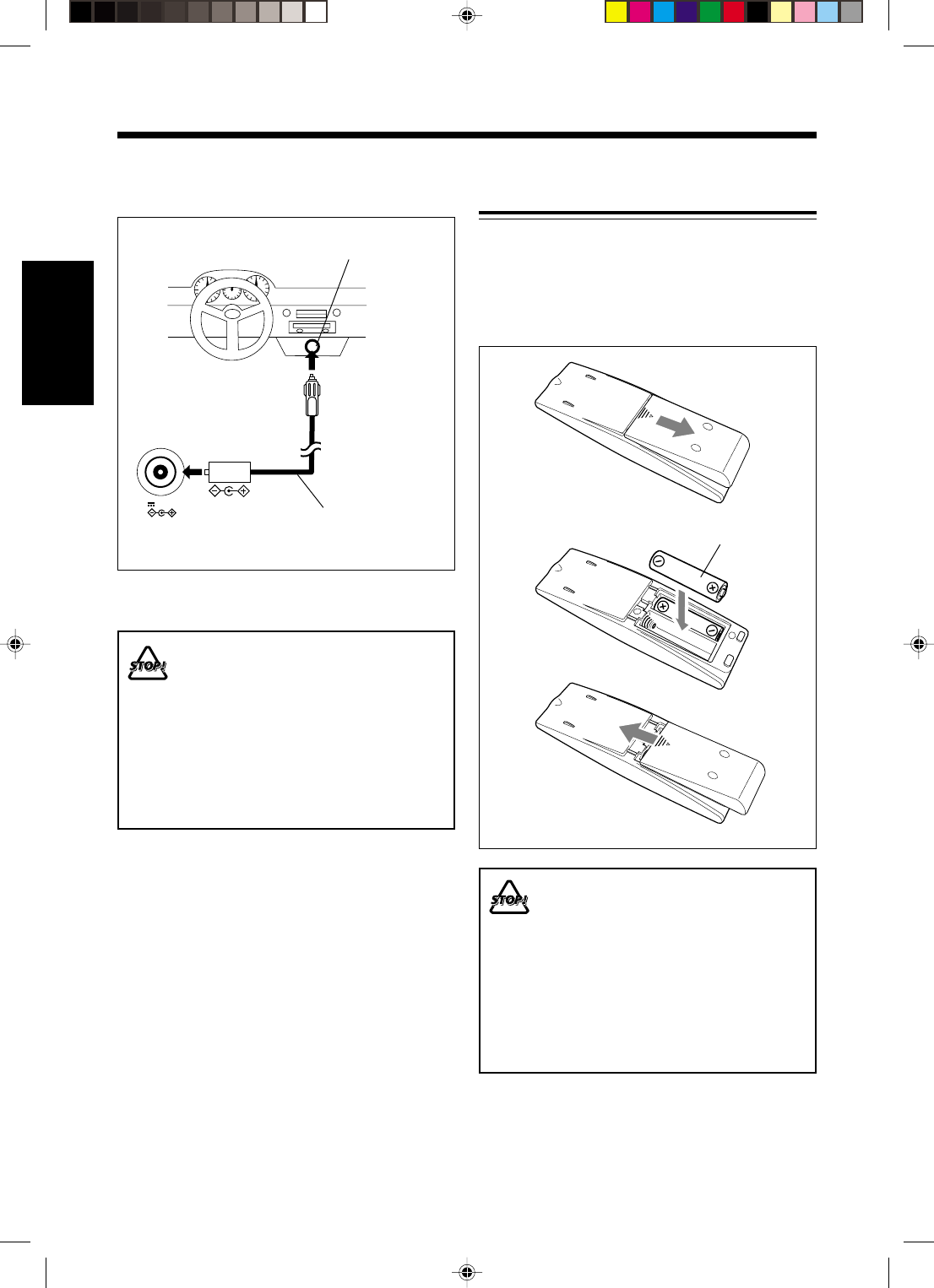
9
FrançaisFrançais
Mise en place des piles dans la
télécommande
Insérez les piles—R6(SUM-3)/AA(15F)—dans la
télécommande, en faisant correspondre les polarités
(+ et –) des piles avec les marques + et – dans le
compartiment à piles.
Quand la télécommande ne peut plus commander
l’appareil, remplacez les deux piles en même temps.
• N’UTILISEZ PAS une vieille pile avec une
pile neuve.
• N’UTILISEZ PAS différents types de pile
en même temps.
• N’EXPOSEZ PAS les piles au feu ou à
une flamme.
• NE LAISSEZ PAS les piles dans le
compartiment à piles si vous n’avez pas
l’intention d’utiliser la télécommande
pendant une période prolongée. Sinon,
elles risqueraient de fuir et
d’endommager la télécommande.
R6(SUM-3)/AA(15F)
1
3
2
12V 4A
DC IN
À la prise allume-cigares
de la voiture (12 V)
Adaptateur pour voiture
(modèle JVC: CA-R120)
Connectez l’adaptateur pour voiture au connecteur
DC IN (12 V, 4 A) et à la prise allume-cigares.
•NE CONNECTEZ PAS l’adaptateur pour
voiture à la prise allume-cigares avant de
le connecter au connecteur DC IN. Sinon,
un court-circuit pourrait se produire si
l’adaptateur entrait en contact avec une
partie métallique de la voiture.
•N’UTILISEZ PAS cet appareil pendant
une période prolongée dans une voiture
avec le contact sur la position “OFF” (ou
sur la position “ACC”). Sinon, la batterie
de la voiture pourrait se décharger.
Lors de l’utilisation de l’appareil dans votre
voiture
FR01-13_FS-H30[C]f.pm6 2/19/03, 4:52 PM9
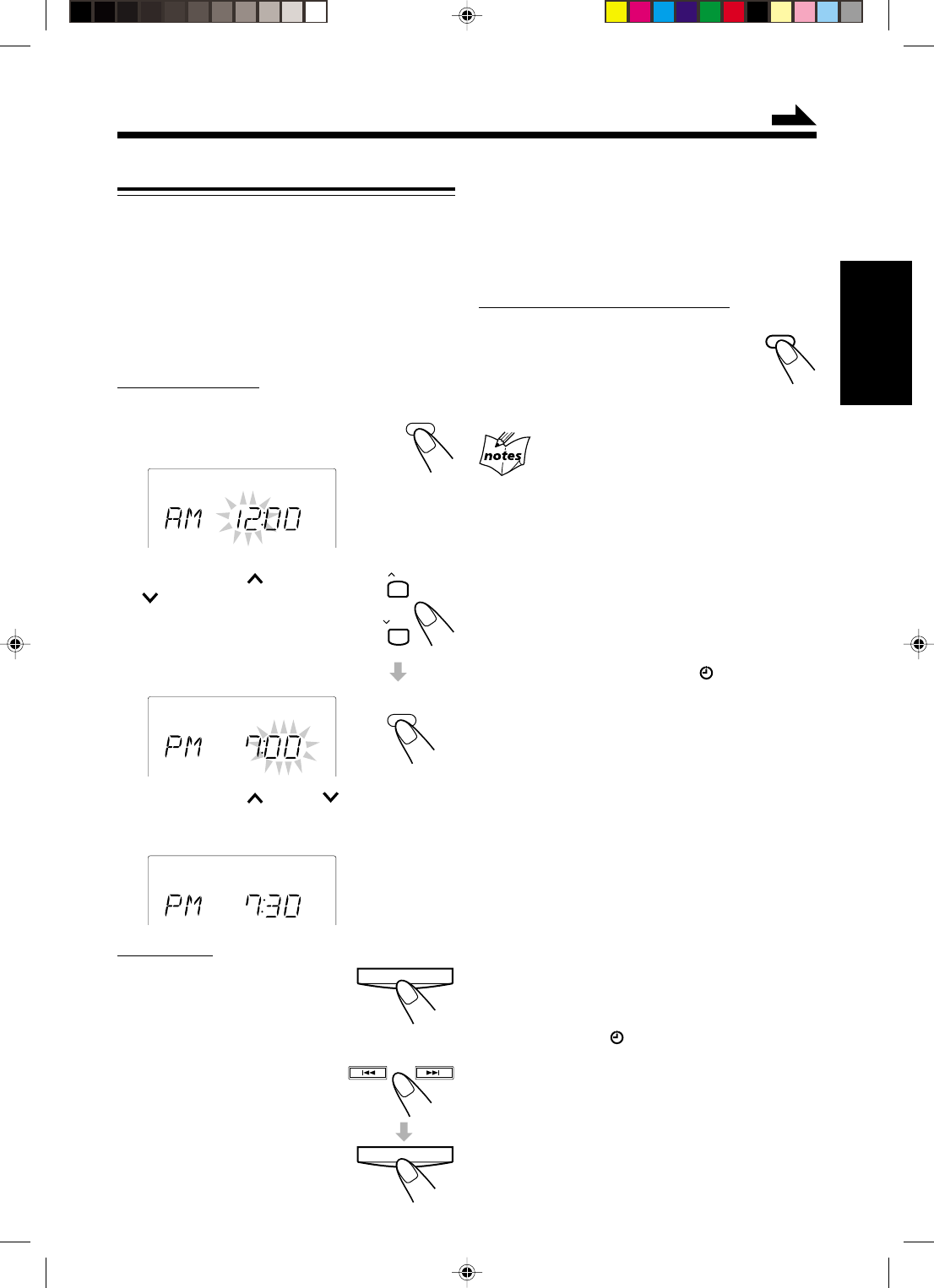
10
Français
Fonctionnement commun
Réglage de l’horloge
Avant d’utiliser l’appareil, réglez d’abord l’horloge.
Quand vous branchez le cordon d’alimentation,
l’indicateur CLOCK et “AM 12:00” clignotent sur
l’affichage.
Vous pouvez régler l’horloge quand l’appareil est
allumé ou éteint.
• Il y a une durée limite pour réaliser les étapes
suivantes. Si le réglage est annulé avant la fin,
recommencez à partir de l’étape
1
.
Sur la télécommande:
1
Appuyez sur CLOCK/TIMER.
Le chiffre des heures commence à
clignoter sur l’affichage.
2
Appuyez sur UP ou
DOWN pour ajuster
l’heure, puis appuyez
sur CLOCK/TIMER.
Le chiffre les minutes commence à
clignoter.
3
Appuyez sur UP ou DOWN pour
ajuster les minutes, puis appuyez sur
CLOCK/TIMER.
Sur l’appareil:
1
Appuyez sur TIMER/
SNOOZE.
Le chiffre des heures commence
à clignoter sur l’affichage.
2
Appuyez sur ¢ ou 4
pour ajuster l’heure, puis
appuyez sur TIMER/
SNOOZE.
Le chiffre les minutes commence
à clignoter.
CLOCK
/ TIMER
CLOCK
CLOCK
CLOCK
TIMER/SNOOZE
DISPLAY
3
Appuyez sur ¢ ou 4 pour ajuster
les minutes, puis appuyez sur TIMER/
SNOOZE.
Pour vérifier l’heure pendant la lecture
Sur la télécommande UNIQUEMENT:
Appuyez sur DISPLAY (de couleur
grise).
• Chaque fois que vous appuyez sur la
touche, l’indication de la source et
l’horloge alternent sur l’affichage.
• Quand vous débranchez le cordon d’alimentation ou
qu’une coupure de courant se produit
L’horloge est réinitialisée immédiatement sur “AM 12:00”.
Si cela se produit, réglez de nouveau l’horloge.
• Il se peut que l’horloge avance ou retarde 1 ou 2
minutes en plus par mois
Si cela se produit, réglez de nouveau l’horloge.
Pour changer l’horloge
1 Assurez-vous que l’indicateur (minuterie)
n’est pas allumé sur l’affichage.
• S’il est allumé, maintenez pressée CLOCK/
TIMER (ou TIMER/SNOOZE sur l’appareil)
jusqu’à ce que l’appareil se mette hors tension.
2 Appuyez répétitivement sur CLOCK/TIMER
(ou sur TIMER/SNOOZE sur l’appareil)
jusqu’à ce que l’appareil entre en mode de
réglage de l’horloge (le chiffre des heures
clignote sur l’affichage).
La première fois que vous appuyez sur CLOCK/
TIMER (ou TIMER/SNOOZE sur l’appareil),
l’appareil entre en mode de réglage de la minuterie.
(Référez-vous à la page 20).
3 Répétez les étapes
2
et
3
de la procédure
“Réglage de l’horloge”.
4 Maintenez de nouveau pressée CLOCK/TIMER
(ou TIMER/SNOOZE sur l’appareil) de façon
que l’indicateur (minuterie) s’éteigne.
UP
DOWN
CLOCK
/ TIMER
TIMER/SNOOZE
À suivre
FR01-13_FS-H30[C]f.pm6 2/5/03, 6:09 PM10
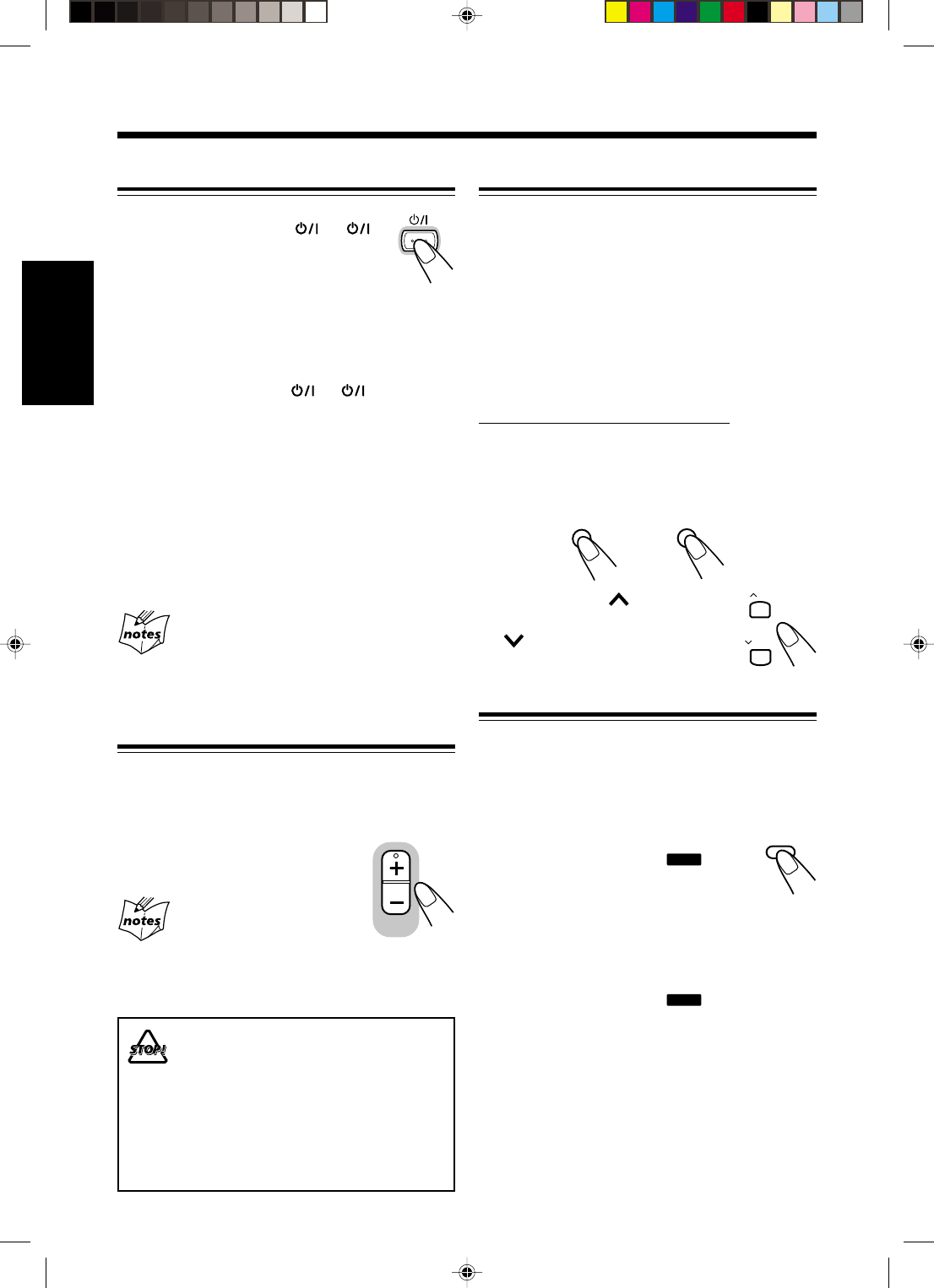
11
FrançaisFrançais
Ajustement de la tonalité (grave/aigu)
Il est possible d’ajuster le niveau des graves (plage des
basses fréquences) et le niveau des aigus (plage des
hautes fréquences) dans une plage de –5 à +5.
À l’expédition de l’usine, le niveau des graves est réglé
sur “BASS 0”, et le niveau des aigus sur “TREBLE +1”.
• Cette fonction n’affecte que le son reproduit et pas
l’enregistrement.
• Il y a une durée limite pour réaliser les étapes
suivantes. Si le réglage est annulé avant la fin,
recommencez à partir de l’étape
1
.
Sur la télécommande UNIQUEMENT:
1
Appuyer sur BASS pour ajuster le
niveau des graves ou appuyer sur
TREBLE pour ajuster le niveau des
aigus.
2
Appuyer sur UP pour
augmenter le niveau ou sur
DOWN pour le diminuer.
Renforcement des graves
Vous pouvez renforcer les sons graves pour conserver
la richesse et la plénitude des graves à faible niveau de
volume—Active Hyper Bass Pro.
• Cette fonction n’affecte que le son reproduit et pas
l’enregistrement.
Pour obtenir l’effet, appuyez sur AHB
PRO de façon que l’indicateur
BASS
s’allume sur l’affichage.
• Chaque fois que vous appuyez sur la
touche, le renforcement des graves se met
alternativement en (AHB ON) et hors
(AHB OFF) service.
Pour annuler l’effet, appuyez de nouveau sur AHB
PRO de façon que l’indicateur
BASS
s’éteigne.
Mise sous tension
Pour mettre l’appareil sous tension,
appuyez sur STANDBY/ON (ou sur
l’appareil).
Le témoin STANDBY s’éteint sur l’appareil.
• Quand vous appuyez sur la touche de
source—3/8 CD, 2 3 TAPE, TUNER (ou BAND
TUNER sur l’appareil) et AUX, l’appareil se met
automatiquement sous tension et la lecture démarre
si la source est prête.
Pour mettre l’appareil hors tension, appuyez de
nouveau sur STANDBY/ON (ou sur l’appareil).
Le témoin STANDBY s’allume sur l’appareil.
• L’indicateur CLOCK indicator et “AM 12:00”
clignotent sur l’affichage jusqu’à ce que vous régliez
l’horloge intégrée. Une fois que l’horloge est réglée,
elle apparaît sur l’affichage quand l’appareil est en
mode d’attente.
• Une petite quantité d’électricité est toujours
consommée même quand l’appareil est en mode
d’attente.
Pour mettre l’appareil complètement hors tension,
débranchez le cordon d’alimentation.
Quand vous débranchez le cordon
d’alimentation ou qu’une coupure de courant se
produit
L’horloge est réinitialisée immédiatement à “AM 12:00”
tandis que les stations préréglées du tuner (voir page 12) sont
effacées en quelques jours.
Ajustement du volume
Vous pouvez ajuster le niveau de volume uniquement
quand l’appareil est sous tension. Vous pouvez régler le
niveau du volume entre “VOL MIN” et “VOLUME 1”
– “VOLUME 40 (VOL MAX)”.
Appuyez sur VOLUME + pour
augmenter le volume ou appuyez sur
VOLUME – pour le diminuer.
Pour une écoute privée
Connectez le casque d’écoute à la prise PHONES. Aucun son
ne sort des enceintes. Assurez-vous de diminuer le volume
avant de connecter le casque d’écoute ou de le mettre sur vos
oreilles.
NE METTEZ PAS l’appareil hors tension (en
mode d’attente) avec le volume réglé sur un
niveau très élevé; sinon, une soudaine
déflagration sonore peut endommager votre
ouïe, vos enceintes ou votre casque d’écoute
quand l’appareil est remis sous tension ou
qu’une source est reproduite la fois suivante.
RAPPELEZ-VOUS qu’il n’est pas possible
d’ajuster le volume quand l’appareil est en
mode d’attente.
VOLUME
BASS
TREBLE
UP
DOWN
AHB PROAHB PRO
STANDBY/ON
FR01-13_FS-H30[C]f.pm6 2/5/03, 6:09 PM11
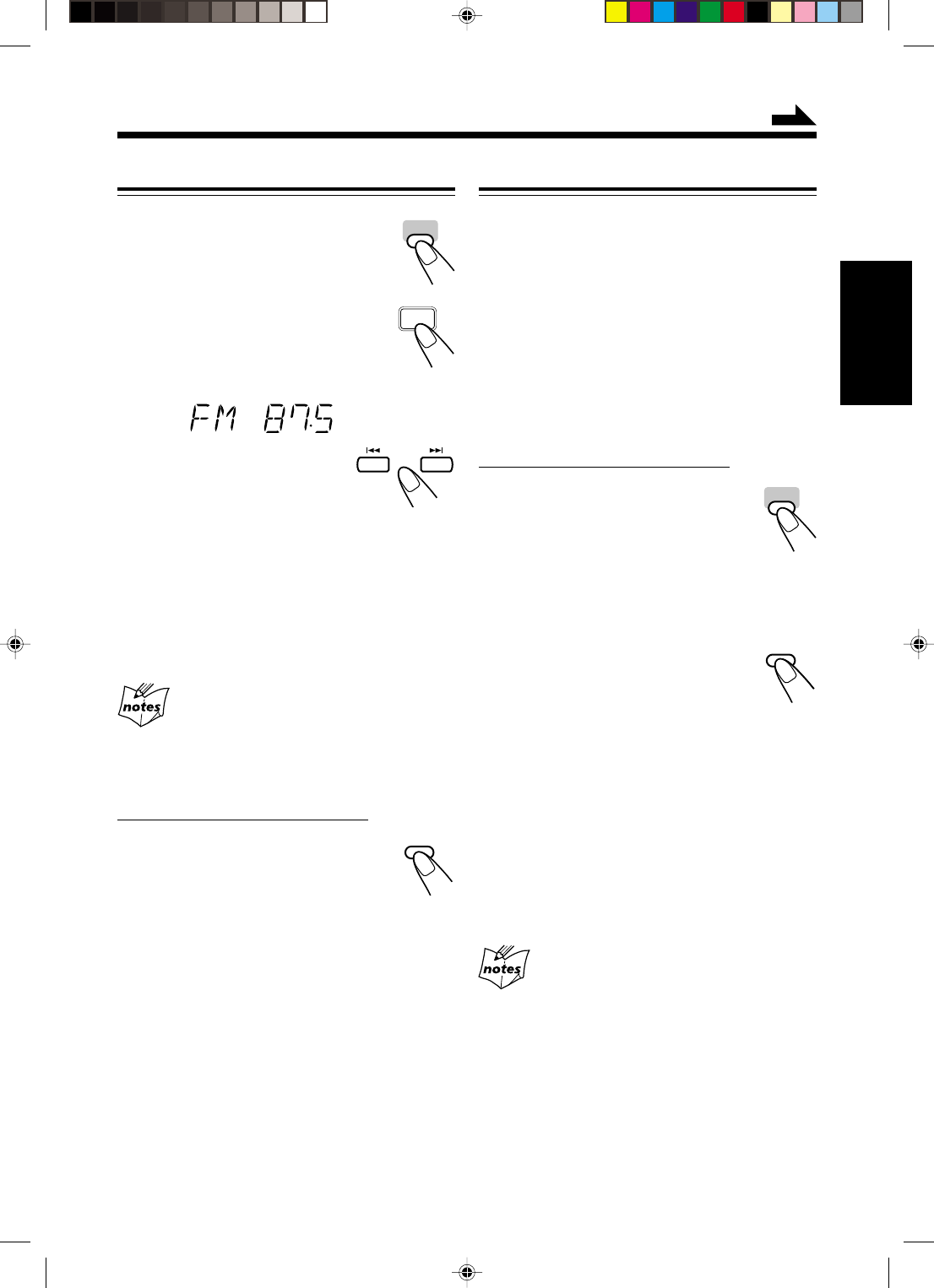
12
Français
Accord d’une station
1
Appuyez sur TUNER (ou
BAND TUNER sur l’appareil)
pour choisir la bande.
L’appareil se met automatiquement sous
tension et accorde la dernière station—
accordée FM ou AM.
• Chaque fois que vous appuyez sur la
touche, la bande alterne entre FM et
AM.
2
Maintenez pressée ¢
ou 4 pendant plus 1
seconde.
L’appareil commence à rechercher les stations et
s’arrête quand une station de signal suffisamment
fort est accordée.
• Si le programme est diffusé en stéréo,
l’indicateur STEREO s’allume.
Pour arrêter la recherche en cours, appuyez
sur ¢ ou 4.
Si vous appuyez sur ¢ ou 4 brièvement et
répétitivement
La fréquence change pas par pas.
Pour changer le mode de réception FM
Sur la télécommande UNIQUEMENT:
Quand une émission FM stéréo est
difficile à recevoir ou parasitée, appuyez
sur FM MODE sur la télécommande de
façon que l’indicateur MONO s’allume sur
l’affichage. La réception est améliorée.
Pour rétablir l’effet stéréo, appuyez de nouveau sur
FM MODE de façon que l’indicateur MONO
s’éteigne. En mode stéréo, vous entendez un son stéréo
quand un programme est diffusé en stéréo.
Préréglage des stations
Vous pouvez prérégler 30 FM et 15 stations
AM—en utilisant soit de préréglage automatique ou de
préréglage manuel.
Dans certains cas, des tests de fréquences ont déjà été
mémorisés dans le tuner lors de la vérification de la
fonction de préréglage avant l’expédition. Ce n’est pas
un mauvais fonctionnement.
Pour prérégler les stations automatiquement
—Préréglage automatique
Vous avez besoin de prérégler les stations séparément
pour les bandes FM et AM.
Sur la télécommande UNIQUEMENT:
1
Appuyer sur TUNER pour
choisir la bande.
L’appareil se met automatiquement sous
tension et accorde la dernière station
—accordée FM ou AM.
• Chaque fois que vous appuyez sur la touche,
la bande alterne entre FM et AM.
2
Maintenez pressée
AUTO PRESET pendant plus
2 secondes.
Les stations locales avec un fort signal
sont recherchées et mémorisées automatiquement.
Quand le préréglage automatique est terminé, la
station mémorisée dans le numéro de préréglage 1
est accordée.
• Mémoriser une nouvelle station sur un numéro
déjà utilisé efface la station précédemment
mémorisée.
3
Répétez les étapes
1
et
2
pour
mémoriser une station d’une autre
bande.
Si vous ne pouvez pas mémoriser les stations
souhaitées automatiquement
Les stations avec un signal faible ne peuvent pas être
détectées avec la méthode de préréglage automatique. Pour
mémoriser une telle station, utilisez la méthode de préréglage
manuel.
Écoute d’émissions FM et AM
TUNER
TUNER
BAND
FM MODE
AUTO
PRESET
AUTO
PRESET
TUNER
À suivre
FR01-13_FS-H30[C]f.pm6 2/5/03, 6:09 PM12
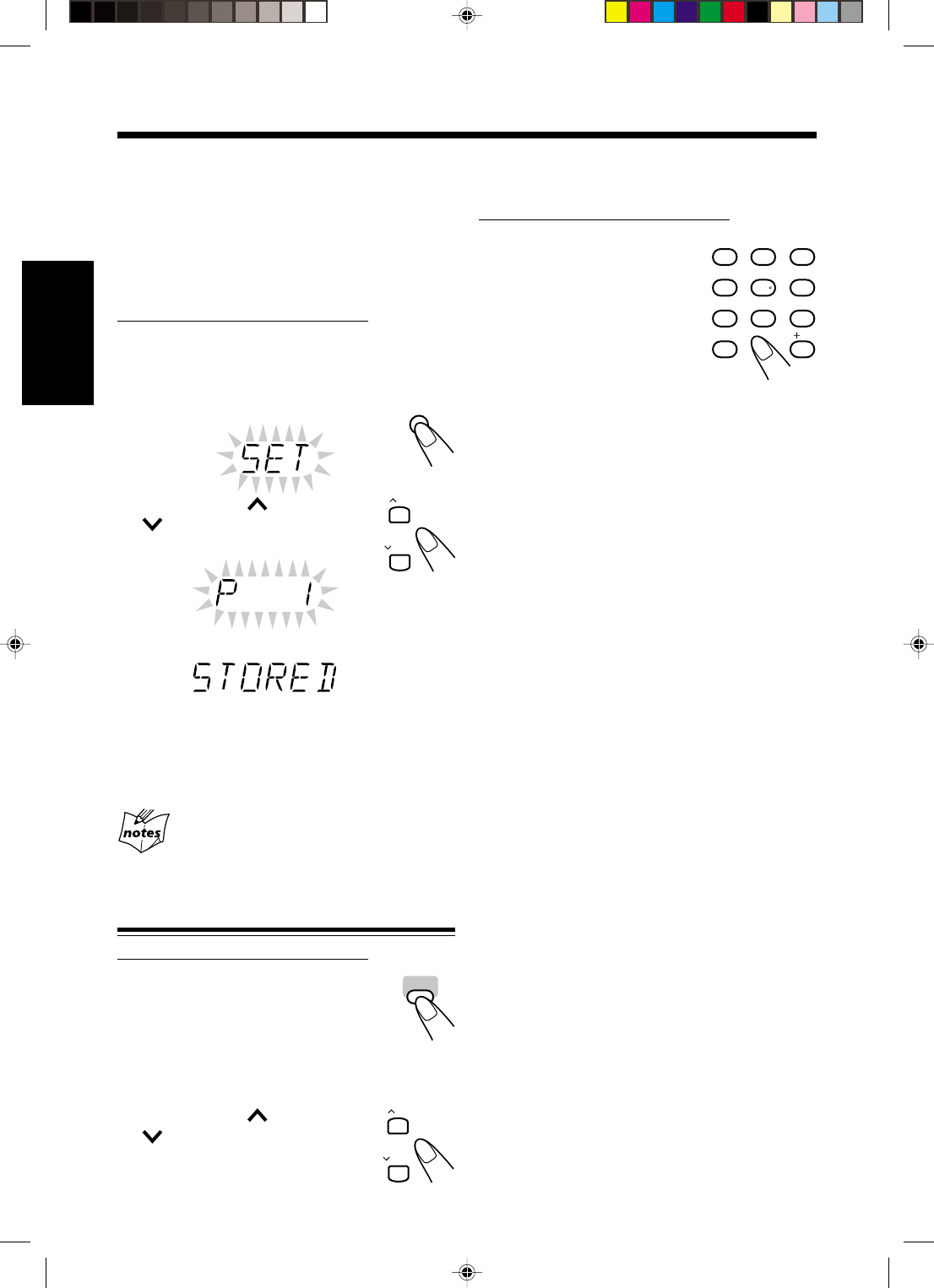
13
FrançaisFrançais
Pour prérégler les stations manuellement
—Préréglage manuel
Vous avez besoin de prérégler les stations séparément
pour les bandes FM et AM.
• Il y a une durée limite pour réaliser les étapes
suivantes. Si le réglage est annulé avant la fin,
recommencez à partir de l’étape
2
.
Sur la télécommande UNIQUEMENT:
1
Accordez la station que vous souhaitez
prérégler.
• Voir “Accord d’une station” à la page 12.
2
Appuyez sur SET.
3
Appuyez sur UP ou
DOWN pour choisir un
numéro de préréglage.
4
Appuyez de nouveau sur SET.
La station accordée à l’étape
1
est mémorisée sur le
numéro de préréglage choisi à l’étape
3
.
• Mémoriser une nouvelle station sur un numéro
déjà utilisé efface la station précédemment
mémorisée.
Quand vous débranchez le cordon
d’alimentation ou qu’une coupure de courant se
produit
Les stations préréglées sont effacées après quelques jours. Si
cela se produit, préréglez de nouveau les stations.
Accord d’une station préréglée
Sur la télécommande UNIQUEMENT:
1
Appuyez sur TUNER pour
choisir la bande.
L’appareil est mis automatiquement
sous tension et accorde la dernière
station—accordée FM ou AM.
• Chaque fois que vous appuyez sur la touche, la
bande alterne entre FM et AM.
2
Appuyez sur UP ou
DOWN pour choisir un
numéro de préréglage.
UP
DOWN
1
4
7
10
2
5
8
3
6
9
10
TUNER
UP
DOWN
Pour accorder directement une station préréglée
en utilisant les touches numériques
Sur la télécommande UNIQUEMENT:
Appuyer sur les touches
numériques permet de choisir le
numéro de préréglage souhaité.
Ex.: Pour le numéro de préréglage
5, appuyer sur 5.
Pour le numéro de préréglage
15, appuyer sur +10 puis
sur 5.
Pour le numéro de préréglage
20, appuyer sur +10 puis sur 10.
Pour le numéro de préréglage 30, appuyer sur
+10, +10 puis sur 10.
SET
FR01-13_FS-H30[C]f.pm6 2/5/03, 6:09 PM13
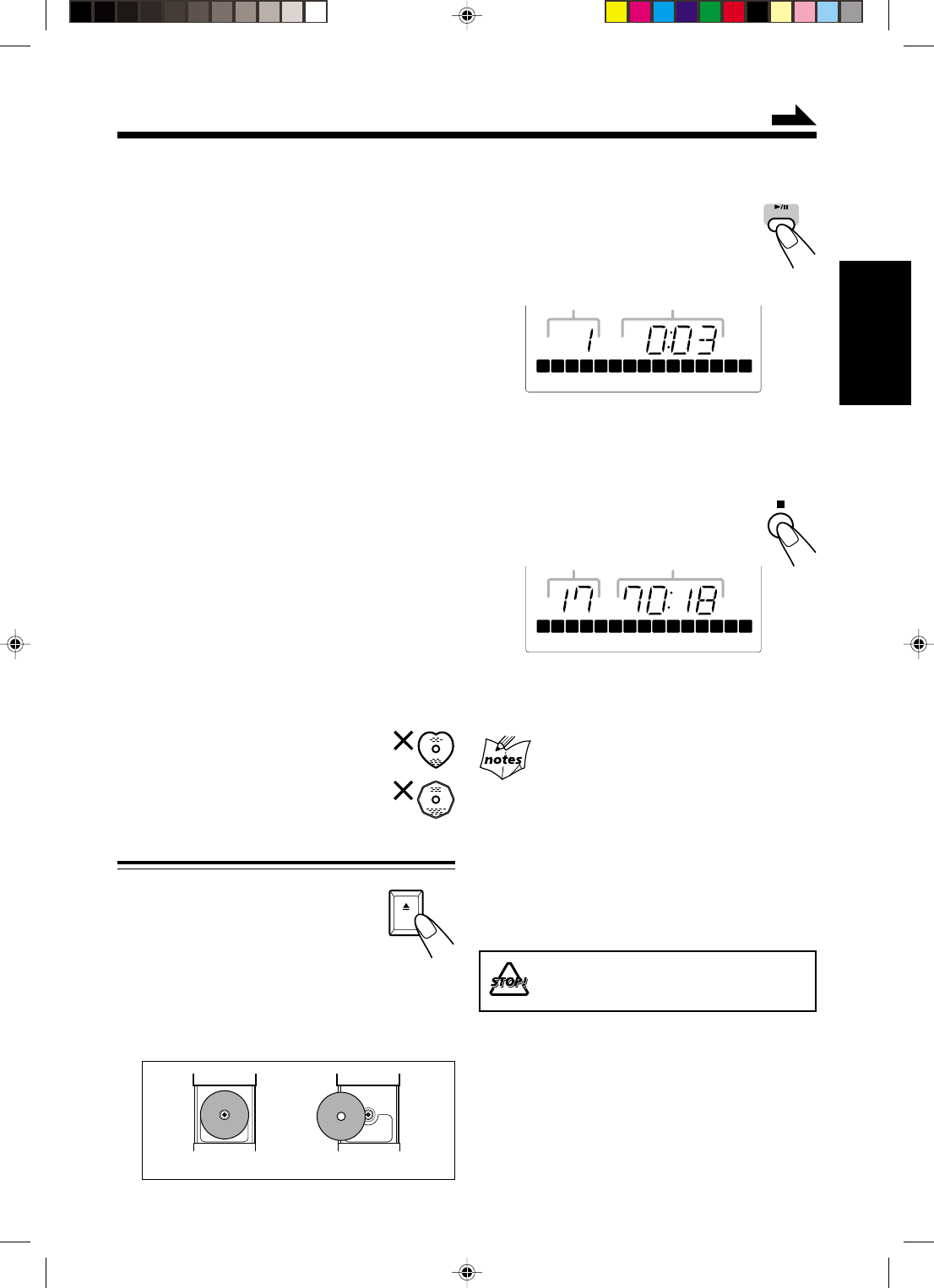
14
Français
Lecture des disques
Cet appareil est conçu pour reproduire les disque
suivants—CD, CD-R et CD-RW.
Lors de la reproduction d’un CD-R ou d’un CD-RW
Les CD-R (enregistrables) et les CD-RW
(réinscriptibles) édités par l’utilisateur peuvent être
reproduits uniquement s’ils ont déjà été “finalisés”.
•Normalement, vous pouvez reproduire vos CD-R ou
CD-RW originaux enregistrés au format de CD
musical. Cependant, il se peut que certains ne
puissent pas être reproduits en fonction de leurs
caractéristiques ou des conditions d’enregistrement.
•Avant de reproduire un CD-R ou un CD-RW, lisez
attentivement leurs instructions et précautions.
•Certains CD-R ou CD-RW ne peuvent pas être
reproduits sur cet appareil à cause de leurs
caractéristiques, de dommages ou de taches, ou
quand la lentille est sale.
•Les CD-RW peuvent avoir un temps d’affichage plus
long. C’est à cause de leur indice de réflexion
inférieur à celui des CD ordinaires.
Divers
De manière générale, vous obtiendrez toujours les
meilleurs résultats en gardant vos disque et les
appareils en parfait état de propreté.
•Rangez les disque dans leurs boîtiers et conservez-
les dans une armoire ou sur une étagère.
•Veillez à fermer le couvercle de la fente lorsque
l’appareil n’est pas utilisé.
L’utilisation continue de disque de formes
irrégulières (en forme de coeurs,
octogonaux, etc.) risque d’endommager le
lecteur.
Lecture d’un disque en entier
—Lecture normale
1
Appuyez sur 0 OPEN sur
l’appareil.
Le couvercle de la fente d’insertion
du disque s’ouvre.
•Vous pouvez insérer un disque pendant que vous
en écoutez un autre.
2
Placez un disque correctement avez
l’étiquette dirigée vers le haut.
3
Refermez le couvercle doucement.
4
Appuyez sur 3/8 CD.
L’appareil se met automatiquement
sous tension et la première du disque
est reproduite.
•Les indicateurs des plages déjà reproduites
disparaissent de l’affichage.
•Le disque s’arrête automatiquement quand la
lecture de la dernière plage est terminée.
Pour arrêter la lecture, appuyez sur 7.
Pour retirer le disque, appuyez sur 0 OPEN sur
l’appareil.
•Si le disque ne peut pas être reconnu correctement
(parce qu’il est rayé, par exemple) ou si un CD-R ou
CD-RW illisible est inséré
La lecture ne démarre pas.
•Si aucun disque n’est en place
“NO DISC” apparaît sur l’affichage.
•Si le disque en place contient plus de 15 plages
L’indicateur OVER s’allume sur l’affichage.
N’ESSAYEZ PAS d’ouvrir le couvercle de la
fente d’insertion du disque à la main car
cela pourrait l’endommager.
CORRECT INCORRECT
OPEN
CD
OVER
REC
1 2 3 4 5 6 7 8 9 10 11 12 13 14 15
Nombre total de
plages
Temps de lecture
total
OVER
REC
1 2 3 4 5 6 7 8 9 10 11 12 13 14 15
Numéro de plage Durée de lecture écoulée
À suivre
FR14-17_FS-H30[C]f.pm6 2/5/03, 6:09 PM14
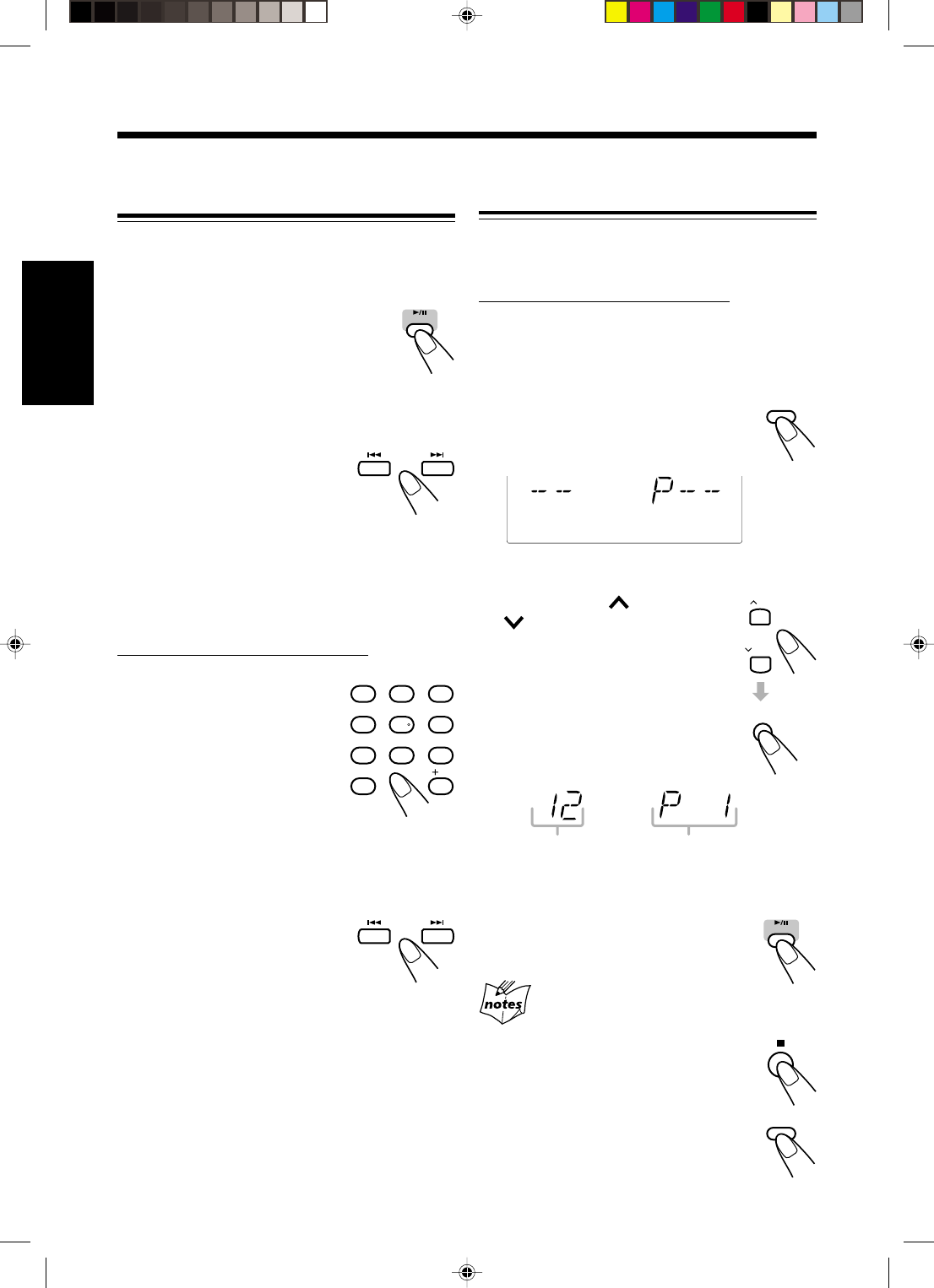
15
FrançaisFrançais
Fonctionnement de base de la platine
disque
Pendant la lecture d’un disque, vous pouvez réaliser les
choses suivantes.
Pour arrêter la lecture momentanément
Pendant la lecture, appuyez sur 3/8 CD.
Pendant la pause, la durée de lecture écoulée
clignote sur l’affichage.
Pour reprendre la lecture, appuyez de
nouveau sur 3/8 CD.
Pour passer sur une autre plage
Avant ou pendant la lecture, appuyez
répétitivement sur ¢ ou 4.
•¢ : Passe au début de la plage
suivante ou des plages qui la
suivent.
•4 : Passe au début de la plage
actuelle ou d’une plage précédente.
Pour aller directement à une autre plage en
utilisant les touches numériques
Sur la télécommande UNIQUEMENT:
Appuyer sur les touches numériques
avant ou pendant la lecture vous
permet de démarrer la lecture à
partir de la plage souhaitée.
Ex.: Pour la plage 5, appuyez sur 5.
Pour la plage 15, appuyez sur
+10, puis sur 5.
Pour la plage 20, appuyez sur
+10, puis sur 10.
Pour la plage 32, appuyez sur
+10, +10, +10, puis sur 2.
Pour localiser un point particulier sur une plage
Pendant la lecture, maintenez pressée
¢ ou 4.
•¢ : Avance rapide du plage.
•4 : Retour rapide du plage.
Programmation de l’ordre de lecture des
plages—Lecture programmée
Vous pouvez changer l’ordre dans lequel les plages
sont reproduites avant de commence la lecture. Vous
pouvez programmer 20 plages au maximum.
Sur la télécommande UNIQUEMENT:
1
Mettez un disque en place.
•Si la source de lecture actuelle n’est pas le
lecteur CD, appuyez sur 3/8 CD, puis sur 7
avant de passer à l’étape suivante.
2
Appuyez sur PRGM
(programme).
L’indicateur PROGRAM s’allume
sur l’affichage.
•Si un programme a été mémorisé, ce programme
est rappelé.
3
Appuyez sur UP ou
DOWN pour choisir le
numéro de plage, puis
appuyez sur SET.
•Il est possible de choisir
directement les numéros de plage
en utilisant les touches
numériques. (Voir “Pour aller
directement à une autre plage en
utilisant les touches numériques”).
4
Répétez l’étape
3
pour programmer
d’autres plages souhaitées.
5
Appuyez sur 3/8 CD.
Les plages sont reproduites dans
l’ordre de la programmation.
Si vous essayez de programmer un 21e pas
“FULL” apparaît sur l’affichage.
Pour arrêter la lecture,
appuyez sur 7.
Pour quitter le mode de lecture
programmée, appuyez sur PRGM
(programme) avant ou après de lecture.
•L’indicateur PROGRAM s’éteint.
CD
1
4
7
10
2
5
8
3
6
9
10
PRGM
PROGRAM
Numéro de plage Numéro du pas de programme
CD
PRGM
UP
DOWN
SET
FR14-17_FS-H30[C]f.pm6 2/5/03, 6:09 PM15
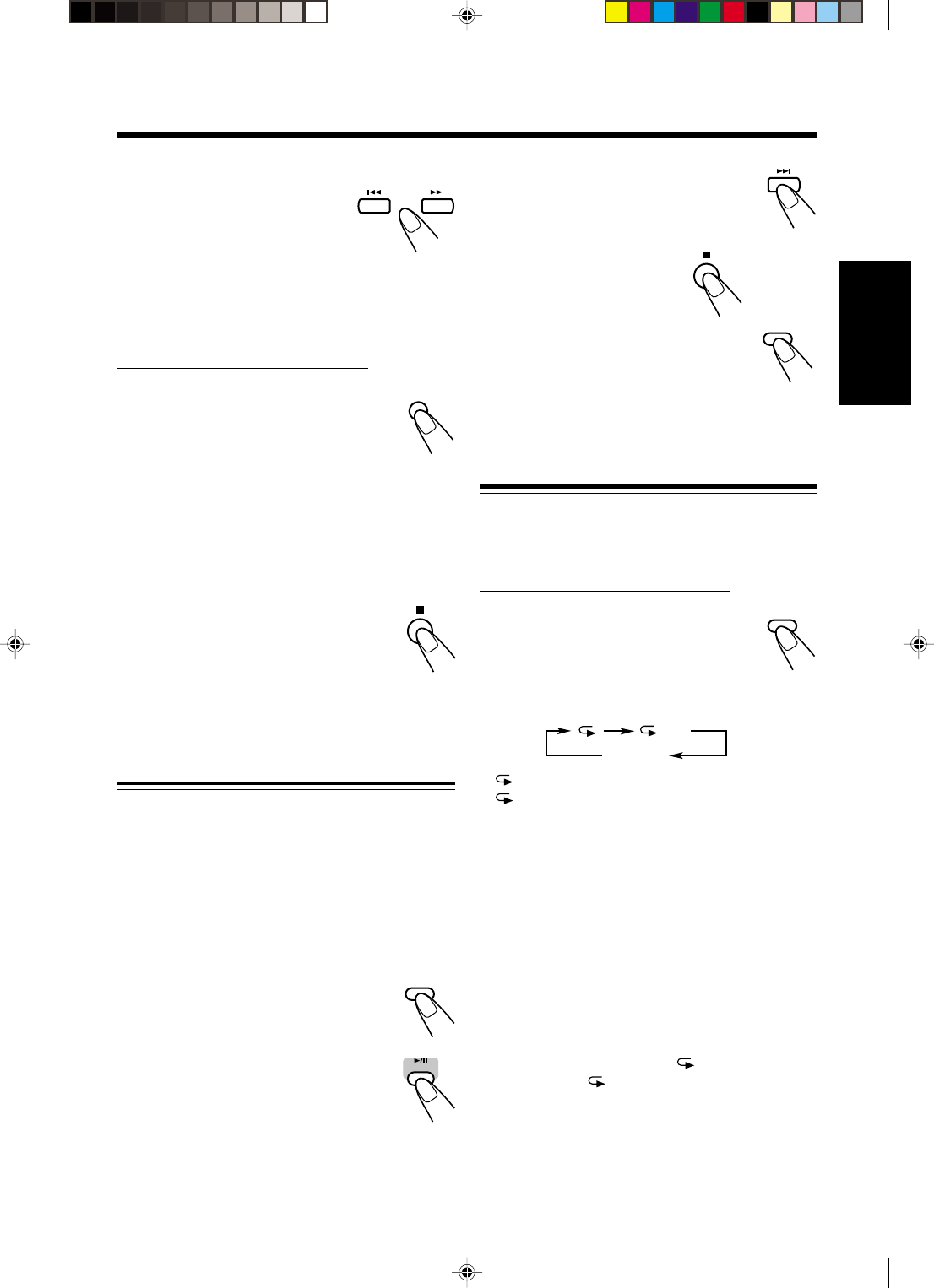
16
Français
Pour sauter la plage actuelle, appuyez sur
¢.
•Vous ne pouvez pas retourner aux plages
précédentes en appuyant sur 4.
Pour arrêter la lecture,
appuyez sur 7.
Pour sortir du mode de lecture
aléatoire, appuyez sur RANDOM avant
ou après de lecture.
La lecture aléatoire est annulée et la
lecture normale reprend.
•L’indicateur RANDOM s’éteint.
Répétition des plages—Lecture répétée
Vous pouvez reproduire répétitivement toutes les
plages, un programme ou la plage en cours de lecture
autant de fois que vous le souhaitez.
Sur la télécommande UNIQUEMENT:
Pour répéter la lecture, appuyez sur
REPEAT pendant ou avant de lecture.
•Chaque fois que vous appuyez sur la
touche, le mode de lecture répétée
change comme suit et l’indicateur suivant s’allume
sur l’affichage:
:Répète une plage.
ALL : En mode de lecture normale, répète
toutes les plages.
En mode de lecture programmée, répète
toutes les plages d’un programme.
En mode de lecture aléatoire, répète
toutes les plages dans un ordre
quelconque.
Pour annuler la lecture répétée, appuyez
répétitivement sur REPEAT jusqu’à ce que l’indicateur
de répétition s’éteigne de l’affichage.
•La lecture répétée reste en service même quand vous
choisissez un autre mode de lecture (lecture
normale, programmée ou aléatoire).
•En mode de lecture aléatoire, ne peut pas être
sélectionné. Si est choisi quand vous appuyez
sur RANDOM, il est annulé.
Pour vérifier le contenu du programme
Il est possible de vérifier le contenu
du programme en appuyant sur
¢ ou 4 avant ou après de
lecture.
•¢ : Pour vérifier le contenu dans l’ordre du
programme.
•4 : Pour vérifier le contenu dans l’ordre inverse.
Pour modifier le programme
Sur la télécommande UNIQUEMENT:
Avant ou après de commencer la lecture,
vous pouvez effacer la dernière plage
programmée en appuyant sur la touche
CANCEL.
•Chaque fois que vous appuyez sur la touche, la
dernière plage programmée est effacée du
programme.
Pour ajouter des plages dans un programme avant
la reproduction, choisissez simplement les numéros
de plage que vous souhaitez ajouter en suivant l’étape
3
de la procédure de programmation.
Pour effacer le programme, appuyez sur 7
avant ou après de lecture.
•Un pression sur la touche 0 OPEN pour
ouvrir le tiroir de disque effacera aussi les
plages programées.
Lecture dans un ordre aléatoire
—Lecture aléatoire
Lorsque ce mode est utilisé, les plages sont lues dans
un ordre totalement aléatoire.
Sur la télécommande UNIQUEMENT:
1
Mettez un disque en place.
•Si la source de lecture actuelle n’est pas le lecteur
CD, appuyez sur 3/8 CD, puis sur 7 avant de
passer à l’étape suivante.
2
Appuyez sur RANDOM.
L’indicateur RANDOM s’allume sur
l’affichage.
3
Appuyez sur 3/8 CD.
Les plages sont reproduites
aléatoirement.
La lecture aléatoire se termine quand
toutes les plages ont été reproduites une fois.
CANCEL
RANDOM
CD
REPEAT
RANDOM
ALL
Annulé
FR14-17_FS-H30[C]f.pm6 2/5/03, 6:09 PM16

17
FrançaisFrançais
Lecture de cassettes
Vous pouvez reproduire des cassettes de type I.
Lecture d’une cassette
1
Appuyez sur ) pour la platine cassette
sur l’appareil.
Le compartiment à cassette s’ouvre.
2
Mettez une cassette à l’intérieur, la
partie exposée dirigée vers le bas.
3
Refermez doucement le compartiment
à cassette.
4
Appuyez sur 2 3 TAPE.
L’appareil se met automatiquement
sous tension et la lecture de la cassette
commence. L’indicateur du sens de
défilement de la bande (3 ou 2)
clignote doucement sur l’affichage.
•Chaque fois que vous appuyez sur la touche,
le sens de défilement de la bande change:
3: reproduction de la face avant.
2: reproduction de la face arrière.
Quand la bande est reproduite jusqu’à la fin, la
platine s’arrête automatiquement si le mode
autoreverse est réglé sur ou . (Voir “Pour
reproduire les deux faces répétitivement—Mode
autoreverse”).
Si aucune cassette ne se trouve dans l’appareil
quand vous appuyez sur 2 3 TAPE
“NO TAPE” apparaît sur l’affichage.
Pour arrêter la lecture, appuyez sur 7.
Pour bobiner rapidement vers la
gauche ou vers la droite, appuyez
sur ¢ ou 4 quand la bande est à
l’arrêt.
L’indicateur de sens de la bande (3 ou 2)
clignote rapidement sur l’affichage.
Pour retirer la cassette, appuyez sur
) sur l’appareil.
Pour reproduire les deux faces répétitivement
—Mode autoreverse
Vous pouvez régler la platine pour reproduire une seule
face d’une cassette, les deux faces une fois ou les deux
faces en continu.
Sur la télécommande UNIQUEMENT:
Appuyez sur REV.MODE (mode
autoreverse).
•Chaque fois que vous appuyez sur la
touche, le mode d’inversion change comme
suit:
: La platine à s’arrête automatiquement après
la lecture des deux faces. S’arrête lorsque la
lecture dans le sens 2 est terminée.
: La platine à continue de lire les deux faces de
la bande jusqu’à ce que vous appuyez sur la
touche 7.
: La platine à s’arrête automatiquement après
la lecture d’une face.
L’utilisation de bande C-120 ou plus fine
n’est pas recommandée, car une
détérioration caractéristique peut se
produire et la bande peut se prendre
facilement dans les galets presseurs et les
cabestans.
REV.MODE
TAPE
FR14-17_FS-H30[C]f.pm6 2/5/03, 6:09 PM17
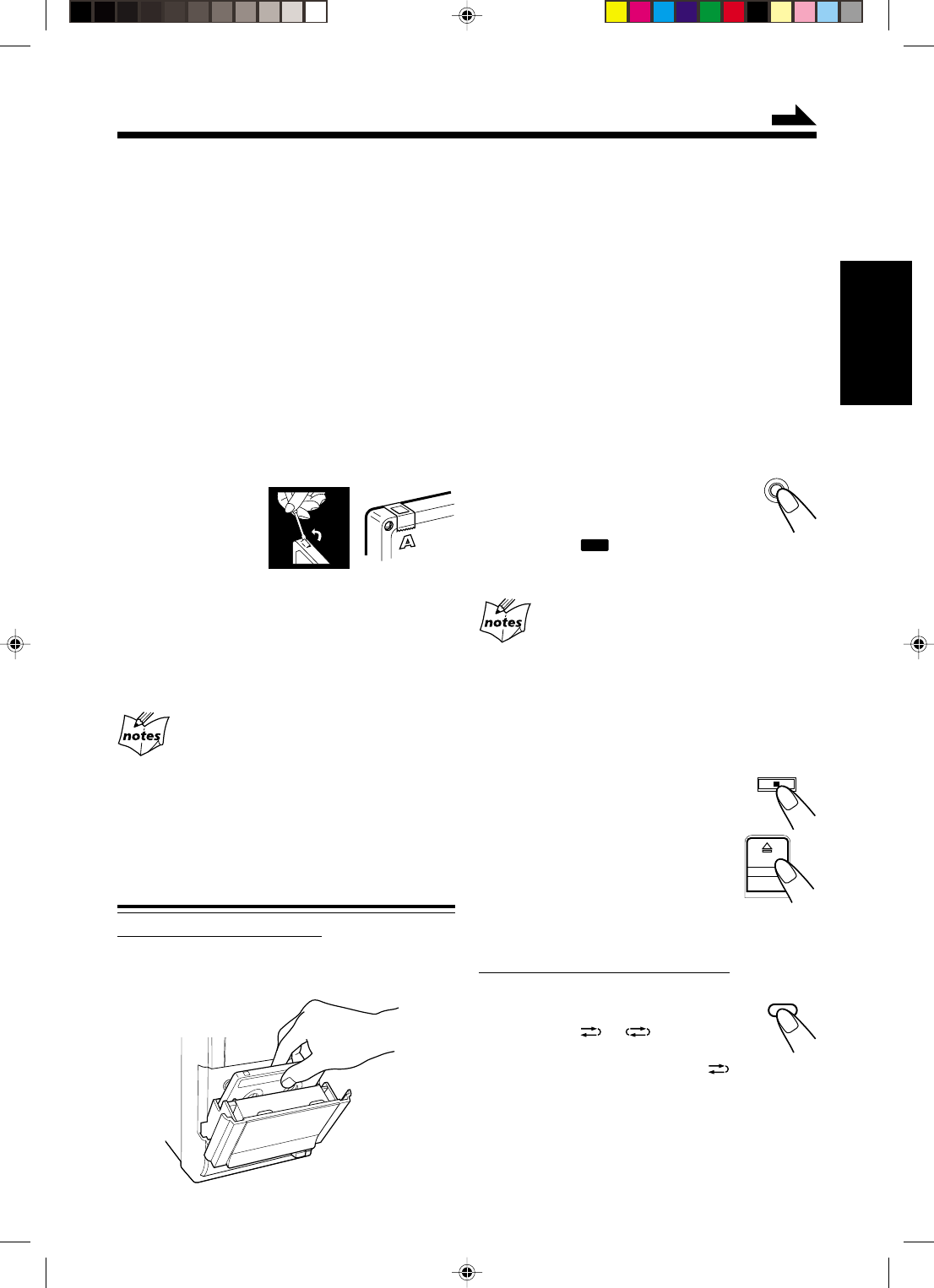
18
Français
Enregistrement
2
Refermez le compartiment à cassette
doucement et vérifiez le sens
d’enregistrement pour la cassette.
•Si le sens de défilement de la bande n’est pas
correct, appuyez deux fois sur 2 3 TAPE puis
sur 7 pour changer le sens du défilement.
•Si vous souhaitez enregistrer les deux faces de la
cassette, voir “Pour enregistrer les deux faces—
Mode autoreverse”.
3
Commencez la reproduction de la
source—FM, AM ou appareil extérieur
connecté aux prises AUX.
•Si la source est le lecteur CD, voir
“Enregistrement direct de disque” à la page 19.
4
Appuyez sur
ONE TOUCH REC
(enregistrement).
L’indicateur
REC
(enregistrement) s’allume
sur l’affichage et l’enregistrement commence.
•Si aucune cassette ne se trouve dans l’appareil quand
vous appuyez sur REC
“NO REC” apparaît sur l’affichage.
•Si une cassette protégée se trouve dans l’appareil quand
vous appuyez sur REC
“NO REC” apparaît sur l’affichage.
Pour arrêter l’enregistrement en cours,
appuyez sur 7.
Pour retirer la cassette, appuyez sur )
sur l’appareil.
Pour enregistrer les deux faces—Mode
autoreverse
Sur la télécommande UNIQUEMENT:
Appuyez répétitivement sur
REV.MODE (mode autoreverse)
jusqu’à ce que ou s’allume.
•Lors de l’utilisation du mode
d’inversion pour l’enregistrement, s’allume et
l’enregistrement démarre d’abord dans la direction
avant (3).
Sinon, l’enregistrement s’arrête après que
l’enregistrement d’une seule face de la casette est
terminé (la face arrière).
IMPORTANT:
•Il peut être illégal d’enregistrer ou de reproduire
des matériaux protégés par des droits d’auteur
sans l’autorisation du propriétaire des droits.
•Le niveau d’enregistrement est réglé correctement
automatiquement et il n’est pas affecté par les autres
réglages sonores. Alors, vous pouvez ajuster le son
que vous êtes en train d’écouter, pendant un
enregistrement, sans affecter le niveau
d’enregistrement.
•Si les enregistrements effectués ont trop de parasites,
c’est que l’appareil était peut-être trop près d’un
téléviseur. Éloignez-le du téléviseur.
•Vous pouvez utiliser des cassettes de type I pour
l’enregistrement.
Pour protéger vos enregistrements
Les cassettes
possèdent deux
languettes à l’arrière
permettant de
protéger les
enregistrements contre tout effacement ou ré-
enregistrement accidentel.
Pour protéger vos enregistrements, retirez ces
languettes.
Pour enregistrer de nouveau sur une cassette protégée,
couvrez les trous avec du ruban adhésif.
Au début et à la fin de la bande
Il y a une bande amorce sur laquelle il n’est pas possible
d’enregistrer. Alors, lors de l’enregistrement d’un disque ou
d’un programme radio, avancez d’abord la bande pour
dépasser la bande amorce pour vous assurer que
l’enregistrement s’effectuera sans aucune perte.
Enregistrement sur une cassette
Sur l’appareil UNIQUEMENT:
1
Insérez une cassette enregistrable, avec
la partie exposée dirigée vers le bas.
ONE TOUCH
REC
REV.MODE
À suivre
FR18-26_FS-H30[C]f.pm6 2/5/03, 6:09 PM18

19
FrançaisFrançais
Enregistrement direct de disque
Tout le contenu du disque est enregistré sur la cassette
dans l’ordre du disque, ou en fonction de l’ordre réglé
pour la lecture programmée.
Sur l’appareil UNIQUEMENT:
1
Insérez une cassette enregistrable, avec
la partie exposée dirigée vers le bas.
2
Mettez un disque en place.
•Si la source de lecture actuelle n’est pas le
lecteur CD, appuyez sur 3/8 CD, puis sur 7
avant de passer à l’étape suivante.
—Si vous ne souhaitez pas qu’il y ait un blanc
d’environ 4 secondes entre les plages,
appuyez deux fois sur 3/8 CD.
Sinon, un blanc sera automatiquement
enregistré entre les plages.
•Si vous souhaitez enregistrer les deux faces de la
cassette, vour “Pour enregistrer les deux faces—
Mode autoreverse”.
3
Appuyez sur
ONE TOUCH REC
(enregistrement).
L’indicateur
REC
(enregistrement) s’allume sur
l’affichage et l’enregistrement commence.
Après l’enregistrement, le lecteur CD et la platine à
cassettes s’arrêtent automatiquement.
Pour arrêter l’enregistrement en cours,
appuyez sur 7.
La cassette s’arrête au bout de 4 secondes.
Pour retirer la cassette, appuyez sur )
sur l’appareil.
Pour enregistrer les deux faces—Mode
autoreverse
Sur la télécommande UNIQUEMENT:
Appuyez répétitivement sur REV.MODE
(mode autoreverse) jusqu’à ce que
ou s’allume.
•Lors de l’utilisation du mode autoreverse
pour l’enregistrement direct de disque, s’allume
et l’enregistrement démarre dans la direction avant
(3). Quand la bande atteint sa fin pendant
l’enregistrement d’un morceau sur la face avant (3),
ce morceau est réenregistré au début de la face
arrière (2).
Si vous commencez l’enregistrement sur la face
arrière (2), l’enregistrement s’arrêtera à la fin de la
face arrière de la cassette.
Lorsque vous programmez la minuterie d’arrêt
pendant l’enregistrement direct de disque
Laissez suffisamment de temps pour terminer la lecture du
disque sinon la chaîne s’éteindra avant la fin de
l’enregistrement.
Enregistrement d’une plage
Cette méthode d’enregistrement est pratique pour
l’enregistrement des plages d’un disque pendant la
lecture de ce disque. Vous pouvez de cette façon
enregistrer vos morceaux favoris sur une cassette.
Sur l’appareil UNIQUEMENT:
1
Insérez une cassette enregistrable, avec
la partie exposée dirigée vers le bas.
2
Reproduisez la plage sur le disque que
vous souhaitez enregistrer.
3
Appuyez sur ONE
TOUCH REC
(enregistrement).
Le lecteur CD revient au début de cette plage
et la plage s’enregistre sur la cassette.
Après l’enregistrement, le lecteur CD et la
platine à cassettes s’arrêtent automatiquement.
4
Répétez les étapes
2
et
3
pour
enregistrer d’autres plages.
Pour arrêter l’enregistrement en cours,
appuyez sur 7.
La cassette s’arrête au bout de 4 secondes.
Pour retirer la cassette, appuyez sur )
sur l’appareil.
ONE TOUCH
REC
REV.MODE
ONE TOUCH
REC
FR18-26_FS-H30[C]f.pm6 2/5/03, 6:09 PM19
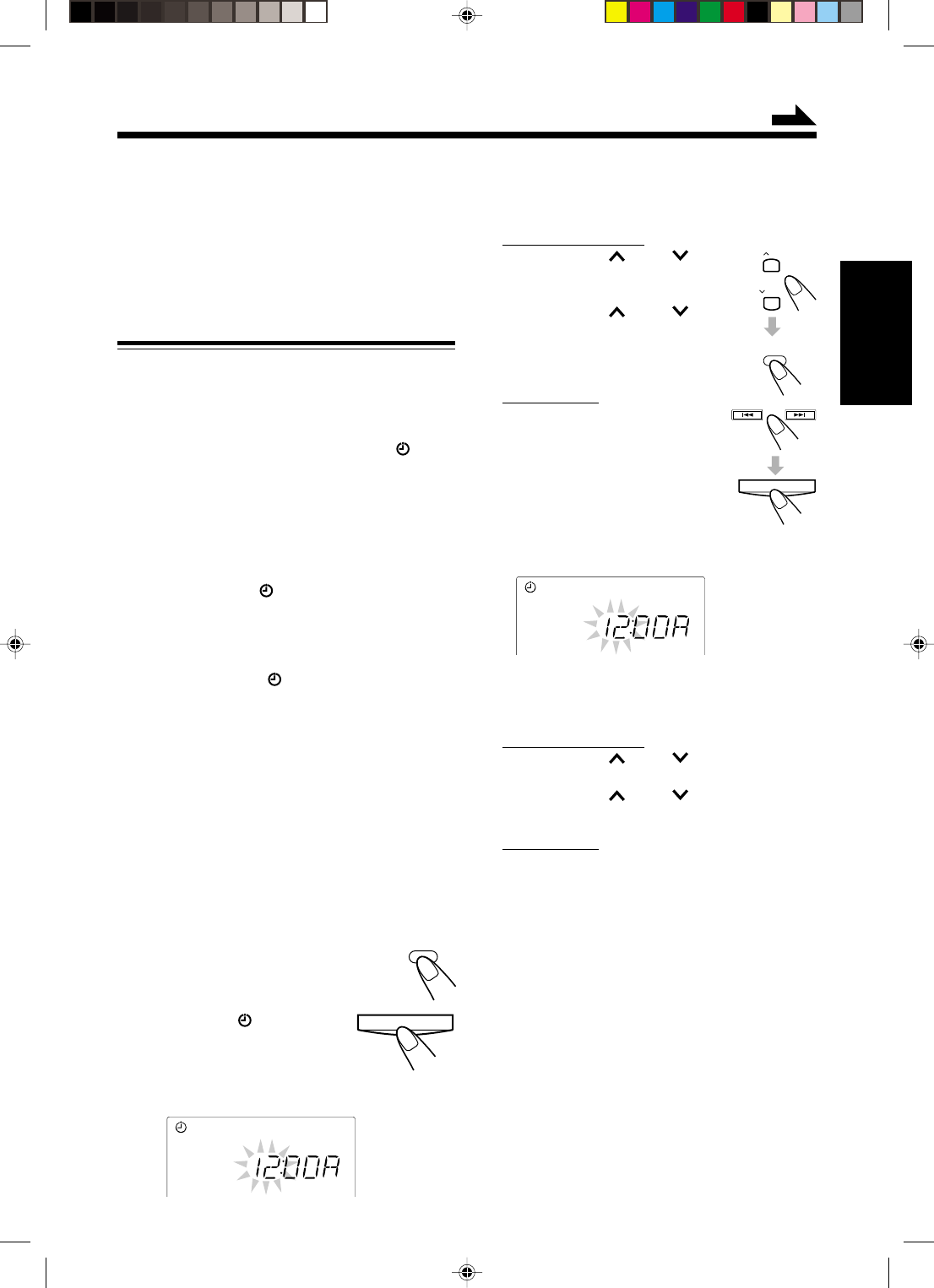
20
Français
Utilisation des minuteries
Il y a quatre minuteries disponibles—Minuterie
quotidienne, minuterie d’enregistrement, minuterie de
rappel et minuterie d’arrêt.
Avant d’utiliser ces minuteries, vous devez régler
l’horloge intégrée à cet appareil (voir page 10).
Utilisation de la minuterie quotidienne
et d’enregistrement
Vous pouvez régler la minuterie que l’appareil soit
sous ou hors tension.
Fonctionnement de la minuterie
Quand l’heure de début arrive, l’appareil se met
automatiquement sous tension (les indicateur
[minuterie] clignotent juste avant l’heure de début et
continue de clignoter pendant le fonctionnement de la
minuterie). Puis, quand l’heure de fin arrive, l’appareil
se met automatiquement hors tension (en mode
d’attente).
Le réglage de la minuterie reste en mémoire jusqu’à ce
qu’il soit changé.
•Quand les indicateur (minuterie) est allumé sur
l’affichage, la minuterie fonctionne comme minuterie
quotidienne. Une fois que la minuterie quotidienne a
été réglée, elle se déclenche à la même heure tous les
jours jusqu’à ce qu’elle soit mise hors service.
•Quand les indicateurs (minuterie) et REC sont
allumés sur l’affichage, la minuterie fonctionne
comme minuterie d’enregistrement. Une fois que
l’enregistrement par minuterie est terminé, les
réglages de la minuterie reste en mémoire mais la
minuterie est mise hors service.
Avant de commencer...
Lors de l’utilisation du “TUNER” comme source de
lecture, assurez-vous que la station souhaitée est
accordée avant de mettre l’appareil hors tension.
•Il y a une durée limite pour réaliser les étapes
suivantes. Si le réglage est annulé avant la fin,
recommencez à partir de l’étape
1
.
1
Appuyez sur
CLOCK/TIMER (ou
TIMER/SNOOZE sur
l’appareil).
Les indicateurs (minuterie) et
ON s’allume et l’heure de début
actuelle clignote sur l’affichage.
L’appareil entre en mode de réglage
de l’heure de début.
2
Réglez l’heure à laquelle vous
souhaitez que l’appareil se mette sous
tension.
Sur la télécommande:
1) Appuyez sur UP ou DOWN
pour régler les heures, puis appuyez
sur CLOCK/TIMER.
2) Appuyez sur UP ou DOWN
pour régler les minutes, puis
appuyez sur CLOCK/TIMER.
Sur l’appareil:
1) Appuyez sur ¢ ou 4 pour
régler les heures, puis appuyez
sur TIMER/SNOOZE.
2) Appuyez sur ¢ ou 4 pour
régler les minutes, puis appuyez
sur TIMER/SNOOZE.
L’indicateur OFF s’allume et l’appareil
entre en mode de réglage de l’heure de fin.
3
Réglez l’heure à laquelle vous
souhaitez que l’appareil se mette hors
tension (en mode d’attente).
Sur la télécommande:
1) Appuyez sur UP ou DOWN pour régler
les heures, puis appuyez sur CLOCK/TIMER.
2) Appuyez sur UP ou DOWN pour régler
les minutes, puis appuyez sur CLOCK/TIMER.
Sur l’appareil:
1) Appuyez sur ¢ ou 4 pour régler
les heures, puis appuyez sur TIMER/SNOOZE.
2) Appuyez sur ¢ ou 4 pour régler
les minutes, puis appuyez sur TIMER/SNOOZE.
L’appareil entre en mode de sélection de minuterie.
ON
OFF
UP
DOWN
CLOCK
/ TIMER
TIMER/SNOOZE
À suivre
CLOCK
/ TIMER
TIMER/SNOOZE
FR18-26_FS-H30[C]f.pm6 2/5/03, 6:09 PM20
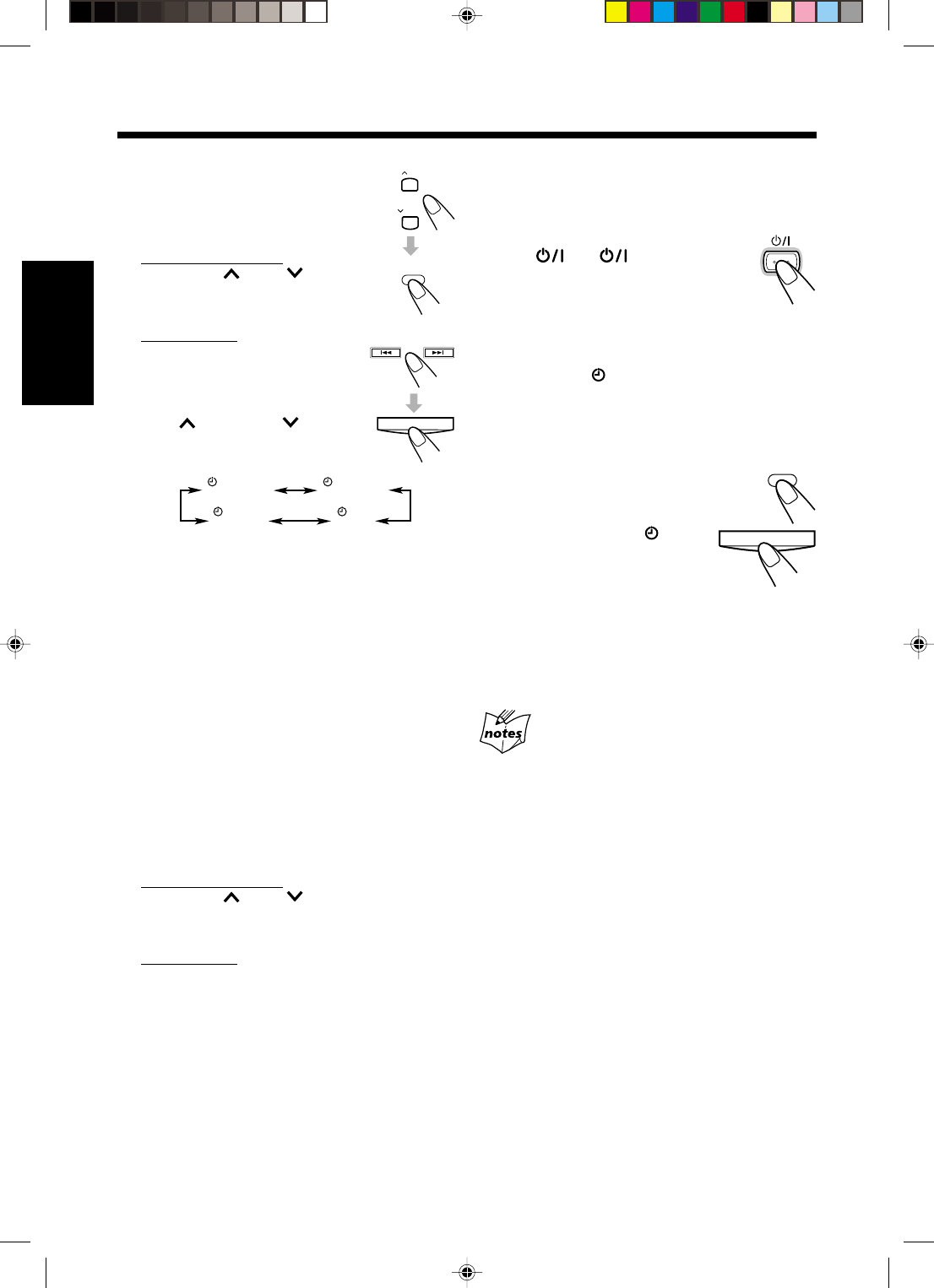
21
FrançaisFrançais
4
Choisissez la minuterie
(minuterie quotidienne ou
minuterie d’enregistrement)
avec la source à reproduire.
Sur la télécommande:
Appuyez sur UP ou DOWN
pour choisir la minuterie, puis
appuyez sur CLOCK/TIMER.
Sur l’appareil:
Appuyez sur ¢ ou 4 pour
choisir la minuterie, puis appuyez
sur TIMER/SNOOZE.
•Chaque fois que vous appuyez
sur UP (¢) ou DOWN
(4), le mode de minuterie et la
source changent comme suit:
TUNER : accorde la dernière station écoutée.
(Minuterie quotidienne)
REC TUNER : enregistre la dernière station
écoutée. (Minuterie d’enregistrement)
•Mettez une cassette enregistrable dans la
platine cassette.
CD : reproduit un disque. (Minuterie
quotidienne)
•Mettez un disque en place.
TAPE : reproduit une cassette. (Minuterie
quotidienne)
•Assurez-vous qu’il y a une cassette dans
la platine.
•Assurez-vous que le sens de défilement
de la bande est correctement choisi.
L’appareil entre en mode de réglage du niveau de
volume.
5
Choisissez le niveau de volume.
Sur la télécommande:
Appuyez sur UP ou DOWN pour régler le
niveau de volume puis appuyer sur CLOCK/
TIMER.
Sur l’appareil:
Appuyez sur ¢ ou 4 pour régler le niveau de
volume puis appuyer sur TIMER/SNOOZE.
•Vous pouvez choisir le niveau de volume
(“VOLUME – –” et “VOLUME 0” à “VOLUME
40”).
Si vous choisissez “VOLUME – –”, le volume
est réglé sur le dernier niveau de volume réglé
avant la mise hors tension de l’appareil.
•Pour couper le son pendant qu’un enregistrement
par minuterie (REC TUNER) est en cours, réglez
le niveau de volume sur “VOLUME 0”.
L’appareil entre en mode de réglage de l’horloge.
TUNER TUNER
REC
CDTAPE
6
Ajustez l’horloge si nécessaire.
•Voir “Réglage de l’horloge” à la page 10.
7
Appuyez sur STANDBY/
ON (ou sur
l’appareil) pour mettre
l’appareil hors tension (en
mode d’attente) si vous avez réglé la
minuterie avec l’appareil sous tension.
•Quand la minuterie met l’appareil sous tension,
l’indicateur (minuterie) clignote. (Si la
minuterie d’enregistrement a été choisie à
l’étape
4
, l’indicateur REC clignote aussi).
Pour mettre hors service la
minuterie temporairement,
maintenez pressée CLOCK/TIMER
(ou TIMER/SNOOZE sur l’appareil)
jusqu’à ce que l’indicateur
(minuterie) s’éteigne sur l’affichage.
Pour mettre en service ou modifier
la minuterie (avec le réglage précédent), suivez les
étapes
1
à
7
des pages 20 et 21.
•Si vous souhaitez changer le réglage de la minuterie
après l’utilisation de la minuterie quotidienne,
mettez d’abord la minuterie hors service.
•Si l’appareil est sous tension quand l’heure de début de
la minuterie arrive
La minuterie ne fonctionne pas.
•Quand vous débranchez le cordon d’alimentation ou
qu’une coupure de courant se produit
La minuterie est annulée. Vous devez régler d’abord
l’horloge, puis de nouveau la minuterie.
STANDBY/ON
UP
DOWN
CLOCK
/ TIMER
TIMER/SNOOZE
CLOCK
/ TIMER
TIMER/SNOOZE
FR18-26_FS-H30[C]f.pm6 2/5/03, 6:09 PM21
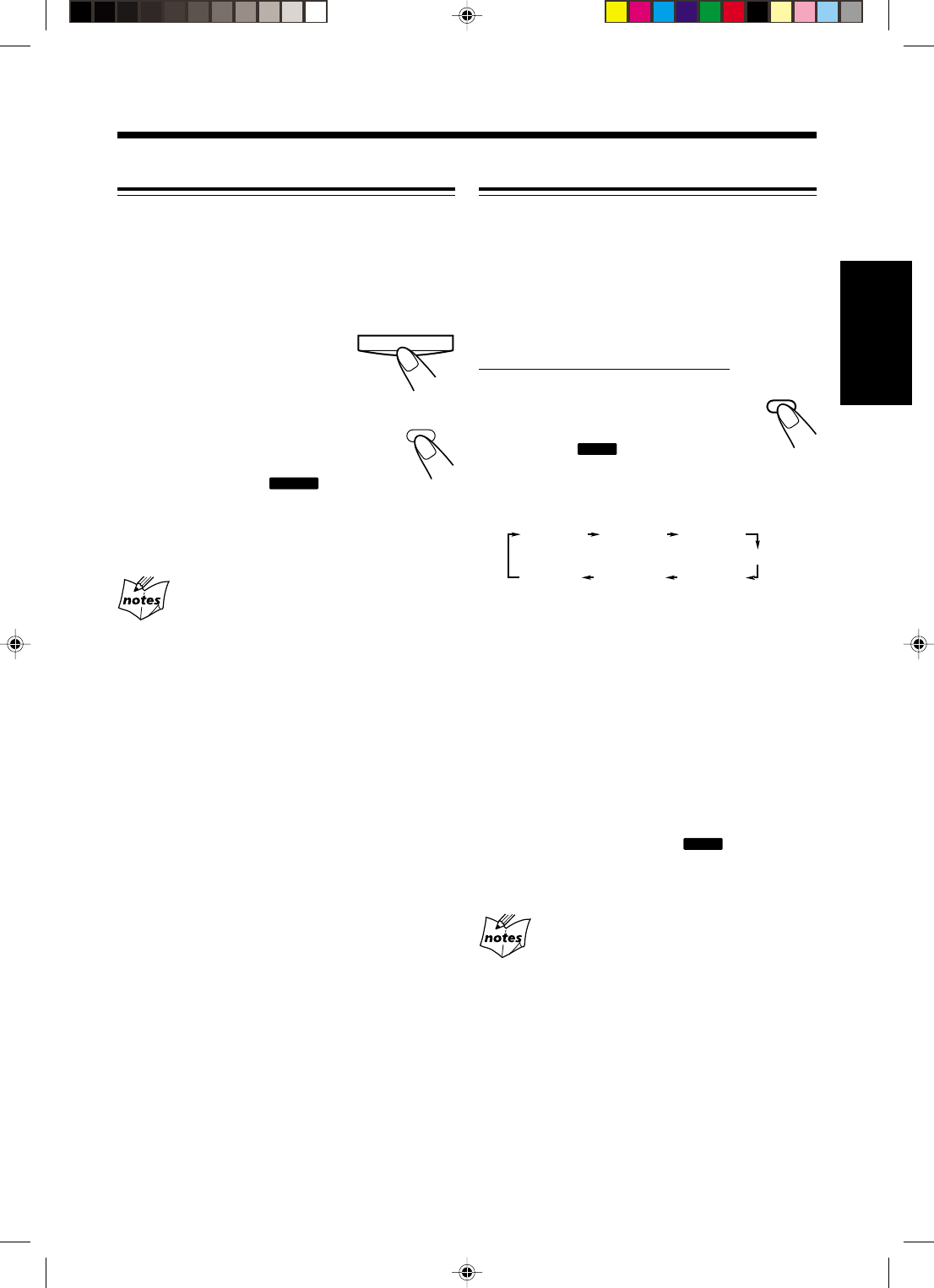
22
Français
Utilisation de la minuterie d’arrêt
Avec la minuterie d’arrêt, vous pouvez vous endormir
en musique. Vous pouvez régler la minuterie quand
l’appareil est sous tension.
Fonctionnement de la minuterie d’arrêt
L’appareil se met automatiquement hors tension après
une durée déterminée.
Sur la télécommande UNIQUEMENT:
1
Appuyez sur SLEEP.
La durée avant que l’appareil ne se
mette hors tension apparaît et
l’indicateur
SLEEP
s’allume sur
l’affichage.
•Chaque fois que vous appuyez sur la touche, la
durée change comme suit:
2
Attendez environ 5 secondes après
avoir spécifié une durée.
Pour vérifier la durée restante jusqu’à la mise hors
tension, appuyez une fois sur SLEEP de façon que la
durée restante jusqu’à la mise hors tension apparaisse
pendant environ 5 secondes.
Pour changer la durée avant la mise hors tension,
appuyez répétitivement sur SLEEP jusqu’à ce que la
durée souhaitée apparaisse sur l’affichage.
Pour annuler le réglage, appuyez répétitivement sur
SLEEP de façon que l’indicateur
SLEEP
s’éteigne.
•La minuterie d’arrête est aussi annulée quand
l’appareil est mis hors tension.
•Si vous réglez la minuterie d’arrêt après que la
minuterie quotidienne reproduit la source choisie
La minuterie quotidienne est annulée. Quand l’heure de
mise hors tension de la minuterie d’arrêt arrive, l’appareil
se met hors tension.
•Si vous réglez la minuterie d’arrêt après le démarrage
d’un enregistrement avec la minuterie d’enregistrement
La minuterie d’enregistrement est annulée mais
l’enregistrement continue jusqu’à ce que la minuterie
d’arrêt soit mise en service.
SLEEP
Utilisation de la minuterie de rappel
La minuterie de rappel met l’appareil hors tension (en
mode d’attente) seulement pendant 5 minutes quand la
minuterie quotidienne est en service.
•Vous pouvez régler cette minuterie uniquement
quand la minuterie quotidienne est en service.
Appuyez sur TIMER/
SNOOZE sur l’appareil (ou
CLOCK/TIMER sur la
télécommande) pendant
que la minuterie quotidienne est
en service.
L’appareil se met hors tension (en mode
d’attente) et l’indicateur
SNOOZE
s’allume
sur l’affichage.
Après 5 minutes, l’appareil se remet automatiquement
sous tension.
•Si l’appareil est mis sous tension quand la minuterie de
rappel est en service
La minuterie de rappel et la minuterie quotidienne sont
annulées.
•Si vous mettez la minuterie de rappel en service alors
qu’il reste moins de 5 minutes avant l’heure de fin de la
minuterie quotidienne
L’appareil ne se remet pas sous tension après 5 minutes.
•Si vous débranchez l’appareil ou qu’une coupure de
courant se produit
La minuterie est annulée. Vous devez régler à nouveau
l’horloge puis la minuterie.
TIMER/SNOOZE
SLEEP 10
Annulé
SLEEP 20 SLEEP 30
SLEEP 60
SLEEP 90SLEEP120
CLOCK
/ TIMER
FR18-26_FS-H30[C]f.pm6 2/5/03, 6:09 PM22
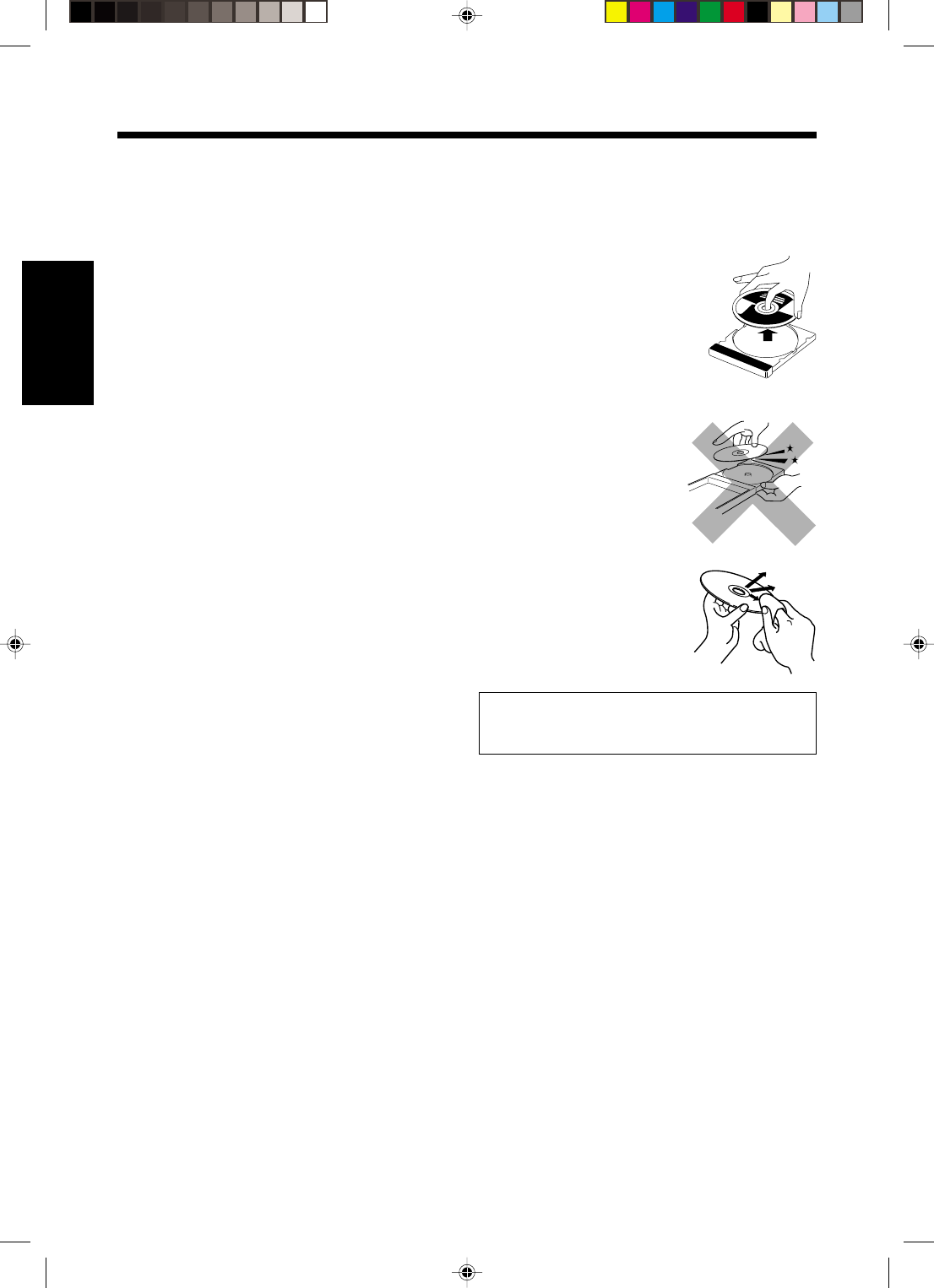
23
FrançaisFrançais
Entretien
Pour obtenir les meilleures performances de l’appareil, gardez vos disques et le mécanisme propres.
Nettoyage de l’appareil
•Taches sur l’appareil
Elles doivent être enlevées avec un chiffon doux. Si
l’appareil est très taché, essuyez-le avec un chiffon
humidifié avec une solution détergente neutre diluée
dans l’eau et frottez ensuite avec un chiffon sec.
•Faites attention aux point suivants pour que
l’appareil ne soit pas détérioré en qualité,
endommagé et qu’il ne perde pas sa peinture.
—NE L’ESSUYEZ PAS avec un chiffon dur.
—NE L’ESSUYEZ PAS trop fortement.
—NE L’ESSUYEZ PAS avec un diluant ou du
benzène.
—N’APPLIQUEZ sur l’appareil aucune substance
volatile telle que des insecticides.
—NE LAISSEZ PAS des objets en caoutchouc ou en
plastique en contact prolongé avec l’appareil.
Manipulation des disques
•Retirez les disques de leur boîtier
en les tenant par les arêtes et en
appuyant légèrement au centre.
•Ne touchez pas la surface brillante
du disques et ne le tordez pas.
•Remettez les disques dans leur
boîte après utilisation pour éviter
qu’ils ne se gondolent.
•Faites attention de ne pas rayer
la surface du disques en le
remettant dans son boîtier.
•Evitez une exposition directe
au soleil, aux températures
extrêmes et à l’humidité.
Pour nettoyez un disques
Essuyez le disques avec un
chiffon doux en ligne droite du
centre vers les bords du disque.
N’UTILISEZ PAS de solvant—comme un nettoyant
pour disques vinyles, un vaporisateur, un diluant ou
du benzène—pour nettoyer un disques.
FR18-26_FS-H30[C]f.pm6 2/5/03, 6:09 PM23
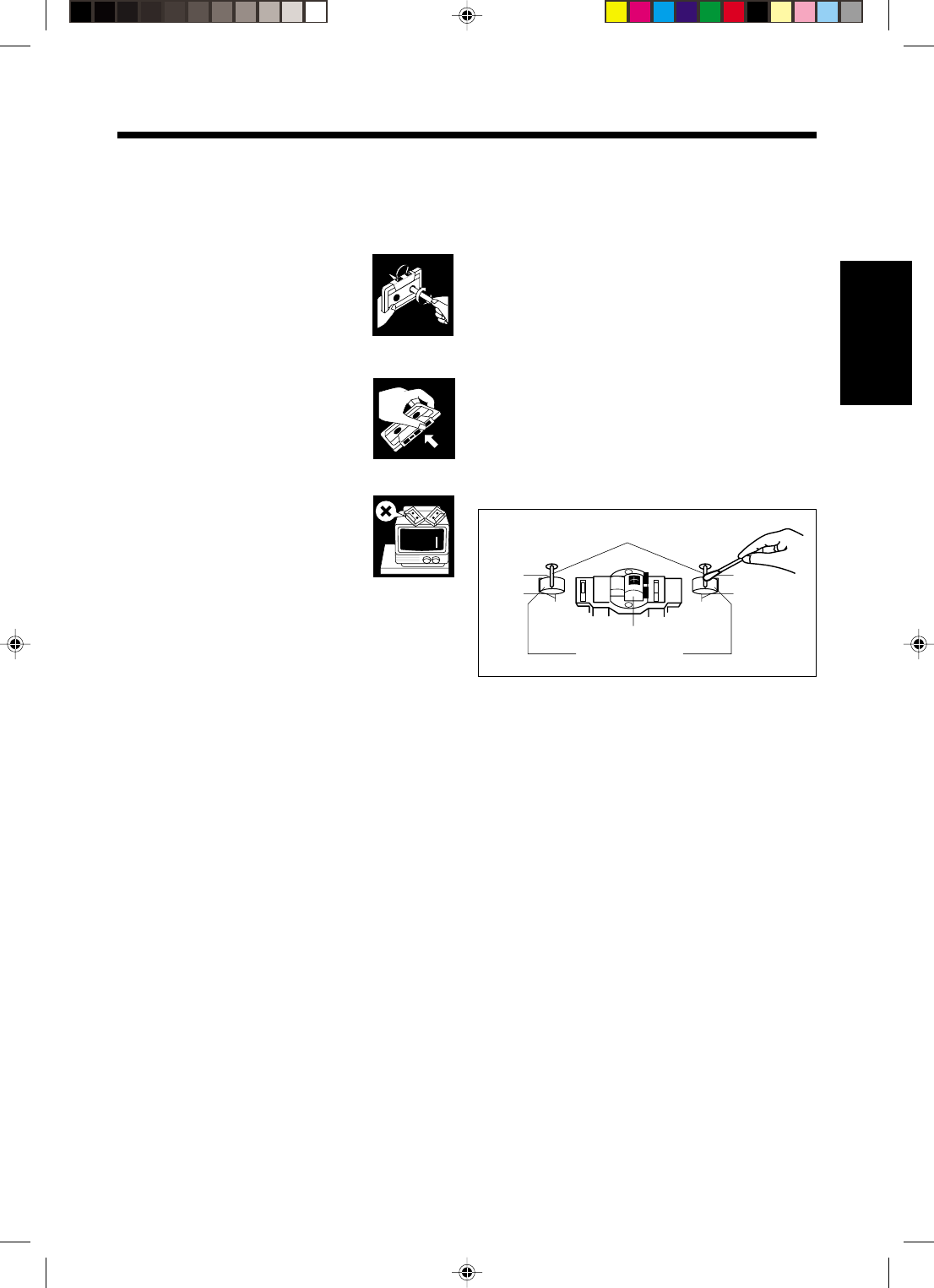
24
Français
Manipulation des cassettes
•Si la bande est lâche dans la
cassette, retirez le mou en insérant
un stylo dans l’une des bobines et
en tournant.
•Si la bande est lâche, elle peut être
étirée, coupée ou se prendre dans la
cassette.
•Ne touchez pas la surface de la
bande.
•Évitez les endroits suivants pour
conserver les cassettes:
—Les endroits poussiéreux
—En plein soleil ou dans un endroit
très chaud
—Dans des endroits humides
—Sur un téléviseur ou un haut-
parleur
—Près d’un aimant
Pour conserver la meilleure qualité
d’enregistrement ou de lecture possible
Si les têtes, les cabestans et les galets presseurs de la
platine cassette deviennent sales, les choses suivantes
se produisent:
•Baisse de la qualité sonore
•Son discontinu
•Affaiblissement
•Effacement incomplet
•Difficultés à l’enregistrement
Pour nettoyer les têtes, les cabestans et les galets
presseurs
Utilisez un coton-tige imprégné d’alcool.
Pour démagnétiser les têtes
Mettez l’appareil hors tension et utiliser un
démagnétiseur de têtes (en vente dans les magasins
d’électronique et de disques).
Têtes
Cabestans
Galets presseur
FR18-26_FS-H30[C]f.pm6 2/5/03, 6:09 PM24
25
FrançaisFrançais
Guide de dépannage
Si vous rencontrez des problèmes avec cet appareil, consultez cette liste avant d’appeler un réparateur.
Si vous ne pouvez pas résoudre le problème avec les conseils donnés ci-dessous, ou si l’appareil a été endommagé
physiquement, appelez une personne qualifiée, telle que votre revendeur, pour faire réparer l’appareil.
Symptôme
Aucun son n’est entendu.
Il est difficile d’écouter les
émissions de radio à cause des
parasites.
Impossible de reproduire le disque.
Le son du disque est discontinu.
Les compartiments à cassette ne
s’ouvre pas.
Impossible d’enregistrer.
L’appareil ne fonctionne pas.
Impossible de commander l’appareil
à partir de la télécommande.
Cause
•Les connexions sont incorrectes
ou lâches.
•Le casque d’écoute est branché.
•Les antennes sont déconnectées.
•L’antenne cadre AM est trop près
de l’appareil.
•L’antenne FM n’est pas étendue
ou placée correctement.
Le disque est placé à l’envers.
Le disque est rayé ou sale.
L’alimentation provenant du cordon
d’alimentation a été interrompue
quand la bande défilait.
Les languettes à l’arrière de la
cassette ont été retirées.
Le microprocesseur intégré
fonctionne mal à cause
d’interférences électriques
extérieures.
•Il y a un obstacle entre la
télécommande et le capteur de
télécommande.
•Les piles sont usées.
Action
•Vérifiez toutes les connexions et
corrigez-les. (Voir pages 6 – 9).
•Débranchez le casque d’écoute.
•Reconnectez les antennes
correctement et solidement.
•Changez la position et
l’orientation de l’antenne cadre
AM.
•Étendez l’antenne dans la
meilleure position possible.
Placez le disque avec l’étiquette en
haut.
Nettoyez ou remplacez le disque.
(Voir page 23).
Branchez le cordon d’alimentation,
puis mettez l’appareil sous tension.
Mettez l’appareil sous tension.
Débranchez le cordon
d’alimentation puis rebranchez-le.
•Retirez l’obstacle.
•Remplacez les piles.
FR18-26_FS-H30[C]f.pm6 2/5/03, 6:09 PM25
26
Français
Spécifications
Amplificateur
Puissance de sortie:
20 W (10 W + 10 W) à 4 W (10% THD)
12 W par canal, min. RMS, entraîné sur 4 W,
de 80 Hz à 15 kHz, avec moins de 10% de
distorsion harmonique totale.
Sensibilité d’entrée audio/Impédance (à 1 kHz)
AUX: 500 mV/48,75 kΩ
Impédance des enceintes: 4 Ω
Tuner
Plage d’accord FM :
87,50 MHz – 108,00 MHz
Plage d’accord AM : 530 kHz – 1 710 kHz
Lecteur CD
Plage dynamique: 85 dB
Rapport signal sur bruit: 90 dB
Pleurage et scintillement: Non mesurable
Platine cassette
Réponse en fréquence:
Normal (type I): 50 Hz – 15 000 Hz
Pleurage et scintillement: 0,15% (WRMS)
Enceintes
Haut-parleurs:
Haut-parleur de haute fidélité: 8,0 cm cône x 1
Impédance: 4 Ω
Dimensions (approx.):
135 mm x 203 mm x 190 mm (L/H/P)
Masse (approx.): 1,7 kg par enceinte
Accessoires fournis
Voir page 6.
Général
Alimentation:
AC IN: 120 V , 60 Hz
DC IN: 12 V, 4 A
Consommation: 35 W (pendant le fonctionnement)
3,0 W (en moded’attente)
Dimensions (approx.):
412 mm x 208 mm x 275 mm (L/H/P)
Masse (approx.): 6,5 kg
La conception et les spécifications sont sujettes à
changement sans notification.
FR18-26_FS-H30[C]f.pm6 2/5/03, 6:09 PM26

VICTOR COMPANY OF JAPAN, LIMITED
EN, FR 0303MWMMDWJEM
© 2003 VICTOR COMPANY OF JAPAN, LIMITED
COVER_FS-H30[C]f.pm6 03.2.5, 5:41 PM2
