JVC GZ HM445AEK HM650/GZ HM445/GZ HM440 User Manual LYT2282 001B M
GZ-HM440BEK GZ-HM440BEK, GZ-HM445AEK, GZ-HM445BEK, GZ-HM445REK, GZ-HM445SEK, GZ-HM650BEK LYT2282-001B-M nglish,
GZ-HM650BEK GZ-HM650BEK LYT2282-001B-M nglish,
GZ-HM445REK GZ-HM445REK LYT2282-001B-M nglish,
GZ-HM445BEK GZ-HM445BEK LYT2282-001B-M nglish,
GZ-HM445SEK GZ-HM445SEK LYT2282-001B-M nglish,
User Manual: JVC GZ-HM445AEK GZ-HM445AEK nglish,
Open the PDF directly: View PDF  .
.
Page Count: 28
EN
ƖʽʼʷƭƖʻʻʼ
ƖʻʻʼƭƖʻʻʼ
ƖʻʻʼƭƖʻʻʷ
·É¿¹É»ÈË¿º»
»·ÈËÉÊÅûÈÉ
¾·ÄÁÏÅ˼ÅÈÆËȹ¾·É¿Ä½Ê¾¿ÉÆÈź˹ÊƔ
»¼ÅÈ»ËÉ»ƑÆ»·É»È»·ºÊ¾»·¼»ÊÏÈ»¹·ËÊ¿ÅÄɷĺ·ËÊ¿ÅÄÉÅÄÆƔʹ·ÄºÆƔʹʻÊÅ»ÄÉËȻɷ¼»
Ëɻżʾ¿ÉÆÈź˹ÊƔ
Ɣ
»Ê·¿Â»ºÉ»ÈË¿º»
ơ·É¿¹É»ÈË¿º»Ƣƺʾ¿É÷ÄË·Âƻ·Äº·ơ»Ê·¿Â»ºÉ»ÈË¿º»Ƣ·È»·Ì·¿Â·¸Â»¼ÅÈʾ¿ÉÆÈź˹ÊƔ
ÅÈÃÅÈ»º»Ê·¿ÂÉÅÄÅƻȷʿĽʾ¿ÉÆÈź˹ÊƑÆ»·É»È»¼»ÈÊÅʾ»ơ»Ê·¿Â»ºÉ»ÈË¿º»Ƣ·Êʾ»
¼ÅÂÂÅͿĽͻ¸É¿Ê»Ɣ
4
¾ÊÊÆƓƭƭ÷ÄË·ÂƔÀ̹Ɣ¹ÅƔÀÆƭ¿Äº»ÎƔ¾ÊÃÂƭ
4
Å˹·Ä·ÂÉÅ·¹¹»ÉÉʾ»Í»¸É¿Ê»¼ÈÅÃʾ»¸Ë¿ÂÊƖ¿Ä·ÆÆ¿¹·Ê¿ÅÄÉżÊͷȻż
ʾ¿ÉËÄ¿ÊƔ
LYT2282-001B-M
»ÊʿĽʷÈÊ»º»¹ÅȺ¿Ä½Â·Ï¸·¹ÁÅÆϿĽ
ËÈʾ»È
ļÅÈ÷ʿÅÄ
·¼»ÊÏÈ»¹·ËÊ¿ÅÄÉ
When the equipment is installed in a cabinet or on
a shelf, make sure that it has sufficient space on
all sides to allow for ventilation (10 cm or more on
both sides, on top and at the rear).
Do not block the ventilation holes.
(If the ventilation holes are blocked by a newspaper,
or cloth etc. the heat may not be able to get out.)
No naked flame sources, such as lighted candles,
should be placed on the apparatus.
When discarding batteries, environmental
problems must be considered and the local rules
or laws governing the disposal of these batteries
must be followed strictly.
The apparatus shall not be exposed to dripping
or splashing.
Do not use this equipment in a bathroom or
places with water.
Also do not place any containers filled with water
or liquids (such as cosmetics or medicines, flower
vases, potted plants, cups etc.) on top of this unit.
(If water or liquid is allowed to enter this
equipment, fire or electric shock may be caused.)
Do not point the lens directly into the sun. This
can cause eye injuries, as well as lead to the
malfunctioning of internal circuitry. There is also a
risk of fire or electric shock.
CAUTION!
The following notes concern possible physical
damage to this unit and to the user.
Carrying or holding this unit by the LCD monitor
can result in dropping the unit, or in a malfunction.
Do not use a tripod on unsteady or unlevel
surfaces. It could tip over, causing serious damage
to the unit.
CAUTION!
Connecting cables (Audio/Video, etc.)
to this unit and leaving it on top of the TV is not
recommended, as tripping on the cables will cause
this unit to fall, resulting in damage.
CAUTION:
To avoid electric shock
or damage to the unit,
first firmly insert the small
end of the power cord
into the AC Adapter
until it is no longer wobbly,
and then plug the larger
end of the power cord into an AC outlet.
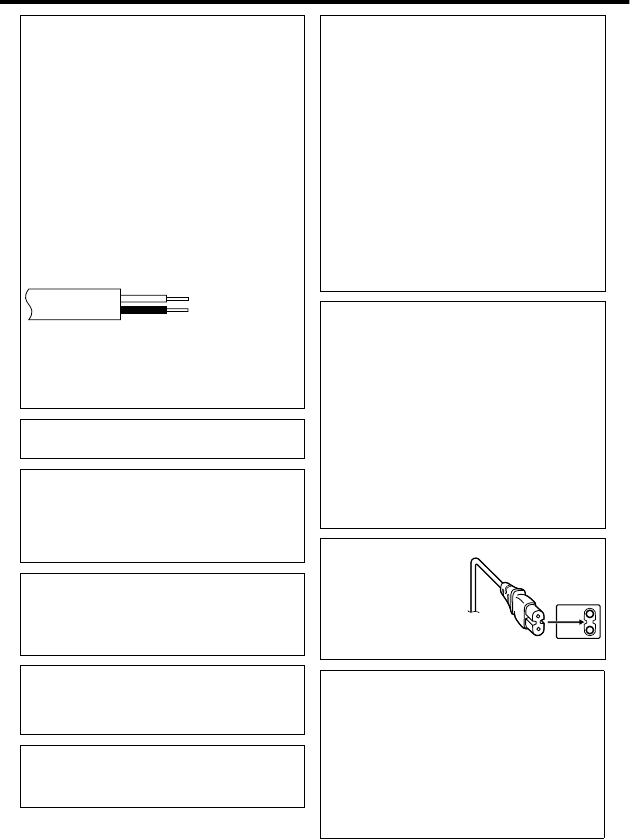
IMPORTANT (for owners in the U.K.)
Connection to the mains supply in the United
Kingdom.
DO NOT cut off the mains plug from this equipment.
If the plug fitted is not suitable for the power points
in your home or the cable is too short to reach
a power point, then obtain an appropriate safety
approved extension lead or consult your dealer.
BE SURE to replace the fuse only with an
identical approved type, as originally fitted,
and to replace the fuse cover.
If nonetheless the mains plug is cut off be sure
to remove the fuse and dispose of the plug
immediately, to avoid possible shock hazard by
inadvertent connection to the mains supply.
If this product is not supplied fitted with a mains
plug then follow the instructions given below:
DO NOT make any connection to the Larger
Terminal coded E or Green.
The wires in the mains lead are coloured in
accordance with the following code:
Blue to N
(Neutral) or Black
Brown to L (Live)
or Red
If these colours do not correspond with the terminal
identifications of your plug, connect as follows:
Blue wire to terminal coded N (Neutral) or coloured
black.
Brown wire to terminal coded L (Live) or coloured Red.
If in doubt — consult a competent electrician.
WARNING: TO PREVENT FIRE OR SHOCK
HAZARD, DO NOT EXPOSE THIS UNIT TO RAIN
OR MOISTURE.
CAUTIONS:
•
To prevent shock, do not open the cabinet. No
user serviceable parts inside. Refer servicing to
qualified personnel.
When you are not using the AC adapter for a
long period of time, it is recommended that you
disconnect the power cord from AC outlet.
•
NOTES:
•
The rating plate and safety caution are on the
bottom and/or the back of the main unit.
The serial number plate is on the battery pack mount.
The rating information and safety caution of the
AC adapter are on its upper and lower sides.
•
•
WARNING:
The battery pack and the camcorder with battery
installed, and the remote control with battery
installed should not be exposed to excessive heat
such as direct sunlight, fire or the Iike.
CAUTION:
The mains plug shall remain readily operable.
•
Remove the mains plug immediately if the
camcorder functions abnormally.
Caution on Replaceable lithium battery
The battery used in this device may present a fire
or chemical burn hazard if mistreated.
Do not recharge, disassemble, heat above 100°C
or incinerate.
Replace battery with Panasonic, Sanyo, Sony or
Maxell CR2025.
Danger of explosion or Risk of fire if the battery is
incorrectly replaced.
•
Dispose of used battery promptly.
•
Keep away from children.
•
Do not disassemble and do not dispose of in fire.
ÅÈÃÅÈ»¿Ä¼ÅÈ÷ʿÅÄƑÈ»¼»ÈÊÅʾ»»Ê·¿Â»ºÉ»ÈË¿º»
¾ÊÊÆƓƭƭ÷ÄË·ÂƔÀ̹Ɣ¹ÅƔÀÆƭ¿Äº»ÎƔ¾ÊÃÂƭ
Information for Users on Disposal of Old
Equipment and Batteries
Products
Battery
Notice:
The sign Pb below the symbol
for batteries indicates that this
battery contains lead.
[European Union]
These symbols indicate that the electrical and
electronic equipment and the battery with this symbol
should not be disposed of as general household
waste at its end-of-life. Instead, the products should
be handed over to the applicable collection points for
the recycling of electrical and electronic equipment as
well as batteries for proper treatment, recovery and
recycling in accordance with your national legislation
and the Directive 2002/96/EC and 2006/66/EC.
By disposing of these products correctly, you will help
to conserve natural resources and will help to prevent
potential negative effects on the environment and
human health which could otherwise be caused by
inappropriate waste handling of these products.
For more information about collection points and
recycling of these products, please contact your
local municipal office, your household waste disposal
service or the shop where you purchased the product.
Penalties may be applicable for incorrect disposal of
this waste, in accordance with national legislation.
[Business users]
If you wish to dispose of this product, please visit
our web page http://www.jvc.eu to obtain
information about the take-back of the product.
[Other Countries outside the European Union]
These symbols are only valid in the European Union.
If you wish to dispose of these items, please do so
in accordance with applicable national legislation or
other rules in your country for the treatment of old
electrical and electronic equipment and batteries.
SOME DO’S AND DON’TS ON THE SAFE
USE OF EQUIPMENT
This equipment has been designed and manufactured
to meet international safety standards but, like any
electrical equipment, care must be taken if you are to
obtain the best results and safety is to be assured.
DO read the operating instructions before you attempt
to use the equipment.
DO ensure that all electrical connections (including the
mains plug, extension leads and interconnections between
pieces of equipment) are properly made and in accordance
with the manufacturer’s instructions. Switch off and withdraw
the mains plug when making or changing connections.
DO consult your dealer if you are ever in doubt about
the installation, operation or safety of your equipment.
DO be careful with glass panels or doors on equipment.
DON’T continue to operate the equipment if you are in
any doubt about it working normally, or if it is damaged
in any way — switch off, withdraw the mains plug and
consult your dealer.
DON’T remove any fixed cover as this may expose
dangerous voltages.
DON’T leave equipment switched on when it is
unattended unless it is specifically stated that it is
designed for unattended operation or has a standby
mode. Switch off using the switch on the equipment
and make sure that your family knows how to do this.
Special arrangements may need to be made for infirm
or handicapped people.
DON’T use equipment such as personal stereos
or radios so that you are distracted from the
requirements of road safety. It is illegal to watch
television whilst driving.
DON’T listen to headphones at high volume, as such
use can permanently damage your hearing.
DON’T obstruct the ventilation of the equipment, for
example with curtains or soft furnishings. Overheating
will cause damage and shorten the life of the equipment.
DON’T use makeshift stands and NEVER fix legs with
wood screws — to ensure complete safety always fit
the manufacturer’s approved stand or legs with the
fixings provided according to the instructions.
DON’T allow electrical equipment to be exposed to
rain or moisture.
ABOVE ALL
•NEVER let anyone especially children push
anything into holes, slots or any other opening in the
case — this could result in a fatal electrical shock;
•
NEVER guess or take chances with electrical equipment
of any kind — it is better to be safe than sorry!
Make a backup of important recorded data
JVC will not be responsible for any lost data. It is
recommended to copy your important recorded
data to a disc or other recording media for storage.
ÅÈÃÅÈ»¿Ä¼ÅÈ÷ʿÅÄƑÈ»¼»ÈÊÅʾ»»Ê·¿Â»ºÉ»ÈË¿º»
¾ÊÊÆƓƭƭ÷ÄË·ÂƔÀ̹Ɣ¹ÅƔÀÆƭ¿Äº»ÎƔ¾ÊÃÂƭ
ÅÄÊ»ÄÊÉ
·¼»ÊÏÈ»¹·ËÊ¿ÅÄÉƔƔƔƔƔƔƔƔƔƔƔƔƔƔƔƔƔƔƔƔƔƔƔƔƔƔƔƔƔƔƔʹ
»È¿¼Ï¿Ä½Ê¾»¹¹»ÉÉÅÈ¿»ÉƔƔƔƔƔƔƔƔƔƔƔƔƔƔƔƔƔƔƔƔʻ
·Ã»Éż·ÈÊɷĺËĹʿÅÄÉƔƔƔƔƔƔƔƔƔƔƔƔƔʼ
·Ã»ÉżËÊÊÅÄɷĺËĹʿÅÄÉÅÄʾ»
ÅÄ¿ÊÅÈƔƔƔƔƔƔƔƔƔƔƔƔƔƔƔƔƔƔƔƔƔƔƔƔƔƔƔƔƔƔƔƔƔƔƔƔƔƔƔƔʽ
»ÊʿĽʷÈÊ»ºƔƔƔƔƔƔƔƔƔƔƔƔƔƔƔƔƔƔƔƔƔƔƔƔƔƔƔʿ
¾·È½¿Ä½Ê¾»·ÊÊ»ÈÏ·¹ÁƔƔƔƔƔƔƔƔƔƔƔƔƔƔƔƔƔƔƔʿ
ȿƺÀËÉÊûÄÊƔƔƔƔƔƔƔƔƔƔƔƔƔƔƔƔƔƔƔƔƔƔƔƔƔƔƔƔƔƔƔƔƔƔƔˀ
ɿĽ·É··ÄºÊÈ·ÆƔƔƔƔƔƔƔƔƔƔƔƔƔƔƔƔƔƔƔƔƔƔƔƔƔˀ
ÄÉ»ÈʿĽ·Ä·ÈºƔƔƔƔƔƔƔƔƔƔƔƔƔƔƔƔƔƔƔƔƔƔƔƔƔƔƔˀ
ÂŹÁ»ÊʿĽƔƔƔƔƔƔƔƔƔƔƔƔƔƔƔƔƔƔƔƔƔƔƔƔƔƔƔƔƔƔƔƔƔƔƔƔƔʸʹ
¿º»Å˷¿ÊÏƔƔƔƔƔƔƔƔƔƔƔƔƔƔƔƔƔƔƔƔƔƔƔƔƔƔƔƔƔƔƔƔƔƔƔƔƔʸʺ
»¹ÅȺ¿Ä½ƔƔƔƔƔƔƔƔƔƔƔƔƔƔƔƔƔƔƔƔƔƔƔƔƔƔƔƔƔƔƔƔƔʸʻ
¿º»Å»¹ÅȺ¿Ä½ƔƔƔƔƔƔƔƔƔƔƔƔƔƔƔƔƔƔƔƔƔƔƔƔƔƔƔƔƔƔƔƔʸʻ
Ê¿ÂÂ÷½»»¹ÅȺ¿Ä½ƔƔƔƔƔƔƔƔƔƔƔƔƔƔƔƔƔƔƔƔƔƔƔƔƔʸʼ
·ϸ·¹ÁƔƔƔƔƔƔƔƔƔƔƔƔƔƔƔƔƔƔƔƔƔƔƔƔƔƔƔƔƔƔƔƔƔƔƔʸʽ
·ϿĽ·¹Áƭ»Â»Ê¿Ä½¿Â»ÉÅÄʾ¿ÉÄ¿Ê
ƔƔƔƔƔƔƔƔƔƔƔƔƔƔƔƔƔƔƔƔƔƔƔƔƔƔƔƔƔƔƔƔƔƔƔƔƔƔƔƔƔƔƔƔƔƔƔƔƔƔƔƔƔƔƔƔƔƔƔʸʽ
·ϿĽ·¹ÁÅÄƔƔƔƔƔƔƔƔƔƔƔƔƔƔƔƔƔƔƔƔƔƔƔƔƔƔƔƔʸʾ
ÅÆϿĽƔƔƔƔƔƔƔƔƔƔƔƔƔƔƔƔƔƔƔƔƔƔƔƔƔƔƔƔƔƔƔƔƔƔƔƔʸˀ
˸¸¿Ä½¿Â»É¸ÏÅÄÄ»¹Ê¿Ä½ÊÅ·
»¹ÅȺ»ÈÅÈƔƔƔƔƔƔƔƔƔƔƔƔƔƔƔƔƔƔƔƔƔƔƔƔƔƔƔƔƔƔƔʸˀ
ËÈʾ»ÈļÅÈ÷ʿÅÄƔƔƔƔƔƔƔƔƔƔƔƔƔƔƔƔƔƔƔʹʷ
ƻȷʿĽʾ»»ÄËƔƔƔƔƔƔƔƔƔƔƔƔƔƔƔƔƔƔƔƔƔƔƔƔƔƔƔʹʷ
»¹ÅȺ·¸Â»¿Ã»ƭËø»Èż÷½»É
ƔƔƔƔƔƔƔƔƔƔƔƔƔƔƔƔƔƔƔƔƔƔƔƔƔƔƔƔƔƔƔƔƔƔƔƔƔƔƔƔƔƔƔƔƔƔƔƔƔƔƔƔƔƔƔƔƔƔƔʹʸ
ÈÅ˸»ɾÅÅʿĽƔƔƔƔƔƔƔƔƔƔƔƔƔƔƔƔƔƔƔƔƔƔƔƔƔƔƔƔƔƔƔƔƔʹʹ
·ËÊ¿ÅÄÉƔƔƔƔƔƔƔƔƔƔƔƔƔƔƔƔƔƔƔƔƔƔƔƔƔƔƔƔƔƔƔƔƔƔƔƔƔƔƔƔƔƔƔƔʹʻ
Æ»¹¿¼¿¹·Ê¿ÅÄÉƔƔƔƔƔƔƔƔƔƔƔƔƔƔƔƔƔƔƔƔƔƔƔƔƔƔƔƔƔƔƔƔƔƔƔƔʹʽ
Ɣ»Ê·¿Â»ºÉ»ÈË¿º»
ơ·É¿¹É»ÈË¿º»Ƣƺʾ¿É÷ÄË·Âƻ·Äº·ơ»Ê·¿Â»ºÉ»ÈË¿º»Ƣ·È»·Ì·¿Â·¸Â»¼ÅÈʾ¿ÉÆÈź˹ÊƔ
ÅÈÃÅÈ»º»Ê·¿ÂÉÅÄÅƻȷʿĽʾ¿ÉÆÈź˹ÊƑÆ»·É»È»¼»ÈÊÅʾ»ơ»Ê·¿Â»ºÉ»ÈË¿º»Ƣ·Êʾ»
¼ÅÂÂÅͿĽͻ¸É¿Ê»Ɣ
4¾ÊÊÆƓƭƭ÷ÄË·ÂƔÀ̹Ɣ¹ÅƔÀÆƭ¿Äº»ÎƔ¾ÊÃÂƭ
4
Å˹·Ä·ÂÉÅ·¹¹»ÉÉʾ»Í»¸É¿Ê»¼ÈÅÃʾ»¸Ë¿ÂÊƖ¿Ä·ÆÆ¿¹·Ê¿ÅÄÉżÊÍ·È»
żʾ¿ÉËÄ¿ÊƔ
»È¿¼Ï¿Ä½Ê¾»¹¹»ÉÉÅÈ¿»É
º·ÆÊ»È
Ɩʸʷdž ÅÍ»ÈÅȺdž ·ÊÊ»ÈÏ·¹Á
Ɩʸʸʻ
·¸Â»
ƺÏÆ»Ɩ¿Ä¿ÏÆ»ƻ
ƔƔƔƔ
·¸Â» ·É¿¹É»ÈË¿º»
ƺʾ¿É÷ÄË·Âƻ
ƔƔ
¹·ÈºÉ·È»ÉźɻƷȷʻÂÏƔÅȺ»Ê·¿ÂÉÅÄʾ»ÊÏÆ»Éż¹·ÈºÉʾ·Ê¹·Ä¸»ËÉ»ºÅÄʾ¿É
ËÄ¿ÊƑÈ»¼»ÈÊÅÆƔʸʷƔ
dž ¾»ÄËɿĽʾ»·º·ÆÊ»ÈÅÌ»ÈÉ»·ÉƑÆ»·É»ÆȻƷȻ·¹ÅÃûȹ¿·ÂÂÏ·Ì·¿Â·¸Â»¹ÅÄÌ»ÈÊ»È
ÆÂ˽¼ÅÈʾ»¹ÅËÄÊÈÏÅÈÈ»½¿ÅÄż̿ɿÊƔ
ÅÈÃÅÈ»¿Ä¼ÅÈ÷ʿÅÄƑÈ»¼»ÈÊÅʾ»»Ê·¿Â»ºÉ»ÈË¿º»
¾ÊÊÆƓƭƭ÷ÄË·ÂƔÀ̹Ɣ¹ÅƔÀÆƭ¿Äº»ÎƔ¾ÊÃÂƭ
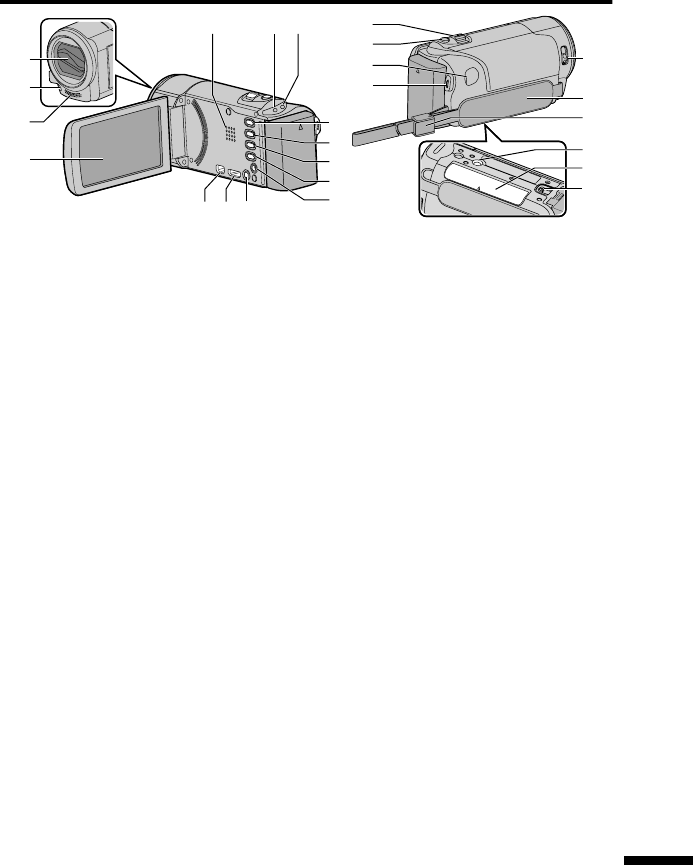
·Ã»Éż·ÈÊɷĺËĹʿÅÄÉ
j
e
g
h
f
m
l
k
i
2
4
5
1
cd
67
8
9
0
b
a
3
o
n
»ÄÉÅÌ»È
¿½¾ÊƺƖʽʼʷƭƖʻʻʼƻ
ʻȻſ¹ÈÅƾÅÄ»
ÅÄ¿ÊÅÈ
ËÈÄÉÅÄƭż¼Ê¾»ÆÅͻȸÏÅƻĿĽƭ
¹ÂÅɿĽʾ»ÃÅÄ¿ÊÅÈƔ
Æ»·Á»È
ƺ¹¹»ÉÉƻ·ÃÆ
¿½¾ÊÉËÆƭ¸Â¿ÄÁɺËȿĽȻ¹ÅȺ¿Ä½ÅÈ
Æ·ϸ·¹ÁƔ
ƭƺÅÍ»Èƭ¾·È½»ƻ
·ÃÆƺÆƔʿƻ
¿ƔƺÄʻ¿½»ÄÊËÊÅƻËÊÊÅÄ
ƺÆƔʸʻƻ
Ϳʹ¾»É¸»ÊÍ»»ÄÄʻ¿½»ÄÊËÊŷĺ
·ÄË·ÂÃź»ÉƔ
ƺÉ»ÈƻËÊÊÅÄ
ƭƺ¿º»ÅƭÊ¿ÂÂ÷½»ƻËÊÊÅÄ
Ϳʹ¾»É¸»ÊÍ»»ÄÌ¿º»Å·ÄºÉʿ¿÷½»
Ãź»ÉƔ
ƺļÅÈ÷ʿÅÄƻËÊÊÅÄ
»¹ÅȺ¿Ä½ Ɠ¿ÉÆ·ÏÉʾ»È»Ã·¿Ä¿Ä½
ʿûƺ¼ÅÈÌ¿º»ÅÅÄÂÏƻ·Äº
¸·ÊÊ»ÈÏÆÅÍ»ÈƔ
·ϸ·¹Á Ɠ¿ÉÆ·Ïɼ¿Â»¿Ä¼ÅÈ÷ʿÅÄ
É˹¾·ÉÈ»¹ÅȺ¿Ä½º·Ê»Ɣ
ÅÄÄ»¹ÊÅÈƺÆƔʸʿƑʸˀƻ
,ƺÅÍ»ÈƻËÊÊÅÄ
È»Éɷĺ¾ÅºÊÅÊËÈÄʾ»ÆÅÍ»ÈÅÄƭż¼
;¿Â»Ê¾»ÃÅÄ¿ÊÅÈ¿ÉÅƻĻºƔ
¿Ä¿ÅÄÄ»¹ÊÅÈƺÆƔʸʾƻ
ÅÄÄ»¹ÊÅÈ
ÅÅÃƭÅÂËû»Ì»ÈƺÆƔʸʻƑʸʽƻ
ƺÊ¿ÂÂ÷½»»¹ÅȺ¿Ä½ƻ
ËÊÊÅÄƺÆƔʸʼƻ
ÅÄÄ»¹ÊÅÈƺÆƔʿƻ
ƭƺ¿º»Å»¹ÅȺ¿Ä½ƻ
ËÊÊÅÄƺÆƔʸʻƻ
»ÄÉÅÌ»ÈͿʹ¾ƺÆƔʸʻƻ
È¿Æ»ÂÊƺÆƔˀƻ
ÊÈ·ÆŹÁƺÆƔˀƻ
È¿ÆźÅËÄʿĽÅ»
·ÈºÂÅÊƺÆƔˀƻ
·ÊÊ»Èϻ»·É»»Ì»ÈƺÆƔʿƻ
ÅÈÃÅÈ»¿Ä¼ÅÈ÷ʿÅÄƑÈ»¼»ÈÊÅʾ»»Ê·¿Â»ºÉ»ÈË¿º»
¾ÊÊÆƓƭƭ÷ÄË·ÂƔÀ̹Ɣ¹ÅƔÀÆƭ¿Äº»ÎƔ¾ÊÃÂƭ
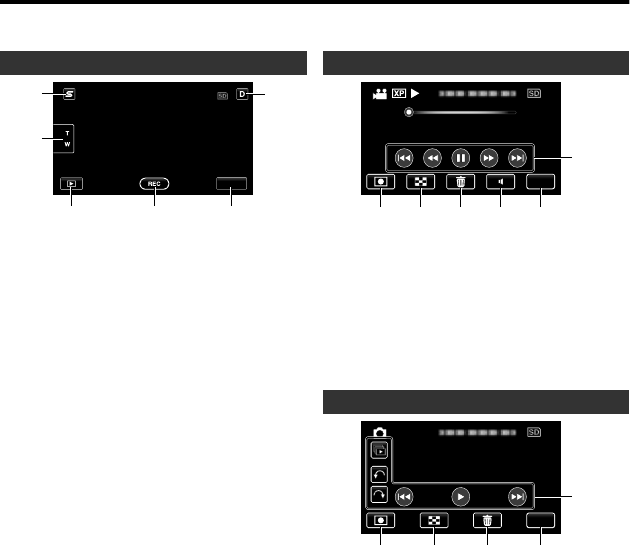
·Ã»ÉżËÊÊÅÄɷĺËĹʿÅÄÉÅÄʾ»
ÅÄ¿ÊÅÈ
¾»¼ÅÂÂÅͿĽɹȻ»ÄÉ·È»º¿ÉÆ·ϻººËȿĽʾ»Ì¿º»Å·ÄºÉʿ¿÷½»Ãź»ÉƑ·ÄºÅƻȷʻ·É
ʾ»ÊÅ˹¾É¹È»»ÄÉƔ
»¹ÅȺ¿Ä½¹È»»Äƺ¿º»ÅƭÊ¿ÂÂ÷½»ƻ
MENU
16
2
3 4 5
·¹»¾ÅÈÊËÊ»ÄËËÊÊÅÄ
¿ÉÆ·ÏɷɾÅÈʹËÊɹȻ»Äż¼·¹»
È»¹Å½Ä¿Ê¿ÅļËĹʿÅÄÉƔ
ÅÅÃËÊÊÅÄ
·ϸ·¹Áź»ËÊÊÅÄ
Ϳʹ¾»ÉÊÅʾ»Æ·ϸ·¹ÁÃź»Ɣ
»¹ÅȺ¿Ä½Ê·ÈÊƭÊÅÆËÊÊÅÄƺÆƔʸʻƑ
ʸʼƻ
Ɠ ¿º»Å»¹ÅȺ¿Ä½Ê·ÈÊËÊÊÅÄ
Ɠ ¿º»Å»¹ÅȺ¿Ä½ÊÅÆËÊÊÅÄ
Ɠ Ê¿ÂÂ÷½»»¹ÅȺ¿Ä½ËÊÊÅÄ
»ÄËËÊÊÅÄƺÆƔʹʷƻ
¿ÉÆ·ÏËÊÊÅÄ
Åûº¿ÉÆ·Ïɺ¿É·ÆÆ»·È·¼Ê»È
·ÆÆÈÅο÷ʻÂÏʺÉ»¹ÅĺÉƔÈ»ÉÉʾ¿É
¸ËÊÊÅÄÊÅɾÅÍʾ»º¿ÉÆ·ÏÉ·½·¿ÄƔ¾»
º¿ÉÆ·ÏÉ·ÆÆ»·È¼ÅÈ·ÆÆÈÅο÷ʻÂÏʺ
É»¹ÅĺÉͿʾ»Ì»ÈÏÆÈ»ÉÉƔÈ»Éɷĺ¾Åº
ʾ¿É¸ËÊÊÅÄÊż¿Îʾ»º¿ÉÆ·ÏÉƔÈ»ÉÉʾ¿É
¸ËÊÊÅÄ·½·¿ÄÊÅȻ»·É»Ê¾»º¿ÉÆ·ÏÉƔ
·ϸ·¹Á¹È»»Äƺ¿º»Åƻ
0:01:23 0:12:34
MENU
6
1 2 3 4 5
»¹ÅȺ¿Ä½Åº»ËÊÊÅÄ
Ϳʹ¾»ÉÊÅʾ»È»¹ÅȺ¿Ä½Ãź»Ɣ
ĺ»Î¹È»»ÄËÊÊÅÄ
»Â»Ê»ËÊÊÅÄ
ÅÂËûºÀËÉÊûÄÊËÊÊÅÄƺÆƔʸʽƻ
»ÄËËÊÊÅÄƺÆƔʹʷƻ
ƻȷʿÅÄËÊÊÅÄÉƺÆƔʸʽƻ
·ϸ·¹Á¹È»»ÄƺÊ¿ÂÂ÷½»ƻ
MENU
5
1 2 34
»¹ÅȺ¿Ä½Åº»ËÊÊÅÄ
Ϳʹ¾»ÉÊÅʾ»È»¹ÅȺ¿Ä½Ãź»Ɣ
ĺ»Î¹È»»ÄËÊÊÅÄ
»Â»Ê»ËÊÊÅÄ
»ÄËËÊÊÅÄƺÆƔʹʷƻ
ƻȷʿÅÄËÊÊÅÄÉƺÆƔʸʽƻ
ÅÈÃÅÈ»¿Ä¼ÅÈ÷ʿÅÄƑÈ»¼»ÈÊÅʾ»»Ê·¿Â»ºÉ»ÈË¿º»
¾ÊÊÆƓƭƭ÷ÄË·ÂƔÀ̹Ɣ¹ÅƔÀÆƭ¿Äº»ÎƔ¾ÊÃÂƭ
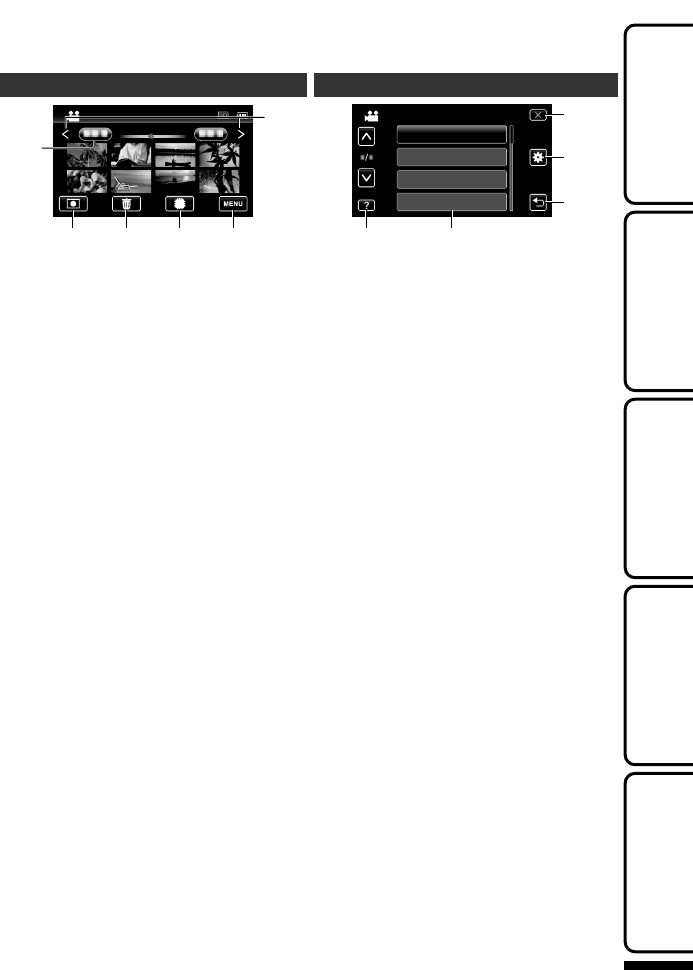
ĺ»Î¹È»»Ä
2011
2011
1
2 3 4 5
6
·Ê»ËÊÊÅÄ
»¹ÅȺ¿Ä½Åº»ËÊÊÅÄ
Ϳʹ¾»ÉÊÅʾ»È»¹ÅȺ¿Ä½Ãź»Ɣ
»Â»Ê»ËÊÊÅÄ
·ϸ·¹Á»º¿·ËÊÊÅÄ
Ϳʹ¾»É¸»ÊÍ»»Ä¹·Èº·Äº¸Ë¿ÂÊƖ¿Ä
ûÃÅÈÏÅÈÉÂÅʷĺÉÂÅÊƺƖʻʻʼƭ
ƖʻʻʷƻƔ
»ÄËËÊÊÅÄƺÆƔʹʷƻ
·½»ÅÈͷȺƭ·¹ÁËÊÊÅÄ
»Ä˹Ȼ»Ä
5
4
3
1 2
BRIGHTNESS ADJUST
FOCUS
SCENE SELECT
VIDEO
WHITE BALANCE
»ÂÆËÊÊÅÄƺÆƔʹʷƻ
»ÄËÊ»ÃÉƺÆƔʹʷƻ
»ÊËÈÄËÊÊÅÄ
ÅÃÃÅÄƭ·É¿¹»ÊʿĽÉËÊÊÅÄ
ÂÅÉ»ËÊÊÅÄ
ÅÈÃÅÈ»¿Ä¼ÅÈ÷ʿÅÄƑÈ»¼»ÈÊÅʾ»»Ê·¿Â»ºÉ»ÈË¿º»
¾ÊÊÆƓƭƭ÷ÄË·ÂƔÀ̹Ɣ¹ÅƔÀÆƭ¿Äº»ÎƔ¾ÊÃÂƭ
»ÊʿĽʷÈÊ»º»¹ÅȺ¿Ä½Â·Ï¸·¹ÁÅÆϿĽ
ËÈʾ»È
ļÅÈ÷ʿÅÄ
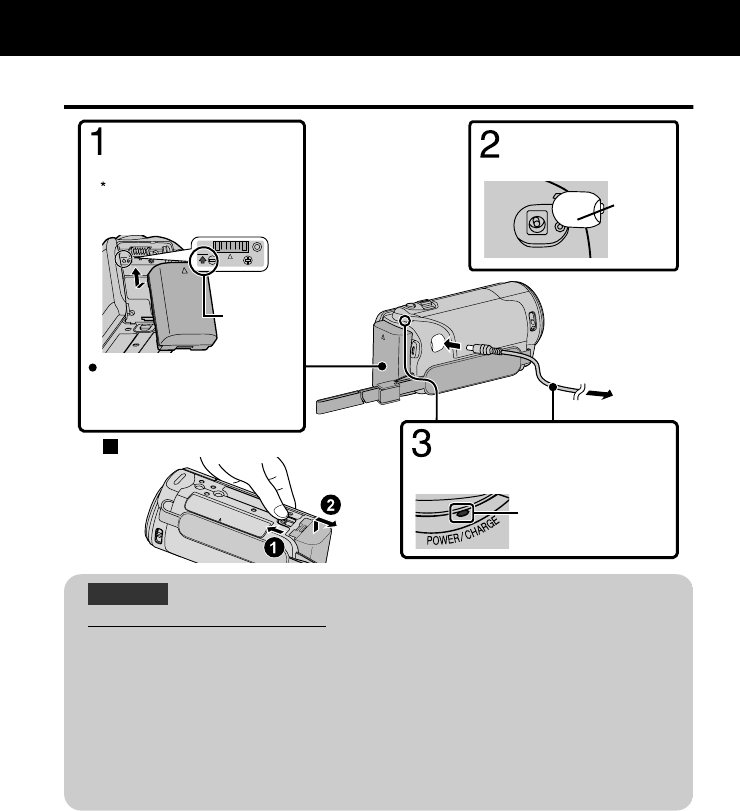
¾·È½¿Ä½Ê¾»·ÊÊ»ÈÏ·¹Á
(Base)
To detach the battery pack
Charging finished:
Goes out
Charging in progress:
Blinks
Charging Lamp
Plug in the power.
To AC Outlet
(110 V to 240 V)
AC Adapter
Cover
Connect the DC
connector.
Mark
Align the top of the battery
with the mark on this unit,
and slide in until the battery
clicks into place.
The battery pack is not
charged at the time of
purchase.
Attach the battery pack.
»ÉËÈ»ÊÅËÉ»¸·ÊÊ»ÈÏÆ·¹ÁÉƔ
¼ÏÅËËÉ»·ÄÏÅʾ»È¸·ÊÊ»ÈÏÆ·¹Áɸ»É¿º»É¸·ÊÊ»ÈÏÆ·¹ÁÉƑÉ·¼»ÊϷĺ
ƻȼÅÈ÷Ĺ»¹·ÄÄÅʸ»½Ë·È·ÄÊ»»ºƔ
¾·È½¿Ä½Ê¿Ã»ƓÆÆÈÅÎƔʹ¾ʺʷÃƺËɿĽÉËÆÆ¿»º¸·ÊÊ»ÈÏÆ·¹Áƻ
dž
¾»¹¾·È½¿Ä½Ê¿Ã»¿É;»Äʾ»ËÄ¿Ê¿ÉËÉ»º·ÊʹʼͮƔ¼Ê¾»¸·ÊÊ»ÈÏÆ·¹Á¿É¹¾·È½»º
ÅËÊÉ¿º»Ê¾»ÈÅÅÃÊ»ÃƻȷÊËȻȷĽ»Å¼ʸʷͮÊÅʺʼͮƑ¹¾·È½¿Ä½Ã·ÏÊ·Á»·ÂÅĽ»Èʿû
ÅÈ¿Ê÷ÏÄÅÊÉÊ·ÈÊƔ¾»È»¹ÅȺ·¸Â»·ÄºÆ·Ϸ¸Â»Ê¿Ã»Ã·Ï·ÂÉŸ»É¾ÅÈʻĻºËĺ»È
ÉÅûËÉ·½»¹Åĺ¿Ê¿ÅÄÉÉ˹¾·É·ÊÂÅÍÊ»ÃƻȷÊËÈ»Ɣ
¾·È½¿Ä½¿É·ÂÉÅÆÅÉÉ¿¸Â»Í¿Ê¾·¹·¸Â»Ɣƺ»¼»ÈÊŻʷ¿Â»ºÉ»ÈË¿º»Ɣƻ
»ÊʿĽʷÈÊ»º
ÅÈÃÅÈ»¿Ä¼ÅÈ÷ʿÅÄƑÈ»¼»ÈÊÅʾ»»Ê·¿Â»ºÉ»ÈË¿º»
¾ÊÊÆƓƭƭ÷ÄË·ÂƔÀ̹Ɣ¹ÅƔÀÆƭ¿Äº»ÎƔ¾ÊÃÂƭ
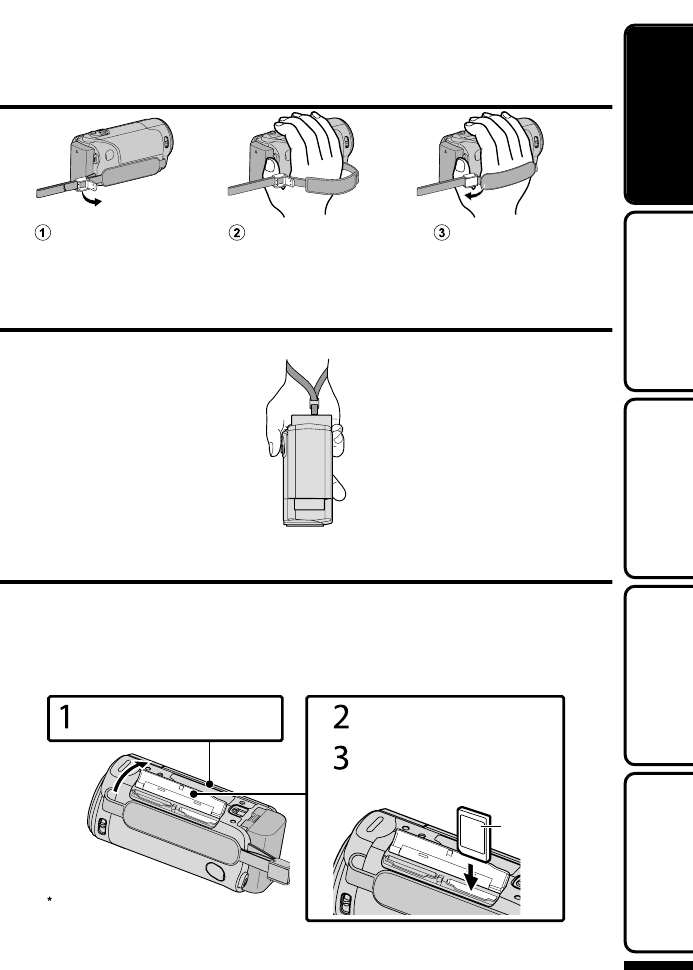
ȿƺÀËÉÊûÄÊ
Close the lever
Adjust the length
of the belt
Open the lever on
the strap lock
ɿĽ·É··ÄºÊÈ·Æ
ºÀËÉÊʾ»Â»Ä½Ê¾Å¼Ê¾»¸»ÂʷĺÂÅÅÆ¿Ê·ÈÅËĺÏÅËÈÍÈ¿ÉÊƔ
ÄÉ»ÈʿĽ·Ä·Èº
4Ɩʽʼʷƺź»ÂÉͿʾ˿ÂÊƖ¿Ä»ÃÅÈÏƻ
¾»Ä·¹ÅÃûȹ¿·ÂÂÏ·Ì·¿Â·¸Â»¹·Èº¿É¿ÄÉ»ÈÊ»ºƑÈ»¹ÅȺ¿Ä½É¹·ÄÉʿ¸»Ã·º»ÊÅʾ»¹·Èº
ͿʾÅËÊÉÊÅÆƿĽ;»Äʾ»È»Ã·¿Ä¿Ä½È»¹ÅȺ¿Ä½Ê¿Ã»ÅÄʾ»¸Ë¿ÂÊƖ¿ÄûÃÅÈÏÈËÄÉÅËÊƔ
džÅÈ»¹ÅȺÊÅʾ»¹·ÈºƑ¿Ê¿ÉÄ»¹»ÉÉ·ÈÏÊÅƻȼÅÈÃûº¿·É»ÊʿĽÉƔƺÆƔʸʸƻ
¾»ÄÄŹ·Èº¿É·Ì·¿Â·¸Â»ƑÉ»Êûº¿·É»ÊʿĽÉÊÅơƖƢ¼ÅÈÈ»¹ÅȺ¿Ä½Ɣ
Ɣ
Turn off the power of this unit before
inserting or removing a card.
(Base)
Label
Insert an SD card.
Open the cover.
Close the LCD monitor.
ÅÈÃÅÈ»¿Ä¼ÅÈ÷ʿÅÄƑÈ»¼»ÈÊÅʾ»»Ê·¿Â»ºÉ»ÈË¿º»
¾ÊÊÆƓƭƭ÷ÄË·ÂƔÀ̹Ɣ¹ÅƔÀÆƭ¿Äº»ÎƔ¾ÊÃÂƭ
»ÊʿĽʷÈÊ»º»¹ÅȺ¿Ä½Â·Ï¸·¹ÁÅÆϿĽ
ËÈʾ»È
ļÅÈ÷ʿÅÄ
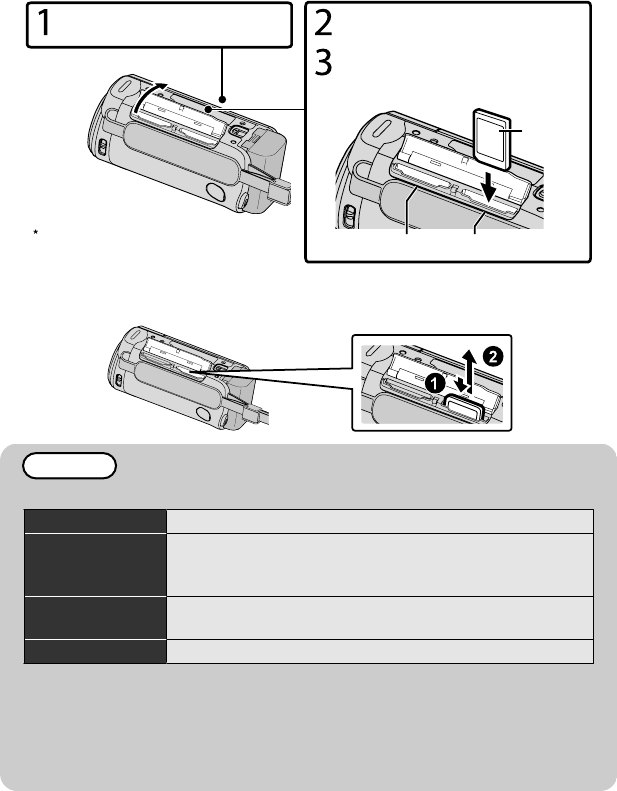
4ƖʻʻʼƭƖʻʻʷƺź»ÂÉͿʾ˷ÂÂÅÊƻ
ÄÉ»ÈÊ·¹ÅÃûȹ¿·ÂÂÏ·Ì·¿Â·¸Â»¹·Èº¸»¼ÅȻȻ¹ÅȺ¿Ä½Ɣ
¾¿ÉËĿʹÅûÉͿʾÊÍŹ·ÈºÉÂÅÊÉƔ¾»ÄÊÍŹ·ÈºÉ·È»¿ÄÉ»ÈÊ»ºƑÈ»¹ÅȺ¿Ä½É
¹·Ä¸»¹ÅÄÊ¿ÄË»ºÅÄʾ»Åʾ»È¹·Èº»Ì»Ä¿¼ÅÄ»¹·Èº¿É¼ËÂÂƔ
Turn off the power of this unit before
inserting or removing a card.
(Base)
Slot B Slot A
Label
Insert an SD card into slot A.
Open the cover.
Close the LCD monitor.
4ÅÈ»ÃÅ̻ʾ»¹·Èº
Ëɾʾ»¹·Èº¿ÄͷȺÅĹ»Ƒʾ»ÄÆË¿ÊÅËÊÉÊÈ·¿½¾ÊƔ
(Base)
ƻȷʿÅÄÉ·È»¹Åļ¿ÈûºÅÄʾ»¼ÅÂÂÅͿĽ¹·ÈºÉƔ
·Ä˼·¹ÊËÈ»È ·Ä·ÉÅÄ¿¹ƑƑ·Ä¿ÉÁƑƑÏ»Ɩ¿dž
¿º»Å
·ÉÉʻÅȾ¿½¾»È¹ÅÃÆ·Ê¿¸Â»¹·Èºƺʹƻƭ·ÉÉʻÅÈ
¾¿½¾»È¹ÅÃÆ·Ê¿¸Â»¹·ÈºƺʻÊÅʺʹƻƭ·ÉÉʻÅÈ
¾¿½¾»È¹ÅÃÆ·Ê¿¸Â»¹·ÈºƺʻʿÊÅʽʻƻ
Ê¿ÂÂ÷½»¹·ÈºƺʹʼʽÊÅʹƻƭ¹·ÈºƺʻÊÅʺʹƻƭ
¹·ÈºƺʻʿÊÅʽʻƻ
Ï»Ɩ¿ Ï»Ɩ¿ÅÄÄ»¹ÊʹƭÏ»Ɩ¿ÎÆÂÅÈ»ʹƭÏ»Ɩ¿ÈÅʹ
džÄÂÏʾ»ÉÆ»¹¿¼¿»ºÃź»ÂÉ÷ϸ»ËÉ»ºƔ»¼»ÈÊÅʾ»»Ê·¿Â»ºÉ»ÈË¿º»¼ÅÈ
º»Ê·¿ÂÉƔ
ɿĽ¹·ÈºÉƺ¿Ä¹Â˺¿Ä½ƭ¹·ÈºÉƻÅʾ»Èʾ·ÄʾÅÉ»ÉÆ»¹¿¼¿»º·¸ÅÌ»
÷ÏÈ»ÉËÂÊ¿ÄÈ»¹ÅȺ¿Ä½¼·¿ÂËÈ»ÅȺ·Ê·ÂÅÉÉƔ
ÅÆÈÅÊ»¹Êʾ»º·Ê·ƑºÅÄÅÊÊÅ˹¾Ê¾»Ê»ÈÿķÂÉżʾ»¹·ÈºƔ
Ï»Ɩ¿Ã·Ä˼·¹ÊËÈ»ÉûÃÅÈϹ·ÈºÉͿʾͿȻ»ÉɼËĹʿÅÄƔ
ÅÈÃÅÈ»¿Ä¼ÅÈ÷ʿÅÄƑÈ»¼»ÈÊÅʾ»»Ê·¿Â»ºÉ»ÈË¿º»
¾ÊÊÆƓƭƭ÷ÄË·ÂƔÀ̹Ɣ¹ÅƔÀÆƭ¿Äº»ÎƔ¾ÊÃÂƭ
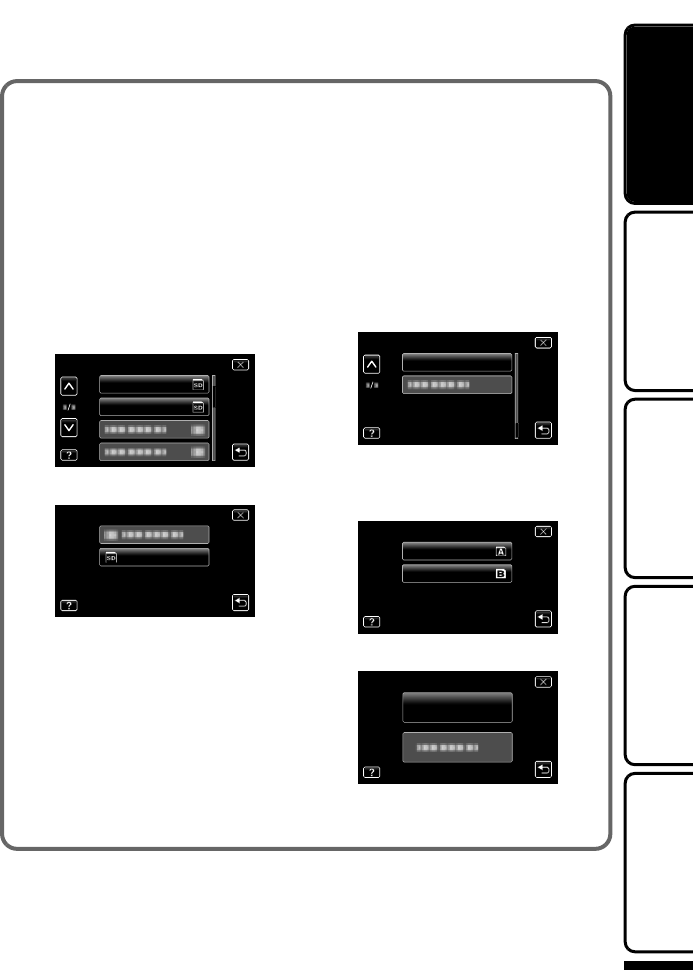
4ÅËÉ»·Ä¹·ÈºƺƖʽʼʷƻ
»¹ÅȺ¿Ä½¹·Ä¸»Æ»È¼ÅÈûºÅÄ·
¹·ÈºÍ¾»ÄơƢ
ÅÈơƢż
ơƢƺ¸·É¿¹É»ÊʿĽÉƻ¿ÉÉ»ÊÊÅ
ơƢƔ
Æ»Äʾ»ÃÅÄ¿ÊÅÈƔ
¾»ËÄ¿ÊÊËÈÄÉÅÄƔ
·ÆơƢƔ
·Æơ:ƢƔ
·ÆơƢÅÈ
ơƢƔ
Ɣ
REC MEDIA FOR IMAGE
REC MEDIA FOR VIDEO
·ÆơƢƔ
SD CARD
4ÅËÉ»¹·ÈºÉʾ·Ê¾·Ì»¸»»Ä
ËÉ»ºÅÄÅʾ»Èº»Ì¿¹»É
ÅÈ÷Êƺ¿Ä¿Ê¿·Â¿Ð»ƻʾ»¹·ÈºËɿĽ
ơƢ¼ÈÅÃ
ơƢƺ¸·É¿¹É»ÊʿĽÉƻƔ
º·Ê·ÅÄʾ»¹·ÈºÍ¿Â¸»º»Â»Ê»º
;»Ä¿Ê¿É¼ÅÈ÷ÊÊ»ºƔÅÆϷ¼¿Â»É
ÅÄʾ»¹·ÈºÊÅ·¹ÅÃÆËʻȸ»¼ÅÈ»
¼ÅÈ÷ÊʿĽƔ
»È¼ÅÈÃÉÊ»ÆÉƖ¼ÈÅÃơÅËÉ»·Ä
¹·ÈºƢƔ
·ÆơƢƔ
FORMAT SD CARD
ƺƖʻʻʼƭƖʻʻʷƻ
·Æʾ»ÉÂÅÊͿʾʾ»¹·ÈºÊÅ
¼ÅÈ÷ÊƔ
SLOT B
SLOT A
·ÆơƢƔ
FORMAT SD CARD
FILE
·ÆơƢƔ
¼Ê»È¼ÅÈ÷ÊʿĽƑÊ·ÆơƢƔ
ÅÈÃÅÈ»¿Ä¼ÅÈ÷ʿÅÄƑÈ»¼»ÈÊÅʾ»»Ê·¿Â»ºÉ»ÈË¿º»
¾ÊÊÆƓƭƭ÷ÄË·ÂƔÀ̹Ɣ¹ÅƔÀÆƭ¿Äº»ÎƔ¾ÊÃÂƭ
»ÊʿĽʷÈÊ»º»¹ÅȺ¿Ä½Â·Ï¸·¹ÁÅÆϿĽ
ËÈʾ»È
ļÅÈ÷ʿÅÄ
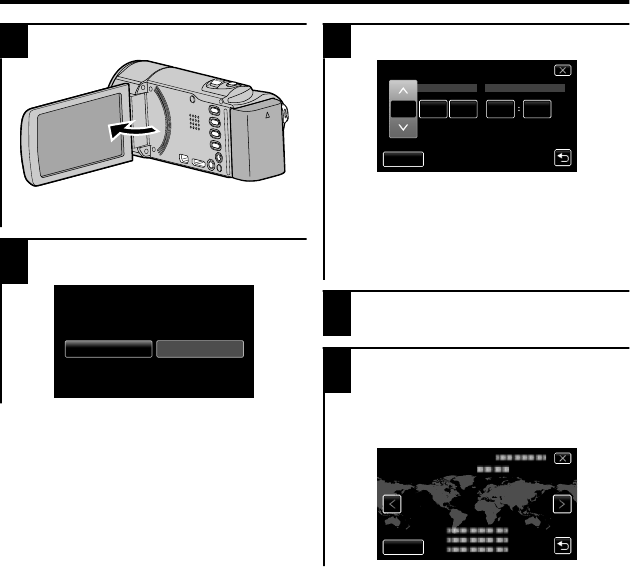
ÂŹÁ»ÊʿĽ
1Æ»Äʾ»ÃÅÄ¿ÊÅÈƔ
Ɣ
¾»ËÄ¿ÊÊËÈÄÉÅÄƔ¾»Äʾ»ÃÅÄ¿ÊÅÈ
¿É¹ÂÅÉ»ºƑʾ»ËÄ¿ÊÊËÈÄÉż¼Ɣ
2·ÆơƢ;»ÄơƭƘƢ
¿Éº¿ÉÆ·ϻºƔ
Ɣ
NOYES
SET DATE/TIME!
3»Êʾ»º·Ê»·ÄºÊ¿Ã»Ɣ
Ɣ
201111 10 00
DATE
CLOCK SETTING
SET
TIME
¾»Äʾ»Ï»·ÈƑÃÅÄʾƑº·ÏƑ¾ÅËÈƑÅÈ
ÿÄËÊ»¿Ê»Ã¿ÉÊ·ÆÆ»ºƑơ͠Ƣ·Äºơ͡ƢͿ¸»
º¿ÉÆ·ϻºƔ
·Æơ͠ƢÅÈơ͡ƢÊÅ·ºÀËÉÊʾ»Ì·ÂË»Ɣ
»Æ»·Êʾ¿ÉÉÊ»ÆÊÅ¿ÄÆËÊʾ»Ï»·ÈƑÃÅÄʾƑ
º·ÏƑ¾ÅËÈƑ·ÄºÃ¿ÄËÊ»Ɣ
4¼Ê»ÈÉ»ÊʿĽʾ»º·Ê»·ÄºÊ¿Ã»ƑÊ·Æ
ơƢƔ
5»Â»¹Êʾ»È»½¿ÅÄ;»È»ÏÅË¿̻·Äº
Ê·ÆơƢƔ
¾»¹¿ÊÏķû·ÄºÊ¿Ã»º¿¼¼»È»Ä¹»·È»
º¿ÉÆ·ϻºƔ
·Æơ̐ƢÅÈơ̑ƢÊÅɻ»¹Êʾ»¹¿ÊÏķûƔ
GMT
CLOCK/AREA SETTING
SAVE
ÅÈÃÅÈ»¿Ä¼ÅÈ÷ʿÅÄƑÈ»¼»ÈÊÅʾ»»Ê·¿Â»ºÉ»ÈË¿º»
¾ÊÊÆƓƭƭ÷ÄË·ÂƔÀ̹Ɣ¹ÅƔÀÆƭ¿Äº»ÎƔ¾ÊÃÂƭ
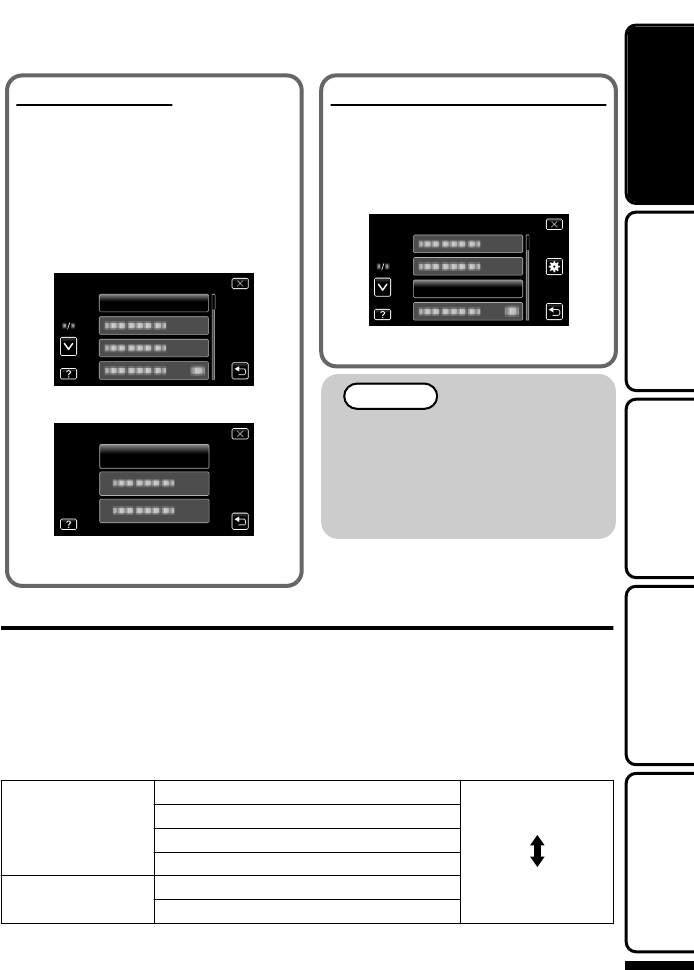
ÅȻɻÊʾ»¹ÂŹÁ
»Êʾ»¹ÂŹÁͿʾơƢ
¼ÈÅÃʾ»Ã»ÄËƔ
Æ»Äʾ»ÃÅÄ¿ÊÅÈƔ
¾»ËÄ¿ÊÊËÈÄÉÅÄƔ
·ÆơƢƔ
·Æơ:ƢƔ
·ÆơƢƔ
CLOCK ADJUST
·ÆơƢƔ
CLOCK ADJUST
CLOCK SETTING
¾»É˸ɻÇË»ÄÊÉ»ÊʿĽÅƻȷʿÅÄÉ
·È»Ê¾»É·Ã»·ÉÉÊ»ÆÉʺƖʼÅÄÆƔʸʹƔ
Ź¾·Ä½»Ê¾»º¿ÉÆ·Ï·Ľ˷½»
¾»Â·Ä½Ë·½»ÅÄʾ»º¿ÉÆ·Ϲ·Ä¸»
¹¾·Ä½»ºƔ
»È¼ÅÈÃÉÊ»ÆÉƖ¼ÈÅÃơÅȻɻÊʾ»
¹ÂŹÁƢƔ
·ÆơƢƔ
LANGUAGE
·ÆÊÅʾ»º»É¿È»ºÂ·Ä½Ë·½»Ɣ
ơƭƘƢ¿Éº¿ÉÆ·ϻº
;»ÄÏÅËÊËÈÄÅÄʾ¿ÉËÄ¿Ê·¼Ê»È¿Ê
¾·ÉÄÅʸ»»ÄËÉ»º¼ÅÈ·ÆÈÅÂÅĽ»º
ƻȿźƔ
¾·È½»Ê¾¿ÉËĿʼÅÈÃÅȻʾ·Äʹʻ
¾ÅËÈɸ»¼ÅȻɻÊʿĽʾ»¹ÂŹÁƔ
ƺÆƔʿƻ
¿º»Å˷¿ÊÏ
¾¿ÉËĿʹ·ÄƻȼÅÈÃÈ»¹ÅȺ¿Ä½¿Ä¸Åʾ¾¿½¾·ÄºÉʷĺ·Èºº»¼¿Ä¿Ê¿ÅÄƔ
Ϻ»¼·ËÂÊƑ¿Ê¿ÉÉ»ÊÊž¿½¾º»¼¿Ä¿Ê¿ÅÄƺƻƔ
4Ź¾·Ä½»Ê¾»É»ÊʿĽ
·ÆơƢƔ
·ÆơƢƔ
·Æʾ»º»É¿È»ºÌ¿º»ÅÇ˷¿ÊÏƔ
¿½¾»¼¿Ä¿Ê¿ÅÄ ¿½¾»ÈÌ¿º»ÅÇ˷¿ÊÏ
ʷĺ·Èº»¼¿Ä¿Ê¿ÅÄ
ÅȻȻ¹ÅȺ¿Ä½Ê¿Ã»
dž ÅÈʾ»·ÆÆÈÅο÷ʻ̿º»ÅÈ»¹ÅȺ¿Ä½Ê¿Ã»ƑÈ»¼»ÈÊÅÆƔʹʸƔ
ÅÈÃÅÈ»¿Ä¼ÅÈ÷ʿÅÄƑÈ»¼»ÈÊÅʾ»»Ê·¿Â»ºÉ»ÈË¿º»
¾ÊÊÆƓƭƭ÷ÄË·ÂƔÀ̹Ɣ¹ÅƔÀÆƭ¿Äº»ÎƔ¾ÊÃÂƭ
»ÊʿĽʷÈÊ»º»¹ÅȺ¿Ä½Â·Ï¸·¹ÁÅÆϿĽ
ËÈʾ»È
ļÅÈ÷ʿÅÄ
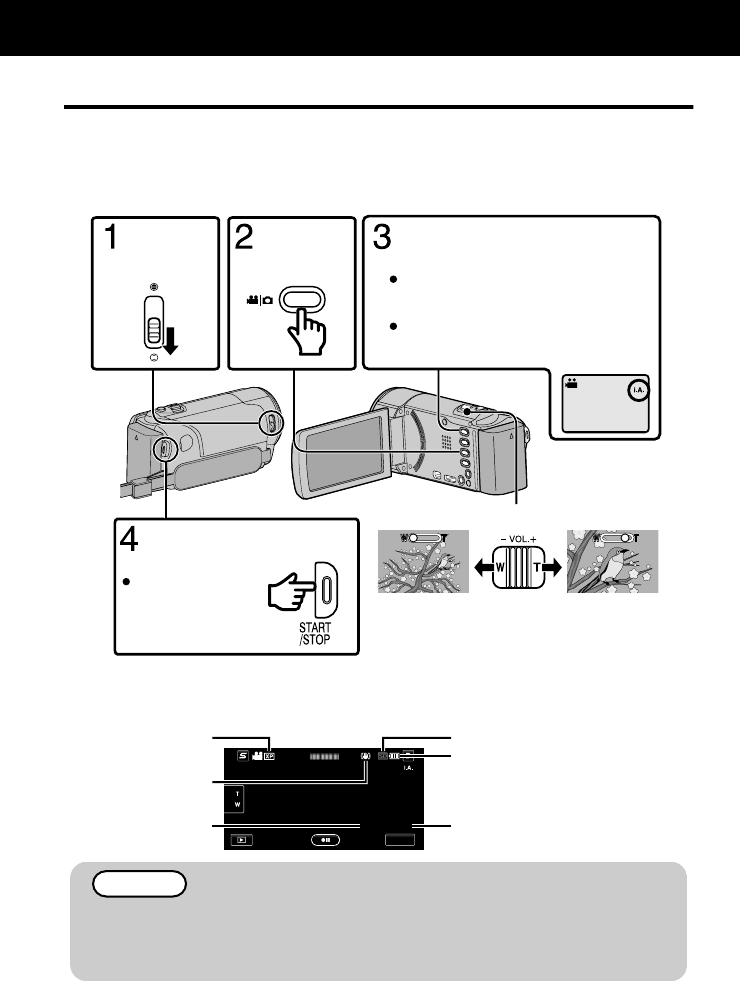
¿º»Å»¹ÅȺ¿Ä½
Å˹·ÄÈ»¹ÅȺͿʾÅËÊÍÅÈÈϿĽ·¸ÅËÊʾ»É»ÊʿĽº»Ê·¿ÂɸÏËɿĽʾ»Äʻ¿½»ÄÊËÊÅÃź»Ɣ»ÊʿĽÉ
É˹¾·É»ÎÆÅÉËÈ»·Äº¼Å¹ËÉͿ¸»·ºÀËÉÊ»º·ËÊÅ÷ʿ¹·ÂÂÏÊÅÉË¿Êʾ»É¾ÅÅʿĽ¹Åĺ¿Ê¿ÅÄÉƔ
Ĺ·É»Å¼ÉÆ»¹¿¼¿¹É¾ÅÅʿĽɹ»Ä»ÉÉ˹¾·É¸·¹Á¿½¾ÊƺƻƑÄ¿½¾ÊÌ¿»ÍƺƻƑÆ»ÈÉÅÄƺƻ
»Ê¹ƔƑ¿ÊÉ¿¹ÅĿɺ¿ÉÆ·ϻºÅÄʾ»É¹È»»ÄƔ
»¼ÅȻȻ¹ÅȺ¿Ä½·Ä¿ÃÆÅÈÊ·ÄÊɹ»Ä»Ƒ¿Ê¿ÉÈ»¹ÅÃûĺ»ºÊŹÅĺ˹ʷÊÈ¿·ÂÈ»¹ÅȺ¿Ä½Ɣ
(Telephoto)
(Wide angle)
Zooming
Press again to stop.
Start recording.
The mode changes between Intelligent
Auto and Manual with every press.
If the mode is H Manual, press the
S button to switch.
Check if the recording mode is P
Intelligent Auto.
Select video
mode.
Open the
lens cover.
Å˹·Ä·ÂÉÅÊ·ÆÅÄʾ»ÊÅ˹¾É¹È»»ÄÊÅÈ»¹ÅȺƔÅÉÊÅÆÈ»¹ÅȺ¿Ä½ƑÊ·ÆƔÄ
·ºº¿Ê¿ÅÄƑÏÅ˹·Ä·ÂÉÅÊ·ÆƭÊÅÐÅÅÃƔ
4ĺ¿¹·Ê¿ÅÄɺËȿĽ̿º»ÅÈ»¹ÅȺ¿Ä½
MENU
0:00:00 [0:54]
Remaining Recording Time
Battery Indicator
Recording Media
Scene Counter
Image Stabilizer
Video Quality
¾»»Éʿ÷ʻºÈ»¹ÅȺ¿Ä½Ê¿Ã»Å¼Ê¾»ÉËÆÆ¿»º¸·ÊÊ»ÈÏÆ·¹Á¿É·ÆÆÈÅο÷ʻÂÏʸ¾ÅËÈ
ʼÿÄËÊ»ÉƔƺÆƔʹʸƻ
ÅÄÅÊÈ»ÃÅ̻ʾ»¸·ÊÊ»ÈÏÆ·¹ÁƑ·º·ÆÊ»ÈƑÅȹ·ÈºÍ¾»Äʾ»·¹¹»ÉÉ·ÃÆ
¿É¿½¾Ê»ºƔ¾»È»¹ÅȺ»ºº·Ê·Ã·Ï¸»¹ÅûËÄÈ»·º·¸Â»Ɣ
»¹ÅȺ¿Ä½
ÅÈÃÅÈ»¿Ä¼ÅÈ÷ʿÅÄƑÈ»¼»ÈÊÅʾ»»Ê·¿Â»ºÉ»ÈË¿º»
¾ÊÊÆƓƭƭ÷ÄË·ÂƔÀ̹Ɣ¹ÅƔÀÆƭ¿Äº»ÎƔ¾ÊÃÂƭ
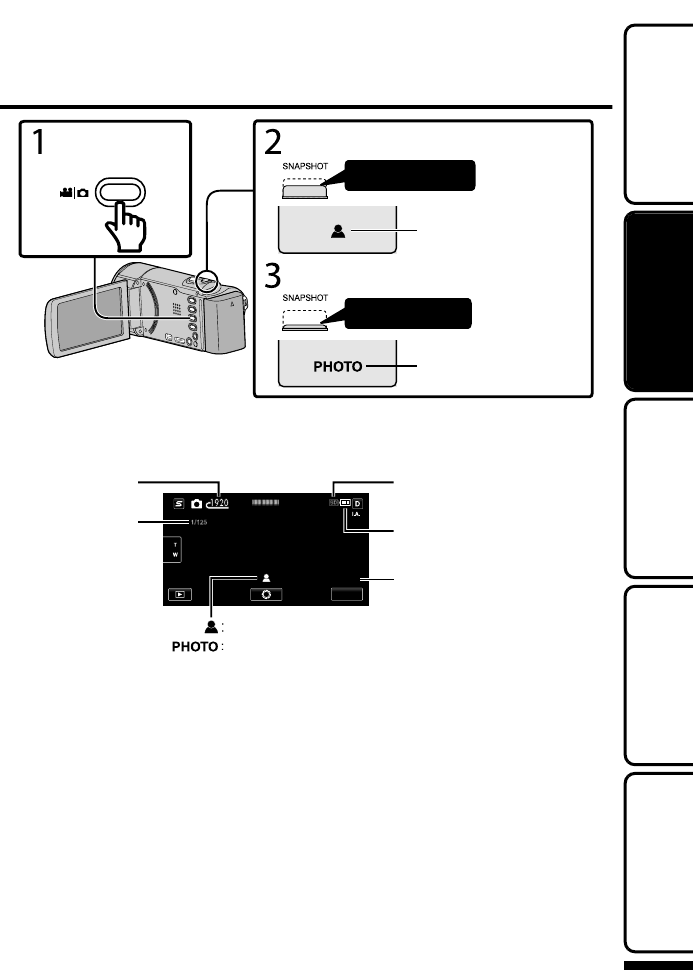
Ê¿ÂÂ÷½»»¹ÅȺ¿Ä½
Lights up during still
image recording
Press fully
Take a still image.
Lights up in green when
focused
Press halfway
Set the focus on the subject.
Select still image
mode.
Å˹·Ä·ÂÉÅÊ·ÆÅÄʾ»ÊÅ˹¾É¹È»»ÄÊÅÈ»¹ÅȺƔÅͻ̻ÈƑ¼Å¹Ëɹ·ÄÄÅʸ»É»Ê¸Ï
ÆÈ»ÉɿĽ¾·Â¼Í·ÏƔ
4ĺ¿¹·Ê¿ÅÄɺËȿĽÉʿ¿÷½»È»¹ÅȺ¿Ä½
[6630]
MENU
Battery Indicator
Recording Media
Recording in Progress
Remaining Number of Shots
Focus
Shutter Speed
Image Size
ÅÈÃÅÈ»¿Ä¼ÅÈ÷ʿÅÄƑÈ»¼»ÈÊÅʾ»»Ê·¿Â»ºÉ»ÈË¿º»
¾ÊÊÆƓƭƭ÷ÄË·ÂƔÀ̹Ɣ¹ÅƔÀÆƭ¿Äº»ÎƔ¾ÊÃÂƭ
»ÊʿĽʷÈÊ»º»¹ÅȺ¿Ä½Â·Ï¸·¹ÁÅÆϿĽ
ËÈʾ»È
ļÅÈ÷ʿÅÄ
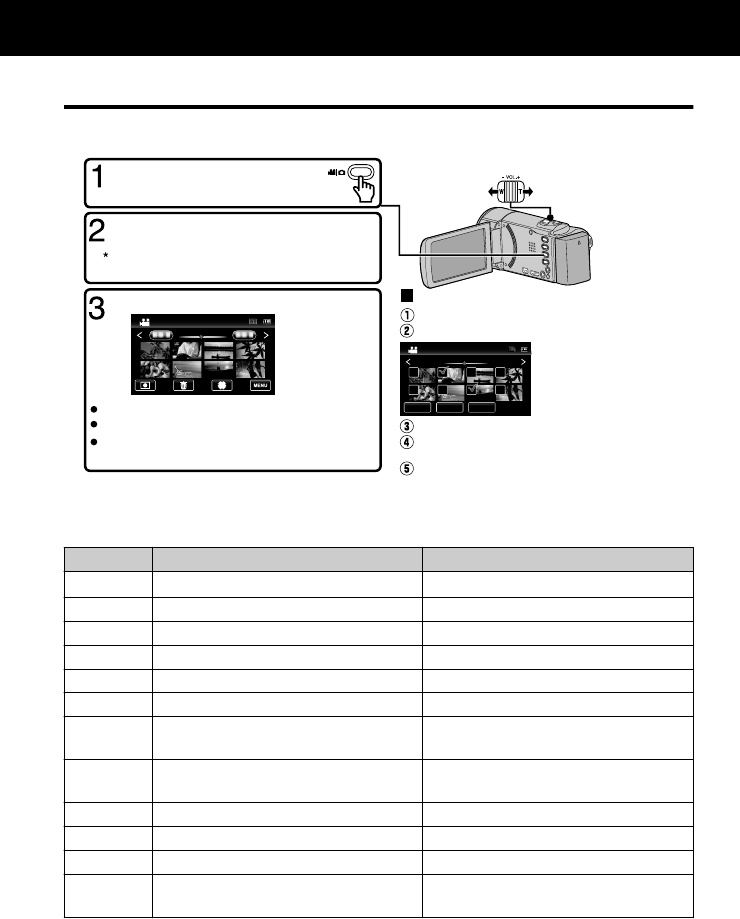
·ϿĽ·¹Áƭ»Â»Ê¿Ä½¿Â»ÉÅÄʾ¿ÉÄ¿Ê
»Â»¹Ê·ÄºÆ·ϸ·¹Áʾ»È»¹ÅȺ»ºÌ¿º»ÅÉÅÈÉʿ¿÷½»É¼ÈÅ÷Ŀĺ»ÎɹȻ»ÄƺʾËøķ¿Â
º¿ÉÆ·ÏƻƔ
2011
2011
2011
SETREL ALLSEL ALL
DELETE
Tap on the files to delete.
Ta p A.
To delete unwanted files
Turn up the volume
Turn down the
volume
Volume adjustment during playback
Ta p I/J to select the media for playback.
Ta p u to return to the video index screen.
Tap on the file to play back.
Select video or still image mode.
Tap “SET”.
A delete mark appears on
the selected file.
To remove the delete
mark, tap again.
Ta p L on the touch screen to select the
playback mode.
Ta p e to pause playback.
Ta p R to return to the recording mode.
Tap “OK”.
Tap “EXECUTE” when the confirmation
message appears.
4Ź·ÆÊËÈ»·Éʿ¿÷½»ºËȿĽÆ·ϸ·¹Á
·Ëɻʾ»Æ·ϸ·¹Á·ÄºÆÈ»ÉÉʾ»¸ËÊÊÅÄƔ
4É·¸Â»ÅƻȷʿÅĸËÊÊÅÄɺËȿĽÆ·ϸ·¹Áƺdžƻ
ËȿĽ̿º»ÅÆ·ϸ·¹Á ËȿĽÉʿ¿÷½»Æ·ϸ·¹Á
ƭ·ϸ·¹ÁƭÆ·ËÉ» Ê·ÈÊƭÆ·Ëɻɿº»É¾ÅÍ
8ÊÅÆƺÈ»ÊËÈÄÉÊſĺ»ÎɹȻ»Äƻ ÊÅÆƺÈ»ÊËÈÄÉÊſĺ»ÎɹȻ»Äƻ
ºÌ·Ä¹»ÉÊÅʾ»Ä»ÎÊÌ¿º»Å ºÌ·Ä¹»ÉÊÅʾ»Ä»ÎÊÉʿ¿÷½»
»ÊËÈÄÉÊÅʾ»¸»½¿ÄĿĽżʾ»É¹»Ä»
»ÊËÈÄÉÊÅʾ»ÆȻ̿ÅËÉÉʿ¿÷½»
!ÅÈͷȺɻ·È¹¾ Ɩ
"»Ì»Èɻɻ·È¹¾ Ɩ
$ÅÈͷȺÉÂÅÍƖÃÅÊ¿ÅÄƭÈ»Éɷĺ¾Åº
ÊÅÉÊ·ÈÊÉÂÅÍÆ·ϸ·¹Á
Ɩ
%»Ì»ÈÉ»ÉÂÅÍƖÃÅÊ¿ÅÄƭÈ»Éɷĺ¾Åº
ÊÅÉÊ·ÈÊȻ̻ÈÉ»ÉÂÅÍÆ·ϸ·¹Á
Ɩ
ÅÂËû·ºÀËÉÊûÄÊ Ɩ
Ɩ ÅÊ·Ê»Éˀʷº»½È»»É¹ÅËÄʻȹÂŹÁÍ¿É»
Ɩ ÅÊ·Ê»Éˀʷº»½È»»É¹ÂŹÁÍ¿É»
Ɩ ÅÄÊ¿ÄËÅËÉÆ·ϸ·¹Áż¿Ã·½»ÉÊ·Á»Ä
¸Ï¹ÅÄÊ¿ÄËÅËÉɾÅÅʿĽ
dž ¾»¸ËÊÊÅÄɺ¿É·ÆÆ»·È·¼Ê»È·ÆÆÈÅο÷ʻÂÏʺÉ»¹ÅĺÉƔ·ÆÅÄʾ»É¹È»»ÄÊź¿ÉÆ·Ïʾ»
¸ËÊÊÅÄÉ·½·¿ÄƔ
·ϸ·¹Á
ÅÈÃÅÈ»¿Ä¼ÅÈ÷ʿÅÄƑÈ»¼»ÈÊÅʾ»»Ê·¿Â»ºÉ»ÈË¿º»
¾ÊÊÆƓƭƭ÷ÄË·ÂƔÀ̹Ɣ¹ÅƔÀÆƭ¿Äº»ÎƔ¾ÊÃÂƭ
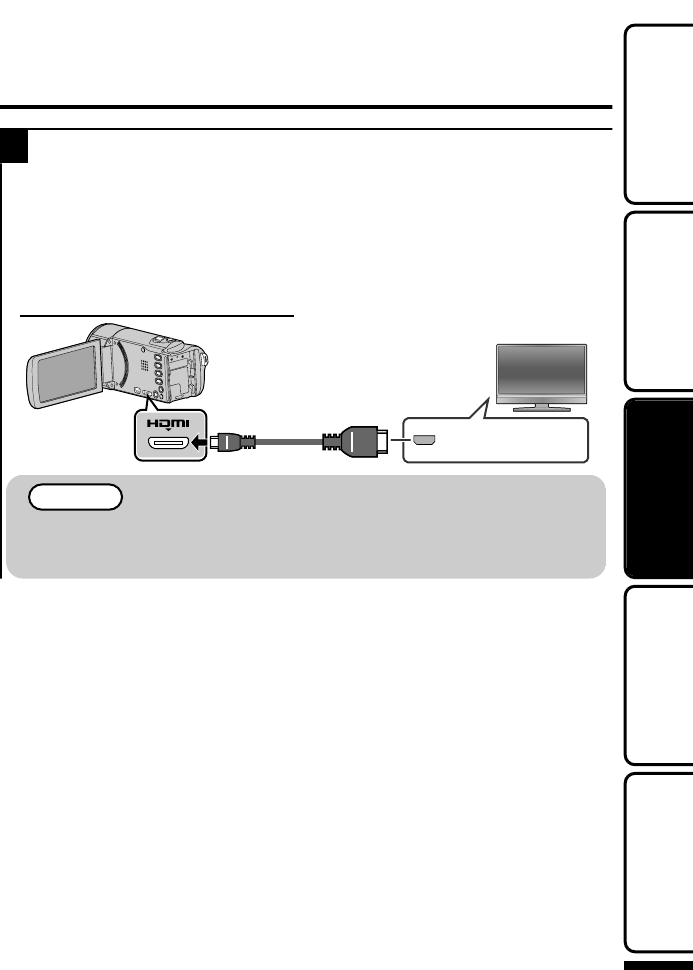
·ϿĽ·¹ÁÅÄ
1ÅÄÄ»¹ÊÊÅ·Ɣ
dž »¼»È·ÂÉÅÊÅʾ»¿ÄÉÊÈ˹ʿÅÄ÷ÄË·Âżʾ»¿ÄËÉ»Ɣ
ËÈÄż¼Ê¾»¹·Ã¹ÅȺ»È¸ÏÆÈ»ÉɿĽʾ»,¸ËÊÊÅļÅÈ·¸ÅËÊʹÉ»¹ÅĺÉƔ
4·ϿĽ¸·¹Á¿ÄÇ˷¿ÊÏ
¼ÏÅË·È»ËɿĽ·ÄƑÏÅ˹·ÄÆ·ϸ·¹Á¿ÄÇ˷¿ÊϸϹÅÄÄ»¹Ê¿Ä½ÊÅʾ»
¹ÅÄÄ»¹ÊÅÈƔ
ÅÄÄ»¹Ê¿Ä½ÊÅʾ»¹ÅÄÄ»¹ÊÅÈ
Ɣ
HDMI Connector
Input
TV
HDMI Cable
(Optional)
To HDMI Mini
Connector
ÅÈÇË»ÉÊ¿ÅÄÉ·¸ÅËÊʾ»ÅÈûʾźż¹ÅÄÄ»¹Ê¿ÅÄƑ¹ÅÄÊ·¹ÊÏÅËÈƠÉ
÷Ä˼·¹ÊËÈ»ÈƔ
É»·¿½¾Æ»»º·¸Â»·Éʾ»Ã¿Ä¿¹·¸Â»Ɣ
ÅÈÃÅÈ»¿Ä¼ÅÈ÷ʿÅÄƑÈ»¼»ÈÊÅʾ»»Ê·¿Â»ºÉ»ÈË¿º»
¾ÊÊÆƓƭƭ÷ÄË·ÂƔÀ̹Ɣ¹ÅƔÀÆƭ¿Äº»ÎƔ¾ÊÃÂƭ
»ÊʿĽʷÈÊ»º»¹ÅȺ¿Ä½Â·Ï¸·¹ÁÅÆϿĽ
ËÈʾ»È
ļÅÈ÷ʿÅÄ
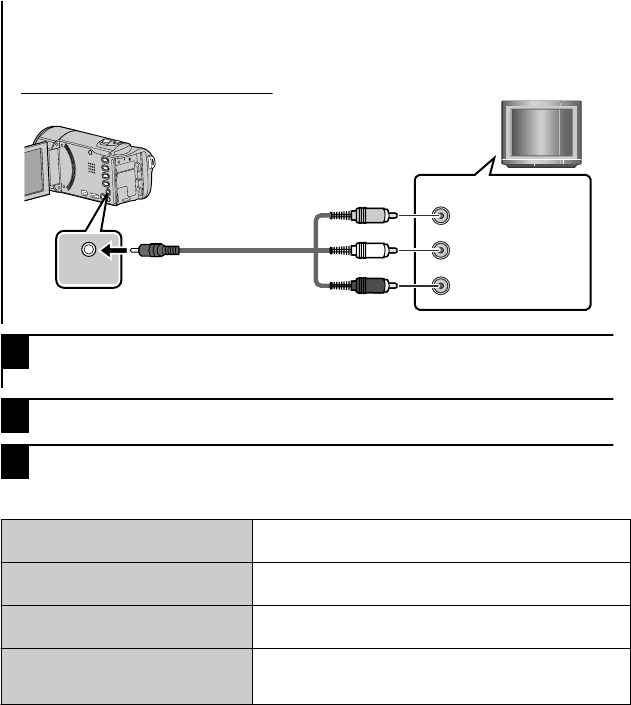
4·ϿĽ¸·¹Á¿ÄÉʷĺ·ÈºÇ˷¿ÊÏ
¼ÏÅË·È»ËɿĽ·¹ÅÄÌ»ÄÊ¿ÅÄ·ÂƑÏÅ˹·ÄÆ·ϸ·¹Á¿ÄÉʷĺ·ÈºÇ˷¿ÊϸϹÅÄÄ»¹Ê¿Ä½
ÊÅʾ»¹ÅÄÄ»¹ÊÅÈƔ
ÅÄÄ»¹Ê¿Ä½ÊÅʾ»¹ÅÄÄ»¹ÊÅÈ
Ɣ
AV Red
White
Ye l l o w
TV
Audio Input (R)
Audio Input (L)
Video Input
Video Input
AV Cable (Provided)
To AV Connector
2ÅÄÄ»¹Êʾ»·º·ÆÊ»ÈƔƺÆƔʿƻ
¾¿ÉËÄ¿ÊÆÅÍ»ÈÉÅÄ·ËÊÅ÷ʿ¹·ÂÂÏ;»Äʾ»·º·ÆʻȿɹÅÄÄ»¹Ê»ºƔ
3»Â»¹Êʾ»¿ÄÆËÊÉͿʹ¾Ɣ
4·ϸ·¹Á·¼¿Â»ƔƺÆƔʸʽƻ
4¾»Ä¿Ã·½»ÉÂÅÅÁËÄÄ·ÊËÈ·ÂÅÄʾ»
÷½»ÉºÅÄÅÊ·ÆÆ»·ÈÅÄʾ»
ÆÈÅÆ»ÈÂÏƔ
¿É¹ÅÄÄ»¹Êʾ»¹·¸Â»·Äº¹ÅÄÄ»¹Ê·½·¿ÄƔ
ËÈÄż¼·ÄºÅÄʾ¿ÉËÄ¿Ê·½·¿ÄƔ
÷½»É·È»ÆÈÅÀ»¹Ê»ºÌ»ÈÊ¿¹·ÂÂÏÅÄ
ʾ»Ɣ
»ÊơƢ¿Äʾ»ơƢƺ¸·É¿¹
É»ÊʿĽÉƻûÄËÊÅơʻƓʺƢƔ
÷½»É·È»ÆÈÅÀ»¹Ê»º¾ÅÈ¿ÐÅÄÊ·ÂÂÏ
ÅÄʾ»Ɣ
ºÀËÉÊʾ»ƠÉɹȻ»Ä·¹¹ÅȺ¿Ä½ÂÏƔ
¾»¹ÅÂÅÈż¿Ã·½»ÉÂÅÅÁÉÉÊȷĽ»Ɣ ¾»Äʾ»Ì¿º»ÅÍ·ÉÈ»¹ÅȺ»ºÍ¿Ê¾ơÎƔÌƔÅÂÅÈƢÉ»Ê
ÊÅơƢƑ¹¾·Ä½»Ê¾»É»ÊʿĽ·Éº»É¿È»ºÅÄƔ
ºÀËÉÊʾ»ƠÉɹȻ»Ä·¹¹ÅȺ¿Ä½ÂÏƔ
ÅÈÃÅÈ»¿Ä¼ÅÈ÷ʿÅÄƑÈ»¼»ÈÊÅʾ»»Ê·¿Â»ºÉ»ÈË¿º»
¾ÊÊÆƓƭƭ÷ÄË·ÂƔÀ̹Ɣ¹ÅƔÀÆƭ¿Äº»ÎƔ¾ÊÃÂƭ
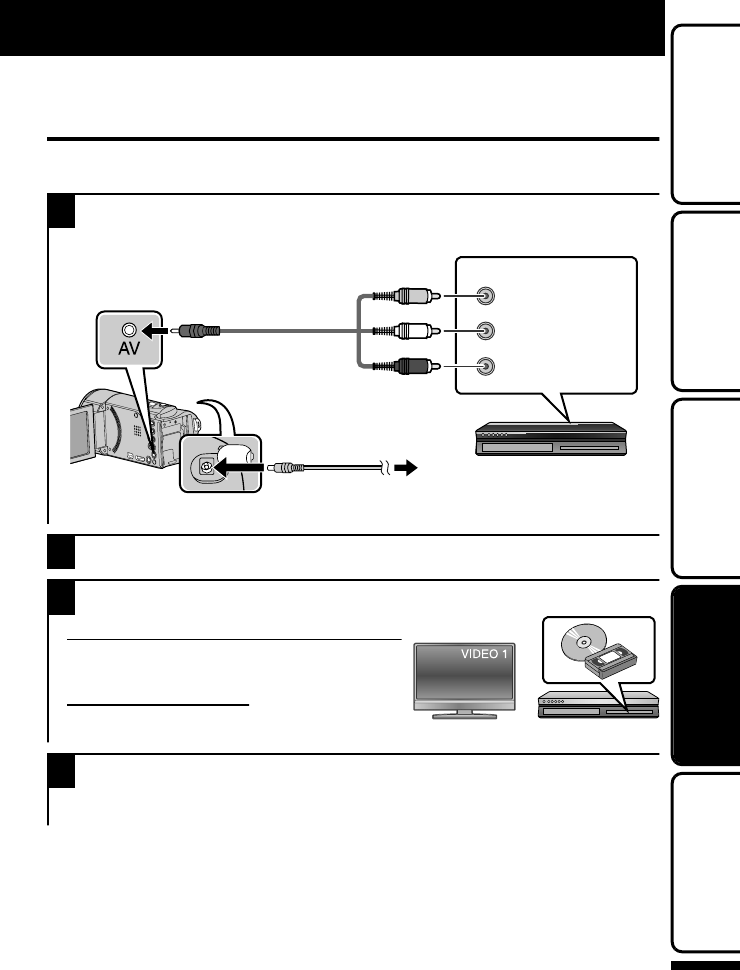
˸¸¿Ä½¿Â»É¸ÏÅÄÄ»¹Ê¿Ä½ÊÅ·
»¹ÅȺ»ÈÅÈ
Å˹·ÄºË¸Ì¿º»ÅÉ¿ÄÉʷĺ·ÈºÇ˷¿ÊϸϹÅÄÄ»¹Ê¿Ä½ÊÅ·È»¹ÅȺ»ÈÅÈƔ
»¼»È·ÂÉÅÊÅʾ»¿ÄÉÊÈ˹ʿÅÄ÷ÄË·ÂÉżʾ»ƑÈ»¹ÅȺ»ÈƑƑ»Ê¹Ɣ
1ÅÄÄ»¹ÊÊÅ·ƭÈ»¹ÅȺ»ÈƔ
ËÈÄż¼Ê¾»¹·Ã¹ÅȺ»È¸ÏÆÈ»ÉɿĽʾ»,¸ËÊÊÅļÅÈ·¸ÅËÊʹÉ»¹ÅĺÉƔ
Red
White
Ye l l o w
VCR/DVD Recorder
Audio Input (R)
Audio Input (L)
Video Input
Video Input
To DC Connector
To AC Outlet
(110 V to 240 V)
AC Adapter
AV Cable (Provided)
To AV Connector
¾¿ÉËÄ¿ÊÆÅÍ»ÈÉÅÄ·ËÊÅ÷ʿ¹·ÂÂÏ;»Äʾ»·º·ÆʻȿɹÅÄÄ»¹Ê»ºƔ
2·Æ+ÊÅɻ»¹Êʾ»Æ·ϸ·¹ÁÃź»Ɣ
3ȻƷȻÊÅÈ»¹ÅȺƔ
ȻƷȷʿÅÄÅķĺƭÈ»¹ÅȺ»È
Ϳʹ¾ÊÅ·¹ÅÃÆ·Ê¿¸Â»»ÎÊ»Èķ¿ÄÆËÊƔ
ÄÉ»ÈÊ·ƖÅÈÌ¿º»ÅÊ·Æ»Ɣ
ȻƷȷʿÅÄÅÄʾ¿ÉËÄ¿Ê
»ÊơƢ¿Äʾ»ơƢƺ¸·É¿¹
É»ÊʿĽÉƻûÄËÊÅʾ»·ÉÆ»¹ÊÈ·Ê¿ÅƺơʻƓʺƢÅÈơʸʽƓˀƢƻżʾ»¹ÅÄÄ»¹Ê¿Ä½Ɣ
4Ê·ÈÊÈ»¹ÅȺ¿Ä½Ɣ
Ê·ÈÊÆ·ϸ·¹ÁÅÄʾ¿ÉËÄ¿ÊƺÆƔʸʽƻ·ÄºÆÈ»ÉÉʾ»È»¹ÅȺ¸ËÊÊÅÄÅÄʾ»È»¹ÅȺ»ÈƔ
¼Ê»ÈÆ·ϸ·¹Á¿É¹ÅÃÆ»ʻƑÉÊÅÆʾ»È»¹ÅȺ¿Ä½Ɣ
ÅÆϿĽ
ÅÈÃÅÈ»¿Ä¼ÅÈ÷ʿÅÄƑÈ»¼»ÈÊÅʾ»»Ê·¿Â»ºÉ»ÈË¿º»
¾ÊÊÆƓƭƭ÷ÄË·ÂƔÀ̹Ɣ¹ÅƔÀÆƭ¿Äº»ÎƔ¾ÊÃÂƭ
»ÊʿĽʷÈÊ»º»¹ÅȺ¿Ä½Â·Ï¸·¹ÁÅÆϿĽ
ËÈʾ»È
ļÅÈ÷ʿÅÄ
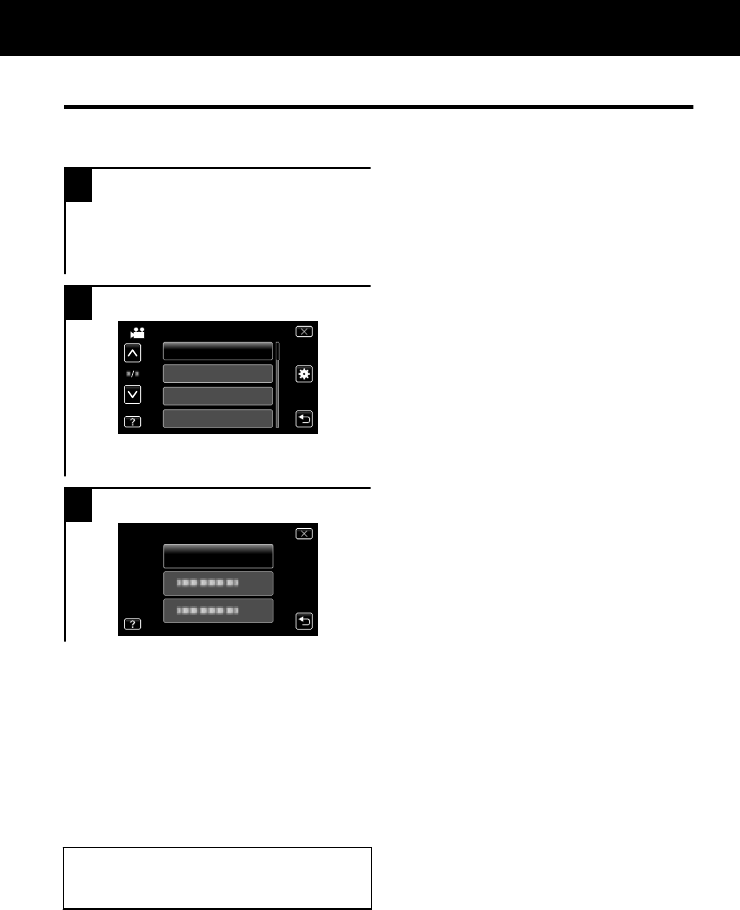
ƻȷʿĽʾ»»ÄË
Å˹·Ä¹Åļ¿½ËȻ̷ȿÅËÉÉ»ÊʿĽÉËɿĽʾ»
ûÄËƔ
1·ÆơƢƔ
¾»Ã»Ä˺¿¼¼»ÈÉ·¹¹ÅȺ¿Ä½ÊÅʾ»Ãź»
¿ÄËÉ»Ɣ
·ÆơƢÊź¿ÉÆ·Ïʾ»¼·¹»É¾ÅÈʹËÊ
ûÄËƔ
2·Æʾ»º»É¿È»ºÃ»ÄËƔ
Ɣ
BRIGHTNESS ADJUST
FOCUS
SCENE SELECT
VIDEO
WHITE BALANCE
·Æơ:ƢÊź¿ÉÆ·Ïʾ»ơƢƺ¸·É¿¹
É»ÊʿĽÉƻûÄËƔ
3·Æʾ»º»É¿È»ºÉ»ÊʿĽƔ
Ɣ
CLOCK ADJUST
CLOCK SETTING
4ŻοÊʾ»É¹È»»Ä
·ÆơƢƺÇË¿ÊƻƔ
4ÅÈ»ÊËÈÄÊÅʾ»ÆȻ̿ÅËÉɹȻ»Ä
·Æơ)ƢƺÈ»ÊËÈÄƻƔ
4ź¿ÉÆ·Ïʾ»¾»ÂƼ¿Â»
·Æơ*Ƣƺ¾»ÂÆƻ·ÄºÊ·Æʾ»Ã»ÄË¿Ê»ÃƔ
»ÂƼ¿Â»Ã·ÏÄÅʸ»·Ì·¿Â·¸Â»¼ÅÈÉÅû
¿Ê»ÃÉƔ
ÅÈÃÅÈ»¿Ä¼ÅÈ÷ʿÅÄÅÄʾ»
É»ÊʿĽÉƑÈ»¼»ÈÊÅʾ»»Ê·¿Â»ºÉ»È
Ë¿º»Ɣ
ËÈʾ»ÈļÅÈ÷ʿÅÄ
ÅÈÃÅÈ»¿Ä¼ÅÈ÷ʿÅÄƑÈ»¼»ÈÊÅʾ»»Ê·¿Â»ºÉ»ÈË¿º»
¾ÊÊÆƓƭƭ÷ÄË·ÂƔÀ̹Ɣ¹ÅƔÀÆƭ¿Äº»ÎƔ¾ÊÃÂƭ
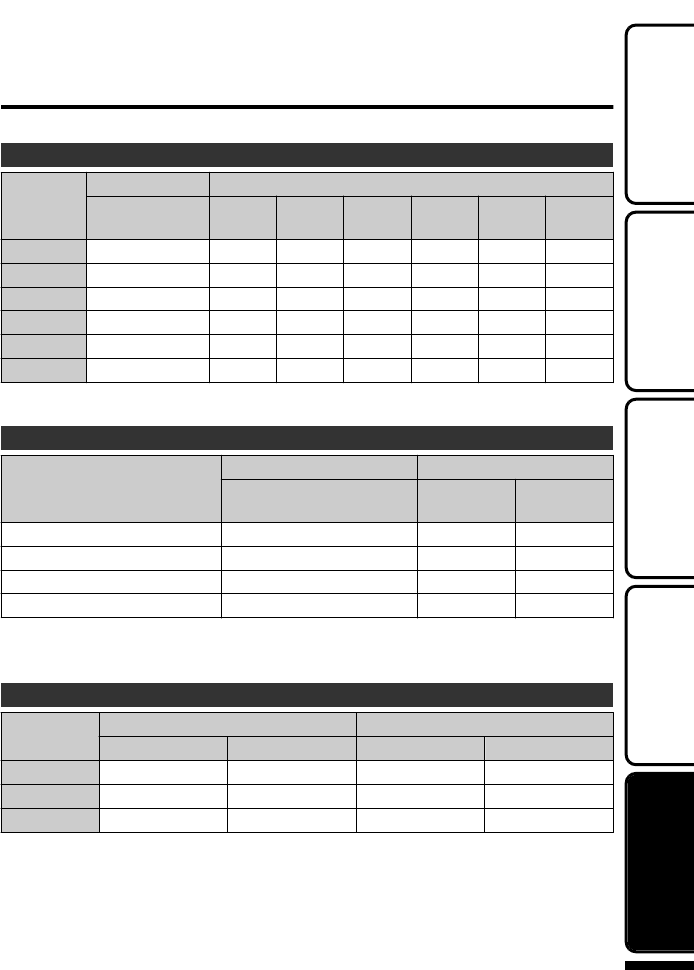
»¹ÅȺ·¸Â»¿Ã»ƭËø»Èż÷½»É
Å˹·Ä¹¾»¹Áʾ»Ì¿º»ÅÈ»¹ÅȺ¿Ä½Ê¿Ã»¸ÏÆÈ»ÉɿĽʾ»¸ËÊÊÅÄƔ
ÆÆÈÅο÷ʻ¿º»Å»¹ÅȺ¿Ä½¿Ã»
˷¿ÊÏ
Ë¿ÂÊƖ¿Ä»ÃÅÈÏ ƭ·Èº
Ɩʽʼʷ
ʿ
ʻ ʿ ʸʽ ʺʹ ʻʿ ʽʻ
ʻʷÃ ʹʷÃ ʻʷÃ ʸ¾ʹʷÃ ʹ¾ʼʷÃ ʻ¾ʹʷÃ ʼ¾ʼʷÃ
ʼʷÃ ʺʷÃ ʸ¾ ʹ¾ ʻ¾ʸʷÃ ʽ¾ʸʷÃ ʿ¾ʹʷÃ
ʸ¾ʹʷÃ ʻʷÃ ʸ¾ʹʷÃ ʹ¾ʼʷÃ ʼ¾ʼʷÃ ʿ¾ʻʷÃ ʸʸ¾ʼʷÃ
ʺ¾ʹʷÃ ʸ¾ʻʷÃ ʺ¾ʻʷÃ ʾ¾ʸʷÃ ʸʻ¾ʼʷÃ ʹʸ¾ʼʷÃ ʹˀ¾ʼʷÃ
ʹ¾ʺʷÃ ʸ¾ʹʷÃ ʹ¾ʼʷÃ ʼ¾ʻʷÃ ʸʸ¾ʺʷÃ ʸʾ¾ ʹʺ¾
ʼ¾ʹʷÃ ʹ¾ʼʷÃ ʼ¾ʼʷÃ ʸʸ¾ʻʷÃ ʹʺ¾ʼʷÃ ʺʼ¾ʸʷÃ ʻʾ¾ʻʷÃ
¾»·ÆÆÈÅο÷ʻȻ¹ÅȺ¿Ä½Ê¿Ã»¿ÉÅÄÂÏ·½Ë¿º»Ɣ¾»·¹ÊË·ÂÈ»¹ÅȺ¿Ä½Ê¿Ã»Ã·ÏɾÅÈÊ»Ä
º»Æ»Äº¿Ä½ÅÄʾ»É¾ÅÅʿĽ»ÄÌ¿ÈÅÄûÄÊƔ
ÆÆÈÅο÷ʻËø»ÈżʿÂÂ÷½»ÉƺÄ¿ÊƓËø»Èż¾ÅÊÉƻ
÷½»¿Ð»
Ë¿ÂÊƖ¿Ä»ÃÅÈÏ ·Èº
Ɩʽʼʷ
ʿ
ʻ ʿ
ʽʻʷ̍ʻʿʷƺʻƓʺƻ ˀˀˀˀ ˀˀˀˀ ˀˀˀˀ
ʸʻʻʷ̍ʸʷʿʷƺʻƓʺƻ ʿʿʷʷ ʻʺʷʷ ʿʿʷʷ
ʸˀʹʷ̍ʸʷʿʷƺʸʽƓˀƻ ʽʾʷʷ ʺʹʷʷ ʽʾʷʷ
ʹʻʷʷ̍ʸʺʻʻƺʸʽƓˀƻdž ʻʺʷʷ ʹʸʷʷ ʻʺʷʷ
dž Ɩʽʼʷ
ÆÊÅˀˀˀˀÉʿ¿÷½»É÷ϸ»È»¹ÅȺ»ºÅĹ·ÈºÉͿʾ·Ê»·ÉÊʺʹ¹·Æ·¹¿ÊÏ
ƺÈ»½·ÈºÂ»ÉÉż¿Ã·½»É¿Ð»ƻƔ
ÆÆÈÅο÷ʻ»¹ÅȺ¿Ä½¿Ã»ƺɿĽ·ÊÊ»ÈÏƻ
·ÊÊ»ÈÏ·¹Á ¹Ê˷»¹ÅȺ¿Ä½¿Ã» ÅÄÊ¿ÄËÅËÉ»¹ÅȺ¿Ä½¿Ã»
ƖʻʻʼƭƖʻʻʷ Ɩʽʼʷ ƖʻʻʼƭƖʻʻʷ Ɩʽʼʷ
Ɩʸʸʻ ʸ¾ʼÃ ʸ¾ʼÃ ʹ¾ ʸ¾ʼʼÃ
Ɩʸʹʸ ʸ¾ʻʷÃ ʸ¾ʺʼÃ ʺ¾ʼÃ ʹ¾ʼʼÃ
Ɩʸʺʿ ʺ¾ ʹ¾ʼʼÃ ʼ¾ʺʷÃ ʼ¾ʹʷÃ
¾»·¸ÅÌ»·È»Ì·ÂË»É;»ÄơƢ¿ÉÉ»ÊÊÅơƢ·ÄºơƢ
¿ÉÉ»ÊÊÅơʺƢƺÉʷĺ·ÈºƻƔ
¾»·¹ÊË·ÂÈ»¹ÅȺ¿Ä½Ê¿Ã»Ã·Ï¸»É¾ÅÈʻȿ¼ÐÅÅÿĽ¿ÉËÉ»ºÅÈ¿¼È»¹ÅȺ¿Ä½¿ÉÉÊÅÆÆ»º
Ȼƻ·Ê»ºÂÏƔƺÊ¿ÉÈ»¹ÅÃûĺ»ºÊÅÆȻƷȻ¸·ÊÊ»ÈÏÆ·¹ÁÉÈ»·ºÏ¼ÅÈʾȻ»Ê¿Ã»Éʾ»
»ÎÆ»¹Ê»ºÈ»¹ÅȺ¿Ä½Ê¿Ã»Ɣƻ
¾»Äʾ»¸·ÊÊ»ÈÏ¿¼»¿ÉÈ»·¹¾»ºƑʾ»È»¹ÅȺ¿Ä½Ê¿Ã»¸»¹ÅûÉɾÅÈʻȻ̻Ŀ¼Ê¾»¸·ÊÊ»ÈÏ
Æ·¹Á¿É¼ËÂÂϹ¾·È½»ºƔƺ»Æ·¹»Ê¾»¸·ÊÊ»ÈÏÆ·¹ÁͿʾ·Ä»ÍÅÄ»Ɣƻ
ÅÈÃÅÈ»¿Ä¼ÅÈ÷ʿÅÄƑÈ»¼»ÈÊÅʾ»»Ê·¿Â»ºÉ»ÈË¿º»
¾ÊÊÆƓƭƭ÷ÄË·ÂƔÀ̹Ɣ¹ÅƔÀÆƭ¿Äº»ÎƔ¾ÊÃÂƭ
»ÊʿĽʷÈÊ»º»¹ÅȺ¿Ä½Â·Ï¸·¹ÁÅÆϿĽ
ËÈʾ»È
ļÅÈ÷ʿÅÄ
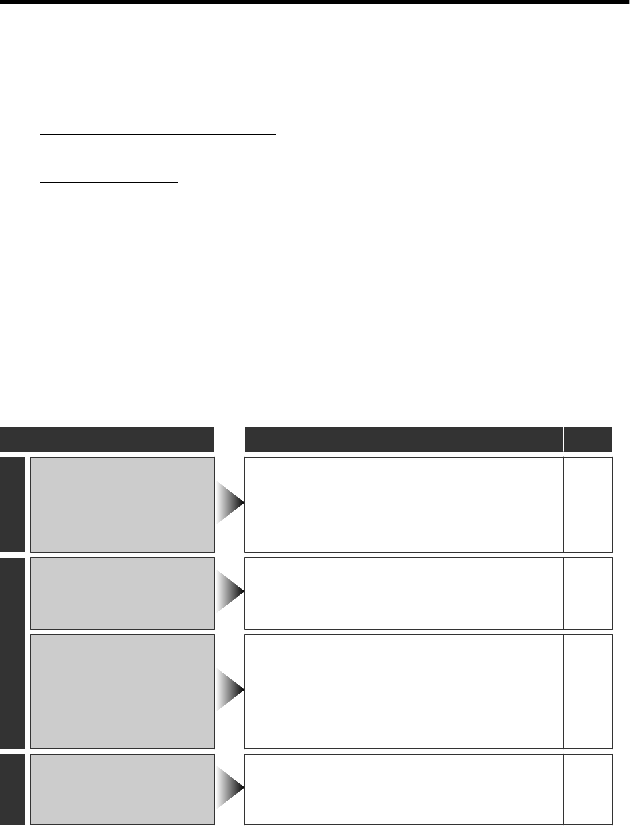
ÈÅ˸»ɾÅÅʿĽ
¼ÏÅ˻ĹÅËÄÊ»ÈÆÈŸ»ÃÉͿʾʾ¿ÉËÄ¿ÊƑ¹¾»¹Áʾ»¼ÅÂÂÅͿĽ¸»¼ÅȻȻÇË»ÉʿĽɻÈÌ¿¹»Ɣ
ʸ»¼»ÈÊÅơÈÅ˸»Ƣ¸»ÂÅÍƔ
ʹ»¼»ÈÊÅʾ»ơÈÅ˸»ɾÅÅʿĽƢÉ»¹Ê¿ÅÄ¿Äʾ»ơ»Ê·¿Â»ºÉ»ÈË¿º»ƢƔ
¼ÏÅ˾·Ì»º¿¼¼¿¹ËÂÊ¿»ÉÅƻȷʿĽʾ»ËÄ¿ÊƑÈ»¼»ÈÊÅʾ»º»Ê·¿Â»ºº»É¹È¿ÆÊ¿ÅÄÉ¿Äʾ»ơ»Ê·¿Â»º
É»ÈË¿º»ƢƔ
¾ÊÊÆƓƭƭ÷ÄË·ÂƔÀ̹Ɣ¹ÅƔÀÆƭ¿Äº»ÎƔ¾ÊÃÂƭ
ʺ»¼»ÈÊÅʾ»Å¼Ä»ÍÆÈź˹ÊÉÅÄƠÉÍ»¸É¿Ê»Ɣ
¾ÊÊÆƓƭƭÍÍÍƔÀ̹Ɣ¹ÅÃƭ
ʻ¾¿ÉËĿʿɷÿ¹ÈŹÅÃÆËÊ»ÈƖ¹ÅÄÊÈÅ»ºº»Ì¿¹»Ɣ»¹ÊÈÅÉÊ·Ê¿¹º¿É¹¾·È½»Ƒ»ÎÊ»ÈÄ·Â
ÄÅ¿É»·Äº¿Äʻȼ»È»Ä¹»ƺ¼ÈÅ÷Ƒ·È·º¿ÅƑ»Ê¹Ɣƻÿ½¾ÊÆȻ̻ÄʿʼÈÅüËĹʿÅĿĽ
ÆÈÅÆ»ÈÂÏƔ
ÄÉ˹¾·¹·É»ƑȻɻÊʾ»ËÄ¿ÊƔ
ËÈÄż¼Ê¾»ÆÅÍ»ÈƔƺÂÅɻʾ»ÃÅÄ¿ÊÅÈƔƻ
»ÃÅ̻ʾ»·º·Æʻȷ帷ÊÊ»ÈÏÆ·¹Á¼ÈÅÃʾ¿ÉËÄ¿ÊƑÈ»·ÊÊ·¹¾Ê¾»ÃƑÅÆ»Ä
ʾ»ÃÅÄ¿ÊÅȷĺʾ¿ÉËÄ¿ÊÆÅÍ»ÈÉÅÄ·ËÊÅ÷ʿ¹·ÂÂÏƔ
ʼ¼Ê¾»·¸ÅÌ»ºÅÄÅÊÉÅÂ̻ʾ»ÆÈŸ»ÃƑ¹ÅÄÉËÂÊÏÅËÈÄ»·È»Éʺ»·Â»ÈÅÈ
É»ÈÌ¿¹»¹»ÄÊ»ÈƔ
ÈÅ˸»
ÈÅ˸» ¹Ê¿ÅÄ ·½»
ÅÍ»È
ƭ
·ÃÆÉÊ·ÈÊɸ¿ÄÁ¿Ä½
;»Äʾ»ÃÅÄ¿ÊÅÈ¿É
¹ÂÅÉ»ºƔ
¾»¸·ÊÊ»ÈÏÆ·¹Á¿É¸»¿Ä½¹¾·È½»ºƔ ʿ
»¹ÅȺ¿Ä½
»¹ÅȺ¿Ä½¹·ÄÄÅʸ»
ƻȼÅÈûºƔ
¾»¹Áʾ»ƭ¸ËÊÊÅÄƔ ʸʻ
»ÊÊÅʾ»È»¹ÅȺ¿Ä½Ãź»¸ÏÊ·ÆƿĽʾ»
;¸ËÊÊÅÄÅÄʾ»É¹È»»ÄƔ
ʸʽ
»¹ÅȺ¿Ä½ÉÊÅÆÉ
·ËÊÅ÷ʿ¹·ÂÂÏƔ
ËÈÄż¼Ê¾¿ÉËÄ¿ÊƑÍ·¿Ê¼Åȷ;¿Â»Ƒ·ÄºÊËÈÄ
¿ÊÅÄ·½·¿ÄƔƺ¾¿ÉËÄ¿ÊÉÊÅÆÉ·ËÊÅ÷ʿ¹·ÂÂÏ
ÊÅÆÈÅÊ»¹Êʾ»¹¿È¹Ë¿Ê;»Äʾ»
Ê»ÃƻȷÊËȻȿɻÉƔƻ
Ɩ
»¹ÅȺ¿Ä½ÉÊÅÆÉ·ËÊÅ÷ʿ¹·ÂÂÏ·¼Ê»Èʸʹ
¾ÅËÈÉż¹ÅÄÊ¿ÄËÅËÉÈ»¹ÅȺ¿Ä½Ɣ Ɩ
·ϸ·¹Á
ÅËĺÅÈÌ¿º»Å¿É
¿ÄÊ»ÈÈËÆÊ»ºƔ
ÅûʿûÉÆ·ϸ·¹Á¿É¿ÄÊ»ÈÈËÆÊ»º·Êʾ»
¹ÅÄÄ»¹Ê¿Ä½É»¹Ê¿Åĸ»ÊÍ»»ÄÊÍÅɹ»Ä»ÉƔ
¾¿É¿ÉÄÅʷ÷¼ËĹʿÅÄƔ
Ɩ
ÅÈÃÅÈ»¿Ä¼ÅÈ÷ʿÅÄƑÈ»¼»ÈÊÅʾ»»Ê·¿Â»ºÉ»ÈË¿º»
¾ÊÊÆƓƭƭ÷ÄË·ÂƔÀ̹Ɣ¹ÅƔÀÆƭ¿Äº»ÎƔ¾ÊÃÂƭ
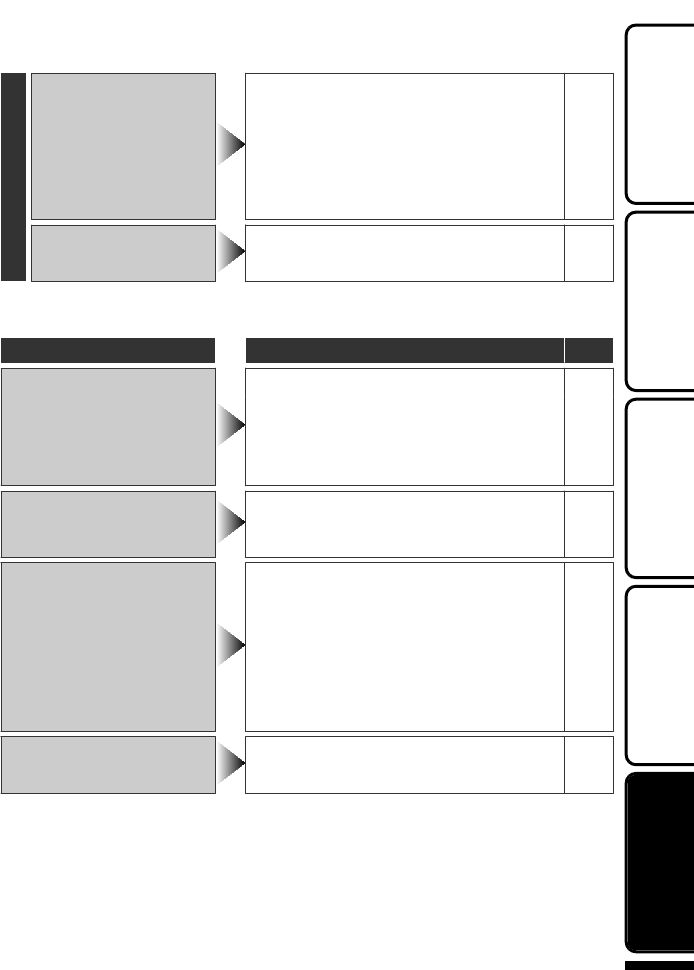
ʾ»ÈÆÈŸ»ÃÉ
¾»Â·ÃƺŻÉÄÅʼ·ɾ
ºËȿĽ¸·ÊÊ»ÈÏÆ·¹Á
¹¾·È½¿Ä½Ɣ
¾»¹Áʾ»È»Ã·¿Ä¿Ä½¸·ÊÊ»ÈÏÆÅÍ»ÈƔ
ƺ¾»Äʾ»¸·ÊÊ»ÈÏÆ·¹Á¿É¼ËÂÂϹ¾·È½»ºƑ
ʾ»Â·ÃƺŻÉÄÅʼ·ɾƔƻ
ʸʻ
¾»Ä¹¾·È½¿Ä½¿Ä»¿Ê¾»È·¾ÅÊÅȹź
»ÄÌ¿ÈÅÄûÄÊƑ»ÄÉËȻʾ·Ê¸·ÊÊ»ÈϿɸ»¿Ä½
¹¾·È½»ºÍ¿Ê¾¿Äʾ»Æ»ÈÿÊÊ»ºÊ»ÃƻȷÊËÈ»
ȷĽ»Ɣƺʾ»ÈÍ¿É»Ƒ¹¾·È½¿Ä½Ã·ÏÉÊÅÆÊÅ
ÆÈÅÊ»¹Êʾ»¸·ÊÊ»ÈÏÆ·¹ÁƔƻ
ʿ
¾¿ÉËĿʾ»·ÊÉËÆƔ ¾¿É¿ÉÄÅʷ÷¼ËĹʿÅÄƔƺ¾¿ÉËÄ¿Ê÷Ï
¸»¹ÅûͷÈÃ;»ÄËÉ»º¼ÅÈ·ÂÅĽʿûƔƻ Ɩ
·ÈĿĽĺ¿¹·Ê¿ÅÄÉ
·ÈĿĽĺ¿¹·Ê¿ÅÄÉ ¹Ê¿ÅÄ ·½»
·ÈĿĽĺ¿¹·Ê¿ÅÄÉ
ËÈÄż¼·ÄºÅÄʾ¿ÉËÄ¿Ê·½·¿ÄƔ Ɩ
¼Ê¾»·¸ÅÌ»ºÅ»ÉÄÅÊÉÅÂ̻ʾ»ÆÈŸ»ÃƑ¸·¹ÁËÆ
ÏÅËȼ¿Â»É·Äº»Î»¹ËÊ»ơƖ
ƔƢÅÈơƢ¿Äʾ»
ơƢƺ¸·É¿¹É»ÊʿĽÉƻûÄËƔƺº·Ê·Í¿ÂÂ
¸»º»Â»Ê»ºƔƻ
Ɩ
¾»ÄʿûƖ·ÆɻȻ¹ÅȺ¿Ä½¿ÉÉÊÅÆÆ»ºÍ¿Ê¾Ê¾»
È»¹ÅȺ»ºÊ¿Ã»Â»ÉÉʾ·ÄơʷƓʷʷƓʷʷƓʸʻƢƑʾ»Ì¿º»Å
Í¿ÂÂÄÅʸ»É·Ì»ºƔ
Ɩ
ƖƘƭ
Ƙ
ËÈÄż¼·ÄºÅÄʾ¿ÉËÄ¿Ê·½·¿ÄƔ Ɩ
»ÃÅ̻ʾ»·º·Æʻȷ帷ÊÊ»ÈÏÆ·¹ÁƑʾ»Ä
È»ÃÅÌ»·ÄºÈ»Ɩ¿ÄÉ»ÈÊʾ»¹·ÈºƔ Ɩ
»ÃÅÌ»·ÄϺ¿ÈʼÈÅÃʾ»¹·ÈºÊ»ÈÿķÂÉƔ Ɩ
¼Ê¾»·¸ÅÌ»ºÅ»ÉÄÅÊÉÅÂ̻ʾ»ÆÈŸ»ÃƑ¸·¹ÁËÆ
ÏÅËȼ¿Â»É·Äº»Î»¹ËÊ»ơƖ
ƔƢÅÈơƢ¿Äʾ»
ơƢƺ¸·É¿¹É»ÊʿĽÉƻûÄËƔƺº·Ê·Í¿ÂÂ
¸»º»Â»Ê»ºƔƻ
Ɩ
ÆÆ»·ÈɼÅÈʼÉ»¹Åĺɷ¼Ê»ÈÆÅͻȿÉÊËÈÄ»ºÅÄ¿¼
ʾ»Â»ÄɹÅ̻ȿɹÂÅÉ»ºÅÈ;»Ä¿Ê¿Éº·ÈÁƔ Ɩ
ÅÈÃÅÈ»¿Ä¼ÅÈ÷ʿÅÄƑÈ»¼»ÈÊÅʾ»»Ê·¿Â»ºÉ»ÈË¿º»
¾ÊÊÆƓƭƭ÷ÄË·ÂƔÀ̹Ɣ¹ÅƔÀÆƭ¿Äº»ÎƔ¾ÊÃÂƭ
»ÊʿĽʷÈÊ»º»¹ÅȺ¿Ä½Â·Ï¸·¹ÁÅÆϿĽ
ËÈʾ»È
ļÅÈ÷ʿÅÄ
·ËÊ¿ÅÄÉ
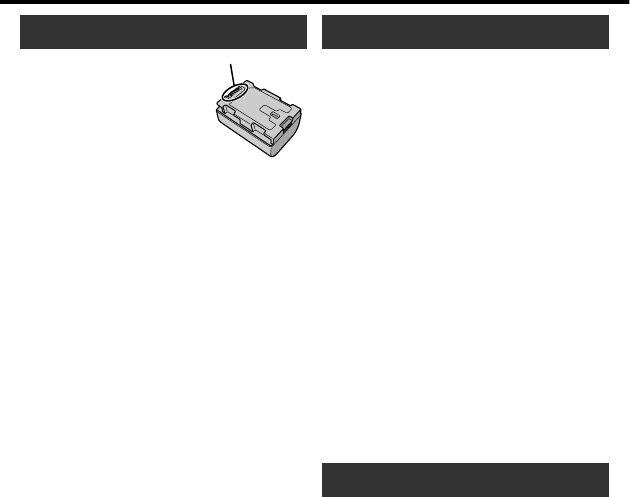
Battery Pack
The supplied battery pack is a
lithium-ion battery. Before using
the supplied battery pack or an
optional battery pack, be sure
to read the following cautions:
•
To avoid hazards
...
do not burn.
...
do not short-circuit the terminals. Keep it away
from metallic objects when not in use. When
transporting, carry the battery in a plastic bag.
...
do not modify or disassemble.
...
do not expose the battery to temperatures
exceeding 60°C, as this may cause the
battery to overheat, explode or catch fire.
... use only specified chargers.
•
To prevent damage and prolong service life
... do not subject to unnecessary shock.
... charge within the temperature range of 10°C
to 35°C. Cooler temperatures
require longer charging time, or in some cases
stop charging at all.
Warmer temperatures prevent complete
charging, or in some cases stop charging at all.
... store in a cool, dry place. Extended exposure
to high temperatures will increase natural
discharge and shorten service life.
... keep a 30% battery level (
X
) if the battery pack
is not to be used for a long period of time.
In addition, fully charge and then fully discharge
the battery pack every 2 months, then continue
to store it at a 30% battery level (
X
).
... remove from charger or powered unit when not
in use, as some machines use current even
when switched off.
... do not drop or subject to strong impact.
Recording Medium
•
Be sure to follow the guidelines below
to prevent corruption or damage to your
recorded data.
•
Do not bend or drop the recording medium,
or subject it to strong pressure, jolts or
vibrations.
•
Do not splash the recording medium with water.
•
Do not use, replace, or store the recording
medium in locations that are exposed to
strong static electricity or electrical noise.
•
Do not turn off the camcorder power or
remove the battery or AC adapter during
shooting, playback, or when otherwise
accessing the recording medium.
•
Do not bring the recording medium near
objects that have a strong magnetic field or
that emit strong electromagnetic waves.
•
Do not store the recording medium in
locations with high temperature or high humidity.
•
Do not touch the metal parts.
•
When formatting or erasing data using
the camcorder, only the file administration
information is changed. The data is not
completely erased from the recording medium.
If you want to completely erase all of the data,
we recommend either using commercially
available software that is specially designed for
that purpose, or by physically destroying the
camcorder with a hammer etc.
LCD Monitor
•
To prevent damage to the LCD monitor,
DO NOT
... push it strongly or apply any shocks.
... place the camcorder with LCD monitor on the
bottom.
•
To prolong service life
... avoid rubbing it with coarse cloth.
Terminals
ÅÈÃÅÈ»¿Ä¼ÅÈ÷ʿÅÄƑÈ»¼»ÈÊÅʾ»»Ê·¿Â»ºÉ»ÈË¿º»
¾ÊÊÆƓƭƭ÷ÄË·ÂƔÀ̹Ɣ¹ÅƔÀÆƭ¿Äº»ÎƔ¾ÊÃÂƭ
Main Unit •To prevent the unit from dropping,
•Fasten the grip belt securely.
•When using the camcorder with a tripod,
attach the camcorder to the tripod securely.
If the camcorder drops, you may be injured
and the camcorder may be damaged.
When a child uses the unit, there must be
parental guidance.
•For safety, DO NOT
... open the camcorder’s chassis.
... disassemble or modify the unit.
...
...
...
...
...
...
...
allow inflammables, water or metallic objects
to enter the unit.
remove the battery pack or disconnect the
power supply while the power is on.
leave the battery pack attached when the
camcorder is not in use.
place naked fl ame sources, such as lighted
candles, on the apparatus.
expose the apparatus to dripping or splashing.
leave dust or metal objects adhered to the
power plug or an AC wall outlet.
insert any objects in the camcorder.
•Avoid using the unit
... in places subject to excessive humidity or dust.
... in places subject to soot or steam such as near
a cooking stove.
... in places subject to excessive shock or
vibration.
... near a television set.
... near appliances generating strong magnetic
or electric fields (speakers, broadcasting
antennas, etc.).
... in places subject to extremely high (over 40°C)
or extremely low (under 0°C)
temperatures.
•DO NOT leave the unit
... in places of over 50°C .
... in places where humidity is extremely low
(below 35 %) or extremely high (above 80 %).
... in direct sunlight.
... in a closed car in summer.
... near a heater.
... in high places such as on a TV. Leaving the unit
in high places while a cable is connected may
result in a malfunction if the cable is caught and
the unit falls onto the floor.
•To protect the unit, DO NOT
... allow it to become wet.
... drop the unit or strike it against hard objects.
... subject it to shock or excessive vibration during
transportation.
... keep the lens directed at extremely bright
objects for long periods.
... expose the lens to direct sunlight.
... swing it excessively when using the hand strap.
... swing the soft camera case excessively when
the camera is inside it.
... store the camcorder in a dusty or sandy area.
Dear Customer, [European Union]
This apparatus is in conformance with the valid
European directives and standards regarding
electromagnetic compatibility and electrical
safety.
European representative of Victor Company of
Japan, Limited is:
JVC Technical Services Europe GmbH
Postfach 10 05 04
61145 Friedberg
Germany
Remember that this unit is intended for
private consumer use only.
Any commercial use without proper permission
is prohibited. (Even if you record an event such
as a show, performance or exhibition for personal
enjoyment, it is strongly recommended that you
obtain permission beforehand.)
Trademarks
•"AVCHD", "AVCHD" logo, "AVCHD Lite" and
"AVCHD Lite" logo are trademarks of Panasonic
Corporation and Sony Corporation.
•x.v.Colour™ is a trademark of
Sony Corporation.
•
HDMI™
is a trademark of HDMI
Licensing, LLC.
•Manufactured under license from Dolby
Laboratories. Dolby and the double-D symbol
are trademarks of Dolby Laboratories.
•Windows® is either registered trademark or
trademark of Microsoft Corporation in the
United States and/or other countries.
•Macintosh is a registered trademark of Apple Inc.
•iMovie and iPhoto are trademarks of Apple Inc.,
registered in the U.S. and other countries.
•YouTube™ and the YouTube logo are
trademarks and/or registered trademarks of
YouTube LLC.
•
Intel, Intel Core, and Pentium are trademarks or
registered trademarks of Intel Corporation or its
subsidiaries in the United States and other countries.
•Eye-Fi is a trademark of Eye-Fi, Inc.
•
Other product and company names included in
this instruction manual are trademarks and/or
registered trademarks of their respective holders.
ÅÈÃÅÈ»¿Ä¼ÅÈ÷ʿÅÄƑÈ»¼»ÈÊÅʾ»»Ê·¿Â»ºÉ»ÈË¿º»
¾ÊÊÆƓƭƭ÷ÄË·ÂƔÀ̹Ɣ¹ÅƔÀÆƭ¿Äº»ÎƔ¾ÊÃÂƭ
»ÊʿĽʷÈÊ»º»¹ÅȺ¿Ä½Â·Ï¸·¹ÁÅÆϿĽ
ËÈʾ»È
ļÅÈ÷ʿÅÄ
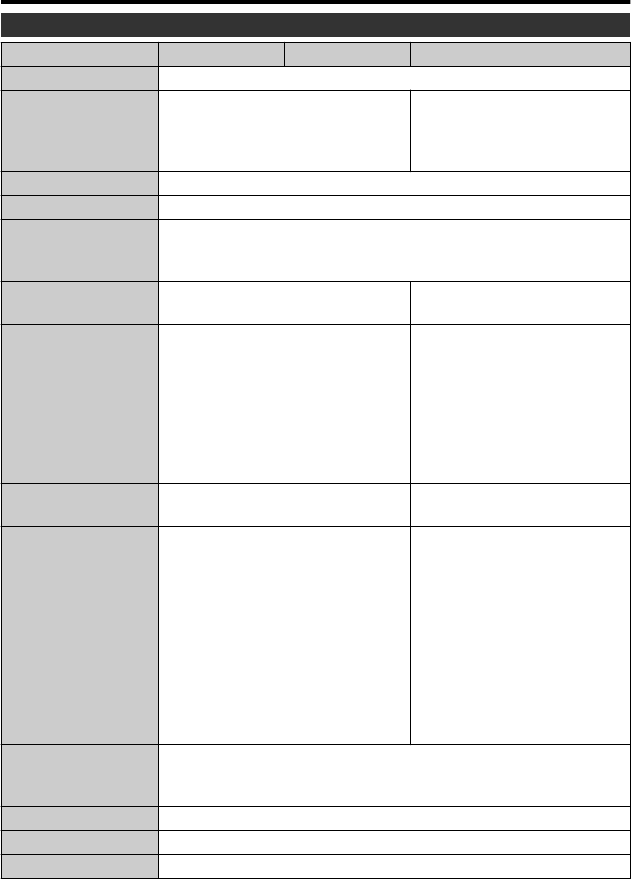
Æ»¹¿¼¿¹·Ê¿ÅÄÉ
·Ã»È·
ź»Â·Ã» Ɩʻʻʷ Ɩʻʻʼ Ɩʽʼʷ
ÅÍ»ÈÉËÆÆÂÏ É¿Ä½·º·ÆÊ»ÈƓʼƔʹƑɿĽ¸·ÊÊ»ÈÏÆ·¹ÁƓʺƔʼƖʺƔʽ
ÅͻȹÅÄÉËÃÆÊ¿ÅÄ ʹƔʺƺ;»ÄơƢ¿É
É»ÊÊÅơʺƢƺÉʷĺ·Èºƻƻ
ʹƔʼƺ;»ÄơƢ¿É
É»ÊÊÅơʻƢƺ¸È¿½¾Ê»Èƻƻ
ʹƔʻƺ;»Äơ
Ƣ¿ÉÉ»ÊÊÅơʺƢƺÉʷĺ·Èºƻƻ
ʹƔʽƺ;»Äơ
Ƣ¿ÉÉ»ÊÊÅơʻƢƺ¸È¿½¾Ê»Èƻƻ
¿Ã»ÄÉ¿ÅÄÉƺÎÎƻ ʼʸÃÃÎʼʼÃÃÎʸʸʸÃÃƺÎÎƓ»Î¹Â˺¿Ä½½È¿Æ¸»ÂÊƻ
·ÉÉ ÆÆÈÅÎƔʸˀʼ½ƺ¹·Ã»È·ÅÄÂÏƻƑÆÆÈÅÎƔʹʺʼ½ƺ¿Ä¹Â˺¿Ä½ÉËÆÆ¿»º¸·ÊÊ»ÈÏÆ·¹Áƻ
ƻȷʿĽ»ÄÌ¿ÈÅÄûÄÊ ÂÂÅÍ·¸Â»ÅƻȷʿĽʻÃƻȷÊËÈ»ƓʷͮÊÅʻʷͮ
ÂÂÅÍ·¸Â»ÉÊÅÈ·½»Ê»ÃƻȷÊËÈ»ƓƖʹʷͮÊÅʼʷͮ
ÂÂÅÍ·¸Â»È»Â·Ê¿Ì»¾Ëÿº¿ÊÏƓʺʼ̈ÊÅʿʷ̈
÷½»Æ¿¹ÁËƺ»Ì¿¹» ʸƭʼƔʿͲʸƑʼʷʷƑʷʷʷƿλÂÉƺÆÈŽȻÉÉ¿Ì»ƻ ʸƭʻƔʸͲʺƑʺʹʷƑʷʷʷƿλÂÉƺÆÈŽȻÉÉ¿Ì»
ƻ
»¹ÅȺ¿Ä½·È»·ƺ¿º»Åƻ ƺƭƭƭƻ
ʽʺʷƑʷʷʷÊÅʸƑʷʼʷƑʷʷʷƿλÂÉƺƻ
ʽʺʷƑʷʷʷÊÅʸƑʹʼʷƑʷʷʷƿλÂÉƺƻ
ƺƭƻ
ʺʻʷƑʷʷʷÊÅʸƑʷʼʷƑʷʷʷƿλÂÉƺºÏķÿ¹ÐÅÅÃ
ƻ
ʽʺʷƑʷʷʷÊÅʸƑʷʼʷƑʷʷʷƿλÂÉƺºÏķÿ¹ÐÅÅÃ
ƻ
ƺƭƭƭƻ
ʸƑʹʹʷƑʷʷʷƿλÂÉƺƻ
ʸƑʻʻʷƑʷʷʷƿλÂÉƺƻ
ƺƭƻ
ʺˀʷƑʷʷʷÊÅʸƑʹʹʷƑʷʷʷƿλÂÉƺºÏķÿ¹
ÐÅÅÃƻ
ʸƑʹʹʷƑʷʷʷƿλÂÉƺºÏķÿ¹ÐÅÅÃƻ
»¹ÅȺ¿Ä½·È»·ƺÊ¿ÂÂ
¿Ã·½»ƻ
ƺʻƓʺƻʻʾʷƑʷʷʷÊÅˀʺʷƑʷʷʷƿλÂÉ
ƺʸʽƓˀƻʽʺʷƑʷʷʷÊÅʸƑʹʼʷƑʷʷʷƿλÂÉ
ƺʻƓʺƻʸƑʷʿʷƑʷʷʷƿλÂÉ
ƺʸʽƓˀƻʸƑʻʻʷƑʷʷʷƿλÂÉ
»ÄÉ ʸƔʿƖʽƔʺƑ¼̏ʹƔˀÃÃÊÅʸʸʽƔʷÃÃ
ƺƭƭƭƻ
ʺʼÃùÅÄÌ»ÈÉ¿ÅÄƓʻʼƔʽÃÃÊÅʸƑʿʹʻÃÃ
ƺƻ
ʺʼÃùÅÄÌ»ÈÉ¿ÅÄƓʻʹƔʷÃÃÊÅʸƑʽʿʷÃÃ
ƺƻ
ƺƭƻ
ʺʼÃùÅÄÌ»ÈÉ¿ÅÄƓʻʼƔʽÃÃÊÅʺƑʸʿʹÃÃ
ƺºÏķÿ¹ÐÅÅÃƻ
ʺʼÃùÅÄÌ»ÈÉ¿ÅÄƓʻʼƔʽÃÃÊÅʸƑʿʹʻÃÃ
ƺºÏķÿ¹ÐÅÅÃƻ
ʸƔʿƖʽƔʺƑ¼̏ʹƔˀÃÃÊÅʸʸʽƔʷÃÃ
ƺƭƭƭƻ
ʺʼÃùÅÄÌ»ÈÉ¿ÅÄƓʻʼƔʷÃÃÊÅ
ʸƑʿʷʷÃÃƺƻ
ʺʼÃùÅÄÌ»ÈÉ¿ÅÄƓʻʸƔʻÃÃÊÅ
ʸƑʽʼʽÃÃƺƻ
ƺƭƻ
ʺʼÃùÅÄÌ»ÈÉ¿ÅÄƓʻʼƔʷÃÃÊÅ
ʺƑʸʼʷÃÃƺºÏķÿ¹ÐÅÅÃƻ
ʺʼÃùÅÄÌ»ÈÉ¿ÅÄƓʻʼƔʷÃÃÊÅ
ʸƑʿʷʷÃÃƺºÏķÿ¹ÐÅÅÃƻ
ÅÅÃƺ¿º»Åƻ ÆÊ¿¹·ÂÐÅÅÃƓÆÊÅʻʷÎ
Ïķÿ¹ÐÅÅÃƓÆÊÅʾʷÎƺƭƻ
¿½¿Ê·ÂÐÅÅÃƓÆÊÅʹʷʷÎ
ÅÅÃƺʿ¿÷½»ƻ ÆÊ¿¹·ÂÐÅÅÃƓÆÊÅʻʷÎ
¿º»ÅÈ»¹ÅȺ¿Ä½¼ÅÈÃ·Ê Éʷĺ·ÈºƑ¿º»ÅƓƭƔʹʽʻƑ˺¿ÅƓŸϿ½¿Ê·Âƺʹ¹¾ƻ
ʿ¿÷½»È»¹ÅȺ¿Ä½¼ÅÈÃ·Ê Éʷĺ·Èº
ÅÈÃÅÈ»¿Ä¼ÅÈ÷ʿÅÄƑÈ»¼»ÈÊÅʾ»»Ê·¿Â»ºÉ»ÈË¿º»
¾ÊÊÆƓƭƭ÷ÄË·ÂƔÀ̹Ɣ¹ÅƔÀÆƭ¿Äº»ÎƔ¾ÊÃÂƭ
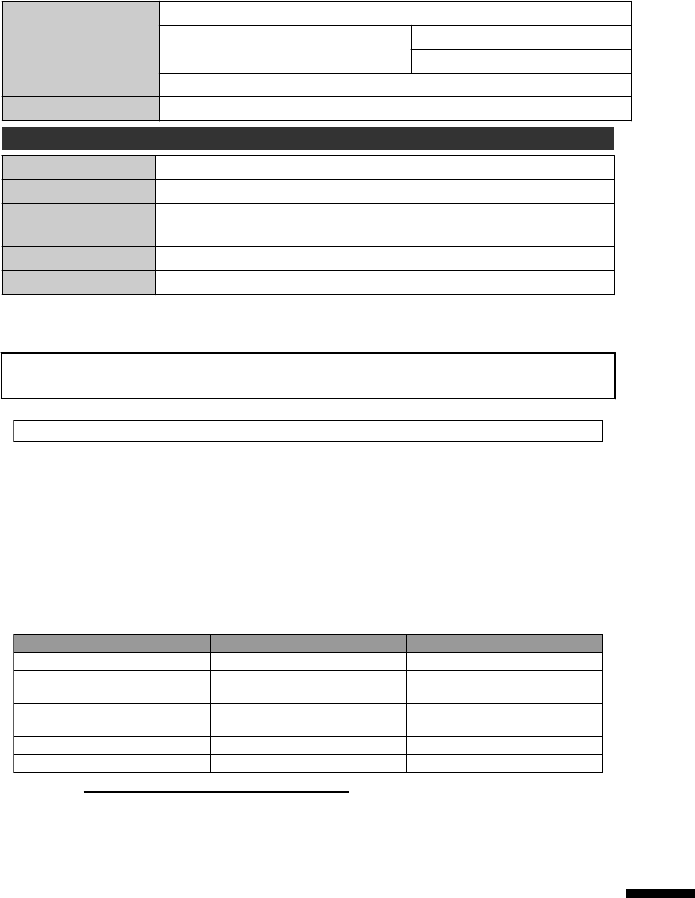
»¹ÅȺ¿Ä½»º¿· ƭƭ¹·Èºƺ¹ÅÃûȹ¿·ÂÂÏ·Ì·¿Â·¸Â»ƻ
Ë·ÂÉÂÅÊ Ë¿ÂÊƖ¿ÄûÃÅÈÏ
ʿ
Ï»Ɩ¿¹·Èºƺ¹ÅÃûȹ¿·ÂÂÏ·Ì·¿Â·¸Â»ƻ
ÂŹÁ¸·ÊÊ»ÈÏ »¹¾·È½»·¸Â»¸·ÊÊ»ÈÏ
º·ÆÊ»ÈƺƖʸʷƻdž
ÅÍ»ÈÉËÆÆÂÏ ʸʸʷÊÅʹʻʷƑʼʷÐƭʽʷÐ
ËÊÆËÊ ʼƔʹƑʸ
ÂÂÅÍ·¸Â»ÅƻȷʿĽ
Ê»ÃƻȷÊËÈ»
ʷͮÊÅʻʷͮƺʸʷͮÊÅʺʼͮºËȿĽ¹¾·È½¿Ä½ƻ
¿Ã»ÄÉ¿ÅÄÉƺÃÃƻ ʿʺÎʹʿÎʻʷƺÎÎƓ»Î¹Â˺¿Ä½¹ÅȺ·ÄºÆÂ˽ƻ
·ÉÉ ÆÆÈÅÎƔʾʾ½
dž ¾»ÄËɿĽʾ»·º·ÆÊ»ÈÅÌ»ÈÉ»·ÉƑÆ»·É»ÆȻƷȻ·¹ÅÃûȹ¿·ÂÂÏ·Ì·¿Â·¸Â»
¹ÅÄÌ»ÈÊ»ÈÆÂ˽¼ÅÈʾ»¹ÅËÄÊÈÏÅÈÈ»½¿ÅÄż̿ɿÊƔ
¾»ÉÆ»¹¿¼¿¹·Ê¿ÅÄɷĺ·ÆÆ»·È·Ä¹»Å¼Ê¾¿ÉÆÈź˹ʷȻÉ˸À»¹ÊÊŹ¾·Ä½»É¼ÅÈ
¼ËÈʾ»È¿ÃÆÈÅ̻ûÄÊͿʾÅËÊÆÈ¿ÅÈÄÅÊ¿¹»Ɣ
Customer Support Information
Use of this software is authorized according to the terms of the software license.
JVC (for inquires regarding this unit)
When contacting the nearest JVC office or agency in your country (refer to the JVC Worldwide Service
Network at http://www.jvc-victor.co.jp/english/worldmap/index-e.html) about this software, please have the
following information ready.
• Product Name, Model, Serial Number, Problem, Error Message
•
Computer (Manufacturer, Model (Desktop/Laptop), CPU, OS, Memory (MB/GB), Available Hard Disk Space (GB))
Please note that it may take some time to respond to your questions, depending on their subject matter.
JVC cannot answer questions regarding basic operation of your computer, or questions regarding specifications
or performance of the OS, other applications or drivers.
Pixela (for inquires regarding the provided software)
Region Language Phone #
USA and Canada English +1-800-458-4029 (toll-free)
Europe (UK, Germany, France,
and Spain) English/German/French/Spanish +800-1532-4865 (toll-free)
Other Countries in Europe English/German/French/Spanish +44-1489-564-764
Asia (Philippines) English +63-2-438-0090
nihCanihC ese 10800-163-0014 (toll-free)
Homepage: http://www.pixela.co.jp/oem/jvc/mediabrowser/e/
Please check our website for latest information and downloading.
ÅÈÃÅÈ»¿Ä¼ÅÈ÷ʿÅÄƑÈ»¼»ÈÊÅʾ»»Ê·¿Â»ºÉ»ÈË¿º»
¾ÊÊÆƓƭƭ÷ÄË·ÂƔÀ̹Ɣ¹ÅƔÀÆƭ¿Äº»ÎƔ¾ÊÃÂƭ

ĺ»Î
$·º·ÆÊ»ÈƔƔƔƔƔƔƔƔƔƔƔƔƔƔƔƔƔƔƔƔƔƔƔƔƔƔƔƔƔƔƔƔƔʿƑʹʻ
ÅÄÄ»¹Ê¿ÅÄƔƔƔƔƔƔƔƔƔƔƔƔƔƔƔƔƔƔƔƔƔƔƔƔƔʸʿƑʸˀ
%·ÊÊ»ÈÏ·¹ÁƔƔƔƔƔƔƔƔƔƔƔƔƔƔƔƔƔƔƔƔƔƔƔƔƔƔƔƔƔƔƔʿƑʹʻ
&ÂŹÁºÀËÉÊƔƔƔƔƔƔƔƔƔƔƔƔƔƔƔƔƔƔƔƔƔƔƔƔƔƔƔƔƔƔƔƔƔƔƔʸʹ
'·Ê»ƭ¿Ã»»ÊʿĽƔƔƔƔƔƔƔƔƔƔƔƔƔƔƔƔƔƔƔƔƔƔƔƔƔƔʸʹ
»Â»Ê¿Ä½¿Â»ÉƔƔƔƔƔƔƔƔƔƔƔƔƔƔƔƔƔƔƔƔƔƔƔƔƔƔƔƔƔƔƔƔƔʸʽ
˸¸¿Ä½ƺËÆ¿¹·Ê»ƻƔƔƔƔƔƔƔƔƔƔƔƔƔƔƔƔƔƔƔƔƔƔƔʸˀ
)ÅÈ÷ʷȺƔƔƔƔƔƔƔƔƔƔƔƔƔƔƔƔƔƔƔƔƔƔƔƔƔƔƔƔƔʸʸ
+ÅÄÄ»¹Ê¿ÅÄƔƔƔƔƔƔƔƔƔƔƔƔƔƔƔƔƔƔƔƔƔƔƔƔƔƔƔʸʾ
/·Ä½Ë·½»»ÊʿĽƔƔƔƔƔƔƔƔƔƔƔƔƔƔƔƔƔƔƔƔƔƔƔƔƔƔƔʸʺ
ÅÄ¿ÊÅÈƔƔƔƔƔƔƔƔƔƔƔƔƔƔƔƔƔƔƔƔƔƔƔƔƔƔƔƔƔƔƔƔƔƔƔʹʻ
1Ëø»Èż÷½»ÉƔƔƔƔƔƔƔƔƔƔƔƔƔƔƔƔƔƔƔƔƔƔƔƔƔƔʹʸ
5»¹ÅȺ·¸Â»¿Ã»ƔƔƔƔƔƔƔƔƔƔƔƔƔƔƔƔƔƔƔƔƔƔƔƔƔƔƔƔʹʸ
6·ÈºƔƔƔƔƔƔƔƔƔƔƔƔƔƔƔƔƔƔƔƔƔƔƔƔƔƔƔƔƔƔƔƔƔƔƔƔƔƔƔƔƔƔƔˀ
9¿»Í¿Ä½¿Â»ÉÅÄƔƔƔƔƔƔƔƔƔƔƔƔƔƔƔƔƔƔƔƔƔƔƔƔʸʾ
=ÅÅÃƔƔƔƔƔƔƔƔƔƔƔƔƔƔƔƔƔƔƔƔƔƔƔƔƔƔƔƔƔƔƔƔƔƔƔƔƔƔƔƔƔƔƔƔƔƔʸʻ
0111MZR-SW-WM
EK
© 2011 Victor Company of Japan, Limited
*LYT2282-001B-M*
