JVC KW XC405U XC406/KW XC405 User Manual XC405U, XC406U GET0327 001A
KW-XC406U KW-XC406U GET0327-001A English, Thai,
KW-XC405U KW-XC405U GET0327-001A
User Manual: JVC KW-XC405U KW-XC405U, KW-XC406U English, Thai,
Open the PDF directly: View PDF  .
.
Page Count: 58
ENGLISH
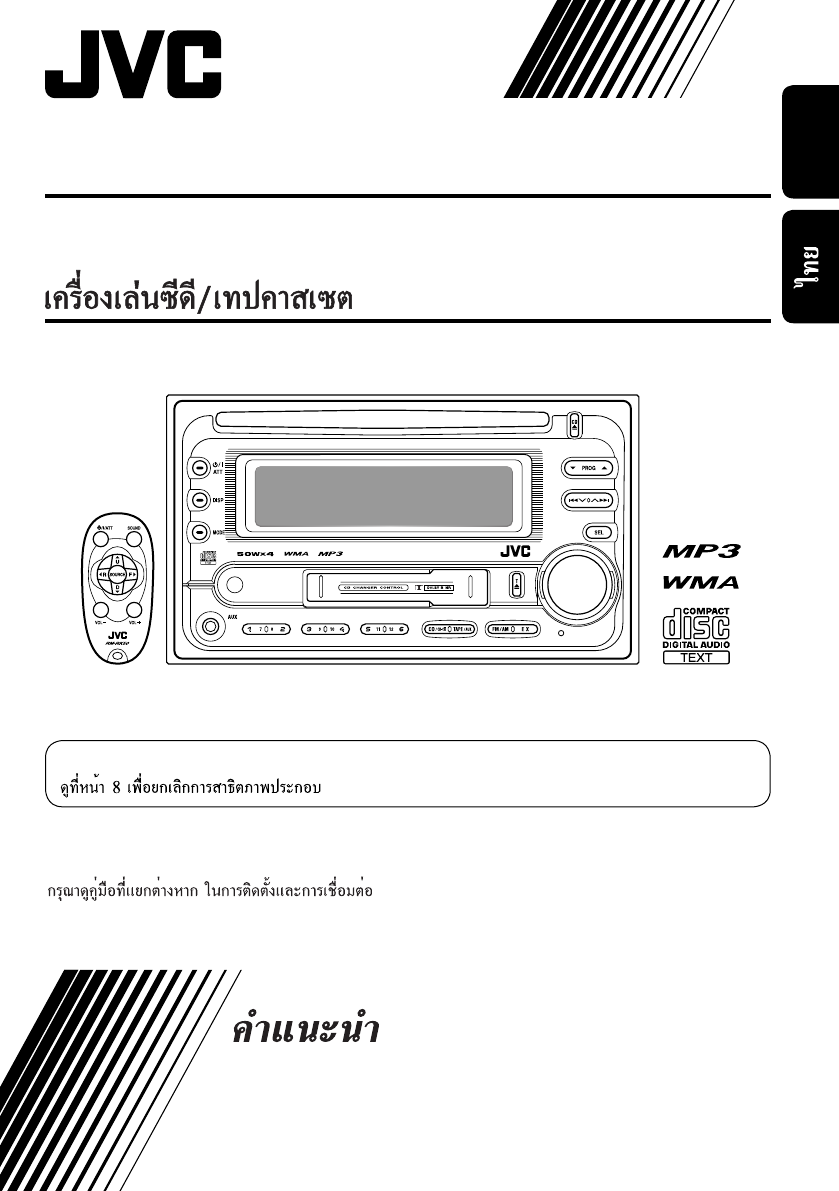
CD/CASSETTE RECEIVER KW-XC406/KW-XC405
KW-XC406/KW-XC405
For canceling the display demonstration, see page 8.
For installation and connections, refer to the separate manual.
INSTRUCTIONS
GET0327-001A
[U]
Cover_KW-XC406_5_001A_f.indd 2Cover_KW-XC406_5_001A_f.indd 2 8/3/05 10:37:10 AM8/3/05 10:37:10 AM
2
ENGLISH
Warning:
If you need to operate the unit while driving,
be sure to look ahead carefully or you may
be involved in a traffic accident.
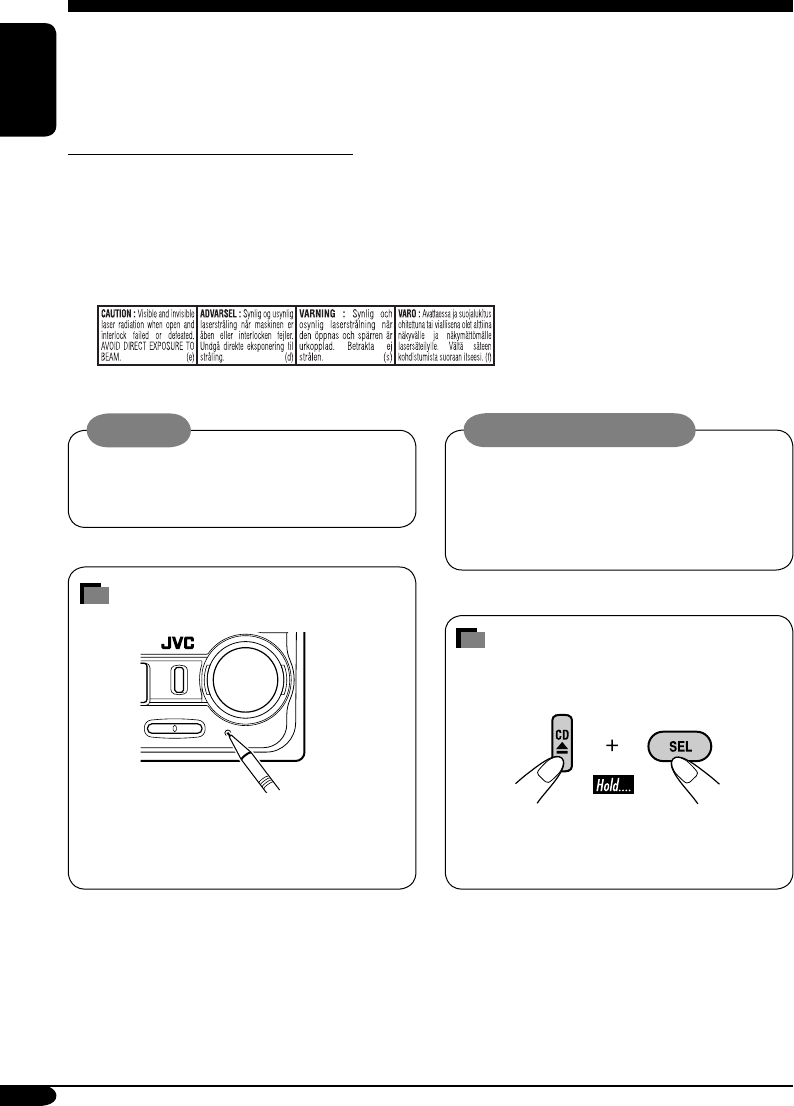
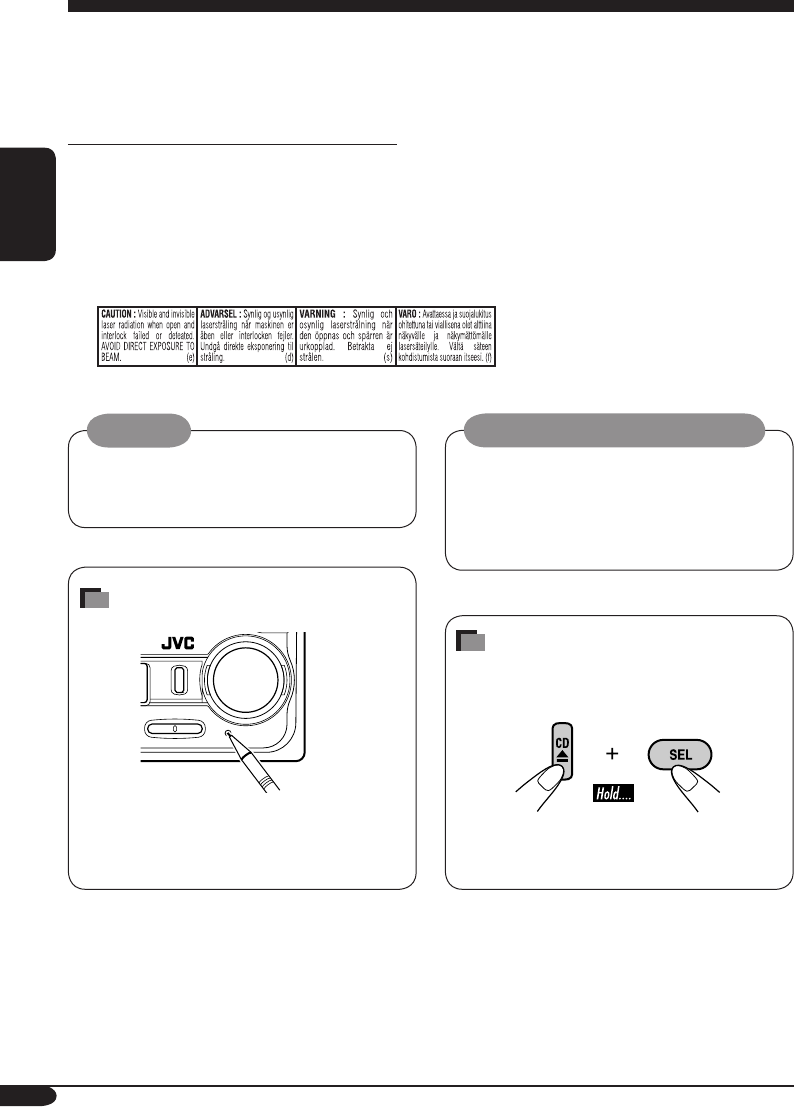
How to reset your unit
This will reset the microcomputer. Your
preset adjustments will also be erased.
Thank you for purchasing a JVC product.
Please read all instructions carefully before operation, to ensure your complete understanding and to
obtain the best possible performance from the unit.
IMPORTANT FOR LASER PRODUCTS
1. CLASS 1 LASER PRODUCT
2. CAUTION: Do not open the top cover. There are no user serviceable parts inside the unit; leave
all servicing to qualified service personnel.
3. CAUTION: Visible and invisible laser radiation when open and interlock failed or defeated.
Avoid direct exposure to beam.
4. REPRODUCTION OF LABEL: CAUTION LABEL, PLACED OUTSIDE THE UNIT.
Caution on volume setting:
Discs produce very little noise compared
with other sources. Lower the volume
before playing a disc to avoid damaging
the speakers by the sudden increase of the
output level.
How to forcibly eject a disc
If a disc cannot be recognized or cannot be
ejected, eject the disc as follows.
• If this does not work, reset your unit.
• Be careful not to drop the disc when it
ejects.
EN02-05_KW-XC406_405[U]f.indd 2EN02-05_KW-XC406_405[U]f.indd 2 7/26/05 9:27:21 AM7/26/05 9:27:21 AM

3
ENGLISH
How to reset your unit ........................... 2
How to forcibly eject a disc ................... 2
How to read this manual ........................ 4
How to use the MODE button ............... 4
Control panel —
KW-XC406/KW-XC405 ............... 5
Parts identification ................................. 5
Remote controller — RM-RK50
... 6
Main elements and features ................... 6
Getting started ....................... 7
Basic operations .................................. 7
Canceling the display demonstrations ... 8
Setting the clock .................................... 8
Radio operations ................... 9
Listening to the radio ........................... 9
Storing stations in memory .................... 9
Listening to a preset station ................... 10
Scanning broadcast stations ................... 10
Assigning titles to the stations ............... 11
Disc operations ...................... 12
Playing a disc in the unit ..................... 12
Playing discs in the CD changer ........... 13
Other main functions ............................. 15
Changing the display information ......... 15
Selecting the playback modes ................ 16
Tape operations ..................... 17
Playing a tape ..................................... 17
Finding the beginning of a tune ............. 17
Other convenient tape functions ............ 17
Sound adjustments ................ 18
Selecting preset sound modes
(EQ: equalizer) ................................. 18
Adjusting the sound ............................... 18
Storing your own sound adjustments ..... 19
General settings — PSM ......... 20
Basic procedure ..................................... 20
External component operations
... 22
Playing an external component ............ 22
Maintenance .......................... 23
Handling discs ....................................... 23
Handling cassettes ................................. 23
More about this unit ............... 24
Troubleshooting ..................... 27
Specifications ......................... 29
Temperature inside the car....
If you have parked the car for a long time in
hot or cold weather, wait until the temperature
in the car becomes normal before operating the
unit.
Contents
For safety....
• Do not raise the volume level too much, as
this will block outside sounds, making driving
dangerous.
• Stop the car before performing any
complicated operations.
EN02-05_KW-XC406_405[U]f.indd 3EN02-05_KW-XC406_405[U]f.indd 3 7/26/05 9:27:23 AM7/26/05 9:27:23 AM
4
ENGLISH
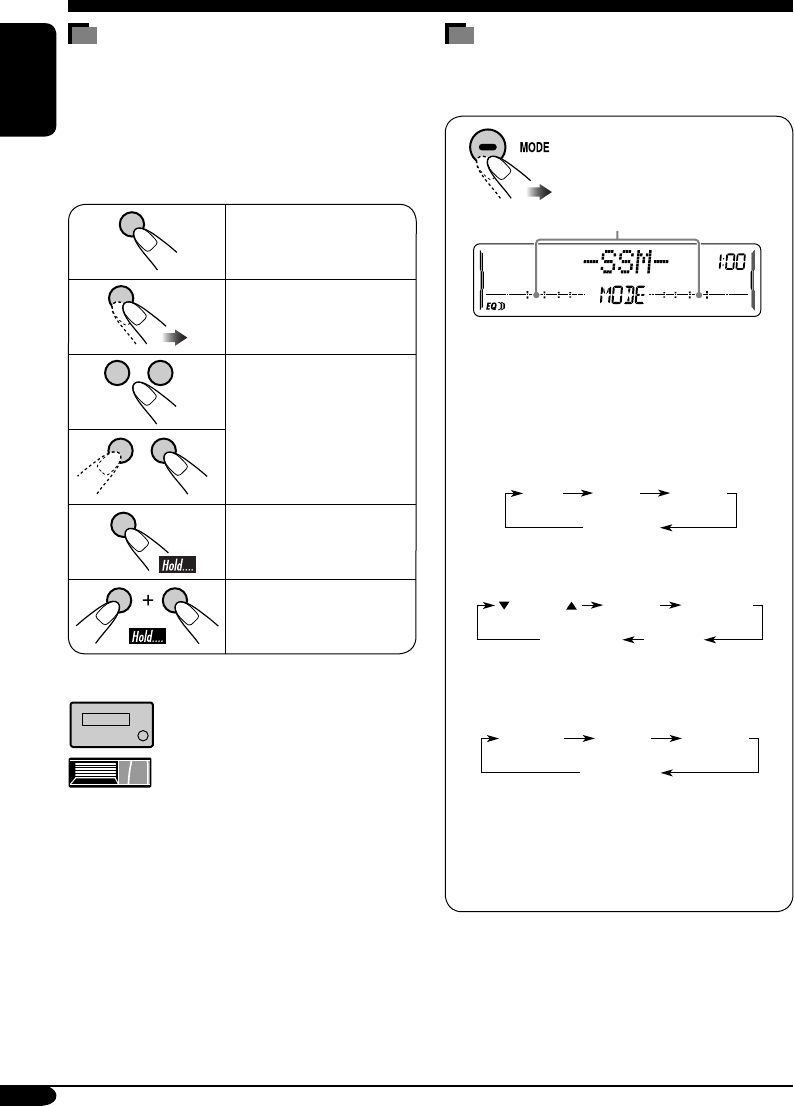
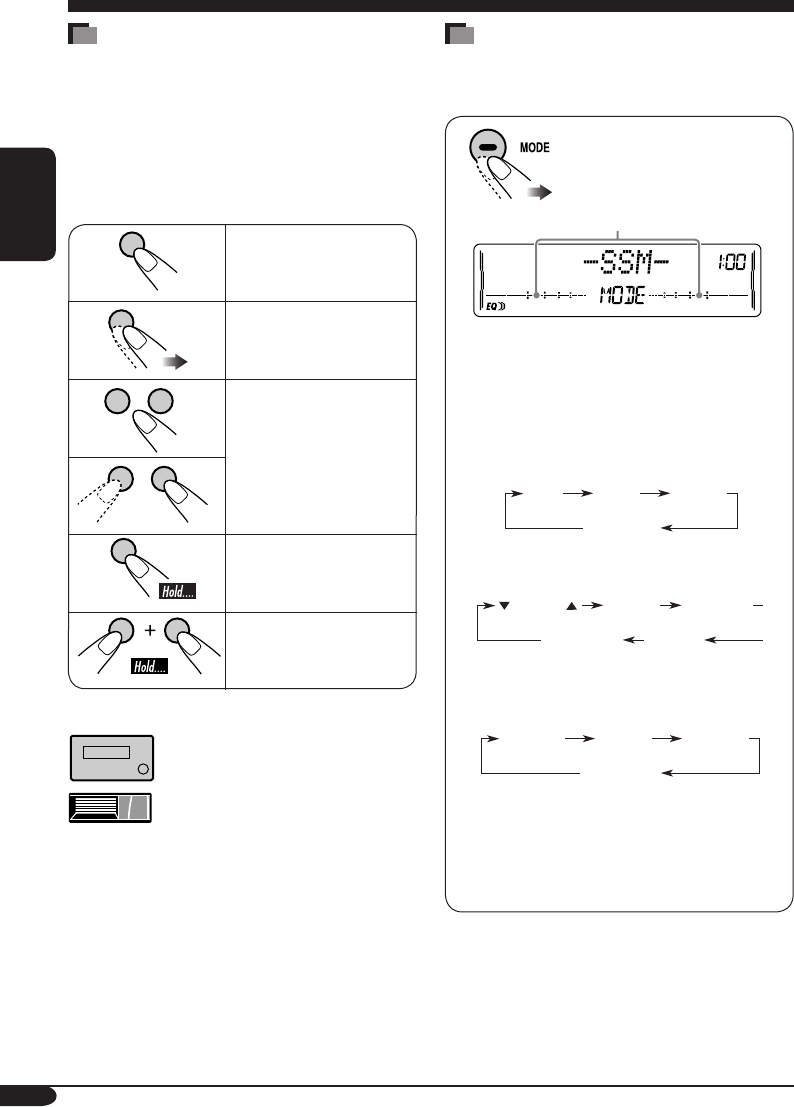
How to use the MODE button
Press MODE repeatedly to select the different
functions available during play.
Time countdown indicator
Ex.: When “SSM” is selected
While listening to the radio:
• You cannot select “SSM” or “SCAN”
if you are listening to the station stored
in the EX (extra) button, see page 10 for
details.
While listening to a disc:
While listening to a tape:
While adjusting the sound mode:
• Pressing MODE allows you to store the
adjusted sound mode into memory. (See
page 19 for details.)
* Depending on the level meter setting. (See
page 20 for details.)
How to read this manual
The following methods are used to make the
explanations simple and easy-to-understand:
• Some related tips and notes are explained in
“More about this unit” (see pages 24 – 26).
• Button operations are mainly explained with
the illustrations as follows:
Press briefly.
Press repeatedly.
Press either one.
Press and hold until
your desired response
begins.
Press and hold both
buttons at the same
time.
The following marks are used to indicate...
: Built-in CD player operations.
: External CD changer operations.
SSM SCAN MONO
Canceled
(Station frequency)*
DOLBY B B.SKIP REPEAT
REPEAT RANDOM
INTRO
Canceled
(Track no. and
Elapsed playing time)*
Canceled
(Playback direction)*
–10 +10
EN02-05_KW-XC406_405[U]f.indd 4EN02-05_KW-XC406_405[U]f.indd 4 7/26/05 9:27:24 AM7/26/05 9:27:24 AM
5
ENGLISH
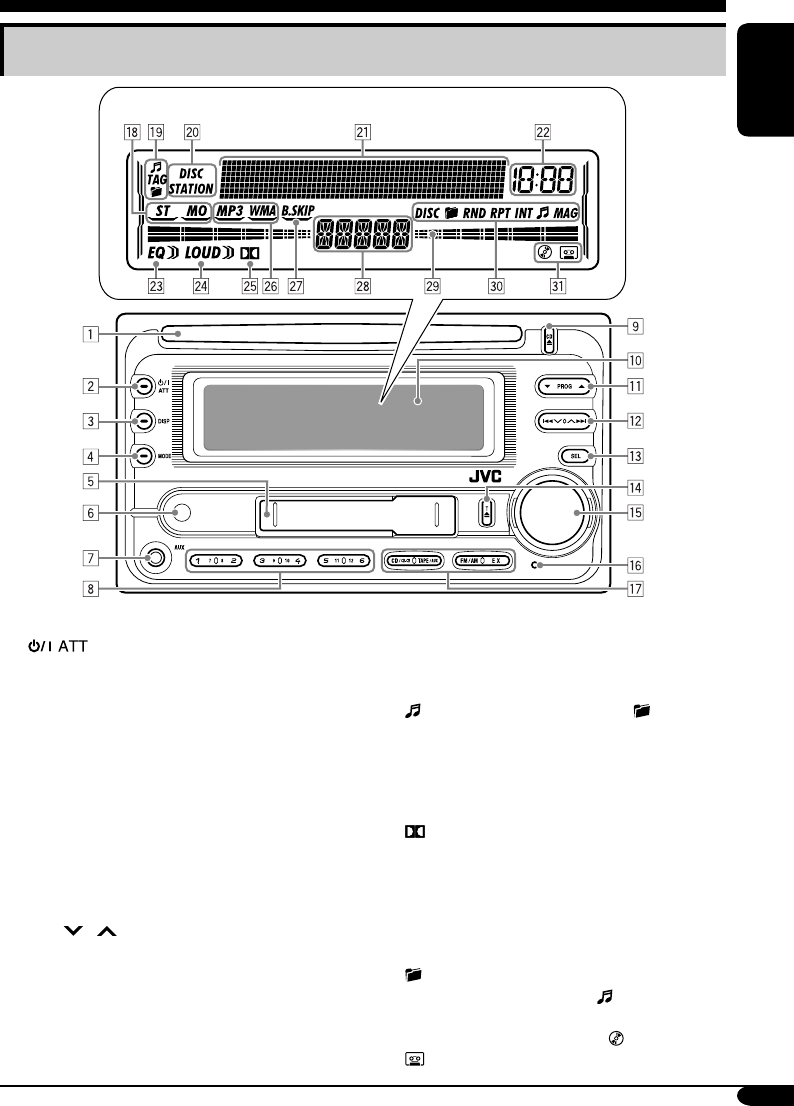
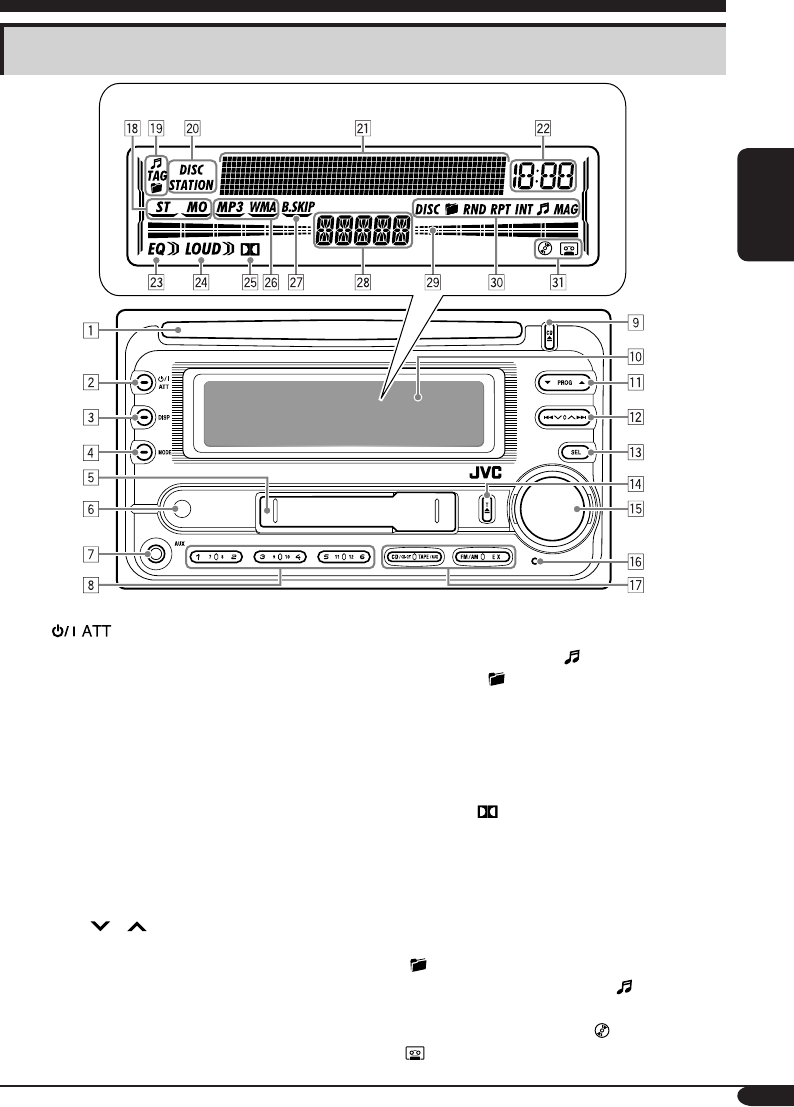
Control panel — KW-XC406/KW-XC405
1 Loading slot
2 (standby/on attenuator) button
3 DISP (display) button
4 MODE button
5 Cassette compartment
6 Remote sensor
• DO NOT expose the remote sensor to
strong light (direct sunlight or artificial
lighting).
7 AUX (auxiliary) input jack
8 Number buttons
9 CD 0 (CD eject) button
p Display window
q 5 (up) / ∞ (down) buttons
PROG (program) 5 / ∞ buttons
w 4 / ¢ buttons
e SEL (select) button
r T 0 (tape eject) button
t Control dial
y Reset button
u Source buttons—CD/CD-CH, TAPE/AUX,
FM/AM, EX (extra)
Display window
i Tuner reception indicators—ST (stereo),
MO (monaural)
o Disc information indicators—
(track/file), TAG (ID3 Tag), (folder)
; Text name indicators—DISC, STATION
a Main display, level meter
s Clock indicator
d EQ (equalizer) indicator
f LOUD (loudness) indicator
g (Dolby B NR) indicator
h Playback disc indicators—MP3, WMA
j B.SKIP (blank skip) indicator
k Source display
l Level meter, volume meter, time countdown
indicator
/ Playback mode indicators—DISC,
(folder), RND (random),
RPT (repeat), INT (intro), (track/file),
MAG (magazine)
z Loaded source indicators— (disc),
(tape)
Parts identification
Display window
EN02-05_KW-XC406_405[U]f.indd 5EN02-05_KW-XC406_405[U]f.indd 5 8/3/05 10:38:14 AM8/3/05 10:38:14 AM
6
ENGLISH
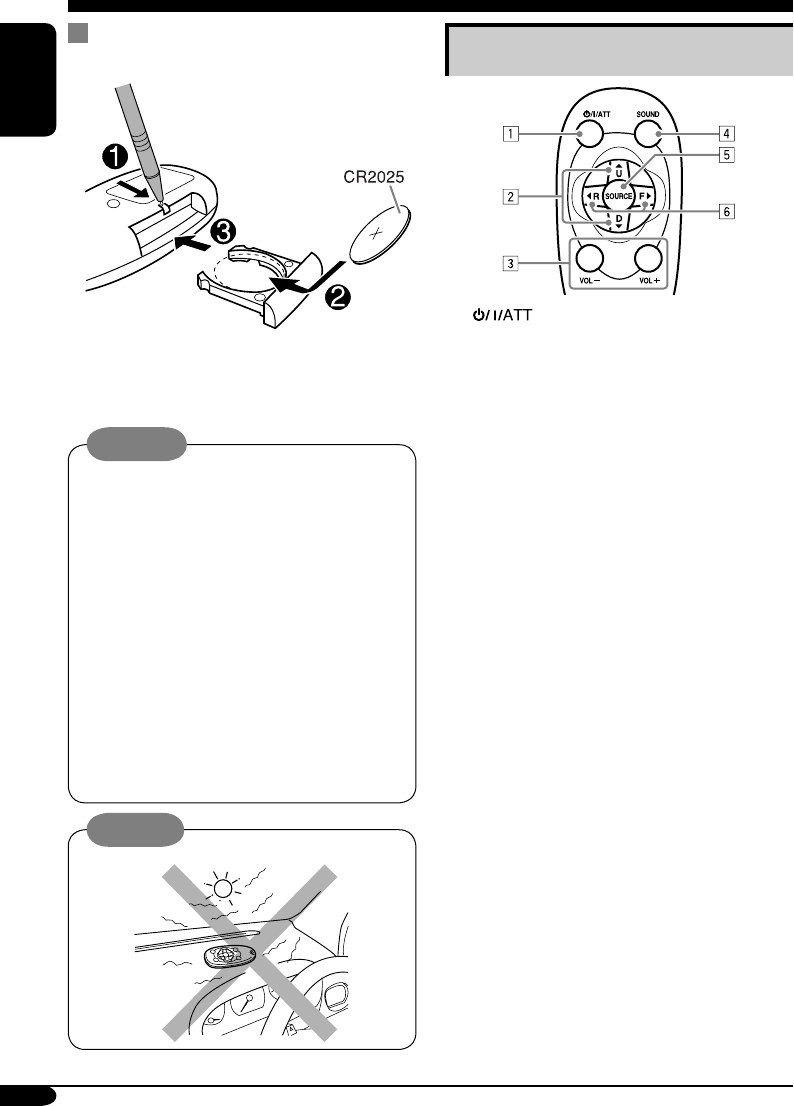
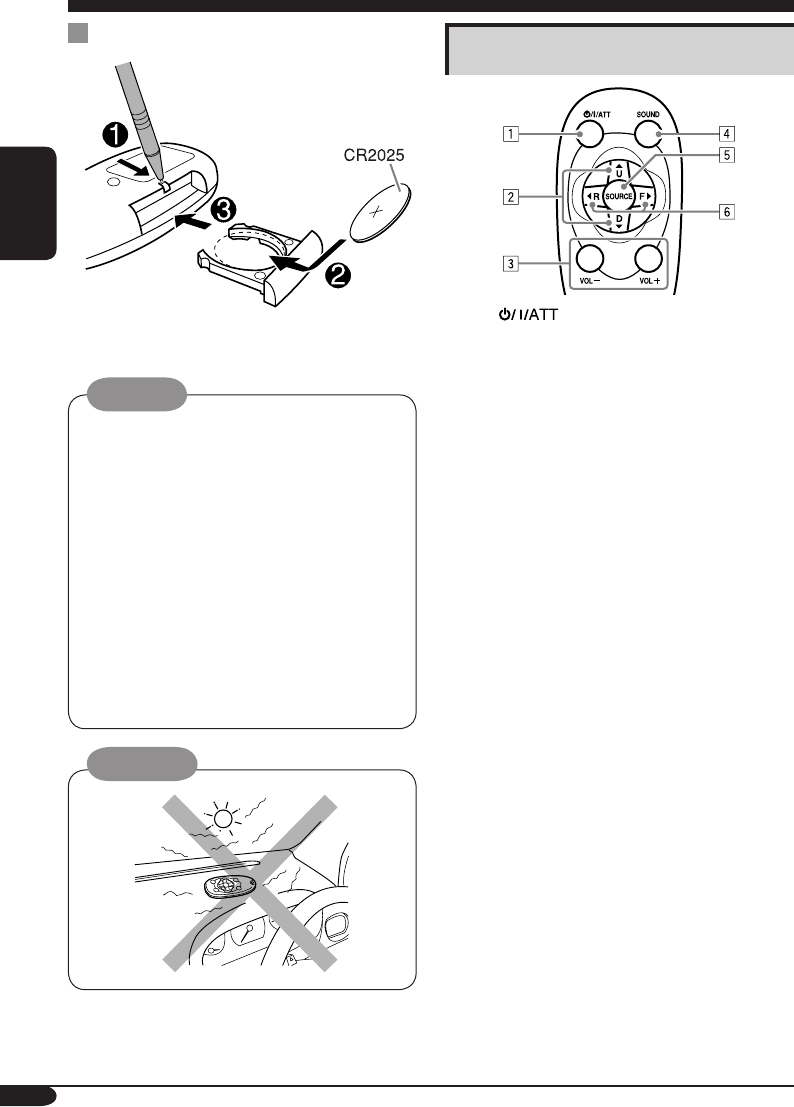
Remote controller — RM-RK50
Main elements and features
1 (standby/on/attenuator) button
•
Turns the power on if pressed briefly or
attenuates the sound when the power is on.
• Turns the power off if pressed and held.
2 5 U (up) / D (down) ∞ buttons
•
Changes the FM/AM bands with 5 U only.
•
Changes the preset stations with D ∞ only.
• Changes the folder of the MP3/WMA
discs.
•
Changes the tape directions with 5 U only.
• While playing an MP3 disc on an
MP3-compatible CD changer:
– Changes the disc if pressed briefly.
– Changes the folder if pressed and held.
3 VOL – / VOL + buttons
• Adjusts the volume level.
4 SOUND button
• Selects the sound mode (EQ: equalizer).
5 SOURCE button
• Selects the source.
6 2 R (reverse) / F (forward) 3 buttons
• Searches for stations if pressed briefly.
• Fast-forwards or reverses the track if
pressed and held.
• Changes the tracks of the disc if pressed
briefly.
• Fast-forwards or reverses the tape if
pressed and held.*
• Finds the beginning of a tune (MMS)
while listening to a tape if pressed
briefly.*
* To release these operations, press 5 U.
Playback resumes.
Installing the lithium coin battery
(CR2025)
• When operating, aim the remote controller
directly at the remote sensor on the unit.
Make sure there is no obstacle in between.
Warning:
• Do not install any battery other than
CR2025 or its equivalent; otherwise, it
may explode.
• Store the battery in a place where children
cannot reach to avoid risk of accident.
• To prevent the battery from over-heating,
cracking, or starting a fire:
– Do not recharge, short, disassemble,
heat the battery, or dispose of it in a fire.
– Do not leave the battery with other
metallic materials.
– Do not poke the battery with tweezers or
similar tools.
– Wrap the battery with tape and insulate
when throwing away or saving it.
Caution:
EN06-13_KW-XC406_405[U]f.indd 6EN06-13_KW-XC406_405[U]f.indd 6 7/28/05 12:33:26 PM7/28/05 12:33:26 PM
7
ENGLISH
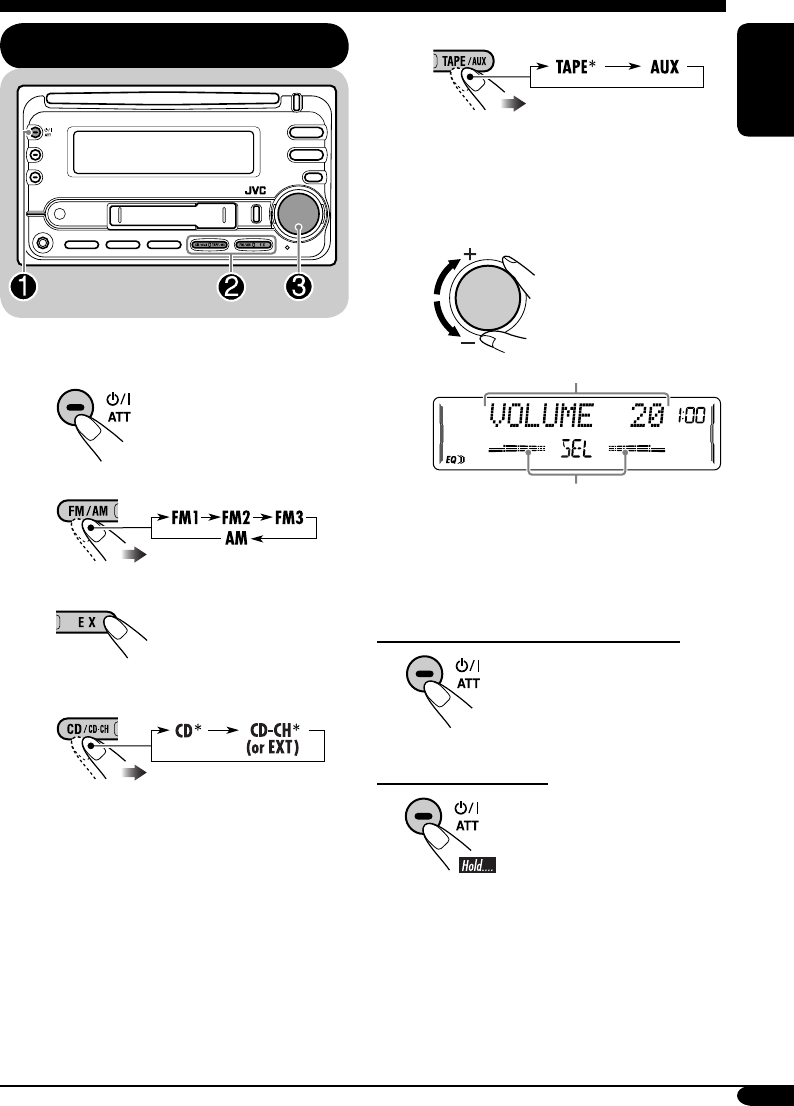
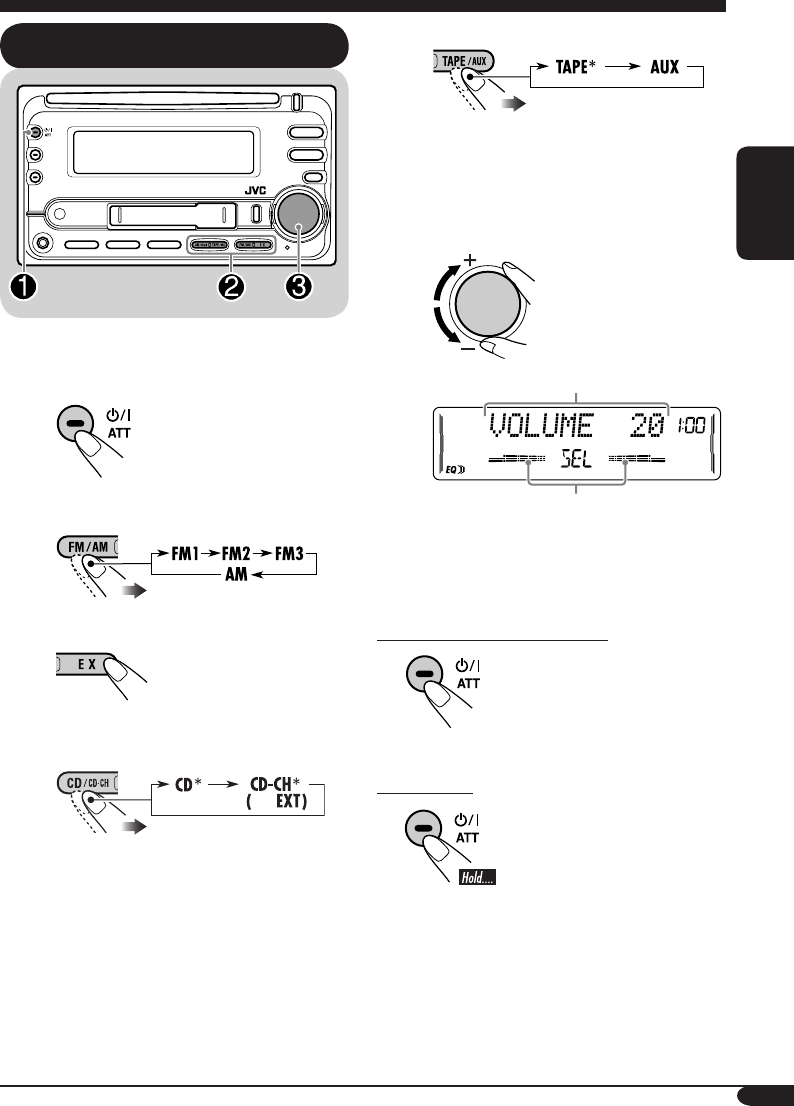
~ Turn on the power.
Ÿ For FM/AM tuner
For your favorite station
• Stored your favorite
station, see page 10
for details.
For CD/CD-CH
Select “CD-CH” when using an Apple
iPod® or a JVC D. player (see page
22).
iPod is a trademark of Apple
Computer, Inc., registered in the U.S.
and other countries.
For TAPE/AUX
* You cannot select these sources if they
are not ready.
! Adjust the volume.
Volume level appears.
Volume level indicator
⁄ Adjust the sound as you want.
(See pages 18 and 19.)
To drop the volume in a moment (ATT)
To restore the sound, press
it again.
To turn off the power
Getting started
Basic operations
EN06-13_KW-XC406_405[U]f.indd 7EN06-13_KW-XC406_405[U]f.indd 7 7/26/05 9:27:47 AM7/26/05 9:27:47 AM
8
ENGLISH
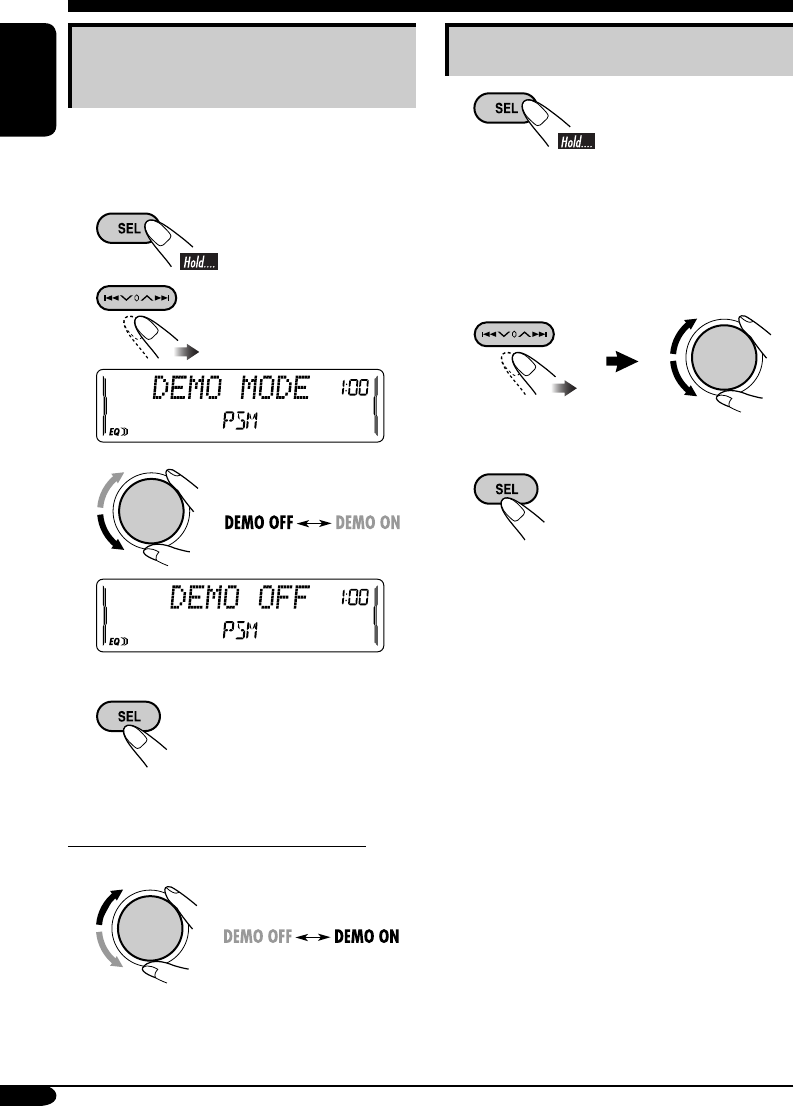
Canceling the display
demonstrations
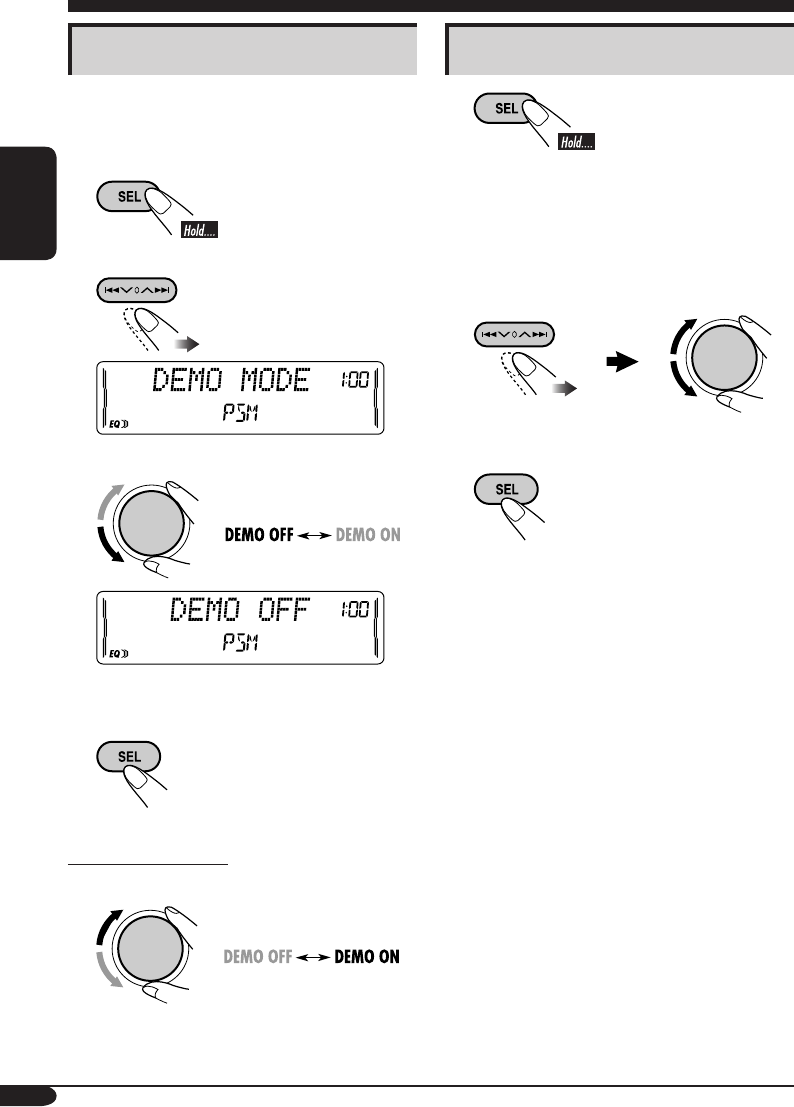
If no operations are done for about 20 seconds,
display demonstration starts.
[Initial: DEMO ON] —see page 20.
1
2
3
4 Finish the procedure.
To activate the display demonstration
In step 3 above...
Setting the clock
1
2 Set the hour and minute.
1 Select “CLOCK HOUR,” then
adjust the hour.
2 Select “CLOCK MIN,” (minute)
then adjust the minute.
3 Finish the procedure.
EN06-13_KW-XC406_405[U]f.indd 8EN06-13_KW-XC406_405[U]f.indd 8 7/26/05 9:27:48 AM7/26/05 9:27:48 AM
9
ENGLISH
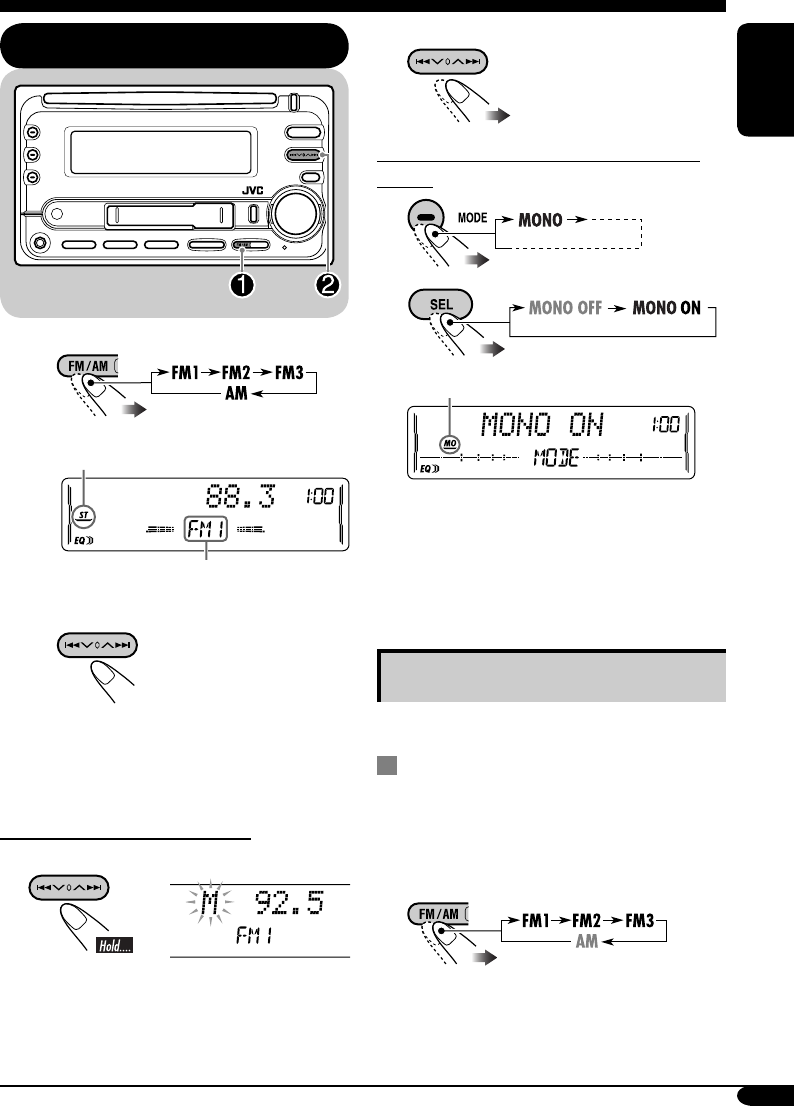
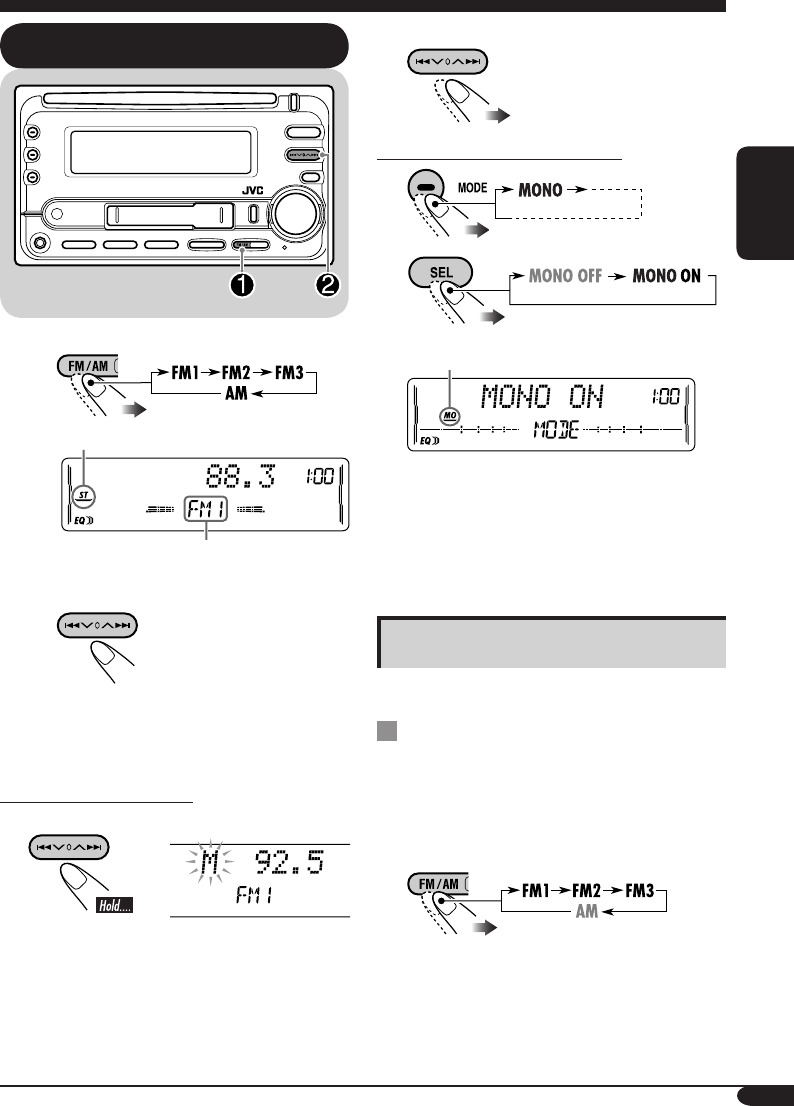
2 Select the desired station frequencies.
When an FM stereo broadcast is hard to
receive
1
2
Lights up when monaural mode is activated.
Reception improves, but stereo effect will
be lost.
To restore the stereo effect, repeat the same
procedure. Then, in step 2, select “MONO
OFF.”
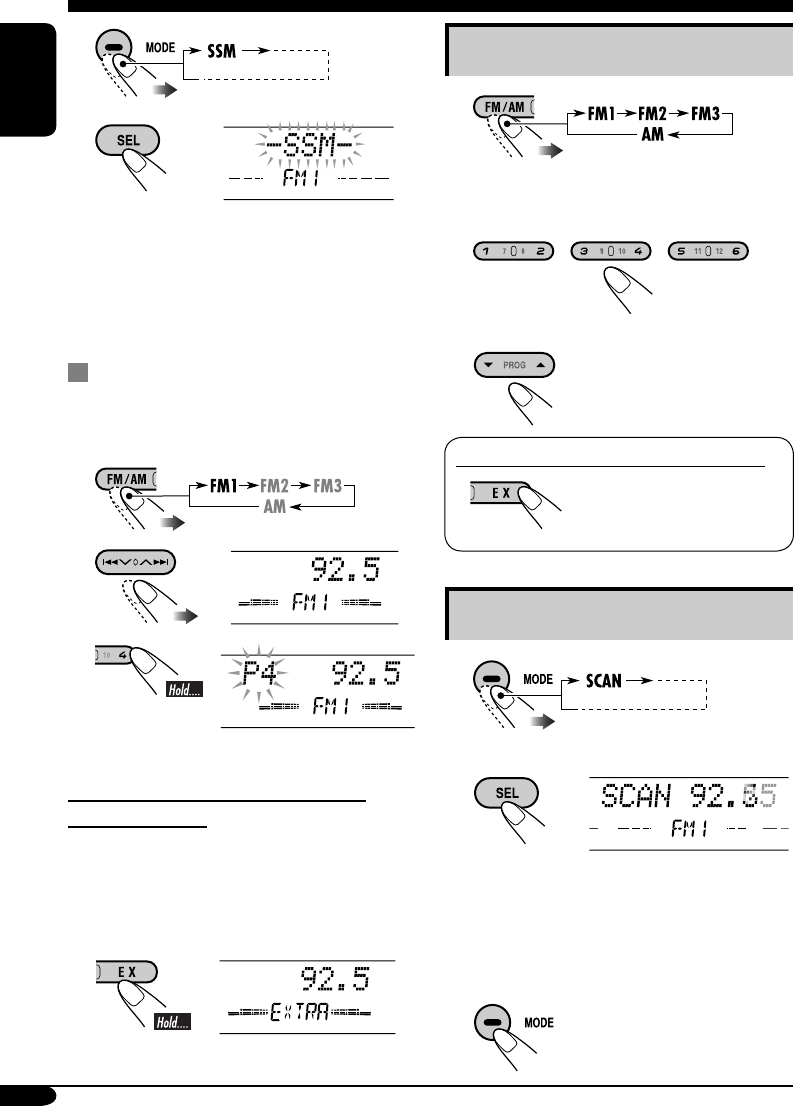
Storing stations in memory
You can preset six stations for each band.
FM station automatic presetting —
SSM (Strong-station Sequential
Memory)
1 Select the FM band (FM1 – FM3)
you want to store into.
Radio operations
Listening to the radio
~
Lights up when receiving an FM stereo
broadcast with sufficient signal strength.
Selected band appears.
Ÿ Start searching for a station.
When a station is received, searching
stops.
To stop searching, press the same
button again.
To tune in to a station manually
In step Ÿ above...
1
To be continued....
EN06-13_KW-XC406_405[U]f.indd 9EN06-13_KW-XC406_405[U]f.indd 9 8/9/05 12:19:26 PM8/9/05 12:19:26 PM
10
ENGLISH
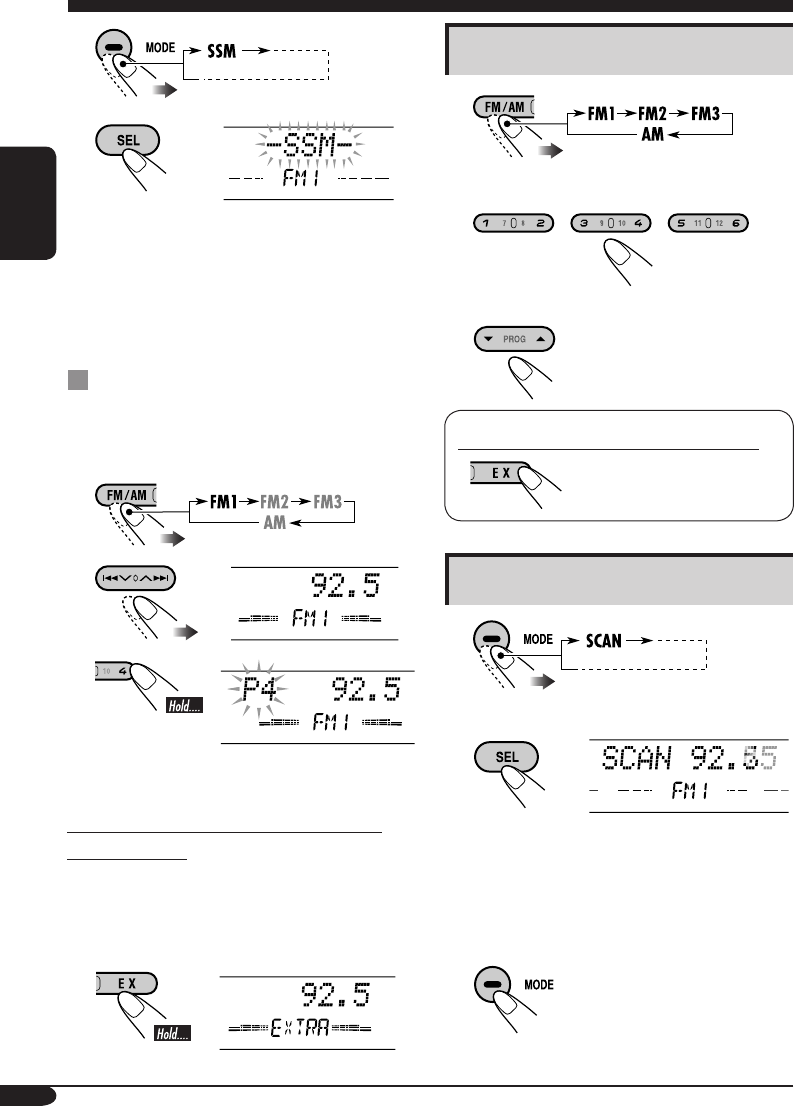
Listening to a preset station
1
2 Select the preset station (1 – 6) you
want.
or
To tune in to your favorite station (EX)
If you press the button
again, the previous source
will be played back again.
Scanning broadcast stations
1
2 Start scanning.
Each time a broadcast is tuned in, scanning
stops for about 5 seconds (tuned frequency
appears on the display), and you can check
what program is now being broadcast.
3 Start listening to the program.
2
3
“SSM” flashes, then disappears when
automatic presetting is over.
Local FM stations with the strongest signals are
searched and stored automatically in the FM
band.
Manual presetting
Ex.: Storing FM station of 92.5 MHz into the
preset number 4 of the FM1 band.
1
2
3
Preset number flashes for a while.
Storing your favorite station into the
EX (extra) button
Ex.: Storing your favorite FM station of
92.5 MHz into the EX button
While listening to an FM station, tune in
to your favorite station, then....
EN06-13_KW-XC406_405[U]f.indd 10EN06-13_KW-XC406_405[U]f.indd 10 7/29/05 7:50:03 PM7/29/05 7:50:03 PM
11
ENGLISH
4 Finish the procedure.
To erase the entire title
In step 3 on the left...
To change the information shown on the
display
* If no title is assigned, “NO NAME” appears
for a while.
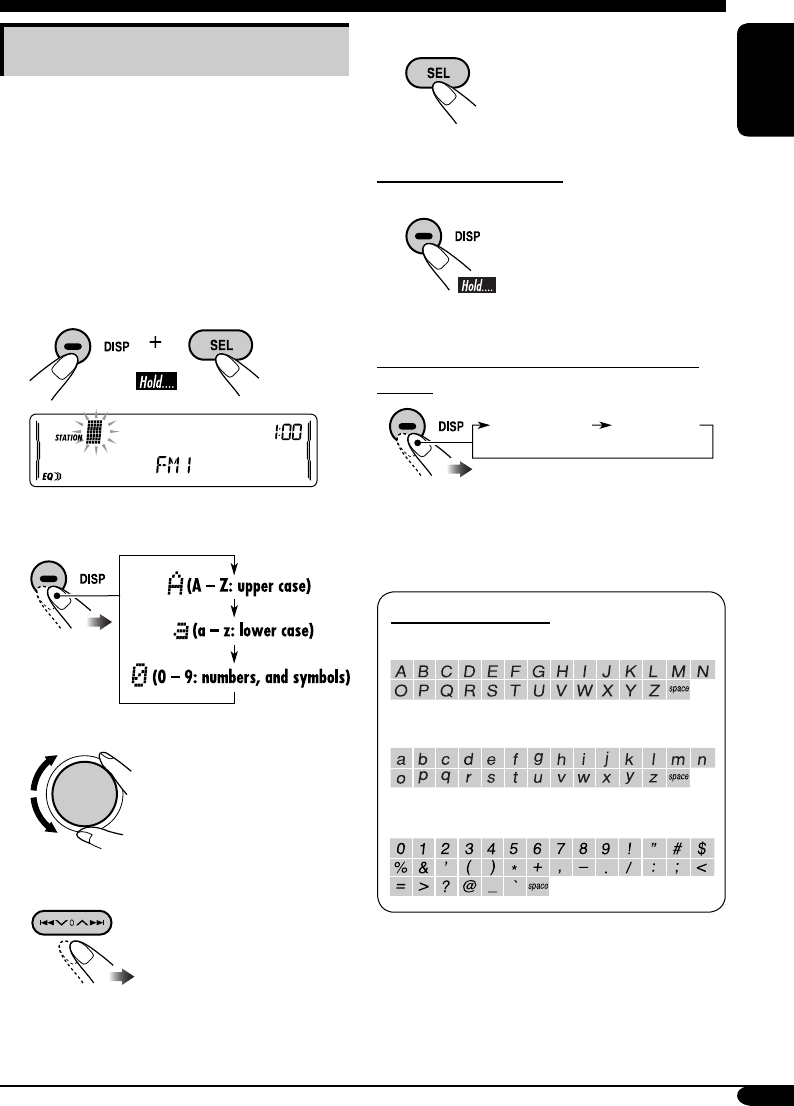
Available characters
Upper case
Lower case
Numbers and symbols
Assigning titles to the stations
You can assign titles to 30 station frequencies
(including both FM and AM). Each station
name can be assigned up to 10 characters.
However, you cannot assign title to the station
frequency stored in the EX button.
1 Tune in to the station you would like
to assign a title to.
2 Enter the assigning mode.
3 Assign a title.
1 Select a character set.
2 Select a character.
3 Move to the next (or previous)
character position.
4 Repeat steps 1 to 3 until you
finish entering the title.
Station frequency
(and Preset no.)
Assigned title*
EN06-13_KW-XC406_405[U]f.indd 11EN06-13_KW-XC406_405[U]f.indd 11 7/26/05 9:27:52 AM7/26/05 9:27:52 AM
12
ENGLISH
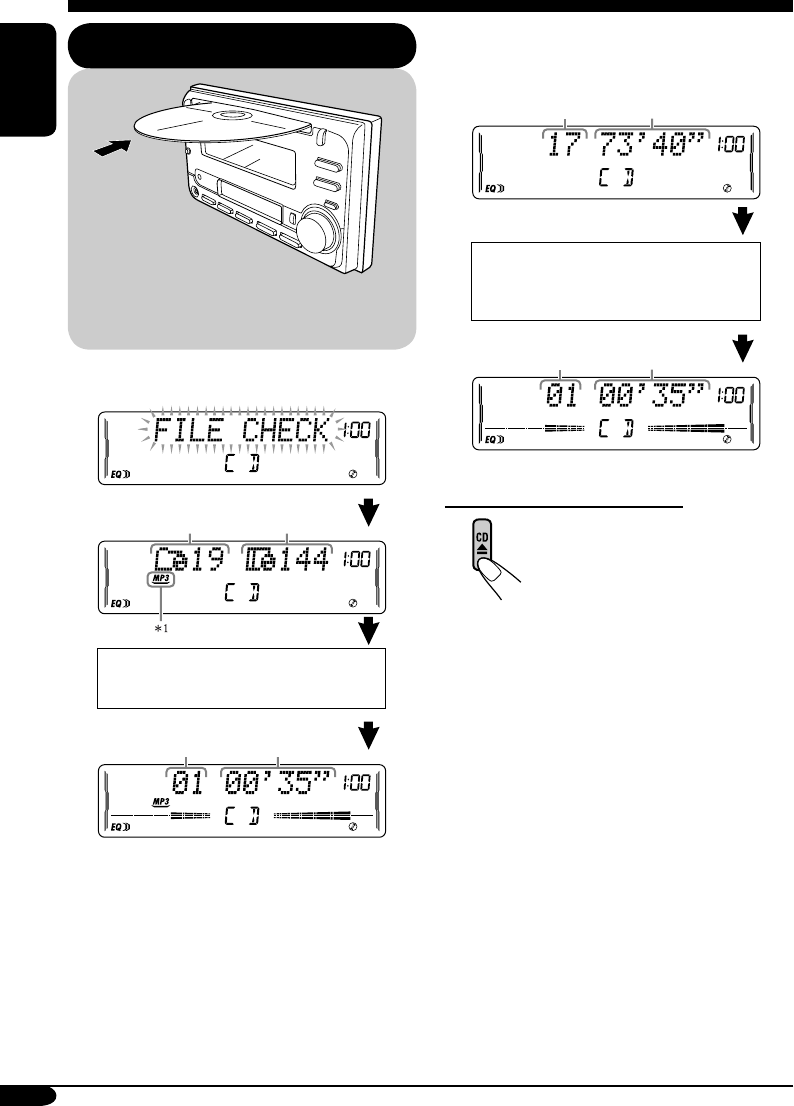
• When inserting an audio CD or a CD Text
disc:
To stop play and eject the disc
The source changes to the last
selected source.
*1 Either the MP3 or WMA indicator lights up
depending on the detected file.
*2 Depending on the level meter setting. (See
page 20 for details.)
• When inserting an MP3 or a WMA disc:
Disc operations
Playing a disc in the unit
Total file
number
Total playing time
of the inserted disc
Total track number
of the inserted disc
Elapsed playing
time*2
Current track
number*2
All tracks will be played repeatedly until
you change the source or eject the disc.
Total folder
number
Elapsed playing
time*2
Current track
number*2
Disc information appears
automatically (see page 15).
CD Text: Disc title/performer =
Track title appears automatically
(see page 15).
EN06-13_KW-XC406_405[U]f.indd 12EN06-13_KW-XC406_405[U]f.indd 12 7/26/05 9:27:53 AM7/26/05 9:27:53 AM
13
ENGLISH
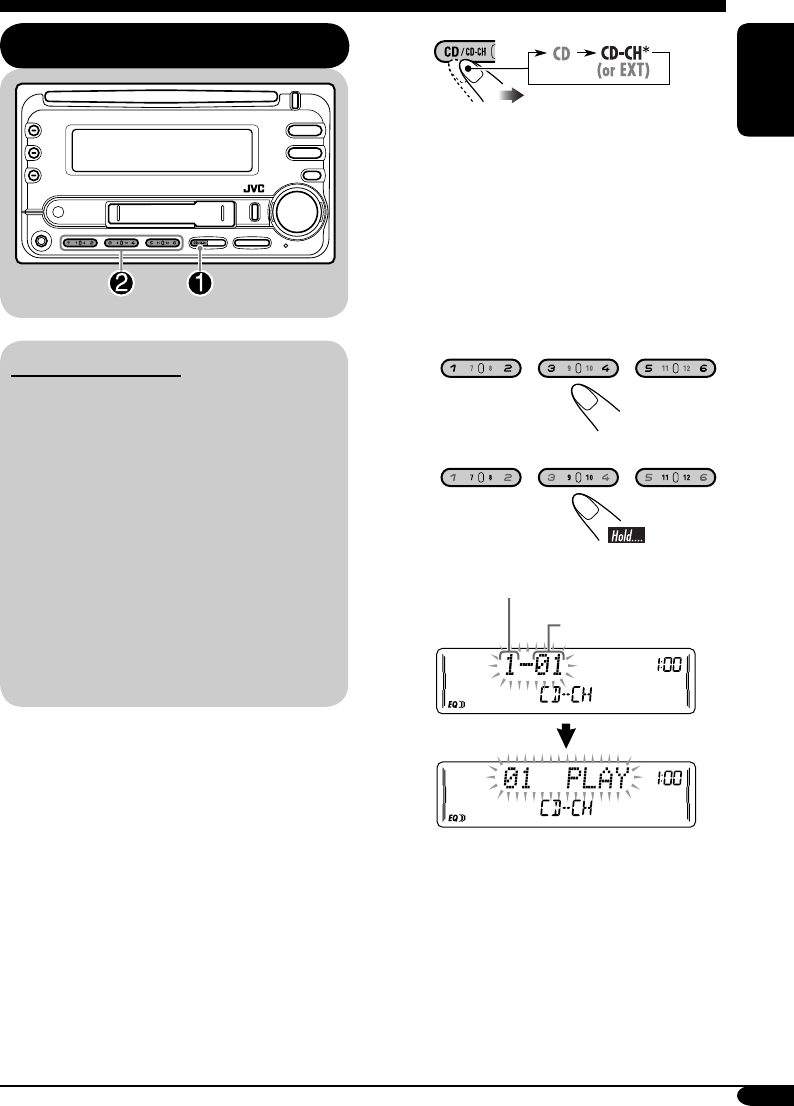
Playing discs in the CD changer
About the CD changer
It is recommended to use a JVC MP3-
compatible CD changer with your unit.
• You can also connect other CH-X series
CD changers (except CH-X99 and
CH-X100). However, they are not
compatible with MP3 discs, so you cannot
play back MP3 discs.
• You cannot play any WMA disc in the CD
changer.
• You cannot use the KD-MK series CD
changers with this unit.
• Disc text information recorded in the CD
Text can be displayed when a JVC CD
Text compatible CD changer is connected.
All tracks of the inserted discs in the magazine
will be played repeatedly until you change
the source or eject the magazine from the CD
changer.
~
* If you have changed “EXT INPUT”
setting to “EXT INPUT” (see page
21), you cannot select the CD
changer.
See also page 22 for using iPod or
JVC D. player.
Ÿ Select a disc.
For disc number from 01 – 06:
For disc number from 07 – 12:
Selected disc number
Track number
EN06-13_KW-XC406_405[U]f.indd 13EN06-13_KW-XC406_405[U]f.indd 13 7/29/05 7:50:12 PM7/29/05 7:50:12 PM
14
ENGLISH
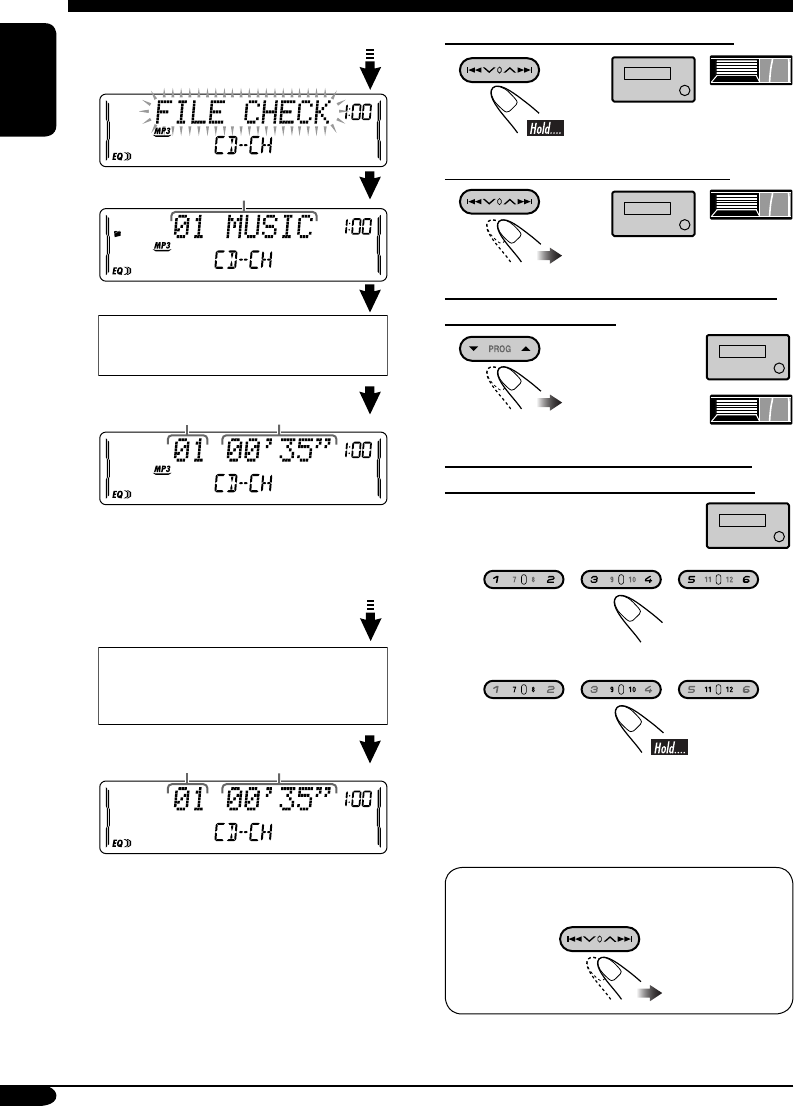
• When the current disc is an MP3 disc:
• When the current disc is an audio CD or a
CD Text disc:
*1 “ROOT” appears if no folder is included in
the disc.
*2 Depending on the level meter setting. (See
page 20 for details.)
To fast-forward or reverse the track
To go to the next or previous tracks
To go to the next or previous folders (for
MP3 and WMA discs)
To locate a particular track (for CD) or
folder (for MP3 or WMA) discs directly
To select a number from 01 – 06:
To select a number from 07 – 12:
• To use folder search on MP3/WMA discs, it
is required that folders are assigned with
2-digit numbers at the beginning of their
folder names—01, 02, 03, and so on.
To select a particular track in a folder (for
MP3 or WMA disc):
Elapsed playing
time*2
Current track
number*2
Disc information appears
automatically (see page 15).
Folder name*1
Elapsed playing
time*2
Current track
number*2
CD Text: Disc title/performer =
Track title appears automatically
(see page 15).
(For MP3/WMA
discs)
(For MP3 discs)
EN14-17_KW-XC406_405[U]f.indd 14EN14-17_KW-XC406_405[U]f.indd 14 8/3/05 10:40:03 AM8/3/05 10:40:03 AM
15
ENGLISH
Other main functions
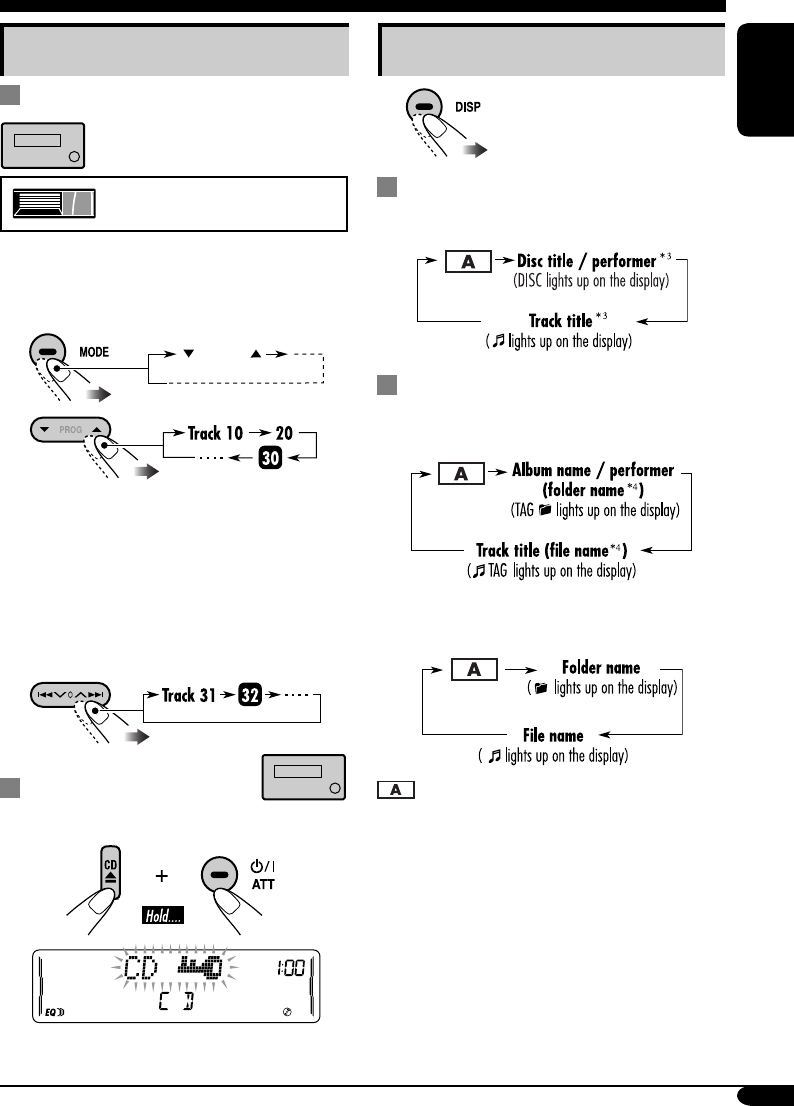
Skipping a track quickly during play
• For MP3 or WMA disc, you can skip a track
within the same folder.
Ex.: To select track 32 while playing track 6
1
2
First time you press 5 / ∞ button, the track
skips to the nearest higher or lower track
with a track number of multiple ten (ex.
10th, 20th, 30th).
Then each time you press the button, you
can skip 10 tracks.
• After the last track, the first track will be
selected and vice versa.
3
Prohibiting disc ejection
You can lock a disc in the loading slot.
To cancel the prohibition, repeat the same
procedure.
Changing the display information
While playing an audio CD or a CD
Text
While playing an MP3 or WMA disc
• When “TAG DISP” is set to
“TAG ON” (see page 21)
• When “TAG DISP” is set to
“TAG OFF”
: Current track/file number and
Elapsed playing time
*3 If the current disc is an audio CD,
“NO NAME” appears.
*4 If an MP3/WMA file does not have ID3 tags,
folder name and file name appear. In this
case, the TAG indicator will not light up.
–10 +10
Only possible on JVC
MP3-compatible CD changer
EN14-17_KW-XC406_405[U]f.indd 15EN14-17_KW-XC406_405[U]f.indd 15 8/2/05 4:52:45 PM8/2/05 4:52:45 PM
16
ENGLISH
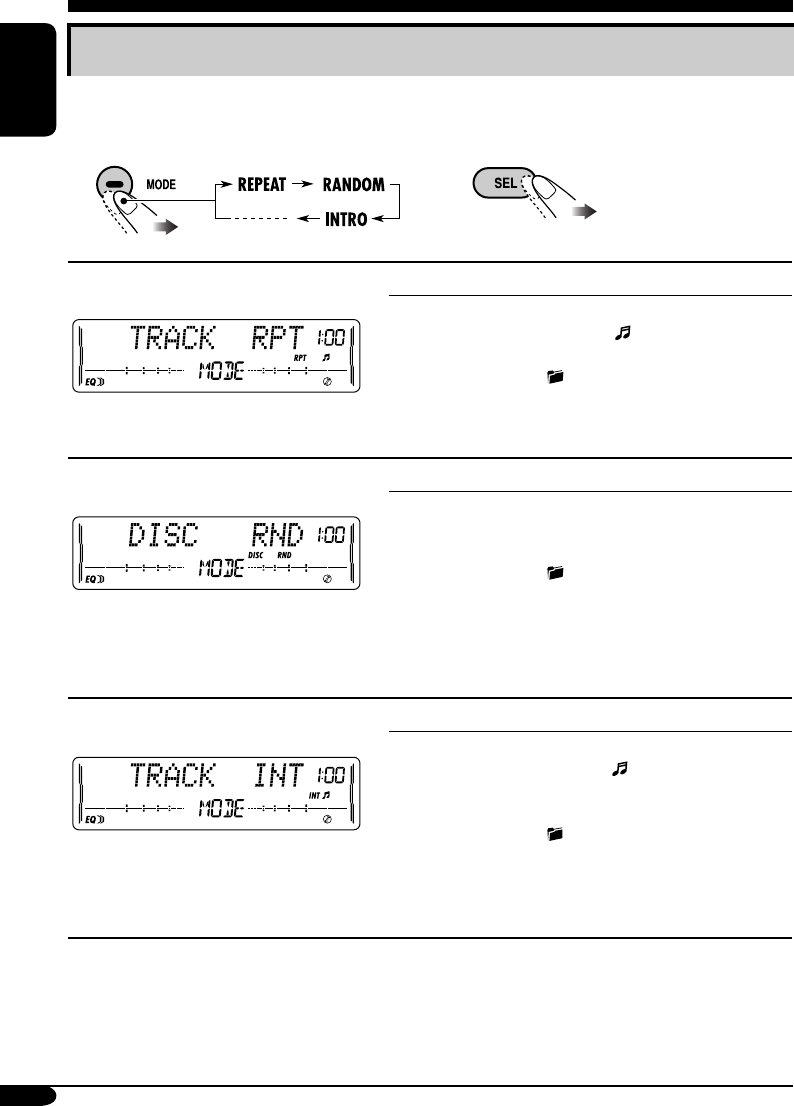
Selecting the playback modes
You can use only one of the following playback modes at a time.
Select your desired playback mode.
1 2
Repeat play
Ex.: When “TRACK RPT” is selected
Mode Plays repeatedly
TRACK RPT : The current track.
• RPT and light up.
FOLDER RPT*1 : All tracks of the current folder.
• and RPT light up.
DISC RPT*2 : All tracks of the current disc.
• DISC and RPT light up.
REPEAT OFF : Cancels.
Random play
Ex.: When “DISC RND” is selected
Mode Plays at random
FOLDER RND*1: All tracks of the current folder,
then tracks of the next folder and so
on.
• and RND light up.
DISC RND : All tracks of the current disc.
• DISC and RND light up.
MAG RND*2 : All tracks of the inserted discs.
• RND and MAG light up.
RANDOM OFF : Cancels.
Intro scan
Ex.: When “TRACK INT” is selected
Mode
Plays the beginning 15 seconds of...
TRACK INT : All tracks of the current disc.
• INT and light up.
FOLDER INT*1 : The first track of every folder of
the current disc.
• and INT light up.
DISC INT*2 : The first tracks of the inserted
discs.
• DISC and INT light up.
INTRO OFF : Cancels.
*1 Only while playing an MP3 disc or WMA disc.
*2 Only while playing discs in the CD changer.
EN14-17_KW-XC406_405[U]f.indd 16EN14-17_KW-XC406_405[U]f.indd 16 7/26/05 9:26:33 AM7/26/05 9:26:33 AM
17
ENGLISH
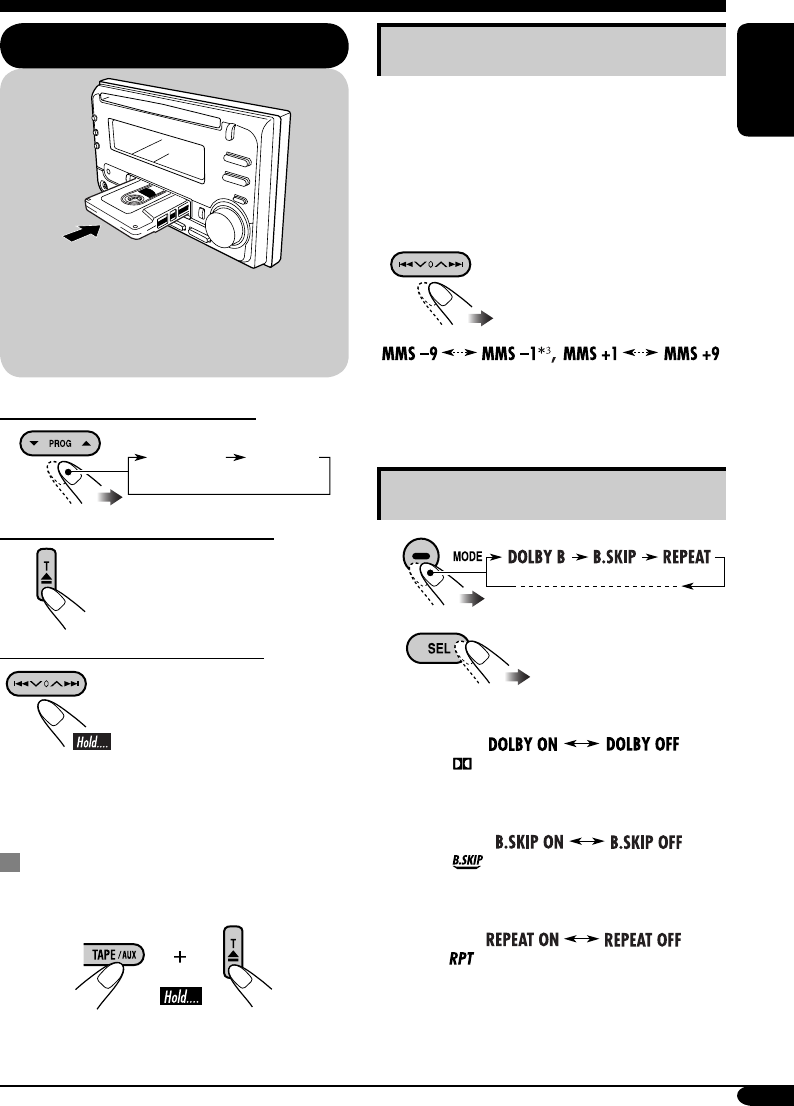
To change the playback direction
To stop play and eject the cassette
The source changes to the last
selected source.
To fast-forward or rewind a tape
When the tape reaches its
end while fast-forwarding,
the tape direction will change
automatically.
To stop fast-forwarding or rewinding, press
the PROG button.
Prohibiting tape ejection
You can lock a tape in the loading slot.
To cancel the prohibition, repeat the same
procedure.
Tape operations
Playing a tape Finding the beginning of a tune
Multi Music Scan (MMS) allows you to
automatically start playback from the beginning
of a specified tune.
Specify the tune you want to locate
(how many tunes ahead of or before the
current tune)
When the beginning
of the specified tune is
located, playback starts
automatically.
*3 Goes back to the beginning of the current
tune.
Other convenient tape functions
1
2
• To turn on or off Dolby B NR*4
( lights up on the display)
• To skip blank portions on the tape
( lights up on the display)
• To play the current tune repeatedly
( lights up on the display)
*4 Manufactured under license from
Dolby Laboratories. “Dolby” and the
double-D symbol are trademarks of Dolby
Laboratories.
Playback starts automatically. When one
side of the tape reaches its end during play,
the other side of the tape automatically
starts playing. (Auto Reverse)
FWD PLAY
(Forward play)
REV PLAY
(Reverse play)
EN14-17_KW-XC406_405[U]f.indd 17EN14-17_KW-XC406_405[U]f.indd 17 8/3/05 10:42:19 AM8/3/05 10:42:19 AM
18
ENGLISH
Sound adjustments
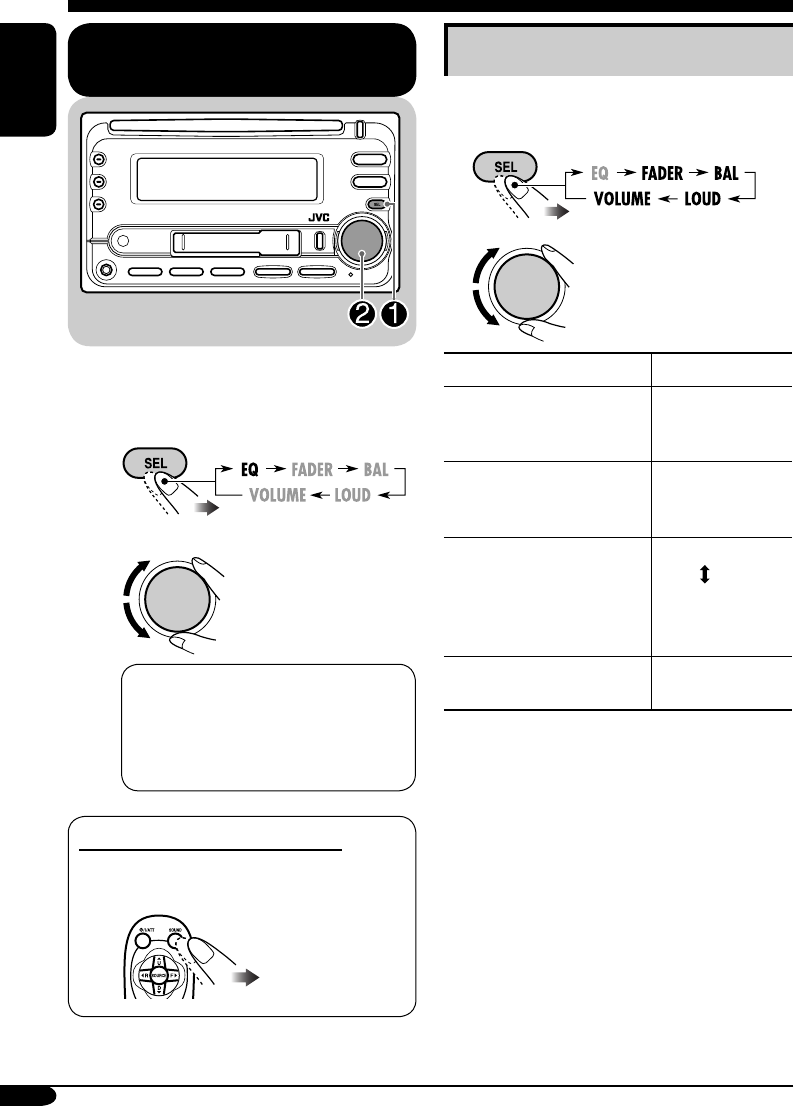
Selecting preset sound modes
(EQ: equalizer)
You can select a preset sound mode suitable to
the music genre.
~
Ÿ
FLAT O Hard Rock O R & B O
POP O JAZZ O DanceMusic O
Country O Reggae O Classic O
USER 1 O USER 2 O USER 3 O
(back to the beginning)
To select the sound mode directly
You can select the sound mode directly using
the remote controller.
Adjusting the sound
You can adjust the sound characteristics to your
preference.
1
2
Indication Range
FADER*1
Adjust the front and rear
speaker balance.
R06 (Rear only)
to
F06 (Front only)
BAL (balance)
Adjust the left and right
speaker balance.
L06 (Left only)
to
R06 (Right only)
LOUD (loudness)
Boost low and high
frequencies to produce a
well-balanced sound at low
volume level.
LOUD ON
LOUD OFF
VOLUME*2
Adjust the volume.
00 (min.) to
30 or 50 (max.)*3
*1 If you are using a two-speaker system, set
the fader level to “00.”
*2 Normally the control dial works as the
volume control. So you do not have to select
“VOLUME” to adjust the volume level.
*3 Depending on the amplifier gain control
setting. (See page 21 for details.)
EN18-23_KW-XC406_405[U]f.indd 18EN18-23_KW-XC406_405[U]f.indd 18 7/26/05 9:28:13 AM7/26/05 9:28:13 AM
19
ENGLISH
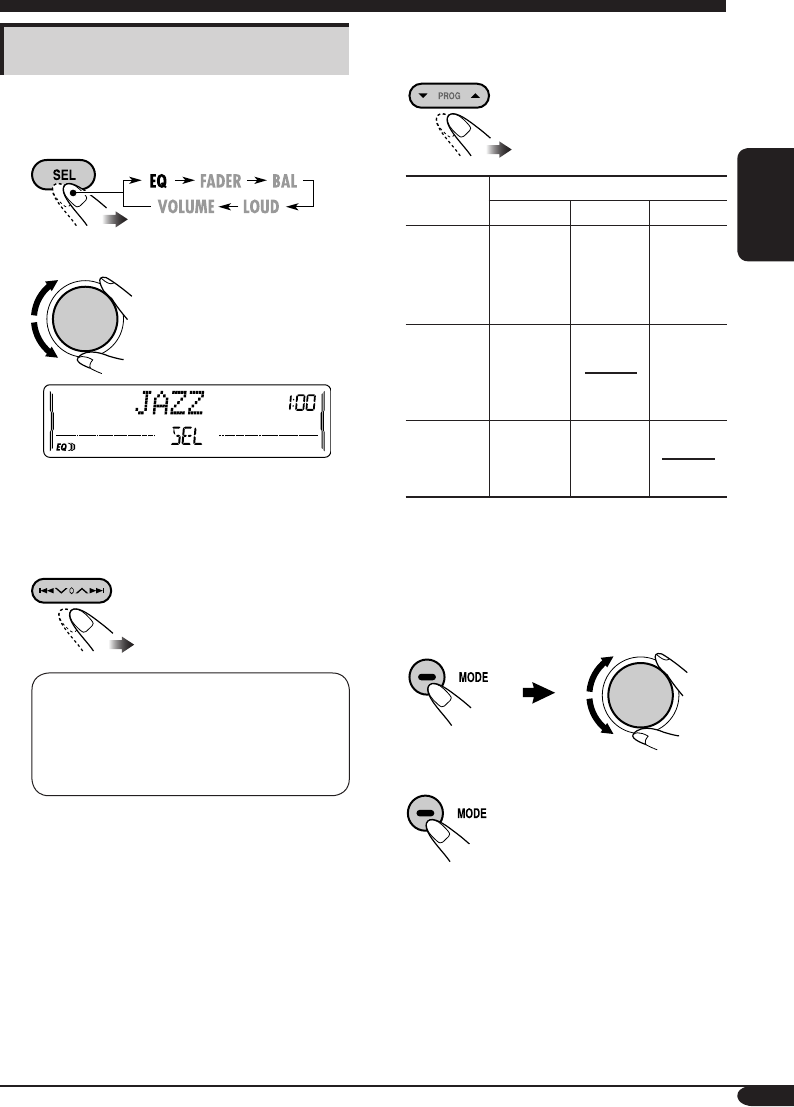
Storing your own sound
adjustments
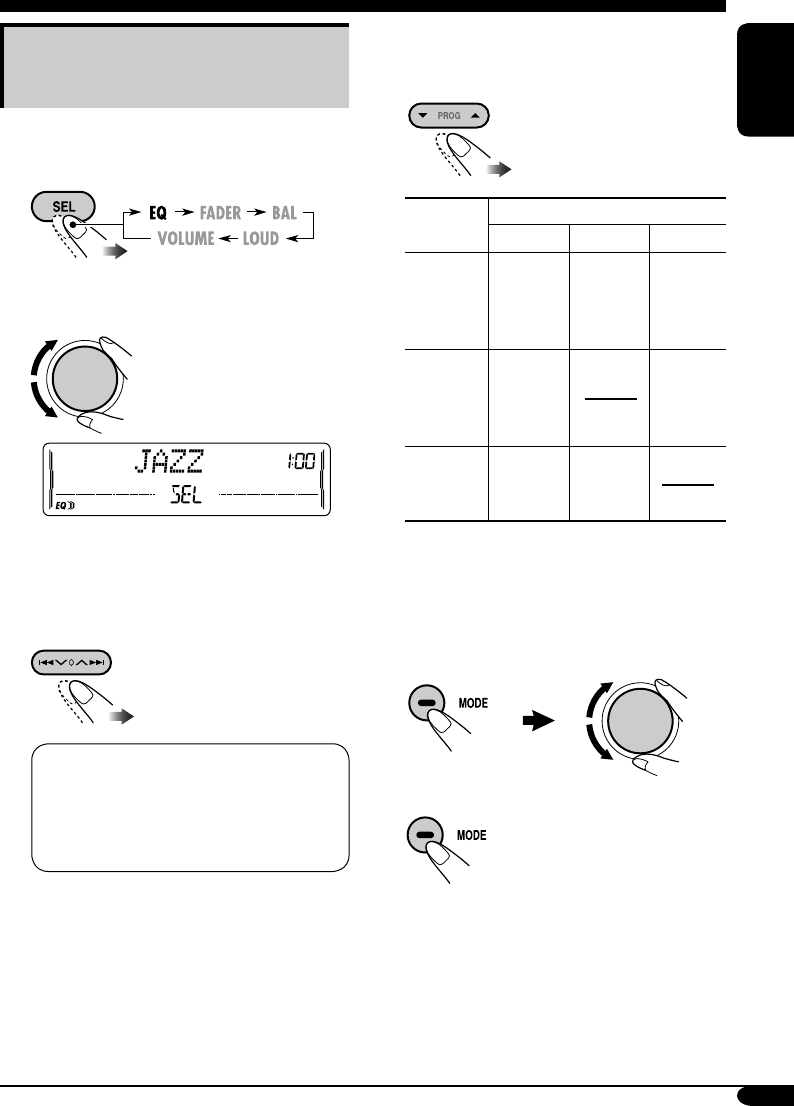
You can adjust the sound modes and store your
own adjustments in memory.
1
2 Select one of the sound mode to
adjust.
Ex.: When “JAZZ” is selected
3 Select the sound elements to adjust
while the selected sound mode is
shown.
LOW LEVEL O LOW FREQ. O
LOW WIDTH O MID LEVEL O
MID WIDTH O HIGH LEVEL O
HIGH FREQ. O (back to the
beginning)
• (LOW, MID, HIGH) LEVEL:
Adjust the enhancement level.
• (LOW, HIGH) FREQ:
Select the center frequency to adjust.
• (LOW, MID) WIDTH :
Select the band width level.
4 Adjust the selected sound elements
while the indication on step 3 is
shown.
Indication Preset values
LOW MID HIGH
LEVEL –06
(min.) to
+06
(max.)
–06
(min.) to
+06
(max.)
–06
(min.) to
+06
(max.)
FREQ 60Hz
80Hz
100Hz
120Hz
8kHz
10kHz
12kHz
15kHz
WIDTH 1 (min.)
to
4 (max.)
1 (min.)
to
2 (max.)
5 Repeat steps 3 and 4 to set (or
adjust) the other sound elements.
6 Select one of the user sound modes
(USER 1, USER 2, USER 3).
7 Store the adjustments.
“MEMORY” appears for a
while.
EN18-23_KW-XC406_405[U]f.indd 19EN18-23_KW-XC406_405[U]f.indd 19 7/29/05 7:50:53 PM7/29/05 7:50:53 PM
20
ENGLISH
Indications Selectable settings, [reference page]
DEMO MODE
Display
demonstration
DEMO ON : [Initial]; Display demonstration will be activated
automatically if no operation is done for about
20 seconds, [8].
DEMO OFF : Cancels.
CLOCK HOUR
Hour adjustment
1 – 12, [8]
[Initial: 1 (1:00)]
CLOCK MIN
Minute adjustment
00 – 59, [8]
[Initial: 00 (1:00)]
CLOCK DISP
Clock display
CLOCK ON : Clock time is shown on the display at all times even
when the unit is turned off.
CLOCK OFF : [Initial];
Clock time is shown
when the unit is turned
on
. If the unit is turned off,
pressing DISP will show
the clock time for about 5 seconds.
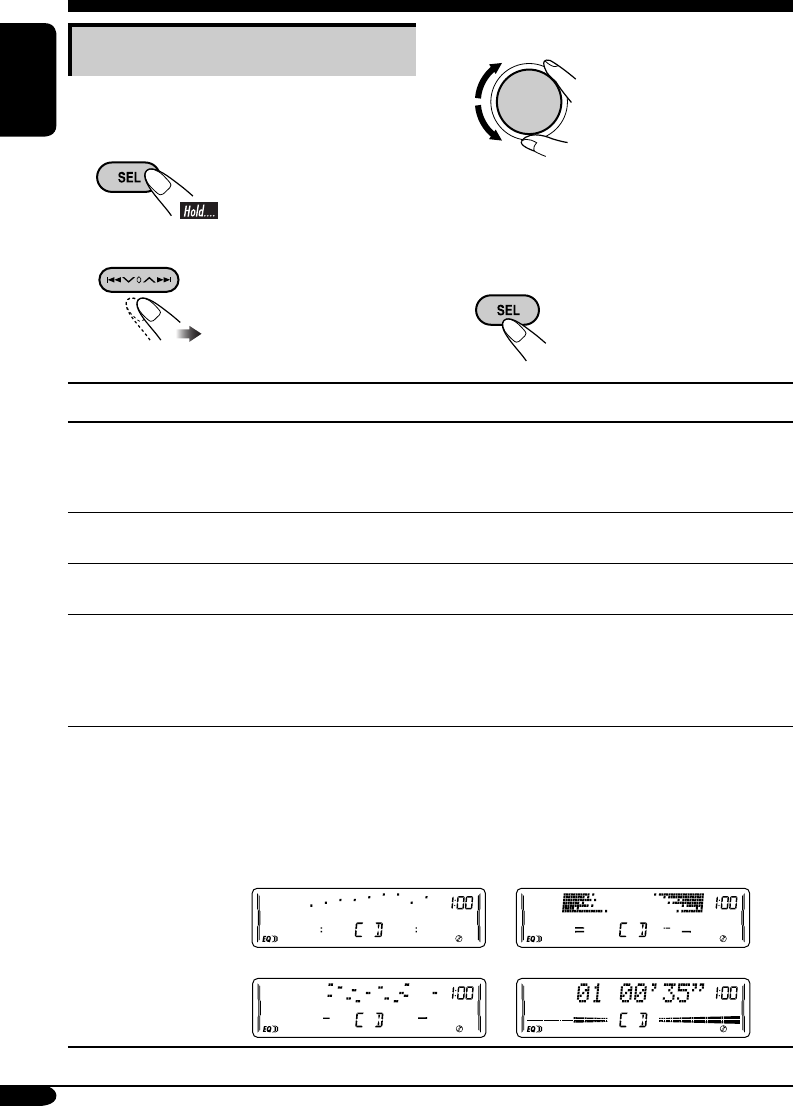
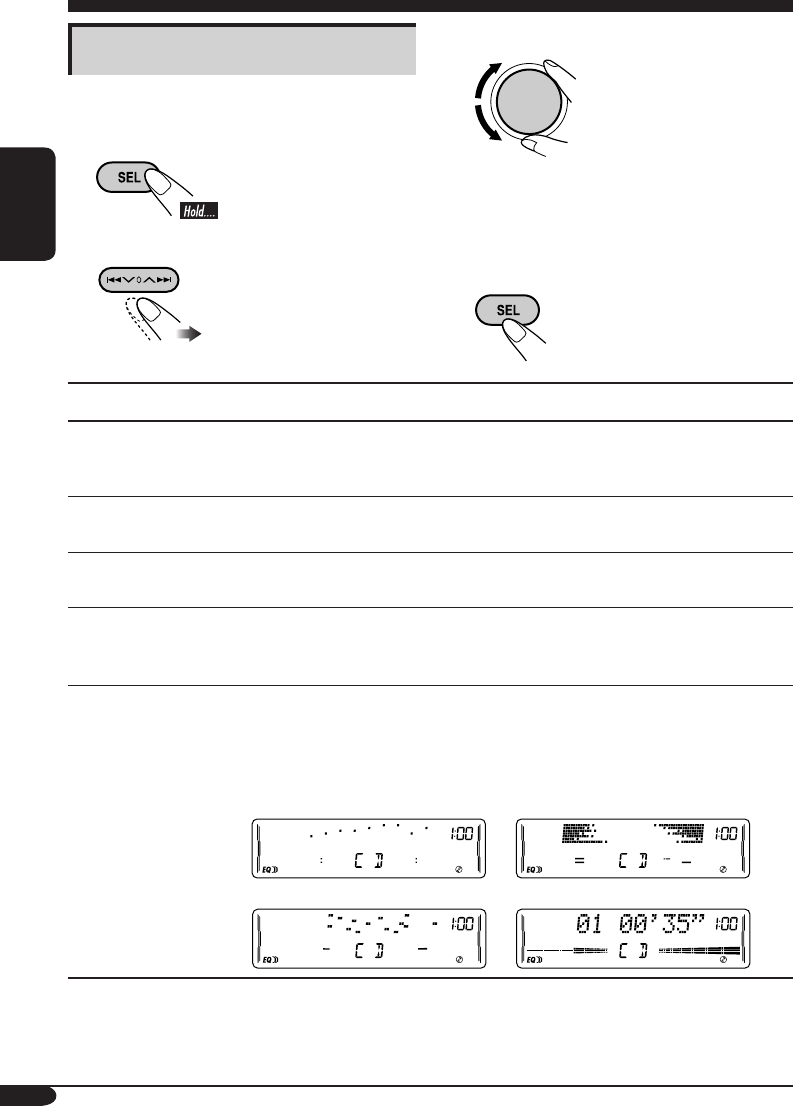
LEVELMETER
Audio level meter
You can select one of the four different level meter patterns or a
demonstration of all the patterns.
LEVEL ALL [Initial] O LEVEL 1 O LEVEL 2 O LEVEL 3 O
LEVEL 4 O LEVEL OFF (canceled) O (back to the beginning)
LEVEL ALL : Demonstrates all the level meter patterns, each for
about 20 seconds.
LEVEL 1 LEVEL 2
LEVEL 3 LEVEL 4
General settings — PSM
Basic procedure
You can change PSM (Preferred Setting Mode)
items listed in the table that follows.
1
2 Select a PSM item.
3 Adjust the PSM item selected.
4 Repeat steps 2 and 3 to adjust the
other PSM items if necessary.
5 Finish the procedure.
EN18-23_KW-XC406_405[U]f.indd 20EN18-23_KW-XC406_405[U]f.indd 20 7/29/05 7:50:54 PM7/29/05 7:50:54 PM

21
ENGLISH
Indications Selectable settings, [reference page]
DIMMER
Dimmer
AUTO : [Initial]; Dims the display when you turn on the
headlights.
ON : Activates dimmer.
OFF : Cancels.
CONTRAST
Display contrast
1 – 10 : Adjust the display contrast to make the display indications
clear and legible.
[Initial: 5]
SCROLL*1
Scroll
ONCE : [Initial]; Scrolls the disc information once.
AUTO :
Repeats scrolling (5-second intervals in between).
OFF : Cancels.
• Pressing DISP for more than one second can scroll the display regardless
of the setting.
EXT INPUT*2
External input
CHANGER : [Initial]; To use a JVC CD changer, an Apple iPod, or a
JVC D. player, [13, 22].
EXT INPUT : To use another external component, [22].
AUX ADJUST
Auxiliary input
level adjustment
AUX ADJ 00 – AUX ADJ 05: Adjust the auxiliary input level
accordingly, to avoid the sudden increase of the output
level when changing the source from external component
connected to the AUX input jack on the control panel.
[Initial: AUX ADJ 00]
TAG DISP
Tag display
TAG ON : [Initial]; Shows the ID3 tag while playing MP3/WMA
tracks, [15].
TAG OFF : Cancels.
AMP GAIN
Amplifier gain
control
You can change the maximum volume level of this unit.
LOW PWR : VOLUME 00 – VOLUME 30 (Select this if the
maximum power of the speaker is less than 50 W to avoid
damaging the speaker.)
HIGH PWR : [Initial]; VOLUME 00 – VOLUME 50
IF FILTER
IF filter
AUTO : [Initial]; Increases the tuner selectivity to reduce noise
interference between the stations. (Stereo effect will also
be lost.)
WIDE : Subject to noise interference from adjacent stations, but
sound quality will not be degraded and will retain the
stereo effect.
*1 Some characters or symbols will not be shown (and will be blanked) or substituted on the
display.
*2 Cannot be selected if the source is “CD-CH” or “EXT.”
EN18-23_KW-XC406_405[U]f.indd 21EN18-23_KW-XC406_405[U]f.indd 21 7/29/05 7:50:54 PM7/29/05 7:50:54 PM
22
ENGLISH
External component operations
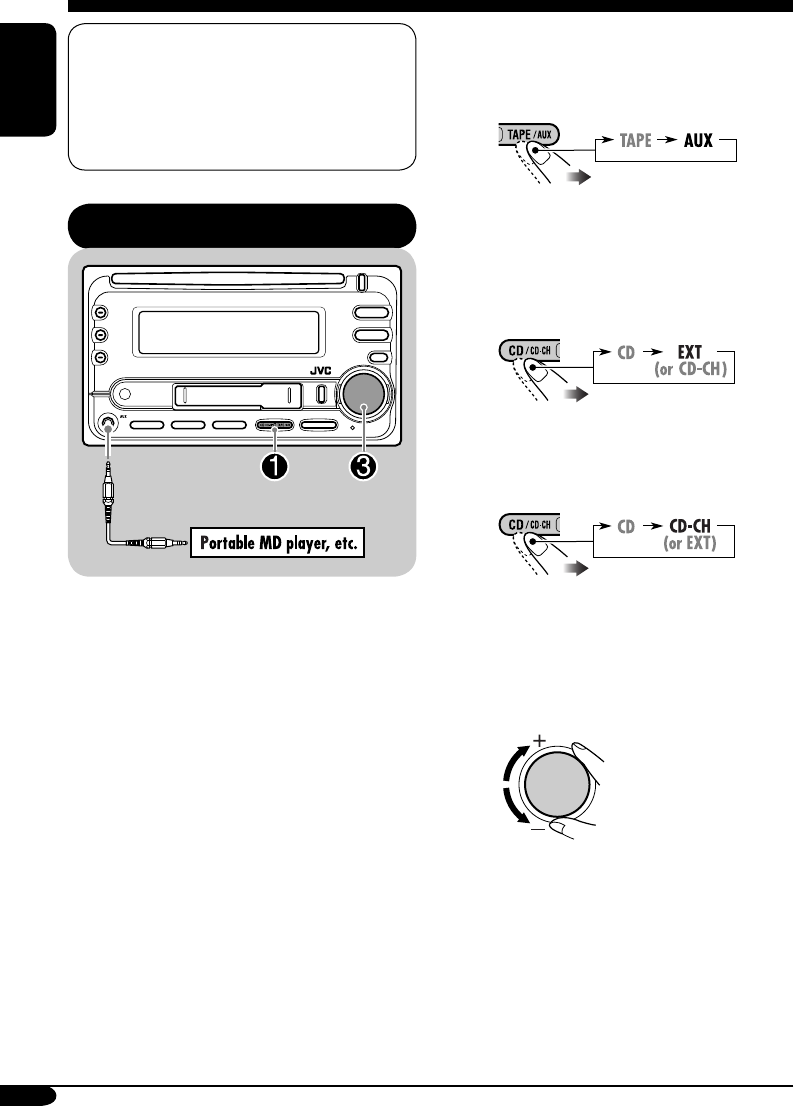
~ For selecting the external
component connected to....
• AUX input jack
• CD changer jack on the rear
using KS-U57 or KS-U58
If “EXT” does not appear, see page
21 and select the external input
(EXT INPUT).
• CD changer jack on the rear
using interface adapter for iPod
—KS-PD100 or for D. player—
KS-PD500
Ÿ Turn on the connected component
and start playing the source.
! Adjust the volume.
⁄ Adjust the sound as you want.
(See pages 18 and 19.)
This unit is ready for any Apple iPod® or
JVC D. player control interface.
• For details, refer also to the manual
supplied with the interface adapter
for iPod®—KS-PD100 or D. player—
KS-PD500.
Playing an external component
You can connect an external component to....
• CD changer jack on the rear using:
– Line Input Adapter—KS-U57 or KS-U58
(not supplied) for any other components
(except iPod or D. player).
– Interface adapter for iPod®—KS-PD100
(not supplied) for controlling iPod.
– D. player interface adapter—KS-PD500
(not supplied) for controlling D. player.
• AUX (auxiliary) input jack on the control
panel.
For connection, see Installation/Connection
Manual (separate volume).
EN18-23_KW-XC406_405[U]f.indd 22EN18-23_KW-XC406_405[U]f.indd 22 7/29/05 7:50:55 PM7/29/05 7:50:55 PM
23
ENGLISH
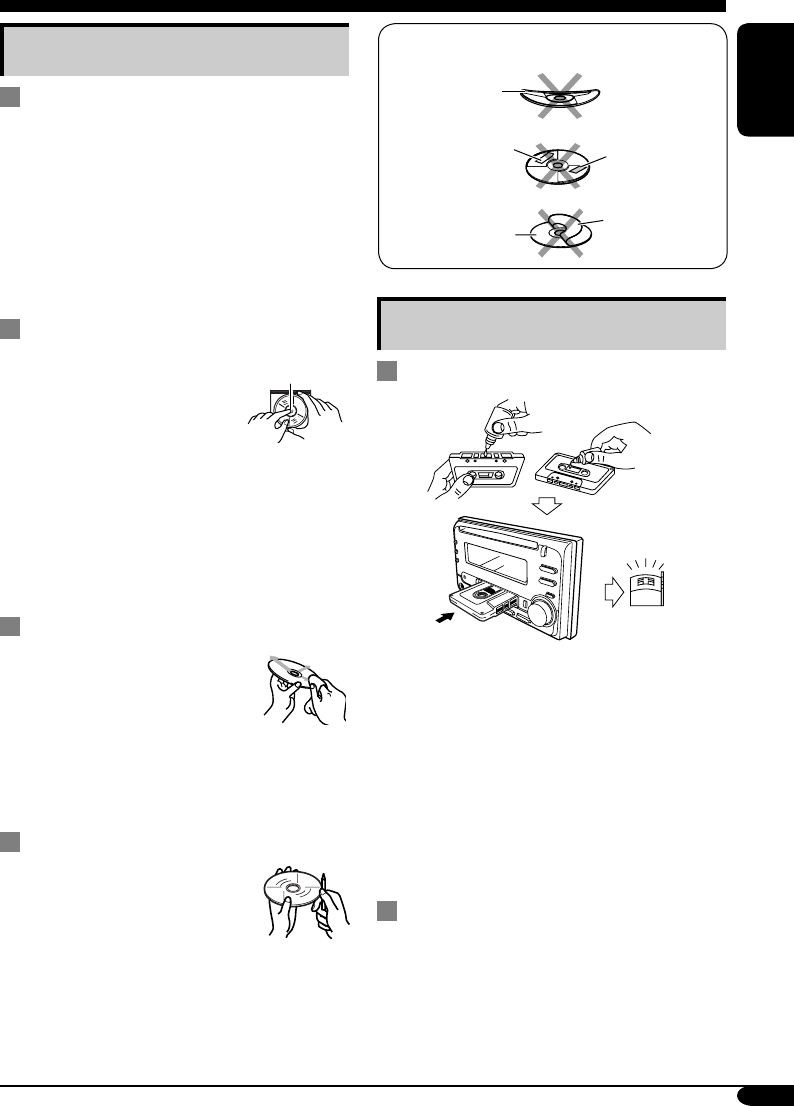
Handling cassettes
To clean the head
• Clean the heads after every 10 hours of use
using a wet-type head cleaning tape (available
at an audio store).
When the head becomes dirty, you may
realize the following symptoms:
– Sound quality is reduced.
– Sound level decreases.
– Sound drops out.
• Do not touch the highly-polished head with
any metallic or magnetic tools.
To keep the tape clean
• Always store the cassettes in their storage
cases after use.
• Do not store cassettes in the following places:
– Subject to direct sunlight
– With high humidity
– At extremely hot temperatures
Maintenance
Handling discs
Moisture condensation
Moisture may condense on the lens inside the
CD player in the following cases:
• After starting the heater in the car.
• If it becomes very humid inside the car.
Should this occur, the CD player may
malfunction. In this case, eject the disc and
leave the unit turned on for a few hours until the
moisture evaporates.
How to handle discs
When removing a disc from
its case, press down the center
holder of the case and lift the
disc out, holding it by the edges.
• Always hold the disc by the
edges. Do not touch its recording surface.
When storing a disc into its case, gently insert
the disc around the center holder (with the
printed surface facing up).
• Make sure to store discs into the cases after
use.
To keep discs clean
A dirty disc may not play correctly.
If a disc does become dirty, wipe
it with a soft cloth in a straight line
from center to edge.
• Do not use any solvent (for example,
conventional record cleaner, spray, thinner,
benzine, etc.) to clean discs.
To play new discs
New discs may have some rough
spots around the inner and outer
edges. If such a disc is used, this
unit may reject the disc.
To remove these rough spots, rub the edges
with a pencil or ball-point pen, etc.
Center holder
Do not use the following discs:
Warped
disc
Sticker Sticker
residue
Disc
Stick-on
label
EN18-23_KW-XC406_405[U]f.indd 23EN18-23_KW-XC406_405[U]f.indd 23 7/26/05 9:28:19 AM7/26/05 9:28:19 AM
24
ENGLISH
More about this unit
Basic operations
Turning on the power
• By pressing the source buttons on the unit,
you can also turn on the power. If the source
is ready, playback also starts.
Turning off the power
• If you turn off the ignition key without
turning off this unit, the unit will
automatically turn on when you turn on the
ignition key next time. If the last selected
source is ready for playback (ex. a disc
or a tape is in the unit), playback starts
automatically.
• If you turn off the power while listening to a
disc, disc play will start from where playback
has been stopped previously, next time you
turn on the power.
Selecting the sources
• When no disc or cassette is loaded in the unit,
“CD” or “TAPE” cannot be selected.
• Without connecting to the CD changer,
“CD-CH” cannot be selected.
Tuner operations
Storing stations in memory
• During SSM search...
– All previously stored stations are erased and
stations are stored newly.
– Received stations are preset in No. 1 (lowest
frequency) to No. 6 (highest frequency).
– When SSM is over, the station stored in
No. 1 will be automatically tuned in.
• When storing a station manually, a previously
preset station is erased when a new station is
stored in the same preset number.
Disc operations
Caution for DualDisc playback
• The Non-DVD side of a “DualDisc” does
not comply with the “Compact Disc Digital
Audio” standard. Therefore, the use of Non-
DVD side of a DualDisc on this product may
not be recommended.
General
• MP3 and WMA (Windows Media® Audio)
“tracks” (words “file” and “track” are used
interchangeably) are recorded in “folders.”
• This unit has been designed to reproduce
CDs/CD Texts, and CD-Rs (Recordable)/
CD-RWs (Rewritable) in audio CD (CD-DA),
MP3 and WMA format.
• When a disc has been loaded, selecting “CD”
for the playback source starts disc play.
Inserting a disc
• When a disc is inserted upside down, the disc
automatically ejects and the unit starts playing
the last selected source.
• Do not insert 8 cm discs (single CD) and
unusual shape discs (heart, flower, etc.) into
the loading slot.
Playing a disc
• While fast-forwarding or reversing on an MP3
or WMA disc, you can only hear intermittent
sounds.
Playing a CD-R or CD-RW
• Use only “finalized” CD-Rs or CD-RWs.
• This unit can play back only the files of the
same type which is first detected if a disc
includes both audio CD (CD-DA) files and
MP3/WMA files.
• This unit can play back multi-session discs;
however, unclosed sessions will be skipped
while playing.
EN24-29–KW-XC406_405[U]f.indd 24EN24-29–KW-XC406_405[U]f.indd 24 7/29/05 7:51:02 PM7/29/05 7:51:02 PM

25
ENGLISH
• Some CD-Rs or CD-RWs may not play
back on this unit because of their disc
characteristics, and for the following causes:
– Discs are dirty or scratched.
– Moisture condensation occurs on the lens
inside the unit.
– The pickup lens inside the unit is dirty.
– CD-R/CD-RW on which the files are
written with “Packet Write” method.
– There are improper recording conditions
(missing data, etc.) or media conditions
(stain, scratch, warp, etc.).
• CD-RWs may require a longer readout time
since the reflectance of CD-RWs is lower
than that of regular CDs.
• Do not use the following CD-Rs or CD-RWs:
– Discs with stickers, labels, or protective seal
stuck to the surface.
– Discs on which labels can be directly
printed by an ink jet printer.
Using these discs under high temperatures
or high humidity may cause malfunctions or
damages to the unit.
Playing an MP3/WMA disc
• This unit can play back MP3/WMA files
with the extension code <.mp3> or <.wma>
(regardless of the letter case—upper/lower).
• This unit can show the names of albums,
artists (performer), and ID3 Tag (Version 1.0,
1.1, 2.2, 2.3, or 2.4) for MP3 files and for
WMA files.
• This unit can display only one-byte
characters. No other characters can be
correctly displayed (see page 11).
• This unit can play back MP3/WMA files
meeting the conditions below:
– Bit rate: 8 kbps — 320 kbps
– Sampling frequency:
48 kHz, 44.1 kHz, 32 kHz (for MPEG-1)
24 kHz, 22.05 kHz, 16 kHz (for MPEG-2)
48 kHz, 44.1 kHz, 32 kHz (for WMA)
– Disc format: ISO 9660 Level 1/ Level 2,
Romeo, Joliet, Windows long file name
• The maximum number of characters for file/
folder names vary among the disc format used
(includes 4 extension characters—<.mp3> or
<.wma>).
– ISO 9660 Level 1: up to 12 characters
– ISO 9660 Level 2: up to 31 characters
– Romeo*: up to 128 (72) characters
– Joliet*: up to 64 (36) characters
– Windows long file name*: up to 128 (72)
characters
* The parenthetic figure is the maximum
number of characters for file/folder names
in case the total number of files and folders
is 313 or more.
• This unit can recognize the total of 512 files,
of 200 folders, and of 8 hierarchies.
• This unit can play back the files recorded in
VBR (variable bit rate).
The files recorded in VBR have a discrepancy
in elapsed time display, and do not show the
actual elapsed time. This difference becomes
noticeable especially after performing the
search function.
• This unit cannot play back the following files:
– MP3 files encoded with MP3i and
MP3 PRO format.
– MP3 files encoded in an unappropriated
format.
– MP3 files encoded with Layer 1/2.
– WMA files encoded with lossless,
professional, and voice format.
– WMA files which are not based upon
Windows Media® Audio.
– WMA files copy-protected with DRM.
– Files which have the data such as WAVE,
ATRAC3, etc.
• The search function works but search speed is
not constant.
To be continued....
EN24-29–KW-XC406_405[U]f.indd 25EN24-29–KW-XC406_405[U]f.indd 25 8/3/05 10:54:41 AM8/3/05 10:54:41 AM

26
ENGLISH
Changing the source
• If you change the source, playback also stops
(without ejecting the disc).
Next time you select “CD” or “CD-CH” for
the playback source, disc play starts from
where it has been stopped previously.
Ejecting a disc
• If the ejected disc is not removed within
15 seconds, the disc is automatically inserted
again into the loading slot to protect it from
dust. (Disc will not play this time.)
Tape operations
Playing a tape
• While locating a specified tune:
– If the tape is rewound to its beginning,
playback starts from the beginning of that
side.
– If the tape is fast-forwarded to the end, it is
reversed and played from the beginning of
the other side.
• In the following cases, Multi Music Scan
(MMS), Blank Skip, and Repeat Play may not
operate correctly:
– Tapes with tunes having long pianissimo
passages (very quiet parts) or non-recorded
portions.
– Tapes with short non-recorded sections.
– Tapes with high level noise or humming
between tunes.
– The Dolby NR setting does not match. For
example, if the tape is recorded with the
Dolby C NR.
• Do not use the following tape:
– Dirty or dusty tapes.
– Cassette with peeling labels.
– Loose tape which may become entangled
with the mechanism.
Changing the source
• If you change the source, playback also stops
(without ejecting the cassette).
Ignition key-off release
• When you turn off the ignition key with
a cassette in the compartment, the unit
automatically releases the tape from its head.
General settings—PSM
• If you change the “TAG DISP” setting from
“TAG OFF” to “TAG ON” while playing
MP3/WMA file, the tag display will be
activated when the next file starts playing.
• If you change the “AMP GAIN” setting
from “HIGH PWR” to “LOW PWR”
while the volume level is set higher than
“VOLUME 30,” the unit automatically
changes the volume level to “VOLUME 30.”
Other main functions
• If you try to assign a title to the 31st station
frequency, “NAME FULL” flashes. Delete
unwanted titles before assignment.
EN24-29–KW-XC406_405[U]f.indd 26EN24-29–KW-XC406_405[U]f.indd 26 7/26/05 9:28:35 AM7/26/05 9:28:35 AM
27
ENGLISH
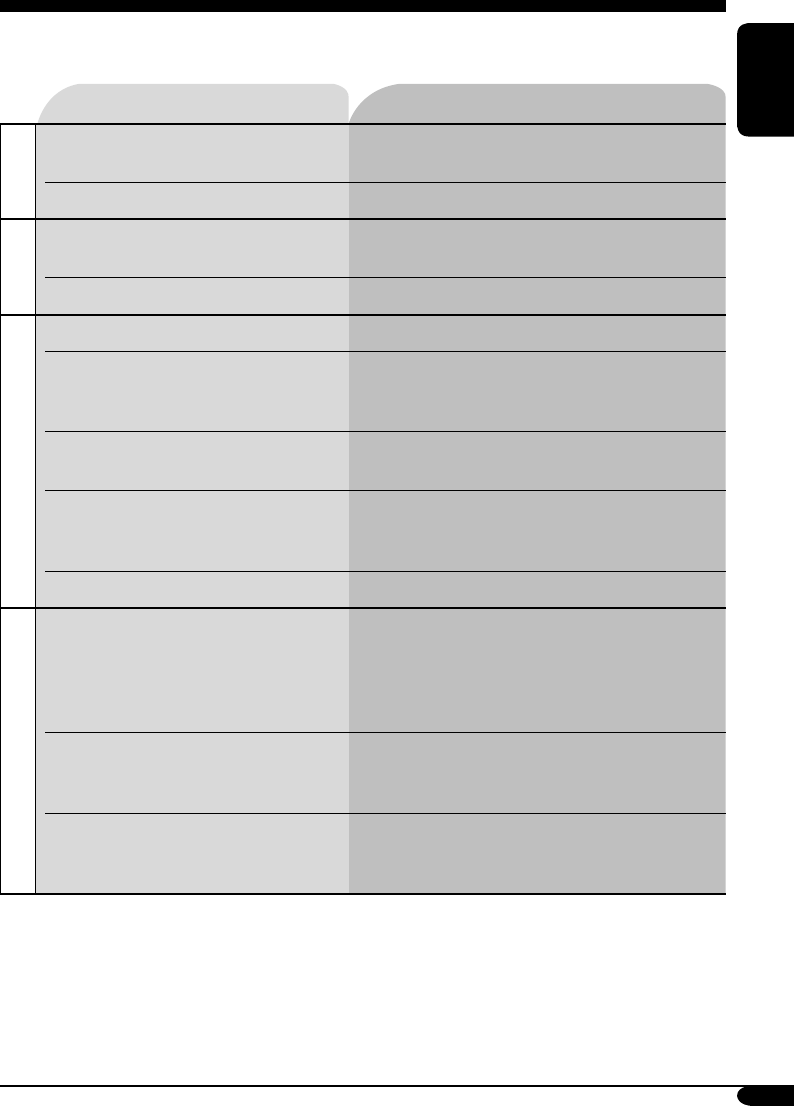
Troubleshooting
What appears to be trouble is not always serious. Check the following points before calling a service
center.
To be continued....
Symptoms Remedies/Causes
General
• Sound cannot be heard from the
speakers.
• Adjust the volume to the optimum level.
• Check the cords and connections.
• The unit does not work at all. Reset the unit (see page 2).
FM/AM
• SSM automatic presetting does not
work.
Store stations manually.
• Static noise while listening to the radio. Connect the antenna firmly.
Disc playback
• Disc cannot be played back. Insert the disc correctly.
• CD-R/CD-RW cannot be played back.
• Tracks on the CD-R/CD-RW cannot be
skipped.
• Insert a finalized CD-R/CD-RW.
•
Finalize the CD-R/CD-RW with the component
which you used for recording.
• Disc can be neither played back nor
ejected.
• Unlock the disc (see page 15).
• Eject the disc forcibly (see page 2).
• Disc sound is sometimes interrupted. • Stop playback while driving on rough roads.
• Use an unscratched disc.
• Check the cords and connections.
• “NO DISC” appears on the display. Insert a correct disc into the loading slot.
MP3/WMA playback
• Disc cannot be played back. • Use a disc with MP3/WMA tracks recorded in
the format compliant with ISO 9660 Level 1,
Level 2, Romeo, or Joliet.
• Add the extension code <.mp3> or <.wma> to
the file names.
• Noise is generated. Skip to another track or change the disc. (Do not
add the extension code <.mp3> or <.wma> to
non-MP3 or WMA tracks.)
• A longer readout time is required
(“CHECK” keeps flashing on the
display).
Do not use too many hierarchies and folders.
EN24-29–KW-XC406_405[U]f.indd 27EN24-29–KW-XC406_405[U]f.indd 27 7/26/05 9:28:36 AM7/26/05 9:28:36 AM
28
ENGLISH
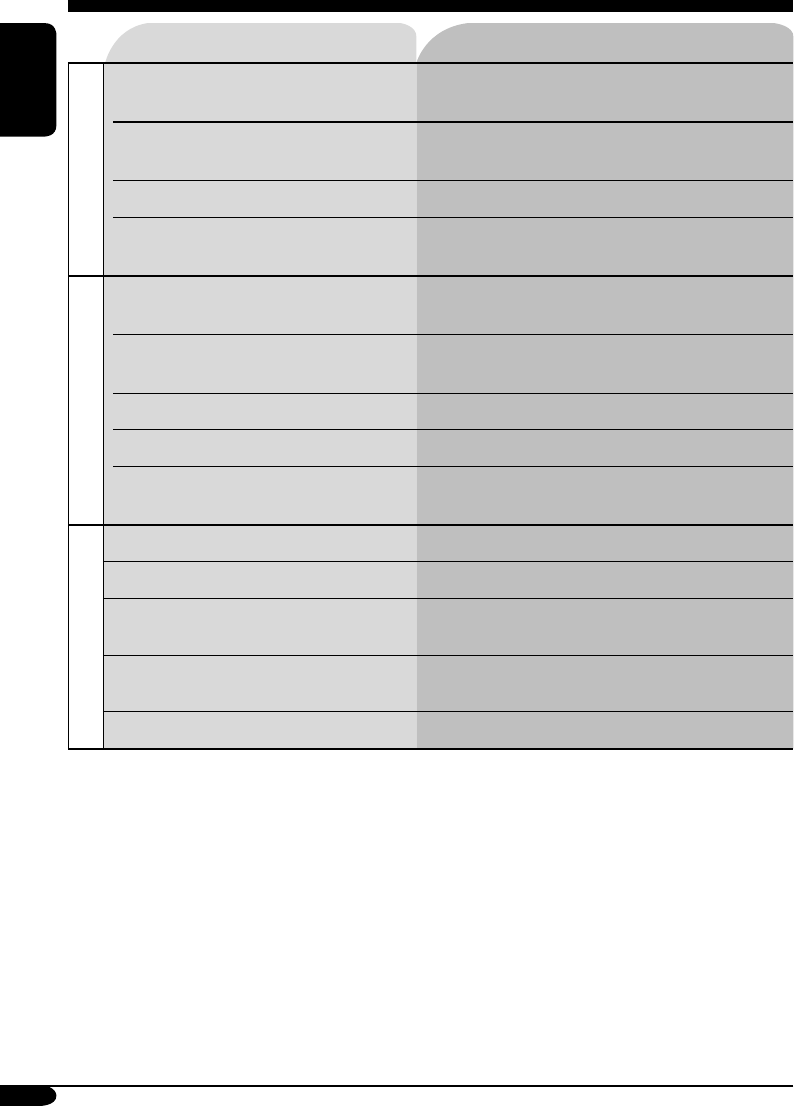
Symptoms Remedies/Causes
MP3/WMA playback
• Tracks do not play back in the order
you have intended them to play.
Playback order is determined when the files are
recorded.
• Elapsed playing time is not correct. This sometimes occurs during play. This is caused
by how the tracks are recorded on the disc.
• “NO FILES” appears on the display. Insert a disc that contains MP3/WMA tracks.
• Correct characters are not displayed
(e.g. album name).
This unit can only display alphabets (upper/lower
case), numbers, and a limited number of symbols.
Tape playback
• A cassette cannot be inserted. Insert the cassette with the exposed tape facing
right.
• Cassette can be neither played back nor
ejected.
Unlock the cassette (see page 17).
• “NO TAPE” appears on the display. Insert a cassette correctly.
• Cassette tapes become hot. This is not a malfunction.
• Tape sound is at very low level and
sound quality is degraded.
Clean the tape head using a head cleaning tape.
CD changer
• “NO DISC” appears on the display.
Insert a disc into the magazine.
• “NO MAG” appears on the display. Insert the magazine.
• “RESET 8” appears on the display. Connect this unit and the CD changer correctly
and press the reset button of the CD changer.
• “RESET 1” – “RESET 7” appears on
the display.
Press the reset button of the CD changer.
• The CD changer does not work at all. Reset the unit (see page 2).
• Microsoft and Windows Media are either registered trademarks or trademarks of Microsoft
Corporation in the United States and/or other countries.
EN24-29–KW-XC406_405[U]f.indd 28EN24-29–KW-XC406_405[U]f.indd 28 7/26/05 9:28:36 AM7/26/05 9:28:36 AM

29
ENGLISH
Specifications
AUDIO AMPLIFIER SECTION
Maximum Power Output:
Front: 50 W per channel
Rear: 50 W per channel
Continuous Power Output (RMS):
Front: 19 W per channel into 4 Ω, 40 Hz
to 20 000 Hz at no more than 0.8%
total harmonic distortion.
Rear: 19 W per channel into 4 Ω, 40 Hz
to 20 000 Hz at no more than 0.8%
total harmonic distortion.
Load Impedance: 4 Ω (4 Ω to 8 Ω allowance)
Equalizer Control Range:
Low: ±12 dB (60 Hz, 80 Hz, 100 Hz, 120 Hz)
Mid: ±12 dB
High: ±12 dB (8 kHz, 10 kHz, 12 kHz, 15 kHz)
Frequency Response: 40 Hz to 20 000 Hz
Signal-to-Noise Ratio: 70 dB
Line-Out Level/Impedance:
2.0 V/20 kΩ load (full scale)
Output Impedance: 1 kΩ
Other terminals: CD changer, AUX (auxiliary)
input jack
TUNER SECTION
Frequency Range:
FM: 87.5 MHz to 108.0 MHz
AM: 531 kHz to 1 602 kHz
[FM Tuner]
Usable Sensitivity: 11.3 dBf (1.0 µV/75 Ω)
50 dB Quieting Sensitivity:
16.3 dBf (1.8 µV/75 Ω)
Alternate Channel Selectivity (400 kHz): 65 dB
Frequency Response: 40 Hz to 15 000 Hz
Stereo Separation: 30 dB
Capture Ratio: 1.5 dB
[AM Tuner]
Sensitivity: 20 µV
Selectivity: 35 dB
CD PLAYER SECTION
Type: Compact disc player
Signal Detection System: Non-contact optical
pickup (semiconductor laser)
Number of Channels: 2 channels (stereo)
Frequency Response: 5 Hz to 20 000 Hz
Dynamic Range: 96 dB
Signal-to-Noise Ratio: 98 dB
Wow and Flutter: Less than measurable limit
MP3 Decoding Format:
MPEG1/2 Audio Layer 3
Max. Bit Rate: 320 kbps
WMA (Windows Media® Audio) Decoding
Format:
Max. Bit Rate: 192 kbps
CASSETTE DECK SECTION
Wow and Flutter: 0.1 % (WRMS)
Fast-Wind Time: 100 sec. (C-60)
Frequency Response: 30 Hz to 16 000 Hz
(Normal tape)
Signal-to-Noise Ratio: (Normal tape)
Dolby B NR ON: 65 dB
Dolby B NR OFF: 56 dB
Stereo Separation: 40 dB
GENERAL
Power Requirement:
Operating Voltage:
DC 14.4 V (11 V to 16 V allowance)
Grounding System: Negative ground
Allowable Operating Temperature:
0°C to +40°C
Dimensions (W × H × D):
Installation Size (approx.):
178 mm × 100 mm × 158 mm
Set Size (approx.):
178 mm × 100 mm × 175 mm
Mass (approx.):
2.3 kg (excluding accessories)
Design and specifications are subject to change
without notice.
EN24-29–KW-XC406_405[U]f.indd 29EN24-29–KW-XC406_405[U]f.indd 29 7/26/05 9:28:36 AM7/26/05 9:28:36 AM
2
‰∑¬
§”‡µ◊Õπ:
∂È“µÈÕß„™È‡§√◊ËÕߢ≥–¢—∫√∂ ¢Õ„ÀÈ·πË„®«Ë“
¥Ÿ∑“ß√Õ∫§Õ∫¥’·≈È« ¡‘‡™Ëππ—ÈπÕ“®‡°‘¥Õÿ∫—µ‘‡Àµÿ¢÷Èπ‰¥È
«‘∏’°“√µ—È߇§√◊ËÕß„À¡Ë
®–‡ªÁπ°“√µ—Èß√–∫∫‰¡‚§√§Õ¡æ‘«‡µÕ√Ï„À¡Ë
§Ë“∑’˪√—∫µ—È߉«È°ËÕπ®–∂Ÿ°≈∫∑‘Èß
¢Õ¢Õ∫æ√–§ÿ≥∑’ˇ≈◊Õ°´◊ÈÕº≈‘µ¿—≥±Ï¢Õß JVC °√ÿ≥“ÕË“π§”·π–π”∑—ÈßÀ¡¥‚¥¬≈–‡Õ’¬¥°ËÕπ°“√„™Èß“π
‡æ◊ËÕ„Àȇ¢È“„®™—¥‡®π ·≈–‡æ◊ËÕ„Àȉ¥È√—∫ª√–‘∑∏‘¿“æŸßÿ¥„π°“√„™Èß“πº≈‘µ¿—≥±Ï
¢ÈÕ¡Ÿ≈∑’˧«√∑√“∫‡°’ˬ«°—∫‡§√◊ËÕß√–∫∫‡≈‡´Õ√Ï
1. º≈‘µ¿—≥±Ï‡§√◊ËÕß√–∫∫‡≈‡´Õ√Ï ™—Èπ 1
2. ¢ÈÕ§«√√–«—ß: ÀÈ“¡‡ª‘¥ø“‡§√◊ËÕߥȓπ∫π ¿“¬„π‡§√◊ËÕß«ππ’È ‰¡Ë¡’Ë«πª√–°Õ∫„¥Ê ∑’Ë®”‡ªÁπµÈÕ߇ª‘¥
‡æ◊ËÕµ√«®‡™Á§À√◊Õ´ËÕ¡ §«√„Àș˓ߺŸÈ‡™’ˬ«™“≠ ‡ªÁπºŸÈ√—∫º‘¥™Õ∫„π°“√´ËÕ¡‡§√◊ËÕß
3. ¢ÈÕ§«√√–«—ß: À“°‡ª‘¥‡§√◊ËÕß À√◊Õ‡¡◊ËÕµ—«≈ÁÕ§‡§√◊ËÕ߇’¬À√◊Õ™”√ÿ¥ ∑Ë“πÕ“®—¡º—‡¢È“°—∫·ß‡≈‡´Õ√Ï
∑’Ë¡Õ߇ÀÁπ·≈–‰¡Ë‡ÀÁπ¥È«¬µ“‡ª≈Ë“ §«√À≈’°‡≈’ˬߡ‘„Àô—¡º—‚¥¬µ√ß °—∫·ß‡≈‡´Õ√Ï
4. °“√∑”©≈“°¢÷Èπ¡“„À¡Ë: ©≈“°√–∫ÿ¢ÈÕ§«√√–«—ß «“߉«È¥È“ππÕ°¢Õßµ—«‡§√◊ËÕß
¢ÈÕ§«√√–«—߇°’ˬ«°—∫°“√µ—Èß√–¥—∫§«“¡¥—ß:
·ºËπ¥‘°Ï¡’‡’¬ß·∑√°πÈÕ¬ ‡¡◊ËÕ‡∑’¬∫°—∫´Õ√ÏÕ◊ËπÊ
¥—ßπ—Èπ®÷ߧ«√≈¥§«“¡¥—ß≈ß °ËÕπ‡≈Ëπ·ºË𥑰Ï
‡æ◊ËÕÀ≈’°‡≈’ˬߧ«“¡‡’¬À“¬µËÕ≈”‚æß ®“°√–¥—
∫‡’¬ß∑’ˇæ‘Ë¡¢÷Èπ©—∫æ≈—π
«‘∏’∫—ߧ—∫¥—π·ºË𥑰ÏÕÕ°Ë
À“°‡§√◊ËÕ߉¡Ë®”·ºËπÀ√◊Õ¥—π·ºË𥑰ÏÕÕ°®“°‡§√◊ËÕ߉¡Ë‰¥È
„ÀÈ¥—π·ºË𥑰ÏÕÕ°®“°‡§√◊ËÕߥ—ßπ’ÈÈ
• ∂È“·ºËπ¥‘°Ï‰¡Ë∑”ß“π „ÀÈ≈Õßµ—È߇§√◊ËÕß„À¡Ë
• √–«—ßլ˓„ÀÈ·ºËπ¥‘°Ïµ°≈ßæ◊Èπ‡¡◊ËÕ¥—π·ºË𥑰ÏÕÕ°¡“
TH02-05_KW-XC406_405[U]2.indd 2TH02-05_KW-XC406_405[U]2.indd 2 8/5/05 2:44:00 PM8/5/05 2:44:00 PM

3
‰∑¬
«‘∏’°“√µ—È߇§√◊ËÕß„À¡ËË ............................... 2
«‘∏’∫—ߧ—∫¥—π·ºË𥑰ÏÕÕ°Ë ........................ 2
«‘∏’ÕË“π§ŸË¡◊Õ©∫—∫π’È’ ................................ 4
«‘∏’„™ÈªÿË¡ MODE ............................... 4
·ºß§«∫§ÿ¡°“√∑”ß“π— —
KW-XC406/KW-XC405 ......................... 5
µ”·ÀπËߢÕߪÿË¡µË“ßÊ ............................. 5
√’‚¡∑ §Õπ‚∑√≈‘ — RM-RK50 .............. 6
ÕߧϪ√–°Õ∫·≈–§ÿ≥¡∫—µ‘”§—≠ ................ 6
°“√‡√‘Ë¡µÈπ„™Èß“π ................................... 7
°“√„™ôß“π‡∫◊ÈÕßµÈπ ................................. 7
°“√¬°‡≈‘°°“√·¥ßµ—«Õ¬Ë“ß ...................... 8
°“√µ—È߇«≈“ ........................................ 8
°“√„™Èß“π«‘∑¬ÿ ...................................... 9
°“√ø—ß«‘∑¬ÿ ........................................... 9
°“√∫—π∑÷°∂“π’≈ß„ÀπË«¬§«“¡®” ............... 9
°“√√—∫ø—ߧ≈◊Ëπ∂“π’∑’˵—È߉«È≈Ë«ßÀπÈ“ .............. 10
°“√·°πÀ“∂“π’«‘∑¬ÿ ........................... 10
°“√µ—Èß™◊ËÕ∂“π’«‘∑¬ÿ .............................. 11
°“√„™Èß“π·ºËπ¥‘°Ï ................................. 12
°“√‡≈Ëπ·ºË𥑰ú„π‡§√◊ËÕß ....................... 12
°“√‡≈Ëπ·ºËπ¥°ú„π´’¥’‡™π‡®Õ√å ................ 13
ø—ß°Ï™—πÀ≈—°Õ◊ËπÊ ................................. 15
°“√‡ª≈’ˬπ¢ÈÕ¡Ÿ≈∑’Ë·¥ß ......................... 15
°“√‡≈◊Õ°‚À¡¥°“√‡≈Ëπ ........................... 16
°“√„™Èß“π‡∑ª ........................................... 17
°“√‡≈Ëπ‡∑ª ................................................... 17
°“√§ÈπÀ“®ÿ¥‡√‘Ë¡µÈπ¢Õ߇æ≈ß ..................... 17
ø—ß°Ï™—π‡∑ªÕ◊ËπÊ .................................. 17
°“√ª√—∫·µË߇’¬ß ...................................... 18
°“√‡≈◊Õ°‚À¡¥‡’¬ß∑’˵—È߉«È≈Ë«ßÀπÈ“
(EQ: Õ’§«Õ‰≈‡´Õ√ÏÏ) ................................... 18
°“√ª√—∫·µË߇’¬ß ................................. 18
°“√‡°Á∫‡’¬ß∑’˪√—∫·µËߥȫ¬µπ‡Õß ............... 19
°“√µ—Èߧ˓∑—Ë«‰ª — PSM .......................... 20
¢—ÈπµÕπ‡∫◊ÈÕßµÈπ .................................. 20
°“√„™Èß“πÕÿª°√≥Ï¿“¬πÕ° ........................ 22
°“√‡≈ËπÕÿª°√≥Ï¿“¬πÕ° ........................... 22
°“√¥Ÿ·≈√—°…“ ....................................... 23
°“√√—°…“·ºËπ¥‘°Ï ................................ 23
°“√√—°…“µ≈—∫‡∑ª ................................ 23
¢ÈÕ¡Ÿ≈‡æ‘Ë¡‡µ‘¡‡°’ˬ«°—∫µ—«‡§√◊ËÕß .................. 24
°“√·°È‰¢ª—≠À“‡∫◊ÈÕßµÈπ ........................... 27
¢ÈÕ¡Ÿ≈®”‡æ“– ........................................ 29
Õÿ≥À¿Ÿ¡‘¿“¬„π√∂....
À“°®Õ¥√∂∑‘È߉«È„π∑’Ë∑’Ë¡’Õ“°“»√ÈÕπÀ√◊ÕÀ𓫇ªÁπ‡«≈“π“π
§«√√Õ®π°«Ë“Õÿ≥À¿Ÿ¡‘¿“¬„π√∂°≈—∫ŸË√–¥—∫ª°µ‘°ËÕπ‡√‘Ë¡„™È
ß“π‡§√◊ËÕß
“√∫—≠
‡æ◊ËÕ§«“¡ª≈Õ¥¿—¬....
• ‰¡Ë§«√‡æ‘Ë¡√–¥—∫‡’¬ß¥—߇°‘π‰ª ‡æ√“–®–
∑”„Àȉ¡Ë‰¥È¬‘π‡’¬ß®“° ¿“¬πÕ° ´÷ËßÕ“®‡°‘¥Õ—πµ√“¬¢≥–
¢—∫√∂‰¥ÈÈ
• §«√À¬ÿ¥√∂°ËÕπ°“√„™Èß“π∑’ˬÿË߬“°´—∫´ÈÕπ
TH02-05_KW-XC406_405[U]2.indd 3TH02-05_KW-XC406_405[U]2.indd 3 8/5/05 2:44:05 PM8/5/05 2:44:05 PM
4
‰∑¬
SSM SCAN MONO
DOLBY B B.SKIP REPEAT
REPEAT RANDOM
INTRO
–10 +10
«‘∏‘ „™ÈªÿË¡ MODE
°¥ªÿË¡ MODE ´È”‡æ◊ËÕ‡≈◊Õ°ø—ß°Ï™—πÕ◊Ëπ∑’Ë“¡“√„™Èß“π‰
¥È¢≥–‡≈Ëπ
‰ø—≠≠“≥·¥ß°“√π—∫‡«≈“∂Õ¬À≈—ß
‡™Ëπ: ‡¡◊ËÕ‡≈◊Õ° “SSM”
¢≥–ø—ß«‘∑¬ÿ:
• ∑Ë“π“¡“√∂‡≈◊Õ° “SSM” À√◊Õ “SCAN”
À“°∑Ë“π°”≈—ßø—ß«‘∑¬ÿ™ËÕß∑’Ë∫—π∑÷°‰«È¥È«¬ªÿË¡ EX
(extra-摇»…) ¥Ÿ√“¬≈–‡Õ’¬¥„πÀπÈ“ 10
¢≥–ø—ß®“°·ºËπ:
¢≥–ø—߇∑ª:
¢≥–ª√—∫‚À¡¥‡’¬ß:
• °¥ªÿË¡ MODE ‡æ◊ËÕ∫—π∑÷°‚À¡¥‡’¬ß∑’˪√—∫‰«È„π
ÀπË«¬§«“¡®” (¥Ÿ√“¬≈–‡Õ’¬¥„πÀπÈ“ 19)
*
∑—Èßπ’È¢÷ÈπÕ¬ŸË°—∫°“√µ—Èߧ˓¡“µ√«—¥√–¥—∫ (¥Ÿ√“¬≈–‡Õ’¬¥
„πÀπÈ“
20
)
«‘∏’ÕË“π§ŸË¡◊Õ©∫—∫πô’ô
‡æ◊ËÕ„Àȧ”Õ∏‘∫“¬ ßË“¬µËÕ°“√‡¢È“„® ‡√“®÷ß„™È«‘∏’µËÕ‰ªπ’È:
• ¢ÈÕ·π–π”·≈–À¡“¬‡ÀµÿµË“ßÊ ®–Õ∏‘∫“¬‰«È ™Ë«ßÀ≈—
ߢÕ߇≈Ë¡ „π∫∑ “¢ÈÕ¡Ÿ≈‡æ‘Ë¡‡µ‘¡‡°’ˬ«°—∫µ—«‡§√◊ËÕß”
(¥ŸÀπÈ“ 24 ∂÷ß 26)
• °“√Õ∏‘∫“¬«‘∏’„™Èß“πªÿË¡µË“ßÊ ∫π‡§√◊ËÕß
®–·¥ßæ√ÈÕ¡√Ÿª¥—ßπ’È:
°¥—ÈπÊ
°¥´È”Ê
°¥ªÿË¡„¥ªÿË¡Àπ÷Ëß
°¥§È“߉«È ®π°«Ë“®–
‡√‘Ë¡∑”ß“π µ“¡µÈÕß°“√
°¥ªÿË¡∑—ÈßÕߧȓ߉«Èæ√ÈÕ¡°—π
‡§√◊ËÕßÀ¡“¬µËÕ‰ªπ’È„™È‡æ◊ËÕ∫Õ°...
: °“√∑”ß“π¢Õ߇§√◊ËÕ߇≈Ëπ CD ∑’˵‘¥µ—Èß
¡“„πµ—«‡§√◊ËÕß
: °“√∑”ß“π¢Õß´’¥’‡™π‡®Õ√Ï¿“¬πÕ°
(§≈◊Ë𧫓¡∂’Ë∂“π’«‘∑¬ÿ)*
(À¡“¬‡≈¢·∑√Á§·≈–
‡«≈“∑’ˇ≈ËπºË“π‰ª)*
(∑‘»∑“ß°“√‡≈Ëπ)*
¬°‡≈‘°
¬°‡≈‘°
¬°‡≈‘°
TH02-05_KW-XC406_405[U]2.indd 4TH02-05_KW-XC406_405[U]2.indd 4 8/5/05 2:44:08 PM8/5/05 2:44:08 PM
5
‰∑¬
·ºß§«∫§ÿ¡°“√∑”ß“π—
-
KW-XC406/KW-XC405
1 ™ËÕß„Ë·ºË𥑰Ï
2 ªÿË¡ (·µπ¥Ï∫“¬/‡ª‘¥‡§√◊ËÕß ‡∫“‡’¬ß≈ß)
3 ªÿË¡ DISP (·¥ßº≈)
4 ªÿË¡ MODE
5 ™ËÕ߇≈Ëπ‡∑ª
6 √’‚¡∑‡´Áπ‡´Õ√
• լ˓«“ß√’‚¡∑‡´Èπ‡´Õ√Ï∑‘È߉«È„ÀÈ‚¥π·≈ß·¥¥®—¥
(·≈ß·¥¥‚¥¬µ√ß À√◊Õ·≈ß®“°À≈Õ¥‰ø)
7 ™ËÕßµËÕ—≠≠“≥ AUX (µËÕæË«ß—≠≠“≥)
8 ªÿË¡µ—«‡≈¢
9 ªÿË¡ CD 0 (¥’¥ CD)
p ®Õ·¥ßº≈
q ªÿË¡ 5 (¢÷Èπ) / ∞ (≈ß)
ªÿË¡ PROG (‚ª√·°√¡) 5 / ∞
w ªÿË¡ 4 / ¢
e ªÿË¡ SEL (‡≈◊Õ°)
r ªÿË¡ T 0 (¥’¥‡∑ªÕÕ°)
t ·ªÈπ§«∫§ÿ¡
y ªÿË¡√’‡´Áµ
u ªÿË¡‡≈◊Õ°´Õ√Ï—CD/CD-CH, TAPE/AUX,
FM/AM, EX (extra-摇»…)
®Õ·¥ßº≈
i
‰ø—≠≠“≥¿“§√—∫«‘∑¬ÿ
—
ST (‡µÕ√‘‚Õ)
,
MO (‚¡‚π)
o —≠≠“≥·¥ß¢ÈÕ¡Ÿ≈¥°— (·∑√Á°/‰ø≈Ï), TAG
(ID3 Tag), (‚ø≈‡¥Õ√Ï)
; —≠≠“≥·¥ß¢ÈÕ¡Ÿ≈ó—DISC, STATION
a ®Õ·¥ßº≈À≈—°, ¡“µ√«—¥√–¥—∫
s ‰ø—≠≠“≥π“Ñ°“
d ‰ø—≠≠“≥ EQ (Õ’§«Õ‰≈‡´Õ√Ï)
f ‰ø—≠≠“≥ LOUD (§«“¡¥—ß)
g ‰ø—≠≠“≥ (Dolby B NR)
h ‰ø—≠≠“≥·¥ß·ºË𥑰ú—MP3, WMA
j ‰ø—≠≠“≥ B.SKIP (¢È“¡™Ë«ß«Ë“ß√–À«Ë“߇æ≈ß)
k ÀπÈ“ª—¥·¥ß´Õ√Ï
l ‰ø—≠≠“≥¡“µ√«—¥√–¥—∫, ¡“µ√«—¥√–¥—∫‡’¬ß,
°“√π—∫‡«≈“∂Õ¬À≈—ß
/ ‰ø—≠≠“≥·¥ß‚À¡¥°“√‡≈Ëπó—DISC,
(‚ø≈‡¥Õ√Ï), RND (‡≈Ëπ·∫∫ÿË¡),
RPT (‡≈Ëπ´È”), INT (Õ‘π‚∑√), (·∑√Á°/
‰ø≈Ï), MAG (·¡°°“´’π)
z ‰ø—≠≠“≥·¥ß´Õ√Ï∑’ˇ≈Ëπ— (¥‘°Ï),
(෻)
µ”·ÀπËߢÕߪÿË¡µË“ßÊ
®Õ·¥ßº≈
TH02-05_KW-XC406_405[U]2.indd 5TH02-05_KW-XC406_405[U]2.indd 5 8/10/05 4:19:12 PM8/10/05 4:19:12 PM
6
‰∑¬
√’‚¡∑ §Õπ‚∑√≈‘ — RM-RK50
ÕߧϪ√–°Õ∫·≈–§ÿ≥¡∫—µ‘”§—≠
1 ªÿË¡ (·µπ¥Ï∫“¬/‡ª‘¥/°√Õß—≠≠“≥)
• ‡ª‘¥‡§√◊ËÕßÀ“°°¥ªÿË¡·≈È«ª≈ËÕ¬À√◊ÕÀπ˫߇’¬ß‡¡◊ËÕ‡
ª‘¥‡§√◊ËÕß
• ª‘¥‡§√◊ËÕßÀ“°°¥ªÿË¡§È“߉«È
2 ªÿË¡ 5 U (¢÷Èπ) / D (≈ß) ∞
• ‡ª≈’ˬπ§≈◊Ëπ FM/AM ¥È«¬ªÿË¡ 5 U ‡∑Ë“π—Èπ
• ‡ª≈’ˬπ§≈◊Ëπ∂“π’∑’˵—È߉«È¥È«¬ªÿË¡ D ∞ ‡∑Ë“π—Èπ
• ‡ª≈’ˬπ‚ø≈‡¥Õ√Ï ∫π·ºËπ MP3/WMA
•
‡ª≈’ˬπÀπÈ“‡∑ª¥È«¬ªÿË¡ 5 U ‡∑Ë“π—Èπ
• ¢≥–‡≈Ëπ·ºËπ MP3 ∫π´’¥’‡™π‡®Õ√Ï
∑’Ë“¡“√∂„™Èß“π°—∫ MP3 ‰¥È:
– ‡ª≈’ˬπ·ºËπ¥°Ï À“°°¥—ÈπÊ
– ‡ª≈’ˬπ‚ø≈‡¥Õ√ÏÀ“°°¥§È“߉«È
3 ªÿË¡ VOL – / VOL +
• ª√—∫√–¥—∫§«“¡¥—ß
4 ªÿË¡ SOUND
• ‡≈◊Õ°‚À¡¥‡’¬ß (EQ: Õ’§«Õ‰≈‡´Õ√Ï)
5 ªÿË¡ SOURCE
• ‡≈◊Õ°´Õ√
6 ªÿË¡ 2 R (°√Õ∂Õ¬À≈—ß) / F (°√Õ‡¥‘πÀπÈ“) 3
• §ÈπÀ“§≈◊Ëπ∂“π’ À“°°¥—ÈπÊ
• °√Õ·∑√Á°‡¥‘πÀπÈ“ À√◊Õ∂Õ¬À≈—ß À“°°¥§È“߉«È
• ‡ª≈’ˬπ·À√Á§¢Õß·ºËπ¥‘°Ï‡¡◊ËÕ°¥·≈⫪≈ËÕ¬
• °√Õ‡∑ª‡¥‘πÀπâ“À√◊Õ∂Õ¬À≈—ßÀ“°°¥ªÿË¡§È“߉«È*
• §âπÀ“®ÿ¥‡√‘Ë¡µâπ¢Õ߇æ≈ß (MMS)
À“°°¥ªÿË¡·≈⫪≈ËÕ¬„π¢≥–∑’Ëø—߇∑ª*
*
À“°µÈÕß°“√À¬ÿ¥°“√∑”ß“π¢Õßø—ß°Ï™—ππ’È °¥ªÿË¡
5 U
‡§√◊ËÕß®–‡√‘Ë¡‡≈ËπµËÕ
°“√µ‘¥µ—Èß·∫µ‡µÕ√’Ë≈‘‡∏’ˬ¡ (CR2025)
•
‡¡◊ËÕ®–„™Èß“π „Àȇ≈Áß√’‚¡∑ §Õπ‚∑√≈ µ√߉ª∑’Ë√’‚¡∑
‡´Áπ‡´Õ√Ï ∫π‡§√◊ËÕß√—∫ ¥Ÿ„ÀÈ·πË„®«Ë“‰¡Ë¡’‘Ëß„¥°’¥¢«“ß∑“ß
§”‡µ◊Õπ:
• ÀÈ“¡„™È·∫µ‡µÕ√’Ë·∫∫Õ◊ËππÕ°®“° CR2025
À√◊Õ·∫µ‡µÕ√’Ë∑’Ë¡’≈—°…≥–‡¥’¬«°—π‡æ√“–
Õ“®∑”„Àȇ°‘¥°“√–‡∫‘¥‰¥È
• §«√‡°Á∫·∫µ‡µÕ√’ˉ«È„π∑’Ë∑’ˇ¥Á°‡Õ◊ÈÕ¡‰¡Ë∂÷ß
‡æ◊ËÕÀ≈’°‡≈’ˬßÕÿ∫—µ‘‡Àµÿ
• ‡æ◊ËÕªÈÕß°—π‰¡Ë„ÀÈ·∫µ‡µÕ√’Ë√ÈÕπ®—¥ ·µ°√È“«
À√◊Õµ‘¥‰ø:
– լ˓π”·∫µ‡µÕ√’ˉª™“√Ï® ≈—¥«ß®√ ∑”„ÀÈ√ÈÕπ
À√◊Õ‡º“‰ø
– լ˓∑‘Èß·∫µ‡µÕ√’ˉ«È°—∫«—¥ÿ‚≈À–Õ◊ËπÊ
– լ˓„™È§’¡ À√◊Õ‡§√◊ËÕß¡◊ÕÕ◊Ëπ ·ß–·∫µ‡µÕ√’Ë
– „™È‡∑ªæ—π·∫µ‡µÕ√’Ë ·≈–æ—π¥È«¬©π«π
‡¡◊ËÕµÈÕß°“√∑‘Èß À√◊Õ‡°Á∫‰«
¢ÈÕ§«√√–«—ß:
TH06-13_KW-XC406_405[U]2.indd 6TH06-13_KW-XC406_405[U]2.indd 6 8/5/05 5:39:14 PM8/5/05 5:39:14 PM
7
‰∑¬
~ °¥ªÿË¡‡ª‘¥‡§√◊ËÕß
Ÿ ”À√—∫«‘∑¬ÿ FM/AM
”À√—∫∂“π’«‘∑¬ÿ∑’Ë∑Ë“π™◊Ëπ™Õ∫
• ∫—π∑÷°∂“π’«‘∑¬ÿ∑’Ë∑Ë“π
™◊Ëπ™Õ∫ ¥Ÿ√“¬≈–‡Õ’¬¥„π
ÀπÈ“ 10
”À√—∫ CD/CD-CH
‡≈◊Õ° “CD-CH” ‡¡◊ËÕ∑Ë“π„™È Apple iPod®
À√◊Õ‡§√◊ËÕ߇≈Ëπ JVC D. (¥ŸÀπÈ“ 22)
iPod ‡ªÁπ‡§√◊ËÕßÀ¡“¬°“√§È“¢Õß Apple
Computer, Inc. ´÷Ëß®¥∑–‡∫’¬π
°“√§È“„πª√–‡∑»À√—∞Õ‡¡√‘°“·≈–ª√–‡∑»Õ◊ËπÊ
”À√—∫ TAPE/AUX
*
∑Ë“π‰¡Ë“¡“√∂‡≈◊Õ°´Õ√ω¥ÈÀ“°´Õ√Ï∑’˵ÈÕß
°“√‡≈Ëπ¬—߉¡Ëæ√ÈÕ¡„™Èß“π
! ª√—∫√–¥—∫§«“¡¥—ß
√–¥—∫§«“¡¥—ß®–ª√“°Ø¢÷Èπ
‰ø—≠≠“≥·¥ß√–¥—∫§«“¡¥—ß
⁄ ª√—∫·µË߇’¬ßµ“¡µÈÕß°“√
(¥ŸÀπÈ“ 18 ·– 19)
°“√≈¥§«“¡¥—ß≈ß™—Ë«§√ŸË (ATT)
À“°µÈÕß°“√°≈—∫‰ª∑’Ë√–¥—∫
‡’¬ß‡¥‘¡ „ÀÈ°¥´È”Õ’°§√—Èß
°“√ª‘¥‡§√◊ËÕß
°“√‡√‘Ë¡µÈπ„™Èß“π
°“√„™Èß“π‡∫◊ÈÕßµÈπ
À√◊Õ
TH06-13_KW-XC406_405[U]2.indd 7TH06-13_KW-XC406_405[U]2.indd 7 8/15/05 4:46:14 PM8/15/05 4:46:14 PM
8
‰∑¬
°“√¬°‡≈‘°°“√·¥ßµ—«Õ¬Ë“ß
À“°‰¡Ë¡’°“√„™Èß“ππ“πª√–¡“≥ 20 «‘π“∑’ ‡§√◊ËÕß®–
‡√‘Ë¡·¥ßµ—«Õ¬Ë“ß∫πÀπÈ“®Õ
[‡√‘Ë¡µÈπ: DEMO ON]—¥ŸÀπÈ“ 20
1
2
3
4 ‡√Á®‘Èπ¢—ÈπµÕπ
°“√‡ª‘¥·¥ßµ—«Õ¬Ë“ß
„π¢—ÈπµÕπ∑’Ë 3 ¢È“ßµÈπ...
°“√µ—È߇«≈“
1
2 µ—Èß™—Ë«‚¡ß·≈–π“∑’
1 ‡≈◊Õ° “CLOCK HOUR” ®“°π—Èπª√—
∫™—Ë«‚¡ß
2 ‡≈◊Õ° “CLOCK MIN” (π“∑’) ®“°π—Èπª√—
∫π“∑’
3 ‡√Á®‘Èπ¢—ÈπµÕπ
TH06-13_KW-XC406_405[U]2.indd 8TH06-13_KW-XC406_405[U]2.indd 8 8/5/05 5:39:22 PM8/5/05 5:39:22 PM
9
‰∑¬
2 ‡≈◊Õ°§≈◊Ëπ∂“π’«‘∑¬ÿ∑’˵ÈÕß°“√
‡¡◊ËÕ√—∫§≈◊Ëπ FM ‡µÕ√‘‚Õ‰¥È¬“°
1
2
‰ø®–µ‘¥ ‡¡◊ËÕ‡ª‘¥„™È‚À¡¥‚¡‚π
¿“§√—∫—≠≠“≥®–¥’¢÷Èπ ·µË‰¡Ë‡ªÁπ‡’¬ß‡µÕ√‘‚Õ
À“°µÈÕß°“√‡√’¬°‡’¬ß‡µÕ√‘‚Õ°≈—∫¡“Õ’°§√—Èß
„ÀÈ∑”¢—ÈπµÕπ‡¥‘¡´È”Õ’°§√—Èß ‡¡◊ËÕ∂÷ߢ—ÈπµÕπ∑’Ë 2 ‡≈◊Õ°
“MONO OFF”
°“√∫—π∑÷°∂“π’≈ß„ÀπË«¬§«“¡®”
∑Ë“π“¡“√∂µ—Èߧ≈◊Ëπ«‘∑¬ÿ‰¥È 6 ∂“π’ „π·µË≈–·∂∫§≈◊Ëπ
°“√µ—Èߧ≈◊Ëπ∂“π’ FM ·∫∫Õ—µ‚π¡—µ‘—
SSM (ÀπË«¬§«“¡®”µ“¡≈”¥—∫§«“¡·√ß
¢Õß—≠≠“≥§≈◊Ëπ«‘∑¬ÿ)
1 ‡≈◊Õ°·∂∫§≈◊Ëπ FM (FM1 – FM3)
∑’˵ÈÕß°“√∫—π∑÷°≈ß
°“√„™Èß“π«‘∑¬ÿ
°“√ø—ß«‘∑¬ÿ
~
‰ø®–µ‘¥ ‡¡◊ËÕ√—∫§≈◊Ëπ FM ‡µÕ√‘‚Õ∑’Ë¡’—≠≠“≥·√ßæÕ
·∂∫§≈◊Ëπ∑’ˇ≈◊Õ°®–ª√“°Ø¢÷Èπ
Ÿ ‡√‘Ë¡§ÈπÀ“∂“π
‡¡◊ËÕ√—∫∂“π’‰¥È °“√§ÈπÀ“®–‘Èπÿ¥≈ß
À“°µÈÕß°“√À¬ÿ¥°“√§ÈπÀ“ „ÀÈ°¥ªÿË¡‡¥‘¡´È”Õ’°§√—Èß
°“√®ŸπÀ“∂“π’¥È«¬µπ‡Õß
„π¢—ÈπµÕπ∑’Ë Ÿ ¢È“ßµÈπ...
1
¡’µËÕ....
TH06-13_KW-XC406_405[U]2.indd 9TH06-13_KW-XC406_405[U]2.indd 9 8/15/05 4:46:17 PM8/15/05 4:46:17 PM
10
‰∑¬
°“√√—∫ø—ߧ≈◊Ëπ∂“π’∑’˵—È߉«È≈Ë«ßÀπÈ“
1
2 ‡≈◊Õ°∂“π’∑’˵ÈÕß°“√µ—È߉«È≈Ë«ßÀπÈ“ (1 – 6)
À√◊Õ
°“√§ÈπÀ“∂“π’«‘∑¬ÿ∑’Ë∑Ë“π™◊Ëπ™Õ∫ (EX)
À“°°¥ªÿË¡Õ’°§√—Èß ‡§√◊ËÕß®–‡≈Ëπ´Õ
√Ï∑’ˇ≈Ëπ¡“°ËÕπÀπÈ“Õ’°§√—Èß
°“√·°πÀ“∂“π’«‘∑¬ÿ
1
2 ‡√‘Ë¡°“√§ÈπÀ“
∑ÿ°§√—Èß∑’ˇ§√◊ËÕߧÈπ‡®Õ∂“π’«‘∑¬ÿ ‡§√◊ËÕß®–À¬ÿ¥°“√·°π
ª√–¡“≥ 5 «‘π“∑’ (§≈◊Ëπ∑’˧Èπ‡®Õ®–ª√“°Ø∑’ËÀπÈ“®Õ·¥ß)
·≈–∑Ë“π“¡“√∂µ√«®Õ∫√“¬°“√∑’ËÕÕ°Õ“°“»„π¢≥–π—Èπ‰¥È
3 ‡√‘Ë¡ø—ß√“¬°“√«‘∑¬ÿ
2
3
¢ÈÕ§«“¡ “SSM” ®–°√–æ√‘∫ ·≈È«À“¬‰ª
‡¡◊ËÕ°“√µ—Èߧ≈◊ËπÕ—µ‚π¡—µ‘‡√Á®‘Èπ
‡§√◊ËÕß®–§ÈπÀ“§≈◊Ëπ«‘∑¬ÿ FM „π∑ÈÕß∂‘Ëπ
∑’Ë¡’≠≠“≥·√ß∑’Ëÿ¥ ·≈–∫—π∑÷°≈ß„π·∂∫§≈◊Ëπ FM
„ÀÈ‚¥¬Õ—µ‚π¡—µ‘
°“√µ—Èߧ≈◊Ëπ«‘∑¬ÿ¥È«¬µπ‡Õß
‡™Ëπ: °“√∫—π∑÷°§≈◊Ëπ∂“π’ FM 92.5 MHz ≈ß∑’ˇ≈¢
4 ¢Õß·∂∫§≈◊Ëπ FM1
1
2
3
À¡“¬‡≈¢∑’˵—Èß¡“®“°‚√ßß“π®–°√–æ√‘∫™—Ë«§√
°“√∫—π∑÷°“π’∑’Ë∑Ë“π™◊Ëπ™Õ∫≈ß„πªÿË¡ EX
(extra-摇»…)
‡™Ëπ: °“√∫—π∑÷°∂“π’«‘∑¬ÿ FM 92.5 MHz ≈ß„πªÿË¡ EX
¢≥–ø—ß∂“π’«‘∑¬ÿ FM „ÀȧÈπÀ“§≈◊Ëπ∑’Ë∑Ë“π™◊Ëπ™Õ∫
®“°π—Èπ.......
TH06-13_KW-XC406_405[U]2.indd 10TH06-13_KW-XC406_405[U]2.indd 10 8/15/05 4:46:19 PM8/15/05 4:46:19 PM
11
‰∑¬
4 ‡√Á®‘Èπ¢—ÈπµÕπ
°“√≈∫™◊ËÕ∑—ÈßÀ¡¥
„π¢—ÈπµÕπ∑’Ë 3 ∑“ߥȓπ´È“¬...
°“√‡ª≈’ˬπ¢ÈÕ¡Ÿ≈∑’Ë·¥ß∫π®Õ·¥ßº≈
*
À“°‰¡Ë¡’°“√µ—Èß™◊ËÕ “NO NAME” ®–ª√“°Ø¢÷Èπ™—Ë«¢≥–
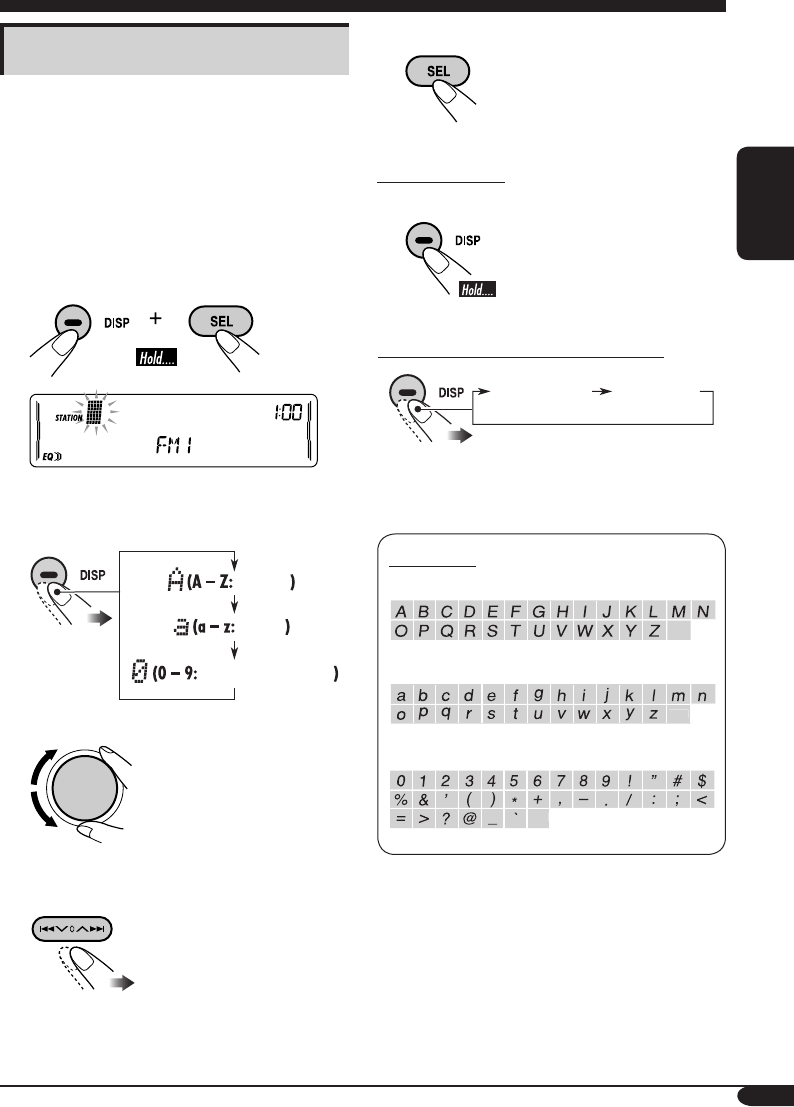
µ—«Õ—°…√∑’Ë¡’
µ—«„À≠Ë
µ—«‡≈Á°
µ—«‡≈¢·≈–—≠≈—°…≥Ï
°“√µ—Èß™◊ËÕ∂“π’«‘∑¬ÿ
∑Ë“π“¡“√∂µ—Èß™◊ËÕ„Àȧ≈◊Ëπ∂“𒉥È∂÷ß 30 §≈◊Ëπ (√«¡∑—Èß
FM ·≈– AM) ™◊ËÕ∂“π’·µË≈–™◊ËÕ®–¡’§«“¡¬“«‰¥È∂÷ß 10
µ—«Õ—°…√ լ˓߉√°Áµ“¡ ∑Ë“π‰¡Ë“¡“√∂µ—Èß™◊ËÕ§≈◊Ëπ∂“π’∑’Ë∫—
π∑÷°‰«È„πªÿË¡ EX
1 ª√—∫À“∂“π’∑’Ë∑Ë“πµÈÕß°“√µ—Èß™◊ËÕ
2 ‡¢È“ŸË‚À¡¥°”Àπ¥™◊ËÕ
3 °”Àπ¥™◊ËÕ
1 ‡≈◊Õ°™ÿ¥µ—«Õ—°…√
2 ‡≈◊Õ°µ—«Õ—°…√
3 ‡≈◊ËÕπ‰ª¬—ßµ”·ÀπËßµ—«Õ—°…√∂—¥‰ª
(À√◊Õ°ËÕπÀπÈ“)
4 ∑”µ“¡¢—ÈπµÕπ∑’Ë 1 ∂÷ß 3 ´È”®π°«Ë“®–
„Ë™◊ËÕ§√∫
µ—«„À≠Ë
µ—«‡≈Á°
µ—«‡≈¢·≈–—≠≈—°…≥å
‡«
Èπ
«√√§
‡«
Èπ
«√√§
‡«
Èπ
«√√§
™◊ËÕ∑’˵—Èß*
§«“¡∂’Ë¢Õß∂“π’
(·≈–À¡“¬‡≈¢∑’Ë°”À𥉫È)
TH06-13_KW-XC406_405[U]2.indd 11TH06-13_KW-XC406_405[U]2.indd 11 8/5/05 5:39:27 PM8/5/05 5:39:27 PM
12
‰∑¬
• ‡¡◊ËÕ„Ë·ºËπ audio CD À√◊Õ CD Text:
°“√À¬ÿ¥‡≈Ëπ·≈–¥—π·ºË𥑰ÏÕÕ°
´Õ√Ï®–‡ª≈’ˬπ°≈—∫‡ªÁπ´Õ√Ï∑’ˇ≈◊Õ°‰«È§√—ÈßÀ≈—ßÿ¥
*1 ‰ø—≠≠“≥ MP3 À√◊Õ WMA µ‘¥ ¢÷ÈπÕ¬ŸË°—
∫‰ø≈Ï∑’˵√«®æ∫
*2 ∑—Èßπ’È¢÷ÈπÕ¬ŸË°—∫°“√µ—Èߧ˓¡“µ√«—¥√–¥—∫ (¥Ÿ√“¬≈–‡Õ’¬¥„πÀπÈ“
20)
• ‡¡◊ËÕ„Ë·ºËπ MP3 À√◊Õ WMA:
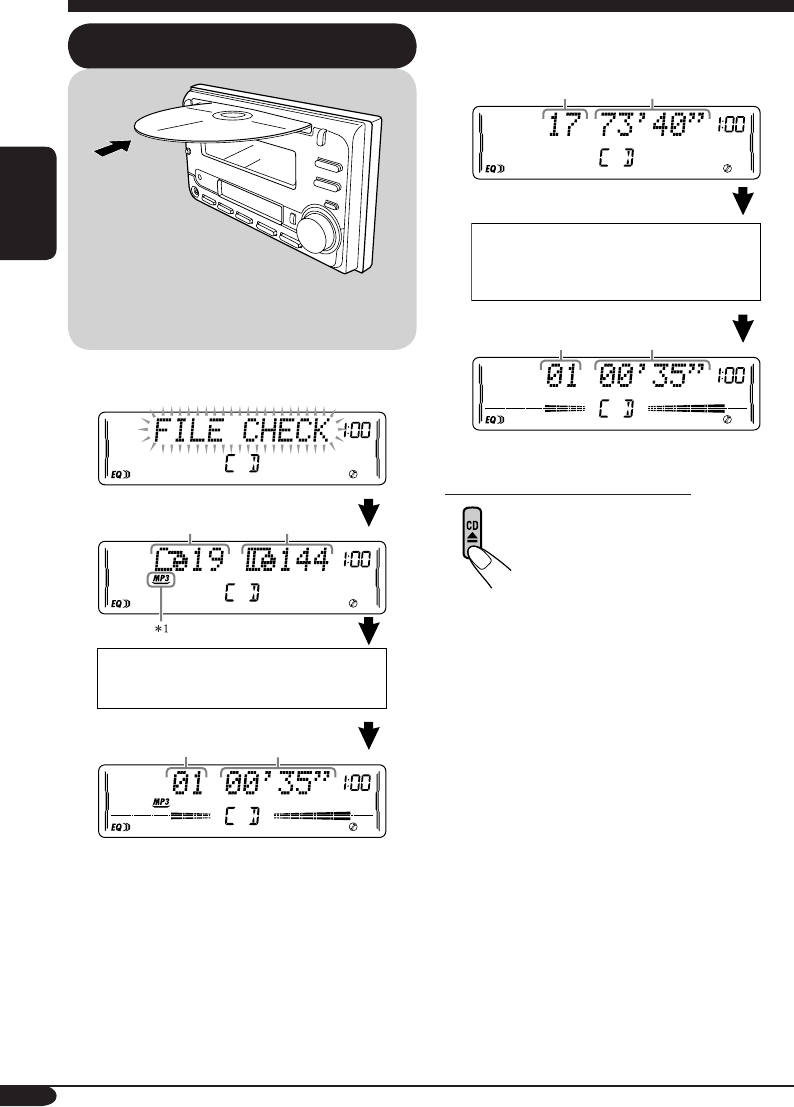
°“√„™Èß“π·ºË𥑰Ï
°“√‡≈Ëπ·ºË𥑰ú„π‡§√◊ËÕß ‡«≈“‡≈Ëπ∑—Èß
À¡¥¢Õß·ºËπ∑’Ë„Ë„π™ËÕß
®”π«π·∑√Á°∑—È
ßÀ¡¥¢Õß·ºËπ∑’Ë„Ë„π™ËÕß
‡§√◊ËÕß®–‡≈Ëπ∑ÿ°·∑√Á°´È” ®π°«Ë“®–‡ª≈’ˬπ´Õ√Ï
À√◊Õ¥—π·ºË𥑰ÏÕÕ°
®”π«π‚ø≈‡¥Õ√Ï∑—Èß
À¡¥
¢ÈÕ¡Ÿ≈¢Õß·ºËπ¥‘°Ïª√“°Ø¢÷Èπ‚¥¬Õ—
µ‚π¡—µ‘ (¥ŸÀπÈ“ 15)
CD Text: ™◊ËÕ¢Õß·ºË𥑰Ï/ºŸÈ·¥ß =
™◊ËÕ·∑√Á°ª√“°Æ¢÷Èπ‚¥¬Õ—µ‚π¡—µ‘
(¥ŸÀπÈ“ 15)
®”π«π‰ø≈Ï∑—ÈßÀ¡¥
®”π«π·∑√Á°ª—®®ÿ∫—π*2‡«≈“∑’ˇ≈ËπºË“π‰ª*2
®”π«π·∑√Á°ª—®®ÿ∫—π*2‡«≈“∑’ˇ≈ËπºË“π‰ª*2
TH06-13_KW-XC406_405[U]2.indd 12TH06-13_KW-XC406_405[U]2.indd 12 8/5/05 5:39:28 PM8/5/05 5:39:28 PM
13
‰∑¬
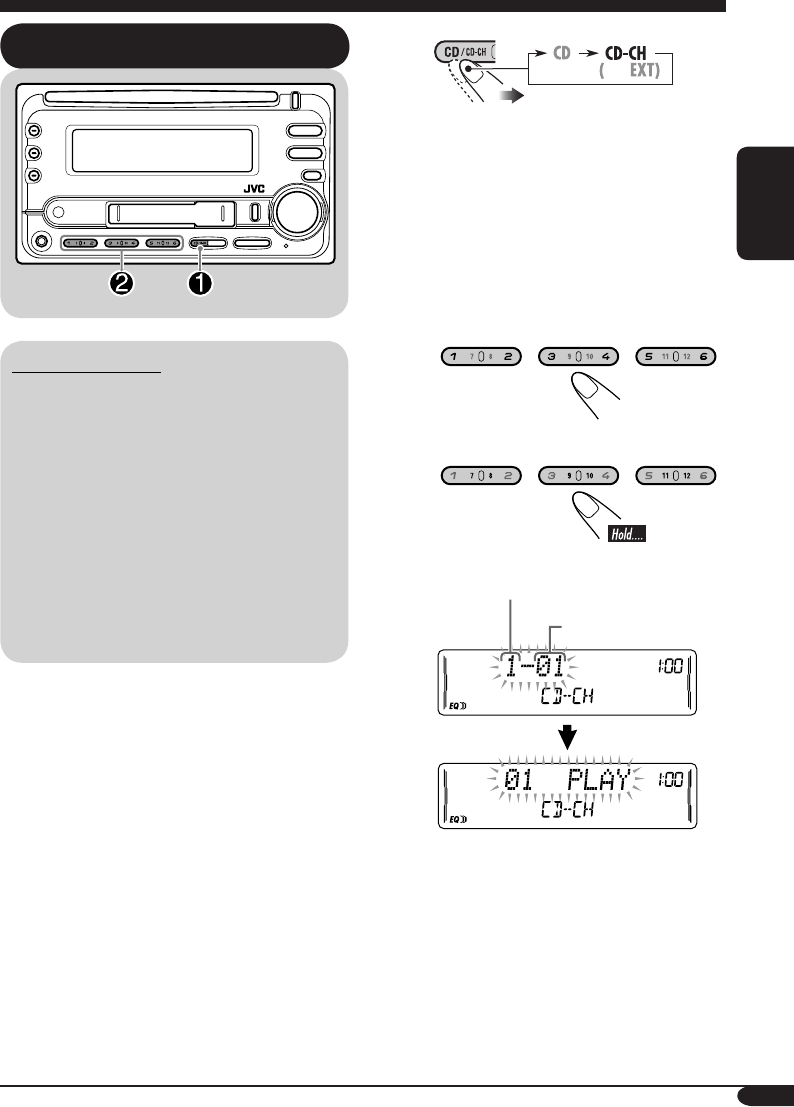
°“√‡≈Ëπ·ºËπ¥°ú„π´’¥’‡™π‡®Õ√Ï
‡°’ˬ«°—∫´’¥’‡™π‡®Õ√
¢Õ·π–π”„ÀÈ„™È´’¥’‡™π‡®Õ√Ï ∑’Ë“¡“√∂‡≈Ëπ MP3 ¢Õß
JVC °—∫‡§√◊ËÕß√—∫¢Õß∑Ë“π
• ∑Ë“π“¡“√∂µËÕ´’¥’‡™π‡®Õ√Ï CH-X (¬°‡«Èπ
CH-X99 ·≈– CH-X100) ·µËÕ“®„™È°—∫·ºËπ
MP3 ‰¡Ë‰¥È ∑”„ÀÈ∑Ë“π‡≈Ëπ·ºËπ MP3 ‰¡Ë‰¥È
• ∑Ë“π‰¡Ë“¡“√∂‡≈Ëπ·ºËπ WMA „π´’¥’‡™π‡®Õ√Ï
• ∑Ë“π‰¡Ë“¡“√∂„™È´’¥’‡™π‡®Õ√Ï √ÿËπ KD-MK
°—∫‡§√◊ËÕßπ’ȉ¥È
• ¢ÈÕ¡Ÿ≈∑’ˇªÁπ¢ÈÕ§«“¡¢Õß·ºËπ¥‘°Ï ´÷Ëß∫—π∑÷°≈ß CD
Text “¡“√∂·¥ß‰¥È ‡¡◊ËÕµËÕ‡™◊ËÕ¡°—∫ JVC CD
Text ∑“¡“√∂„™Èß“π°—∫´’¥’‡™π‡®Õ√ω¥È
‡§√◊ËÕß®–‡≈Ëπ∑ÿ°·∑√Á°¢Õß·ºË𥑰Ï∑’ËÕ¬ŸË„π™ËÕß´È” ®π°«Ë“®–
‡ª≈’ˬπ´Õ√Ï À√◊Õ¥—π·ºß„ËÕÕ°®“° CD ‡™π‡®Õ√
Ï
~
* À“°‡ª≈’ˬπ°“√µ—Èߧ˓ “EXT INPUT” ‡ªÁπ
“EXT INPUT” (¥ŸÀπÈ“ 21) ∑Ë“π®–‰¡“¡
“√∂‡≈◊Õ°´’¥’‡™π‡®Õ√ω¥È
∑—Èßπ’È‚ª√¥¥Ÿ°“√„™È iPod À√◊Õ‡§√◊ËÕ߇≈Ëπ JVC
D. ∑’ËÀπÈ“ 22
Ÿ ‡≈◊Õ°·ºËπ¥°
”À√—∫®”π«π·ºËπ¥°Ï®“° 01 – 06:
”À√—∫®”π«π·ºËπ¥‘°Ï®“° 07 – 12:
®”π«π·ºËπ∑’ˇ≈◊Õ°
À¡“¬‡≈¢·∑√Á°
À√◊Õ *
TH06-13_KW-XC406_405[U]2.indd 13TH06-13_KW-XC406_405[U]2.indd 13 8/5/05 5:39:29 PM8/5/05 5:39:29 PM
14
‰∑¬
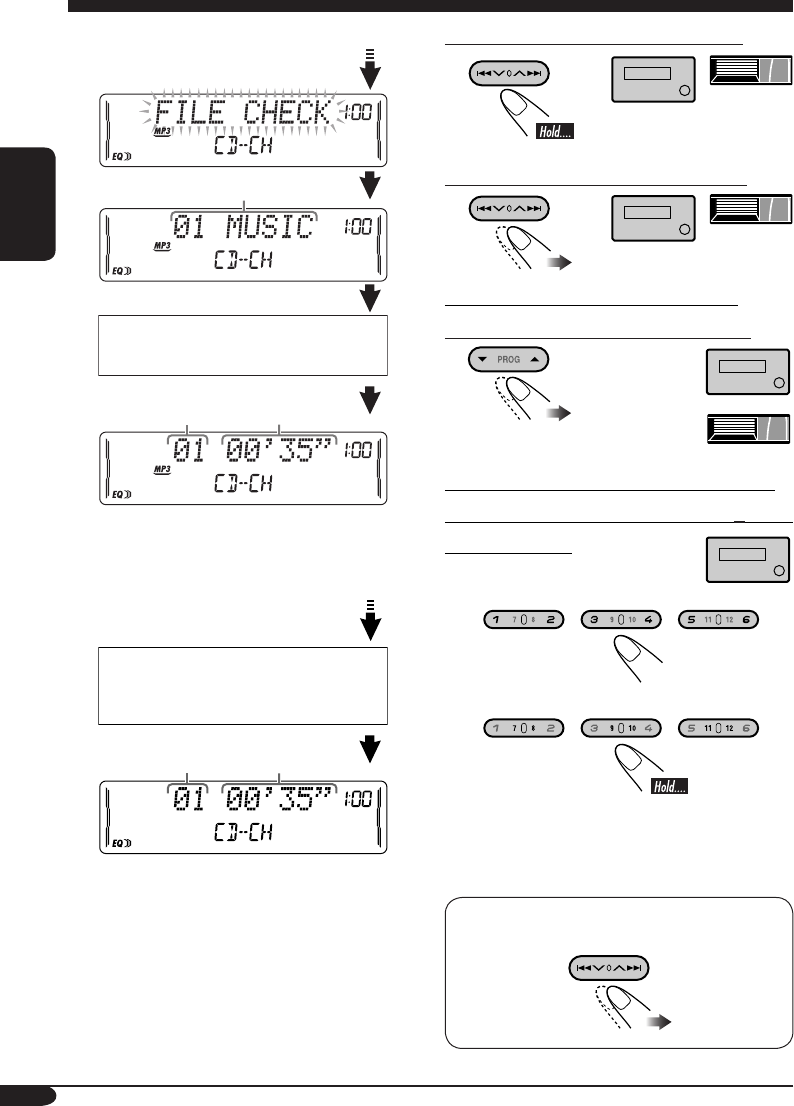
• ‡¡◊ËÕ¥°Ïª—®®ÿ∫—π‡ªÁπ·ºËπ MP3:
•
‡¡◊ËÕ¥‘°Ïª—®®ÿ∫—π‡ªÁπ·ºËπ audio CD À√◊Õ CD
Text:
*1 ¢ÈÕ§«“¡ “ROOT” ®–ª√“°Ø¢÷Èπ À“°‰¡Ë¡’‚ø≈‡¥Õ√Ï„π
·ºË𥑰Ï
*2
∑—Èßπ’È¢÷ÈπÕ¬ŸË°—∫°“√µ—Èߧ˓¡“µ√«—¥√–¥—∫ (¥Ÿ√“¬≈–‡Õ’¬¥
„πÀπÈ“
20
)
°“√°√Õ‡¥‘πÀπÈ“ À√◊Õ°√Õ∂Õ¬À≈—ß·∑√Á°
°“√‰ª¬—ß·∑√Á°∂—¥‰ª À√◊Õ·∑√Á°°ËÕπÀπÈ“
°“√‰ª¬—ß‚ø≈‡¥Õ√Ï∂—¥‰ª À√◊Õ°ËÕπÀπÈ“
(‡©æ“–·ºËπ MP3 À√◊Õ WMA ‡∑Ë“π—Èπ)
°“√À“µ”·ÀπËß·∑√Á°„¥·∑√Á°Àπ÷Ëß (”À√—∫
CD) À√◊Õ‚ø≈‡¥Õ√Ï (”À√—∫·ºËπ MP3 À√◊Õ
WMA) ‚¥¬µ√ß
‡≈◊Õ°‡≈¢®“° 01 – 06:
‡≈◊Õ°‡≈¢®“° 07 – 12:
• °“√§ÈπÀ“‚ø≈‡¥Õ√Ï∫π·ºËπ MP3/WMA
®”‡ªÁπµÈÕß°”Àπ¥µ—«‡≈¢ 2 À≈—°ÀπÈ“™◊ËÕ‚ø≈‡¥Õ√◊ú—01,
02, 03, ·≈–Õ◊ËπÊ
°“√‡≈◊Õ°·∑√Á°„π‚ø≈‡¥Õ√Ï (”À√—∫·ºËπ MP3 À√◊Õ
WMA):
¢ÈÕ¡Ÿ≈¢Õß·ºËπ¥°Ïª√“°Ø¢÷Èπ‚¥¬Õ—
µ‚π¡—µ‘ (¥ŸÀπÈ“ 15)
CD Text:
™◊ËÕ¢Õß·ºË𥑰Ï
/ºŸÈ·¥ß
= ™◊ËÕ·∑√Á°ª√“°Æ¢÷Èπ‚¥¬Õ—µ‚π¡—µ‘
(¥ŸÀπÈ“ 15)
™◊ËÕ‚ø≈‡¥Õ√Ï*1
®”π«π·∑√Á°ª—®®ÿ∫—π*2‡«≈“∑’ˇ≈ËπºË“π‰ª*2
®”π«π·∑√Á°ª—®®ÿ∫—π*2‡«≈“∑’ˇ≈ËπºË“π‰ª*2
(”À√—∫·ºËπ MP3/
WMA)
(”À√—∫·ºËπ MP3)
TH14-17_KW-XC406_405[U]2.indd 14TH14-17_KW-XC406_405[U]2.indd 14 8/10/05 3:27:31 PM8/10/05 3:27:31 PM
15
‰∑¬
ø—ß°Ï™—πÀ≈—°Õ◊ËπÊ
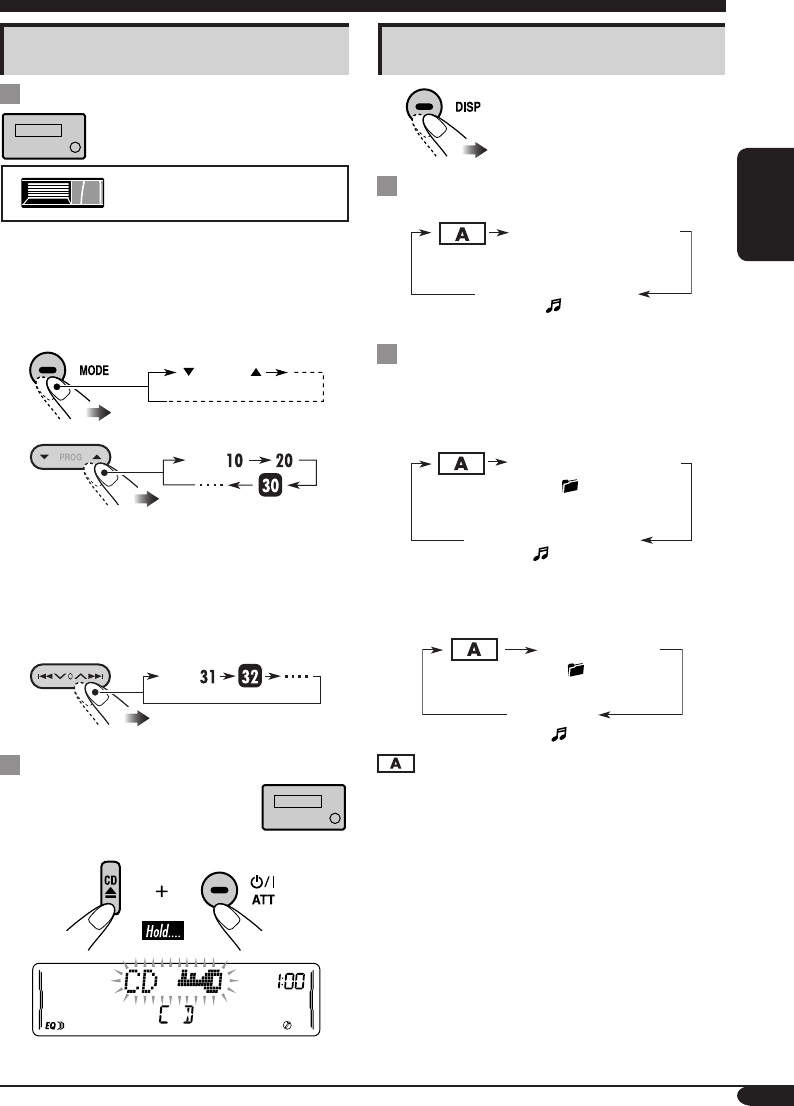
¢È“¡·∑√Á°Õ¬Ë“ß√«¥‡√Á«¢≥–‡≈Ëπ
• ”À√—∫·ºËπ MP3 À√◊Õ WMA ∑Ë“π“¡“√∂¢È“¡·∑√Á°
„π‚ø≈‡¥Õ√χ¥’¬«°—π‰¥È
‡™Ëπ: ‡≈◊Õ°·∑√Á° 32 ¢≥–‡≈Ëπ·∑√Á° 6
1
2
§√—Èß·√°∑’Ë°¥ªÿË¡ 6 / 7 ‡§√◊ËÕß®–¢È“¡‰ª¬—
ß·∑√Á°ß¢÷Èπ À√◊յ˔≈ß„°≈Èÿ¥ ∑’Ë¡’À¡“¬‡≈¢·∑√Á°≈ß
∑È“¬¥È«¬‡≈¢»Ÿπ¬Ï (‡™Ëπ ·∑√Á°∑’Ë 10, 20, 30)
®“°π—Èπ·µË§√—Èß∑’Ë°¥ªÿË¡π’È ∑Ë“π®–¢È“¡‰ª∑’≈– 10 ·∑√Á°
• À≈—ß®“°®∫·∑√Á°ÿ¥∑È“¬ ‡§√◊ËÕß®–
‡≈◊Õ°‰ª∑’Ë·∑√Á°·√° ·≈–„π∑‘»∑“ß°≈—∫°—π
3
°“√ªÈÕß°—π‰¡Ë„Àȇ§√◊ËÕߥ—π·ºË𥑰ÏÕÕ°
∑Ë“π“¡“√∂≈ÍÕ§·ºËπ¥‘°Ï ‰«È„π™ËÕ߄ˉ¥È
À“°µÈÕß°“√¬°‡≈‘° „ÀÈ∑”µ“¡¢—ÈπµÕπ‡¥‘¡´È”Õ’°§√—Èß
°“√‡ª≈’ˬπ¢ÈÕ¡Ÿ≈∑’Ë·¥ß
¢≥–‡≈Ëπ audio CD À√◊Õ CD Text
¢≥–‡≈Ëπ·ºËπ MP3 À√◊Õ WMA
• ‡¡◊ËÕµ—Èß “TAG DISP” ‰ª∑’Ë “TAG ON”
(¥ŸÀπÈ“ 21)
• ‡¡◊ËÕµ—Èß “TAG DISP” ‰ª∑’Ë “TAG OFF”
: ·∑√Á°ª—®®ÿ∫—π/À¡“¬‡≈¢‰ø≈Ï·≈–
‡«≈“∑’ˇ≈ËπºË“π‰ª
*3 À“°¥‘°Ï·ºËπª—®®ÿ∫—π‡ªÁπ audio CD ®–¡’¢ÈÕ§«“¡ì
“NO NAME” ª√“°Ø¢÷Èπ
*4 À“°‰ø≈Ï MP3/WMA ‰¡Ë¡’·∑Á° ID3 ™◊ËÕ‚ø≈‡¥Õ√Ï
·≈–™◊ËÕ‰ø≈Ï®–ª√“°Ø¢÷Èπ „π°√≥’‡™Ëππ’È ‰ø—≠≠“≥
TAG ®–‰¡Ëµ‘¥
–10 +10
·∑√Á°
·∑√Á°
(‰ø—≠≈—°…≥ TAG µ‘¥∫πÀπÈ“®Õ)
™◊ËÕ·∑√Á° (™◊ËÕ‰ø≈Ï*4)
(‰ø—≠≈—°…≥ µ‘¥∫πÀπÈ“®Õ)
(‰ø—≠≈—°…≥ µ‘¥∫πÀπÈ“®Õ)
™◊ËÕ‰ø≈Ï
™◊ËÕ‚ø≈‡¥Õ√Ï
(‰ø—≠≈—°…≥ DISC µ‘¥∫πÀπÈ“®Õ)
™◊ËÕ¢Õß·ºË𥑰Ï/ºŸÈ·¥ß*3
(‰ø—≠≈—°…≥ µ‘¥∫πÀπÈ“®Õ)
™◊ËÕ·∑√Á°*3
(‰ø—≠≈—°…≥ TAG µ‘¥∫πÀπÈ“®Õ)
™◊ËÕÕ—≈∫—È¡/ºŸÈ·¥ß
(™◊ËÕ‚ø≈‡¥Õ√Ï*4)
‡©æ“–´’¥’‡™π‡®Õ√Ï∑’Ë“¡“√∂‡≈Ëπ
MP3 ¢Õß JVC ‡∑Ë“π—Èπ
TH14-17_KW-XC406_405[U]2.indd 15TH14-17_KW-XC406_405[U]2.indd 15 8/10/05 3:27:34 PM8/10/05 3:27:34 PM
16
‰∑¬
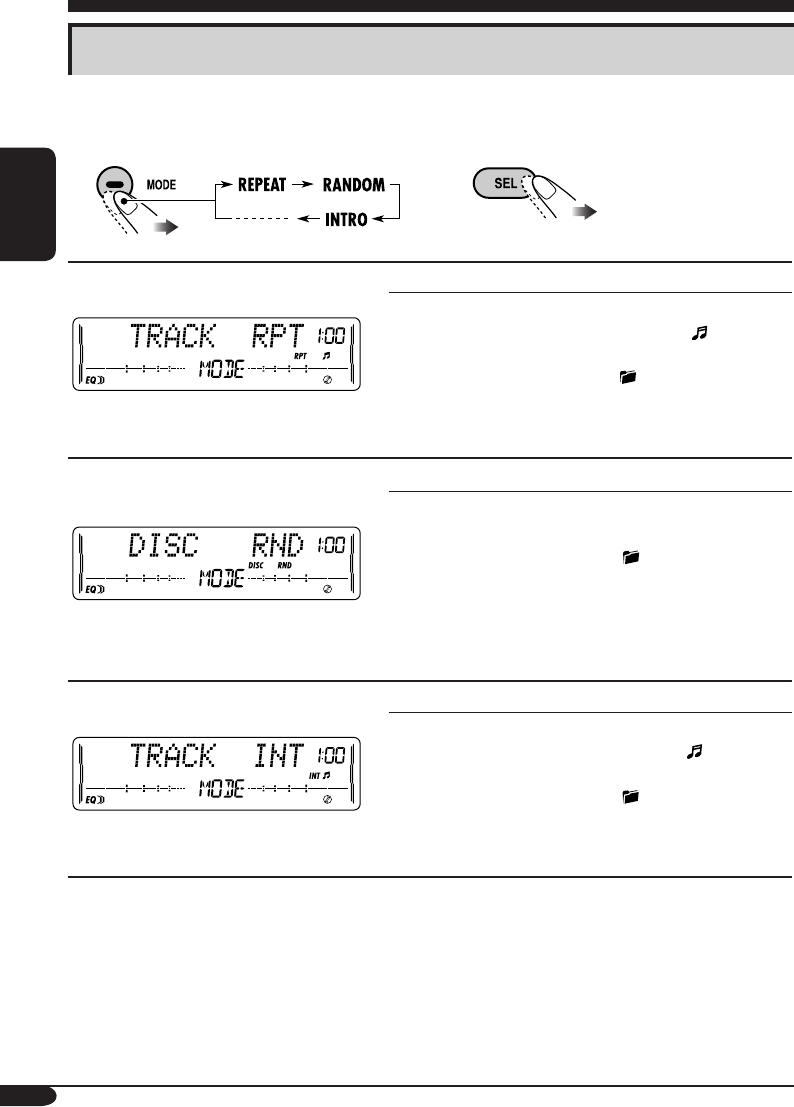
°“√‡≈◊Õ°‚À¡¥°“√‡≈Ëπ
∑Ë“π“¡“√∂„™È‚À¡¥°“√‡≈ËπµËÕ‰ªπ’È ·∫∫„¥·∫∫Àπ÷Ë߉¥È∑’≈–‚À¡¥‡∑Ë“π—Èπ
‡≈◊Õ°‚À¡¥°“√‡≈Ëπ∑’˵ÈÕß°“
1 2
°“√‡≈Ëπ´È”
‡™Ëπ: ‡¡◊ËÕ‡≈◊Õ° “TRACK RPT”
‚À¡¥ ‡≈Ëπ´È”
TRACK RPT : ·∑√Á°ª—®®ÿ∫—π
• ‰ø—≠≠“≥ RPT ·≈– ®–µ‘¥
FOLDER RPT*1: ∑ÿ°·∑√Á°„π‚ø≈‡¥Õ√Ϫ—®®ÿ∫—π
• ‰ø—≠≠“≥ ·≈– RPT ®–µ‘¥
DISC RPT*2 : ∑ÿ°·∑√Á°„π·ºË𥑰Ï∑’Ë„Ë„π™ËÕß
• ‰ø—≠≠“≥ DISC ·≈– RPT ®–µ‘¥
REPEAT OFF : ¬°‡≈‘°
°“√‡≈Ëπ·∫∫ÿË¡
‡™Ëπ: ‡¡◊ËÕ‡≈◊Õ° “DISC RND”
‚À¡¥ °“√‡≈Ëπ·∫∫ÿË¡
FOLDER RND*1: ∑ÿ°·∑√Á°„π‚ø≈‡¥Õ√Ϫ—®®ÿ∫—π ®“°π—È
π‰ª∑’Ë·∑√Á°„π‚ø≈‡¥Õ√Ï∂—¥‰ª‡√◊ËÕ¬Ê
• ‰ø—≠≠“≥ ·≈– RND ®–µ‘¥
DISC RND : ∑ÿ°·∑√Á°„π·ºË𥑰Ï∑’Ë„Ë„π™ËÕß
• ‰ø—≠≠“≥ DISC ·≈– RND ®–µ‘¥
MAG RND*2 : ∑ÿ°·∑√Á°„π·ºË𥑰Ï∑’Ë„Ë„π™ËÕß
• ‰ø—≠≠“≥ RND ·≈– MAG ®–µ‘¥
RANDOM OFF : ¬°‡≈‘°
°“√·°πÕ‘π‚∑√
‡™Ëπ: ‡¡◊ËÕ‡≈◊Õ° “TRACK INT”
‚À¡¥ ‡≈Ëπ 15 «‘π“∑’·√°¢Õß...
TRACK INT : ∑ÿ°·∑√Á°„π·ºËπ¥‘°Ïª—®®ÿ∫—π
• ‰ø—≠≠“≥ INT ·≈– ®–µ‘¥
FOLDER INT*1 :
·∑√Á°·√°¢Õß∑ÿ°‚ø≈‡¥Õ√Ï„π·ºËπ¥‘°Ïª—®®ÿ∫—π
• ‰ø—≠≠“≥ ·≈– INT ®–µ‘¥
DISC INT*2 : ·∑√Á°·√°¢Õß·ºË𥑰Ï∑’ËÕ¬ŸË„π‡§√◊ËÕß
• ‰ø—≠≠“≥ DISC ·≈– INT ®–µ‘¥
INTRO OFF : ¬°‡≈‘°
*1 ‡©æ“–‡¡◊ËÕ‡≈Ëπ·ºËπ MP3 À√◊Õ WMA
*2 ‡©æ“–‡¡◊ËÕ‡≈Ëπ·ºËπ¥‘°Ï„π CD ‡™π‡®Õ√Ï
TH14-17_KW-XC406_405[U]2.indd 16TH14-17_KW-XC406_405[U]2.indd 16 8/5/05 11:25:04 AM8/5/05 11:25:04 AM
17
‰∑¬
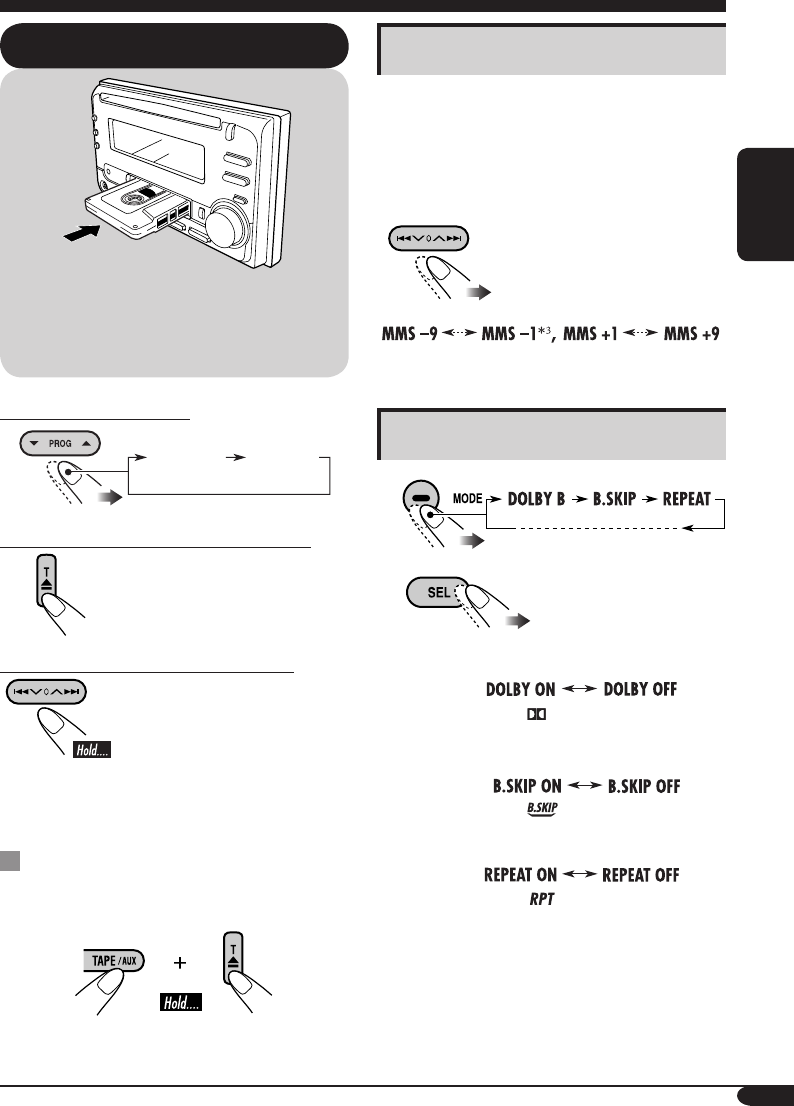
°“√‡ª≈’ˬπ∑‘»∑“ß°“√‡≈Ëπ
°“√À¬ÿ¥‡≈Ëπ·≈–°“√¥’¥‡∑ªÕÕ°®“°‡§√◊ËÕß
´Õ√Ï®–‡ª≈’ˬπ°≈—
∫‡ªÁπ´Õ√Ï∑’ˇ≈◊Õ°‰«È§√—ÈßÀ≈—ßÿ¥
°“√°√Õ‡∑ª‰ªÀπÈ“À√◊Õ°“√°√Õ‡∑ª°≈—∫
‡¡◊ËÕ‡∑ª°√Õ‰ªÀπÈ“®πÀ¡¥ÀπÈ“
ÀπÈ“‡∑ª®–‡ª≈’ˬπ‡Õß‚¥¬Õ—µ‚π¡—µ
°“√À¬ÿ¥°“√°√Õ‡∑ª‰ªÀπÈ“À√◊Õ°“√°√Õ‡∑ª°≈—∫ °¥ªÿË¡
PROG
°“√ªÈÕß°—π‰¡Ë„Àȇ§√◊ËÕߥ’¥‡∑ªÕÕ°
∑Ë“π“¡“√∂≈ÁÕ§‡∑ª‰«È„π™ËÕ߄ˉ¥È
À“°µÈÕß°“√¬°‡≈‘° „ÀÈ∑”µ“¡¢—ÈπµÕπ‡¥‘¡´È”Õ’°§√—Èß
°“√„™Èß“π‡∑ª
°“√‡≈Ëπ‡∑ª °“√§ÈπÀ“®ÿ¥‡√‘Ë¡µÈπ¢Õ߇æ≈ß
°“√·°πÀ“‡æ≈ßµ“¡∑’Ë°”Àπ¥ (MMS) ®–∑”„Àȇ§√◊ËÕ߇≈Ëπ
‡∑ª®“°®ÿ¥‡√‘Ë¡µÈπ¢Õ߇æ≈ß∑’ˇ≈◊Õ°‰«È‚¥¬Õ—µ‚π¡—µ‘
°”Àπ¥‡æ≈ß∑’˵ÈÕß°“√§ÈπÀ“ (≈Ë«ßÀπÈ“°’ˇæ≈ßÀ√◊Õ°ËÕπ
‡æ≈ߪ—®®ÿ∫—π)
‡¡◊ËÕ¡’§Èπ‡®Õ®ÿ¥‡√‘Ë¡µÈπ¢Õ߇æ≈ß∑’Ë°”Àπ¥
‡§√◊ËÕß®–‡√‘Ë¡‡≈Ëπ‚¥¬Õ—µ‚π¡—µ‘
*3
°≈—∫‰ª¬—ß®ÿ¥‡√‘Ë¡µÈπ¢Õ߇æ≈ߪ—®®ÿ∫—π
ø—ß°Ï™—π‡∑ªÕ◊ËπÊ
1
2
• °“√‡ª‘¥À√◊Õª‘¥√–∫∫‡’¬ß Dolby B NR*4
• °“√¢È“¡™Ë«ß«Ë“ß√–À«Ë“߇æ≈ß„π‡∑ª
• °“√‡≈Ëπ‡æ≈ߪ—®®ÿ∫—π´È”
*4
º≈‘µ‚¥¬‰¥â√—∫°“√Õπÿ≠“µ®“°
Dolby Laboratories
“Dolby”
·≈–—≠≈—°∫í≥åÕ—°∫í√
D
§Ÿà
‡ªìπ‡§√◊ËÕßÀ¡“¬°“√§â“¢Õß
Dolby Laboratories
‡§√◊ËÕß®–‡√‘Ë¡‡≈Ëπ‡∑ª‚¥¬Õ—µ‚π¡—µ‘ ‡¡◊ËÕ‡§√◊ËÕ߇≈Ëπ‡∑ª
¥È“πÀπ÷Ëß®πÀ¡¥ÀπÈ“‡∑ª ‡§√◊ËÕß®–‡≈ËπÕ’°ÀπÈ“‚¥¬Õ—
µ‚π¡—µ‘ (°≈—∫ÀπÈ“‡∑ªÕ—µ‚π¡—µ‘)
(‡≈Ëπ‰ªÀπÈ“)
FWD PLAY REV PLAY
(‡≈Ëπ∂Õ¬À≈—ß)
(‰ø—≠≈—°…≥ µ‘¥∫πÀπÈ“®Õ)
(‰ø—≠≈—°…≥ µ‘¥∫πÀπÈ“®Õ)
(‰ø—≠≈—°…≥ µ‘¥∫πÀπÈ“®Õ)
TH14-17_KW-XC406_405[U]2.indd 17TH14-17_KW-XC406_405[U]2.indd 17 8/15/05 5:41:43 PM8/15/05 5:41:43 PM
18
‰∑¬
°“√ª√—∫·µË߇’¬ß
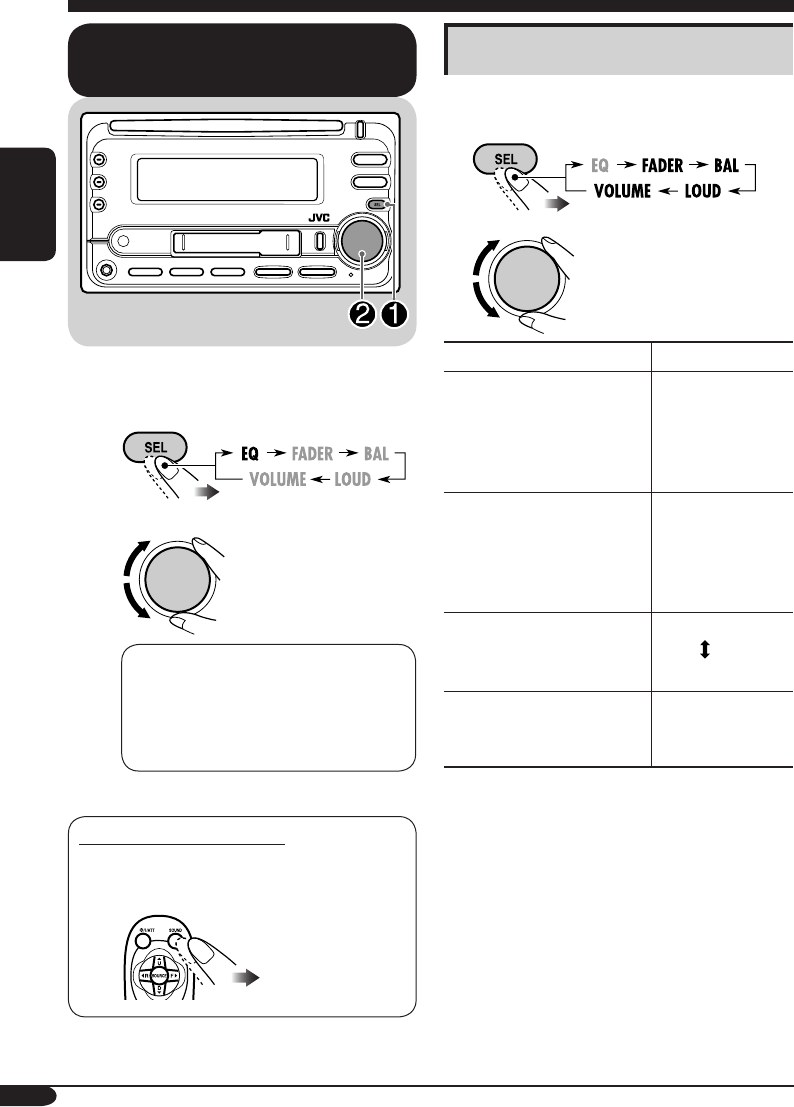
°“√‡≈◊Õ°‚À¡¥‡’¬ß∑’˵—È߉«È≈Ë«ßÀπÈ“
(EQ: Õ’§«Õ‰≈‡´Õ√Ï)
∑Ë“π“¡“√∂‡≈◊Õ°‚À¡¥‡’¬ß ∑’˵—È߉«È≈Ë«ßÀπÈ“ „ÀȇÀ¡“–°—
∫ª√–‡¿∑¢Õ߇æ≈߉¥È
~
Ÿ
FLAT O Hard Rock O R & B O
POP O JAZZ O DanceMusic O
Country O Reggae O Classic O
USER 1 O USER 2 O USER 3 O
(°≈—∫ŸË®ÿ¥‡√‘Ë¡µÈπ)
°“√‡≈◊Õ°‚À¡¥‡’¬ß‚¥¬µ√ß
∑Ë“π“¡“√∂‡≈◊Õ°‚À¡¥‡’¬ß‰¥È‚¥¬µ√ߥȫ¬√’‚¡∑§Õπ‚
∑√≈
°“√ª√—∫·µË߇’¬ß
∑Ë“π“¡“√∂ª√—∫·µËߧÿ≥¡∫—µ‘¢Õ߇’¬ß‰¥È
µ“¡§«“¡µÈÕß°“√
1
2
‰ø—≠≠“≥ 摬
FADER*1
ª√—∫¡¥ÿ≈≈”‚æßÀπÈ“À≈—ß
R06
(‡©æ“–¥È“πÀ≈—ß)
∂÷ß
F06
(‡©æ“–¥È“πÀπÈ“)
BAL (¡¥ÿ≈‡¬ß´È“¬¢«“)
ª√—∫¡¥ÿ≈≈”‚æß´È“¬¢«“ L06
(‡©æ“–¥È“π´È“¬)
∂÷ß
R06
(‡©æ“–¥È“π¢«“)
LOUD (§«“¡¥—ß)
‡æ‘Ë¡§«“¡∂’˵˔·≈–Ÿß ‡æ◊ËÕ„Àȇ’¬ß‰
¥È¡¥ÿ≈¥’¬‘Ëߢ÷Èπ ∑’Ë√–¥—∫‡’¬ß§ËÕ¬
LOUD ON
LOUD OFF
VOLUME*2
ª√—∫√–¥—∫‡’¬ß 00 (µË”ÿ¥) ∂÷ß
30 À√◊Õ 50
(Ÿßÿ¥)*3
*1 À“°„™È√–∫∫Õß≈”‚æß „Àȵ—Èß√–¥—∫¡¥ÿ≈ÀπÈ“À≈—߉ª∑’Ë
“00”
*2 ª°µ‘ªÿË¡§«∫§ÿ¡ ®–∑”ß“π‡ªÁπµ—«§«∫§ÿ¡√–¥—∫§«“¡¥—
ߢÕ߇’¬ß¥È«¬ ¥—ßπ—Èπ®÷߉¡Ë®”‡ªÁπµÈÕ߇≈◊Õ°
“VOLUME” ‡æ◊ËÕª√—∫√–¥—∫§«“¡¥—ߢÕ߇’¬ß
*3
¢÷ÈπÕ¬ŸË°—∫°“√µ—Èߧ˓§«∫§ÿ¡ Õ—µ√“¢¬“¬¢Õß·Õ¡æ≈‘ø“¬‡ÕÕ√Ï
(¥Ÿ√“¬≈–‡Õ’¬¥„πÀπÈ“ 21)
TH18-23_KW-XC406_405[U]2.indd 18TH18-23_KW-XC406_405[U]2.indd 18 8/5/05 5:44:15 PM8/5/05 5:44:15 PM
19
‰∑¬
°“√‡°Á∫‡’¬ß∑’˪√—∫·µËߥȫ¬µπ‡Õß
§ÿ≥“¡“√∂ª√—∫·µËß‚À¡¥‡’¬ß ·≈–®—¥‡°Á∫‡’¬ß∑’˪√—
∫·µËߥȫ¬µπ‡Õß ≈ß„πÀπË«¬§«“¡®”‰¥È
1
2 ‡≈◊Õ°‚À¡¥‡’¬ß∑’˵ÈÕß°“√ª√—∫
‡™Ëπ: ‡¡◊ËÕ‡≈◊Õ° “JAZZ”
3 ‡≈◊Õ°ÕߧϪ√–°Õ∫‡’¬ß∑’Ë®–ª√—∫·µËߢ≥–∑’Ë‚À
¡¥‡’¬ß∑’ˇ≈◊Õ°‰«Èª√“°Ø¢÷Èπ
LOW LEVEL O LOW FREQ. O
LOW WIDTH O MID LEVEL O
MID WIDTH O HIGH LEVEL O
HIGH FREQ. O
(°≈—∫ŸË®ÿ¥‡√‘Ë¡µÈπ)
• (LOW, MID, HIGH) LEVEL:
ª√—∫·µËß√–¥—∫‡æ‘Ë¡‡µ‘¡
• (LOW, HIGH) FREQ:
‡≈◊Õ°§≈◊Ëπ°≈“ß∑’Ë®–ª√—∫·µËß
• (LOW, MID) WIDTH :
‡≈◊Õ°√–¥—∫§«“¡°«È“ߢÕß·∂∫§≈◊Ëπ
4
ª√—∫ÕߧϪ√–°Õ∫‡’¬ß∑’ˇ≈◊Õ°„π¢≥–∑’Ë¡’‰ø·¥ß„
π¢—ÈπµÕπ∑
’Ë 3
ª√“°Ø¢÷Èπ
‰ø—≠≠“≥ §Ë“∑’˵—È߉«È≈Ë«ßÀπÈ“
LOW MID HIGH
LEVEL –06
(µË”ÿ¥) ∂÷ß
+06
(Ÿßÿ¥)
–06
(µË”ÿ¥) ∂÷ß
+06
(Ÿßÿ¥)
–06
(µË”ÿ¥) ∂÷ß
+06
(Ÿßÿ¥)
FREQ 60Hz
80Hz
100Hz
120Hz
8kHz
10kHz
12kHz
15kHz
WIDTH 1 (µË”ÿ¥)
∂÷ß
4 (Ÿßÿ¥)
1 (µË”ÿ¥)
∂÷ß
2 (Ÿßÿ¥)
5 ∑”µ“¡¢—ÈπµÕπ∑’Ë 3 ·≈– 4 ´È”Õ’°§√—Èß ‡æ◊ËÕµ—Èß
(À√◊Õª√—∫) ÕߧϪ√–°Õ∫¢Õ߇’¬ßÕ◊ËπÊ
6 ‡≈◊Õ°Àπ÷Ëß„π‚À¡¥‡’¬ß¢ÕߺŸÈ„™È (USER 1,
USER 2, USER 3)
7 ®—¥‡°Á∫‡’¬ß∑’˪√—∫·µËß·≈È«
“MEMORY”
®–ª√“°Ø¢÷Èπ™—Ë«¢≥–
TH18-23_KW-XC406_405[U]2.indd 19TH18-23_KW-XC406_405[U]2.indd 19 8/5/05 5:44:18 PM8/5/05 5:44:18 PM
20
‰∑¬
‰ø—≠≠“≥ §Ë“∑“¡“√∂‡≈◊Õ°‰¥È [ÀπÈ“”À√—∫ÕÈ“ßÕ‘ß]
DEMO MODE
°“√·¥ßµ—«Õ¬Ë“ß DEMO ON : [‡√‘Ë¡µÈπ]; ‡§√◊ËÕß®–‡ª‘¥·¥ßµ—«Õ¬Ë“߇Õß ‚¥¬Õ—µ‚π¡—µ‘
À“°‰¡Ë¡’°“√„™Èß“ππ“πª√–¡“≥ 20 «‘π“∑’ [8]
DEMO OFF : ¬°‡≈‘°
CLOCK HOUR
°“√µ—Èß™—Ë«‚¡ß 1 – 12, [8]
[
‡√‘Ë¡µÈπ:
1 (1:00)]
CLOCK MIN
°“√µ—Èßπ“∑ 00 – 59, [8]
[
‡√‘Ë¡µÈπ:
00 (1:00)]
CLOCK DISP
°“√·¥ß‡«≈“ CLOCK ON : ‡§√◊ËÕß®–·¥ß‡«≈“∑’ËÀπÈ“®Õµ≈Õ¥‡«≈“·¡È®–‡ª‘¥‡§√◊ËÕß·≈È«°Áµ“¡
CLOCK OFF : [‡√‘Ë¡µÈπ]; ‡«≈“®–·¥ß∑’ËÀπÈ“®Õ‡¡◊ËÕ‡ª‘¥‡§√◊ËÕß À“°ª‘¥‡§√◊ËÕß
°“√°¥ªÿË¡ DISP ®–‡ªÁπ°“√·¥ß‡«≈“ª√–¡“≥ 5 «‘π“∑’
LEVELMETER
¡“µ√«—¥√–¥—∫‡’¬ß
∑Ë“π“¡“√∂‡≈◊Õ°¡“µ√«—¥√–¥—∫‰¥È∂÷ß
4
√–¥—∫À√◊Õ®–‡≈◊Õ°„Àȇ§√◊ËÕß“∏‘µ√Ÿª·∫∫¡“µ√«—¥∑—ÈßÀ¡¥‰¥È
LEVEL ALL [‡√‘Ë¡µÈπ] O LEVEL 1 O LEVEL 2 O LEVEL 3 O
LEVEL 4 O LEVEL OFF (¬°‡≈‘°) O
(°≈—∫ŸË®ÿ¥‡√‘Ë¡µÈπ)
LEVEL ALL : ·¥ß√Ÿª·∫∫¡“µ√«—¥∑—ÈßÀ¡¥ ‚¥¬·¥ß·∫∫≈– 20 «‘π“∑’
LEVEL 1 LEVEL 2
LEVEL 3 LEVEL 4
°“√µ—Èߧ˓∑—Ë«‰ª — PSM
¢—ÈπµÕπ‡∫◊ÈÕßµÈπ
∑Ë“π“¡“√∂‡ª≈’ˬπ√“¬°“√ PSM (‚À¡¥°“√µ—Èߧ˓
∑’˵ÈÕß°“√) ∑’Ë√–∫ÿ„πµ“√“ߥȓπ≈˓߉¥
1
2 ‡≈◊Õ°√“¬°“√ PSM
3 ª√—∫·µËß√“¬°“√ PSM ∑’ˇ≈◊Õ°
4 ∑”µ“¡¢—ÈπµÕπ∑’Ë 2 ·≈– 3 ´È”Õ’°§√—Èß
‡æ◊ËÕª√—∫·µËß√“¬°“√ PSM Õ◊ËπÊ ∂È“®”‡ªÁπ
5 ‡√Á®‘Èπ¢—ÈπµÕπ
TH18-23_KW-XC406_405[U]2.indd 20TH18-23_KW-XC406_405[U]2.indd 20 8/16/05 8:51:23 AM8/16/05 8:51:23 AM

21
‰∑¬
‰ø—≠≠“≥ §Ë“∑“¡“√∂‡≈◊Õ°‰¥È [ÀπÈ“”À√—∫ÕÈ“ßÕ‘ß]
DIMMER
ø—ß°Ï™—πÀ√’Ë·ß AUTO : [‡√‘Ë¡µÈπ]; À√’Ë·ß∫πÀπÈ“®Õ ‡¡◊ËÕ‡ª‘¥‰øÀπÈ“√∂
ON : ‡ª‘¥„™Èø—ß°Ï™—πÀ√’Ë·ß
OFF : ¬°‡≈‘°
CONTRAST
·¥ß§«“¡§¡™—¥ 1 – 10 : ª√—∫§«“¡§¡™—¥¢Õ߮շ¥ßº≈ ‡æ◊ËÕ‰ø—≠≠“≥∫πÀπÈ“®Õ™— ¥‡®π
·≈–ÕË“π‰¥È
[‡√‘Ë¡µÈπ: 5]
SCROLL*1
‡≈◊ËÕπÀπÈ“®Õ ONCE : [‡√‘Ë¡µÈπ]; ‡≈◊ËÕπ¢ÈÕ¡Ÿ≈„π·ºË𥑰ÏÀπ÷Ëߧ√—Èß ‡≈◊ËÕπÀπÈ“®Õ
AUTO : ‡≈◊ËÕπÀπÈ“®Õ´È” (‡«Èπ™Ë«ß 5 «‘π“∑’)
OFF : ¬°‡≈‘°
• °“√°¥ªÿË¡ DISP π“π°«Ë“Àπ÷Ëß«‘π“∑’“¡“√∂‡≈◊ËÕπÀπÈ“®Õ‰¥È ‰¡Ë«Ë“®–µ—Èß
§Ë“‰«Èլ˓߉√
EXT INPUT*2
—≠≠“≥‡¢È“®“°¿“¬πÕ°
CHANGER : [‡√‘Ë¡µÈπ]; °“√„™È´’¥’‡™π‡®Õ√Ï JVC Apple iPod À√◊Õ‡§√◊ËÕ߇≈Ëπ JVC
D. [13, 22]
EX INPUT : °“√„™ÈÕÿª°√≥Ï¿“¬πÕ°Õ◊Ëπ [22]
AUX ADJUST
°“√√—∫—≠≠“≥µËÕæË«ß
°“√ª√—∫√–¥—∫
AUX ADJ 00 – AUX ADJ 05: ª√—∫√–¥—∫°“√√—∫—≠≠“≥µËÕæ˫߇æ◊ËÕÀ≈’°‡≈’ˬ߰“√‡æ‘Ë
¡√–¥—∫‡’¬ß‚¥¬©—∫æ≈—π‡¡◊ËÕ¡’°“√‡ª≈’ˬπ´Õ√Ï®“°Õÿª°√≥Ï¿“¬πÕ°∑’ˇ™◊Ë
Õ¡µËÕ°—∫™ËÕß√—∫—≠≠“≥ AUX ∑’Ë·ºß§«∫§ÿ¡
[‡√‘Ë¡µÈπ: AUX ADJ 00]
TAG DISP
°“√·¥ß·∑Á° TAG ON : [‡√‘Ë¡µÈπ];
·¥ß·∑Á° ID3 ¢≥–‡≈Ëπ·∑√Á° MP3/WMA [15
]
TAG OFF : ¬°‡≈‘°
AMP GAIN
°“√§«∫§ÿ¡Õ—µ√“¢¬“
¬¢Õß·Õ¡æ≈‘ø“¬‡ÕÕ√
∑Ë“π“¡“√∂‡ª≈’ˬπ√–¥—∫‡’¬ßŸßÿ¥ ¢Õ߇§√◊ËÕßπ’ȉ¥È
LOW PWR : VOLUME 00 – VOLUME 30 (‡≈◊Õ°√“¬°“√π’È À“°°”≈—ߢ—
∫Ÿßÿ¥¢Õß≈”‚æߵ˔°«Ë“ 50 W ‡æ◊ËÕªÈÕß°—π‰¡Ë„ÀÈ≈”‚æ߇’¬)
HIGH PWR : [‡√‘Ë¡µÈπ]; VOLUME 00 – VOLUME 50
IF FILTER
ø‘≈‡µÕ√Ï IF
AUTO : [‡√‘Ë¡µÈπ]; ‡æ‘Ë¡™Ë«ß§«“¡∂’Ë«‘∑¬ÿ‡æ◊ËÕ≈¥—≠≠“≥√∫°«π√–À«Ë“ß∂“π’
(‡’¬ß‡µÕ√‘‚Õ®–À“¬‰ª)
WIDE : ¢÷ÈπÕ¬ŸË°—∫≠≠“≥√∫°«π®“°∂“π’„°≈ȇ§’¬ß ·µË§ÿ≥¿“æ¢Õ߇’¬ß®–
‰¡Ë≈¥≈ß·≈–√—°…“‡’¬ß‡µÕ√‘‚Õ‰«È
*1
Õ—°¢√–À√◊Õ—≠≈—°…≥Ï∫“ßµ—«®–‰¡Ë·¥ß (·≈–®–«Ë“ß) À√◊Õª√“°Ø‡ªÁπ´—∫‰µ‡µ‘≈∫πÀπÈ“®Õ
*2
‰¡Ë“¡“√∂‡≈◊Õ°‰¥ÈÀ“°´Õ√ϧ◊Õ
“CD-CH”
À√◊Õ
“EXT”
TH18-23_KW-XC406_405[U]2.indd 21TH18-23_KW-XC406_405[U]2.indd 21 8/5/05 5:44:21 PM8/5/05 5:44:21 PM
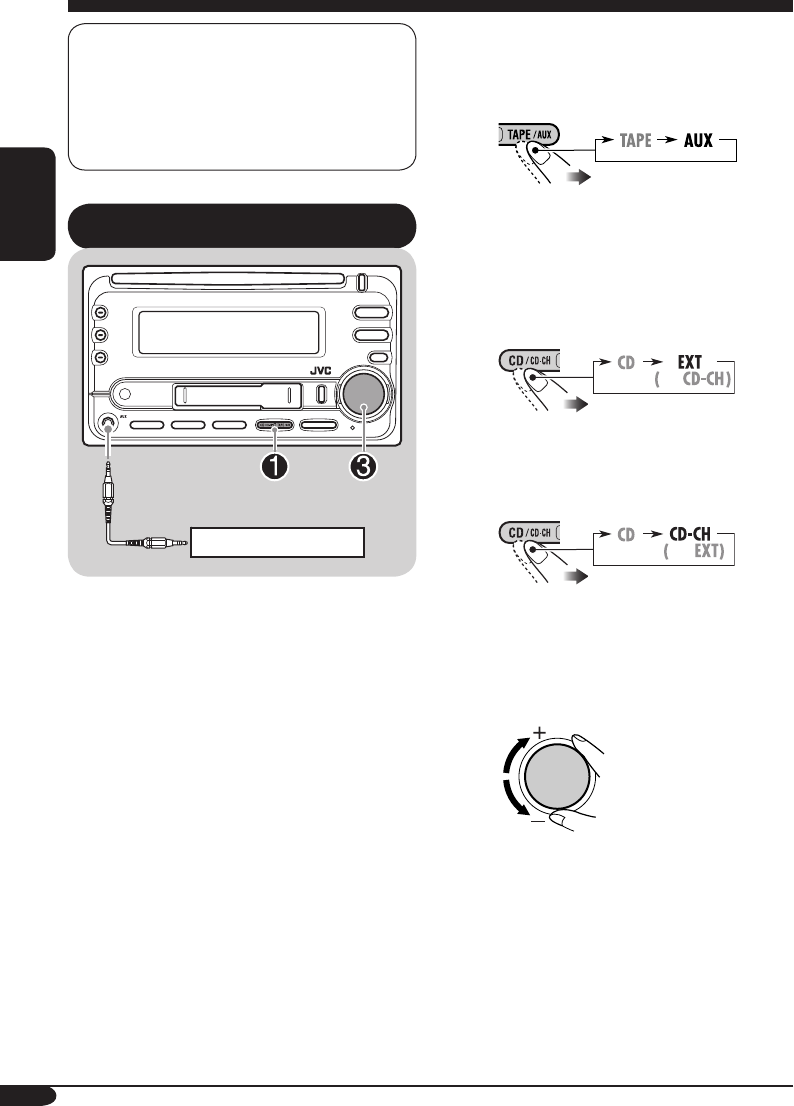
22
‰∑¬
°“√„™Èß“πÕÿª°√≥Ï¿“¬πÕ°
~ ”À√—∫°“√‡≈◊Õ°Õÿª°√≥Ï¿“¬πÕ°∑’˵ËÕ°—∫....
• ™ËÕß√—∫—≠≠“≥ AUX
•
´’¥’‡™π‡®Õ√Ï∑’˥ȓπÀ≈—ß‚¥¬„™È KS-U57
À√◊Õ KS-U58
À“° “EXT” ‰¡Ëª√“°Ø∑’ˮշ¥ß „ÀÈ¥ŸÀπÈ“
21 ·≈–‡≈◊Õ°—≠≠“≥‡¢È“®“°¿“¬πÕ°
(EXT INPUT)
• ™ËÕ߇’¬∫´’¥’‡™π‡®Õ√Ï∑’˥ȓπÀ≈—ß‚¥¬„™È
Õ‘π‡∑Õ√χøÕ–·¥ª‡µÕ√Ï”À√—∫ iPod—
KS-PD100 À√◊Õ”À√—∫‡§√◊ËÕ߇≈Ëπ D.
—KS-PD500
Ÿ ‡ª‘¥Õÿª°√≥Ï¿“¬πÕ° ·≈È«‡√‘Ë¡‡≈Ëπ´Õ√Ï
! ª√—∫√–¥—∫§«“¡¥—ß
⁄ ª√—∫·µË߇’¬ßµ“¡µÈÕß°“√
(¥ŸÀπÈ“ 18 ·≈– 19)
‡§√◊ËÕß√ÿËππ’Èæ√ÈÕ¡„™Èß“π°—∫‡§√◊ËÕߧ«∫§ÿ¡ Apple iPod®
À√◊Õ‡§√◊ËÕ߇≈Ëπ JVC D.
• ÕË“π√“¬≈–‡Õ’¬¥‡æ‘Ë¡‡µ‘¡‰¥È§ŸË¡◊Õ∑’Ë·π∫¡“°—∫
Õ‘π‡∑Õ√χøÕ–·¥ª‡µÕ√Ï iPod®—KS-PD100
À√◊Õ‡§√◊ËÕ߇≈Ëπ D.—KS-PD500
°“√‡≈ËπÕÿª°√≥Ï¿“¬πÕ°
∑Ë“π“¡“√∂‡™◊ËÕ¡µËÕÕÿª°√≥Ï¿“¬πÕ°°—∫....
• ™ËÕ߇’¬∫´’¥’‡™π‡®Õ√Ï∑’˥ȓπÀ≈—ß‚¥¬„™È:
– Õ–·¥ª‡µÕ√Ï“¬—≠≠“≥‡¢È“–KS-U57 À√◊Õ
KS-U58 (‰¡Ë‰¥È„ÀÈ¡“æ√ÈÕ¡‡§√◊ËÕß) ”À√—∫
Õÿª°√≥Ï¿“¬πÕ°„¥Ê °Áµ“¡ (¬°‡«Èπ iPod À√◊Õ
‡§√◊ËÕ߇≈Ëπ D.)
– Õ‘π‡∑Õ√χøÕ–·¥ª‡µÕ√Ï”À√—∫√ÿËπ iPod®–KS-
PD100 (‰¡Ë‰¥È„ÀÈ¡“æ√ÈÕ¡‡§√◊ËÕß) „™È§«∫§ÿ¡‡§√◊ËÕß
iPod
– Õ‘π‡∑Õ√χøÕ–·¥ª‡µÕ√Ï”À√—∫‡§√◊ËÕ߇≈Ëπ
D.–KS-PD500 (‰¡Ë‰¥È„ÀÈ¡“æ√ÈÕ¡‡§√◊ËÕß)
‡æ◊ËÕ§«∫§ÿ¡‡§√◊ËÕ߇≈Ëπ D.
• ™ËÕß√—∫—≠≠“≥ AUX ∑’Ë·ºß§«∫§ÿ¡
”À√—∫°“√µËÕ‡™◊ËÕ¡ °“√µ‘¥µ—Èß/§ŸË¡◊Õ°“√µ‘¥µ—Èß (·¬°§π≈–‡≈Ë¡)
‡™Ë𠇧√◊ËÕ߇≈Ëπ MD À√◊Õ
À√◊Õ
TH18-23_KW-XC406_405[U]2.indd 22TH18-23_KW-XC406_405[U]2.indd 22 8/15/05 2:21:40 PM8/15/05 2:21:40 PM
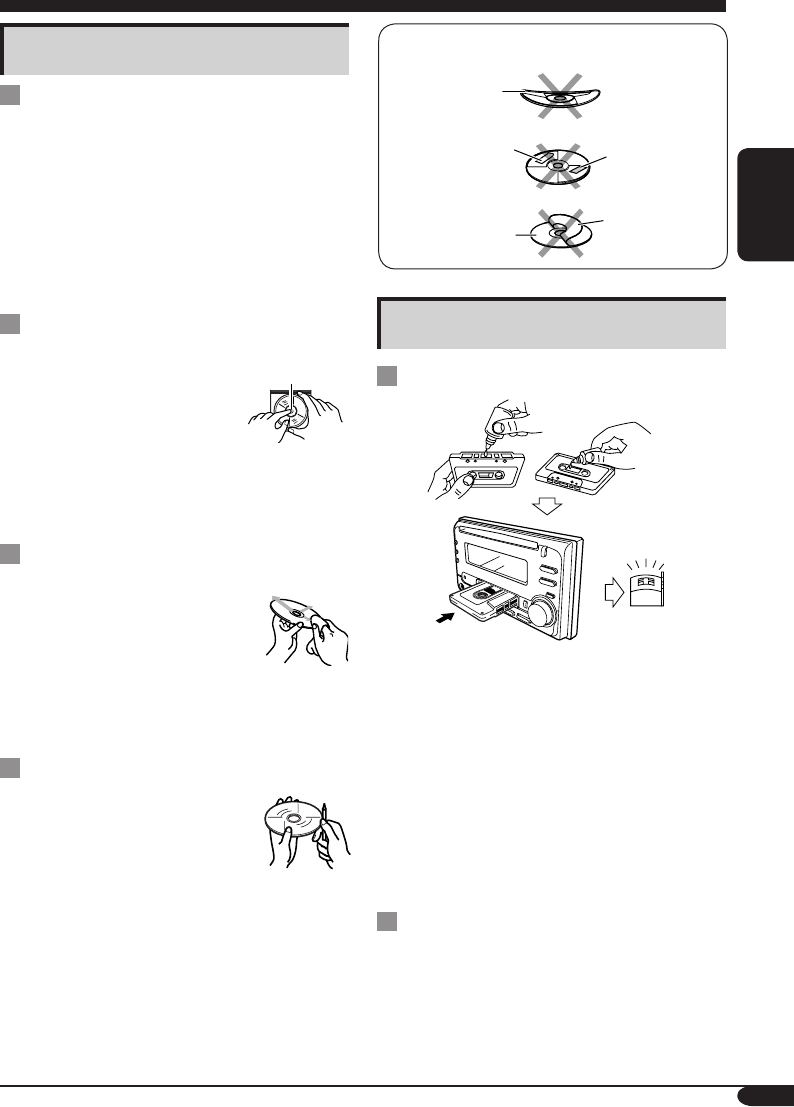
23
‰∑¬
Õ¬Ë“π”·ºËπ¥°ÏµËÕ‰ªπ’È¡“„™È:
·ºËπ∫‘¥ßÕ
µ‘Í°‡°Õ√Ï §√“∫‡À𒬫µ‘¥·πËπ
·ºËπ¥‘°Ï µ‘Í°‡°Õ√ÏÏ·ª–∑—∫
°“√√—°…“µ≈—∫‡∑ª
°“√∑”§«“¡–Õ“¥À—«‡∑ª
• ∑”§«“¡–Õ“¥À≈—ß®“°„™Èß“π∑ÿ°Ê 10 ™—Ë«‚¡ß
‚¥¬„™È™ÿ¥≈È“ßÀ—«‡∑ª™π‘¥‡ª’¬° (¡’®”ÀπË“¬∑—Ë«‰ª
µ“¡√È“π‡§√◊ËÕ߇’¬ß)
‡¡◊ËÕÀ—«ÕË“π°ª√° Õ“°“√µËÕ‰ªπ’ÈÕ“®‡°‘¥¢÷Èπ°—∫µ—«‡§√◊ËÕß:
– §ÿ≥¿“懒¬ß≈¥≈ß
– §«“¡¥—߇’¬ß≈¥≈ß
– ‡’¬ß¢“¥Ê À“¬Ê
• լ˓„Àȇ§√◊ËÕß¡◊Õ∑’ˇªÁπ·¡Ë‡À≈Á°À√◊Õ‡ªÁπ‚≈À–—¡º—°—∫
À—«ÕË“π∑’Ë¡’≈—°…≥–·«««“«
°“√‡°Á∫√—°…“µ≈—∫‡∑ª„ÀÈ–Õ“¥Õ¬ŸË‡¡Õ
• ‡°Á∫µ≈—∫‡∑ª‰«È„π°≈ËÕß∫√√®ÿ‡∑ª∑ÿ°§√—ÈßÀ≈—ß„™Èß“π
• ÀÈ“¡‡°Á∫µ≈—∫‡∑ª‰«È„π∂“π∑’˵ËÕ‰ªπ’È:
– ¡’·ß·¥¥ËÕß‚¥¬µ√ß
– ¡’§«“¡™◊ÈπŸß
– ¡’Õÿ≥À¿Ÿ¡‘Ÿß¡“°
°“√¥Ÿ·≈√—°…“
°“√√—°…“·ºË𥑰Ï
‰ÕπÈ”
§«“¡™◊ÈπÕ“®√«¡µ—«°—π‡ªÁπ‰ÕπÈ” ‡°“–Õ¬ŸË∫π‡≈πÏ
„π‡§√◊ËÕ߇≈Ëπ CD ‰¥È ®“°°√≥’µËÕ‰ªπ’È:
• ‡¡◊ËÕ‡√‘Ë¡‡ª‘¥‡§√◊ËÕß∑”§«“¡√ÈÕπ„π√∂
• À“°„π√∂¡’§«“¡™◊Èπ¡“°
À“°‡°‘¥°√≥’¥—ß°≈Ë“«¢÷È𠇧√◊ËÕ߇≈Ëπ CD Õ“®∑”ß“π
º‘¥æ≈“¥‰¥È „π°√≥’‡™Ëππ’È „ÀÈ¥—π·ºË𥑰ÏÕÕ°
·≈–‡ª‘¥‡§√◊ËÕß∑‘È߉«Èª√–¡“≥Õß“¡™—Ë«‚¡ß ®π°√–∑—Ëß
‰ÕπÈ”√–‡À¬ÕÕ°‰ª®πÀ¡¥
«‘∏’®—∫·ºË𥑰Ï
„π°“√π”·ºËπ¥°ÏÕÕ°®“°µ≈—∫
„ÀÈ°¥µ—«≈ÍÕ§µ√ß°≈“ßµ≈—∫
·≈È«¥—ß·ºËπÕÕ° ‚¥¬®—∫∑’Ë¢Õ∫·ºËπ
• „ÀÈ®—∫·ºË𥑰Ï∑’Ë¢Õ∫‡¡Õ
ÀÈ“¡·µ–µ√ߺ‘«Ë«π∑’Ë„™È∫—π∑÷°¢ÈÕ¡Ÿ≈
„π°“√‡°Á∫·ºË𥑰Ï≈ßµ≈—∫ §ËÕ¬ÊÕ¥·ºËπ≈ß
§√Õ∫µ—«≈ÍÕ§µ√ß°≈“ß (Àß“¬¥È“π∑’Ëæ‘¡æÏ¢ÈÕ§«“¡¢÷Èπ)
• ‡¡◊ËÕ„™Èß“π‡√Á® §«√‡°Á∫·ºËπ¥‘°Ï‰«È„πµ≈—∫‡¡Õ
°“√∑”§«“¡–Õ“¥·ºË𥑰ÏÏ
·ºË𥑰Ï∑°ª√°Õ“®∑”„ÀÈ°“√‡≈Ëπº‘¥‡æ’Ȭπ‰ª
À“°·ºË𥑰°ª√° „ÀÈ„™ÈºÈ“πÿË¡‡™Á¥‡ªÁπ·π
«µ√ß ®“°µ√ß°≈“߉ª∂÷ߢÕ∫
• ‰¡Ë§«√„™ÈπÈ”¬“∑”§«“¡–Õ“¥™π‘¥„¥Ê
(‡™Ëπ πÈ”¬“∑”§«“¡–Õ“¥·ºËπ‡’¬ß∑—Ë«‰ª
‡ª√¬Ï ∑‘π‡πÕ√Ï πÈ”¡—π‡∫π´‘𠇪ÁπµÈπ) ∑”§«“¡–
Õ“¥·ºË𥑰Ï
°“√‡≈Ëπ·ºËπ¥‘°Ï„À¡
·ºËπ¥‘°Ï„À¡ËÕ“®¡’√Õ¬¢√ÿ¢√–∫√‘‡«≥¢Õ∫¥È“π„π
·≈–¢Õ∫¥È“ππÕ° À“°π”·ºË𥑰Ï≈—°…≥–
¥—ß°≈Ë“«¡“„™È ‡§√◊ËÕßÕ“®¥—π·ºËπÕÕ°
°“√≈∫√Õ¬¢√ÿ¢√–ÕÕ° Õ“®∑”‰¥È‚¥¬„™È«—¥ÿ
‡™Ë𠥑πÕÀ√◊Õª“°°“≈Ÿ°≈◊Ëπ
¢—¥∫√‘‡«≥¢Õ∫·ºËπ
µ—«≈ÍÕ§µ√ß°≈“ß
TH18-23_KW-XC406_405[U]2.indd 23TH18-23_KW-XC406_405[U]2.indd 23 8/5/05 5:44:25 PM8/5/05 5:44:25 PM

24
‰∑¬
¢ÈÕ¡Ÿ≈‡æ‘Ë¡‡µ‘¡‡°’ˬ«°—∫µ—«‡§√◊ËÕß
°“√„™Èß“π‡∫◊ÈÕßµÈπ
°“√‡ª‘¥‡§√◊ËÕß
• ∑Ë“π“¡“√∂‡ª‘¥‡§√◊ËÕ߉¥È‚¥¬°¥ªÿË¡´Õ√Ï∑’˵—«‡§√◊ËÕ߉¥È‡™Ëπ°—π
À“°´Õ√ÏÕ¬ŸË„π∂“π–æ√ÈÕ¡„™Èß“π ‡§√◊ËÕß®–‡√‘Ë¡‡≈Ëπ‡Õß
‚¥¬Õ—µ‚π¡—µ‘
°“√ª‘¥‡§√◊ËÕß
• À“°∑Ë“π¥—∫‡§√◊ËÕß‚¥¬∑’ˬ—߉¡Ëª‘¥‡§√◊ËÕ߇≈Ë𠇧√◊ËÕß®–‡ª‘¥°“√
∑”ß“π‚¥¬Õ—µ‚π¡—µ‘‡¡◊ËÕ∑Ë“πµ“√Ï∑√∂„π§√—ÈßµËÕ‰ª
·≈–À“°´Õ√Ï∑’ˇ≈◊Õ°‰«È§√—ÈßÀ≈—ßÿ¥Õ¬ŸË„π∂“π–æ√ÈÕ¡®–
‡≈Ëπ (‡™Ëπ ·ºË𥑰ÏÀ√◊Õ‡∑ªÕ¬ŸË„π‡§√◊ËÕß) ‡§√◊ËÕß®–
‡√‘Ë¡‡≈Ëπ‚¥¬Õ—µ‚π¡—µ‘
• À“°ª‘¥‡§√◊ËÕß ¢≥–ø—ß·ºË𥑰ÏÏÕ¬ŸË ‡§√◊ËÕß®–
‡√‘Ë¡‡≈Ëπ·ºËπ¥‘°Ï„À¡Ë ®“°®ÿ¥∑’ËÀ¬ÿ¥‡≈Ëπ‰«È§√—Èß°ËÕπ
‡¡◊ËÕ‡ª‘¥‡§√◊ËÕߧ√—ÈßµËÕ‰ª
°“√‡≈◊Õ°´Õ√Ï
• ‡¡◊ËÕ‰¡Ë¡’·ºË𥑰ÏÀ√◊Õµ≈—∫‡∑ªÕ¬ŸË„π‡§√◊ËÕ߇≈Ëπ
∑Ë“π‰¡Ë“¡“√∂‡≈◊Õ° “CD” À√◊Õ “TAPE”
• À“°‰¡Ë‰¥ÈµËÕ´’¥’‡™π‡®Õ√ω«È ®–‰¡Ë“¡“√∂‡≈◊Õ°
“CD-CH” ‰¥È
°“√„™Èß“π«‘∑¬ÿ
°“√∫—π∑÷°∂“π’≈ß„πÀπË«¬§«“¡®”
• ‡¡◊ËÕµ—Èß SSM §ÈπÀ“·≈–∫—π∑÷°§≈◊Ë𧫓¡∂’Ë...
–
∂“π’∑—ÈßÀ¡¥∑’Ë∫—π∑÷°‰«È ®–∂Ÿ°≈∫ÕÕ° ·≈–∫—π∑÷°„À¡ËË
– µ—Èß∂“π’∑’Ë√—∫‰¥È ‰«È∑’ËÀ¡“¬‡≈¢ 1 (§≈◊ËπµË”ÿ¥)
∂÷ßÀ¡“¬‡≈¢ 6 (§≈◊ËπŸßÿ¥)
– ‡¡◊ËÕ‡√Á®‘Èπ¢—ÈπµÕπ SSM ‡§√◊ËÕß®–ª√—∫¡“¬—ß∂“π’
∑’Ë∫—π∑÷°≈ß„πÀ¡“¬‡≈¢ 1 ‡Õß‚¥¬Õ—µ‚π¡—µ‘
• ‡¡◊ËÕ∑”°“√∫—π∑÷°¥È«¬µπ‡Õß ∂“π’∑’˵—È߉«È°ËÕπÀπÈ“π’È
®–∂Ÿ°≈∫ÕÕ°‡¡◊ËÕ¡’°“√∫—π∑÷°∂“π’„À¡Ë´È”≈߉ª∫πªÿË¡À
¡“¬‡≈¢‡¥’¬«°—π
°“√„™Èß“π·ºË𥑰Ï
¢ÈÕ§«√√–«—ß”À√—∫°“√‡≈Ëπ·ºËπ¥‘°Ï§ŸË (DualDisc):
• ¥È“π∑’ˉ¡Ë„™Ë DVD ¢Õß·ºËπ “DualDisc” ‡ªÁπË«π
∑’ˉ¡Ë‡ªÁπ‰ªµ“¡¡“µ√∞“π “√–∫∫‡’¬ß¥‘®‘µÕ≈¢Õß·ºËπ
§Õ¡·æ§¥‘°Ï” ¥—ßπ—Èπ®÷߉¡Ë·π–π”„ÀÈ„™È¥È“π∑’ˉ¡Ë„™Ë
DVD ¢Õß·ºËπ DualDisc °—∫‡§√◊ËÕßπ’È
∑—Ë«‰ª
• “·∑√Á°” MP3 ·≈– WMA (Windows Media®
Audio) (§”«Ë“ “‰ø≈Ï” ·≈– “·∑√Á°” ‡ªÁπ§”∑’Ë
„™≈—∫°—π) ∂Ÿ°∫—π∑÷°‰«È„π “‚ø≈‡¥Õ√Ï”
• ‡§√◊ËÕßπ’ȉ¥È√—∫°“√ÕÕ°·∫∫¡“„ÀÈ∑” CD/CD Text
·≈– CD-R (“¡“√∂∫—π∑÷°‰¥È)/CD-RW (“¡“√∂∫—
π∑÷°´È”‰¥È) „π√Ÿª·∫∫¢Õß audio CD (CD-DA),
MP3 ·≈– WMA ¢÷Èπ¡“„À¡Ë‰¥È
• ‡¡◊ËÕ„Ë·ºË𥑰ÏÏ„π™ËÕß·≈È« ‡§√◊ËÕß®–‡√‘Ë¡‡≈Ëπ‡Õß
‡¡◊ËÕ‡≈◊Õ°Á “CD” ‡ªÁπ´Õ√Ï
°“√„Ë·ºË𥑰ÏÏ„π™ËÕß
• ‡¡◊ËÕ„Ë·ºËπ¥‘°Ï°≈—∫¥È“𠇧√◊ËÕß®–¥’¥·ºËπÕÕ°¡“‚¥¬Õ—
µ‚π¡—µ‘·≈–‡§√◊ËÕß®–‡√‘Ë¡‡≈Ëπ´Õ√Ï∑’ˇ≈◊Õ°‰«È§√—ÈßÀ≈—ßÿ¥
• լ˓„Ë·ºËπ¥‘°Ï¢π“¥ 8 ´¡. CD ‡¥’ˬ« (single
CD) ·≈–·ºË𥑰Ï∑’Ë¡’√Ÿª√˓ߺ‘¥ª°µ‘ (‡™Ëπ √ŸªÀ—«„®
√Ÿª¥Õ°‰¡È ‡ªÁπµÈπ) ≈ß„π™ËÕß
°“√‡≈Ëπ·ºË𥑰Ï
•
¢≥–°√Õ·ºËπ MP3 À√◊Õ WMA ‡¥‘πÀπÈ“ À√◊Õ∂Õ¬À≈—ß
∑Ë“π®–‰¥È¬‘π·µË‡’¬ß‡ªÁπæ—°Ê ‡∑Ë“π—Èπ
°“√‡≈Ëπ·ºËπ CD-R À√◊Õ CD-RW
• ¢Õ„ÀÈ„™È‡©æ“–·ºËπ CD-R À√◊Õ CD-RW ∑’Ë∑”°“√
“finalized” ·≈È«‡∑Ë“π—Èπ
• ‡§√◊ËÕßπ’È“¡“√∂‡≈Ëπ‰¥È‡©æ“–‰ø≈Ϫ√–‡¿∑‡¥’¬«°—π
´÷Ëßµ√«®æ∫‡ªÁπ§√—Èß·√°‡∑Ë“π—Èπ À“°„π·ºËπ¡’∑—È߉ø≈Ï
audio CD (CD-DA) ·≈–‰ø≈Ï MP3/WMA
• ‡§√◊ËÕßπ’È“¡“√∂‡≈Ëπ·ºËπ¥‘°Ï¡—≈µ‘‡´™—Ëπ‰¥È ·µË‡´™—Ëπ
∑’ˇª‘¥Õ¬ŸË®–∂Ÿ°¢È“¡‰ª¢≥–‡≈Ëπ
TH24-29–KW-XC406_405[U]2.indd 24TH24-29–KW-XC406_405[U]2.indd 24 8/5/05 6:00:23 PM8/5/05 6:00:23 PM

25
‰∑¬
•
CD
-
R À√◊Õ CD
-
RW ∫“ß·ºËπÕ“®‰¡Ë“¡“√∂‡≈Ëπ°—
∫‡§√◊ËÕßπ’ȉ¥È ‡π◊ËÕß®“°§ÿ≥≈—°…≥–¢Õß·ºËπ ·≈–“‡Àµÿ¥—ßπ’È:
– ·ºËπ¥‘°Ï°ª√°À√◊Õ¡’√Õ∫¢Ÿ¥¢’¥
– Õ“®‡°‘¥‰ÕπÈ”∫π‡≈πϥȓπ„π‡§√◊ËÕß√—∫‰¥È
– ‡≈πÏÀ—«ÕË“π„π‡§√◊ËÕß°ª√°
– ·ºËπ
CD
-
R
À√◊Õ
CD
-
RW
¡’‰ø≈Ï∑’ˇ¢’¬π¥È«¬«‘∏’
“Packet Write”
– ¿“æ°“√∫—π∑÷° (¢ÈÕ¡Ÿ≈À“¬ œ≈œ) À√◊Õ¿“æ◊ËÕ
(¡’√Õ¬§√“∫ √Õ¬¢Ÿ¥¢’¥ ∫‘¥ßÕ œ≈œ) ‰¡Ë¥’
• ·ºËπ
CD
-
RW
Õ“®µÈÕß„™È‡«≈“ÕË“ππ“π¢÷Èπ
‡π◊ËÕß®“°·ºËπ
CD
-
RW
¡’Õ—µ√“°“√–∑ÈÕπ·ß
µË”°«Ë“·ºËπ CD ª°µ‘
• լ˓„™È·ºËπ CD-R À√◊Õ
CD
-
RW
µËÕ‰ªπ’È
:
– ·ºË𥑰Ï∑’˵‘¥µ‘°‡°Õ√Ï ©≈“° À√◊Õª‘¥ºπ÷°ªÈÕß°—
π‰«È∑’˥ȓπÀπÈ“
– ·ºË𥑰Ï∑’Ë“¡“√∂æ‘¡æÏ·ºËπªÈ“¬ ¥È«¬‡§√◊ËÕßæ√‘π‡µÕ√Ï
Ցߧχ®Á∑‰¥È‚¥¬µ√ß
°“√„™È·ºËπ¥‘°Ï¥—ß°≈Ë“«‚¥¬¡’Õÿ≥À¿Ÿ¡‘ŸßÀ√◊Õ§«“¡™◊ÈπŸß„
π¢≥–π—ÈπÕ“®∑”„Àȇ§√◊ËÕß∑”ß“π∫°æ√ËÕßÀ√◊Õ‡°‘¥√ȓߧ«
“¡‡’¬À“¬°—∫µ—«‡§√◊ËÕ߉¥È
°“√‡≈Ëπ·ºËπ MP3/WMA
• ‡§√◊ËÕßπ’È“¡“√∂‡≈Ëπ‰ø≈Ï MP3/WMA ∑’Ë¡’π“¡°ÿ
<.mp3> À√◊Õ <.wma> (‰¡Ë«Ë“®–‡ªÁπÕ—
°…√„À≠ËÀ√◊Õ‡≈Á°)
• ‡§√◊ËÕßπ’È“¡“√∂·¥ß™◊ËÕÕ—≈∫—È¡ »‘≈ª‘π (ºŸÈ·¥ß) ·≈–
·∑Á° ID3 (‡«Õ√Ï™—π 1.0, 1.1, 2.2, 2.3, À√◊Õ 2.4)
”À√—∫‰ø≈Ï MP3 ·≈–”À√—∫‰ø≈Ï WMA ‰¥È
•
‡§√◊ËÕßπ’È“¡“√∂‡¢È“„®‰¥È‡©æ“–Õ—°¢√–Àπ÷Ë߉∫∑χ∑Ë“π—Èπ
Õ—°¢√–·∫∫Õ◊ËπÕ“®·¥ß∫πÀπÈ“®Õ‰¡Ë∂Ÿ°µÈÕß
(
¥ŸÀπÈ“ 11
)
• ‡§√◊ËÕßπ’È“¡“√∂‡≈Ëπ‰ø≈Ï MP3/WMA ∑’˵√ßµ“¡‡ß◊ËÕπ
‰¢¥È“π≈Ë“ßπ’ȉ¥È:
– ∫‘∑‡√∑: 8 kbps—320 kbps
– §«“¡∂’Ë°“√™—°µ—«Õ¬Ë“ß:
48 kHz, 44.1 kHz, 32 kHz (”À√—∫ MPEG-1)
24 kHz, 22.05 kHz, 16 kHz (”À√—∫ MPEG-2)
48 kHz, 44.1 kHz, 32 kHz (”À√—∫ WMA)
– √Ÿª·∫∫¢Õß·ºË𥑰Ï: ISO 9660 Level 1/Level
2, Romeo, Joliet, ™◊ËÕ‰ø≈Ϭ“«Ê∫π Windows
• ®”π«πÕ—°¢√–Ÿßÿ¥”À√—∫™◊ËÕ‰ø≈Ï/‚ø≈‡¥Õ√Ï
Õ“®·µ°µË“ß°—π ¢÷ÈπÕ¬ŸË°—∫√Ÿª·∫∫¢Õß·ºË𥑰Ï∑’Ë
„™È (√«¡Õ—°¢√–µËÕ∑È“¬ 4 µ—«◊— <.mp3> À√◊Õ
<.wma>)
– ISO 9660 Level 1: Ÿß∂÷ß 12 µ—«Õ—°…√
– ISO 9660 Level 2: Ÿß∂÷ß 31 µ—«Õ—°…√
– Romeo*: Ÿß∂÷ß 128 (72) µ—«Õ—°…√
– Joliet*: Ÿß∂÷ß 64 (36) µ—«Õ—°…√
– ™◊ËÕ‰ø≈Ϭ“«Ê∫π Windows*: Ÿß∂÷ß 128 (72)
µ—«Õ—°…√
* µ—«‡≈¢„π«ß‡≈Á∫ §◊Õ®”π«πÕ—°¢√–Ÿßÿ¥
”À√—∫™◊ËÕ‰ø≈Ï/‚ø≈‡¥Õ√Ï „π°√≥’∑’ˉø≈Ï·≈–
‚ø≈‡¥Õ√Ï¡’®”π«π√«¡°—πµ—Èß·µË 313 ¢÷Èπ‰ª
• ‡§√◊ËÕßπ’È“¡“√∂√Õß√—∫‰¥È∑—ÈßÀ¡¥ 512 ‰ø≈Ï 200
‚ø≈‡¥Õ√Ï ·≈– 8 ≈”¥—∫™—Èπ
• ‡§√◊ËÕßπ’È“¡“√∂‡≈Ëπ‰ø≈Ï ∑’Ë∫—π∑÷°Õ¬ŸË„π√Ÿª·∫∫¢Õß
VBR (variable bit rate) ‰¥È
‰ø≈Ï∑’Ë∫—π∑÷°„π√Ÿª·∫∫¢Õß VBR ®–¡’§«“¡§≈“¥‡§≈◊ËÕπ
„π°“√·¥ß‡«≈“‡≈Ëπ∑’ËºË“π‰ª ·≈–‰¡Ë·¥ß‡«≈“®√‘ß
∑’ˇ≈ËπºË“π‰ª ‚¥¬‡©æ“–À≈—ß®“°„™Èø—ß°Ï™—π§ÈπÀ“·≈È«
®–‡ÀÁπ¢ÈÕ·µ°µË“ßπ’ȉ¥Èլ˓ߙ—¥‡®π
• ‡§√◊ËÕßπ’ȉ¡Ë“¡“√∂‡≈Ëπ‰ø≈ϵËÕ‰ªπ’ȉ¥È:
– ‰ø≈Ï MP3 ∑’Ë„Ë√À—„π√Ÿª·∫∫¢Õß MP3i ·≈–
MP3 PRO
– ‰ø≈Ï MP3 ∑’Ë„Ë√À—„π√Ÿª·∫∫∑’ˬ—߉¡Ë‰¥È®—¥√√
– ‰ø≈Ï MP3 ∑’Ë„Ë√À—¥È«¬ Layer 1/2
– ‰ø≈Ï WMA ∑’ˇ¢È“√À—¥È«¬√Ÿª·∫∫∑’ˉ¡ËŸ≠À“¬
‡ªÁπ¡◊ÕÕ“™’æ ·≈–‡’¬ß
– ‰ø≈Ï WMA ∑’ˉ¡Ë‰¥È„™È°—∫ Windows Media®
Audio
–
‰ø≈Ï„π√Ÿª·∫∫¢Õß WMA ∑’Ë¡’°“√ª°ªÈÕß≈‘¢‘∑∏‘ϥȫ¬
DRM
– ‰ø≈Ï´÷Ëß¡’¢ÈÕ¡Ÿ≈ ‡™Ëπ WAVE, ATRAC3, œ≈œ
• ø—ß°Ï™—π§ÈπÀ““¡“√∂„™Èß“π‰¥È
·µË§«“¡‡√Á«„π°“√§ÈπÀ“®–‰¡Ë§ß∑
¡’µËÕ....
TH24-29–KW-XC406_405[U]2.indd 25TH24-29–KW-XC406_405[U]2.indd 25 8/5/05 6:00:26 PM8/5/05 6:00:26 PM

26
‰∑¬
°“√‡ª≈’ˬπ´Õ√á
• À“°‡ª≈’ˬπ´Õ√Ï ‡§√◊ËÕß®–À¬ÿ¥‡≈Ëπ (‚¥¬‰¡Ë¥—
π·ºË𥑰ÏÕÕ°¡“)
§√—ÈßÀπÈ“∑’ˇ≈◊Õ° “CD” À√◊Õ “CD-CH”
‡ªÁπ´Õ√Ï„π°“√‡≈Ë𠇧√◊ËÕß®–‡√‘Ë¡‡≈Ëπ®“°®ÿ¥∑’ËÀ¬ÿ¥‰«È§√—
ß°ËÕπ
°“√¥—π·ºË𥑰ÏÕÕ°®“°‡§√◊ËÕß
• À“°‰¡ËÀ¬‘∫·ºË𥑰ÏÕÕ°¿“¬„π 15 «‘π“∑’ ‡§√◊ËÕß®–
¥÷ß·ºËπ°≈—∫‡¢È“™ËÕß„Ë ‚¥¬Õ—µ‚π¡—µ‘ ‡æ◊ËÕªÈÕß°—
π·ºËπ®“°ΩÿËπ≈–ÕÕß (§√“«π’ȇ§√◊ËÕß®–‰¡Ë‡≈Ëπ·ºËπ)
°“√„™Èß“π‡∑ª
°“√‡≈Ëπ‡∑ª
• ¢≥–∑’˧ÈπÀ“‡æ≈ß∑’Ë°”Àπ¥:
– À“°‡∑ª°√Õ°≈—∫‰ª¬—ß®ÿ¥‡√‘Ë¡µÈ𠇧√◊ËÕß®–‡√‘Ë¡‡≈Ëπ®“°®ÿ
¥‡√‘Ë¡µÈπ¢Õ߇∑ªÀπÈ“π—Èπ
– À“°‡∑ª°√Õ‰ªÀπÈ“®–À¡¥ÀπÈ“π—È𠇧√◊ËÕß®–°≈—
∫ÀπÈ“‡∑ª·≈–‡≈Ëπ®“°®ÿ¥‡√‘Ë¡µÈπ¢Õ߇∑ªÕ’°ÀπÈ“Àπ÷Ëß
• „π°√≥’µËÕ‰ªπ’È °“√·°πÀ“‡æ≈ßµ“¡∑’Ë°”Àπ¥
(MMS), °“√¢È“¡™ËÕß«Ë“ß√–À«Ë“߇æ≈ß ·≈–
°“√‡≈Ëπ´È”Õ“®∑”ß“π¢—¥¢ÈÕß:
– ‡∑ª∑’Ë¡’∫√√®ÿ‡æ≈ß∑’Ë¡’™Ë«ß∑’Ë·ºË«‡∫“π“π¡“°
(™Ë«ß∑’ˇߒ¬∫¡“°¢Õ߇æ≈ß) À√◊ÕË«π∑’ˉ¡Ë¡’°“√∫—π∑÷°
– ‡∑ª∑’Ë¡’‡´Á°™—π∑’ˉ¡Ë¡’°“√∫—π∑÷°™Ë«ß—Èπ
– ‡∑ª∑’Ë¡’‡’¬ß¥—ßÀ√◊Õ‡’¬ßŒ—¡√–À«Ë“߇æ≈ß
– °“√µ—Èߧ˓ Dolby NR ‰¡Ëµ√ß°—π µ—«Õ¬Ë“߇™Ëπ
À“°‡∑ª¡’°“√∫—π∑÷°‡ªÁπ Dolby C NR
• ÀÈ“¡„™È‡∑ª∑’Ë¡’≈—°…≥–µËÕ‰ªπ’È:
– ‡∑ª∑’Ë°ª√°À√◊Õ¡’ΩÿËπ®—∫¡“°
– µ≈—∫‡∑ª∑’Ë¡’°“√≈Õ°©≈“°ÕÕ°
– ‡∑ª∑’ËÀ≈«¡Õ“®‡¢È“µ‘¥Õ¬ŸË°—∫°≈‰°°“√∑”ß“π¢Õ߇§√◊ËÕß
°“√‡ª≈’ˬπ´Õ√Ï
• À“°‡ª≈’ˬπ´Õ√Ï ‡§√◊ËÕß®–À¬ÿ¥‡≈Ëπ
(‚¥¬‰¡Ë¥’¥‡∑ªÕÕ°¡“°)
°“√¥’¥‡∑ªÕÕ°¡“‡¡◊ËÕ¥—∫‡§√◊ËÕß
• ‡¡◊ËÕ¥—∫‡§√◊ËÕß‚¥¬∑’ˇ∑ª¬—ߧ“Õ¬ŸË„π™ËÕ߄ˇ∑ª ‡§√◊ËÕß®–¥’
¥‡∑ªÕÕ°¡“®“°™ËÕ߄ˇ∑ª‚¥¬Õ—µ‚π¡—µ‘
°“√µ—Èߧ˓∑—Ë«‰ª—PSM
• À“°‡ª≈’ˬπ°“√µ—Èߧ˓ “TAG DISP” ®“° “TAG
OFF” ‡ªÁπ “TAG ON” ¢≥–‡≈Ëπ‰ø≈Ï
MP3/WMA ‡§√◊ËÕß®–‡ª‘¥„™ÈÀπÈ“®Õ·¥ß·∑Á°
‡¡◊ËÕ‡√‘Ë¡‡≈Ëπ‰ø≈Ï∂—¥‰ª
• À“°‡ª≈’ˬπ§äË “AMP GAIN” ∑’˵—È߉«È ®“°ì
“HIGH PWR” ‡ªÁπä “LOW PWR” ¢≥–µ—Èß√–¥—
∫‡’¬ß‰«ÈŸß°«“ä Ë“VOLUME 30” ‡§√◊ËÕß®–‡ª≈’ˬπ√–
¥—∫‡’¬ß‰ª∑’Ë “VOLUME 30” „ÀȇÕß‚¥¬Õ—µ‚π¡—µ
ø—ß°Ï™—πÀ≈—°Õ◊ËπÊ
• À“°∑Ë“πµ—Èß™◊ËÕ∂“π’«‘∑¬ÿ¢Õߧ≈◊Ëπ∑’Ë 31 “NAME
FULL” ®–°–æ√‘∫ ∑Ë“π§«√≈∫™◊ËÕ∂“π’∑’ˉ¡ËµÈÕß°“√Õ
Õ°°ËÕπ∑’Ë®–µ—Èß™◊ËÕ„À¡Ë
TH24-29–KW-XC406_405[U]2.indd 26TH24-29–KW-XC406_405[U]2.indd 26 8/5/05 6:00:28 PM8/5/05 6:00:28 PM
27
‰∑¬
°“√·°È‰¢ª—≠À“‡∫◊ÈÕßµÈπ
‘Ëß∑’Ë¥Ÿ‡À¡◊Õπ®–‡ªÁπª—≠À“ Õ“®‰¡Ë√È“¬·√߇¡Õ‰ª ¢Õ„Àȵ√«®Õ∫µ“¡®ÿ¥µË“ßÊ µËÕ‰ªπ’È °ËÕπ‚∑√À“»Ÿπ¬Ï∫√‘°“√
Õ“°“√ «‘∏’·°È‰¢/“‡Àµÿ
∑—Ë«‰ª
• ‡’¬ß‰¡ËÕÕ°®“°≈”‚æß • ª√—∫‡’¬ß„ÀÈÕ¬ŸË„π√–¥—∫∑’ËæÕ‡À¡“–
• µ√«®‡™Á§“¬‰ø·≈–°“√µËÕ“¬
• ‡§√◊ËÕß„™Èß“π‰¡Ë‰¥È‡≈¬ µ—È߇§√◊ËÕß„À¡Ë (¥ŸÀπÈ“ 2)
FM/AM
• °“√µ—Èߧ˓ SSM Õ—µ‚π¡—µ‘‰¡Ë∑”ß“π ∫—π∑÷°∂“π’¥È«¬µπ‡Õß
• ¡’‡’¬ß·∑√°¢≥–ø—ß«‘∑¬ÿ µËÕ“¬Õ“°“»„ÀÈ·πËπ
°“√‡≈Ëπ·ºË𥑰
• ‰¡Ë“¡“√∂‡≈Ëπ·ºËπ¥‘°Ï‰¥È „Ë·ºËπ¥‘°Ï„ÀÈ∂Ÿ°µÈÕß
• ·ºËπ CD-R/CD-RW ‰¡Ë“¡“√∂‡≈Ëπ‰¥È‘
•
‡§√◊ËÕ߉¡Ë“¡“√∂¢È“¡·∑√Á°∫π·ºËπ CD-R/CD-
RW ‰¥È
• „Ë·ºËπ CD-R/CD-RW ∑’˪‘¥·ºËπ·≈È«
• ∑”°“√ª‘¥·ºËπ CD-R/CD-RW
¥È«¬ÕߧϪ√–°Õ∫∑’Ë„™È„π°“√∫—π∑÷°
• ºËπ‰¡“¡“√∂‡≈Ëπ À√◊Õ¥—πÕÕ°®“°‡§√◊ËÕ߉¥È• ª≈¥≈ÍÕ§·ºËπ¥‘°Ï (¥ŸÀπÈ“ 15)
• ∫—ߧ—∫¥—π·ºËπ¥°ÏÕÕ°®“°‡§√◊ËÕß (¥ŸÀπÈ“ 2)
• ∫“ߧ√—È߇’¬ß¢“¥À“¬ • À¬ÿ¥‡≈Ëπ¢≥–¢—∫√∂∫π∂ππ¢√ÿ¢√–
• ‡≈Ëπ·ºË𥑰Ï∑’ˉ¡Ë¡’√Õ¬¢’¥¢Ë«π
• µ√«®‡™Á§“¬‰ø·≈–°“√µËÕ“¬
• ¢ÈÕ§«“¡Á “NO DISC” ª√“°Ø¢÷Èπ∫πÀπÈ“®Õ „Ë·ºË𥑰Ï≈ß„π™ËÕß„Ë·ºËπ¥‘°Ï„ÀÈ∂Ÿ°¥È“π
°“√‡≈Ëπ MP3/WMA
• ‰¡Ë“¡“√∂‡≈Ëπ·ºËπ¥‘°Ï‰¥È • ‡≈Ëπ·ºË𥑰Ï∑’Ë∫—π∑÷°·∑√Á° MP3/WMA
„π√Ÿª·∫∫∑’ËÕ¥§≈ÈÕßµ“¡ ISO 9660 Level 1, Level
2, Romeo À√◊Õ Joliet
• ‡æ‘Ë¡π“¡°ÿ≈ <.mp3> À√◊Õ <.wma> „ÀÈ°—∫™◊ËÕ‰ø≈
• ¡’‡’¬ß√∫°«π ¢È“¡‰ª¬—ß·∑√Á°Õ◊Ëπ À√◊Õ‡ª≈’ˬπ·ºËπ¥‘°Ï (լ˓‡µ‘¡π“¡°ÿ≈
<.mp3> À√◊Õ <.wma> „ÀÈ°—∫·∑√Á°∑’ˉ¡Ë„™Ë MP3 À√◊Õ
WMA)
• „™È‡«≈“ÕË“π·ºËππ“π¢÷Èπ (¢ÈÕ§«“¡
“CHECK” ®–°√–æ√‘∫∫πÀπÈ“®Õ) լ˓„™È≈”¥—∫¢—Èπ·≈–‚ø≈‡¥Õ√Ï¡“°‡°‘π‰ª
¡’µËÕ....
TH24-29–KW-XC406_405[U]2.indd 27TH24-29–KW-XC406_405[U]2.indd 27 8/10/05 5:51:59 PM8/10/05 5:51:59 PM
28
‰∑¬
Õ“°“√ «‘∏’·°È‰¢/“‡Àµÿ
°“√‡≈Ëπ MP3/WMA
• ≈”¥—∫°“√‡≈Ëπ∂Ÿ°°”Àπ¥‰«È ‡¡◊ËÕ∑”°“√∫—π∑÷°‰ø≈ ‡«≈“∑’ˇ≈Ëπ‡æ≈ßºË“π‰ª‰¡Ë∂Ÿ°µÈÕß
• ‡«≈“∑’ˇ≈Ëπ‡æ≈ßºË“π‰ª‰¡Ë∂Ÿ°µÈÕß ∫“ߧ√—ÈßÕ“®‡°‘¥¢÷Èπ√–À«Ë“߇≈Ëπ ‡°‘¥®“°«‘∏’∫—
π∑÷°‡æ≈ß≈ß∫π·ºË𥑰Ï
• ¢ÈÕ§«“¡ “NO FILES” ª√“°Ø¢÷Èπ∫πÀπÈ“®Õ ·ºËπ¥°Ïª—®®ÿ∫—π‰¡Ë¡’·∑√Á° MP3/WMA
• Õ—°¢√–∑’Ë∂Ÿ°µÈÕ߉¡Ëª√“°Ø∫π®Õ·¥ßº≈
(‡™Ëπ ™◊ËÕÕ—≈∫—È¡) ‡§√◊ËÕ߇≈Ëπ√ÿËππ’È®–·¥ß‡©æ“–µ—«Õ—°…√ (æ‘¡æχ≈Á°/
æ‘¡æÏ„À≠Ë), µ—«‡≈¢ ·≈–‡§√◊ËÕßÀ¡“¬‡æ’¬ß∫“ßµ—«‡∑Ë“π—Èπ
°“√‡≈Ëπ‡∑ª
• ‰¡Ë“¡“√∂„ˇ∑ª‡¢È“‰ª‰¥È „ˇ∑ª‚¥¬À—πÀπÈ“‡∑ª„ÀÈ∂Ÿ°µÈÕß
• ‰¡Ë“¡“√∂‡≈Ëπ‡∑ªÀ√◊Õ¥’¥‡∑ªÕÕ°®“°‡§√◊ËÕß °“√ª≈¥≈ÁÕ°µ≈—∫‡∑ª (¥ŸÀπÈ“ 17)
• ¢ÈÕ§«“¡ “NO TAPE” ª√“°Ø¢÷Èπ∫πÀπÈ“®Õ °“√„ˇ∑ªÕ¬Ë“ß∂Ÿ°«‘∏’
• µ≈—∫‡∑ª√ÈÕπ¢÷Èππ’ˉ¡Ë„™ËÕ“°“√º‘¥ª°µ‘
• ‡’¬ß®“°‡∑ª‡∫“≈ß·≈–§ÿ≥¿“懒¬ßµË”≈ß ∑”§«“¡–Õ“¥À—«‡∑ª‚¥¬„™È™ÿ¥≈È“ßÀ—«‡∑ª
CD ‡™π‡®Õ√
• ¢ÈÕ§«“¡ “NO DISC” ª√“°Ø¢÷Èπ∫πÀπÈ“®Õ
„Ë¥‘°Ï≈ß„π™ËÕß„Ë¥‘°Ï
• ¢ÈÕ§«“¡ “NO MAG” ª√“°Ø¢÷Èπ∫πÀπÈ“®Õ ‡’¬∫™ËÕß„Ë·ºËπ
• ¢ÈÕ§«“¡ “RESET 8” ª√“°Ø¢÷Èπ∫πÀπÈ“®Õ
µËÕ‡§√◊ËÕß·≈–´’¥’‡™π‡®Õ√Ï„ÀÈ∂Ÿ°µÈÕß ·≈È«°¥ªÿË¡√’‡´Áµ∫π´’¥’
CD
‡™π‡®Õ√
Ï
•
¢ÈÕ§«“¡ “RESET 1” — “RESET 7”
ª√“°Ø¢÷Èπ∫πÀπÈ“®Õ
°¥ªÿË¡√’‡´Áµ∫π´’¥’ CD ‡™π‡®Õ√Ï
• ´’¥’ CD ‡™π‡®Õ√Ï„™Èß“π‰¡Ë‰¥È‡≈¬ µ—È߇§√◊ËÕß„À¡Ë (¥ŸÀπÈ“ 2)
• Microsoft ·≈– Windows Media ‡ªÁπ‡§√◊ËÕßÀ¡“¬°“√§È“®¥∑–‡∫’¬π À√◊Õ‡§√◊ËÕßÀ¡“¬°“√§È“¢Õß Microsoft
Corporation „πÀ√—∞·≈–/À√◊Õª√–‡∑»µË“ßÊ
TH24-29–KW-XC406_405[U]2.indd 28TH24-29–KW-XC406_405[U]2.indd 28 8/5/05 6:00:30 PM8/5/05 6:00:30 PM
29
‰∑¬
¢ÈÕ¡Ÿ≈®”‡æ“–
À¡«¥‡§√◊ËÕߢ¬“¬‡’¬ß
°”≈—ߢ—∫Ÿßÿ¥:
≈”‚æßÀπÈ“: 50 «—µµÏµËÕ™ËÕß
≈”‚æßÀ≈—ß: 50 «—µµÏµËÕ™ËÕß
°”≈—ߢ—∫µËÕ‡π◊ËÕß (RMS):
≈”‚æßÀπÈ“: 19 «—µµÏµËÕ™ËÕß ‚¥¬·∫Ë߇ªÁπ 4
¡’§«“¡∂’Ë 40 Hz ∂÷ß 20 000 Hz
„πÕ—µ√“‰¡Ë‡°‘π 0.8% ¢Õߧ«“¡‡æ’Ȭπ‡
™‘ߌ“√Ï‚¡π‘°á
≈”‚æßÀ≈—ß: 19 «—µµÏµËÕ™ËÕß ‚¥¬·∫Ë߇ªÁπ 4
¡’§«“¡∂’Ë 40 Hz ∂÷ß 20 000 Hz
„πÕ—µ√“‰¡Ë‡°‘π 0.8% ¢Õߧ«“¡‡æ’Ȭπ‡
™‘ߌ“√Ï‚¡π‘°Ï
§«“¡µÈ“π∑“πµËÕ‰ø°√–·≈—∫
:
4 (Õ¬ŸË√–À«Ë“ß 4 ∂÷ß 8 )
™Ë«ß§«∫§ÿ¡Õ’§«Õ‰≈‡´Õ√Ï:
Low: ±12 dB (60 Hz, 80 Hz, 100 Hz, 120 Hz)
Mid: ±12 dB
High: ±12 dB (8 kHz, 10 kHz, 12 kHz, 15 kHz)
°“√µÕ∫πÕߧ≈◊Ë𧫓¡∂: 40 Hz ∂÷ß 20 000 Hz
Õ—µ√“Ë«π¢Õß—≠≠“≥µËÕ‡’¬ß√∫°«π: 70 dB
√–¥—∫‡’¬ßÕÕ°/Õ‘¡æ’·¥π´Ï:
2.0 V/20 k ‚À≈¥ (‡µÁ¡∑’Ë)
‡ÕÈ“∑Ïæÿ∑Õ‘¡æ’·¥π´Ï: 1 k
¢—È«µËÕÕ◊ËπÊ: ´’¥’‡™π‡®Õ√Ï, ™ËÕß√—∫—≠≠“≥ AUX
(µËÕæË«ß—≠≠“≥)
À¡«¥«‘∑¬ÿ
™Ë«ß§«“¡∂’Ë:
FM: 87.5 MHz ∂÷ß 108.0 MHz
AM: 531 kHz ∂÷ß 1 602 kHz
[«‘∑¬ÿ FM]
§«“¡‰«„™Èß“π: 11.3 dBf (1.0 µV/75 )
50 dB §«“¡‰«µËÕ§«“¡‡ß’¬∫
:
16.3 dBf (1.8 µV/75 )
§«“¡§¡™—¥°“√‡ª≈’ˬπ™ËÕß (400 kHz): 65 dB
°“√µÕ∫πÕߧ≈◊Ë𧫓¡∂’Ë: 40 Hz ∂÷ß 15 000 Hz
√–¥—∫‡’¬ß≈”‚æß·¬°: 30 dB
Õ—µ√“Ë«π°“√·ª≈ß°√–·‰øøÈ“: 1.5 dB
[«‘∑¬ÿ AM]
§«“¡‰«: 20
µ
V
√–¥—∫‡’¬ß≈”‚æß·¬°: 35 dB
À¡«¥‡§√◊ËÕ߇≈àπ CD
ª√–‡¿∑: ‡§√◊ËÕ߇≈Ëπ·ºËπ¥‘≈°Ï·∫∫§Õ¡·æ§
√–∫∫ÕË“π≈—≠≠“≥: À—«ÕË“π¥È«¬·≈ß™π‘¥‰¡Ë≈—¡º—
(‡≈‡´Õ√Ï™π‘¥‡´¡‘§Õπ¥—°‡µÕ√Ï)
®”π«π™ËÕß—≠≠“≥: 2 ™ËÕß (‡µÕ√‘‚Õ)
°“√µÕ∫πÕߧ≈◊Ë𧫓¡∂’Ë
:
5 Hz ∂÷ß 20 000 Hz
æ‘—¬°“√‡ª≈’ˬπ·ª≈ß: 96 dB
Õ—µ√“Ë«π¢Õß—≠≠“≥µËÕ‡’¬ß√∫°«π
:
98 dB
§«“¡·ª√ª√«π·≈–§«“¡—Ëπ–‡∑◊Õπ¢Õ߇’¬ß:
πÈÕ¬°«Ë“ª√‘¡“≥∑’Ë“¡“√∂«—¥‰¥È
√Ÿª·∫∫°“√∂Õ¥√À— MP3:
MPEG1/2 Audio Layer 3
∫‘∑‡√∑Ÿßÿ¥: 320 kbps
√Ÿª·∫∫°“√∂Õ¥√À— WMA (Windows Media® Audio)
:
∫‘∑‡√∑Ÿßÿ¥: 192 kbps
À¡«¥‡§√◊ËÕ߇≈Ëπ‡∑ª
§«“¡·ª√ª√«π·≈–§«“¡
—Ëπ
–‡∑◊Õπ¢Õ߇
’¬ß:
0.1 % (WRMS)
Fast-Wind Time: 100 «‘π“∑’ (C-60)
°“√µÕ∫
πÕߧ≈◊Ë𧫓¡∂: 30 Hz ∂÷ß 16 000 Hz
(‡∑ª∑—Ë«‰ª)
Õ—µ√“Ë«π¢Õß—≠≠“≥µËÕ‡’¬ß√∫°«π
:
(‡∑ª∑—Ë«‰ª)
Dolby B NR ON: 65 dB
Dolby B NR OFF: 56 dB
√–∫∫‡’¬ß≈”‚æß·¬°: 40 dB
∑—Ë«‰ª
°”≈—߉øøÈ“∑’Ë„™È:
·√ߥ—π„™Èß“π:
‰øøÈ“°√–·µ√ß 14.4 ‚«≈∑Ï (Õ¬ŸË√–À«Ë“ß
11 ‚«≈∑Ï ∂÷ß 16 ‚«≈∑Ï)
√–∫∫“¬¥‘π: æ◊Èπ¥‘π‡ªÁπ¢—È«≈∫
Õÿ≥À¿Ÿ¡‘∑’˪≈Õ¥¿—¬„π°“√„™Èß“π:
0ºC ∂÷ß +40ºC
¢π“¥ (°«È“ß x Ÿß x ≈÷°):
¢π“¥µ‘¥µ—Èß (ª√–¡“≥):
178 ¡¡ x 100 ¡¡ x 158 ¡¡
¢π“¥∑’ˇ´µ (ª√–¡“≥):
178 ¡¡ x 100 ¡¡ x 175 ¡¡
πÈ”Àπ—° (ª√–¡“≥):
2.3 °° (‰¡Ë√«¡Õÿª°√≥Ϫ√–°Õ∫Õ◊Ëπ)
√Ÿª·∫∫·≈–¢ÈÕ¡Ÿ≈®”‡æ“– Õ“®‡ª≈’ˬπ·ª≈߉¥È ‚¥¬‰¡ËµÈÕß
·®Èß„ÀÈ∑√“∫≈Ë«ßÀπÈ“
TH24-29–KW-XC406_405[U]2.indd 29TH24-29–KW-XC406_405[U]2.indd 29 8/5/05 6:00:31 PM8/5/05 6:00:31 PM
© 2005 Victor Company of Japan, Limited
EN, TH
0805DTSMDTJEIN
Having TROUBLE with operation?
Please reset your unit
Refer to page of How to reset your unit
Rear_KW-XC406_5_001A_f.indd 2Rear_KW-XC406_5_001A_f.indd 2 7/26/05 9:28:47 AM7/26/05 9:28:47 AM
