JVC Compact VHS C Camcorder Manual L0205217
User Manual: JVC JVC Compact VHS C Camcorder Manual JVC Compact VHS C Camcorder Owner's Manual, JVC Compact VHS C Camcorder installation guides
Open the PDF directly: View PDF  .
.
Page Count: 2
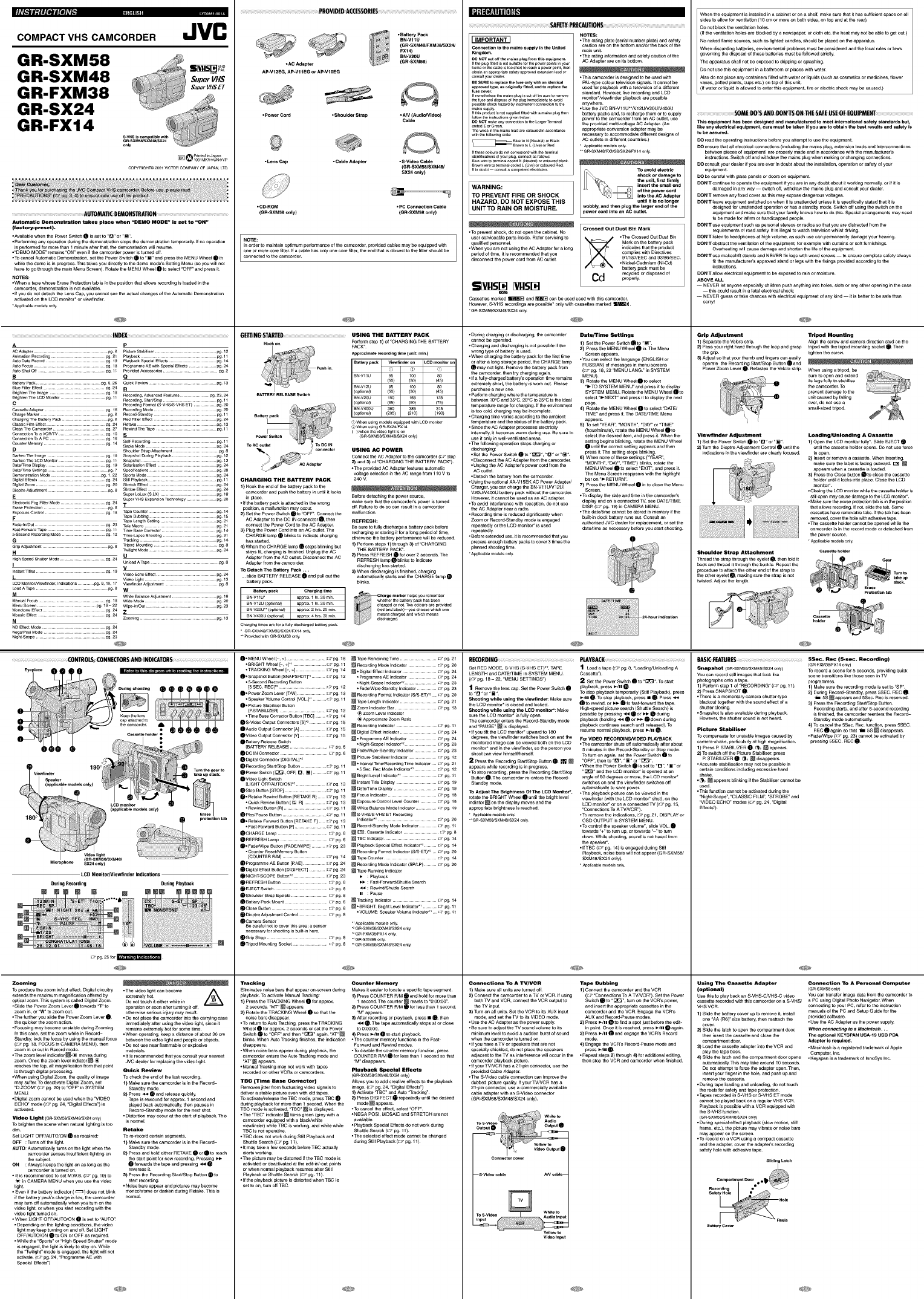
liitlihltilll]ll_#[_"il:il[ttJ{e]#k rgtll
COMPACT VHS CAMCORDER
GR-SXM58
GR-SXM48
GR-FXM38
GR-SX24
GR-FX14
p_ed in J_pa_
COPYnlGHT_2®_VlCTOnCOMPANyOFJA_N _TO
Automatic Demonstration takes place when "DEMO MOME" is set to "ON"
(factory-preset),
•Availablewhenthe PowerSwitchQ is set to <'[3"or <'@"
•Performinganyoperationduring the demonstrationsteps the demonstrationtemporarilyIf nooperation
isperformed formore than 1 minuteafter that,the demonstrationwiliresume¸
•<'DEMOMODE" remaMa"ON"evenif the camcorderpoweris turnedoff
• TOcancelAutomaticDernonstratMa,set the Power SwitchQ to "[]" and pressthe MENUWheel I in
whilethe demois in progress¸Thistakesyou directly to the domemede's Setting Menu(so you willnot
haveto go throughthe mainMenu Screen)¸ Rotate theMENUWheel I to select "OFF"andpress it
NOTES:
•When a tapewhose EraseProtectiontabis in thepositionthat allows recordingis loadedin the
camcorder,de_nstraticn is notavailable¸
• If youdo not domshthe LensCap, you cannot s_ the actualchanges ot the Automa_cDemonstration
activatedonthe LCD_nitor* erviewflnder
Appl_cab_modelso_ly
............ PROVII)ED A(CESSORIIIS
JVC (GR-SXM48/FXM38/SX24/FBXNI-4)20U
•ACAdapter (GR-SXM58)
AP-V12EG,AP-V11EGor AP*VIOEG
•pow_ cord • Shoulder Strap •A/V tAudioNideo)
Cable
•LensCap •CableAdapter • S-Vldeo Cable
(GR-SXM58/SXM48/
SX24only)
•CD*ROM •PCConnectionCable
(GR-SXM58only) (GR-SXM58only)
NOTE=
In order to maintainoptimum performanceof the camcorder,providedcables maybe equipped with
connoted to theca_rder
oneor morecore filter If a cable h_ only one_re filter>the endthat is clo_st to Lhe liftershould be
Hookon. Perform step 1) of "CHARGINGTHE BATTERY
PACK"
App_o,_mat_recordingtime(untorain.)
BaUe_y_k vl_f_n_, on _COmo._o, on
P_Shin. _
BN-VIIU 95 _® 8O
(so) (so) (4s)
_ BN-VI2U 95 _® 8o
(optier_E) (50) (50) (45)
BATTERYRILIASE S_i_h BN-V20U IS0 _ss _a5
(optier_D (85) (g0)
BN-V400U 360 385 315
(optier_D (205) (210) (190)
Batte_LPaCk )When using models equipped wire LCD _nltor
)when us_ GR-SX24/FXI 4
Pow_Swlt _h ( ):when the video Eght IS on
(GR-SXM58/SXM48/SX24 en_y)
TO AC o_let
. _ _, Co"hector USING AC POWER
apta 2) and 3)of "CHARGINGTHE BATTERYPACK")
=: •The providedAC Adapterfeaturesautomatic
voltage selectioninthe AC range from 110V to
CHARGING THE BATTERY PACK 240 _L
1)Hooktheendofthebat[elypacktothe _ ,, _,
camcorderand push the battery in until it locks Before detachingthe powersource,
in place
•if thebatlely packisattached in the wrong make surethat thecamcorder'spoweris turned
position, a malfunction mayoccur off Fallure to do so can result in a camcorder
2) Set the Power Switchllto "OFF" Connect the malfunction
ACAdapterto theDC IN connectorII, then R_FRESH:
connectthe PowerCord to the ACAdaptor Be sure to fully dischargea barely pack before
3) Plugthe Power Cord intoan AC outlet The
CHARGElampI_ blinksto indicatecharging rechargingor storingft for a long periodrdtime,
othe_ise the battery pedormancewill be regard
hasstarted
4) When theCHARGE lamp _ stopsbllnl_ng but 1) Performsteps 1)through 3)of "CHARGING
THE BATTERYPACK_.
stays Ift, sharging isl_nishedSnplug the AC 2) Press REFRESHI_ for over2 seconds The
Adapterfrom the AC outlet•Disconnectthe AC REFRESHlampI_ blinks to indicate
Adapterfrom thecamcorder discharginghas s_aded
TODetachThe BatteryPack,,, 3) Whendiacbarglngis linished,charging
• slide BATTERYRELEASEII and pull outthe automaticallystarts andthe CHARGE IampI_
batterypack blinks
Batterypack Chargtt_gtime ._,___
BN-VI1U* approxI h_30 rain _Charge markerhelpsyouremember
whethe_thebatterypackhasbeen
BN.VI2U(optiOnal) appmx1 h_30 rain chargedO_notTwoeolou_sateprovided
BN.V2OU**(optiOnal) appmx2 h_s2Orain (redandblack}..-youchoosewhichone
BN-V400U(ept_onab appmx4 h_s 30 rain dischargedgr_eansc_aredandwhich_ans
N
ND Effect MOde ......................................... pg 24 Cha_ging t_mes are for a fully discharged battery pack
NegeJPesi MOde ............................................ pg 24 " GR.SXM481FXM38iSX24/F xl 4 only
Night-Scope ................................................. pg 23 -* pmvide d w_th GR-SXM58 onl_
I_ • MENU Wheel [-, +] ........................ IT"pg t8 _Tape Remaining Time ....................... ,?_ pg 21
•BRIGHTWheel[-, +],1 .................... _" pg 11 _ Re_rd_ngModeIndicator.................. ,:,_pg 20
A P
AO Adapte_ ................................................ pg 6PiCture S_Iise_ ............................................. pg 12
Anlmalion R _ _dil_ 3.................................... pg21 Playback ................................................. pull
AUt0 Dale Re_d ....................................... pg 19 Playback Special _ffe_ts .............................. pg 14
AUtO Focus ................................................... pg18 Progtamme AE wit h Spec_a_ Eflect S .................... pg24
Auto Shut Oft ............................................ pull Provided Accessories ................................. pg2
B Q
_tte[y P_ck.................................................._ 6,28 QU_CkReview............................................ pg 13
B_ FilterEffect ....................................... pg 24 R
BrightenTie Ima_ ......................................... pg 18 Recording'AdvancedFeatures.................... pg 23,24
BrightenTheLCDMonitor............................... pull Recording,Starl/Stop................................. pull
C RecordingFormat(S-VH_S-VHSET)................ pg 20
CassetteAdapter...................................... pg 16 RecordingMode............................................... pg 20
ChargeMarker........................................... pg6 Record-Standby........................................ pg 11
ChargingTheBatteryPack............................... pg6 RedFillerEffe_........................................ pg24
ClassicFilmEffect...................................... pg 24 Retake................................................... pg 13
CleanTheCamcordet...................................... pg27 RewindTheTape...................................... pull
Con_cuonToa VcRrrv .............................. p_ls S
Con_ectienToAPC..................................... p_ 16
Counte_ Memory .......................................... pg14 Self"Re_ding .............................................. pull
Sepia Mode ............................................. pg 24
DShoulder StrapAtt_chment .................................pg 8
Darken The Image ........................................ _ 18 Snapshot Ou[_ Playback ........................... pg 12
Darken The LCD Monito_ ............................... pgll Snapshol ................................................ pg12
DaieFFIme Display ...................................... pg 19 Solarisation Effect ........................................... pg 24
DaleRime Settings ...................................... pg7 Specif_ations .............................................. pg28
Demonstration Mode ................................ pg 1,22 Sports Mode ............................................ pg 24
Digital Effects ................................................. pg 24 Still Playback .......................................... pg 11
Digital Z_m .............................................. pg 20 Stretch Effect .................................................... pg 24
Dloptre Adi_stmeat ...................................... pg8 Strobe Effect .......................................... pg24
ESupe_ LoLUx (SLX) .................................. pg 19
Supe_ VHS Expansion Tech_lOgy .................... pg 20
Elect _onic Fog F_lte_ MOde ................................. pg 24 T
E_ase P/otect,3n ......................................... pg 8
E_osure Con#ol .......................................... _ 18 T_ Counte_ ......................................... pg 14
TUbe Dubbing ............................................. pg15
FT_ Leith SeRiag .................................... pg 21
Fade-irffOul ................................................... pg23 T_e Macre ...................................................... pg21
Fast-Fe_wardTape .......................................... pull _ime Base Co,rector ................................. pg14
5-S_ond Recording Mode ............................. pg12 _ime.Lapse ShOoling ................................. pg21
G Tf aching ................................................. pg 14
Grip Adjustment ......................................... pg 8 Trip TM Mounting .......................................... pg 8
HTwilight M°de ......................................... pg24
u
_lgh Unl_d A Tape .......................................... pg 8
SpeedShut_et Mode pg 24
v
_nstant 33{Jes .............................................. pg19 Video Echo Ef fec t .......................................... pg24
LVid_ Light ............................................... pg 13
_O MORilO _ie#lader, Indic_lions ......... pg 9,10 17 VioliSt Adj us_ent ................................... _ 8
Load AT_ .............................................. pg8 W
M
Manual F_US ......................................... pg18 White Balance Adjust merit ........................... pg19
Wide Mode .................................................... pg 20
Menu Screen .......................................... pg 18--22 Wipe-_rdO_l ............................................ pg23
MO_IO_ Effect ........................................ pg 24 Z
Mosaic Eff_ ............................................ pg24 Zooming .................................................... pg13
•TRACKINGWh_l [-, +1................... _:7-pg t4 _ • DigitalEffectindicator....................... ,:,_pg 24
• •Snap_hotB_tton{SNAPSHOTJ*' _" p_ t 2 •Prog,ammeAE Indicator.................. _:_p_ 24
•S-SecondR_rding huron •Nighl-S_po Indlcator".................... _ p_ 2a
[s SEC RECU ............................ _" p_ t 2 • Fade/Wipo-St_ndbyindicator.............. _ pg 2a
I• Powo,Z_m Love,IT/WI.................... ,:_"pg ta _ Re_rding FormalIndicator(S/S-ETy' _:_pg 2O
•SpeakerVolumeControl[VOL]*' ,:_"pg 11 _ T_poLongthlndle_Ior....................... _:_p_ 21
Ill• PictureStabili_, B_tton @ ZoomIndicatorBa,........................... _ p_ t a
[PSTABILIZER].............................. ,:_"p_ _2
•TimoBa_ Co.actor Butt_,FrBcI ,:_"p_ t4 ® ZoomLevelIndicator
® Appm×imateZoomRa_o
I S-VideoOutputConnectom[S)'_ .......... _" p_ t S _ Re_rding Indicator........................... _:_pg t 1
I A_dloO_tputconnector{A_................ _'p_ tS @ DigilalEffectlndleator....................... _:_pg 24
O VideoOutputConnecto,IVJ................ _'pg tS _ • Prog,ammeAE Indicator.................. _:_ p_ 24
I BatmryRelo_ Switch •Nighl-S_po Indlcator".................... _:_ pg 2a
{BATTERYRELEASE]........................ _:_pg 6
O DCIN C_,neetor............................ _pg6 _ Fade/Wipo-Standbylndleator............... _:_pg 2a
O Digi_l Conn_Ior ID_GITALJ'* _ PictureSt_bili_, Indlcator.................. _ pg t 2
O Re_rding Star'Stop Button ................ ,:_"pg 11 @ • Inte_lTime/R_dln_ TimeIrOn,to, _:_p_ 21
•SSac RecModeIndicato,+_.............. _:_ pg _2
O PoworSwltch[_E_, OFF,Q, []] .......... ,:_'pg 11 _ BrightLevelIndicator*'...................... _:_pg t_
O VideoLightSwitch
{LIGHTOFF/AUTO/ON)'_ ................... _'pg ta mln_tanlTi_e DisplW.......................... _:_p_ t9
StopB_On ISTOP]......................... _" pg 11 _ D_ternmeDisplW.......................... _:_ p_ t 9
O •RetakoRewindhuron [RETAKER_ ,:_'p_ _a _ FocusIndicato,............................... _pg t8
• O_ickReviewhuron [ _ R] ............... _'pg ta _ E×posumControlLevolCounlor ........... _p_ t8
•RewindB_on [RI........................... _" pg 11 _ WhiIoB_lan_ ModoIndicator.............. _ p_ t 9
O Play/PadreButton........................... ,_" pg 11 @ S-VHS/S-VHSETRecording
O •RetakeFo_rd huron IRETAKEFJ _:a_pg t a Indieato,+'•................................... _:_pg 2O
•Fa_t-Fo,w_rdButtonIF].................... _:_"pg 11 _ Re_rd-StandbyModeIndicator............. _:_pg t 1
OCHARGEL_mp .............................. _:_pg 6 _:Ca_settolndlcator ....................... _'p_8
@ REFRESHLamp............................ _ pg 6 ITBC Indicato,................................ _ pg t4
O •Fado_VipeB_Iton[FADFJWIPE].......... _:_"p_ 2a @ PlaybackSpecialEff_t Indicator" _:_p_ t4
• CounlorR_UMemory B_on _ Re_rding Forma_Indicator(S/S-ETy' _:_p_ 2O
[COUNTERR/MJ........................... ,:_"p_ t4 @T_po Counter................................ _ p_ t4
O ProgrammeAEB_tton[_AE] ............... ,:_"p_ 24 @ Re_rding ModeIndicator(SP/LPi......... _ p_ 2O
li Digi_l Eff_I ButtonID_GIFECT]........... _" p_ 24 @ T_poRunninglndle_tor
ON_GH_SCOPEButton*'¸.................... _'pg 2a _ : Playback
REFRESHhuron ............................. _:_pg 6 _* : Fact-Forward/ShuttleS_reh
O EJECTSwitch................................. _ pg 8 _ : Rewind/Sh_t_eSoa,ch
OShoulderStrap Eyelet_....................... _:_pg 8 II : Pau_
OBattery PackMo_m .......................... _ pg 6 @T,ack_n__ndle_Ior........................... _:_ pg _4
O DioptmAdiu_tmentcontrol................... _pg8 •VOLUME:SpeakorVolumoIndictor*' _ pg t 1
OCamera Sensor "Applica_e mo_elsan_
BOcarefulnot to coverthisarea; a _n_,
neco_s_ty{orsh_ting is built-lnhem "_GR-SXM_SXM4_SX24only
"_GR-FXMa_FXI_o_ly
OG,ipStmp ...................................... _:_pg 8 _GR-SXM_aenI_
OT,ipod MountingSocket...................... _ pg 8 -_GR.SXM_SXM4_SX24only
Tracking Counter Memory
Eliminatesnoisebars thatappear on-screendudng Makes it easierto locate a specifictape segment.
playback.TOactivateManual Tracking: 1) Press COUNTERPJMQ and hold for morethan
1) Press theTRACKINGWheelI forapprox. 1 second¸The counter_ resetsto rg:00:00'.
2 seconds¸"MT' _ appears¸ 2) Press COUNTERPdMO for less than1 second¸
2) Rotatethe TRACKINGWheel I SOthat the <'M'appears¸
noisebars disappear¸ S) ATtarrecordingorplayback, press• 0, then
•TOreturnto Auto Tracking,press theTRACKING ._ Q. The tapeautomatically stops at or clo_
Wheel I for approx 2 sacongeorset the Power to0:00:00.
Switch I to "OFF"and then"_" again¸"AT"_ 4) Press _/lI Q to sta_ playback.
_inks When Auto Trackingfinishes,the iod_a_on -The counter memoly functionsin theFast-
disappears¸ Po_ard and Rewind modes¸
•Whennoise ba_sappearduring playback,the -To dlsaMathe countermemoryfunction, press
camcorder entersthe AutoTracking modeand COUNTERR/M O for lessthan1 second so that
"AT`>@ appears¸ "M" dlsappaars
•Manual Trackingmay not workwith tapes Playhack Special Effects
racordadon other VCRs orca_rdom (GR-SXM58_SXM48_SX24o_ly)
TBC (Time Ease Co_ctor) Allows youto add creative e_ectsto tha playback
Removesjitterfrom fluctuatingvideo signalsto image¸ (_ pg 24, "Digital Effects")
deliver a stablepicture even wlth old tapes¸ 1) Actlvate"TSC" andAuto <'Tracking"¸
TOacgvate/releasethe TBCmode, pressTBC I! 2) Press DIGIFECTO repeatedlyuntil tha dashed
during p_yback for morethan 1 _cond. When the raode_ appears.
TBC mode is activated,"TBC__ is dlsh_yed -TOcancelthe effect,select "OFF"
•The '_rBc"indicator_ turnsgreen (grey with a •NEGA POSt,MOSAICand STRETCHare not
camcorderequipped with a Mack/whge available.
viewfieder) whileTBC is _rklug, and white while • Playback Sgedai E_ects do not work during
TBC is notoperative¸ Sh_la Search(_/pg 11).
•TBC doesnot workduring S_IIPlaybackand -The selectedefbct mode cannot bechanged
Shu_le SOa_Sh(_ pg 11). during Still Playback (_;?ug.1t )
•it maytake a low seconds beforeTSC actually
sta_s working¸
•The picture maybe distorted _ the TBC modeis
activated or deactivated at theedthge_outpoints
or when normal playbackresumesager S_li
P_yback orShuttle Search(_ ug. 11)
• tf the playbackpicture isdlstorted whenTBC is
set to on,turn off TBC
Z.Z.]........
........ ......
_ _f_2oid_{Keepthelens
....;Z:: '°.........
ee on_b
,a_ gt
Mtc_opho_ SX24 only)
LCDMonitorNlewltndet Indications
gating gecordinl Derinl Playback
............
---N411 )!
,_ pg 25 for
Zooming _, , _
TOproduce thezoom irdouteffect•Digital circuitry -The videolight can become A
extendsthe maximum magnificationoffered by extremely hot
opticalzoom This systemis called Digital Zoom DOnot to_shit either whlle in
•Slidethe PowerZoomLever II towards"r' to operationor SOonafter tumlng it off,
zoomin+or"W' to zoomout. othe_ise seriousinjury may result.
• Thefurtheryou slide the Power Zoom Lever_1> • DOnot placethe came.orderinto the carlyiug case
the quickerthe zoomaction, immediately after using thevideolight>sin_ it
•Focusingmaybecome unstableduringZooming remains extremely hotfor sometime•
In this case, set the zoomwhile in Record- •When operating,keep a distanceof about 30 cm
Standby,lock the focus by using the manualfocus between the video light andpeopleor objects•
(__ pg 18,FOCUS in CAMERAMENS), then •DOnot use near flammableor explosive
zoomin or out in Recordmode materials•
•Thezoom level indicator_ ® _ves during •it isrecommendedthatyouCOnSUltyournear_t
zoom Oncethe zoomlevel indshor_ ® JVC dealerfor replacicgthe videolight
reachesthetop, sh m_gnificshonfrom that point
isthroughdigital processing M_dck Review
•When _slng Digit_l Zoom, the quality rd image TO Ch_ the e_d Of the I_st recordtng.
maysuffer TOdeacgvate DigitalZoom, set I) Makesure thecamcorderis in the Record-
'D ZOOM"(;,/pg 2o)to "OFF"in SYSTEM standby mode
MENU 2)Press -_1_ and release quickly
• Digital zoom cannotbe used whenthe 'VIDEO Tapeis rewound Ior approx, t second and
ECHO"mode (_rr pg. 24,"Digltai Elf_ts") is playedbackautomatically,then pauses in
activated Record-Standbymode forthe nextshot
[]ideo Light (GR-SXMh_SXMAa/SX24only) • Distortion may OCCurat the start ot playback.This
is normal
Tobrightenthescenewhen naturallighEngistoo
dim Retake
Set LIGHTOFF/AUTO/ONIas requiredr TO re+recordcertain segments•
OFF :Turns offthe llght. 1)Makesure thecamcorderis ic the Racord-
AUTO:Automaticallyturnson the light whenthe standby mode
camcorder sensesinsufficlentlightingon 2)Press andholdeither RETAKEI_ orI_ to reach
the subject the stair pointfor new recording Pressing I_
ON :Always keeps thelight on _ long as the _1 Towardsthe tapeand pressing _i_1_1
camcorder ist_med on reverses it
• ft is recommenbadto set M WB (_rz- pg 19)to 3)Press the Recording start/stop Button I_ to
Jl. in CAMERA MENUwhenyouuse the vigeo s_adrecordlng.
light. •Noise bars appear andpicturesmaybecome
•Even _fthe battely indicator (,_) does notbilnk monochrome or darken during Retake Thisis
ifthe battery pack'scharge is low, the camcorder normal
mayturnoff automaticallywhen youturn onthe
videoEght,or when you startr_rding with the
vibaoEghtturned on
•When LIGHT OFF/AUTO/ON_1 is set to "ASTO":
•Dependingon the lightingcondlbans+the video
tight maykeeptumlng onand off Set LIGHT
OFF/AUTO/ONIto ON or OFF as required
•While the"Sports"or "HighSpeed Shtltieff mode
_sengaged,the light is llkelyto stay on While
the 'Twilight"mode isengaged,the llghtwill not
activate (r[._pg 24>"Programme AE with
Sp_ial Eff_ts ")
: SAP lieU l ION
NOTES:
•The ratingp_ate(sabalnumberplate)andsafety
ConnectiontothemainssupplyintheUnn_ caodonareonthebottomand/orthebackofthe
Kingdom. malnunit¸
•The ratinginformatMaaod s_fatycautionofthe
DO NOTo_tofft_ m_i._pl_g_t_ equ_pme.t. AC Adaptarareon itsbottom.
oons_Ityou_d_r •Thiscamcorderisdesignedtobeusedwith
BESURE to,_pl_t_e_u_o.lywith_._e_ti_l PAL*typecoMartelevisionsignals.Itcannotbe
_rov_ type,_ ori_.a_lyfm,_.a_dto_,_ t_ usedforplaybackwitha televisionofa d_erent
fu__o_ standard¸However.liverecordingandLCD
,no.e_h_ th_m_ dog_s_Io__ su_to,_v_
the_u__nd_spo_o_thepl_immedi_,_ly,Ioavo_ mongo_*/viewf_nderplaybackarepossible
_bl_ _k h_a,dbyinadv_nt_._vo. tolh_ anywhere¸
m_s _up_y
,tui__d_ _s.or_u_pl_d_tt_dw_lham_ plug_h_
DO NOr_ _y _._e_ toth_L_m_r_inal
_i_s_ lh_ma_slead_r__olo_dina_da._
Bl_toN (N_ut,aito,_
Bm_ntoL(Live)o,_
,thee_U_ donot_.e_on_w_lhthet_i_l
WARNING:
TO PREVENT FIRE OR SHOCK
HAZARD, DO NOT EXPOSE THIS
UNITTO RAIN OR MOISTURE.
• To prevent shock, do not open the cabinet NO
user se_tceabie parts inside. Refer so.icing to
geaiffled personnel.
• When you are not using the AC Adapter for a long
period of time, it is recommended that you
disconn_t the power cord from AC outlet.
•Use the JVC BN-Vt 1 U**N12UN20S/V400U
battery packs and, to recharge them or to supply
power to the camcorder from an AC outlet+ use
the provided muiti-vshage AC Adapter. (An
appropriate conversion adapter m_y be
necessary to accommodate d#ferent designs of
AC outlets in different countries)
Applicable models only
_*G R. SXM48/FX M38/SX24/FX 14 on_y
TOavotd dectric
shockor damageto
the unit, firstfirmly
insert the smaRend
ofthe powercord
untilit is nolonger
__o_rJwobbly,and the. plugthe larger end of the
Crossed Out Dust Bin Mark
X.TheCrossedOut Dust Bin
Mark onthebat[ely pack
_odicatasthat thep_odi_ct
complieswith Directlves
91/157/EECand93/86/EEC.
•NickebCadmlum(Ni_Cd}
battery pack must be
recyctedor disposedof
Cd .........
Cassettesmarked _ and _ canbe usedusedwith this ca_rder
However,S-VHS recordings arepossible* only with cassettesmarked
•GR.SXM58/SXM48/SX24only
•During chargingor discharging,the camcorder Date/Time Settings
cannot beoperated 1) Set the PowerSwitchQ to <'[]"
•Charging aoddissharging is not posslbleif tha 2) Press the MENUWheel I in The Manu
wrongtype of battely ISused. Screenappears.
•When charging thebattely packfor the firsttime •YOucan selectthelanguage (ENGUSH or
or agera longstorage pebad,the CHARGElamp
Q maynot light. Removethe batterypack from RUSSIAN)of messagesin menu screens
the camcorder,thentry charging again¸ (_,i pg lg, 22 "MENS LANG'>in SYSTEM
MENU)¸
• tf a fully_cbargedbattely's operationtlme remains 3) Rotatathe MENU Wheel I to select
extremely short,the battery isworn out Please "_TO SYSTEM MENS"and prassit to display
purchase a new one SYSTEMMENU. Rotatethe MENUWheelI to
•POdo_ shargiro wherethetemperatureis
between 10°Cand_°C 20°Cto 25°C istheideal select "_ NEXT"and pressit todlsh_aythe next
temperaturerange forsharglrO. If theenvironment page¸
4) Rotate theMENUWheel I to select "DAT_
is toocold,chargingmay be incomplete¸ TIME" and pros it The DATa!TIMEMenu
•Charging time variesaccording to the ambient
temperatureangthe statusof the battelypack¸ appears¸
5) Toset <'YEAR",<'MONTH",<'DAY"or <'TIME`>
• Since the ACAdapterprocesses eiectdolty (houSmMate),rotatethe MENSWheel I to
internally,it bacomes warmduring use Be surato
useit only i_ well-veodlatedareas¸ selectthe desired item,angpress it Whenthe
settingbeginsbli_kicg, rotata theMENU Wheel
•The following operationstops charging or I until the correct setllng appears andthen
discharging:
•Set the Power SwitchO to <'_[;3 ","Q" or "[]". pressit Thesetting stopsblinking¸
6) When none of these sattings("YEAR",
• Di._'.onnoct theAC Adapterfrom thecamcorder "MONTH'>,"DAY","TIME")blinks, rotate the
•Unplugthe AC AdopteCspowercord fromthe MENUWheel I to select "EXIT'>,and pressit
ACoutlet¸
•Detachthe batterylrom thecamcorder The Menu Screenreappearswith the highlight
baron <'=-RETURN"¸
• Ssiug the opdonai AA-Vl 5EK ACPower Adaptar/ 7) Press the MENS WheelI into close the Menu
Charger,you cancharge the SN-Vl 1UN12U/ Screen
V20UN4OOUbattery packwithoutthe c_r_.order •Todisplay thedata and timein thecamcordor's
However,it cannotbe usedas an ACadapter¸ displayangon a connected TV,see DATE/TIME
•TOavoidinterference withrecepdon,do net use DIS_ (_ pg 1g)in CAMERA MENU¸
the AC Adapternear a redlo. •Tha datedimecannot bestored in memory if the
•Recording timeis reduced sige_icantlywhen
Zoom or Racord-Staedbymode is engaged bulthlnclock battery runsout CO.SOdan
repeatedlyor the LCD monitor*is used authedsed dVCdoaler for replacement,or set the
repeatedl_ date_timaas necessaly beforayoustar{ shooting¸
• Sothreextendeduse, it m recommendedtbat you
prepareenoughbattelypackstocover3 tim_ tha
ptannedshootingdo_
•shplioablem_els anl_
i'_!!,!i_Ti_i_7!771iii!i_i!i_i!;_,!ii!!ii!iiii_7_7!i
2_-hou__.m_at_.
_{i { {{7{ 7{i
ItECORDItI6 PLAYBACK
set REC MODE, S+VHS(S-VHSET)**,TAPE 1Loeda tape (_,_pg 8, "L_dlng/Unloading A
LENGTH and DATErrtMEin SYSTEM MENS Cassette")
(: /pg 18 - 22, "MENUSETTINGS") 2Set the Power Switch0 to <'_E_'. TOstart
1Remove thelens cap SOtthe Power Swltch 0 pla_acic press _-/II I
to "B" or "i" TOstop playbacktemporarily(stili Playback),press
stlootlng whge usingthe viewfinder: Makes_re _-/II Q TOstep playback,press • Q Press
the LCDmonitor* isclosed and locked¸ Q to rewind, or _'_-I to fassto_ard the rage
Sho_ing whge usingthe LCOmonitor*:Make High-sheedpicturesea_sh(Shut_aSearch)is
sure the LCD monitor*is fullyopen¸ possibleby pressing _<_Q or _._-0 during
The camcordorenters the Record_Standbymode playback(holding << Q or_,- Q downduring
and "PASSE,>_ is displayed¸ playbackcontinues sea_shuntil released).To
•tf you tiltthe LCD monitor"upwardto 180 resume normal playback,press _*/lI 0
degrees,thevlewfioder swi_shesback onandthe FOrVIDEORECOItDiN6/ViDEOPLAYBACK
monitoredimage can be viewed both on the LCD •Thecamcordershutsoffardomatically afterabout
monitor*and in the vlewlloder,so the person you S minutes in tha Record_StaodbyorStop mode¸
shoot can view hlmselfalemelf TOturn on agein, set thePower Switch0 to
2 Pressthe Racordlngstadistop B_on Q ll!f @ <'OFF",then to "1:1","[]" or "[;_3".
appearswhile recordingis in progress. •When thePowerSwitch0 isset to _0 ", "[]" or
•TOstep recording,press theRecording StarPStop "_EI" and the LCDmonitor* isopened at an
ButtonQ Thecamcorder re-entersthe Record+ angleof 6Odegrees ormore, the LCDmonitor
Standby_do. switches on andthe viewfiederswitches off
automaticallyto save power¸
TOAdjust The BrightnessOf The LCDMonitor*, . The playbackpicturecan be viewedin the
rotate the BRIGHTWheel I untll the bdght level view_ieder(with the LCDmonftor_ shut),o_ the
iodshor _ on thedisplay movesandthe LCD monitor*or ona connectedTV (_,i ug.15,
appropriate brightnessis raached "ConnectionsToA TV/VCR'>)
• Applicablemo_elsan_ •TOremove the indications,_ /pg.21, DISPLAYor
•*_R-SXM_8_SXM48_SX24only¸ OSDOSTPUT in SYSTEM MENU.
•TOcontrol the speaker volume*,slide VOL.I
towards'%"to turn uth or towards "-" to turn
down¸While shoo_ng,sound is notheard from
thespeeker_
• If TBC (z7-ug. 14) isengaged dshngStill
Playback, noise ba_swili not appear (GR_SXM58/
SXM48/SX24only)¸
AppEica_emo_elsonl_
Connections TO [] TV/VC[] Tape Muhhtng
1) Makesure all units areturned off 1) Connectthe camcorderand the VCR
2) Connectthe camcorderto a TV or VCR If using (_ <'OonnecticnsTOATWVCR') Set the Power
bothTV and VCR, _nnect me VCR outputto SwitchQ to "_2E_", turn ontheVCR+Spower,
theTV input¸ andinse_the appropriatecassavas inthe
S) Turnon all units¸Set the VCR toits AUX input camcorder andthe VCR EngagethaVCR's
mode,and settheTV to itsVIDEO mode¸ AUXand Record-Pausemodes¸
•Sse theACAdapter as thepower suppl_ 2) Press =*/lI O to finda spot just before thaedit-
-Be sureto adjus_theTV sound volumeto its i_ point¸Onceit is reached,press _*/II I again.
minimum level to avoid a sudden burst of sound 3) Press _/ll Q and engagethe VCR'sRecord
whenthe camcorderis turned on mode.
•tf you have a TV orspeakers thatare net 4) Engagethe VCR's Pocord+Pau_ mode and
specially shielded,do not place the speakers press_/ll O
adjacent to theTV as interlerencewill occurin the •Repeatsteps 2) through4) foradditional editing,
camcorderp_yback picture, thenstop theVCR and _mcorder whan finished¸
• tf yourTV/VCRhas a 21 _pinconnector, usethe
provided Cable Adapte_
•The S_Videecomaconnectioncan improvethe
dubbed picturequallt_ If yourTWVCRhasa
21+pinconnector, usaa commercially availa_a
cableadapterwith anS-VMaoconnector
(GR-SXM58/SXM48/SX24only).
White to
Vd A_dio
o_ _ eo o_p_tl
outhuilI
con_r _ve_
Wh_
mp.tT°S-Via_ __Audio Input
_.ow to
VideoInp.t
When the equipment is installed in a cabinet or on a shelf, make sure that it has sufficient spa_ on all
sides to allow for ventilation (10 cm or more on both sides, on top and at the rear)
DO not block the ventilation holes.
(11the ventilation holes are btacked by a newspaper, or cloth etc. the heat may not be able to get o_t.)
NO naked flame sources, such as lighted candles, should be ptaced on the apparatus
When discarding batteries, envgenmental problems must be considered and the Io_1 rules or laws
gevemlng the dishos_l of these batteries must be followed st ric3y
The apparatus shall not be exposed to dripping or splashlng
Do not use this equipment in a bathroom or places with water
Also do not place any containers filled with watar or tiquids (such as cosmetics or medicine> flower
vases, potted plants, cups etc.) on top of this unit
(11water or tiquid is albwed to enter this equipment, fire or electdc shock may be caused.)
SOM_DO'S AND D0N TS 0N THE SAFEiUSEO_EQUIPMEN_
_ts eqrdpmem has been designed and manufa_ured to meet internat_nal saSt_ _anda_s but,
)Ekea_ electrical equipme_, cam mustbe takenif you are to obtainthe best r_ults andsafetyIs
beassured.
DOmad theopemtlng in_ruckons before youattempt to use the equlpm_t.
DOensure thatsh electrical connectlons(Maledingthe mamaplug, extensionleadsand interconn_ions
between piecesof ege_pmem)amproperlymade andin accordancewith the manufacture_
instructions¸Swi_h off ang withdrawthemains plugwhenmaking erchangingconnections¸
DOconsuityour doaler if youam averin doubt aboutthe in.all.on, operationor safety of _ur
_ulpment
DOba ca_l with glass panelsor doomon equipment¸
DON'T comlnuatoopemm the equipment_ you am in any doubtabout it _rking normall_ or if it is
damagedin any way-- swi_h o_ withdrawthemains plugandconsult _ur doale_
DON'T removeany _ed coveras thls mayexposedangerousvoltages
DON'T leave_ulpment switchedon whenit is unmteededunless itis specifically statedthat it is
designed_r unattendedoge_ion or has a staod_ mode¸Swi_h _f using theswish on the
equlpmantangmake_m that your familyknows how to do this¸ Specialar_ngemen_ may need
bemade fori_rm erhandicappedpeople¸
DON'T use equipmentsuch as personal stereosor md_oseo thin geuare di_mcted SOrethe
mqulmmentsof madsa_ It is illegal to wash teI_ision whilst d_ing.
DON'Tlistento headphonesm hbh volume,as such usecan permanentlydamage yourhearing.
DON'T obstructthe ventil_on of the equipment,for axample with Cumins or soft furnishings¸
Overheatingwill causedamage and shortenthe li_ of the equlpmant.
DON'T use ma_shiff _aeds aedNEVERfix lags with woodscrews -- b ensurecomplete sa_y always
fit themanufacturer'sapproved stand or legs with the fixings providedaccording to the
Mat_cticns
DON'T allow ele_ri_i equipmentto ba exposed to rain or moisture
ABOVE ALL
-- NEVERlet anyone especially childrenpush an_hing intoholes, Slotsorany other opening in thacasa
-- this ceuldresuit in a fatal electdoalshock;
-- NgVER guesser take chances withel_tdcal equipmantot any klnd -- it is bener m be _fa than
sorly!
Grip Adjustment l"_lpod Mounting
1) Separatethe Veic_ostrip. Alignthe screwandcamera direction studonthe
2) Passyou_dghthandthroughthe loopand grasp t_ipodwith the tripod_uming _cket O Then
the grip¸ _ghtanthe screw
3)Adjust so that yourthumb andfingers caneasily
operatethe RecordlngStud/Stop SottonQand • • _ _ •
PowerZoom Lever 0 RafastentheValcro st_p When usinga tdpod, be
sureto open and axtend
its lags fullyto stshilise
thecamcordor TO
prevent damageto the
unitcaused byfalling
over,do notusea
small-sizedtripod.
Viewflnder Adjustment Loading/Mnloadfag [] Cassette
1) Setthe Power Switch I_ to"_" or "l". 1)Open theLCD monitorfully*. Slide EJECT
2) Turn theDicptre AdjustmentControl_1 until the until the c_ssetteholder opens Do not use force
indicationsin the vlewfinderare cleady focused to open
2) Insert or remove a cassette When icser3ng>
make surethe label ISfacing outward E_
appearswhena cassetteis loaded.
3)Press the Closebutton _to closethe cassette
holder until it locks into place Stose the LCD
monitor*.
•Closingthe LCDmonitor whilethecassetteholderis
stillopenmay causedamageto the LCD monitor*.
•Makesuretheeraseprotectic_tab is in theposition
thatallowsrecordingif not, slide thetab. Some
casselstshaveremovshiet_ba If thetabhas been
removed,covertheholewithadbaswetape•
•Thecassette holdercannot be opened while the
carncorderis in there_rd _de ordetached from
thepower source.
•A_plicab_mo_lsonl_
Shouldel* Strap Attachment cassettehold4er
backand threaditthroughthe buckle Repeatthe I
procedureto attachthe other end of the strap to
theother eyeletI_, making surethe strap is not
twisted Adjustthe length
U..o
holder
gSec. Rec (5-sec. Recording)
(GR-FXM38/FX14end)
Snapshot (GR-SXM_SXM4_SX24enEy) TOrecorda scene for 5 seconds, providingquick
YOucan record still images thatlook lika scenetransWonslikethose seenin TV
photographsonto a t_ge. programmes
1) Performstep1 of "RECORDING"(_:_ug 11) 1) Make surethe recordingmodeis set to'SP"
2) PressSNAPSHOTI 2)During Record-Standby,press 5SEC REC0
• There is a momentarycamera shu_er4ype 11 5S_ apgearsand 5Sec Recis rese_ed
blackouttogetherwith the soundeffectof a 3)Press the RecordingStadistop Su_on
shu_er closing. Recording starts,ang ager5-second recording
•Snapshotis also availableduring playback is finished,the camoordorreenterstheRecord-
Howler, the shuner soundis not heard Standby modeautomatically¸
4)TOcanal the5SOC.Rec function,press 5SEC
Picture Stabiliser REC • again so that i 5S_ disappears
TOcompensatefor unstableimagescaused by • Fede/Wipe(_,i pg 23)cannot ba actuated by
camera-shake,pa_icularly at high magn_icadon prassingSSEC REC0
1) Press _ STABIUZER 0 _, _ appears¸
2)TOswitch off the PictureStabiliser,press
RSTASILIZERO _ ! disappears
•Accuratestabilisationmay notbe possiblein
cerfalnconditions includingexcassive hand
shake¸
• _ _ appears blinking_ the Stshiliser cannotbe
used¸
•Thisfunctioncannotbeactivated during the
"Night-scope", "CLASStC FILM'>,"STROBE`>and
"VIDEOECHO,>_des (_J ug 24, "Digltai
Effects'>)¸
Msing 'Ylhe Cassette Adapte_, Connection TO [] Personal Computer
(optional) (GR-SXM58 only)
Use thisto play back an S-VHSUg/VHSUg video You can transfer image data from the camcorder to
cassette recorded with th_s camcorder on a S÷VHSt a PC using Digbal Photo Navlgator When
VHS VCR con_ecgng to your PC, refer to the instruodon
manuals of the PC and Setup Guide for the
1) stide the battery cover up to remove it, install provlded software.
one "AA (R6)" size battery, then reattach the • Sse the AC Adopter as the power supply.
cover
2) Slide the latch to open the compartment door, When connecting to a Macintosh...
then insert the cassette and close the The opttonal KEYSPAN USA-19 USB PDA
compartment door Adapter IS required.
3) Load the cassette adopter into the VCR and • Macintosh is a registered trademark of Apple
play the _pe back Computer, Inc
4) stide the latch and the compartment door opens • Keyspan is a t_demark of InnoSys Inc.
automatlcally This may take around 10 seconds
DO not attempt to force the adapter open Then,
insert your finger in the hole> and push up and
remove the cassette
• During tape icading and unicadlng, do not touch
the reels for safety and tape protecban
• Tapes recorded in S*VHS or StVHS ET _de
cannot be played back on a regular VHS VCR
Playback is posslble with a VCR equlpped with
the S*VHS tunction
(GR-@XM58JSXM48JSX24 on_y)
• During speclal-effect playback (slow moban, still
frame, etc.), the picture may vibrate or noise bars
may appear on the screen
• TO record on a VCR using a compact cassette
and the adaptor> cover the adapter's recording
_fety hole with adheslve tape
sli_ng La_h
Hole
Batt_, Cov_
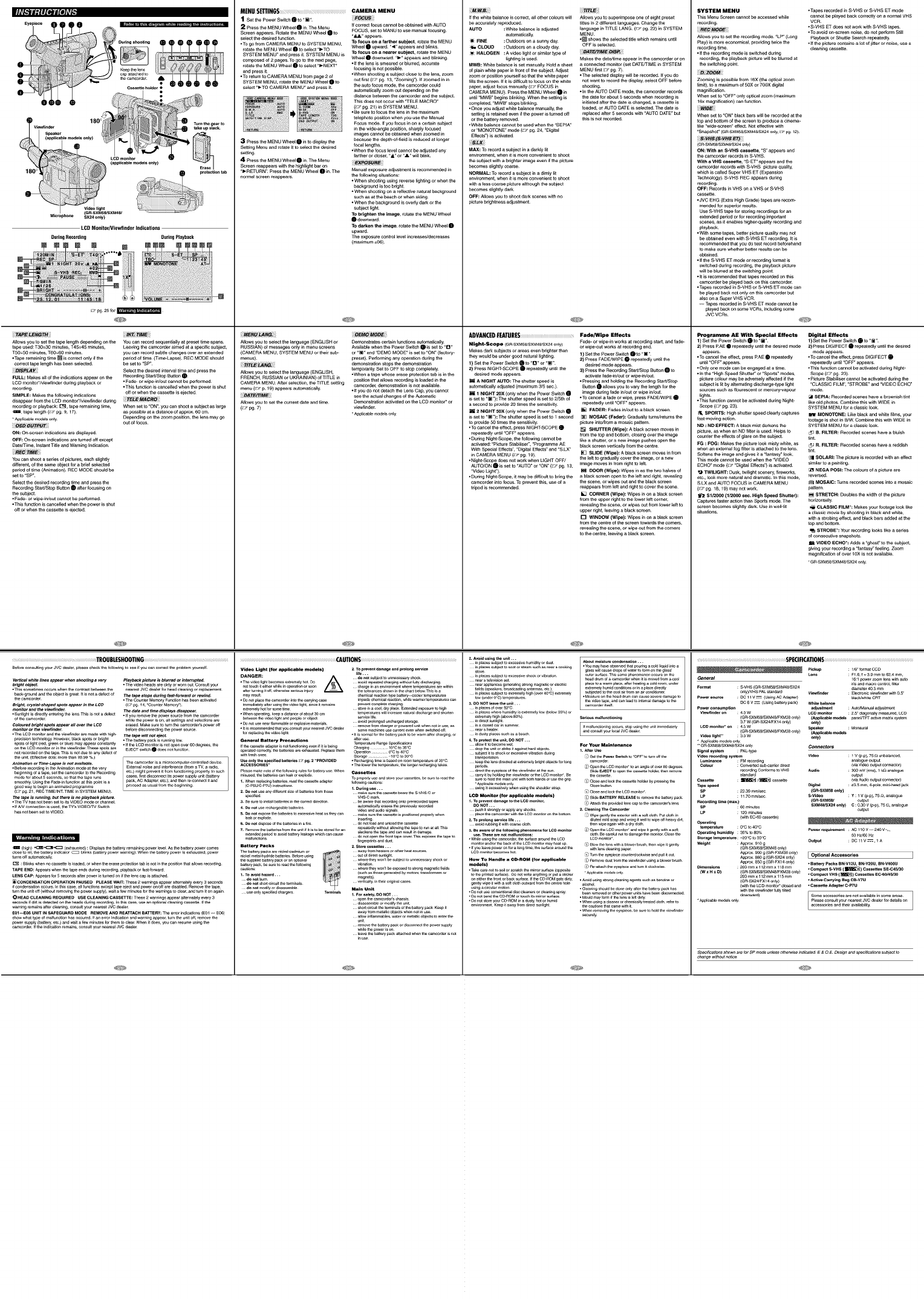
_k.'vll:il[#,Jjfe]_6 MENU SE_ING_ CAMERA MENU
1Setthe Power SwitchI to "[]". _ilFOC_+:_+
2Pressthe MENUWhee_I in The Menu tf correctfocuscannot be obtained with AUTO
FOCUS, set to MANU to use manual focusing¸
Screenappears. Rotatethe MENUWheel I to
selectthe desired_unction ",61." appears¸
TOfocus onafarthersubject, rotatethe MENU
•TOgo _romCAMERA MENUtoSYSTEM MENU, Wheel I upward "<" appears and blinks
rotate the MENU Wheel I to select ")-TO TOfocus ona nearer subiect,rotate theMENU
SYSTEM MENU" andpress it SYSTEM MENUis Wheel I downward¸ "1-" appearsandblinking¸
composed of 2 pages¸TOgoto thenextpage,
rotale the MENU Wh_l I to seleCt")-NEXT" •t( the lens is smearedor blurred,accurate
focusingisnot gossible
and pressit •When shooting a subject close tothe _ens,zoom
•Toreturn to CAMERAMENUfrom page 2 of
SYSTEM MENU, rotatethe MENUWheel I to out first(_ pg 13, "zoomlng9 If zoomedin in
select"_-TOCAMERA MENU"and pressit the autofocusmode, thecamcordarcould
automshcaltyzoomoutdependingonthe
distance betweenthecamcorderand thesubject.
Th+sdoes notOCCurwith "TELEMACRO+
(:r+.pg 21) +nSYSTEM MENU¸
•Be sureto focus thelens inthe maximum
telephotopos_ionwhenyou use theManual
FOCUSmode. Ifyou focus in ona cenaln subject
in the wide+anglegosillon,sbargty focused
images cannotbe obtained when zoomed in
3Pressthe MENUWbael I in to display the because thedepth+of-fieldis reducedat longer
focallengths.
Setting Menu androtate it to_l_t the desired •When the focuslevel cannotbe adjustedany
set,rig, f_rtheror closer,"_" or "a." willblink.
4Pressthe MENUWheel I in The Menu _i+IEXPO_URE_!
Screen reappearswith thehighlightbar on
")-RETURN"¸ Pressthe MENUWheel I in The Manual exposure adjustment isrecommended in
normal screen reappears¸ me followlng situations:
• When shootingusing reverselightingor whenthe
backgroundis too bright
• When shootingon a rshecgvenatural background
such as at the beach or whensk_ing
• Whenthebackgroundis oveHydark orthe
subject light¸
To brighten the image, rotate the MENUWheel
I downward
TOdarkenthe i_pe, rotate the MENUWheel I
upward
The exposure controllevel incre_s/decre_s
(maximum±O6)¸
Turntheg_a, to
De ontab
Mteropho_ SX24 only) SXM48/
LCDMonitorNiewfindet indications
DuringRecording DuringPlayback
E
_pg 25{or_'_
TA#_ENG_
Altowsyou to set the tapelength dependingonthe YOUcan record sequengallyat presettime spans¸
tapeused:T30=30 mln_es, T4S=_ minutes, Leavingmecan'_ordaraimed at a specific subject,
T5O=50mln_tes,T60=60 mln_tes youcan record subtlechanges overan extenbad
•Taperemaining time_ is correctonly ifthe per+edot time¸(Time-Lapse)REC MODEshould
correcttape lengthhas b_n selected be set to "SP"
i_!i_PLA_ill Selectthe desiredinte_al time angpress the
FULL:Makesall of the indicationsappear on me RecordingStarPStopButton0
LCOmoshor+/vlew_inderduring playbackor • Fade+or wlpe4_out cannotbeperformed
•This functionis cancelledwhenthe poweris shut
recording.
SIMPLE: Makes the [oflowlng indications off or when the cassette is ejected
disappear from the LCD monitor*/viewflnder during
recording or playback: [_, tape rema_nlng time, When set to "ON _, you can shoot a subject as large
_, tape length {:,_ pg 9,17) as possible at a distance of approx. 60 cm.
Applicable models only Depending on the zoom position, the ions _y go
om o_locus
ON: On-_r_n indicationsare dishlayod
OFF: On-screen _ndjeat_ons are turned off except
Date/Time, Instant T_e and Warning [ndlcatlon.
YOU can shoot a series ot pictures, each slightly
different, of the same ogject for a brief sekected
period of time (Animation). REC MODE should be
set to "SP'.
Select the desired recording time and press the
Recording Stari/Stop Bt_ton _ after focusing on
the subject
• Fade- or wlpe4n/out cannot be perfo_ed
• This functlon is cancelled when the power is shut
o_f or when the _ssette is ejected
TROUBLEStlOOTING ...................................
Before consulting your JVC d_leL p_ease ch_k the following to _e if y3u can cet_ect the p_oblem your_]f
Ver#cal wh_ta lines appear when sh_tln 9a_ty Playback plctum 1_ blurred or/nte_upted
bright _j_t. .Th e video he_s ate d[_y ot worn OUt Consult you_
• Th_ s sometimes occurs when the con_ast between the r_atest JVC dea_et fo_ head e_anin_ o_ t e_ace_nt
b_ck.gtou_theob_[sgteat ffis not adef_t of T_p#durMgfast.fo_a_ot_wln# "
Camco_t . The Counte_ Memory F_t[on h_s been _ctivated
Bttghb etystal_haped spots appear in the LCD (_:_ pg 14, "Counter Memory")
monitor and the v/ewflnde_ The date and time displays dlsappea_
•sunlight_sd_,e_yentet_n_the_ensTh_S_Snotade_ot -ffyou,e_ovemepowe,sou,cef,emthecam_,_,
dthecameo,tier wh_ thepowe,_son,a_semngs_nd_ect_onsa,e
Colou_db_gmspots_ppear.. o_r theLCO erasedMakesumto turnthecamce,de,'spewe,e_
monitoror thevlev_n_e_ befo,ed_sc_,_c_gthepo_etseume
•The LCD monito_ an_ the viewfin_e_ are made w_th high- The tape willnot aj_t.
p,_s_n technologyHoweve,,brockSpotso, b,_ht -Theba_e,ypack _S,unnmg
spotsof _ht {,ed,_,eeno, b_) may a_pea,constantly .ff _e LCDmon_o,_sr_t opene_e,e3d_,ees, the
on the LCD monitor ot in the v_wfinder These spots are EjEC T switch _ does not fu_tion
not recorded on tie blpe This is _t due to any defe_ of
_n_t(Effect_dots:mo,ethan_9_ %)
Animation or TI_-Lapse is not a_tlab#e. The camcorde_ _S a mict Ocomput e_ cent _o_ed device
•_e_o,e,ece,u_g_ntheA_mat_or,modeatme ve,y Exte,_ noisear_ mteffe,e_e(_omaw, a md_o,
beginning of a tape, _t the camcot_e_ to the Recording etc) might prevent it from f_ion_ng ptoped_ in SUCh
_o,_eut5 sece_s, _ matthetape,uns cases,_,std_scon_ect_mpowersupply_n_t(_a_e,y
smoothlyUsingmeFade-mfunc_, at th_spoemm a pack,AC Adapter,etch andthen,e-con_ _tar_
goodwayto beginae am_atedp_og,amme p,_ed as usua__,o_the_egmnmg
(_ pg 21, REC T_ME/_NT T_ME in SYSTEM MENU)
Theropeis _nnlng, bu_the_ _Sno pl_y_k pmture
• The _f has not been set to its VIDEO _de or channel
• _f A/V connection is used, {he TV's V]DEOP,"V Switch
has r_t b_n _t to WDEO
(high) +_ {exhausted) :DiSplays the battery remaining power level AS the battery powe_ comes
dose to hi6 the battery indicator _ b_n ks (ba_ety powe_ warning ) When the battery powe_ _S exhausted, powe_
t_ms off au{emat _a_y
E_ : B_inks when no cassette is _Oaded, _ when the erase protection tab is not _n the position that a_ows _ecotd_ng
TAPE END: Appeals when the tape ends during _ecord]ng, playback o_ _ast-fo_ard
LENS CAP: Appears fet 5 seconds after powe_ is t_med on ff the lens cap is attached
[_ CON DENSATION OP_ RATION FAUS_ D PLEASEWAIT:These2wamin_sappeara_etr_telyevety3seconds
ff condonation Occurs _n this case, a[[ functions except tape eject and po_ e_Joff ate disabled Re_ve the _ape,
_rn the unit off (wit_ut removing the power supply), wait a few minutes fo_ _he warnings to e_eat, and turn it on again
_HEAD CLEANING R_QUIReD US_CL_ANINGCASS_TTE:These2wam[ngsappeata_te_te]yevety3
seconds _f dirt is detected on the heads during recording In th_s ea_, use an opt[er_ e_eaaing ca_tte ff the
warning remains afte_ cleaning, consult your neat_t JVC dea[e_
E01_06 UNIT IN SAFEGUARD MODE REMOVE AND REATTACH _ATTERY: The ergot mdm_ations (_01 ---- E06)
Show what type of maffunction has occured _f an e_ro_ indicalion and warning appea_, turn the unff off, remove the
powe_ supply (battery, etc) and _it a few minutes for them to c]_r When it does, you can _esume using the
camco_der _f the [nd_tion remains, _nsult ,tout _a_est JVC dealer
DEMOMODE
Allowsyou toselect the language(ENGLISHor Demonstratescertain functionsautomatically¸
RUSSIAN) of messagesonly in menuscreens Availablewhen the PowerSwitchO is set to "O
(CAMERAMENU,SYSTEMMENUor theksub+ or"[]'and'DEMOMOOE'issetto"ON"(factory_
menus) preset) Performingany operationduring the
_i__N_ i bamonstragonstopsthedemonstrshon
temporarily¸Set to OFF to stopcompletely
Allowsyou toselect the language(ENGUSH, -When a tape whose erase protectiontab +s+nthe
FRENCH, RUSSIANor UKRAINIAN)ofTITLE in pos_ionthat allows reco_dlngis baded in the
CAMERA MENU¸After selection,the TITLE setting camcorder,demonstration is not available
menu (_ 7 p t9) appears automagoally -tf you do notdatash the Lens Cap, youcannot
i_+!_I"FJlr/MEi!_+_ see the actualchangesof the Automshc
Allowsyou toset the current date and time¸ Demonstrationactivated on the LCO monitor*or
(_:?pg 7) vlewfinder
Video Light (f_ applteaMe models) 2. To p_ent _a_ge _nd prolong s_v_ce
me...
DANGER: A _notsu_ to_n_sa=y shoo_
•Thev_o _ghtb_om_ _xtr_me_yhot DO _ av°_dre_atedeha_g[ngw_tho_M]yd_scha_ing
=_y_s_t chemical_acti_ typebatte_y _oler t_pemtu=_
•DOnotplaceIhecan_=derintotheca_n/__ ca_ _pedechemical_eac_onwl_ewarmert_pemtu_s can
•_med[atelyafter_sh_gthev_eo_[ght,ShaDeitr_ains preyer _mp]etecharging
extremelyh_tfor_n_ _me sto_eina cool,d_yp[a_ Extendedexposu=_to h_gh
•Wh_ operatingk_p ad[sta_ o_ab_t30 cm t_perat_es w[ll_[_ naturald_scha_ge_ 9helen
• _t _s r_ommended that y_ tenet y_ n_est JVC dealt s_ machines u_ cu_t even wt_n _t ohed of_
General Battery Precautions a_ler use
_empe,a_u,e_a_e Sp_f_a_o_m
operatedeo,r_ the_tte_ areexh_gtedReplacethem Operation...... 0_Cto40'C
s_d W_C mar_
4. DO not u_e i_halgeable ba_ede9 nut omat[_llY ethos _ p_w_sly leeched
_a_o,e_ode _m_g
7. R_flov_thebattm]_from_ unitff itisto be_oled{or_ re.atomywithout_owJ__ _petorunat all T_s
slackenstheta_ and_n r_gultJ__ama_
Battery Packs 2. S_m _smtes ...
n_kelmetaH,ydndebattet]_ Be_OI_USing _ outO_dJte__nl_ht
the9uppl_dbatterypackoranopt[or_l wheretheyworCtbe_bj_t toun_99at_ _ck or
batterypack,_e _le to lea_the{ollow_g wblation
ca_ons: whe_theyworCtbeexpog_to strongmagneticfi_lds
do.or bum ,_,_m)
donotmodifyordisassemble I_in Unit
d[_ssemble or tflod[_ the unit
umt
remove the battery pack or di_con_ the power s_y
_meme powe,,so.
_use
TITL_
tf the white balanceis correct, all other coloumwell Altowsyou to superimposeoneo+eight preset
be acouratelyreproduced t_lesin 2 different languages Changethe
AUTO :White balanceis adjusted language in TITLELANG (_,;+pg 22) in SYSTEM
automagoall_ MENU¸
)_ RNE : Outdoors ona sunny day ._ shows theselectedtitle wNchrema+nsuntil
_. CLOUD : Outdoors ona cloudy day OFF isselected
%HALOGEN : Avideo light or_m_lartypeof i_+Ii_T_J_MEi;DIS_i
llghtingis used Makesthe date/time appearinthe camcordaror on
MWB: Wh_e balance isset manuall_Hold a sheet a connected monitor(set DATE/TIMEin SYSTEM
of p_ainwhite paper+n frontof the subject¸Adjust MENUfirst_r pg 7)
zoom orposhionyourself SOthatthe wh_ePaper •The selecteddisplaywellbe recorded If you do
fillsthescreen¸ If it is d#gou_to focuson the white notwantto record the d_splay,select OFF before
Paper,adjustfocusmanually (_ FOCUSin shooting
CAMERA MENU) Pressthe MENUWhee_I in •In the AUTODATEmode,the camcordarrecords
until "MWS"begins blinking¸Whenthesetting is thedate forabout 5 secondswhen recordingis
completed,'MWB" stops bllnk_ng ishiatedalter thedate ischanged, a cassetteis
•Onceyou adjustwhksbalancemanually,the loaded, orAUTO DATE+sselected¸The date is
setting isretainedeven +_thepoweris turned off rep_ecedager S secondswith "AUTO DATE+but
or the battery removed¸ thisis not recorded¸
•Wh_ebalancecannot beu_d whenthe "SEPtA_
or "MONOTONE'mode(z+i pg 24,"Digital
Effects")+Sactivated¸
MAX: Torecord a subjectin a darkly I_
envhanmenbwhen it +smore convenient toshoot
the subjectwith a brighter imageeven _ thep+cture
becomes sllghtly coarse¸
NORMAL: TOrecord a subject in a dimly lit
environment,when it +smore convenient toshoot
w_ha less coarse picturealthough the subject
becomes sl+ghtlygark
OFF: AtlOWSyoutoshoot darkscenes w_hno
picture b_ghmessadjustment¸
A_VANCE_ _F.ATUR_ FadeJWipe Effects
Night-Scope {Gn+SXMS_SXM4e_SX24onEy) Fada- or wlpe-in worksat recording start, and fade_
or w+pe-outworksat recordingend.
Makes darksubjects or areaseven brighterthan 1) Setthe Power Switch I to "[]"
they would beunder goodnatural llghbag 2) Press FAD_JWIPEO repeatedlyuntil the
1) Setthe Power SwitchQ to"Q" or "[]" dashad mode appears¸
2) Press NIGHT-SCOPEI repeatedlyuntil the 3) Pressthe RecordingStaWStopButtonQ to
desiredmode appears¸ activatefede4n/outorwlpe4n/out
iA NIGHTAUTO:The shutter speedis •Pressing andholding theRecording StarVStop
automshcalty adjusted(max+mum3/5 sec) Button O aksws you to vary the lengthfor the
i 1 NIGHT 20X (onlywhenthe Power SwitchO imagededng fade in/outor wipe+n/out
is set to "[] "): Tha shu_terspeed +sset to 2/5th of •TOcancela fede orwlpe, press FADFJWIPEO
a second to provida 2Otimesthe sensitlv_y repeatedly until "OFF+appears.
H2NIGHT50X (onlywhentha Power SwkshQ [] FADEm:Fedes m/outto a black screen
is set to "[] "): The shu_terspeed is set to 1 _cond [] MOSAIC(Fader): Gradually tumshetumsthe
to provlda5Otimesthe eens_Mty picture into/froma medic pattern¸
•Tocancelthe effect,press NIGHT-SCOPEO [] SHUTTER(Wipe): A_ack screen movesin
repeatedlyuntil "OFF"appears, from thetop and bottom, closing overthe +mage
•Du_ng Night-scope,the thllowlngcannot be tlke a sh_er, or a new image pushesopen the
activated:"PictureStshil+ser_, "ProgrammeAE black screen verticallyfrom the centre¸
With Speclal Effects","OigltalEffects"and "SLX+
in CAMERA MENU(_ pg lg) [] SLIDE(W_pe):Aglack screen movesin from
the leg to gradualIycover the +mage,ora new
•Night+Scopedoes notworkwhen LIGHT OFF/
AUTO/ONQ isset to"AUTO"or "ON" (_+. pg 13, +magemovesin from rightto leg
"VideoLight")¸ _ DOOR(Wlpe): W+pesin as thetwo baivesof
• Du_ng Night+scope,_ may bedmicu_to bring the a black screen opento thele_tand right,reveallng
camcorderinto focus¸TO preventthis, u_ of a the scene,orw+pesoutand the black screen
t_ipodis recommended¸ reappearsfrom Ish and rightto cover the scene¸
[] COroNER(Wipe): Wipes in ona blackscreen
from the upper rightto the lowerle_tcorner,
reveallng thescene,or w+pesoutfrom lower left to
upper right,leaving a black screen.
[] WINDOW(Wipe): W+pesin on a black screen
from the centre of the screen towardsthe comers,
reveallng thescene,or w+peoutfrom me_rners
tothe _ntre, leaving a black scr_n
2. Avo_ us+.gt_e.._... 7
_ p_a_s_bi_ to e_ss_vehum,_tyo, du_t
_ p_a_ s_ _osee,o, _e_ s_, _ _, a_k_ • Vo__ay_e obse_ _, r_,_ _ _ _q_ _e a
_o_e _a_ _ oa_ _,_p_o__a,e,,o_ _ _, _ _'
_ p_a_ _b_ _ e_e shoo_o__,_o_ o_ _udaceT_ _e p_o_ _,_ _ _e
_e_,__e_s_ _ headd_ o___co,_ _he___ _o_ _m_a_e_
_e_,ap_a_ _,_ _,o,_ _c _,e_ p_ace_ a _a_ p_ace__e,_ a _ ,_, u_
_ _p_k_ _a_c_ _e_as_ e__ e_,e_e__,_ _end_s o,_ _ p_ _e_y
_ p_a_ s_b_ _ e_e_y hO__o_e,_'_C_e_ _e_ed _ _he_o_a_,_ a__ co_,
• M_u_ _ _ hea_d_ e_ _se _e_ _,a_e _o
p_a_s _f_ humidly is extmm_y _ow (_w 35%1 or
r
d_mypm_ss_d,_s ab_
a_o__ tob_ _et ForYour Mainte_e
p_,o_s d)op_ meLCOme,mettoa,, _gmo+o_e,_o,_,_s
direr the ey_ o_ the vJewfinder at the _n _ _JE_ to oper_ the cassette hoist, tl_n r_flove
ea,__tby_om_ the_ew_de,o, meLC_,,,omto_8e _ _t_e
s.,e to +_d,_ ,,+amuo_t_th _othh_,,+so, use meg,+p <+;C_oseaod+_ m__assetteho+d_,byp,_+,_ ._
LCD Monitor (for applicable mo_els} _S _i_ BATTERy RELEASE to remove me battery pack
push it _rong_y or a_y ar_y s_ _. Cleaning The Ca_eorder
LCDmorn,o,'
* WhBe _gh_ 9 the cam_r_r, t_ 9u_ace atour_ t_ LCD
_n_or _,_r the back o_ the LCD monRor may heat _p (_ _ow the _ns wi_ a _ower _r_gh _n wi_ it ger_t_y
LCDmorn,o,b_o,_ hm q _,_,me ey_p_e_oume,do_se a.d pu"_t_,
How TOH_le a CD,ROM tfor applicable i_1R_nove_st f_omthev[eW_h_erUsingablow_brush
_1_} s Re=a_ theey_ at_ t_mRc_ockw_ge
to the D_nted _ffa_ ) DO not wnte _,ythh_g or put a _¢ker "APP"C_ole _'_de_s onlY
ger_t_y wipe it with a _o_ _o_ _twa,d _om the cer_t r_ _e _col_
u_ a circular tno_ + CieanJr_g 9I_utd be done o@y after the ba_e_y _ has
•Do.or be+m,_ ct_Ro,v o, to_, +ismmo,_fface •Mou_m_y_o,,,+++the_e,,_+s_e+td_y
envirot_nt Keep it away from d[r_ 9u_ght the _ut_ons that came with it
• Tapes recorded in S*VHS or S+VHS ET mode
cannot be played back correcgy on a normal VHS
VCR
• S*VHS ET does not work with S*VHS tapes
• To avoid on-screen noise, do not perlorm Still
Allows you to set the recording mode. "LP _ (Long P_ayback or Shuttle Search repeatedly
Play) ismore economical, providing twi_ the •tf the picture contains a lot of jitter or noi_, use a
recording time cleaning @s_tte
• If the recording mode is switched during
recording, the playback picture wilt be biur_ed at
the swi[shlng point
iiii_!!zoo_i;!!
Zooming is possible from 16X (the optical zoom
tlmlt }, to a m_imum of 50)( or 700X digital
magnification
When set to "OFF" only optical zoom (maximum
16x magnification) can function
When set to "ON" black bars wilt be recorded at the
top and bottom of the screen to produce a cinema_
+ike "wlde-scr een" effect. Not eflective with
'Snapsbat _ {GR.SXM58JSXM48/SX24 only, _ pg 12)
(GR-SXMS_M4_SX24 on_y_
ON: With an S,VHS cassette, "S" appears and
the camcotder records in S-VHS.
With a VHS cassette, +S+ET " appears and the
camcorde_ records with S÷VHS picture quallt y,
which is caljed Super VHS ET (Expansion
Technology). S-VHS REC aPpea_ during
recording.
OFF: Records in VHS on a VHS or S_VHS
cassette.
• JVC EHG (Extra High Grade) tapes are recom*
mended for superior resugs.
Use S_VHS tape for storing recordings fo_ an
ex_ended period or for recording important
scenes, as it enables higher-quallty r_org_ng and
playback.
• With some tapes, better picture quality may not
be obtained even with S_VHS ET recording it is
recommended that you do test record beforehand
to make sure whether better resuks can be
obtained
• ff the S_VHS ET mode or recording format is
switched during recordlng, the playback picture
will be blurred at the switching point
•it is recommended that tapes _ecorded on this
camco_der be p_ayed back on this camoorder
• Tapes recorded _n S*VHS or S÷VHS ET mode can
be p_ayod back not only on this camcorder bul
also on a Super VHS VCR
-- Tapes recorded in S÷VHS £T mode cannot be
p_ayed back on some VCRs, i_lud_ng some
JVC VCRs.
P_,'og ramme AE With Special Effects Digital Effects
Sp_ifica_onsshewnaretorSPmOdeunlessothe_e_ndicated E&OEDesignandsp_if_al,'oneSUbleCtto
_ha_e w_heutne_
SPKIFIC_TIOHS ..........................
General _6:1powe,z_m _es w_thau,e
msa_dmacrocem,o_,rote,
Eo_mt : S-VHS(GR-SXMS_SX_48_SX24 _a_te,4O 5 mm
_,_yVHSPALman_a,d v_aw+mde_ : Bec_omcv_w_r,ue,w+thO5'
Po_ source : PC I_V = (USm_ACAdapte,) _ac_Jwh_teC_T
PC_ v =(Usir_batte,ypack) whitebman_
P_ consumption adjustment :Auto/Manetadjustment
V_fi_e_ on :40 W LCD monJto_ : 25" d_n_ m_su_ed, LCD
(e_-SXM_ISXM4_FXM3__,_y) (_pl_le mo_s peterFTao_ve_t,_xsystem
37 w (GR-SX24/FX14 or@) _ly)
LCDmonnor*on : 45W Speake_ : Monauta_
(GR" SXM_/SXM4_FXM38 onlY) (_1_ m_
Vid_ light** : 30 W _ly)
• Ap21icab_e mode_s only
'" G R"SXMS_SXM48/_X24 °n]Y Connectors
Signal system :PAL4ype
Video _ordi_ system Vid_ : I V (_pp 75 £x Uo_a_d,
L.m+na_e :FM,_,d_ng _mbg_ eut_ut
Color : Cohvertedsub-ca_t_e_d[_ b4avideooutputconneclog
reco_dir_Conforms_ VHS Audio : 300mV{rms),I k£_ana_og_
standard _tput
Ca_elt_ : I_ /_ ca_te b4aAUdiooutputconnectoQ
Tape_eed Digital : _35 ram,4+po_e,m_ni-headjack
SP : 2339mmJ_ (GR-SXM58only)
LP : _17Omm_e s-v_ : Y:_v (pp),75 _, an_bgue
R_o_dlng time (max.) (G R-SXM58/ _tpu{
SP : 60 m_nutes SXM48/SX24 only) C : 0 30 v (p p), 75 £_, analogue
LP : _20_mums _mm
(wireEC-60_s_tte)
Op_atinghumid_ty: 95%t080% P_er[equIrement : _110V--2_V*_,
H_U60Hz
S_ge tem_atufe : ..20,, Cto 50"G Ou_t : PC 11 V _, 1 A
Weieht : A_OX 910g
(GR-SXM58]SXM48 Only)
Apptox 900 g {GR+FXM38 only) IOP tiona] Acce_ries
Apptox 860 g {GR+S y_4 only)
ApPtox 850 g {GR-FXI 4 One) • Battery Packs BI_VI2U, BN_V20U, BN-V400 U
Dimensions : 200ram x 112 minx 118mm • Compact S.VHS ( I_ ) Cassett_ SE.C45/30
(w x H xD) (GR- _XM_/SXM_]FXM3_ only) ,Compact VHS (_ )Casse_ _C-60/4_30
200ram_1_2mmxllsmm
(GR-SX24/FXI 4 Only) •Activ e Carrying Bag CB-V7U
(w_thmeLCD_,,ito,* CeDedand •cassio Adap_rC_P7U
w+ththev_r,e_t M+yt_ed aooesso,+esandthe+,_va_mb++ks
downward) Somea_e_des arenotavailableinsomea_e_s
•Ap_icab_em_[s only P_e_seconsuRyourr_at_t JVCdense_fordotailson
1)Set the Power Swgsh _ to +[]" 1) Set the Power Sw+tsh _ to "[]".
2) Press RAE • repeatedly unti_ the desired mode 2) Press DIGIFECT _ repeatedly until the desired
appea_s, mode appears.
• To cancel the effect, press RAE _ repeatedly •To cancel the eflect, press DIGIFECT I_
ushl +OFF" appea_s repeatedly until "OFF" appears.
•Only one mode can be engaged at a time. -This function cannot be activated dedng Night*
•in the "High Speed Shutter" or "Sports" modes, Scope (_J pg 23)
picture colour may be agoerse_y affected #the • Pict u_e Stabilise_ cannot be activated dudng the
subject is ill by shemagng dlscbarge4ype _ght "CLASSIC F_LM _, "STROBE _and "VIDEO ECHO"
sources s_sh as gourescent or mercury*vapour mode.
fights. [41 SEPIA: Recorded scenes have a brownish tint
•This function cannot be activated during Night- llke old photos. Combine this with WIDE in
Scope (r_ pg 23) SYSTEM MENU for a classic look
,_ SPORTS: High shutter speed dearly _pt_res _ MONO3ONE: Uks black and while _ilms, your
fast-movlng action, footage is shot in B/W Combine this with WIDE in
ND : ND EFFECT: A black mist darkens the SYSTEM MENU for a c_assic look
picture+ as when an ND tiger is used Helps to D_ B. FILTER: R_orded scenes have a bluish
counter the effects of glare on the subject bat+
FG : FOG: Makes the picture look misty white, as E_ R. FILTER: R_orded scenes have a reddish
when an external fog fi_er is attached to the lens. 'dnt
Softens the image and gives it a '_antasy' look.
This mode cannot be used when the "VIDEO /[] SOLARh The picture is recorded with an effect
ECHO" mode (:%? "Digltal Effects _) is activated similar to a painting+
[] NEGA POSh The colours of a picture are
•,,} TWILIGHT: Dusk, twilight scenery, fireworks,
etc., look _re natural and dramatic In this _de, reversed.
SLX and AUTO FOCUS in CAMERA MENU _ MOSAIC: Turns recorded scenes into a mosaic
{:,fpg 18+ 19) may not work. pattern
tP_ Sl/20c0 (1/2000 sec. High Speed Shelter): _STRETCH: Do_bles the width of the picture
Captures faster action than Spor[s mode The horizontally
screen becomes slightly dark Use in wellqlt _,_ CLASSIC RU_*: Makes your footage look llke
situations, a classic movie by shooting in black and white,
with a st roblng effect, and b_ack bars added at the
top and bottom
S'I_OBE*: Your recording looks like a series
of consecutive snapshots.
VIDEO ECHO*: Adds a "ghost" to the subject,
giving your recordlng a '_antasy' feeling Zoom
magnificatlon of over 10X is not available
•GR.SXM58¢SXM48¢SX24 only
