Jablotron JA80M Wireless magnetic door detector User Manual mhq51404

Jablotron Ltd Wireless magnetic door detector mhq51404

Users Manual

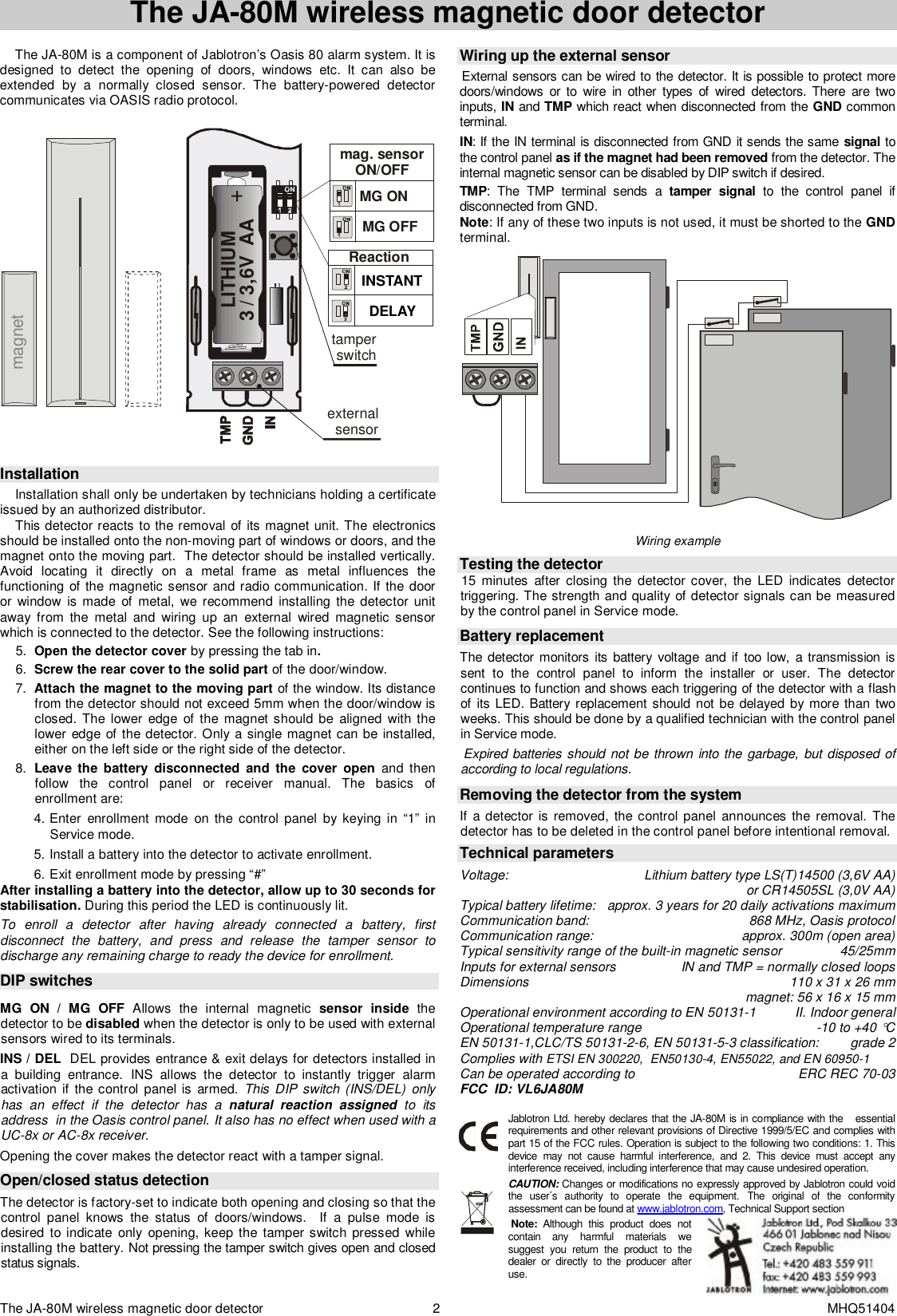
The JA-80M wireless magnetic door detector  2 MHQ51404 The JA-80M wireless magnetic door detector   The JA-80M is a component of Jablotron’s Oasis 80 alarm system. It is designed to detect the opening of doors, windows etc. It can also be extended by a normally closed sensor. The battery-powered detector communicates via OASIS radio protocol.   MG OFFMG ON  tamper switchexternalsensorReaction mag. sensor ON/OFFINSTANTDELAYmagnetLITHIUM3 / 3,6V  AA   Installation  Installation shall only be undertaken by technicians holding a certificate issued by an authorized distributor.  This detector reacts to the removal of its magnet unit. The electronics should be installed onto the non-moving part of windows or doors, and the magnet onto the moving part.  The detector should be installed vertically.  Avoid locating it directly on a metal frame as metal influences the functioning of the magnetic sensor and radio communication. If the door or window is made of metal, we recommend installing the detector unit away from the metal and wiring up an external wired magnetic sensor which is connected to the detector. See the following instructions: 5.  Open the detector cover by pressing the tab in.  6.  Screw the rear cover to the solid part of the door/window. 7.  Attach the magnet to the moving part of the window. Its distance from the detector should not exceed 5mm when the door/window is closed. The lower edge of the magnet should be aligned with the lower edge of the detector. Only a single magnet can be installed, either on the left side or the right side of the detector. 8.  Leave the battery disconnected and the cover open and then follow the control panel or receiver manual. The basics of enrollment are: 4. Enter enrollment mode on the control panel by keying in “1” in Service mode. 5. Install a battery into the detector to activate enrollment. 6. Exit enrollment mode by pressing “#” After installing a battery into the detector, allow up to 30 seconds for stabilisation. During this period the LED is continuously lit. To enroll a detector after having already connected a battery, first disconnect the battery, and press and release the tamper sensor to discharge any remaining charge to ready the device for enrollment.  DIP switches  MG ON / MG OFF  Allows the internal magnetic  sensor inside the detector to be disabled when the detector is only to be used with external sensors wired to its terminals.    INS / DEL  DEL provides entrance & exit delays for detectors installed in a building entrance. INS allows the detector to instantly trigger alarm activation if the control panel is armed. This DIP switch (INS/DEL) only has an effect if the detector has a  natural reaction assigned to its address  in the Oasis control panel. It also has no effect when used with a UC-8x or AC-8x receiver. Opening the cover makes the detector react with a tamper signal.    Open/closed status detection The detector is factory-set to indicate both opening and closing so that the control panel knows the status of doors/windows.  If a pulse mode is desired to indicate only opening, keep the tamper switch pressed while installing the battery. Not pressing the tamper switch gives open and closed status signals.     Wiring up the external sensor  External sensors can be wired to the detector. It is possible to protect more doors/windows or to wire in other types of wired detectors. There are two inputs, IN and TMP which react when disconnected from the GND common terminal.  IN: If the IN terminal is disconnected from GND it sends the same  signal to the control panel as if the magnet had been removed from the detector. The internal magnetic sensor can be disabled by DIP switch if desired. TMP: The TMP terminal sends a  tamper signal to the control panel if disconnected from GND. Note: If any of these two inputs is not used, it must be shorted to the GND terminal.  Wiring example     Testing the detector  15 minutes after closing the detector cover, the LED indicates detector triggering. The strength and quality of detector signals can be measured by the control panel in Service mode.   Battery replacement The detector monitors its battery voltage and if too low, a transmission is sent to the control panel to inform the installer or user. The detector continues to function and shows each triggering of the detector with a flash of its LED. Battery replacement should not be delayed by more than two weeks. This should be done by a qualified technician with the control panel in Service mode.   Expired batteries should not be thrown into the garbage, but disposed of according to local regulations.  Removing the detector from the system If a detector is removed, the control panel announces the removal. The detector has to be deleted in the control panel before intentional removal.    Technical parameters  Voltage: Lithium battery type LS(T)14500 (3,6V AA)  or CR14505SL (3,0V AA) Typical battery lifetime: approx. 3 years for 20 daily activations maximum Communication band: 868 MHz, Oasis protocol Communication range: approx. 300m (open area) Typical sensitivity range of the built-in magnetic sensor 45/25mm Inputs for external sensors IN and TMP = normally closed loops Dimensions  110 x 31 x 26 mm   magnet: 56 x 16 x 15 mm Operational environment according to EN 50131-1  II. Indoor general Operational temperature range -10 to +40 °C EN 50131-1,CLC/TS 50131-2-6, EN 50131-5-3 classification:  grade 2 Complies with ETSI EN 300220,  EN50130-4, EN55022, and EN 60950-1 Can be operated according to  ERC REC 70-03 FCC  ID: VL6JA80M  Jablotron Ltd. hereby declares that the JA-80M is in compliance with the   essential requirements and other relevant provisions of Directive 1999/5/EC and complies with part 15 of the FCC rules. Operation is subject to the following two conditions: 1. This device may not cause harmful interference, and 2. This device must accept any interference received, including interference that may cause undesired operation. CAUTION: Changes or modifications no expressly approved by Jablotron could void the user´s authority to operate the equipment. The original of the conformity assessment can be found at www.jablotron.com, Technical Support section   Note: Although this product does not contain any harmful materials we suggest you return the product to the dealer or directly to the producer after use.

Navigation menu