Jablotron JA80P Wireless PIR detector- Component of alarm system User Manual Exhibit 7 Instruction manual JA80P

Jablotron Ltd Wireless PIR detector- Component of alarm system Exhibit 7 Instruction manual JA80P

User Manual

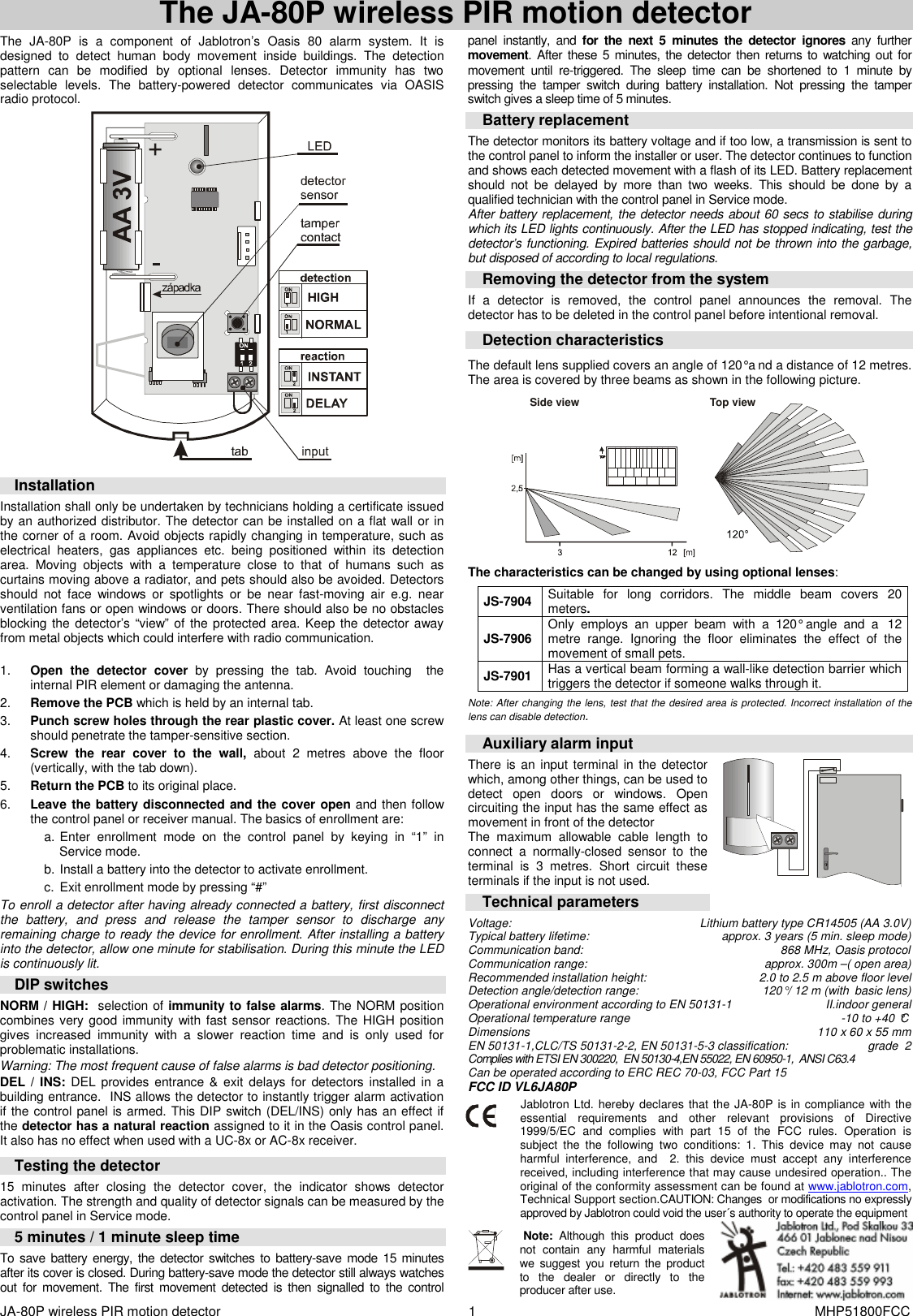
JA-80P wireless PIR motion detector    1  MHP51800FCC The JA-80P wireless PIR motion detector   The  JA-80P  is  a  component  of  Jablotron’s  Oasis  80  alarm  system.  It  is designed  to  detect  human  body  movement  inside  buildings.  The  detection pattern  can  be  modified  by  optional  lenses.  Detector  immunity  has  two selectable  levels.  The  battery-powered  detector  communicates  via  OASIS radio protocol.   Installation Installation shall only be undertaken by technicians holding a certificate issued by an authorized distributor. The detector can be installed on a flat wall or in the corner of a room. Avoid objects rapidly changing in temperature, such as electrical  heaters,  gas  appliances  etc.  being  positioned  within  its  detection area.  Moving  objects  with  a  temperature  close  to  that  of  humans  such  as curtains moving above a radiator, and pets should also be avoided. Detectors should  not  face  windows  or  spotlights  or  be  near  fast-moving  air  e.g.  near ventilation fans or open windows or doors. There should also be no obstacles blocking the detector’s “view” of  the protected area. Keep the detector away from metal objects which could interfere with radio communication.   1.  Open  the  detector  cover  by  pressing  the  tab.  Avoid  touching    the internal PIR element or damaging the antenna. 2.  Remove the PCB which is held by an internal tab. 3.  Punch screw holes through the rear plastic cover. At least one screw should penetrate the tamper-sensitive section.   4.  Screw  the  rear  cover  to  the  wall,  about  2  metres  above  the  floor (vertically, with the tab down).  5.  Return the PCB to its original place. 6.  Leave the battery disconnected and the cover open and then follow the control panel or receiver manual. The basics of enrollment are: a. Enter  enrollment  mode  on  the  control  panel  by  keying  in  “1”  in Service mode. b. Install a battery into the detector to activate enrollment. c.  Exit enrollment mode by pressing “#”  To enroll a detector after having already connected a battery, first disconnect the  battery,  and  press  and  release  the  tamper  sensor  to  discharge  any remaining charge to ready the device for enrollment. After installing a battery into the detector, allow one minute for stabilisation. During this minute the LED is continuously lit. DIP switches NORM / HIGH:  selection of immunity to false alarms. The NORM position combines very good immunity with  fast sensor reactions. The HIGH position gives  increased  immunity  with  a  slower  reaction  time  and  is  only  used  for problematic installations.  Warning: The most frequent cause of false alarms is bad detector positioning.  DEL / INS: DEL provides entrance & exit delays for detectors  installed in  a building entrance.  INS allows the detector to instantly trigger alarm activation if the control panel is armed. This DIP switch (DEL/INS) only has an effect if the detector has a natural reaction assigned to it in the Oasis control panel. It also has no effect when used with a UC-8x or AC-8x receiver.       Testing the detector  15  minutes  after  closing  the  detector  cover,  the  indicator  shows  detector activation. The strength and quality of detector signals can be measured by the control panel in Service mode.   5 minutes / 1 minute sleep time To save battery energy,  the  detector  switches to  battery-save mode  15 minutes after its cover is closed. During battery-save mode the detector still always watches out  for  movement.  The  first  movement  detected  is then  signalled  to  the  control panel  instantly,  and  for  the  next  5  minutes  the  detector  ignores  any  further movement. After  these 5 minutes, the  detector then returns to  watching out  for movement  until  re-triggered.  The  sleep  time  can  be  shortened  to  1  minute  by pressing  the  tamper  switch  during  battery  installation.  Not  pressing  the  tamper switch gives a sleep time of 5 minutes. Battery replacement The detector monitors its battery voltage and if too low, a transmission is sent to the control panel to inform the installer or user. The detector continues to function and shows each detected movement with a flash of its LED. Battery replacement should  not  be  delayed  by  more  than  two  weeks.  This  should  be  done  by  a qualified technician with the control panel in Service mode. After battery replacement, the detector needs about 60 secs to stabilise during which its LED lights continuously. After the LED has stopped indicating, test the detector’s functioning. Expired batteries should not be thrown into the garbage, but disposed of according to local regulations.  Removing the detector from the system If  a  detector  is  removed,  the  control  panel  announces  the  removal.  The detector has to be deleted in the control panel before intentional removal.    Detection characteristics    The default lens supplied covers an angle of 120° a nd a distance of 12 metres.  The area is covered by three beams as shown in the following picture.   Side viewTop view   The characteristics can be changed by using optional lenses:  JS-7904  Suitable  for  long  corridors.  The  middle  beam  covers  20 meters.   JS-7906  Only  employs  an  upper  beam  with  a  120°  angle  and  a  12 metre  range.  Ignoring  the  floor  eliminates  the  effect  of  the movement of small pets. JS-7901  Has a vertical beam forming a wall-like detection barrier which triggers the detector if someone walks through it.  Note: After changing the lens, test that the desired area is protected. Incorrect installation of the lens can disable detection.  Auxiliary alarm input There is  an input terminal in the detector which, among other things, can be used to detect  open  doors  or  windows.  Open circuiting the input has the same effect as movement in front of the detector The  maximum  allowable  cable  length  to connect  a  normally-closed  sensor  to  the terminal  is  3  metres.  Short  circuit  these terminals if the input is not used. Technical parameters                                       Voltage:  Lithium battery type CR14505 (AA 3.0V) Typical battery lifetime:   approx. 3 years (5 min. sleep mode) Communication band:        868 MHz, Oasis protocol Communication range:  approx. 300m –( open area) Recommended installation height:  2.0 to 2.5 m above floor level  Detection angle/detection range:  120° / 12 m (with  basic lens) Operational environment according to EN 50131-1   II.indoor general Operational temperature range  -10 to +40 °C Dimensions  110 x 60 x 55 mm EN 50131-1,CLC/TS 50131-2-2, EN 50131-5-3 classification:   grade  2 Complies with ETSI EN 300220,  EN 50130-4,EN 55022, EN 60950-1,  ANSI C63.4 Can be operated according to ERC REC 70-03, FCC Part 15 FCC ID VL6JA80P Jablotron Ltd. hereby declares that the JA-80P is in compliance with the essential  requirements  and  other  relevant  provisions  of  Directive 1999/5/EC  and  complies  with  part  15  of  the  FCC  rules.  Operation  is subject  the  the  following  two  conditions:  1.  This  device  may  not  cause harmful  interference,  and    2.  this  device  must  accept  any  interference received, including interference that may cause undesired operation.. The original of the conformity assessment can be found at www.jablotron.com, Technical Support section.CAUTION: Changes  or modifications no expressly approved by Jablotron could void the user´s authority to operate the equipment    Note:  Although  this  product  does not  contain  any  harmful  materials we suggest  you  return  the  product to  the  dealer  or  directly  to  the producer after use.

Navigation menu