Jablotron JA82M Wireless Magnetic door detector-part of Alarm Sys User Manual Exhibit 7 Instruction manual JA82M

Jablotron Ltd Wireless Magnetic door detector-part of Alarm Sys Exhibit 7 Instruction manual JA82M

User Manual

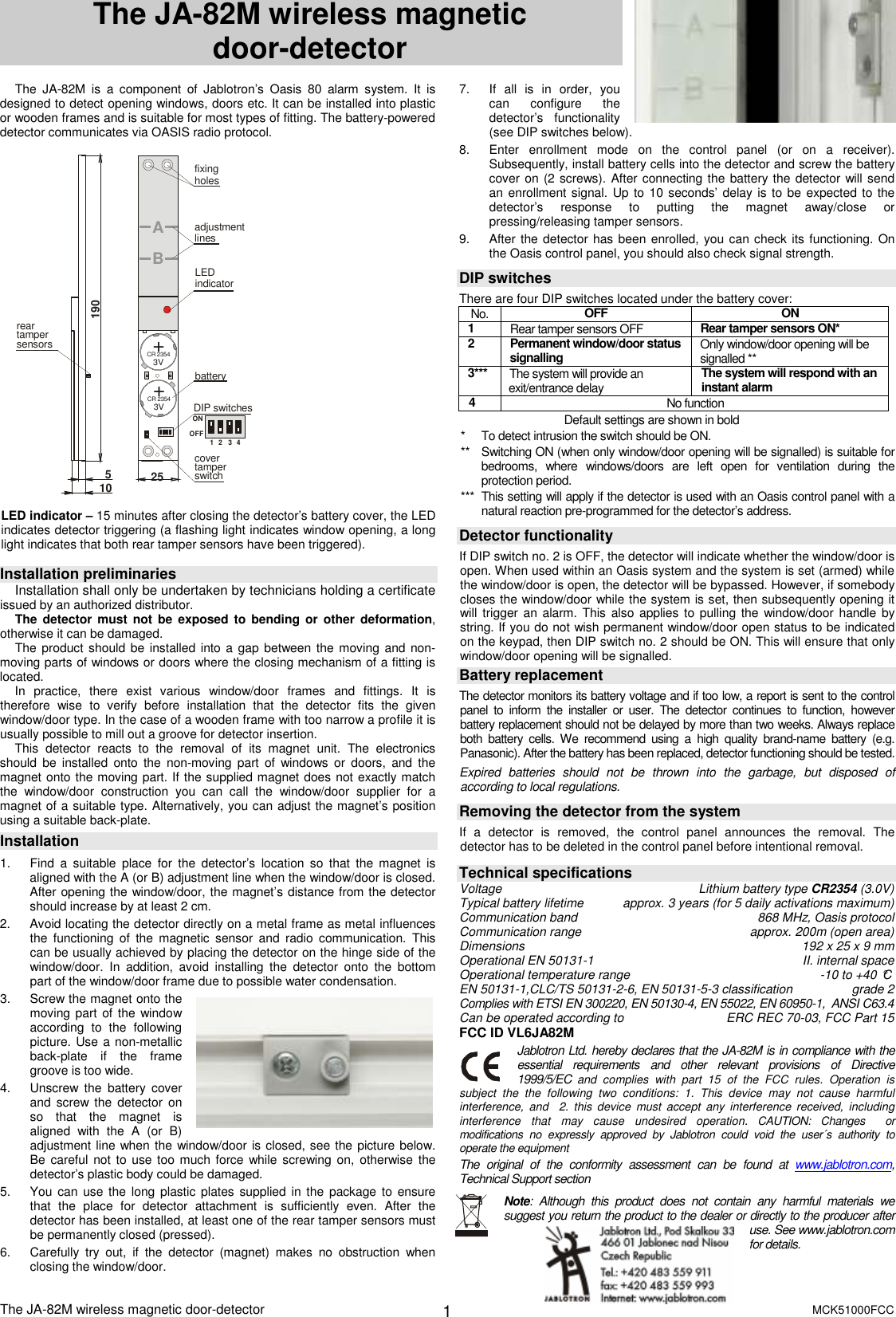
The JA-82M wireless magnetic door-detector       MCK51000FCC  1 The JA-82M wireless magnetic               door-detector   The  JA-82M  is  a  component  of  Jablotron’s  Oasis  80  alarm  system.  It  is designed to detect opening windows, doors etc. It can be installed into plastic or wooden frames and is suitable for most types of fitting. The battery-powered detector communicates via OASIS radio protocol.  1234ON+CR 23543V+CR 23543VAB51901025batteryLEDindicatorreartampersensorsDIP switchescovertamper switchadjustmentlinesfixingholes1234ONOFF  LED indicator – 15 minutes after closing the detector’s battery cover, the LED indicates detector triggering (a flashing light indicates window opening, a long light indicates that both rear tamper sensors have been triggered).  Installation preliminaries Installation shall only be undertaken by technicians holding a certificate issued by an authorized distributor.  The detector must not be  exposed to bending  or  other deformation, otherwise it can be damaged. The product should be  installed into a gap between the moving and non-moving parts of windows or doors where the closing mechanism of a fitting is located. In  practice,  there  exist  various  window/door  frames  and  fittings.  It  is therefore  wise  to  verify  before  installation  that  the  detector  fits  the  given window/door type. In the case of a wooden frame with too narrow a profile it is usually possible to mill out a groove for detector insertion. This  detector  reacts  to  the  removal  of  its  magnet  unit.  The  electronics should  be  installed  onto  the  non-moving  part  of  windows  or  doors,  and the magnet onto the moving part. If the supplied magnet does not exactly match the  window/door  construction  you  can  call  the  window/door  supplier  for  a magnet of a suitable type. Alternatively, you can adjust the magnet’s position using a suitable back-plate. Installation   1.  Find  a  suitable  place  for  the  detector’s  location so  that  the  magnet  is aligned with the A (or B) adjustment line when the window/door is closed. After opening the window/door, the magnet’s distance from the detector should increase by at least 2 cm. 2.  Avoid locating the detector directly on a metal frame as metal influences the  functioning  of  the  magnetic  sensor  and  radio  communication.  This can be usually achieved by placing the detector on the hinge side of the window/door.  In  addition,  avoid  installing  the  detector  onto  the  bottom part of the window/door frame due to possible water condensation. 3.  Screw the magnet onto the moving part of  the window according  to  the  following picture. Use a non-metallic back-plate  if  the  frame groove is too wide. 4.  Unscrew  the  battery  cover and  screw the  detector  on so  that  the  magnet  is aligned  with  the  A  (or  B) adjustment line when the window/door is closed, see the picture below. Be careful not to use too  much force while screwing on,  otherwise the detector’s plastic body could be damaged. 5.  You can use the  long plastic plates supplied in the  package to  ensure that  the  place  for  detector  attachment  is  sufficiently  even.  After  the detector has been installed, at least one of the rear tamper sensors must be permanently closed (pressed). 6.  Carefully  try  out,  if  the  detector  (magnet)  makes  no  obstruction  when closing the window/door. 7.  If  all  is  in  order,  you can  configure  the detector’s  functionality (see DIP switches below). 8.  Enter  enrollment  mode  on  the  control  panel  (or  on  a  receiver). Subsequently, install battery cells into the detector and screw the battery cover on (2 screws). After connecting the battery the detector will send an enrollment signal. Up to  10 seconds’ delay is to be  expected to the detector’s  response  to  putting  the  magnet  away/close  or pressing/releasing tamper sensors. 9.  After the detector has been enrolled, you can check its functioning. On the Oasis control panel, you should also check signal strength.  DIP switches There are four DIP switches located under the battery cover: No.  OFF  ON 1  Rear tamper sensors OFF  Rear tamper sensors ON*  2  Permanent window/door status signalling Only window/door opening will be signalled ** 3***  The system will provide an exit/entrance delay  The system will respond with an instant alarm 4  No function                                  Default settings are shown in bold *  To detect intrusion the switch should be ON. **  Switching ON (when only window/door opening will be signalled) is suitable for bedrooms,  where  windows/doors  are  left  open  for  ventilation  during  the protection period. ***  This setting will apply if the detector is used with an Oasis control panel with a natural reaction pre-programmed for the detector’s address.  Detector functionality  If DIP switch no. 2 is OFF, the detector will indicate whether the window/door is open. When used within an Oasis system and the system is set (armed) while the window/door is open, the detector will be bypassed. However, if somebody closes the window/door while the system is set, then subsequently opening it will trigger  an alarm. This  also applies to  pulling the  window/door handle by string. If you do not wish permanent window/door open status to be indicated on the keypad, then DIP switch no. 2 should be ON. This will ensure that only window/door opening will be signalled. Battery replacement The detector monitors its battery voltage and if too low, a report is sent to the control panel  to  inform  the  installer  or  user.  The  detector  continues  to  function,  however battery replacement should not be delayed by more than two weeks. Always replace both  battery  cells.  We  recommend  using  a  high  quality  brand-name  battery  (e.g. Panasonic). After the battery has been replaced, detector functioning should be tested. Expired  batteries  should  not  be  thrown  into  the  garbage,  but  disposed  of according to local regulations.  Removing the detector from the system If  a  detector  is  removed,  the  control  panel  announces  the  removal.  The detector has to be deleted in the control panel before intentional removal.    Technical specifications Voltage  Lithium battery type CR2354 (3.0V) Typical battery lifetime  approx. 3 years (for 5 daily activations maximum) Communication band  868 MHz, Oasis protocol Communication range  approx. 200m (open area) Dimensions   192 x 25 x 9 mm Operational EN 50131-1   II. internal space Operational temperature range  -10 to +40 °C EN 50131-1,CLC/TS 50131-2-6, EN 50131-5-3 classification   grade 2 Complies with ETSI EN 300220, EN 50130-4, EN 55022, EN 60950-1,  ANSI C63.4 Can be operated according to  ERC REC 70-03, FCC Part 15 FCC ID VL6JA82M Jablotron Ltd. hereby declares that the JA-82M is in compliance with the   essential  requirements  and  other  relevant  provisions  of  Directive 1999/5/EC and  complies  with  part  15  of  the  FCC  rules.  Operation  is subject  the  the  following  two  conditions:  1.  This  device  may  not  cause  harmful interference,  and    2.  this  device  must  accept  any  interference  received, including interference  that  may  cause  undesired  operation. CAUTION:  Changes    or modifications  no  expressly  approved  by  Jablotron  could  void  the  user´s  authority  to operate the equipment The  original  of  the  conformity  assessment  can  be  found  at  www.jablotron.com, Technical Support section   Note:  Although  this  product  does  not  contain  any  harmful  materials  we suggest you return the product to the dealer or directly to the producer after use. See www.jablotron.com for details.

Navigation menu