Jablotron RC89 Wireless doorbell button User Manual Exhibit 7 Instruction manual RC89

Jablotron Ltd Wireless doorbell button Exhibit 7 Instruction manual RC89

Users manual

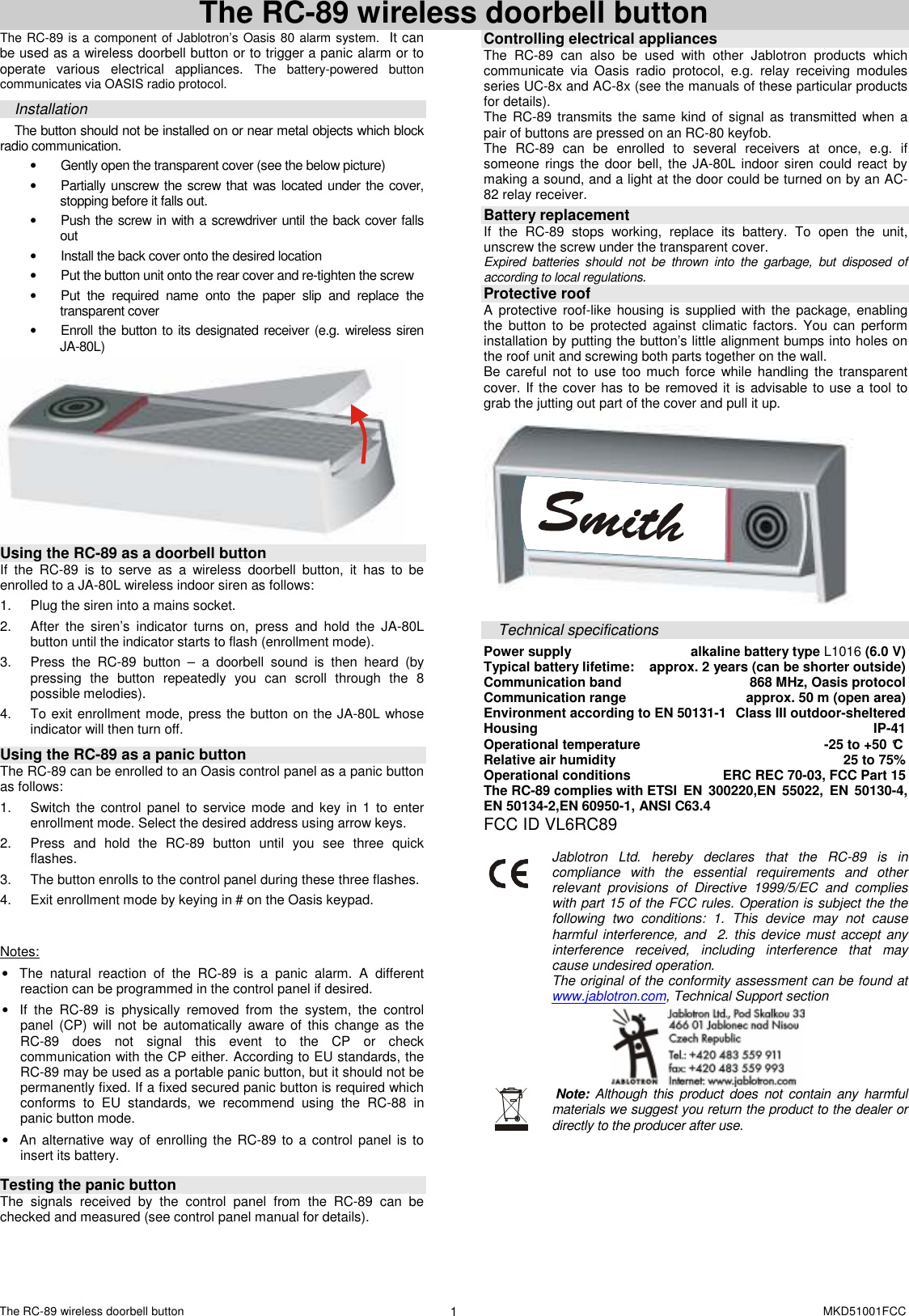
The RC-89 wireless doorbell button    MKD51001FCC 1  The RC-89 wireless doorbell button The RC-89 is a component of Jablotron’s Oasis 80 alarm system.  It can be used as a wireless doorbell button or to trigger a panic alarm or to operate  various  electrical  appliances. The  battery-powered  button communicates via OASIS radio protocol.  Installation The button should not be installed on or near metal objects which block radio communication.  •  Gently open the transparent cover (see the below picture)  •  Partially unscrew the screw that was located under the cover, stopping before it falls out.   •  Push the screw in with a screwdriver until the back cover falls out •  Install the back cover onto the desired location •  Put the button unit onto the rear cover and re-tighten the screw •  Put  the  required  name  onto  the  paper  slip  and  replace  the transparent cover •  Enroll the button to its designated receiver (e.g. wireless siren JA-80L)   Using the RC-89 as a doorbell button If  the  RC-89  is  to  serve  as  a  wireless  doorbell  button,  it  has  to  be enrolled to a JA-80L wireless indoor siren as follows:  1.  Plug the siren into a mains socket. 2.  After  the  siren’s  indicator  turns  on,  press  and  hold  the  JA-80L button until the indicator starts to flash (enrollment mode). 3.  Press  the  RC-89  button  –  a  doorbell  sound  is  then  heard  (by pressing  the  button  repeatedly  you  can  scroll  through  the  8 possible melodies). 4.  To exit enrollment mode, press the button on the JA-80L whose indicator will then turn off.  Using the RC-89 as a panic button The RC-89 can be enrolled to an Oasis control panel as a panic button as follows:   1.  Switch the control  panel to  service mode  and key  in  1 to  enter enrollment mode. Select the desired address using arrow keys.  2.  Press  and  hold  the  RC-89  button  until  you  see  three  quick flashes.  3.  The button enrolls to the control panel during these three flashes. 4.  Exit enrollment mode by keying in # on the Oasis keypad.   Notes: •  The  natural  reaction  of  the  RC-89  is  a  panic  alarm.  A  different reaction can be programmed in the control panel if desired. •  If  the  RC-89  is  physically  removed  from  the  system,  the  control panel  (CP) will  not  be  automatically  aware  of  this  change  as the RC-89  does  not  signal  this  event  to  the  CP  or  check communication with the CP either. According to EU standards, the RC-89 may be used as a portable panic button, but it should not be permanently fixed. If a fixed secured panic button is required which conforms  to  EU  standards,  we  recommend  using  the  RC-88  in panic button mode. •  An alternative way of enrolling  the RC-89 to a control panel is  to insert its battery.   Testing the panic button  The  signals  received  by  the  control  panel  from  the  RC-89  can  be checked and measured (see control panel manual for details).   Controlling electrical appliances The  RC-89  can  also  be  used  with  other  Jablotron  products  which communicate  via  Oasis  radio  protocol,  e.g.  relay  receiving  modules series UC-8x and AC-8x (see the manuals of these particular products for details).     The RC-89  transmits the same  kind of signal as transmitted  when  a pair of buttons are pressed on an RC-80 keyfob. The  RC-89  can  be  enrolled  to  several  receivers  at  once,  e.g.  if someone rings  the door  bell, the  JA-80L indoor siren  could  react  by making a sound, and a light at the door could be turned on by an AC-82 relay receiver.   Battery replacement If  the  RC-89  stops  working,  replace  its  battery.  To  open  the  unit, unscrew the screw under the transparent cover.   Expired  batteries  should  not  be  thrown  into  the  garbage,  but  disposed  of according to local regulations.  Protective roof A  protective roof-like  housing  is supplied  with the  package, enabling the  button  to  be  protected against  climatic  factors.  You can  perform installation by putting the button’s little alignment bumps into holes on the roof unit and screwing both parts together on the wall. Be  careful not  to use too  much force  while handling the transparent cover. If the cover has to be removed it is advisable to use a tool to grab the jutting out part of the cover and pull it up.   Technical specifications Power supply  alkaline battery type L1016 (6.0 V) Typical battery lifetime:   approx. 2 years (can be shorter outside) Communication band  868 MHz, Oasis protocol Communication range  approx. 50 m (open area) Environment according to EN 50131-1  Class III outdoor-sheltered Housing  IP-41 Operational temperature  -25 to +50 °C Relative air humidity  25 to 75% Operational conditions                       ERC REC 70-03, FCC Part 15 The RC-89 complies with ETSI  EN  300220,EN  55022,  EN  50130-4, EN 50134-2,EN 60950-1, ANSI C63.4 FCC ID VL6RC89        Jablotron  Ltd.  hereby  declares  that  the  RC-89  is  in compliance  with  the  essential  requirements  and  other relevant  provisions  of  Directive  1999/5/EC  and  complies with part 15 of the FCC rules. Operation is subject the the following  two  conditions:  1.  This  device  may  not  cause harmful interference, and  2.  this device  must accept any interference  received,  including  interference  that  may cause undesired operation. The original of the conformity assessment can be found at www.jablotron.com, Technical Support section        Note:  Although this product  does  not contain  any harmful materials we suggest you return the product to the dealer or directly to the producer after use.

Navigation menu