Jasco 99004 Bluetooth Home Stereo Transmitter and Receiver User Manual
Jasco Products Company Bluetooth Home Stereo Transmitter and Receiver
Jasco >
User Manual

99004 Instructions, Revision a.1 10/18/2006 11:31:38 AM
99004
Bluetooth Home Stereo Transmitter & Receiver
Class 1
Federal Communications Commission (FCC) Statement
15.21
You are cautioned that changes or modifications not expressly approved by the part responsible for compliance could
void the user’s authority to operate the equipment.
15.105(b)
This equipment has been tested and found to comply with the limits for a Class B digital device, pursuant to part 15 of the
FCC rules. These limits are designed to provide reasonable protection against harmful interference in a residential
installation. This equipment generates, uses and can radiate radio frequency energy and, if not installed and used in
accordance with the instructions, may cause harmful interference to radio communications. However, there is no
guarantee that interference will not occur in a particular installation. If this equipment does cause harmful interference to
radio or television reception, which can be determined by turning the equipment off and on, the user is encouraged to try
to correct the interference by one or more of the following measures:
-Reorient or relocate the receiving antenna.
-Increase the separation between the equipment and receiver.
-Connect the equipment into an outlet on a circuit different from that to which the receiver is connected.
-Consult the dealer or an experienced radio/TV technician for help.
Operation is subject to the following two conditions:
1) this device may not cause interference and
2) this device must accept any interference, including interference that may cause undesired operation of the device.
FCC RF Radiation Exposure Statement:
This equipment complies with FCC radiation exposure limits set forth for an uncontrolled environment. End users must
follow the specific operating instructions for satisfying RF exposure compliance. This transmitter must not be co-located
or operating in conjunction with any other antenna or transmitter.
Using the Product
Thank you or choosing the GE 99004 Stereo Receiver & Transmitter. This device provides users with the ability to
receive or transmit stereo audio via Bluetooth wireless technology.
• Receive Mode: The audio source can be any device that is Bluetooth enabled to comply with the A2DP
(Advanced Audio Distribution Profile) specification. Examples would include a computer with a music library or
an MP3 player with Bluetooth transmission technology. A typical application would be to stream music from one
of the sources listed above to your home entertainment system, allowing the music to be heard through your
stereo system’s speakers.
99004 Instructions, Revision a.1 10/18/2006 11:31:38 AM
• Transmit Mode: The source can be any audio device that has line output jacks like your stereo receiver. A
typical application would be to stream the music from your stereo system to a pair of Bluetooth enabled stereo
headphones.
Connections
Your GE 99004 came with an AC Adapter and two RCA-to-3.5mm stereo patch cables.
1. Plug the AC adapter in to the receiver and the other end to a standard AC outlet.
2. Connect one of the patch cables from the 99004’s jack marked “Input” to the line output jacks on your audio
device.
3. Connect the 2nd patch cable from the “Output” jack to the auxiliary input jacks on your stereo receiver.
Pairing the GE 99004 to a Bluetooth Enabled Device
Receiving Mode:
1. Make sure the transmitting device (a laptop computer or other audio device transmitting via Bluetooth) is turned
on and in transmission mode. See the owner’s manual of the other device for any product specific instructions.
2. Turn on the Audio/Video receiver and select the appropriate input.
3. Set the GE 99004’s Receive/Transmit switch to Receive and turn it ON. When powered on, the 99004 will
connect a Bluetooth transmitter and automatically pair with the transmitting device which paired before. If the
device has not pair with each other before then need to press the “pairing” button to pairing the new devices
before you use it. The 99004’s Pairing LED will flash quickly with multiple blinks during this process. When
pairing is complete the Pairing LED will always on, indicating pairing is complete. When it is unlinked, the
indication LED will blink slow and steady.
4. Play music from the source–computer, or stand-alone transmitter. The audio should stream to the receiver so
that you can hear it through your stereo system.
Transmitting Mode:
1. Make sure the receiving device is turned on. Most Bluetooth enabled headphones will automatically pair with the
GE 99004. See the owner’s manual of the other device for any product specific instructions.
2. Turn on the Audio/Video receiver and select the appropriate input (CD, FM, etc.) for the music source.
3. Set the GE 99004’s Receive/Transmit switch to Transmit and turn it ON. When powered on, the 99004 will
search for a Bluetooth receiver and connect automatically to the receiving device which paired before. If the
device has not pair with each other before then need to press the “pairing” button to pairing the devices before
you use it. The 99004’s Pairing LED will flash quickly with multiple blinks during this process. When pairing is
complete the Pairing LED will always on, indicating pairing is complete. When it is unlinked, the indication LED
will blink slow and steady.
4. Play music from the source device. The audio should stream to the receiver so that you can hear it through your
headphones.
It may take up to 2 minutes for the GE 99004 and your Bluetooth audio device to pair. While the GE 99004 and your
audio transmitter is pairing you will see the Blue LED on the GE 99004 flashing quickly. Once your GE 99004 is
paired you will see a slow and steady blinking.
Advanced Audio Controls
The front panel controls also provide music playback control for use with Bluetooth-enabled audio devices offering this
feature. If your audio device supports it, you can use the pushbuttons to control (play, pause, previous song, skip song)
your audio device.
Turning Off the Unit
If you don’t want to use the transceiver, turn it OFF by slide switch. It can easily be paired back up to your devices the
next time you choose to use it. While turning the unit “ON” or “OFF”, you’ll hear a dual-beep indicating that the power
setting has cycled.
Troubleshooting
1. Why can’t I create a connection to the 99004 in Receive mode?
a. Make sure the transmitting device is fully powered (battery has full charge or AC powered).
99004 Instructions, Revision a.1 10/18/2006 11:31:38 AM
b. Verify that the 99004 is within the specified range of (30 feet / 10 meters for Class 2 devices or 300 feet
/ 100 meters for Class 1 devices) from the audio source and that the audio source is transmitting via
Bluetooth.
c. Check to see if any other Bluetooth device is connected to the 99004. If other devices are connected, the
indicator LED on the RX box will always on.
d. Turn off the 99004 and all transmitting devices. Power on the 99004, then power on the audio source
and try connecting again.
e. Ensure you have the correct input selected on the stereo and that the volume is properly adjusted.
2. Why can’t I create a connection to the 99004 in Transmit mode?
a. Make sure the receiving device is fully powered (battery has full charge).
b. Verify that the receiving device is within the specified range of (300 feet / 100 meters for Class 1 devices)
from the 99004 and that the 99004 is set to transmit.
c. Check to see if any other Bluetooth receiving device is connected to the 99004. If other devices are
connected, the indicator LED will always on.
d. Turn off the 99004 and all receiving devices. Power on the 99004, then power on the receiving devices
and try connecting again.
e. Ensure you have the correct music source selected on the stereo and that the volume is properly
adjusted.
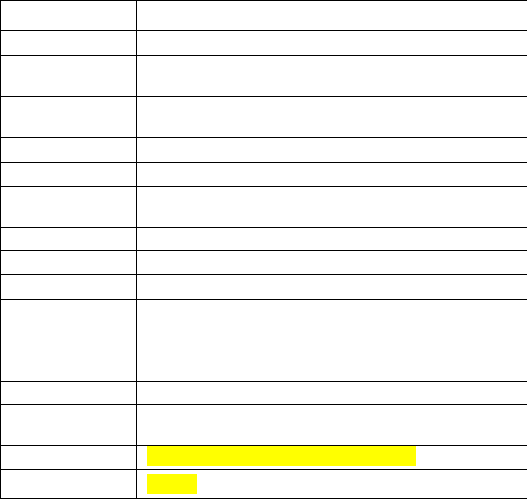
Specifications
Standard Bluetooth 2.0 compliant
Power Class Class 1
Frequency
Band 2.402~2.480 GHZ unlicensed ISM band
Profile
Supported A2DP, AVRCP
Audio Format SBC
Rx Sensitivity < 0.1% BER at -86 dBm
RF Output
Power -6dBm to 17 dBm
Sampling Rate 48 KHz
SNR >85dB
Antenna embedded antenna
Working
Distance Up to 300’ in open space Note: The maximum
operating range depends on the paired phone
model, battery power, and environmental
factors.
Power Supply 5V DC, 500mA; center pin positive
Operating
Temperature -10 °C ~ +55 °C
Dimensions 116mm(L)×72mm(W)× 28.5mm(H)
Weight About 86grams
Product features and specifications are subject to change without notice.
Limited One-Year Warranty
Jasco Products Company warrants this product to be free from manufacturing defects for a period of one year from the
original date of purchase. This warranty is limited to the repair or replacement of this product only and does not extend to
consequential or incidental damage to other products that may be used with this unit. This warranty is in lieu of all other
warranties expressed or implied. Some states do not allow limitations on how long an implied warranty lasts or permit the
exclusion or limitation of incidental or consequential damages, so the above limitations may not apply to you. This
warranty gives you specific rights, and you may also have other rights which vary from state to state. If this unit should
prove defective within the warranty period, return prepaid with dated proof of purchase to:
99004 Instructions, Revision a.1 10/18/2006 11:31:38 AM
Jasco Products Company
10 E. Memorial Road
Oklahoma City, OK 73114
The Bluetooth word mark and logos are owned by Bluetooth SIG, Inc. and any use of such marks by Thomson Inc. is under license.
Other trademarks and trade names are those of their respective owners.
99004 Instructions, Revision a.1 10/18/2006 11:31:38 AM
Notices
FCC-B Radio Frequency Statement
This equipment has been tested and found to comply with the limits for a class B digital device, pursuant to
part 15 of the FCC rules. These limits are designed to provide reasonable protection against harmful
interference when the equipment is operated in a commercial environment. This equipment generates, uses and
can radiate radio frequency energy and, if not installed and used in accordance with the instruction manual,
may cause harmful interference to radio communications. Operation of this equipment in a residential area is
likely to cause harmful interference, in which case the user will be required to correct the interference at his
own expense.
Notice 1
The changes or modifications not expressly approved by party responsible for compliance could void the
user’s authority to operate the equipment.
Notice 2
Shielded interface cable and A.C. power cord, if any, must be used in order to comply with the emission limits.
© 2006 JASCO Products
Made in China