Jasco HCHWS1 The In/Out Thermo-Hygrometer Alarm User Manual THGR198N COVER

Jasco Products Company The In/Out Thermo-Hygrometer Alarm THGR198N COVER

User Manual

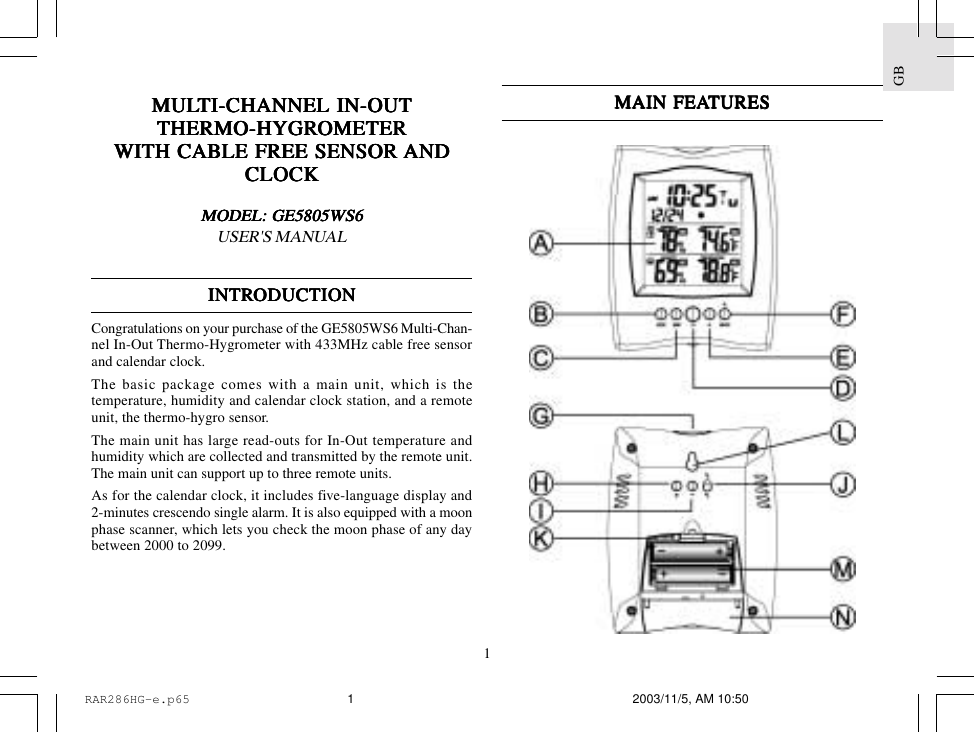
1GBMULMULMULMULMULTI-CHANNEL IN-OUTTI-CHANNEL IN-OUTTI-CHANNEL IN-OUTTI-CHANNEL IN-OUTTI-CHANNEL IN-OUTTHERMO-HYGRTHERMO-HYGRTHERMO-HYGRTHERMO-HYGRTHERMO-HYGROMETEROMETEROMETEROMETEROMETERWITH CABLE FREE SENSOR WITH CABLE FREE SENSOR WITH CABLE FREE SENSOR WITH CABLE FREE SENSOR WITH CABLE FREE SENSOR ANDANDANDANDANDCLOCKCLOCKCLOCKCLOCKCLOCKMODEL: GE5805WS6MODEL: GE5805WS6MODEL: GE5805WS6MODEL: GE5805WS6MODEL: GE5805WS6USER'S MANUALINTRINTRINTRINTRINTRODUCTIONODUCTIONODUCTIONODUCTIONODUCTIONCongratulations on your purchase of the GE5805WS6 Multi-Chan-nel In-Out Thermo-Hygrometer with 433MHz cable free sensorand calendar clock.The basic package comes with a main unit, which is thetemperature, humidity and calendar clock station, and a remoteunit, the thermo-hygro sensor.The main unit has large read-outs for In-Out temperature andhumidity which are collected and transmitted by the remote unit.The main unit can support up to three remote units.As for the calendar clock, it includes five-language display and2-minutes crescendo single alarm. It is also equipped with a moonphase scanner, which lets you check the moon phase of any daybetween 2000 to 2099.MAIN FEAMAIN FEAMAIN FEAMAIN FEAMAIN FEATURESTURESTURESTURESTURESRAR286HG-e.p65 2003/11/5, AM 10:501
GB2K.K.K.K.K. RESET BRESET BRESET BRESET BRESET BUTTUTTUTTUTTUTTONONONONONReturns all settings to default valuesL.L.L.L.L. WWWWWALL-MOUNT RECESSED HOLEALL-MOUNT RECESSED HOLEALL-MOUNT RECESSED HOLEALL-MOUNT RECESSED HOLEALL-MOUNT RECESSED HOLEFor mounting the main unit on a wallM.M.M.M.M. BBBBBAAAAATTERTTERTTERTTERTTERY COMPY COMPY COMPY COMPY COMPARARARARARTMENTSTMENTSTMENTSTMENTSTMENTSAccommodates two UM-3 or “AA” size 1.5V batteriesN.N.N.N.N. TTTTTABLE STABLE STABLE STABLE STABLE STANDANDANDANDANDFor standing the main unit on a flat surfaceMAIN FEAMAIN FEAMAIN FEAMAIN FEAMAIN FEATURES:TURES:TURES:TURES:TURES: REMO REMO REMO REMO REMOTE UNITTE UNITTE UNITTE UNITTE UNITA.A.A.A.A. THREE-LINE DISPLATHREE-LINE DISPLATHREE-LINE DISPLATHREE-LINE DISPLATHREE-LINE DISPLAYYYYYFacilitates easy reading of remote and indoors temperaturesand humidities and calendar clock with moon phaseB.B.B.B.B. MODE BMODE BMODE BMODE BMODE BUTTUTTUTTUTTUTTONONONONONToggles the display modes and set the time for calendar clockC.C.C.C.C. MEM BMEM BMEM BMEM BMEM BUTTUTTUTTUTTUTTONONONONONRecalls the maximum or minimum temperature of individualchannelsD.D.D.D.D. CH BCH BCH BCH BCH BUTTUTTUTTUTTUTTONONONONONSelects among different channelsE.E.E.E.E. AL  BAL  BAL  BAL  BAL  BUTTUTTUTTUTTUTTONONONONONSets and displays the time for the alarmsF.F.F.F.F. ALARM [AL ON/OFF] BALARM [AL ON/OFF] BALARM [AL ON/OFF] BALARM [AL ON/OFF] BALARM [AL ON/OFF] BUTTUTTUTTUTTUTTONONONONONEnables or disables the alarmsG.G.G.G.G. SNOOZE BSNOOZE BSNOOZE BSNOOZE BSNOOZE BUTTUTTUTTUTTUTTONONONONONActivates 8 minutes snooze function when alarm is soundingH.H.H.H.H. UP ( + ) BUP ( + ) BUP ( + ) BUP ( + ) BUP ( + ) BUTTUTTUTTUTTUTTONONONONONAdvances the value of a setting or scan the moonphase statusI.I.I.I.I. DODODODODOWN ( - ) BWN ( - ) BWN ( - ) BWN ( - ) BWN ( - ) BUTTUTTUTTUTTUTTONONONONONDecreases the value of a setting or scan the moonphase statusJ.J.J.J.J. °C/°F SLIDE SWITCH°C/°F SLIDE SWITCH°C/°F SLIDE SWITCH°C/°F SLIDE SWITCH°C/°F SLIDE SWITCHSelects between degree Centigrade (°C) and Fahrenheit (°F)RAR286HG-e.p65 2003/11/5, AM 10:502
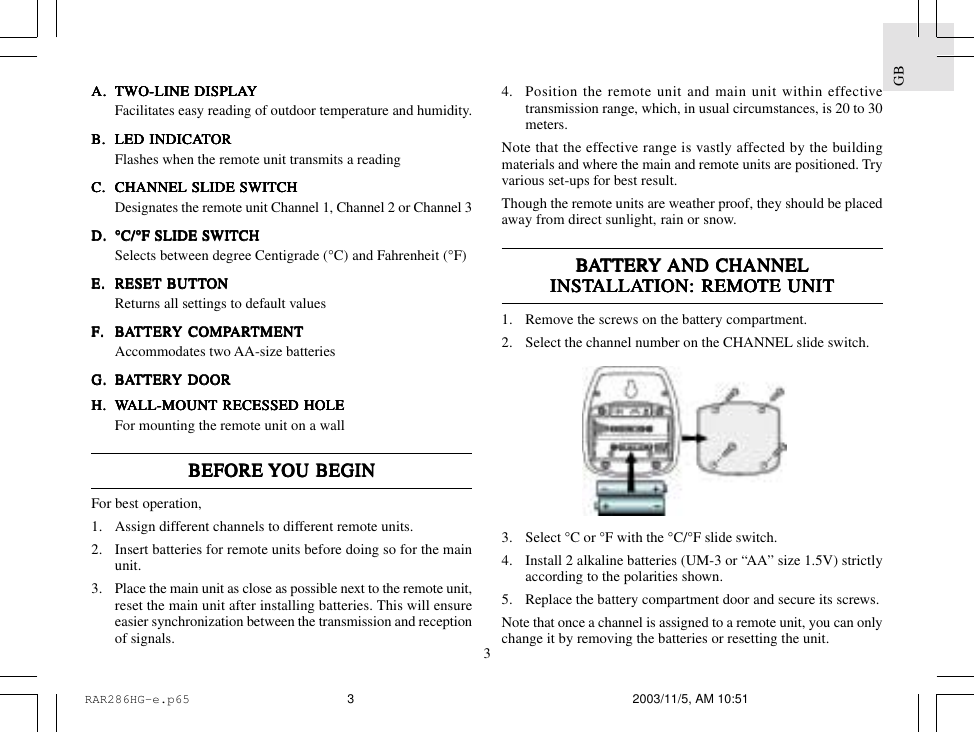
3GBA.A.A.A.A. TWTWTWTWTWO-LINE DISPLAO-LINE DISPLAO-LINE DISPLAO-LINE DISPLAO-LINE DISPLAYYYYYFacilitates easy reading of outdoor temperature and humidity.B.B.B.B.B. LED INDICALED INDICALED INDICALED INDICALED INDICATTTTTORORORORORFlashes when the remote unit transmits a readingC.C.C.C.C. CHANNEL SLIDE SWITCHCHANNEL SLIDE SWITCHCHANNEL SLIDE SWITCHCHANNEL SLIDE SWITCHCHANNEL SLIDE SWITCHDesignates the remote unit Channel 1, Channel 2 or Channel 3D.D.D.D.D. °C/°F SLIDE SWITCH°C/°F SLIDE SWITCH°C/°F SLIDE SWITCH°C/°F SLIDE SWITCH°C/°F SLIDE SWITCHSelects between degree Centigrade (°C) and Fahrenheit (°F)E.E.E.E.E. RESET BRESET BRESET BRESET BRESET BUTTUTTUTTUTTUTTONONONONONReturns all settings to default valuesF.F.F.F.F. BBBBBAAAAATTERTTERTTERTTERTTERY COMPY COMPY COMPY COMPY COMPARARARARARTMENTTMENTTMENTTMENTTMENTAccommodates two AA-size batteriesG.G.G.G.G. BBBBBAAAAATTERTTERTTERTTERTTERY DOORY DOORY DOORY DOORY DOORHHHHH.....WWWWWALL-MOUNT RECESSED HOLEALL-MOUNT RECESSED HOLEALL-MOUNT RECESSED HOLEALL-MOUNT RECESSED HOLEALL-MOUNT RECESSED HOLEFor mounting the remote unit on a wallBEFORE BEFORE BEFORE BEFORE BEFORE YYYYYOU BEGINOU BEGINOU BEGINOU BEGINOU BEGINFor best operation,1. Assign different channels to different remote units.2. Insert batteries for remote units before doing so for the mainunit.3. Place the main unit as close as possible next to the remote unit,reset the main unit after installing batteries. This will ensureeasier synchronization between the transmission and receptionof signals.4. Position the remote unit and main unit within effectivetransmission range, which, in usual circumstances, is 20 to 30meters.Note that the effective range is vastly affected by the buildingmaterials and where the main and remote units are positioned. Tryvarious set-ups for best result.Though the remote units are weather proof, they should be placedaway from direct sunlight, rain or snow.BBBBBAAAAATTERTTERTTERTTERTTERY Y Y Y Y AND CHANNELAND CHANNELAND CHANNELAND CHANNELAND CHANNELINSTINSTINSTINSTINSTALLAALLAALLAALLAALLATION:TION:TION:TION:TION: REMO REMO REMO REMO REMOTE UNITTE UNITTE UNITTE UNITTE UNIT1. Remove the screws on the battery compartment.2. Select the channel number on the CHANNEL slide switch.3. Select °C or °F with the °C/°F slide switch.4. Install 2     alkaline     batteries (UM-3 or “AA” size 1.5V) strictlyaccording to the polarities shown.5. Replace the battery compartment door and secure its screws.Note that once a channel is assigned to a remote unit, you can onlychange it by removing the batteries or resetting the unit.RAR286HG-e.p65 2003/11/5, AM 10:513
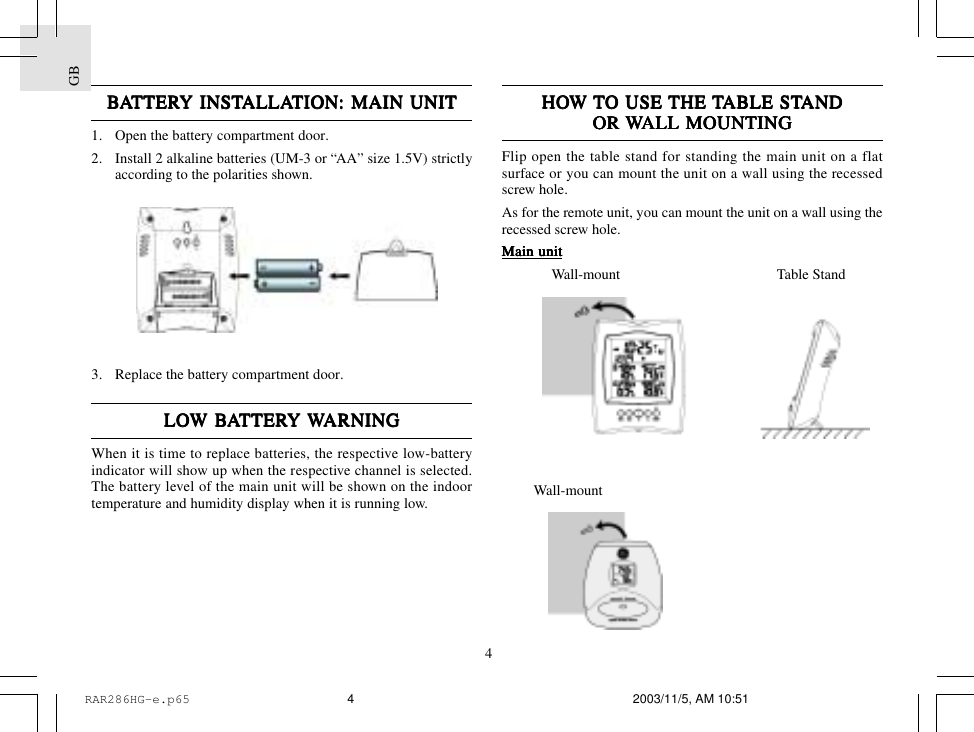
GB4HOHOHOHOHOW W W W W TTTTTO USE O USE O USE O USE O USE THE THE THE THE THE TTTTTABLE STABLE STABLE STABLE STABLE STANDANDANDANDANDOR OR OR OR OR WWWWWALL MOUNTINGALL MOUNTINGALL MOUNTINGALL MOUNTINGALL MOUNTINGFlip open the table stand for standing the main unit on a flatsurface or you can mount the unit on a wall using the recessedscrew hole.As for the remote unit, you can mount the unit on a wall using therecessed screw hole.Main unitMain unitMain unitMain unitMain unit              Wall-mount            Table Stand         Wall-mountBBBBBAAAAATTERTTERTTERTTERTTERY INSTY INSTY INSTY INSTY INSTALLAALLAALLAALLAALLATION:TION:TION:TION:TION: MAIN UNIT MAIN UNIT MAIN UNIT MAIN UNIT MAIN UNIT1. Open the battery compartment door.2. Install 2 alkaline batteries (UM-3 or “AA” size 1.5V) strictlyaccording to the polarities shown.3. Replace the battery compartment door.LOLOLOLOLOW BW BW BW BW BAAAAATTERTTERTTERTTERTTERY Y Y Y Y WWWWWARNINGARNINGARNINGARNINGARNINGWhen it is time to replace batteries, the respective low-batteryindicator will show up when the respective channel is selected.The battery level of the main unit will be shown on the indoortemperature and humidity display when it is running low.RAR286HG-e.p65 2003/11/5, AM 10:514
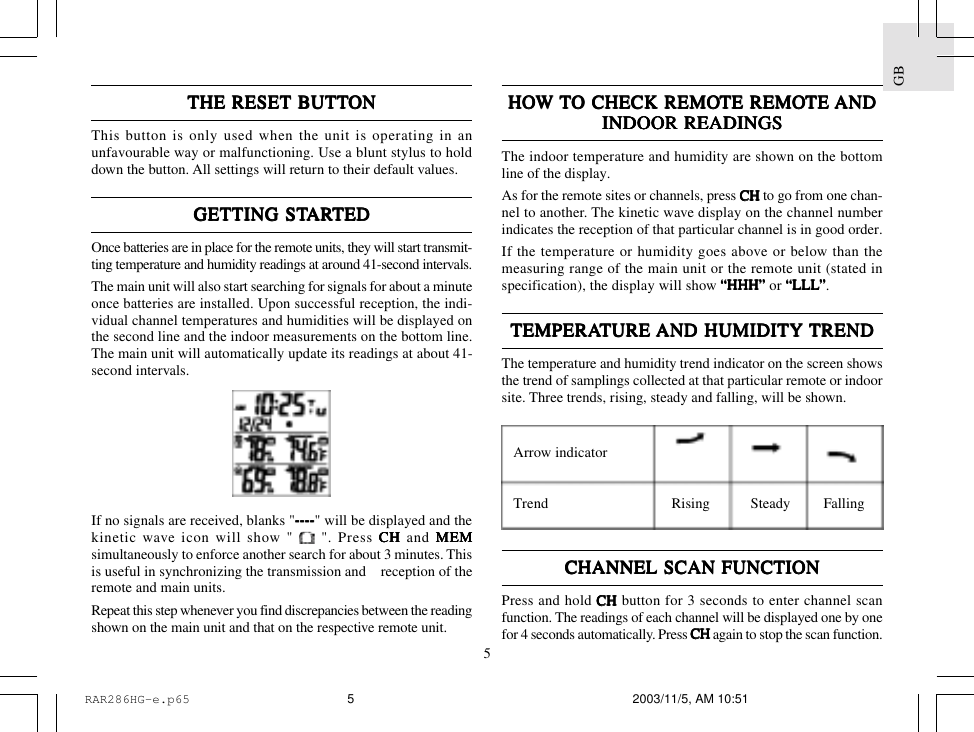
5GBTHE RESET BTHE RESET BTHE RESET BTHE RESET BTHE RESET BUTTUTTUTTUTTUTTONONONONONThis button is only used when the unit is operating in anunfavourable way or malfunctioning. Use a blunt stylus to holddown the button. All settings will return to their default values.GETTING STGETTING STGETTING STGETTING STGETTING STARARARARARTEDTEDTEDTEDTEDOnce batteries are in place for the remote units, they will start transmit-ting temperature and humidity readings at around 41-second intervals.The main unit will also start searching for signals for about a minuteonce batteries are installed. Upon successful reception, the indi-vidual channel temperatures and humidities will be displayed onthe second line and the indoor measurements on the bottom line.The main unit will automatically update its readings at about 41-second intervals.If no signals are received, blanks "--------------------" will be displayed and thekinetic wave icon will show "   ". Press CH CH CH CH CH and MEMMEMMEMMEMMEMsimultaneously to enforce another search for about 3 minutes. Thisis useful in synchronizing the transmission and    reception of theremote and main units.Repeat this step whenever you find discrepancies between the readingshown on the main unit and that on the respective remote unit.HOHOHOHOHOW W W W W TTTTTO CHECK REMOO CHECK REMOO CHECK REMOO CHECK REMOO CHECK REMOTE REMOTE REMOTE REMOTE REMOTE REMOTE TE TE TE TE ANDANDANDANDANDINDOOR READINGSINDOOR READINGSINDOOR READINGSINDOOR READINGSINDOOR READINGSThe indoor temperature and humidity are shown on the bottomline of the display.As for the remote sites or channels, press CH CH CH CH CH to go from one chan-nel to another. The kinetic wave display on the channel numberindicates the reception of that particular channel is in good order.If the temperature or humidity goes above or below than themeasuring range of the main unit or the remote unit (stated inspecification), the display will show “HHH”“HHH”“HHH”“HHH”“HHH” or “LLL“LLL“LLL“LLL“LLL”””””.TEMPERATEMPERATEMPERATEMPERATEMPERATURE TURE TURE TURE TURE AND HUMIDITY AND HUMIDITY AND HUMIDITY AND HUMIDITY AND HUMIDITY TRENDTRENDTRENDTRENDTRENDThe temperature and humidity trend indicator on the screen showsthe trend of samplings collected at that particular remote or indoorsite. Three trends, rising, steady and falling, will be shown.CHANNEL SCAN FUNCTIONCHANNEL SCAN FUNCTIONCHANNEL SCAN FUNCTIONCHANNEL SCAN FUNCTIONCHANNEL SCAN FUNCTIONPress and hold CHCHCHCHCH button for 3 seconds to enter channel scanfunction. The readings of each channel will be displayed one by onefor 4 seconds automatically. Press CHCHCHCHCH again to stop the scan function.Arrow indicatorTrend Rising Steady FallingRAR286HG-e.p65 2003/11/5, AM 10:515
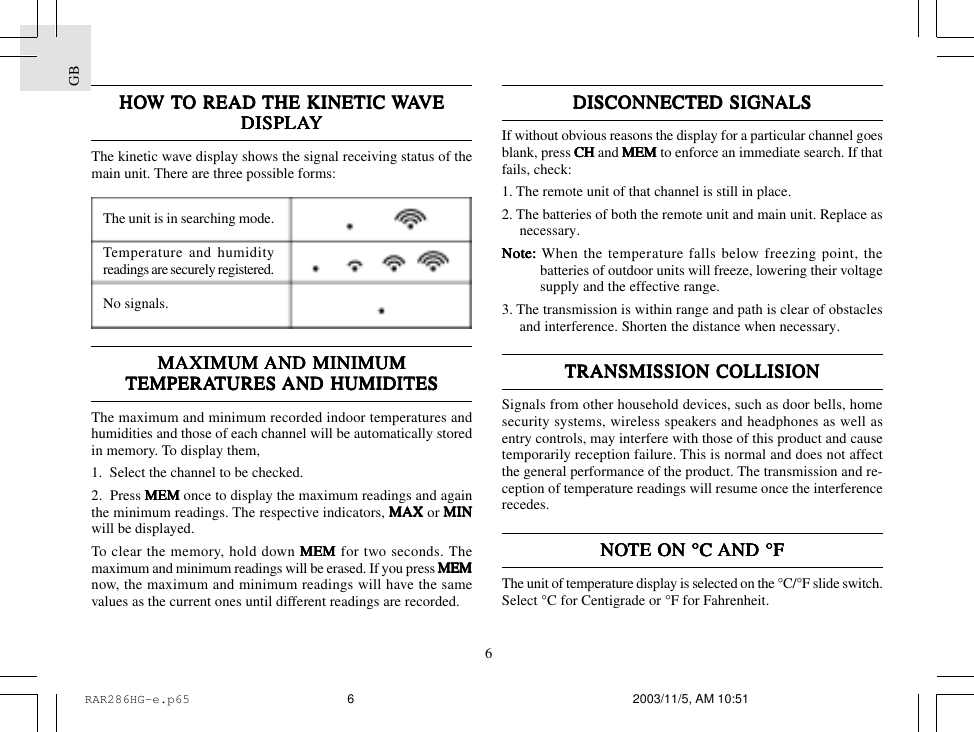
GB6DISCONNECTED SIGNDISCONNECTED SIGNDISCONNECTED SIGNDISCONNECTED SIGNDISCONNECTED SIGNALSALSALSALSALSIf without obvious reasons the display for a particular channel goesblank, press CH CH CH CH CH and MEMMEMMEMMEMMEM to enforce an immediate search. If thatfails, check:1. The remote unit of that channel is still in place.2. The batteries of both the remote unit and main unit. Replace asnecessary.Note:Note:Note:Note:Note: When the temperature falls below freezing point, thebatteries of outdoor units will freeze, lowering their voltagesupply and the effective range.3. The transmission is within range and path is clear of obstaclesand interference. Shorten the distance when necessary.TRANSMISSION COLLISIONTRANSMISSION COLLISIONTRANSMISSION COLLISIONTRANSMISSION COLLISIONTRANSMISSION COLLISIONSignals from other household devices, such as door bells, homesecurity systems, wireless speakers and headphones as well asentry controls, may interfere with those of this product and causetemporarily reception failure. This is normal and does not affectthe general performance of the product. The transmission and re-ception of temperature readings will resume once the interferencerecedes.NONONONONOTE ON °C TE ON °C TE ON °C TE ON °C TE ON °C AND °FAND °FAND °FAND °FAND °FThe unit of temperature display is selected on the °C/°F slide switch.Select °C for Centigrade or °F for Fahrenheit.HOHOHOHOHOW W W W W TTTTTO READ O READ O READ O READ O READ THE KINETIC THE KINETIC THE KINETIC THE KINETIC THE KINETIC WWWWWAAAAAVEVEVEVEVEDISPLADISPLADISPLADISPLADISPLAYYYYYThe kinetic wave display shows the signal receiving status of themain unit. There are three possible forms:The unit is in searching mode.Temperature and humidityreadings are securely registered.No signals.MAXIMUM MAXIMUM MAXIMUM MAXIMUM MAXIMUM AND MINIMUMAND MINIMUMAND MINIMUMAND MINIMUMAND MINIMUMTEMPERATEMPERATEMPERATEMPERATEMPERATURES TURES TURES TURES TURES AND HUMIDITESAND HUMIDITESAND HUMIDITESAND HUMIDITESAND HUMIDITESThe maximum and minimum recorded indoor temperatures andhumidities and those of each channel will be automatically storedin memory. To display them,1.  Select the channel to be checked.2.  Press MEMMEMMEMMEMMEM once to display the maximum readings and againthe minimum readings. The respective indicators, MAXMAXMAXMAXMAX or MINMINMINMINMINwill be displayed.To clear the memory, hold down MEMMEMMEMMEMMEM for two seconds. Themaximum and minimum readings will be erased. If you press MEMMEMMEMMEMMEMnow, the maximum and minimum readings will have the samevalues as the current ones until different readings are recorded.RAR286HG-e.p65 2003/11/5, AM 10:516
7GBCALENDCALENDCALENDCALENDCALENDAR CLOCK DISPLAAR CLOCK DISPLAAR CLOCK DISPLAAR CLOCK DISPLAAR CLOCK DISPLAY MODESY MODESY MODESY MODESY MODESEach press on the MODE MODE MODE MODE MODE button will toggle the display as below.MODE 1.  Hour-Minute-Second  |  Month-DayMODE 2.  Hour-Minute-Day of the Week  |  Month-DayHOHOHOHOHOW W W W W TTTTTO SET O SET O SET O SET O SET THE CLOCK MANUTHE CLOCK MANUTHE CLOCK MANUTHE CLOCK MANUTHE CLOCK MANUALLALLALLALLALLYYYYYTo set the clock manually, hold MODEMODEMODEMODEMODE for three seconds. Thehour digits will blink.Use   or   to select the hour. Keep pressing the button willincrease or decrease the value rapidly.Press MODEMODEMODEMODEMODE to confirm. The minute digits will blink. Repeat thesame procedure to set the minutes, then the year, month, day-of-month and display language for weekday.For display language, you can choose among English (E), Ger-man (D), French (F), Italian (I) and Spanish (S) - in that order.Day-of-week is the usual sequence of Monday through Sunday.If there is an item you do not wish to change, simply press MODEMODEMODEMODEMODEto bypass the item.When you are done, press MODEMODEMODEMODEMODE to exit. The display will returnto the mode last chosen.HOHOHOHOHOW W W W W TTTTTO SET O SET O SET O SET O SET AND AND AND AND AND ARM ARM ARM ARM ARM THE THE THE THE THE ALARMSALARMSALARMSALARMSALARMSThe GE5805WS6 has a single alarm.To set an alarm,1. Press [  [  [  [  [ AL ] AL ] AL ] AL ] AL ] once to display the alarm time.2. Press [  [  [  [  [ AL ] AL ] AL ] AL ] AL ] for three seconds. The hour digits will blink.3. Enter the hour using   or  .4. Press [  [  [  [  [ AL ]AL ]AL ]AL ]AL ]. The minute digits will blink.5. Enter the minutes using   or  .6. Press [  [  [  [  [ AL ] AL ] AL ] AL ] AL ] to exit.The alarm-on icon   will be displayed indicating the alarm is nowarmed.You can also arm or disarm an alarm by pressing the[AL ON/OFF][AL ON/OFF][AL ON/OFF][AL ON/OFF][AL ON/OFF] button.RAR286HG-e.p65 2003/11/5, AM 10:517
GB8ALARM ALARM ALARM ALARM ALARM AND SNOOZE FUNCTIONAND SNOOZE FUNCTIONAND SNOOZE FUNCTIONAND SNOOZE FUNCTIONAND SNOOZE FUNCTIONWhen the alarm is set, it will activate at the set time with thealarm-on icon   flashing. Without interruption, the alarm will ac-tivate for 2 minutes.To stop the alarm, press [ [ [ [ [ AL ] AL ] AL ] AL ] AL ] or [ [ [ [ [ AL ON/OFF ]AL ON/OFF ]AL ON/OFF ]AL ON/OFF ]AL ON/OFF ] key. If the[ SNOOZE ] [ SNOOZE ] [ SNOOZE ] [ SNOOZE ] [ SNOOZE ] button is pressed, the snooze function will betriggered. The alarm will stop for eight minutes before activatingagain.HOHOHOHOHOW W W W W TTTTTO USE O USE O USE O USE O USE AND SCANAND SCANAND SCANAND SCANAND SCANTHE MOON PHASETHE MOON PHASETHE MOON PHASETHE MOON PHASETHE MOON PHASEGE5805WS6 is equipped with a moon phase display. The moonphase of the current day is displayed in the clock or alarm timemode.The eight phased are:To check the moon phase for a particular day, press the UP UP UP UP UP orDODODODODOWNWNWNWNWN button once. The clock will enter moon phase scanningmode.Use the UP UP UP UP UP or DODODODODOWN WN WN WN WN button to locate the date you want to check.The calendar will be day-driven in this mode.You can go back in time or travel to the future, any day between2000 to 2099. The correcponding moon phase will appearimmediately on the screen.The unit will return to the last display mode when the UP UP UP UP UP andDODODODODOWNWNWNWNWN buttons are left idle for 10 seconds.PRECAPRECAPRECAPRECAPRECAUTIONSUTIONSUTIONSUTIONSUTIONSThis product is engineered to give you years of satisfactoryservice if you handle it carefully. Here are a few precautions:1. Do not immerse the unit in water.2. Do not clean the unit with abrasive or corrosive materials. Theymay scratch the plastic parts and corrode the electronic circuit.3. Do not subject the unit to excessive force, shock, dust,temperature or humidity, which may result in malfunction,shorter electronic life span, damaged battery and distorted parts.4. Do not tamper with the unit's internal components. Doing sowill invalidate the warranty on the unit and may causeunnecessary damage. The unit contains no user-serviceableparts.5. Only use fresh batteries as specified in the user's manual. Donot mix new and old batteries as the old ones may leak.6. Always read the user's manual thoroughly before operating theunit.New MoonWaxing CresentFirst QuarterWaxing GibbousFull MoonWaning GibbousLast QuarterWaning CrescentRAR286HG-e.p65 2003/11/5, AM 10:518
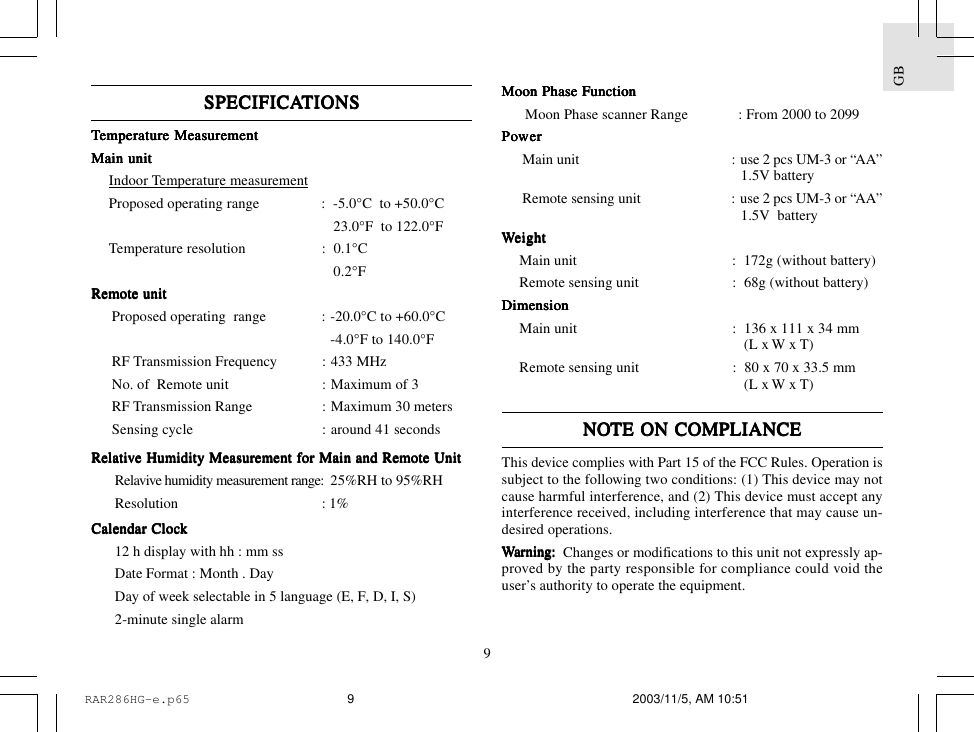
9GBSPECIFICASPECIFICASPECIFICASPECIFICASPECIFICATIONSTIONSTIONSTIONSTIONSTTTTTemperemperemperemperemperaaaaaturturturturture Measure Measure Measure Measure MeasurementementementementementMain unitMain unitMain unitMain unitMain unitIndoor Temperature measurementProposed operating range : -5.0°C  to +50.0°C23.0°F  to 122.0°FTemperature resolution : 0.1°C0.2°FRemote unitRemote unitRemote unitRemote unitRemote unitProposed operating  range : -20.0°C to +60.0°C-4.0°F to 140.0°FRF Transmission Frequency : 433 MHzNo. of  Remote unit : Maximum of 3RF Transmission Range : Maximum 30 metersSensing cycle : around 41 secondsRelaRelaRelaRelaRelatititititivvvvve Humidity Measure Humidity Measure Humidity Measure Humidity Measure Humidity Measurement fement fement fement fement for Main and Remote Unitor Main and Remote Unitor Main and Remote Unitor Main and Remote Unitor Main and Remote UnitRelavive humidity measurement range: 25%RH to 95%RHResolution : 1%Calendar ClocCalendar ClocCalendar ClocCalendar ClocCalendar Clockkkkk12 h display with hh : mm ssDate Format : Month . DayDay of week selectable in 5 language (E, F, D, I, S)2-minute single alarmMoon Phase FunctionMoon Phase FunctionMoon Phase FunctionMoon Phase FunctionMoon Phase FunctionMoon Phase scanner Range : From 2000 to 2099PPPPPooooowwwwwerererererMain unit : use 2 pcs UM-3 or “AA”1.5V batteryRemote sensing unit : use 2 pcs UM-3 or “AA”1.5V  batteryWWWWWeighteighteighteighteightMain unit :  172g (without battery)Remote sensing unit :  68g (without battery)DimensionDimensionDimensionDimensionDimensionMain unit : 136 x 111 x 34 mm(L x W x T)Remote sensing unit : 80 x 70 x 33.5 mm(L x W x T)NONONONONOTE ON COMPLIANCETE ON COMPLIANCETE ON COMPLIANCETE ON COMPLIANCETE ON COMPLIANCEThis device complies with Part 15 of the FCC Rules. Operation issubject to the following two conditions: (1) This device may notcause harmful interference, and (2) This device must accept anyinterference received, including interference that may cause un-desired operations.WWWWWarararararning:ning:ning:ning:ning:      Changes or modifications to this unit not expressly ap-proved by the party responsible for compliance could void theuser’s authority to operate the equipment.RAR286HG-e.p65 2003/11/5, AM 10:519
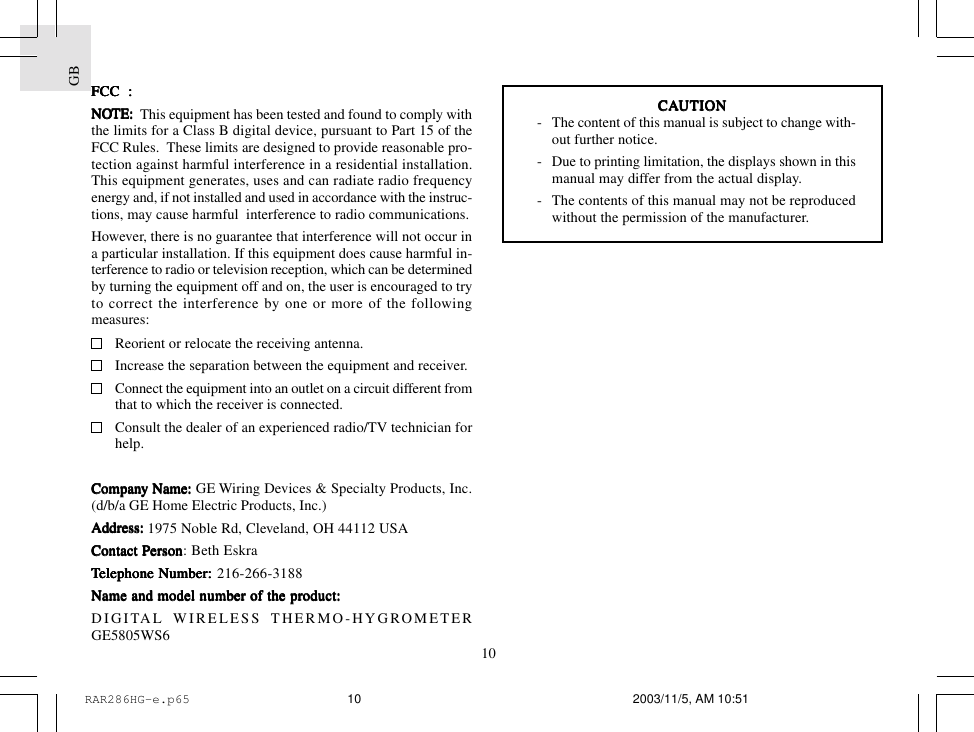
GB10FCC  :FCC  :FCC  :FCC  :FCC  :NONONONONOTE:TE:TE:TE:TE:  This equipment has been tested and found to comply withthe limits for a Class B digital device, pursuant to Part 15 of theFCC Rules.  These limits are designed to provide reasonable pro-tection against harmful interference in a residential installation.This equipment generates, uses and can radiate radio frequencyenergy and, if not installed and used in accordance with the instruc-tions, may cause harmful  interference to radio communications.However, there is no guarantee that interference will not occur ina particular installation. If this equipment does cause harmful in-terference to radio or television reception, which can be determinedby turning the equipment off and on, the user is encouraged to tryto correct the interference by one or more of the followingmeasures:Reorient or relocate the receiving antenna.Increase the separation between the equipment and receiver.Connect the equipment into an outlet on a circuit different fromthat to which the receiver is connected.Consult the dealer of an experienced radio/TV technician forhelp.CompanCompanCompanCompanCompany Name:y Name:y Name:y Name:y Name: GE Wiring Devices & Specialty Products, Inc.(d/b/a GE Home Electric Products, Inc.)AdAdAdAdAddrdrdrdrdress:ess:ess:ess:ess:     1975 Noble Rd, Cleveland, OH 44112 USAContact PContact PContact PContact PContact Pererererersonsonsonsonson: Beth EskraTTTTTeleeleeleeleelephone Number:phone Number:phone Number:phone Number:phone Number: 216-266-3188Name and model nName and model nName and model nName and model nName and model number of the prumber of the prumber of the prumber of the prumber of the product:oduct:oduct:oduct:oduct:DIGITAL WIRELESS THERMO-HYGROMETERGE5805WS6CACACACACAUTIONUTIONUTIONUTIONUTION- The content of this manual is subject to change with-out further notice.- Due to printing limitation, the displays shown in thismanual may differ from the actual display.- The contents of this manual may not be reproducedwithout the permission of the manufacturer.RAR286HG-e.p65 2003/11/5, AM 10:5110

Navigation menu