Exhibit 7 The user manual of EUT
Operation Instructions
Thank you for purchasing this 17”, a high-resolution multi-scan color monitor.
Please read this guide thoroughly before installation.
FCC RADIO FREQUENCY INTERFERENCE STATEMENT
WARNING: (FOR FCC CERTIFIED MODELS)
This monitor has been tested and found compliant with the limits for a Class B
digital device, pursuant to part 15 of the FCC Rules. These limits are designed
to provide proper protection against harmful interference to a residential
installation. This monitor generates, uses, and can radiate radio frequency
energy. Harmful interference to radio communication may be led as a result if
it‘s not properly installed and used. However, there is no guarantee that
interference will not occur in a particular installation. If this monitor does
cause serious interference to radio or television reception, resetting the
monitor may determine it. Moreover, users are encouraged to correct
interference by doing one or more of the following:
l Reorient or relocate the receiving antenna.
l Move the monitor and the receiver further away from each other.
l Connect the monitor into an outlet on a circuit different from that to
which the receiver is connected.
l Consult your local dealer or an qualified technician.
FCC Warning:
To assure a continued FCC compliance, a user must use a grounded power
supply cord and the provided shielded video interface cable with bonded
ferrite cores. Also, any unauthorized changes or modifications to this monitor
would void the user‘s authority to operate this device.
If necessary, shielded interface cables and A.C. power cord must be used to
meet the emission level limits.
EMI Certification
The Class B digital apparatus meets all requirements of the Canadian
Interference-Causing Equipment Regulation.
Cet appareil numerique de class B respecte toutes les exigences du Reglement
sur le materiel brouilleur du Canada.

1
Congratulations!
You have just purchased a TCO'99 approved and labelled product! Your choice has provided you with
a product developed for professional use. Your purchase has also contributed to reducing the burden
on the environment and also to the further development of environmentally adapted electronics
products.
Why do we have environmentally labelled computers?
In many countries, environmental labelling has become an established method for encouraging the
adaptation of goods and services to the environment. The main problem, as far as computers and other
electronics equipment are concerned, is that environmentally harmful substances are used both in the
products and during their manufacture. Since it is not so far possible to satisfactorily recycle the
majority of electronics equipment, most of these potentially damaging substances sooner or later enter
nature.
There are also other characteristics of a computer, such as energy consumption levels, that are
important from the viewpoints of both the work (internal) and natural (external) environments. Since all
methods of electricity generation have a negative effect on the environment (e.g. acidic and climate-
influencing emissions, radioactive waste), it is vital to save energy. Electronics equipment in offices is
often left running continuously and thereby consumes a lot of energy.
What does labelling involve?
This product meets the requirements for the TCO'99 scheme which provides for international and
environmental labelling of personal computers. The labelling scheme was developed as a joint effort by
the TCO (The Swedish Confederation of Professional Employees), Svenska Naturskyddsforeningen
(The Swedish Society for Nature Conservation) and Statens Energimyndighet (The Swedish National
Energy Administration).
Approval requirements cover a wide range of issues: environment, ergonomics, usability, emission of
electric and magnetic fields, energy consumption and electrical and fire safety.
The environmental demands impose restrictions on the presence and use of heavy metals, brominated
and chlorinated flame retardants, CFCs (freons) and chlorinated solvents, among other things. The
product must be prepared for recycling and the manufacturer is obliged to have an environmental
policy which must be adhered to in each country where the company implements its operational policy.
The energy requirements include a demand that the computer and/or display, after a certain period of
inactivity, shall reduce its power consumption to a lower level in one or more stages. The length of time
to reactivate the computer shall be reasonable for the user.
Labelled products must meet strict environmental demands, for example, in respect of the reduction of
electric and magnetic fields, physical and visual ergonomics and good usability.
On the Back page of this folder,you will find a brief summary of the environmental requirements met
by this product. The complete environmental criteria document may be ordered from:
TCO Development
SE-114 94 Stockholm, Sweden
*Page1-2 stand for TCO’99
model only. Please See
back label for model

2
Fax: +46 8 782 92 07
Email (Internet): development@tco.se
Current information regarding TCO'99 approved and labelled products may also be
obtained via the Internet, using the address: http://www.tco-info.com/
Environmental requirements
Flame retardants
Flame retardants are present in printed circuit boards, cables, wires, casings and housings. Their
purpuse is to prevent, or at least to delay the spread of fire. Up to 30% of the plastic in a computer
casing can consist of flame retardant substances. Most flame retardants contain bromine or
chloride, and those flame retardants are chemically related to another group of environmental
toxins, PCBs. Both the flame retardants containing bromine or chloride and the PCBs are
suspected of giving rise to severe health effects, including reproductive damage in fish-eating
birds and mammals, due to the bio-accumulative* processes. Flame retardants have been found in
human blood and researchers fear that disturbances in foetus development may occur.
The relevant TCO'99 demand requires that plastic components weighing more than 25 grams
must not contain flame retardants with organically bound bromine or chlorine. Flame retardants
are allowed in the printed circuit boards since no substitutes are available.
Cadmium**
Cadmium is present in rechargeable batteries and in the colour-generating layers of certain
computer displays. Cadmium damages the nervous system and is toxic in high doses. The
relevant TCO'99 requirement states that batteries, the colour-generating layers of display screens
and the electrical or electronics components must not contain any cadmium.
Mercury**
Mercury is sometimes found in batteries, relays and switches. It damages the nervous system and
is toxic in high doses. The relevant TCO'99 requirement states that batteries may not contain any
mercury. It also demands that mercury is not present in any of the electrical or electronics
components associated with the labelled unit.
CFCs (freons)
The relevant TCO'99 requirement states that neither CFCs nor HCFCs may be used during the
manufacture and assembly of the product.CFCs (freons) are sometimes used for washing printed
circuit boards. CFCs break down ozone and thereby damage the ozone layer in the stratosphere,
causing increased reception on earth of ultraviolet light with e.g. increased risks of skin cancer
(malignant melanoma) as a consequence.
Lead**
Lead can be found in picture tubes, display screens, solders and capacitors. Lead damages the
nervous system and in higher doses, causes lead poisoning. The relevant TCO´99 requirement
permits the inclusion of lead since no replacement has yet been developed.
GENERAL DESCRIPTION
* Bio-accumulative is defined as substances which accumulate within living organisms
** Lead, Cadmium and Mercury are heavy metals which are Bio-accumulative.
3
This color monitor is a microprocessor controlled multi-frequency system
device. The monitor is compatible with many standard graphic formats,
including VGA, SVGA, and XGA. The key features include:
l 17” CRT color display with resolutions up to 1280x1024 pixels.
l Support for graphic cards with VESA compatible DDC1/2B (Display
Data Channel 1/2B) interface for monitor-to-PC communication.
l Easy to use On Screen Display (OSD) adjustment interface.
l Supports EPA, NUTEK A/B, VESA compatible 4-staged power
management systems.
4
FEATURES
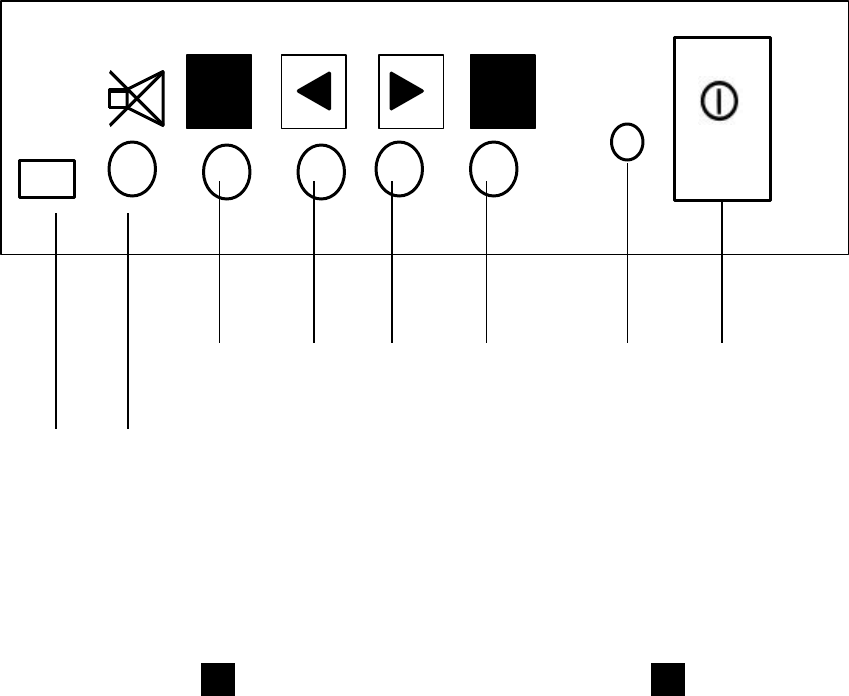
A. Front Panel
¶ POWER ON/OFF SWITCH ¹ INCREASE BUTTON
· POWER ON/OFF INDICATOR º DECREASE BUTTON
¸ FUNCTION » FUNCTION
Features
Æ
and
Ç
are exclusive on Multimedia models.
Æ AUDIO MUTE Ç AUDIO MUTE LED
1
2
1 2
»
º
¹
¸
· 
Ç Æ
5
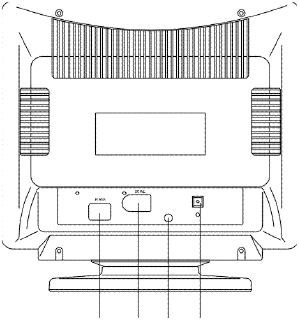
B. Rear Exterior
¼ ½ È É
¼ AC SOCKET
½ 15 PIN D-TYPE CONNECTOR
Features
È
and
É
are exclusive on Multimedia models.
È AUDIO IN
É MICROPHONE OUT
6
FUNCTION
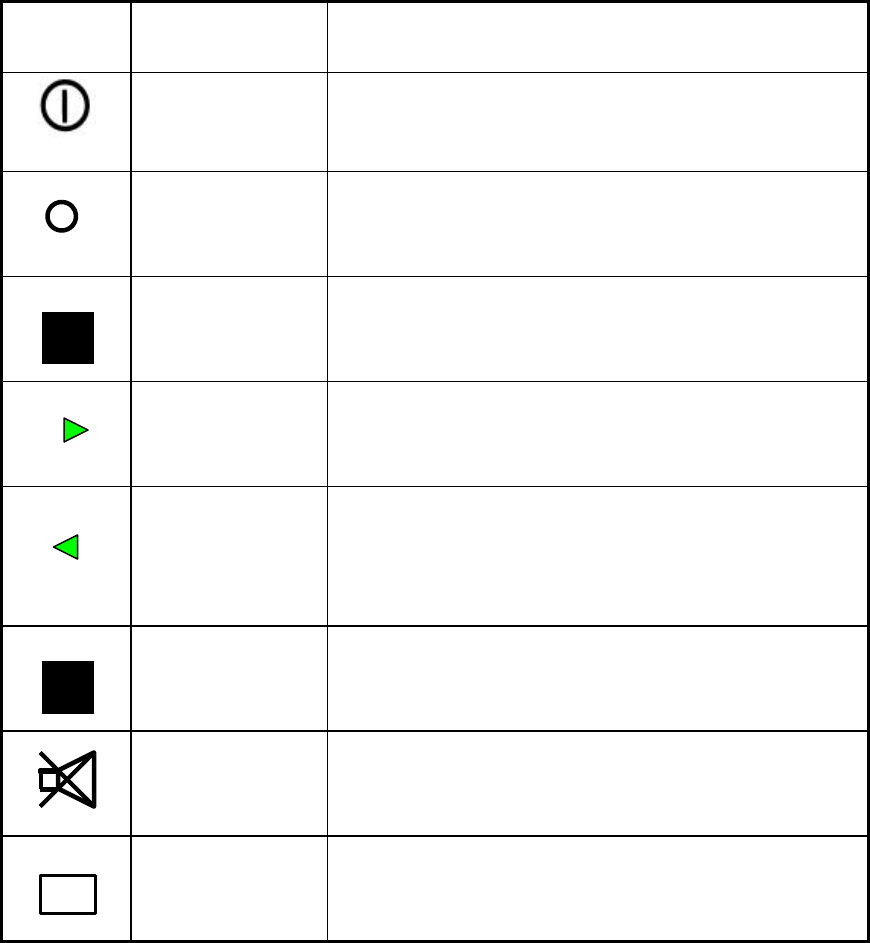
A. External Control
SYMBO
LITEM DESCRIPTION
¶ Power
switch -Controls Power on/off.
· Power
Indicator -Green light gives confirmation of power
on. Orange light gives confirmation of
power saving mode.
¸ Active
function -Press to activate selected functions/sub-
menu.
¹ Increase -Press to select function items toward
right.
-Increases function parameter.
º Decrease -Press to select function items toward
left.
-Decreases function parameter.
» OSD
on/off -Activates/Inactivates OSD functions
Æ Audio
Mute -Mute audio output.
(Multimedia models only)
Ç Audio
Mute
Indicator
- Green light gives confirmation of audio
muted. (Multimedia models only)
B. Digital Features
1. This monitor has an adapted advance CPU to control the Contrast,
Brightness, Zoom, H-phase, H-size, V-center, V-Size, Pincushion,
Trapezoid, Parallelogram, Pin-balance, Rotation, Color temperature.
It also auto saves the configuration set up by users.
2. This monitor has 12 sets of factory preset timing and 16 sets of user
definable timing.
2
1
7
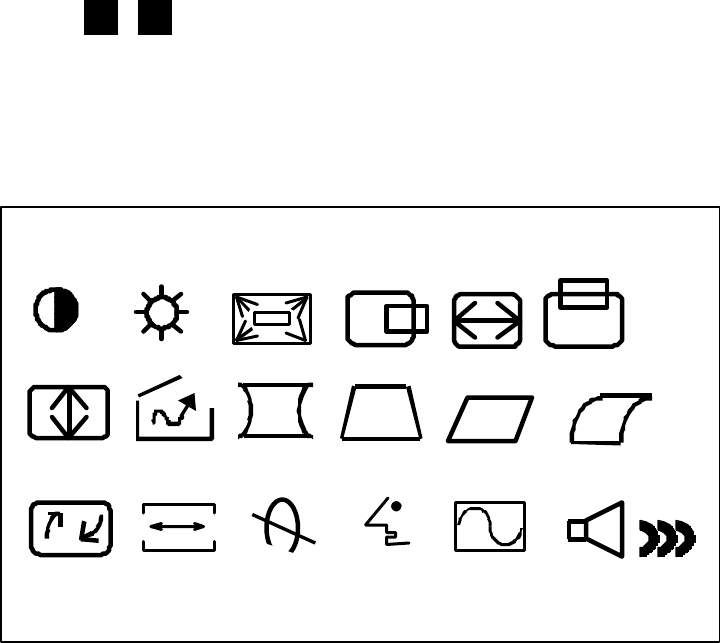
USING OSD FUNCTIONS
l
Press function buttons to activate OSD functions and adjust
with
3 4
to change function parameter.
l
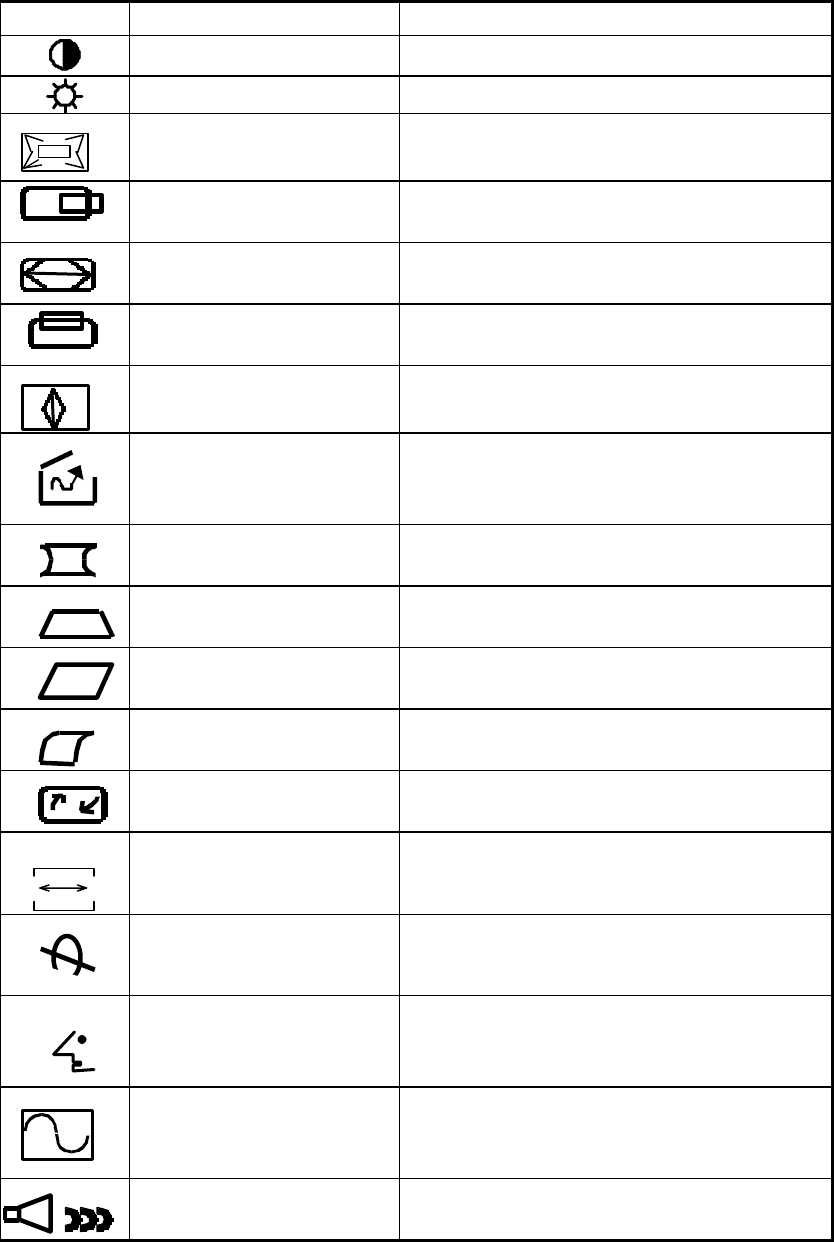
OSD icons:
R B ?
2
1
8
ICON ITEM DESCRIPTION
CONTRAST Increases/decreases video gain.
BRIGHTNESS Increases/decreases raster black level.
ZOOM Zoom In or Zoom Out the video
pattern.
HORIZONTAL PHASE Adjusts the H-phase of the picture.
HORIZONTAL WIDTH Adjusts the H-width of the picture.
VERTICAL POSITION Adjusts the vertical placement of the
picture .
VERTICAL HEIGHT Adjusts the vertical size of the picture .
RECALL When use PRESET MODE press - or +
to recall the factory default .
PINCUSHION Controls the side distortion.
TRAPEZIOD Controls the top of the H-width equal
to the bottom of the picture .
PARALLELOGRAM Controls the vertical line on both sides
to become slope and symmetry.
PIN-BALANCE Controls the vertical line on both sides
to become parabola and symmetry.
ROTATION Controls the tilt of the display image .
R B
COLOR
TEMPERATURE Selects color temperature & adjust user
color mode.
DEGAUSS Degausses the screen.
?LANGUAGE Multi-language select.
Use - and + key to select OSD display
language.
MODEL DISPLAY Shows current horizontal & vertical
frequency & mode type.
AUDIO VOLUME Controls the audio volume.
(Multimedia models only)
*There’s no pin-balance control in multimedia models.
9
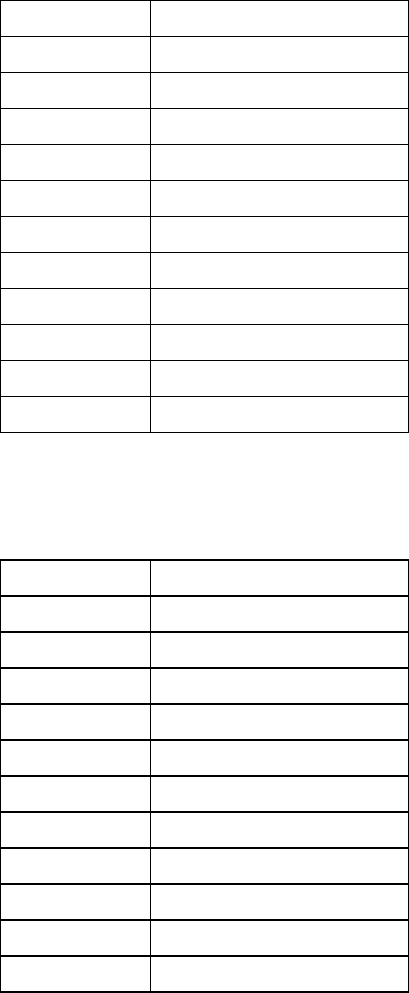
Timing modes of 72KHz
Industry 640 x 350 @ 70HZ
Industry 640 x 480 @ 60HZ
VESA 720 x 400 @ 70HZ
VESA 640 x 480 @ 75HZ
VESA 720 x 400 @ 85HZ
VESA 640 x 480 @ 85HZ
VESA 800 x 600 @ 72HZ
VESA 800 x 600 @ 75HZ
VESA 1024 x 768 @ 60HZ
VESA 800 x 600 @ 85HZ
VESA 1024 x 768 @ 75HZ
VESA 1024 x 768 @ 85HZ
Timing modes of 87KHz
VGA 640 x 400 @ 70HZ
VESA 640 x 480 @ 85HZ
VESA 800 x 600 @ 75HZ
VESA 800 x 600 @ 85HZ
VESA 1024 x 768 @ 75HZ
VESA 1024 x 768 @ 85HZ
VESA 1280 x 1024 @ 60HZ
VESA 1280 x 1024 @ 75HZ
VESA 1600 x 1200 @ 65HZ
Macintosh 832 x 624 @75HZ
Macintosh 1024 x 768 @75HZ
Macintosh 1152 x 870 @75HZ
10
USER TIMING MODE SETUP
The monitor is capable of storing up to 28 modes for total, with 12 factory
programmed, this leaves 16 available set spaces for users.
To successfully install a new timing mode, some certain things have to be
considered.
The new mode must have a horizontal frequency difference of 1 KHz.
Minimum or a vertical frequency difference of 3Hz. minimum from any single
mode previously installed. For example:
Assuming the timing requirements are met, the new mode is automatically
installed when the monitor is connected to the signal source. Thus the front
panel controls for horizontal/vertical display and position can be adjusted.
The last made horizontal/vertical adjustment last will always be stored
with the current timing mode.
After 16 user modes are installed, the first installed ones will be removed when
any more modes are added. However, the factory preset modes will not be
affected.
11
SAFETY PRECAUTIONS
This monitor is manufactured and tested on a ground principle that a user‘s
safety comes first. However, improper use or installation may result danger
to the monitor as well as to the user. Carefully go over the following
WARNINGS before installation and keep this guide handy.
WARNINGS:
u This monitor should be operated only at the correct power sources
indicated on the label on the rear end of the monitor. If you‘re unsure of
the power supply in your residence, consult your local dealer or power
company.
u Do not try to repair the monitor yourself as it contains no user-serviceable
parts. The monitor should only be repaired by a qualified technician.
u Do not remove the monitor cabinet. There is high-voltage parts inside that
may cause electric shock to human bodies, even when the power cord is
disconnected .
u Stop using the monitor if the cabinet is damaged. Have it checked by a
service technician.
u Put your monitor only in a clean, dry environment. Unplug the monitor
immediately if gets wet and consult your service technician.
u Always unplug the monitor before cleaning it. Clean the cabinet with a
clean, dry cloth. Apply non-ammonia based cleaner onto the cloth, not
directly onto the glass screen.
u Keep the monitor away from magnetic objects, motors, TV sets, and
transformer.
u Do not place heavy objects on the cable or power cord.
12
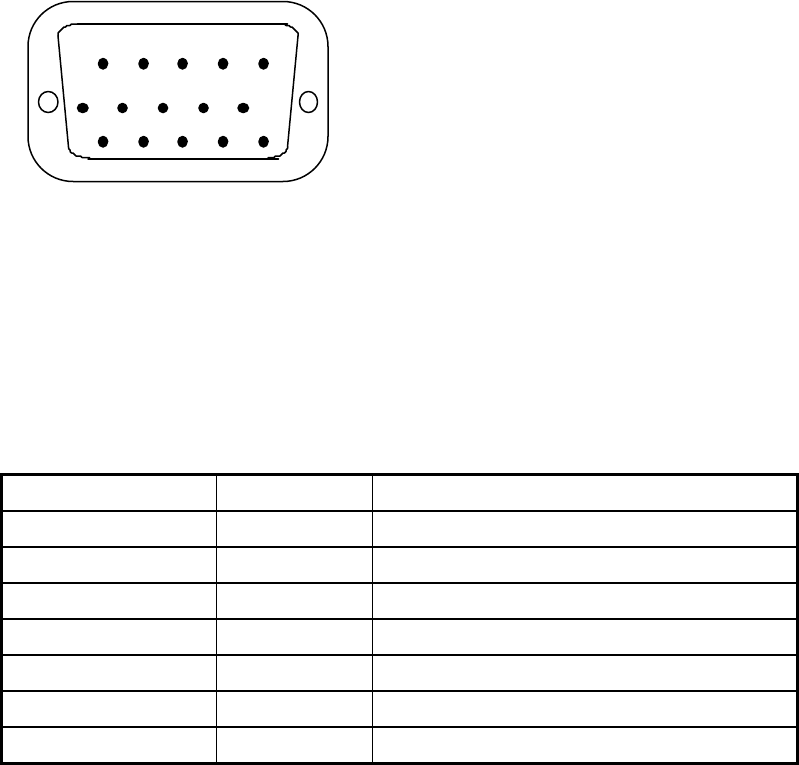
D-SUB CONNECTOR
15-PIN D-SUB CONNECTOR
1 2 3 4 5
6 7 8 9 10
11 12 13 14 15
SIGNAL LEVEL
CONNECTOR SIGNAL DESCRIPTION
RRED 0.7 VP-P(VIDEO)
GGREEN 0.7 VP-P(VIDEO)
BBLUE 0.7 VP-P(VIDEO)
HH/SYNC TTL positive or negative
VV/SYNC TTL positive or negative
SDA DDC1/2B TTL
SCL DDC1/2B TTL
1. R 6. GND 11. GND
2. G 7. GND 12. SDA
3. B 8. GND 13. H. SYNC
4. GND 9. NC 14 V. SYNC
5. NC 10. GND 15. SCL
13
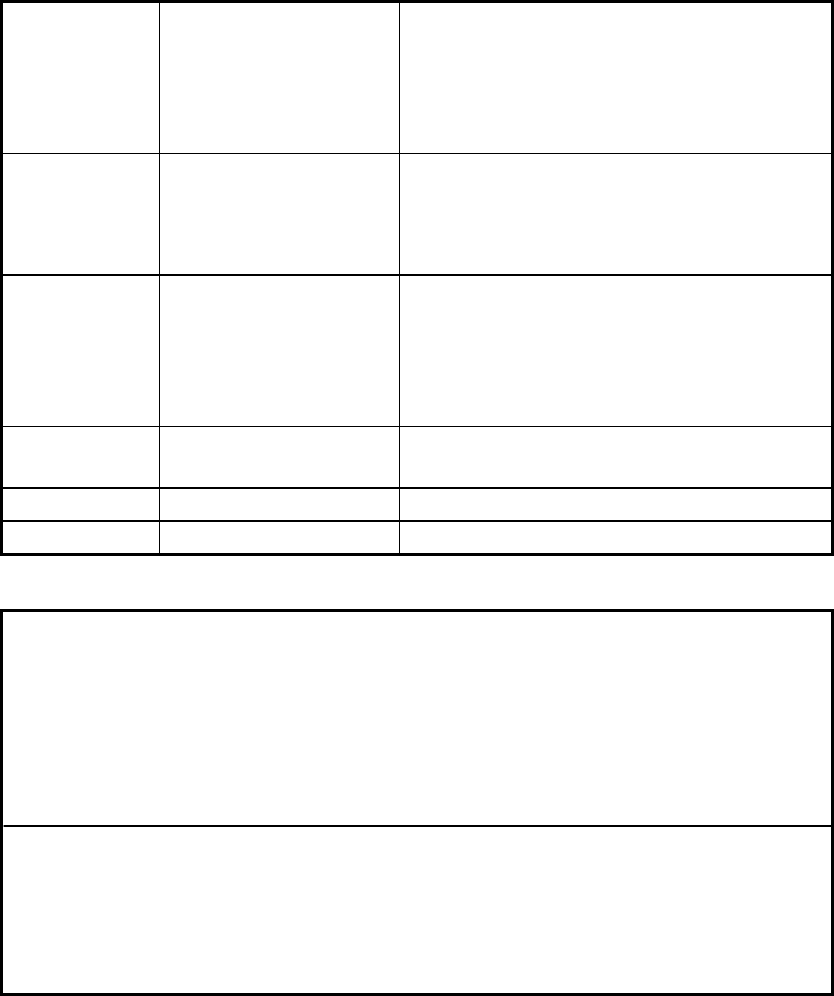
SPECIFICATIONS
CRT Size
Viewable Size
Dot Pitch
Deflection
17-Inch Diagonal Flat Square Type
Specified on carton box.
Specified on carton box.
90°
Display Size
Color
Resolution
Pixel Rate
300mm x 225mm.
Unlimited Colors
Up to 1280 x 1024
110 MHz
Input Signal Video Signal
Sync. Signal
Scanning Freq.
RGB Analogue 0.7 Vpp 75 Ohms
H/V. Separated, TTL.
Level Positive or Negative.
30 KHz to 70 KHz for Horizontal
50 Hz to 120 Hz for Vertical
Power Source Power Supply
Power Consumption AC 100-240 V, 60 Hz/50 Hz.
120W Max.
Dimensions Specified on carton box.
Weight Specified on carton box.
POWER MANAGEMENT
The Power Management states are controlled by the presence and /or
absence of horizontal and vertical sync signals according to the following:
State H. Sync. V. Sync. Power (nominal) LED
ON ON ON <100 WATTS GREEN
STANDBY OFF ON <15 WATTS ORANGE
SUSPEND ON OFF <15 WATTS ORANGE
OFF OFF OFF <05 WATTS ORANGE