Johnson Outdoors IPCON Controller for Trolling Motor on Fishing Boat User Manual

Johnson Outdoors, Inc. Controller for Trolling Motor on Fishing Boat

Contents

manual pt 1

Owner’s Manual
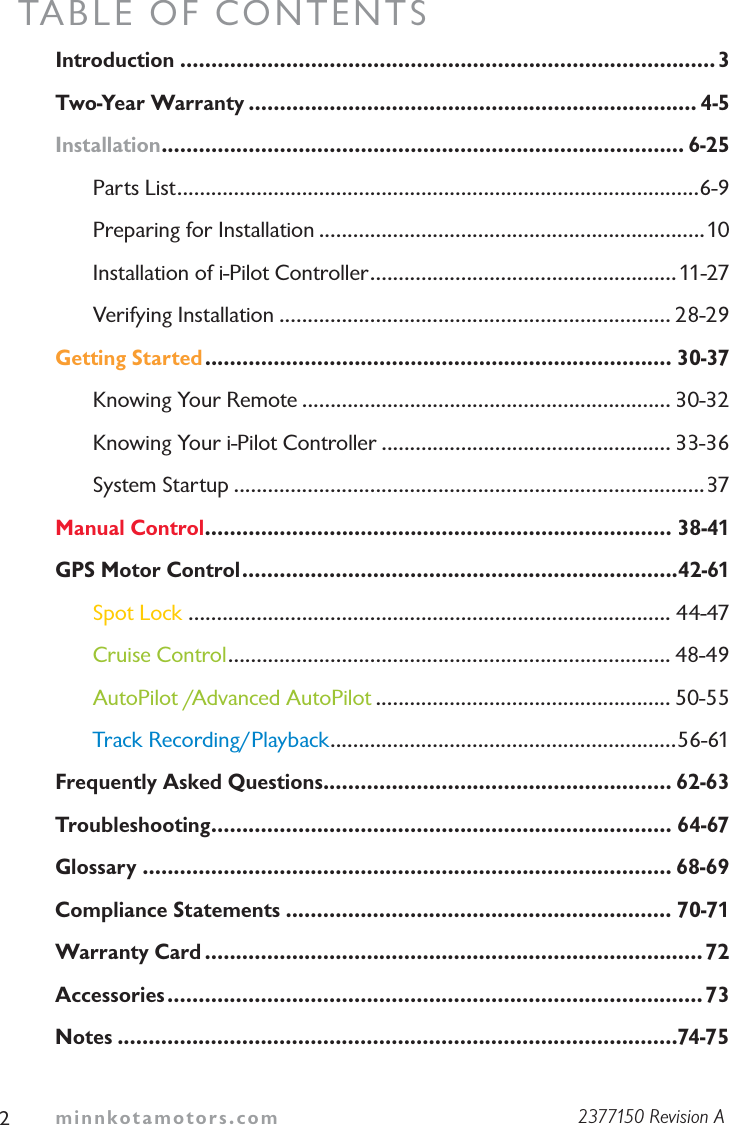
minnkotamotors.comTABLE OF CONTENTSIntroduction ......................................................................................3Two-Year Warranty ........................................................................ 4-5Installation.................................................................................... 6-25Parts List............................................................................................6-9Preparing for Installation ....................................................................10Installation of i-Pilot Controller......................................................11-27Verifying Installation ..................................................................... 28-29Getting Started........................................................................... 30-37Knowing Your Remote ................................................................. 30-32Knowing Your i-Pilot Controller ................................................... 33-36 System Startup ...................................................................................37Manual Control........................................................................... 38-41GPS Motor Control......................................................................42-61Spot Lock ..................................................................................... 44-47Cruise Control.............................................................................. 48-49AutoPilot /Advanced AutoPilot .................................................... 50-55Track Recording/Playback.............................................................56-61Frequently Asked Questions........................................................ 62-63Troubleshooting.......................................................................... 64-67Glossary ..................................................................................... 68-69Compliance Statements .............................................................. 70-71Warranty Card ................................................................................72Accessories...................................................................................... 73Notes ..........................................................................................74-7522377150 Revision A
minnkotamotors.com 3INTRODUCTIONOverviewThank you for purchasing the Minn Kota® i-Pilot®.  This revolutionary control system uses GPS technology to record and store tracks and locations which are then used to deliver unprecedented levels of boat control.  Intuitive features and wireless control help to accurately position your boat and improve your bait presentation.  i-Pilot navigates and positions your boat for you, so you can focus on fishing.This i-Pilot User Guide is divided into four main sections: Installation, Getting Started, Manual Control, and GPS Motor Control.  A waterproof and easy-to-read Quick Reference Guide is also included as a supplement to the User Guide, both of which can be stored in the boat for easy access.A French version of the manual is available on line at minnkotamotors.comUne version français du manuel est disponible en ligne à minnkotamotors.comSafety and CautionsYou are responsible for the safe and prudent operation of your vessel.  We have designed i-Pilot to be an accurate and reliable tool that will enhance boat operation and improve your ability to catch fish.  This product does not relieve you from the responsibility for safe operation of your boat.  You must avoid hazards to navigation and always maintain a permanent watch so you can respond to situations as they develop.  You must always be prepared to regain manual control of your boat.  Learn to operate your i-Pilot in an area free from hazards and obstacles.Warranty and RegistrationTo receive all the benefits of your product warranty please fill out and mail the warranty registration card.  You may also register your product online at minnkotamotors.com.Correctly installing i-Pilot on a Minn Kota trolling motor will not void the original motor warranty or the warranty of any previously installed accessories.  Installing i-Pilot will not extend the warranty of any Minn Kota product it is being installed into or in conjunction with.
minnkotamotors.comLIMITED TWO-YEAR WARRANTY ONENTIRE PRODUCT:Johnson Outdoors Inc. warrants to the original purchaser that the purchaser’s entire i-Pilot System® accessory is free from defects in materials and workmanship appearing within two (2) years after the date of purchase. Johnson Outdoors Inc. will, at its option, either repair or replace, free of charge, any parts found to be defective during the term of this warranty. Such repair or replacement shall be the sole and exclusive liability of Johnson Outdoors Inc. and the sole and exclusive remedy of the purchaser for breach of this warranty.These limited warranties do not apply to i-Pilot Systems used commercially, nor do they cover normal wear and tear, blemishes that do not affect the operation, or damage caused by accidents, abuse, alteration, modification, misuse or improper care or maintenance. DAMAGE CAUSED BY THE USEOF OTHER REPLACEMENT PARTS NOT MEETING THE DESIGNSPECIFICATIONS OF THE ORIGINAL PARTS WILL NOT BE COVERED BYTHIS LIMITED WARRANTY. The cost of normal maintenance or replacement parts that are not defective are the responsibility of the purchaser.To obtain warranty service in the U.S., the part believed to be defective and proof of original purchase (including the date of purchase) must be presented to a Minn Kota Authorized Service Center or to Minn Kota’s factory service center in Mankato, MN. Any charges incurred for service calls, transportation or shipping/freight to/from the Minn Kota Authorized Service Center or factory, labor to haul out, remove, re-install or re-rig products removed for warranty service, or any other similar items are the sole and exclusive responsibility of the purchaser. i-Pilot systems purchased outside of the U.S. (or parts of such systems) must be returned prepaid with proof of purchase (including the date of purchase and serial number) to any Authorized Minn Kota Service Center in the country of purchase. Warranty service can be arranged by contacting a Minn Kota Authorized Service Center listed on the enclosed sheet or by contacting the factory at 4
minnkotamotors.com 51-800-227-6433, 1-507-345-4623 or fax 1-800-527-4464. Note: Do not return your i-Pilot or parts to your retailer. Your retailer is not authorized to repair or replace them.THERE ARE NO EXPRESS WARRANTIES OTHER THAN THESE LIMITEDWARRANTIES. IN NO EVENT SHALL ANY IMPLIED WARRANTIES,INCLUDING ANY IMPLIED WARRANTIES OF MERCHANTABILITY ORFITNESS FOR PARTICULAR PURPOSE, EXTEND BEYOND TWO YEARSFROM THE DATE OF PURCHASE. IN NO EVENT SHALL JOHNSONOUTDOORS MARINE ELECTRONICS L.L.C. BE LIABLE FOR INCIDENTAL,CONSEQUENTIAL OR SPECIAL DAMAGES.Some states do not allow limitations on how long an implied warranty lasts or the exclusion or limitation of incidental or consequential damages, so the above limitations and/or exclusions may not apply to you. This warranty gives you specific legal rights, and you may also have other legal rights which vary from state to state.“WARNING:  This product contains chemical(s) known to the state of California to cause cancer and/or reproductive toxicity.”
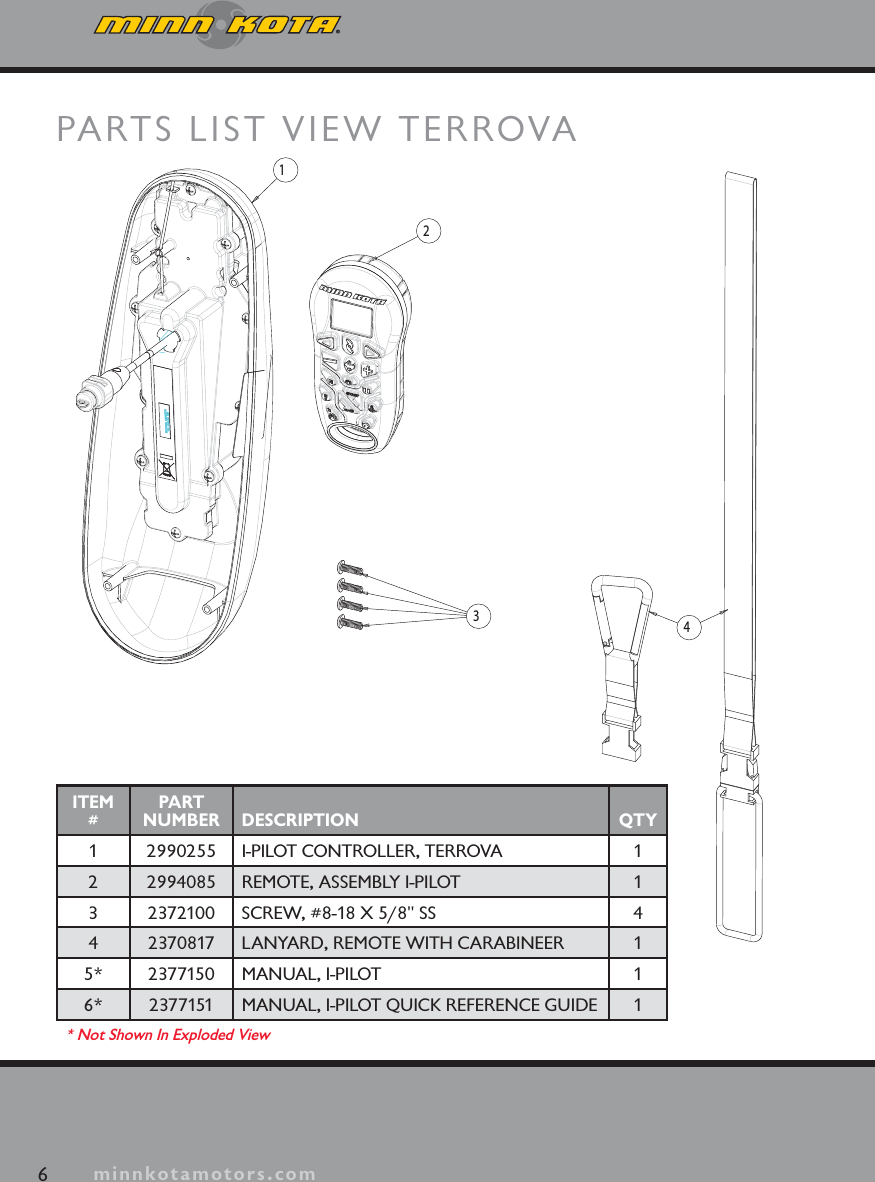
6minnkotamotors.comPARTS LIST VIEW TERROVA2341ITEM#PART NUMBER DESCRIPTION QTY1 2990255 I-PILOT CONTROLLER, TERROVA 12 2994085 REMOTE, ASSEMBLY I-PILOT 13 2372100 SCREW, #8-18 X 5/8" SS 44 2370817 LANYARD, REMOTE WITH CARABINEER 15* 2377150 MANUAL, I-PILOT 16* 2377151 MANUAL, I-PILOT QUICK REFERENCE GUIDE 1* Not Shown In Exploded View
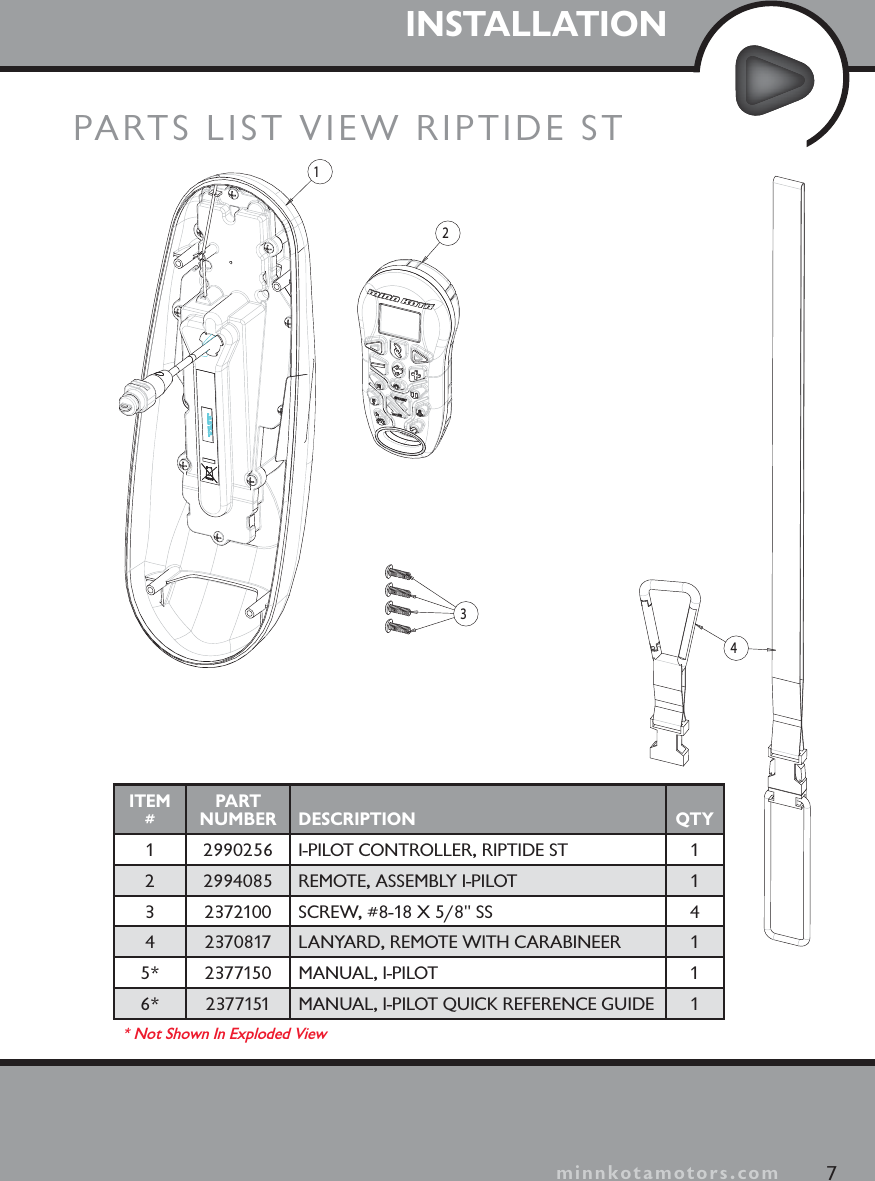
INSTALLATIONPARTS LIST VIEW RIPTIDE ST23417minnkotamotors.comITEM#PART NUMBER DESCRIPTION QTY1 2990256 I-PILOT CONTROLLER, RIPTIDE ST 12 2994085 REMOTE, ASSEMBLY I-PILOT 13 2372100 SCREW, #8-18 X 5/8" SS 44 2370817 LANYARD, REMOTE WITH CARABINEER 15* 2377150 MANUAL, I-PILOT 16* 2377151 MANUAL, I-PILOT QUICK REFERENCE GUIDE 1* Not Shown In Exploded View
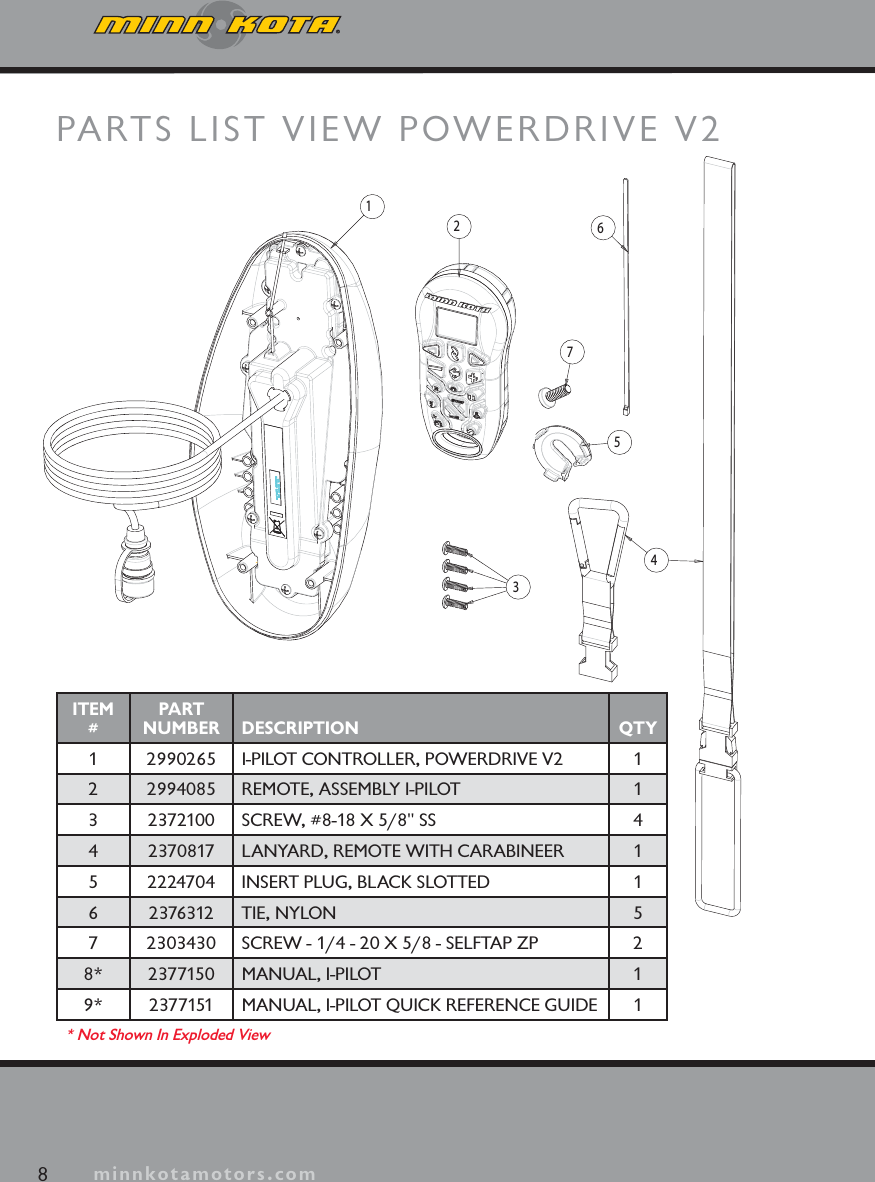
minnkotamotors.comPARTS LIST VIEW POWERDRIVE V223456718minnkotamotors.comITEM#PART NUMBER DESCRIPTION QTY1 2990265 I-PILOT CONTROLLER, POWERDRIVE V2 12 2994085 REMOTE, ASSEMBLY I-PILOT 13 2372100 SCREW, #8-18 X 5/8" SS 44 2370817 LANYARD, REMOTE WITH CARABINEER 15 2224704 INSERT PLUG, BLACK SLOTTED 16 2376312 TIE, NYLON 57 2303430 SCREW - 1/4 - 20 X 5/8 - SELFTAP ZP 28* 2377150 MANUAL, I-PILOT 19* 2377151 MANUAL, I-PILOT QUICK REFERENCE GUIDE 1* Not Shown In Exploded View
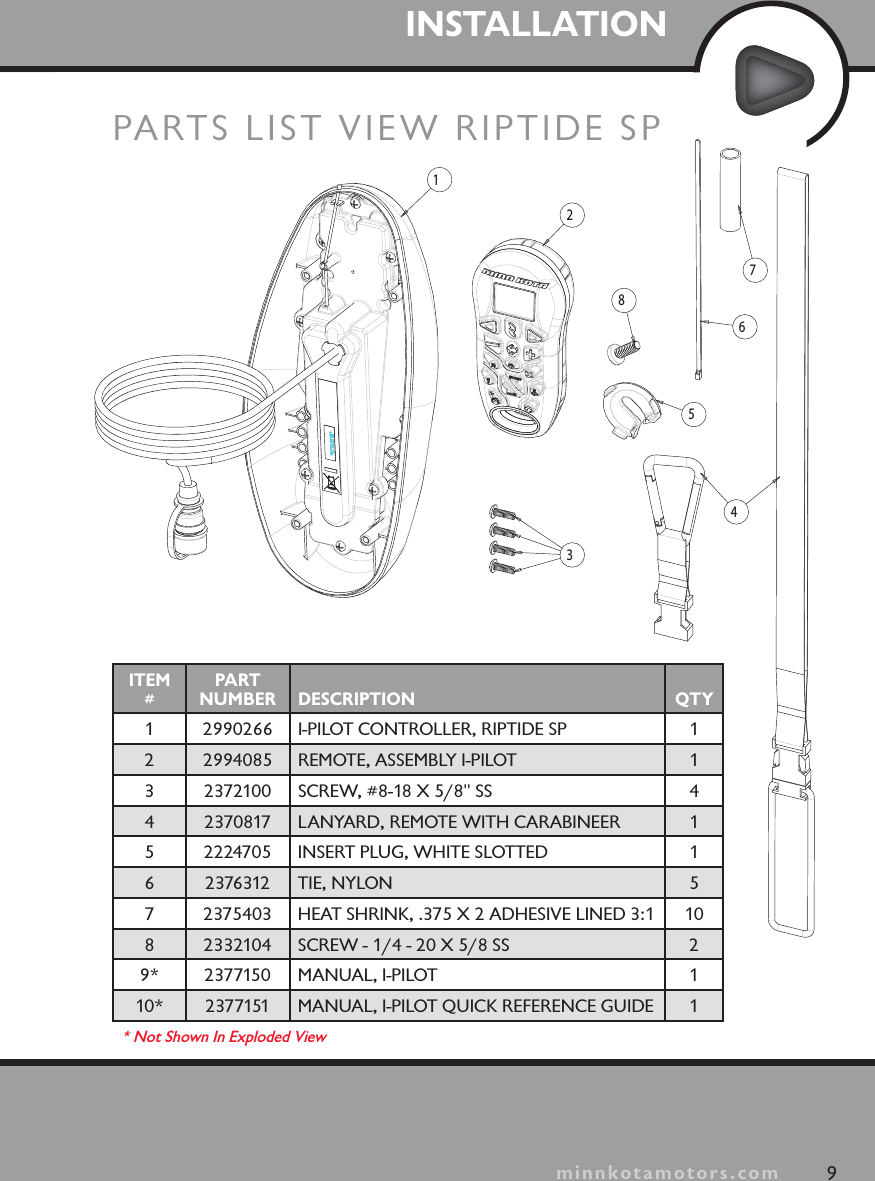
minnkotamotors.comINSTALLATION9minnkotamotors.com23456781PARTS LIST VIEW RIPTIDE SPITEM#PART NUMBER DESCRIPTION QTY1 2990266 I-PILOT CONTROLLER, RIPTIDE SP 12 2994085 REMOTE, ASSEMBLY I-PILOT 13 2372100 SCREW, #8-18 X 5/8" SS 44 2370817 LANYARD, REMOTE WITH CARABINEER 15 2224705 INSERT PLUG, WHITE SLOTTED 16 2376312 TIE, NYLON 57 2375403 HEAT SHRINK, .375 X 2 ADHESIVE LINED 3:1 108 2332104 SCREW - 1/4 - 20 X 5/8 SS 29* 2377150 MANUAL, I-PILOT 110* 2377151 MANUAL, I-PILOT QUICK REFERENCE GUIDE 1* Not Shown In Exploded View
minnkotamotors.comPreparing for InstallationTools you will need during installationTerrova and Riptide ST-Phillips screwdriverPowerDrive V2-Phillips screwdriver-Needle-nose pliers-Utility knifeRiptide SP-Phillips screwdriver-Needle-nose pliers-Utility knife-Heat gun or other heat source for installing heat shrinkBefore installing i-Pilot on your motor, make sure the trolling motor is properly installed on your boat.  Find a clean and dry location for performing the installation.  Most importantly, disconnect all power to the trolling motor before installation.  Not only will this protect you but also the sensitive electronics you are about to install.Read through the entire installation process before performing the installation.If you need help or need further instruction on installing i-Pilot, please go online at minnkotamotors.com for a full step-by-step, guided installation video.  You may also call Minn Kota technical service at 1-800-227-6433 to talk to a customer service representative.PREPARING FOR INSTALLATION10 minnkotamotors.com
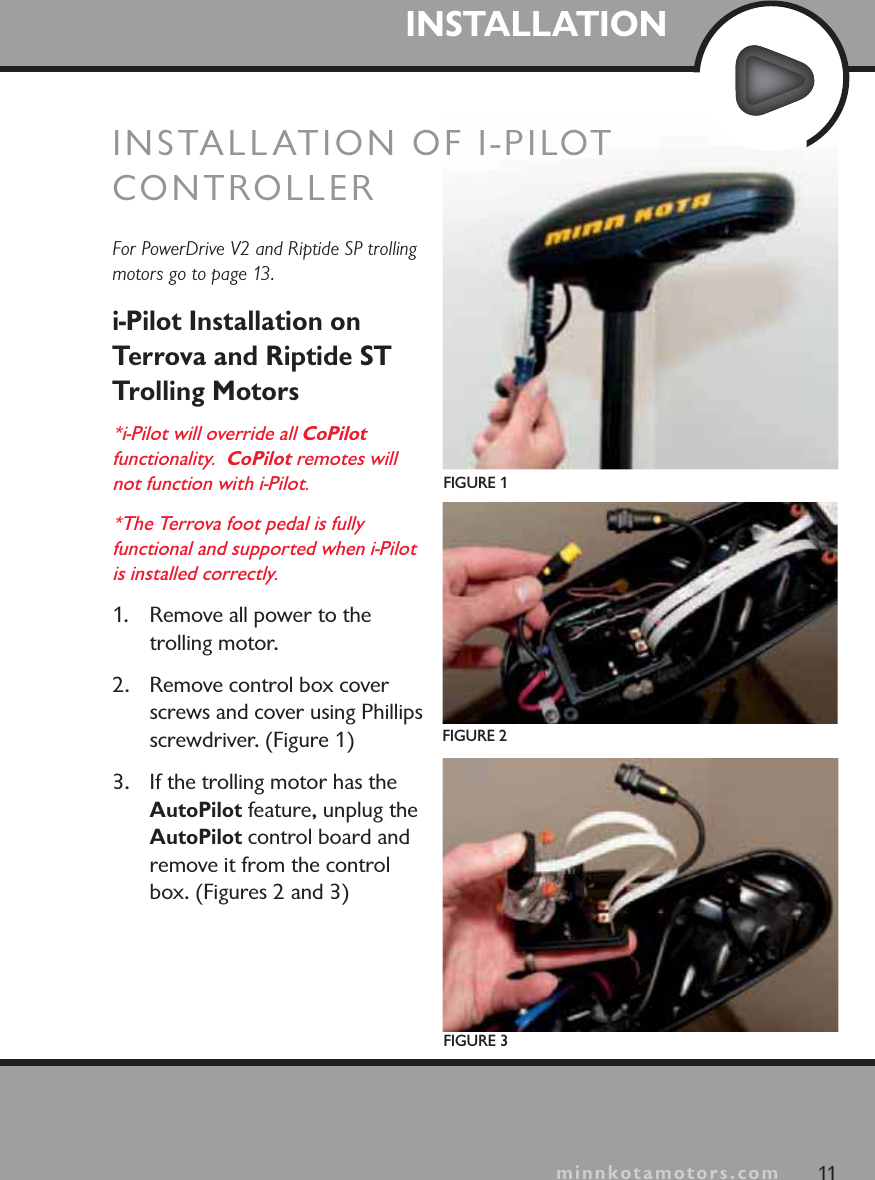
minnkotamotors.comINSTALLATIONFor PowerDrive V2 and Riptide SP trolling motors go to page 13.i-Pilot Installation on Terrova and Riptide ST Trolling Motors*i-Pilot will override all CoPilotfunctionality.  CoPilot remotes will not function with i-Pilot.*The Terrova foot pedal is fully functional and supported when i-Pilot is installed correctly.1. Remove all power to the trolling motor.2. Remove control box cover screws and cover using Phillips screwdriver. (Figure 1)3. If the trolling motor has the AutoPilot feature, unplug the AutoPilot control board and remove it from the control box. (Figures 2 and 3)FIGURE 1FIGURE 2FIGURE 311minnkotamotors.comINSTALLATION OF I-PILOTCONTROLLER
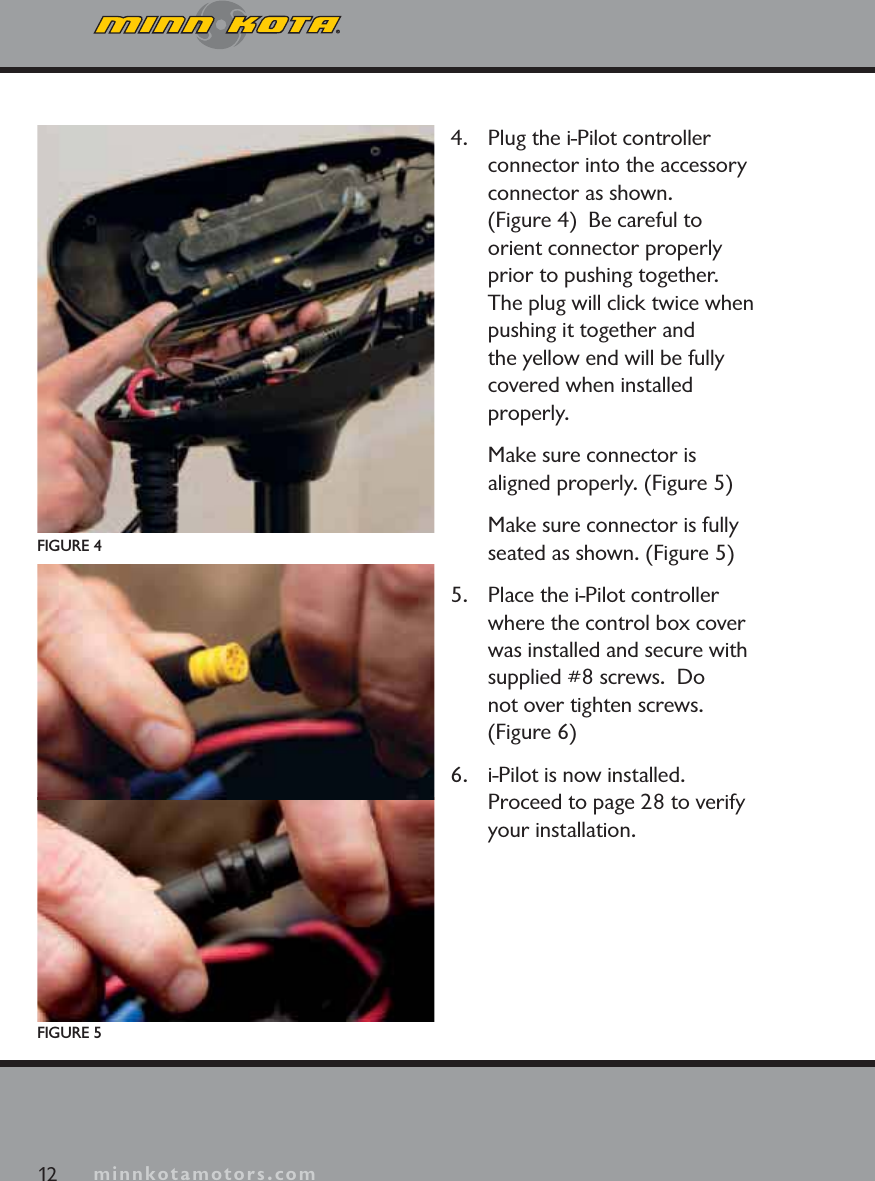
minnkotamotors.com4. Plug the i-Pilot controller connector into the accessory connector as shown.  (Figure 4)  Be careful to orient connector properly prior to pushing together.  The plug will click twice when pushing it together and the yellow end will be fully covered when installed properly.Make sure connector is aligned properly. (Figure 5)Make sure connector is fully seated as shown. (Figure 5)5. Place the i-Pilot controller where the control box cover was installed and secure with supplied #8 screws.  Donot over tighten screws. (Figure 6)6. i-Pilot is now installed.  Proceed to page 28 to verify your installation.FIGURE 4FIGURE 512 minnkotamotors.com
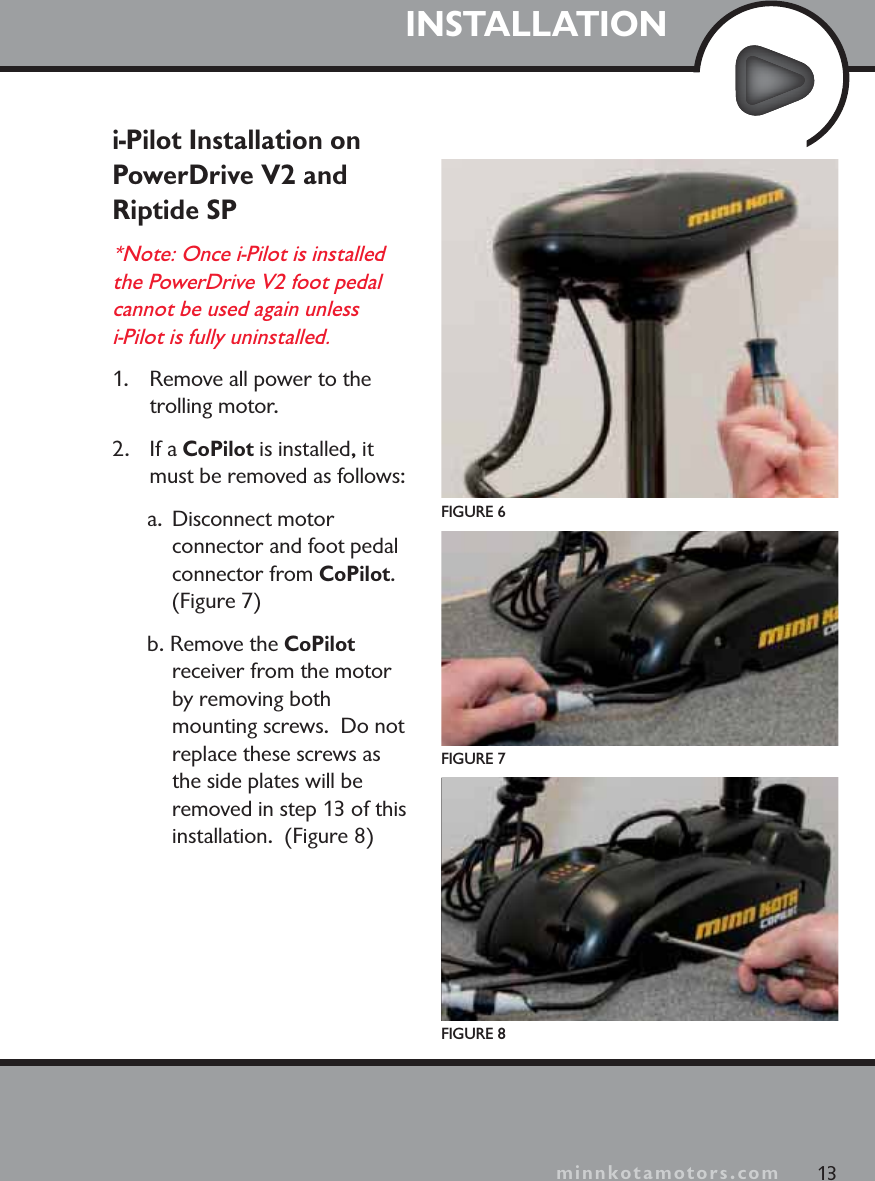
minnkotamotors.comINSTALLATIONi-Pilot Installation on PowerDrive V2 and Riptide SP*Note: Once i-Pilot is installed the PowerDrive V2 foot pedal cannot be used again unless i-Pilot is fully uninstalled. 1.  Remove all power to the trolling motor.2. If a CoPilot is installed, it must be removed as follows:a. Disconnect motor connector and foot pedal connector from CoPilot.(Figure 7)b. Remove the CoPilotreceiver from the motor by removing both mounting screws.  Do not replace these screws as the side plates will be removed in step 13 of this installation.  (Figure 8)FIGURE 6FIGURE 7FIGURE 813minnkotamotors.com
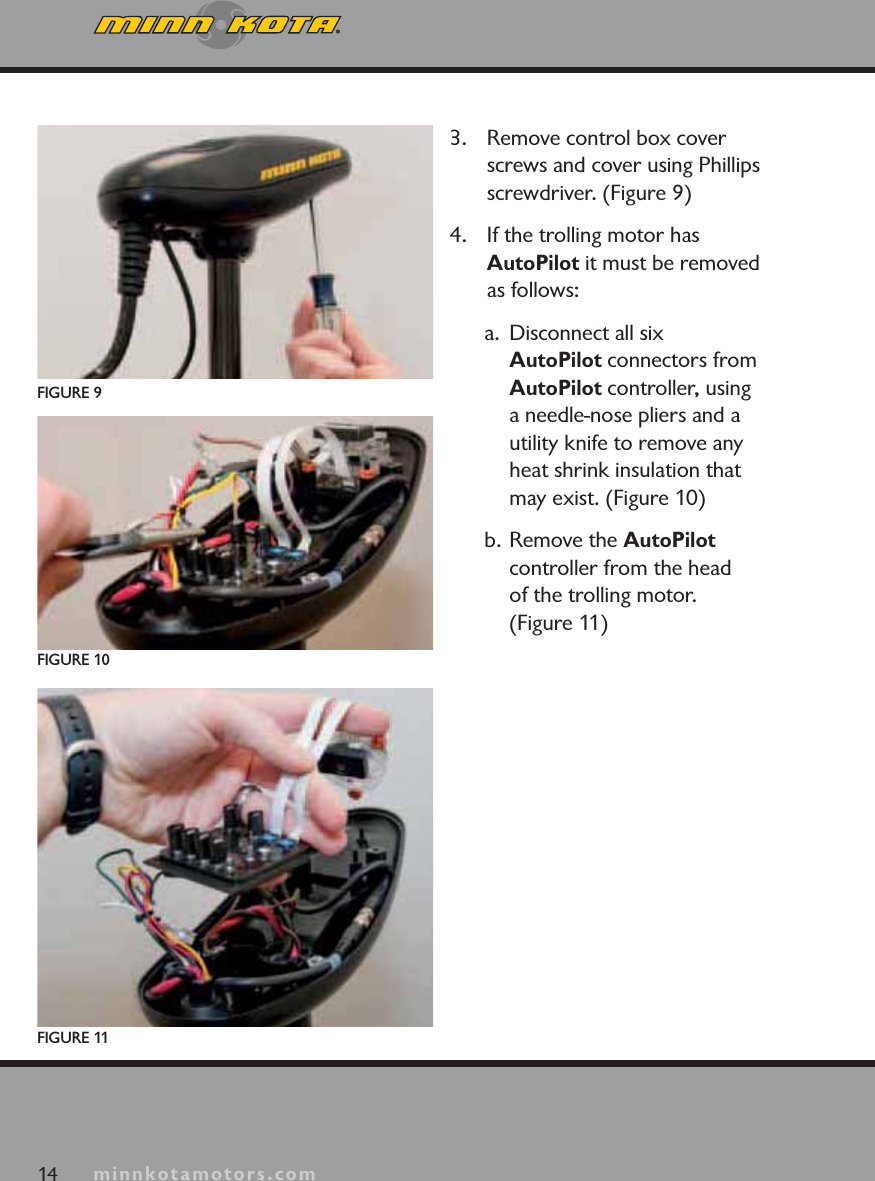
minnkotamotors.com3. Remove control box cover screws and cover using Phillips screwdriver. (Figure 9)4. If the trolling motor has AutoPilot it must be removed as follows:a.  Disconnect all six AutoPilot connectors from AutoPilot controller, using a needle-nose pliers and a utility knife to remove any heat shrink insulation that may exist. (Figure 10)b. Remove the AutoPilotcontroller from the head of the trolling motor. (Figure 11)FIGURE 9FIGURE 10FIGURE 1114 minnkotamotors.com
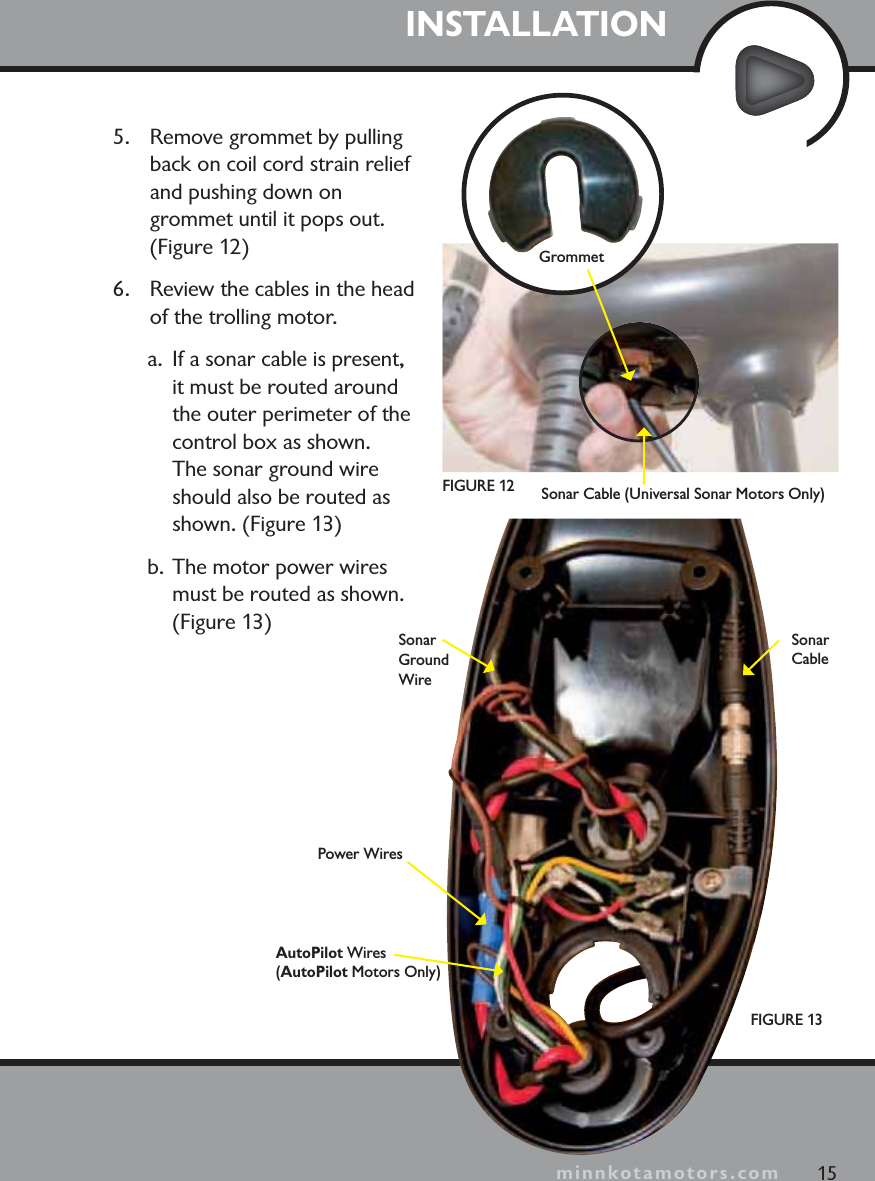
minnkotamotors.com5. Remove grommet by pulling back on coil cord strain relief and pushing down on grommet until it pops out. (Figure 12)6. Review the cables in the head of the trolling motor.   a. If a sonar cable is present, it must be routed around the outer perimeter of the control box as shown.  The sonar ground wire should also be routed as shown. (Figure 13)b. The motor power wires must be routed as shown. (Figure 13)INSTALLATIONFIGURE 1315SonarGround WireGrommetPower WiresAutoPilot Wires(AutoPilot Motors Only)SonarCableminnkotamotors.comFIGURE 12 Sonar Cable (Universal Sonar Motors Only)
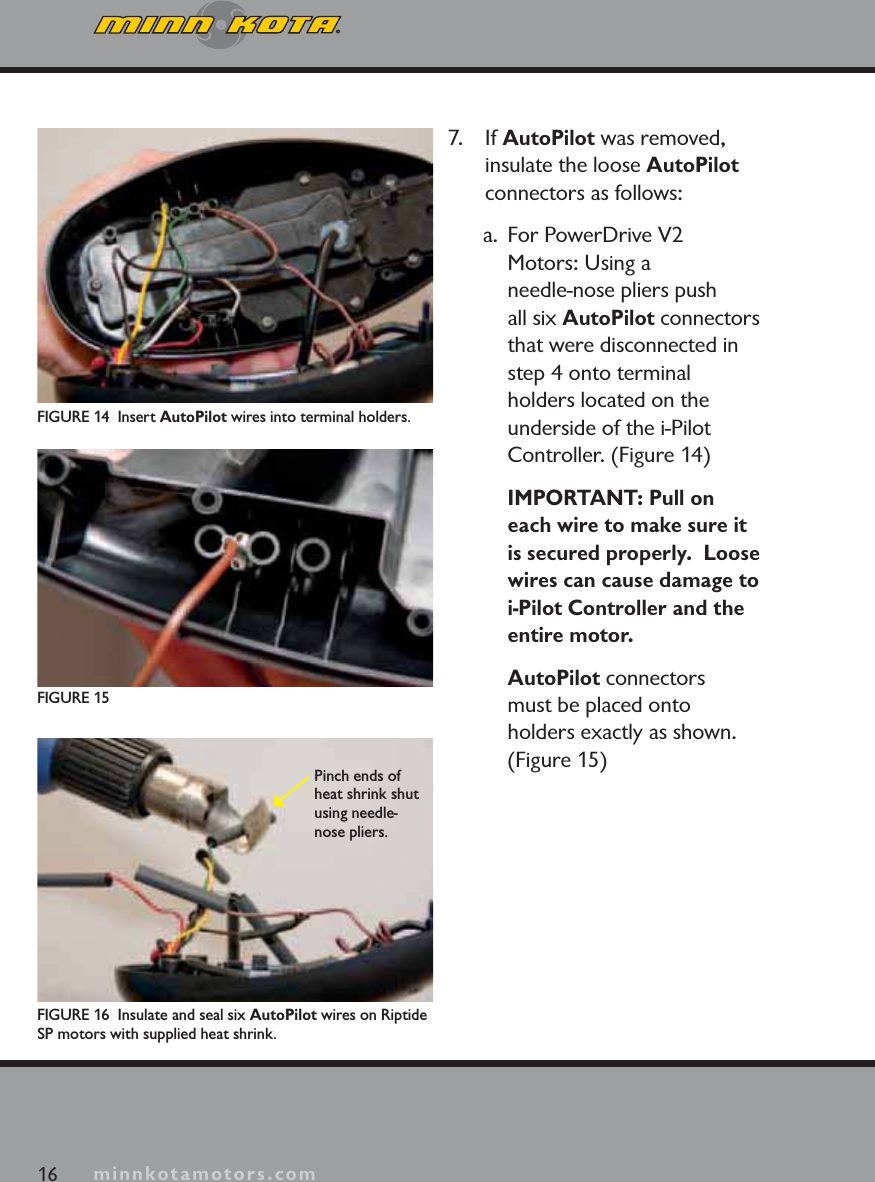
minnkotamotors.com7. If AutoPilot was removed, insulate the loose AutoPilotconnectors as follows:a.  For PowerDrive V2 Motors: Using a needle-nose pliers push all six AutoPilot connectors that were disconnected in step 4 onto terminal holders located on the underside of the i-Pilot Controller. (Figure 14) IMPORTANT: Pull on each wire to make sure it is secured properly.  Loose wires can cause damage to i-Pilot Controller and theentire motor.AutoPilot connectors must be placed onto holders exactly as shown. (Figure 15)FIGURE 14  Insert AutoPilot wires into terminal holders.FIGURE 16  Insulate and seal six AutoPilot wires on Riptide SP motors with supplied heat shrink.Pinch ends of heat shrink shut using needle-nose pliers.FIGURE 1516 minnkotamotors.com
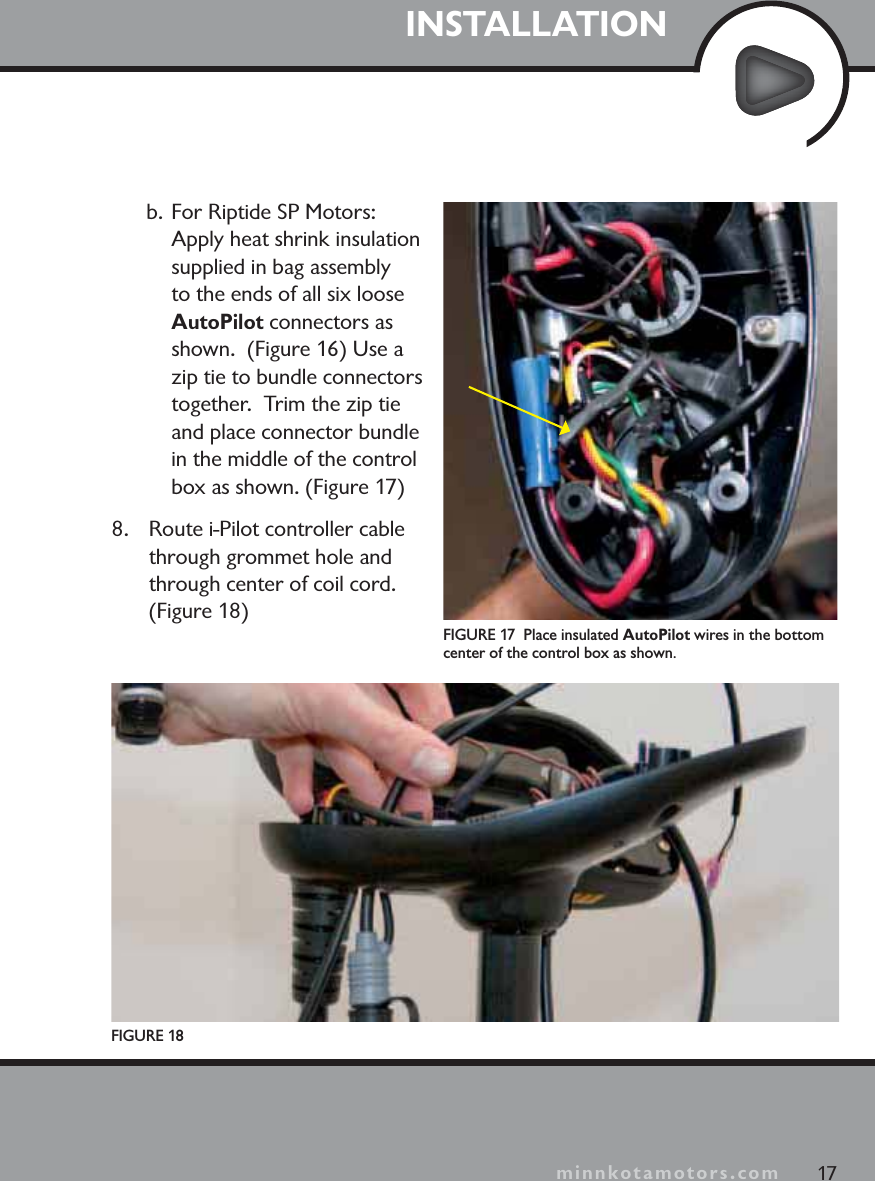
minnkotamotors.comb. For Riptide SP Motors: Apply heat shrink insulation supplied in bag assembly to the ends of all six loose AutoPilot connectors as shown.  (Figure 16) Use a zip tie to bundle connectors together.  Trim the zip tie and place connector bundle in the middle of the control box as shown. (Figure 17)8. Route i-Pilot controller cable through grommet hole and through center of coil cord. (Figure 18)FIGURE 18FIGURE 17  Place insulated AutoPilot wires in the bottom center of the control box as shown.17INSTALLATIONminnkotamotors.com
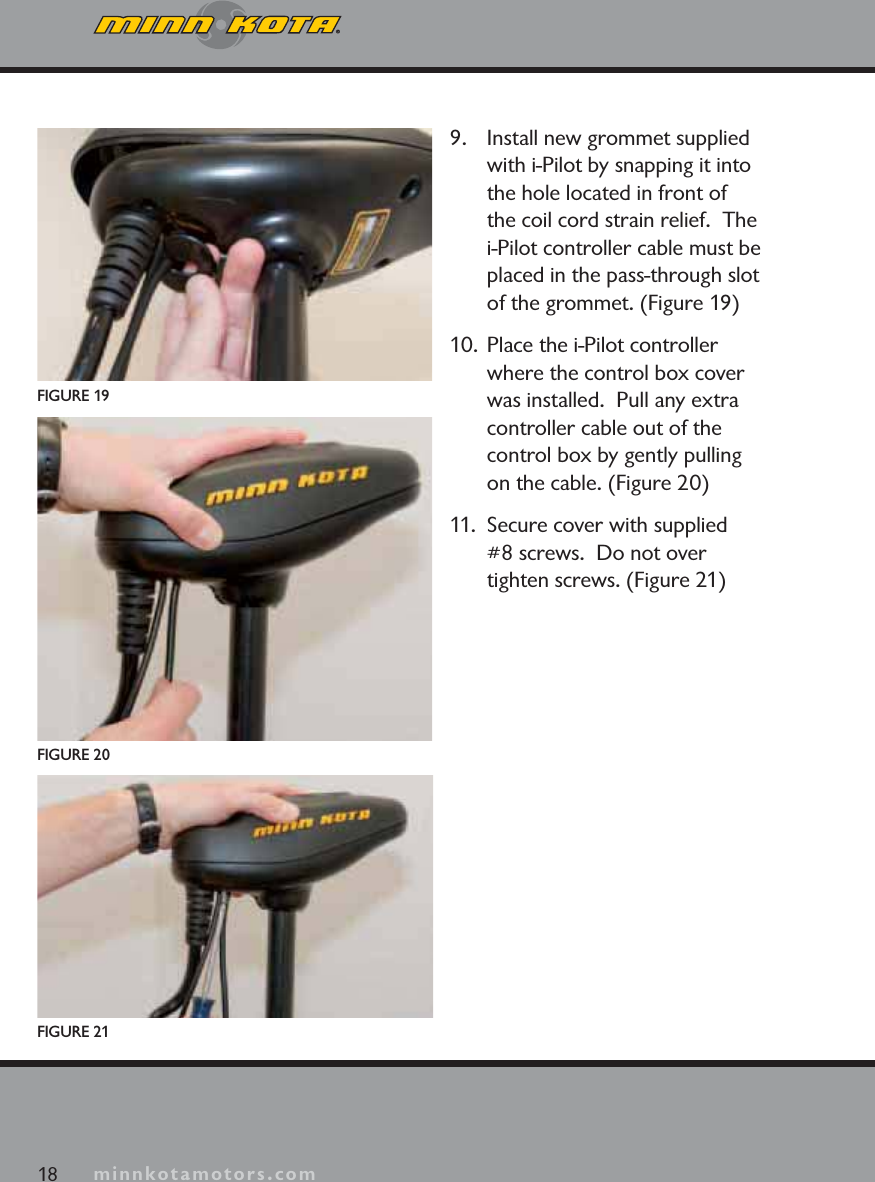
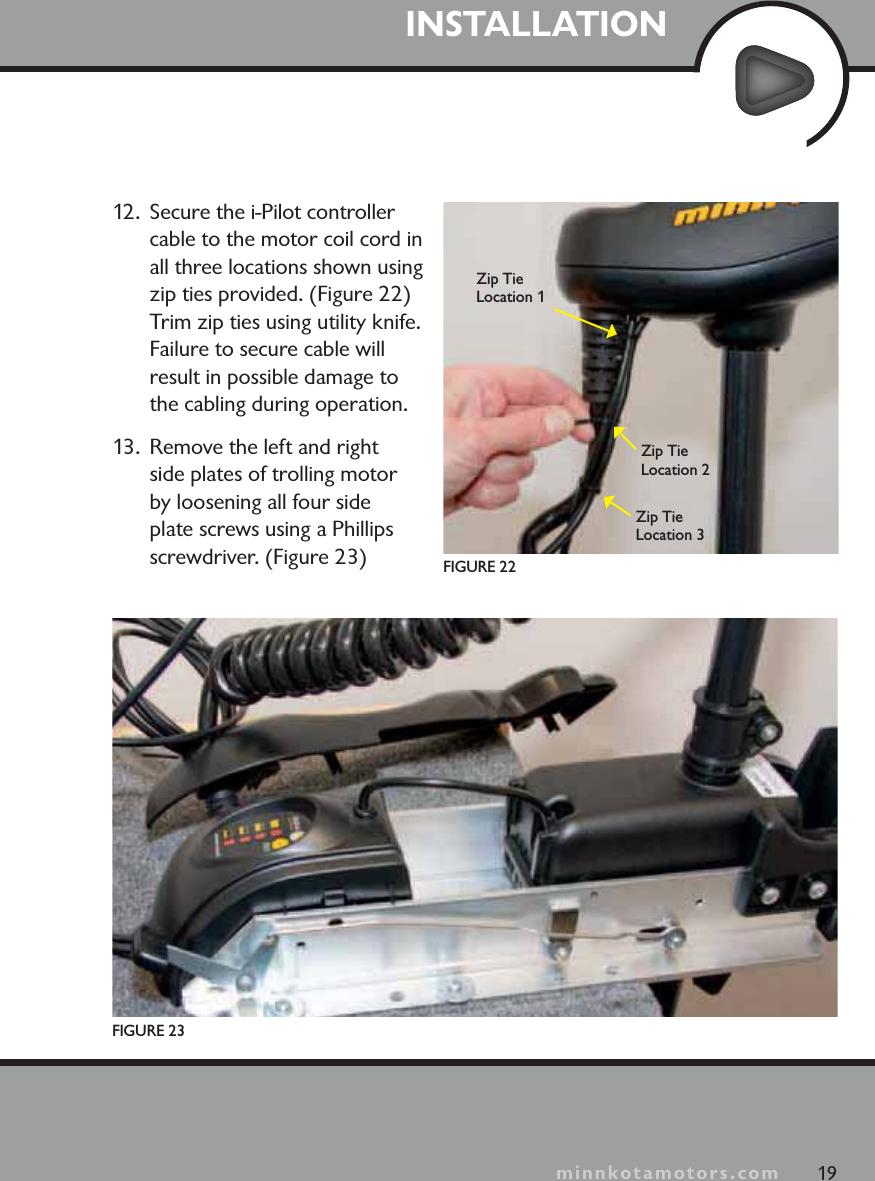
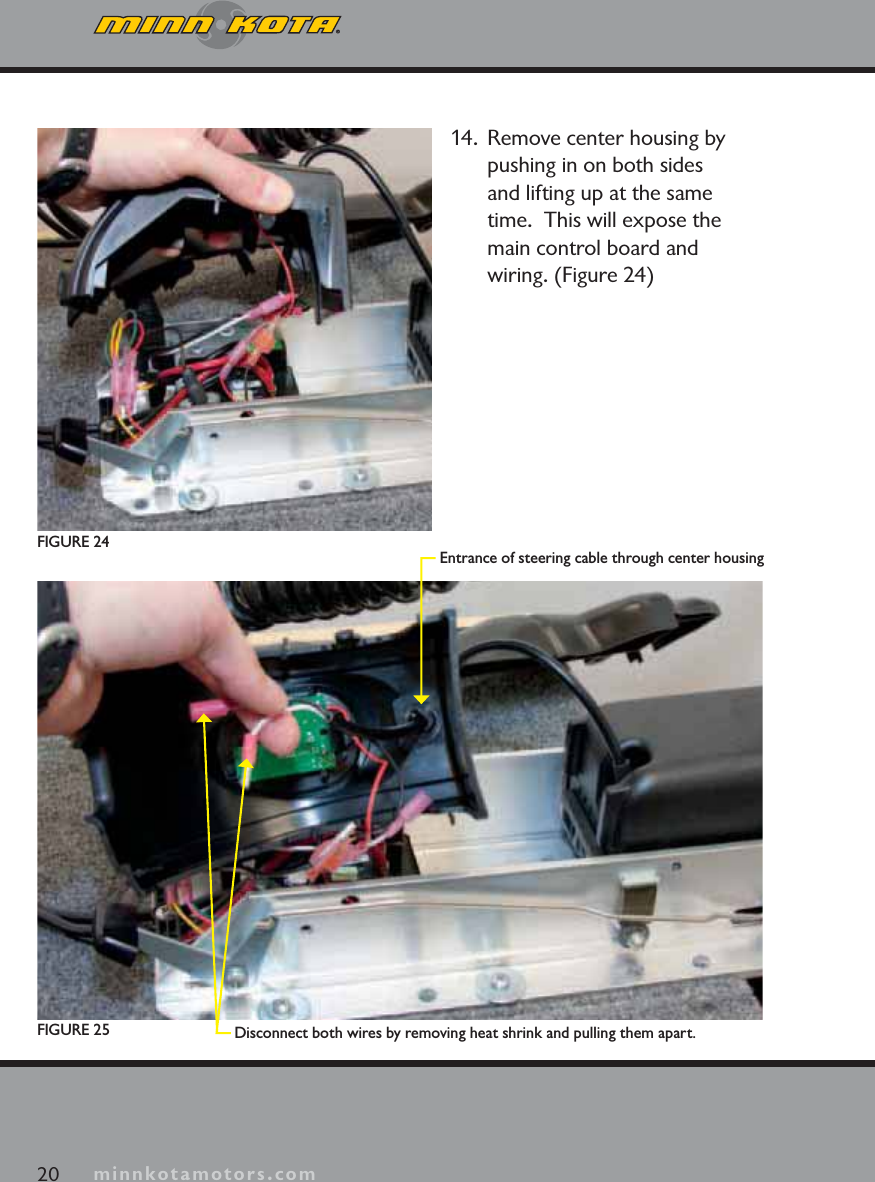
minnkotamotors.com9. Install new grommet supplied with i-Pilot by snapping it into the hole located in front of the coil cord strain relief.  The i-Pilot controller cable must be placed in the pass-through slot of the grommet. (Figure 19)10.  Place the i-Pilot controller where the control box cover was installed.  Pull any extra controller cable out of the control box by gently pulling on the cable. (Figure 20)11.  Secure cover with supplied #8 screws.  Do not over tighten screws. (Figure 21)FIGURE 1918 minnkotamotors.comFIGURE 21FIGURE 20
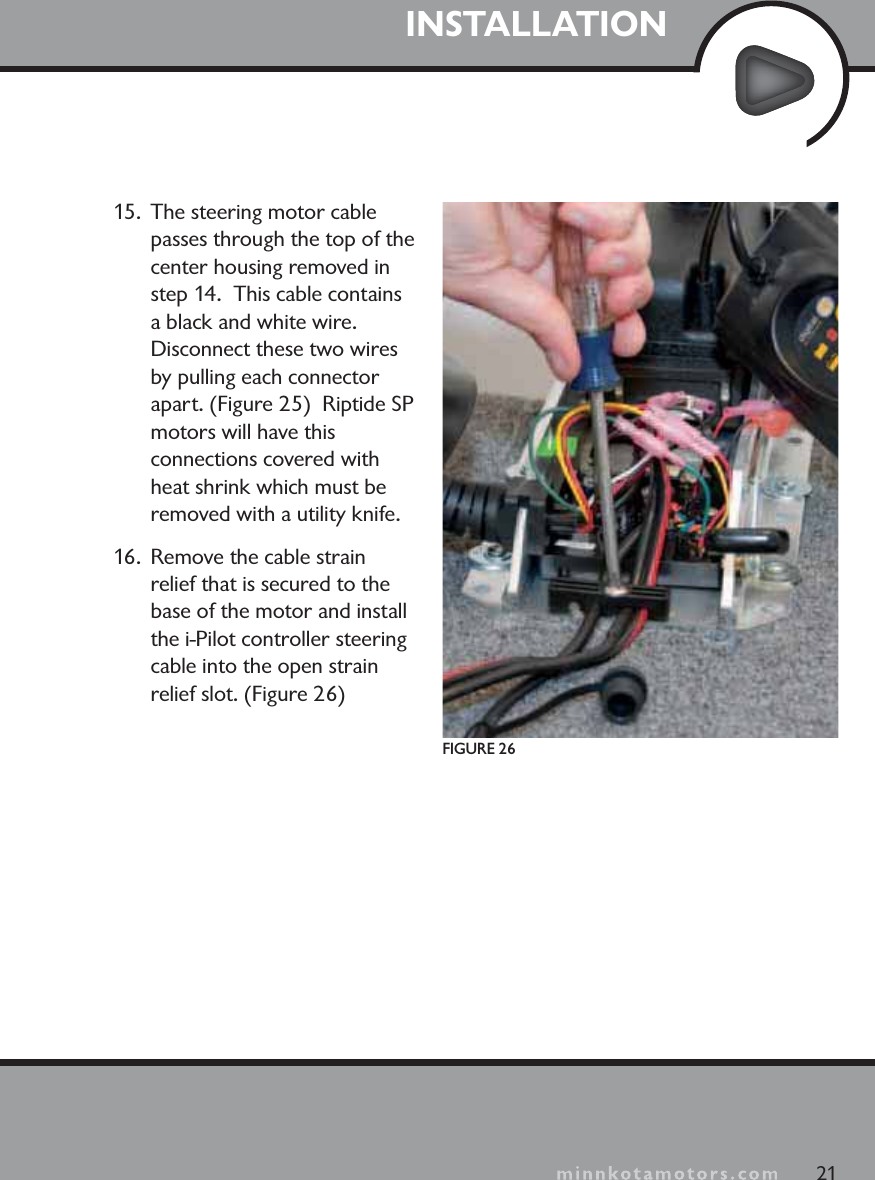
minnkotamotors.comINSTALLATION12.  Secure the i-Pilot controller cable to the motor coil cord in all three locations shown using zip ties provided. (Figure 22) Trim zip ties using utility knife. Failure to secure cable will result in possible damage to the cabling during operation.13.  Remove the left and right side plates of trolling motor by loosening all four side plate screws using a Phillips screwdriver. (Figure 23)FIGURE 23FIGURE 2219Zip Tie Location 1Zip Tie Location 2Zip Tie Location 3minnkotamotors.com
minnkotamotors.com14.  Remove center housing by pushing in on both sides and lifting up at the same time.  This will expose the main control board and wiring. (Figure 24)20 minnkotamotors.comDisconnect both wires by removing heat shrink and pulling them apart.Entrance of steering cable through center housingFIGURE 24FIGURE 25
minnkotamotors.comINSTALLATION15.  The steering motor cable passes through the top of the center housing removed in step 14.  This cable contains a black and white wire.  Disconnect these two wires by pulling each connector apart. (Figure 25)  Riptide SPmotors will have this connections covered with heat shrink which must be removed with a utility knife.16.  Remove the cable strain relief that is secured to the base of the motor and install the i-Pilot controller steering cable into the open strain relief slot. (Figure 26)21FIGURE 26
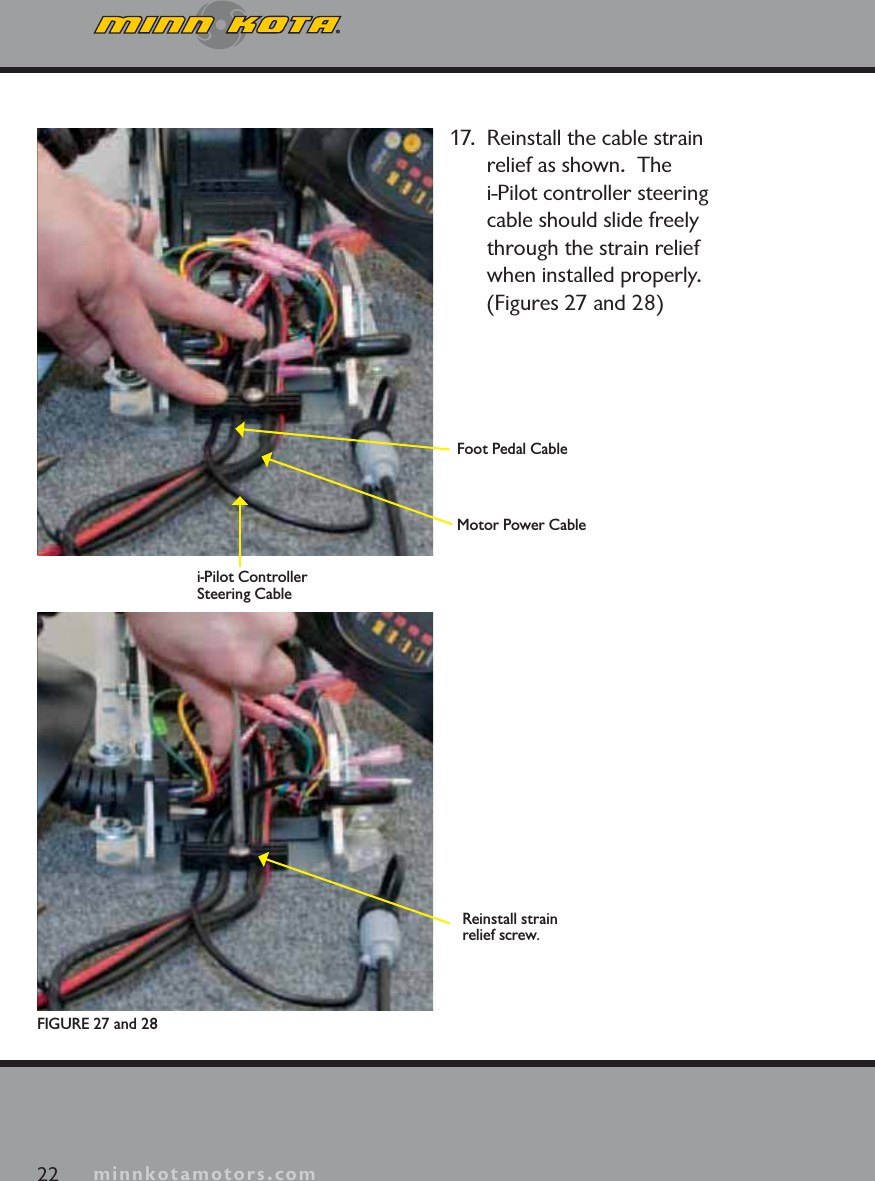
minnkotamotors.com17.  Reinstall the cable strain relief as shown.  The i-Pilot controller steering cable should slide freely through the strain relief when installed properly. (Figures 27 and 28)22 minnkotamotors.comFIGURE 27 and 28Foot Pedal CableMotor Power Cablei-Pilot Controller Steering CableReinstall strain relief screw.
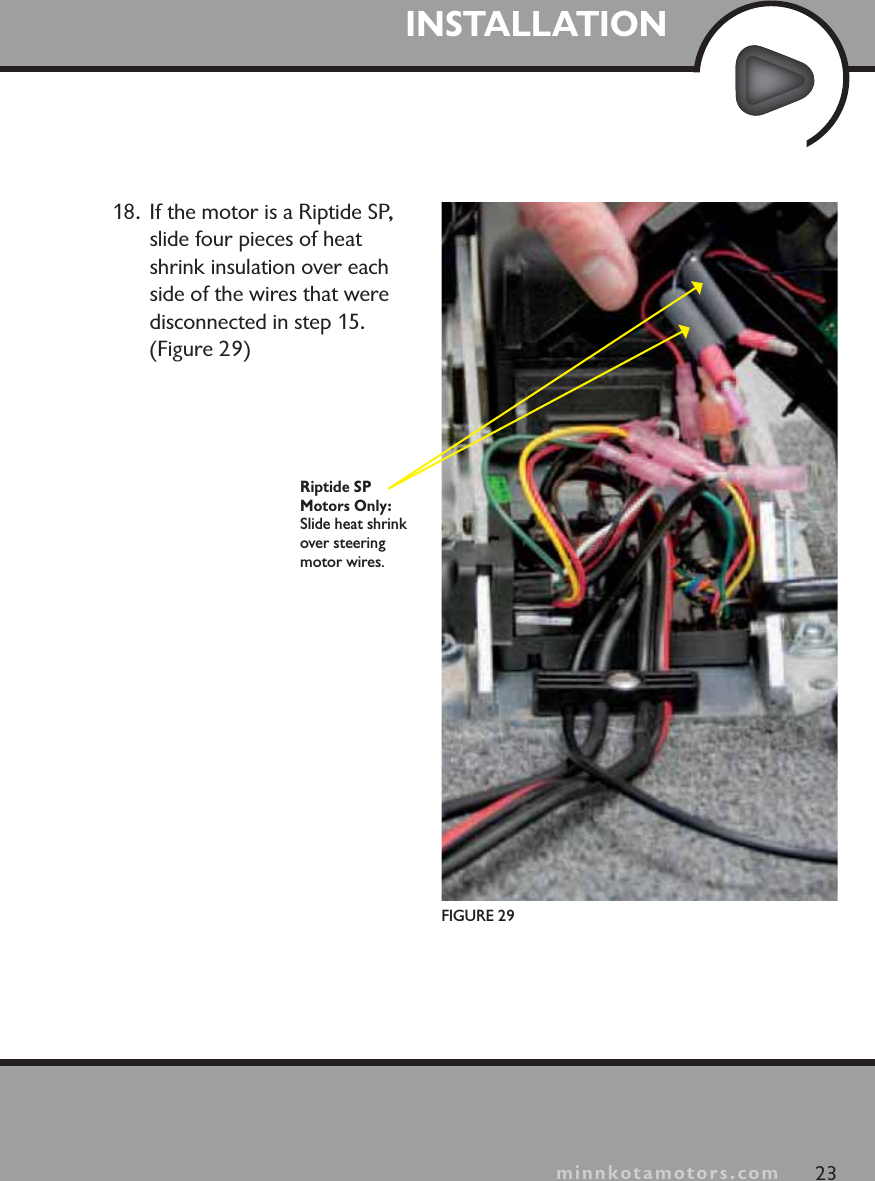
minnkotamotors.comINSTALLATION23minnkotamotors.comFIGURE 29Riptide SP Motors Only: Slide heat shrink over steering motor wires.18.  If the motor is a Riptide SP, slide four pieces of heat shrink insulation over each side of the wires that were disconnected in step 15. (Figure 29)
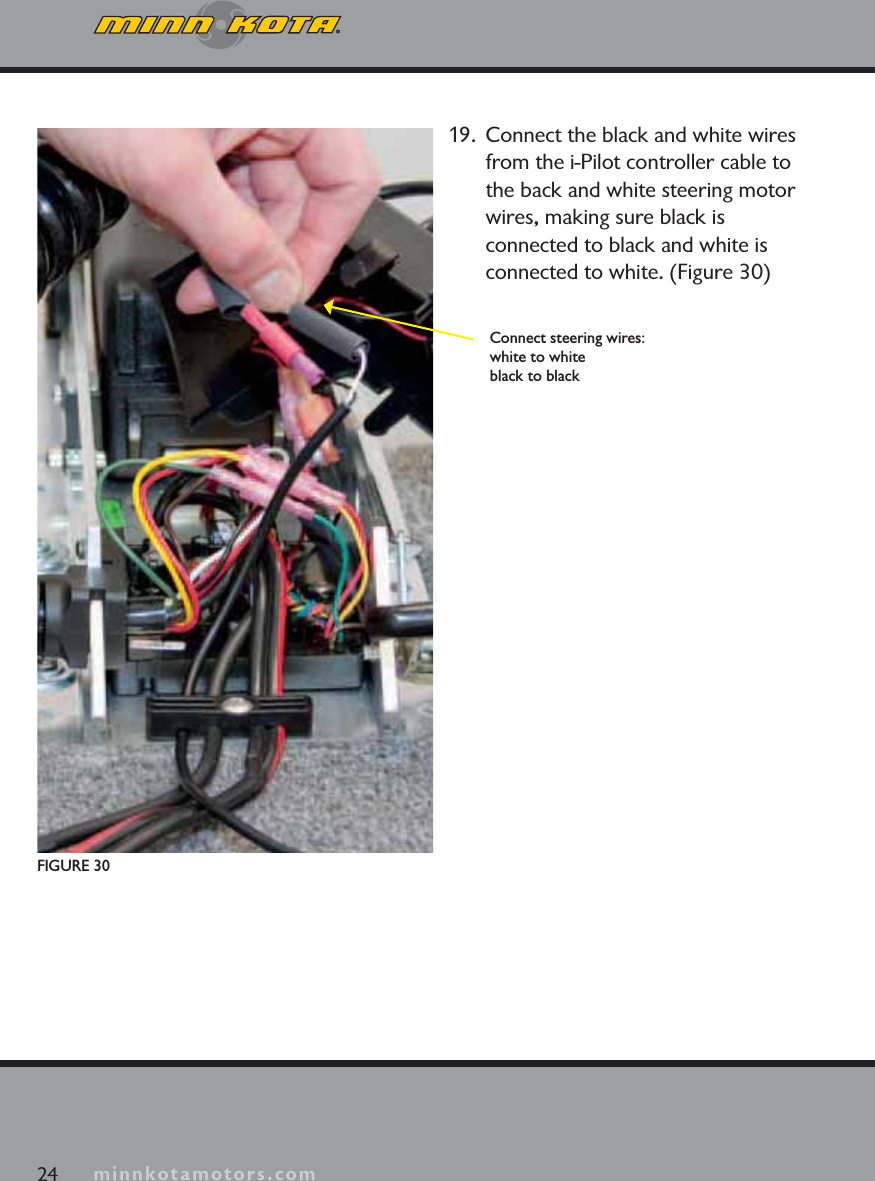
minnkotamotors.com24 minnkotamotors.comFIGURE 30Connect steering wires:white to whiteblack to black19.  Connect the black and white wires from the i-Pilot controller cable to the back and white steering motor wires, making sure black is connected to black and white is connected to white. (Figure 30)
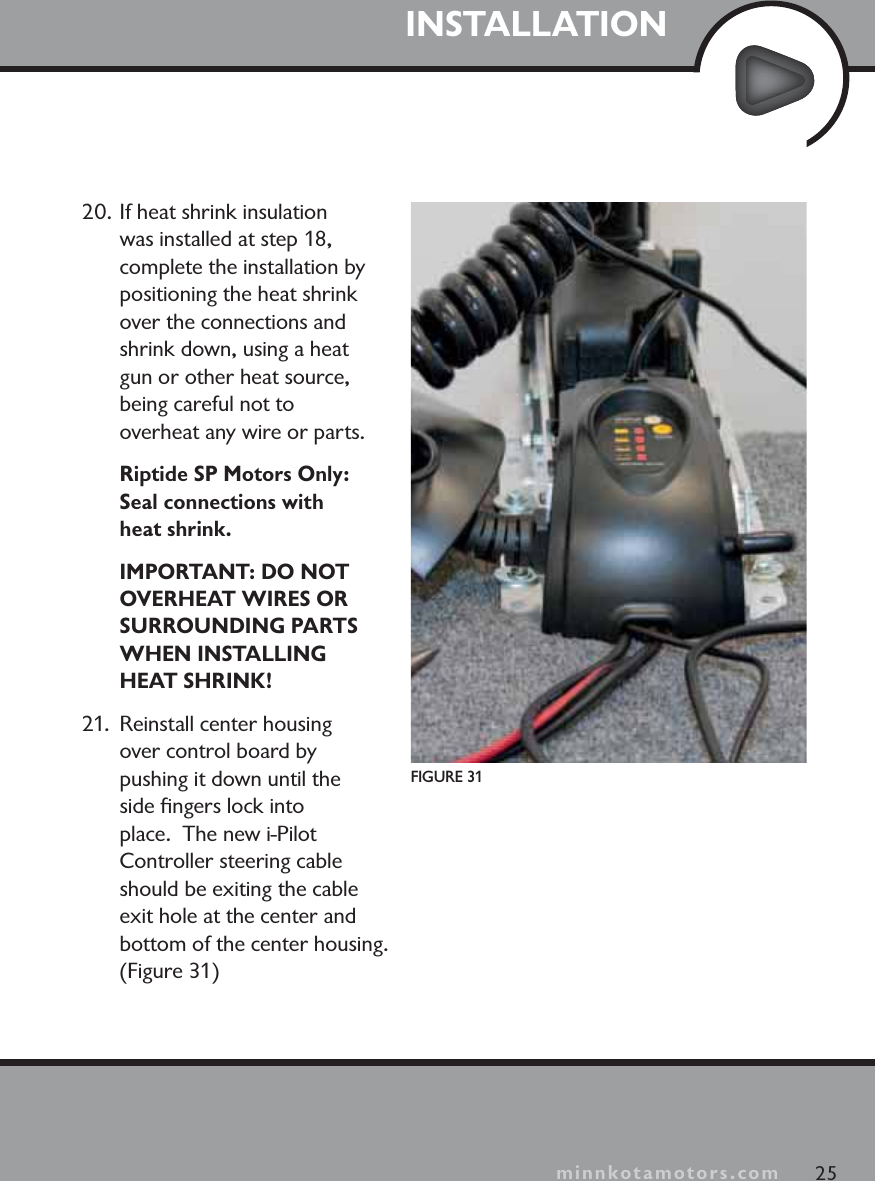
minnkotamotors.comINSTALLATION25minnkotamotors.comFIGURE 3120. If heat shrink insulation was installed at step 18, complete the installation by positioning the heat shrink over the connections and shrink down, using a heat gun or other heat source, being careful not to overheat any wire or parts.Riptide SP Motors Only:Seal connections with heat shrink.IMPORTANT: DO NOT OVERHEAT WIRES OR SURROUNDING PARTS WHEN INSTALLING HEAT SHRINK!21.  Reinstall center housing over control board by pushing it down until the side fingers lock into place.  The new i-Pilot Controller steering cable should be exiting the cable exit hole at the center and bottom of the center housing. (Figure 31)
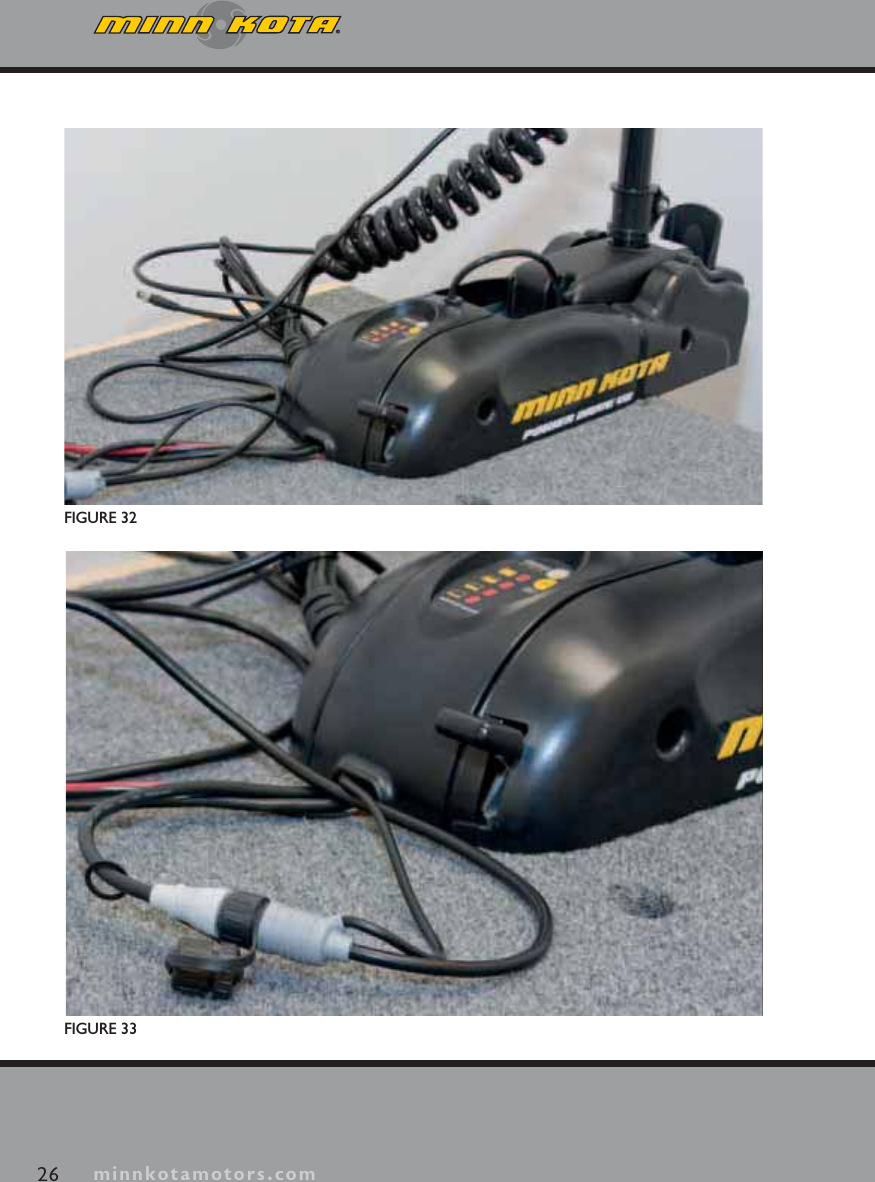
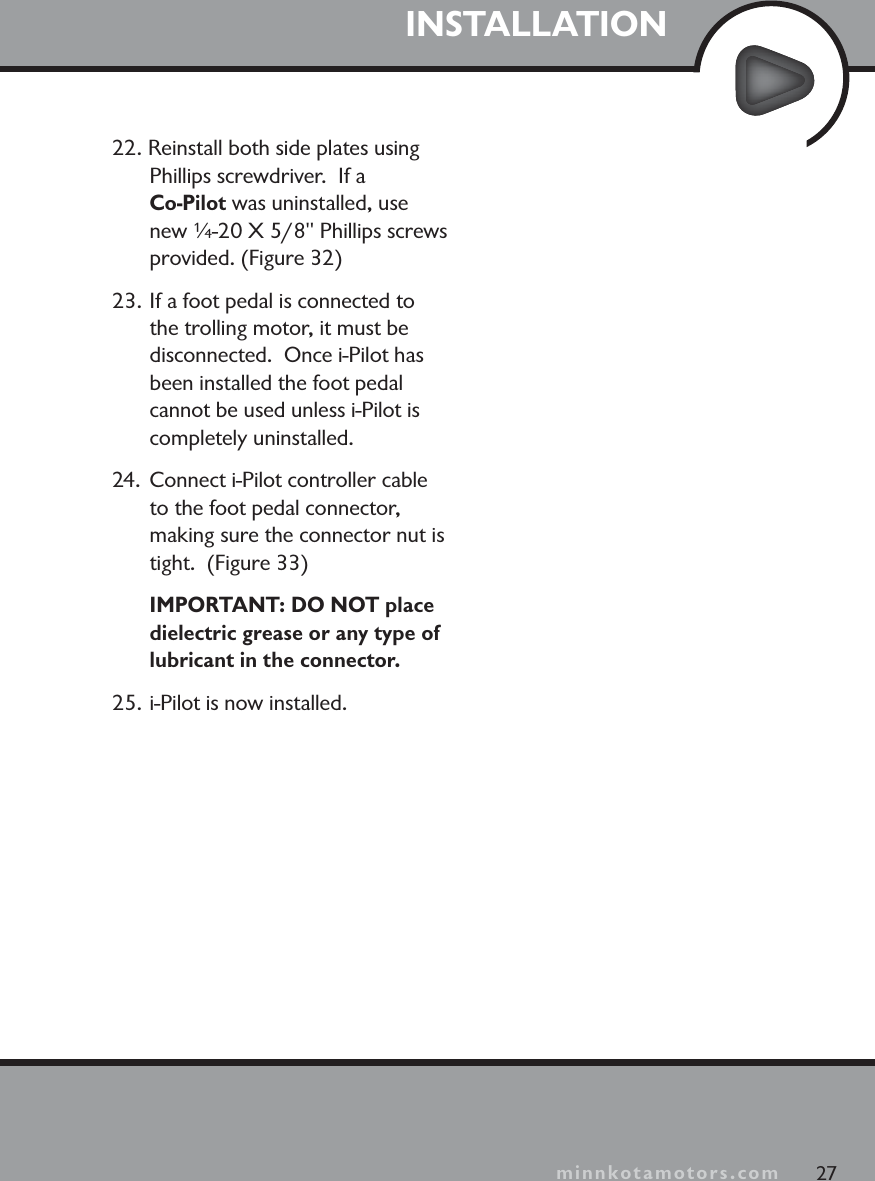
minnkotamotors.com26 minnkotamotors.comFIGURE 32FIGURE 33
minnkotamotors.comINSTALLATION27minnkotamotors.com22. Reinstall both side plates using Phillips screwdriver.  If a Co-Pilot was uninstalled, use new ¼-20 X 5/8" Phillips screws provided. (Figure 32)23. If a foot pedal is connected to the trolling motor, it must be disconnected.  Once i-Pilot has been installed the foot pedal cannot be used unless i-Pilot is completely uninstalled.24.  Connect i-Pilot controller cable to the foot pedal connector, making sure the connector nut is tight.  (Figure 33)IMPORTANT: DO NOT place dielectric grease or any type of lubricant in the connector. 25. i-Pilot is now installed.
minnkotamotors.com28 minnkotamotors.comVERIFYING INSTALLATIONIt is important to verify your i-Pilot installation prior to going on the water.  If this cannot be done, it is highly recommended that system verification be done in an open area on a calm day with a fully operational outboard motor for a backup means of powering your boat.To verify that i-Pilot is working properly before going on the water, follow the steps below.1. Trolling motor should be correctly installed and mounted to the bow of a boat.2. The boat and trolling motor must be located outside and have a direct view of the sky to obtain GPS satellite signals.3. Verify that all obstructions are away from the prop in all directions in both the stowed and deployed positions.4. Connect power to the trolling motor.5.  Deploy the motor so the motor shaft is completely vertical.6. i-Pilot will emit three long audio tones on startup. 7. Press any button on the i-Pilot remote.8. The i-Pilot remote LCD will come on; prop speed and the GPS antenna icon will be displayed. It should take no longer than two minutes to obtain a GPS signal strength of at least one bar.
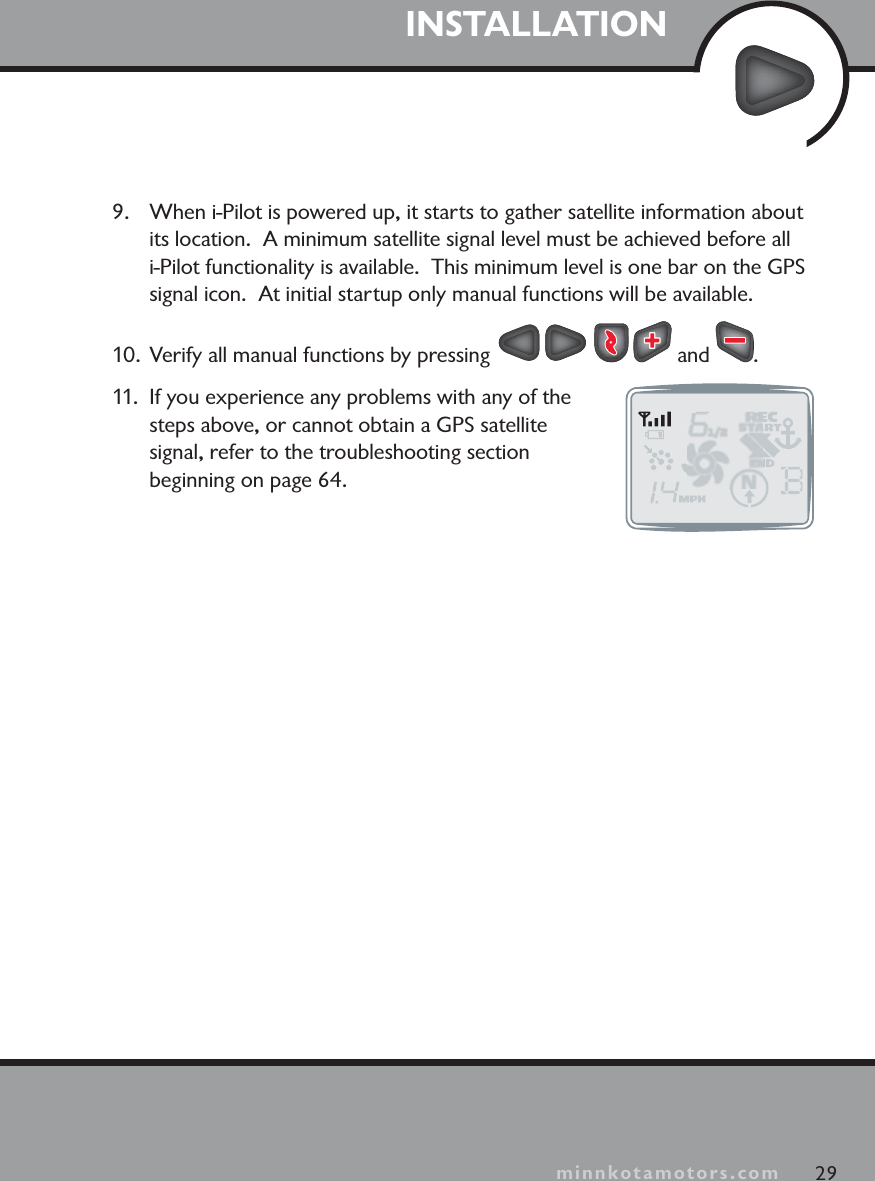
minnkotamotors.comINSTALLATION9. When i-Pilot is powered up, it starts to gather satellite information about its location. A minimum satellite signal level must be achieved before all i-Pilot functionality is available.  This minimum level is one bar on the GPSsignal icon. At initial startup only manual functions will be available.10. Verify all manual functions by pressing   and  .11. If you experience any problems with any of the steps above, or cannot obtain a GPS satellite signal, refer to the troubleshooting section beginning on page 64.29minnkotamotors.com
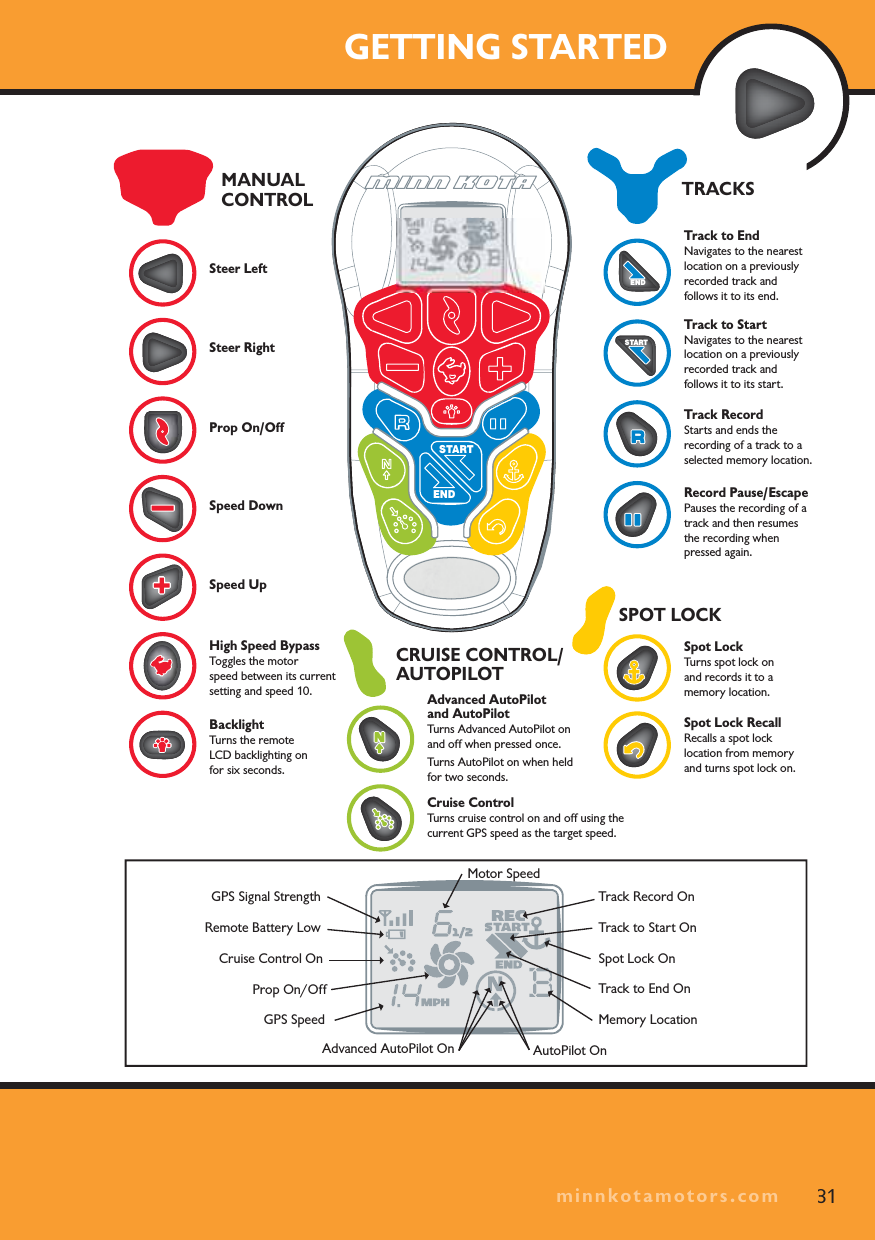
KNOWING YOUR REMOTELayoutThe i-Pilot remote is divided into four sections: Manual Control,Tracks,Spot Lock, and Cruise Control/AutoPilot. Buttons in the Manual Controlsection of the remote do not require a GPS signal to operate and give you full, immediate control over steering, speed and prop functions similar to a CoPilot.All other buttons require a minimum GPS signal strength of one bar in order to operate. Buttons located in the Tracks section are used for track recording and playback.  Spot Lock buttons are located in the Spot Lock section. Cruise Control/AutoPilot are located in the Cruise Control/AutoPilot section.ConstructionThe remote is waterproof and floats in water.  RangeThe range of the remote will be greatly reduced if it is used near or mounted to any metal object including aluminum or steel.  It is also recommended that the front end of the remote not be obstructed during use.Battery LifeRemote battery life is subject to frequency of use and is especially impacted by how often the LCD backlight is used. When the remote battery is low,   will appear on the remote LCD.  The Backlight button will be disabled when   is displayed to conserve battery power.PowerWhen a button is pressed on the remote it will automatically turn on.  To turn the remote off press and hold   for three seconds. The remote will automatically turn itself off thirty minutes after the last button press if a learned i-Pilot controller is powered up and within transmitting range.  The remote will turn off after three seconds if the i-Pilot controller is powered down or out of transmitting range.30
GETTING STARTEDSpot LockTurns spot lock on and records it to a memory location.Record Pause/EscapePauses the recording of a track and then resumes the recording when pressed again.Track RecordStarts and ends the recording of a track to a selected memory location.Track to StartNavigates to the nearest location on a previously recorded track and follows it to its start.Track to EndNavigates to the nearest location on a previously recorded track and follows it to its end.Spot Lock RecallRecalls a spot lock location from memory and turns spot lock on.SPOT LOCKTRACKSSteer LeftSteer Right Prop On/Off Speed Down Speed UpHigh Speed BypassToggles the motor speed between its current setting and speed 10.BacklightTurns the remote LCD backlighting on for six seconds.MANUAL CONTROLSTARTENDCruise ControlTurns cruise control on and off using the current GPS speed as the target speed.Advanced AutoPilot and AutoPilotTurns Advanced AutoPilot on and off when pressed once.Turns AutoPilot on when held for two seconds.CRUISE CONTROL/ AUTOPILOTGPS Signal StrengthRemote Battery LowGPS SpeedCruise Control OnProp On/OffMotor SpeedTrack to End OnTrack Record OnSpot Lock OnTrack to Start OnAutoPilot OnAdvanced AutoPilot OnMemory LocationSTARTEND31minnkotamotors.com
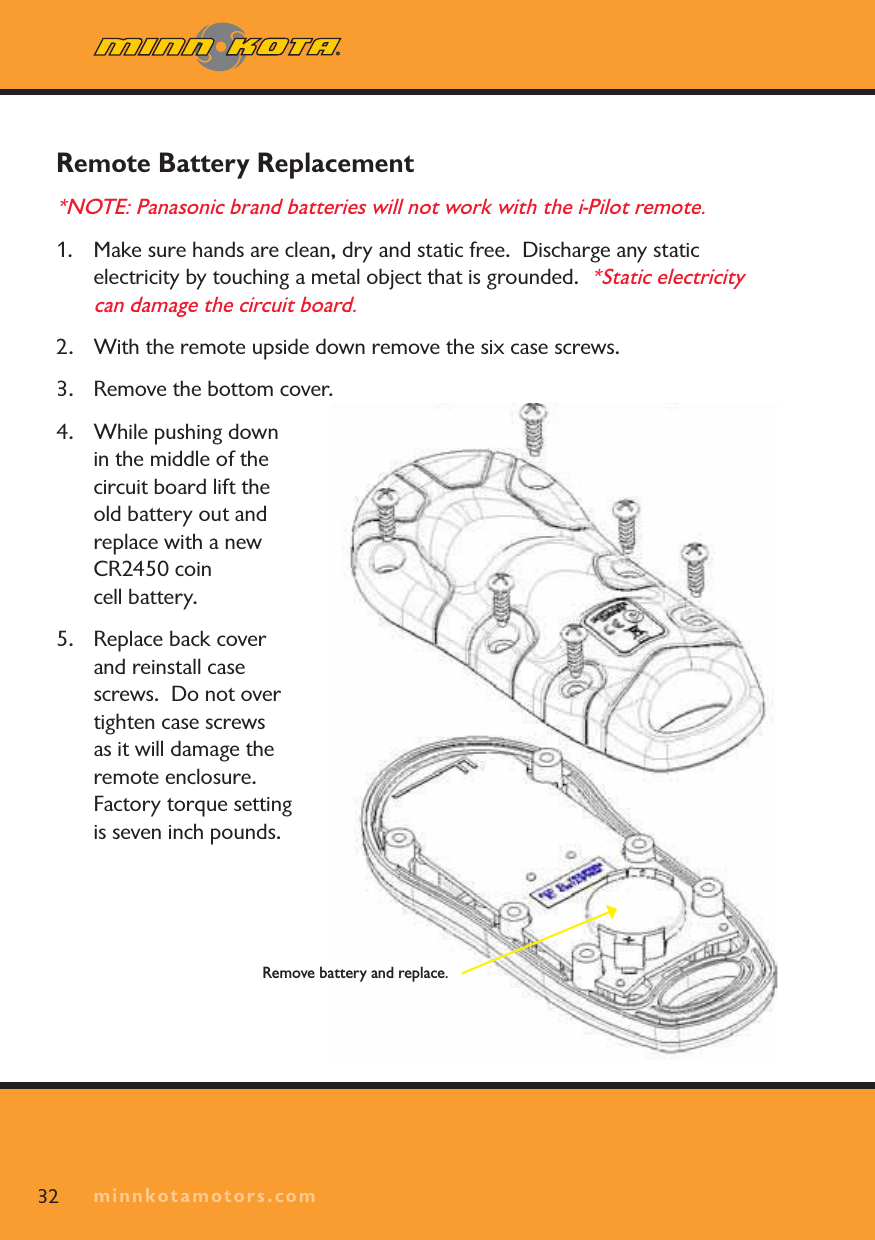
minnkotamotors.comRemote Battery Replacement *NOTE: Panasonic brand batteries will not work with the i-Pilot remote.1. Make sure hands are clean, dry and static free.  Discharge any static electricity by touching a metal object that is grounded.  *Static electricity can damage the circuit board.2. With the remote upside down remove the six case screws.3. Remove the bottom cover.4. While pushing down in the middle of the circuit board lift the old battery out and replace with a new CR2450 coin cell battery.5. Replace back cover and reinstall case screws.  Do not over tighten case screws as it will damage the remote enclosure.  Factory torque setting is seven inch pounds.32 minnkotamotors.comRemove battery and replace.
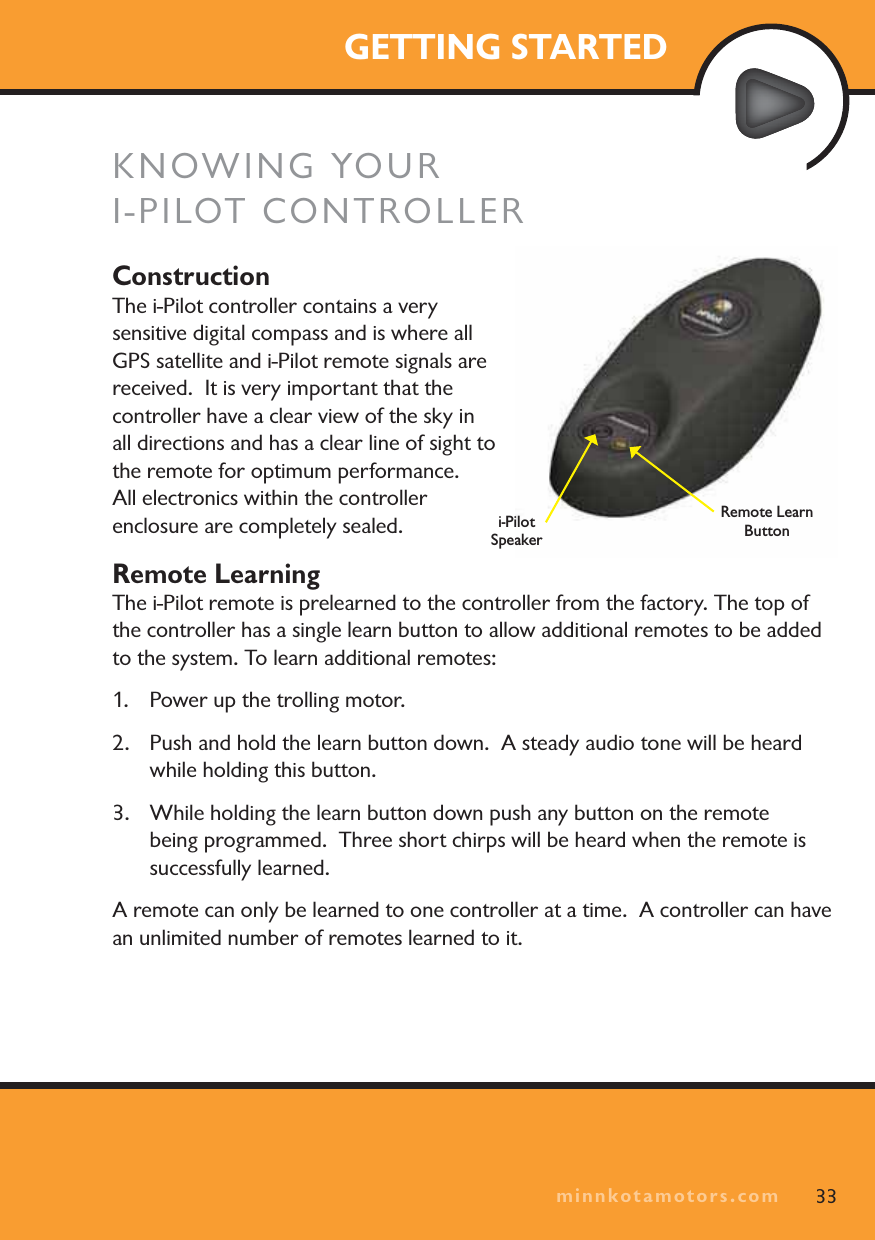
minnkotamotors.comGETTING STARTEDKNOWING YOURI-PILOT CONTROLLERConstructionThe i-Pilot controller contains a very sensitive digital compass and is where all GPS satellite and i-Pilot remote signals are received.  It is very important that the controller have a clear view of the sky in all directions and has a clear line of sight to the remote for optimum performance.  All electronics within the controller enclosure are completely sealed.Remote LearningThe i-Pilot remote is prelearned to the controller from the factory. The top of the controller has a single learn button to allow additional remotes to be added to the system. To learn additional remotes:1. Power up the trolling motor. 2. Push and hold the learn button down.  A steady audio tone will be heard while holding this button.3. While holding the learn button down push any button on the remote being programmed.  Three short chirps will be heard when the remote is successfully learned.A remote can only be learned to one controller at a time.  A controller can have an unlimited number of remotes learned to it.33minnkotamotors.comi-Pilot SpeakerRemote Learn Button
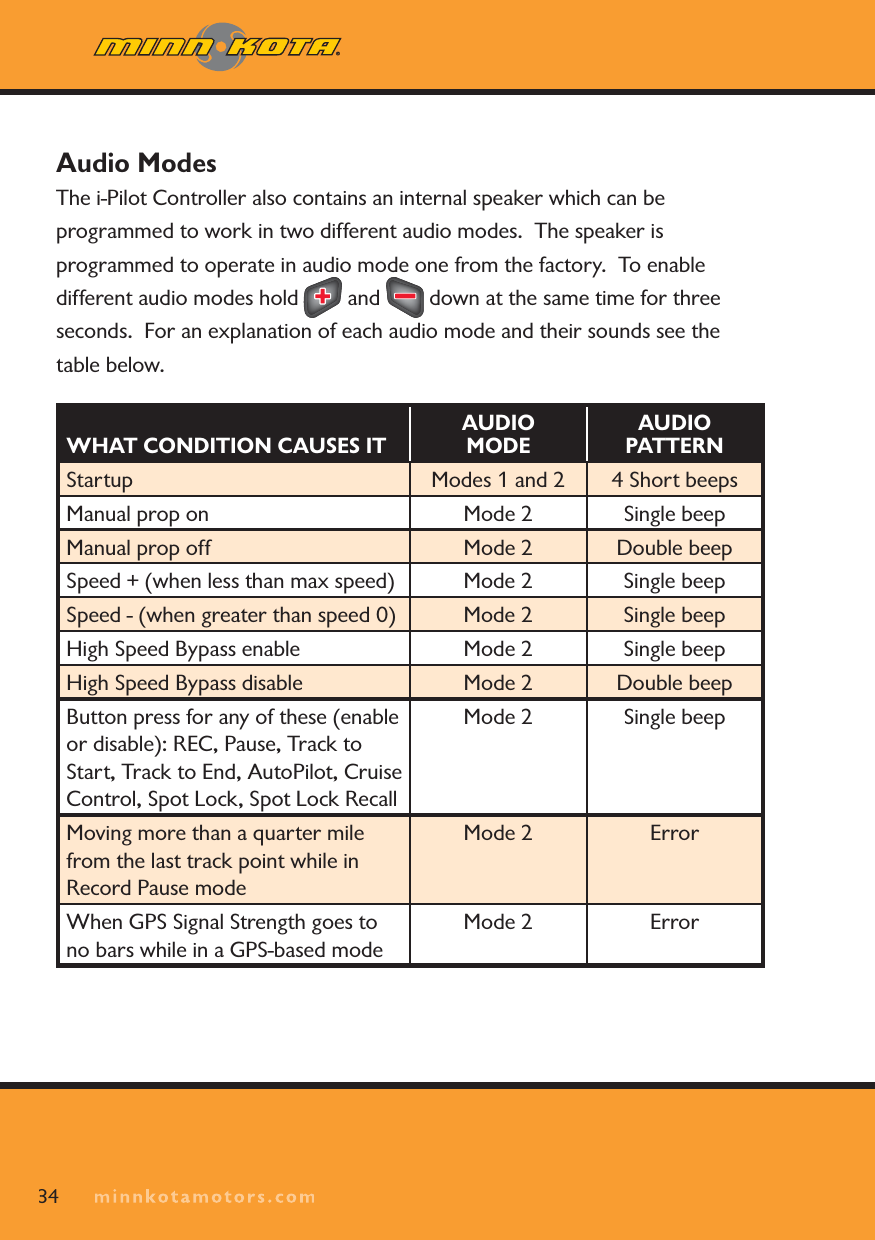
minnkotamotors.comAudio ModesThe i-Pilot Controller also contains an internal speaker which can be programmed to work in two different audio modes.  The speaker is programmed to operate in audio mode one from the factory.  To enable different audio modes hold   and   down at the same time for three seconds. For an explanation of each audio mode and their sounds see the table below. WHAT CONDITION CAUSES ITAUDIO MODEAUDIO PATTERNStartup Modes 1 and 2 4 Short beepsManual prop on Mode 2 Single beep Manual prop off Mode 2 Double beep Speed + (when less than max speed) Mode 2 Single beep Speed - (when greater than speed 0) Mode 2 Single beep High Speed Bypass enable Mode 2 Single beep High Speed Bypass disable Mode 2 Double beep Button press for any of these (enable or disable): REC, Pause, Track to Start, Track to End, AutoPilot, Cruise Control, Spot Lock, Spot Lock RecallMode 2 Single beepMoving more than a quarter mile from the last track point while in Record Pause modeMode 2 ErrorWhen GPS Signal Strength goes to no bars while in a GPS-based modeMode 2 Error34
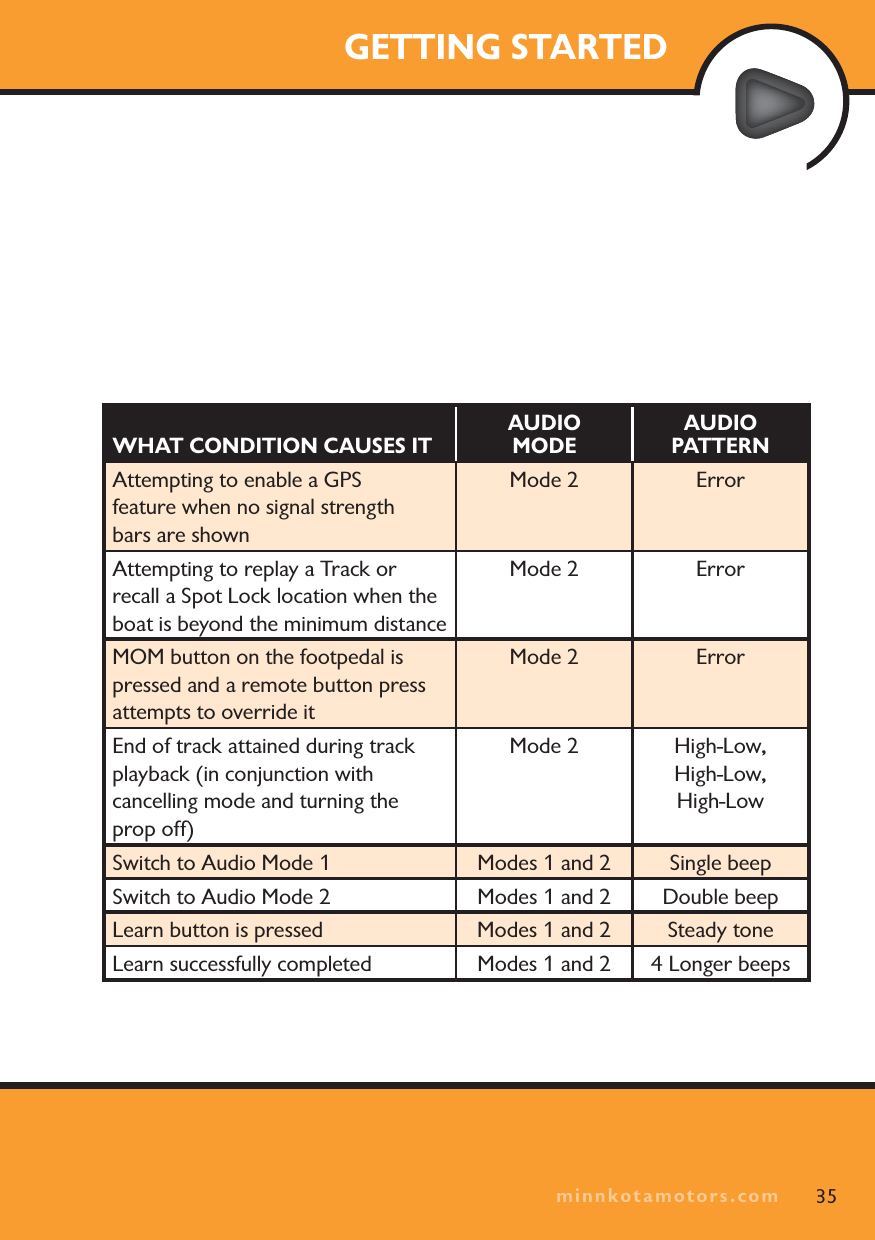
minnkotamotors.comGETTING STARTED35WHAT CONDITION CAUSES ITAUDIO MODEAUDIO PATTERNAttempting to enable a GPSfeature when no signal strength bars are shownMode 2 ErrorAttempting to replay a Track or recall a Spot Lock location when the boat is beyond the minimum distanceMode 2 ErrorMOM button on the footpedal is pressed and a remote button press attempts to override itMode 2 ErrorEnd of track attained during track playback (in conjunction with cancelling mode and turning the prop off)Mode 2 High-Low, High-Low, High-LowSwitch to Audio Mode 1 Modes 1 and 2 Single beepSwitch to Audio Mode 2 Modes 1 and 2 Double beepLearn button is pressed Modes 1 and 2 Steady toneLearn successfully completed Modes 1 and 2 4 Longer beepsminnkotamotors.com
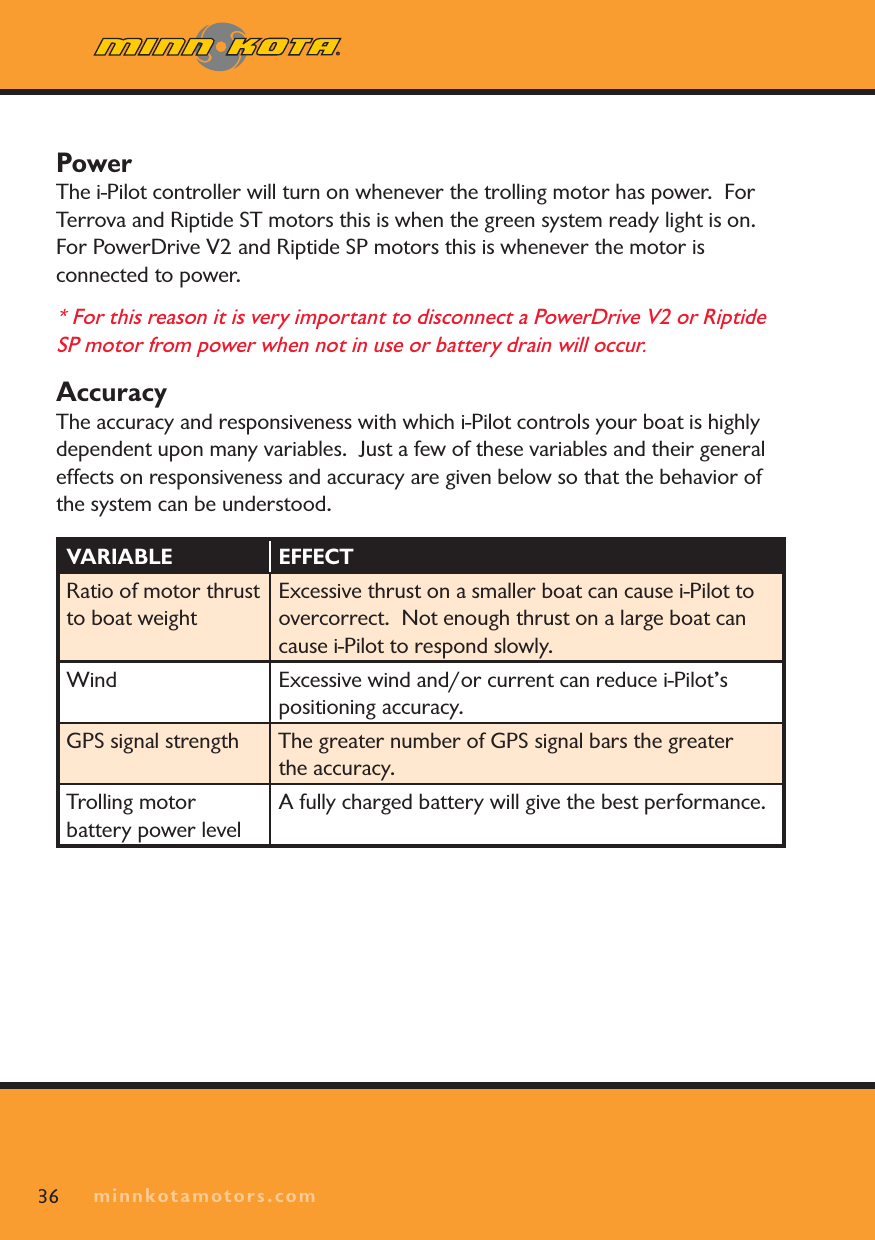
minnkotamotors.com36PowerThe i-Pilot controller will turn on whenever the trolling motor has power.  ForTerrova and Riptide ST motors this is when the green system ready light is on.  For PowerDrive V2 and Riptide SP motors this is whenever the motor is connected to power.  * For this reason it is very important to disconnect a PowerDrive V2 or Riptide SP motor from power when not in use or battery drain will occur. AccuracyThe accuracy and responsiveness with which i-Pilot controls your boat is highly dependent upon many variables.  Just a few of these variables and their general effects on responsiveness and accuracy are given below so that the behavior of the system can be understood.VARIABLE EFFECTRatio of motor thrust to boat weightExcessive thrust on a smaller boat can cause i-Pilot to overcorrect.  Not enough thrust on a large boat can cause i-Pilot to respond slowly.Wind Excessive wind and/or current can reduce i-Pilot’s positioning accuracy.GPS signal strength The greater number of GPS signal bars the greater the accuracy.Trolling motor battery power levelA fully charged battery will give the best performance.minnkotamotors.com
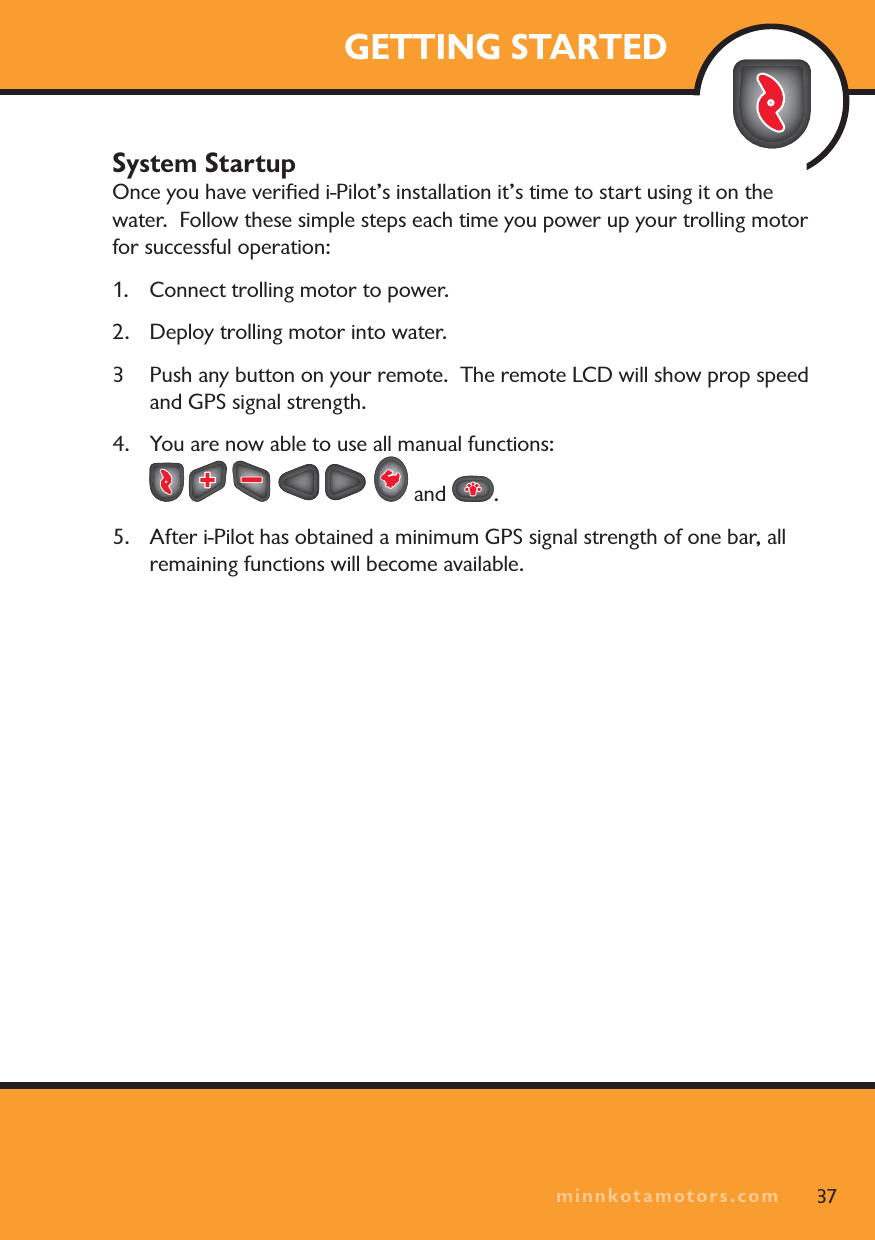
minnkotamotors.comGETTING STARTEDSystem StartupOnce you have verified i-Pilot’s installation it’s time to start using it on the water.  Follow these simple steps each time you power up your trolling motor for successful operation:1. Connect trolling motor to power.2.  Deploy trolling motor into water.3 Push any button on your remote.  The remote LCD will show prop speed and GPS signal strength.4. You are now able to use all manual functions:  and  .5.  After i-Pilot has obtained a minimum GPS signal strength of one bar, all remaining functions will become available.37minnkotamotors.com
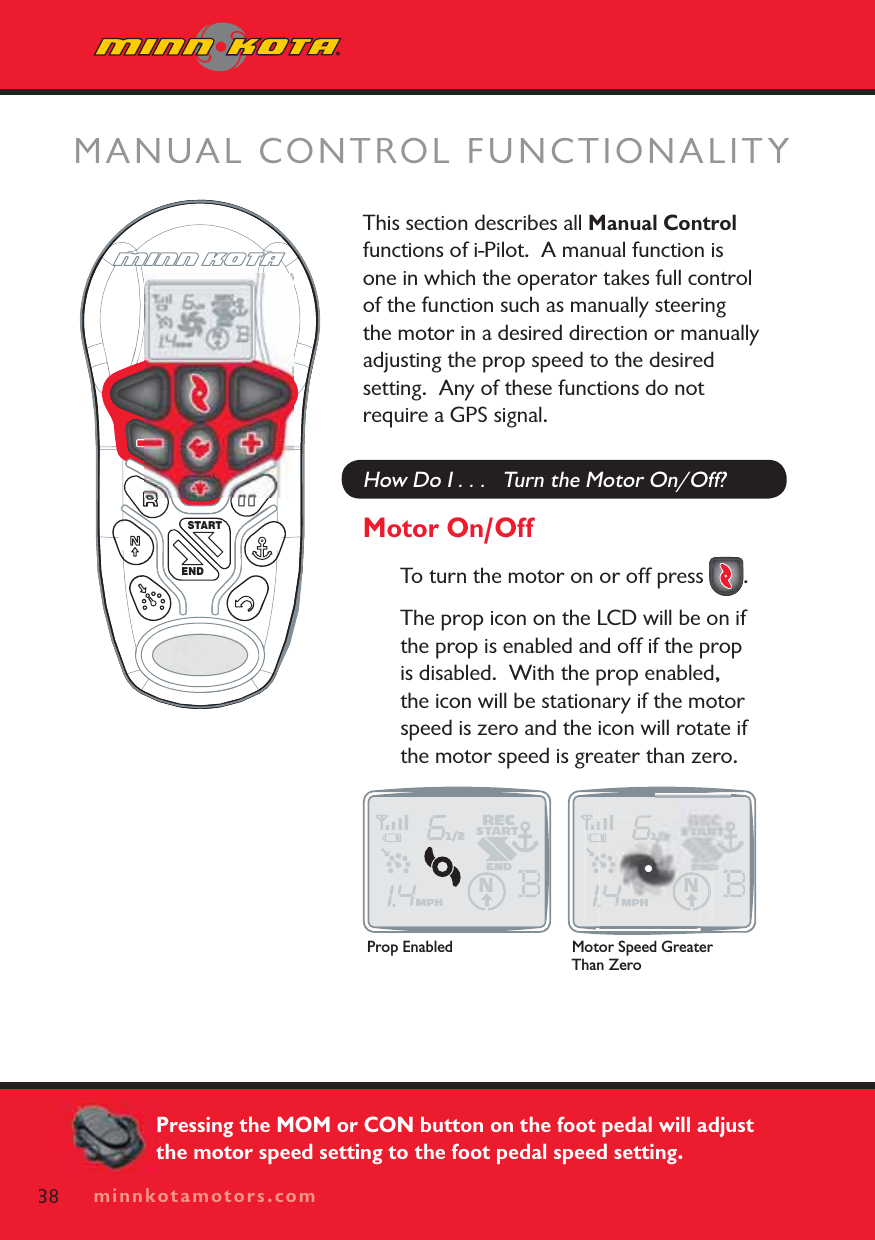
minnkotamotors.comThis section describes all Manual Controlfunctions of i-Pilot.  A manual function is one in which the operator takes full control of the function such as manually steering the motor in a desired direction or manually adjusting the prop speed to the desired setting.  Any of these functions do not require a GPS signal.How Do I . . .   Turn the Motor On/Off?Motor On/OffTo turn the motor on or off press  .  The prop icon on the LCD will be on if the prop is enabled and off if the prop is disabled.  With the prop enabled, the icon will be stationary if the motor speed is zero and the icon will rotate if the motor speed is greater than zero. MANUAL CONTROL FUNCTIONALITYSTARTEND38 minnkotamotors.comProp Enabled Motor Speed Greater Than ZeroPressing the MOM or CON button on the foot pedal will adjust the motor speed setting to the foot pedal speed setting.
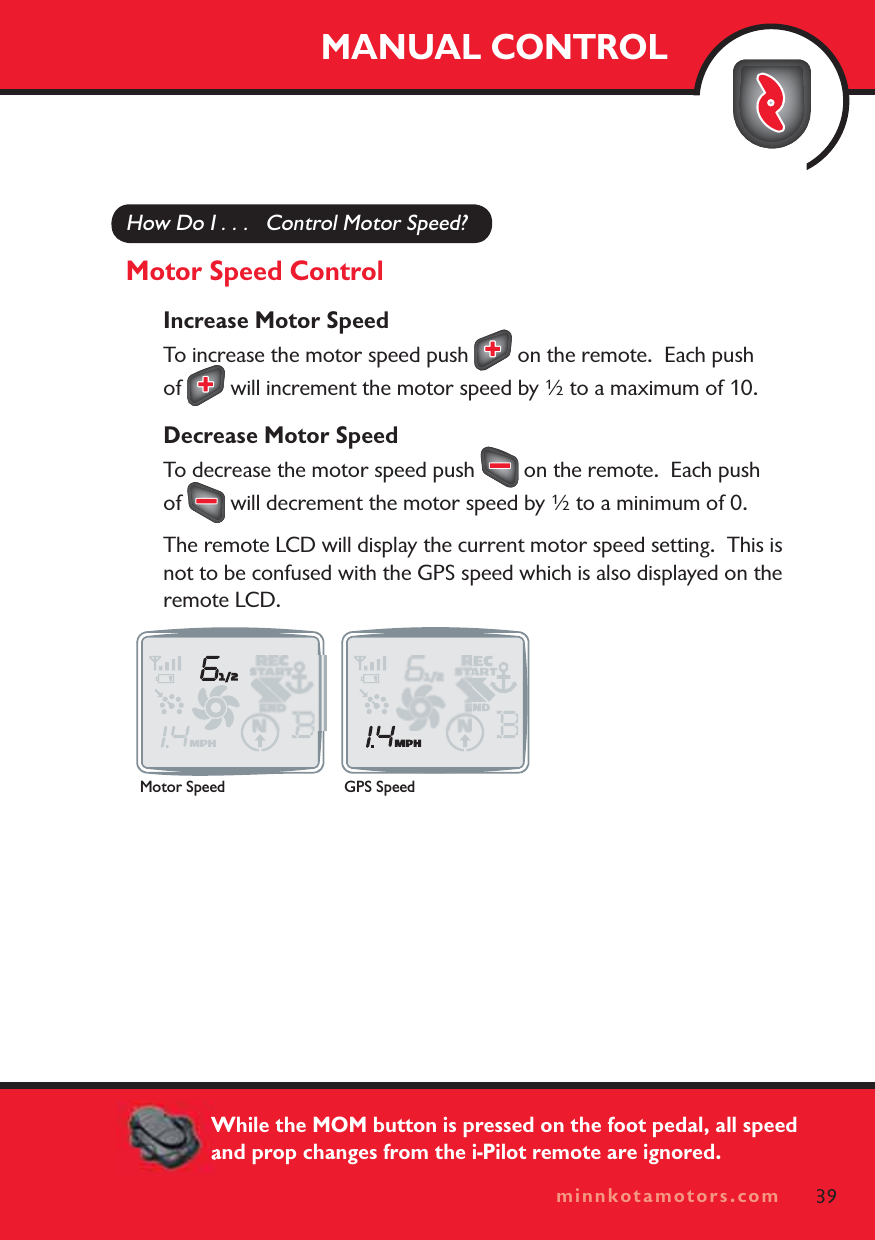
minnkotamotors.comHow Do I . . .   Control Motor Speed?Motor Speed ControlIncrease Motor SpeedTo increase the motor speed push   on the remote.  Each push of  will increment the motor speed by ½ to a maximum of 10.Decrease Motor SpeedTo decrease the motor speed push   on the remote.  Each push of  will decrement the motor speed by ½ to a minimum of 0.The remote LCD will display the current motor speed setting.  This is not to be confused with the GPS speed which is also displayed on the remote LCD.MANUAL CONTROL39minnkotamotors.comMotor Speed GPS SpeedWhile the MOM button is pressed on the foot pedal, all speed and prop changes from the i-Pilot remote are ignored.
minnkotamotors.comHow Do I . . .    Steer the Motor?Motor Steering ControlSteer LeftTo steer the motor to the left press  .Steer rightTo steer the motor to the right press  .If a steering button is held down for more than six to eight seconds, the steering will stop to prevent the coil cord from wrapping on the motor.40 minnkotamotors.com

Navigation menu