Jvc Get0260 003B Users Manual KD G312/G311[EX/EU]
GET0260-003B to the manual be3c9893-a259-4135-b930-b3aae3329790
2015-01-26
: Jvc Jvc-Get0260-003B-Users-Manual-320621 jvc-get0260-003b-users-manual-320621 jvc pdf
Open the PDF directly: View PDF  .
.
Page Count: 64
ENGLISH
FRANÇAIS
CD RECEIVER
RECEPTEUR CD
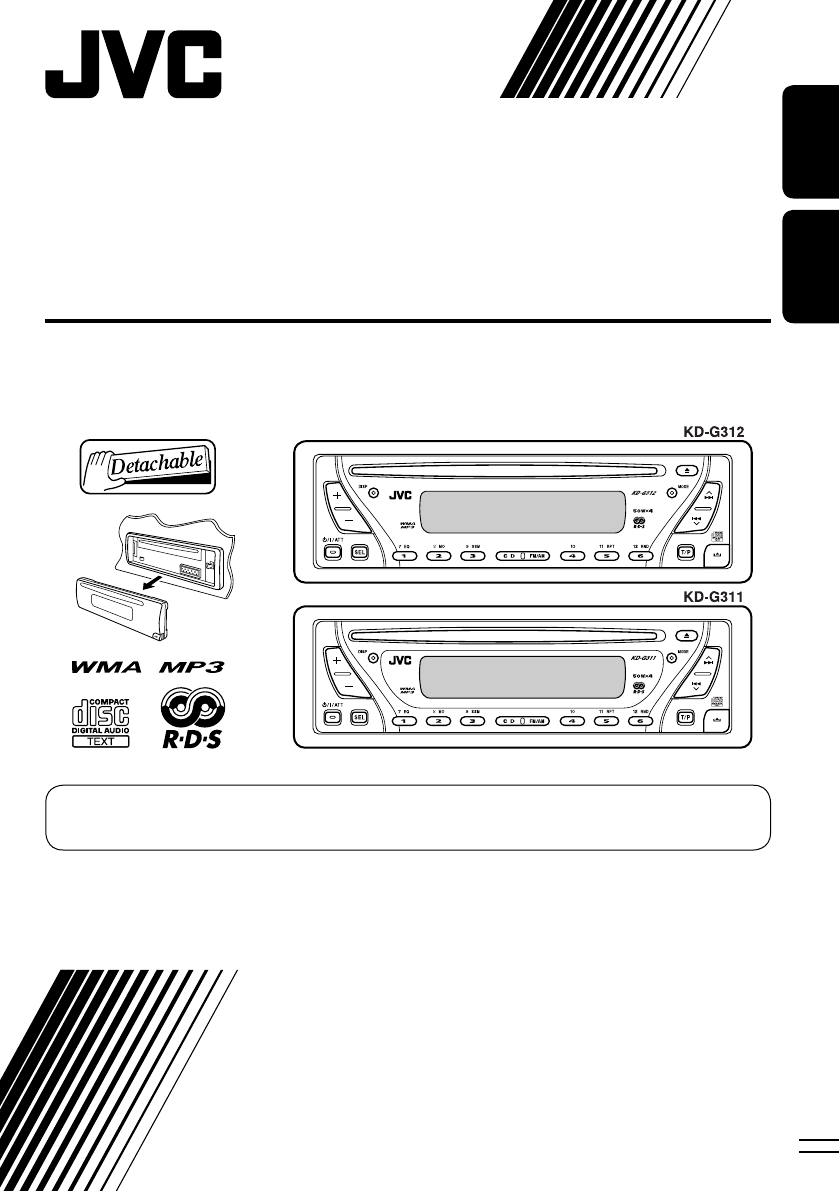
KD-G312/KD-G311
For installation and connections, refer to the separate manual.
Pour l’installation et les raccordements, se référer au manuel séparé.
INSTRUCTIONS
MANUEL D’INSTRUCTIONS
GET0260-003B
[EX/EU]
For canceling the display demonstration, see page 7.
Pour annuler la démonstration des affichages, référez-vous à la page 7.
Cover_KD-G312_003B_f.indd 2Cover_KD-G312_003B_f.indd 2 1/24/05 2:08:10 PM1/24/05 2:08:10 PM
2
ENGLISH
Thank you for purchasing a JVC product.
Please read all instructions carefully before operation, to ensure your complete understanding and to
obtain the best possible performance from the unit.
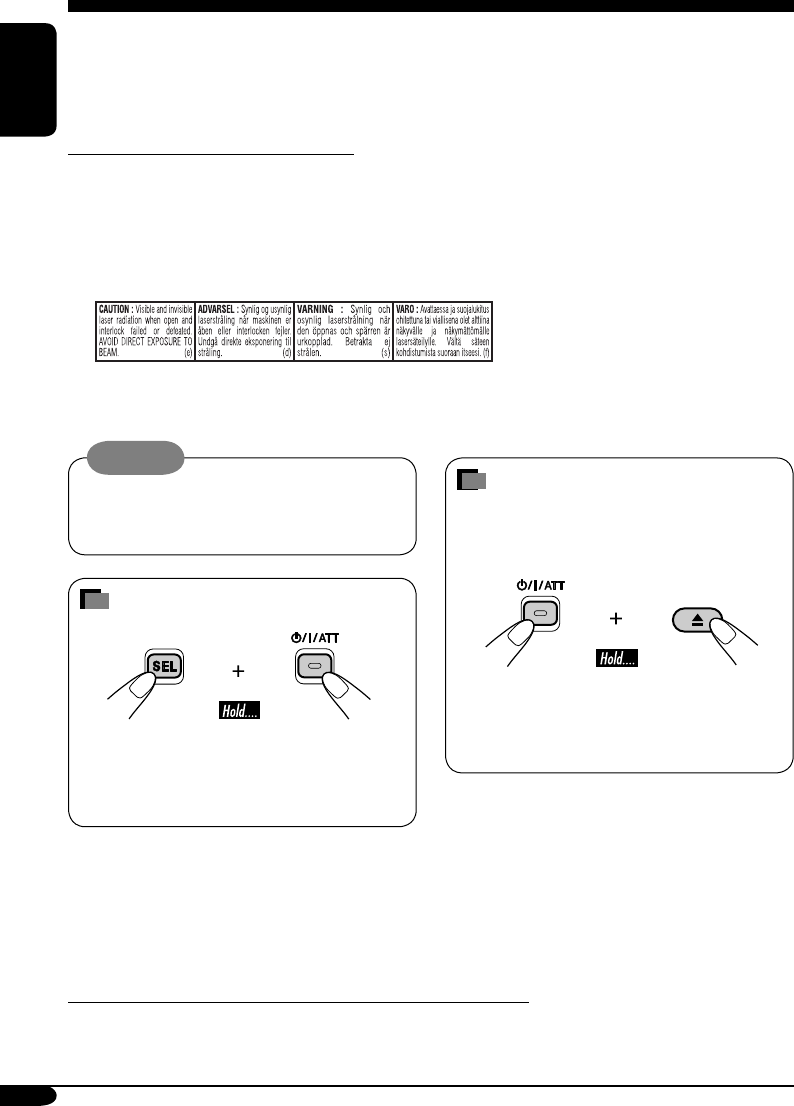
IMPORTANT FOR LASER PRODUCTS
1. CLASS 1 LASER PRODUCT
2. CAUTION: Do not open the top cover. There are no user serviceable parts inside the unit; leave
all servicing to qualified service personnel.
3. CAUTION: Visible and invisible laser radiation when open and interlock failed or defeated.
Avoid direct exposure to beam.
4. REPRODUCTION OF LABEL: CAUTION LABEL, PLACED OUTSIDE THE UNIT.
Warning:
If you need to operate the receiver while
driving, be sure to look ahead carefully or
you may be involved in a traffic accident.
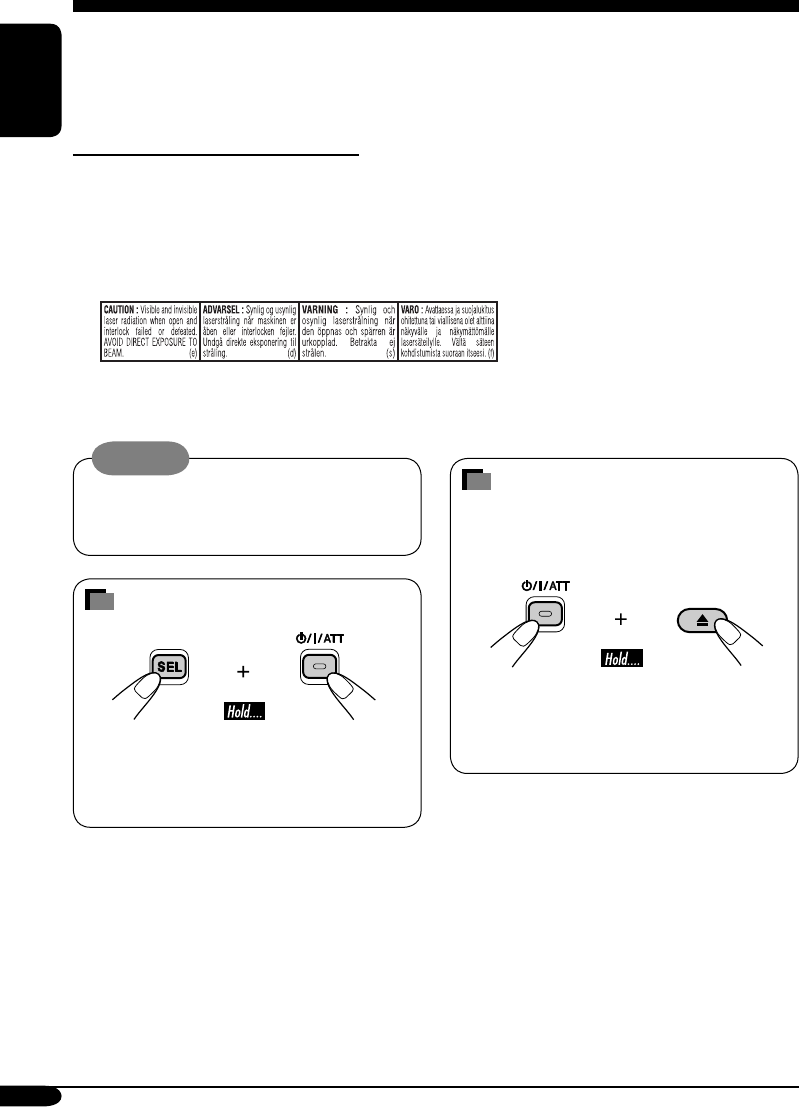
How to reset your unit
• This will reset the microcomputer. Your
preset adjustments will also be erased.
• If a disc is loaded, it will eject. Be careful
not to drop the disc.
How to forcibly eject a disc
If a disc cannot be recognized by the
receiver or cannot be ejected, ejects the disc
as follows.
• If this does not work, try to reset your
receiver.
• Be careful not to drop the disc when it
ejects.
Note: Only for [EX] model users in UK and European countries
For security reasons, a numbered ID card is provided with this receiver, and the same ID number is
imprinted on the receiver’s chassis. Keep the card in a safe place, as it will help the authorities to
identify your receiver if stolen.
EN02-05_KD-G311[EX_EU]f.indd 2EN02-05_KD-G311[EX_EU]f.indd 2 10/27/04 9:35:49 AM10/27/04 9:35:49 AM
3
ENGLISH
How to reset your unit ........................... 2
How to forcibly eject a disc ................... 2
How to read this manual ........................ 4
How to use the MODE button ............... 4
Control panel
— KD-G312/KD-G311 ............... 5
Parts identification ................................. 5
Getting started ....................... 6
Basic operations ........................... 6
Canceling the display demonstrations ... 7
Setting the clock .................................... 7
Radio operations ................... 8
Listening to the radio ........................... 8
Storing stations in memory .................... 9
Listening to a preset station ................... 10
FM RDS operations ................. 11
Searching for your favorite FM RDS
programme
....................................... 11
Storing your favorite programmes ......... 12
Using the standby receptions ................. 12
Tracking the same programme
—Network-Tracking Reception ........ 13
Disc operations ...................... 14
Playing a disc ..................................... 14
Changing the display information ......... 16
Selecting the playback modes ................ 17
Sound adjustments ................ 18
Selecting preset sound modes
(C-EQ: custom equalizer) .................. 18
Adjusting the sound ............................... 19
General settings — PSM ......... 20
Basic procedure ..................................... 20
Detaching the control
panel .................................. 22
Using the remote controller
— RM-RK60 ............................ 23
Main elements and features ................... 23
Maintenance .......................... 24
More about this receiver ........ 25
Troubleshooting ..................... 27
Specifications ......................... 29
*For safety....
• Do not raise the volume level too much, as
this will block outside sounds, making driving
dangerous.
• Stop the car before performing any
complicated operations.
Contents
*Temperature inside the car....
If you have parked the car for a long time in
hot or cold weather, wait until the temperature
in the car becomes normal before operating the
unit.
EN02-05_KD-G312[EX_EU]ff.indd 3EN02-05_KD-G312[EX_EU]ff.indd 3 1/7/05 9:49:59 AM1/7/05 9:49:59 AM
4
ENGLISH
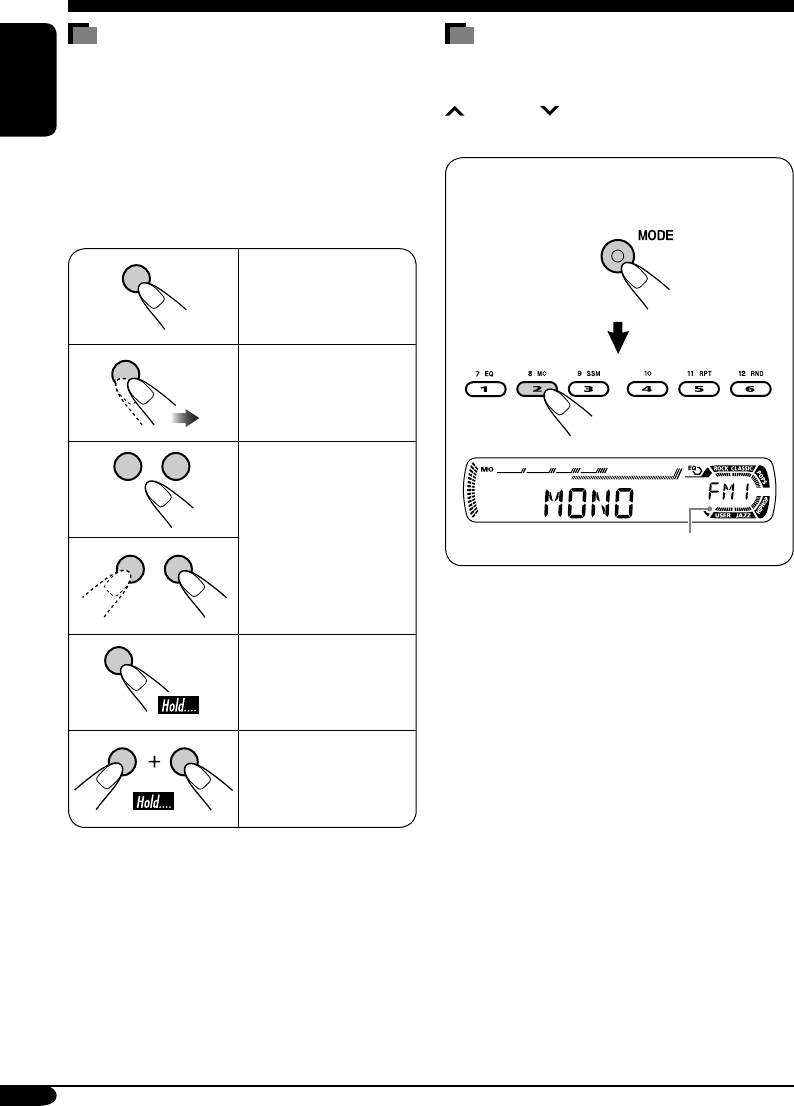
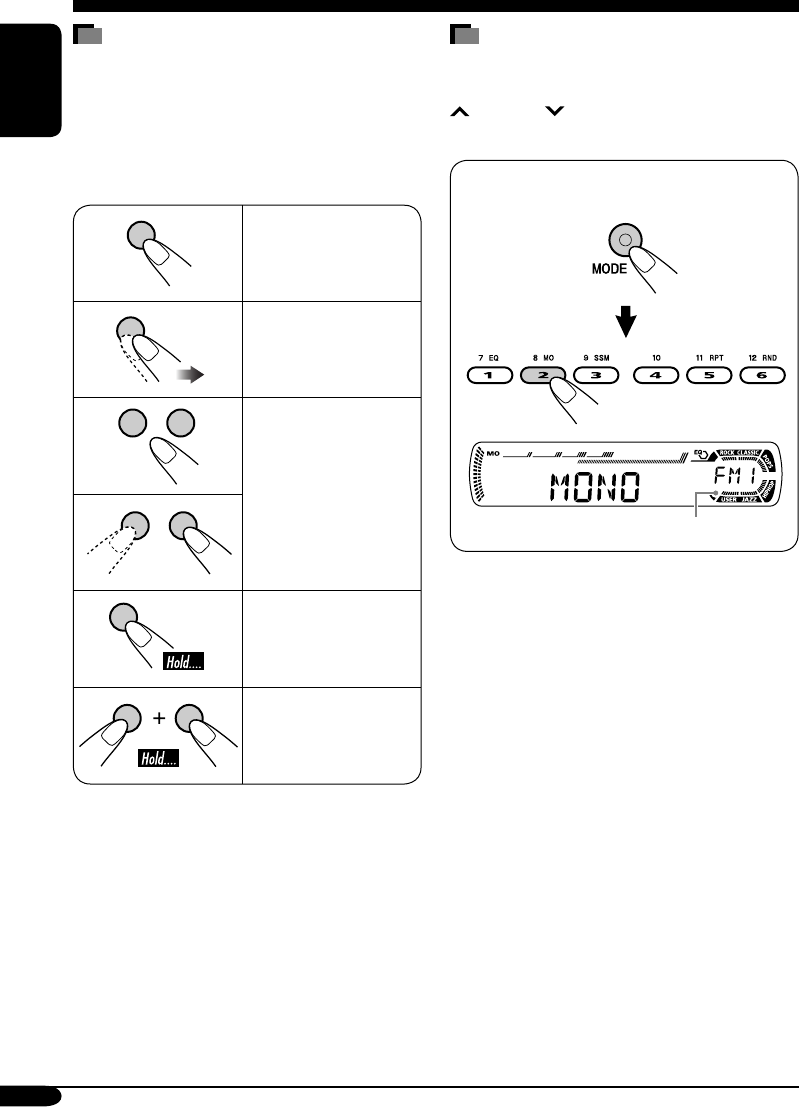
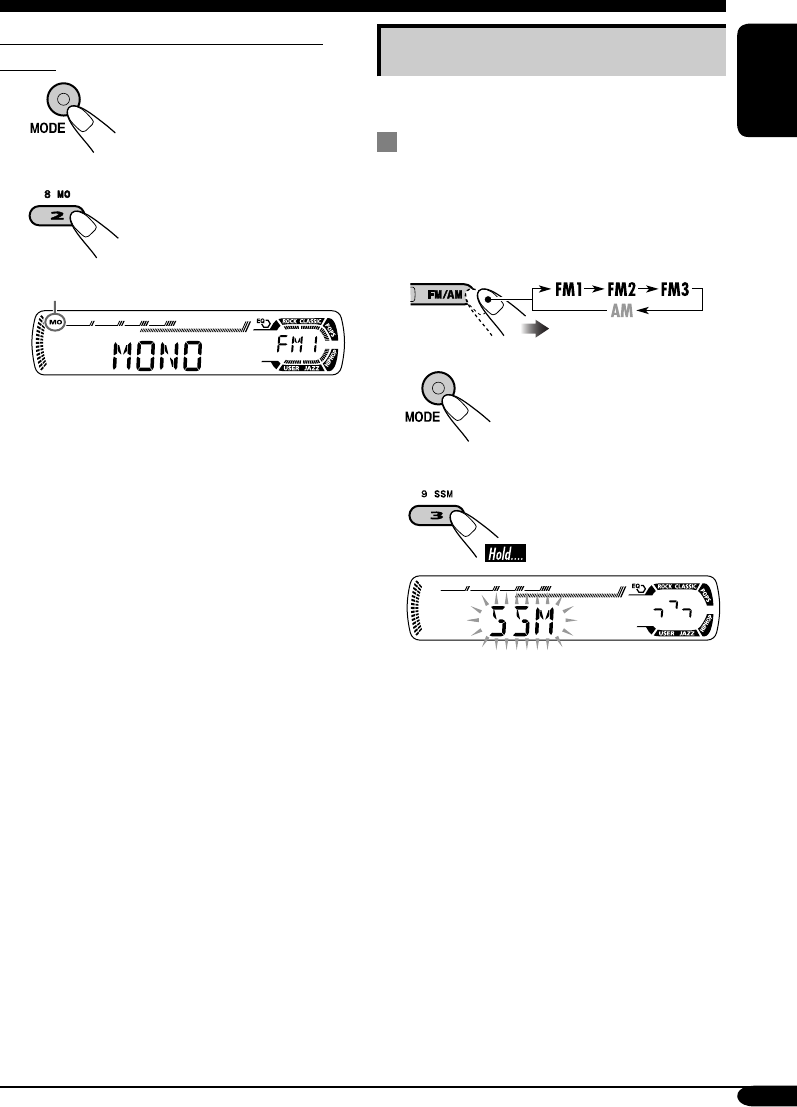
How to use the MODE button
If you press MODE, the receiver goes into
functions mode, then the number buttons and
¢/4 buttons work as different
function buttons.
Ex.: When number button 2 works as
MO (monaural) button.
Time countdown indicator
To use these buttons for original functions
again after pressing MODE, wait for
5 seconds without pressing any of these buttons
until the functions mode is cleared.
• Pressing MODE again also clears the
functions mode.
How to read this manual
The following methods are used to make the
explanations simple and easy-to-understand:
• Some related tips and notes are explained in
“More about this receiver” (see page 25).
• The control panel illustrations used for
explanation in this manual is KD-G311.
• Button operations are mainly explained with
the illustrations as follows:
Press briefly.
Press repeatedly.
Press either one.
Press and hold until
your desired response
begins.
Press and hold both
buttons at the same
time.
EN02-05_KD-G312[EX_EU]ff.indd 4EN02-05_KD-G312[EX_EU]ff.indd 4 1/7/05 9:50:00 AM1/7/05 9:50:00 AM
5
ENGLISH
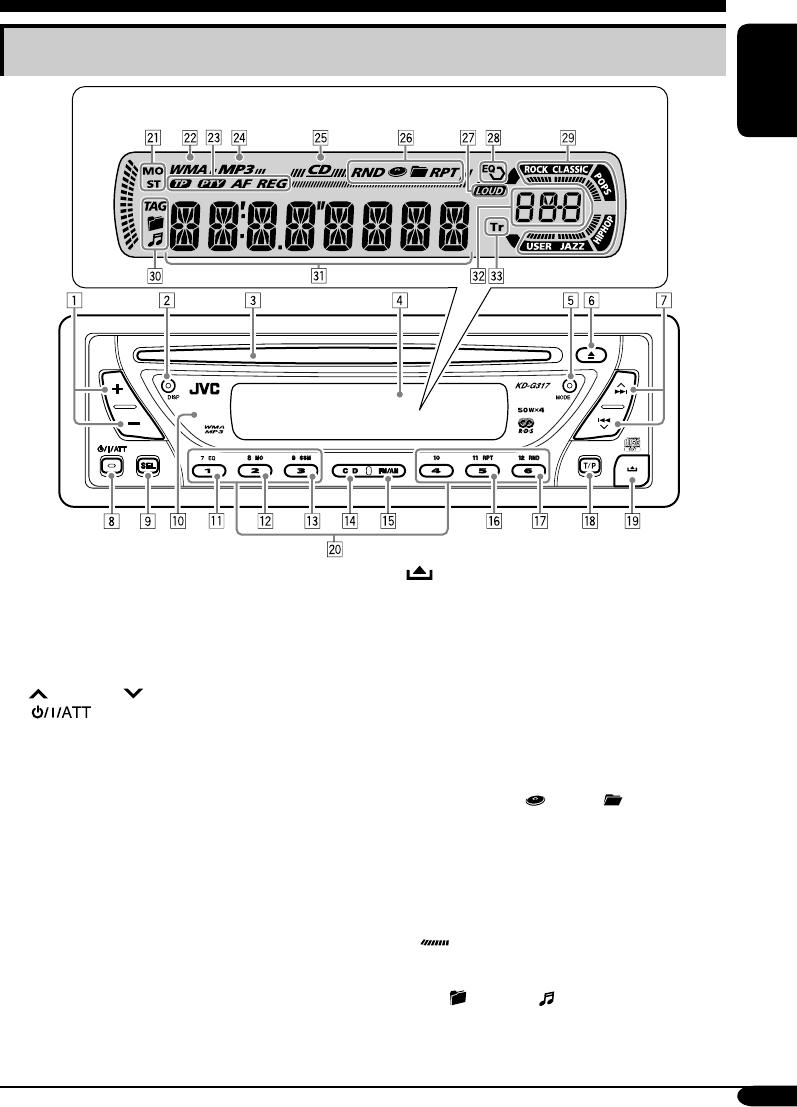
Control panel — KD-G312/KD-G311
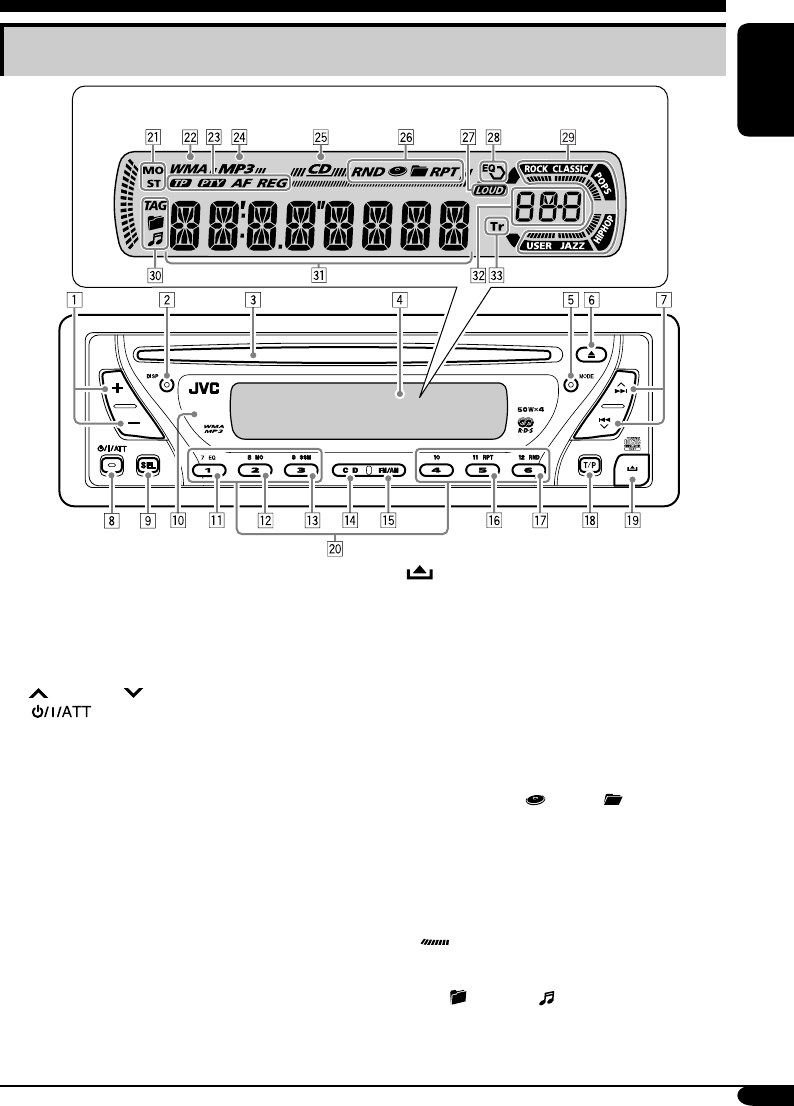
Parts identification
1 +/– buttons
2 DISP (display) button
3 Loading slot
4 Display window
5 MODE button
6 0 (eject) button
7 ¢/4 buttons
8 (standby/on/attenuator) button
9 SEL (select) button
p Remote sensor
• You can control this receiver with an
optionally purchased remote controller.
• DO NOT expose the remote sensor to
strong light (direct sunlight or artificial
lighting).
q EQ (equalizer) button
w MO (monaural) button
e SSM (Strong-station Sequential Memory)
button
r CD button
t FM/AM button
y RPT (repeat) button
u RND (random) button
i T/P (traffic programme/programme type)
button
o (control panel release) button
; Number buttons
Display window
a Tuner reception indicators—MO (monaural),
ST (stereo)
s WMA indicator
d RDS indicators—TP, PTY, AF, REG
f MP3 indicator
g CD indicator
h Playback mode / item indicators—
RND (random), (disc), (folder),
RPT (repeat)
j LOUD (loudness) indicator
k EQ (equalizer) indicator
l Sound mode (C-EQ: custom equalizer)
indicators—ROCK, CLASSIC, POPS,
HIP HOP, JAZZ, USER
• also works as the time countdown
indicator.
/ Disc information indicators—TAG (ID3
Tag), (folder), (track/file)
z Main display
x Source display / Volume level indicator
c Tr (track) indicator
Display window
EN02-05_KD-G312[EX_EU]ff.indd 5EN02-05_KD-G312[EX_EU]ff.indd 5 1/7/05 9:50:00 AM1/7/05 9:50:00 AM
6
ENGLISH
Getting started
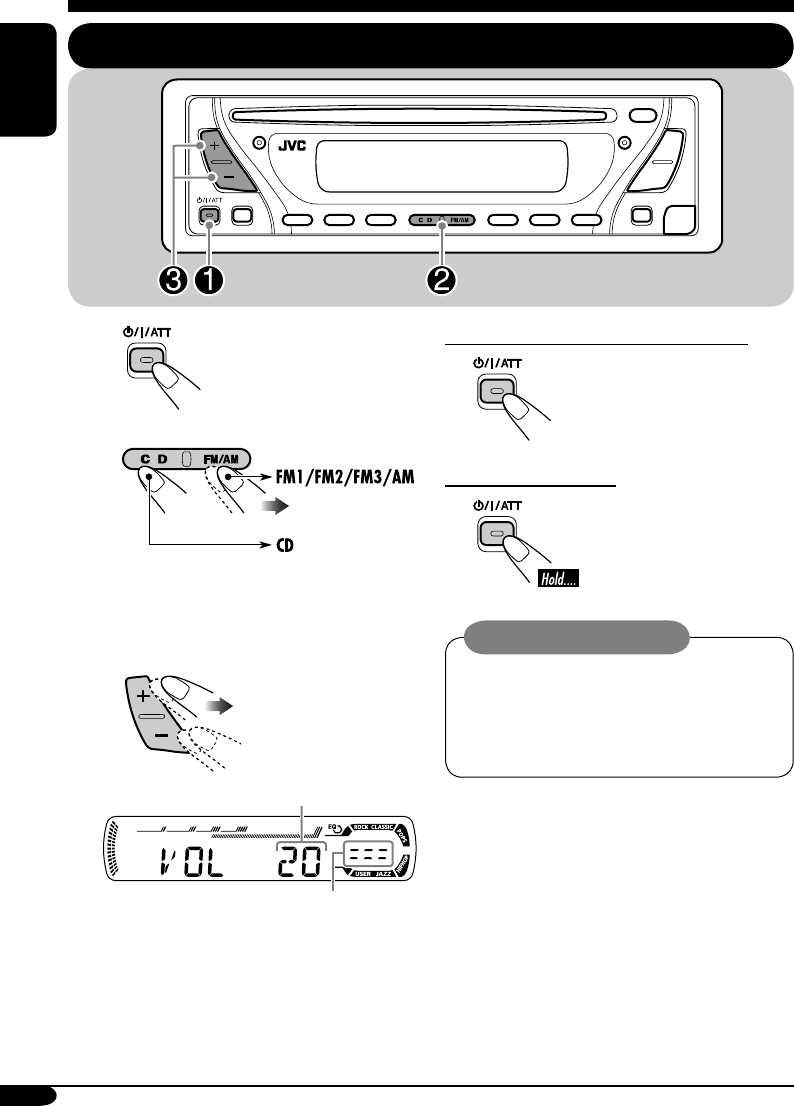
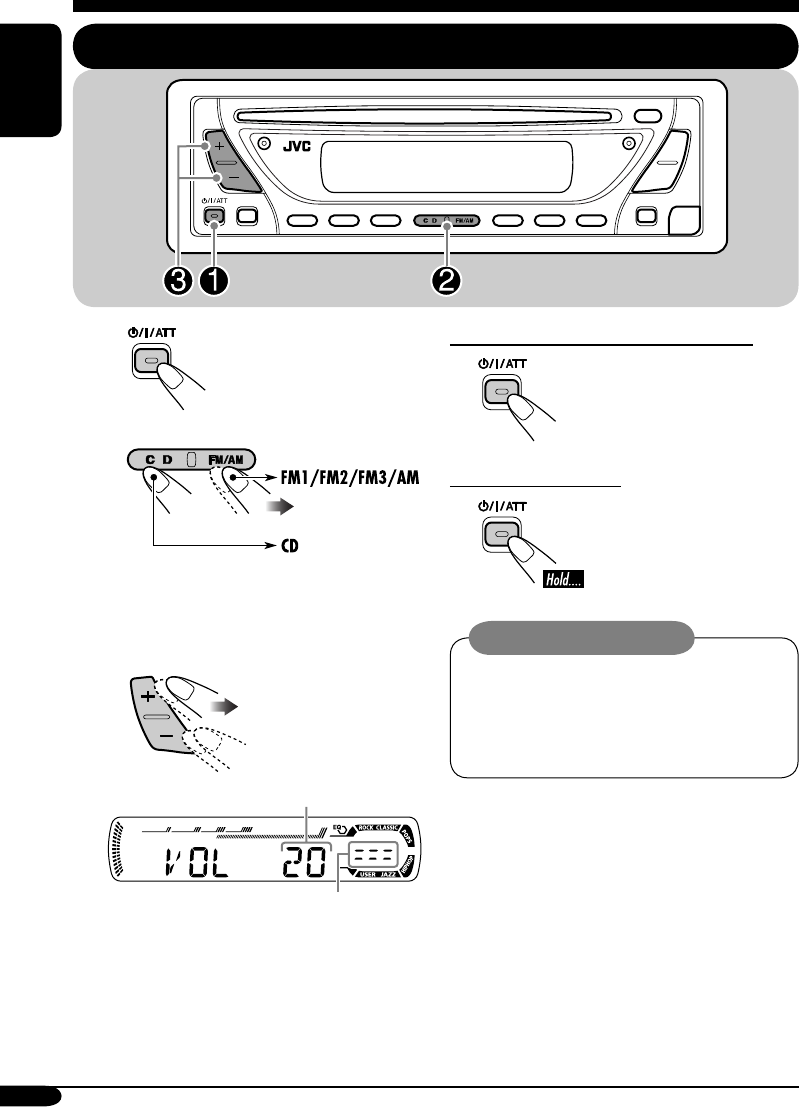
Basic operations
~
Ÿ
You cannot select “CD” as the playback
source if there is no disc in the loading
slot.
!
Volume level appears.
Volume level indicator
⁄ Adjust the sound as you want.
(See pages 18 and 19.)
To drop the volume in a moment (ATT)
To restore the sound, press it
again.
To turn off the power
Caution on volume setting:
Discs produce very little noise compared
with other sources. Lower the volume
before playing a disc to avoid damaging
the speakers by the sudden increase of the
output level.
EN06-11_KD-G311[EX_EU]f.indd 6EN06-11_KD-G311[EX_EU]f.indd 6 10/27/04 9:35:29 AM10/27/04 9:35:29 AM
7
ENGLISH
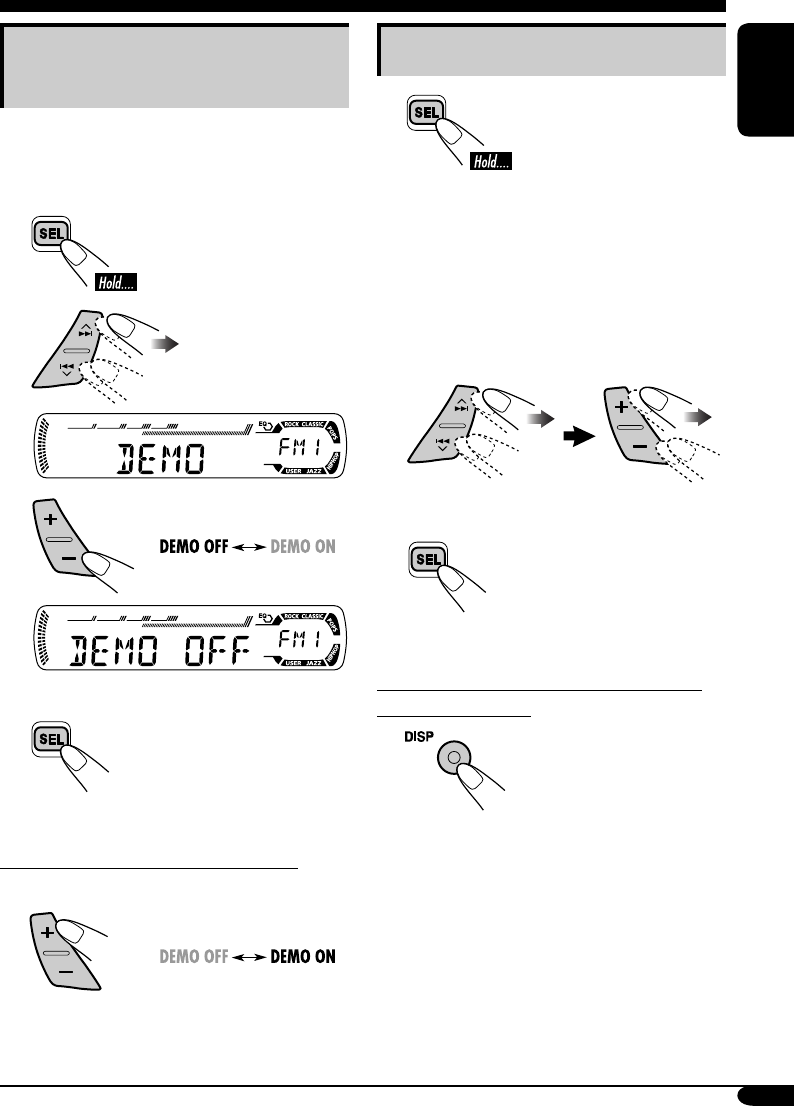
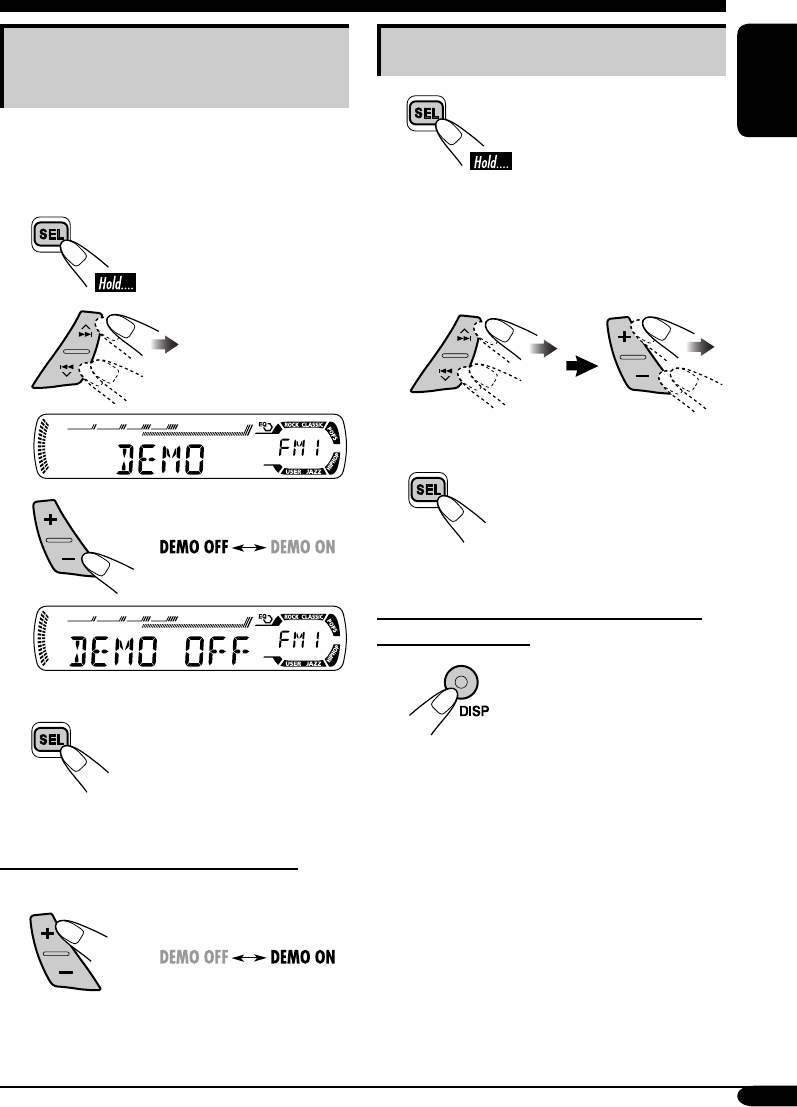
Canceling the display
demonstrations
If no operations are done for about 20 seconds,
display demonstration starts.
[Initial: DEMO ON]—see page 20.
1
2
3
4 Finish the procedure.
To activate the display demonstration
In step 3 above...
Setting the clock
1
2 Set the hour, minute, and clock
system.
1 Select “CLOCK H” (hour), then
adjust the hour.
2 Select “CLOCK M” (minute),
then adjust the minute.
3 Select “24H/12H,” then select
“24H” (hour) or “12H” (hour).
3 Finish the procedure.
To check the current clock time when the
power is turned off
EN06-11_KD-G311[EX_EU]f.indd 7EN06-11_KD-G311[EX_EU]f.indd 7 11/2/04 6:02:23 PM11/2/04 6:02:23 PM
8
ENGLISH
Radio operations
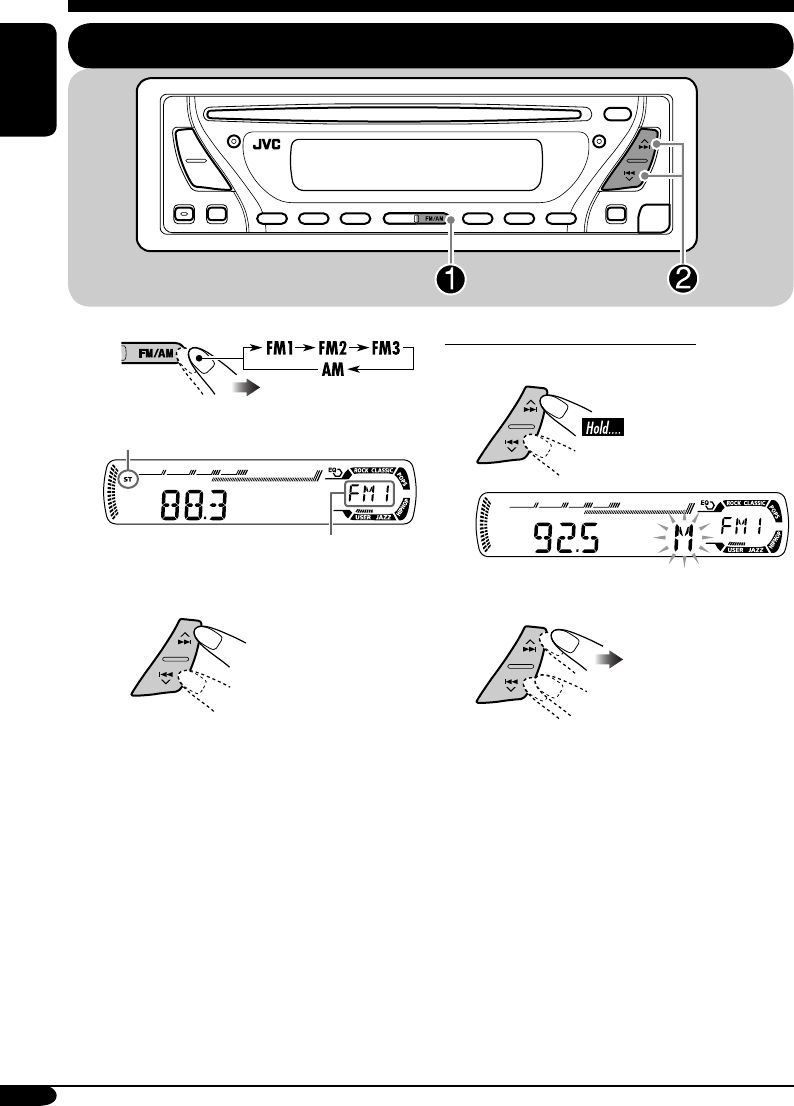
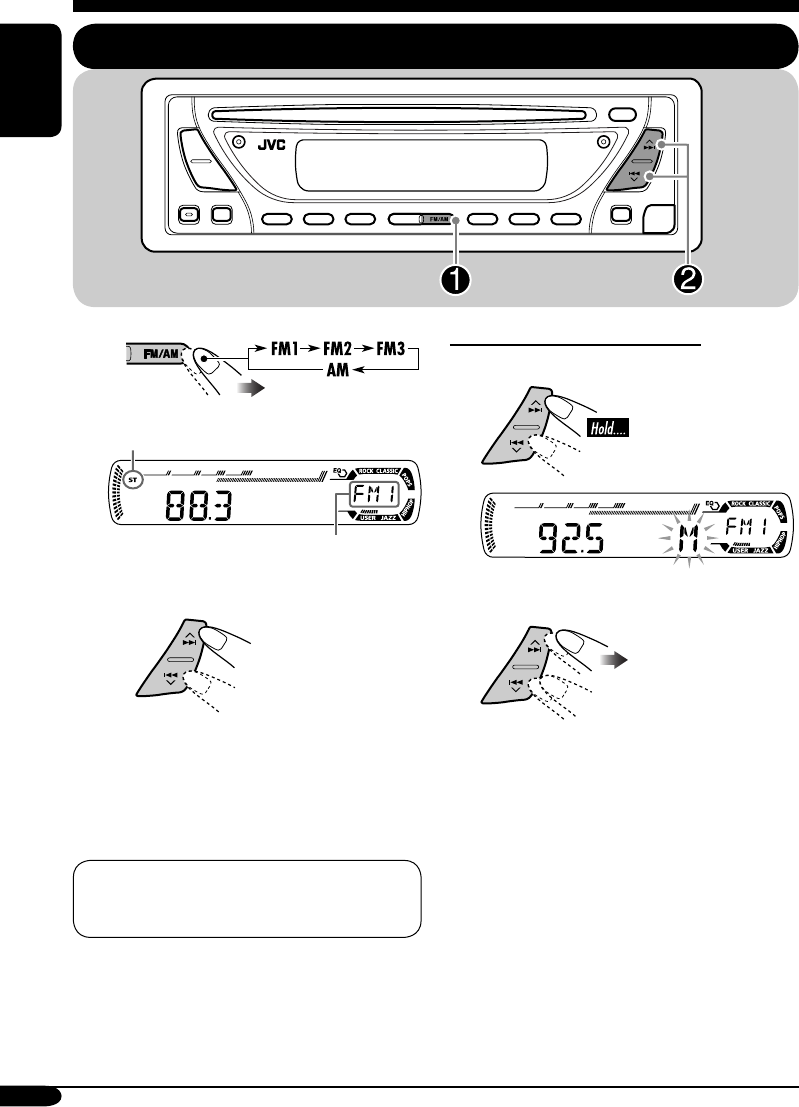
Listening to the radio
~
Lights up when receiving an FM stereo
broadcast with sufficient signal strength.
Selected band appears.
Ÿ Start searching for a station.
When a station is received, searching
stops.
To stop searching, press the same
button again.
To tune in to a station manually
In step Ÿ on the left...
1
2 Select the desired station frequencies.
EN06-11_KD-G311[EX_EU]f.indd 8EN06-11_KD-G311[EX_EU]f.indd 8 10/27/04 9:35:31 AM10/27/04 9:35:31 AM
9
ENGLISH
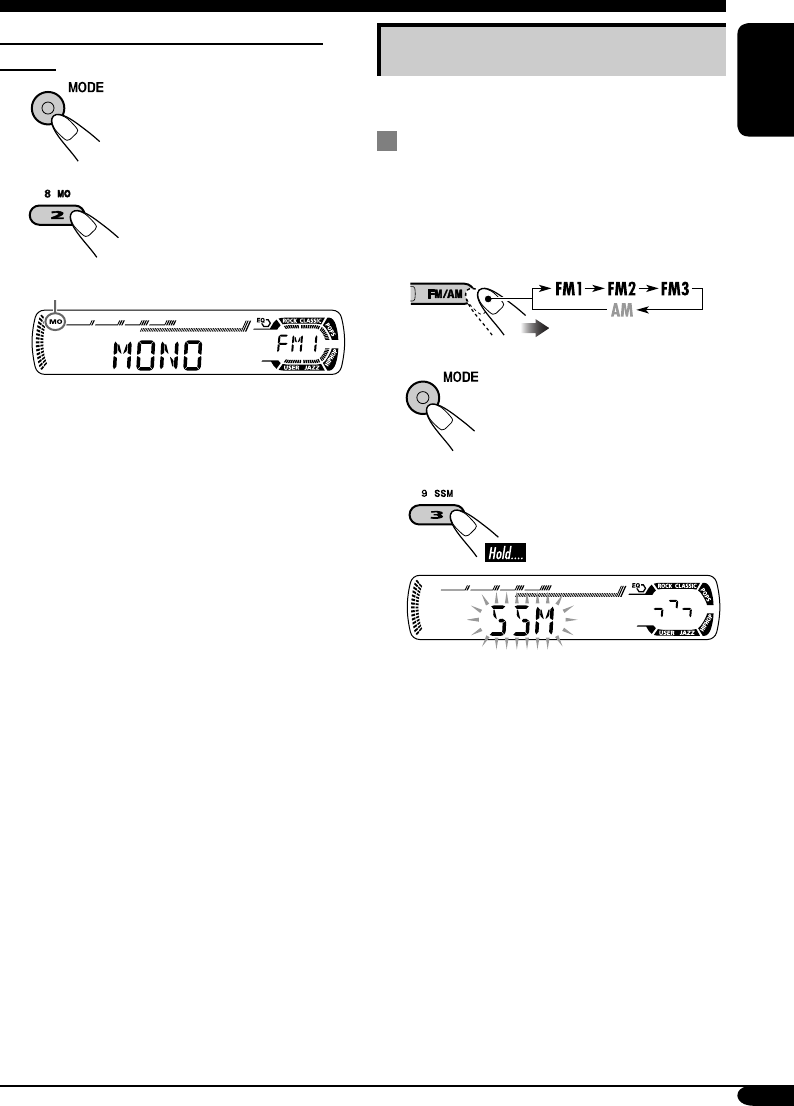
Storing stations in memory
You can preset six stations for each band.
FM station automatic presetting —
SSM (Strong-station Sequential
Memory)
1 Select the FM band (FM1 – FM3)
you want to store into.
2
3
“SSM” flashes, then disappears when
automatic presetting is over.
Local FM stations with the strongest signals are
searched and stored automatically in the FM
band.
When an FM stereo broadcast is hard to
receive
1
2
Lights up when monaural mode is activated.
Reception improves, but stereo effect will
be lost.
To restore the stereo effect, repeat the same
procedure so that the MO indicator goes off.
EN06-11_KD-G311[EX_EU]f.indd 9EN06-11_KD-G311[EX_EU]f.indd 9 10/27/04 9:35:32 AM10/27/04 9:35:32 AM
10
ENGLISH
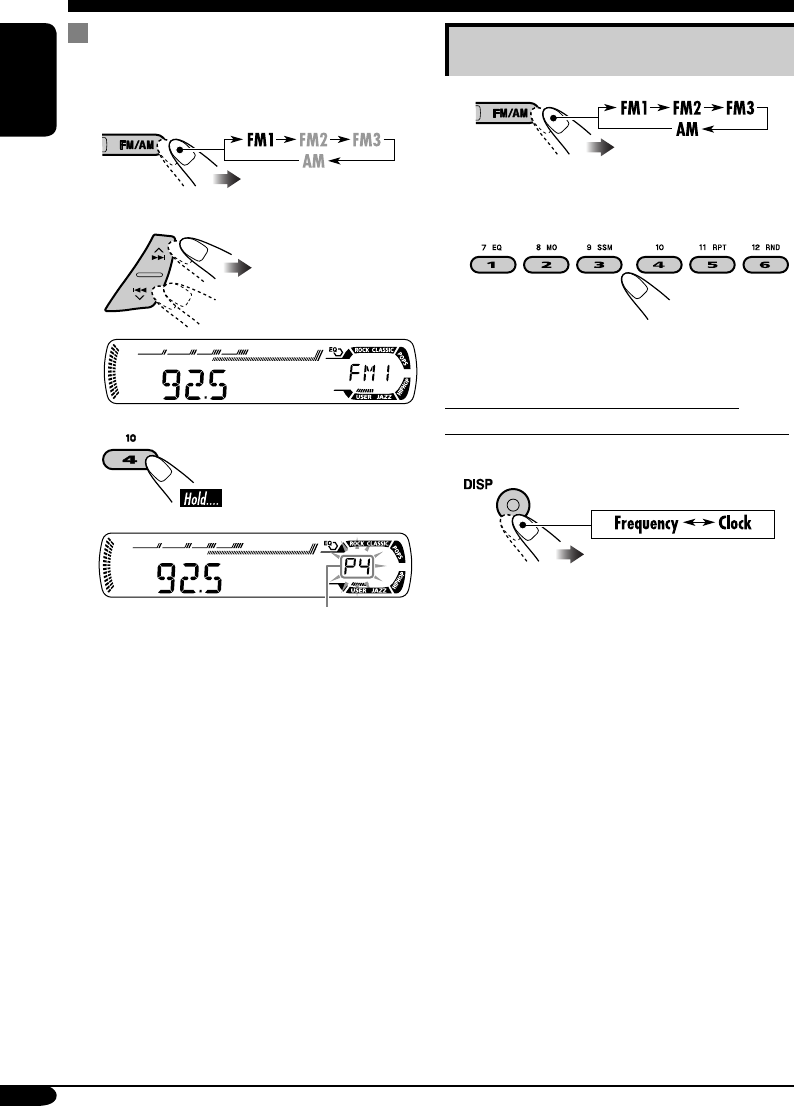
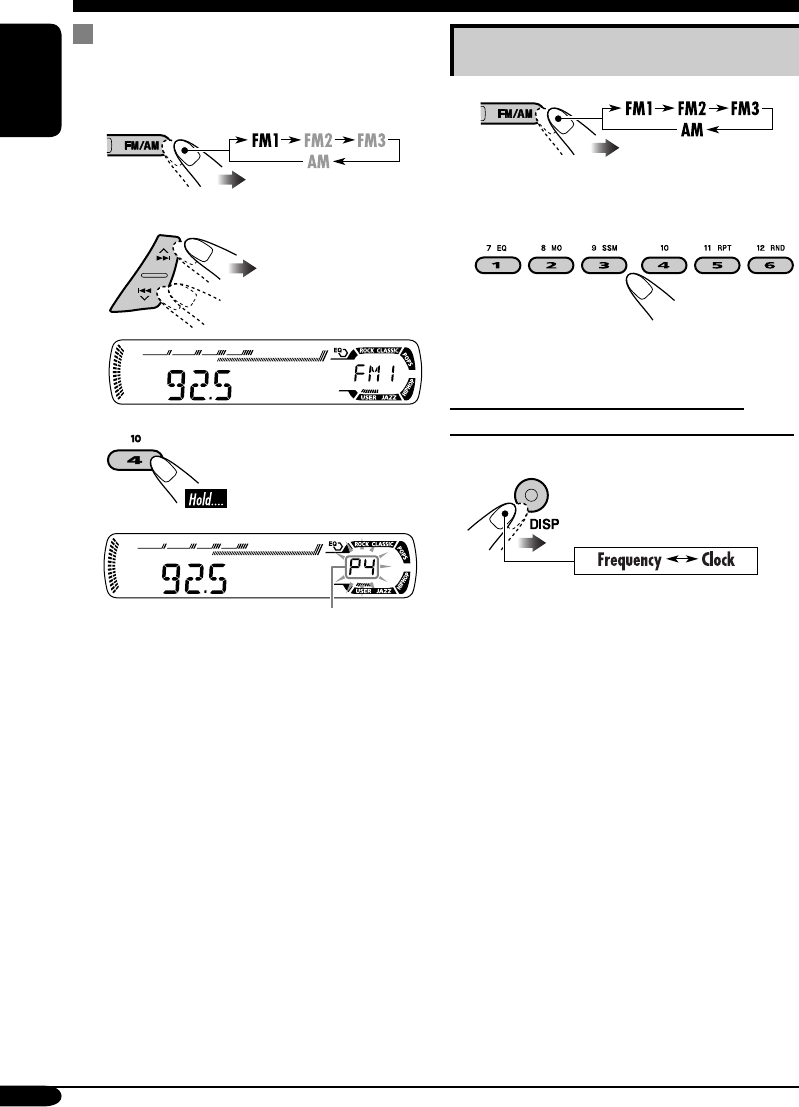
Manual presetting
Ex.: Storing FM station of 92.5 MHz into the
preset number 4 of the FM1 band.
1
2
3
Preset number flashes for a while.
Listening to a preset station
1
2 Select the preset station (1 – 6) you
want.
To check the current clock time while
listening to an FM (non-RDS) or AM station
• For FM RDS stations, see page 13.
EN06-11_KD-G311[EX_EU]f.indd 10EN06-11_KD-G311[EX_EU]f.indd 10 10/27/04 9:35:32 AM10/27/04 9:35:32 AM
11
ENGLISH
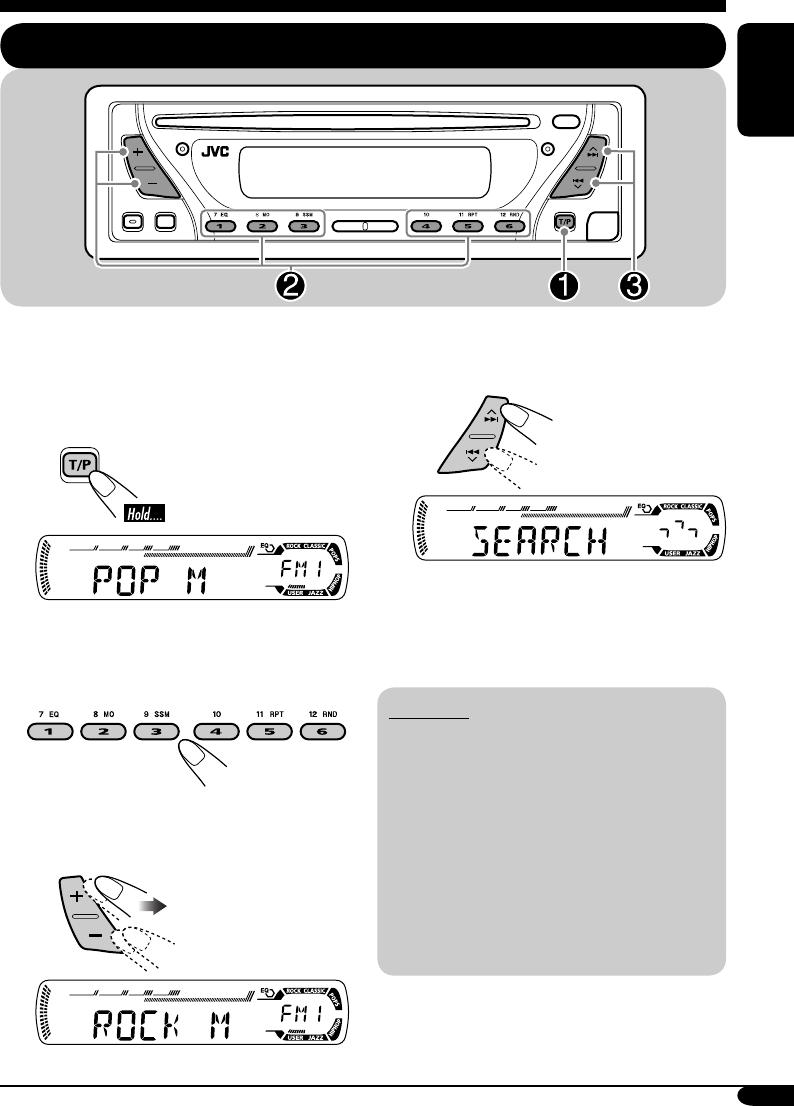
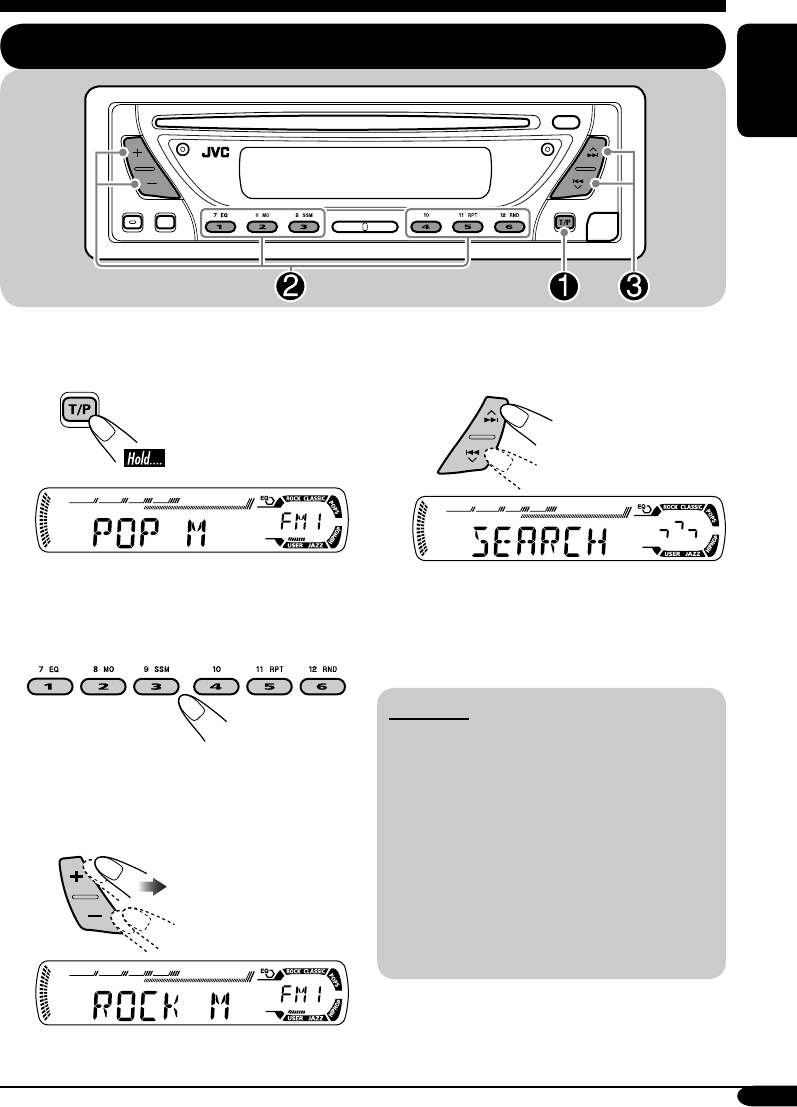
You can tune in to a station broadcasting your
favorite programme by searching for a PTY code.
•
To store your favourite programme, see page
12.
~
The last selected PTY code appears.
Ÿ Select one of your favorite
programme type.
or
Select one of the twenty-nine PTY
codes.
Ex.: When “ROCK M” is selected
FM RDS operations
Searching for your favorite FM RDS programme
! Start searching for your favorite
programme.
If there is a station broadcasting a
programme of the same PTY code as
you have selected, that station is tuned
in.
PTY codes
NEWS, AFFAIRS, INFO, SPORT,
EDUCATE, DRAMA, CULTURE,
SCIENCE, VARIED, POP M (music),
ROCK M (music), EASY M (music),
LIGHT M (music), CLASSICS,
OTHER M (music), WEATHER,
FINANCE, CHILDREN, SOCIAL,
RELIGION, PHONE IN, TRAVEL,
LEISURE, JAZZ, COUNTRY,
NATION M (music), OLDIES,
FOLK M (music), DOCUMENT
EN06-11_KD-G312[EX_EU]ff.indd 11EN06-11_KD-G312[EX_EU]ff.indd 11 1/7/05 9:50:21 AM1/7/05 9:50:21 AM
12
ENGLISH
What you can do with RDS
RDS (Radio Data System) allows FM
stations to send an additional signal along
with their regular programme signals.
By receiving the RDS data, this receiver can
do the following:
•
Programme Type (PTY) Search (see page 11)
• Temporarily switches to Traffic
Announcement—TA Standby Reception
(see the right column)
•
Temporarily switches to your favorite
programme—PTY Standby Reception (see
pages 13 and 21)
•
Tracing the same programme automatically
—Network-Tracking Reception (see page 13)
• Programme Search (see page 21)
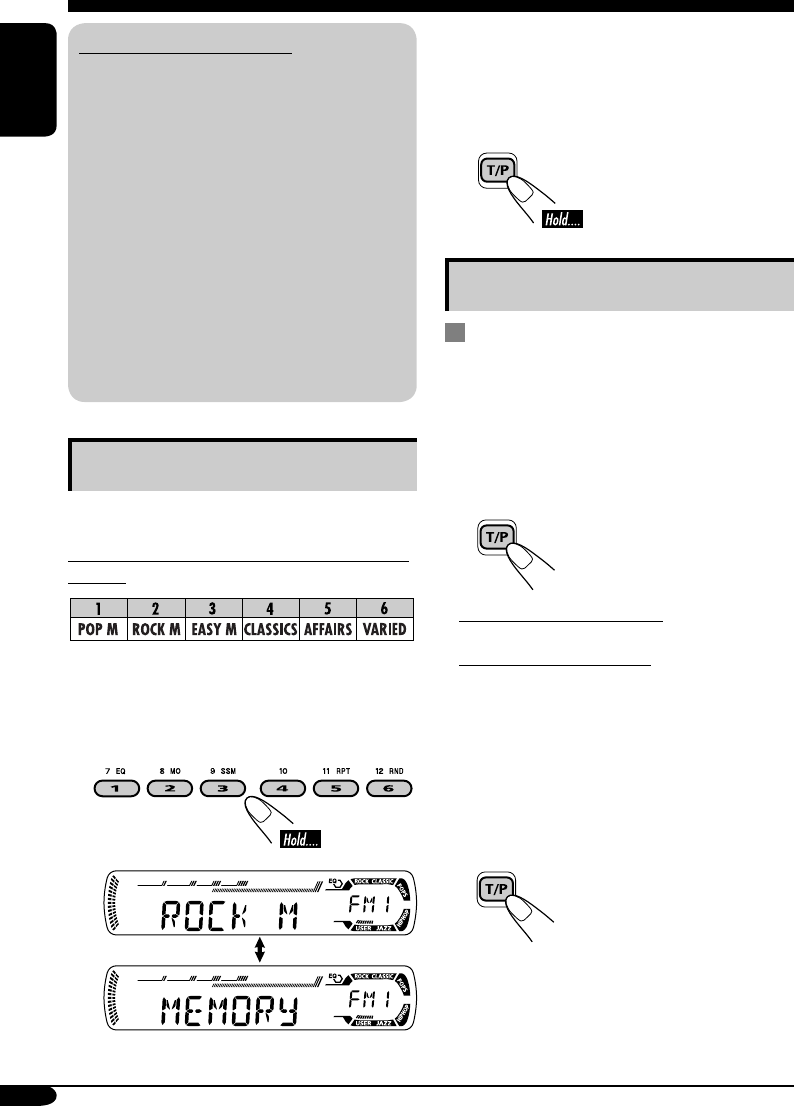
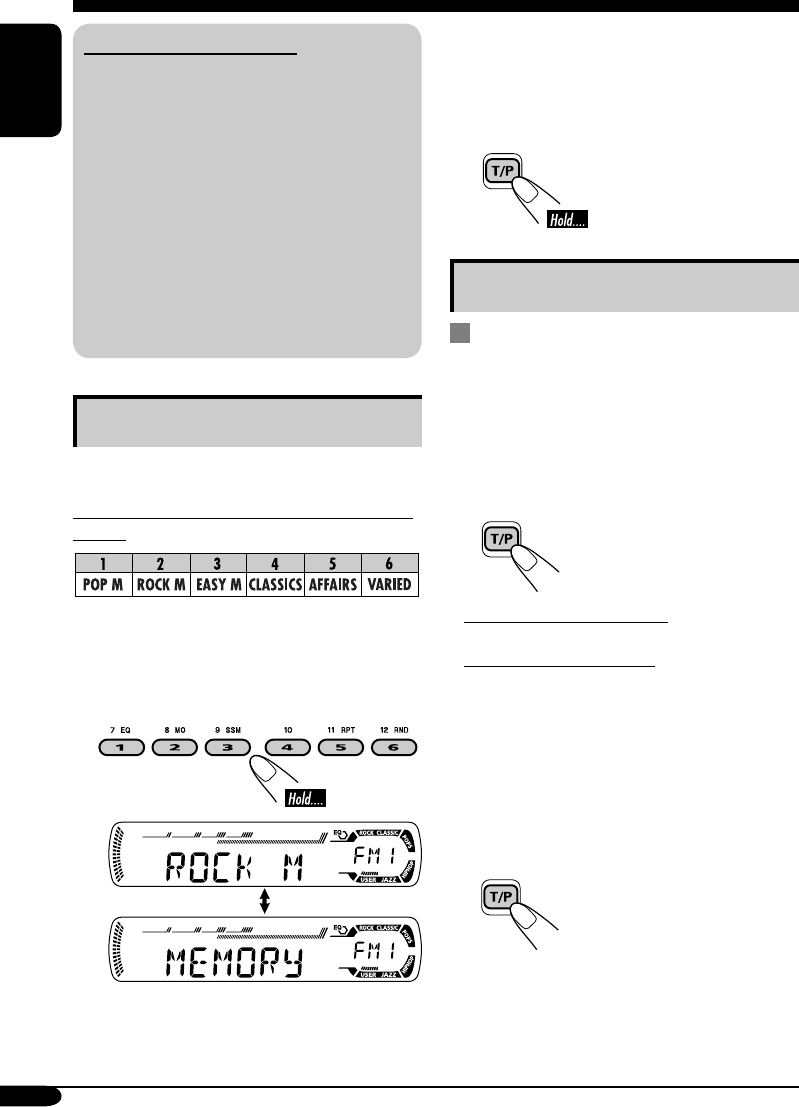
Storing your favorite programmes
You can store six favorite programme types.
Preset programme types in the number buttons
(1 to 6):
1 Select a PTY code (see page 11).
2 Select the preset number (1 – 6) you
want to store into.
Ex.: When “ROCK M” is selected
3 Repeat steps 1 and 2 to store
other PTY codes into other preset
numbers.
4 Finish the procedure.
Using the standby receptions
TA Standby Reception
TA Standby Reception allows the receiver to
switch temporarily to Traffic Announcement
(TA) from any source other than AM.
The volume changes to the preset TA volume
level (see page 21).
To activate TA Standby Reception
The TP indicator either
lights up or flashes.
• If the TP indicator lights up, TA Standby
Reception is activated.
• If the TP indicator flashes, TA Standby
Reception is not yet activated. (This occurs
when you are listening to an FM station
without the RDS signals required for TA
Standby Reception.)
To activate TA Standby Reception, tune in to
another station providing these signals. The
TP indicator will stop flashing and remain lit.
To deactivate the TA Standby Reception
The TP indicator goes off.
EN12-17_KD-G312[EX_EU]ff.indd 12EN12-17_KD-G312[EX_EU]ff.indd 12 1/12/05 6:12:52 PM1/12/05 6:12:52 PM
13
ENGLISH
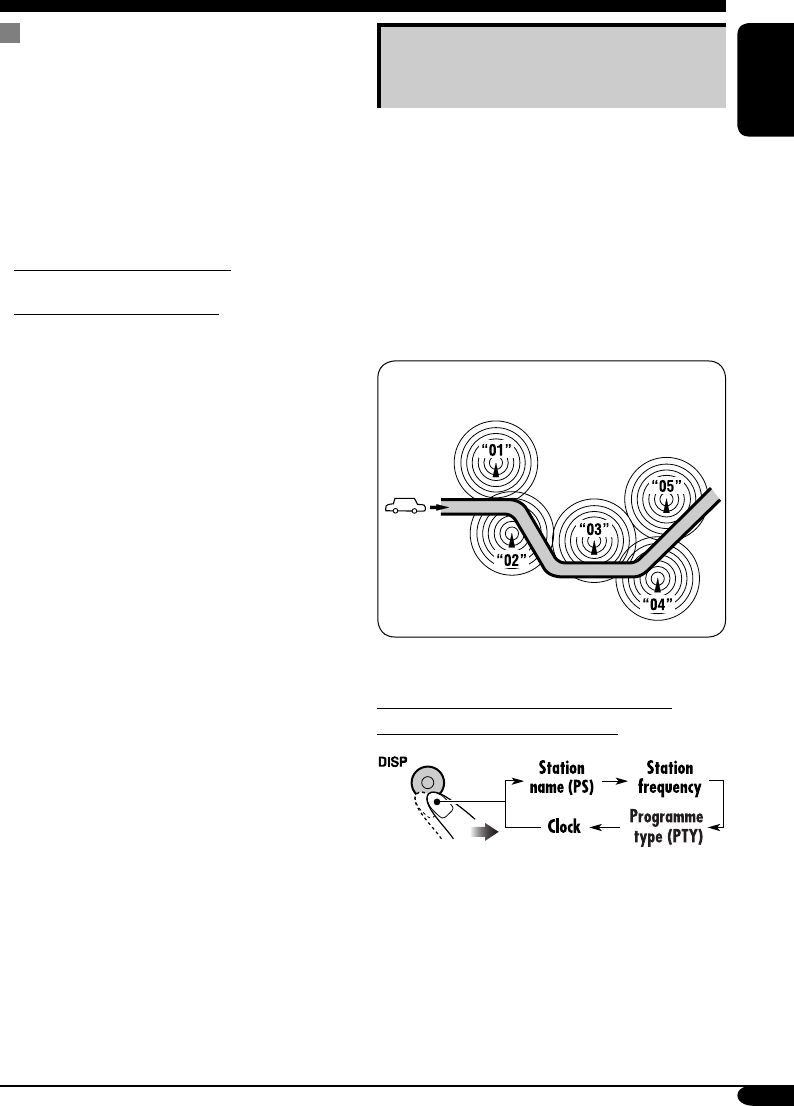
Tracking the same programme—
Network-Tracking Reception
When driving in an area where FM reception
is not sufficient enough, this receiver
automatically tunes in to another FM RDS
station of the same network, possibly
broadcasting the same programme with stronger
signals (see the illustration below).
When shipped from the factory, Network-
Tracking Reception is activated.
To change the Network-Tracking Reception
setting, see page 21.
Programme A broadcasting on different
frequency areas (01 – 05)
To check the current clock time while
listening to an FM RDS station
PTY Standby Reception
PTY Standby Reception allows the receiver
to switch temporarily to your favorite PTY
programme from any source other than AM.
To activate and select your favorite PTY
code for PTY Standby Reception, see page
21.
The PTY indicator either lights up or flashes.
• If the PTY indicator lights up, PTY Standby
Reception is activated.
• If the PTY indicator flashes, PTY Standby
Reception is not yet activated.
To activate PTY Standby Reception, tune in
to another station providing these signals. The
PTY indicator will stop flashing and remain
lit.
To deactivate the PTY Standby Reception,
select “OFF” for the PTY code (see page 21).
The PTY indicator goes off.
EN12-17_KD-G311[EX_EU]f.indd 13EN12-17_KD-G311[EX_EU]f.indd 13 10/29/04 11:40:23 AM10/29/04 11:40:23 AM
14
ENGLISH
Disc operations
Playing a disc
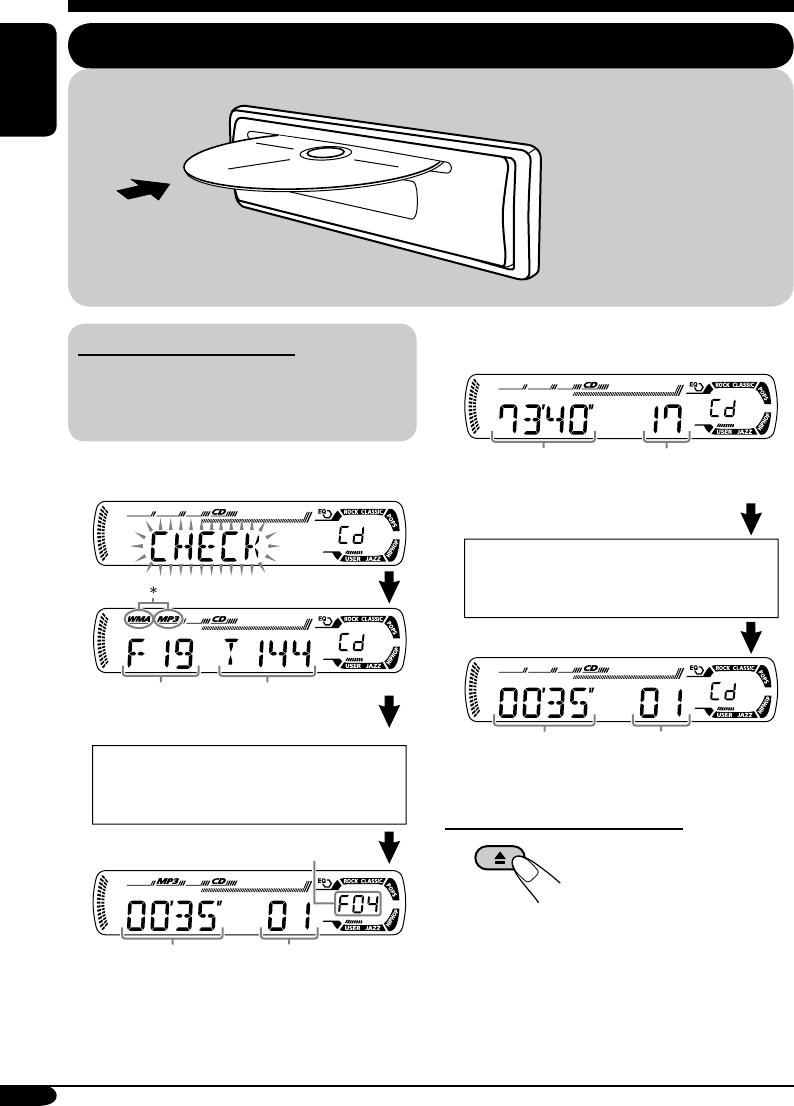
About MP3 and WMA discs
MP3 and WMA (Windows Media® Audio)
“tracks” (words “file” and “track” are used
interchangeably) are recorded in “folders.”
• When inserting an MP3 or a WMA disc:
* Either the MP3 or WMA indicator lights up
depending on the detected file.
• When inserting an audio CD or a CD Text
disc:
To stop play and eject the disc
Total folder
number
Total file
number
Total playing time of
the inserted disc
Total track number
of the inserted disc
Elapsed playing
time
Current track
number
All tracks will be played
repeatedly until you change
the source or eject the disc.
Disc information appears
automatically (see page 16).
Current track
number
Selected folder number
Elapsed
playing time
CD Text: Disc title/performer =
Track title appears automatically
(see page 16).
EN12-17_KD-G311[EX_EU]f.indd 14EN12-17_KD-G311[EX_EU]f.indd 14 10/27/04 9:36:09 AM10/27/04 9:36:09 AM
15
ENGLISH
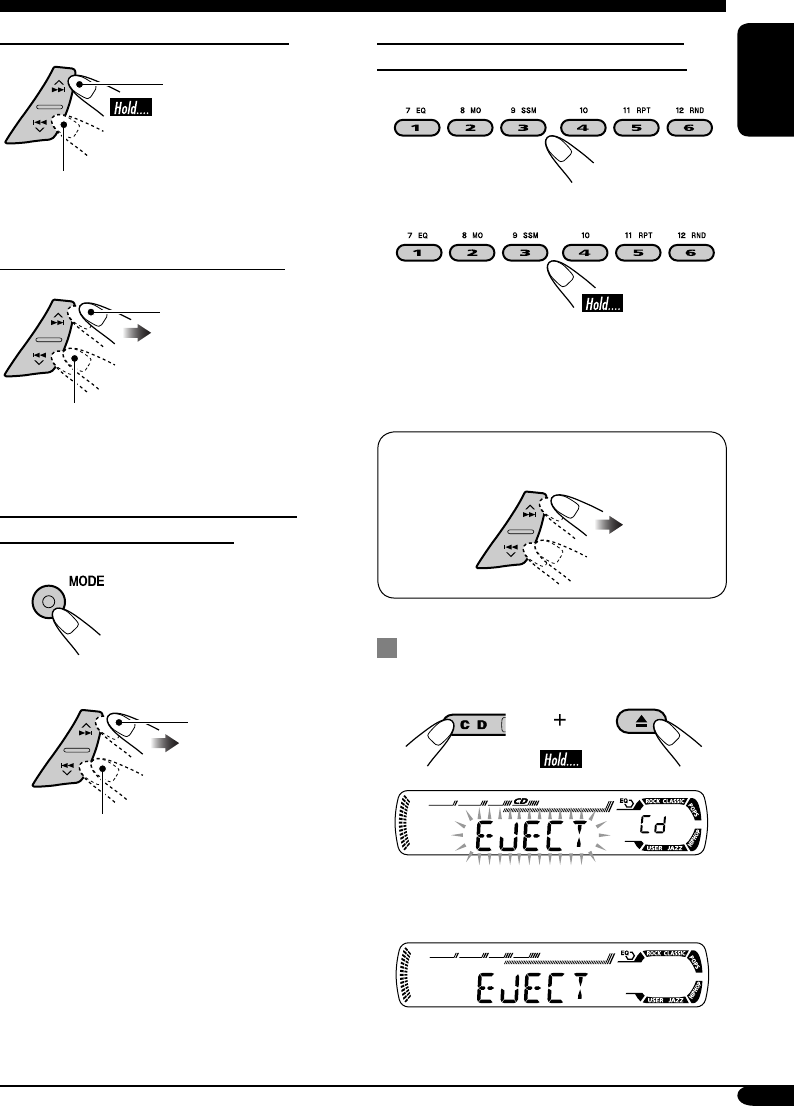
To fast-forward or reverse the track
Fast-forwards.
Reverses.
To go to the next or previous tracks
To the following tracks.
To the beginning of the current track, then
the previous tracks.
To go to the next or previous folders
(only for MP3 or WMA discs)
1
2
To next folders.
To previous folders.
To locate a particular track (for CD) or
folder (for MP3 or WMA discs) directly
To select a number from 01 – 06:
To select a number from 07 – 12:
• To use folder search on MP3/WMA discs, it
is required that folders are assigned with
2-digit numbers at the beginning of their
folder names—01, 02, 03, and so on.
• To select a particular track in a folder
(for MP3 or WMA disc) after selecting a
folder:
Prohibiting disc ejection
You can lock a disc in the loading slot.
To cancel the prohibition, repeat the same
procedure.
EN12-17_KD-G312[EX_EU]ff.indd 15EN12-17_KD-G312[EX_EU]ff.indd 15 1/7/05 9:50:48 AM1/7/05 9:50:48 AM
16
ENGLISH
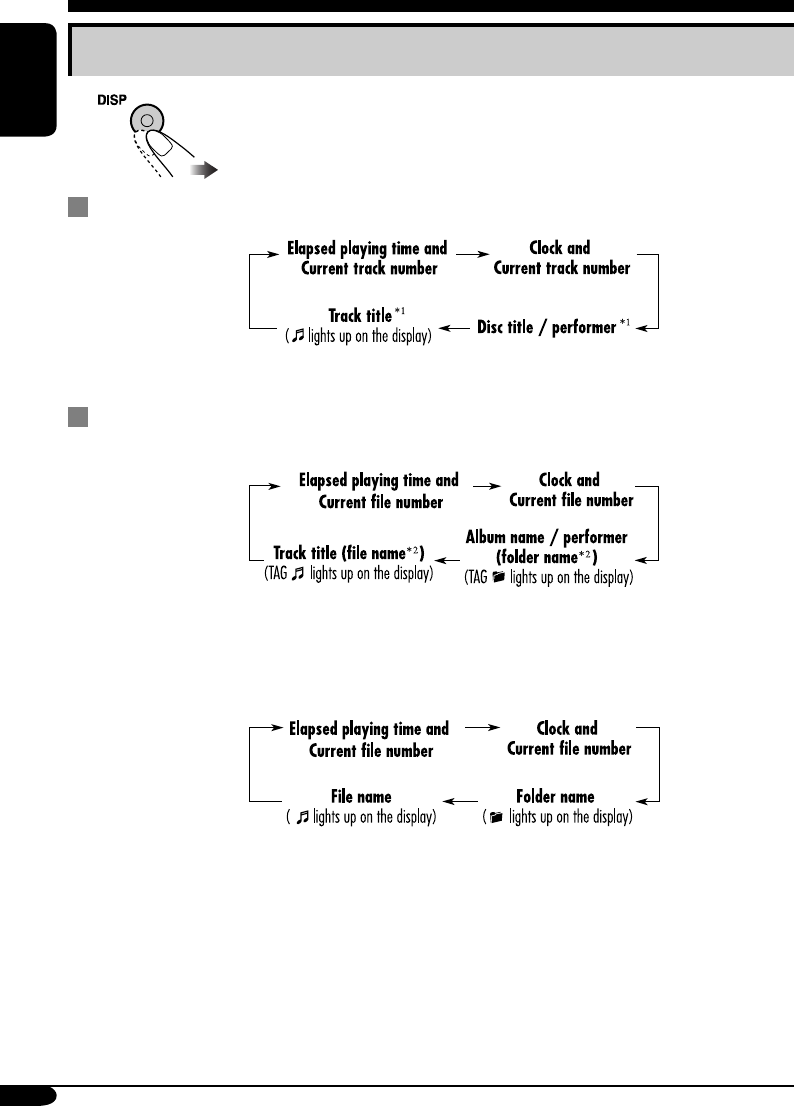
Changing the display information
While playing an audio CD or a CD Text
*1 If the current disc is an audio CD, “NO NAME” appears.
While playing an MP3 or WMA disc
• When “TAG DISP” is set to “TAG ON” (see page 21)
*2 If an MP3/WMA file does not have ID3 tags, folder name and file name appear. In this
case, the TAG indicator will not light up.
• When “TAG DISP” is set to “TAG OFF”
EN12-17_KD-G311[EX_EU]f.indd 16EN12-17_KD-G311[EX_EU]f.indd 16 10/27/04 9:36:10 AM10/27/04 9:36:10 AM
17
ENGLISH
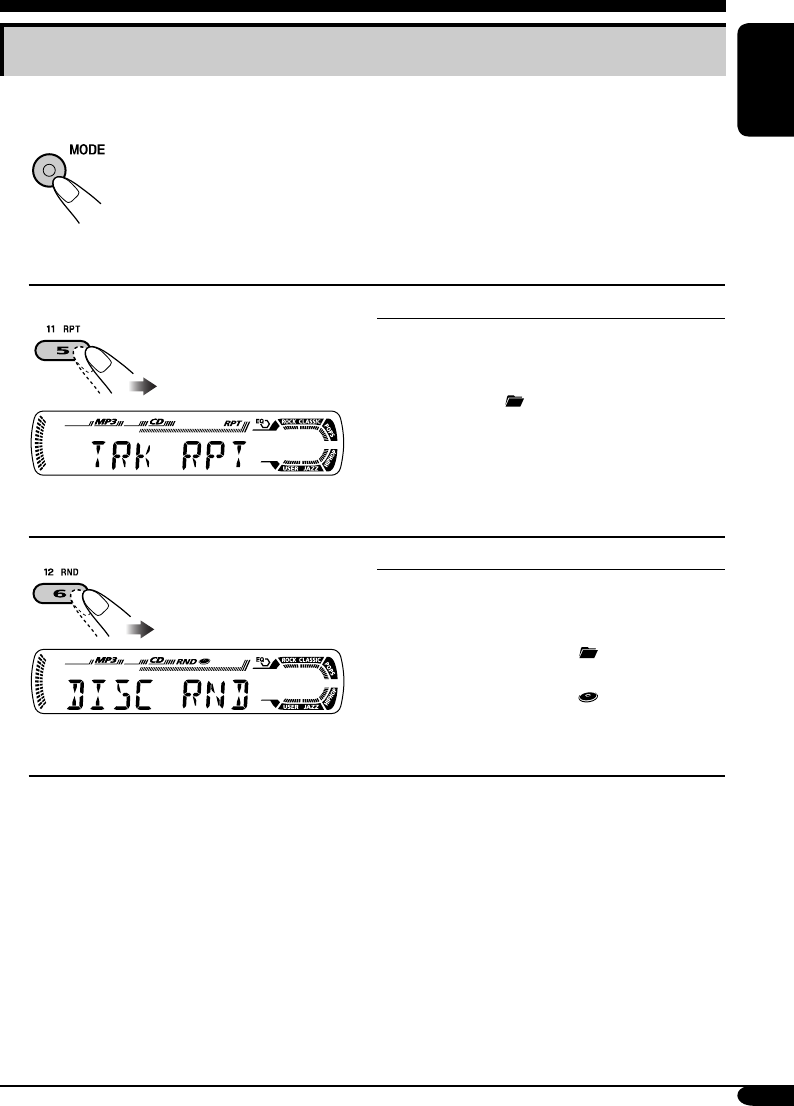
Selecting the playback modes
You can use only one of the following playback modes at a time.
1
2 Select your desired playback mode.
Repeat play
Ex.: When “TRK RPT” is selected while
playing an MP3 disc
Mode Plays repeatedly
TRK RPT: The current track.
• RPT lights up.
FLDR RPT*: All tracks of the current folder.
• and RPT light up.
RPT OFF: Cancels.
Random play Mode Plays at random
Ex.: When “DISC RND” is selected while
playing an MP3 disc
FLDR RND*: All tracks of the current folder,
then tracks of the next folder
and so on.
• RND and light up.
DISC RND: All tracks of the current disc.
• RND and light up.
RND OFF: Cancels.
* Only while playing an MP3 or WMA disc.
EN12-17_KD-G311[EX_EU]f.indd 17EN12-17_KD-G311[EX_EU]f.indd 17 10/27/04 9:36:10 AM10/27/04 9:36:10 AM
18
ENGLISH
Sound adjustments
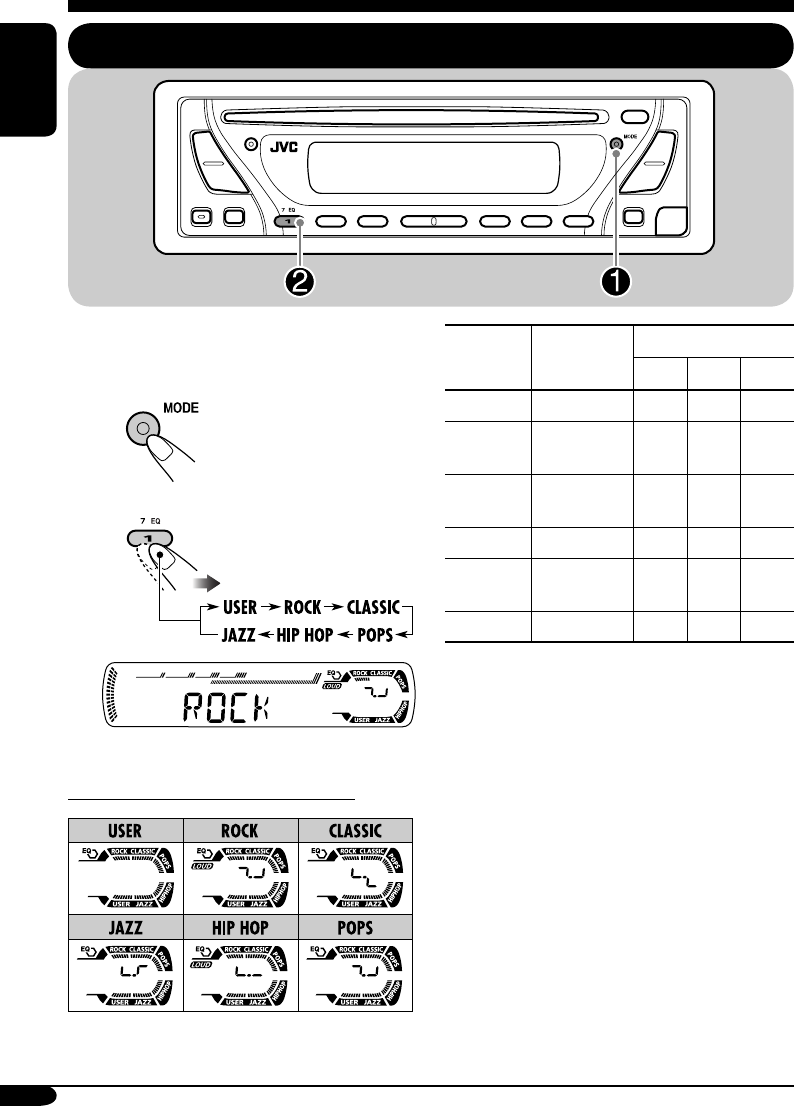
Selecting preset sound modes (C-EQ: custom equalizer)
You can select a preset sound mode suitable to
the music genre.
~
Ÿ
Ex.: When “ROCK” is selected
Indication pattern for each sound mode:
Indication For: Preset values
BAS*1TRE*2
LOUD
*3
USER (Flat sound) 00 00 OFF
ROCK Rock or
disco music
+03 +01 ON
CLASSIC Classical
music
+01 –02 OFF
POPS Light music +04 +01 OFF
HIP HOP Funk or rap
music
+02 00 ON
JAZZ Jazz music +02 +03 OFF
*1 BAS: Bass
*2 TRE: Treble
*3 LOUD: Loudness
EN18-23_KD-G311[EX_EU]f.indd 18EN18-23_KD-G311[EX_EU]f.indd 18 10/27/04 9:36:22 AM10/27/04 9:36:22 AM
19
ENGLISH
Adjusting the sound
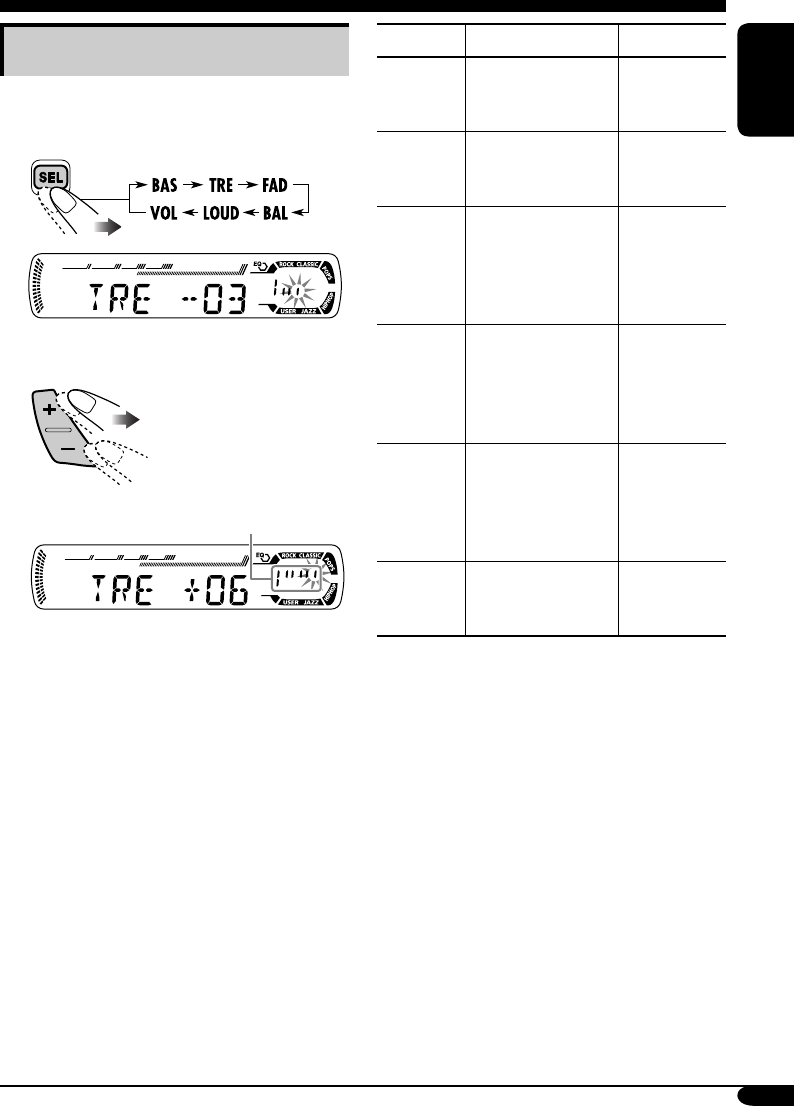
You can adjust the sound characteristics to your
preference.
1
Ex.: When “TRE” is selected
2
Indication pattern changes as
you adjust the level.
Indication To do: Range
BAS*1
(bass)
Adjust the bass. –06 (min.)
to
+06 (max.)
TRE*1
(treble)
Adjust the treble. –06 (min.)
to
+06 (max.)
FAD*2
(fader)
Adjust the front
and rear speaker
balance.
R06 (Rear
only)
to
F06 (Front
only)
BAL
(balance)
Adjust the left
and right speaker
balance.
L06 (Left
only)
to
R06 (Right
only)
LOUD*1
(loudness)
Boost low and
high frequencies
to produce a well-
balanced sound at
low volume level.
LOUD ON
J
LOUD OFF
VOL*3
(volume)
Adjust the volume. 00 (min.) to
30 or 50
(max.)*4
*1 When you adjust the bass, treble, or
loudness, the adjustment you have made is
stored for the currently selected sound mode
(C-EQ) including “USER.”
*2 If you are using a two-speaker system, set
the fader level to “00.”
*3 Normally the +/– buttons work as the volume
control. So you do not have to select “VOL”
to adjust the volume level.
*4 Depending on the amplifier gain control
setting. (See page 21 for details.)
EN18-23_KD-G311[EX_EU]f.indd 19EN18-23_KD-G311[EX_EU]f.indd 19 10/27/04 9:36:24 AM10/27/04 9:36:24 AM
20
ENGLISH
Indications Selectable settings, [reference page]
DEMO
Display demonstration
DEMO ON: [Initial]; Display demonstration will be activated
automatically if no operation is done for about
20 seconds, [7].
DEMO OFF: Cancels.
CLOCK H
Hour adjustment
0 – 23 (1 – 12), [7]
[Initial: 0 (0:00)]
CLOCK M
Minute adjustment
00 – 59, [7]
[Initial: 00 (0:00)]
24H/12H
24 hours or 12 hours time
display
12H O 24H, [7]
[Initial: 24H]
CLK ADJ
Clock adjustment
AUTO: [Initial]; The built-in clock is automatically adjusted
using the CT (clock time) data in the RDS signal.
OFF: Cancels.
General settings — PSM
Basic procedure
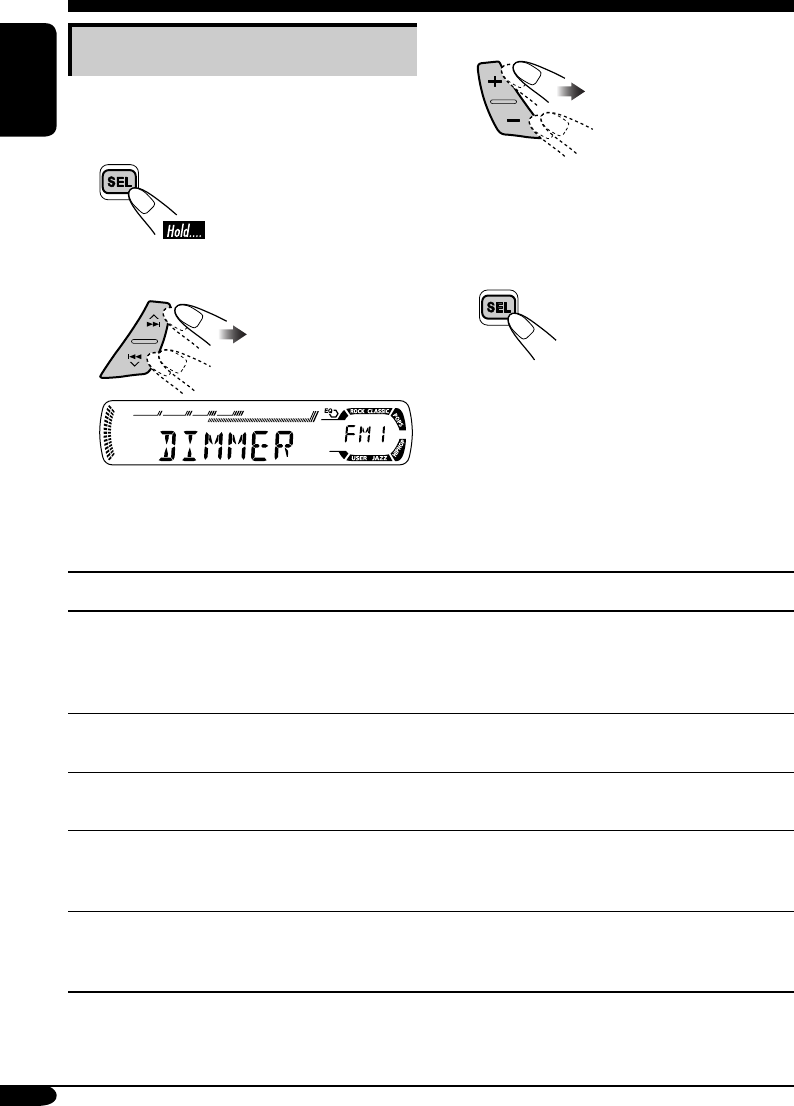
You can change PSM (Preferred Setting Mode)
items listed in the table that follows.
1
2 Select a PSM item.
Ex.: When you select “DIMMER”
3 Adjust the PSM item selected.
4 Repeat steps 2 and 3 to adjust the
other PSM items if necessary.
5 Finish the procedure.
EN18-23_KD-G311[EX_EU]f.indd 20EN18-23_KD-G311[EX_EU]f.indd 20 10/27/04 9:36:24 AM10/27/04 9:36:24 AM
21
ENGLISH
Indications Selectable settings, [reference page]
AF-REG
Alternative frequency/
regionalization reception
When the received signals from the current station become weak...
AF: [Initial]; Switches to another station (the programme
may differ from the one currently received), [13].
• The AF indicator lights up.
AF REG: Switches to another station broadcasting the same
programme.
• The AF and REG indicators light up.
OFF: Cancels.
PTY-STBY
PTY standby
Activates PTY Standby Reception with one of the 29 PTY codes,
[13].
OFF [Initial]
=
29 PTY codes, [11]
=
(back to the beginning)
TA VOL
Traffic announcement
volume
[Initial: VOL 20]; VOL 00 – VOL 30 or 50*, [12]
* Depends on the amplifier gain control.
P-SEARCH
Programme search
ON: Using the AF data, the receiver tunes in to another
frequency broadcasting the same programme as the
original preset RDS station is if the preset station
signals are not sufficient.
OFF: [Initial]; Cancels.
DIMMER
Dimmer
ON: Activates dimmer.
OFF: [Initial]; Cancels.
TEL
Telephone muting
MUTING 1/MUTING 2: Select either one which mutes the
sounds while using the cellular phone.
OFF: [Initial]; Cancels.
SCROLL*
Scroll
ONCE: [Initial]; Scrolls the disc information once.
AUTO: Repeats scrolling (5-second intervals in between).
OFF: Cancels.
• Pressing DISP for more than one second can scroll the display
regardless of the setting.
TAG DISP
Tag display
TAG ON: [Initial]; Shows the ID3 tag while playing
MP3/WMA tracks, [16].
TAG OFF: Cancels.
AMP GAIN
Amplifier gain control
You can change the maximum volume level of this receiver.
LOW PWR: VOL 00 – VOL 30 (Select this if the maximum
power of the speaker is less than 50 W to prevent
them from damaging the speaker.)
HIGH PWR: [Initial]; VOL 00 – VOL 50
* Some characters or symbols will not be shown (and will be blanked) on the display.
(Ex. “ABCå!d#” ]“ABCA D ”.)
EN18-23_KD-G312[EX_EU]ff.indd 21EN18-23_KD-G312[EX_EU]ff.indd 21 1/7/05 9:51:00 AM1/7/05 9:51:00 AM
22
ENGLISH
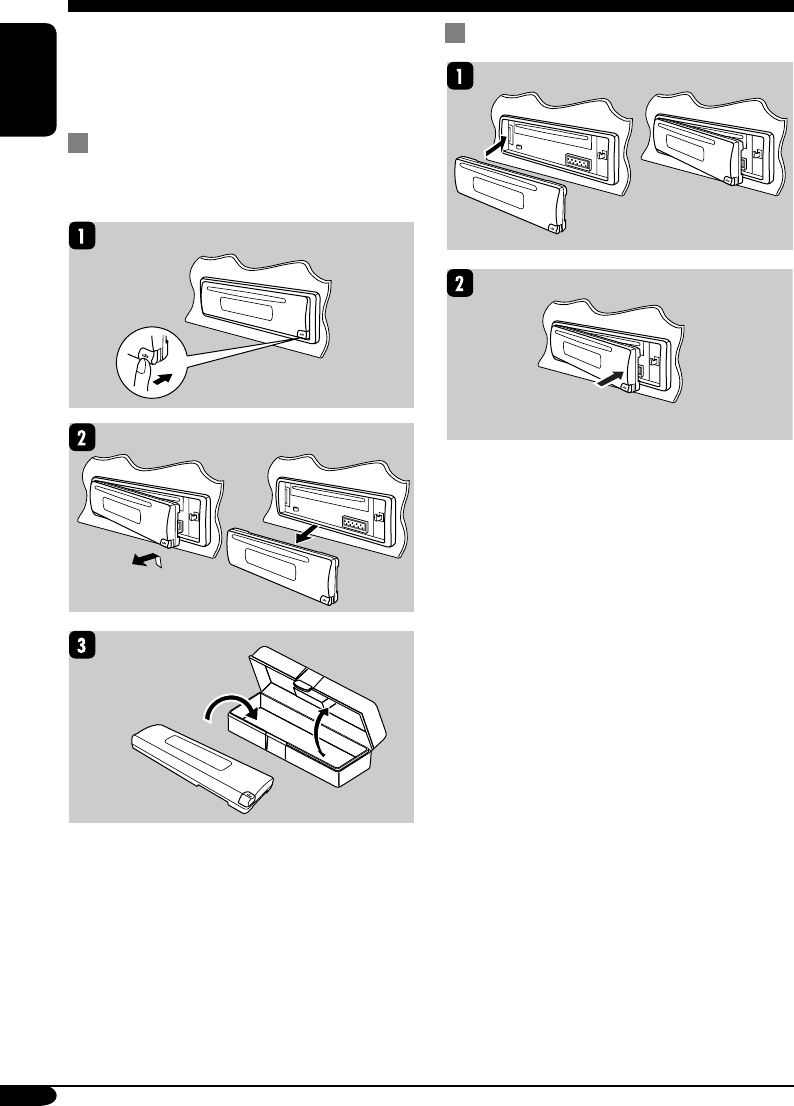
When detaching or attaching the control panel,
be careful not to damage the connectors on
the back of the control panel and on the panel
holder.
Detaching the control panel
Before detaching the control panel, be sure to
turn off the power.
Attaching the control panel
Detaching the control panel
EN18-23_KD-G311[EX_EU]f.indd 22EN18-23_KD-G311[EX_EU]f.indd 22 10/27/04 9:36:25 AM10/27/04 9:36:25 AM
23
ENGLISH
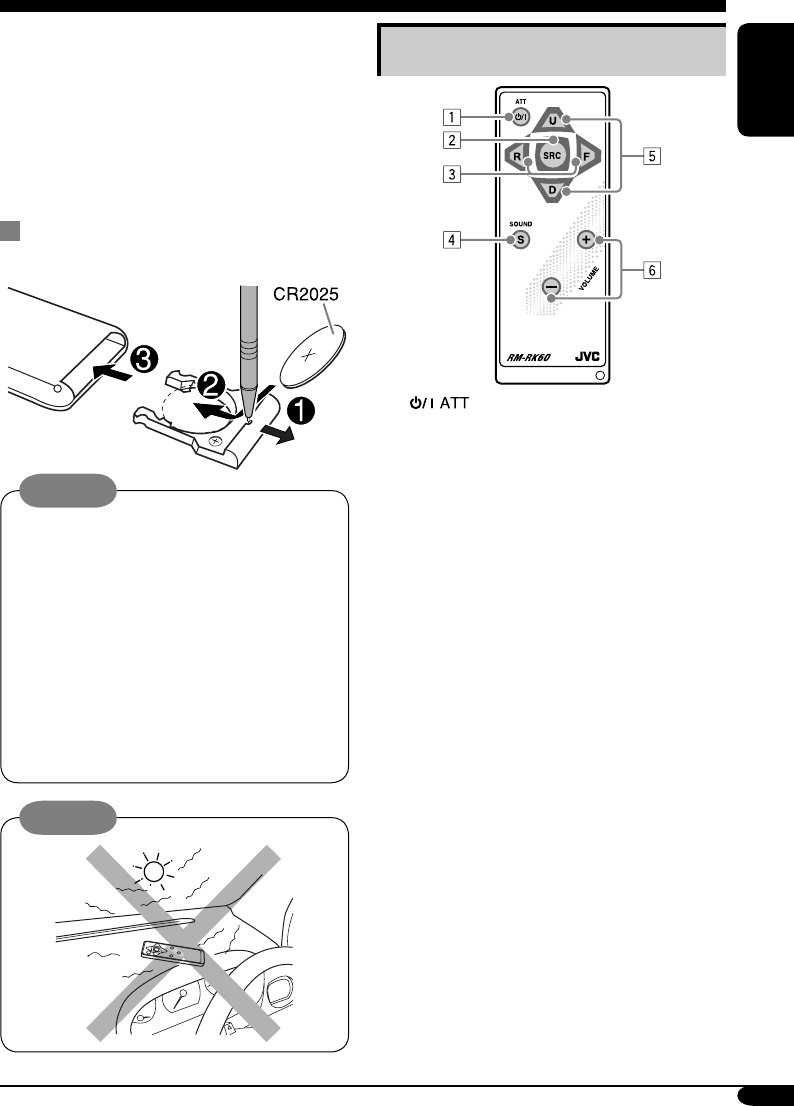
Main elements and features
1 (standby/on attenuator) button
• Turns on and off the power and also
attenuates the sound.
2 SRC (source) button
• Selects the source.
3 R (reverse) / F (forward) buttons
• Searches for stations if pressed briefly.
• Fast-forwards or reverses the track if
pressed and held.
• Changes the tracks of the disc.
4 SOUND button
• Selects the sound mode (C-EQ: custom
equalizer).
5 U (up) / D (down) buttons
• U (up): Changes the FM/AM bands.
• D (down): Changes the preset stations.
• Changes the folder of the MP3/WMA
discs.
6 VOLUME +/– buttons
• Adjusts the volume level.
The receiver is equipped with the steering
wheel remote control function.
• See the Installation/Connection Manual
(separate volume) for connection.
This receiver can be remotely controlled as
instructed here (with an optionally purchased
remote controller). We recommend that you use
remote controller RM-RK60 with your receiver.
• When operating, aim the remote controller
directly at the remote sensor on the
receiver. Make sure there is no obstacle in
between.
Installing the lithium coin battery
(CR2025)
Warning:
• Store the battery in a place where children
cannot reach to avoid risk of accident.
• To prevent the battery from over-heating,
cracking, or starting a fire:
– Do not recharge, short, disassemble, or
heat the battery or dispose of it in a fire.
– Do not leave the battery with other
metallic materials.
– Do not poke the battery with tweezers or
similar tools.
– Wrap the battery with tape and insulate
when throwing away or saving it.
Caution:
Using the remote controller — RM-RK60
EN18-23_KD-G311[EX_EU]f.indd 23EN18-23_KD-G311[EX_EU]f.indd 23 10/27/04 11:59:28 AM10/27/04 11:59:28 AM
24
ENGLISH
Maintenance
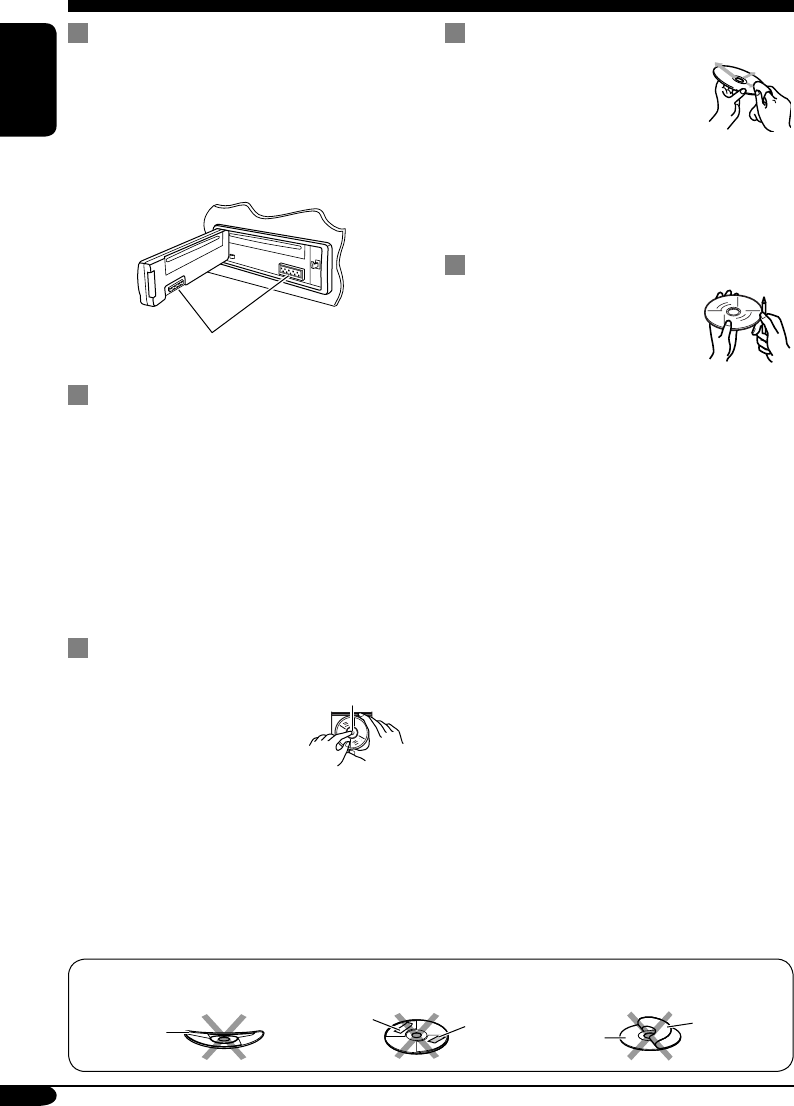
How to clean the connectors
Frequent detachment will deteriorate the
connectors.
To minimize this possibility, periodically wipe
the connectors with a cotton swab or cloth
moistened with alcohol, being careful not to
damage the connectors.
Connector
Moisture condensation
Moisture may condense on the lens inside the
CD player in the following cases:
• After starting the heater in the car.
• If it becomes very humid inside the car.
Should this occur, the CD player may
malfunction. In this case, eject the disc and
leave the receiver turned on for a few hours
until the moisture evaporates.
How to handle discs
When removing a disc from
its case, press down the center
holder of the case and lift the
disc out, holding it by the
edges.
• Always hold the disc by the edges. Do not
touch its recording surface.
When storing a disc into its case, gently insert
the disc around the center holder (with the
printed surface facing up).
• Make sure to store discs into the cases after
use.
To keep discs clean
A dirty disc may not play correctly.
If a disc does become dirty, wipe
it with a soft cloth in a straight line
from center to edge.
• Do not use any solvent (for
example, conventional record cleaner, spray,
thinner, benzine, etc.) to clean discs.
To play new discs
New discs may have some rough
spots around the inner and outer
edges. If such a disc is used, this
receiver may reject the disc.
To remove these rough spots, rub the edges
with a pencil or ball-point pen, etc.
Center holder
Warped
disc
Sticker Sticker
residue Disc
Stick-on
label
Do not use the following discs:
EN24-29_KD-G311[EX_EU]f.indd 24EN24-29_KD-G311[EX_EU]f.indd 24 10/27/04 9:38:29 AM10/27/04 9:38:29 AM
25
ENGLISH
More about this receiver
Basic operations
Turning on the power
• By pressing CD or FM/AM on the receiver,
you can also turn on the power.
Turning off the power
• If you turn off the power while listening to a
disc, disc play will start from where playback
has been stopped previously, next time you
turn on the power.
Tuner operations
Storing stations in memory
• During SSM search...
– All previously stored stations are erased and
stations are stored newly.
– Received stations are preset in No. 1 (lowest
frequency) to No. 6 (highest frequency).
– When SSM is over, the station stored in
No. 1 will be automatically tuned in.
• When storing a station manually, a previously
preset station is erased when a new station is
stored in the same preset number.
FM RDS operations
• Network-Tracking Reception requires two
types of RDS signals—PI (Programme
Identification) and AF (Alternative
Frequency) to work correctly. Without
receiving these data correctly, Network-
Tracking Reception will not operate.
• If a Traffic Announcement is received, the
volume level (TA Volume) automatically
changes to the preset level.
Disc operations
Caution for DualDisc playback
• The Non-DVD side of a “DualDisc” does
not comply with the “Compact Disc Digital
Audio” standard. Therefore, the use of Non-
DVD side of a DualDisc on this product may
not be recommended.
General
• This receiver has been designed to reproduce
CDs/CD Texts, and CD-Rs (Recordable)/
CD-RWs (Rewritable) in audio CD (CD-DA),
MP3 and WMA format.
• When a disc has been loaded, selecting “CD”
for the playback source starts disc play.
Inserting a disc
• When a disc is inserted upside down, the disc
automatically ejects.
• Do not insert 8 cm discs (single CD) and
unusual shape discs (heart, flower, etc.) into
the loading slot.
Playing a disc
• While fast-forwarding or reversing on an MP3
or WMA disc, you can only hear intermittent
sounds.
Playing a CD-R or CD-RW
• Use only “finalized” CD-Rs or CD-RWs.
• This receiver can play back only the files of
the same type which is first detected if a disc
includes both audio CD (CD-DA) files and
MP3/WMA files.
• This receiver can play back multi-session
discs; however, unclosed sessions will be
skipped while playing.
• Some CD-Rs or CD-RWs may not play
back on this receiver because of their disc
characteristics, and for the following causes:
– Discs are dirty or scratched.
– Moisture condensation occurs on the lens
inside the receiver.
– The pickup lens inside the receiver is dirty.
– CD-R/CD-RW on which the files are
written with “Packet Write” method.
– There are improper recording conditions
(missing data, etc.) or media conditions
(stain, scratch, warp, etc.).
• CD-RWs may require a longer readout time
since the reflectance of CD-RWs is lower
than that of regular CDs.
To be continued....
EN24-29_KD-G312[EX_EU]ff.indd 25EN24-29_KD-G312[EX_EU]ff.indd 25 1/7/05 12:24:56 PM1/7/05 12:24:56 PM
26
ENGLISH
• Do not use the following CD-Rs or CD-RWs:
– Discs with stickers, labels, or protective seal
stuck to the surface.
– Discs on which labels can be directly
printed by an ink jet printer.
Using these discs under high temperatures or
high humidities may cause malfunctions or
damages to discs.
Playing an MP3/WMA disc
• This receiver can play back MP3/WMA files
with the extension code <.mp3> or <.wma>
(regardless of the letter case—upper/lower).
• This receiver can show the names of albums,
artists (performer), and ID3 Tag (Version 1.0,
1.1, 2.2, 2.3, or 2.4) for MP3 files and for
WMA files.
• This receiver can handle only one-byte
characters. No other characters can be
correctly displayed.
• This receiver can play back MP3/WMA files
meeting the conditions below:
– Bit rate: 8 kbps — 320 kbps
– Sampling frequency:
48 kHz, 44.1 kHz, 32 kHz (for MPEG-1)
24 kHz, 22.05 kHz, 16 kHz (for MPEG-2)
– Disc format: ISO 9660 Level 1/ Level 2,
Romeo, Joliet, Windows long file name
• The maximum number of characters for file/
folder names vary among the disc format used
(includes 4 extension characters—<.mp3> or
<.wma>).
– ISO 9660 Level 1: up to 12 characters
– ISO 9660 Level 2: up to 31 characters
– Romeo*: up to 128 (72) characters
– Joliet*: up to 64 (36) characters
– Windows long file name*: up to 128 (72)
characters
* The parenthetic figure is the maximum
number of characters for file/folder names
in case the total number of files and folders
is 313 or more.
• This receiver can recognize the total of 512
files, of 200 folders, and of 8 hierarchies.
• This receiver can play back the files recorded
in VBR (variable bit rate).
The files recorded in VBR have a discrepancy
in elapsed time display, and do not show
the actual elapsed time. Especially, after
performing the search function, this difference
becomes noticeable.
• This receiver cannot play back the following
files:
– MP3 files encoded with MP3i and MP3
PRO format.
– MP3 files encoded in an unappropriated
format.
– MP3 files encoded with Layer 1/2.
– WMA files encoded with lossless,
professional, and voice format.
– WMA files which are not based upon
Windows Media® Audio.
– WMA files copy-protected with DRM.
– Files which have the data such as WAVE,
ATRAC3, etc.
• The search function works but search speed is
not constant.
Changing the source
• If you change the source, playback also stops
(without ejecting the disc).
Next time you select “CD” for the playback
source, disc play starts from where it has been
stopped previously.
Ejecting a disc
• If the ejected disc is not removed within
15 seconds, the disc is automatically inserted
again into the loading slot to prevent it from
dust. (Disc will not play this time.)
General settings—PSM
• If you change the “AMP GAIN” setting from
“HIGH PWR” to “LOW PWR” while the
volume level is set higher than “VOL 30,” the
receiver automatically changes the volume
level to “VOL 30.”
EN24-29_KD-G312[EX_EU]ff.indd 26EN24-29_KD-G312[EX_EU]ff.indd 26 1/7/05 12:15:09 PM1/7/05 12:15:09 PM
27
ENGLISH
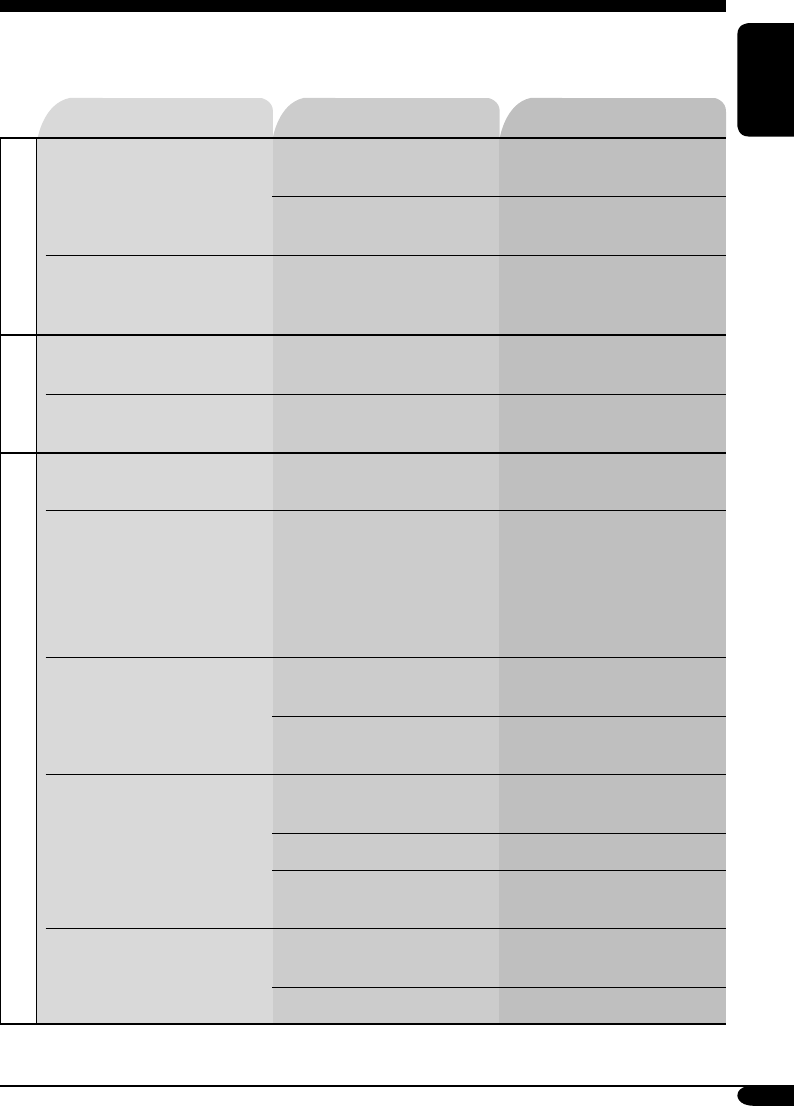
Symptoms Causes Remedies
General
• Sound cannot be heard
from the speakers.
The volume level is set to
the minimum level.
Adjust it to the optimum
level.
Connections are incorrect. Check the cords and
connections.
• The receiver does not
work at all.
The built-in microcomputer
may have functioned
incorrectly due to noise, etc.
Reset the receiver (see page
2).
FM/AM
• SSM automatic presetting
does not work.
Signals are too weak. Store stations manually.
• Static noise while listening
to the radio.
The aerial is not connected
firmly.
Connect the aerial firmly.
Disc playback
• Disc automatically ejects. Disc is inserted upside
down.
Insert the disc correctly.
• CD-R/CD-RW cannot be
played back.
• Tracks on the CD-R/
CD-RW cannot be
skipped.
CD-R/CD-RW is not
finalized.
• Insert a finalized CD-R/
CD-RW.
• Finalize the CD-R/
CD-RW with the
component which you
used for recording.
• Disc can be neither played
back nor ejected.
Disc is locked. Unlock the disc (see page
15).
The CD player may have
functioned incorrectly.
Eject the disc forcibly (see
page 2).
• Disc sound is sometimes
interrupted.
You are driving on rough
roads.
Stop playback while driving
on rough roads.
Disc is scratched. Change the disc.
Connections are incorrect. Check the cords and
connections.
• “NO DISC” appears on the
display.
No disc is in the loading
slot.
Insert a disc into the loading
slot.
Disc is inserted incorrectly. Insert the disc correctly.
Troubleshooting
What appears to be trouble is not always serious. Check the following points before calling a service
center.
EN24-29_KD-G311[EX_EU]f.indd 27EN24-29_KD-G311[EX_EU]f.indd 27 10/27/04 9:38:31 AM10/27/04 9:38:31 AM
28
ENGLISH
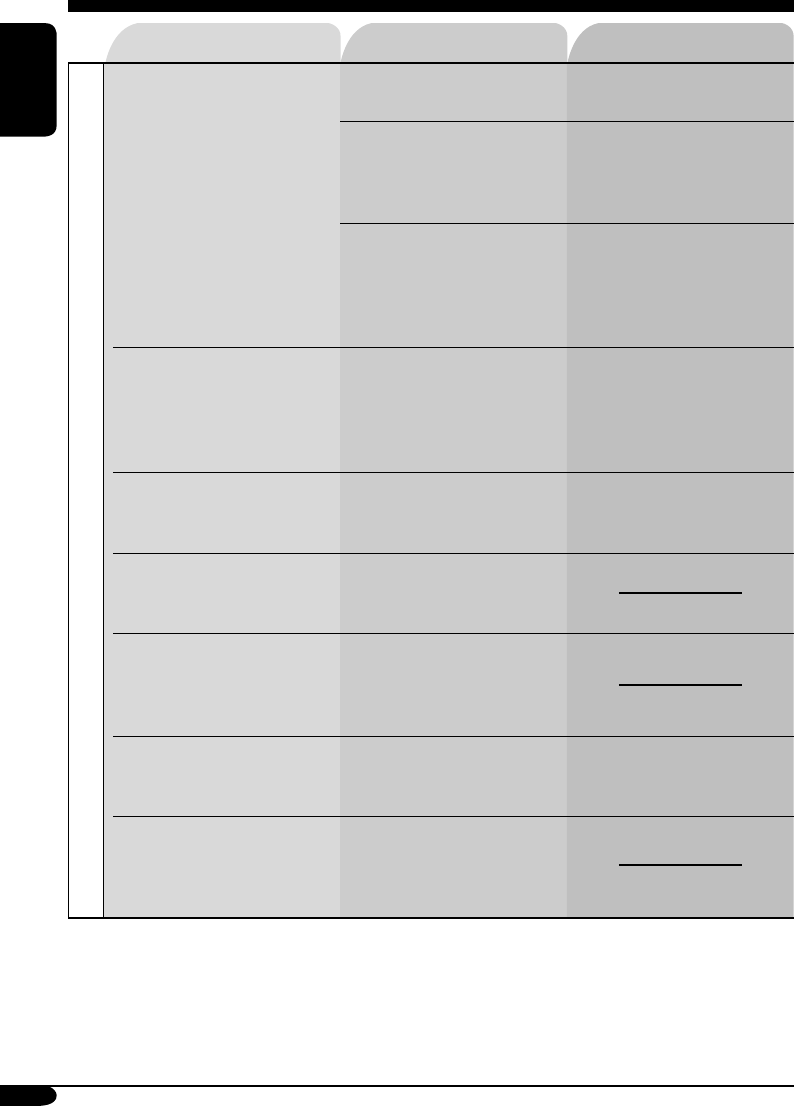
Symptoms Causes Remedies
MP3/WMA playback
• Disc cannot be played
back.
No MP3/WMA tracks are
recorded on the disc.
Change the disc.
MP3/WMA tracks do not
have the extension code
<.mp3> or <.wma> in their
file names.
Add the extension code
<.mp3> or <.wma> to their
file names.
MP3/WMA tracks are not
recorded in the format
compliant with ISO 9660
Level 1, Level 2, Romeo, or
Joliet.
Change the disc.
(Record MP3/WMA
tracks using a compliant
application.)
• Noise is generated. The track played back
is not an MP3/WMA
track (although it has the
extension code <.mp3> or
<.wma>).
Skip to another track or
change the disc. (Do not add
the extension code <.mp3>
or <.wma> to non-MP3 or
WMA tracks.)
• A longer readout time is
required (“CHECK” keeps
flashing on the display).
Readout time varies due to
the complexity of the folder/
file configuration.
Do not use too many
hierarchies and folders.
• Tracks cannot be played
back as you have intended
them to play.
Playback order is determined
when the files are recorded.
• Elapsed playing time is not
correct.
This sometimes occurs
during play. This is caused
by how the tracks are
recorded on the disc.
• “NO FILES” appears on
the display.
The current disc does not
contain any MP3/WMA
tracks.
Insert a disc that contains
MP3/WMA tracks.
• Correct characters are
not displayed (e.g. album
name).
This receiver can only
display alphabets (capital:
A – Z), numbers, and a
limited number of symbols.
EN24-29_KD-G311[EX_EU]f.indd 28EN24-29_KD-G311[EX_EU]f.indd 28 10/27/04 9:38:32 AM10/27/04 9:38:32 AM
29
ENGLISH
Specifications
AUDIO AMPLIFIER SECTION
Maximum Power Output:
Front: 50 W per channel
Rear: 50 W per channel
Continuous Power Output (RMS):
Front: 19 W per channel into 4 Ω, 40 Hz
to 20 000 Hz at no more than 0.8%
total harmonic distortion.
Rear: 19 W per channel into 4 Ω, 40 Hz
to 20 000 Hz at no more than 0.8%
total harmonic distortion.
Load Impedance: 4 Ω (4 Ω to 8 Ω allowance)
Tone Control Range:
Bass: ±10 dB at 100 Hz
Treble: ±10 dB at 10 kHz
Frequency Response: 40 Hz to 20 000 Hz
Signal-to-Noise Ratio: 70 dB
Line-Out Level/Impedance:
2.5 V/20 kΩ load (full scale)
Output Impedance: 1 kΩ
Other Terminal: Steering wheel remote input
TUNER SECTION
Frequency Range:
FM: 87.5 MHz to 108.0 MHz
AM: (MW) 522 kHz to 1 620 kHz
(LW) 144 kHz to 279 kHz
[FM Tuner]
Usable Sensitivity: 11.3 dBf (1.0 µV/75 Ω)
50 dB Quieting Sensitivity:
16.3 dBf (1.8 µV/75 Ω)
Alternate Channel Selectivity (400 kHz): 65 dB
Frequency Response: 40 Hz to 15 000 Hz
Stereo Separation: 30 dB
Capture Ratio: 1.5 dB
[MW Tuner]
Sensitivity: 20 µV
Selectivity: 35 dB
[LW Tuner]
Sensitivity: 50 µV
CD PLAYER SECTION
Type: Compact disc player
Signal Detection System: Non-contact optical
pickup (semiconductor laser)
Number of Channels: 2 channels (stereo)
Frequency Response: 5 Hz to 20 000 Hz
Dynamic Range: 96 dB
Signal-to-Noise Ratio: 98 dB
Wow and Flutter: Less than measurable limit
MP3 Decoding Format:
MPEG1/2 Audio Layer 3
Max. Bit Rate: 320 kbps
WMA (Windows Media® Audio) Decoding
Format:
Max. Bit Rate: 192 kbps
GENERAL
Power Requirement:
Operating Voltage:
DC 14.4 V (11 V to 16 V allowance)
Grounding System: Negative ground
Allowable Operating Temperature:
0°C to +40°C
Dimensions (W × H × D):
Installation Size (approx.):
182 mm × 52 mm × 150 mm
Panel Size (approx.):
188 mm × 58 mm × 11 mm
Mass (approx.):
1.3 kg (excluding accessories)
Design and specifications are subject to change
without notice.
• Microsoft and Windows Media are either registered trademarks or trademarks of Microsoft
Corporation in the United States and/or other countries.
EN24-29_KD-G311[EX_EU]f.indd 29EN24-29_KD-G311[EX_EU]f.indd 29 11/2/04 6:04:17 PM11/2/04 6:04:17 PM
© 2005 Victor Company of Japan, Limited
EN, FR
0105DTSMDTJEIN
Having TROUBLE with operation?
Please reset your unit
Refer to page of How to reset your unit
Vous avez des PROBLÈMES de fonctionnement?
Réinitialisez votre appareil
Référez-vous à la page intitulée Comment réinitialiser votre appareil
Rear_KD-G312_003B_f.indd 2Rear_KD-G312_003B_f.indd 2 1/7/05 9:51:18 AM1/7/05 9:51:18 AM
KD-G312/KD-G311
Installation/Connection Manual
Manuel d’installation/raccordement
GET0260-010B
[EX/EU]
0105DTSMDTJEIN
EN, FR
ENGLISH
This receiver is designed to operate on 12 V DC, NEGATIVE ground electrical systems. If
your vehicle does not have this system, a voltage inverter is required, which can be purchased
at JVC IN-CAR ENTERTAINMENT dealers.
FRANÇAIS
Cet appareil est conçu pour fonctionner sur des sources de courant continu de 12 V à masse
NEGATIVE. Si votre véhicule n’offre pas ce type d’alimentation, il vous faut un convertisseur de tension,
que vous pouvez acheter chez un revendeur d’autoradios JVC.
J
Handles
Poignées
F
Washer (ø5)
Rondelle (ø5)
G
Lock nut (M5)
Ecrou d’arrêt (M5)
H
Mounting bolt (M5 x 20 mm)
Boulon de montage (M5 x 20 mm)
I
Rubber cushion
Amortisseur en caoutchouc
A / B
Hard case/Control panel
Etui de transport/Panneau de
commande
C
Sleeve
Manchon
D
Trim plate
Plaque d’assemblage
E
Power cord
Cordon d’alimentation
Parts list for installation and connection
The following parts are provided for this receiver.
After checking them, please set them correctly.
Liste des pièces pour l’installation et raccordement
Les pièces suivantes sont fournies avec cet appareil.
Après vérification, veuillez les placer correctement.
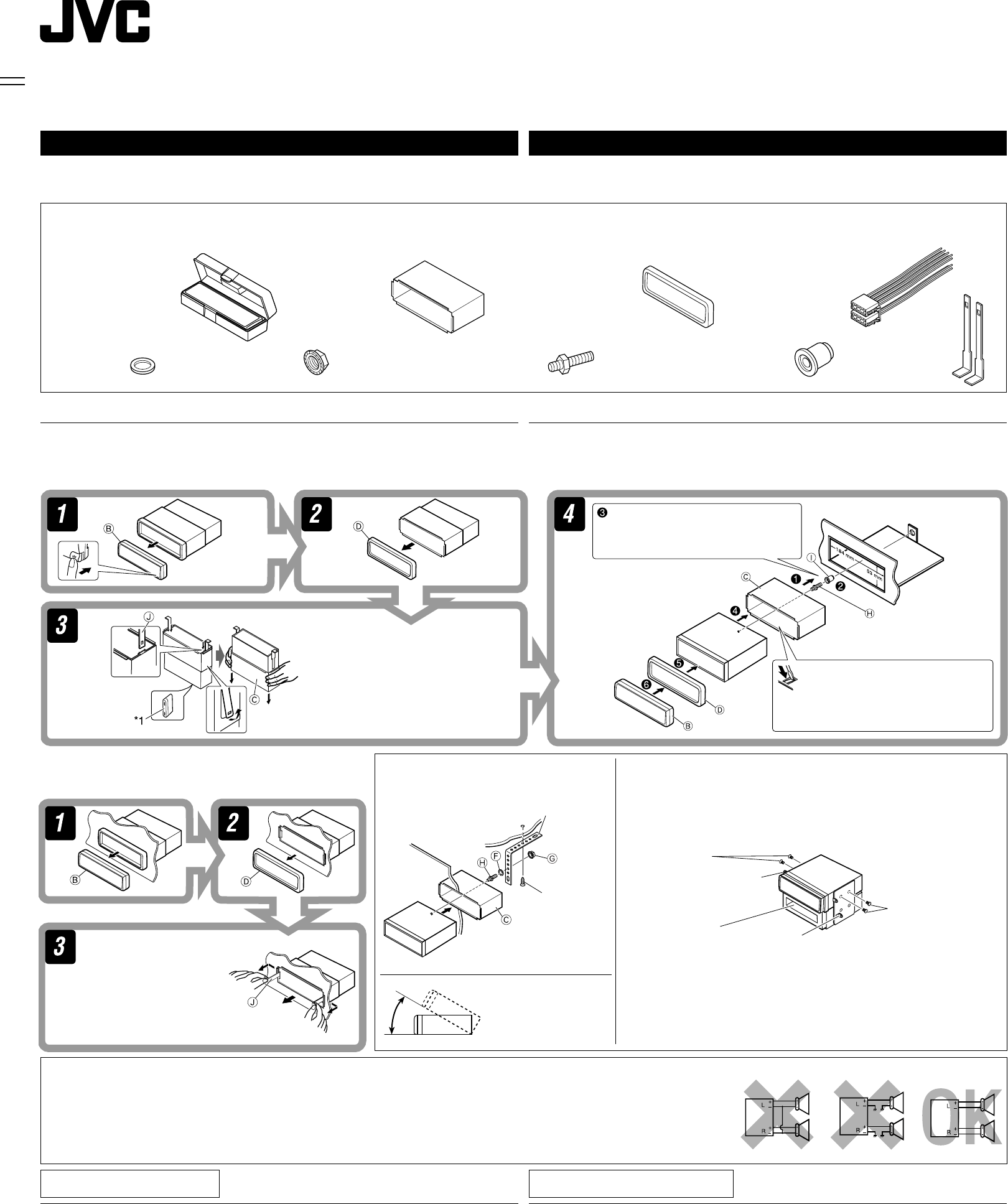
1
INSTALLATION (IN-DASH MOUNTING)
The following illustration shows a typical installation. If you have any questions or require
information regarding installation kits, consult your JVC IN-CAR ENTERTAINMENT dealer or a
company supplying kits.
•
If you are not sure how to install this receiver correctly, have it installed by a qualified technician.
INSTALLATION (MONTAGE DANS LE TABLEAU DE BORD)
L’illustration suivante est un exemple d’installation typique. Si vous avez des questions ou avez besoin
d’information sur des kits d’installation, consulter votre revendeur d’autoradios JVC ou une compagnie
d’approvisionnement.
• Si l’on n’est pas sûr de pouvoir installer correctement cet appareil, le faire installer par un technicien qualifié.
Do the required electrical connections.
Réalisez les connexions électriques.
*1 When you stand the receiver, be
careful not to damage the fuse on
the rear.
*1 Lorsque vous mettez l’appareil à la
verticale, faire attention de ne pas
endommager le fusible situé sur l’arrière.
Bend the appropriate tabs to hold the
sleeve firmly in place.
Tordez les languettes appropriées pour
maintenir le manchon en place.
Removing the receiver / Retrait de l’appareil
Before removing the receiver, release the rear section.
Avant de retirer l’appareil, libérer la section arrière.
Insert the two handles, then
pull them as illustrated so
that the receiver can be
removed.
Insérez les deux poignées, puis
tirez de la façon illustrée de
façon à retirer l’appareil.
When installing the receiver without using the sleeve / Lors de
l’installation de l’appareil scans utiliser de manchon
In a Toyota for example, first remove the car radio and install the receiver in its place.
Par exemple dans une Toyota, retirer d’abord l’autoradio et installer l’appareil à la
place.
When using the optional stay / Lors
de l’utilisation du hauban en option
Note : When installing the receiver on the mounting bracket, make
sure to use the 8 mm-long screws. If longer screws are
used, they could damage the receiver.
Remarque : Lors de l’installation de l’appareil sur le support de montage,
s’assurer d’utiliser des vis d’une longueur de 8 mm. Si des vis plus
longues sont utilisées, elles peuvent endommager l’appareil.
Bracket*
Support*
Bracket*
Support*
* Not included for this
receiver.
* Non fourni avec cet appareil.
Flat type screws
(M5 x 8 mm)*
Vis à tête plate
(M5 x 8 mm)*
Pocket
Poche
Flat type screws
(M5 x 8 mm)*
Vis à tête plate
(M5 x 8 mm)*
Screw (option)
Vis (en option)
Stay (option)
Hauban (en
option)
Fire wall
Cloison
Dashboard
Tableau de
bord
Install the receiver at an
angle of less than 30˚.
Installez l’appareil avec un
angle de moins de 30˚.
PRECAUTIONS on power supply and speaker
connections:
• DO NOT connect the speaker leads of the power cord to
the car battery; otherwise, the receiver will be seriously
damaged.
• BEFORE connecting the speaker leads of the power cord to the
speakers, check the speaker wiring in your car.
PRECAUTIONS sur l’alimentation et la connexion
des enceintes:
• NE CONNECTEZ PAS les fils d’enceintes du cordon
d’alimentation à la batterie; sinon, l’appareil serait
sérieusement endommagé.
• AVANT de connecter les fils d’enceintes du cordon d’alimentation aux
enceintes, vérifiez le câblage des enceintes de votre voiture.
TROUBLESHOOTING
• The fuse blows.
* Are the red and black leads connected correctly?
• Power cannot be turned on.
* Is the yellow lead connected?
• No sound from the speakers.
* Is the speaker output lead short-circuited?
• Sound is distorted.
* Is the speaker output lead grounded?
* Are the “–” terminals of L and R speakers grounded in common?
• Noise interfere with sounds.
* Is the rear ground terminal connected to the car’s chassis using shorter and thicker cords?
• Receiver becomes hot.
* Is the speaker output lead grounded?
* Are the “–” terminals of L and R speakers grounded in common?
• This receiver does not work at all.
* Have you reset your receiver?
EN CAS DE DIFFICULTES
• Le fusible saute.
* Les fils rouge et noir sont-ils racordés correctement?
• L’a p p a r e i l n e p e ut pas être mise sous tension.
* Le fil jaune est-elle raccordée?
• Pas de son des enceintes.
* Le fil de sortie d’enceinte est-il court-circuité?
• Le son est déformé.
* Le fil de sortie d’enceinte est-il à la masse?
* Les bornes “–” des enceintes gauche et droit sont-elles mises ensemble à la masse?
• Interférence avec les sons.
*
La prise arrière de mise à la terre est-elle connectée au châssis de la voiture avec un cordon court et épais?
• L’appareil devient chaud.
* Le fil de sortie d’enceinte est-il à la masse?
* Les bornes “–” des enceintes gauche et droit sont-elles mises ensemble à la masse?
• Cet appareil ne fonctionne pas du tout.
* Avez-vous réinitialisé votre appareil?
Instal1-2_KD-G312_010B_f.indd 1Instal1-2_KD-G312_010B_f.indd 1 1/7/05 9:58:35 AM1/7/05 9:58:35 AM
ELECTRICAL CONNECTIONS
To prevent short circuits, we recommend that you disconnect the battery’s negative terminal and
make all electrical connections before installing the receiver.
• Be sure to ground this receiver to the car’s chassis again after installation.
Notes:
• Replace the fuse with one of the specified rating. If the fuse blows frequently, consult your JVC
IN-CAR ENTERTAINMENT dealer.
• It is recommended to connect to the speakers with maximum power of more than 50 W (both
at the rear and at the front, with an impedance of 4 Ω to 8 Ω). If the maximum power is less
than 50 W, change “AMP GAIN” setting to prevent the speakers
from being damaged (see page 21 of the INSTRUCTIONS).
• To prevent short-circuit, cover the terminals of the UNUSED
leads with insulating tape.
• The heat sink becomes very hot after use. Be
careful not to touch it when removing this receiver.
RACCORDEMENTS ELECTRIQUES
Pour éviter tout court-circuit, nous vous recommandons de débrancher la borne négative de la batterie et
d’effectuer tous les raccordements électriques avant d’installer l’appareil.
• Assurez-vous de raccorder de nouveau la mise à la masse de cet appareil au châssis
de la voiture après l’installation.
Remarques:
• Remplacer le fusible par un de la valeur précisée. Si le fusible saute souvent, consulter votre revendeur
d’autoradios JVC.
• Il est recommandé de connecter des enceintes avec une puissance de plus de 50 W (les enceintes arrière
et les enceintes avant, avec une impédance comprise entre 4 Ω et 8 Ω). Si la puissance maximum est
inférieure à 50 W, changez “AMP GAIN” pour éviter d’endommager vos enceintes (voir page 21 du
MANUEL D’INSTRUCTIONS).
• Pour éviter les court-circuits, couvrir les bornes des fils qui ne sont PAS UTILISÉS avec de la bande
isolante.
• Le dissipateur de chaleur devient très chaud après usage. Faire attention de ne pas le toucher en retirant
cet appareil.
Heat sink
Dissipateur de chaleur
2
A
ENGLISH FRANÇAIS
B
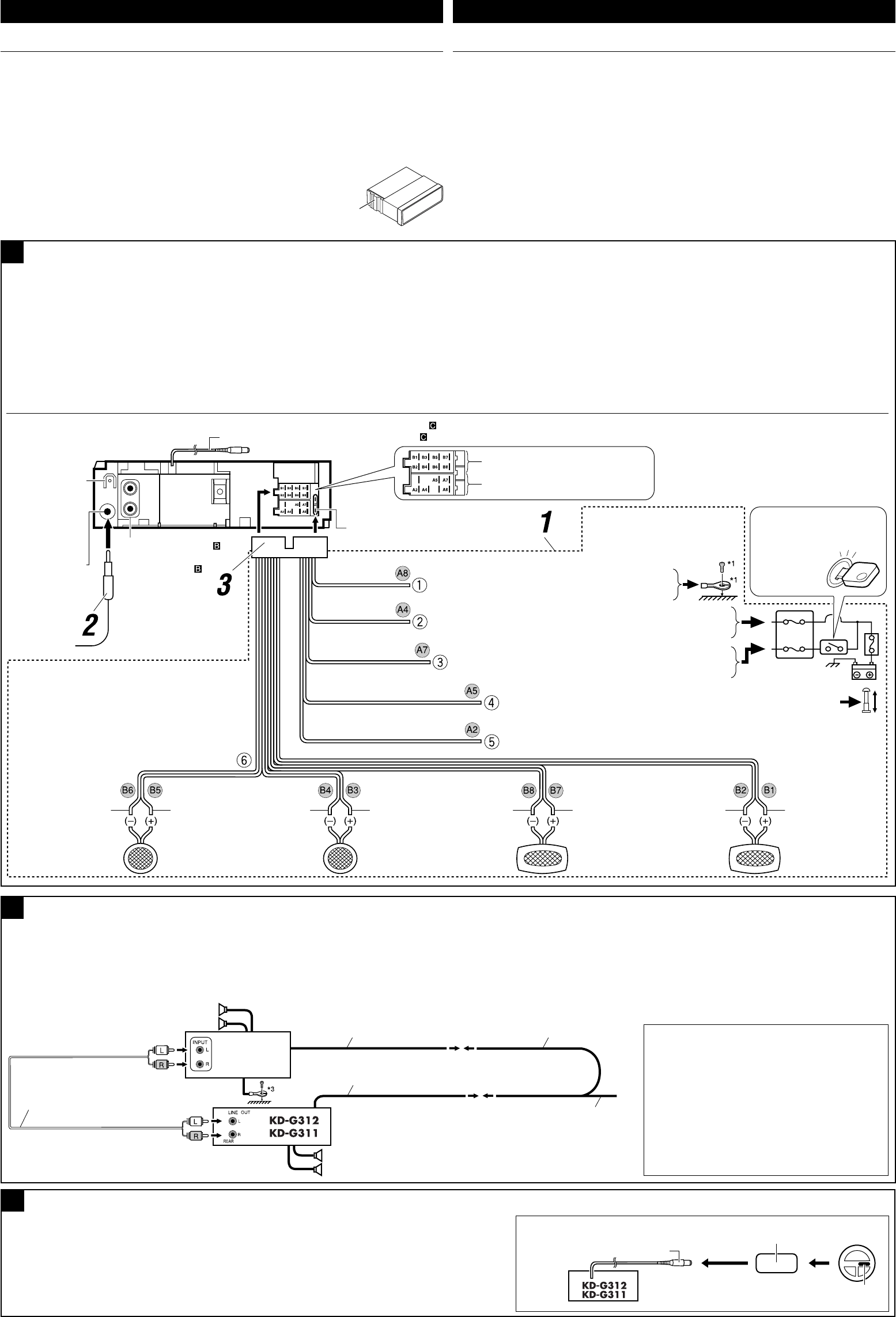
Typical connections / Raccordements typiques
Before connecting: Check the wiring in the vehicle carefully. Incorrect connection may cause
serious damage to this receiver.
The leads of the power cord and those of the connector from the car body may be different in
color.
1 Connect the colored leads of the power cord in the order specified in the illustration below.
2 Connect the aerial cord.
3 Finally connect the wiring harness to the receiver.
Note: If your vehicle does not have any accessory terminal, move the fuse from the fuse
position 1 (initial position) to fuse position 2, and connect the red lead (A7) to the positive (+)
battery terminal.
• The yellow lead (A4) is not used in this case.
Avant de commencer la connexion: Vérifiez attentivement le câblage du véhicule. Une
connexion incorrecte peut endommager sérieusement l’appareil.
Le fil du cordon d’alimentation et ceux des connecteurs du châssis de la voiture peuvent être différents
en couleur.
1
Connectez les fils colorés du cordon d’alimentation dans l’ordre spécifié sur l’illustration ci-dessous.
2 Connectez le cordon d’antenne.
3 Finalement, connectez le faisceau de fils à l’appareil.
Remarque: Si votre véhicule ne possède pas de borne accessoire, déplacez le fusible de la position de
fusible 1 (position originale) à la position de fusible 2 et connectez le fil rouge (A7) à la borne positive
(+) de la batterie.
• Le fil jaune (A4) n’est pas utilisé dans ce cas.
C
Connecting the external amplifier / Connexion d’un amplificateur extérieur
You can connect an amplifier to upgrade your car stereo system.
• Connect the remote lead (blue with white stripe) to the remote lead of the other equipment so
that it can be controlled through this receiver.
• Disconnect the speakers from this receiver, connect them to the amplifier. Leave the
speaker leads of this receiver unused.
Vous pouvez connecter un amplificateur pour améliorer votre système autoradio.
• Connectez le fil de commande à distance (bleu avec bande blanche) au fil de commande à distance de
l’autre appareil de façon qu’il puisse être commandé via cet appareil.
• Déconnectez les enceintes de cet appareil et connectez-les à l’amplificateur. Laissez
les fils d’enceintes de cet appareil inutilisés.
Signal cord (not supplied for this receiver)
Cordon de signal (non fourni avec cet appareil)
Front speakers
Enceintes avant
Rear speakers
Enceintes arrière Remote lead
Fil d’alimentation à distance
Y-connector (not supplied for this receiver)
Connecteur Y (non fourni avec cet appareil)
Remote lead (Blue with white stripe)
Fil d’alimentation à distance (Bleu avec bande blanche)
To the remote lead of other equipment or power
aerial if any
Au fil de télécommande de l’autre appareil ou à l’antenne
automatique s’il y en a une
*2
Before checking the operation of this receiver
prior to installation, this lead must be connected,
otherwise power cannot be turned on.
*2 Pour vérifier le fonctionnement de cet appareil avant
installation, ce fil doit être raccordé, sinon l’appareil
ne peut pas être mis sous tension.
Line out (see diagram )
Sortie de ligne
(voir le diagramme )
Rear ground
terminal
Borne arrière de
masse
15 A fuse
Fusible 15 A
Aerial terminal
Borne de l’antenne Black
Noir
Blue with white stripe
Bleu avec bande blanche
Red
Rouge
Yellow*2
Jaune*2
*1 Not included for this receiver
*1 Non fourni avec cet appareil
To metallic body or chassis of the car
Vers corps métallique ou châssis de la voiture
To a live terminal in the fuse block connecting to the car battery
(bypassing the ignition switch) (constant 12 V)
À une borne sous tension du porte-fusible connectée à la batterie de la voiture
(en dérivant l’interrupteur d’allumage) (12 V constant)
Ignition switch
Interrupteur d’allumage
Fuse block
Porte-fusible
To an accessory terminal in the fuse block
Vers borne accessoire du porte-fusible
To the remote lead of other equipment or power aerial if any (200 mA max.)
Au fil de télécommande de l’autre appareil ou à l’antenne automatique s’il y en a une
(200 mA max.)
Left speaker (front)
Enceinte gauche (avant)
Right speaker (front)
Enceinte droit (avant)
Left speaker (rear)
Enceinte gauche (arrière)
Right speaker (rear)
Enceinte droit (arrière)
Purple
Violet
Purple with black stripe
Violet avec bande noire
Green
Vert
Green with black stripe
Vert avec bande noire
Gray
Gris
Gray with black stripe
Gris avec bande noire
White
Blanc
White with black stripe
Blanc avec bande noire
To steering wheel remote controller (see diagram )
Pour la télécommande de volant (voir le diagramme )
Fuse position 2 / Position de fusible 2
Fuse position 1 / Position de fusible 1
Brown
Marron To cellular phone system
À un système de téléphone cellulaire
Connecting to the steering wheel remote controller / Connexion de la télécommande de volant
If your car is equipped with the steering wheel remote controller, you can operate this receiver using the
controller. To do it, a JVC’s OE remote adapter (not supplied) which matches with your car is required.
Consult your JVC IN-CAR ENTERTAINMENT dealer for details.
Si votre voiture est munie d’une télécommande de volant, vous pouvez commander cet autoradio en utilisant la
télécommande. Pour le faire, un adaptateur pour télécommande au volant JVC (non fourni) correspondant à votre
voiture est nécessaire. Consultez votre revendeur d’autoradio JVC pour les détails.
Steering wheel remote input
Entrée de la télécommande de volant
OE remote adapter (not supplied)
Adaptateur pour télécommande au volant (non fourni)
Steering wheel remote controller (equipped in the car)
Télécommande de volant (installée dans la voiture)
JVC Amplifier
JVC Amplificateur
*3 Firmly attach the ground wire to the metallic
body or to the chassis of the car—to the place
not coated with paint (if coated with paint,
remove the paint before attaching the wire).
Failure to do so may cause damage to the
receiver.
*3 Attachez solidement le fil de mise à la masse au
châssis métallique de la voiture—à un endroit qui
n’est pas recouvert de peinture (s’il est recouvert
de peinture, enlevez d’abord la peinture avant
d’attacher le fil). L’appareil peut être endommagé si
cela n’est pas fait correctement.
Instal1-2_KD-G312_010B_f.indd 2Instal1-2_KD-G312_010B_f.indd 2 1/7/05 9:58:36 AM1/7/05 9:58:36 AM
ENGLISH
РУCCKИЙ
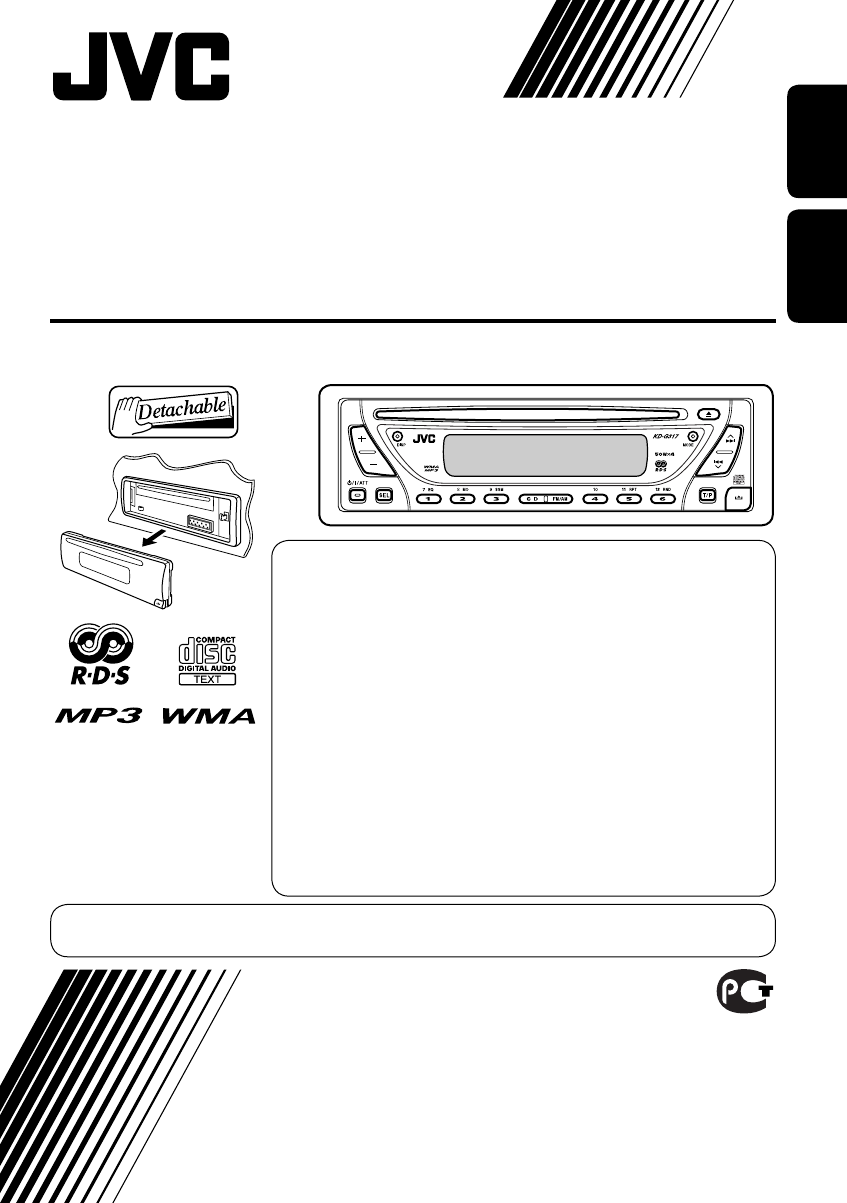
CD RECEIVER
РЕСИВЕР С ПРОИГРЫВАТЕЛЕМ КОМПАКТ-ДИСКОВ
KD-G317
For installation and
connections, refer to the
separate manual.
Указания по установке и
выполнению соединений
приводятся в отдельной
инструкции.
INSTRUCTIONS
ИНСТРУКЦИИ ПО ЭКСПЛУАТАЦИИ
GET0261-001A
[EE]
В соответствии с Законом Российской Федерации “О защите прав
потре бителей” срок службы (годности) данного товара “по истечении
которого он может представлять опасность для жизни, здоровья
потребителя, причинять вред его имуществу или окружающей среде”
составляет семь (7) лет со дня производства. Этот срок является
временем, в течение которого потребитель данного товара может
безопасно им пользоваться при условии соблюдения ин струк ции по
эксплуатации данного товара, проводя необходимое обслуживание,
включающее замену расходных материалов и/или соответствующее
ремонтное обеспечение в специализированном сервисном центре.
Дополнительные косметические материалы к данному товару,
поставляе мые вместе с ним, могут храниться в течение двух (2) лет со
дня его производства.
Срок службы (годности), кроме срока хранения дополнительных
космети ческих материалов, упомянутых в предыдущих двух пунктах,
не затрагивает никаких других прав потребителя, в частности,
гарантийного свидетельства JVC, которое он может получить в
соответствии с законом о правах потребителя или других законов,
связанных с ним.
For canceling the display demonstration, see page 7.
Информацию об отмене демонстрации функций дисплея см. на стр. 7.
Cover_KD-G317[EE]_f.indd 2Cover_KD-G317[EE]_f.indd 2 10/27/04 10:38:39 AM10/27/04 10:38:39 AM
2
ENGLISH
Thank you for purchasing a JVC product.
Please read all instructions carefully before operation, to ensure your complete understanding and to
obtain the best possible performance from the unit.
IMPORTANT FOR LASER PRODUCTS
1. CLASS 1 LASER PRODUCT
2. CAUTION: Do not open the top cover. There are no user serviceable parts inside the unit; leave
all servicing to qualified service personnel.
3. CAUTION: Visible and invisible laser radiation when open and interlock failed or defeated.
Avoid direct exposure to beam.
4. REPRODUCTION OF LABEL: CAUTION LABEL, PLACED OUTSIDE THE UNIT.
Warning:
If you need to operate the receiver while
driving, be sure to look ahead carefully or
you may be involved in a traffic accident.
How to reset your unit
• This will reset the microcomputer. Your
preset adjustments will also be erased.
• If a disc is loaded, it will eject. Be careful
not to drop the disc.
How to forcibly eject a disc
If a disc cannot be recognized by the
receiver or cannot be ejected, ejects the disc
as follows.
• If this does not work, try to reset your
receiver.
• Be careful not to drop the disc when it
ejects.
EN02-05_KD-G317[EE]_f.indd 2EN02-05_KD-G317[EE]_f.indd 2 10/27/04 10:38:55 AM10/27/04 10:38:55 AM
3
ENGLISH
How to reset your unit ........................... 2
How to forcibly eject a disc ................... 2
How to read this manual ........................ 4
How to use the MODE button ............... 4
Control panel — KD-G317 ......... 5
Parts identification ................................. 5
Getting started ....................... 6
Basic operations ........................... 6
Canceling the display demonstrations ... 7
Setting the clock .................................... 7
Radio operations ................... 8
Listening to the radio ........................... 8
Storing stations in memory .................... 9
Listening to a preset station ................... 10
FM RDS operations ................. 11
Searching for your favorite FM RDS
programme
....................................... 11
Storing your favorite programmes ......... 12
Using the standby receptions ................. 12
Tracking the same programme
—Network-Tracking Reception ........ 13
Disc operations ...................... 14
Playing a disc ..................................... 14
Changing the display information ......... 16
Selecting the playback modes ................ 17
Sound adjustments ................ 18
Selecting preset sound modes
(C-EQ: custom equalizer) .................. 18
Adjusting the sound ............................... 19
General settings — PSM ......... 20
Basic procedure ..................................... 20
Detaching the control
panel .................................. 22
Using the remote controller
— RM-RK60 ............................ 23
Main elements and features ................... 23
Maintenance .......................... 24
More about this receiver ........ 25
Troubleshooting ..................... 27
Specifications ......................... 29
*For safety....
• Do not raise the volume level too much, as
this will block outside sounds, making driving
dangerous.
• Stop the car before performing any
complicated operations.
Contents
*Temperature inside the car....
If you have parked the car for a long time in
hot or cold weather, wait until the temperature
in the car becomes normal before operating the
unit.
EN02-05_KD-G317[EE]_f.indd 3EN02-05_KD-G317[EE]_f.indd 3 10/27/04 10:38:58 AM10/27/04 10:38:58 AM
4
ENGLISH
How to use the MODE button
If you press MODE, the receiver goes into
functions mode, then the number buttons and
¢/4 buttons work as different
function buttons.
Ex.: When number button 2 works as
MO (monaural) button.
Time countdown indicator
To use these buttons for original functions
again after pressing MODE, wait for
5 seconds without pressing any of these buttons
until the functions mode is cleared.
• Pressing MODE again also clears the
functions mode.
How to read this manual
The following methods are used to made the
explanations simple and easy-to-understand:
• Some related tips and notes are explained in
“More about this receiver” (see page 25).
• Button operations are mainly explained with
the illustrations as follows:
Press briefly.
Press repeatedly.
Press either one.
Press and hold until
your desired response
begins.
Press and hold both
buttons at the same
time.
EN02-05_KD-G317[EE]_f.indd 4EN02-05_KD-G317[EE]_f.indd 4 10/27/04 10:38:58 AM10/27/04 10:38:58 AM
5
ENGLISH
Control panel — KD-G317
Parts identification
1 +/– buttons
2 DISP (display) button
3 Loading slot
4 Display window
5 MODE button
6 0 (eject) button
7 ¢/4 buttons
8 (standby/on/attenuator) button
9 SEL (select) button
p Remote sensor
• You can control this receiver with an
optionally purchased remote controller.
• DO NOT expose the remote sensor to
strong light (direct sunlight or artificial
lighting).
q EQ (equalizer) button
w MO (monaural) button
e SSM (Strong-station Sequential Memory)
button
r CD button
t FM/AM button
y RPT (repeat) button
u RND (random) button
i T/P (traffic programme/programme type)
button
o (control panel release) button
; Number buttons
Display window
a Tuner reception indicators—MO (monaural),
ST (stereo)
s WMA indicator
d RDS indicators—TP, PTY, AF, REG
f MP3 indicator
g CD indicator
h Playback mode / item indicators—
RND (random), (disc), (folder),
RPT (repeat)
j LOUD (loudness) indicator
k EQ (equalizer) indicator
l Sound mode (C-EQ: custom equalizer)
indicators—ROCK, CLASSIC, POPS,
HIP HOP, JAZZ, USER
• also works as the time countdown
indicator.
/ Disc information indicators—TAG (ID3
Tag), (folder), (track/file)
z Main display
x Source display / Volume level indicator
c Tr (track) indicator
Display window
EN02-05_KD-G317[EE]_f.indd 5EN02-05_KD-G317[EE]_f.indd 5 10/27/04 10:38:59 AM10/27/04 10:38:59 AM
6
ENGLISH
Getting started
Basic operations
~
Ÿ
You cannot select “CD” as the playback
source if there is no disc in the loading
slot.
!
Volume level appears.
Volume level indicator
⁄ Adjust the sound as you want.
(See pages 18 and 19.)
To drop the volume in a moment (ATT)
To restore the sound, press it
again.
To turn off the power
Caution on volume setting:
Discs produce very little noise compared
with other sources. Lower the volume
before playing a disc to avoid damaging
the speakers by the sudden increase of the
output level.
EN06-11_KD-G317[EE]_f.indd 6EN06-11_KD-G317[EE]_f.indd 6 10/27/04 10:39:11 AM10/27/04 10:39:11 AM
7
ENGLISH
Canceling the display
demonstrations
If no operations are done for about 20 seconds,
display demonstration starts.
[Initial: DEMO ON]—see page 20.
1
2
3
4 Finish the procedure.
To activate the display demonstration
In step 3 above...
Setting the clock
1
2 Set the hour and minute.
1 Select “CLOCK H” (hour), then
adjust the hour.
2 Select “CLOCK M” (minute),
then adjust the minute.
3 Finish the procedure.
To check the current clock time when the
power is turned off
EN06-11_KD-G317[EE]_f.indd 7EN06-11_KD-G317[EE]_f.indd 7 11/2/04 5:55:45 PM11/2/04 5:55:45 PM
8
ENGLISH
Radio operations
Listening to the radio
~
Lights up when receiving an FM stereo
broadcast with sufficient signal strength.
Selected band appears.
Ÿ Start searching for a station.
When a station is received, searching
stops.
To stop searching, press the same
button again.
Note:
FM1 and FM2: 87.5 MHz – 108.0 MHz
FM3: 65.00 MHz – 74.00 MHz
To tune in to a station manually
In step Ÿ on the left...
1
2 Select the desired station frequencies.
EN06-11_KD-G317[EE]_f.indd 8EN06-11_KD-G317[EE]_f.indd 8 10/27/04 10:39:13 AM10/27/04 10:39:13 AM
9
ENGLISH
Storing stations in memory
You can preset six stations for each band.
FM station automatic presetting —
SSM (Strong-station Sequential
Memory)
1 Select the FM band (FM1 – FM3)
you want to store into.
2
3
“SSM” flashes, then disappears when
automatic presetting is over.
Local FM stations with the strongest signals are
searched and stored automatically in the FM
band.
When an FM stereo broadcast is hard to
receive
1
2
Lights up when monaural mode is activated.
Reception improves, but stereo effect will
be lost.
To restore the stereo effect, repeat the same
procedure so that the MO indicator goes off.
EN06-11_KD-G317[EE]_f.indd 9EN06-11_KD-G317[EE]_f.indd 9 10/27/04 10:39:14 AM10/27/04 10:39:14 AM
10
ENGLISH
Manual presetting
Ex.: Storing FM station of 92.5 MHz into the
preset number 4 of the FM1 band.
1
2
3
Preset number flashes for a while.
Listening to a preset station
1
2 Select the preset station (1 – 6) you
want.
To check the current clock time while
listening to an FM (non-RDS) or AM station
• For FM RDS stations, see page 13.
EN06-11_KD-G317[EE]_f.indd 10EN06-11_KD-G317[EE]_f.indd 10 10/27/04 10:39:14 AM10/27/04 10:39:14 AM
11
ENGLISH
FM RDS operations
Searching for your favorite FM RDS programme
You can tune in to a station broadcasting your
favorite programme by searching for a PTY code.
~
The last selected PTY code appears.
Ÿ Select one of your favorite
programme type.
or
Select one of the twenty-nine PTY
codes.
Ex.: When “ROCK M” is selected
! Start searching for your favorite
programme.
If there is a station broadcasting a
programme of the same PTY code as
you have selected, that station is tuned
in.
PTY codes
NEWS, AFFAIRS, INFO, SPORT,
EDUCATE, DRAMA, CULTURE,
SCIENCE, VARIED, POP M (music),
ROCK M (music), EASY M (music),
LIGHT M (music), CLASSICS,
OTHER M (music), WEATHER,
FINANCE, CHILDREN, SOCIAL,
RELIGION, PHONE IN, TRAVEL,
LEISURE, JAZZ, COUNTRY,
NATION M (music), OLDIES,
FOLK M (music), DOCUMENT
EN06-11_KD-G317[EE]_f.indd 11EN06-11_KD-G317[EE]_f.indd 11 11/2/04 5:55:58 PM11/2/04 5:55:58 PM
12
ENGLISH
What you can do with RDS
RDS (Radio Data System) allows FM
stations to send an additional signal along
with their regular programme signals.
By receiving the RDS data, this receiver can
do the following:
•
Programme Type (PTY) Search (see page 11)
• Standby Reception of Traffic
Announcement—TA (see the following) or
your favorite programme (PTY) (see pages
13 and 21)
•
Tracing the same programme automatically
—Network-Tracking Reception (see page 13)
• Programme Search (see page 21)
Storing your favorite programmes
You can store six favorite programme types.
Preset programme types in the number buttons
(1 to 6)
1 Select a PTY code (see page 11).
2 Select the preset number (1 – 6) you
want to store into.
Ex.: When “ROCK M” is selected
3 Repeat steps 1 and 2 to store
other PTY codes into other preset
numbers.
4 Finish the procedure.
Using the standby receptions
TA Standby Reception
TA Standby Reception allows the receiver to
switch temporarily to Traffic Announcement
(TA) from any source other than AM.
The volume changes to the preset TA volume
level (see page 21).
To activate TA Standby Reception
The TP indicator either
lights up or flashes.
• If the TP indicator lights up, TA Standby
Reception is activated.
• If the TP indicator flashes, TA Standby
Reception is not yet activated. (This occurs
when you are listening to an FM station
without the RDS signals required for TA
Standby Reception.)
To activate TA Standby Reception, tune in to
another station providing these signals. The
TP indicator will stop flashing and remain lit.
To deactivate the TA Standby Reception
The TP indicator goes off.
EN12-17_KD-G317[EE]_f.indd 12EN12-17_KD-G317[EE]_f.indd 12 10/27/04 10:39:30 AM10/27/04 10:39:30 AM
13
ENGLISH
Tracking the same programme—
Network-Tracking Reception
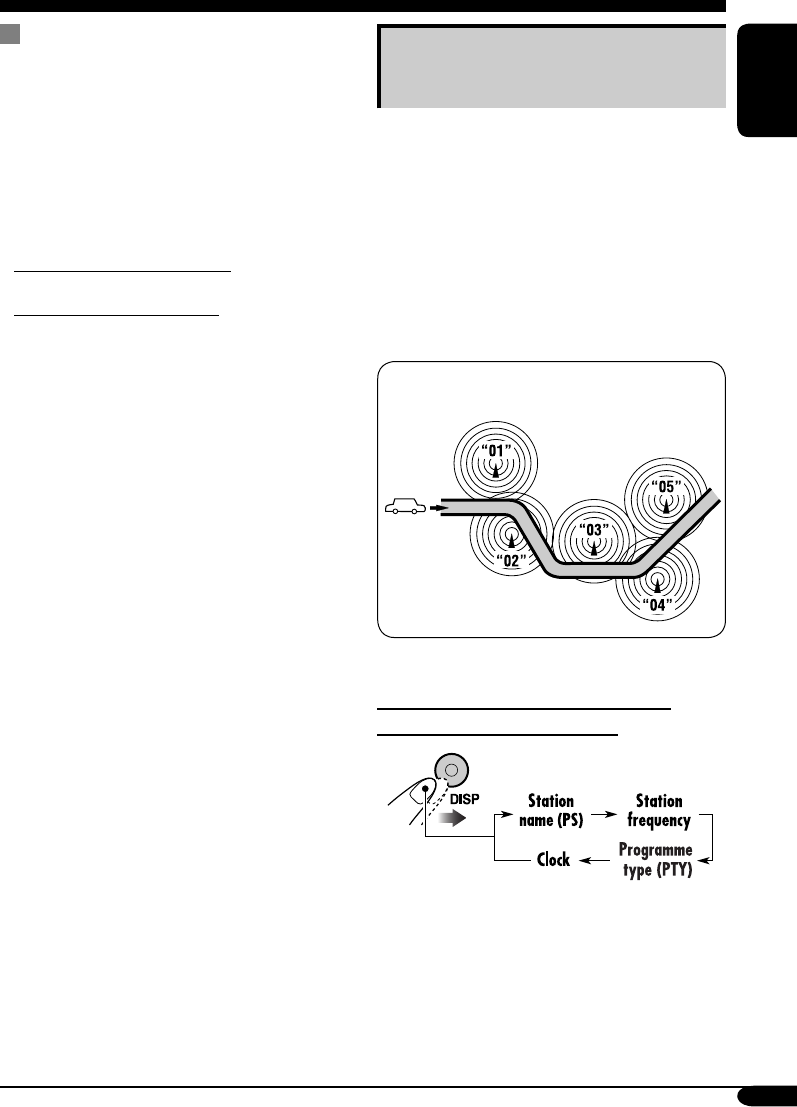
When driving in an area where FM reception
is not sufficient enough, this receiver
automatically tunes in to another FM RDS
station of the same network, possibly
broadcasting the same programme with stronger
signals (see the illustration below).
When shipped from the factory, Network-
Tracking Reception is activated.
To change the Network-Tracking Reception
setting, see page 21.
Programme A broadcasting on different
frequency areas (01 – 05)
To check the current clock time while
listening to an FM RDS station
PTY Standby Reception
PTY Standby Reception allows the receiver
to switch temporarily to your favorite PTY
programme from any source other than AM.
To activate and select your favorite PTY
code for PTY Standby Reception, see page
21.
The PTY indicator either lights up or flashes.
• If the PTY indicator lights up, PTY Standby
Reception is activated.
• If the PTY indicator flashes, PTY Standby
Reception is not yet activated.
To activate PTY Standby Reception, tune in
to another station providing these signals. The
PTY indicator will stop flashing and remain
lit.
To deactivate the PTY Standby Reception,
select “OFF” for the PTY code (see page 21).
The PTY indicator goes off.
EN12-17_KD-G317[EE]_f.indd 13EN12-17_KD-G317[EE]_f.indd 13 10/29/04 2:15:26 PM10/29/04 2:15:26 PM
14
ENGLISH
Disc operations
Playing a disc
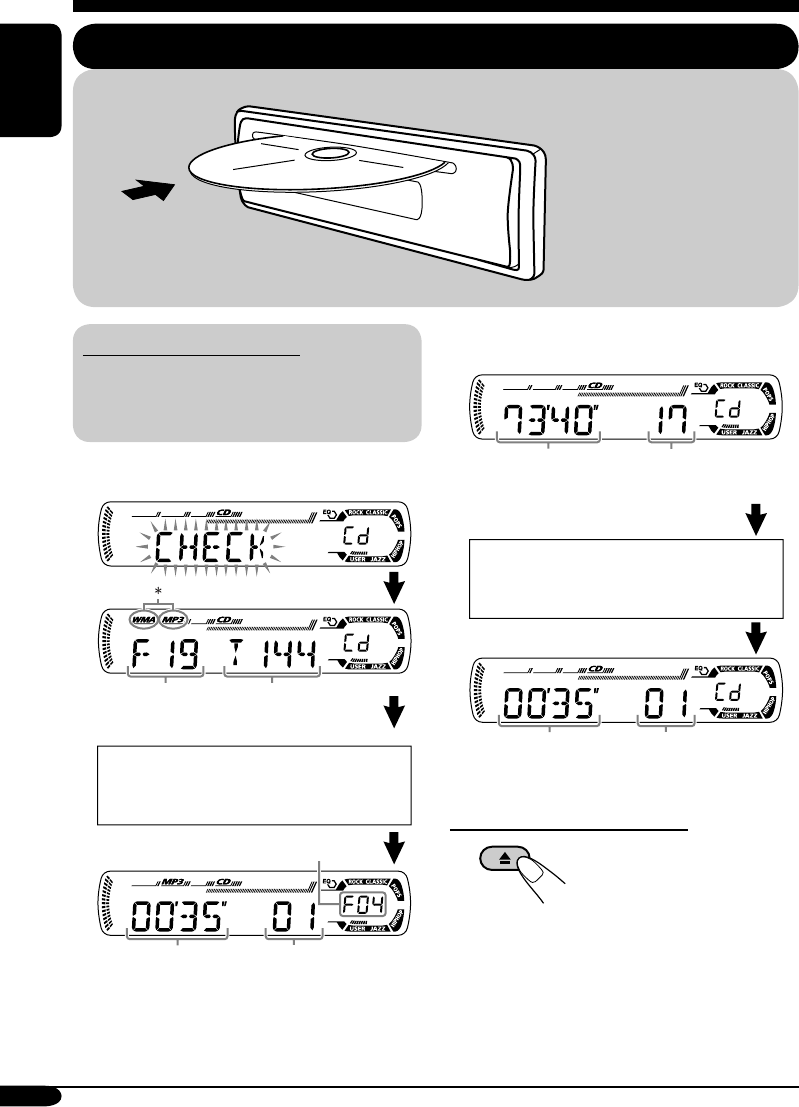
About MP3 and WMA discs
MP3 and WMA (Windows Media® Audio)
“tracks” (words “file” and “track” are used
interchangeably) are recorded in “folders.”
• When inserting an MP3 or a WMA disc:
* Either the MP3 or WMA indicator lights up
depending on the detected file.
• When inserting an audio CD or a CD Text
disc:
To stop play and eject the disc
Total folder
number
Total file
number
Total playing time of
the inserted disc
Total track number
of the inserted disc
Elapsed playing
time
Current track
number
All tracks will be played
repeatedly until you change
the source or eject the disc.
Disc information appears
automatically (see page 16).
Current track
number
Selected folder number
Elapsed
playing time
CD Text: Disc title/performer =
Track title appears automatically
(see page 16).
EN12-17_KD-G317[EE]_f.indd 14EN12-17_KD-G317[EE]_f.indd 14 10/27/04 10:39:31 AM10/27/04 10:39:31 AM
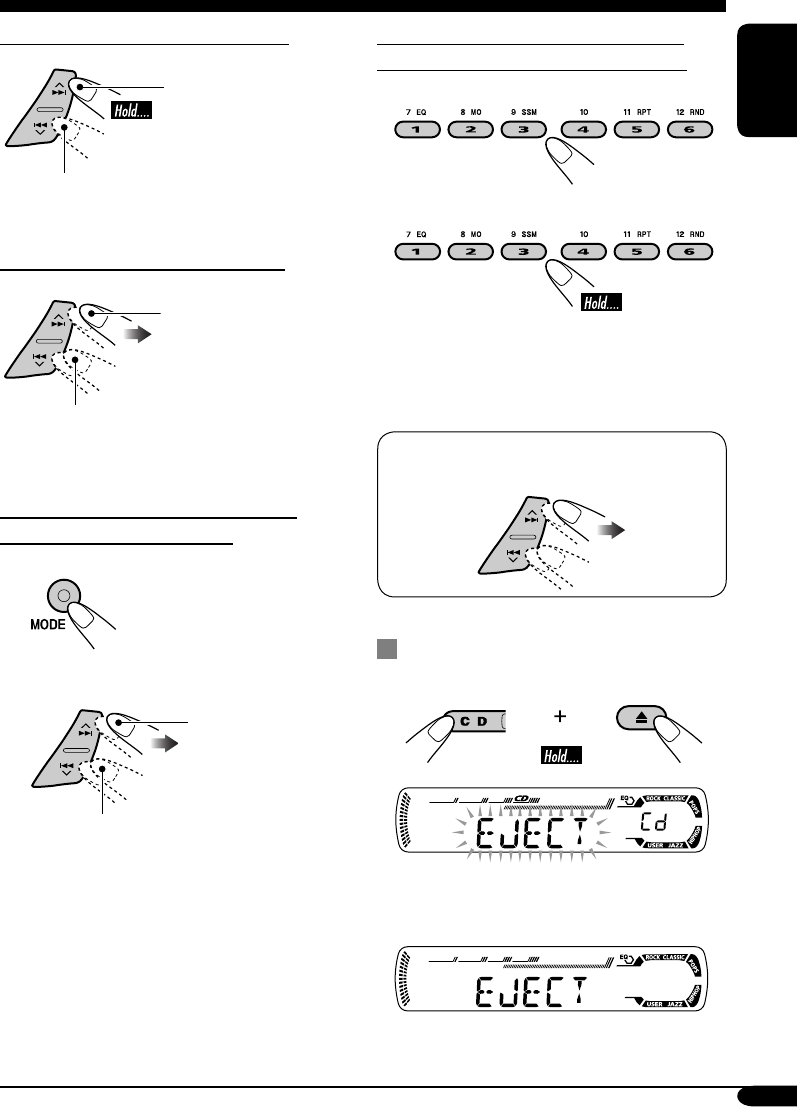
15
ENGLISH
To fast-forward or reverse the track
Fast-forwards.
Reverses.
To go to the next or previous tracks
To the following tracks.
To the beginning of the current track, then
the previous tracks.
To go to the next or previous folders
(only for MP3 or WMA discs)
1
2
To next folders.
To previous folders.
To locate a particular track (for CD) or
folder (for MP3 or WMA discs) directly
To select a number from 01 – 06:
To select a number from 07 – 12:
• To use folder search on MP3/WMA discs, it
is required that folders are assigned with
2-digits number at the beginning of their
folder names—01, 02, 03, and so on.
• To select a particular track in a folder
(for MP3 or WMA disc) after selecting a
folder:
Prohibiting disc ejection
You can lock a disc in the loading slot.
To cancel the prohibition, repeat the same
procedure.
EN12-17_KD-G317[EE]_f.indd 15EN12-17_KD-G317[EE]_f.indd 15 10/27/04 10:39:32 AM10/27/04 10:39:32 AM
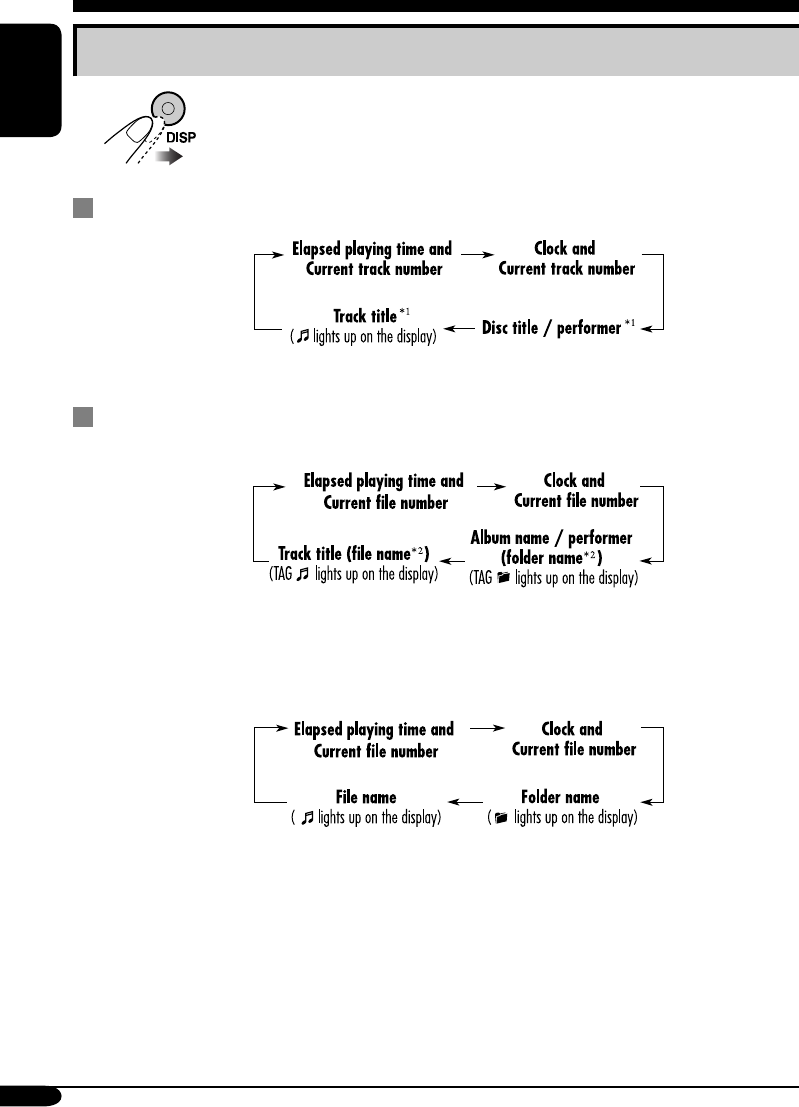
16
ENGLISH
Changing the display information
While playing an audio CD or a CD Text
*1 If the current disc is an audio CD, “NO NAME” appears.
While playing an MP3 or WMA disc
• When “TAG DISP” is set to “TAG ON” (see page 21)
*2 If an MP3/WMA file does not have ID3 tags, folder name and file name appear. In this
case, the TAG indicator will not light up.
• When “TAG DISP” is set to “TAG OFF”
EN12-17_KD-G317[EE]_f.indd 16EN12-17_KD-G317[EE]_f.indd 16 10/27/04 10:39:33 AM10/27/04 10:39:33 AM
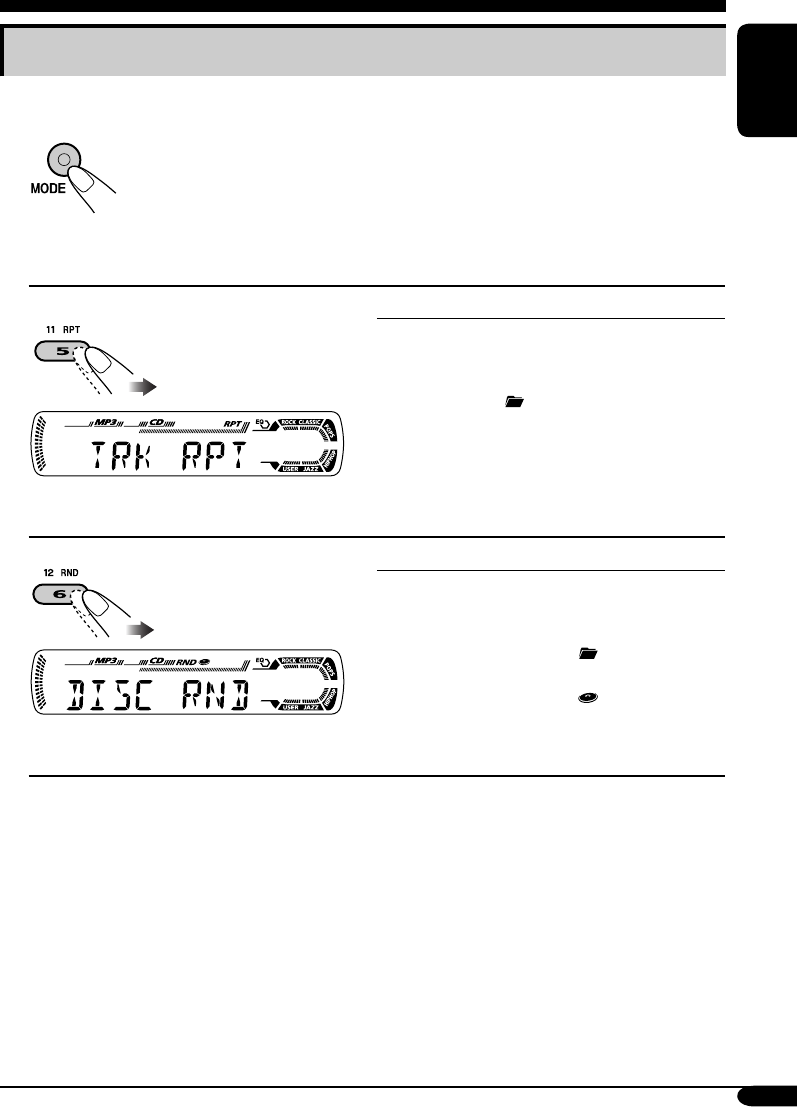
17
ENGLISH
Selecting the playback modes
You can use only one of the following playback modes at a time.
1
2 Select your desired playback mode.
Repeat play
Ex.: When “TRK RPT” is selected while
playing an MP3 disc
Mode Plays repeatedly
TRK RPT: The current track.
• RPT lights up.
FLDR RPT*: All tracks of the current folder.
• and RPT light up.
RPT OFF: Cancels.
Random play Mode Plays at random
Ex.: When “DISC RND” is selected while
playing an MP3 disc
FLDR RND*: All tracks of the current folder,
then tracks of the next folder
and so on.
• RND and light up.
DISC RND: All tracks of the current disc.
• RND and light up.
RND OFF: Cancels.
* Only while playing an MP3 or WMA disc.
EN12-17_KD-G317[EE]_f.indd 17EN12-17_KD-G317[EE]_f.indd 17 10/27/04 10:39:33 AM10/27/04 10:39:33 AM
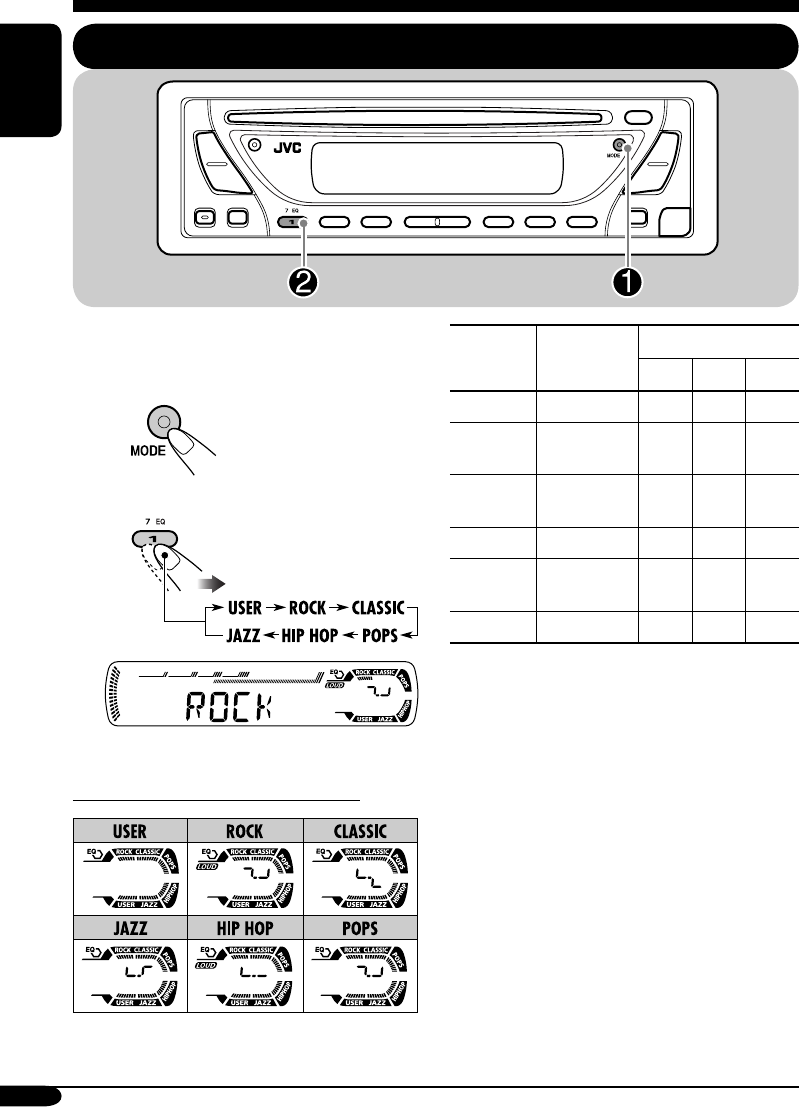
18
ENGLISH
Sound adjustments
Selecting preset sound modes (C-EQ: custom equalizer)
You can select a preset sound mode suitable to
the music genre.
~
Ÿ
Ex.: When “ROCK” is selected
Indication pattern for each sound mode:
Indication For: Preset values
BAS*1TRE*2
LOUD
*3
USER (Flat sound) 00 00 OFF
ROCK Rock or
disco music
+03 +01 ON
CLASSIC Classical
music
+01 –02 OFF
POPS Light music +04 +01 OFF
HIP HOP Funk or rap
music
+02 00 ON
JAZZ Jazz music +02 +03 OFF
*1 BAS: Bass
*2 TRE: Treble
*3 LOUD: Loudness
EN18-23_KD-G317[EE]_f.indd 18EN18-23_KD-G317[EE]_f.indd 18 10/27/04 10:39:46 AM10/27/04 10:39:46 AM
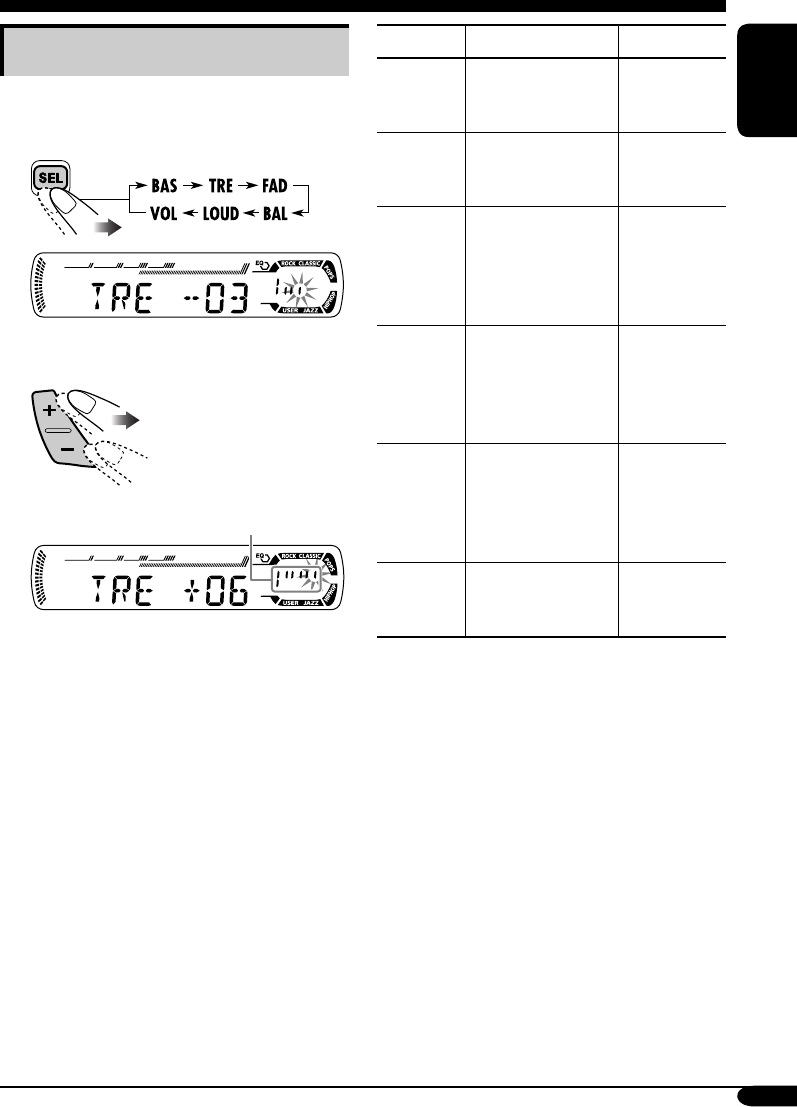
19
ENGLISH
Adjusting the sound
You can adjust the sound characteristics to your
preference.
1
Ex.: When “TRE” is selected
2
Indication pattern changes as
you adjust the level.
Indication To do: Range
BAS*1
(bass)
Adjust the bass. –06 (min.)
to
+06 (max.)
TRE*1
(treble)
Adjust the treble. –06 (min.)
to
+06 (max.)
FAD*2
(fader)
Adjust the front
and rear speaker
balance.
R06 (Rear
only)
to
F06 (Front
only)
BAL
(balance)
Adjust the left
and right speaker
balance.
L06 (Left
only)
to
R06 (Right
only)
LOUD*1
(loudness)
Boost low and
high frequencies
to produce a well-
balanced sound at
low volume level.
LOUD ON
J
LOUD OFF
VOL*3
(volume)
Adjust the volume. 00 (min.) to
30 or 50
(max.)*4
*1 When you adjust the bass, treble, or
loudness, the adjustment you have made is
stored for the currently selected sound mode
(C-EQ) including “USER.”
*2 If you are using a two-speaker system, set
the fader level to “00.”
*3 Normally the +/– buttons work as the volume
control. So you do not have to select “VOL”
to adjust the volume level.
*4 Depending on the amplifier gain control
setting. (See page 21 for details.)
EN18-23_KD-G317[EE]_f.indd 19EN18-23_KD-G317[EE]_f.indd 19 10/27/04 10:39:47 AM10/27/04 10:39:47 AM
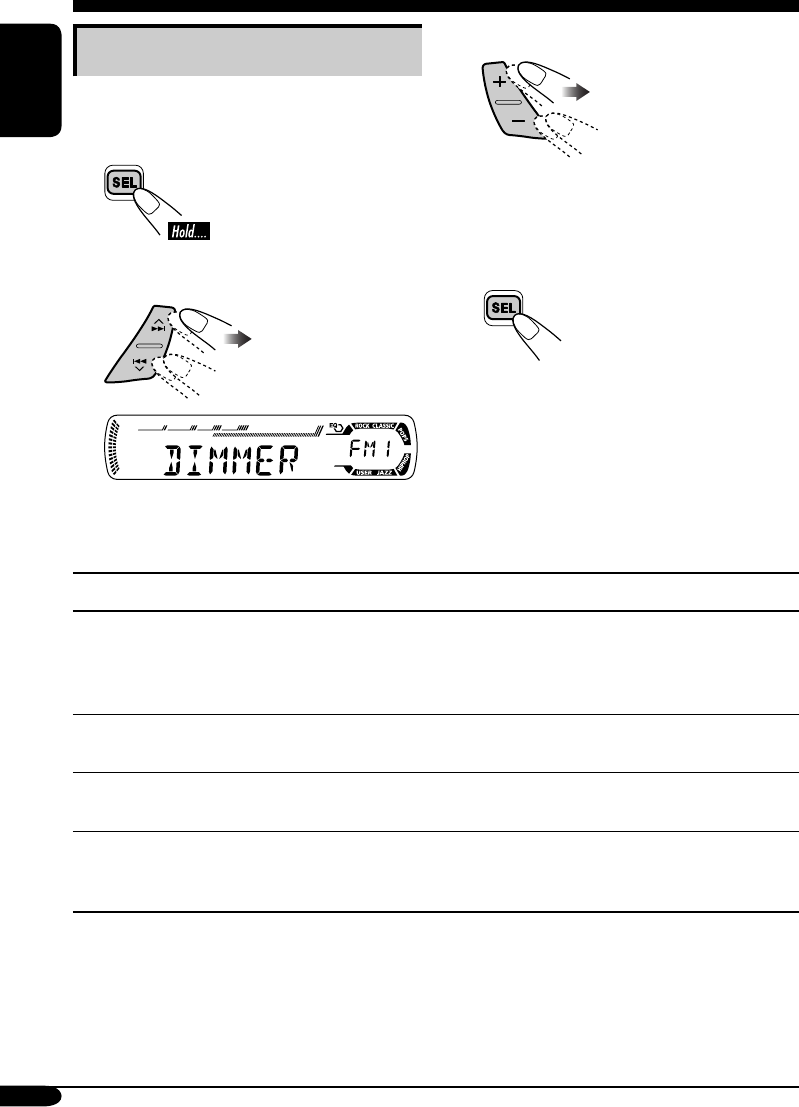
20
ENGLISH
Indications Selectable settings, [reference page]
DEMO
Display demonstration
DEMO ON: [Initial]; Display demonstration will be activated
automatically if no operation is done for about
20 seconds, [7].
DEMO OFF: Cancels.
CLOCK H
Hour adjustment
0 – 23, [7]
[Initial: 0 (0:00)]
CLOCK M
Minute adjustment
00 – 59, [7]
[Initial: 00 (0:00)]
CLK ADJ
Clock adjustment
AUTO: [Initial]; The built-in clock is automatically adjusted
using the CT (clock time) data in the RDS signal.
OFF: Cancels.
General settings — PSM
Basic procedure
You can change PSM (Preferred Setting Mode)
items listed in the table that follows.
1
2 Select a PSM item.
Ex.: When you select “DIMMER”
3 Adjust the PSM item selected.
4 Repeat steps 2 and 3 to adjust the
other PSM items if necessary.
5 Finish the procedure.
EN18-23_KD-G317[EE]_f.indd 20EN18-23_KD-G317[EE]_f.indd 20 10/27/04 10:39:48 AM10/27/04 10:39:48 AM
21
ENGLISH
Indications Selectable settings, [reference page]
AF-REG
Alternative frequency/
regionalization reception
When the received signals from the current station become weak...
AF: [Initial]; Switches to another station (the programme
may differ from the one currently received), [13].
• The AF indicator lights up.
AF REG: Switches to another station broadcasting the same
programme.
• The AF and REG indicators light up.
OFF: Cancels.
PTY-STBY
PTY standby
Activates PTY Standby Reception with one of the 29 PTY codes,
[13].
OFF [Initial]
=
29 PTY codes, [11]
=
(back to the beginning)
TA VOL
Traffic announcement
volume
[Initial: VOL 20]; VOL 00 – VOL 30 or 50*, [12]
* Depends on the amplifier gain control.
P-SEARCH
Programme search
ON: Using the AF data, the receiver tunes in to another
frequency broadcasting the same programme as the
original preset RDS station is if the preset station
signals are not sufficient.
OFF: [Initial]; Cancels.
DIMMER
Dimmer
ON: Activates dimmer.
OFF: [Initial]; Cancels.
TEL
Telephone muting
MUTING 1/MUTING 2: Select either one which mutes the
sounds while using the cellular phone.
OFF: [Initial]; Cancels.
SCROLL*
Scroll
ONCE: [Initial]; Scrolls the disc information once.
AUTO: Repeats scrolling (5-seconds interval in between).
OFF: Cancels.
• Pressing DISP for more than one second can scroll the display
regardless of the setting.
TAG DISP
Tag display
TAG ON: [Initial]; Shows the ID3 tag while playing
MP3/WMA tracks, [16].
TAG OFF: Cancels.
AMP GAIN
Amplifier gain control
You can change the maximum volume level of this receiver.
LOW PWR: VOL 00 – VOL 30 (Select this if the maximum
power of the speaker is less than 50 W to prevent
them from damaging the speaker.)
HIGH PWR: [Initial]; VOL 00 – VOL 50
* Some characters or symbols will not be shown (and will be blanked) on the display.
(Ex. “ABCå!d#” ]“ABCA D ”.)
EN18-23_KD-G317[EE]_f.indd 21EN18-23_KD-G317[EE]_f.indd 21 11/3/04 11:03:25 AM11/3/04 11:03:25 AM
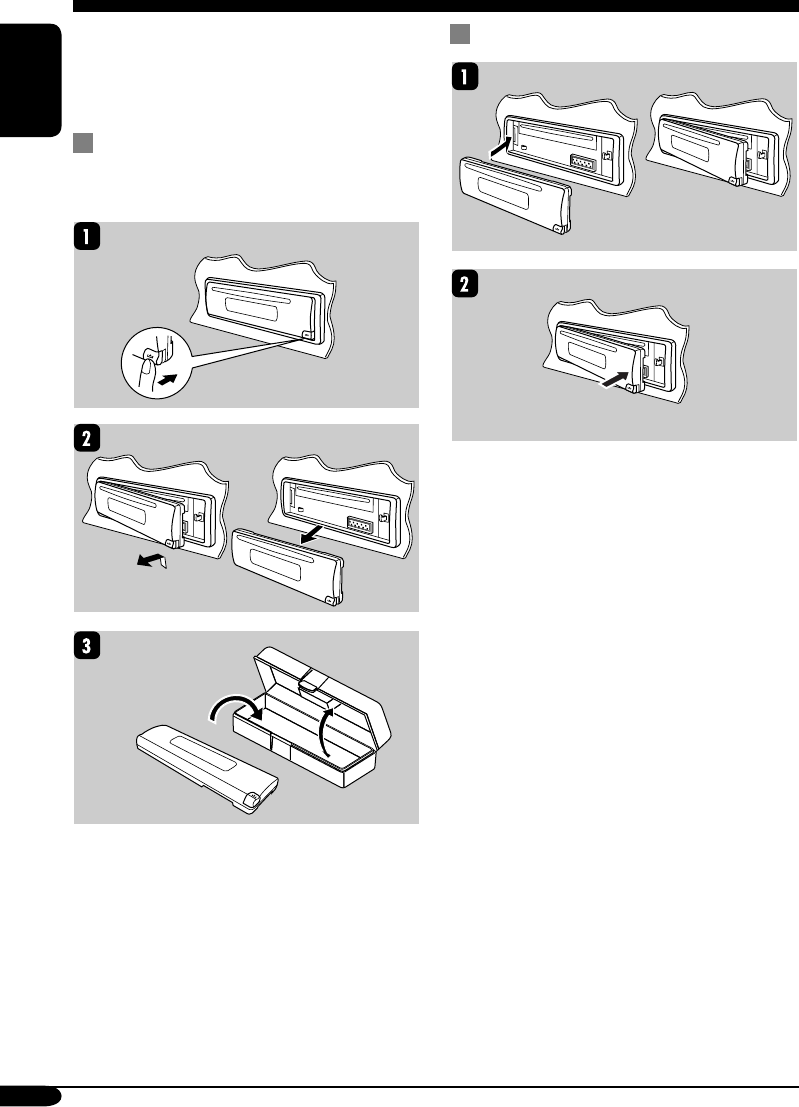
22
ENGLISH
When detaching or attaching the control panel,
be careful not to damage the connectors on
the back of the control panel and on the panel
holder.
Detaching the control panel
Before detaching the control panel, be sure to
turn off the power.
Attaching the control panel
Detaching the control panel
EN18-23_KD-G317[EE]_f.indd 22EN18-23_KD-G317[EE]_f.indd 22 10/27/04 10:39:49 AM10/27/04 10:39:49 AM
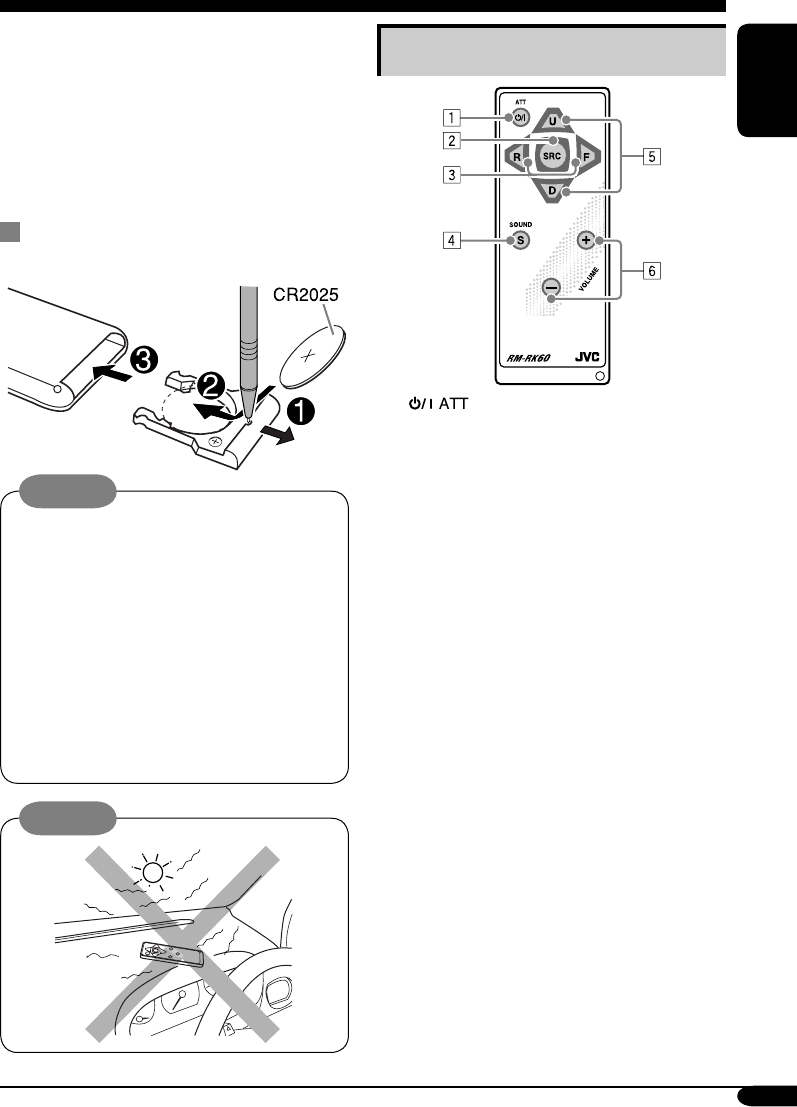
23
ENGLISH
Main elements and features
1 (standby/on attenuator) button
• Turns on and off the power and also
attenuates the sound.
2 SRC (source) button
• Selects the source.
3 R (reverse) / F (forward) buttons
• Searches for stations if pressed briefly.
• Fast-forwards or reverses the track if
pressed and held.
• Changes the tracks of the disc.
4 SOUND button
• Selects the sound mode (C-EQ: custom
equalizer).
5 U (up) / D (down) buttons
• U (up): Changes the FM/AM bands.
• D (down): Changes the preset stations.
• Changes the folder of the MP3/WMA
discs.
6 VOLUME +/– buttons
• Adjusts the volume level.
This receiver can be remotely controlled as
instructed here (with an optionally purchased
remote controller). We recommend that you use
remote controller RM-RK60 with your receiver.
• When operating, aim the remote controller
directly at the remote sensor on the
receiver. Make sure there is no obstacle in
between.
Installing the lithium coin battery
(CR2025)
Warning:
• Store the battery in a place where children
cannot reach to avoid risk of accident.
• To prevent the battery from over-heating,
cracking, or starting a fire:
– Do not recharge, short, disassemble, or
heat the battery or dispose of it in a fire.
– Do not leave the battery with other
metallic materials.
– Do not poke the battery with tweezers or
similar tools.
– Wrap the battery with tape and insulate
when throwing away or saving it.
Caution:
Using the remote controller — RM-RK60
EN18-23_KD-G317[EE]_f.indd 23EN18-23_KD-G317[EE]_f.indd 23 10/27/04 11:57:36 AM10/27/04 11:57:36 AM
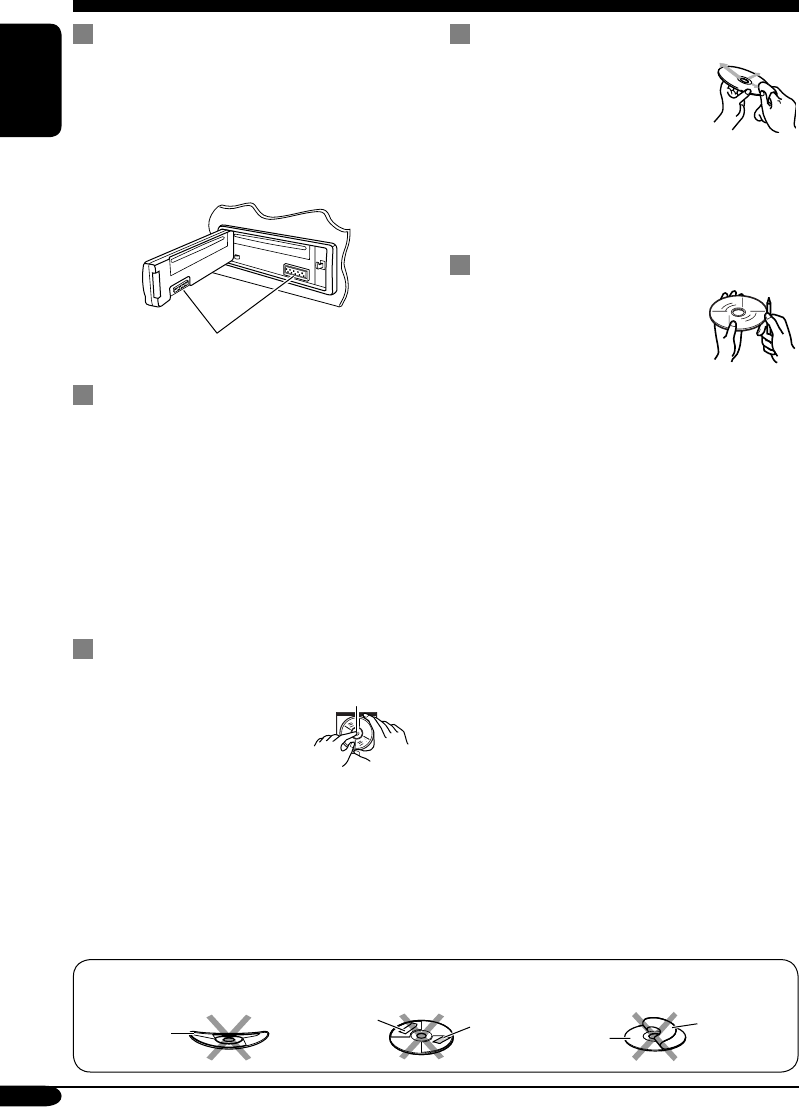
24
ENGLISH
Maintenance
How to clean the connectors
Frequent detachment will deteriorate the
connectors.
To minimize this possibility, periodically wipe
the connectors with a cotton swab or cloth
moistened with alcohol, being careful not to
damage the connectors.
Connector
Moisture condensation
Moisture may condense on the lens inside the
CD player in the following cases:
• After starting the heater in the car.
• If it becomes very humid inside the car.
Should this occur, the CD player may
malfunction. In this case, eject the disc and
leave the receiver turned on for a few hours
until the moisture evaporates.
How to handle discs
When removing a disc from
its case, press down the center
holder of the case and lift the
disc out, holding it by the
edges.
• Always hold the disc by the edges. Do not
touch its recording surface.
When storing a disc into its case, gently insert
the disc around the center holder (with the
printed surface facing up).
• Make sure to store discs into the cases after
use.
To keep discs clean
A dirty disc may not play correctly.
If a disc does become dirty, wipe
it with a soft cloth in a straight line
from center to edge.
• Do not use any solvent (for
example, conventional record cleaner, spray,
thinner, benzine, etc.) to clean discs.
To play new discs
New discs may have some rough
spots around the inner and outer
edges. If such a disc is used, this
receiver may reject the disc.
To remove these rough spots, rub the edges
with a pencil or ball-point pen, etc.
Center holder
Warped
disc
Sticker Sticker
residue Disc
Stick-on
label
Do not use the following discs:
EN24-29_KD-G317[EE]_f.indd 24EN24-29_KD-G317[EE]_f.indd 24 10/27/04 10:40:00 AM10/27/04 10:40:00 AM
25
ENGLISH
More about this receiver
Basic operations
Turning on the power
• By pressing CD or FM/AM on the receiver,
you can also turn on the power.
Turning off the power
• If you turn off the power while listening to a
disc, disc play will start from where playback
has been stopped previously, next time you
turn on the power.
Tuner operations
Storing stations in memory
• During SSM search...
– All previously stored stations are erased and
stations are stored newly.
– Received stations are preset in No. 1 (lowest
frequency) to No. 6 (highest frequency).
– When SSM is over, the station stored in
No. 1 will be automatically tuned in.
• When storing a station manually, a previously
preset station is erased when a new station is
stored in the same preset number.
FM RDS operations
• Network-Tracking Reception requires two
types of RDS signals—PI (Programme
Identification) and AF (Alternative
Frequency) to work correctly. Without
receiving these data correctly, Network-
Tracking Reception will not operate.
• If a Traffic Announcement is received, the
volume level (TA Volume) automatically
changes to the preset level.
Disc operations
General
• This receiver has been designed to reproduce
CDs/CD Texts, and CD-Rs (Recordable)/
CD-RWs (Rewritable) in audio CD (CD-DA),
MP3 and WMA format.
• When a disc has been loaded, selecting “CD”
for the playback source starts disc play.
Inserting a disc
• When a disc is inserted upside down, the disc
automatically ejects.
• Do not insert 8 cm discs (single CD) and
unusual shape discs (heart, flower, etc.) into
the loading slot.
Playing a disc
• While fast-forwarding or reversing on an MP3
or WMA disc, you can only hear intermittent
sounds.
Playing a CD-R or CD-RW
• Use only “finalized” CD-Rs or CD-RWs.
• This receiver can play back only the files of
the same type which is first detected if a disc
includes both audio CD (CD-DA) files and
MP3/WMA files.
• This receiver can play back multi-session
discs; however, unclosed sessions will be
skipped while playing.
• Some CD-Rs or CD-RWs may not play
back on this receiver because of their disc
characteristics, and for the following causes:
– Discs are dirty or scratched.
– Moisture condensation occurs on the lens
inside the receiver.
– The pickup lens inside the receiver is dirty.
– CD-R/CD-RW on which the files are
written with “Packet Write” method.
– There are improper recording conditions
(missing data, etc.) or media conditions
(stain, scratch, warp, etc.).
• CD-RWs may require a longer readout time
since the reflectance of CD-RWs is lower
than that of regular CDs.
• Do not use the following CD-Rs or CD-RWs:
– Discs with stickers, labels, or protective seal
stuck to the surface.
– Discs on which labels can be directly
printed by an ink jet printer.
Using these discs under high temperatures or
high humidities may cause malfunctions or
damages to discs.
EN24-29_KD-G317[EE]_f.indd 25EN24-29_KD-G317[EE]_f.indd 25 10/27/04 10:40:02 AM10/27/04 10:40:02 AM
26
ENGLISH
Playing an MP3/WMA disc
• This receiver can play back MP3/WMA files
with the extension code <.mp3> or <.wma>
(regardless of the letter case—upper/lower).
• This receiver can show the names of albums,
artists (performer), and ID3 Tag (Version 1.0,
1.1, 2.2, 2.3, or 2.4) for MP3 files and for
WMA files.
• This receiver can handle only one-byte
characters. No other characters can be
correctly displayed.
• This receiver can play back MP3/WMA files
meeting the conditions below:
– Bit rate: 8 kbps — 320 kbps
– Sampling frequency:
48 kHz, 44.1 kHz, 32 kHz (for MPEG-1)
24 kHz, 22.05 kHz, 16 kHz (for MPEG-2)
– Disc format: ISO 9660 Level 1/ Level 2,
Romeo, Joliet, Windows long file name
• The maximum number of characters for file/
folder names vary among the disc format used
(includes 4 extension characters—<.mp3> or
<.wma>).
– ISO 9660 Level 1: up to 12 characters
– ISO 9660 Level 2: up to 31 characters
– Romeo*: up to 128 (72) characters
– Joliet*: up to 64 (36) characters
– Windows long file name*: up to 128 (72)
characters
* The parenthetic figure is the maximum
number of characters for file/folder names
in case the total number of files and folders
is 313 or more.
• This receiver can recognize the total of 512
files, of 200 folders, and of 8 hierarchies.
• This receiver can play back the files recorded
in VBR (variable bit rate).
The files recorded in VBR have a discrepancy
in elapsed time display, and do not show
the actual elapsed time. Especially, after
performing the search function, this difference
becomes noticeable.
• This receiver cannot play back the following
files:
– MP3 files encoded with MP3i and MP3
PRO format.
– MP3 files encoded in an unappropriated
format.
– MP3 files encoded with Layer 1/2.
– WMA files encoded with lossless,
professional, and voice format.
– WMA files which are not based upon
Windows Media® Audio.
– WMA formatted files copy-protected with
DRM.
– Files which have the data such as WAVE,
ATRAC3, etc.
• The search function works but search speed is
not constant.
Changing the source
• If you change the source, playback also stops
(without ejecting the disc).
Next time you select “CD” for the playback
source, disc play starts from where it has been
stopped previously.
Ejecting a disc
• If the ejected disc is not removed within
15 seconds, the disc is automatically inserted
again into the loading slot to prevent it from
dust. (Disc will not play this time.)
General settings—PSM
• If you change the “AMP GAIN” setting from
“HIGH PWR” to “LOW PWR” while the
volume level is set higher than “VOL 30,” the
receiver automatically changes the volume
level to “VOL 30.”
EN24-29_KD-G317[EE]_f.indd 26EN24-29_KD-G317[EE]_f.indd 26 10/27/04 10:40:02 AM10/27/04 10:40:02 AM
27
ENGLISH
Symptoms Causes Remedies
General
• Sound cannot be heard
from the speakers.
The volume level is set to
the minimum level.
Adjust it to the optimum
level.
Connections are incorrect. Check the cords and
connections.
• The receiver does not
work at all.
The built-in microcomputer
may have functioned
incorrectly due to noise, etc.
Reset the receiver (see page
2).
FM/AM
• SSM automatic presetting
does not work.
Signals are too weak. Store stations manually.
• Static noise while listening
to the radio.
The aerial is not connected
firmly.
Connect the aerial firmly.
Disc playback
• Disc automatically ejects. Disc is inserted upside
down.
Insert the disc correctly.
• CD-R/CD-RW cannot be
played back.
• Tracks on the CD-R/
CD-RW cannot be
skipped.
CD-R/CD-RW is not
finalized.
• Insert a finalized CD-R/
CD-RW.
• Finalize the CD-R/
CD-RW with the
component which you
used for recording.
• Disc can be neither played
back nor ejected.
Disc is locked. Unlock the disc (see page
15).
The CD player may have
functioned incorrectly.
Eject the disc forcibly (see
page 2).
• Disc sound is sometimes
interrupted.
You are driving on rough
roads.
Stop playback while driving
on rough roads.
Disc is scratched. Change the disc.
Connections are incorrect. Check the cords and
connections.
• “NO DISC” appears on the
display.
No disc is in the loading
slot.
Insert a disc into the loading
slot.
Disc is inserted incorrectly. Insert the disc correctly.
Troubleshooting
What appears to be trouble is not always serious. Check the following points before calling a service
center.
EN24-29_KD-G317[EE]_f.indd 27EN24-29_KD-G317[EE]_f.indd 27 10/27/04 10:40:02 AM10/27/04 10:40:02 AM
28
ENGLISH
Symptoms Causes Remedies
MP3/WMA playback
• Disc cannot be played
back.
No MP3/WMA tracks are
recorded on the disc.
Change the disc.
MP3/WMA tracks do not
have the extension code
<.mp3> or <.wma> in their
file names.
Add the extension code
<.mp3> or <.wma> to their
file names.
MP3/WMA tracks are not
recorded in the format
compliant with ISO 9660
Level 1, Level 2, Romeo, or
Joliet.
Change the disc.
(Record MP3/WMA
tracks using a compliant
application.)
• Noise is generated. The track played back
is not an MP3/WMA
track (although it has the
extension code <.mp3> or
<.wma>).
Skip to another track or
change the disc. (Do not add
the extension code <.mp3>
or <.wma> to non-MP3 or
WMA tracks.)
• A longer readout time is
required (“CHECK” keeps
flashing on the display).
Readout time varies due to
the complexity of the folder/
file configuration.
Do not use too many
hierarchies and folders.
• Tracks cannot be played
back as you have intended
them to play.
Playback order is determined
when the files are recorded.
• Elapsed playing time is not
correct.
This sometimes occurs
during play. This is caused
by how the tracks are
recorded on the disc.
• “NO FILES” appears on
the display.
The current disc does not
contain any MP3/WMA
tracks.
Insert a disc that contains
MP3/WMA tracks.
• Correct characters are
not displayed (e.g. album
name).
This receiver can only
display alphabets (capital:
A – Z), numbers, and a
limited number of symbols.
EN24-29_KD-G317[EE]_f.indd 28EN24-29_KD-G317[EE]_f.indd 28 10/27/04 10:40:03 AM10/27/04 10:40:03 AM
29
ENGLISH
Specifications
AUDIO AMPLIFIER SECTION
Maximum Power Output:
Front: 50 W per channel
Rear: 50 W per channel
Continuous Power Output (RMS):
Front: 19 W per channel into 4 Ω, 40 Hz
to 20 000 Hz at no more than 0.8%
total harmonic distortion.
Rear: 19 W per channel into 4 Ω, 40 Hz
to 20 000 Hz at no more than 0.8%
total harmonic distortion.
Load Impedance: 4 Ω (4 Ω to 8 Ω allowance)
Tone Control Range:
Bass: ±10 dB at 100 Hz
Treble: ±10 dB at 10 kHz
Frequency Response: 40 Hz to 20 000 Hz
Signal-to-Noise Ratio: 70 dB
Line-Out Level/Impedance:
2.5 V/20 kΩ load (full scale)
Output Impedance: 1 kΩ
TUNER SECTION
Frequency Range:
FM1/FM2: 87.5 MHz to 108.0 MHz
FM3: 65.00 MHz to 74.00 MHz
AM: (MW) 522 kHz to 1 620 kHz
(LW) 144 kHz to 279 kHz
[FM Tuner]
Usable Sensitivity: 11.3 dBf (1.0 µV/75 Ω)
50 dB Quieting Sensitivity:
16.3 dBf (1.8 µV/75 Ω)
Alternate Channel Selectivity (400 kHz): 65 dB
Frequency Response: 40 Hz to 15 000 Hz
Stereo Separation: 30 dB
Capture Ratio: 1.5 dB
[MW Tuner]
Sensitivity: 20 µV
Selectivity: 35 dB
[LW Tuner]
Sensitivity: 50 µV
CD PLAYER SECTION
Type: Compact disc player
Signal Detection System: Non-contact optical
pickup (semiconductor laser)
Number of Channels: 2 channels (stereo)
Frequency Response: 5 Hz to 20 000 Hz
Dynamic Range: 96 dB
Signal-to-Noise Ratio: 98 dB
Wow and Flutter: Less than measurable limit
MP3 Decoding Format:
MPEG1/2 Audio Layer 3
Max. Bit Rate: 320 kbps
WMA (Windows Media® Audio) Decoding
Format:
Max. Bit Rate: 192 kbps
GENERAL
Power Requirement:
Operating Voltage:
DC 14.4 V (11 V to 16 V allowance)
Grounding System: Negative ground
Allowable Operating Temperature:
0°C to +40°C
Dimensions (W × H × D):
Installation Size (approx.):
182 mm × 52 mm × 150 mm
Panel Size (approx.):
188 mm × 58 mm × 11 mm
Mass (approx.):
1.3 kg (excluding accessories)
Design and specifications are subject to change
without notice.
• Microsoft and Windows Media are either registered trademarks or trademarks of Microsoft
Corporation in the United States and/or other countries.
EN24-29_KD-G317[EE]_f.indd 29EN24-29_KD-G317[EE]_f.indd 29 11/2/04 5:57:03 PM11/2/04 5:57:03 PM
© 2004 Victor Company of Japan, Limited
EN, RU
1104DTSMDTJEIN
Having TROUBLE with operation?
Please reset your unit
Refer to page of How to reset your unit
Затруднения при эксплуатации?
Пожалуйста, перезагрузите Ваше устройство
Для получения информации о перезагрузке Вашего
устройства обратитесь на соответствующую страницу
Rear_KD-G317[EE]_f.indd 2Rear_KD-G317[EE]_f.indd 2 10/27/04 10:43:12 AM10/27/04 10:43:12 AM
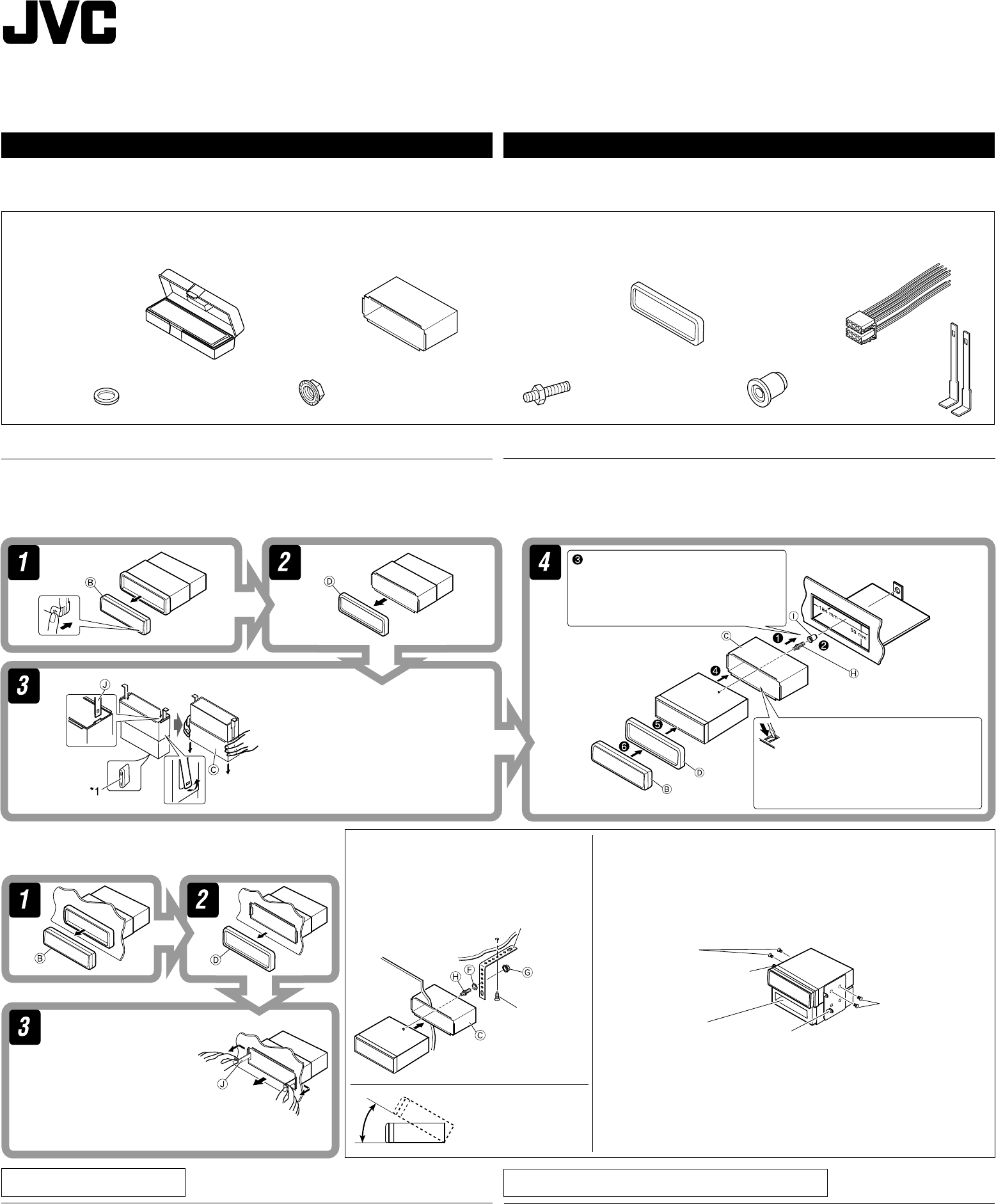
KD-G317
Installation/Connection Manual
Руководство по установке/подключению
GET0261-002A
[EE]
1104DTSMDTJEIN
EN, RU
ENGLISH
This receiver is designed to operate on 12 V DC, NEGATIVE ground electrical systems. If
your vehicle does not have this system, a voltage inverter is required, which can be purchased
at JVC IN-CAR ENTERTAINMENT dealers.
J
Handles
Рычаги
F
Washer (ø5)
Шайба (њ5)
G
Lock nut (M5)
Фиксирующая гайка (M5)
H
Mounting bolt (M5 x 20 mm)
Крепежный болт (M5 x 20 мм)
I
Rubber cushion
Резиновый чехол
A / B
Hard case/Control panel
Жесткий футляр/
панель управления
C
Sleeve
Муфта
D
Trim plate
Декоративную панель
E
Power cord
Кабель питания
Parts list for installation and connection
The following parts are provided for this receiver.
After checking them, please set them correctly.
1
INSTALLATION (IN-DASH MOUNTING)
The following illustration shows a typical installation. If you have any questions or require
information regarding installation kits, consult your JVC IN-CAR ENTERTAINMENT dealer or a
company supplying kits.
•
If you are not sure how to install this receiver correctly, have it installed by a qualified technician.
Removing the receiver / Удаление устройства
Before removing the receiver, release the rear section.
Перед удалением устройства освободите заднюю часть.
When installing the receiver without using the sleeve /
При установке устройства без использования муфты
In a Toyota for example, first remove the car radio and install the receiver in its place.
В автомобилях “Toyota”, например, сначала удалите автомобильную
магнитолу, затем установите на ее место это устройство.
When using the optional stay /
При
использовании дополнительной
стойки
Note : When installing the receiver on the mounting bracket,
make sure to use the 8 mm-long screws. If longer screws
are used, they could damage the receiver.
Примечание : При установке устройства на крепежный кронштейн,
используйте только винты длиной 8 мм. При
использовании более длинных винтов можно
повредить устройство.
Bracket*
Кронштейн*
Bracket*
Кронштейн*
* Not included for this receiver.
* Не входят в комплект.
Flat type screws
(M5 x 8 mm)*
Крепежные винты
(M5 x 8 мм)*
Pocket
Карман
Flat type screws
(M5 x 8 mm)*
Крепежные винты
(M5 x 8 мм)*
Screw (option)
Винт
(дополнительно)
Stay (option)
Стойка
(дополнительно)
Fire wall
Стена
Dashboard
Приборная
панель
Install the receiver at an
angle of less than 30˚.
Установите устройство
под углом менее 30°.
TROUBLESHOOTING
• The fuse blows.
* Are the red and black leads connected correctly?
• Power cannot be turned on.
* Is the yellow lead connected?
• No sound from the speakers.
* Is the speaker output lead short-circuited?
• Sound is distorted.
* Is the speaker output lead grounded?
* Are the “–” terminals of L and R speakers grounded in common?
• Noise interfere with sounds.
* Is the rear ground terminal connected to the car’s chassis using shorter and thicker cords?
• Receiver becomes hot.
* Is the speaker output lead grounded?
* Are the “–” terminals of L and R speakers grounded in common?
• This receiver does not work at all.
* Have you reset your receiver?
Do the required electrical connections.
Выполните необходимые
подключения контактов, как
показано на оборотной стороне
этой инструкции.
*1 When you stand the receiver, be
careful not to damage the fuse on
the rear.
*1 Устанавливайте устройство таким
образом, чтобы не повредить
предохранитель, расположенный
сзади.
Bend the appropriate tabs to hold
the sleeve firmly in place.
Отогните соответствующие
фиксаторы, предназначенные
для прочной установки корпуса.
Insert the two handles, then
pull them as illustrated so
that the receiver can be
removed.
Вставьте два рычажка,
затем потяните их, как
показано на рисунке,
чтобы вынуть устройство.
РУССКИЙ
Это устройство разработано для эксплуатации на 12 В постоянного напряжения с
минусом на массе. Если Ваш автомобиль не имеет этой системы, требуется инвертор
напряжения, который может быть приобретен у дилера автомобилнего специалиста JVC.
Список деталей для установки и подключения
Следующие детали поставлены в комплекте с устройством.
После проверки комплектации, пожалуйста, установите их правильно.
УСТАНОВКА (УСТАНОВКА В ПРИБОРНУЮ ПАНЕЛЬ)
На следующих иллюстрациях показана типовая установка. Если у Вас есть какие-либо
вопросы, касающиеся установки, обратитесь к Вашему дилеру автомобилнего
специалиста JVC или в компанию, поставляющую соответствующие принадлежности.
• Если Вы не знаете точно, как следует устанавливать это устройство, обратитесь к
квалифицированному специалисту.
BЫЯВЛЕНИЕ НЕИСПРАВНОСТЕЙ
• Сработал предохранитель.
* Правильно ли подключены черный и красный провода?
• Питание не включается.
* Подключен ли желтый провод?
• Звук не выводится через громкоговорители.
* Нет ли короткого замыкания на кабеле выхода громкоговорителей?
• Звук искажен.
* Заземлен ли провод выхода громкоговорителей?
* Заземлены ли разъемы “–” правого (R) и левого (L) громкоговорителей?
• Шум мешает звучанию.
* Соединен ли находящийся сзади зажим заземления с шасси автомобиля с помощью
более короткого и тонкого шнуров?
• Устройство нагревается.
* Заземлен ли провод выхода громкоговорителей?
* Заземлены ли разъемы “–” правого (R) и левого (L) громкоговорителей?
• Приемник не работает.
* Выполнена ли перенастройка приемника?
Instal1-2_KD-G317_002A_f.indd 1 10/19/04, 5:22:54 PM
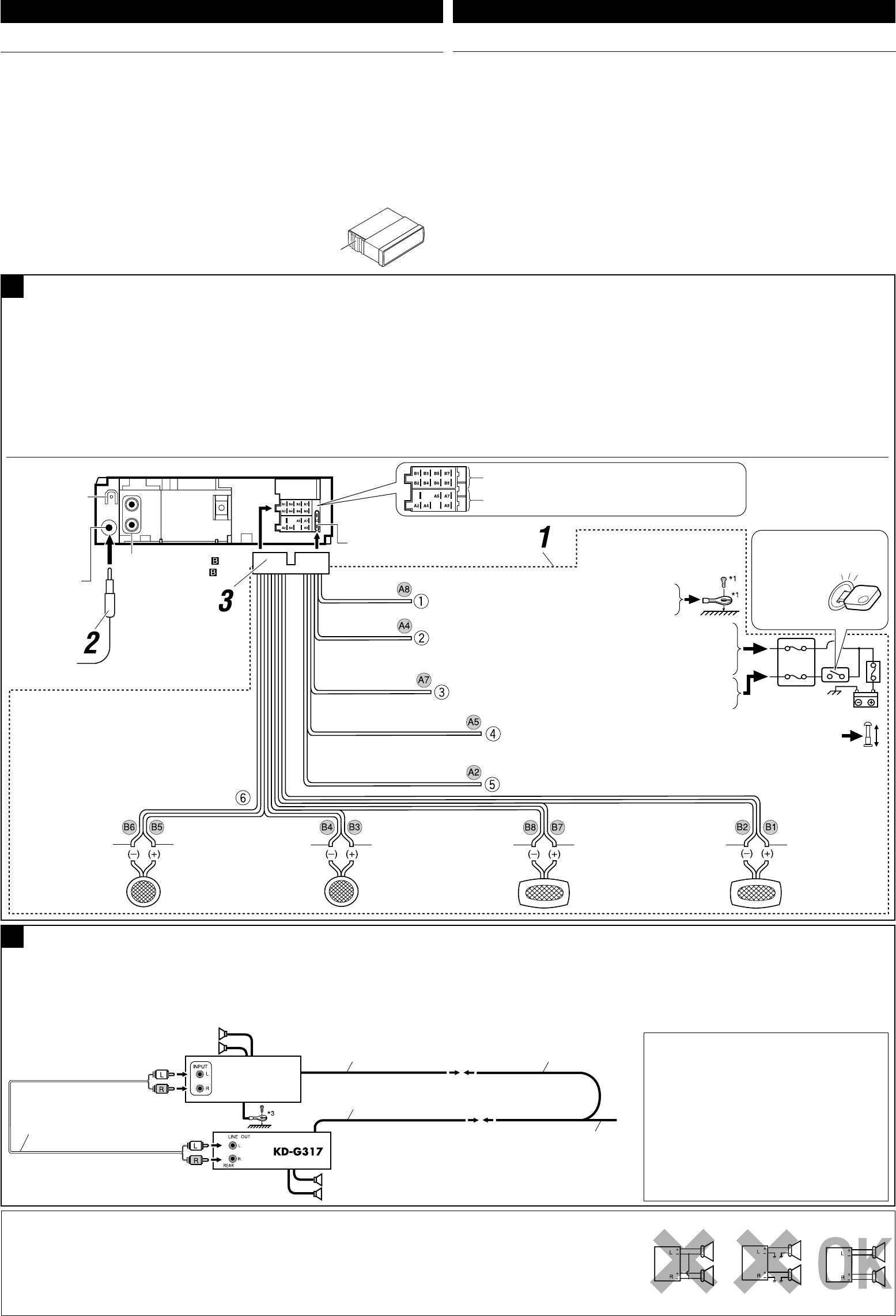
ELECTRICAL CONNECTIONS
To prevent short circuits, we recommend that you disconnect the battery’s negative terminal and
make all electrical connections before installing the receiver.
• Be sure to ground this receiver to the car’s chassis again after installation.
Notes:
• Replace the fuse with one of the specified rating. If the fuse blows frequently, consult your JVC
IN-CAR ENTERTAINMENT dealer.
• It is recommended to connect to the speakers with maximum power of more than 50 W (both
at the rear and at the front, with an impedance of 4 Ω to 8 Ω). If the maximum power is less
than 50 W, change “AMP GAIN” setting to prevent the speakers from being damaged (see
page 21 of the INSTRUCTIONS).
• To prevent short-circuit, cover the terminals of the UNUSED leads with insulating tape.
• The heat sink becomes very hot after use. Be careful not to touch it when removing this
receiver.
Heat sink
Радиатор
2
A
ENGLISH РУССКИЙ
B
Typical connections / Типичные подключения
Before connecting: Check the wiring in the vehicle carefully. Incorrect connection may cause
serious damage to this receiver.
The leads of the power cord and those of the connector from the car body may be different in
color.
1 Connect the colored leads of the power cord in the order specified in the illustration below.
2 Connect the aerial cord.
3 Finally connect the wiring harness to the receiver.
Note: If your vehicle does not have any accessory terminal, move the fuse from the fuse
position 1 (initial position) to fuse position 2, and connect the red lead (A7) to the positive (+)
battery terminal.
• The yellow lead (A4) is not used in this case.
Connecting the external amplifier / Подключение внешнего усилителя
You can connect an amplifier to upgrade your car stereo system.
• Connect the remote lead (blue with white stripe) to the remote lead of the other equipment so
that it can be controlled through this receiver.
• Disconnect the speakers from this receiver, connect them to the amplifier. Leave the
speaker leads of this receiver unused.
Signal cord (not supplied for this receiver)
Кабель сигнала (не входит в комплект)
Front speakers
Передние громкоговорители
Rear speakers
Задние громкоговорители
JVC Amplifier
JVC-усилитель
Remote lead
Провод внешнего устройства
Y-connector (not supplied for this receiver)
Разъем Y (не входит в комплект)
Remote lead (Blue with white stripe)
Провод внешнего устройства (Синий с белой полосой)
To the remote lead of other equipment or power aerial if any
К удаленному проводу другого оборудования или антенны
*3 Firmly attach the ground wire to the metallic
body or to the chassis of the car—to the place
not coated with paint (if coated with paint,
remove the paint before attaching the wire).
Failure to do so may cause damage to the
receiver.
*3 Плотно прикрепите заземляющий провод
к металлическому кузову или шасси
автомобиля—в месте, не покрытом краской
(если оно покрыто краской, удалите
краску перед тем, как прикреплять
провод). Невыполнение этого требования
может привести к повреждению данного
устройства.
*2
Before checking the operation of this
receiver prior to installation, this lead must be
connected, otherwise power cannot be turned
on.
*2 Перед проверкой работы устройства
подключите этот провод, иначе питание не
включится.
Line out (see diagram )
К выходу (см. схему )
Rear ground
terminal
Задний разъем
заземления
15 A fuse
Предохранитель 15 A
Aerial terminal
Разъем антенны Black
Черный
Blue with white stripe
Синий с белой полосой
Red
Красный
Yellow*2
Желтый*2
*1 Not included for this receiver
*1 Не входит в комплект
To metallic body or chassis of the car
К металлическому корпусу или шасси автомобиля
To a live terminal in the fuse block connecting to the car battery
(bypassing the ignition switch) (constant 12 V)
К разъему фазы в блоке предохранителя (минуя блок зажигания)
(постоянный 12 В)
Ignition switch
Переключатель зажигания
Fuse block
Блок
предохранителя
To an accessory terminal in the fuse block
К вспомогательному разъему в блоке предохранителя
To the remote lead of other equipment or power aerial if any (200 mA max.)
К удаленному проводу другого оборудования или антенны (макс. 200 мА)
Left speaker (front)
Левый громкоговоритель
(передний)
Right speaker (front)
Правый громкоговоритель
(передний)
Left speaker (rear)
Левый громкоговоритель
(задний)
Right speaker (rear)
Правый
громкоговоритель
(задний)
Purple
Пурпурный
Purple with black stripe
Пурпурный с черной
полосой
Green
Зеленый
Green with black stripe
Зеленый с черной
полосо
Gray
Серый
Gray with black stripe
Серый с черной
полосой
White
Белый
White with black stripe
Белый с черной
полосой
Fuse position 2 / Положение 2 предохранителя
Fuse position 1 / Положение 1 предохранителя
PRECAUTIONS on power supply and speaker
connections:
• DO NOT connect the speaker leads of the power cord to
the car battery; otherwise, the receiver will be seriously
damaged.
• BEFORE connecting the speaker leads of the power cord to the
speakers, check the speaker wiring in your car.
ЭЛЕКТРИЧЕСКИЕ ПОДКЛЮЧЕНИЯ
Для предотвращения коротких замыканий мы рекомендуем Вам отсоединить
отрицательный разъем аккумулятора и осуществить все подключения перед установкой
устройства.
• После установки обязательно заземлите данное устройство на шасси
автомобиля.
Примечания:
• Заменяйте предохранитель другим предохранителем указанного класса. Если
предохранитель сгорает слишком часто, обратитесь к дилеру автомобилнего
специалиста JVC.
• Рекомендуется подключать динамики с максимальной мощностью более 50 Вт (к
задней и передней панели устройства, с полным сопротивлением от 4 Ω до 8 Ω). Если
максимальная мощность динамиков менее 50 Вт, перейдите в режим “AMP GAIN”,
чтобы предотвратить их повреждение (см. ИНСТРУКЦИИ ПО ЭКСПЛУАТАЦИИ на
стр. 21).
• Для предотвращения короткого замыкания заклейте НЕИСПОЛЬЗУЕМЫЕ концы
изолирующей лентой.
• Радиатор во время использования сильно нагревается. Старайтесь его не трогать во
время удаления устройства.
Перед началом подключений: Тщательно проверьте проводку в автомобиле.
Неправильное подключение может привести к серьезному повреждению устройства.
Жилы силового кабеля и жилы соединителя от кузова автомобиля могут быть разного
цвета.
1 Подсоедините цветные провода шнура питания в указанном ниже порядке.
2 Подключите кабель антенны.
3 В последнюю очередь подключите электропроводку к устройству.
Примечание: Если в Вашем автомобиле никакого вспомогательного разъема
не имеется, переставьте предохранитель из положения 1 предохранителя
(первоначальное положение) в положение 2 предохранителя и подключите красный
провод (А7) к положительному (+) полюсу аккумулятора.
• Желтый провод (А4) в этом случае не используется.
Можно подключить усилитель для обновления автомобильной стереосистемы.
• Подсоедините провод внешнего устройства (синий с белой полосой) к проводу
внешнего устройства другого оборудования так, чтобы им можно было управлять с
этого устройства.
• Отсоедините громкоговорители от данного устройства, подключите их
к усилителю. Оставьте провода громкоговорителей данного устройства
неиспользованными.
ПРЕДОСТЕРЕЖЕНИЯ по питанию и подключению
громкоговорителей:
• НЕ подключайте провода громкоговорителей к
аккумулятору автомобиля, иначе устройство будет
повреждено.
• ПЕРЕД подключением проводов громкоговорителей
к кабелю питания громкоговорителя проверьте схему
соединений громкоговорителей в Вашем автомобиле.
Brown
Коричневый To cellular phone system
К системе сотового телефона
Instal1-2_KD-G317_002A_f.indd 2 10/20/04, 11:30:18 AM
