Jvc Kd G310 Instruction Manual AR360_G310[J]
KD-G310 MA110Bien
2015-07-14
: Jvc Jvc-Kd-G310-Instruction-Manual-772815 jvc-kd-g310-instruction-manual-772815 jvc pdf
Open the PDF directly: View PDF  .
.
Page Count: 38
- INSTRUCTIONS
- INFORMATION (For U.S.A.)
- IMPORTANT FOR LASER PRODUCTS
- Contents
- Control panel
- Remote controller
- Getting started
- Radio operations
- Disc operations
- Sound adjustments
- General settings — PSM
- Detaching the control panel
- External component operations
- SIRIUSR radio operations
- Maintenance
- More about this receiver
- Troubleshooting
- Specifications
- Installation/Connection Manual
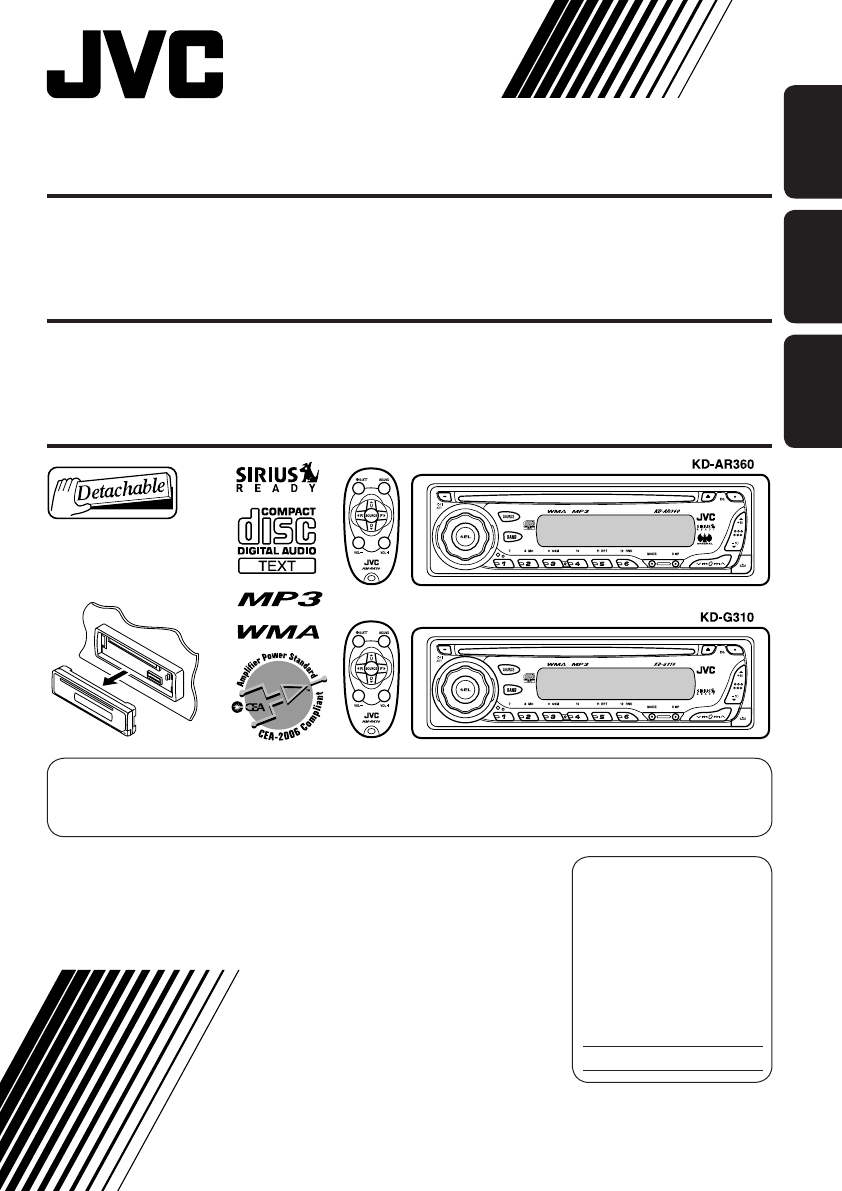
ENGLISHESPAÑOL
FRANÇAIS
CD RECEIVER KD-AR360/KD-G310
RECEPTOR CON CD KD-AR360/KD-G310
RECEPTEUR CD KD-AR360/KD-G310
For canceling the display demonstration, see page 8.
Para cancelar la demostración en pantalla, consulte la página 8.
Pour annuler la démonstration des affichages, référez-vous à la page 8.
For installation and connections, refer to the separate manual.
Para la instalación y las conexiones, refiérase al manual separado.
Pour l’installation et les raccordements, se référer au manuel séparé.
INSTRUCTIONS
MANUAL DE INSTRUCCIONES
MANUEL D’INSTRUCTIONS
For customer Use:
Enter below the Model
No. and Serial No. which
are located on the top or
bottom of the cabinet.
Retain this information for
future reference.
Model No.
Serial No.
GET0248-001B
[J]
Cover_KD-AR360_G310[J]f.indd 2 10/14/04, 4:56:01 PM
2
ENGLISH
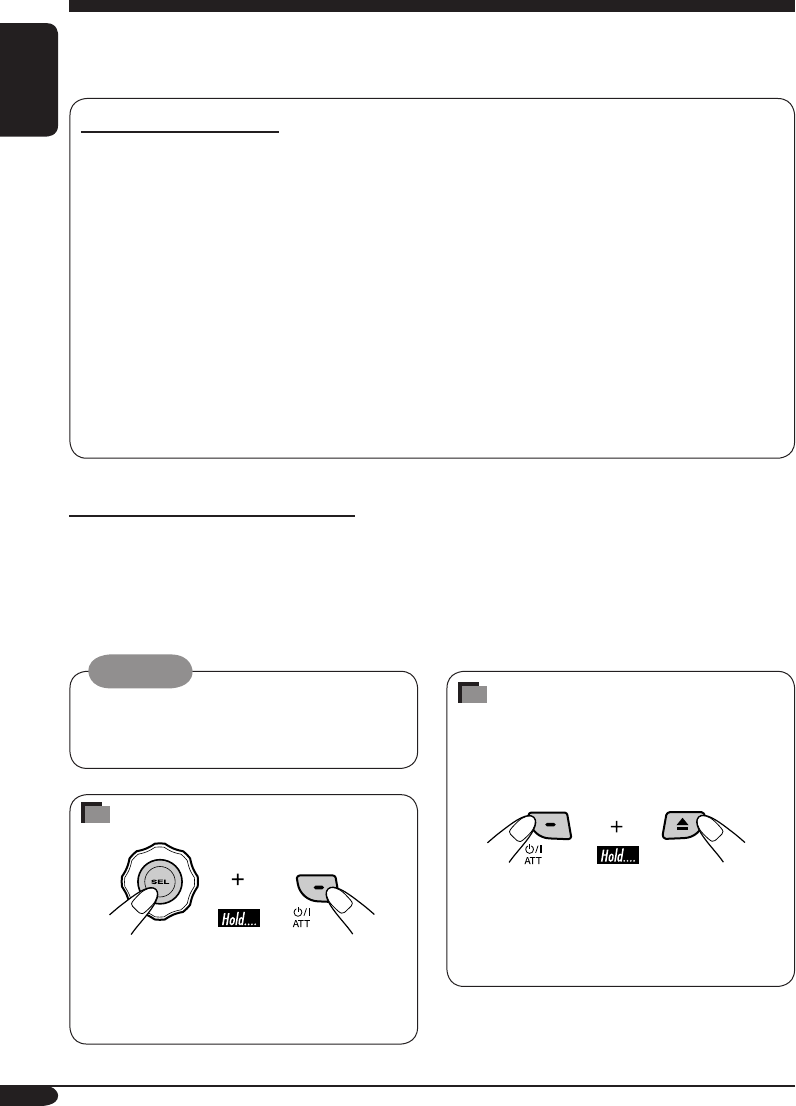
How to forcibly eject a disc
If a disc cannot be recognized by the
receiver or cannot be ejected, ejects the disc
as follows.
• If this does not work, try to reset your
receiver.
• Be careful not to drop the disc when it
ejects.
Thank you for purchasing a JVC product.
Please read all instructions carefully before operation, to ensure your complete understanding and to
obtain the best possible performance from the unit.
INFORMATION (For U.S.A.)
This equipment has been tested and found to comply with the limits for a Class B digital device,
pursuant to Part 15 of the FCC Rules. These limits are designed to provide reasonable protection
against harmful interference in a residential installation. This equipment generates, uses, and can
radiate radio frequency energy and, if not installed and used in accordance with the instructions,
may cause harmful interference to radio communications. However, there is no guarantee that
interference will not occur in a particular installation. If this equipment does cause harmful
interference to radio or television reception, which can be determined by turning the equipment
off and on, the user is encouraged to try to correct the interference by one or more of the
following measures:
– Reorient or relocate the receiving antenna.
– Increase the separation between the equipment and receiver.
– Connect the equipment into an outlet on a circuit different from that to which the receiver is
connected.
– Consult the dealer or an experienced radio/TV technician for help.
IMPORTANT FOR LASER PRODUCTS
1. CLASS 1 LASER PRODUCT
2. CAUTION: Do not open the top cover. There are no user serviceable parts inside the unit; leave
all servicing to qualified service personnel.
3. CAUTION: Visible and invisible laser radiation when open and interlock failed or defeated.
Avoid direct exposure to beam.
Warning:
If you need to operate the receiver while
driving, be sure to look ahead carefully or
you may be involved in a traffic accident.
How to reset your unit
• This will reset the microcomputer. Your
preset adjustments will also be erased.
• If a disc is loaded, it will eject. Be careful
not to drop the disc.
EN02-05_KD-AR360_G310[J]f.indd 2 9/28/04, 10:44:00 AM

3
ENGLISH
How to reset your unit ........................... 2
How to forcibly eject a disc................... 2
How to read this manual........................ 4
How to use the MODE button ............... 4
Control panel
— KD-AR360 and KD-G310 ......... 5
Parts identification................................. 5
Remote controller — RM-RK50
... 6
Main elements and features ................... 6
Getting started....................... 7
Basic operations.................................. 7
Canceling the display demonstrations ... 8
Setting the clock .................................... 8
Radio operations ................... 9
Listening to the radio........................... 9
Storing stations in memory.................... 10
Listening to a preset station ................... 11
Disc operations ...................... 12
Playing a disc in the receiver ............... 12
Playing discs in the CD changer ........... 13
Other main functions ............................. 15
Changing the display information ......... 16
Selecting the playback modes................ 17
Sound adjustments ................ 18
Selecting preset sound modes
(C-EQ: custom equalizer) .................. 18
Adjusting the sound ............................... 19
General settings — PSM ......... 20
Basic operations..................................... 20
Detaching the control panel.... 22
External component operations
... 23
Playing an external component ............ 23
SIRIUS
®
radio operations
............ 24
Listening to the SIRIUS® radio.............. 25
Storing channels in memory .................. 26
Listening to a preset channel ................. 26
Maintenance .......................... 27
More about this receiver ........ 28
Troubleshooting ..................... 30
Specifications ......................... 33
*For safety....
• Do not raise the volume level too much, as
this will block outside sounds, making driving
dangerous.
• Stop the car before performing any
complicated operations.
Contents
*Temperature inside the car....
If you have parked the car for a long time in
hot or cold weather, wait until the temperature
in the car becomes normal before operating the
unit.
EN02-05_KD-AR360_G310[J]f.indd 3 9/28/04, 10:44:01 AM
4
ENGLISH
How to read this manual
The following methods are used to made the
explanations simple and easy-to-understand:
• Some related tips and notes are explained in
“More about this receiver” (see page 28).
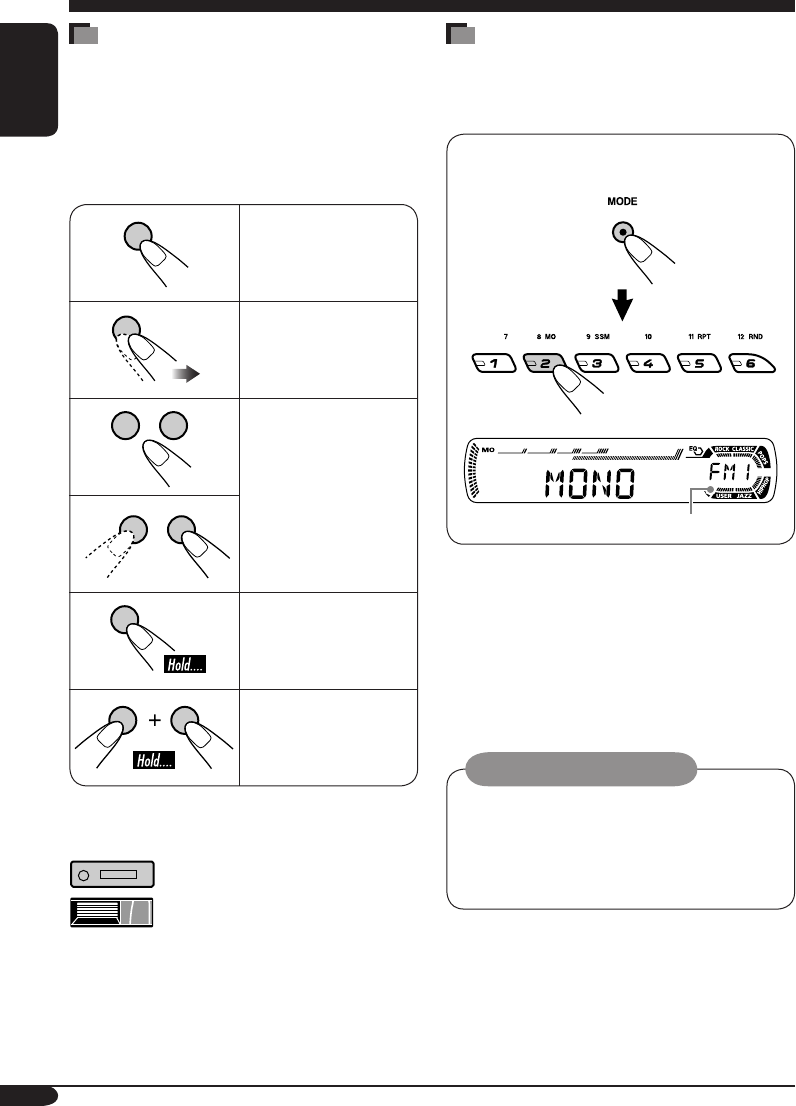
• Button operations are mainly explained with
the illustrations as follows:
Press briefly.
Press repeatedly.
Press either one.
Press and hold until
your desired response
begins.
Press and hold both
buttons at the same
time.
The following marks are used to indicate...
: Built-in CD player operations.
: External CD changer operations.
How to use the MODE button
If you press MODE, the receiver goes into
functions mode, then the number buttons and
5/∞ buttons work as different function buttons.
Ex.: When number button 2 works as
MO (monaural) button.
Time countdown indicator
To use these buttons for original functions
again after pressing MODE, wait for
5 seconds without pressing any of these buttons
until the functions mode is cleared.
• Pressing MODE again also clears the
functions mode.
Caution on volume setting:
Discs produce very little noise compared
with other sources. Lower the volume
before playing a disc to avoid damaging
the speakers by the sudden increase of the
output level.
EN02-05_KD-AR360_G310[J]f.indd 4 9/24/04, 10:16:35 AM

5
ENGLISH
Control panel — KD-AR360 and KD-G310
Display window
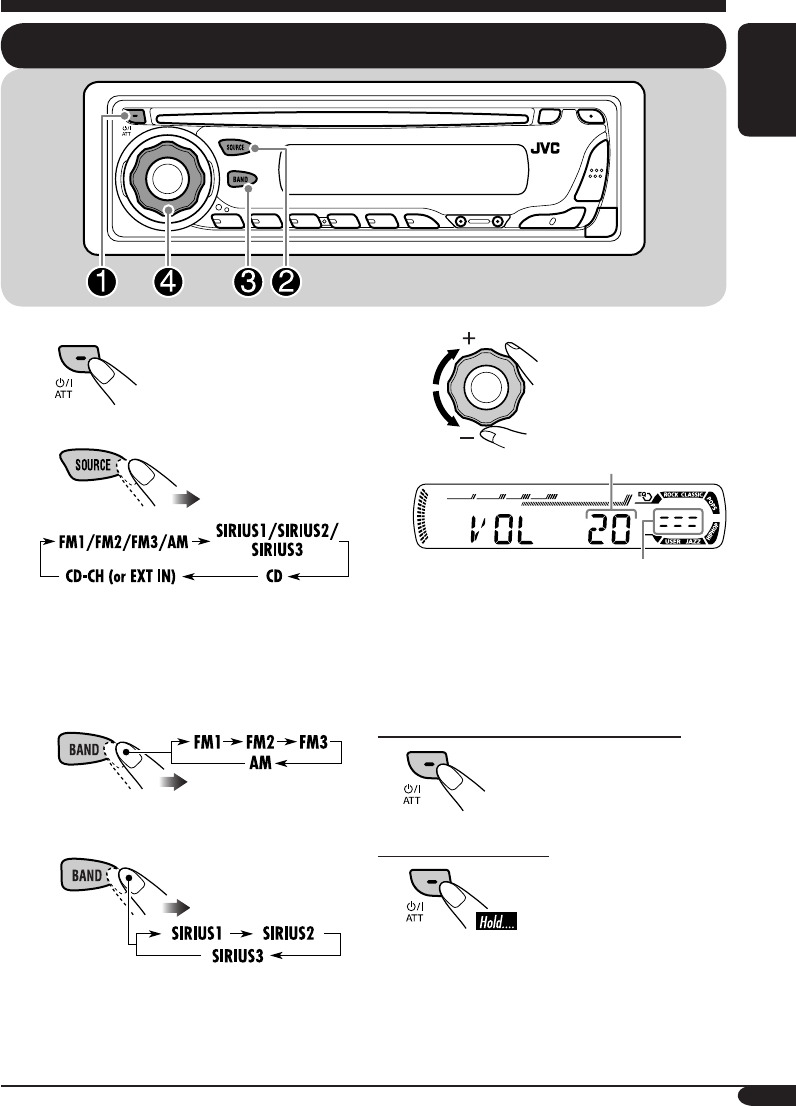
1 (standby/on attenuator) button
2 SEL (select) button
3 SOURCE button
4 BAND button
5 Loading slot
6 Display window
7 0 (eject) button
8 EQ (equalizer) button
9 Remote sensor
• DO NOT expose the remote sensor to
strong light (direct sunlight or artificial
lighting).
p 5 (up) button / +10 button
q Control dial
w Number buttons
e MO (monaural) button
r SSM (Strong-station Sequential Memory)
button
t RPT (repeat) button
y RND (random) button
u MODE button
i DISP (display) button
o 4/¢ buttons
; (control panel release) button
a ∞ (down) button / –10 button
Display window
s Tuner reception indicators—
MO (monaural), ST (stereo)
d WMA indicator
f MP3 indicator
g CH (CD changer) indicator
• Lights up only when CD-CH is selected
for the playback source.
h CD indicator
j Playback mode / item indicators—
RND (random), (disc), (folder),
RPT (repeat)
k LOUD (loudness) indicator
l EQ (equalizer) indicator
/ Sound mode (C-EQ: custom equalizer)
indicators—ROCK, CLASSIC, POPS,
HIP HOP, JAZZ, USER
• also works as the time countdown
indicator.
z Disc information indicators—TAG (ID3
Tag), (folder), (track/file)
x Main display
c Source display / Volume level indicator
v Tr (track) indicator
Parts identification
EN02-05_KD-AR360_G310[J]f.indd 5 9/24/04, 10:16:35 AM
6
ENGLISH
Remote controller — RM-RK50
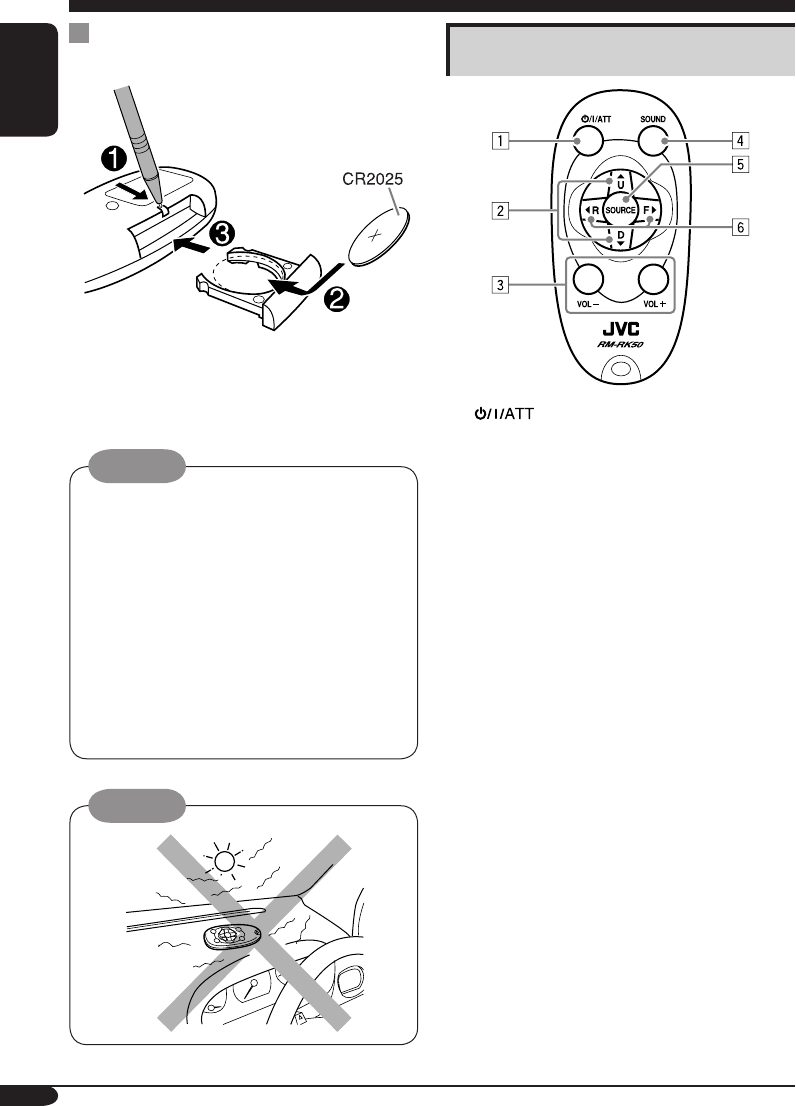
Main elements and features
1 (standby/on/attenuator) button
• Turns on and off the power and also
attenuates the sound.
2 5 U (up) / D (down) ∞ buttons
• 5 U: Changes the FM/AM bands.
• D ∞: Changes the preset stations.
• Changes the folder on the MP3/WMA
discs.
• While playing an MP3 disc on an
MP3-compatible CD changer:
– Changes the disc if pressed briefly.
– Changes the folder if pressed and held.
• While listening to the SIRIUS radio:
– Changes the categories.
3 VOL – / VOL + buttons
• Adjusts the volume level.
4 SOUND button
• Selects the sound mode (C-EQ: custom
equalizer).
5 SOURCE button
• Selects the source.
6 2 R (reverse) / F (forward) 3 buttons
• Searches for stations if pressed briefly.
• Fast-forwards or reverses the track if
pressed and held.
• Changes the tracks on the disc.
• While listening to the SIRIUS radio:
– Changes the channels if pressed briefly.
– Changes the channels rapidly if pressed
and held.
Installing the lithium coin battery
(CR2025)
• Aim the remote controller directly at the
remote sensor on the receiver. Make sure
there is no obstacle in between.
Warning:
• Store the battery in a place where children
cannot reach to avoid risk of accident.
• To prevent the battery from over-heating,
cracking, or starting a fire:
– Do not recharge, short, disassemble, or
heat the battery or dispose of it in a fire.
– Do not leave the battery with other
metallic materials.
– Do not poke the battery with tweezers or
similar tools.
– Wrap the battery with tape and insulate
when throwing away or saving it.
Caution:
EN06-11_KD-AR360_G310[J]f.indd 6 10/1/04, 3:18:13 PM
7
ENGLISH
⁄
Volume level appears.
Volume level indicator
@ Adjust the sound as you want.
(See pages 18 and 19.)
To drop the volume in a moment (ATT)
To restore the sound, press
it again.
To turn off the power
Getting started
Basic operations
~
Ÿ
You cannot select some sources if they
are not ready.
! • For FM/AM tuner only
• For SIRIUS® radio only
EN06-11_KD-AR360_G310[J]f.indd 7 9/24/04, 10:14:23 AM
8
ENGLISH
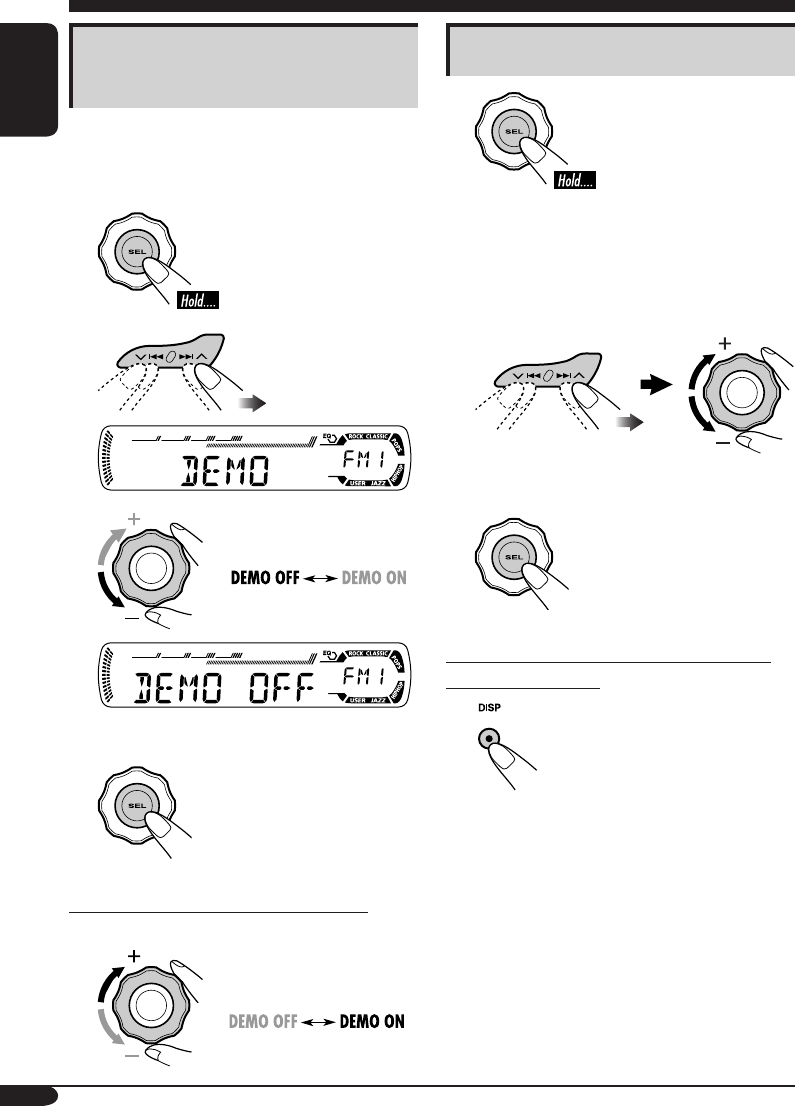
Canceling the display
demonstrations
If no operations are done for about 20 seconds,
display demonstration starts.
[Initial: DEMO ON]
1
2
3
4 Finish the procedure.
To activate the display demonstration
In step 3 above...
Setting the clock
1
2 Set the hour and minute.
1 Select “CLOCK H” (hour), then
adjust the hour.
2 Select “CLOCK M” (minute),
then adjust the minute.
3 Finish the procedure.
To check the current clock time when the
power is turned off
EN06-11_KD-AR360_G310[J]f.indd 8 9/24/04, 10:14:23 AM
9
ENGLISH
Radio operations
Listening to the radio
~
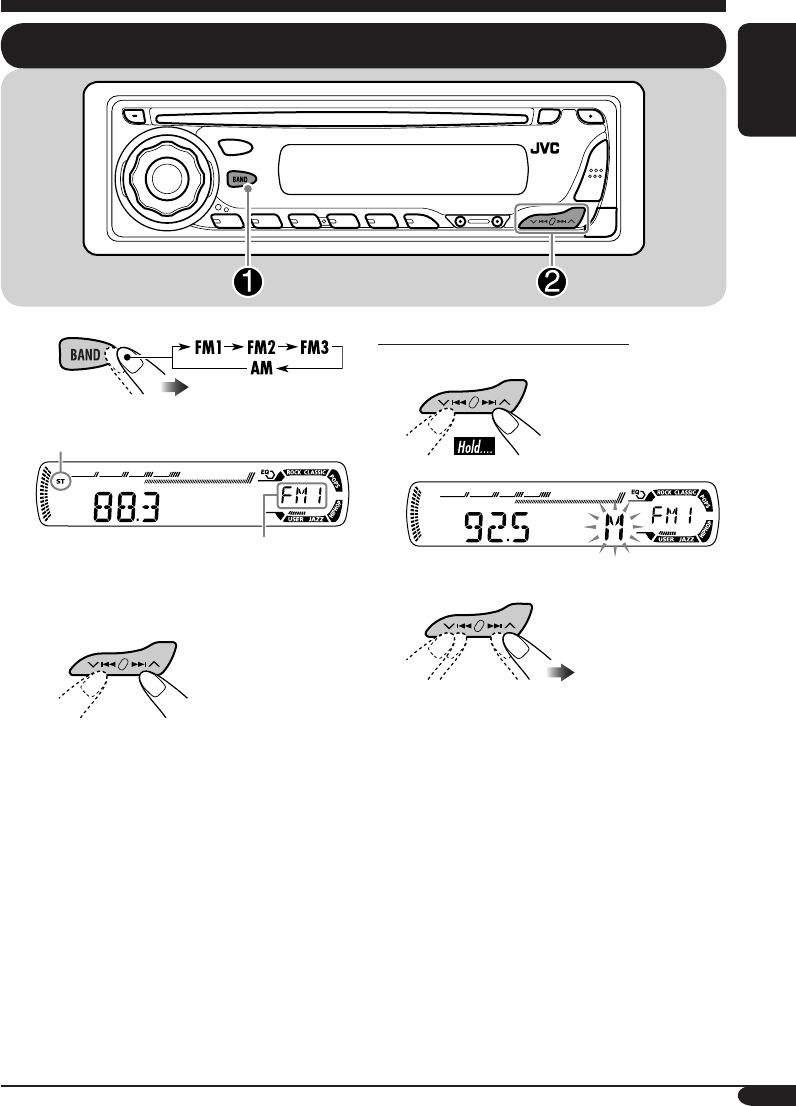
Lights up when receiving an FM stereo
broadcast with sufficient signal strength.
Selected band appears.
Ÿ Start searching for a station.
When a station is received, searching
stops.
To stop searching, press the same
button again.
To tune in to a station manually
In step Ÿ on the left...
1
2 Select the desired station frequencies.
EN06-11_KD-AR360_G310[J]f.indd 9 9/24/04, 10:14:23 AM
10
ENGLISH
When an FM stereo broadcast is hard to
receive
1
2
Lights up when monaural mode is activated.
Reception improves, but stereo effect will
be lost.
To restore the stereo effect, repeat the same
procedure so that the MO indicator goes off.
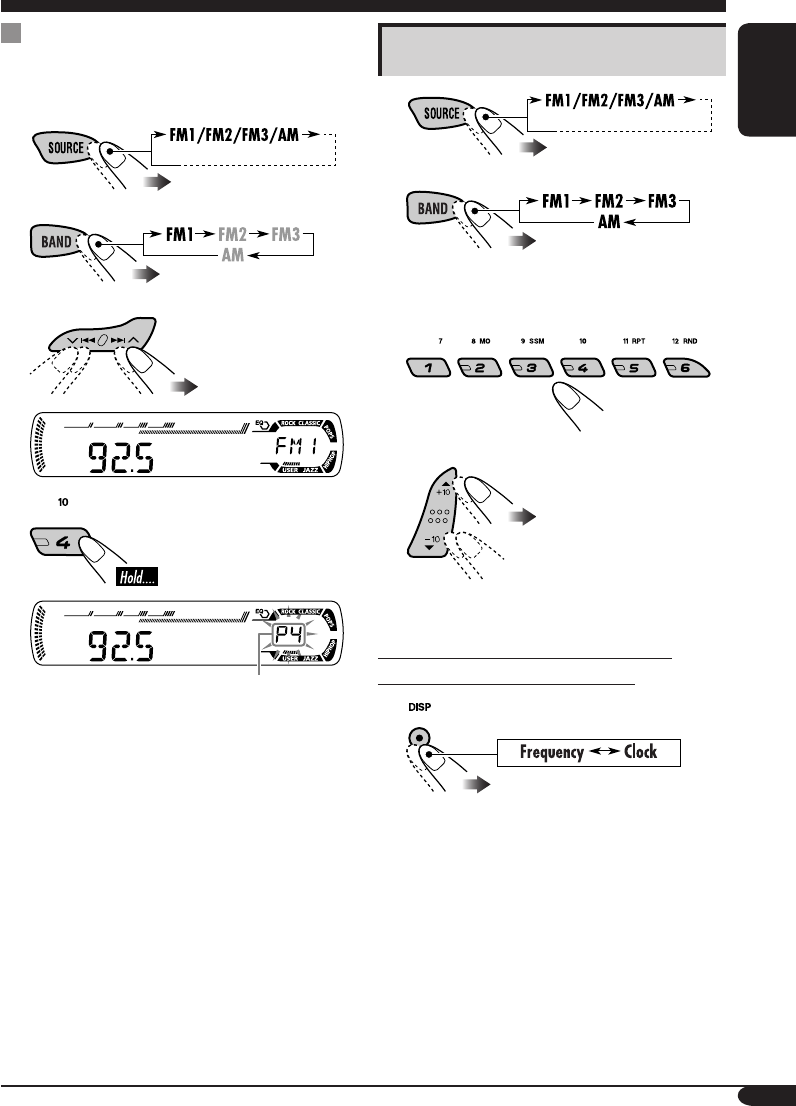
Storing stations in memory
You can preset six stations for each band.
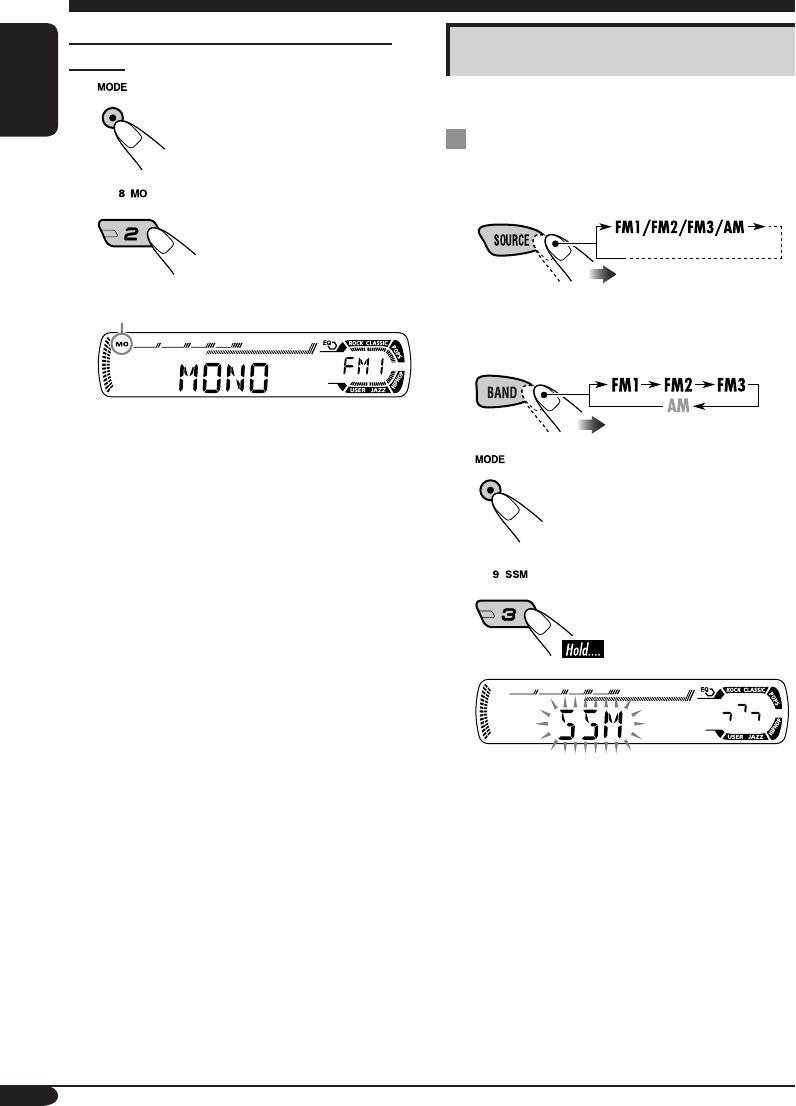
FM station automatic presetting —
SSM (Strong-station Sequential
Memory)
1
2 Select the FM band (FM1 – FM3)
you want to store into.
3
4
“SSM” flashes, then disappears when
automatic presetting is over.
Local FM stations with the strongest signals are
searched and stored automatically in the FM
band.
EN06-11_KD-AR360_G310[J]f.indd 10 9/24/04, 10:14:24 AM
11
ENGLISH
Manual presetting
Ex.: Storing FM station of 92.5 MHz into preset
number 4 of the FM1 band.
1
2
3
4
Preset number flashes for a while.
Listening to a preset station
1
2
3 Select the preset station (1 – 6) you
want.
or
To check the current clock time while
listening to an FM or AM station
EN06-11_KD-AR360_G310[J]f.indd 11 9/24/04, 10:14:24 AM
12
ENGLISH
Disc operations
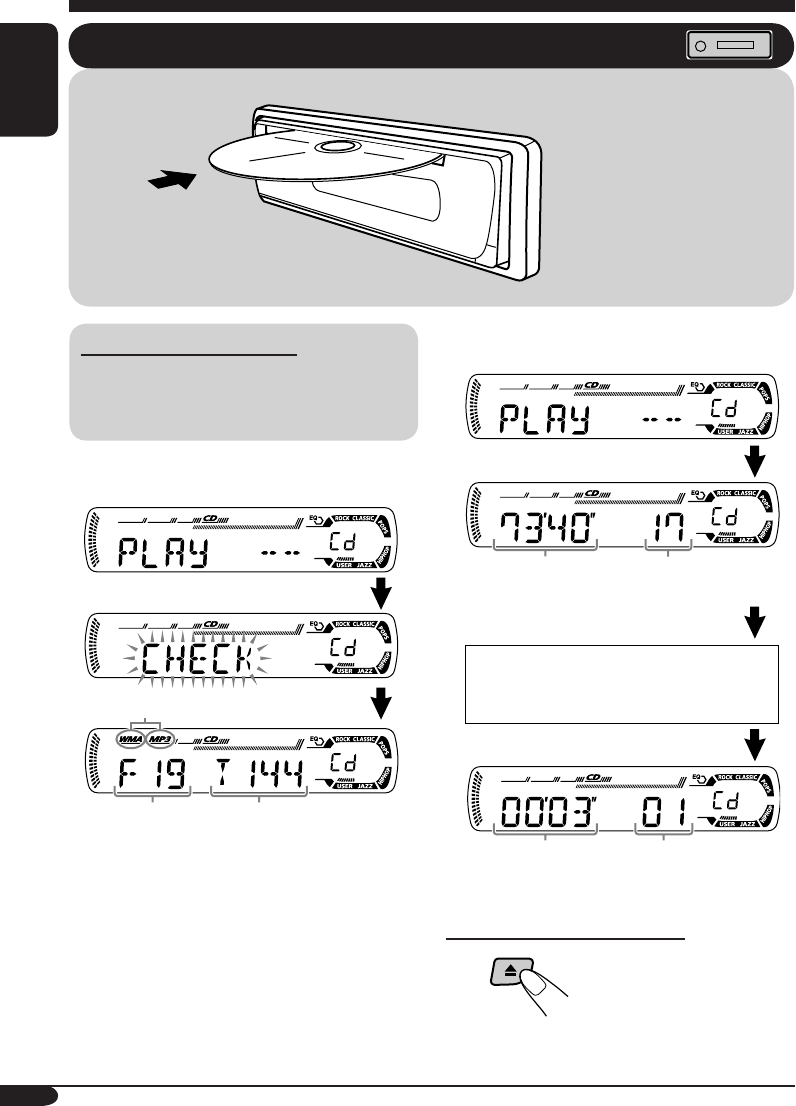
Playing a disc in the receiver
About MP3 and WMA discs
MP3 and WMA (Windows Media® Audio)
“tracks” (words “file” and “track” are used
interchangeably) are recorded in “folders.”
• When inserting an MP3 or a WMA disc:
When playback starts, disc information will
automatically appear (see page 16).
* Either the MP3 or WMA indicator lights up
depending on the detected file.
• When inserting an audio CD or a CD Text
disc:
To stop play and eject the disc
*
Total folder
number
Total file
number
Total playing time of
the inserted disc
Total track number
of the inserted disc
Elapsed playing
time
Current track
number
All tracks will be played
repeatedly until you stop
playback.
CD Text: Disc title/performer =
Track title appear automatically.
EN12-17_KD-AR360_G310[J]f.indd 12 10/7/04, 9:24:37 AM
13
ENGLISH
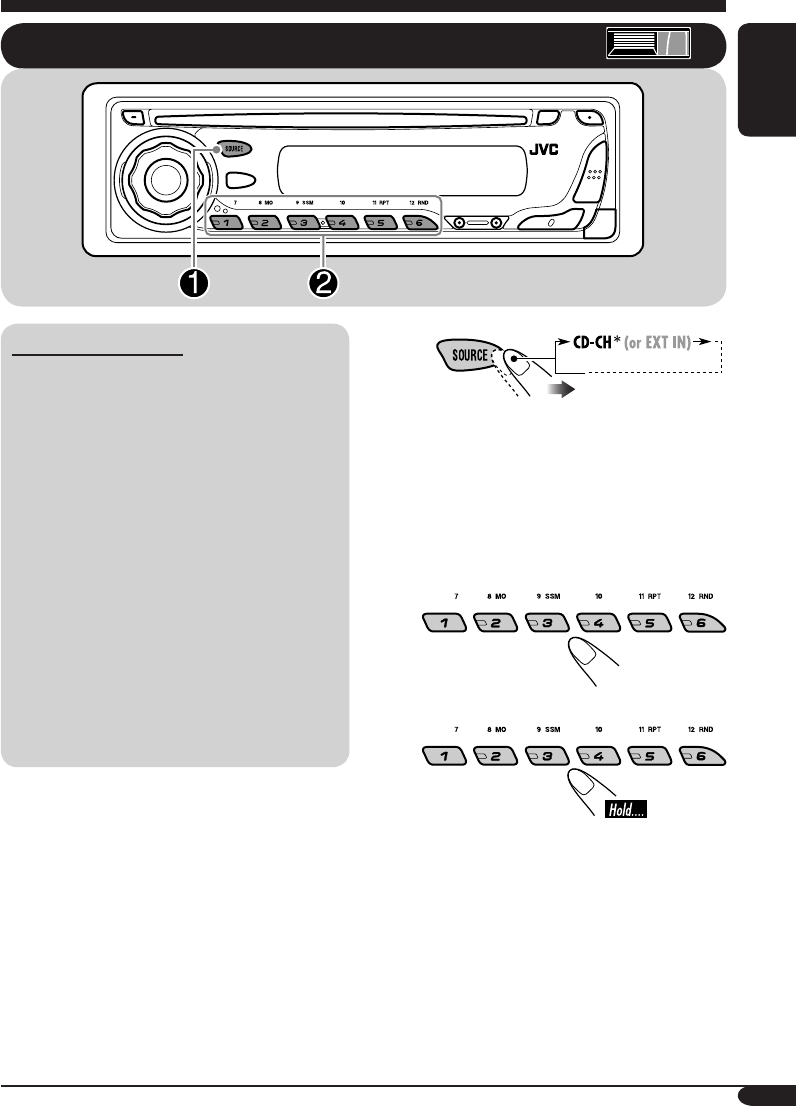
~
* If you have changed “EXT IN” setting
to “EXT IN” (see page 21), you
cannot select the CD changer.
Ÿ Select a disc.
For disc number from 01 – 06:
For disc number from 07 – 12:
Playing discs in the CD changer
About the CD changer
It is recommended to use the JVC MP3-
compatible CD changer with your receiver.
• You can also connect other CH-X series
CD changers (except CH-X99 and
CH-X100). However, they are not
compatible with MP3 discs, so you cannot
play back MP3 discs.
• You cannot use the KD-MK series CD
changers with this receiver.
• Disc text information recorded in the CD
Text can be displayed when a JVC CD
Text compatible CD changer is connected.
Before operating your CD changer:
• Refer also to the Instructions supplied with
your CD changer.
• You cannot control and play any WMA
disc in the CD changer.
EN12-17_KD-AR360_G310[J]f.indd 13 9/24/04, 10:14:41 AM
14
ENGLISH
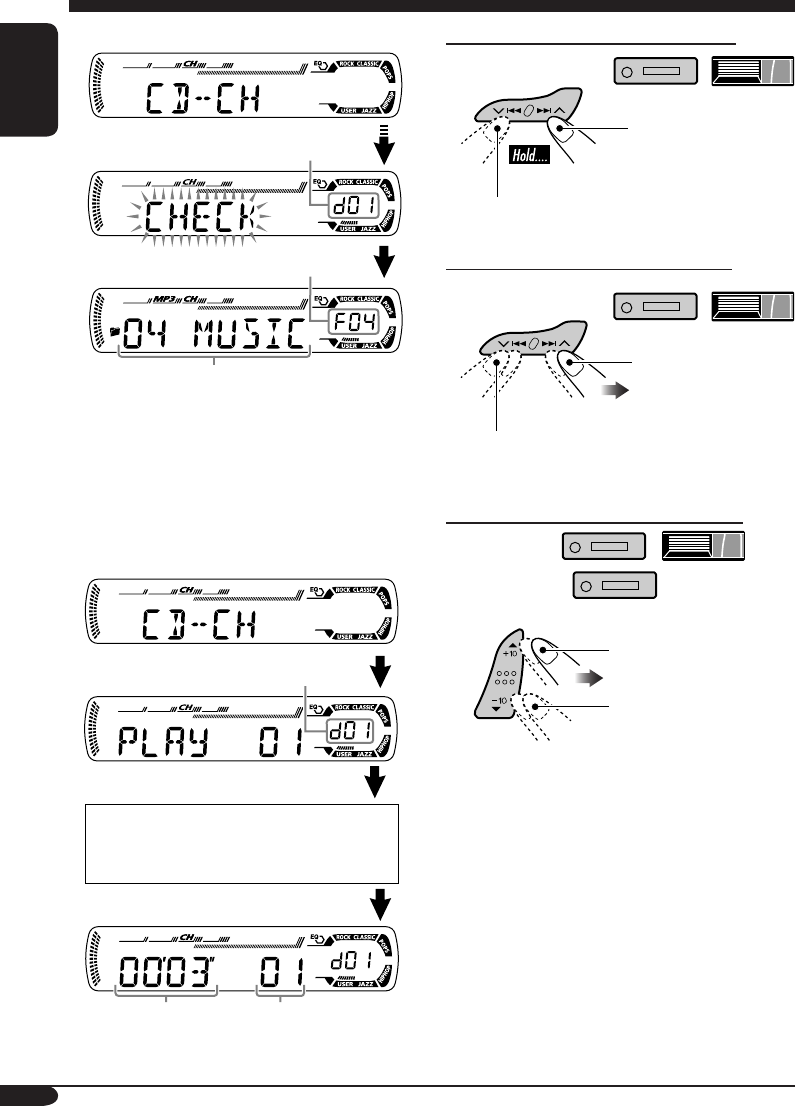
To fast-forward or reverse the track
Fast-forwards.
Reverses.
To go to the next or previous tracks
To the following
tracks.
To the beginning of the current track, then
the previous tracks.
To go to the next or previous folders
For MP3 discs:
For WMA discs:
To next folders.
To previous folders.
• When the current disc is an MP3 disc:
When playback starts, disc information will
automatically appear (see page 16).
* “ROOT” appears if no folder is included in
the disc.
• When the current disc is an audio CD or a
CD Text disc:
Selected disc number
Elapsed playing
time
Current track
number
Selected disc number
Selected folder number
CD Text: Disc title/performer =
Track title appear automatically.
Folder name*
EN12-17_KD-AR360_G310[J]f.indd 14 10/7/04, 9:24:48 AM
15
ENGLISH
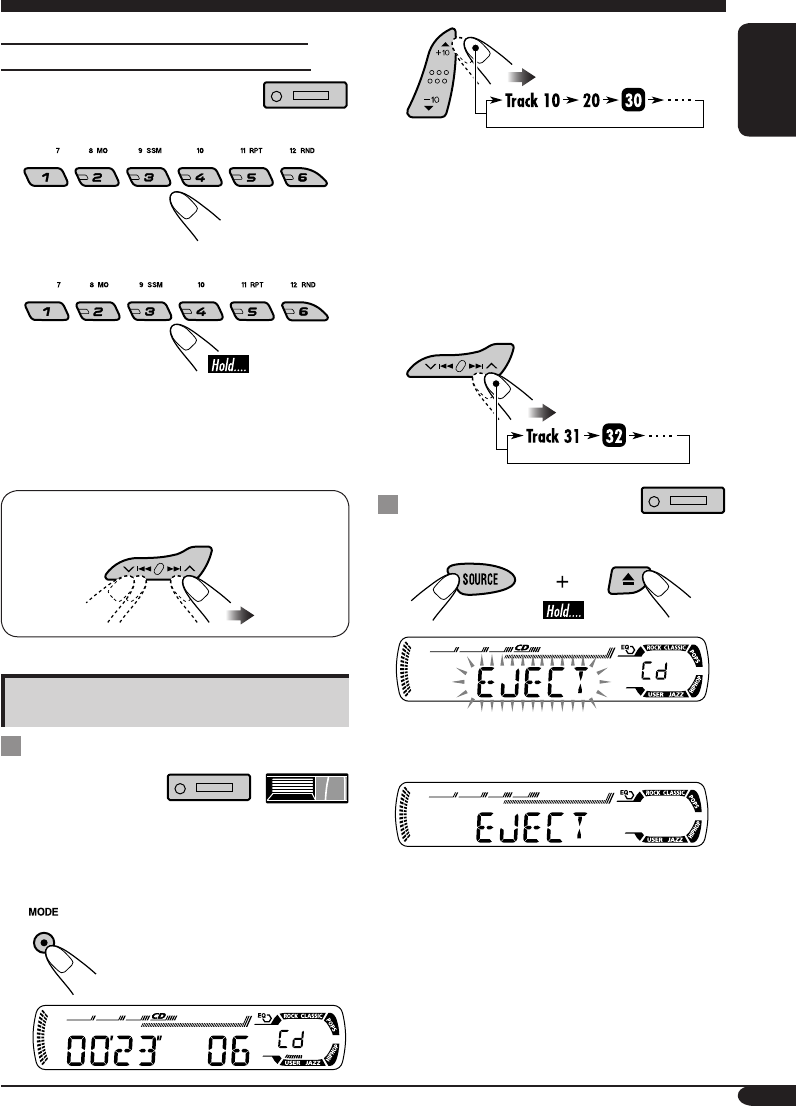
To locate a particular track (for CD) or
folder (for MP3 or WMA discs) directly
To select a number from 01 – 06:
To select a number from 07 – 12:
• To use folder search on MP3/WMA discs, it
is required that folders are assigned with 2
digit numbers at the beginning of their folder
names—01, 02, 03, and so on.
• To select a particular track in a folder (for
MP3 or WMA disc) after selecting a folder:
Other main functions
Skipping a track quickly during play
• For MP3 or WMA disc, you can skip a track
within the same folder.
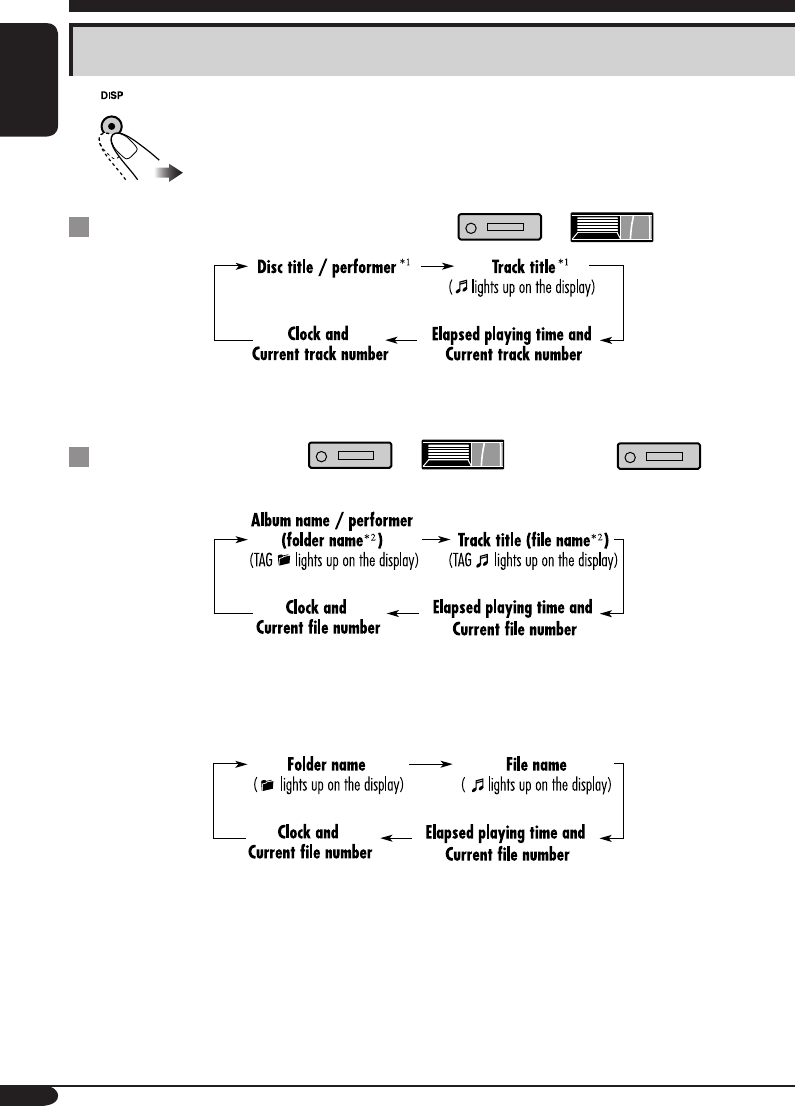
Ex.: To select track 32 while playing track 6
1
2
First time you press +10 or –10 button, the
track skips to the nearest higher or lower
track with a track number of multiple ten
(ex. 10th, 20th, 30th).
Then each time you press the button, you
can skip 10 tracks.
• After the last track, the first track will be
selected and vice versa.
3
Prohibiting disc ejection
You can lock a disc in the loading slot.
To cancel the prohibition, repeat the same
procedure.
EN12-17_KD-AR360_G310[J]f.indd 15 9/24/04, 10:14:42 AM
16
ENGLISH
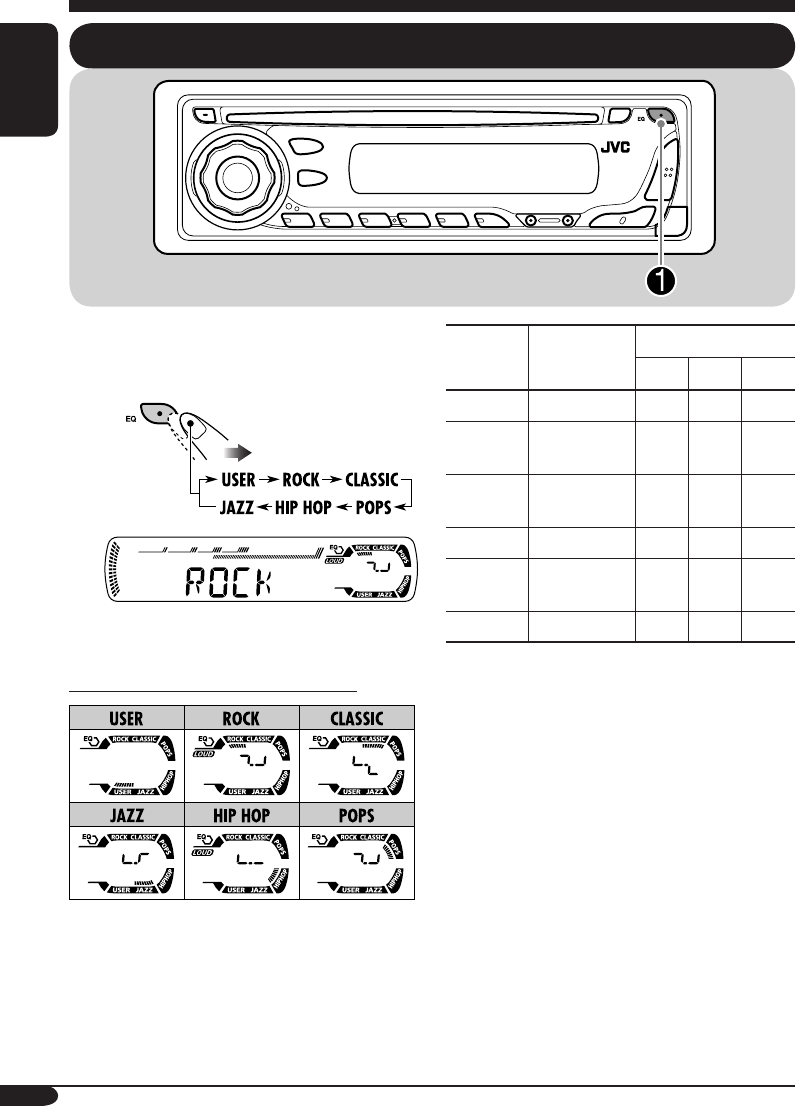
Changing the display information
While playing an audio CD or a CD Text ( / )
*1 If the current disc is an audio CD, “NO NAME” appears.
While playing an MP3 ( / ) or WMA ( ) disc
• When “TAG DISP” is set to “TAG ON” (see page 21)
*2 If an MP3/WMA file does not have ID3 tags, folder name and file name appear. In this
case, the TAG indicator will not light up.
• When “TAG DISP” is set to “TAG OFF”
EN12-17_KD-AR360_G310[J]f.indd 16 9/24/04, 10:14:42 AM

17
ENGLISH
Selecting the playback modes
You can use only one of the following playback modes at a time.
1
2 Select your desired playback mode.
Repeat play
Ex.: When “TRK RPT” is selected while
playing an MP3 disc in the receiver
Mode Plays repeatedly
TRK RPT: The current track.
• RPT lights up.
FLDR RPT*1: All tracks of the current folder.
•
and RPT light up.
DISC RPT*2: All tracks of the current disc.
•
and RPT light up.
RPT OFF: Cancels repeat play.
Random play
Ex.: When “DISC RND” is selected while
playing an MP3 disc in the receiver
Mode Plays at random
FLDR RND*1: All tracks of the current folder,
then tracks of the next folder
and so on.
• RND and
light up.
DISC RND: All tracks of the current disc.
• RND and
light up.
MAG RND*2: All tracks of the inserted discs.
• RND lights up.
RND OFF: Cancels random play.
*1 Only while playing an MP3 ( / ) or WMA ( ) disc.
*2 Only while playing discs in the CD changer ( ).
EN12-17_KD-AR360_G310[J]f.indd 17 9/24/04, 10:14:43 AM
18
ENGLISH
Sound adjustments
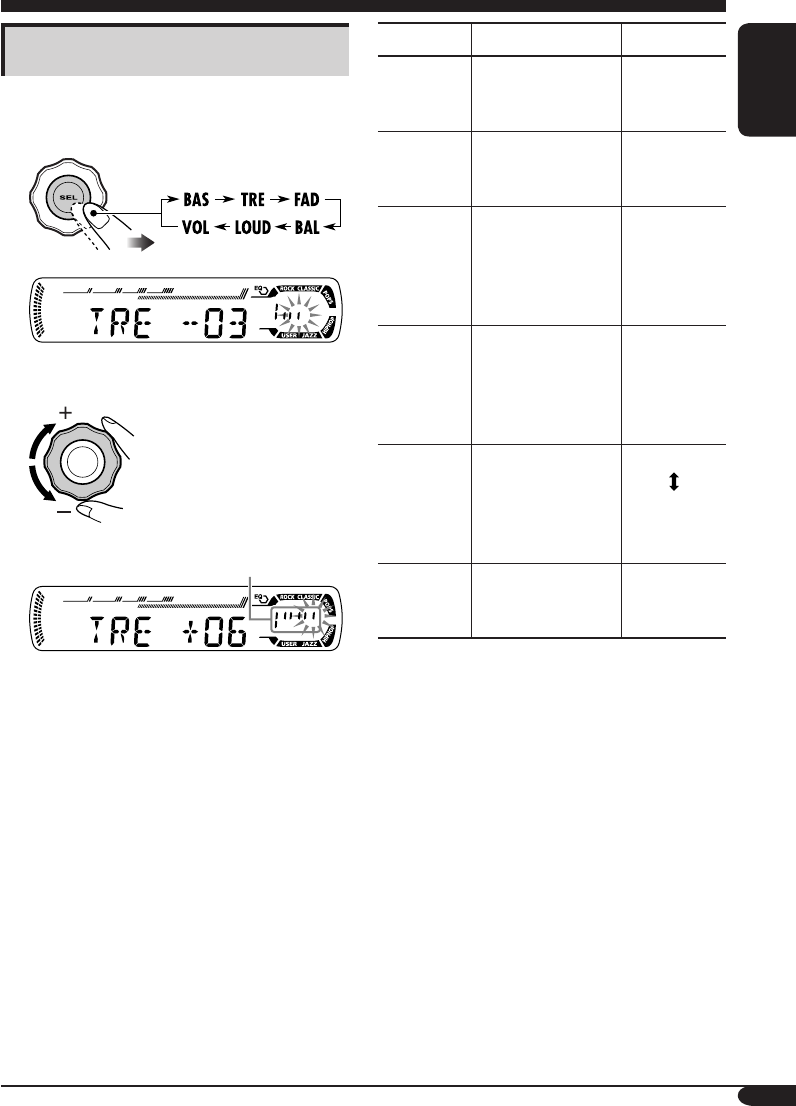
Selecting preset sound modes (C-EQ: custom equalizer)
You can select a preset sound mode suitable to
the music genre.
~
Ex.: When “ROCK” is selected
Indication pattern for each sound mode:
Indication For: Preset values
BAS*1TRE*2
LOUD
*3
USER (Flat sound) 00 00 OFF
ROCK Rock or
disco music
+03 +01 ON
CLASSIC Classical
music
+01 –02 OFF
POPS Light music +04 +01 OFF
HIP HOP Funk or rap
music
+02 00 ON
JAZZ Jazz music +02 +03 OFF
*1 BAS: Bass
*2 TRE: Treble
*3 LOUD: Loudness
EN18-23_KD-AR360_G310[J]f.indd 18 9/24/04, 10:15:04 AM
19
ENGLISH
Adjusting the sound
You can adjust the sound characteristics to your
preference.
1
Ex.: When “TRE” is selected
2
Indication pattern changes as
you adjust the level.
Indication To do: Range
BAS*1
(bass)
Adjust the bass. –06 (min.)
to
+06 (max.)
TRE*1
(treble)
Adjust the treble. –06 (min.)
to
+06 (max.)
FAD*2
(fader)
Adjust the front
and rear speaker
balance.
R06 (Rear
only)
to
F06 (Front
only)
BAL
(balance)
Adjust the left
and right speaker
balance.
L06 (Left
only)
to
R06 (Right
only)
LOUD*1
(loudness)
Boost low and
high frequencies
to produce a well-
balanced sound at
low volume level.
LOUD ON
LOUD OFF
VOL*3
(volume)
Adjust the
volume.
00 (min.) to
30 or 50
(max.)*4
*1 When you adjust the bass, treble, or
loudness, the adjustment you have made is
stored for the currently selected sound mode
(C-EQ) including “USER.”
*2 If you are using a two-speaker system, set
the fader level to “00.”
*3 Normally the control dial works as the
volume control. So you do not have to select
“VOL” to adjust the volume level.
*4 Depending on the amplifier gain control
setting. (See page 21 for details.)
EN18-23_KD-AR360_G310[J]f.indd 19 9/24/04, 10:15:04 AM
20
ENGLISH
Indications Selectable settings, [reference page]
DEMO
Display demonstration
DEMO ON: [Initial]; Display demonstration will be activated
automatically if no operation is done for about
20 seconds, [8].
DEMO OFF: Cancels.
CLOCK H
Hour adjustment
1 – 12, [8]
[Initial: 1 (1:00)]
CLOCK M
Minute adjustment
00 – 59, [8]
[Initial: 00 (1:00)]
CLK ADJ*1
Clock adjustment
AUTO: [Initial]; The built-in clock will be adjusted automatically
using the clock data provided via the SIRIUS® radio channel.
OFF: Cancels.
T-ZONE*1, *2
Time zone
Select your residential area from one of the following time zone for
clock adjustment.
EASTERN [Initial] “ ATLANTI C “ NEWFOUND “
ALASKA “ PACIFIC “ MOUNTAIN “ CENTRAL “
(back to the beginning)
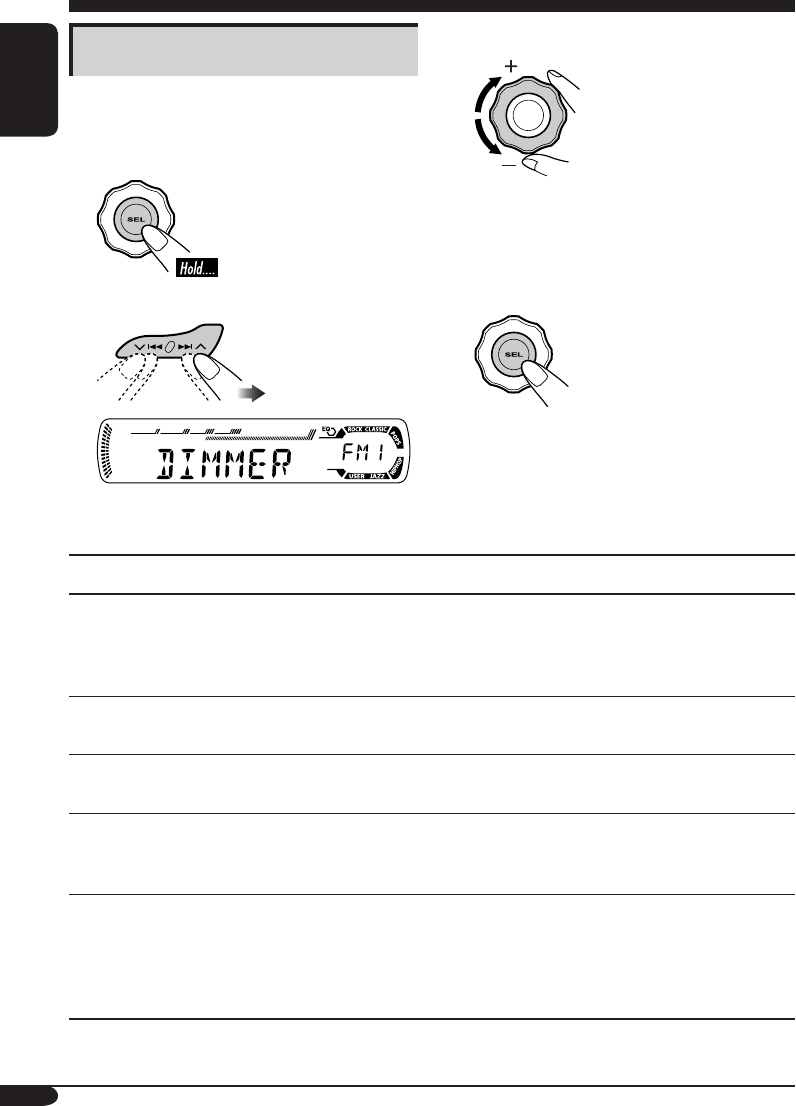
General settings — PSM
Basic operations
You can change PSM (Preferred Setting Mode)
items listed (except for SID) in the table that
follows.
1
2 Select a PSM item.
Ex.: When you select “DIMMER”
3 Adjust the PSM item selected.
4 Repeat steps 2 and 3 to adjust the
other PSM items if necessary.
5 Finish the procedure.
EN18-23_KD-AR360_G310[J]f.indd 20 9/24/04, 10:15:05 AM
21
ENGLISH
Indications Selectable settings, [reference page]
DST*1, *2
Daylight savings time
Activates this if your residential area is subject to DST.
ON: [Initial]; Activates daylight savings time.
OFF: Cancels.
SID*1
SIRIUS® ID
The 12-digits SIRIUS identification number scrolls on the display
after 5 seconds, [24].
• Press SEL to resume the previous display.
DIMMER
Dimmer
ON: Activates dimmer.
OFF: [Initial]; Cancels.
TEL*3
Telephone muting
MUTING 1/MUTING 2: Select either one which mutes the sounds
while using the cellular phone.
OFF: [Initial]; Cancels.
SCROLL*4
Scroll
ONCE: [Initial]; Scrolls the disc information once.
AUTO: Repeats scrolling (5-second interval in between).
OFF: Cancels.
• Pressing DISP for more than one second can scrolls the display
regardless of the setting.
EXT IN*5
External input
CHANGER: [Initial]; To use a JVC CD changer, [13].
EXT IN: To use another external component (other than
SIRIUS DLP), [23].
TAG DIS P
Tag display
TAG ON: [Initial]; Shows the ID3 tag while playing MP3/WMA
tracks, [16].
TAG OF F: Cancels.
AMP GAIN
Amplifier gain control
You can change the maximum volume level of this receiver.
LOW PWR: VOL 00 – VOL 30 (Select this if the maximum power
of the speaker is less than 50 W to prevent them from
damaging.)
HIGH PWR: [Initial]; VOL 00 – VOL 50
AREA
Tuner channel interval
AREA EU: Select this when using the receiver in an area other
than North and South America. (FM: 50 kHz—manual
tuning, 100 kHz—auto search; AM: 9 kHz)
AREA US: [Initial]; Select this when using the receiver in North or
South America. (FM: 200 kHz; AM: 10 kHz)
*1 Displayed only when SIRIUS radio is connected.
*2 Displayed only when “CLK ADJ” is set to “AUTO.”
*3 Only for KD-AR360.
*4 Some characters or symbols will not be shown (and will be blanked) on the display.
(Ex. “ABCå!d#” ]“ABCA D ”).
*5 Displayed only when one of the following sources is selected—FM, AM, or CD.
EN18-23_KD-AR360_G310[J]f.indd 21 9/24/04, 10:15:05 AM
22
ENGLISH
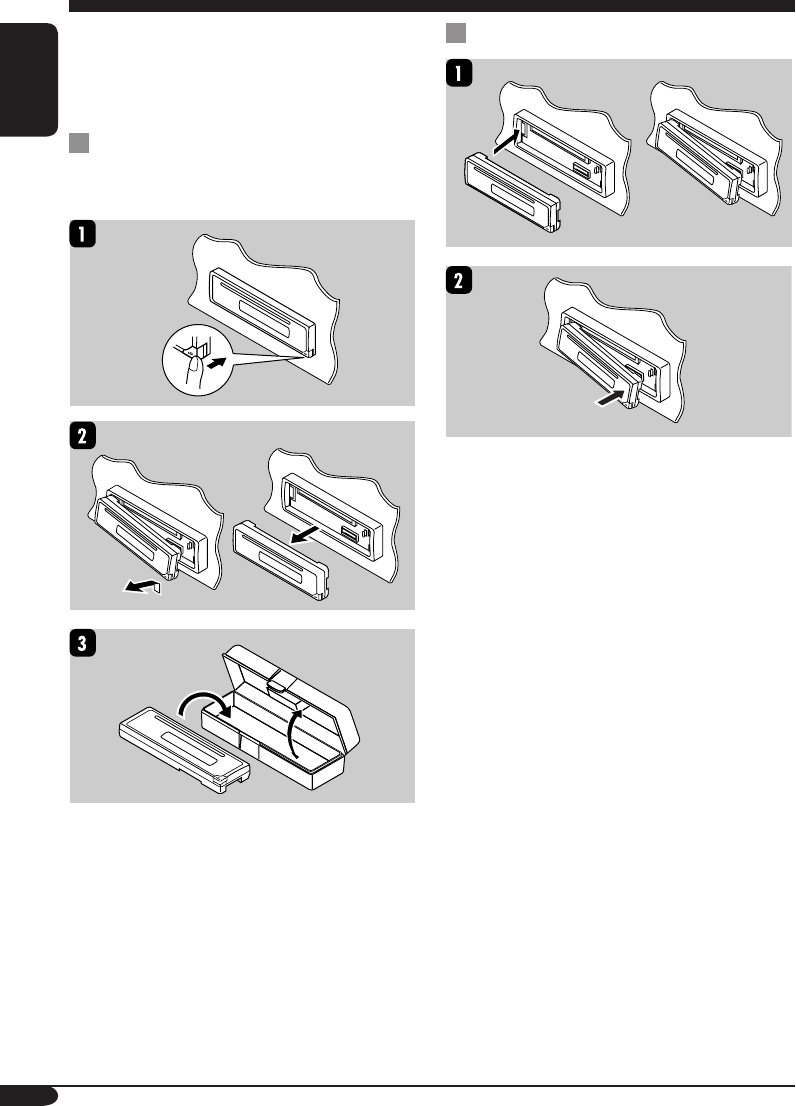
When detaching or attaching the control panel,
be careful not to damage the connectors on
the back of the control panel and on the panel
holder.
Detaching the control panel
Before detaching the control panel, be sure to
turn off the power.
Attaching the control panel
Detaching the control panel
EN18-23_KD-AR360_G310[J]f.indd 22 9/24/04, 10:15:05 AM
23
ENGLISH
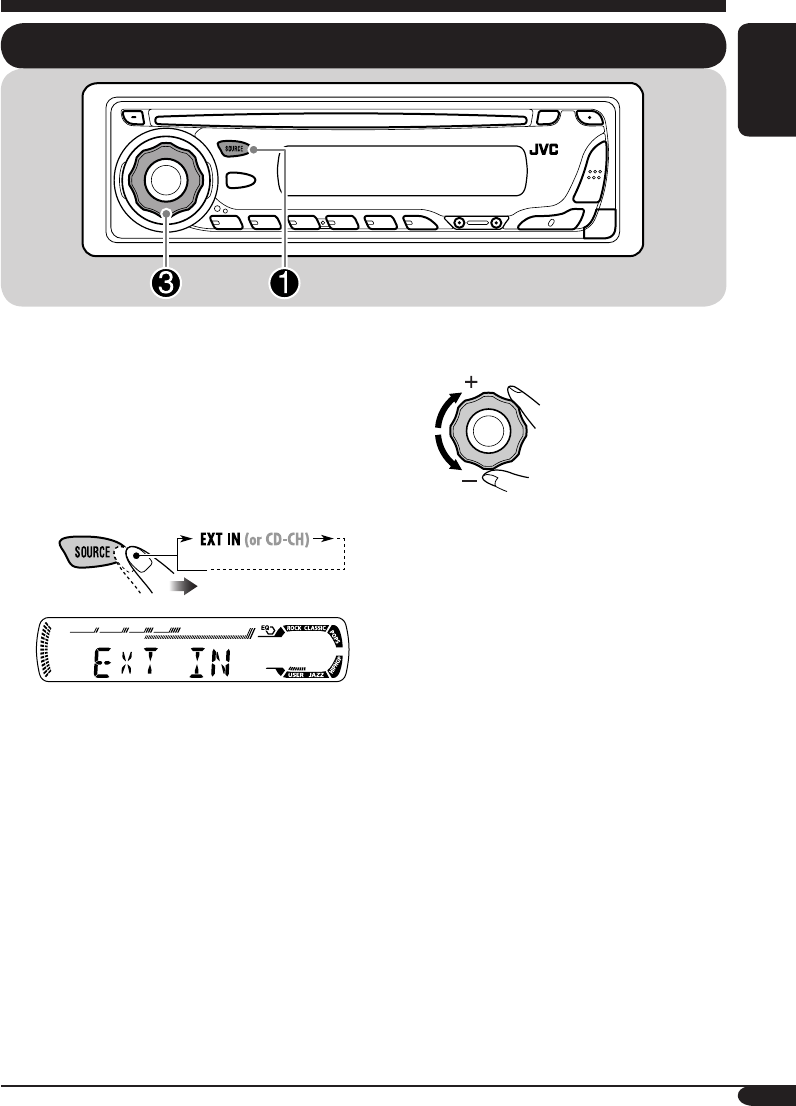
External component operations
Playing an external component
You can connect the external component to
the CD changer jack on the rear using the Line
Input Adapter KS-U57 (not supplied).
• For connection, see Installation/Connection
Manual (separate volume).
• Before operating the external component,
select the external input correctly (see page
21).
~
• If “EXT IN” does not appear, see page
21 and select the external input (“EXT
IN”).
Ÿ Turn on the connected component
and start playing the source.
! Adjust the volume.
⁄ Adjust the sound as you want.
(See pages 18 and 19.)
EN18-23_KD-AR360_G310[J]f.indd 23 9/24/04, 10:15:06 AM
24
ENGLISH
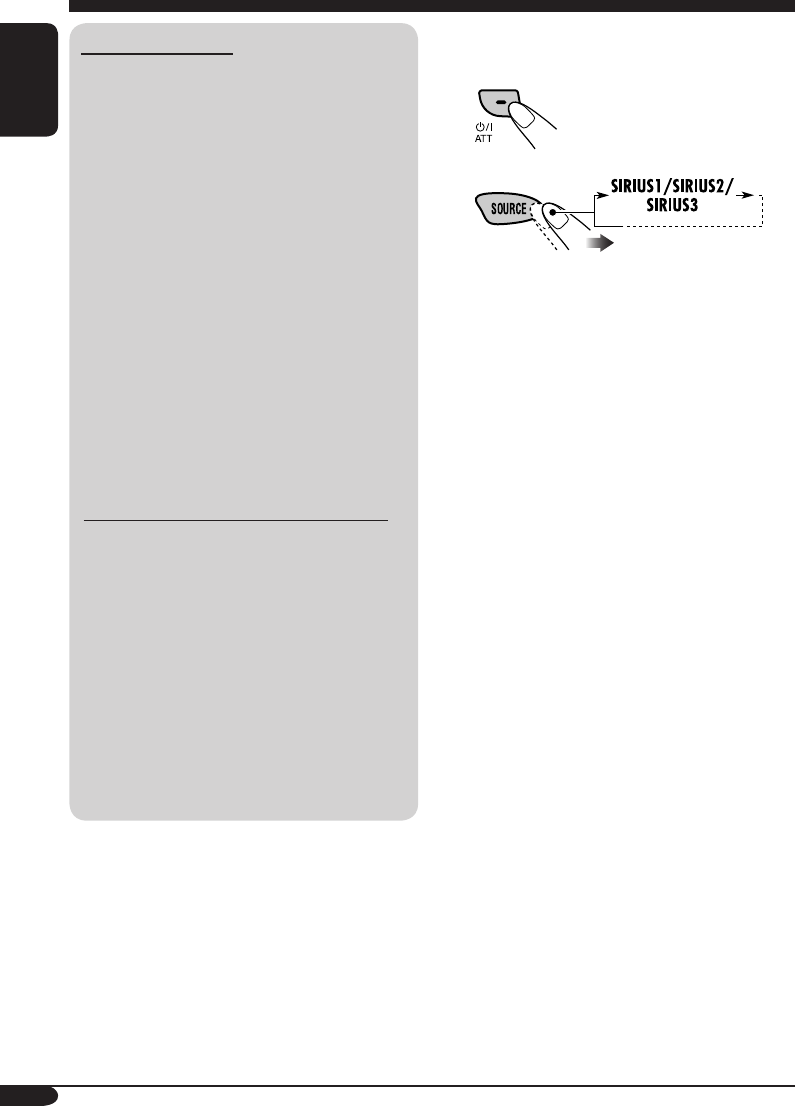
SIRIUS® radio operations
About SIRIUS radio
SIRIUS is a satellite radio that can deliver
digital-quality sound.
SIRIUS has 65 music channels which are all
commercial-free and 50 channels of sports,
news, and entertainment programs.
You can enjoy and control the SIRIUS
radio digital entertainment channels
from the receiver by connecting the JVC
SIRIUS radio DLP—Down Link Processor
(optionally purchased) to the CD changer
jack on the rear.
• You can also connect the JVC SIRIUS
radio PnP (Plug and Play), KT-SR1000 or
KT-SR2000, using the JVC SIRIUS radio
adapter, KS-U100K (not supplied). By
turning on the power of the receiver, you
can turn on/off the JVC PnP. However,
you cannot control it from this receiver.
GCI (Global Control Information) update:
• If channels are updated after subscription,
updating starts automatically.
“UPDATING” flashes and no sound can
be heard.
• Update takes a few minutes to complete.
• During update, you cannot operate your
SIRIUS radio.
Before operating your SIRIUS radio:
• For connection, see Installation/
Connection Manual (separate volume).
• Refer also to the Instructions supplied
with your SIRIUS radio.
Before you can listen to JVC DLP, activate
your SIRIUS subscription after connection:
1
2
JVC DLP starts updating all the SIRIUS
channels.
“UPDATING” flashes on the display for a
few minutes. No sound can be heard during
update.
Once completed, JVC DLP tunes in to the
preset channel, CH184.
3 Check your SIRIUS ID, see page 21.
4 Contact SIRIUS on the internet at
<http://activate.siriusradio.com/> to activate
your subscription, or you can call SIRIUS
toll-free at 1-888-539-SIRIUS (7474).
“SUB UPDT PRESS ANY KEY” scrolls
on the display once subscription has been
completed.
EN24-29_KD-AR360_G310[J]f.indd 24 9/24/04, 10:15:48 AM
25
ENGLISH
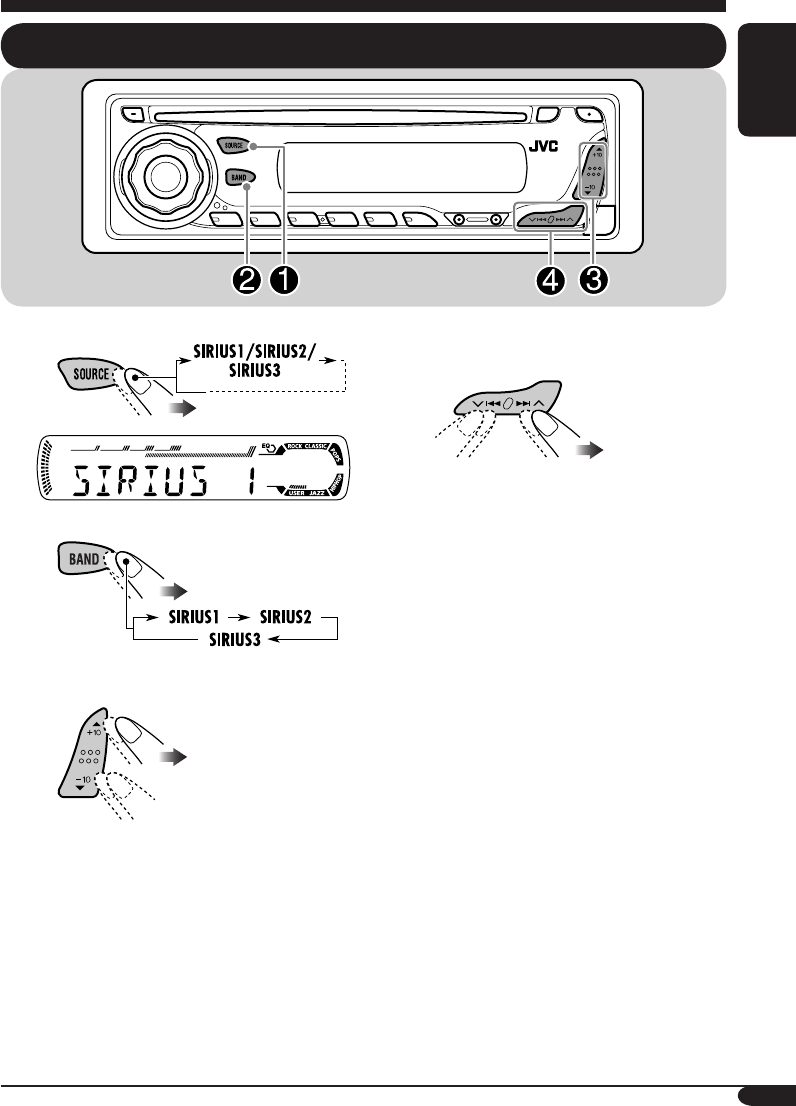
~
Ÿ
! Select a category.
You can tune in to all the channels of
every category by selecting “ALL.”
Selecting a particular category
(SPORTS, ENTERTAINMENT, etc.)
allows you to enjoy only the channels
from the selected category.
Listening to the SIRIUS® radio
⁄ Select a channel for listening.
Press and hold these buttons change the
channels rapidly.
• When changing the category or channel,
invalid and unsubscribed channels are skipped
automatically.
EN25_KD-AR360_G310[J]f.indd 25 10/6/04, 10:06:34 AM
26
ENGLISH
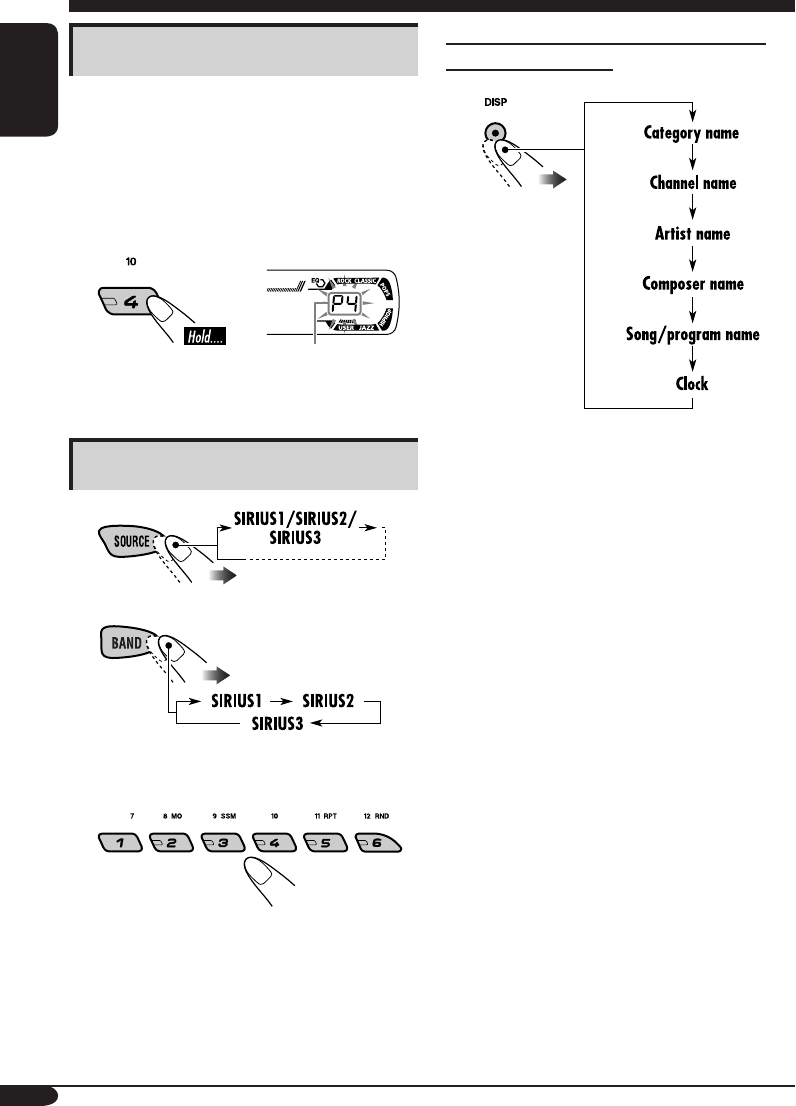
Storing channels in memory
You can preset six channels for each band.
Ex.: Storing a channel into preset number 4.
1 Perform steps ~ to ⁄ on page 25, to
tune in to a channel you want.
2
Preset number flashes
for a while.
Listening to a preset channel
1
2
3 Select the preset channel (1 – 6) you
want.
To change the display information while
listening to a channel
EN24-29_KD-AR360_G310[J]f.indd 26 10/1/04, 3:57:57 PM
27
ENGLISH
Maintenance
How to clean the connectors
Frequent detachment will deteriorate the
connectors.
To minimize this possibility, periodically wipe
the connectors with a cotton swab or cloth
moistened with alcohol, being careful not to
damage the connectors.
Connector
Moisture condensation
Moisture may condense on the lens inside the
CD player in the following cases:
• After starting the heater in the car.
• If it becomes very humid inside the car.
Should this occur, the CD player may
malfunction. In this case, eject the disc and
leave the receiver turned on for a few hours
until the moisture evaporates.
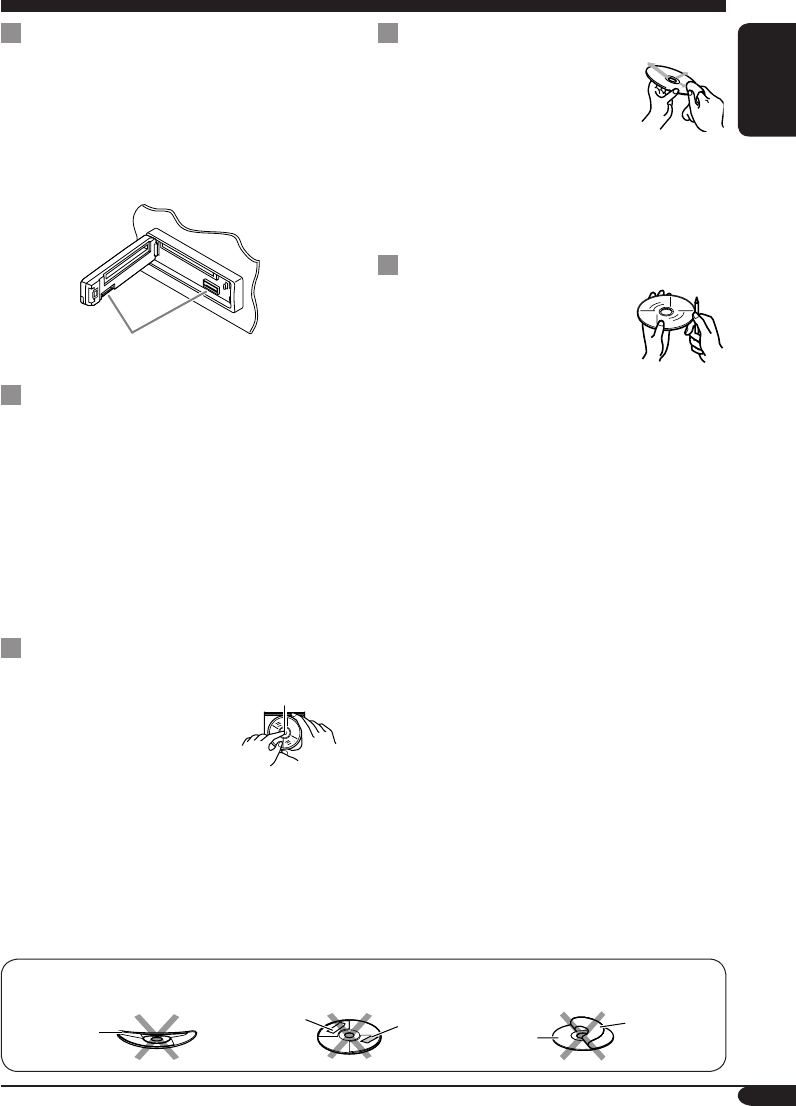
How to handle discs
When removing a disc from
its case, press down the center
holder of the case and lift the
disc out, holding it by the
edges.
• Always hold the disc by the edges. Do not
touch its recording surface.
When storing a disc into its case, gently insert
the disc around the center holder (with the
printed surface facing up).
• Make sure to store discs into the cases after
use.
To keep discs clean
A dirty disc may not play correctly.
If a disc does become dirty, wipe
it with a soft cloth in a straight line
from center to edge.
• Do not use any solvent (for
example, conventional record cleaner, spray,
thinner, benzine, etc.) to clean discs.
To play new discs
New discs may have some rough
spots around the inner and outer
edges. If such a disc is used, this
receiver may reject the disc.
To remove these rough spots, rub the edges
with a pencil or ball-point pen, etc.
Center holder
Wrap disc
Sticker Sticker
residue Disc
Stick-on
label
Do not use the following discs:
EN24-29_KD-AR360_G310[J]f.indd 27 9/24/04, 10:15:49 AM
28
ENGLISH
More about this receiver
Basic operations
Turning off the power
• If you turn off the power while listening to a
disc, disc play will start from where playback
has been stopped previously, next time you
turn on the power.
Selecting the sources
• When no disc is loaded in the receiver, “CD”
cannot be selected.
• Without connecting to the SIRIUS radio or
CD changer, “SIRIUS” or “CD-CH” cannot
be selected.
Tuner operations
Storing stations in memory
• During SSM search...
– All previously stored stations are erased
and stations are stored newly.
–
Received stations are preset in No. 1 (lowest
frequency) to No. 6 (highest frequency).
– When SSM is over, the station stored in
No. 1 will be automatically tuned in.
• When storing a station manually, a previously
preset station is erased when a new station is
stored in the same preset number.
Disc operations
General
• This receiver has been designed to reproduce
CDs/CD Texts, and CD-Rs (Recordable)/
CD-RWs (Rewritable) in audio CD (CD-DA),
MP3 and WMA format.
• When a disc has been loaded, selecting “CD”
for the playback source starts disc play.
Inserting a disc
• When a disc is inserted upside down, the disc
automatically ejects.
• Do not insert 8 cm discs (single CD) and
unusual shape discs (heart, flower, etc.) into
the loading slot.
Playing a disc
• While fast-forwarding or reversing on an MP3
or WMA disc, you can only hear intermittent
sounds.
Playing a CD-R or CD-RW
• Use only “finalized” CD-Rs or CD-RWs.
• This receiver can play back only the files of
the same type which is first detected if a disc
includes both audio CD (CD-DA) files and
MP3/WMA files.
• This receiver can play back multi-session
discs; however, unclosed sessions will be
skipped while playing.
• Some CD-Rs or CD-RWs may not play
back on this receiver because of their disc
characteristics, and for the following causes:
– Discs are dirty or scratched.
– Moisture condensation occurs on the lens
inside the receiver.
– The pickup lens inside the receiver is dirty.
– CD-R/CD-RW on which the files are
written with “Packet Write” method.
– There are improper recording conditions
(missing data, etc.) or media conditions
(stain, scratch, warp, etc.).
• CD-RWs may require a longer readout time
since the reflectance of CD-RWs is lower
than that of regular CDs.
• Do not use the following CD-Rs or CD-RWs:
– Discs with stickers, labels, or protective seal
stuck to the surface.
– Discs on which labels can be directly
printed by an ink jet printer.
Using these discs under high temperatures
or high humidity may cause malfunctions or
damage to discs.
EN24-29_KD-AR360_G310[J]f.indd 28 10/7/04, 12:14:24 PM

29
ENGLISH
Playing an MP3/WMA disc
• This receiver can play back MP3/WMA files
with the extension code <.mp3> or <.wma>
(regardless of the letter case—upper/lower).
• This receiver can show the names of albums,
artists (performer), and ID3 Tag (Version 1.0,
1.1, 2.2, 2.3, or 2.4) for MP3 files and for
WMA files.
• This receiver can handle only one-byte
characters. No other characters can be
correctly displayed.
• This receiver can play back MP3/WMA files
meeting the conditions below:
– Bit rate: 8 kbps — 320 kbps
– Sampling frequency:
48 kHz, 44.1 kHz, 32 kHz (for MPEG-1)
24 kHz, 22.05 kHz, 16 kHz (for MPEG-2)
– Disc format: ISO 9660 Level 1/ Level 2,
Romeo, Joliet, Windows long file name
• The maximum number of characters for file/
folder names vary among the disc format used
(includes 4 extension characters—<.mp3> or
<.wma>).
– ISO 9660 Level 1: up to 12 characters
– ISO 9660 Level 2: up to 31 characters
– Romeo*: up to 128 (72) characters
– Joliet*: up to 64 (36) characters
– Windows long file name*: up to 128 (72)
characters
* The parenthetic figure is the maximum
number of characters for file/folder names
in case the total number of files and folders
is 313 or more.
• This receiver can recognize the total of 512
files, of 200 folders, and of 8 hierarchies.
• This receiver can play back the files recorded
in VBR (variable bit rate).
The files recorded in VBR have a discrepancy
in elapsed time display, and do not show
the actual elapsed time. Especially, after
performing the search function, this difference
becomes noticeable.
• This receiver cannot play back the following
files:
– MP3 files encoded with MP3i and MP3
PRO formats.
– MP3 files encoded in an unappropriated
format.
– MP3 files encoded with Layer 1/2.
– WMA files encoded with lossless,
professional, and voice formats.
– WMA files which are not based upon
Windows Media® Audio.
– WMA formatted files copy-protected with
DRM.
– Files which have the data such as WAVE,
ATRAC3, etc.
• The search function works but search speed is
not constant.
Changing the source
• If you change the source, playback also stops
(without ejecting the disc).
Next time you select “CD” for the playback
source, disc play starts from where it has been
stopped previously.
Ejecting a disc
• If the ejected disc is not removed within
15 seconds, the disc is automatically inserted
again into the loading slot to prevent it from
dust. (Disc will not play this time.)
General settings—PSM
• If you change the “AMP GAIN” setting from
“HIGH PWR” to “LOW PWR” while the
volume level is set higher than “VOL 30,” the
receiver automatically changes the volume
level to “VOL 30.”
EN24-29_KD-AR360_G310[J]f.indd 29 10/7/04, 9:25:42 AM
30
ENGLISH
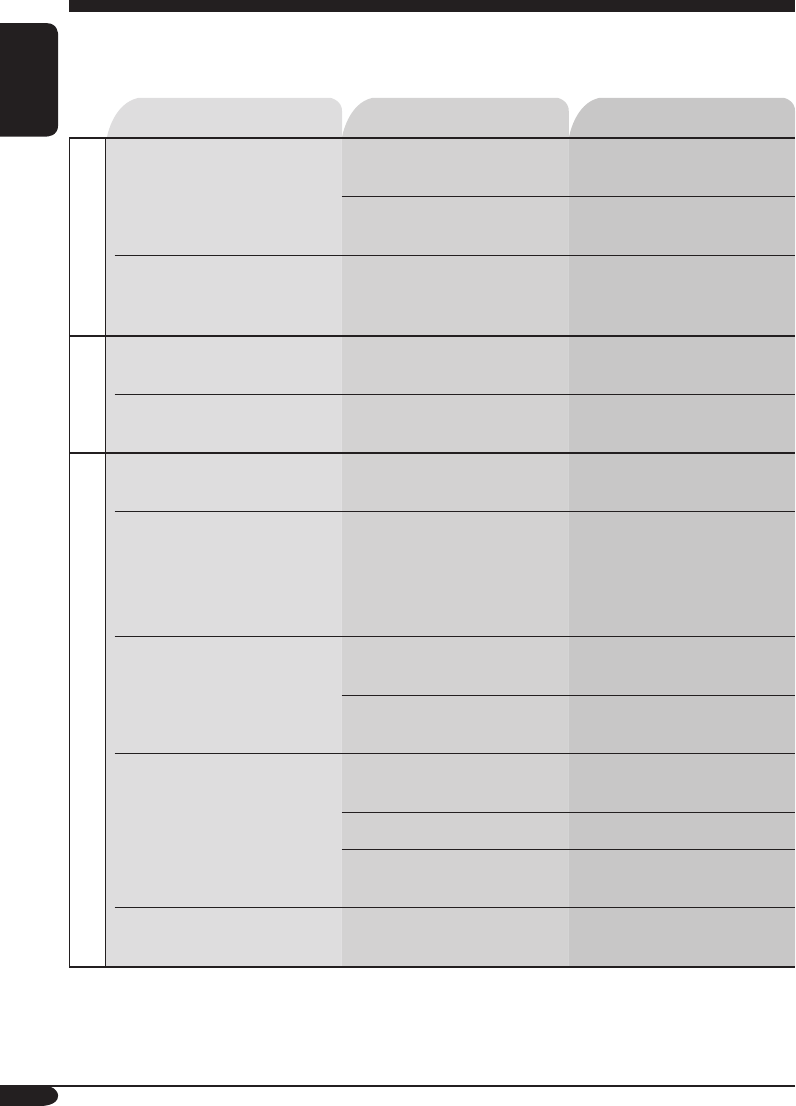
Symptoms Causes Remedies
General
• Sound cannot be heard
from the speakers.
The volume level is set to
the minimum level.
Adjust it to the optimum
level.
Connections are incorrect. Check the cords and
connections.
• This receiver does not
work at all.
The built-in microcomputer
may have functioned
incorrectly due to noise, etc.
Reset the receiver (see page
2).
FM/AM
• SSM automatic presetting
does not work.
Signals are too weak. Store stations manually.
• Static noise while listening
to the radio.
The antenna is not connected
firmly.
Connect the antenna firmly.
Disc playback
• Disc automatically ejects. Disc is inserted upside
down.
Insert the disc correctly.
• CD-R/CD-RW cannot be
played back.
• Tracks on the CD-R/
CD-RW cannot be
skipped.
CD-R/CD-RW is not
finalized.
• Insert a finalized CD-R/
CD-RW.
•
Finalize the CD-R/CD-RW
with the component which
you used for recording.
• Disc can be neither played
back nor ejected.
Disc is locked. Unlock the disc (see page
15).
The CD player may have
functioned incorrectly.
Eject the disc forcibly (see
page 2).
• Disc sound is sometimes
interrupted.
You are driving on rough
roads.
Stop playback while driving
on rough roads.
Disc is scratched. Change the disc.
Connections are incorrect. Check the cords and
connections.
• “NO DISC” appears on the
display.
Disc is inserted incorrectly. Insert the disc correctly.
Troubleshooting
What appears to be trouble is not always serious. Check the following points before calling a service
center.
EN30-33_KD-AR360_G310[J]f.indd 30 10/7/04, 9:26:48 AM
31
ENGLISH
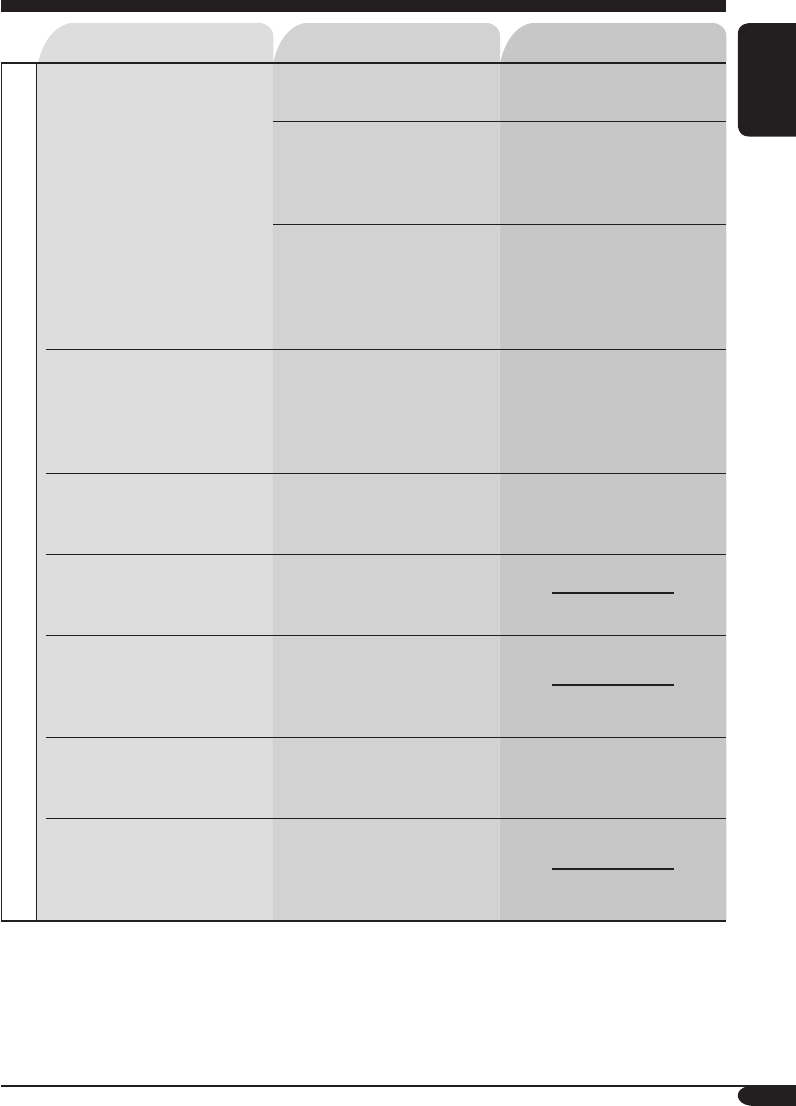
Symptoms Causes Remedies
MP3/WMA playback
• Disc cannot be played
back.
No MP3/WMA tracks are
recorded on the disc.
Change the disc.
MP3/WMA tracks do not
have the extension code
<.mp3> or <.wma> in their
file names.
Add the extension code
<.mp3> or <.wma> to their
file names.
MP3/WMA tracks are not
recorded in the format
compliant with ISO 9660
Level 1, Level 2, Romeo, or
Joliet.
Change the disc.
(Record MP3/WMA
tracks using a compliant
application.)
• Noise is generated. The track played back is not
an MP3/WMA file (although
it has the extension code
<.mp3> or <.wma>).
Skip to another track or
change the disc. (Do not add
the extension code <.mp3>
or <.wma> to non-MP3 or
WMA tracks.)
• A longer readout time is
required (“CHECK” keeps
flashing on the display).
Readout time varies due to
the complexity of the folder/
file configuration.
Do not use too many
hierarchies and folders.
• Tracks cannot be played
back as you have intended
them to play.
Playback order is determined
when the files are recorded.
• Elapsed playing time is not
correct.
This sometimes occurs
during play. This is caused
by how the tracks are
recorded on the disc.
• “NO FILES” appears on
the display.
The current disc does not
contain any MP3/WMA
tracks.
Insert a disc that contains
MP3/WMA tracks.
• Correct characters are
not displayed (e.g. album
name).
This receiver can only
display alphabets (capital:
A – Z), numbers, and a
limited number of symbols.
EN30-33_KD-AR360_G310[J]f.indd 31 10/14/04, 4:56:43 PM
32
ENGLISH
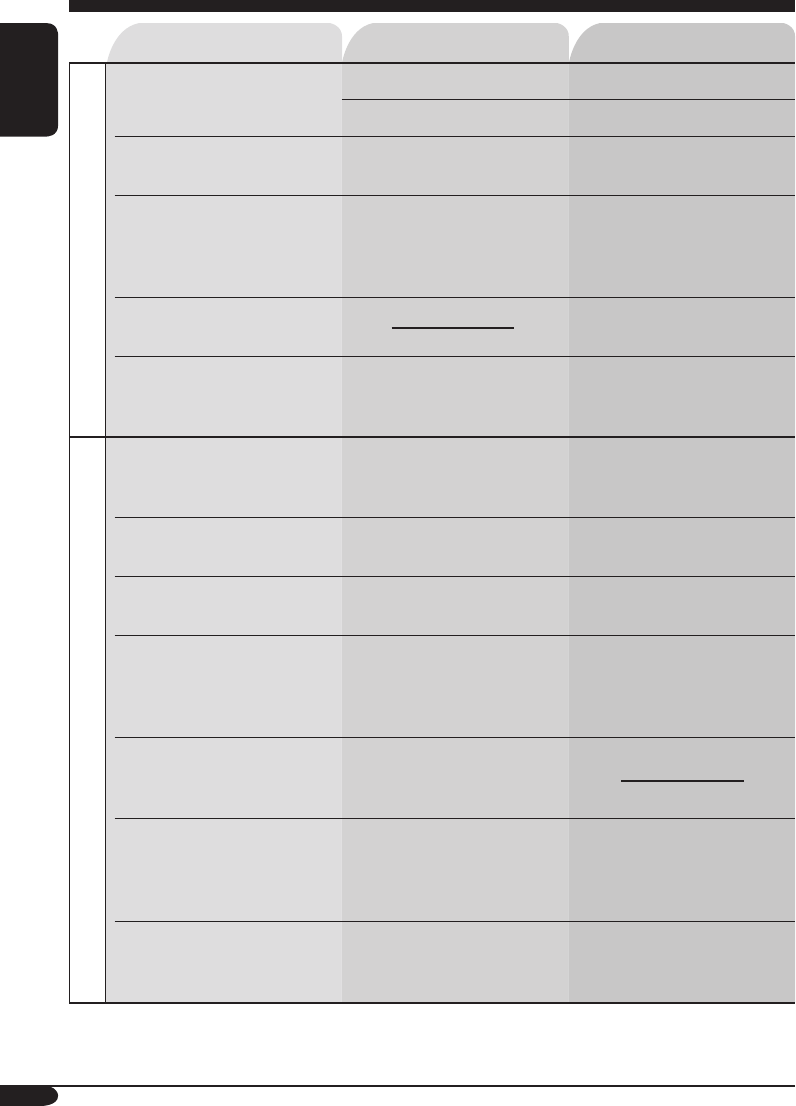
Symptoms Causes Remedies
CD changer
• “NO DISC” appears on the
display.
No disc is in the magazine.
Insert disc into the magazine.
Disc is inserted upside down.
Insert disc correctly.
• “NO MAG” appears on
the display.
No magazine is loaded in the
CD changer.
Insert the magazine.
• “RESET 8” appears on the
display.
This receiver is not
connected to the CD changer
correctly.
Connect this receiver and the
CD changer correctly and
press the reset button of the
CD changer.
• “RESET 1” – “RESET 7”
appears on the display.
Press the reset button of the
CD changer.
• The CD changer does not
work at all.
The built-in microcomputer
may function incorrectly due
to noise, etc.
Reset the receiver (see page
2).
SIRIUS
• “CALL 1-888-539-
SIRIUS TO SUBSCRIBE”
scrolls on the display.
Subscription has not been
done.
Starts subscribing (see page
24).
• “NO SIGNAL” scrolls on
the display.
Signals are too weak. Move to an area with
stronger signals.
• “NO ANTENNA” scrolls
on the display.
The antenna is not connected
firmly.
Connect the antenna firmly.
• “NO CH” appears on the
display for about
5 seconds, then returns to
the previous display.
No broadcast on the selected
channel.
Select another channel or
continue listening to the
previous channel.
• “NO (information)*”
appears or scrolls on the
display.
No text information for the
selected channel.
• No sound can be heard. “UPDATING” flashes on
the display.
The receiver is updating the
channel information and
it takes a few minutes to
complete.
• SIRIUS radio does not
work at all.
The built-in microcomputer
may function incorrectly due
to noise, etc.
Reconnect the SIRIUS radio
after a few seconds.
* NO CATEGORY, NO CHANNEL, NO ARTIST, NO COMPOSER, and NO SONG/PROGRAM
EN30-33_KD-AR360_G310[J]f.indd 32 9/28/04, 10:44:46 AM
33
ENGLISH
Specifications
AUDIO AMPLIFIER SECTION
Power Output:
18 W RMS × 4 Channels at 4 Ω
and ≤ 1% THD+N
Signal to Noise Ratio:
80 dBA (reference: 1 W into 4 Ω)
Load Impedance: 4 Ω (4 Ω to 8 Ω allowance)
Tone Control Range:
Bass: ±10 dB at 100 Hz
Treble: ±10 dB at 10 kHz
Frequency Response: 40 Hz to 20 000 Hz
Line-Out Level/Impedance:
2.5 V/20 kΩ load (full scale)
Output Impedance: 1 kΩ
Other terminals: CD changer
TUNER SECTION
Frequency Range:
FM: 87.5 MHz to 107.9 MHz
(with channel interval set to 200 kHz)
87.5 MHz to 108.0 MHz
(with channel interval set to 50 kHz)
AM: 530 kHz to 1 710 kHz
(with channel interval set to 10 kHz)
531 kHz to 1 602 kHz
(with channel interval set to 9 kHz)
[FM Tuner]
Usable Sensitivity: 11.3 dBf (1.0 µV/75 Ω)
50 dB Quieting Sensitivity:
16.3 dBf (1.8 µV/75 Ω)
Alternate Channel Selectivity (400 kHz): 65 dB
Frequency Response: 40 Hz to 15 000 Hz
Stereo Separation: 35 dB
Capture Ratio: 1.5 dB
[AM Tuner]
Sensitivity: 20 µV
Selectivity: 35 dB
CD PLAYER SECTION
Type: Compact disc player
Signal Detection System: Non-contact optical
pickup (semiconductor laser)
Number of channels: 2 channels (stereo)
Frequency Response: 5 Hz to 20 000 Hz
Dynamic Range: 96 dB
Signal-to-Noise Ratio: 98 dB
Wow and Flutter: Less than measurable limit
MP3 decoding format:
MPEG1/2 Audio Layer 3
Max. Bit Rate: 320 Kbps
WMA (Windows Media® Audio) decoding
format:
Max. Bit Rate: 192 Kbps
GENERAL
Power Requirement:
Operating Voltage:
DC 14.4 V (11 V to 16 V allowance)
Grounding System: Negative ground
Allowable Operating Temperature:
0°C to +40°C (32°F to 104°F)
Dimensions (W × H × D):
Installation Size (approx.):
182 mm × 52 mm × 150 mm
(7-3/16” × 2-1/16” × 5-15/16”)
Panel Size (approx.):
188 mm × 58 mm × 11 mm
(7-7/16” × 2-5/16” × 7/16”)
Mass (approx.):
1.4 kg (3.1 lbs) (excluding accessories)
Design and specifications are subject to change
without notice.
If a kit is necessary for your car, consult
your telephone directory for the nearest car
audio speciality shop.
• Microsoft and Windows Media are either
registered trademarks or trademarks of
Microsoft Corporation in the United States
and/or other countries.
EN30-33_KD-AR360_G310[J]f.indd 33 10/7/04, 4:31:52 PM

Having TROUBLE with operation?
Please reset your unit
Refer to page of How to reset your unit
Still having trouble??
USA ONLY
Call 1-800-252-5722
http://www.jvc.com
We can help you!
© 2004 Victor Company of Japan, Limited
EN, SP, FR
1004DTSMDTJEIN
Rear_KD-AR360_G310[J]f.indd 2 9/28/04, 10:45:12 AM
KD-AR360/KD-G310
Installation/Connection Manual
Manual de instalación/conexión
Manuel d’installation/raccordement
GET0248-002A
[J]
1004DTSMDTJEIN
EN, SP, FR
K
Handles
Manijas
Poignées
G
Washer (ø5)
Arandela (ø5)
Rondelle (ø5)
H
Lock nut (M5)
Tuerca de seguridad
(M5)
Ecrou d’arrêt (M5)
I
Mounting bolt—M5 x 20 mm
(M5 x 13/16”)
Perno de montaje—M5 x 20 mm
(M5 x 13/16 pulgada)
Boulon de montage—M5 x 20 mm
(M5 x 13/16 pouces)
J
Rubber cushion
Cojín de goma
Amortisseur en
caoutchouc
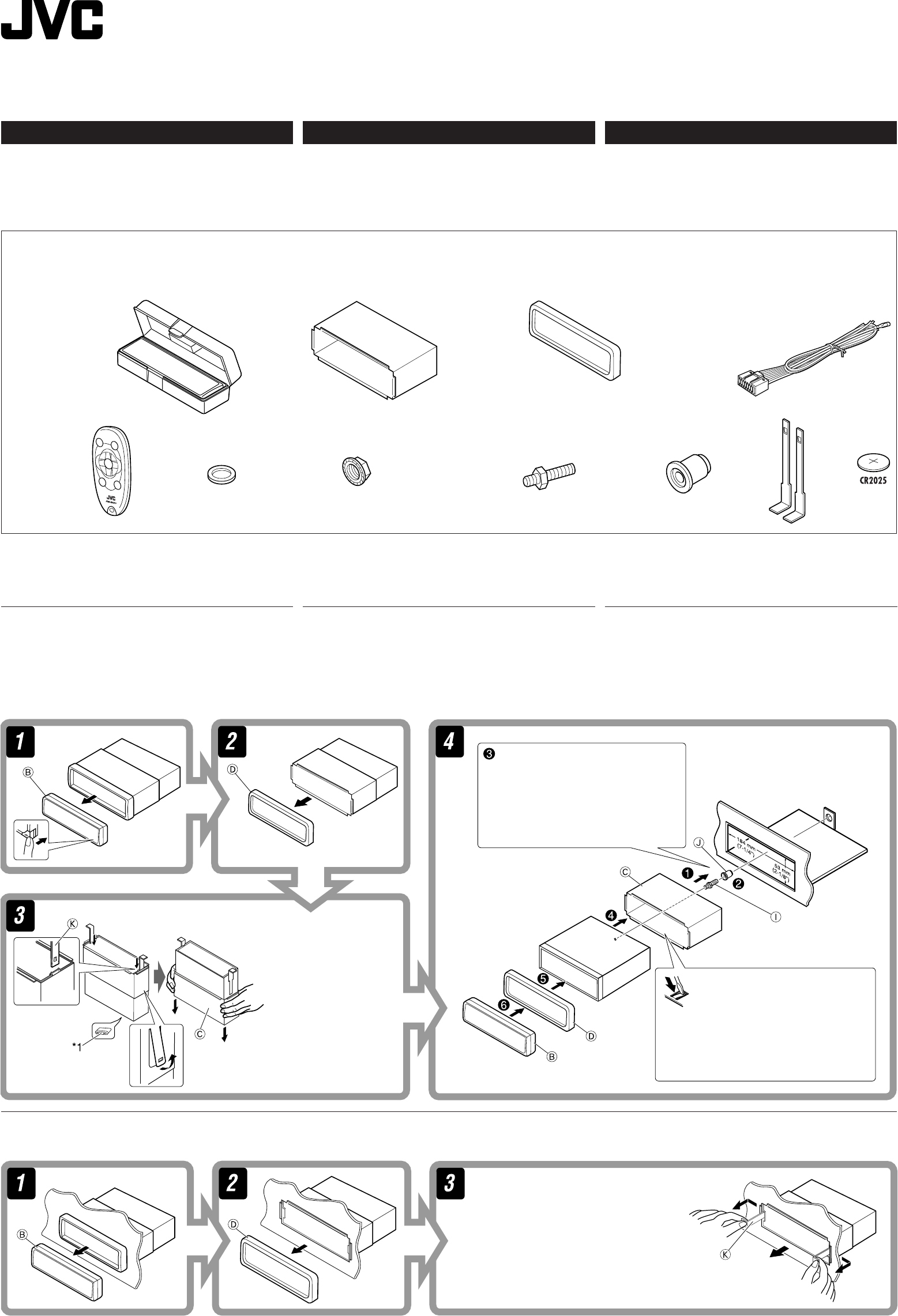
A / B
Hard case/Control panel
Estuche duro/Panel de
control
Etui de transport/
Panneau de commande
C
Sleeve
Cubierta
Manchon
D
Trim plate
Placa de guarnición
Plaque d’assemblage
E
Power cord
Cordón de alimentación
Cordon d’alimentation
1
Do the required electrical connections.
Realice las conexiones eléctricas
requeridas.
Réalisez les connexions électriques.
*1 When you stand the
receiver, be careful not
to damage the fuse on
the rear.
*1 Al poner la unidad
vertical, tenga cuidado
de no dañar el fusible
provisto en la parte
posterior.
*1 Lorsque vous mettez
l’appareil à la verticale,
faire attention de ne pas
endommager le fusible
situé sur l’arrière.
Bend the appropriate tabs to hold the
sleeve firmly in place.
Doble las lengüetas apropiadas para
retener firmemente la manga en su
lugar.
Tordez les languettes appropriées
pour maintenir le manchon en place.
ENGLISH
This receiver is designed to operate on 12 V DC, NEGATIVE
ground electrical systems. If your vehicle does not have this
system, a voltage inverter is required, which can be purchased
at JVC car audio dealers.
Parts list for installation and connection
The following parts are provided for this receiver.
After checking them, please set them correctly.
INSTALLATION
(IN-DASH MOUNTING)
The following illustration shows a typical installation. If you
have any questions or require information regarding installation
kits, consult your JVC car audio dealer or a company supplying
kits.
• If you are not sure how to install this receiver correctly, have
it installed by a qualified technician.
ESPAÑOL
Esta unidad está diseñada para funcionar con 12 V de CC,
con sistemas eléctricos de masa NEGATIVA. Si su vehículo
no posee este sistema, será necesario un inversor de tensión,
que puede ser adquirido en los concesionarios de JVC de
equipos de audio para automóviles.
Lista de piezas para instalación y conexión
Con esta unidad se suministran las siguientes piezas.
Después de inspeccionarlas, colóquelas correctamente.
INSTALACION (MONTAJE EN EL
TABLERO DE INSTRUMENTOS)
La siguiente ilustración muestra una instalación típica. Si
tiene alguna pregunta o necesita información acerca de las
herramientas para instalación, consulte con su concesionario
de JVC de equipos de audio para automóviles o a una
compañía que suministra tales herramientas.
• Si usted no está seguro de cómo instalar correctamente la
unidad, hágala instalar por un técnico cualificado.
F
Remote controller
Control remoto
Télécommade
L
Battery
Pila
Pile
Removing the receiver
Before removing the receiver, release the rear section.
Extracción de la unidad
Antes de extraer la unidad, libere la sección trasera.
Insert the two handles, then pull them
as illustrated so that the receiver can be
removed.
Inserte las dos manijas y, a continuación,
extráigalas de la manera indicada en la
ilustración para poder desmontar la unidad.
Insérez les deux poignées, puis tirez de la
façon illustrée de façon à retirer l’appareil.
FRANÇAIS
Cet appareil est conçu pour fonctionner sur des sources de
courant continu de 12 V à masse NEGATIVE. Si votre véhicule
n’offre pas ce type d’alimentation, il vous faut un convertisseur
de tension, que vous pouvez acheter chez un revendeur
d’autoradios JVC.
Liste des pièces pour l’installation et
raccordement
Les pièces suivantes sont fournies avec cet appareil.
Après vérification, veuillez les placer correctement.
INSTALLATION (MONTAGE
DANS LE TABLEAU DE BORD)
L’illustration suivante est un exemple d’installation typique. Si
vous avez des questions ou avez besoin d’information sur des
kits d’installation, consulter votre revendeur d’autoradios JVC
ou une compagnie d’approvisionnement.
• Si l’on n’est pas sûr de pouvoir installer correctement cet
appareil, le faire installer par un technicien qualifié.
Retrait de l’appareil
Avant de retirer l’appareil, libérer la section arrière.
Instal1-2_AR360G310[J]f.indd 1 9/24/04, 2:52:52 PM
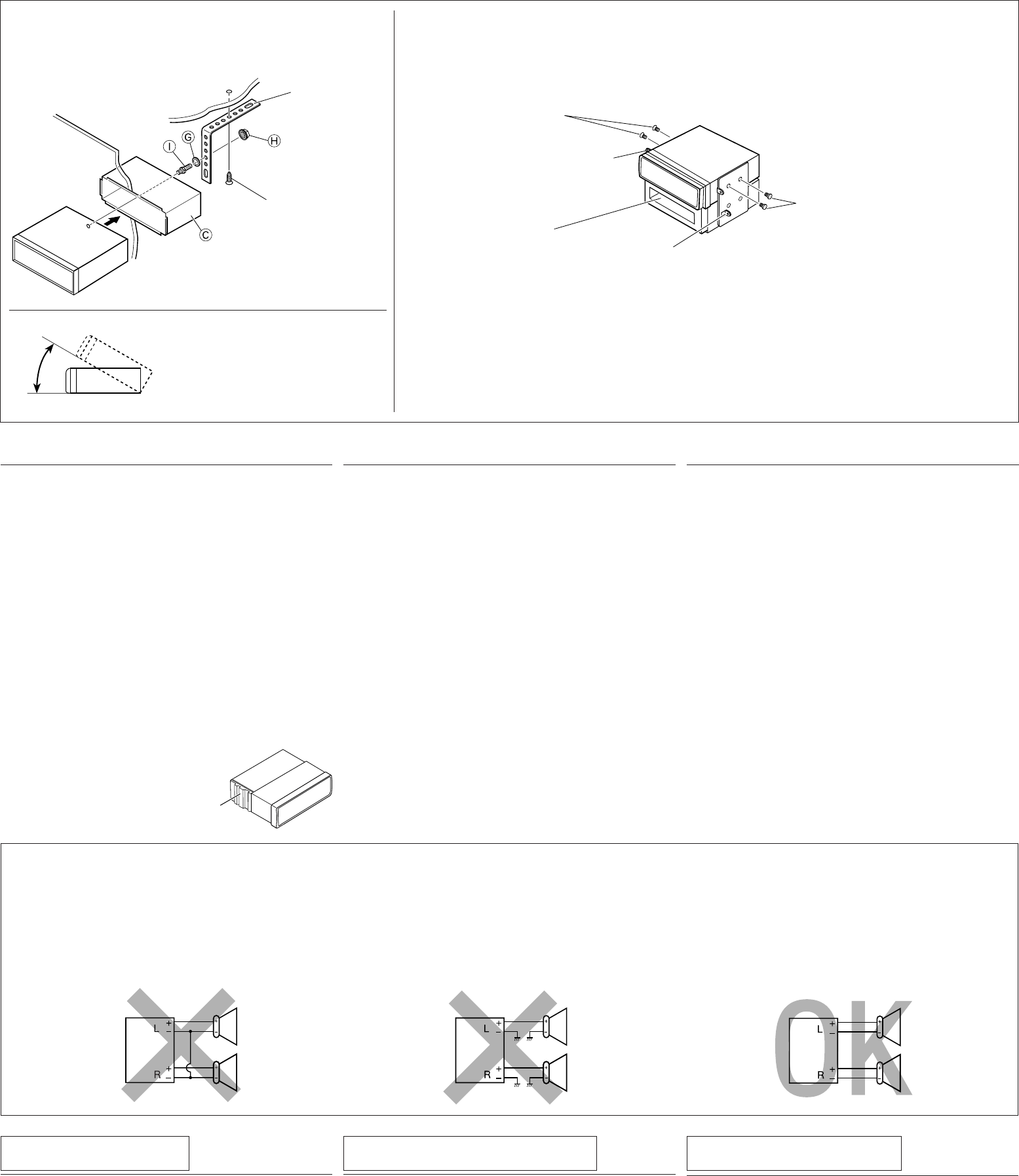
When installing the receiver without using the sleeve / Instalación de la unidad sin
utilizar la cubierta / Lors de l’installation de l’appareil scans utiliser de manchon
In a Toyota for example, first remove the car radio and install the receiver in its place.
En un Toyota por ejemplo, primero retire la radio del automóvil y luego instale la unidad en su lugar.
Par exemple dans une Toyota, retirer d’abord l’autoradio et installer l’appareil à la place.
When using the optional stay / Cuando emplea un
soporte opcional / Lors de l’utilisation du hauban en
option
Note : When installing the receiver on the mounting bracket, make sure to use the 8 mm (3/8”) -long
screws. If longer screws are used, they could damage the receiver.
Nota : Cuando instala la unidad en la ménsula de montaje, asegúrese de utilizar los tornillos de 8 mm
(3/8 pulgada) de longitud. Si se utilizan tornillos más largos, éstos pueden dañar la unidad.
Remarque : Lors de l’installation de l’appareil sur le support de montage, s’assurer d’utiliser des vis d’une
longueur de 8 mm (3/8 pouces). Si des vis plus longues sont utilisées, elles peuvent endommager
l’appareil.
Bracket*
Ménsula*
Support *
* Not included with this receiver.
* No suministrado con esta
unidad.
* Non fourni avec cet appareil.
Flat type screws—M5 x 8 mm (M5 x 3/8”)*
Tornillos tipo plano—M5 x 8 mm
(M5 x 3/8 pulgada)*
Vis à tête plate—M5 x 8 mm
(M5 x 3/8 pouces)*
Pocket
Compartimiento
Poche
Flat type screws—M5 x 8 mm
(M5 x 3/8”)*
Tornillos tipo plano—M5 x 8 mm
(M5 x 3/8 pulgada)*
Vis à tête plate—M5 x 8 mm
(M5 x 3/8 pouces)*
Screw (option)
Tornillo (opción)
Vis (en option)
Stay (option)
Soporte (opción)
Hauban (en option)
Fire wall
Tabique a prueba de incendios
Cloison
Dashboard
Tablero de
instrumentos
Tableau de bord
Install the receiver at an angle of less
than 30˚.
Instale la unidad a un ángulo de menos
de 30˚.
Installez l’appareil avec un angle de
moins de 30˚.
Heat sink
Sumidero térmico
Dissipateur de chaleur
2
TROUBLESHOOTING
• The fuse blows.
* Are the red and black leads connected correctly?
• Power cannot be turned on.
* Is the yellow lead connected?
• No sound from the speakers.
* Is the speaker output lead short-circuited?
• Sound is distorted.
* Is the speaker output lead grounded?
* Are the “–” terminals of L and R speakers grounded in
common?
• Noise interfere with sounds.
* Is the rear ground terminal connected to the car’s chassis
using shorter and thicker cords?
• Receiver becomes hot.
* Is the speaker output lead grounded?
* Are the “–” terminals of L and R speakers grounded in
common?
• This receiver does not work at all.
* Have you reset your receiver?
ELECTRICAL CONNECTIONS
To prevent short circuits, we recommend that you disconnect
the battery’s negative terminal and make all electrical
connections before installing the receiver.
• Be sure to ground this receiver to the car’s chassis again
after installation.
Notes:
• Replace the fuse with one of the specified rating. If the fuse
blows frequently, consult your JVC car audio dealer.
• It is recommended to connect to the speakers with maximum
power of more than 50 W (both at the rear and at the front,
with an impedance of 4 Ω to 8 Ω). If the maximum power
is less than 50 W, change “AMP GAIN” setting to prevent
the speakers from being damaged (see page 21 of the
INSTRUCTIONS).
• To prevent short-circuit, cover the terminals of the UNUSED
leads with insulating tape.
• The heat sink becomes very hot after use. Be careful not to
touch it when removing this receiver.
CONEXIONES ELECTRICAS
Para evitar cortocircuitos, recomendamos que desconecte
el terminal negativo de la batería y que efectúe todas las
conexiones eléctricas antes de instalar la unidad.
• Asegúrese de volver a conectar a masa esta unidad al
chasis del automóvil después de la instalación.
Notas:
• Reemplace el fusible por uno con la corriente especificada.
Si el fusible se quemase frecuentemente consulte con
su concesionario de JVC de equipos de audio para
automóviles.
• Se recomienda conectar los altavoces con una potencia
máxima de más de 50 W (tanto atrás como adelante, con
una impedancia de 4 Ω a 8 Ω). Si la potencia máxima es
de menos de 50 W, cambie “AMP GAIN” para evitar daños
en los altavoces (consulte la página 21 del MANUAL DE
INSTRUCCIONES).
• Para evitar cortocircuitos, cubra los cables NO UTILIZADOS
con cinta aislante.
• El sumidero térmico estará muy caliente después del uso.
Asegúrese de no tocarlo al desmontar esta unidad.
LOCALIZACION DE AVERIAS
• El fusible se quema.
* ¿Están los conductores rojo y negro correctamente
conectados?
• No es posible conectar la alimentación.
* ¿Está el cable amarillo conectado?
• No sale sonido de los altavoces.
*
¿Está el cable de salida del altavoz cortocircuitado?
• El sonido presenta distorsión.
* ¿Está el cable de salida del altavoz conectado a masa?
* ¿Están los terminales “–” de los altavoces L y R conectados
a una masa común?
• Perturbación de ruido.
* ¿El terminal de tierra trasero está conectado al chasis del
automóvil utilizando los cordones más corto y más grueso?
• La unidad se calienta.
* ¿Está el cable de salida del altavoz conectado a masa?
* ¿Están los terminales “–” de los altavoces L y R conectados
a una masa común?
• Este receptor no funciona en absoluto.
* ¿Reinicializó el receptor?
PRECAUTIONS on power supply and speaker
connections:
• DO NOT connect the speaker leads of the power cord
to the car battery; otherwise, the receiver will be
seriously damaged.
• BEFORE connecting the speaker leads of the power cord to
the speakers, check the speaker wiring in your car.
PRECAUCIONES sobre las conexiones de la
fuente de alimentación y de los altavoces:
• NO conecte los conductores de altavoz del cable de
alimentación a la batería de automóvil, pues podrían
producirse graves daños en la unidad.
• ANTES de conectar a los altavoces los conductores de
altavoz del cable de alimentación, verifique el conexionado
de altavoz de su automóvil.
Bracket*
Ménsula*
Support *
RACCORDEMENTS ELECTRIQUES
Pour éviter tout court-circuit, nous vous recommandons de
débrancher la borne négative de la batterie et d’effectuer tous
les raccordements électriques avant d’installer l’appareil.
• Assurez-vous de raccorder de nouveau la mise à la
masse de cet appareil au châssis de la voiture après
l’installation.
Remarques:
• Remplacer le fusible par un de la valeur précisée. Si le fusible
saute souvent, consulter votre revendeur d’autoradios JVC.
• Il est recommandé de connecter des enceintes avec une
puissance de plus de 50 W (les enceintes arrière et les
enceintes avant, avec une impédance comprise entre
4 Ω et 8 Ω). Si la puissance maximum est inférieure à 50
W, changez “AMP GAIN” pour éviter d’endommager vos
enceintes (voir page 21 du MANUEL D’INSTRUCTIONS).
• Pour éviter les court-circuits, couvrir les bornes des fils qui ne
sont PAS UTILISÉS avec de la bande isolante.
• Le dissipateur de chaleur devient très chaud après usage.
Faire attention de ne pas le toucher en retirant cet appareil.
PRECAUTIONS sur l’alimentation et la
connexion des enceintes:
• NE CONNECTEZ PAS les fils d’enceintes du cordon
d’alimentation à la batterie; sinon, l’appareil serait
sérieusement endommagé.
• AVANT de connecter les fils d’enceintes du cordon
d’alimentation aux enceintes, vérifiez le câblage des
enceintes de votre voiture.
EN CAS DE DIFFICULTES
• Le fusible saute.
* Les fils rouge et noir sont-ils racordés correctement?
• L’appareil ne peut pas être mise sous tension.
* Le fil jaune est-elle raccordée?
• Pas de son des enceintes.
* Le fil de sortie d’enceinte est-il court-circuité?
• Le son est déformé.
* Le fil de sortie d’enceinte est-il à la masse?
* Les bornes “–” des enceintes gauche et droit sont-elles mises
ensemble à la masse?
• Interférence avec les sons.
* La prise arrière de mise à la terre est-elle connectée au
châssis de la voiture avec un cordon court et épais?
• L’a p p a r e i l d e v i e n t c h a u d .
* Le fil de sortie d’enceinte est-il à la masse?
* Les bornes “–” des enceintes gauche et droit sont-elles mises
ensemble à la masse?
• Cet appareil ne fonctionne pas du tout.
* Avez-vous réinitialisé votre appareil?
Instal1-2_AR360G310[J]f.indd 2 9/24/04, 2:52:53 PM
3
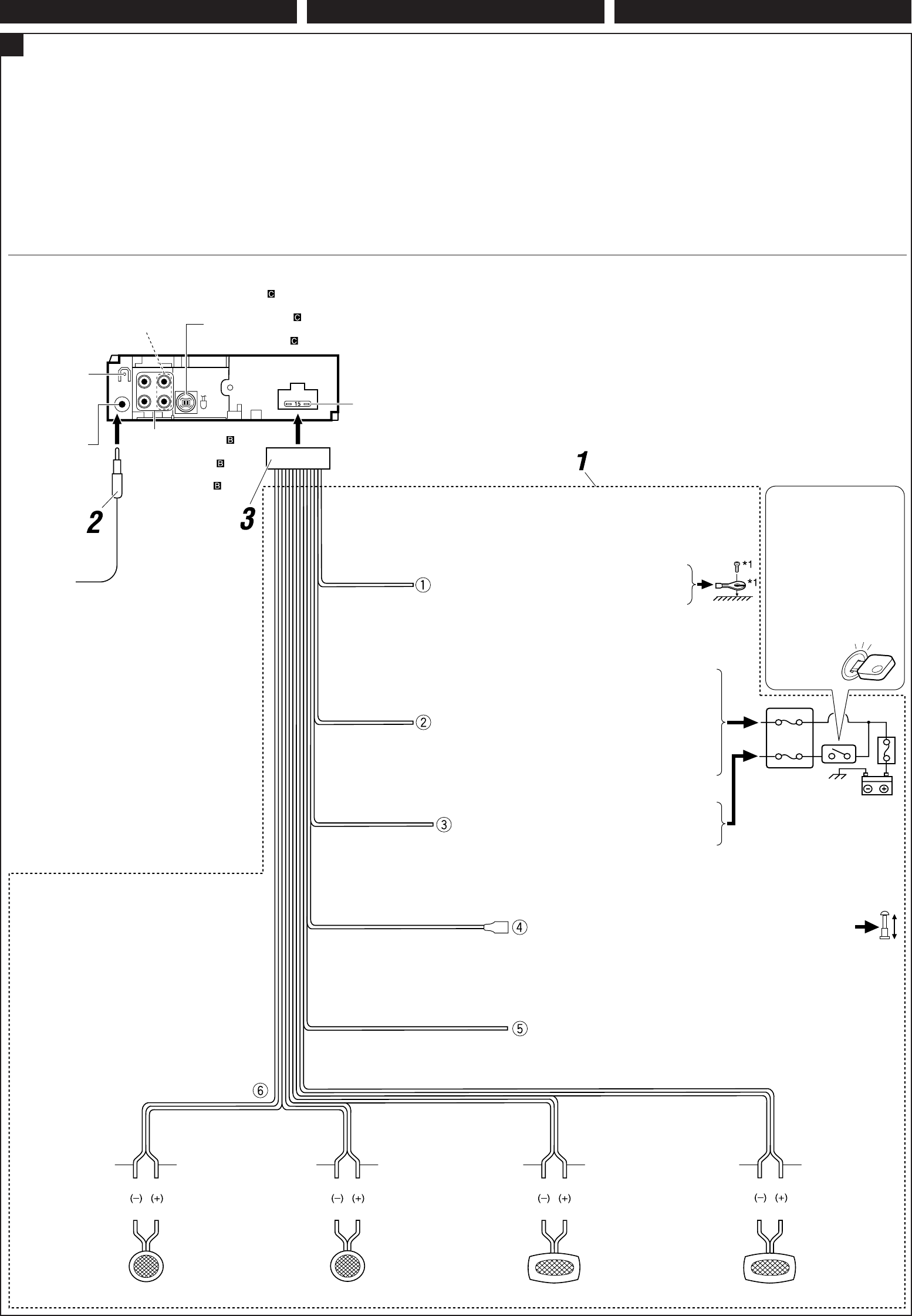
ATypical Connections / Conexiones tipicas / Raccordements typiques
Before connecting: Check the wiring in the vehicle
carefully. Incorrect connection may cause serious damage to
this receiver.
The leads of the power cord and those of the connector from
the car body may be different in color.
1 Connect the colored leads of the power cord in the order
specified in the illustration below.
2 Connect the antenna cord.
3 Finally connect the wiring harness to the receiver.
*2
Before checking the operation of this receiver
prior to installation, this lead must be connected,
otherwise power cannot be turned on.
*2
Antes de comprobar el funcionamiento de esta
unidad previa a de la instalación, es necesario
conectar este cable, de lo contrario no se podrá
conectar la alimentación.
*2 Pour vérifier le fonctionnement de cet appareil avant
installation, ce fil doit être raccordé, sinon l’appareil ne
peut pas être mis sous tension.
Line out (see diagram )
Salida de línea
(véase el diagrama )
Sortie de ligne
(voir le diagramme )
Rear ground terminal
Terminal de tierra
posterior
Borne arrière de
masse
To CD changer, another external component, or SIRIUS® radio
(see diagram )
Al cambiador de CD, otro componente externo, o radio SIRIUS®
(véase el diagrama )
Au changeur de CD, un autre appareil extérieur ou à la radio SIRIUS ®
(voir le diagramme )
15 A fuse
Fusible de 15 A
Fusible 15 A
Antenna terminal
Terminal de la antena
Borne de l’antenne
Black
Negro
Noir
Blue with white stripe
Azul con rayas blancas
Bleu avec bande blanche
Red
Rojo
Rouge
Yellow*2
Amarillo*2
Jaune*2
Brown
Marrón
Marrone
*1 Not included for this receiver
*1 No suministrado con esta unidad
*1 Non fourni avec cet appareil
To metallic body or chassis of the car
A un cuerpo metálico o chasis del automóvil
Vers corps métallique ou châssis de la voiture
Ignition switch
Interruptor de encendido
Interrupteur d’allumage
Fuse block
Bloque de fusibles
Porte-fusible
To an accessory terminal in the fuse block
A un terminal accesorio del bloque de fusibles
Vers borne accessoire du porte-fusible
To the remote lead of other equipment or automatic antenna if any
(200 mA max.)
Al conductor remoto de otro equipo o de la antena automática, si hubiere
(máx. 200 mA)
Au fil de télécommande de l’autre appareil ou à l’antenne automatique s’il y
en a une (200 mA max.)
To cellular phone system—only for KD-AR360
Al sistema de teléfono celular—solo para KD-AR360
Al cellulare—seulement pour le KD-AR360
Left speaker (front)
Altavoz izquierdo (frontal)
Enceinte gauche (avant)
Right speaker (front)
Altavoz derecho (frontal)
Enceinte droit (avant)
Left speaker (rear)
Altavoz izquierdo (trasero)
Enceinte gauche (arrière)
Right speaker (rear)
Altavoz derecho
(trasero)
Enceinte droit (arrière)
Purple
Púrpura
Violet
Purple with black stripe
Púrpura con rayas
negras
Violet avec bande noire
Green
Verde
Vert
Green with black stripe
Verde con rayas negras
Vert avec bande noire
Gray
Gris
Gris
Gray with black stripe
Gris con rayas negras
Gris avec bande noire
White
Blanco
Blanc
White with black stripe
Blanco con rayas
negras
Blanc avec bande
noire
ENGLISH
Antes de la conexión: Verifique atentamente el conexionado
del vehículo. Una conexión incorrecta podría producir daños
graves en la unidad.
Los cordones del cable de alimentación y los del conector
procedentes de la carrocería del automóvil podrían ser de
diferentes en color.
1 Conecte los conductores de color del cable de
alimentación en el orden especificado en la ilustración de
abajo.
2 Conecte el cable de antena.
3 Por último, conecte el cable de alimentación a la unidad.
ESPAÑOL FRANÇAIS
Avant de commencer la connexion: Vérifiez attentivement
le câblage du véhicule. Une connexion incorrecte peut
endommager sérieusement l’appareil.
Le fil du cordon d’alimentation et ceux des connecteurs du
châssis de la voiture peuvent être différents en couleur.
1 Connectez les fils colorés du cordon d’alimentation dans
l’ordre spécifié sur l’illustration ci-dessous.
2 Connectez le cordon d’antenne.
3 Finalement, connectez le faisceau de fils à l’appareil.
To a live terminal in the fuse block connecting to the car battery
(bypassing the ignition switch) (constant 12 V)
A un terminal activo del bloque de fusibles conectado a la
batería del automóvil (desviando el interruptor de encendido)
(12 V constantes)
A une borne sous tension du porte-fusible connectée à la batterie
de la voiture (en dérivant l’interrupteur d’allumage) (12 V constant)
Only for KD-AR360
Solo para KD-AR360
Seulement pour le KD-AR360
Instal3-4_AR360G310[J]f.indd 3 9/24/04, 2:58:50 PM
4
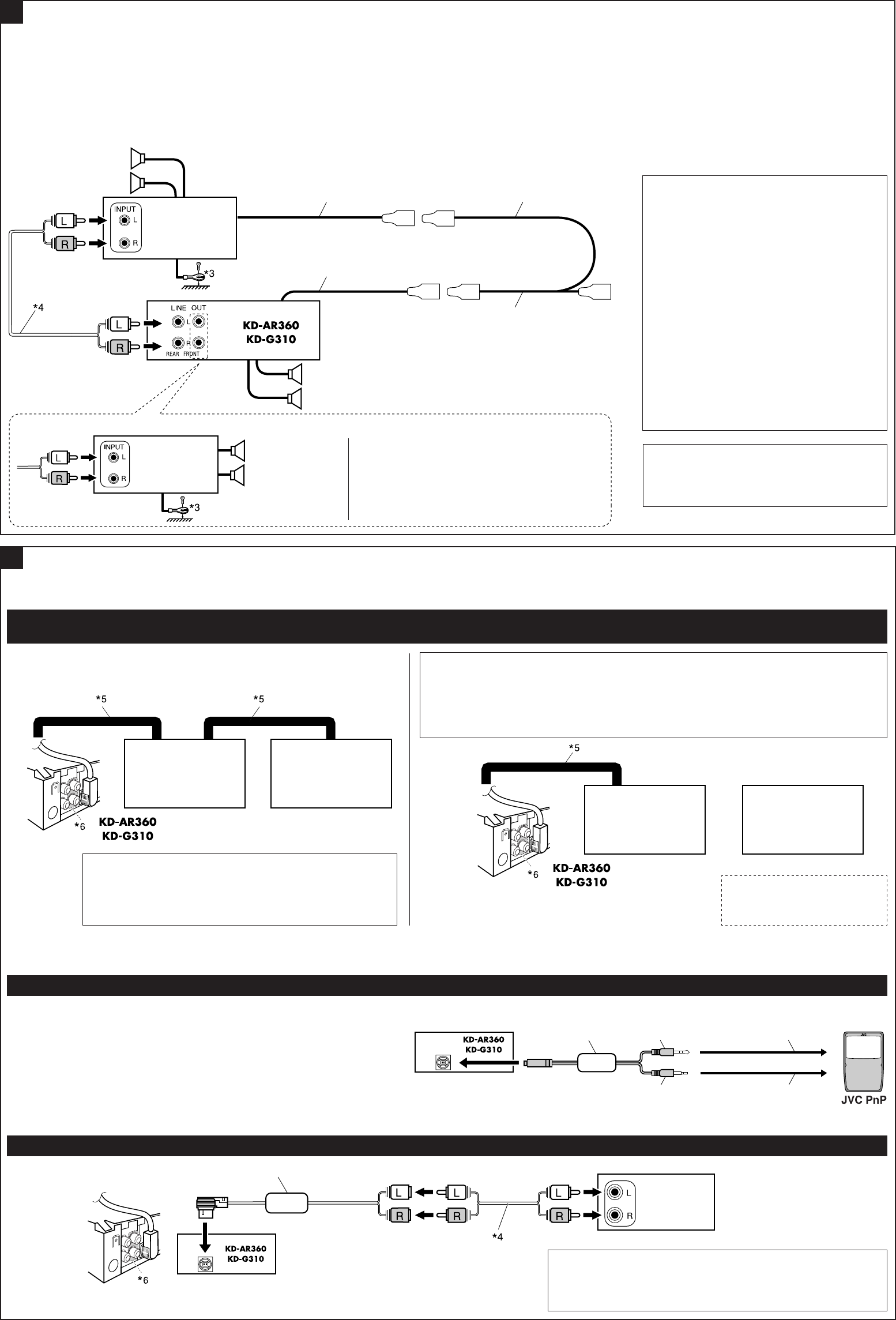
BConnecting the external amplifiers / Conexión de los amplificadores externos / Connexion d’amplificateurs extérieurs
You can connect amplifiers to upgrade your car stereo
system.
• Connect the remote lead (blue with white stripe) to the
remote lead of the other equipment so that it can be
controlled through this receiver.
• Disconnect the speakers from this receiver, connect
them to the amplifier. Leave the speaker leads of this
receiver unused.
*4 Signal cord (not supplied with this receiver)
*4 Cable de señal (no suministrado con esta
unidad)
*4 Cordon de signal (non fourni avec cet appareil)
Front speakers
Altavoces delanteros
Enceintes avant
*3 Firmly attach the ground wire to the metallic
body or to the chassis of the car—to the place
not coated with paint (if coated with paint,
remove the paint before attaching the wire).
Failure to do so may cause damage to the
receiver.
*3 Fije firmemente el cable de tierra a la
carrocería metálica o al chasis—a un lugar
no cubierto con pintura (si está cubierto con
pintura, quítela antes de fijar el cable). De lo
contrario, se podrían producir daños en la
unidad.
*3 Attachez solidement le fil de mise à la masse
au châssis métallique de la voiture—à un
endroit qui n’est pas recouvert de peinture (s’il
est recouvert de peinture, enlevez d’abord
la peinture avant d’attacher le fil). L’appareil
peut être endommagé si cela n’est pas fait
correctement.
C
Rear speakers
Altavoces posteriores
Enceintes arrière
JVC Amplifier
Amplificador de
JVC
JVC Amplificateur
Remote lead
Cable remoto
Fil d’alimentation à distance
Y-connector (not supplied with this receiver)
Conector en Y (no suministrado con esta unidad)
Connecteur Y (non fourni avec cet appareil)
Remote lead (Blue with white stripe)
Cable remoto (Azul con rayas blancas)
Fil d’alimentation à distance (Bleu avec bande blanche)
To the remote lead of other equipment or automatic
antenna if any
Al conductor remoto de otro equipo o de la antena
automática, si hubiere
Au fil de télécommande de l’autre appareil ou à
l’antenne automatique s’il y en a une
Usted podrá conectar amplificadores para mejorar el sistema
estéreo de su automóvil.
• Conecte el conductor remoto (azul con rayas blancas) al
conductor remoto del otro equipo para poderlo controlar a
través de esta unidad.
• Desconecte los altavoces de esta unidad y conéctelos
al amplificador. Los cables de los altavoces de esta
unidad quedan sin usar.
External Component / Componente exterior / Appareil extérieur
CD changer jack
Jack para el cambiador de CD
Prise du changeur CD
External component
Componente exterior
Appareil extérieur
*7 Line Input Adapter KS-U57 (not supplied with this receiver)
*7 Adaptador de entrada de línea KS-U57 (no suministrado con esta
unidad)
*7 Adaptateur d’entrée de ligne KS-U57 (non fourni avec cet appareil)
Vous pouvez connecter des amplificateurs pour améliorer
votre système autoradio.
• Connectez le fil de commande à distance (bleu avec bande
blanche) au fil de commande à distance de l’autre appareil
de façon qu’il puisse être commandé via cet appareil.
• Déconnectez les enceintes de cet appareil et
connectez-les à l’amplificateur. Laissez les fils
d’enceintes de cet appareil inutilisés.
Connecting other external components / Conexión de otros componentes externos / Connexion d’un autre appareil extérieur
JVC DLP
DLP JVC
Processeur DLP
JVC CD changer and DLP (Down Link Processor) / Cambiador de CD de JVC y DLP (“Down Link Processor”) JVC / Changeur de CD
JVC et Processeur DLP (Processeur de signaux satellite-terre)
JVC CD changer
Cambiador de CD de
JVC
Changeur de CD JVC
• You can connect both components in series as illustrated below.
• Podrá conectar ambos componentes en serie, tal como se observa en la ilustración de abajo.
• Vous pouvez connecter les deux appareils en série comme montré sur l’illustration.
JVC CD changer
Cambiador de CD de
JVC
Changeur de CD JVC
JVC DLP
DLP JVC
Processeur DLP
or
o
ou
CAUTION / PRECAUCION / PRECAUTION:
• Before connecting the CD changer and/or JVC DLP, make sure that the receiver is turned off.
• Antes de conectar el cambiador de CD y/o DLP JVC, asegúrese de que el receptor esté
apagado.
• Avant de connecter votre changeur de CD et/ou votre processeur DLP JVC, assurez-vous que
l’autoradio est hors tension.
KS-U57*7
JVC PnP (Plug and Play) / PnP (“Plug and Play”) JVC / PnP (“Plug and Play”) JVC
You can also connect JVC PnP through this receiver using JVC SIRIUS radio
adapter, KS-U100K (not supplied).
• Turning on/off the receiver can also turns on/off the JVC PnP.
También podrá conectar la PnP JVC a través de este receptor utilizando el
adaptador para radio SIRIUS JVC, KS-U100K (no suministrado).
• Al encender/apagar el receptor también se enciende/apaga la PnP JVC.
Vous pouvez aussi connecter le PnP JVC à cet autoradio en utilisant l’adaptateur de
radio SIRIUS JVC KS-U100K (non fourni).
• Mettre sous/hors tension l’autoradio peut aussi mettre sous/hors tension le PnP
JVC.
KS-U100K
CD changer jack
Jack para el cambiador de CD
Prise du changeur CD
Stereo mini plug
Miniclavija estéreo
Fiche stéré mini
DC power plug
Clavija de alimentación de CC
Fiche d’alimentation CC
To DC IN jack
Al jack DC IN
À la prise DC IN
To headphones jack
Al jack para auriculares
À la prise du casque d’écoute
*6 Only for KD-AR360
*6 Solo para KD-AR360
*6 Seulement pour le KD-AR360
Only for KD-AR360 / Solo para KD-AR360 / Seulement pour le KD-AR360
JVC Amplifier
Amplificador de
JVC
JVC Amplificateur
Front speakers
Altavoces delanteros
Enceintes avant
You can connect another power amplifier for front speakers.
Podrá conectar otro amplificador de potencia para los
altavoces delanteros.
Vous pouvez connecter un autre amplificateur de puissance
pour les enceintes avant.
• Set “EXT IN” to “CHANGER” (See page 21 of the INSTRUCTIONS.) / Ajuste “EXT IN” a “CHANGER” (Consulte la página 21 del MANUAL DE INSTRUCCIONES). / Réglez “EXT IN” sur “CHANGER” (Voir la page
21 du MANUEL D’INSTRUCTIONS.)
• Set “EXT IN” to “EXT IN” (See page 21 of the INSTRUCTIONS.) / Ajuste “EXT IN” a “EXT IN” (Consulte la página 21 del MANUAL DE INSTRUCCIONES). / Réglez “EXT IN” sur “EXT IN” (Voir la page 21 du
MANUEL D’INSTRUCTIONS.)
*5 Signal cord supplied with your JVC CD changer or DLP
*5 Cable de señal suministrado con su cambiador de CD o DLP
JVC
*5 Cordon de signal fourni avec votre changeur de CD ou
processeur DLP JVC
Instal3-4_AR360G310[J]f.indd 4 9/24/04, 2:58:52 PM
