K Mark SQC7B00 Wireless Communication Device User Manual Relay User Guide Version 8 19 2016 FINAL Edit
K-Mark Industrial Limited. Wireless Communication Device Relay User Guide Version 8 19 2016 FINAL Edit
K Mark >
user manual

Simple Connect Relay
USER GUIDE
v2

en
2
Contents
Contents 2
About the Simple Connect Relay 4
Getting Started 5
Wearing the Relay 6
Wear the Relay around your neck 6
Turning On the Relay 7
Turning Off the Relay 7
Auto Mode versus Manual Mode 8
Charging the Battery 9
Changing the Volume 10
Reset to Default Levels and Settings 11
Check the Battery Status of the Relay 12

en
3
Pair a Bluetooth® device with the Relay 13
Turning on Bluetooth® on the Relay 13
Pairing a Bluetooth® device 13
Using the Relay with your Cell Phone 14
Answering a call 14
Making a call 14
Ending a call 14
Switch to an incoming call 15
Listen to Music 16
FCC Compliance 17

en
4
About the Simple Connect Relay
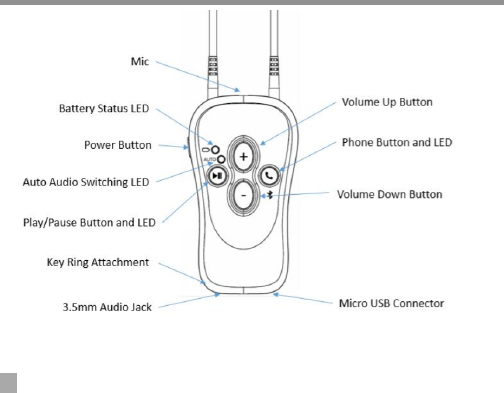
The Simple Connect Relay is a wireless communications device
that you can use with compatible hearing aids.
Using the Relay, you can:
! Send audio to your hearing aids so that you can do things
such as listen to music or make phone calls.
! Control the volume and program settings on your hearing
aids.
Now that you’ve purchased the Relay, your hearing healthcare
professional will synchronize the device with your specific hearing
aids and your custom program settings. It’s advised that you do
not modify the settings once this is done.
en
5
Getting Started

en
6
Wearing the Relay
Wear the Relay around your neck
1. Plug one end of the provided neck loop into the top of the
Relay (Do not plug the Audio Input Cable into the neck loop
ports.)
2. Either place around neck and then attach the other end to
the Relay, or attach it first and then slip it over your head to
wear.
NOTE: Using the Relay with the neck loop attached at both ends is
necessary for streaming functionality, and proper functionality of
the unit.
Whether the neck loop is attached or not, the remote control
volume of your hearing aids is fully functioning.

en
7
Turning On the Relay
Each time that you turn on the Relay, It will reconnect to the last
Bluetooth® device that it was connected to, if that device is in
range.
! Press the Power button for 2 seconds to power on.
Turning Off the Relay
! Press and hold the Power button for approximately 2 seconds
will power the Relay off.

en
8
Auto Mode versus Manual Mode
(Auto mode) When you turn on the Relay for the first time, it will
put the unit in Auto mode. When you play music from your phone
or other connected device, the Relay will automatically send the
music to your hearing aids.
(Manual mode) When you play music from your phone or other
connected device, the Relay will require you to press the Play
button on the Relay before the music will play through your
hearing aids.
To toggle between Auto and Manual mode - Press the Play/Pause
button on the Relay and the Power button at the same time on
startup.
Tip: Auto mode is the preferred mode for most cases for its ease
of use.

en
9
Charging the Battery
On a full charge, the unit should last appx 8 hours of streaming
music/phone call. It should get at least 50 hours in Volume Remote
Only mode. To recharge the battery;
1. Insert the power adaptor cable into the micro USB port on
the bottom of the Relay.
2. You can also charge your device using a micro USB cable that
you connect to a computer.
Note: You can continue to use the Relay while it is charging.

en
10
Changing the Volume
When you change the volume for your hearing aids, you change it
for all incoming audio, including phone calls and music.
1. Press the + button to turn up the volume or the - button to
turn down the volume.
Tip: Making volume changes with the switches on your hearing
aids is not allowed while listening to music or on a phone call. Use
the Relay to control your hearing aid volume at these times.

en
11
Reset to Default Levels and Settings
If the hearing aids become out of sync, then the following
procedure will reset them to the Default levels and re-sync.
1. Press and hold the Volume Up (+) and Volume Down (-)
buttons for 2 seconds.
2. This will sync the right and left hearing aids, and reset the
volume level to mid level and program 1.
en
12
Check the Battery Status of the Relay
The battery icon appears in a specific color, depending on how
much charge is remaining.
Color
% Charge remaining
Green
40% or more
Amber
10-40%
Red
less than 10%

en
13
Pair a Bluetooth® device with the Relay
Before you can use the Relay with other Bluetooth® enabled
devices, such as your cell phone, you must turn on Bluetooth® and
then pair the two devices.
Turning On Bluetooth® on the Relay
1. Press and hold the PHONE button for 2 seconds.
2. PHONE will flash BLUE indicating the Relay is in Pairing Mode.
Pairing a Bluetooth® device
After the Relay is in Bluetooth® pairing mode, please follow your
device manufacturer’s instructions to complete the pairing of your
Bluetooth® device.

en
14
Using the Relay with your cell phone
Answer a call
! To accept a call, press the PHONE button.
Make a call
! To make a call, use your cell phone to start the call.
After you start the call, you can use the Relay to control audio
during your phone call.
End a call
! To end a call, press the PHONE button.
You can also end the call directly from your cell phone.

en
15
Using the Relay with your cell phone
Switch to an incoming call
If your cell phone supports call waiting, you can switch to an
incoming call while you are already on the phone. When you
switch to an incoming call, you place your existing call on hold.
1. Refer to your phone’s user manual for how to use call
waiting.

en
16
Listen to music
You can listen to music using a connected Bluetooth® device or
from a music player that you plug into the Relay.
! To listen to music using a paired Bluetooth® device, start the
music on that device.
! To listen to music through a media player, insert the stereo
audio cable in the input jack on the bottom of the Relay.
Tip: To preserve battery life, unplug the stereo audio cable when
you are not listening to music.

en
17
The Relay is certified to the following standards:
FCC ID: VEP-SQC7B00
This device complies with Part 15 of the FCC Rules. Operation is subject to the following two conditions:
(1) this device may not cause harmful interference, and
(2) this device must accept any interference received, including interference that may cause undesired operation.
Changes or modifications made to the equipment not expressly approved by the manufacturer may void the FCC’s
authorization to operate the equipment
NOTE: This equipment has been tested and found to comply with the limits for a Class B digital device, pursuant to part
15 of the FCC Rules. These limits are designed to provide reasonable protection against harmful interference in a
residential installation. This equipment generates, uses and can radiate radio frequency energy and, if not installed and
used in accordance with the instructions, may cause harmful interference to radio communications. However, there is
no guarantee that interference will not occur in a particular installation. If this equipment does cause harmful
interference to radio or television reception, which can be determined by turning the equipment off and on, the user is
encouraged to try to correct the interference by one or more of the following measures:
—Reorient or relocate the receiving antenna.
—Increase the separation between the equipment and receiver.
—Connect the equipment into an outlet on a circuit different from that to which the receiver is connected.
—Consult the dealer or an experienced radio/TV technician for help.
Bluetooth®
QDID: 56386
Declaration ID: D022347
The Bluetooth® word mark and logos are registered trademarks owned by Bluetooth SIG, Inc. and any use of such marks
by Hearing Lab Technology LLC is under license. Other trademarks and trade names are those of their respective
owners.

en
18