K Mark SZE-KHKGC Game Caller User Manual KernelInstructions1108 indd
K-Mark Industrial Limited. Game Caller KernelInstructions1108 indd
K Mark >
User Manual
“THE KERNEL” Instructions
INSTALLING BATTERIES
x Transmitter (remote control) uses an alkaline A23 battery (A23 battery is preinstalled).
x Receiver uses four (4) alkaline AAA batteries (“AAA” alkaline batteries are NOT included nor installed). Two (2) batteries must
be installed into each battery compartment (x2). A small screw driver is required to remove the screws holding the battery
cover in place for this operation. Make sure and follow the “+” and “-“marks when installing the “AAA” batteries.
POWER UP
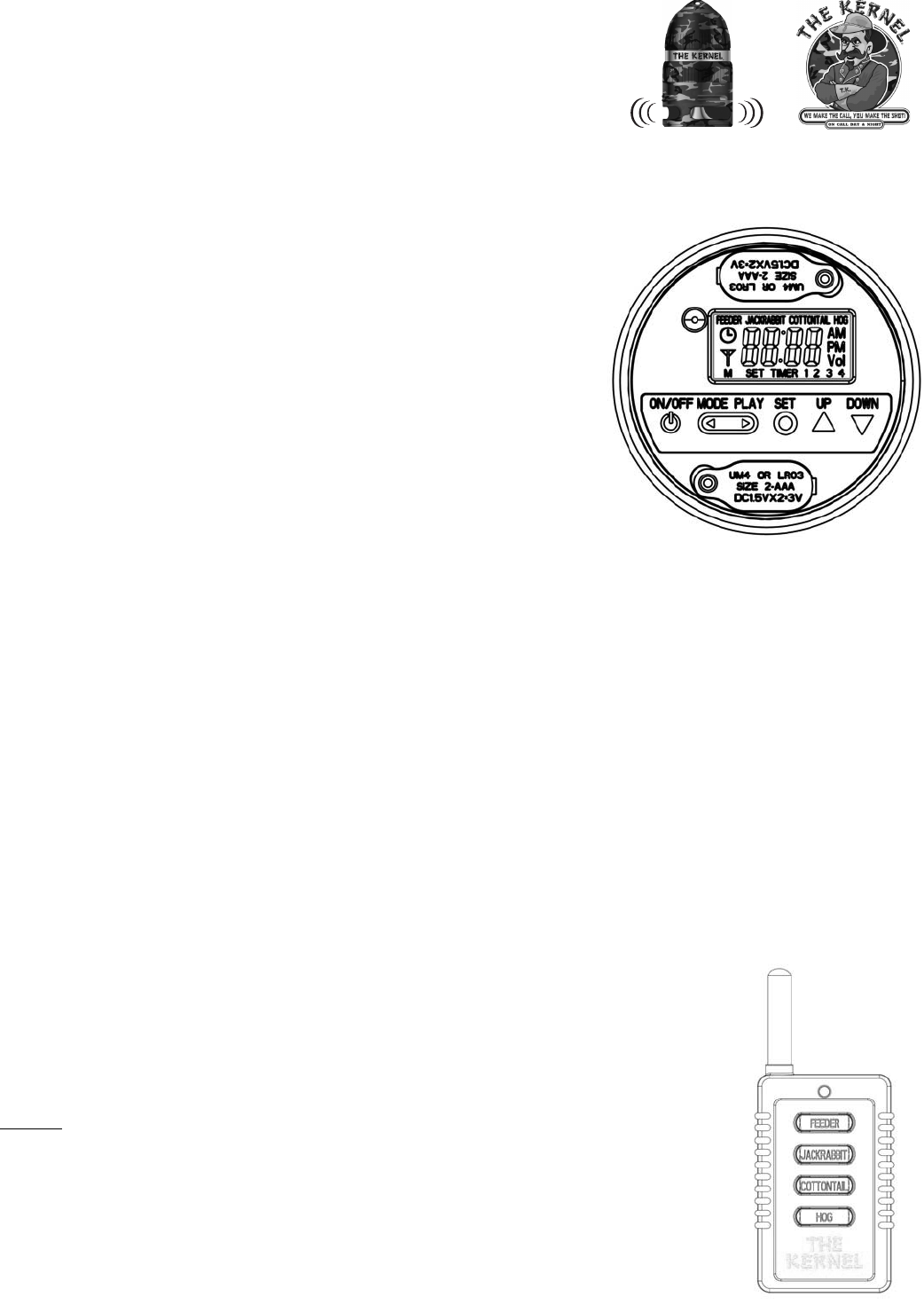
x Access the control panel located inside the receiver by unscrewing The Kernel cap.
x Press the “ON/OFF” button inside the receiver to turn The Kernel “ON”. When
power is “ON” the LCD screen will display the active mode, call, and time. Pressing
the “ON/OFF” button again will turn The Kernel “OFF”.
INITIAL SETUP
x The Kernel must be in TIMER mode and not MANUAL nor RF mode, to set the
current time.
x Use the SET button to set the current time.
x Press and hold the SET button for three (3) seconds to set the time; 88:88 will flash
on the screen. Press the UP and DOWN buttons to adjust the time.
x Press the SET button to return to the main screen. If no buttons are pressed for
fifteen (15) seconds, the timer will automatically return to TIMER mode.
ADJUSTING VOLUME
x There are eight (8) volume levels, seven (7) is the loudest setting and zero (0) has
no volume. (Volume levels apply to all sounds and NOT individually.)
x The volume can be adjusted using the “UP” & “DOWN” buttons while in the TIMER and RF modes.
x Press the SET button to lock in the volume or wait ten (10) seconds once volume is set to the desired level.
x The volume cannot be adjusted while in the MANUAL mode
MODES
x Pressing the MODE button repeatedly will allow the user to cycle through and select the desired mode. The active or current
mode is displayed on the left part of the LCD screen using one (1) of three (3) symbols
Timer Mode is used to set the time for a particular call to be played daily.
x Use the SET button to set the four (4) timers.
x Press the SET button to set the time for TIMER 1; 88:88 will flash. Press UP and DOWN buttons to adjust the activation time
x Press the SET button again to set the desired sound/call to play.
x The call text will flash “ON”. Press the UP and DOWN buttons to change between four (4) different sounds/calls.
x If the SET button is pressed and held down for two (2) seconds, the corresponding sound will play
x Press the SET button again to set TIMER 2. “TIMER 2” will appear on the LCD screen and 88:88 will flash, this means that
the timer is not active and no sound/call will play.
x Exit back to the main screen by cycling through all four (4) timers or do not touch any buttons for fifteen (15) seconds and the
timer will return to TIMER mode.
Manual Mode is used to play a call without the use of the remote control. Pressing the PLAY button will play the active sound/call
that is highlighted at the top of the screen. If the ON/OFF button is pressed during playback the sound/call will stop playing and
The Kernel will remain “ON”. Pressing the UP and DOWN buttons, while in the MANUAL mode, will allow the
the different sounds/calls. Volume cannot be changed in the MANUAL mode. The mode must be changed
to TIMER mode or RF mode to adjust the volume.
user to scroll through
RF “Remote” Mode is used to play a sound/call using the remote control (transmitter)
x Pressing FEEDER button on the transmitter will play FEEDER sound one (1) time.
x Pressing JACKRABBIT button on the transmitter will play JACKRABBIT sound one (1) time. The same
applies for COTTONTAIL button and the HOG button on the transmitter; each will play the respective
sound one (1) time. The transmitter (remote) can start and stop a sound and override a playing sound.
Example: If FEEDER sound is playing and JACKRABBIT button on the transmitter (remote) is pressed,
the FEEDER sound will stop playing and JACKRABBIT sound will start.
USE
x Range – The Kernel has been designed to operate using the remote control up to 100 yards. The
effective range will vary depending on the environment. Range will be shortened when used in wooded
areas or around power lines and/or other structures that emit interference signals.
x Battery Consumption –The Kernel batteries will last months with daily use when in the TIMER and
MANUAL modes. Battery consumption is higher when in the RF mode. It is recommended to keep
The Kernel in TIMER or MANUAL mode when not in use.
THANK YOU FOR BUYING THE KERNEL, HAVE A SAFE HUNT! TK
CONTACT INFORMATION
The Kernel Game Calls, LLC
13231 Champion Forest Drive, Suite 201
Houston, TX 77069 USA
877-6KERNEL
(537635)
Email: info@thekernelsays.com
www.thekernelsays.com
30 day money back if not completely satisfied.
(refund for call only)
FCC Statements
The device complies with part 15 of the FCC Rules. Operation is subject to the following two conditions: (1) this device may not cause harmful
interference, and (2) this device must accept any interference received, including interference that may cause undesired operation.
NOTE: THE MANUFACTURER IS NOT RESPONSIBLE FOR ANY RADIO OR TV INTERFERENCE CAUSED BY UNAUTHORIZED MODIFICATIONS
TO THIS EQUIPMENT. SUCH MODIFICATIONS COULD VOID THE USER AUTHORITY TO OPERATE THE EQUIPMENT
NOTE: This equipment has been tested and found to comply with the limits for a Class B digital device, pursuant to Part 15 of the FCC Rules. These
limits are designed to provide reasonable protection against harmful interference in a residential installation. This equipment generates uses and can
radiate radio frequency energy and, if not installed and used in accordance with the instructions, may cause harmful interference to radio
communications. However, there is no guarantee that interference will not occur in a particular installation.
If this equipment does cause harmful interference to radio or television reception, which can be determined by turning the equipment off and on, the user
is encouraged to try to correct the interference by one or more of the following measures:
Reorient or relocate the receiving antenna
Increase the separation between the equipment and receiver
Connect the equipment into an outlet on a circuit different from that to which the receiver is connected
Consult the dealer or an experienced radio/TV technician for help
NOTE: Changes or Modifications not expressly approved by the party responsible could void the user’s authority to operate this device.