K Mark UBC-CO1 BarkWise User Manual

K-Mark Industrial Limited. BarkWise

User manual

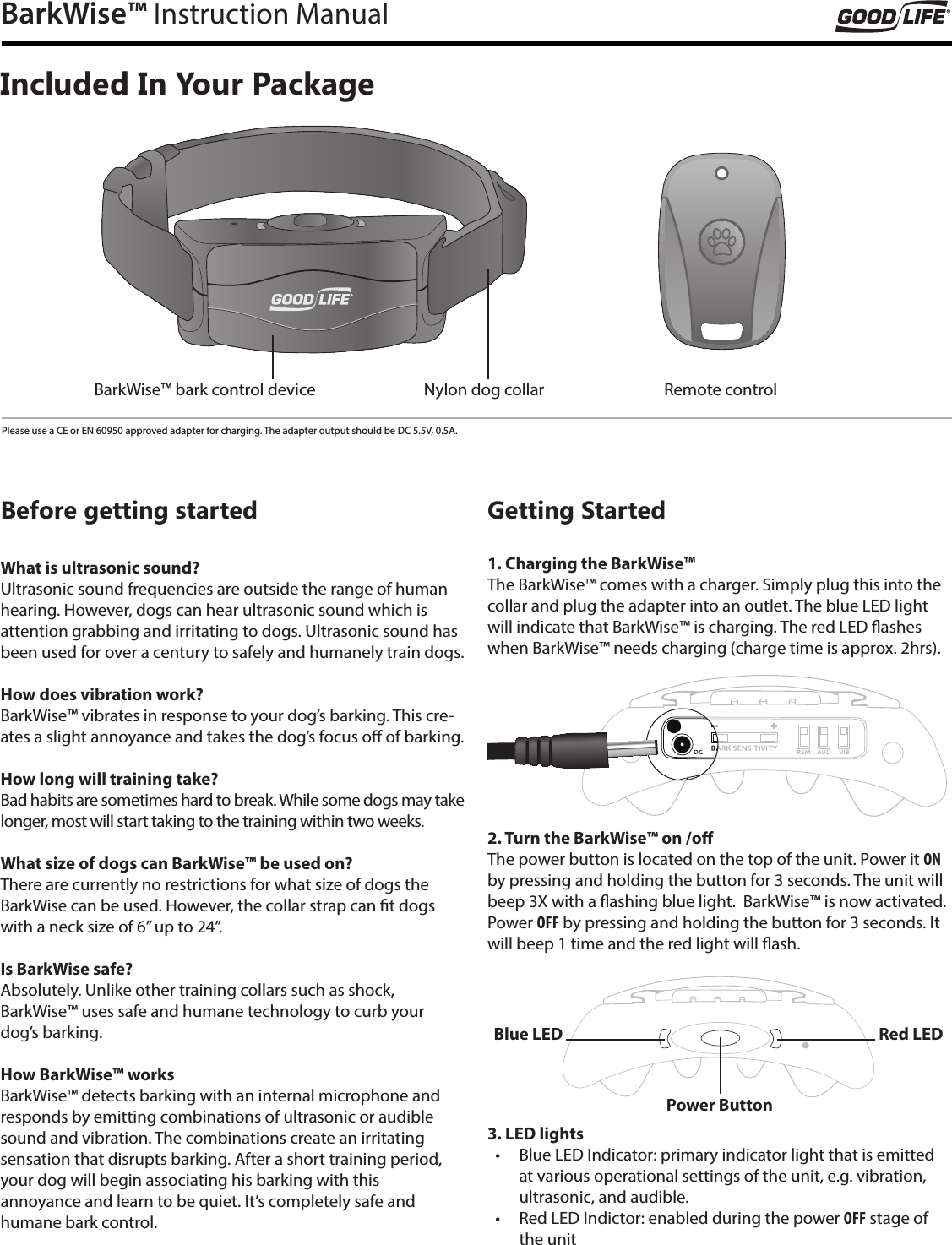
BarkWise™ Instruction ManualIncluded In Your PackageBefore getting startedWhat is ultrasonic sound?Ultrasonic sound frequencies are outside the range of human hearing. However, dogs can hear ultrasonic sound which is attention grabbing and irritating to dogs. Ultrasonic sound has been used for over a century to safely and humanely train dogs.How does vibration work?BarkWise™ vibrates in response to your dog’s barking. This cre-ates a slight annoyance and takes the dog’s focus o of barking.How long will training take?Bad habits are sometimes hard to break. While some dogs may take longer, most will start taking to the training within two weeks.What size of dogs can BarkWise™ be used on?There are currently no restrictions for what size of dogs the BarkWise can be used. However, the collar strap can t dogs with a neck size of 6” up to 24”.Is BarkWise safe?Absolutely. Unlike other training collars such as shock,  BarkWise™ uses safe and humane technology to curb your  dog’s barking.How BarkWise™ worksBarkWise™ detects barking with an internal microphone and responds by emitting combinations of ultrasonic or audible sound and vibration. The combinations create an irritating  sensation that disrupts barking. After a short training period, your dog will begin associating his barking with this  annoyance and learn to be quiet. It’s completely safe and  humane bark control.Getting Started1. Charging the BarkWise™The BarkWise™ comes with a charger. Simply plug this into the collar and plug the adapter into an outlet. The blue LED light will indicate that BarkWise™ is charging. The red LED ashes when BarkWise™ needs charging (charge time is approx. 2hrs). 2. Turn the BarkWise™ on /oThe power button is located on the top of the unit. Power it ON by pressing and holding the button for 3 seconds. The unit will beep 3X with a ashing blue light.  BarkWise™ is now activated.  Power OFF by pressing and holding the button for 3 seconds. It will beep 1 time and the red light will ash.3. LED lights •  Blue LED Indicator: primary indicator light that is emitted at various operational settings of the unit, e.g. vibration, ultrasonic, and audible. •  Red LED Indictor: enabled during the power OFF stage of the unitPower ButtonBlue LED Red LEDBarkWise™ bark control device Nylon dog collar Remote controlPlease use a CE or EN 60950 approved adapter for charging. The adapter output should be DC 5.5V, 0.5A.
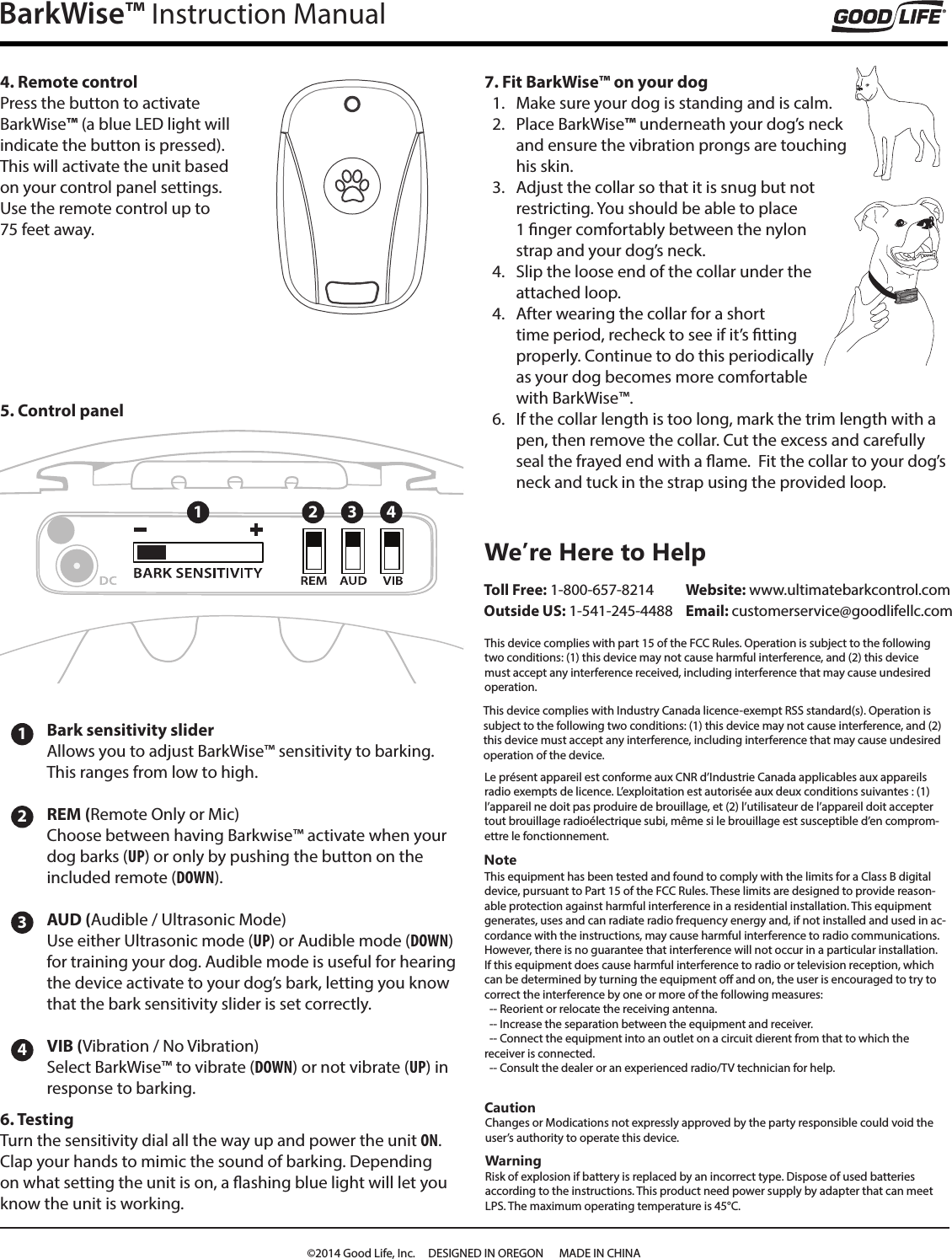
BarkWise™ Instruction Manual4. Remote controlPress the button to activate  BarkWise™ (a blue LED light will indicate the button is pressed). This will activate the unit based on your control panel settings. Use the remote control up to  75 feet away.1234Bark sensitivity slider Allows you to adjust BarkWise™ sensitivity to barking.  This ranges from low to high.REM (Remote Only or Mic)Choose between having Barkwise™ activate when your dog barks (UP) or only by pushing the button on the included remote (DOWN).AUD (Audible / Ultrasonic Mode)Use either Ultrasonic mode (UP) or Audible mode (DOWN) for training your dog. Audible mode is useful for hearing the device activate to your dog’s bark, letting you know that the bark sensitivity slider is set correctly.VIB (Vibration / No Vibration)Select BarkWise™ to vibrate (DOWN) or not vibrate (UP) in response to barking. 6. TestingTurn the sensitivity dial all the way up and power the unit ON. Clap your hands to mimic the sound of barking. Depending on what setting the unit is on, a ashing blue light will let you know the unit is working.  7. Fit BarkWise™ on your dog1.  Make sure your dog is standing and is calm.2.  Place BarkWise™ underneath your dog’s neck and ensure the vibration prongs are touching his skin.3.  Adjust the collar so that it is snug but not restricting. You should be able to place 1 nger comfortably between the nylon strap and your dog’s neck.4.  Slip the loose end of the collar under the attached loop. 4.  After wearing the collar for a short time period, recheck to see if it’s tting properly. Continue to do this periodically as your dog becomes more comfortable with BarkWise™.6.  If the collar length is too long, mark the trim length with a pen, then remove the collar. Cut the excess and carefully seal the frayed end with a ame.  Fit the collar to your dog’s neck and tuck in the strap using the provided loop. 1 2 3 45. Control panelNoteThis equipment has been tested and found to comply with the limits for a Class B digital device, pursuant to Part 15 of the FCC Rules. These limits are designed to provide reason-able protection against harmful interference in a residential installation. This equipment generates, uses and can radiate radio frequency energy and, if not installed and used in ac-cordance with the instructions, may cause harmful interference to radio communications. However, there is no guarantee that interference will not occur in a particular installation.If this equipment does cause harmful interference to radio or television reception, which can be determined by turning the equipment o and on, the user is encouraged to try to correct the interference by one or more of the following measures:  -- Reorient or relocate the receiving antenna.  -- Increase the separation between the equipment and receiver.  -- Connect the equipment into an outlet on a circuit dierent from that to which the receiver is connected.  -- Consult the dealer or an experienced radio/TV technician for help.We’re Here to Help Toll Free: 1-800-657-8214 Outside US: 1-541-245-4488CautionChanges or Modications not expressly approved by the party responsible could void the user’s authority to operate this device.WarningRisk of explosion if battery is replaced by an incorrect type. Dispose of used batteries according to the instructions. This product need power supply by adapter that can meet LPS. The maximum operating temperature is 45°C.This device complies with Industry Canada licence-exempt RSS standard(s). Operation is subject to the following two conditions: (1) this device may not cause interference, and (2) this device must accept any interference, including interference that may cause undesired operation of the device.Website: www.ultimatebarkcontrol.com  Email: customerservice@goodlifellc.comThis device complies with part 15 of the FCC Rules. Operation is subject to the following two conditions: (1) this device may not cause harmful interference, and (2) this device must accept any interference received, including interference that may cause undesired operation.Le présent appareil est conforme aux CNR d’Industrie Canada applicables aux appareils radio exempts de licence. L’exploitation est autorisée aux deux conditions suivantes : (1) l’appareil ne doit pas produire de brouillage, et (2) l’utilisateur de l’appareil doit accepter tout brouillage radioélectrique subi, même si le brouillage est susceptible d’en comprom-ettre le fonctionnement.©2014 Good Life, Inc.     DESIGNED IN OREGON      MADE IN CHINA

Navigation menu