KENWIN KW-B25BT Bluetooth Speaker User Manual iW1

KENWIN INDUSTRIAL (H.K.) LTD. Bluetooth Speaker iW1

User Manual

User ManualKW-B25BTBluetooth Speaker
English 2Safety Instructions1.  Water and Moisture – The unit should not be used near water. For example: near a bathtub, washbowl, kitchen sink, laundry tub, swimming pool or in a wet basement.  2.  Ventilation – The unit should be situated so that its location or position does not  ni terfere with its proper ventilation. For example, it should not be situated on a bed, sofa, rug or similar surface that may block ventilation openings.  Also, it should not be placed in a built-in installation, such as a bookcase or cabinet, which may impede the flow of air through the ventilation openings.3.  Heat – The unit should be situated away from heat sources such as radiators, heat registers, stoves or other appliances (including amplifiers) that produce heat. 4.  Power Sources  – The unit should be connected to a power supply only of the type described in the operating instructions or as marked on the appliance.5.  Power Cable Protection – Power supply cables should be routed so that they are not likely to be walked on or pinched by items placed upon or against them.  It is always best to have a clear area from where thecable exits the unit to where it is plugged into an AC socket.  6.  Cleaning – The unit should be cleaned only as recommended. See the Maintenance section of this manual for cleaning instructions.7.  Objects and Liquid Entry – Care should be taken so that objects do not fall and liquids are not spilled into  any openings or vents located on the product.8  Attachments – Do not use attachments not recommended by the product manufacturer. 9  Lightning and Power Surge Protection – Unplug the unit from the wall socket and disconnect the antenna  or cable system during a lightning storm or when it is left unattended and unused for long periods of time. This will prevent damage to the product due to lightning and power-line surges.  10.  Overloading  – Do not overload wall sockets, extension cords, or integral convenience receptacles as this canresult in a risk of fire or electric shock.11.  Damage Requiring Service  – The unit should be serviced by qualified service personnel when: A.     the power supply cable or plug has been damaged.B.     objects have fallen into or liquid has been spilled into the enclosure.C.     the unit has been exposed to rain.D.     the unit has been dropped or the enclosure damaged.E.      the unit exhibits a marked change in performance or does not operate normally.12.  Periods of None Use – If the unit is to be left unused for an extended period of time, such as a month or  longer, the power cable should be unplugged from the unit to prevent damage or corrosion.  1314.  WARNING:To reduce the risk of fire or electric shock, do not expose this apparatus to rain or moisture.         The apparatus shall not be exposed to dripping or splashing and that objects filled with liquids, such as          vases, shall not be placed on apparatus.15.  WARNING: The mains plug is used as disconnect device, the disconnect device shall remain readily         operable.16.  When not in use and during movement, please take care of the power corset, e.g. tie up the power        cordset with cable tie or something like that. It shall be free from sharp edges and the like that can        cause abrasion of the power corset. When put into use again, please make sure the power cordset        being not damaged, If any damages found, please look for the service person to replace the power        corset specified by the manufacturer or have the same characteristics as the original one.17.         Correct Disposal of this product. This marking indicates that this product should not be disposed with         other household wastes throughout the EU. To prevent possible harm to the environment or human        health from uncontrolled waste disposal, recycle it responsibly to promote the sustainable reuse of        material resources. To return your used device, please use the return and collection systems or contact        the retailer where the product was purchased. They can take this product for environmental safe recycling..  Servicing  – The user should not attempt to service the unit beyond those methods described in the user’s operating instructions.  Service methods not covered in the operating instructions should be referred to qualified service personnel.
English 3Safety Instructions18.  Warning:  Changes or modifications to this unit not expressly approved by the party responsible for compliance could void the user’s authority to operate the equipment. NOTE:  This equipment has been tested and found to comply with the limits for a Class B digital device, pursuant to Part 15 of the FCC Rules.  These limits are designed to provide reasonable protection against harmful interference in a residential installation.  This equipment generates, uses and can radiate radio frequency energy and, if not installed and used in accordance with the instructions, may cause harmful interference to radio communications.However, there is no guarantee that interference will not occur in a particular installation.  If this equipment does cause harmful interference to radio or television reception, which can be determined by turning the equipment off and on, the user is encouraged to try to correct the interference by one or more of the following measures: o  Reorient or relocate the receiving antenna. o  Increase the separation between the equipment and receiver. o  Connect the equipment into an outlet on a circuit different from that to which the receiver is      connected. o  Consult the dealer or an experienced radio/TV technician for help. This device complies with Part 15 of the FCC Rules.   Operation is subject to the following two   conditions:     (1) this device may not cause harmful interference, and    (2) this device must accept any interference received,   including interference that may                              cause undesired operation.                         This Transmitter must be installed to  provide a separation distance of at least 20 cm from all persons.
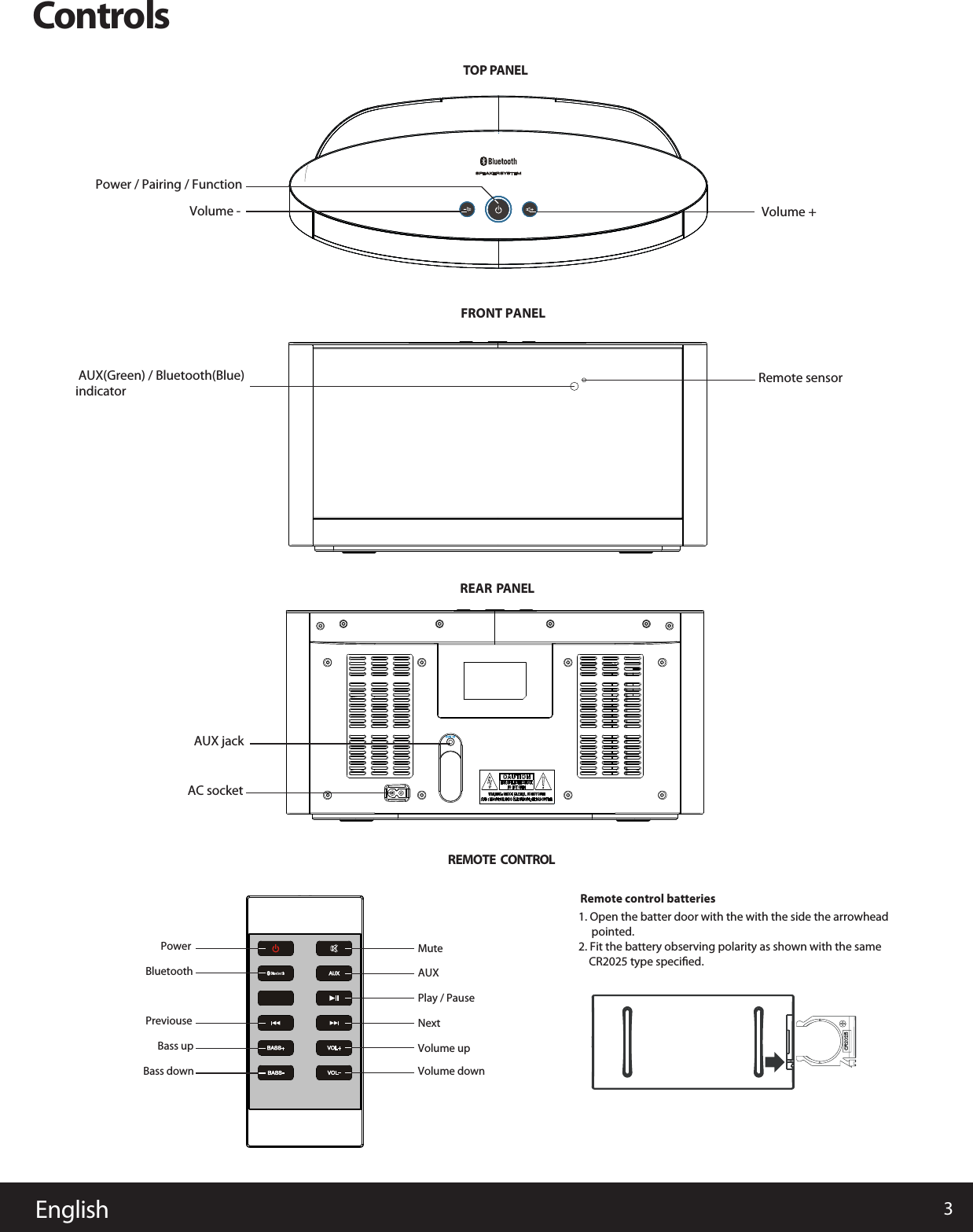
3EnglishControlsTOP PANELREARREMOTE  CONTROL PANELFRONT PANEL AUX(Green) / Bluetooth(Blue)indicatorVolume - Volume +Remote sensorAUX jackAC socketPowerBluetoothPreviouseBass upBass down Volume downVolume upNextPlay / PauseAUXMuteRemote control batteries1. Open the batter door with the with the side the arrowhead     pointed.   2. Fit the battery observing polarity as shown with the same     CR2025 type specified. Power / Pairing / Function
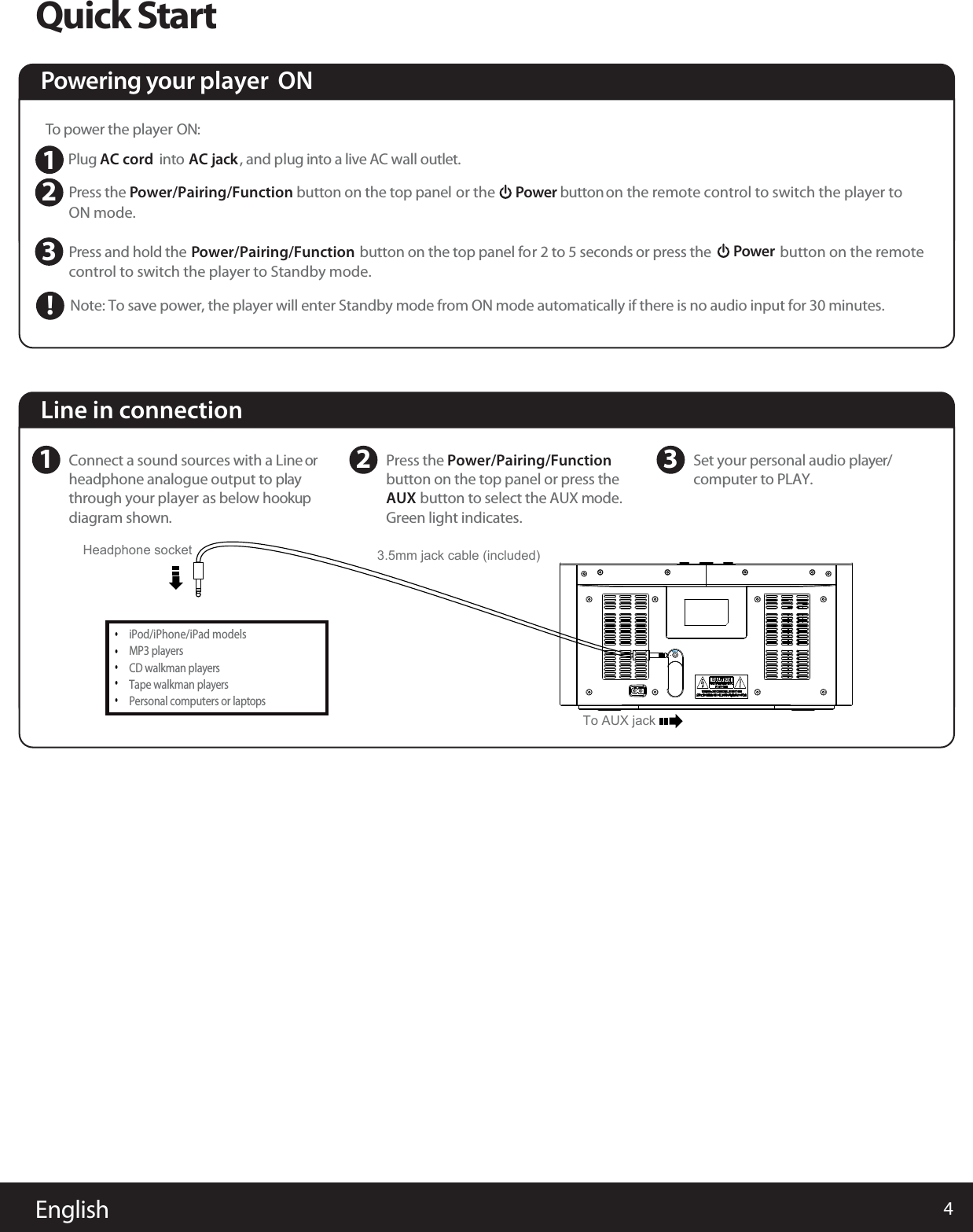
4EnglishQuick StartTo power the player   ON: Plug AC cord  into AC jack, and plug into a live AC wall outlet. PON mode. ress the button on the top panel   or the       Power button  on the remote control to switch the player to Powering your player  ON      Power Pcontrol to switch the player to Standby mode.button on the remoteress and hold theNote: To save power, the player will enter Standby mode from ON mode automatically if there is no audio input for 30 minutes.button on the top panel for 2 to 5 seconds  or press the           Power/Pairing/Function  Power/Pairing/Function  123!Line in connection1Connect a sound sources with a Line orheadphone analogue output to play through your player  as below hookupdiagram shown.2Press the Power/Pairing/Function AUX button on the top panel or press the         button to select the AUX mode. Green light indicates.    3Set your personal audio player/computer to PLAY.iPod/iPhone/iPad models   MP3 playersCD walkman playersTape walkman playersPersonal computers or laptopsHeadphone socket•••••3.5mm jack cable (included)To AUX jack
5EnglishMusic ConnectivityYour Bluetooth device (cellphone, MP3 player, computer, ect.) must support the A2DP Bluetooth profile (Commonly knownas stereo audio profile) to work with the player. Many of the latest mobile phones and PCs with built-in Bluetooth functionalitywill support this profile. For accurate information about your product, please refer to your bluetooth device’s user manualfor details on the bluetooth profiles it supports and on how to set the device’s Bluetooth pairing/searching/setup mode.Using Bluetooth: Paring Your DevicePress and hold the Power/Pairing/Function  button for 5 seconds at ON mode until blue light flashes to begin pairing operation. 1.Once your device and the player are linked you can start to play Bluetooth music through the player.1.Turn on the player and press the Power/Pairing/Functioncontrol to select the Bluetooth mode. Blue light indicates for Bluetooth mode.        button on the top panel or press the Bluetooth button on the remote  2.Press the      button on the remote control to skip the next track. immediately to skip the previous track.4.6. Press the       button on the remote control again to pause play; Press again to resume it. Please remember to turn off Bluetooth device manually.Press  the       button on the remote control to play your Bluetooth-enable device. (Depending on the Bluetooth device youare using, you may need to manually go into media player mode on your device to make it work properly) 3.Once paired with a device, the Blue light will stop flashing and glow steadily. 4.Pairing remains intact when the player or the Bluetooth device is powered off or is taken out of link range. The player will auto 5.link with the last linked device when that device is in range.Activate Bluetooth on your device according to the device’s usefound on the device’s tools or settings menu. Turn on Bluetooth connectivity and make your device “discoverable”.r manual to link to the player. Typically, Bluetooth controls are2.Before your startPairing your Bluetooth device with the playerPPairing your other Bluetooth devicelaying Bluetooth Music     Search the device name “DKS999” on your bluetooth device listed and select it as your audio speaker. 3.Press the Volume +/-  button on the top panel or remote control to adjust the system volume.7.  Press the      button on the remote control to skip back to the beginning of the track currently play. Press the button again5.  Note: Connecting to a bluetooth device may take up to 5 minutes. If the pairing is unsuccessory repair your bluetooth device with the player and repeat the above steps. To restart the current connection from player for sbutton for 5 seconds and repeat the above steps for pairing your other Bluetooth.elect the other bluetooth device, press and hold the Power/Pairing/Function
6EnglishTrouble ShootingSpecificationThere is no power to the playerEnsure that the Power Switch of wall socket is physcially set to the ON position.Power supply : AC 100-240V, 50/60HzOutput power 180W RMS:Power consumption 140W:AUX in jack : 3.5mm (included) Make sure you have the latest firmware for your iPhone/iPad/iPod.Make sure your device is working properly. Check your device’s manual for details on Bluetooth pairing and linking.Make sure your device supports the A2DP and AVRCP Bluetooth profiles before linking/pairing. The player defaults to the last linked device, so a new device may need to be linked by press and hold the Power/Paring/Functionbutton for pairing other device.Ensure that the AC plug is securely connected to the player and proper wall outlet.Trouble pairing device/computer with the player

Navigation menu