KINGSTOWN TECHONOLOGY KST-900 Bluetooth Headphone User Manual KST 900

SHENZHEN KINGSTOWN TECHONOLOGY CO., LIMITED Bluetooth Headphone KST 900

user manual

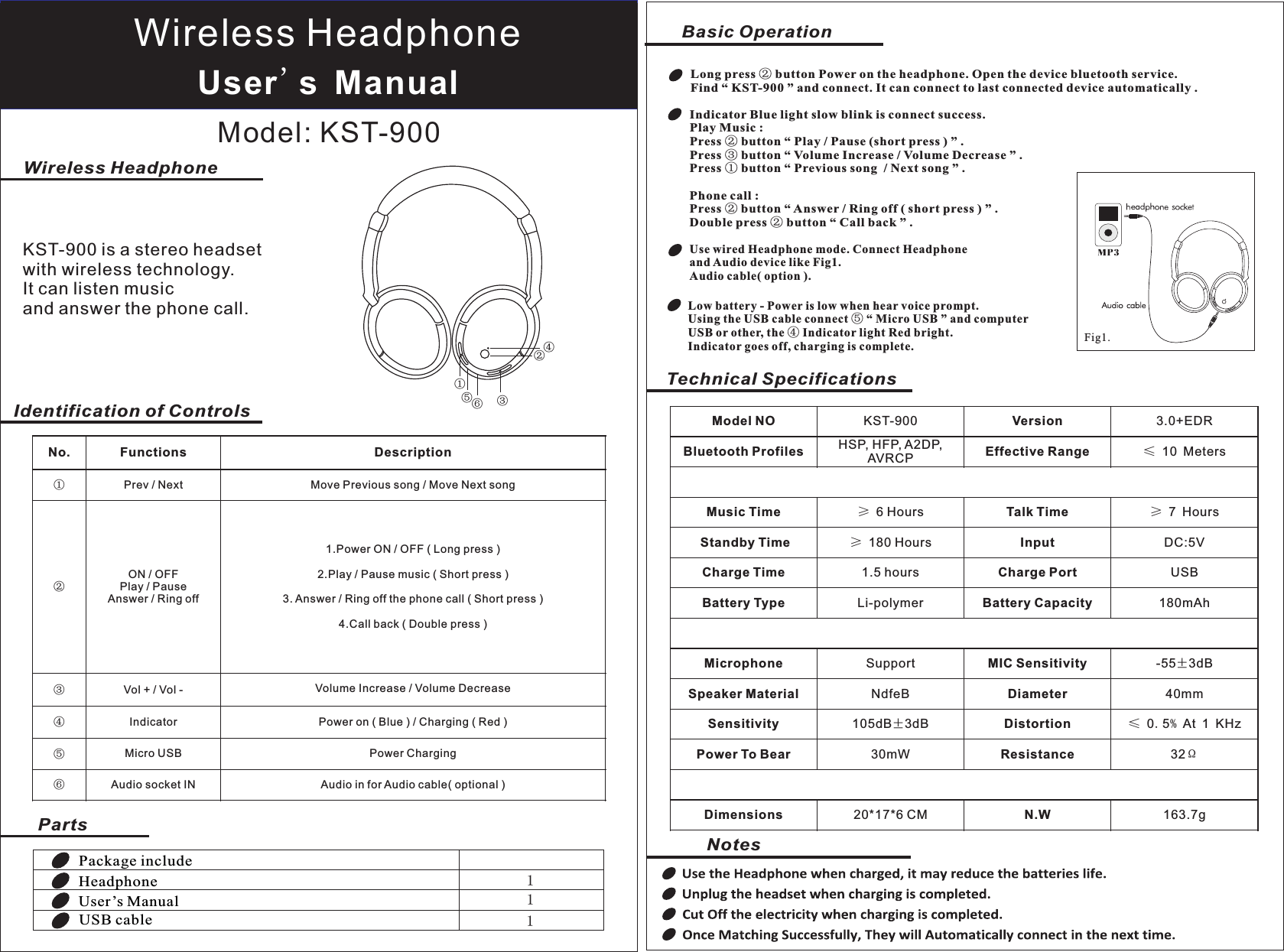
Technical SpecificationsNotesPackage includeHeadphoneUser’s ManualUSB cable111User's ManualModel: KST-900Identification of ControlsPartsNo.FunctionsDescription①Prev / NextMove Previous song / Move Next song②ON / OFFPlay / PauseAnswer / Ring off1.Power ON / OFF ( Long press )2.Play / Pause music ( Short press )3. Answer / Ring off the phone call ( Short press )4.Call back ( Double press )③Vol + / Vol -Volume Increase / Volume Decrease④IndicatorPower on ( Blue ) / Charging ( Red )⑤Micro USBPower Charging⑥Audio socket INAudio in for Audio cable( optional )①②Wireless HeadphoneBasic OperationIndicator Blue light slow blink is connect success.Play Music :Press ② button “ Play / Pause (short press ) ” . Press ③ button “ Volume Increase / Volume Decrease ” .Press ① button “ Previous song  / Next song ” .Phone call :Press ② button “ Answer / Ring off ( short press ) ” . Double press ② button “ Call back ” . Use wired Headphone mode. Connect Headphone and Audio device like Fig1.   Audio cable( option ). Wireless HeadphoneKST-900 is a stereo headset with wireless technology.It can listen music and answer the phone call.Model NOKST-900Version3.0+EDRBluetooth ProfilesHSP, HFP, A2DP, AVRCPEffective Range≤ 10 MetersMusic Time≥ 6 HoursTalk Time≥ 7 Hours Standby Time≥ 180 HoursInputDC:5VCharge Time1.5 hoursCharge PortUSBBattery TypeLi-polymerBattery Capacity180mAhMicrophoneSupportMIC Sensitivity-55±3dBSpeaker MaterialNdfeBDiameter40mmSensitivity105dB±3dBDistortion≤ 0.5% At 1 KHzPower To Bear30mWResistance32ΩDimensions20*17*6 CMN.W163.7g③④⑤⑥Fig1.Low battery - Power is low when hear voice prompt.Using the USB cable connect ⑤ “ Micro USB ” and computer USB or other, the ④ Indicator light Red bright.Indicator goes off, charging is complete.Long press ② button Power on the headphone. Open the device bluetooth service. Find “ KST-900 ” and connect. It can connect to last connected device automatically .
  FCC Statement This equipment has been tested and found to comply with the limits for a Class B digital device, pursuant to Part 15 of the FCC Rules. These limits are designed to provide reasonable protection against harmful interference in a residential installation. This equipment generates uses and can radiate radio frequency energy and, if not installed and used in accordance with the instructions, may cause harmful interference to radio communications. However, there is no guarantee that interference will not occur in a particular installation. If this equipment does cause harmful interference to radio or television reception, which can be determined by turning the equipment off and on, the user is encouraged to try to correct the interference by one or more of the following measures: -- Reorient or relocate the receiving antenna.     -- Increase the separation between the equipment and receiver.       -- Connect the equipment into an outlet on a circuit different from that to which the receiver is connected.   -- Consult the dealer or an experienced radio/TV technician for help.  This device complies with part 15 of the FCC Rules. Operation is subject to the following two conditions:(1) This device may not cause harmful interference, and (2) this device must accept any interference received, including interference that may cause undesired operation.  Changes or modifications not expressly approved by the party responsible for compliance could void the user's authority to operate the equipment.

Navigation menu