KIOXIA 420U1TJ TransferJet USB Adapter User Manual
Toshiba Corporation, Semiconductor & Storage Products Co., Memory Div., Memory A TransferJet USB Adapter Users Manual
KIOXIA >
Users Manual
1
TransferJetTM USB adapter
(User's manual)
TJM35420AUX(EU)
----------------------------------------------------------------------------------------------------------------------------------------------------------------
INTRODUCTION
Thank you for purchasing the USB adapter (“the Product”). To ensure proper use, please read this manual
and your device manual carefully and entirely before using the Product, then retain this manual for future
reference.
USB adapter is compatible with the TransferJetTM standard (http://www.transferjet.org/index.html). It allows
you to use TransferJetTM communications to wirelessly transfer data in your computer.
*USB adapter functions only on the computer equipped with a USB interface (A type).
*USB adapter functions only in conjunction with specialized file transfer software. USB adapter cannot be
used alone and/or in conjunction with other software.
*Supported computer operating systems include Windows® 7 32-bit and 64-bit, and Windows® 8 32-bit and
64-bit.
*The switch on the USB adapter is for expanded functionality. It cannot be used at this time.
WHAT IS TransferJetTM
TransferJetTM is a close proximity wireless transfer technology for transmitting data by just holding the
devices you want to communicate near each other. You can transfer data at high speeds without connecting
cables.
SAFETY PRECAUTIONS
This section lists important precautions which users of the Product (and anyone else) should observe in
order to avoid
injury to human body and damage to property, and to ensure safe and correct use of our
products. Please be sure that you
understand the meanings of the labels and graphic symbols described
below before you move on to the detailed
descriptions of the precautions, and comply with the
precautions stated.
In case any dangers are caused by the Product please contact Toshiba Corporation or Toshiba
Electronics Europe GmbH under the addresses indicated at the end of this user manual.
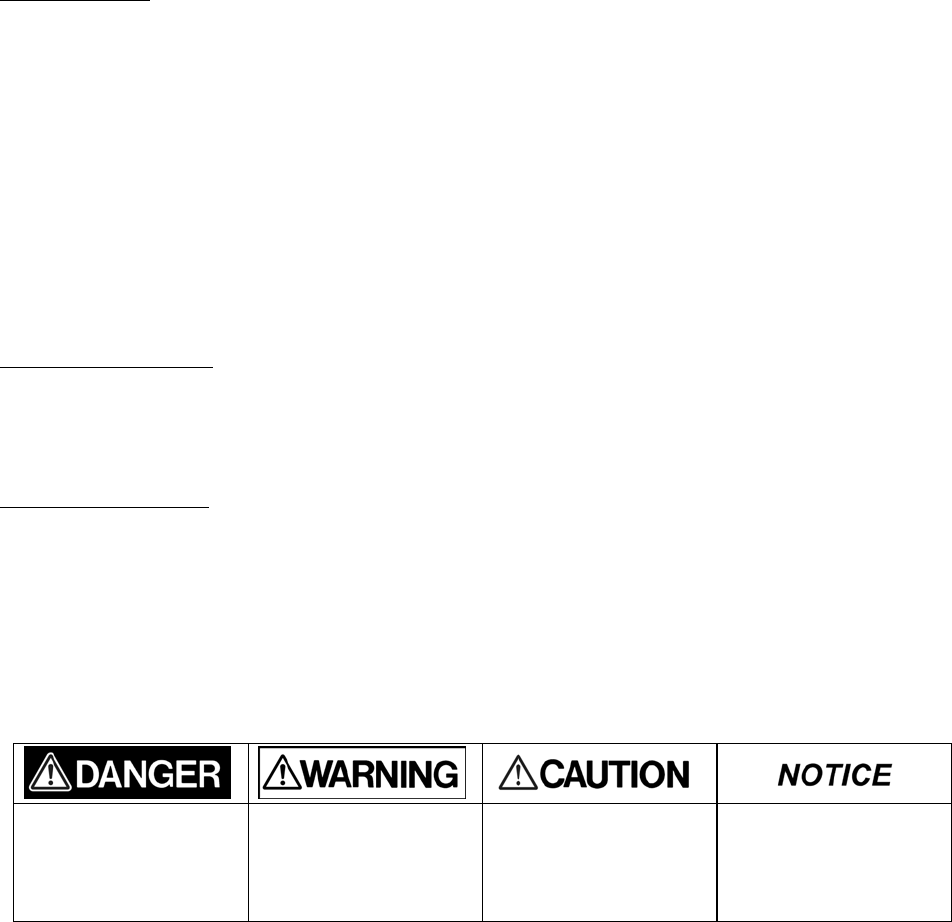
Explanation of Labels
Indicates a hazardous
situation which, if not
avoided, will result in death
or serious injury1.
Indicates a hazardous
situation which, if not
avoided, could result in
death or serious injury1.
Indicates a potentially
hazardous situation which,
if not avoided, may result in
minor or moderate injury2.
Indicates practices that
may cause property
damage3 and other
problems, but not personal
injury
1.
Serious injury includes blindness, wounds, burns (low and high temperature), electric shock, fractures,
and poisoning,
etc. with long-lasting effects or that require hospitalization and/or long-term hospital
visits for treatment.
2.
Minor or moderate injury includes wounds, burns, electric shock, etc. not requiring hospitalization
and/or long-term
hospital visits for treatment.
2
3.
Property damage means damage to customer or third party machines and equipment.
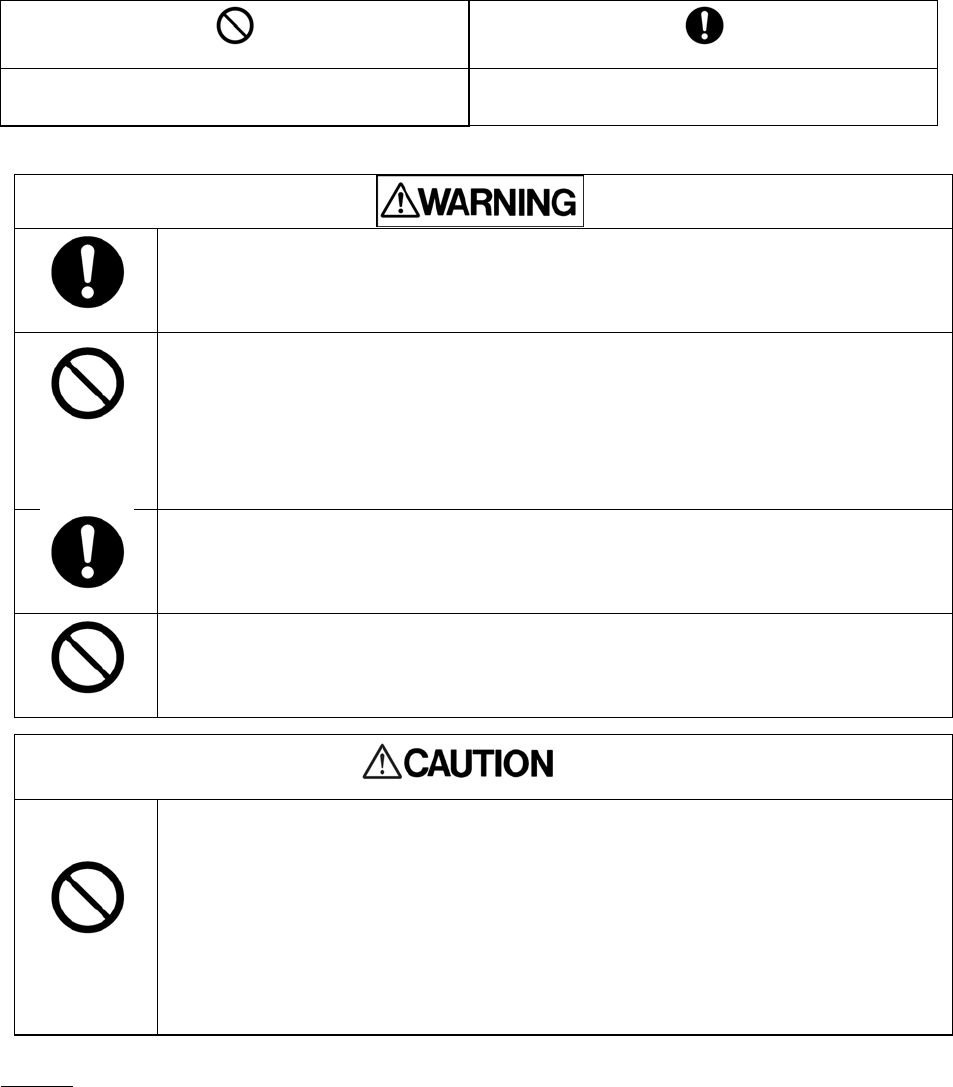
Explanation of Graphic Symbols
Instructions
●Keep the Product out of reach of children and pets.
Misuse of the Product including without limitation accidental swallowing may cause
suffocation or other injury. Contact a doctor immediately if you suspect a child has
swallowed the Product.
Prohibited
●Do not disassemble or modify the Product.
●Do not bend, drop, place heavy objects upon the Product, or otherwise expose
the Product to strong force or impact.
Failure to follow these instructions could result in fire, damage to the Product and/or
personal injury including burns and electric shock
Instructions
●If the Product produces an odor, overheats or smokes, immediately turn off the
device with which the Product is used, including the computer and peripherals, and
disconnect the power cord from the outlet. Do not use the Product again. Please
contact the store that you purchased the Product from.
Prohibited
●Do not touch the Product for a long time.
If the Product is used for a long time, the surface may become hot. Do not touch the Product for a
long time to prevent skin irritation and/or heat injury.
Prohibited
●Do not touch the terminals (connection surface) directly, with metal objects or
hard objects, because it may cause surges, including static electricity. Keep the
terminals clean.
●Do not use or place in bathrooms or otherwise expose the Product to moisture or
humidity.
●Do not expose the Product to dust, electric noise, strong magnetic fields, or
corrosive chemicals or gases or liquids.
●Do not place near sources of heat or flame, or near flammable materials.
Failure to follow these instructions below may also cause malfunction or corruption:
NOTICE
●Transfer speed of the Product may vary depending on the relative position of the TransferJetTM device.
Prohibited
Instructions
Indicates prohibited actions. Indicates actions that must be undertaken for safety
purposes.
3
●The Product is compliant with local radio regulations in following countries or regions. (as of August 2014)
Austria, Belgium, Bulgaria, Croatia, Cyprus, Czech Republic, Denmark, Estonia, Finland, France, Germany, Greece,
Hungary, Ireland, Italy, Latvia, Lithuania, Luxembourg, Malta, Netherlands, Poland, Portugal, Romania, Slovakia,
Slovenia, Spain, Sweden, United Kingdom, Canada, mainland China, Korea, USA, Japan.
Use in other countries and regions may violate local ordinances.
You can check the latest information at online manual (http://www.toshiba.co.jp/XXXX).
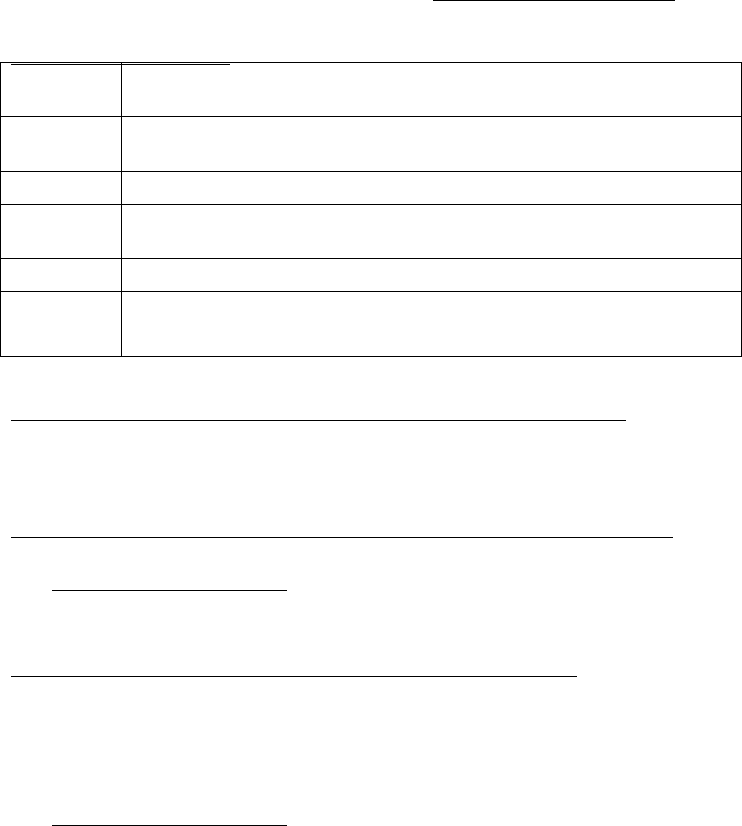
MAIN SPECIFICATIONS
Operating
environment
Temperature 5 to 35°C
Humidity: 20 to 80% RH (without condensation)
External
dimensions
USB adaptor: Approx. 24.3 mm (L) x 15.0 mm (W) x 7.0 mm (H)
(excluding protrusions)
Weight USB adaptor: Approx. 1.5 g
Rated
voltage
4.4〜5.25 V
Interface USB adaptor: USB 2.0 (USB interface (A type))
Bundled
items
TransferJetTM USB adapter (1)
User's manual (1)
[USB adaptor] HOW TO INSTALL THE FILE TRANSFER SOFTWARE
You need to download and install the specialized file transfer software on your computer and TransferJetTM
device to transfer in advance to use the file transfer function.
[USB adaptor] HOW TO INSTALL THE SOFTWARE ON YOUR COMPUTER
① Access on the following web site and download the Windows® version of the transfer software.
http://www.toshiba.co.jp/xxxx
② Refer to the procedure on the above web site for details.
[USB adaptor] HOW TO USE THE FILE TRANSFER FUNCTION
Insert USB adapter into your computerʼs USB port.
Position the computer in which you have inserted USB adapter to face another TransferJetTM device to
transfer.
Start the file transfer software on the computer that have been positioned, and transfer files.
Refer to the following web site for detailed procedures on using the file transfer software on the
computer.
http://www.toshiba.co.jp/xxxx
Refer to the device manual of the TransferJet
TM device to transfer for how to use its file transfer
software.
Do not remove USB adapter from your computer until file transfer is completed.
To remove USB adapter from your computer, shut down the file transfer software and then unplug USB
adapter from your computer.

4
LIMITED WARRANTY OF TOSHIBA CORPORATION
In addition to statutory warranty rights of the consumer existing towards the seller under the applicable
national legal regime, the Product is warranted by Toshiba Corporation, 1-1-1, Shibaura, Minato-ku, Tokyo,
Japan as manufacturer against defects in materials and workmanship for one (1) year from the date of
purchase. Retain the original dated sales receipt. Proof of the date of purchase will be required with any
request for warranty replacement.
Toshiba Corporationʼs sole liability under the Limited Warranty in the event of such defects is to replace the
Product. This Limited Warranty does not provide for any damage claims and/or other warranty rights
towards the manufacturer.
To exercise this Limited Warranty please contact Toshiba Corporation under the address indicated at the
end of this user manual.
GEOGRAPHCAL COVERAGE
THIS LIMITED WARRANTY WILL BE HONORED ONLY IN AUSTRIA, BELGIUM, BULGARIA, CROATIA, CYPRUS,
CZECH REPUBLIC, DENMARK, ESTONIA, FINLAND, FRANCE, GERMANY, GREECE, HUNGARY, IRELAND, ITALY,
LATVIA, LITHUANIA, MALTA, NETHERLANDS, POLAND, PORTUGAL, ROMANIA, SLOVAKIA, SLOVENIA, SPAIN,
SWEDEN, UNITED KINGDOM. IN ALL OTHER REGIONS, TOSHIBA CORPORATION MAKES NO WARRANTY,
AND SPECIFICALLY DISCLAIMS ANY AND ALL WARRANTIES WHETHER EXPRESS OR IMPLIED, WITH
RESPECT TO THE PRODUCT AND TO THE FULLEST EXTENT PERMITTED UNDER APPLICABLE LAWS.
TOSHIBA CORPORATION RESERVES THE RIGHT TO MODIFY THE DESIGN OR SPECIFICATIONS OF THE
PRODUCT OR THE PRODUCT INSTRUCTIONS OR WARNINGS AT ANY TIME IN ITS SOLE DISCRETION AND WITHOUT
NOTICE. UPDATED INFORMATION WILL BE PROVIDED VIA http://www.toshiba.co.jp/p-media/xxxxxx
LIMITATIONS
1.
This Limited Warranty does not cover circumstances beyond Toshiba Corporationʼs control, nor
problems caused by failure to follow the operation instructions for the Product.
2.
Toshiba Corporation does not warrant that the use or operation of the Product will be error free. To
protect against accidental data loss, back up your data frequently on multiple types of storage media.
3.
The Product must be used in TransferJetTM compatible device that is compliant with the
specifications of the TransferJetTM Consortium (http://www.transferjet.org/index.html). Please comply
with the device restrictions. Toshiba Corporation does not warrant that the Product will be compatible
with all devices that may use similar to the Product. Toshiba Corporation does not warrant that Product
will be compatible with all software except the operating software explicitly specified by Toshiba
Corporation.
4.
THIS LIMETED WARRANTY DOES NOT APPLY TO FAILURES DUE TO SHIPPING DAMAGE, ACCIDENT,
ALTERATION,
MODIFICATION, UNAUTHORIZED SERVICE, MISUSE, ABUSE, USE WITH INCOMPATIBLE
DEVICES OR SOFTWARE,
ACCESSORIES OR ATTACHMENTS, FAILURE TO USE ITEMS SUPPLIED BY
5
TOSHIBA CORPORATION,
OR TO CLAIMS MADE AFTER THE EXPIRATION OF THIS LIMETED WARRANTY.
5.
TOSHIBA CORPORATION EXPRESSLY DISCLAIMS
ANY WARRANTIES, EXPRESS OR IMPLIED, OTHER
THAN THOSE SET FORTH IN THIS LIMITED LIABILITY, INCLUDING BUT
NOT LIMITED TO WARRANTIES
OF NON-INFRINGEMENT, MERCHANTABILITY, OR FITNESS FOR A
PARTICULAR PURPOSE. UNDER THIS
LIMI T E D WAR R A N TY TOSHIBA CORPORATION SHALL NOT BE LIABLE FOR ANY INCIDENTAL,
CONSEQUENTIAL,
SPECIAL, OR INDIRECT DAMAGES, WHETHER OR NOT TOSHIBA CORPORATION
HAD BEEN ADVISED OF THE POSSIBILITY
OF SUCH DAMAGES, INCLUDING LOSS OF DATA, LOSS OF
BUSINESS, OR OTHER LOSSES.
YOUR RIGHTS
Some countries, states or provinces do not allow the exclusion or limitation of incidental or consequential
damages, so the above limitations or exclusions may not apply to you. This Limited Warranty gives you
specific legal rights, and you may have other rights which may vary from country to country, state to
state or province to province. If the applicable law does not permit such limitations or exclusions, this
Limited Warranty will deemed modified to the extent permitted, but the rest of the warranty remains in
full force and effect.
For the avoidance of doubt Toshiba Corporation declares that this Limited Warranty does not affect, i.e.
exclude, limit or suspend in any way customerʼs rights under national legislation governing the sale of
consumer goods.
UNINTENDED USAGE
The Product is intended for usage in general electronics applications. The Product is neither intended nor
warranted for usage in equipment or system that requires extraordinarily high levels of quality and/or system
reliability or in equipment the malfunction or failure of which may cause loss of human life, bodily injury,
property damage or serious effect to the public. UNLESS OTHERWISE AGREED IN WRITING BY TOSHIBA
CORPORATION, TOSHIBA CORPORATION SHALL ASSUME NO RESPONSIBILITIES OR LIABILITIES
WHATSOEVER FOR ANY DAMAGES RESULTING FROM OR RELATING TO CUSTOMERʼS UNINTENDED USAGE
OF THE PRODUCT.
PRIVACY DATA
The Product, once directly or indirectly returned to Toshiba Corporation, may be analyzed for quality purposes
by Toshiba Corporation or a company that provides components or services for the Product. Data that may
still be remaining on the Product will be treated in confidence and will not be shared with any other third
party. The returned Product and the data will be destroyed after the analysis.
REGULATORY STATEMENTS
1. FCC information
FCC notice "Declaration of Conformity Information"
This equipment has been tested and found to comply with the limits for a Class B digital device, pursuant
to Part 15 of FCC Rules. These limits are designed to provide reasonable protection against harmful
interference in a residential installation. This equipment generates, uses, and can radiate radio frequency
energy. If not installed and used in accordance with the instructions, it may cause harmful interference to

6
radio communications. However, there is no guarantee that interference will not occur in a particular
installation.
If this equipment does cause harmful interference to radio or television reception, which can be
determined by tuning the equipment off and on, the user is encouraged to try and correct the interference
by one or more of the following measures:
●Reorient or relocate the receiving antenna.
●Increase the distance between the equipment and the receiver.
●Connect the equipment to outlet on a circuit different from that to which the receiver is connected.
●Consult the dealer or an experienced radio/TV technician for help.
FCC conditions
This device complies with part 15 of the FCC Rules.
Operation is subject to the following two conditions:
1 This device may not cause harmful interference.
2 This device must accept any interference received, including interference that may cause undesired
operation.
FCC Caution: Any changes or modifications not expressly approved by the party responsible for compliance
could void the user's authority to operate this equipment.
This device and its antenna(s) must not be co-located or operating in conjunction with any other antenna
or transmitter.
To reduce potential radio interference to other users, the antenna type and its gain should be so chosen
that the equivalent isotropically radiated power (EIRP) is not more than that required for successful
communication
This equipment may only be operated indoors. Operation outdoors is in violation of 47 U.S.C. 301 and
could subject the operator to serious legal penalties.
Contact
Address: TOSHIBA America Information Systems, Inc.
9740 Irvine Boulevard Irvine, California
92618-1697
Telephone: (949) 583-3000
2. Canada - Industry Canada (IC)
This device complies with Industry Canada licence-exempt RSS standard(s). Operation is subject to the
following two conditions: (1) this device may not cause interference, and (2) this device must accept any
interference, including interference that may cause undesired operation of the device.
Le présent appareil est conforme aux CNR d'Industrie Canada applicables aux appareils radio exempts de
licence. L'exploitation est autorisée aux deux conditions suivantes : (1) l'appareil ne doit pas produire de
brouillage, et (2) l'utilisateur de l'appareil doit accepter tout brouillage radioélectrique subi, même si le
brouillage est susceptible d'en compromettre le fonctionnement.
This device is restricted to indoor use.
CAN ICES-3 (B)/NMB-3(B)

7
3. EU (European Union)
■CE Marking
NOTE: Affixing of the CE marking to the Product itself is not possible because of the size and physical
characteristics of the Product. As a result, the CE marking is affixed to the packaging and/or to this Userʼs
manual.
■EC/EU Declaration of Conformity
As Manufacturer Toshiba Corporation hereby declares that the Product is in compliance with the essential
requirements and other relevant provisions of R&TTE Directive 1999/5/EC, EMC Directive 2004/108/EC, RoHS
Directive 2011/65/EU and WEEE 2012/19/EU and the related implementing (national) measures.
The Product complies with the following harmonized European standards.
Health: EN62479:2010
Safety: EN60950-1:2006+A11:2009+A1:2010+A12:2011
EMC : EN301 489-1 V1.9.2.1:2011, EN301 489-33 V1.1.1:2009, EN55022:2010 Class B, EN55024:2010
Radio: EN302 065 V1.2.1:2010
This product and the original options are designed to observe the related EMC (Electromagnetic Compatibility)
and safety standards. However, TOSHIBA Corporation cannot guarantee that this product still observes these
EMC standards if options or cables not produced by TOSHIBA Corporation are connected or implemented. In
this case the persons who have connected/implemented those options/cables have to provide assurance that
the system (PC plus options/cables) still fulfils the required standards. To avoid general EMC problems, the
following guidance should be noted:
- Only CE marked options should be connected/implemented
- Only best shielded cables should be connected
Authorized representative of Toshiba Corporation concerning the EU Declaration of Conformity and for affixing
the CE Marking is TOSHIBA EUROPE GMBH, Hammfelddamm 8, 41460 Neuss, Germany.
The complete and official EU Declaration of Conformity can be found on the web site of Toshiba Europe GmbH.
http://epps.toshiba-teg.com on the Internet.
■Working environment
This product was designed to fulfil the EMC (Electromagnetic Compatibility) requirements to be observed for
so-called “Residential, commercial and light industry environments”. TOSHIBA Corporation does not approve
8
the use of this product in working environments other than the above mentioned “Residential, commercial
and light industry environments”.
For example, the following environments are not approved:
- Industrial Environments (e.g. environments where a mains voltage of 380 V three-phase is used)
- Medical Environments
- Automotive Environments
- Aircraft Environments
Any consequences resulting from the use of this product in working environments that are not approved are
not the responsibility of TOSHIBA Corporation.
The consequences of the use of this product in non-approved working environments may be:
- Interference with other devices or machines in the near surrounding area.
- Malfunction of, or data loss from, this product caused by disturbances generated by other devices or
machines in the near surrounding area.
Therefore TOSHIBA Corporation strongly recommend that the electromagnetic compatibility of this product
should be suitably tested in all non-approved working environments before use. In the case of automobiles or
aircraft, the manufacturer or airline respectively should be asked for permission before use of this product.
Furthermore, for general safety reasons, the use of this product in environments with explosive atmospheres
is not permitted.
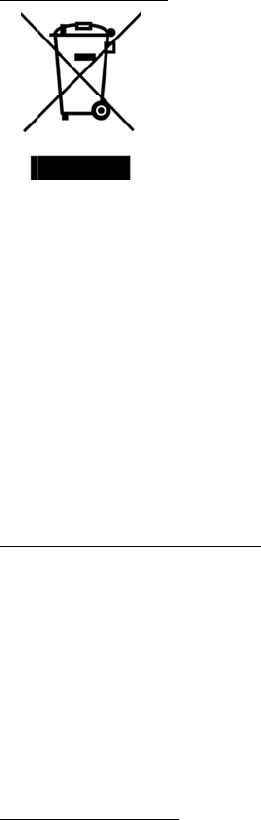
Disp
o
The
c
sepa
r
They
The
b
By p
a
prod
u
hum
a
For
m
visit
o
( w
w
REA
C
The
E
of C
h
Tosh
the
p
Plea
s
ww
w
cand
i
3
. R
u
This
follo
w
Regu
07-2
0
The
P
o
sal of produ
c
rossed out w
h
r
ately from ho
will be separ
a
b
lack bar indic
a
rticipating in
s
u
cts and batte
a
n health.
m
ore detailed i
o
ur website
w
w.toshiba.eu/
C
H - Complia
n
E
uropean Uni
o
h
emicals), ent
e
iba will meet
a
p
resence in ou
r
s
e consult the
f
w
.toshiba.eu/r
e
i
date list acco
r
u
ssian Feder
a
Product is an
u
w
ing restrictio
n
To be use
d
Not to be
Not to be
u
latory referen
c
0
-03-001 of 7
P
roduct is not
cts
h
eeled dust bi
n
usehold wast
e
a
ted at the rec
ates that the
p
s
eparate colle
c
ries and thus
h
nformation a
b
recycling ) or
c
n
ce Stateme
n
o
n (EU) chemi
c
e
red into force
a
ll REACH req
u
r
articles of su
f
ollowing web
s
e
ach for infor
m
r
ding to REAC
H
a
tion
u
ltra-band wir
e
n
s:
d
indoor only.
used onboard
o
used at airport
c
e: Resolution
May 2007 (a
s
subject to ma
n
n
symbol indic
e
. Integrated
b
ycling centres
p
roduct was p
l
c
tion of produ
c
h
elp to preve
n
b
out the collec
t
c
ontact your l
o
n
t
c
al regulation,
on 1 June 20
0
u
irements and
bstances inclu
s
ite
m
ation about t
h
H
in a concent
r
e
less device,
w
o
f aircraft whil
e
cargo termina
l
of the State
C
s
amended).
n
datory certifi
c
9
ates that prod
b
atteries and a
.
l
aced on the
m
c
ts and batteri
n
t potential ne
g
t
ion and recycl
o
cal city office
REACH (Regi
s
0
7, with phas
e
is committed
t
ded on the ca
n
h
e presence in
r
ation above
0
w
hich may be
o
e
climbing and l
l
s.
C
ommission of
c
ation.
ucts must be
c
ccumulators c
a
m
arket after A
u
es, you will h
e
g
ative conseq
u
l
ing program
m
or the shop
w
s
tration, Evalu
a
e
d deadlines t
o
to provide ou
r
n
didate list ac
c
our articles o
f
0
.1 % weight
b
o
perated in th
anding.
the Russian F
c
ollected and
d
a
n be dispose
d
u
gust 13, 200
5
e
lp to assure t
h
u
ences for the
m
es available i
n
w
here you pur
c
a
tion, Authori
z
o
2018.
r
customers wi
c
ording to RE
A
f
substances i
n
b
y weight.
e Russian Fed
e
ederation for
R
d
isposed of
d
of with the
p
5
.
h
e proper dis
p
environment
a
n
your country
c
hased the pro
z
ation and Res
th informatio
n
A
CH regulation
n
cluded on th
e
e
ration subjec
R
adio Frequen
p
roduct.
p
osal of
a
nd
y
, please
duct.
triction
n
about
.
e
t to the
cies No
10
The service life period of the Product is […] years
With regard to the Product please contact the importer/authorized organization for the Russian Federation
indicated at the end of this user manual.
●TransferJetTM and TransferJetTM logos are licensed by the TransferJet Consortium.
●Windows is either a registered trademark or trademark of Microsoft Corporation in the United States and
other countries.
●All other company/product names may be trademarks of their respective companies.
Manufacturer: Toshiba Corporation , 1-1-1, Shibaura, Minato-ku, Tokyo,
Japan
Companies Register: […]
Contact: Fon: […] Fax: […], E-Mail: […]
Importer
(European Union): Toshiba Electronics Europe GmbH, Hansaallee 181, 40549
Dusseldorf Germany
Handelsregister: Düsseldorf HRB 22487
Contact: Fon: […] Fax: […], E-Mail: […]
Authorized organization/Importer:
(Russian Federation):
[Insert companyʼs name]
Companies Register: […]
Contact: Fon: […] Fax: […], E-Mail: […]
©2014 TOSHIBA CORPORATION, All rights Reserved,
特定の海外国/地域向け製品のため、⽇本国内でのサポートは受けられません。