KODAK Cameras, All Manual L0910226
User Manual: KODAK KODAK Cameras, All Manual KODAK Cameras, All Owner's Manual, KODAK Cameras, All installation guides
Open the PDF directly: View PDF  .
.
Page Count: 24
KODAKEASYSHAREM341
Digital Camera
User guide
IMPORTANT:Beforeconnectinganycables,installthesoftwarethat wasincludedwith
your camera.Thenreturnto thisuserguide.
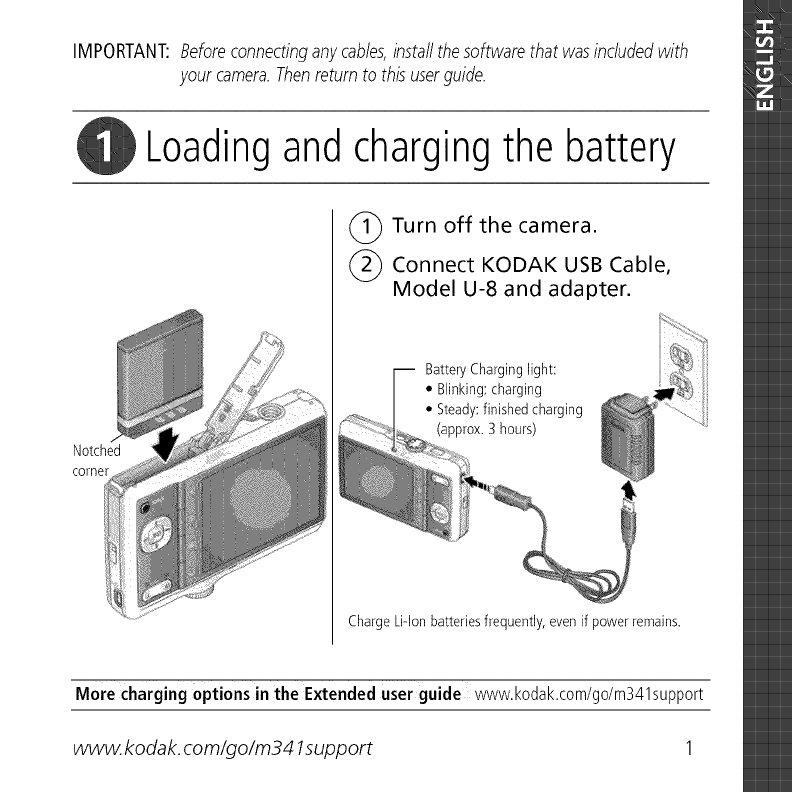
Loadingand chargingthe battery
(_ Turn off the camera.
(_) Connect KODAK USB Cable,
Model U-8 and adapter.
Notched
corner
BatteryCharginglight:
•Blinking:charging
•Steady:finishedcharging
(approx,3 hours)
Charge Li-lon batteries frequently, even if power remains.
Merecharging options in the Extendeduser guide www.kodak.com/go/m341support
www. kodak, corn/go/m341support 1
Using an (accessory) SD or SDHC Card
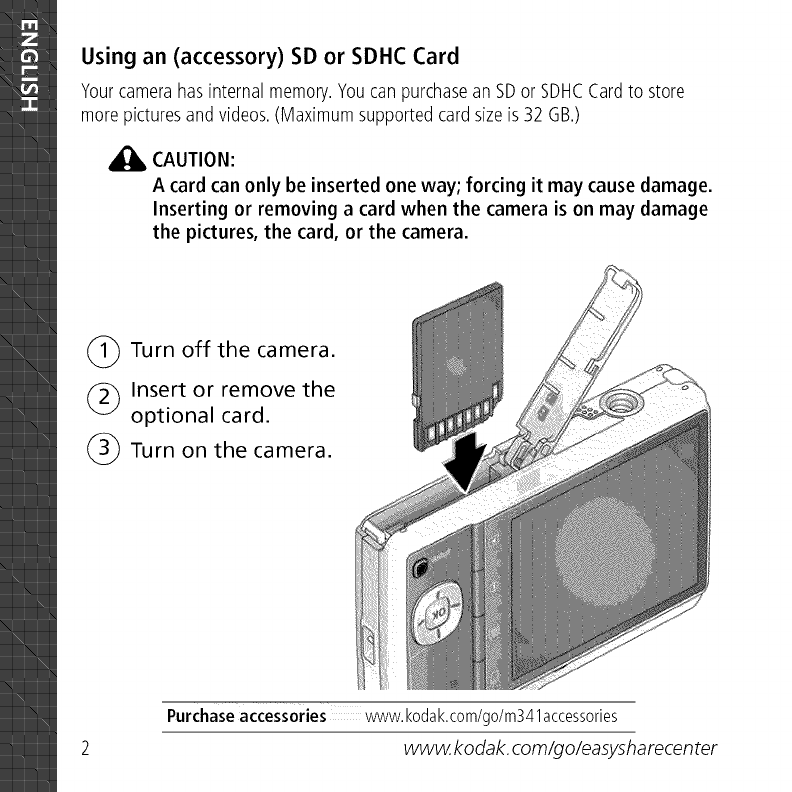
Yourcamerahasinternalmemory.YoucanpurchaseanSDor SDHCCardto store
morepicturesandvideos.(Maximumsupportedcardsizeis 32 GB.)
CAUTION:
Acard can only be inserted one way; forcing it may cause damage.
Inserting or removing a card when the camera is on may damage
the pictures, the card, or the camera.
(_ Turn off the camera.
(_ Insert or remove the
optional card.
(_ Turn on the camera.
Purchase accessories www.kodak.com/go/m341accessories
www. kodak, com/go/easysharecen ter
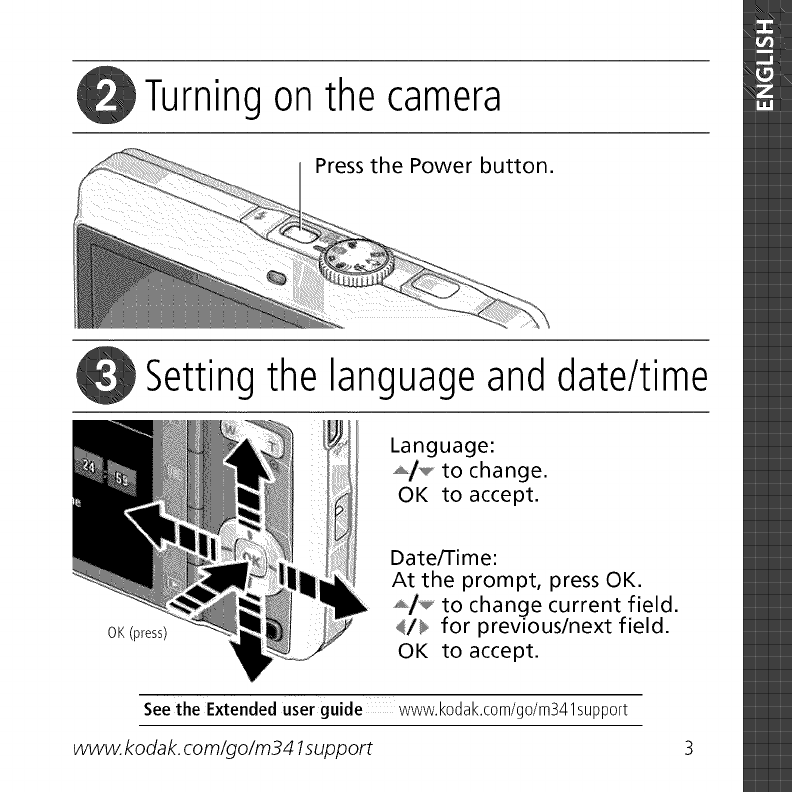
Turning on the camera
Press the Power button.
Setting the language and date/time
OK(press)
Language:
_/*_,* to change.
OK to accept.
Date/Time:
At the prompt, press OK.
_,i_ to change current field.
4/_ for previous/next field.
OK to accept.
Seethe Extendeduser guide www.kodak.com/go/m341support
www. kodak, corn/go/m341support
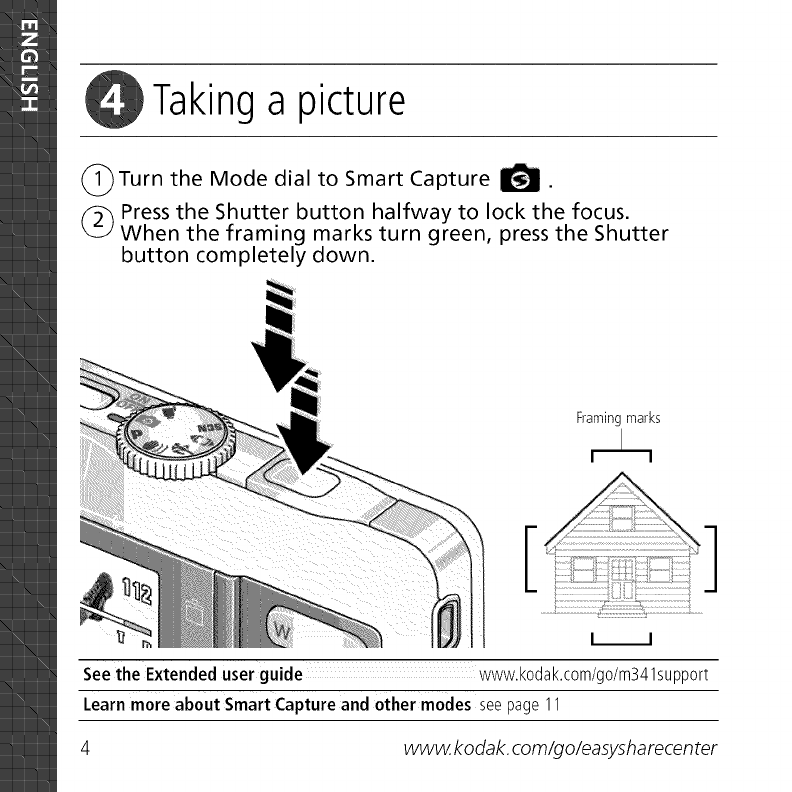
Takinga picture
(_)Turn the Mode dial to Smart Capture _.
(_ Press the Shutter button halfway to lock the focus.
When the framing marks turn green, press the Shutter
button completely down.
Framing marks
L_J
See the Extended user guide www.kodak.com/go/m341support
Learnmore about Smart Capture and other modes seepage 11
4www. kodak, com/go/easysharecen ter
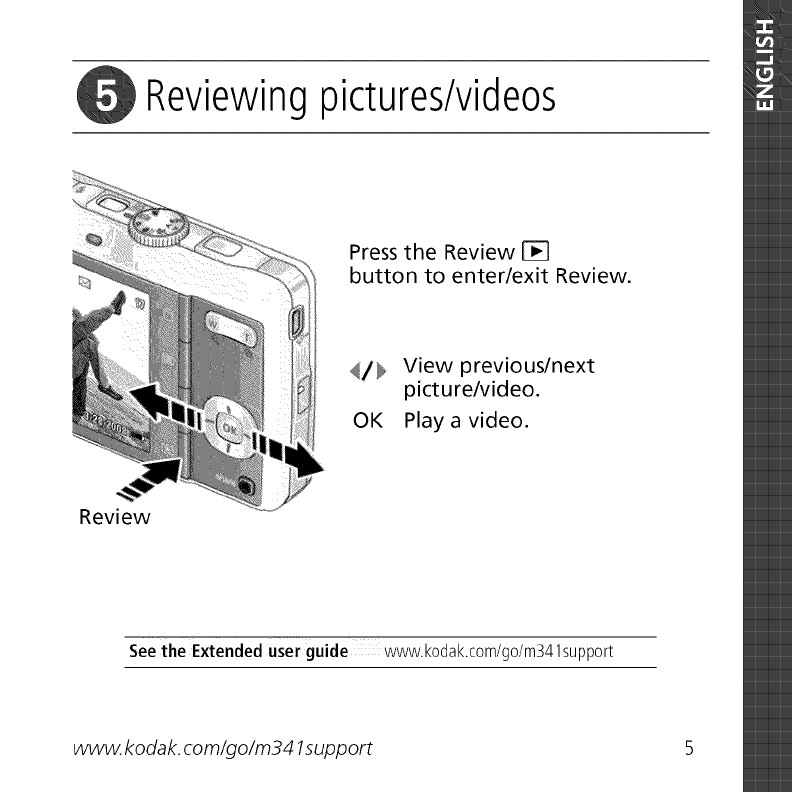
_i Reviewing pictures/videos
Press the Review
button to enter/exit Review.
4/}li,_ View previous/next
picture/video.
OK Playa video.
Review
See the Extended user guide www.kodak.com/go/m341support
www. kodak, corn/go/m341support 5
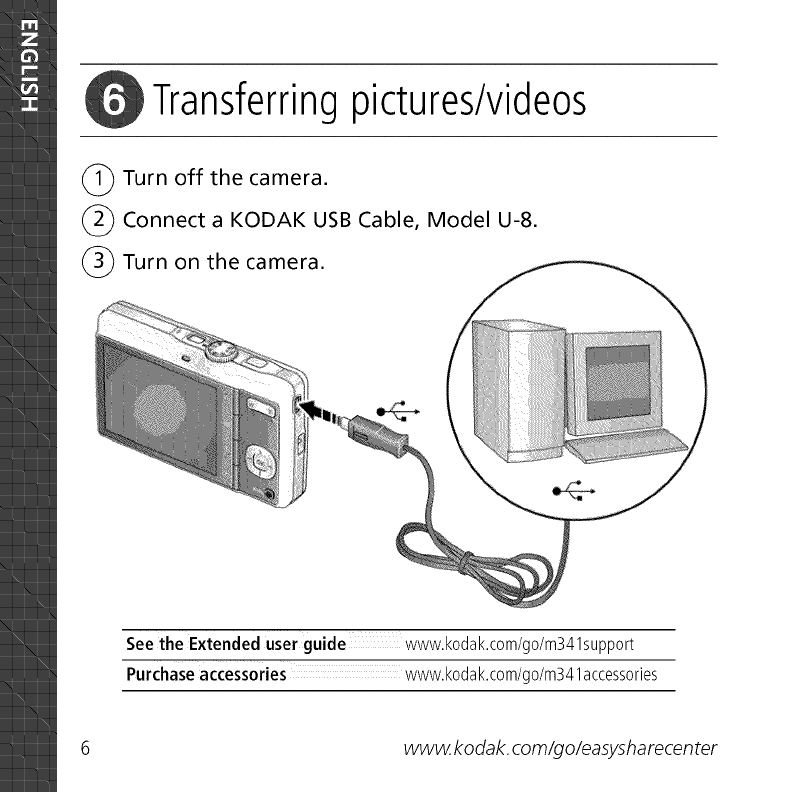
Transferringpictures/videos
(_ Turn off the camera.
(_ Connect a KODAK USB Cable, Model U-8.
(_) Turn on the camera.
See the Extended user guide www.kodak.com/go/m341support
Purchase accessories www.kodak.com/go/m341accessories
6www. kodak, com/go/easysharecen ter
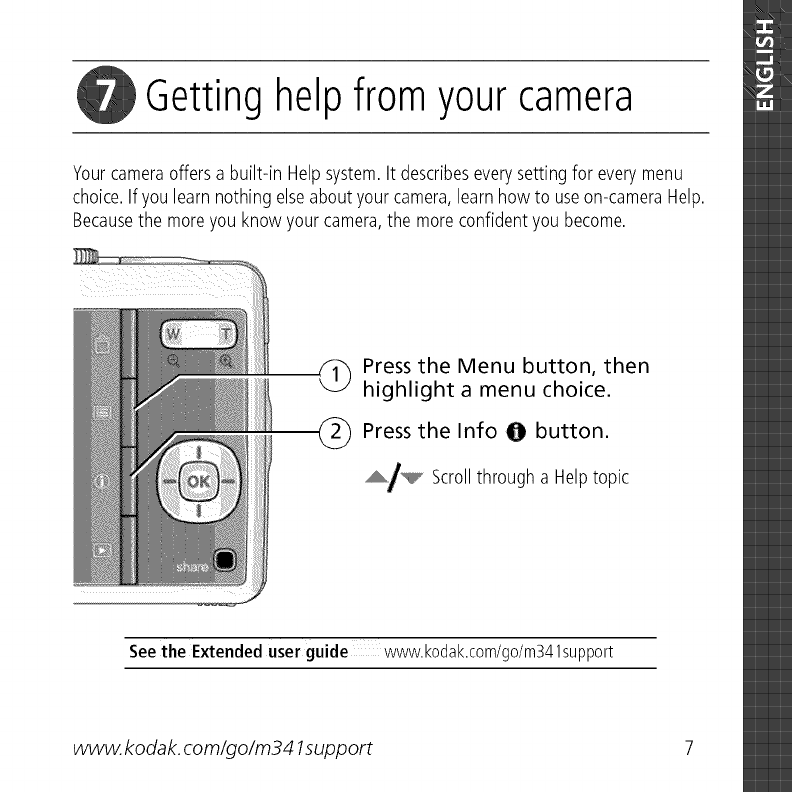
Getting helpfrom your camera
Yourcameraoffers abuilt-in Helpsystem.It describeseverysettingfor everymenu
choice.Ifyou learnnothing elseabout yourcamera,learnhow to useon-cameraHelp.
Becausethe moreyou know your camera,the moreconfidentyou become.
Press the Menu button, then
highlight a menu choice.
_ Press the Info @button.
_/_ Scrollthrough a Helptopic
See the Extended user guide www.kodak.com/go/m341support
www. kodak, corn/go/m341support 7
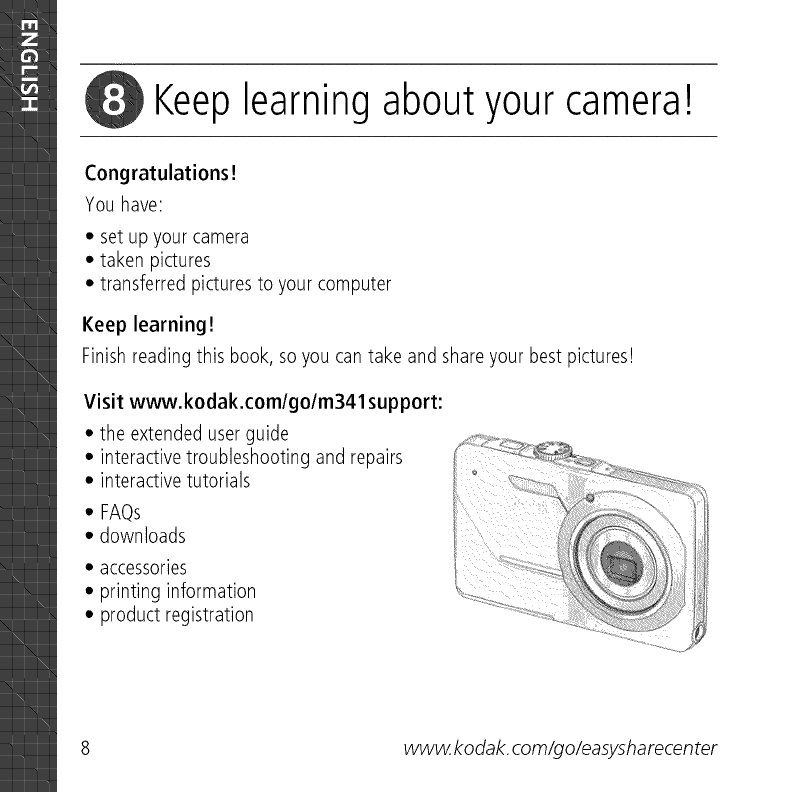
Keep learning about your camera!
Congratulations!
You have:
• set up your camera
• taken pictures
• transferred picturesto your computer
Keep learning!
Finishreading this book, so you can take and shareyour best pictures!
Visit www.kodak.com/go/m341 support:
• the extended userguide
• interactive troubleshooting and repairs
• interactive tutorials
• FAQs
• downloads
• accessories
• printing information
• product registration
8www.kodak, com/go/easysharecenter
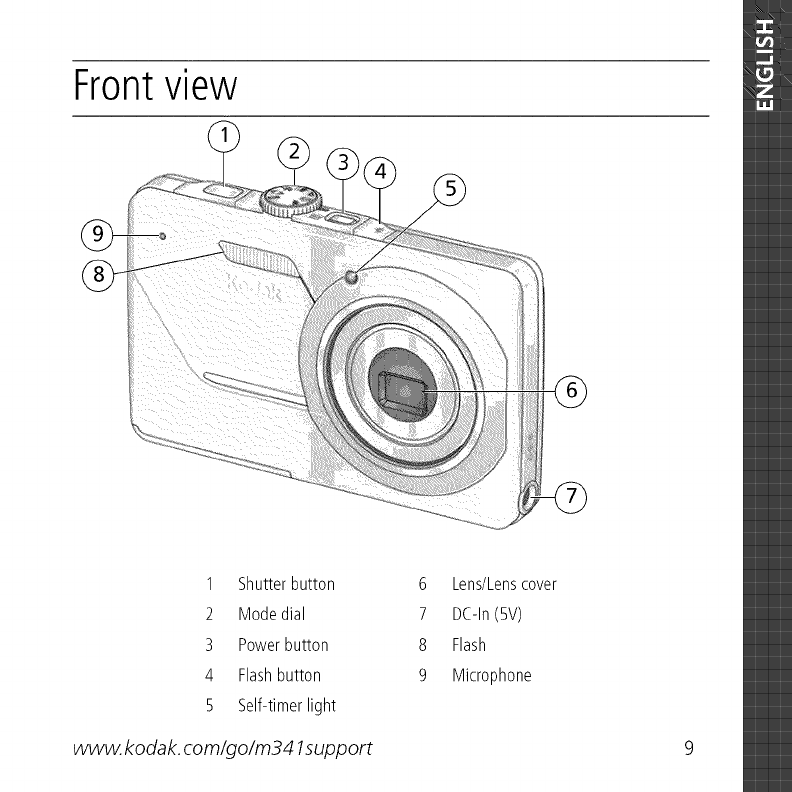
Front view
1 Shutterbutton
2 Modedial
3 Powerbutton
4 Flashbutton
5 Self-timerlight
www. kodak, corn/go/m341support
6 Lens/Lenscover
7 DC-In(5V)
8 Flash
9 Microphone
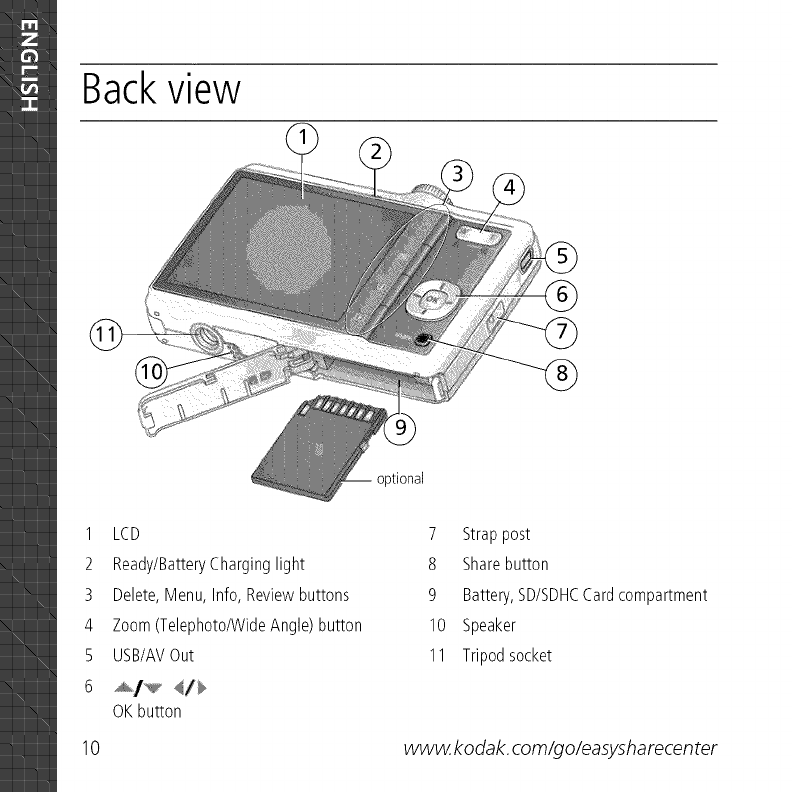
Backview
1 LCD
2 Ready/BatteryCharginglight
3 Delete,Menu, Info, Reviewbuttons
4 Zoom(Telephoto/WideAngle) button
5 USB/AVOut
6 _/_ _/_
OK button
optional
7 Strappost
8 Sharebutton
9 Battery,SD/SDHCCardcompartment
10 Speaker
11 Tripodsocket
10 www. kodak, com/go/easysharecen ter
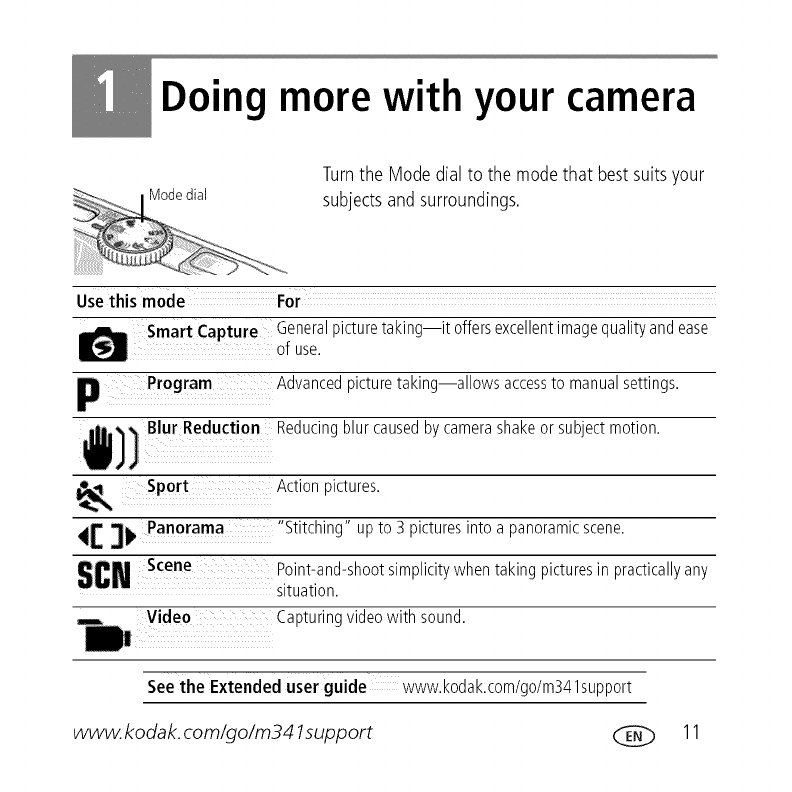
Doing more with your camera
Turnthe Modedial to the modethat bestsuitsyour
subjectsand surroundings.
Use this mode For
Smart Capture Generalpicturetaking it offersexcellentimagequalityandease
of use.
p Program Advancedpicturetaking allows accessto manualsettings.
Blur Reduction Reducingblur causedbycamerashakeor subjectmotion.
Sport Action oictures.
41:3_Panorama
SCNScene
"Stitching" upto 3 picturesinto a panoramicscene.
Point-and-shootsimplicitywhen taking picturesin practicallyany
situation.
Video Capturingvideowith sound.
See the Extended user guide www.kodak.com/go/m341support
www.kodak, com/go/m341support ___ 11
Doing more with your camera
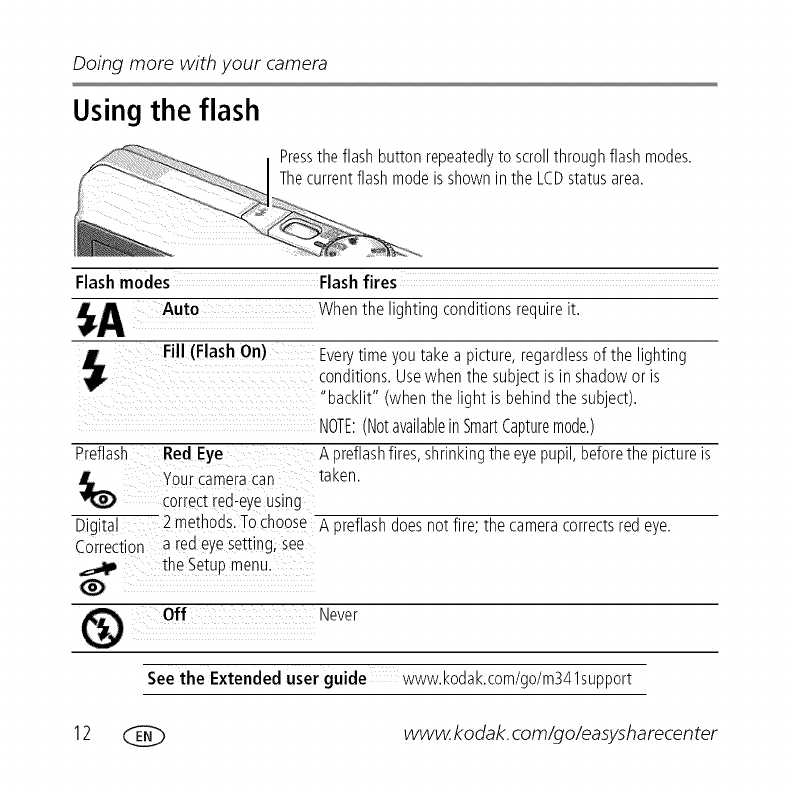
Using the flash
Pressthe flash button repeatedlyto scrollthroughflash modes.
Thecurrentflashmodeisshownin the LCDstatusarea.
Flash modes Flashfires
Auto Whenthe lighting conditionsrequireit.
Fill (Flash On)
Preflash Red Eye
your cameracan
correc_rea-eyeusing
Digital 2 methods.Tochoose
Correction a red eye setting,see
the SetLp menu.
Off
Everytimeyou takea picture,regardlessof the lighting
conditions.Usewhen the subjectis in shadowor is
"backlit" (whenthe light is behindthe subject).
NOTE:(NotavailableinSmartCapturemode.)
A preflashfires,shrinkingtheeyepupil,beforethe pictureis
[aKen.
A preflashdoesnot fire; the cameracorrectsred eye.
Never
See the Extended user guide www.kodak.com/go/m341support
12 _ www.kodak, com/go/easysharecenter
Doingmorewithyourcamera
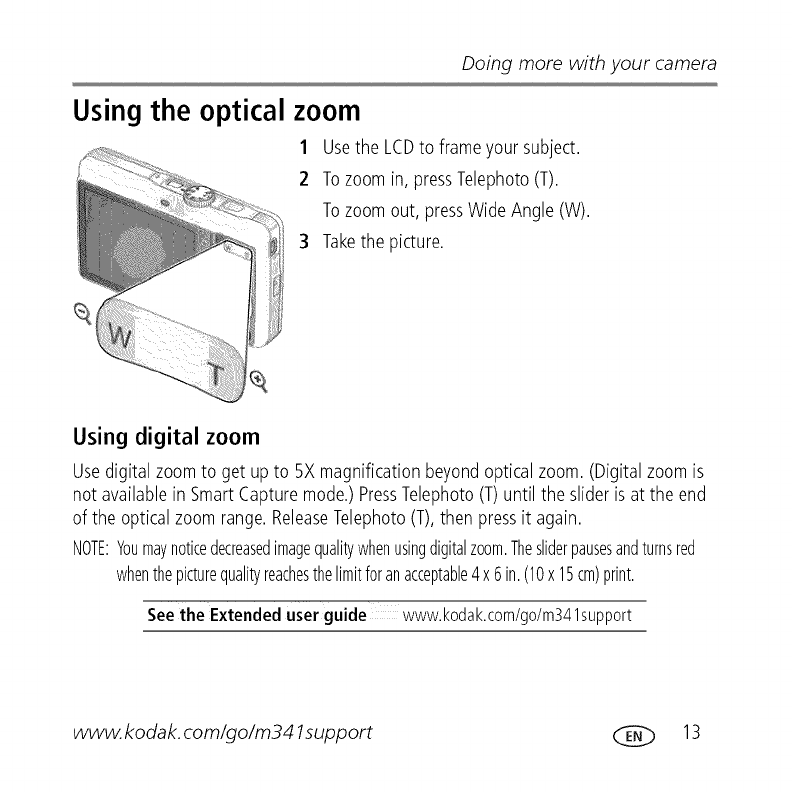
Using the optical zoom
1Usethe LCDto frameyour subject.
2 Tozoomin, pressTelephoto(T).
Tozoomout, pressWide Angle(W).
3 Takethe picture.
Using digital zoom
Usedigital zoomto get upto 5X magnificationbeyondopticalzoom.(Digitalzoomis
not availablein SmartCapturemode.)PressTelephoto(T)until the slider is at the end
of the opticalzoomrange.ReleaseTelephoto(T),then pressit again.
NOTE:Youmaynoticedecreasedimagequalitywhenusingdigitalzoom.Thesliderpausesandturnsred
whenthepicturequalityreachesthelimitforanacceptable4x6in.(10x 15cm)print.
See the Extended user guide www.kodak.com/go/m341support
www.kodak, com/go/m341support (___ 13
Doing more with your camera
Using the menu button to change settings
Youcan changesettingsto get the bestresultsfromyour camera.
NOTE:Somemodesofferlimitedsettings.Somesettingsremainuntilyouchangethem;others,untilyou
changemodesorturnoffthecamera.
1
2
3
4
IMPORTANT:
Pressthe Menu_ button.
Press4/_ to highlight the Capture/Videoor Setuptab.
Press,_/_ to highlight a setting,then pressOK.
Highlightan option,then pressOK.
Yourcameraoffersabuilt-inHelpsystem.Togetthemostfromyourcamera,
seepage7.
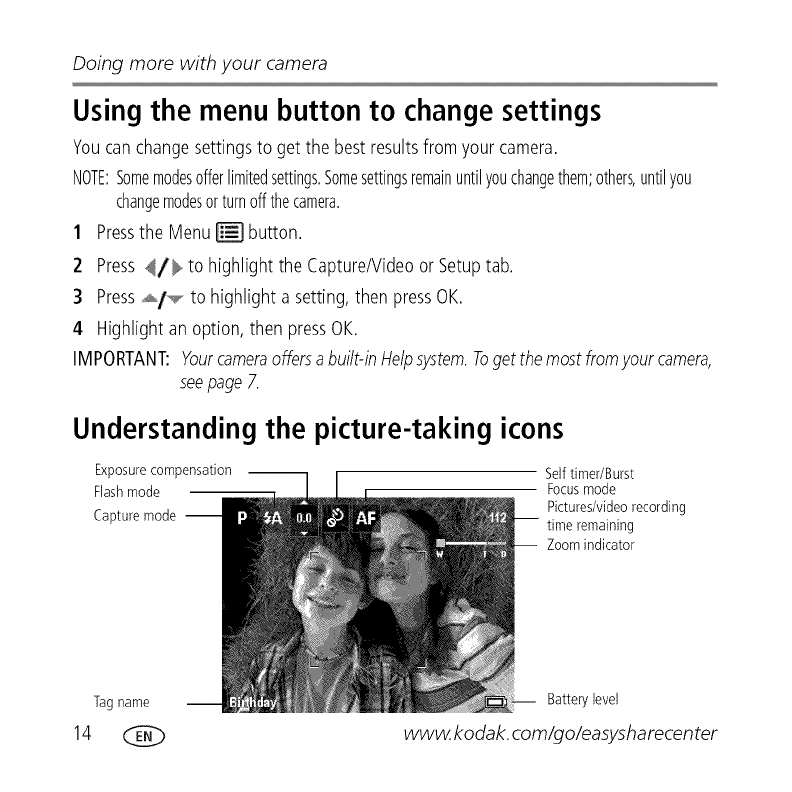
Understanding the picture-taking icons
Exposure compensation
Flash mode
Capture mode --
Self timer/Burst
Focus mode
Pictures/video recording
time remaining
Zoom indicator
Tag name
14
Battery level
www.kodak, com/go/easysharecenter
Working with pictures/videos
Deleting pictures/videos
1Pressthe Review_ button.
2 Press4,/_ for previous/nextpicture/video.
3 Pressthe Deletebutton, then follow the prompts.
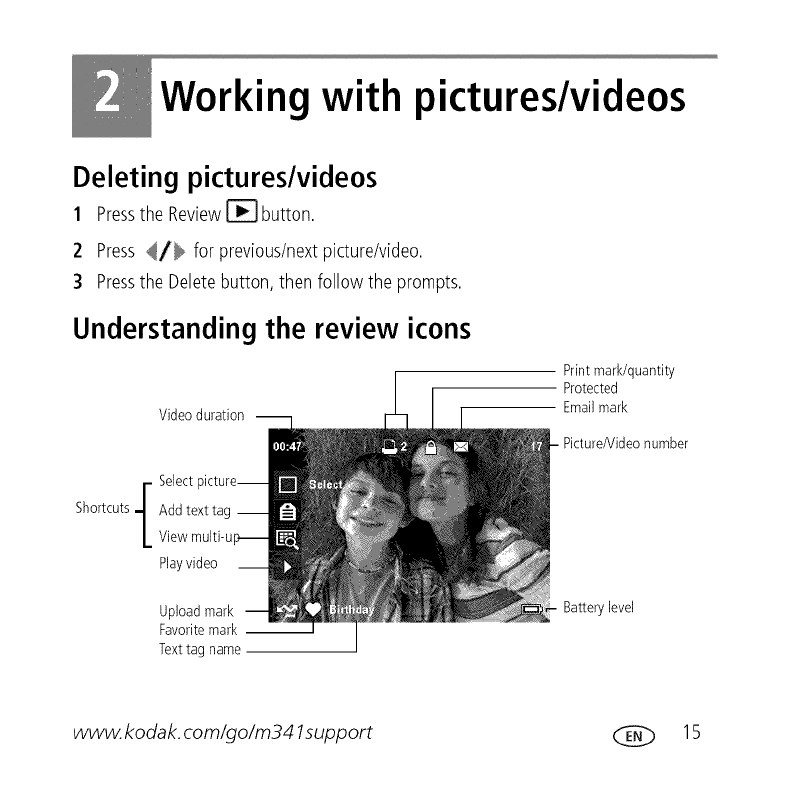
Understanding the review icons
Video duration --
Print mark/quantity
Protected
Email mark
F
Shortcuts q Add text tag --
LView multi-u
Play video
Upload mark
Favorite mark --
Text tag name
Battery level
www.kodak, com/go/m341support (___ 15

Share your stories!
and each begins with a picture,
Prints Photo gifts
• 4 x 6 pictures • Cards
• Enlargements,posters • Calendars
• Collages • Mugs
• Photo books • Ties
• Shirts
Digitally
• EASYSHAREDigital Picture Frame
• HDTVdevices
• Email
...and much more!
16 _ www. kodak, com/go/easysharecenter
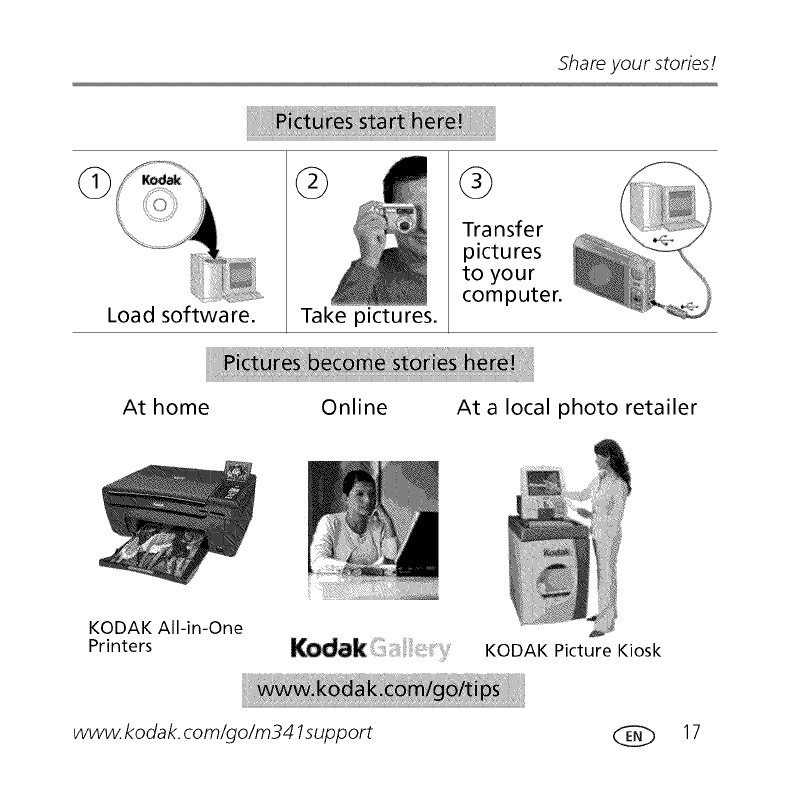
Shareyourstories!
Load software.
G
Take pictures.
@
Transfer
pictures
to your
computer.
At home Online At a local photo retailer
KODAK All-in-One
Printers KODAK Picture Kiosk
www. kodak, corn/go/m341support _ 17
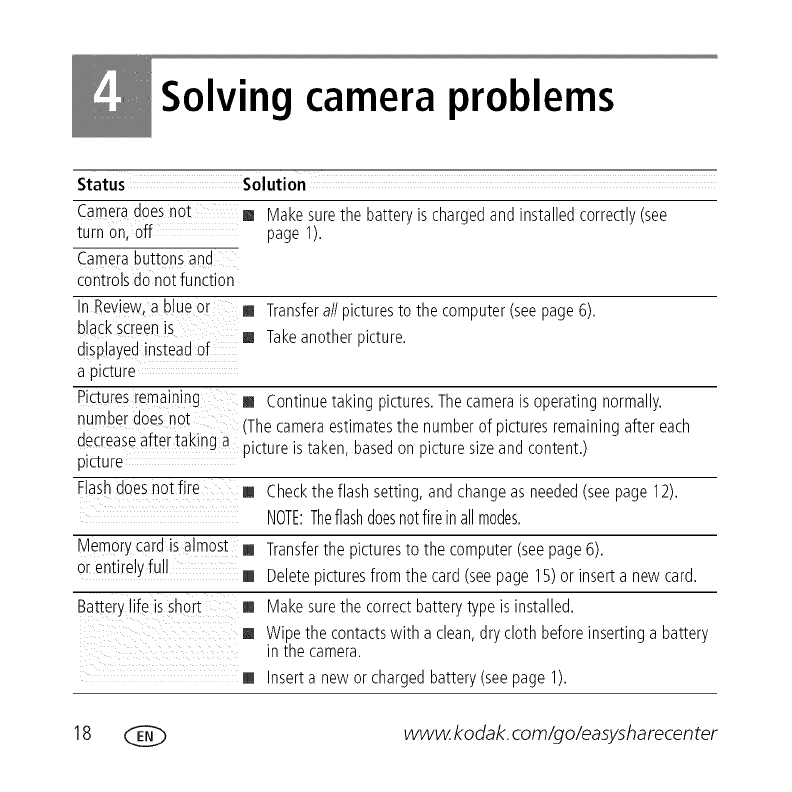
Solving camera problems
Status Solution
Cameradoesno[
turn on, off
Camerabuttonsana
controlsdo notfunction
[] Make surethe batteryis chargedand installedcorrectly(see
page 1).
[] Transferall picturesto the computer(seepage6).
[] Takeanotherpicture.
[] Continuetaking pictures.Thecameraisoperatingnormally.
(Thecameraestimatesthe numberof picturesremainingaftereach
pictureistaken, basedon picturesizeand content.)
n Revie_A.a b ueor
black screenis
displated insteadof
a plc[ure
Picturesremaining
numberdoesno[
decreaseafter taking a
picture
Flashdoesnotfire [] Checkthe flashsetting, andchangeasneeded(seepage 12).
NOTE:Theflashdoesnotfirein allmodes.
Memorycard is almost [] Transferthe picturesto the computer(seepage6).
or entireJyfull [] Deletepicturesfromthe card (seepage 15) or inserta new card.
Batterylife isshort [] Make surethe correctbatterytypeis installed.
[] Wipethe contactswith a clean,dry cloth beforeinsertinga battery
in the camera.
[] Inserta new or charged battery(seepage 1).
18 _ www.kodak, com/go/easysharecenter

Appendix
CAUTION:
Do not disassemblethis product; there are no user-serviceable parts inside. Refer servicing to
qualified service personnel. KODAKAC Adapters and Battery Chargers are intended for indoor
use only. The use of controls, adjustments, or procedures other than those specified herein may
result in exposure to shock and/or electrical or mechanical hazards. If the LCDbreaks, do not
touch the glass or liquid. Contact Kodak customer support.
[] Theuseof an accessorythat isnot recommendedby Kodakmaycausefire, electricshock,or injury. For
approvedaccessories,visit www.kodak.com/go/accessories.
[] Useonly a USB-certifiedcomputerequippedwith a currentqimitingmotherboard.Contactyour computer
manufacturerif you havequestions.
[] If usingthis productin an airplane,observeall instructionsof the airline.
[] Whenremovingthe battery,allow it to cool; it may be hot.
[] Followall warningsand instructionssuppliedbythe batterymanufacturer.
[] Useonly batteriesapprovedforthis productto avoid riskof explosion.
[] Keepbatteriesout of the reachof children.
[] Do not allow batteriesto touch metalobjects, includingcoins.Otherwise,a batterymayshort circuit,
dischargeenergy,becomehot, or leak.
[] Do not disassemble,install backward,or exposebatteriesto liquid, moisture,fire, or extremetemperature.
[] Removethe batterywhen the productis storedfor an extendedperiodof time.In the unlikelyevent that
batteryfluid leaksinsidethe product,contact Kodakcustomersupport.
[] In the unlikelyeventthat batteryfluid leaksonto your skin,washimmediatelywith water and contactyour
localhealth provider.Foradditionalhealth-relatedinformation,contactyour local Kodakcustomersupport.
[] Disposeof batteriesaccordingto localand nationalregulations.Visitwww.kodak.com/go/kes.
[] Do not chargenomrechargeablebatteries.Formoreinformation, seewww.kodak.com/go/batteries.
www.kodak.com/go/m341support (___ 19
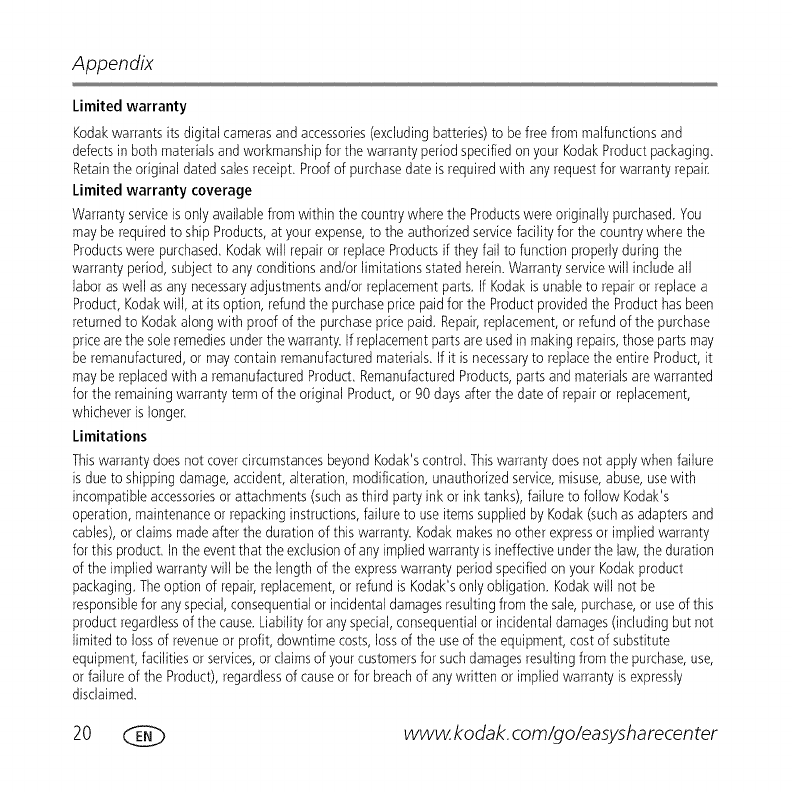
Appendix
Limited warranty
Kodakwarrants its digital camerasand accessories(excludingbatteries)to be free from malfunctionsand
defectsin both materialsand workmanshipfor the warrantyperiodspecifiedon your KodakProductpackaging,
Retainthe original dated salesreceipt,Proofof purchasedate is requiredwith anyrequestfor warranty repair,
Limited warranty coverage
Warrantyserviceisonly availablefrom within the countrywhere the Productswere originally purchased.You
mayberequiredto ship Products,at your expense,to the authorizedservicefacilityfor the countrywhere the
Productswere purchased,Kodakwill repairor replaceProductsif theyfail to function properlyduring the
warrantyperiod,subject to any conditionsand/or limitations statedherein.Warrantyservicewill includeall
labor aswell asany necessaryadjustmentsand/or replacementparts,If Kodakis unableto repair or replacea
Product,Kodakwill, at itsoption, refundthe purchasepricepaidfor the Productprovidedthe Producthasbeen
returnedto Kodakalongwith proofof the purchasepricepaid, Repair,replacement,or refundof the purchase
pricearethe sole remediesunder thewarranty. If replacementpartsare usedin makingrepairs,thosepartsmay
be remanufactured,or maycontain remanufacturedmaterials,If it is necessaryto replacethe entire Product,it
maybe replacedwith a remanufacturedProduct,RemanufacturedProducts,partsand materialsare warranted
for the remainingwarrantytermof the original Product,or 90 days after the date of repairor replacement,
whicheveris longer,
Limitations
Thiswarrantydoesnot covercircumstancesbeyond Kodak'scontrol,Thiswarrantydoesnot applywhen failure
isdue to shippingdamage,accident,alteration, modification,unauthorizedservice,misuse,abuse,usewith
incompatibleaccessoriesor attachments(suchasthird partyink or ink tanks), failureto follow Kodak's
operation,maintenanceorrepackinginstructions,failureto useitemssuppliedby Kodak(suchasadaptersand
cables),or claimsmadeafter the durationof this warranty. Kodakmakesno other expressor impliedwarranty
forthis product,Inthe eventthat the exclusionof anyimpliedwarranty isineffectiveunderthe law,the duration
of the impliedwarrantywill be the length of the expresswarranty periodspecifiedon your Kodakproduct
packaging,Theoption of repair,replacement,or refund is Kodak'sonly obligation. Kodakwill not be
responsiblefor anyspecial,consequentialor incidentaldamagesresultingfromthe sale,purchase,or useof this
productregardlessof the cause.Liabilityforanyspecial,consequentialor incidentaldamages(includingbut not
limitedto lossof revenueor profit, downtime costs,lossof the useof the equipment,cost of substitute
equipment,facilities orservices,or claimsof yourcustomersfor suchdamagesresultingfrom the purchase,use,
orfailure of the Product),regardlessof causeor for breachof anywritten or impliedwarrantyis expressly
disclaimed.
20 _ www.kodak.com/go/easysharecenter
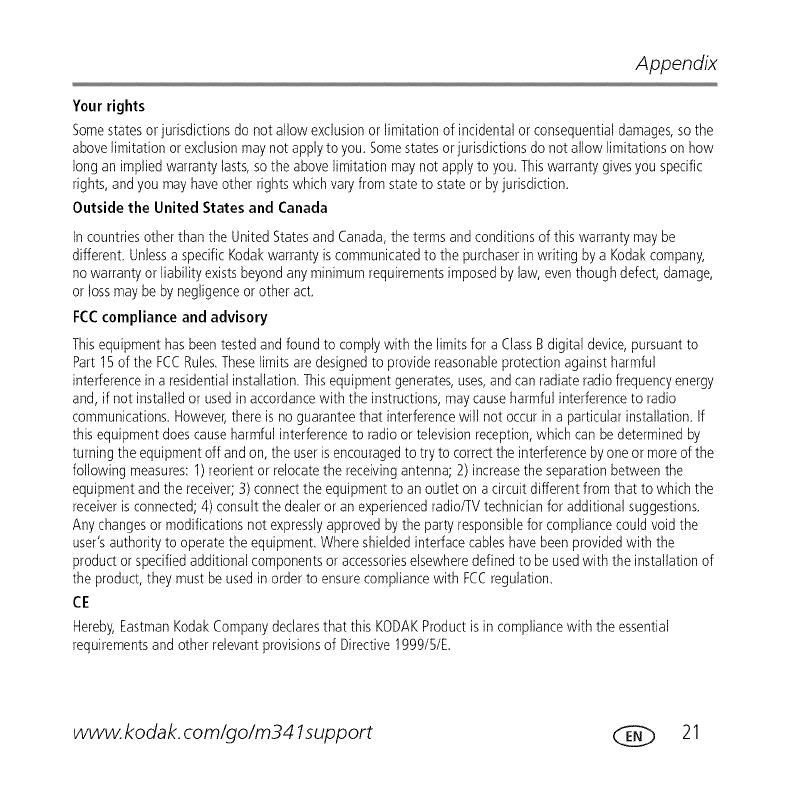
Appendix
Your rights
Some states or jurisdictions do not allow exclusion or limitation of incidental or consequential damages, so the
above limitation or exclusion may not apply to you, Some states or jurisdictions do not allow limitations on how
long an implied warranty lasts, so the above limitation may not apply to you, This warranty gives you specific
rights, and you may have other rights which vary from state to state or by jurisdiction,
Outside the United States and Canada
In countriesother than the United Statesand Canada,the termsand conditionsof this warranty maybe
different. Unlessa specificKodakwarranty is communicatedto the purchaserin writing by a Kodakcompany,
no warrantyor liabilityexistsbeyondanyminimumrequirementsimposedbylaw, eventhoughdefect, damage,
or lossmaybebynegligenceor otheract,
FCCcompliance and advisory
Thisequipmenthasbeentested and foundto complywith the limitsfor a ClassBdigital device,pursuantto
Part 15 of the FCCRules,Theselimits aredesignedto provide reasonableprotection againstharmful
interferencein a residentialinstallation,Thisequipmentgenerates,uses,and canradiateradiofrequencyenergy
and, if not installedor usedin accordancewith the instructions,maycauseharmful interferenceto radio
communications.However,there is no guaranteethat interferencewill not occurin a particularinstallation, If
this equipmentdoescauseharmful interferenceto radio or televisionreception,which can be determinedby
turningthe equipmentoff andon, the useris encouragedto try to correctthe interferenceby oneor moreof the
following measures:1)reorientor relocatethe receivingantenna;2) increasethe separationbetweenthe
equipmentandthe receiver;3)connectthe equipmentto an outlet on a circuitdifferent from that to which the
receiveris connected;4) consultthe dealeroran experiencedradio/TVtechnicianfor additional suggestions.
Anychangesor modificationsnot expresslyapprovedbythe partyresponsiblefor compliancecould void the
user'sauthority to operatethe equipment,Whereshieldedinterfacecableshavebeenprovidedwith the
productorspecifiedadditionalcomponentsor accessorieselsewheredefined to be usedwith the installationof
the product,they mustbe usedin orderto ensurecompliancewith FCCregulation.
CE
Hereby,EastmanKodakCompanydeclaresthat this KODAKProductis in compliancewith the essential
requirementsand other relevantprovisionsof Directive1999/5/E.
www.kodak, com/go/m341support ____ 21
Appendix
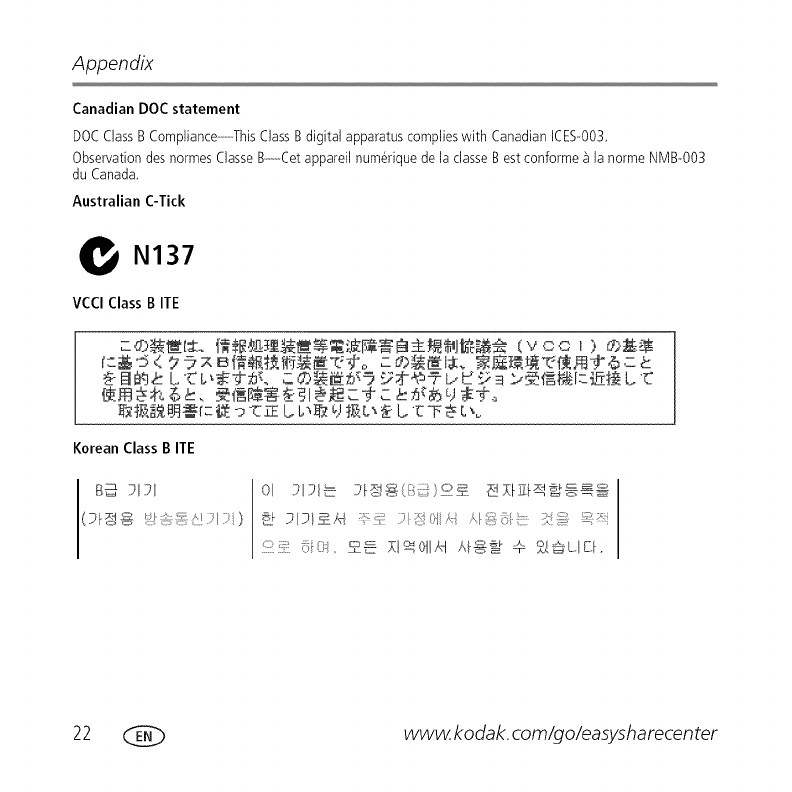
Canadian DOC statement
DOC Class B Compliance------This Class B digital apparatus complies with Canadian ICES-003,
Observation des normes Classe B---Cet appareil num_rique de la classe Best conforme _ la norme NMB-003
du Canada,
Australian C-Tick
N137
VCCI Class BITE
KoreanClass BITE
22 _ www.kodak.com/go/easysharecenter
Appendix
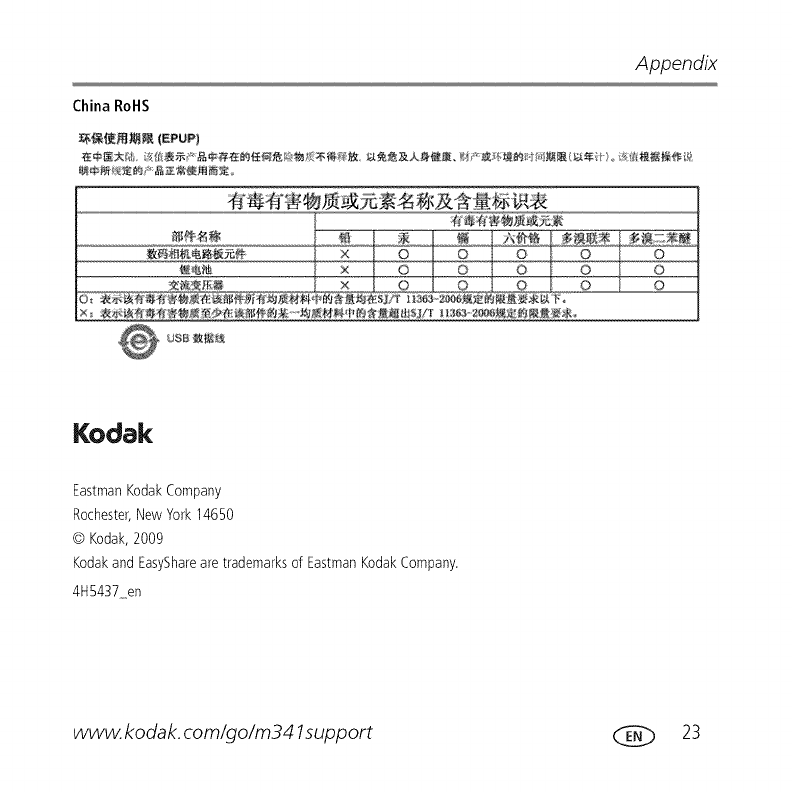
China RollS
.........................................
Kodak
EastmanKodakCompany
Rochester,New York14650
@ Kodak,2009
Kodakand EasySharearetrademarksof EastmanKodakCompany.
4H5437 en
www.kodak.com/go/m341support (___ 23
