KP Electronic Systems KPMT2W VHF Automatic Meter Reading Transceiver with 2.4 GHz TX User Manual DI100

KP Electronic Systems Ltd VHF Automatic Meter Reading Transceiver with 2.4 GHz TX DI100

User Manual

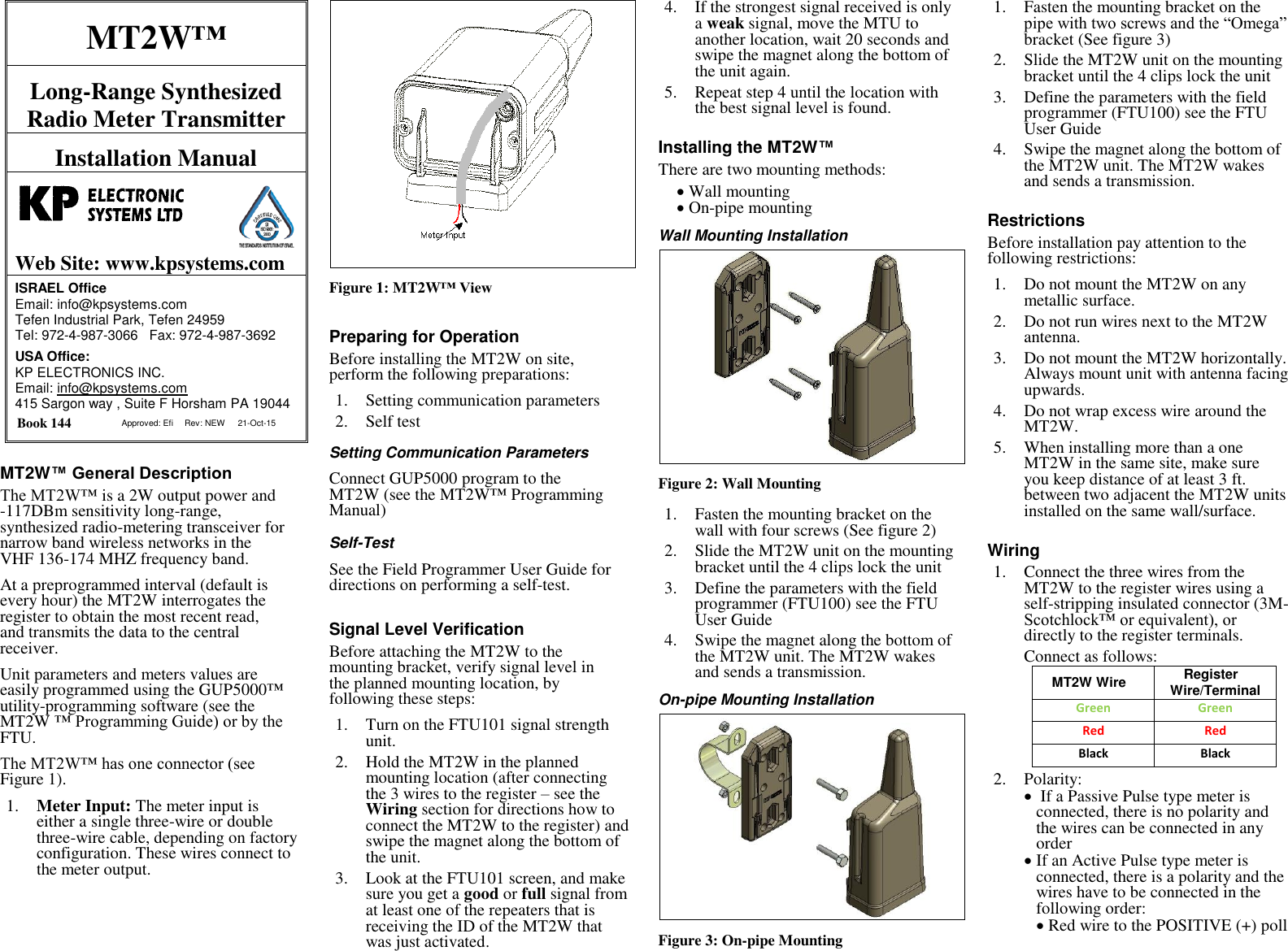
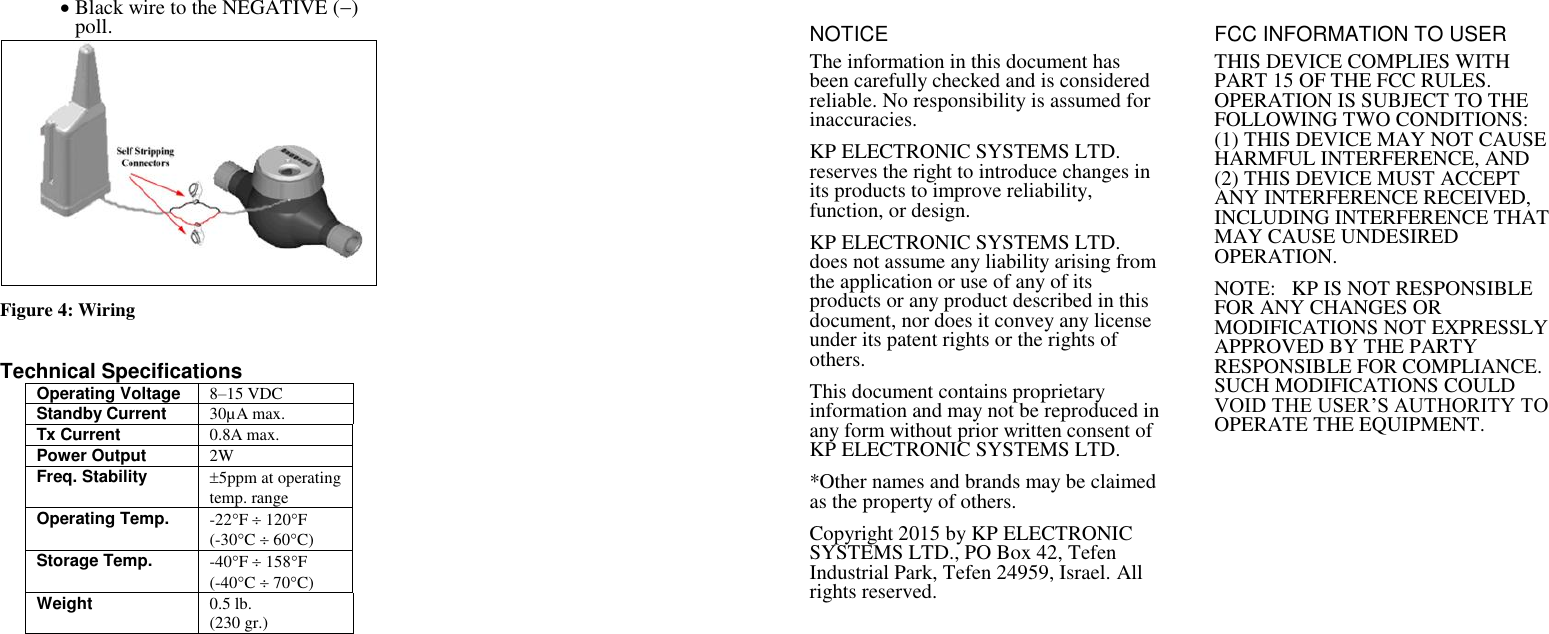
MT2W™ Long-Range Synthesized Radio Meter Transmitter Installation Manual   Web Site: www.kpsystems.com ISRAEL Office  Email: info@kpsystems.com Tefen Industrial Park, Tefen 24959 Tel: 972-4-987-3066   Fax: 972-4-987-3692 USA Office:  KP ELECTRONICS INC. Email: info@kpsystems.com 415 Sargon way , Suite F Horsham PA 19044  Book 144  Approved: Efi Rev: NEW 21-Oct-15 MT2W™ General Description The MT2W™ is a 2W output power and -117DBm sensitivity long-range, synthesized radio-metering transceiver for narrow band wireless networks in the VHF 136-174 MHZ frequency band. At a preprogrammed interval (default is every hour) the MT2W interrogates the register to obtain the most recent read, and transmits the data to the central receiver. Unit parameters and meters values are easily programmed using the GUP5000™ utility-programming software (see the MT2W ™ Programming Guide) or by the FTU. The MT2W™ has one connector (see Figure 1). 1. Meter Input: The meter input is either a single three-wire or double three-wire cable, depending on factory configuration. These wires connect to the meter output.   Figure 1: MT2W™ View Preparing for Operation Before installing the MT2W on site, perform the following preparations: 1. Setting communication parameters 2. Self test   Setting Communication Parameters Connect GUP5000 program to the MT2W (see the MT2W™ Programming Manual) Self-Test  See the Field Programmer User Guide for directions on performing a self-test. Signal Level Verification Before attaching the MT2W to the mounting bracket, verify signal level in the planned mounting location, by following these steps: 1. Turn on the FTU101 signal strength unit. 2. Hold the MT2W in the planned mounting location (after connecting the 3 wires to the register – see the Wiring section for directions how to connect the MT2W to the register) and swipe the magnet along the bottom of the unit. 3. Look at the FTU101 screen, and make sure you get a good or full signal from at least one of the repeaters that is receiving the ID of the MT2W that was just activated. 4. If the strongest signal received is only a weak signal, move the MTU to another location, wait 20 seconds and swipe the magnet along the bottom of the unit again. 5. Repeat step 4 until the location with the best signal level is found. Installing the MT2W™ There are two mounting methods:  Wall mounting  On-pipe mounting Wall Mounting Installation  Figure 2: Wall Mounting 1. Fasten the mounting bracket on the wall with four screws (See figure 2) 2. Slide the MT2W unit on the mounting bracket until the 4 clips lock the unit 3. Define the parameters with the field programmer (FTU100) see the FTU User Guide 4. Swipe the magnet along the bottom of the MT2W unit. The MT2W wakes and sends a transmission.  On-pipe Mounting Installation  Figure 3: On-pipe Mounting 1. Fasten the mounting bracket on the pipe with two screws and the “Omega” bracket (See figure 3) 2. Slide the MT2W unit on the mounting bracket until the 4 clips lock the unit 3. Define the parameters with the field programmer (FTU100) see the FTU User Guide 4. Swipe the magnet along the bottom of the MT2W unit. The MT2W wakes and sends a transmission.  Restrictions Before installation pay attention to the following restrictions: 1. Do not mount the MT2W on any metallic surface. 2. Do not run wires next to the MT2W antenna. 3. Do not mount the MT2W horizontally. Always mount unit with antenna facing upwards. 4. Do not wrap excess wire around the MT2W. 5. When installing more than a one MT2W in the same site, make sure you keep distance of at least 3 ft. between two adjacent the MT2W units installed on the same wall/surface. Wiring 1. Connect the three wires from the MT2W to the register wires using a self-stripping insulated connector (3M-Scotchlock™ or equivalent), or directly to the register terminals.  Connect as follows:  MT2W Wire Register Wire/Terminal Green Green Red Red Black  Black 2. Polarity:   If a Passive Pulse type meter is connected, there is no polarity and the wires can be connected in any order   If an Active Pulse type meter is connected, there is a polarity and the wires have to be connected in the following order:   Red wire to the POSITIVE (+) poll
 Black wire to the NEGATIVE () poll.   Figure 4: Wiring   Technical Specifications Operating Voltage 8–15 VDC Standby Current  30µA max. Tx Current 0.8A max. Power Output 2W Freq. Stability 5ppm at operating temp. range Operating Temp. -22F  120F (-30C  60C) Storage Temp. -40F  158F (-40C  70C) Weight 0.5 lb. (230 gr.) NOTICE The information in this document has been carefully checked and is considered reliable. No responsibility is assumed for inaccuracies. KP ELECTRONIC SYSTEMS LTD. reserves the right to introduce changes in its products to improve reliability, function, or design. KP ELECTRONIC SYSTEMS LTD. does not assume any liability arising from the application or use of any of its products or any product described in this document, nor does it convey any license under its patent rights or the rights of others. This document contains proprietary information and may not be reproduced in any form without prior written consent of KP ELECTRONIC SYSTEMS LTD.  *Other names and brands may be claimed as the property of others. Copyright 2015 by KP ELECTRONIC SYSTEMS LTD., PO Box 42, Tefen Industrial Park, Tefen 24959, Israel. All rights reserved.  FCC INFORMATION TO USER THIS DEVICE COMPLIES WITH PART 15 OF THE FCC RULES. OPERATION IS SUBJECT TO THE FOLLOWING TWO CONDITIONS: (1) THIS DEVICE MAY NOT CAUSE HARMFUL INTERFERENCE, AND (2) THIS DEVICE MUST ACCEPT ANY INTERFERENCE RECEIVED, INCLUDING INTERFERENCE THAT MAY CAUSE UNDESIRED OPERATION. NOTE:   KP IS NOT RESPONSIBLE FOR ANY CHANGES OR MODIFICATIONS NOT EXPRESSLY APPROVED BY THE PARTY RESPONSIBLE FOR COMPLIANCE. SUCH MODIFICATIONS COULD VOID THE USER’S AUTHORITY TO OPERATE THE EQUIPMENT.

Navigation menu