KTV Global 29GG 29 Inches Flat Type TV Broadcast Receiver User Manual 29GG400 10 15

KTV Global Corporation 29 Inches Flat Type TV Broadcast Receiver 29GG400 10 15

Contents

User manual 1of 3

 DIGITAL READY TVWWW.KEC.CO.KRMODEL: 29GG400INSTRUCTION MANUAL
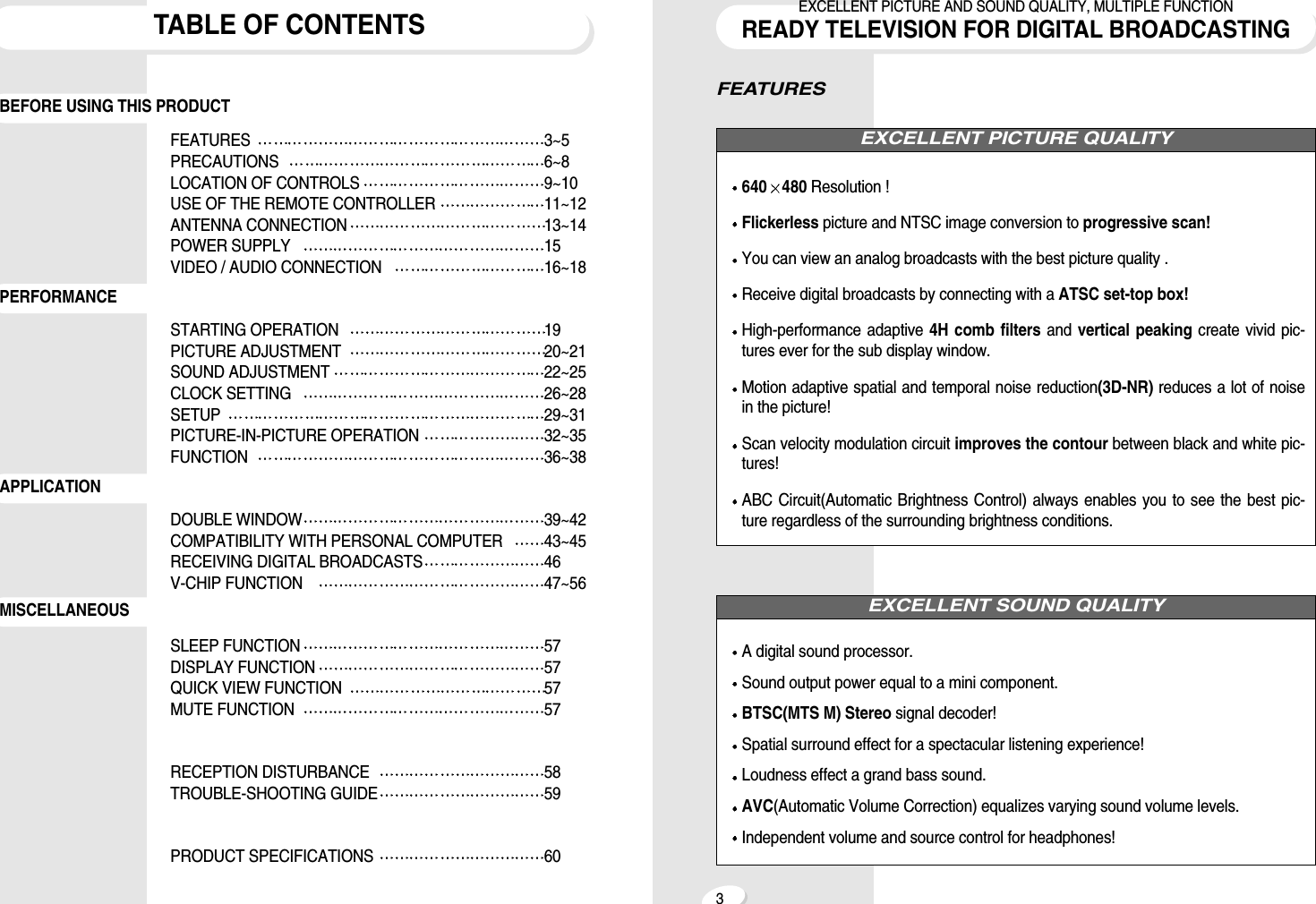
FEATURES640 480 Resolution !Flickerless picture and NTSC image conversion to progressive scan!You can view an analog broadcasts with the best picture quality .Receive digital broadcasts by connecting with a ATSC set-top box!High-performance adaptive 4H comb filters and  vertical peaking create vivid pic-tures ever for the sub display window.Motion adaptive spatial and temporal noise reduction(3D-NR) reduces a lot of noisein the picture!Scan velocity modulation circuit improves the contour between black and white pic-tures!ABC Circuit(Automatic Brightness Control) always enables you to see the best pic-ture regardless of the surrounding brightness conditions.A digital sound processor.Sound output power equal to a mini component.BTSC(MTS M) Stereo signal decoder!Spatial surround effect for a spectacular listening experience!Loudness effect a grand bass sound.AVC(Automatic Volume Correction) equalizes varying sound volume levels.Independent volume and source control for headphones!EXCELLENT SOUND QUALITYEXCELLENT PICTURE QUALITY3EXCELLENT PICTURE AND SOUND QUALITY, MULTIPLE FUNCTIONREADY TELEVISION FOR DIGITAL BROADCASTINGTABLE OF CONTENTSFEATURES 3~5PRECAUTIONS 6~8LOCATION OF CONTROLS 9~10USE OF THE REMOTE CONTROLLER 11~12ANTENNA CONNECTION 13~14POWER SUPPLY 15VIDEO / AUDIO CONNECTION 16~18STARTING OPERATION 19PICTURE ADJUSTMENT 20~21SOUND ADJUSTMENT 22~25CLOCK SETTING 26~28SETUP 29~31PICTURE-IN-PICTURE OPERATION 32~35FUNCTION 36~38DOUBLE WINDOW 39~42COMPATIBILITY WITH PERSONAL COMPUTER 43~45RECEIVING DIGITAL BROADCASTS 46V-CHIP FUNCTION  47~56SLEEP FUNCTION 57DISPLAY FUNCTION 57QUICK VIEW FUNCTION  57MUTE FUNCTION 57RECEPTION DISTURBANCE 58TROUBLE-SHOOTING GUIDE 59PRODUCT SPECIFICATIONS 60BEFORE USING THIS PRODUCTMISCELLANEOUSAPPLICATIONPERFORMANCE
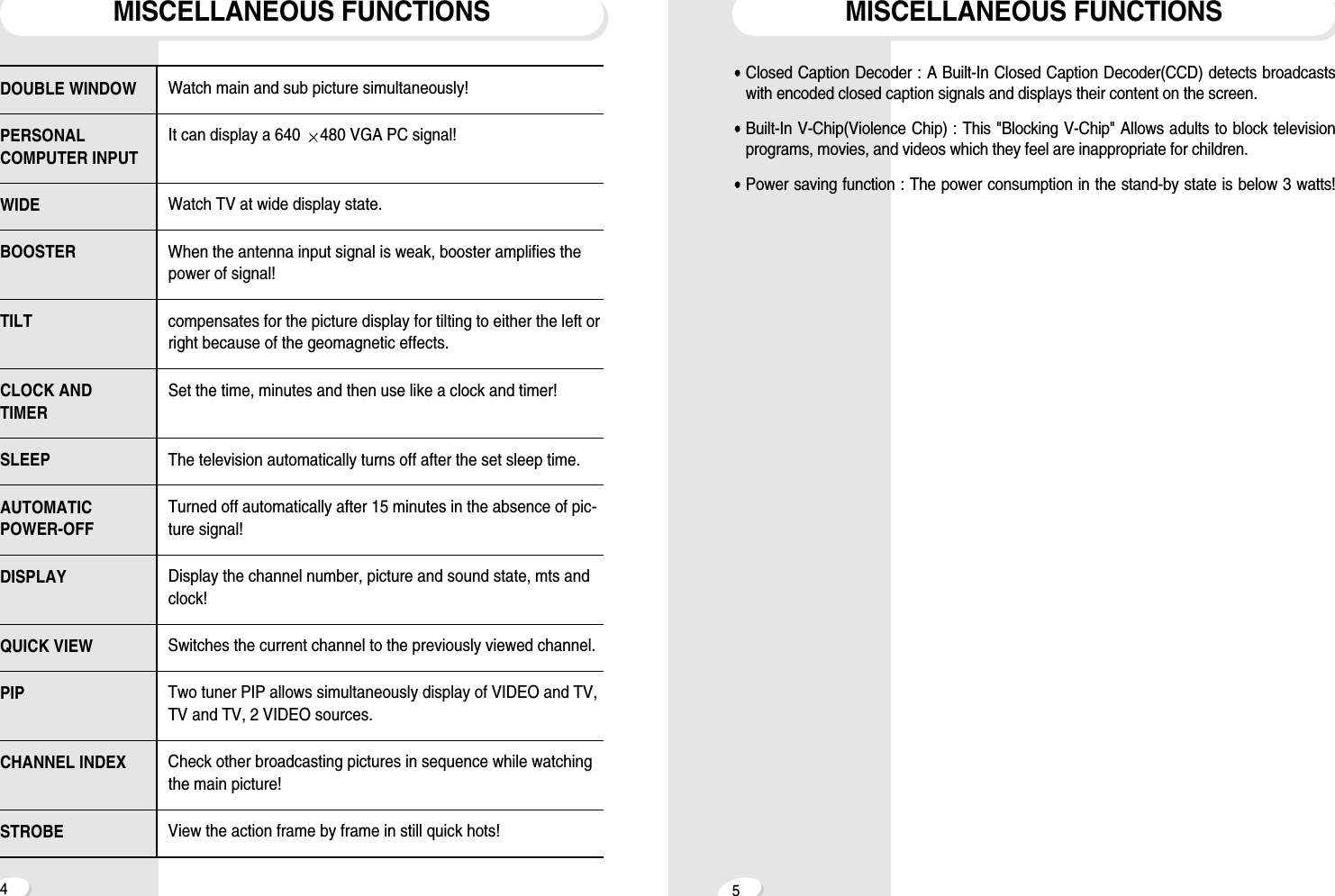
45MISCELLANEOUS FUNCTIONSMISCELLANEOUS FUNCTIONSClosed Caption Decoder : A Built-In Closed Caption Decoder(CCD) detects broadcastswith encoded closed caption signals and displays their content on the screen.Built-In V-Chip(Violence Chip) : This "Blocking V-Chip" Allows adults to block televisionprograms, movies, and videos which they feel are inappropriate for children. Power saving function : The power consumption in the stand-by state is below 3 watts!DOUBLE WINDOWPERSONALCOMPUTER INPUTWIDEBOOSTERTILTCLOCK ANDTIMERSLEEPAUTOMATIC POWER-OFFDISPLAYQUICK VIEWPIPCHANNEL INDEXSTROBEWatch main and sub picture simultaneously! It can display a 640  480 VGA PC signal!Watch TV at wide display state.When the antenna input signal is weak, booster amplifies thepower of signal!compensates for the picture display for tilting to either the left orright because of the geomagnetic effects.Set the time, minutes and then use like a clock and timer!The television automatically turns off after the set sleep time. Turned off automatically after 15 minutes in the absence of pic-ture signal!Display the channel number, picture and sound state, mts andclock!Switches the current channel to the previously viewed channel.Two tuner PIP allows simultaneously display of VIDEO and TV,TV and TV, 2 VIDEO sources.Check other broadcasting pictures in sequence while watchingthe main picture!View the action frame by frame in still quick hots!
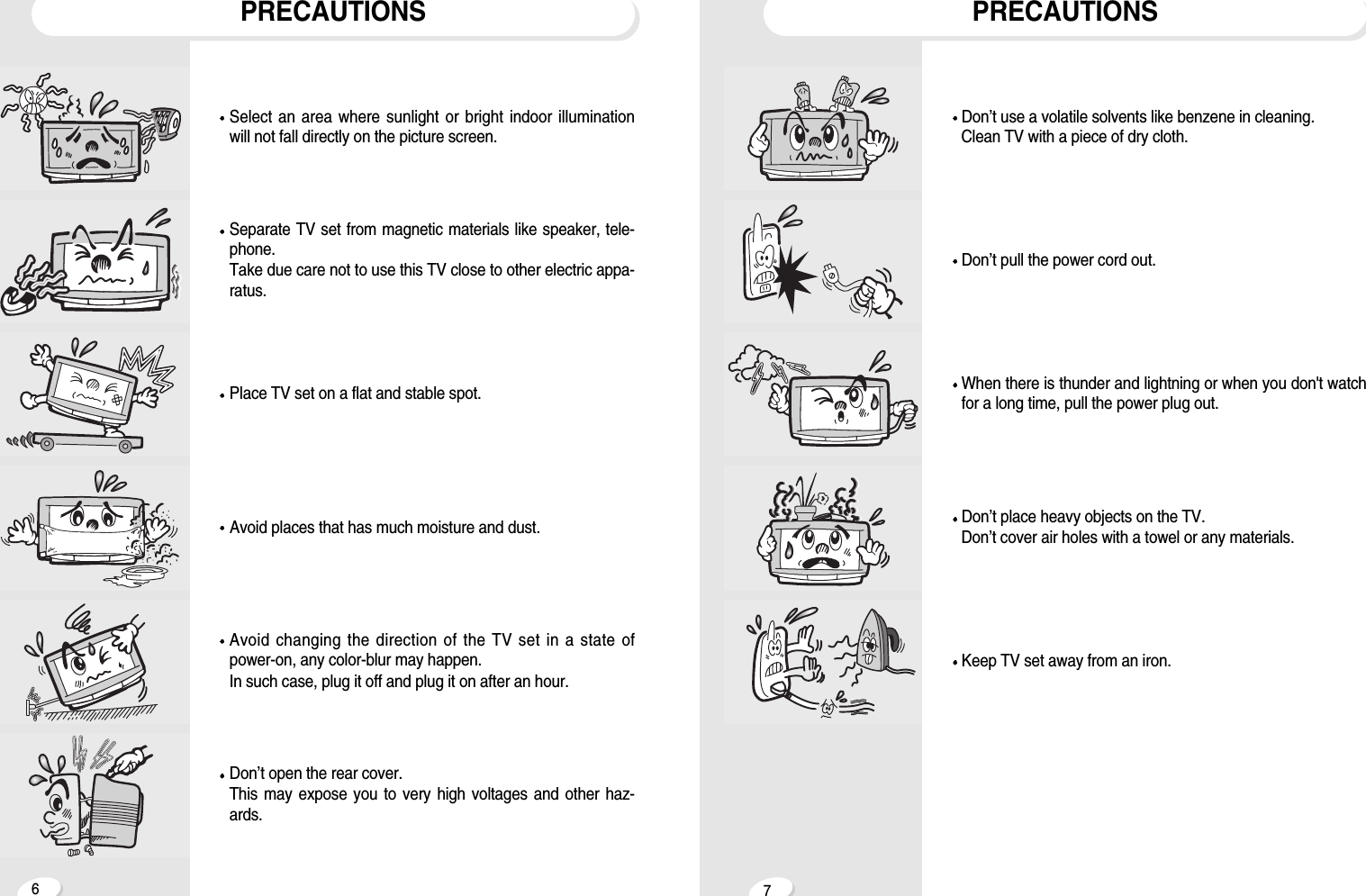
67PRECAUTIONSPRECAUTIONSDon’t open the rear cover.This may expose you to very high voltages and other haz-ards.Avoid changing the direction of the TV set in a state ofpower-on, any color-blur may happen. In such case, plug it off and plug it on after an hour.Avoid places that has much moisture and dust.Place TV set on a flat and stable spot.Separate TV set from magnetic materials like speaker, tele-phone.Take due care not to use this TV close to other electric appa-ratus.Select an area where sunlight or bright indoor illuminationwill not fall directly on the picture screen.Keep TV set away from an iron.Don’t place heavy objects on the TV.Don’t cover air holes with a towel or any materials.When there is thunder and lightning or when you don't watchfor a long time, pull the power plug out.Don’t pull the power cord out.Don’t use a volatile solvents like benzene in cleaning.Clean TV with a piece of dry cloth.
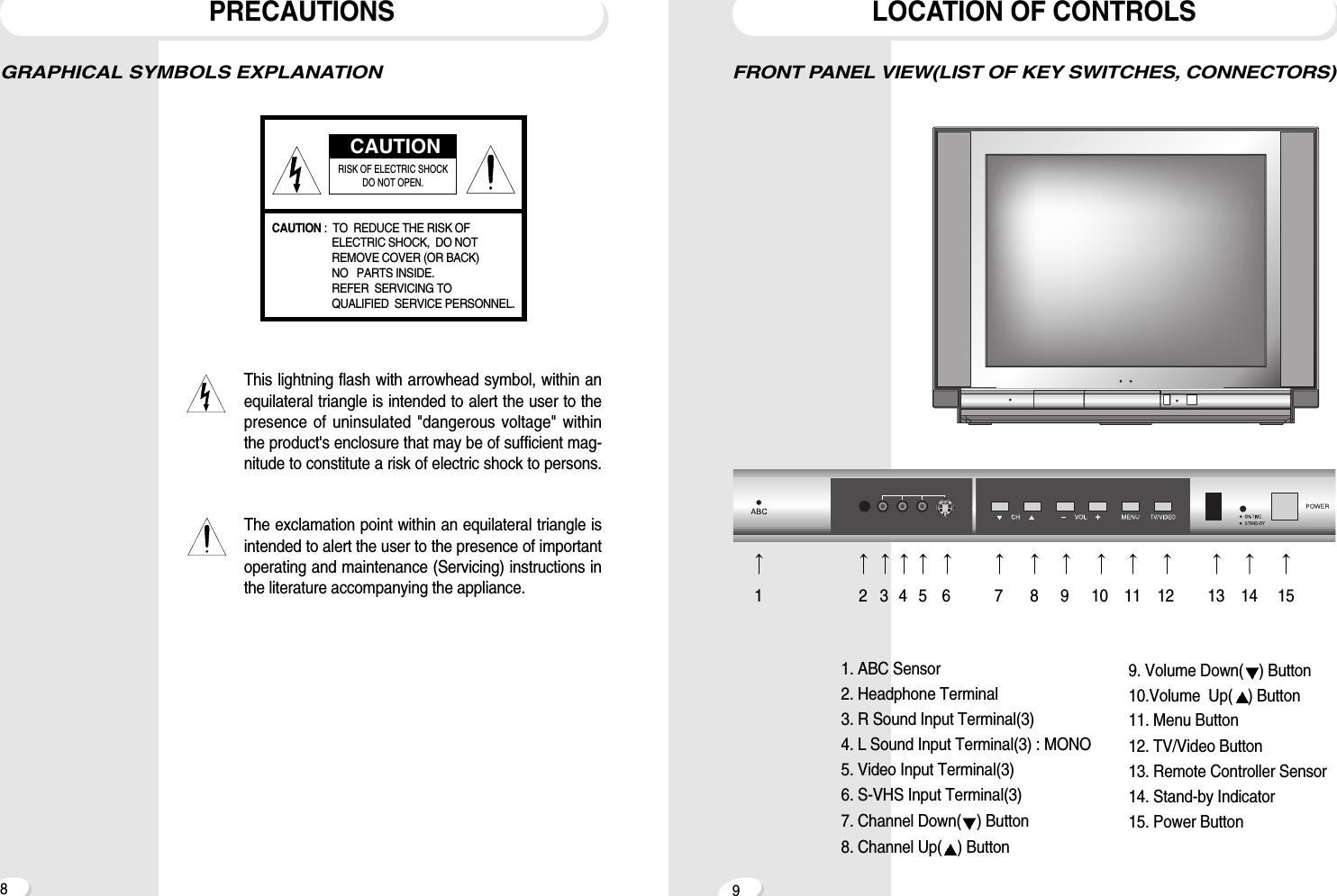
8LOCATION OF CONTROLS9PRECAUTIONSFRONT PANEL VIEW(LIST OF KEY SWITCHES, CONNECTORS)GRAPHICAL SYMBOLS EXPLANATIONThis lightning flash with arrowhead symbol, within anequilateral triangle is intended to alert the user to thepresence of uninsulated "dangerous voltage" withinthe product's enclosure that may be of sufficient mag-nitude to constitute a risk of electric shock to persons.The exclamation point within an equilateral triangle isintended to alert the user to the presence of importantoperating and maintenance (Servicing) instructions inthe literature accompanying the appliance.CAUTIONRISK OF ELECTRIC SHOCK DO NOT OPEN.CAUTION :  TO  REDUCE THE RISK OF ELECTRIC SHOCK,  DO NOTREMOVE COVER (OR BACK)  NO   PARTS INSIDE. REFER  SERVICING TO QUALIFIED  SERVICE PERSONNEL.123456789101112 13 14 151. ABC Sensor2. Headphone Terminal3. R Sound Input Terminal(3)4. L Sound Input Terminal(3) : MONO5. Video Input Terminal(3)6. S-VHS Input Terminal(3)7. Channel Down( ) Button8. Channel Up( ) Button9. Volume Down( ) Button10.Volume  Up( ) Button11. Menu Button12. TV/Video Button13. Remote Controller Sensor14. Stand-by Indicator15. Power Button
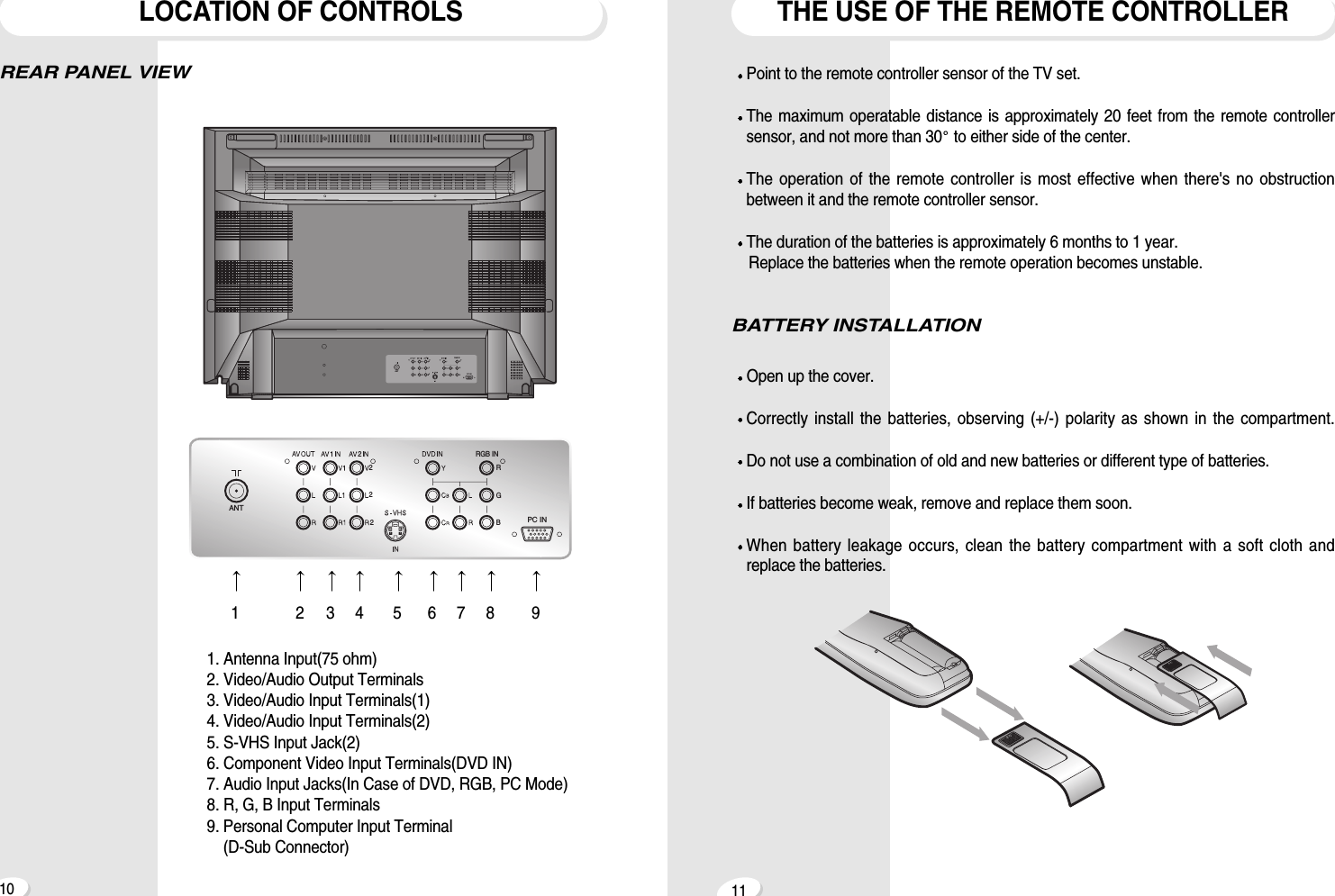
THE USE OF THE REMOTE CONTROLLERLOCATION OF CONTROLS10 11REAR PANEL VIEWPoint to the remote controller sensor of the TV set.The maximum operatable distance is approximately 20 feet from the remote controllersensor, and not more than 30 to either side of the center.The operation of the remote controller is most effective when there's no obstructionbetween it and the remote controller sensor.The duration of the batteries is approximately 6 months to 1 year.Replace the batteries when the remote operation becomes unstable.BATTERY INSTALLATIONOpen up the cover.Correctly install the batteries, observing (+/-) polarity as shown in the compartment.Do not use a combination of old and new batteries or different type of batteries.If batteries become weak, remove and replace them soon.When battery leakage occurs, clean the battery compartment with a soft cloth andreplace the batteries.2RGB2 RGB IN2ANTPC IN22RGB2 RGB IN2ANTPC IN21234567891. Antenna Input(75 ohm)2. Video/Audio Output Terminals3. Video/Audio Input Terminals(1)4. Video/Audio Input Terminals(2)5. S-VHS Input Jack(2)6. Component Video Input Terminals(DVD IN)7. Audio Input Jacks(In Case of DVD, RGB, PC Mode)8. R, G, B Input Terminals9. Personal Computer Input Terminal(D-Sub Connector)
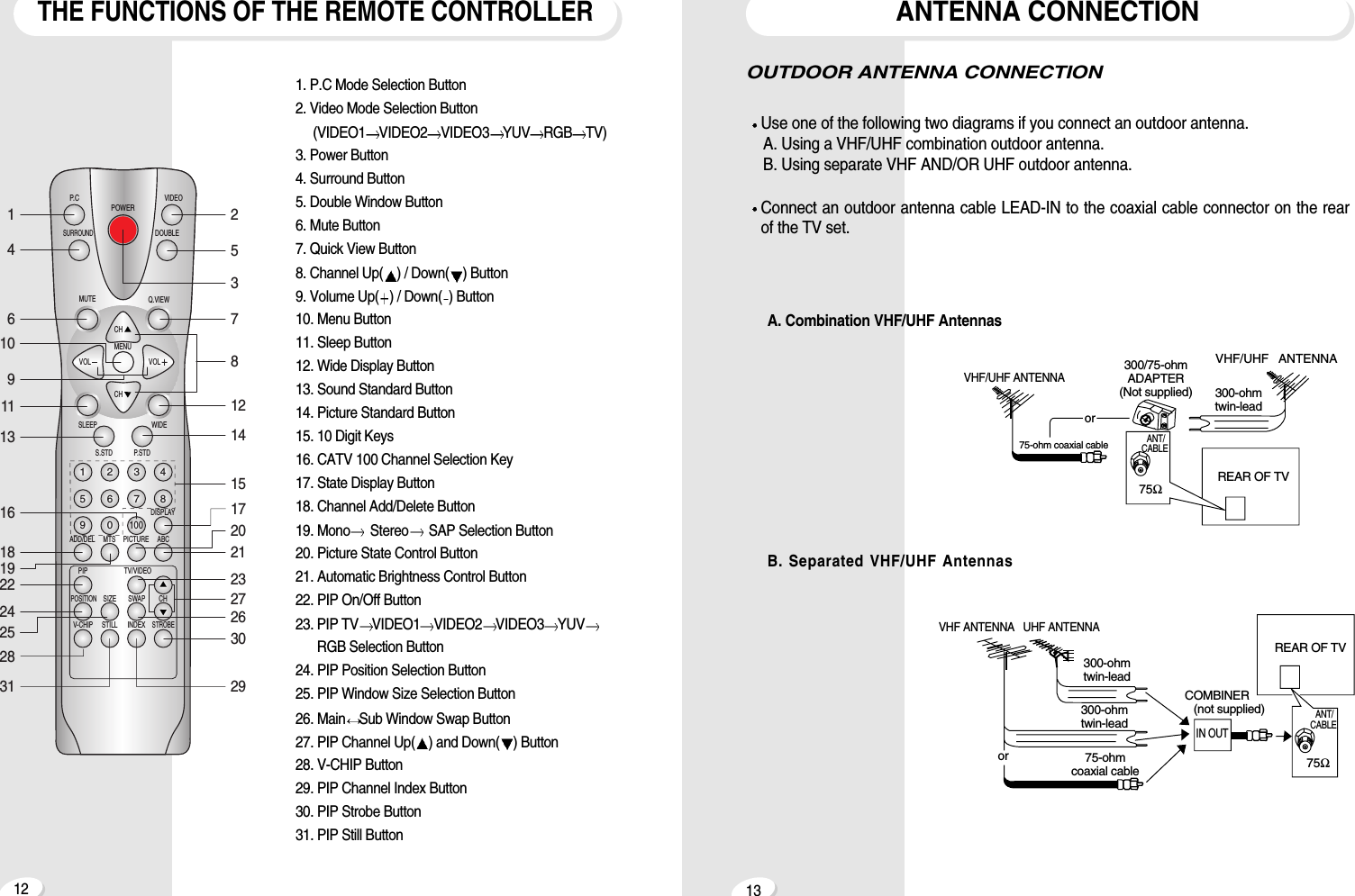
ANTENNA CONNECTIONTHE FUNCTIONS OF THE REMOTE CONTROLLER12 131. P.C Mode Selection Button2. Video Mode Selection Button(VIDEO1 VIDEO2 VIDEO3 YUV RGB TV)3. Power Button4. Surround Button5. Double Window Button6. Mute Button7. Quick View Button8. Channel Up( ) / Down( ) Button9. Volume Up( ) / Down( ) Button10. Menu Button11. Sleep Button12. Wide Display Button13. Sound Standard Button14. Picture Standard Button15. 10 Digit Keys16. CATV 100 Channel Selection Key17. State Display Button18. Channel Add/Delete Button19. Mono Stereo SAP Selection Button20. Picture State Control Button21. Automatic Brightness Control Button22. PIP On/Off Button23. PIP TV VIDEO1 VIDEO2 VIDEO3 YUVRGB Selection Button24. PIP Position Selection Button25. PIP Window Size Selection Button26. Main Sub Window Swap Button27. PIP Channel Up( ) and Down( ) Button28. V-CHIP Button29. PIP Channel Index Button30. PIP Strobe Button31. PIP Still ButtonPOWERVIDEODOUBLEMUTESLEEP WIDEP.STDDISPLAYABCPICTUREMTSADD/DELPOSITIONV-CHIP STILL INDEXSTROBESIZE SWAP CHTV/VIDEOS.STDQ.VIEWMENUVOLCHCHVOLP. CSURROUND1234567890100PIP23146109111318191622243125285781214151721202726233029A. Combination VHF/UHF AntennasB. Separated VHF/UHF AntennasVHF ANTENNA   UHF ANTENNA300-ohmtwin-lead300-ohmtwin-lead75-ohmcoaxial cableANT/CABLE75ΩIN OUTCOMBINER(not supplied)REAR OF TVorVHF/UHF ANTENNA300/75-ohmADAPTER(Not supplied) 300-ohmtwin-lead75-ohm coaxial cableANT/CABLE75ΩorVHF/UHF  ANTENNAREAR OF TVOUTDOOR ANTENNA CONNECTIONUse one of the following two diagrams if you connect an outdoor antenna.A. Using a VHF/UHF combination outdoor antenna.B. Using separate VHF AND/OR UHF outdoor antenna.Connect an outdoor antenna cable LEAD-IN to the coaxial cable connector on the rearof the TV set.
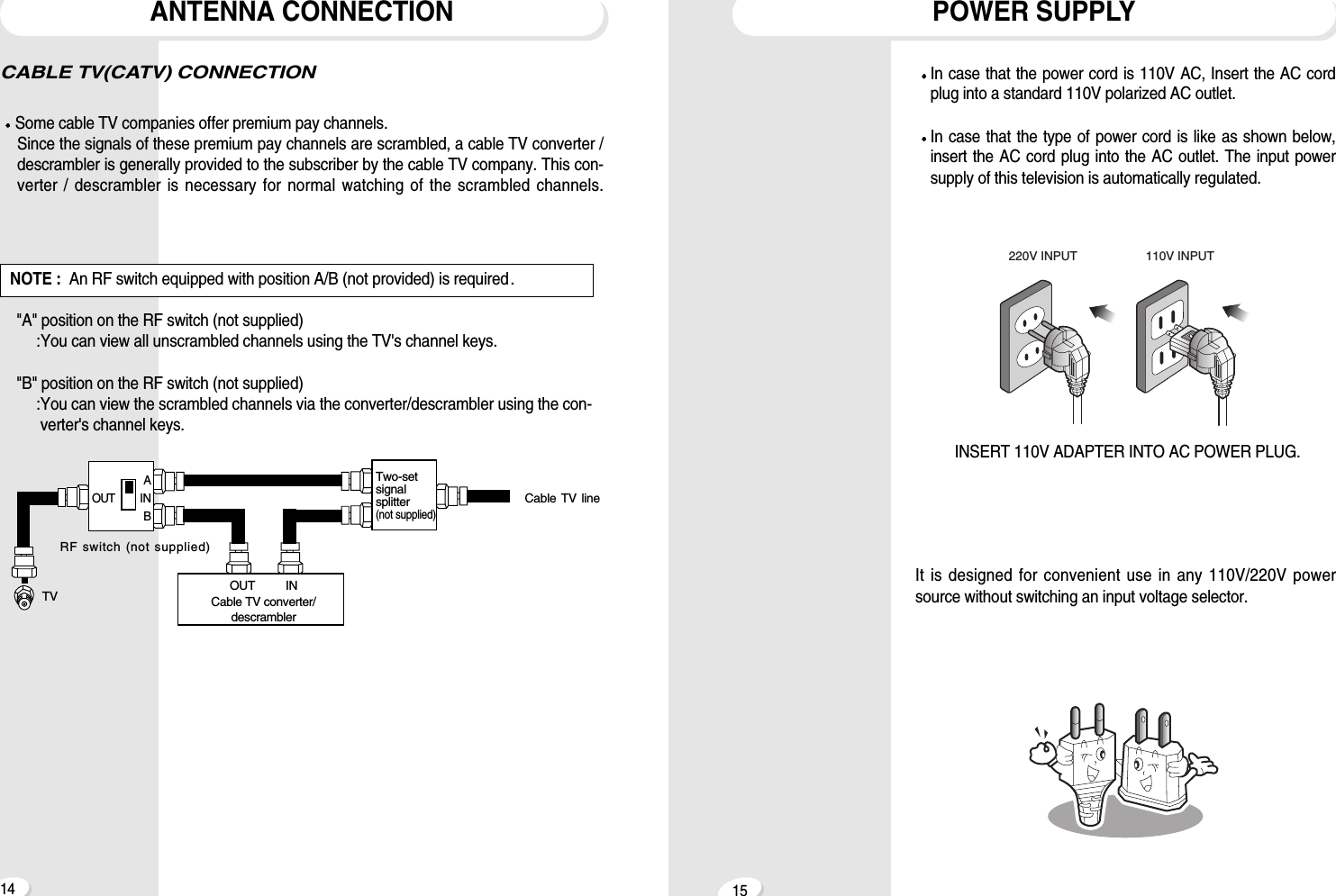
15ANTENNA CONNECTION14POWER SUPPLY220V INPUT 110V INPUTINSERT 110V ADAPTER INTO AC POWER PLUG.Cable TV lineTV OUT   INCable TV converter/descramblerTwo-setsignalsplitter(not supplied)RF switch (not supplied)AOUT INB"A" position on the RF switch (not supplied):You can view all unscrambled channels using the TV's channel keys."B" position on the RF switch (not supplied):You can view the scrambled channels via the converter/descrambler using the con-verter's channel keys.NOTE : An RF switch equipped with position A/B (not provided) is required.CABLE TV(CATV) CONNECTIONSome cable TV companies offer premium pay channels. Since the signals of these premium pay channels are scrambled, a cable TV converter /descrambler is generally provided to the subscriber by the cable TV company. This con-verter / descrambler is necessary for normal watching of the scrambled channels.In case that the power cord is 110V AC, Insert the AC cordplug into a standard 110V polarized AC outlet.In case that the type of power cord is like as shown below,insert the AC cord plug into the AC outlet. The input powersupply of this television is automatically regulated.It is designed for convenient use in any 110V/220V powersource without switching an input voltage selector.
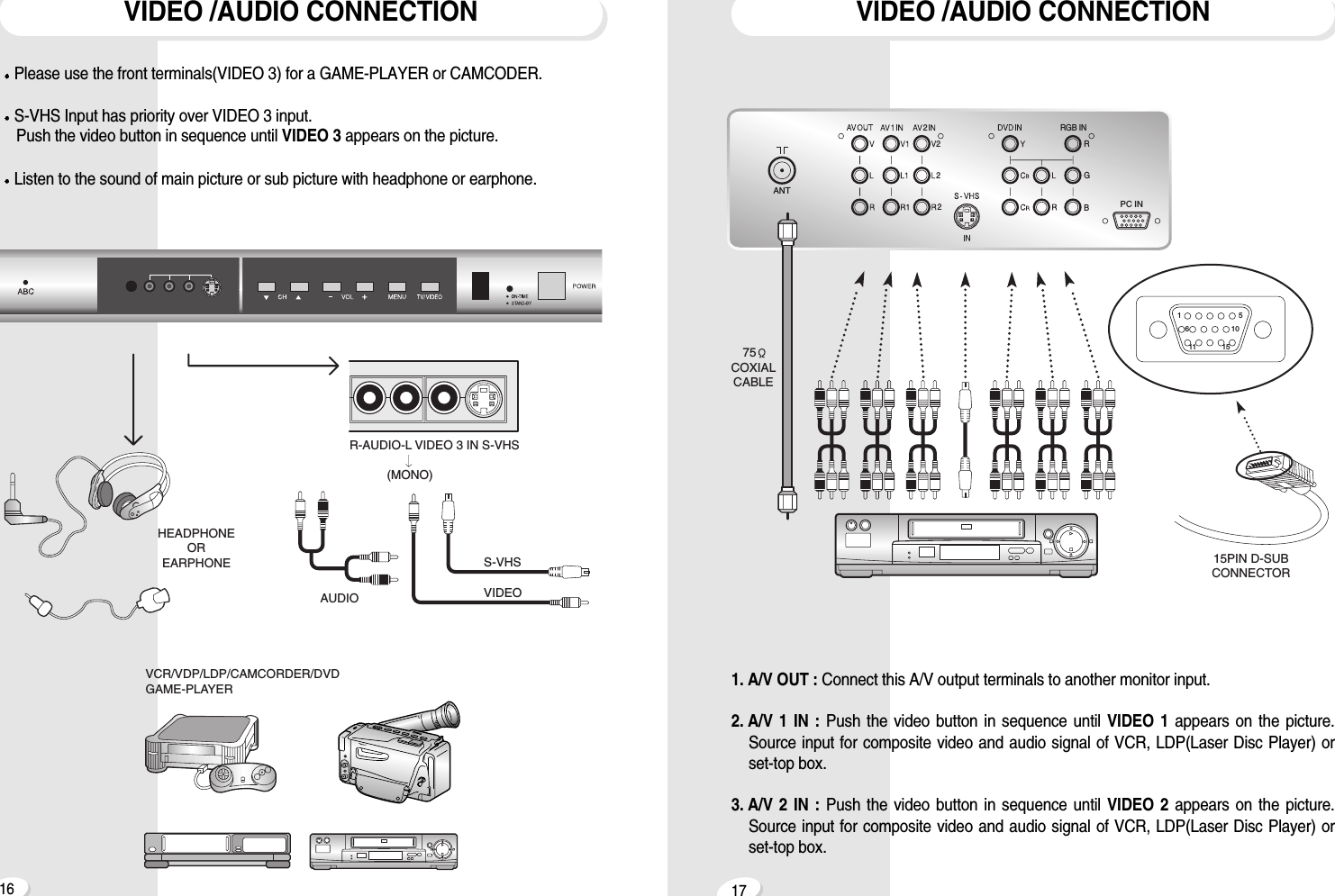
1716VIDEO /AUDIO CONNECTION1. A/V OUT : Connect this A/V output terminals to another monitor input.2. A/V 1 IN : Push the video button in sequence until VIDEO 1 appears on the picture.Source input for composite video and audio signal of VCR, LDP(Laser Disc Player) orset-top box.3. A/V 2 IN : Push the video button in sequence until VIDEO 2 appears on the picture.Source input for composite video and audio signal of VCR, LDP(Laser Disc Player) orset-top box.2RGB2 RGB IN2ANTPC IN275COXIALCABLEVIDEO /AUDIO CONNECTIONAUDIOHEADPHONEOREARPHONE S-VHSVIDEOR-AUDIO-L VIDEO 3 IN S-VHS           (MONO)VCR/VDP/LDP/CAMCORDER/DVDGAME-PLAYER15PIN D-SUBCONNECTOR1561011 15Please use the front terminals(VIDEO 3) for a GAME-PLAYER or CAMCODER.S-VHS Input has priority over VIDEO 3 input.Push the video button in sequence until VIDEO 3 appears on the picture.Listen to the sound of main picture or sub picture with headphone or earphone.
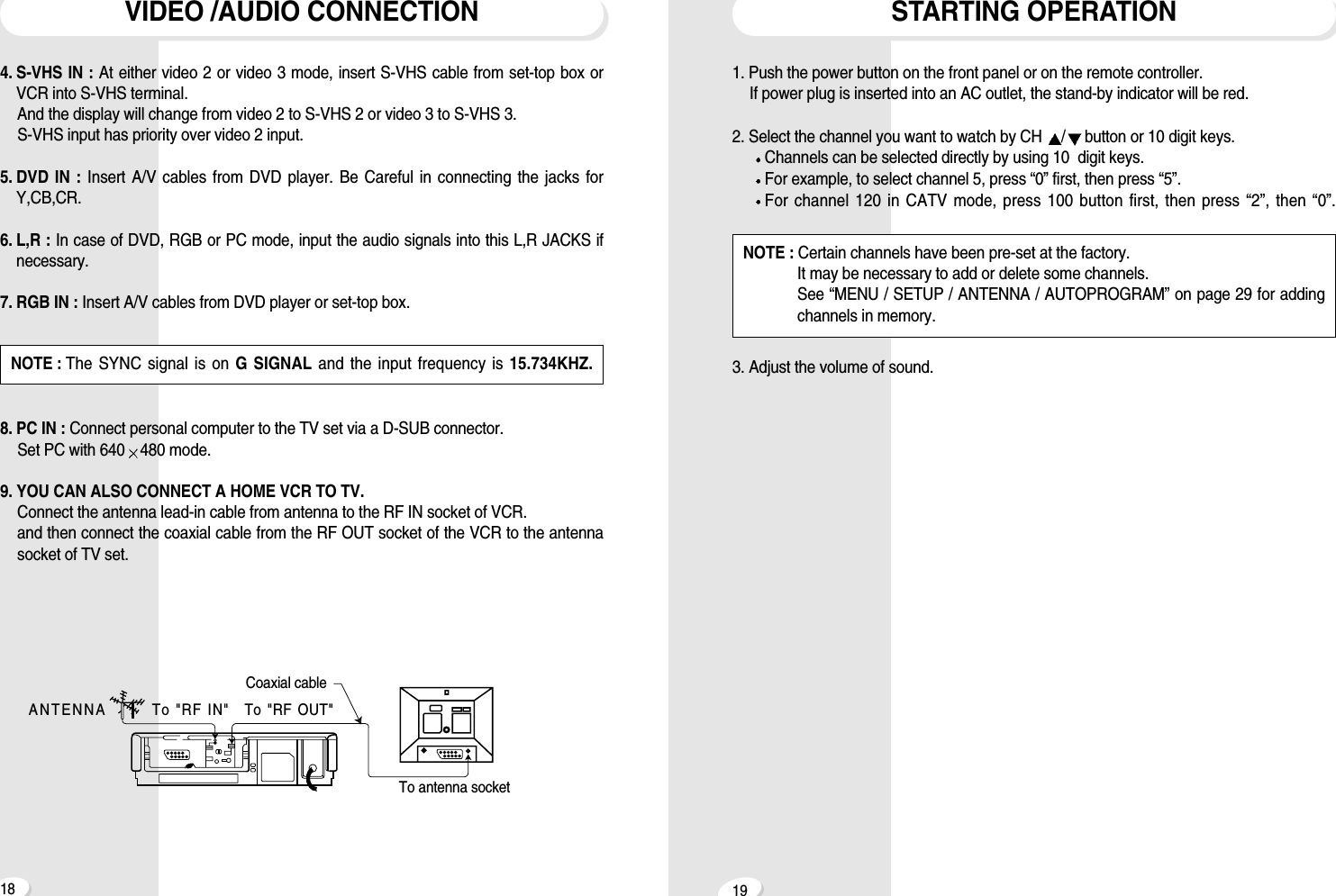
1918STARTING OPERATION1. Push the power button on the front panel or on the remote controller.If power plug is inserted into an AC outlet, the stand-by indicator will be red.2. Select the channel you want to watch by CH  /button or 10 digit keys.Channels can be selected directly by using 10  digit keys.For example, to select channel 5, press “0” first, then press “5”.For channel 120 in CATV mode, press 100 button first, then press “2”, then “0”.3. Adjust the volume of sound.NOTE : Certain channels have been pre-set at the factory.It may be necessary to add or delete some channels.See “MENU / SETUP / ANTENNA / AUTOPROGRAM” on page 29 for addingchannels in memory.VIDEO /AUDIO CONNECTION4. S-VHS IN : At either video 2 or video 3 mode, insert S-VHS cable from set-top box orVCR into S-VHS terminal.And the display will change from video 2 to S-VHS 2 or video 3 to S-VHS 3.S-VHS input has priority over video 2 input.5. DVD IN : Insert A/V cables from DVD player. Be Careful in connecting the jacks forY,CB,CR.6. L,R : In case of DVD, RGB or PC mode, input the audio signals into this L,R JACKS ifnecessary.7. RGB IN : Insert A/V cables from DVD player or set-top box. 8. PC IN : Connect personal computer to the TV set via a D-SUB connector.Set PC with 640 480 mode.9. YOU CAN ALSO CONNECT A HOME VCR TO TV.Connect the antenna lead-in cable from antenna to the RF IN socket of VCR.and then connect the coaxial cable from the RF OUT socket of the VCR to the antennasocket of TV set. ANTENNA To "RF IN"To antenna socketTo "RF OUT"Coaxial cableNOTE : The SYNC signal is on G SIGNAL and the input frequency is 15.734KHZ.
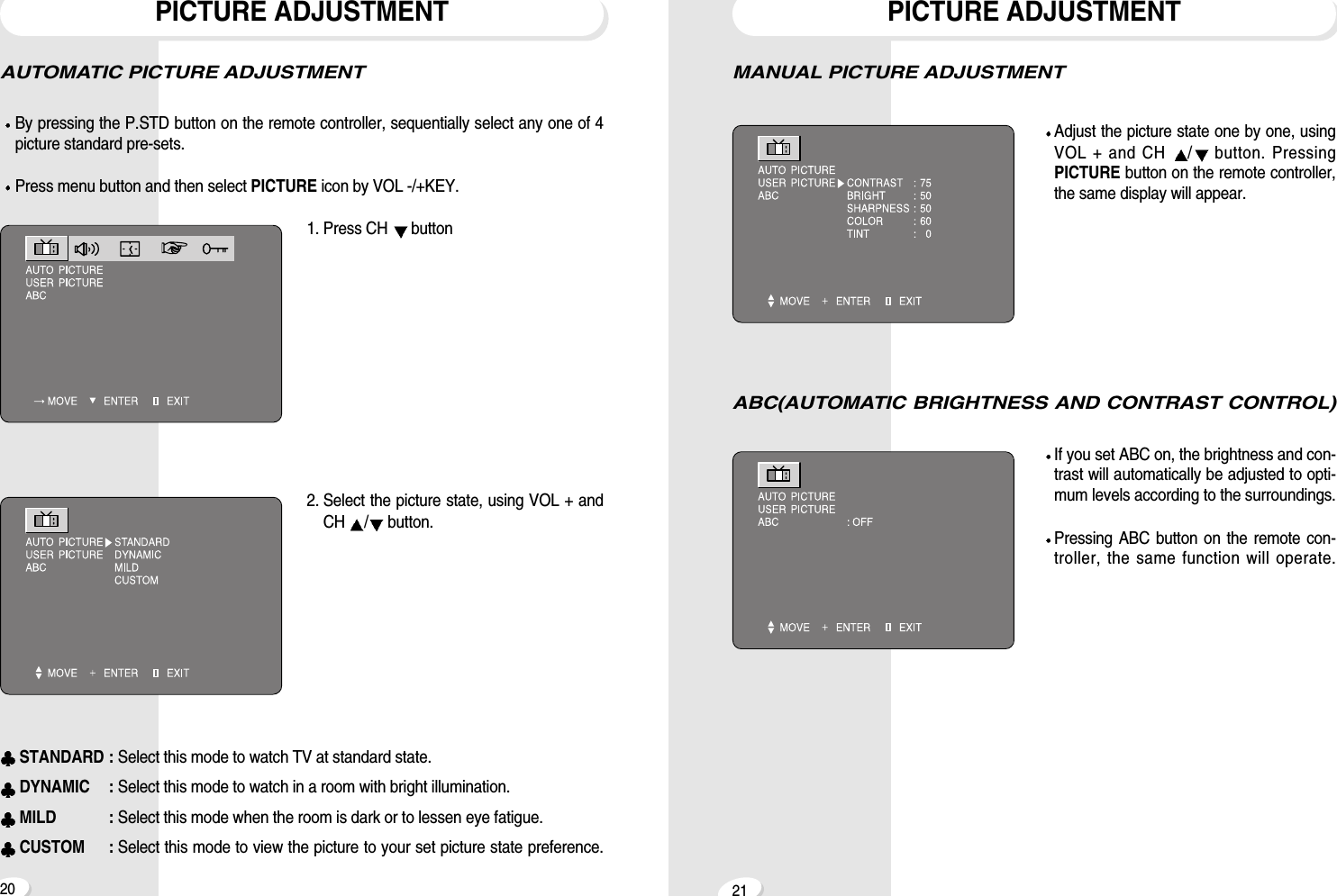
2120PICTURE ADJUSTMENTMANUAL PICTURE ADJUSTMENTAdjust the picture state one by one, usingVOL + and CH  /button. PressingPICTURE button on the remote controller,the same display will appear.ABC(AUTOMATIC BRIGHTNESS AND CONTRAST CONTROL)If you set ABC on, the brightness and con-trast will automatically be adjusted to opti-mum levels according to the surroundings.Pressing ABC button on the remote con-troller, the same function will operate.PICTURE ADJUSTMENTAUTOMATIC PICTURE ADJUSTMENTBy pressing the P.STD button on the remote controller, sequentially select any one of 4picture standard pre-sets.Press menu button and then select PICTURE icon by VOL -/+KEY.1. Press CH  button2. Select the picture state, using VOL + andCH  /button.STANDARD : Select this mode to watch TV at standard state.DYNAMIC : Select this mode to watch in a room with bright illumination.MILD : Select this mode when the room is dark or to lessen eye fatigue.CUSTOM : Select this mode to view the picture to your set picture state preference.
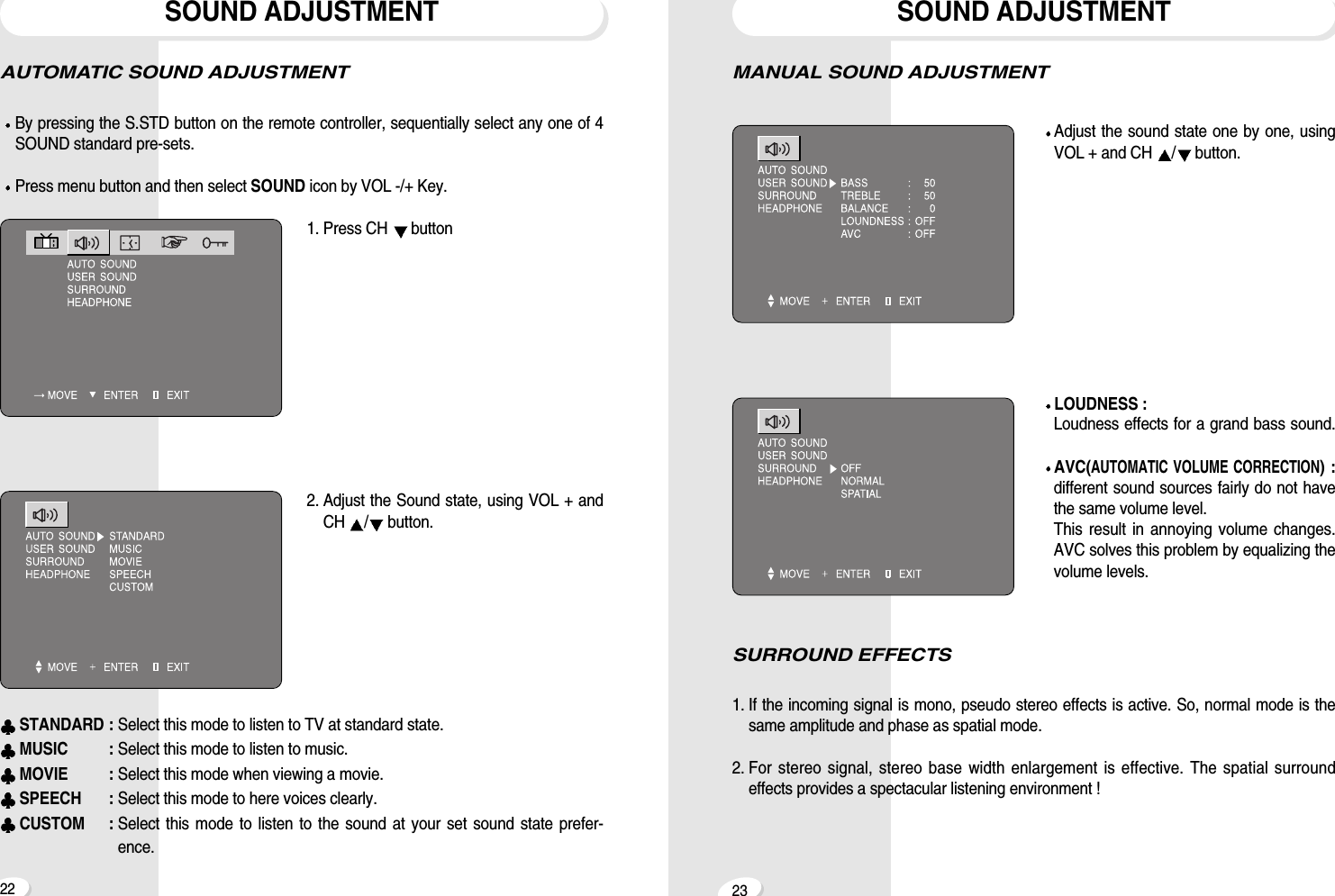
2322SOUND ADJUSTMENTMANUAL SOUND ADJUSTMENTAdjust the sound state one by one, usingVOL + and CH  /button.LOUDNESS : Loudness effects for a grand bass sound.AVC(AUTOMATIC VOLUME CORRECTION) : different sound sources fairly do not havethe same volume level.This result in annoying volume changes. AVC solves this problem by equalizing thevolume levels.SURROUND EFFECTS1. If the incoming signal is mono, pseudo stereo effects is active. So, normal mode is thesame amplitude and phase as spatial mode.2. For stereo signal, stereo base width enlargement is effective. The spatial surroundeffects provides a spectacular listening environment !SOUND ADJUSTMENTAUTOMATIC SOUND ADJUSTMENTBy pressing the S.STD button on the remote controller, sequentially select any one of 4SOUND standard pre-sets.Press menu button and then select SOUND icon by VOL -/+ Key.1. Press CH  button2. Adjust the Sound state, using VOL + andCH  /button.STANDARD : Select this mode to listen to TV at standard state.MUSIC : Select this mode to listen to music.MOVIE : Select this mode when viewing a movie.SPEECH : Select this mode to here voices clearly.CUSTOM : Select this mode to listen to the sound at your set sound state prefer-ence.
2524SOUND ADJUSTMENTSTEREO SOUND SYSTEMWhen the power is switched on or channel changes, “ [[S]],  ]” symbols are automati-cally displayed, depending on the current broadcast signal.If the receiving signal is weak, noise may be heard.In such case, press MTS button and set the sound mode mono for better sound recep-tion.SOUND ADJUSTMENTHEADPHONEAdjust the volume of sound by VOL + andCH  /button.STEREO SOUND SYSTEMThis TV has a built-in BTSC system(ZenithDBX System) decoder to receive stereobroadcast and SAP(Secondary AudioProgram) such as a bilingual broadcast.Whenever MTS button is pressed, the reception mode will change as below. MONO  STEREO  SAPThe “ [[S]],  ] ” symbols indicate that a broadcasting station is transmitting a multiplexsound broadcast. [[S]]   STEREO SYMBOL]   SAP SYMBOL
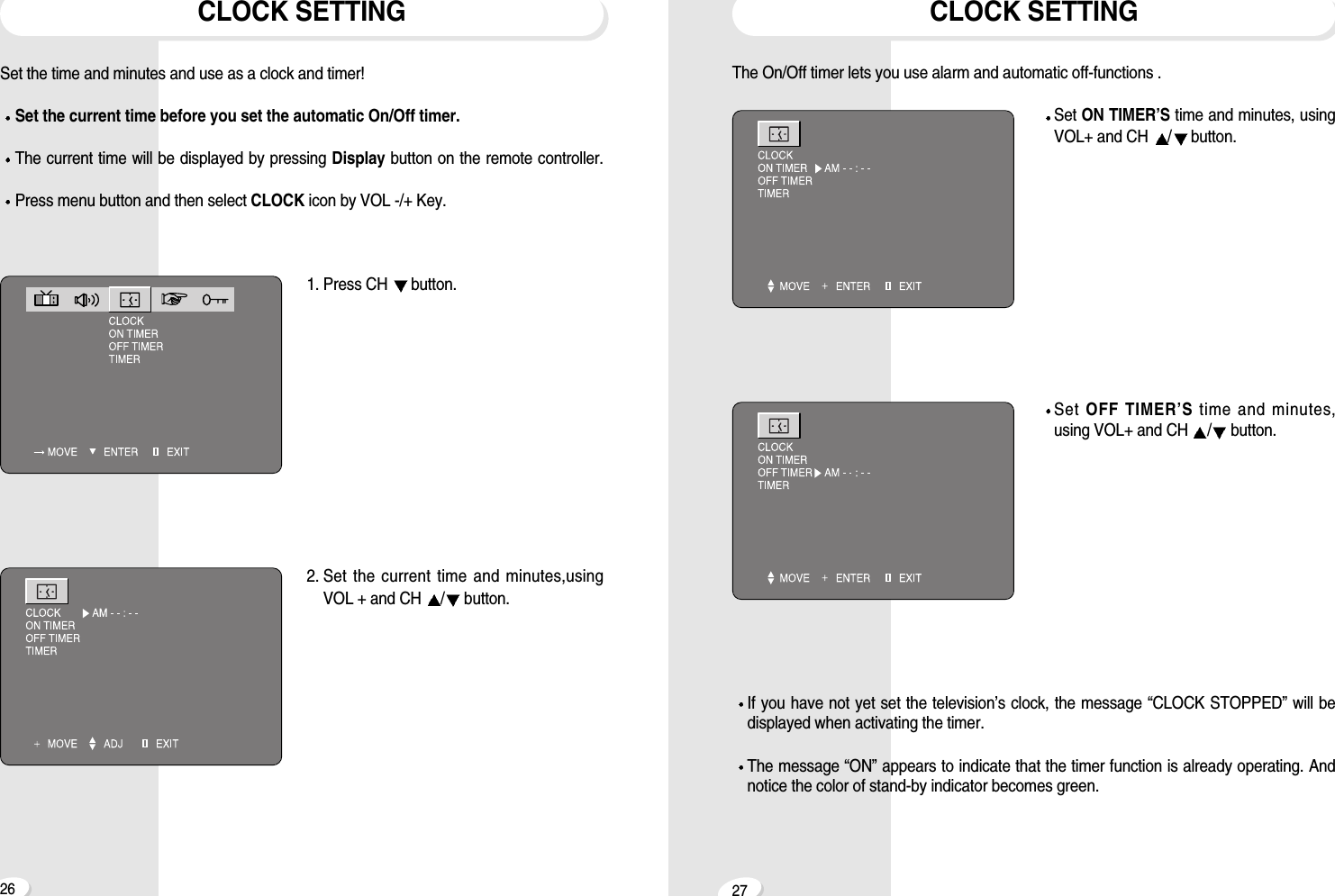
2726The On/Off timer lets you use alarm and automatic off-functions .Set ON TIMER’S time and minutes, usingVOL+ and CH  /button.Set OFF TIMER’S time and minutes,using VOL+ and CH  /button.If you have not yet set the television’s clock, the message “CLOCK STOPPED” will bedisplayed when activating the timer.The message “ON” appears to indicate that the timer function is already operating. Andnotice the color of stand-by indicator becomes green.CLOCK SETTINGCLOCK SETTINGSet the time and minutes and use as a clock and timer! Set the current time before you set the automatic On/Off timer.The current time will be displayed by pressing Display button on the remote controller.Press menu button and then select CLOCK icon by VOL -/+ Key.1. Press CH  button.2. Set the current time and minutes,usingVOL + and CH  /button.
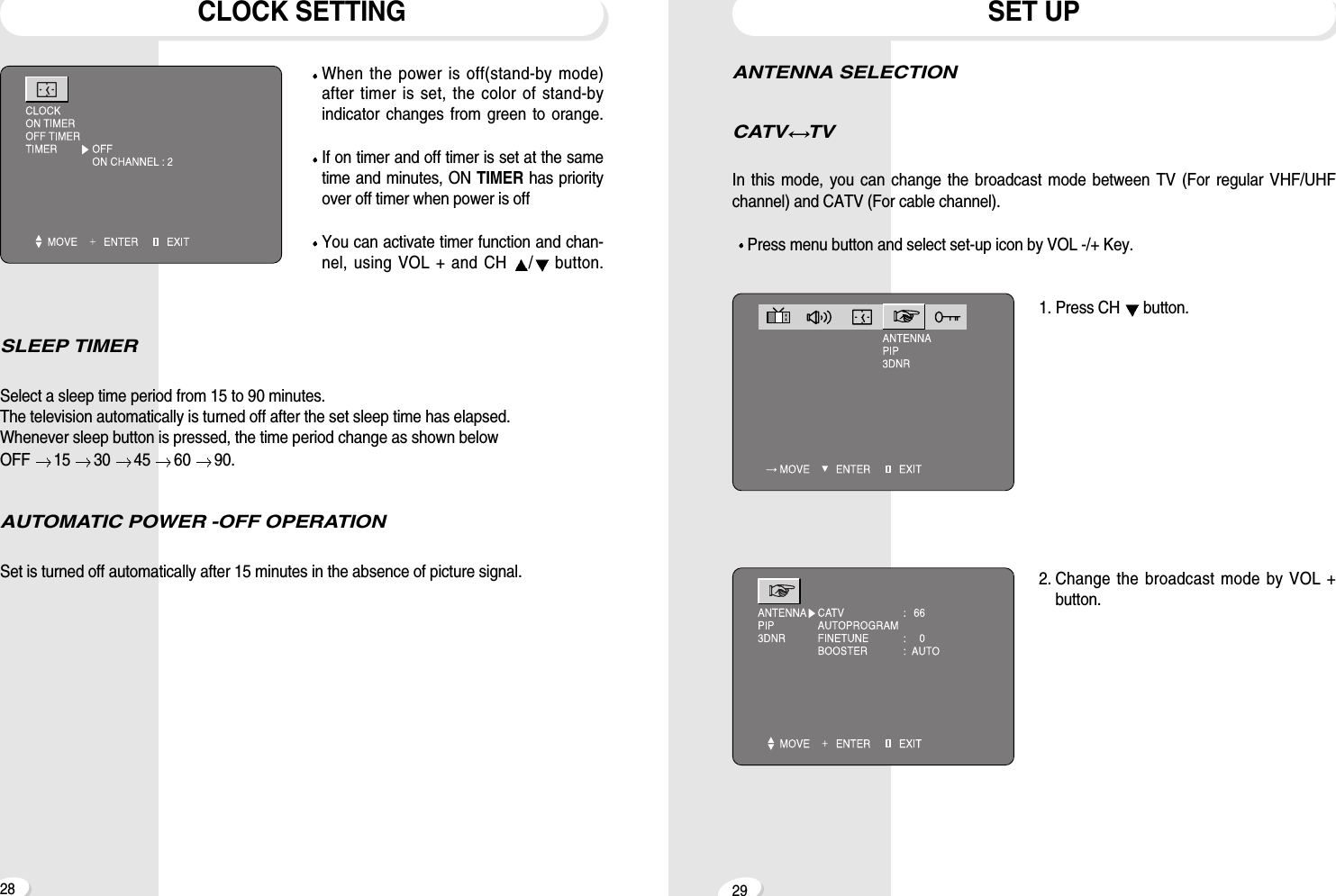
2928ANTENNA SELECTIONCATV TVIn this mode, you can change the broadcast mode between TV (For regular VHF/UHFchannel) and CATV (For cable channel).Press menu button and select set-up icon by VOL -/+ Key.1. Press CH  button.2. Change the broadcast mode by VOL +button.SET UPCLOCK SETTINGWhen the power is off(stand-by mode)after timer is set, the color of stand-byindicator changes from green to orange.If on timer and off timer is set at the sametime and minutes, ON TIMER has priorityover off timer when power is offYou can activate timer function and chan-nel, using VOL + and CH  /button.SLEEP TIMERSelect a sleep time period from 15 to 90 minutes.The television automatically is turned off after the set sleep time has elapsed.Whenever sleep button is pressed, the time period change as shown below OFF  15  30  45  60  90.AUTOMATIC POWER -OFF OPERATIONSet is turned off automatically after 15 minutes in the absence of picture signal.

Navigation menu