KTV Global LT64BD FM Transmitter User Manual

KTV Global Corporation FM Transmitter

USER MANUAL

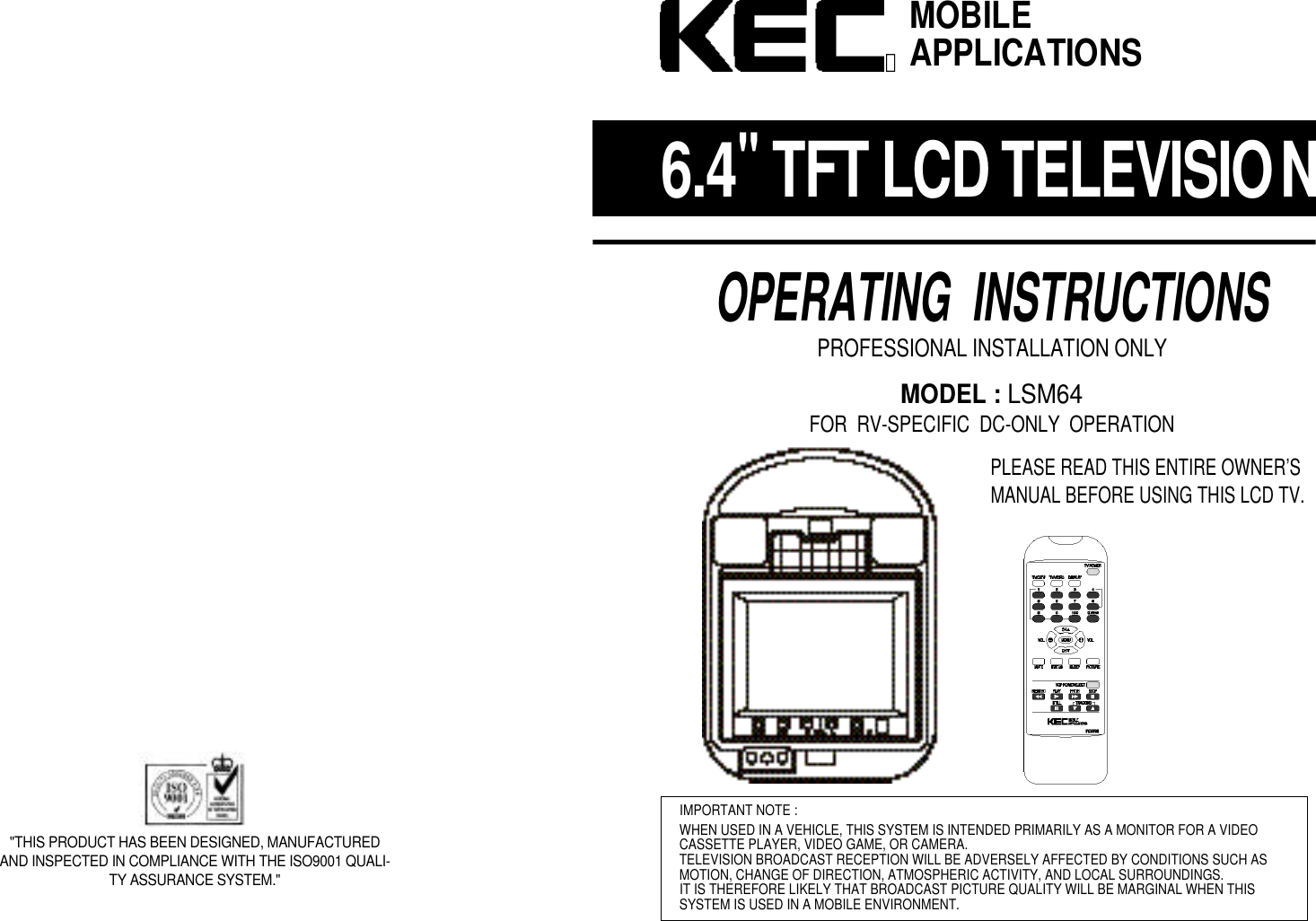
6 . 4"TFT LCD TELEVISIONOPERATING  INSTRUCTIONSPROFESSIONAL INSTALLATION ONLYMODEL : LSM64FOR  RV-SPECIFIC  DC-ONLY  OPERATIONPLEASE READ THIS ENTIRE OWNER’SMANUAL BEFORE USING THIS LCD TV.IMPORTANT NOTE :WHEN USED IN A VEHICLE, THIS SYSTEM IS INTENDED PRIMARILY AS A MONITOR FOR A VIDEOCASSETTE PLAYER, VIDEO GAME, OR CAMERA.TELEVISION BROADCAST RECEPTION WILL BE ADVERSELY AFFECTED BY CONDITIONS SUCH ASMOTION, CHANGE OF DIRECTION, ATMOSPHERIC ACTIVITY, AND LOCAL SURROUNDINGS.IT IS THEREFORE LIKELY THAT BROADCAST PICTURE QUALITY WILL BE MARGINAL WHEN THIS SYSTEM IS USED IN A MOBILE ENVIRONMENT.MOBILEAPPLICATIONSⓇ"THIS PRODUCT HAS BEEN DESIGNED, MANUFACTUREDAND INSPECTED IN COMPLIANCE WITH THE ISO9001 QUALI-TY ASSURANCE SYSTEM."
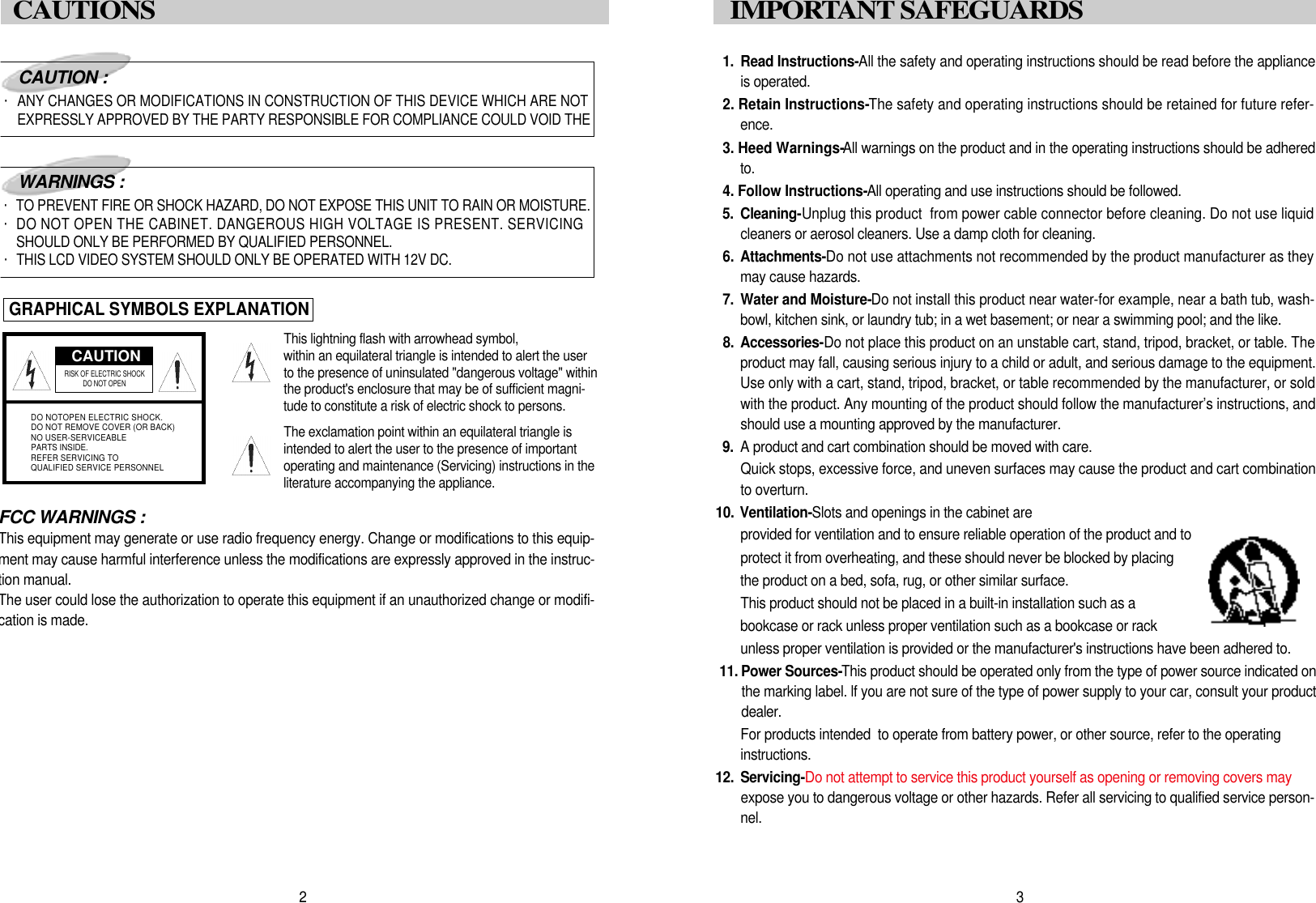
1 . Read Instructions-All the safety and operating instructions should be read before the applianceis operated.2. Retain Instructions-The safety and operating instructions should be retained for future refer-e n c e .3. Heed Warnings-All warnings on the product and in the operating instructions should be adheredt o .4. Follow Instructions-All operating and use instructions should be followed.5 . C l e a n i n g -Unplug this product  from power cable connector before cleaning. Do not use liquidcleaners or aerosol cleaners. Use a damp cloth for cleaning.6. A t t a c h m e n t s -Do not use attachments not recommended by the product manufacturer as theymay cause hazards.7 . Water and Moisture-Do not install this product near water-for example, near a bath tub, wash-bowl, kitchen sink, or laundry tub; in a wet basement; or near a swimming pool; and the like.8 . A c c e s s o r i e s -Do not place this product on an unstable cart, stand, tripod, bracket, or table. Theproduct may fall, causing serious injury to a child or adult, and serious damage to the equipment.Use only with a cart, stand, tripod, bracket, or table recommended by the manufacturer, or soldwith the product. Any mounting of the product should follow the manufacturer’s instructions, andshould use a mounting approved by the manufacturer.9 . A product and cart combination should be moved with care.Quick stops, excessive force, and uneven surfaces may cause the product and cart combinationto overturn.1 0. V e n t i l a t i o n - Slots and openings in the cabinet are provided for ventilation and to ensure reliable operation of the product and to protect it from overheating, and these should never be blocked by placing the product on a bed, sofa, rug, or other similar surface. This product should not be placed in a built-in installation such as a  bookcase or rack unless proper ventilation such as a bookcase or rack unless proper ventilation is provided or the manufacturer's instructions have been adhered to.1 1 . Power Sources-This product should be operated only from the type of power source indicated onthe marking label. lf you are not sure of the type of power supply to your car, consult your productd e a l e r .For products intended  to operate from battery power, or other source, refer to the operating i n s t r u c t i o n s .1 2 . S e r v i c i n g -Do not attempt to service this product yourself as opening or removing covers mayexpose you to dangerous voltage or other hazards. Refer all servicing to qualified service person-n e l .3I M P O RTANT SAFEGUARDS FCC WARNINGS :This equipment may generate or use radio frequency energy. Change or modifications to this equip-ment may cause harmful interference unless the modifications are expressly approved in the instruc-tion manual.The user could lose the authorization to operate this equipment if an unauthorized change or modifi-cation is made.CAUTIONRISK OF ELECTRIC SHOCK DO NOT OPENDO NOTOPEN ELECTRIC SHOCK.DO NOT REMOVE COVER (OR BACK)NO USER-SERVICEABLEPARTS INSIDE.REFER SERVICING TOQUALIFIED SERVICE PERSONNELCAUTION :・ANY CHANGES OR MODIFICATIONS IN CONSTRUCTION OF THIS DEVICE WHICH ARE NOTEXPRESSLY APPROVED BY THE PARTY RESPONSIBLE FOR COMPLIANCE COULD VOID THEWARNINGS :・TO PREVENT FIRE OR SHOCK HAZARD, DO NOT EXPOSE THIS UNIT TO RAIN OR MOISTURE.・DO NOT OPEN THE CABINET. DANGEROUS HIGH VOLTAGE IS PRESENT. SERVICINGSHOULD ONLY BE PERFORMED BY QUALIFIED PERSONNEL.・THIS LCD VIDEO SYSTEM SHOULD ONLY BE OPERATED WITH 12V DC.GRAPHICAL SYMBOLS EXPLANATIONThis lightning flash with arrowhead symbol, within an equilateral triangle is intended to alert the userto the presence of uninsulated "dangerous voltage" withinthe product's enclosure that may be of sufficient magni-tude to constitute a risk of electric shock to persons.The exclamation point within an equilateral triangle isintended to alert the user to the presence of importantoperating and maintenance (Servicing) instructions in theliterature accompanying the appliance.2CAUTIONS
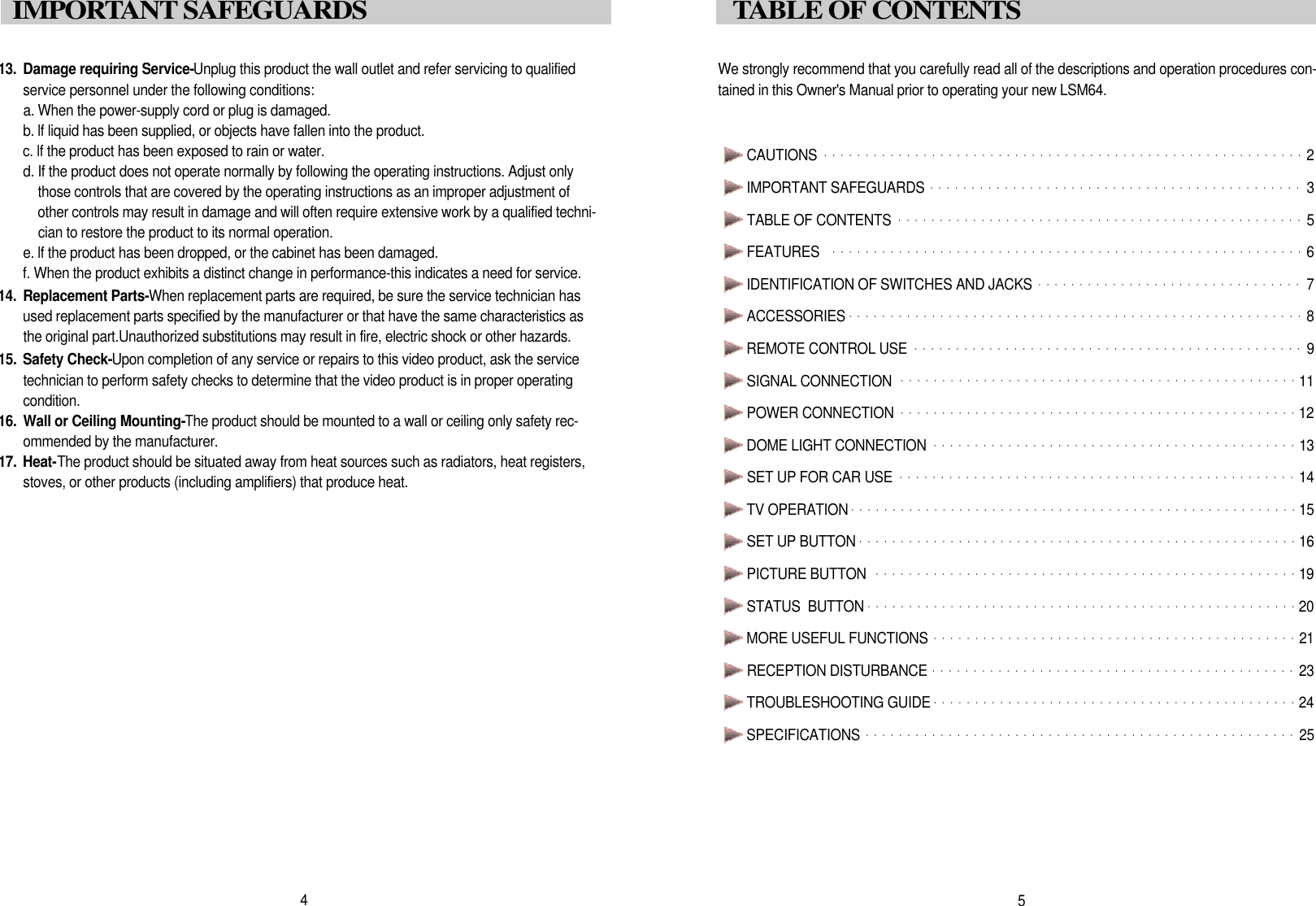
We strongly recommend that you carefully read all of the descriptions and operation procedures con-tained in this Owner's Manual prior to operating your new LSM64.CAUTIONS ・・・・・・・・・・・・・・・・・・・・・・・・・・・・・・・・・・・・・・・・・・・・・・・・・・・・・・・・・・2IMPORTANT SAFEGUARDS ・・・・・・・・・・・・・・・・・・・・・・・・・・・・・・・・・・・・・・・・・・・・・3TABLE OF CONTENTS  ・・・・・・・・・・・・・・・・・・・・・・・・・・・・・・・・・・・・・・・・・・・・・・・・・5FEATURES  ・・・・・・・・・・・・・・・・・・・・・・・・・・・・・・・・・・・・・・・・・・・・・・・・・・・・・・・・・6IDENTIFICATION OF SWITCHES AND JACKS ・・・・・・・・・・・・・・・・・・・・・・・・・・・・・・・・7ACCESSORIES ・・・・・・・・・・・・・・・・・・・・・・・・・・・・・・・・・・・・・・・・・・・・・・・・・・・・・・・8REMOTE CONTROL USE ・・・・・・・・・・・・・・・・・・・・・・・・・・・・・・・・・・・・・・・・・・・・・・・9SIGNAL CONNECTION  ・・・・・・・・・・・・・・・・・・・・・・・・・・・・・・・・・・・・・・・・・・・・・・・・1 1POWER CONNECTION・・・・・・・・・・・・・・・・・・・・・・・・・・・・・・・・・・・・・・・・・・・・・・・・1 2DOME LIGHT CONNECTION ・・・・・・・・・・・・・・・・・・・・・・・・・・・・・・・・・・・・・・・・・・・・1 3SET UP FOR CAR USE  ・・・・・・・・・・・・・・・・・・・・・・・・・・・・・・・・・・・・・・・・・・・・・・・・1 4TV OPERATION・・・・・・・・・・・・・・・・・・・・・・・・・・・・・・・・・・・・・・・・・・・・・・・・・・・・・・1 5SET UP BUTTON ・・・・・・・・・・・・・・・・・・・・・・・・・・・・・・・・・・・・・・・・・・・・・・・・・・・・・1 6PICTURE BUTTON  ・・・・・・・・・・・・・・・・・・・・・・・・・・・・・・・・・・・・・・・・・・・・・・・・・・・1 9STATUS  BUTTON ・・・・・・・・・・・・・・・・・・・・・・・・・・・・・・・・・・・・・・・・・・・・・・・・・・・・2 0MORE USEFUL FUNCTIONS ・・・・・・・・・・・・・・・・・・・・・・・・・・・・・・・・・・・・・・・・・・・・2 1RECEPTION DISTURBANCE ・・・・・・・・・・・・・・・・・・・・・・・・・・・・・・・・・・・・・・・・・・・・2 3TROUBLESHOOTING GUIDE・・・・・・・・・・・・・・・・・・・・・・・・・・・・・・・・・・・・・・・・・・・・2 4SPECIFICATIONS ・・・・・・・・・・・・・・・・・・・・・・・・・・・・・・・・・・・・・・・・・・・・・・・・・・・・2 55TABLE OF CONTENTS1 3 . Damage requiring Service-Unplug this product the wall outlet and refer servicing to qualifiedservice personnel under the following conditions:a. When the power-supply cord or plug is damaged.b. lf liquid has been supplied, or objects have fallen into the product.c. lf the product has been exposed to rain or water.d. If the product does not operate normally by following the operating instructions. Adjust onlythose controls that are covered by the operating instructions as an improper adjustment ofother controls may result in damage and will often require extensive work by a qualified techni-cian to restore the product to its normal operation.e. lf the product has been dropped, or the cabinet has been damaged.f. When the product exhibits a distinct change in performance-this indicates a need for service.1 4 . Replacement Parts-When replacement parts are required, be sure the service technician hasused replacement parts specified by the manufacturer or that have the same characteristics asthe original part.Unauthorized substitutions may result in fire, electric shock or other hazards.1 5 . Safety Check-Upon completion of any service or repairs to this video product, ask the servicetechnician to perform safety checks to determine that the video product is in proper operatingc o n d i t i o n .1 6 . Wall or Ceiling Mounting-The product should be mounted to a wall or ceiling only safety rec-ommended by the manufacturer.1 7 . H e a t -The product should be situated away from heat sources such as radiators, heat registers,stoves, or other products (including amplifiers) that produce heat.4I M P O RTANT SAFEGUARDS
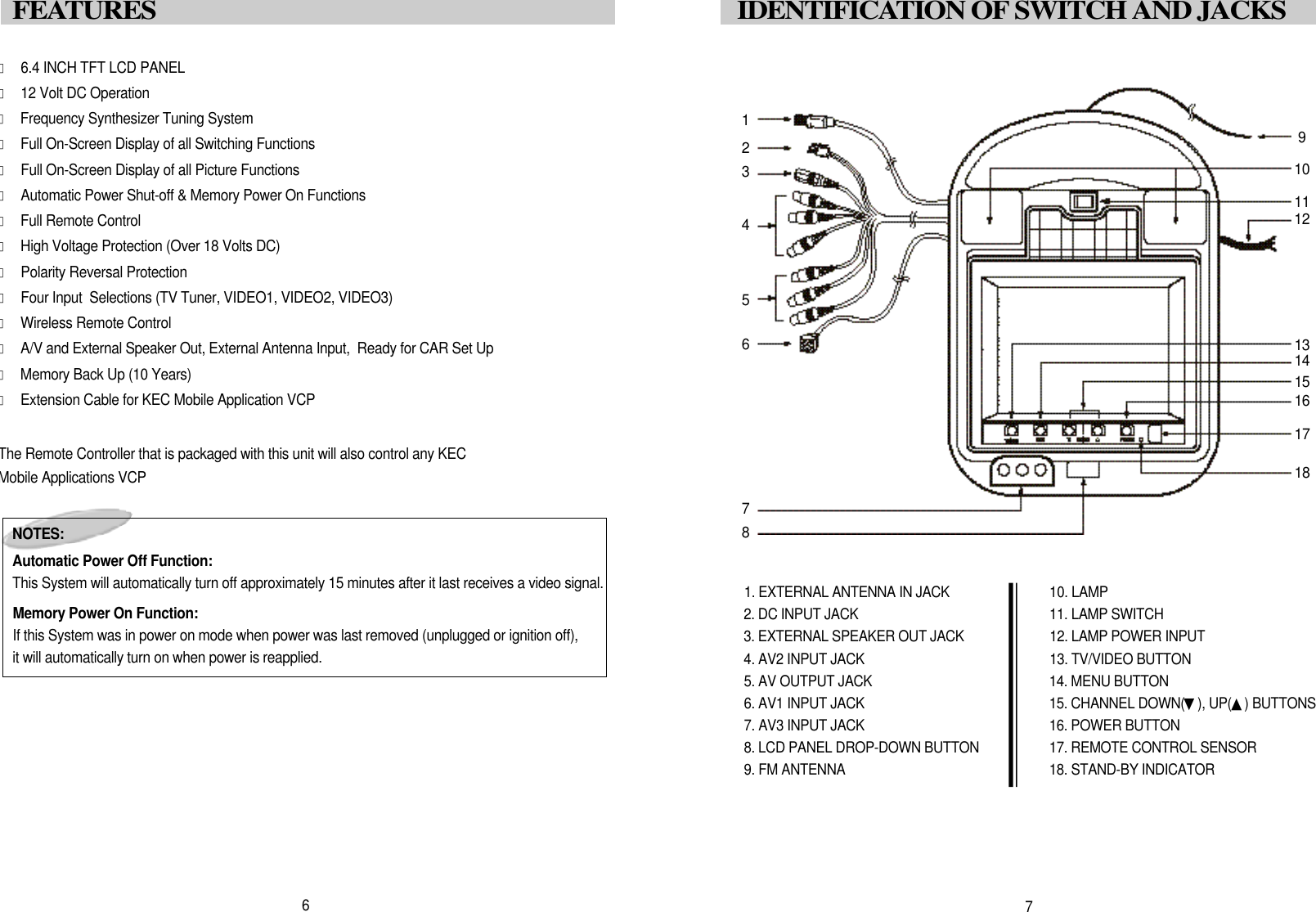
󰣔6.4 INCH TFT LCD PANEL󰣔12 Volt DC Operation󰣔Frequency Synthesizer Tuning System󰣔Full On-Screen Display of all Switching Functions󰣔Full On-Screen Display of all Picture Functions󰣔Automatic Power Shut-off & Memory Power On Functions󰣔Full Remote Control󰣔High Voltage Protection (Over 18 Volts DC)󰣔Polarity Reversal Protection󰣔Four Input  Selections (TV Tuner, VIDEO1, VIDEO2, VIDEO3) 󰣔Wireless Remote Control󰣔A/V and External Speaker Out, External Antenna Input,  Ready for CAR Set Up󰣔Memory Back Up (10 Years)󰣔Extension Cable for KEC Mobile Application VCPThe Remote Controller that is packaged with this unit will also control any KECMobile Applications VCP7I D E N T I F I C ATION OF SWITCH AND JACKS1. EXTERNAL ANTENNA IN JACK2. DC INPUT JACK3. EXTERNAL SPEAKER OUT JACK4. AV2 INPUT JACK5. AV OUTPUT JACK6. AV1 INPUT JACK7. AV3 INPUT JACK8. LCD PANEL DROP-DOWN BUTTON9. FM ANTENNA10. LAMP11. LAMP SWITCH12. LAMP POWER INPUT13. TV/VIDEO BUTTON14. MENU BUTTON15. CHANNEL DOWN(▼), UP(▲) BUTTONS16. POWER BUTTON17. REMOTE CONTROL SENSOR18. STAND-BY INDICATORN O T E S :Automatic Power Off Function:This System will automatically turn off approximately 15 minutes after it last receives a video signal.Memory Power On Function:If this System was in power on mode when power was last removed (unplugged or ignition off), it will automatically turn on when power is reapplied.6F E ATURES 1234567891 01 11 21 31 41 51 61 71 8
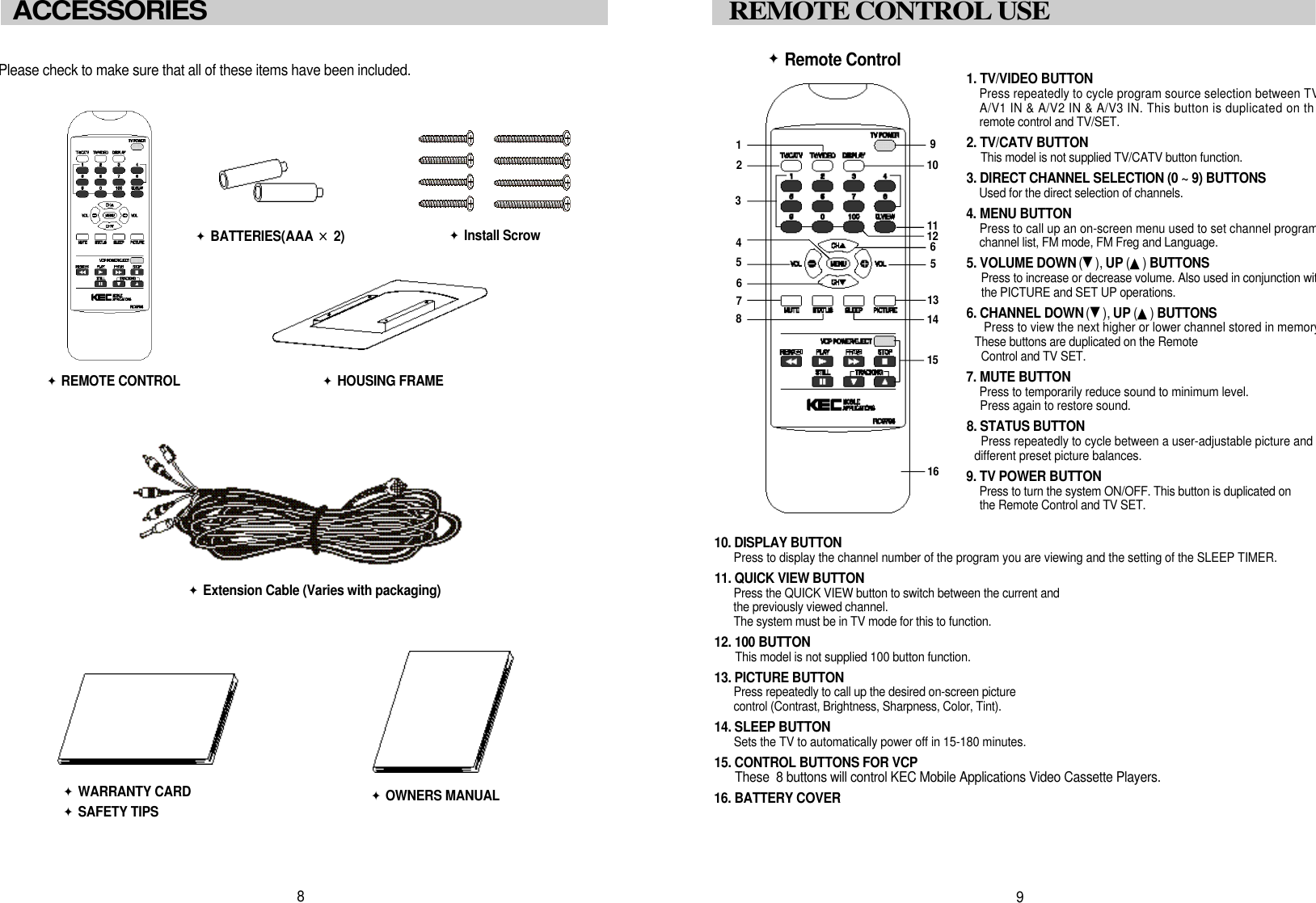
1. TV/VIDEO BUTTONPress repeatedly to cycle program source selection between TVA/V1 IN & A/V2 IN & A/V3 IN. This button is duplicated on thremote control and TV/SET.2. TV/CATV BUTTONThis model is not supplied TV/CATV button function.3. DIRECT CHANNEL SELECTION (0 ~ 9) BUTTONSUsed for the direct selection of channels.4 . MENU BUTTONPress to call up an on-screen menu used to set channel programchannel list, FM mode, FM Freg and Language.5. VOLUME DOWN (▼), UP (▲) B U T T O N SPress to increase or decrease volume. Also used in conjunction witthe PICTURE and SET UP operations.6. CHANNEL DOWN (▼), UP (▲) B U T T O N SPress to view the next higher or lower channel stored in memoryThese buttons are duplicated on the Remote Control and TV SET.7. MUTE BUTTONPress to temporarily reduce sound to minimum level. Press again to restore sound.8. STATUS BUTTONPress repeatedly to cycle between a user-adjustable picture and different preset picture balances.9. TV POWER BUTTONPress to turn the system ON/OFF. This button is duplicated onthe Remote Control and TV SET.󰥐Remote Control10. DISPLAY BUTTONPress to display the channel number of the program you are viewing and the setting of the SLEEP TIMER.11. QUICK VIEW BUTTONPress the QUICK VIEW button to switch between the current and  the previously viewed channel.The system must be in TV mode for this to function.12. 100 BUTTONThis model is not supplied 100 button function.13. PICTURE BUTTONPress repeatedly to call up the desired on-screen picture control (Contrast, Brightness, Sharpness, Color, Tint). 14. SLEEP BUTTONSets the TV to automatically power off in 15-180 minutes.15. CONTROL BUTTONS FOR VCPThese  8 buttons will control KEC Mobile Applications Video Cassette Players.16. BATTERY COVER9REMOTE CONTROL USE92651 31 51 435Please check to make sure that all of these items have been included.8󰥐REMOTE CONTROL󰥐Extension Cable (Varies with packaging)󰥐B A T T E R I ES(AAA ×2 )󰥐WARRANTY CARD󰥐SAFETY TIPS󰥐OWNERS MANUALACCESSORIES 11 04671 181 21 6󰥐Install Scrow󰥐HOUSING FRAME
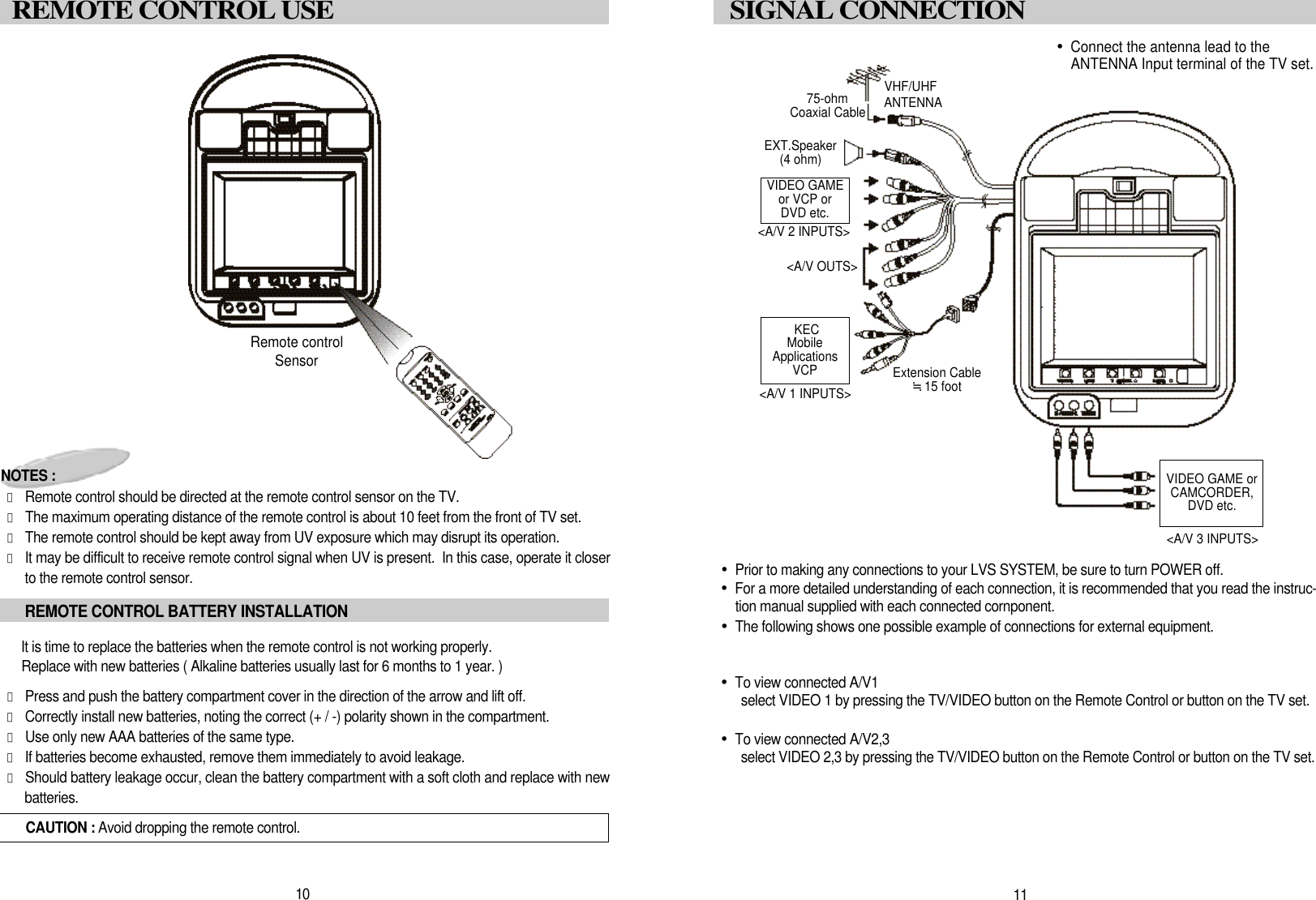
1 1SIGNAL CONNECTION•Prior to making any connections to your LVS SYSTEM, be sure to turn POWER off.•For a more detailed understanding of each connection, it is recommended that you read the instruc-tion manual supplied with each connected cornponent.•The following shows one possible example of connections for external equipment.•To view connected A/V1select VIDEO 1 by pressing the TV/VIDEO button on the Remote Control or button on the TV set.•To view connected A/V2,3select VIDEO 2,3 by pressing the TV/VIDEO button on the Remote Control or button on the TV set.1 0REMOTE CONTROL USECAUTION : Avoid dropping the remote control.NOTES :󰣔Remote control should be directed at the remote control sensor on the TV. 󰣔The maximum operating distance of the remote control is about 10 feet from the front of TV set.󰣔The remote control should be kept away from UV exposure which may disrupt its operation.󰣔It may be difficult to receive remote control signal when UV is present.  In this case, operate it closerto the remote control sensor.It is time to replace the batteries when the remote control is not working properly.Replace with new batteries ( Alkaline batteries usually last for 6 months to 1 year. )󰣔Press and push the battery compartment cover in the direction of the arrow and lift off. 󰣔Correctly install new batteries, noting the correct (+ / -) polarity shown in the compartment.  󰣔Use only new AAA batteries of the same type. 󰣔If batteries become exhausted, remove them immediately to avoid leakage. 󰣔Should battery leakage occur, clean the battery compartment with a soft cloth and replace with newb a t t e r i e s .REMOTE CONTROL BATTERY INSTALLATIONRemote controlSensor•Connect the antenna lead to theANTENNA Input terminal of the TV set.VHF/UHFANTENNA75-ohmCoaxial CableEXT.Speaker(4 ohm)VIDEO GAMEor VCP or DVD etc.KECMobileApplicationsVCP<A/V 1 INPUTS><A/V 2 INPUTS>Extension Cable≒15 footVIDEO GAME orCAMCORDER, DVD etc.<A/V 3 INPUTS><A/V OUTS>
1 3DOME LIGHT CONNECTION(1) “NEGATIVE” Type Door CircuitRed wire - 12 volt constant power.Brown wire - Chassis ground.This wire provides a ground to the dome light circuit when the three (3) position switch isin the “on” position. If this wire is not connected the dome light will not operate when theswitch is in the “on” position. White wire - Negative door switch.This wire connects to the negative door switch. This wire should be locate in the headliner where the factory dome light was removed. When one of the doors are opened onthe vehicle this wire will have continuity (shorted) to ground.(2) “POSITIVE” Type Door CircuitRed wire - Chassis ground.Brown wire - 12 Volt constant power.A constant power lead may have to be run up to the head liner area for this connection.Check all wires for constant power that were attached to the factory dome light.White wire - Positive door switch.This wire attaches to the positive door switch wire. This wire should be located in thehead liner area where the factory dome light was removed. When one of the doors areopened on the vehicle this wire will have 12 volt power on it. AUDIO SYSTEM•Audio output is Monophonic when receiving on-air broadcast signals.•Audio output is Stereo when a stereo audio signal is fed from external audio equipment that is con-nected to the [selected] A/V1 or A/V2, A/V3 Input terminals.•The SPEAKER JACK teminal is a high level output whose sound level is Variable up to 0.7W max-imun when connected to a 4-ohm speaker.VIDEO SYSTEM•This model incorporates 3sets of AUDIO/VIDEO INPUTS (A/V1 & A/V2, A/V3 for direct connectionof 3 external program sources (Video Game, Camcorder, Video Player, etc.).•Direct connection results in superior video quality from the connected program sources.•Refer to the instruction manual supplied with each external instrument for details.1 2SIGNAL CONNECTIONPOWER CONNECTIONCONNECTING TO CAR POWERNOTE : The cable assembly used to connect the L,M64 to the 12-Volt power supply variesdepending on product packaging.NOTE MANUFACTURER : TEASUNG ELECTRIC CO.,LTD. TYPE# : AWM STYLE 1015W A R N I N GThe DC Battery Cord is ONLY for use with this model.Do not use it to power any other productF R O M RED : DC12VCAR BATTERY BLACK : GROUNDPOWER ConnectionsRED : +12V DCBLACK : GROUNDRed, Brown, White and LeadsThese leads provide power for the dome light circuit. The LSM64 is configured to beused with vehicles that use a “negative” type door dircuit. However, the LSM64 can bereconfigured for vehicles that use a “positive” type door circuit. Most import anddomestic vehicles utilize a “negative” circuit. Ford and Lincoln/Mercury vehicles areusually “positive” type circuits. Check your specific vehicle for the type of circuit it uti-lizes before proceeding with the installation.
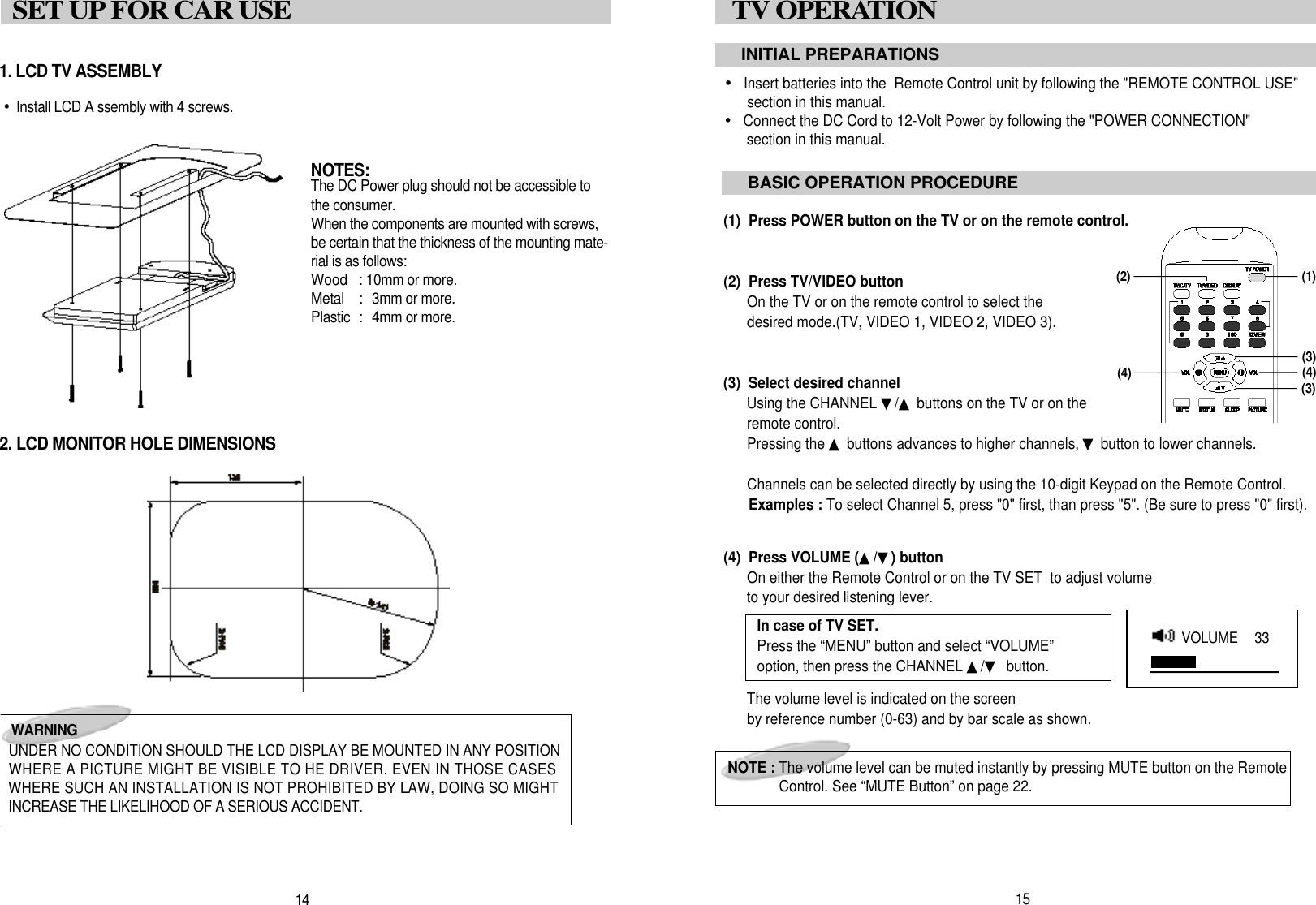
•Insert batteries into the  Remote Control unit by following the "REMOTE CONTROL USE"section in this manual.•Connect the DC Cord to 12-Volt Power by following the "POWER CONNECTION"section in this manual.(1)  Press POWER button on the TV or on the remote control.(2)  Press TV/VIDEO buttonOn the TV or on the remote control to select the desired mode.(TV, VIDEO 1, VIDEO 2, VIDEO 3).(3)  Select desired channelUsing the CHANNEL ▼/▲buttons on the TV or on theremote control.Pressing the ▲buttons advances to higher channels, ▼button to lower channels.Channels can be selected directly by using the 10-digit Keypad on the Remote Control.Examples : To select Channel 5, press "0" first, than press "5". (Be sure to press "0" first).(4)  Press VOLUME (▲/▼) buttonOn either the Remote Control or on the TV SET  to adjust volumeto your desired listening lever.The volume level is indicated on the screenby reference number (0-63) and by bar scale as shown.1. LCD TV ASSEMBLY•Install LCD A ssembly with 4 screws.2. LCD MONITOR HOLE DIMENSIONS1 5TV OPERATION INITIAL PREPARATIONSBASIC OPERATION PROCEDURENOTE : The volume level can be muted instantly by pressing MUTE button on the RemoteControl. See “MUTE Button” on page 22.( 1 )( 3 )( 4 )1 4SET UP FOR CAR USEW A R N I N GUNDER NO CONDITION SHOULD THE LCD DISPLAY BE MOUNTED IN ANY POSITIONWHERE A PICTURE MIGHT BE VISIBLE TO HE DRIVER. EVEN IN THOSE CASESWHERE SUCH AN INSTALLATION IS NOT PROHIBITED BY LAW, DOING SO MIGHTINCREASE THE LIKELIHOOD OF A SERIOUS ACCIDENT.N O T E S :The DC Power plug should not be accessible tothe consumer.When the components are mounted with screws,be certain that the thickness of the mounting mate-rial is as follows:Wood  : 10mm or more.Metal  :  3mm or more.Plastic  :  4mm or more.( 4 )( 3 )In case of TV SET.Press the “MENU” button and select “VOLUME”option, then press the CHANNEL ▲/▼button.VOLUME   3 3( 2 )
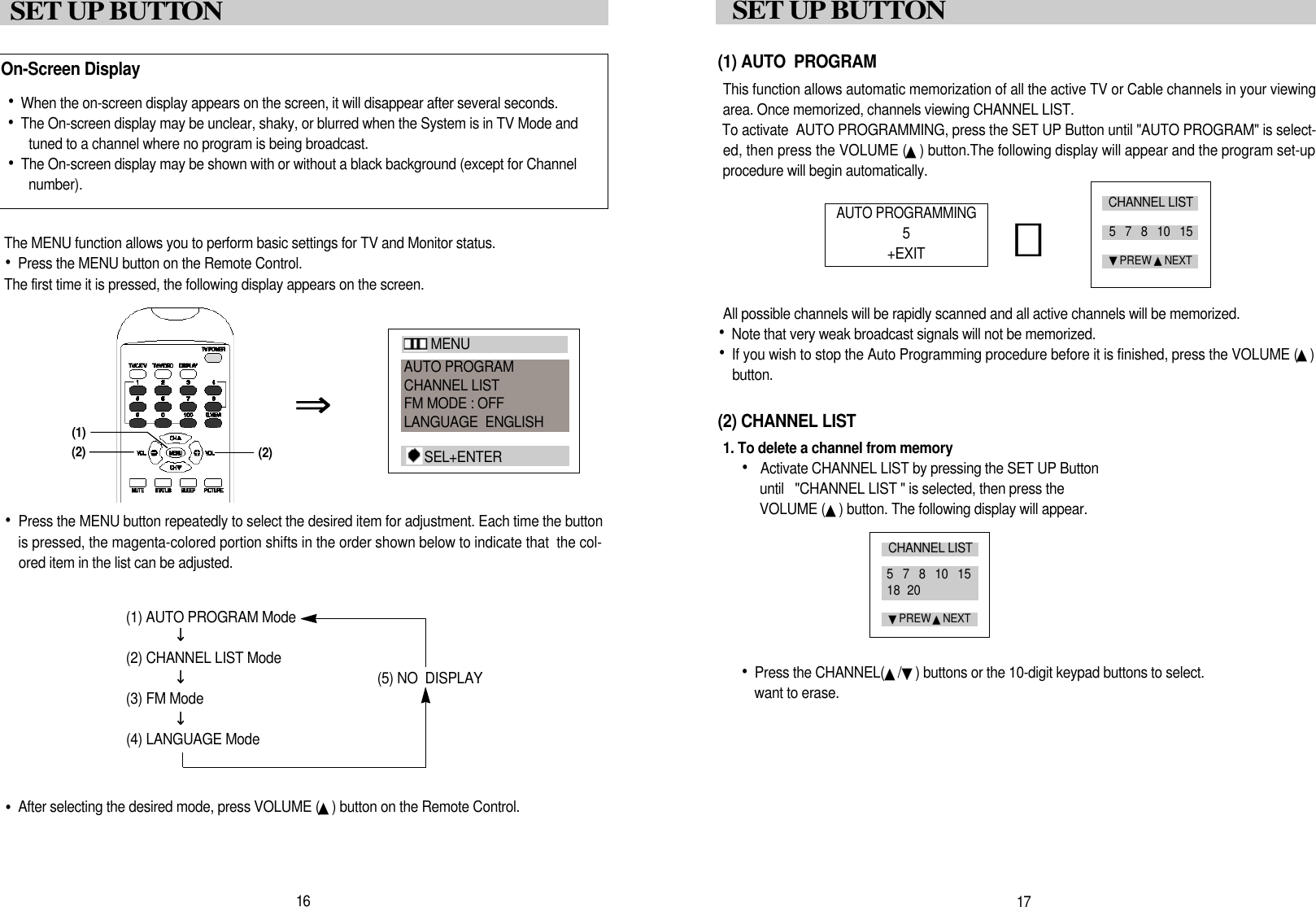
(1) AUTO  PROGRAMThis function allows automatic memorization of all the active TV or Cable channels in your viewingarea. Once memorized, channels viewing CHANNEL LIST.To activate  AUTO PROGRAMMING, press the SET UP Button until "AUTO PROGRAM" is select-ed, then press the VOLUME (▲) button.The following display will appear and the program set-upprocedure will begin automatically.All possible channels will be rapidly scanned and all active channels will be memorized.•Note that very weak broadcast signals will not be memorized. •If you wish to stop the Auto Programming procedure before it is finished, press the VOLUME (▲)b u t t o n .(2) CHANNEL LIST1. To delete a channel from memory•Activate CHANNEL LIST by pressing the SET UP Button until   "CHANNEL LIST " is selected, then press the VOLUME (▲) button. The following display will appear.•Press the CHANNEL(▲/▼) buttons or the 10-digit keypad buttons to select.want to erase.AUTO PROGRAMMING5+ E X I T󰫗1 7SET UP BUTTON The MENU function allows you to perform basic settings for TV and Monitor status.•Press the MENU button on the Remote Control.The first time it is pressed, the following display appears on the screen.•Press the MENU button repeatedly to select the desired item for adjustment. Each time the buttonis pressed, the magenta-colored portion shifts in the order shown below to indicate that  the col-ored item in the list can be adjusted.(1) AUTO PROGRAM Mode(2) CHANNEL LIST Mode(5) NO  DISPLAY(3) FM Mode(4) LANGUAGE Mode•After selecting the desired mode, press VOLUME (▲) button on the Remote Control.  •When the on-screen display appears on the screen, it will disappear after several seconds.•The On-screen display may be unclear, shaky, or blurred when the System is in TV Mode andtuned to a channel where no program is being broadcast.•The On-screen display may be shown with or without a black background (except for Channel number). On-Screen Display󰥪󰥪󰥪⇒1 6SET UP BUTTO NCHANNEL LIST5   7   8   10   15▼PREW ▲N E X TCHANNEL LIST5   7   8   10   1518  20▼PREW ▲N E X T( 2 )( 2 )( 1 )M E N UAUTO PROGRAMCHANNEL LISTFM MODE : OFFLANGUAGE  ENGLISHS E L + E N T E R
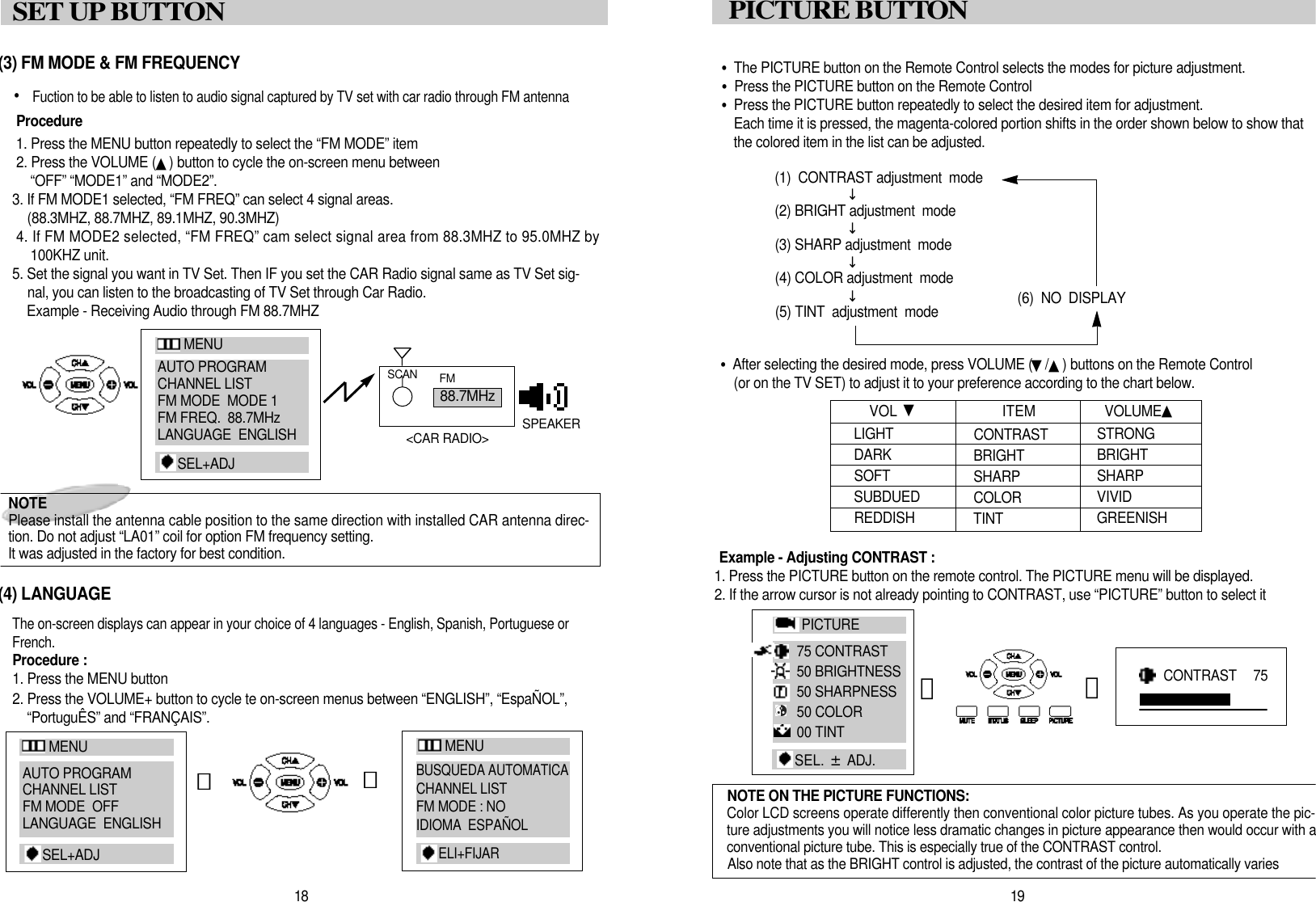
•The PICTURE button on the Remote Control selects the modes for picture adjustment.•Press the PICTURE button on the Remote Control•Press the PICTURE button repeatedly to select the desired item for adjustment.Each time it is pressed, the magenta-colored portion shifts in the order shown below to show thatthe colored item in the list can be adjusted.(1)  CONTRAST adjustment  mode(2) BRIGHT adjustment  mode(3) SHARP adjustment  mode(4) COLOR adjustment  mode(6)  NO  DISPLAY(5) TINT  adjustment  mode•After selecting the desired mode, press VOLUME (▼/▲) buttons on the Remote Control(or on the TV SET) to adjust it to your preference according to the chart below.Example - Adjusting CONTRAST : 1. Press the PICTURE button on the remote control. The PICTURE menu will be displayed.2. If the arrow cursor is not already pointing to CONTRAST, use “PICTURE” button to select it1 9PICTURE BUTTO NL I G H TD A R KS O F TS U B D U E DR E D D I S HVOL  ▼C O N T R A S TB R I G H TSHARP C O L O RT I N TS T R O N GB R I G H TS H A R PV I V I DG R E E N I S HITEM  V O L U M E ▲󰥪󰥪󰥪󰥪NOTE ON THE PICTURE FUNCTIONS:Color LCD screens operate differently then conventional color picture tubes. As you operate the pic-ture adjustments you will notice less dramatic changes in picture appearance then would occur with aconventional picture tube. This is especially true of the CONTRAST control.Also note that as the BRIGHT control is adjusted, the contrast of the picture automatically varies1 8SET UP BUTTON (3) FM MODE & FM FREQUENCY• Fuction to be able to listen to audio signal captured by TV set with car radio through FM antennaP r o c e d u r e1. Press the MENU button repeatedly to select the “FM MODE” item2. Press the VOLUME (▲) button to cycle the on-screen menu between“OFF” “MODE1” and “MODE2”.3. If FM MODE1 selected, “FM FREQ” can select 4 signal areas.(88.3MHZ, 88.7MHZ, 89.1MHZ, 90.3MHZ)4. If FM MODE2 selected, “FM FREQ” cam select signal area from 88.3MHZ to 95.0MHZ by100KHZ unit.5. Set the signal you want in TV Set. Then IF you set the CAR Radio signal same as TV Set sig-nal, you can listen to the broadcasting of TV Set through Car Radio.Example - Receiving Audio through FM 88.7MHZ(4) LANGUAGEThe on-screen displays can appear in your choice of 4 languages - English, Spanish, Portuguese orF r e n c h .Procedure :1. Press the MENU button2. Press the VOLUME+ button to cycle te on-screen menus between “ENGLISH”, “EspaÑOL”,“PortuguÊS” and “FRANÇAIS”.󰫗8 8 . 7 M H zS C A N F MS P E A K E R<CAR RADIO>󰫗CONTRAST   7 5󰫗󰫗NOTE Please install the antenna cable position to the same direction with installed CAR antenna direc-tion. Do not adjust “LA01” coil for option FM frequency setting. It was adjusted in the factory for best condition.M E N UAUTO PROGRAMCHANNEL LISTFM MODE  MODE 1FM FREQ.  88.7MHzLANGUAGE  ENGLISHS E L + A D JM E N UAUTO PROGRAMCHANNEL LISTFM MODE  OFFLANGUAGE  ENGLISHS E L + A D JM E N UBUSQUEDA AUTOMATICACHANNEL LISTFM MODE : NOIDIOMA  ESPAÑOLE L I + F I J A RP I C T U R E75 CONTRAST50 BRIGHTNESS50 SHARPNESS50 COLOR00 TINTSEL.  ±A D J .
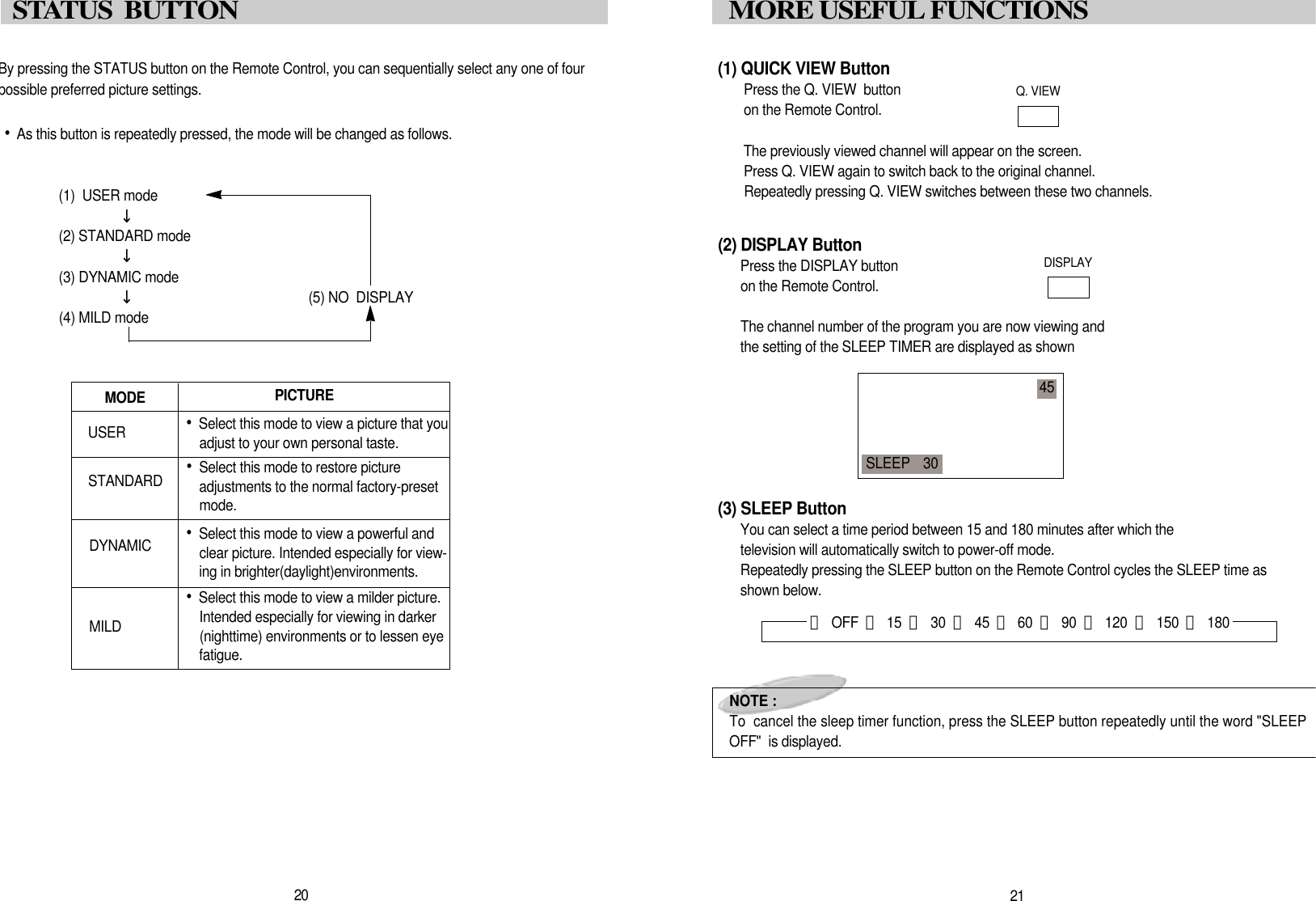
(1) QUICK VIEW ButtonPress the Q. VIEW  buttonon the Remote Control.The previously viewed channel will appear on the screen.Press Q. VIEW again to switch back to the original channel.Repeatedly pressing Q. VIEW switches between these two channels.(2) DISPLAY ButtonPress the DISPLAY buttonon the Remote Control.The channel number of the program you are now viewing and the setting of the SLEEP TIMER are displayed as shown(3) SLEEP ButtonYou can select a time period between 15 and 180 minutes after which the television will automatically switch to power-off mode.Repeatedly pressing the SLEEP button on the Remote Control cycles the SLEEP time asshown below.NOTE :To  cancel the sleep timer function, press the SLEEP button repeatedly until the word "SLEEPOFF"  is displayed.Q. VIEWD I S P L A Y2 1MORE USEFUL FUNCTIONS4 5SLEEP    3 0By pressing the STATUS button on the Remote Control, you can sequentially select any one of fourpossible preferred picture settings.•As this button is repeatedly pressed, the mode will be changed as follows.(1)  USER mode(2) STANDARD mode(3) DYNAMIC mode(5) NO  DISPLAY(4) MILD mode󰥪󰥪󰥪P I C T U R EM O D E•Select this mode to view a picture that youadjust to your own personal taste.•Select this mode to restore pictureadjustments to the normal factory-presetm o d e .•Select this mode to view a powerful andclear picture. Intended especially for view-ing in brighter(daylight)environments.•Select this mode to view a milder picture.Intended especially for viewing in darker(nighttime) environments or to lessen eyef a t i g u e .S T A N D A R DU S E RD Y N A M I CM I L D2 0S TATUS  BUTTON 󰫠O F F 󰫠1 5 󰫠3 0 󰫠4 5 󰫠6 0 󰫠9 0 󰫠1 2 0 󰫠1 5 0 󰫠1 8 0
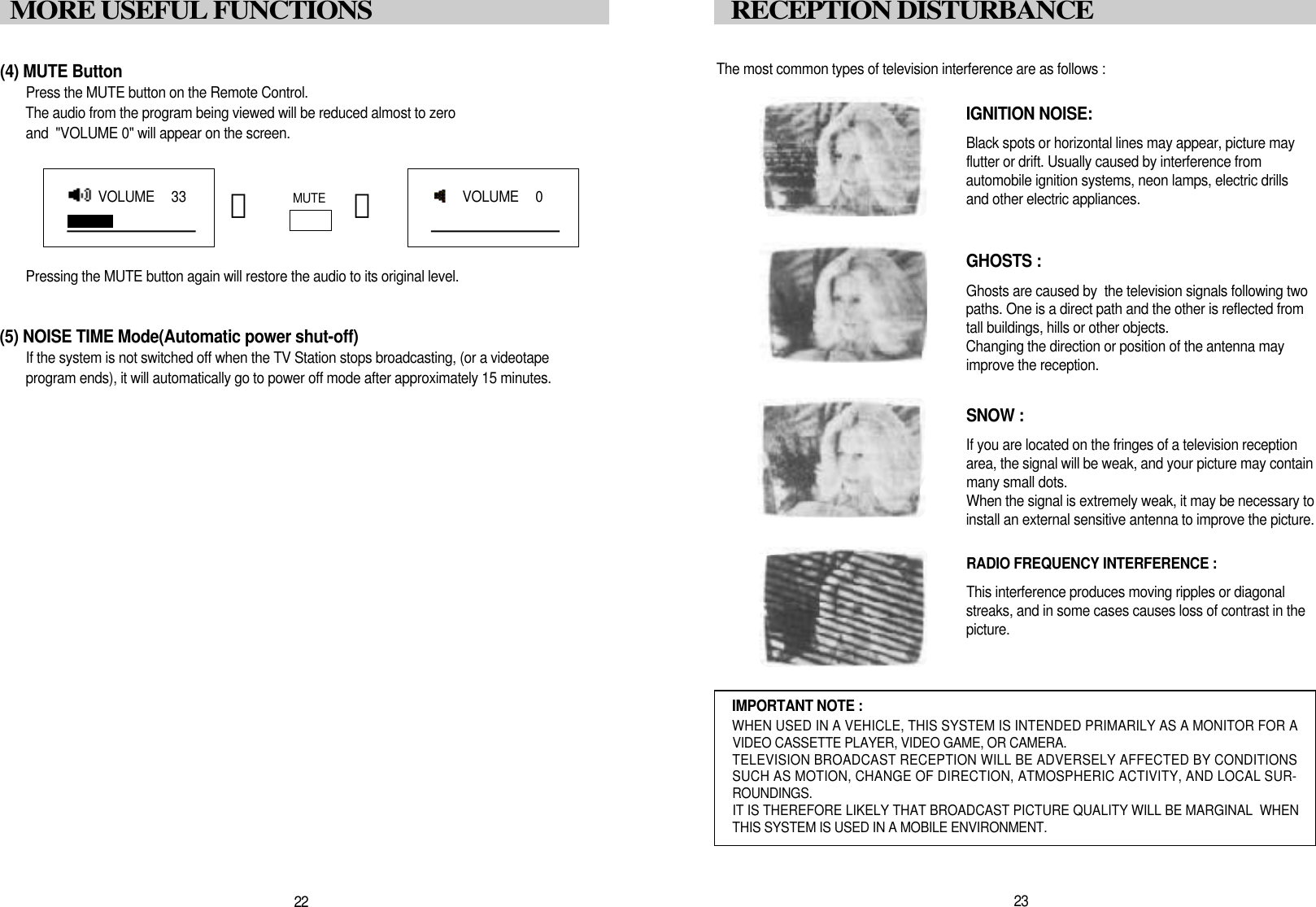
The most common types of television interference are as follows :IGNITION NOISE:Black spots or horizontal lines may appear, picture may flutter or drift. Usually caused by interference from automobile ignition systems, neon lamps, electric drillsand other electric appliances.GHOSTS :Ghosts are caused by  the television signals following two paths. One is a direct path and the other is reflected fromtall buildings, hills or other objects. Changing the direction or position of the antenna mayimprove the reception.SNOW : If you are located on the fringes of a television reception area, the signal will be weak, and your picture may containmany small dots. When the signal is extremely weak, it may be necessary to install an external sensitive antenna to improve the picture.RADIO FREQUENCY INTERFERENCE : This interference produces moving ripples or diagonal streaks, and in some cases causes loss of contrast in thep i c t u r e .IMPORTANT NOTE :WHEN USED IN A VEHICLE, THIS SYSTEM IS INTENDED PRIMARILY AS A MONITOR FOR AVIDEO CASSETTE PLAYER, VIDEO GAME, OR CAMERA.TELEVISION BROADCAST RECEPTION WILL BE ADVERSELY AFFECTED BY CONDITIONSSUCH AS MOTION, CHANGE OF DIRECTION, ATMOSPHERIC ACTIVITY, AND LOCAL SUR-R O U N D I N G S .IT IS THEREFORE LIKELY THAT BROADCAST PICTURE QUALITY WILL BE MARGINAL  WHENTHIS SYSTEM IS USED IN A MOBILE ENVIRONMENT.2 3RECEPTION DISTURBANCE(4) MUTE ButtonPress the MUTE button on the Remote Control. The audio from the program being viewed will be reduced almost to zero and  "VOLUME 0" will appear on the screen.Pressing the MUTE button again will restore the audio to its original level.(5) NOISE TIME Mode(Automatic power shut-off)If the system is not switched off when the TV Station stops broadcasting, (or a videotapeprogram ends), it will automatically go to power off mode after approximately 15 minutes.M U T E󰫗 󰫗2 2MORE USEFUL FUNCTIONSVOLUME   3 3VOLUME   0
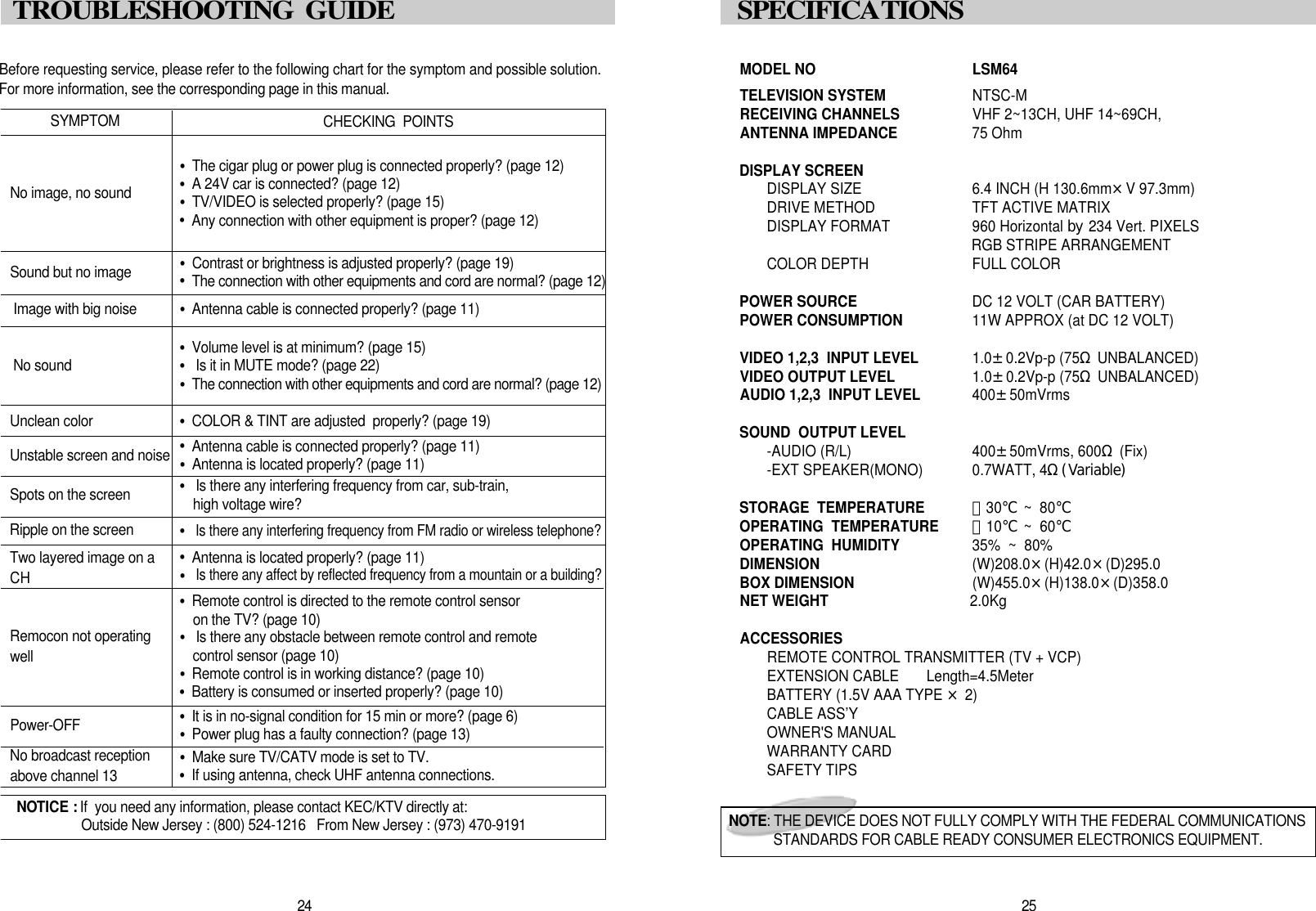
MODEL NO LSM64TELEVISION SYSTEM NTSC-MRECEIVING CHANNELS VHF 2~13CH, UHF 14~69CH,  ANTENNA IMPEDANCE 75 OhmDISPLAY SCREENDISPLAY SIZE 6.4 INCH (H 130.6mm×V 97.3mm)DRIVE METHOD TFT ACTIVE MATRIX DISPLAY FORMAT 960 Horizontal by 234 Vert. PIXELSRGB STRIPE ARRANGEMENTCOLOR DEPTH FULL COLORPOWER SOURCE DC 12 VOLT (CAR BATTERY)POWER CONSUMPTION 11W APPROX (at DC 12 VOLT)VIDEO 1,2,3  INPUT LEVEL 1.0±0.2Vp-p (75ΩUNBALANCED)VIDEO OUTPUT LEVEL 1.0±0.2Vp-p (75ΩUNBALANCED)AUDIO 1,2,3  INPUT LEVEL 400±50mVrmsSOUND  OUTPUT LEVEL-AUDIO (R/L) 400±50mVrms, 600Ω(Fix)-EXT SPEAKER(MONO) 0.7WATT, 4Ω(Variable)STORAGE  TEMPERATURE -30℃~  80℃OPERATING  TEMPERATURE  -10℃~  60℃OPERATING  HUMIDITY 35%  ~  80%DIMENSION  (W)208.0×(H)42.0×(D)295.0BOX DIMENSION   (W)455.0×(H)138.0×(D)358.0NET WEIGHT  2.0KgACCESSORIESREMOTE CONTROL TRANSMITTER (TV + VCP)EXTENSION CABLE       Length=4.5MeterBATTERY (1.5V AAA TYPE ×2)CABLE ASS’YOWNER'S MANUALWARRANTY CARDSAFETY TIPS2 5S P E C I F I C AT I O N SN O T E : THE DEVICE DOES NOT FULLY COMPLY WITH THE FEDERAL COMMUNICATIONSSTANDARDS FOR CABLE READY CONSUMER ELECTRONICS EQUIPMENT.Before requesting service, please refer to the following chart for the symptom and possible solution.For more information, see the corresponding page in this manual. S Y M P T O MNo image, no sound•The cigar plug or power plug is connected properly? (page 12)•A 24V car is connected? (page 12)•TV/VIDEO is selected properly? (page 15)•Any connection with other equipment is proper? (page 12)Sound but no image •Contrast or brightness is adjusted properly? (page 19)•The connection with other equipments and cord are normal? (page 12)Unstable screen and noise •Antenna cable is connected properly? (page 11)•Antenna is located properly? (page 11)Spots on the screen •Is there any interfering frequency from car, sub-train, high voltage wire?Ripple on the screen •Is there any interfering frequency from FM radio or wireless telephone?P o w e r - O F F •It is in no-signal condition for 15 min or more? (page 6)•Power plug has a faulty connection? (page 13)Two layered image on aCH  •Antenna is located properly? (page 11)•Is there any affect by reflected frequency from a mountain or a building?Remocon not operatingw e l l•Remote control is directed to the remote control sensoron the TV? (page 10)•Is there any obstacle between remote control and remotecontrol sensor (page 10)•Remote control is in working distance? (page 10)•Battery is consumed or inserted properly? (page 10)Image with big noise •Antenna cable is connected properly? (page 11)No sound •Volume level is at minimum? (page 15)•Is it in MUTE mode? (page 22)•The connection with other equipments and cord are normal? (page 12)Unclean color  •COLOR & TINT are adjusted  properly? (page 19)CHECKING  POINTSN OTICE : If  you need any information, please contact KEC/KTV directly at: Outside New Jersey : (800) 524-1216   From New Jersey : (973) 470-91912 4TROUBLESHOOTING  GUIDE No broadcast receptionabove channel 13 •Make sure TV/CATV mode is set to TV.•If using antenna, check UHF antenna connections.

Navigation menu