KUNZHIYUAN ELECTRONICS K23-25-26 Bluetooth Speaker User Manual K23
SHENZHEN KUNZHIYUAN ELECTRONICS CO., Ltd Bluetooth Speaker K23
User Manual

Bluetooth Speaker User Manual
Model: K23
Product features
1: You can be connected with the MP3,PC,iPod,CD and other audio source.
2: Bluetooth 2.1 EDR
3: Design in a high-quality audio decoder chip, perfect sound performance
4: Use a high-fidelity full-range speaker, middle and high ,bass hierarchy.
Technical Parameters
Output power: 3mW
Input charging voltage: DC5V ± 10%
Frequency response: 20Hz-20KHz
SNR: ≥85dB
Distortion (%): <1
Bluetooth communication distance:> 10m
Operating Instructions
(1) Bluetooth Pairing
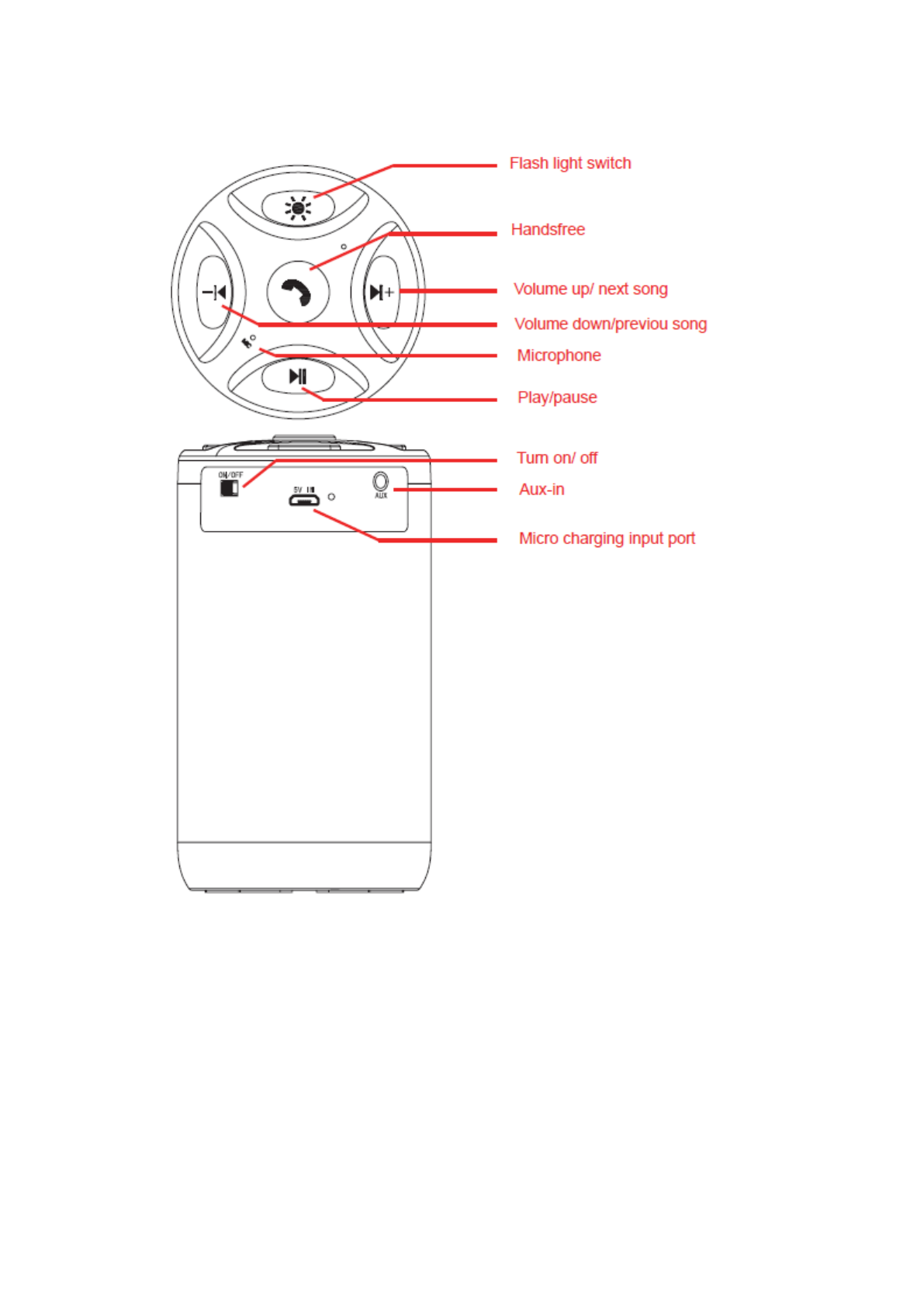
a: Short press the ON/OFF button to turn on, after that,it’s defaulted to be a Bluetooth
connection mode .
b:The first will enter a pairing mode when connecting with a Bluetooth device , the
machine called Bluetooth: UB-SPB25-101, no password,click the UB-SPB25-101 to
connect ,the connection will be successful .
c: After the pairing is successful ,the machine will automatically search for the last device.
If it found it ,Bluetooth device will automatically connect.If it do not search to the last
device within 10 seconds, then enter the status of wait for a connection
d: When in a Bluetooth connection with your phone, press Play, Pause, call button, you
can answer /hang up, long press the keys ,you can redial last phone number.
(3) LINE IN input function
When in a turned on mode, insert the LINE IN input line, it is automatically converted
to the LINE IN function; for mobile phones, computers, MP3 and other equipment to make
use of external speakers .

FCC Warning:
This equipment has been tested and found to comply with the limits for a Class B
digital device, pursuant to part 15 of the FCC Rules. These limits are designed to
provide reasonable protection against harmful interference in a residential installation.
This equipment generates, uses and can radiate radio frequency energy and, if not
installed and used in accordance with the instructions, may cause harmful interference
to radio communications. However, there is no guarantee that interference will not
occur in a particular installation. If this equipment does cause harmful interference to
radio or television reception, which can be determined by turning the equipment off
and on, the user is encouraged to try to correct the interference by one or more of the
following measures:
• Reorient or relocate the receiving antenna.
• Increase the separation between the equipment and receiver.
• Connect the equipment into an outlet on a circuit different from that to which the
receiver is connected.
• Consult the dealer or an experienced radio/TV technician for help.
Caution: Any changes or modifications to this device not explicitly approved by
manufacturer could void your authority to operate this equipment.
This device complies with part 15 of the FCC Rules. Operation is subject to the
following two conditions: (1) This device may not cause harmful interference, and (2)
this device must accept any interference received, including interference that may
cause undesired operation.