Kaba Saflok PND System 6000/Incomm RF Factsheet 6000 Incomm
User Manual: Kaba Saflok PND System 6000/Incomm RF Factsheet Saflok Multihousing Locks ation - Kaba Access & Data Systems
Open the PDF directly: View PDF  .
.
Page Count: 1
PND6000_7_12
© 2012 SAFLOK
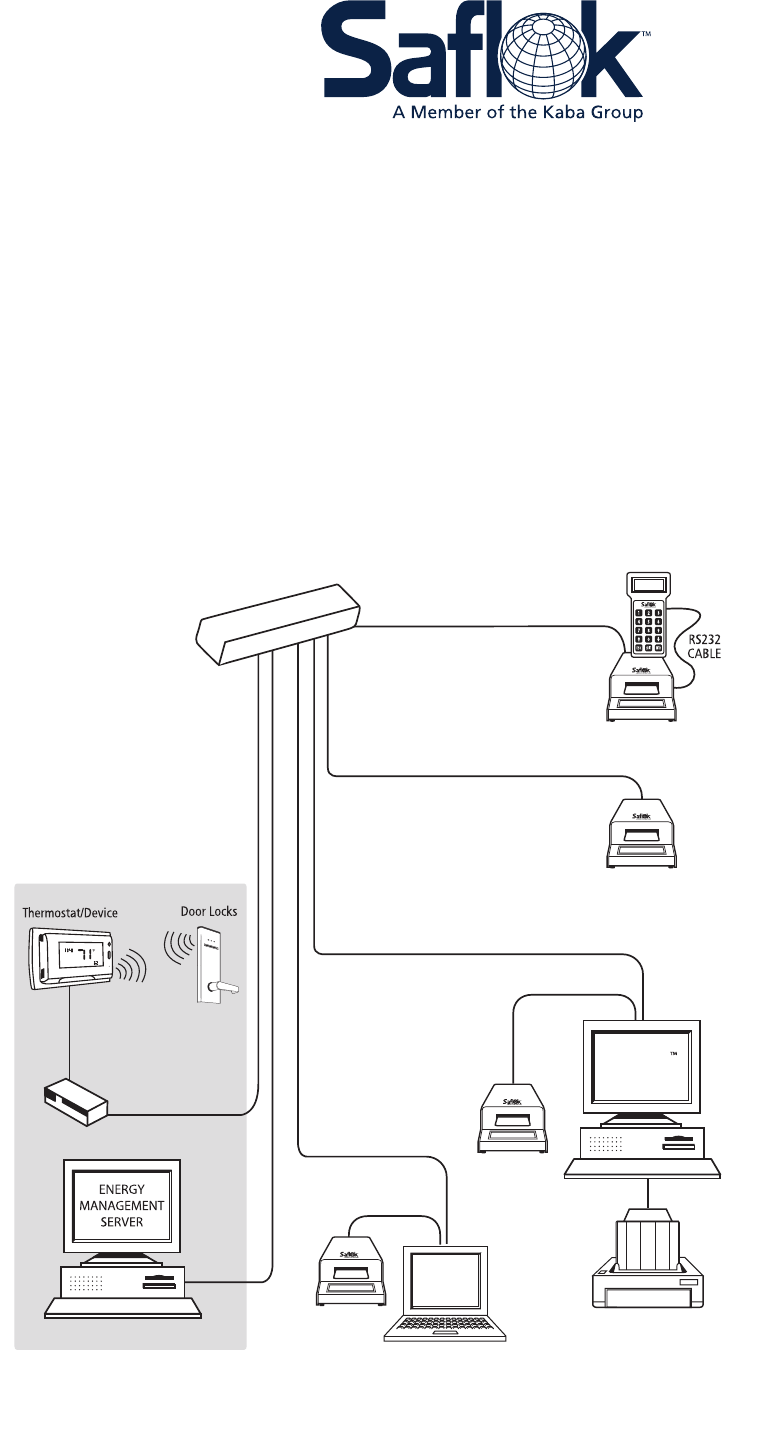
SAFLOK System 6000™/Inncom RF
Property Network Diagram
Minimum Equipment Requirements & Recommendations
ENCODER
WITH USB
CONNECTION
KEY CONTROL
CAT 5 CABLE
NETWORK
PRINTER
CAT 5
CABLE
RS232 CABLE
CLIENT
USB
CAT 5 CABLE
CAT 5 CABLE
ENCODER
WITH TCP/IP CONNECTION
ENCODER
WITH
SERIAL
CONNECTION
SAFLOK
SERVER
ENCODER
WITH TCP/IP CONNECTION
SWITCH
CAT 5
CABLE
CAT 5
CABLE
Bridge
RADIO
WAVES
Inncom RF
SAFLOK™ Server
• Operating system: Windows XP, Windows 7 Professional/Enterprise, Windows Server 2003
(32-bit only), Windows Server 2008 R2 (Windows Server2003 or 2008 R2 are required if
over ten [10] workstations; appropriate server and client licensing is required
• Minimum hardware specications: Quad-core, 2 Ghz or greater CPU / 4GB or greater
RAM / 100GB available hard drive space
• Virtual Machine environments are supported with the following minimum resource
allocation: Dedicated Quad-core, 2 Ghz or greater CPU allocation / 4GB or greater
RAM / 100GB available hard drive space
• If more than two (2) workstations are to be used with
Saok, an Ethernet network is required
• If connecting an encoder and/or handheld LPI device
directly to server, at least one (1) USB port must be
available for encoder connection and at least one (1)
dedicated Serial port for handheld LPI connection
• If including a Serial property management system (PMS)
interface, at least one (1) dedicated Serial port must
be available. TCP/IP interface support is also available.
• Internet access is required to enable SAFLOK
remote real-time support via the web
• Anti-virus software is highly recommended
• UPS and surge protection with equipment
warranty are recommended
Client Workstation(s)
• Operating system: Windows XP Pro,
Vista Business, Windows 7 Pro/Enterprise
• Minimum hardware specications: 2 GHz CPU /
4GB RAM / 10GB of available hard drive space
• If connecting an encoder and/or handheld LPI
device directly to workstation, at least one
(1) USB port must be available for encoder
connection and/or at least one (1) Serial port
for handheld LPI connection; encoders can
also utilize a TCP/IP (network) or
Serial connection
• Anti-virus software is highly recommended
• UPS and surge protection with equipment
warranty are suggested
Notes:
• All network installations and maintenance are the
responsibility of the individual customer and not SAFLOK.
• Due to the wide performance variability of different
manufacturers’ hardware, SAFLOK cannot guarantee software
and hardware compatibility with all computers. If you require
a list of computers that SAFLOK has tested and deemed
software-compatible, please contact SAFLOK customer
service at 1.800.999.6213.
• The customer is responsible for completing all software
updates (e.g., Windows operating system & anti-virus protection).
• If using a Serial interface in a Virtual Machine environment, the
Virtual Machine host computer must have one (1) available dedicated
Serial port that can be allocated to the Saok Server Virtual Machine.
(This diagram assumes that an Ethernet 10/100 multi-port hub is installed on the network.)
