Kef Audio Instant Theatre Kit100 Users Manual
KEF instant theatre KIT100 KIT100_US_Man
2015-02-09
: Kef-Audio Kef-Audio-Kef-Instant-Theatre-Kit100-Users-Manual-568039 kef-audio-kef-instant-theatre-kit100-users-manual-568039 kef-audio pdf
Open the PDF directly: View PDF  .
.
Page Count: 48
KIT100 USA
Part No. 290159USA
Issue 1: March 2004
Installation Manual
Manual de instalación
GB ES
K7190>KIT100 Manual USA 19/4/04 4:11 pm Page 1
important safety instructions
CAUTION:
To prevent electric shock, match wide blade of plug to wide slot, insert fully.
Warning:
This electrical apparatus should not be exposed to dripping or splashing and care should be taken not to place objects containing liquids, such as
vases, upon the apparatus.
Class 1 laser product
The DVD player contained within this system is classified as a CLASS 1 LASER PRODUCT according to EN60825-1:1994
+ A11.The CLASS 1 LASER PRODUCT label is located on the bottom of the DVD unit.
CAUTION:
Use of controls or adjustments or performance of procedures other than those specified herein may result in hazardous radiation exposure.
The DVD player should not be adjusted or repaired by anyone except properly qualified service personnel.
Class B emissions limits
This Class B digital apparatus meets all requirements of the Canadian Interference-Causing Equipment Regulations.
Batteries
Please dispose of used batteries properly, following any local regulations. Do not incinerate.
Please read this owner’s guide
• Read these instructions and heed all warnings.
• Do not use this apparatus near water.
• Please take the time to follow this owner’s guide carefully. It will help you set up and operate your system properly, and enjoy all of its
advanced features. Save this owner’s guide for future reference.
• Do not block the ventilation openings at the rear of the subwoofer.
• Do not install near any heat sources such as radiators, heat registers, stoves, or other apparatus (including amplifiers) that produce heat.
• Do not defeat the safety purpose of the polarized or grounding - type plug.The wide blade or the third prong are provided for your safety.
If the provided plug does not fit into your outlet, consult an electrician for replacement of the obsolete outlet.
• Protect the power cord and plugs from being walked on or pinched.
• Only use attachments/accessories specified by KEF.
• Unplug this apparatus during lightning storms or when unused for long periods of time.
• Refer all servicing to qualified service personnel. Servicing is required when the apparatus has been damaged in any way, such as
power-supply cord or plug is damaged, liquid has been spilled or objects have fallen into the apparatus, the apparatus has been exposed to
rain or moisture, does not operate normally, or has been dropped.
• Clean only with a damp cloth.
• When a cart is used, use caution when moving the cart/apparatus combination to avoid injury from tip-over.
WARNING
TO REDUCE THE RISK OF FIRE OR ELECTRICAL SHOCK, DO NOT
EXPOSE THIS APPLIANCE TO RAIN OR MOISTURE
CAUTION
RISK OF
ELECTRIC
SHOCK
DO NOT OPEN
Explanation of Graphical Symbols
The lightning flash with arrowhead symbol, within an equilateral triangle, is intended
to alert the user to the presence of uninsulated “dangerous voltage” within the
product’s enclosure that may be of a sufficient magnitude to constitute a risk of
electrical shock to persons.
The exclamation mark within an equilateral triangle is intended to alert the user to
the presence of important operating and maintenance (servicing) instructions in the
literature accompanying the appliance.
CAUTION:TO REDUCE THE RISK
OF ELECTRIC SHOCK, DO NOT
REMOVE COVER (OR BACK).
NO USER-SERVICEABLE PARTS
INSIDE. REFER SERVICING TO
QUALIFIED SERVICE PERSONNEL.
1
CLASS 1 LASER PRODUCT
KLASSE 1 LASER PRODUKT
LUOKAN 1 LASER LAITE
KLASS 1 LASER APPARAT
K7190>KIT100 Manual USA 19/4/04 4:11 pm Page 2
LEFT
RIGHT
Composite video
Subwoofer/head unit
AM
Power
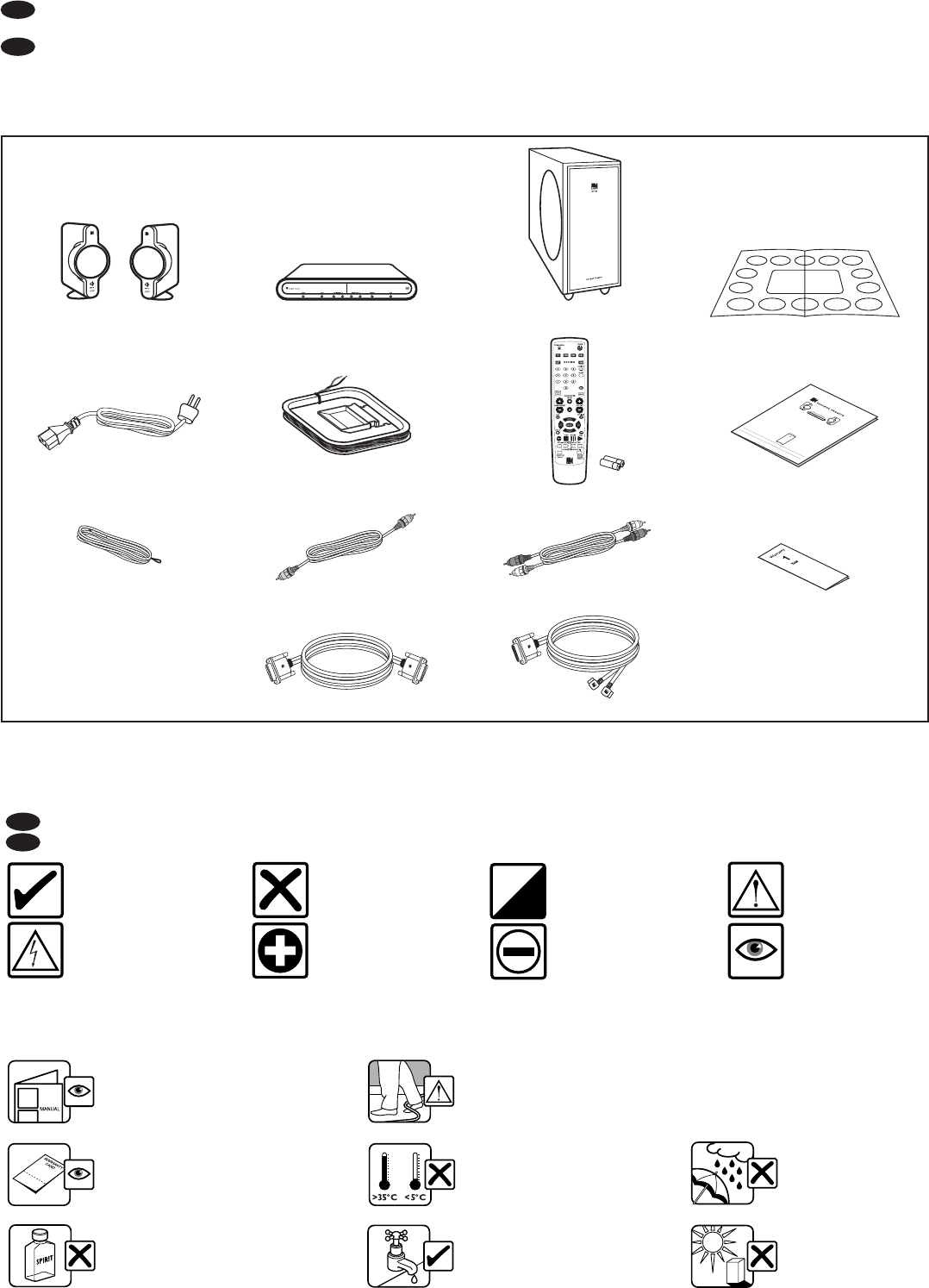
KIT100 Speakers KIT100 DVD KIT100 PSW Subwoofer
FM tv audio
Subwoofer/speakers
KIT100
SOURCE
2
Thank you for purchasing the KIT100.We are confident that it will provide reliable, high performance sound for many years to come. Please read this manual fully
before you attempt any connections to the KIT100.
Gracias por adquirir el modelo KIT100. Un producto de calidad excepcional capaz de garantizar un sonido de alta calidad por muchos años. Por favor lea atentamente
este manual antes de seguir adelante con las conexiones del KIT100.
(ES) introducción
introduction
(ES) contenido del embalaje
carton contents
GB
ES
(GB) Follow this manual carefully for best results
(ES) Siga las instrucciones de este manual para
obtener los mejores resultados
(GB) Read and return warranty card
(ES) Lea y envíenos la tarjeta de garantía
(GB) Clean with a damp lint free cloth
(ES) Limpie con un paño húmedo
(GB) Do not use spirit based cleaners
(ES) No use limpiadores con base de alcohol
(GB) Avoid direct sunlight
(ES) Evite la luz directa
del sol
(GB) Avoid temperature extremes
(ES) Evite temperaturas extremas
(GB) SAFETY NOTICE! trailing cables are dangerous, secure all cables
(ES) ¡ATENCION! los cables de conexión sueltos de los altavoces son peligrosos. Fíjelos
(GB) Avoid damp
(ES) Evite la humedad
(ES) puntos importantes
important points
(GB) Read
(ES) Lea
(GB) Correct
(ES) Correcto
(GB) Wrong
(ES) Incorrecto (GB) Option
(ES) Opción
(GB) Caution/Warning
(ES) Precaución/Atención
(GB) Electrical Warning
(ES) Advertencia eléctrica
(GB) Positive/RED
(ES) Positivo / ROJO (GB) Negative/BLACK
(ES) Negativo / NEGRO
The following icons are used throughout this manual to help you safely install your new DVD system. Please follow them carefully.
Se utilizan los iconos siguientes en este manual para ayudarle a instalar con seguridad sus nuevos altavoces. Sígalas cuidadosamente.
(ES) uso del manual
using the manual
GB
ES
K7190>KIT100 Manual USA 19/4/04 4:11 pm Page 3

R
TO HEAD UNIT TO SPEAKERS
L
POWER
ON OFF
RIGHT
LEFT
R
RL RL
L
R
TO HEAD UNIT TO SPEAKERS
L
POWER
ON OFF
1
2
3
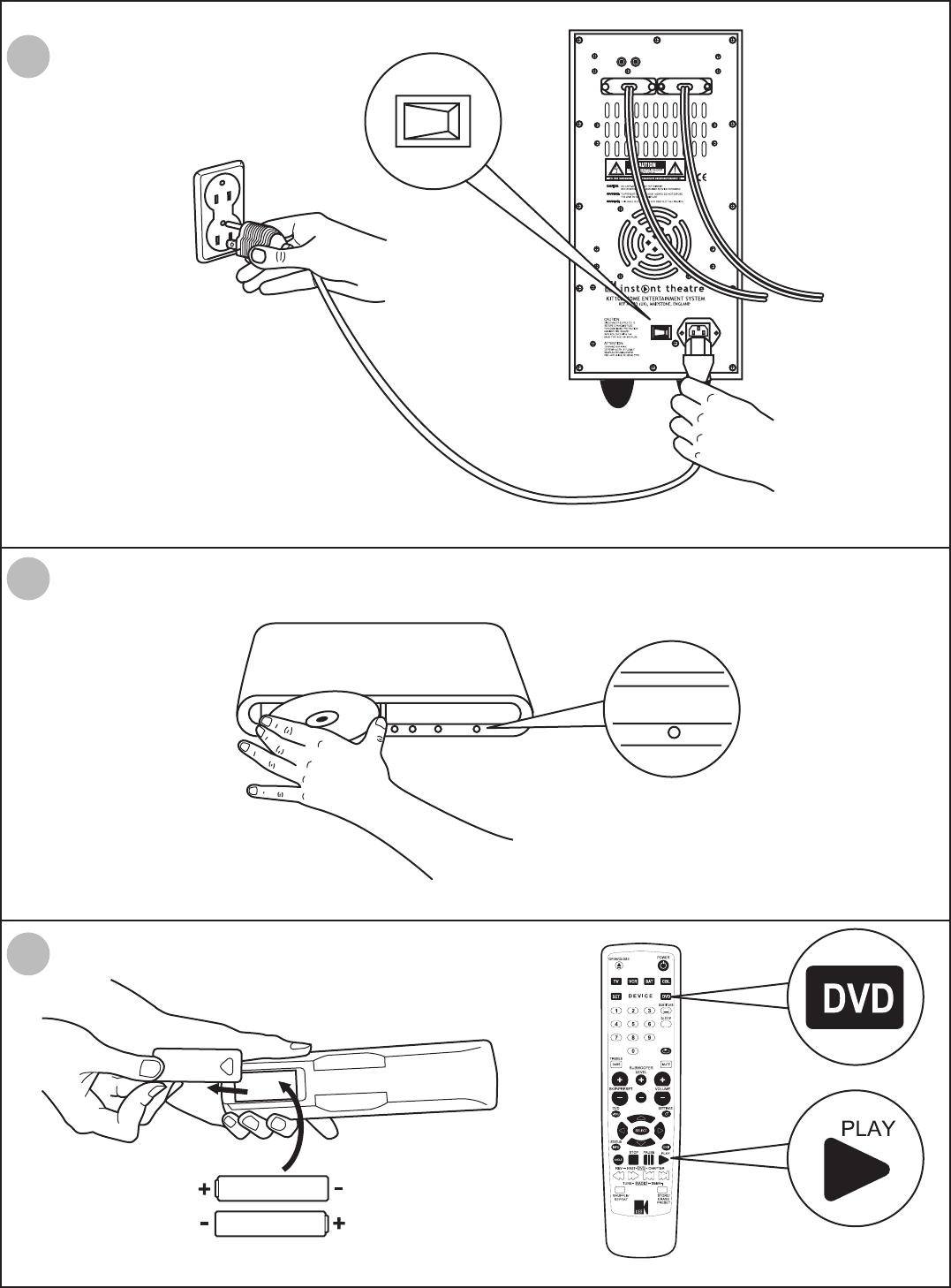
(ES) guía rápida de procedimientos iniciales
quick start-up guide
3
K7190>KIT100 Manual USA 19/4/04 4:11 pm Page 4
R
TO HEAD UNIT TO SPEAKERS
L
POWER
ON OFF
POWER
ON OFF
open / close
4
5
6
SOURCE
4
K7190>KIT100 Manual USA 19/4/04 4:11 pm Page 5

(ES) colocación de los altavoces
positioning speakers
AB
750 mm
5
K7190>KIT100 Manual USA 19/4/04 4:11 pm Page 6

(ES) colocación del subwoofer
positioning subwoofer
AB
>150mm
6
K7190>KIT100 Manual USA 19/4/04 4:11 pm Page 7
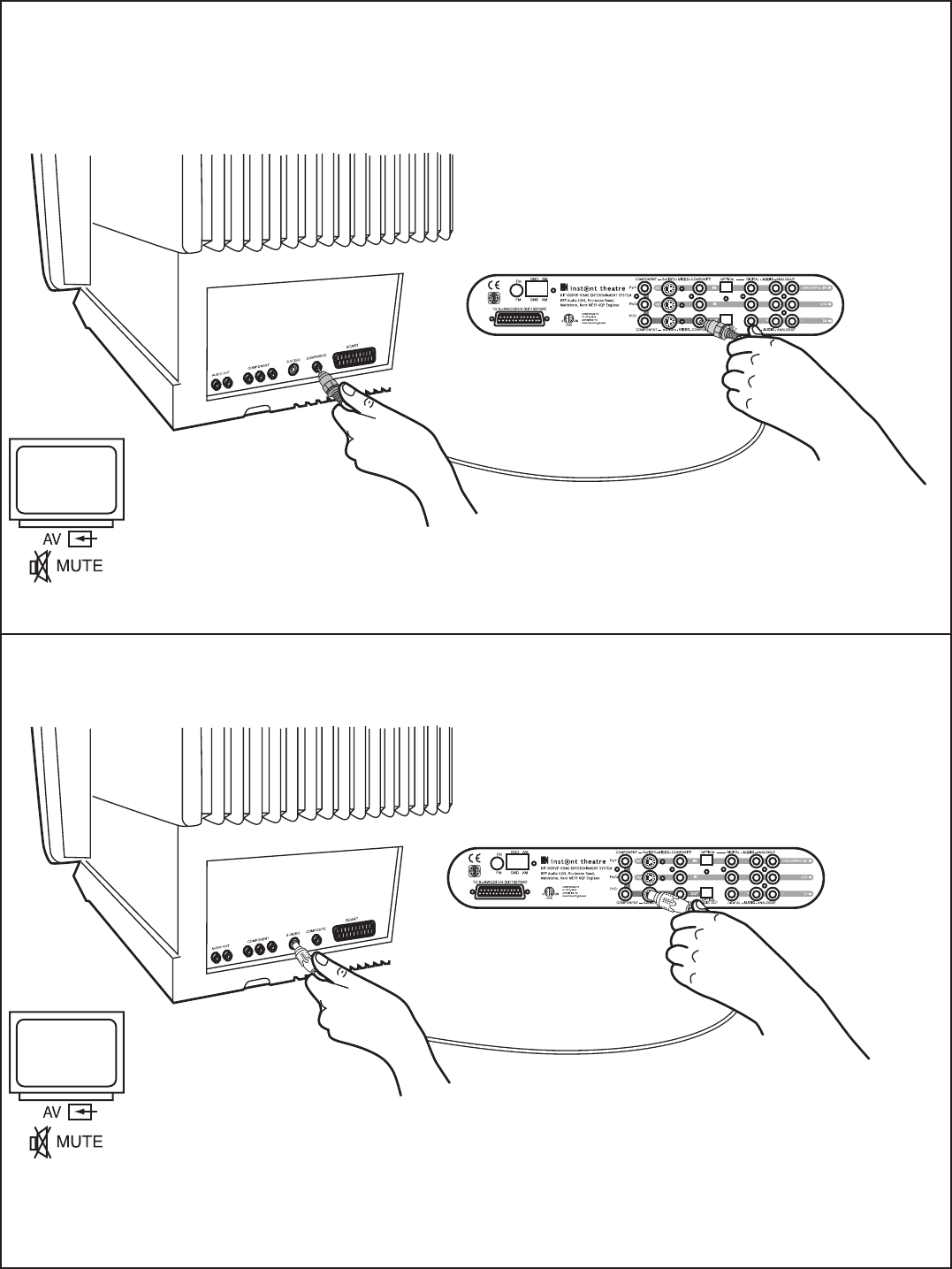
(ES) opciones de conexión a tv
tv connection options
composite
S video
7
K7190>KIT100 Manual USA 19/4/04 4:11 pm Page 8

SOURCE
SOURCE
component
tv audio out
8
K7190>KIT100 Manual USA 19/4/04 4:11 pm Page 9
VCR
Cable/Sat
VCR
Cable/Sat
Line Out
RL
Line Out
RL
Line Out
RL
Line Out
RL
Cable/Sat
S-VIDEO
S-VIDEO
S-VIDEO
S-VIDEO
Cable/Sat
SOURCE
SOURCE
SOURCE
SOURCE
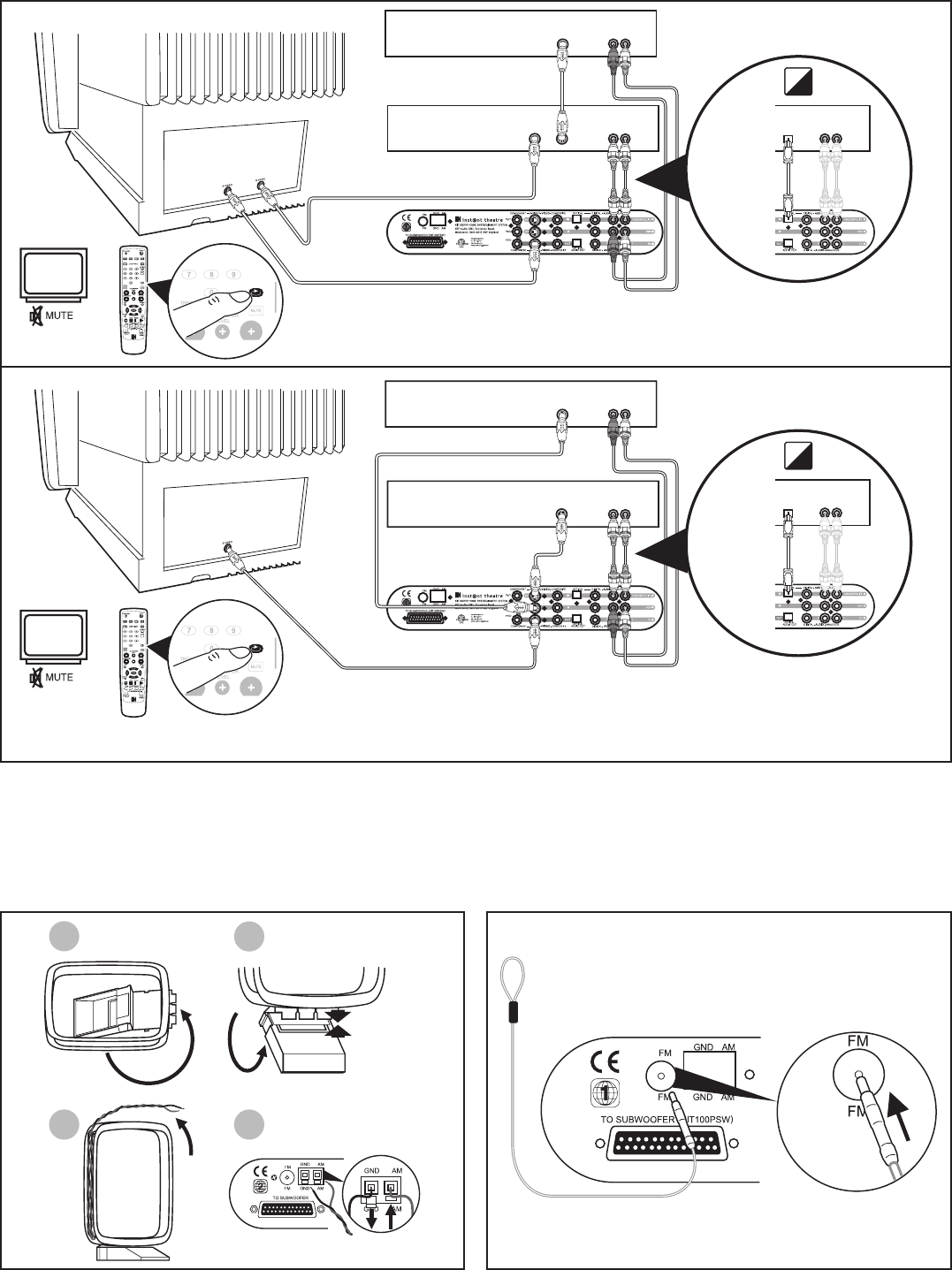
am aerial set-up
12
3 4
fm aerial set-up
(ES) configuración de la antena de am (ES) configuración de la antena de fm
(ES) opciones de conexión avanzadas a vcr/satélite
vcr/satellite advanced connection options
9
K7190>KIT100 Manual USA 19/4/04 4:11 pm Page 10

10
unpacking
Carefully unpack your system. Save all packing materials, which provide the safest way to transport your system as needed.
WARNING:
To avoid danger of suffocation, keep the plastic bags out of the reach of children.
If any part of the system appears damaged, do not attempt to use it. Notify your authorised dealer immediately.
Check to be sure your system includes the parts shown (page 1).
Note:
Please make a note of the serial numbers on the bottom of the DVD unit and the rear of the subwoofer. Copy those numbers onto your
warranty card and in the space provided below.
For your records
Serial numbers are located on the bottom of the DVD unit and the rear of the Subwoofer module.
DVD unit serial number: ______________________________________________________________________________________
Subwoofer module serial number: ________________________________________________________________________________
Dealer name: ______________________________________________________________________________________________
Dealer phone: ______________________________________________________________________________________________
Purchase date: ______________________________________________________________________________________________
User defined DVD parental code: ________________________________________________________________________________
We suggest you keep your sales receipt and warranty card together with this owner’s guide.
English instructions
video connection setup
Selecting the correct input on your TV
The KEF Instant Theatre on-screen displays will only be present on your TV screen if the TV’s external input is properly set to the correct input
which is connected to the DVD player.The video input selection is most commonly made on televisions by pressing the TV’s remote control
button marked ‘TV/Video’,‘Input’,‘AV in’ or ‘Aux’.
Selecting Component and Progressive DVD output
When using the component video connection to your TV (whether progressive or not) you must connect the composite video connection as
well to allow you to set the component option while the default DVD output is composite only. Once you have selected the component option
in the DVDs video settings menu change the TVs input source to compontent and then select progressive if supported by your TV.
Video loop-through
The KEF Instant Theatre only plays composite video inputs on the composite vido output and only plays SVideo inputs on the SVideo output.You
will therefore need a composite or an SVideo lead if you are using these as video sources.
Record and Multi-room audio outputs
Stereo mode must be selected in the Audio menu when using the left and right Record/Multi-room output on the back of the subwoofer to turn
the surround sound off.
K7190>KIT100 Manual USA 19/4/04 4:11 pm Page 11
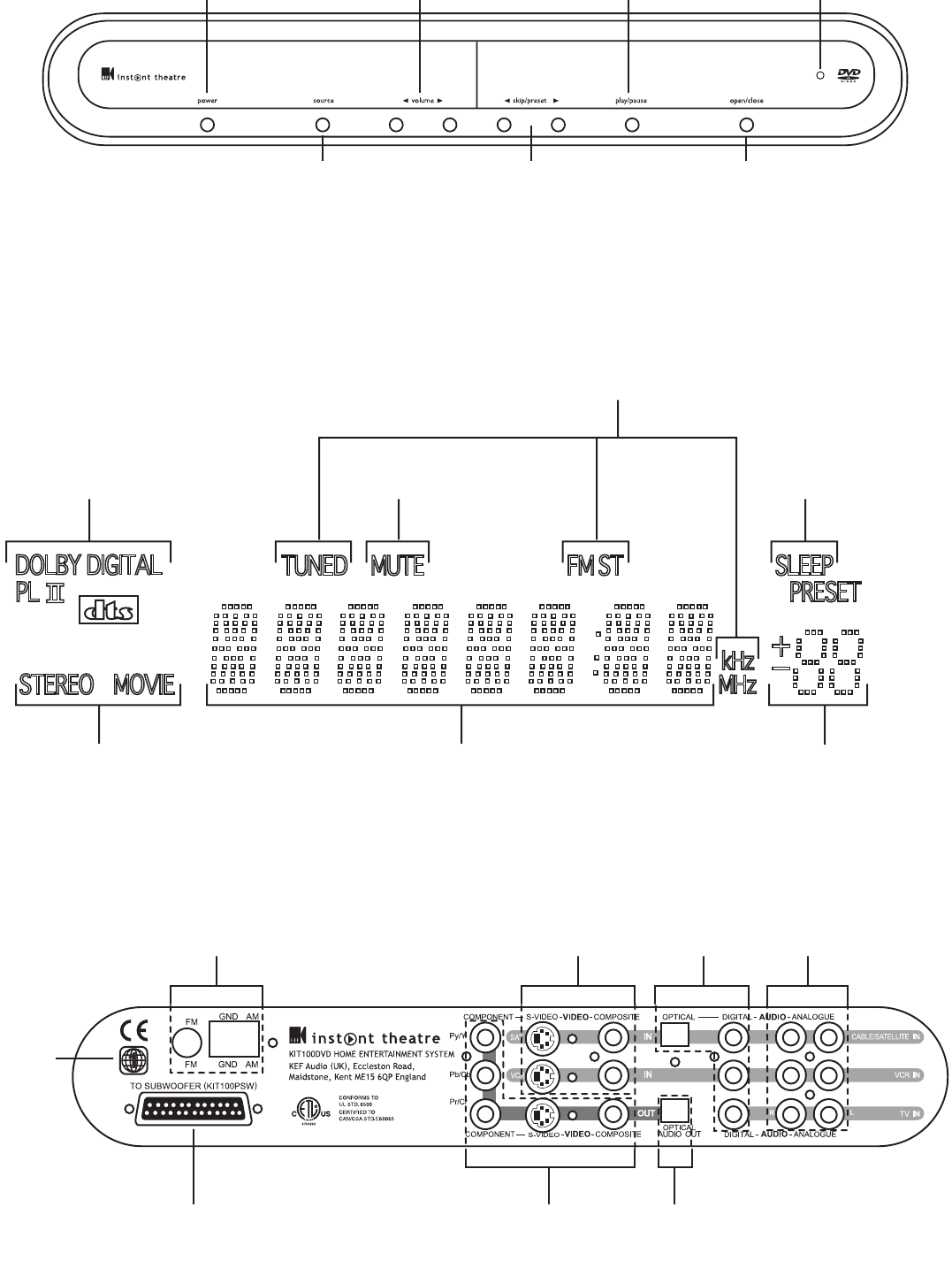
Will display CD track number and its elapsed time when
a disc is playing or the frequency of a radio station Radio PRESET
number
Output acoustic mode over
ride indicator:
STEREO / MOVIE
Surround sound encoding currently
being applied by the system:
DOLBY DIGITAL®
DOLBY PRO LOGIC II®
DTS MUTE activated
Radio TUNED,
FM Stereo and
frequency band
When SLEEP is activated,
the time until system
turn off is displayed
11
dvd rear panel
Radio aerials
AM and FM
Connection to
subwoofer Video output to TV
Component, S-video
or Composite
Digital
Audio
output
Video inputs
S-video or
composite
Digital
audio
inputs
Audio inputs
from set-top box,
VCR and TV
DVD
region
code
dvd system controls
POWER
Turns your KEF Instant Theatre
system on and off.When off
the standby LED is lit
SOURCE
Changes to the next source
selection with each press
OPEN/CLOSE
Opens and closes the
disc tray
<> SKIP/PRESET
Selects the next or
previous chapter on a DVD,
track on a CD or MP3 disc,
picture on a JPEG disc or
radio station preset
<> VOLUME
Increases or decreases the
system volume. Pressing
also unmutes the system if
muted
PLAY/PAUSE
Starts the DVD or CD playing,
if a disc is in. If already playing
it will pause the disc;
press again to resume playing STANDBY
display
K7190>KIT100 Manual USA 19/4/04 4:11 pm Page 12
remote control
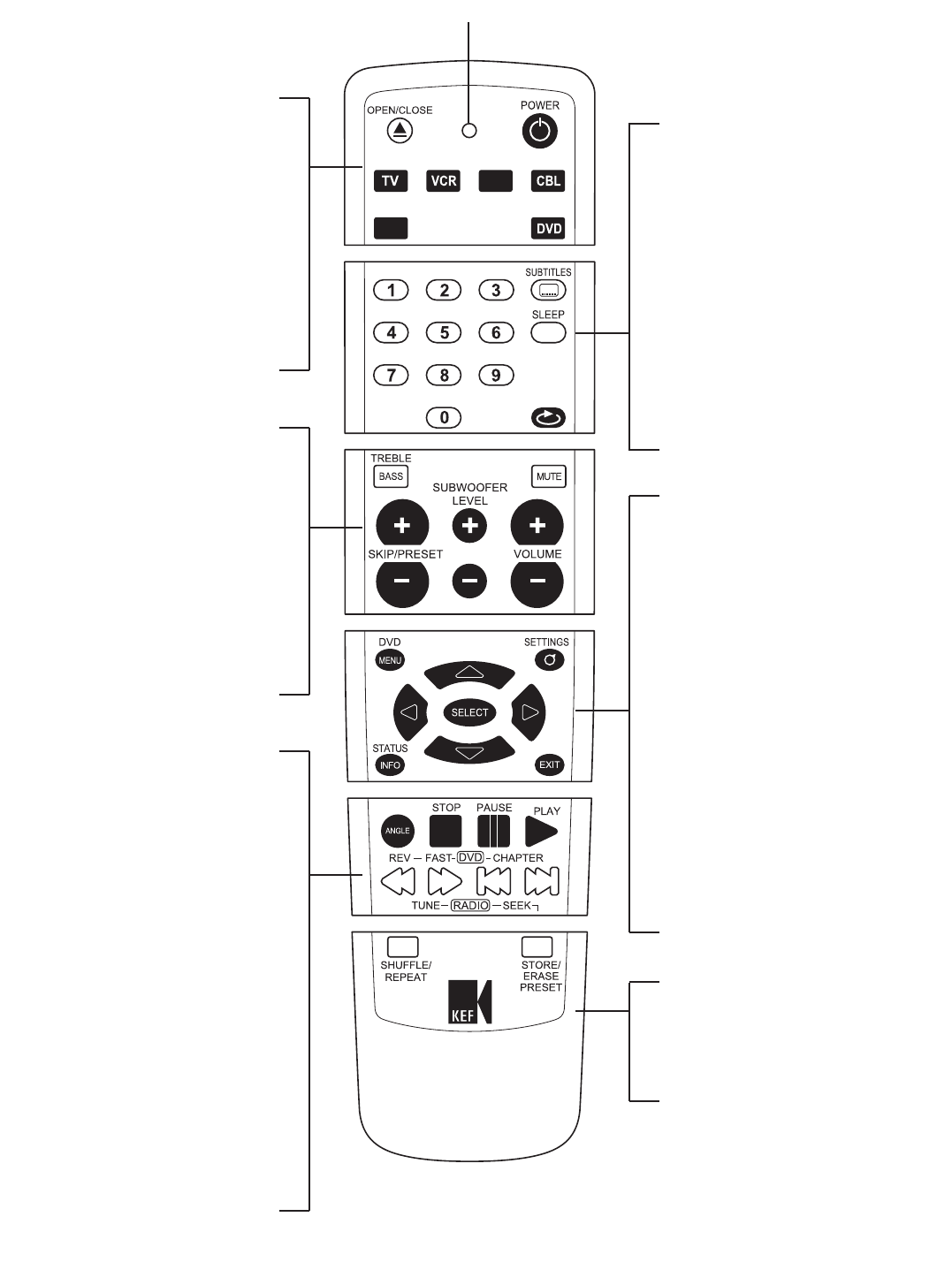
OPEN/CLOSE
Opens and closes the disc tray
POWER
Turns the system on or off
DEVICE
Selects the device to be operated by the
remote control. For example;TV,VCR,
satellite set-top box, cable set-top box. Press
DVD device key to control your
KIT100 DVD home theatre.
SET
Used to program in the correct IR product
code to enable the remote control to operate
different equipment.
BASS/ TREBLE
Displays the bass/treble control menu
MUTE
Mutes and unmutes the system volume
± VOLUME
Increases or decreases the system volume
± SUBWOOFER LEVEL
Increases or decreases the level of bass from
the subwoofer
± SKIP/PRESET
Selects the next or previous chapter on a
DVD, track on a CD or MP3 disc, picture on
a JPEG disc or radio station preset
PLAY
Starts the DVD or CD playing
PAUSE
Pauses the disc. Press again to advance the
disc one frame
STOP
Stops the disc playing. Press again to go back
to the beginning of the disc
REV/TUNE DOWN
Rewind x2, x4, x8 or x20. Radio manually
tune down
FAST/TUNE UP
Fast forward x2, x4,x8 or x20. Radio manually
tune up
CHAPTER/SEEK DOWN
Selects the previous chapter, track, or picture.
Radio auto tune down
CHAPTER/SEEK UP
Selects the next chapter, track, or picture.
Radio auto tune up
ANGLE
Changes the DVD camera angle, if available,
and rotates a JPEG picture
SUBTITLES
Changes to the next available subtitle language
on the DVD disc
SLEEP
Activates the automatic system turn off timer.
Repeated pressing selects a sleep time
between 10 and 120 minutes and timer off
NUMERIC KEYPAD
Enter the number of the desired DVD chapter,
CD track, or radio station preset
SOURCE
Selects the source of the KIT100 DVD home
theatre. Each press scrolls through the
available functions. Disc (will play the inserted
DVD, CD or MP3 disc), FM radio,AM radio,TV
sound source,VCR sound and video source,
CBL/SAT set-top box sound and video source.
DVD MENU
Displays the top menu of the currently loaded
DVD disc if present
SETTINGS - Accesses Settings Menu
Includes controls for Language,Video,Audio,
and parental control functions
SELECT
After highlighting your desired menu choice
using the navigation cursor keys, press the
SELECT button to confirm your choice
NAVIGATION CURSOR KEYS
Use to move within any on-screen menu
STATUS INFO
Displays information about the currently
playing DVD or CD on your TV screen.
Press once for simple elapsed and remaining
time display, press again for complete status
display. Pressing a third time will exit
EXIT
Exits without saving partially completed
changes in settings menu. Displays the DVD
disc title menu if present
SHUFFLE/REPEAT
Plays CD tracks, DVD chapters or JPEG
pictures in a random order. Repeats the track,
chapter, title or disc
STORE/ERASE PRESET
Stores or erases the current radio station
SAT
SET
DEVICE
SOURCE
12
PROGRAMMING MODE LED
K7190>KIT100 Manual USA 19/4/04 4:11 pm Page 13
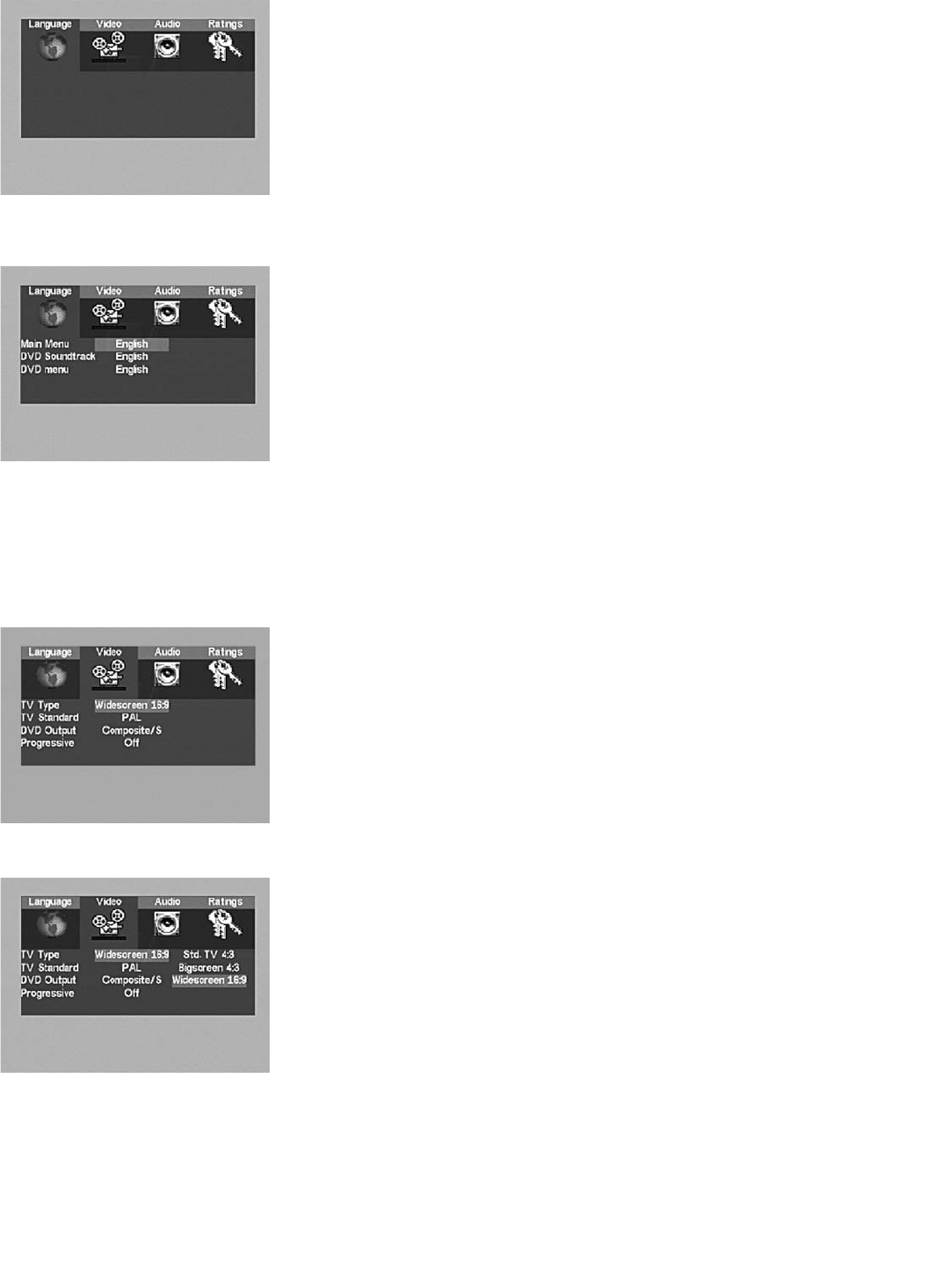
Settings menu
Press the SETTINGS button when watching video from the KEF Instant Theatre to view the Settings
menu, provided the TV’s external AUX input is properly set to view the KEF Instant Theatre’s video
output.Within the Settings menu, select a category (Language,Video,Audio, or Ratings) with the
left/right navigation cursor keys, and press SELECT to open that category’s menu.
Within all the menus, select a category with the up/down navigation cursor keys, and press SELECT
to open that category’s options.Then choose an option with the up/down navigation cursor keys and
press SELECT.To back out of the menus use the left and up navigation cursor keys.
Language menu
The Language menu provides for changing the language of all KEF Instant Theatre system menus,
and for indicating preferences for the language of the DVD’s soundtrack and menus. (DVDs are
published with a limited number of languages on any one disc; the disc will play in your selected
language, if available, or else in the default language for that disc.) Within the Language menu, select a
category (Main menu, DVD soundtrack, or DVD menu) with the up/down cursor keys, and press
SELECT to open that category’s options.
Main Menu
Choosing a language from this list will cause all KEF Instant Theatre system menus (including this one)
to be displayed in that language.
DVD Soundtrack
DVD discs are often published with multiple alternate soundtracks for any one film on that disc.
Setting the DVD soundtrack language will use this sound track as default if it is present on the DVD.
It is usually possible to override this preference in the DVD disc’s own menu.
DVD Menu
This will set the default DVD discs menu language if available on that DVD.
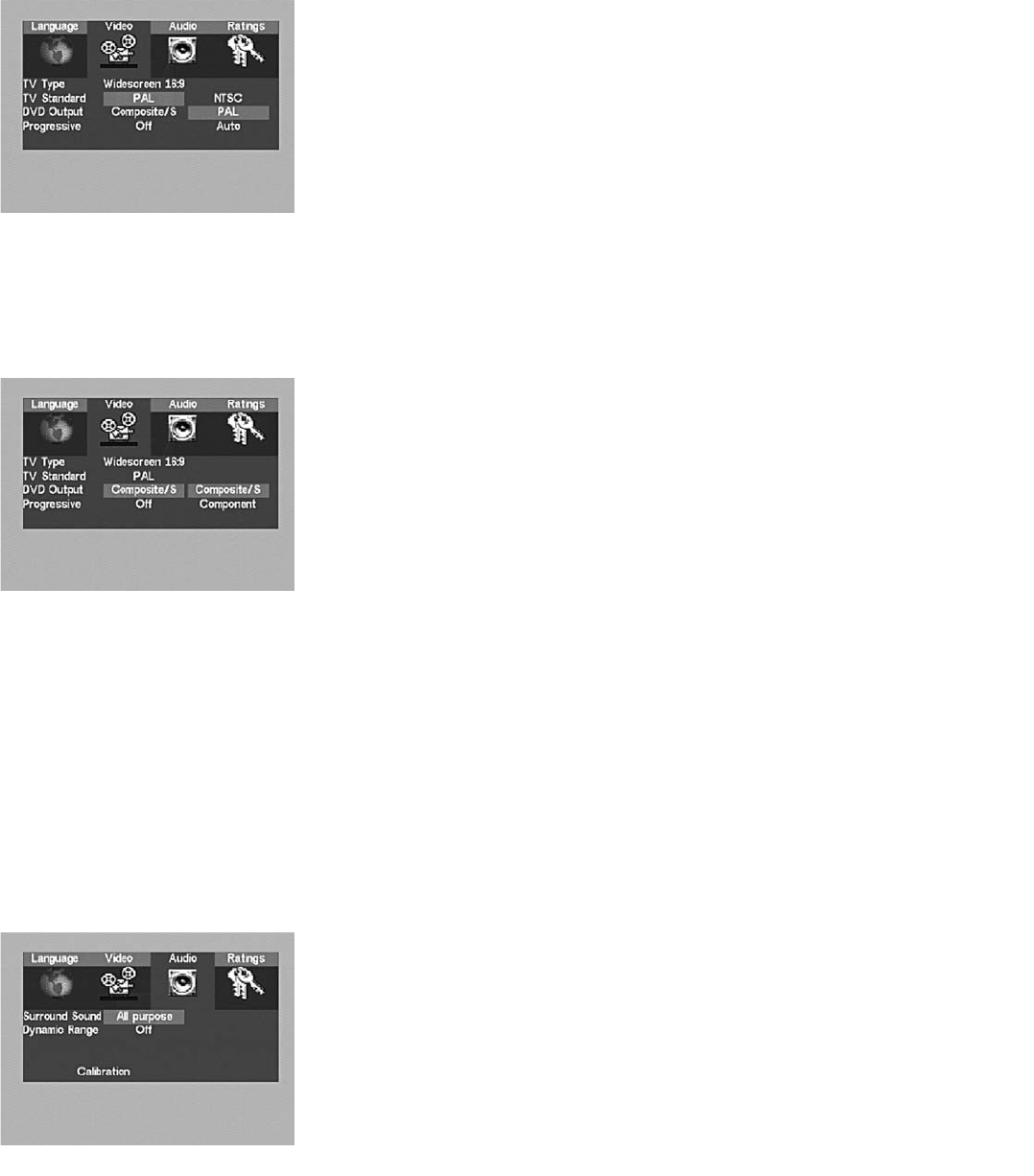
Video Menu
The Video menu allows the KEF Instant Theatre to be optimised for use with different TVs and
different countries’ broadcast standards.
TV Type
Choose the option that best describes the TV being used.
Std. TV 4:3
Choose ‘Std.TV 4:3’ for a TV with a screen ratio of 3/4 which will appear almost as tall as it is wide
but is fairly small.When a DVD is published with both widescreen (letterbox) and pan-and-scan video
formats, this setting will cause it to play in pan-and-scan mode, expanding that part of the picture
containing the action to fill the entire screen.
Bigscreen 4:3
Choose ‘Bigscreen 4:3’ for a TV with a screen ratio 3/4 which will appear almost as tall as it is wide,
and is fairly large.When a DVD is published with both widescreen (letterbox) and pan-and-scan video
formats, this setting will cause it to play in widescreen mode, typically showing the entire widescreen
film image across the centre of the screen, leaving the very top and bottom of the screen
blank (black).
Widescreen 16:9
Choose ‘Widescreen 16:9’ for use with a true widescreen TV (with the screen almost twice as wide
as it is high).When a DVD includes the widescreen (letterbox) format, it will completely fill the
screen. If a DVD is published with only the pan-and-scan (traditional TV) video format, this setting will
cause it to be shown in the centre of the wide TV screen, with black filling in the empty space left and
right of the picture.
system settings
13
K7190>KIT100 Manual USA 19/4/04 4:11 pm Page 14
TV Standard
Television programs are broadcast, and videos or DVDs are published, in different formats in different
countries. Choose the format that best matches the local video/broadcast environment.
NTSC
Choose this if all programming is per the NTSC standard. (Default for KEF Instant Theatre systems
sold in the USA.)
PAL
Choose this if all programming is per the PAL standard. (This is the broadcast standard across much
of Europe and is the default for KEF Instant Theatre systems sold in the UK and Europe.)
Auto
Choose this if using a multi-standard TV and for programming that is a mixture of NTSC and PAL,
as in countries where DVDs might not all be published in the same format.
DVD Output
DVD Output determines which video output, in addition to Composite (RCA), will carry video signals
from the KEF Instant Theatre to your TV. (You will see a prompt message when selecting a new DVD
output, highlight and SELECT “YES” to confirm any changes to this setting.This is to prevent you
setting an output video format which is not displayable on your TV).
Composite/S
Choose this setting if the KEF Instant Theatre will be connected to only the Composite (RCA) input
or the S-Video input of the TV.
Component
Choose this setting if the KEF Instant Theatre will be connected to the Component (RGB) input of
the TV. In this case, connect the Composite input as well, so that you can view non-DVD sources and
to allow you to set the component and progressive options whilst the default DVD output is
composite only.When watching a DVD, switch the input of the TV to “Component” or “RGB.” (The
KEF Instant Theatre’s Component and S-video outputs cannot both be active at the same time.)
Component gives the best video quality for plasma, projector, or other component compatible
televisions or monitors.
Progressive
Select “On” if using the Component output for DVD programs with a TV that supports
‘progressive scan’. Otherwise, select “off”. Progressive scan gives improved picture quality on a
compatible monitor or television but must be used in conjunction with component DVD Output.
It will output PAL or NTSC progressive output as defined by the source material.
Audio Menu
The Audio menu allows for calibration of the KEF Instant Theatre for use in unusually shaped or
furnished rooms, and for turning off the surround sound, if this should be desired.To adjust
bass/treble or the level of bass from the subwoofer, use the dedicated buttons on the remote control.
14
K7190>KIT100 Manual USA 19/4/04 4:11 pm Page 15
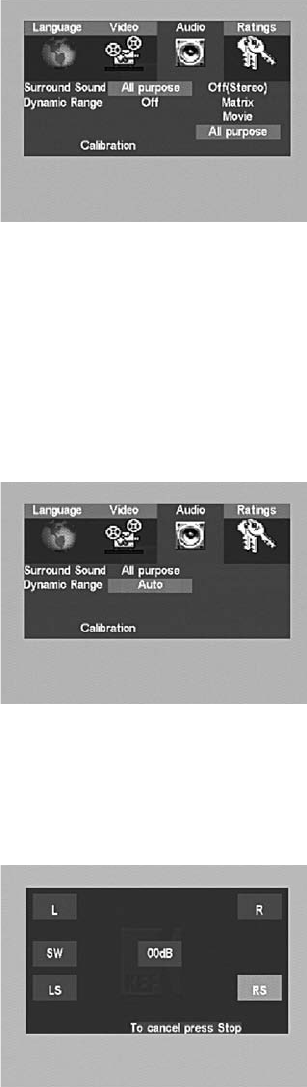
Surround Sound
Normally, the default of “All purpose” is suitable for all users, but you may choose another setting for
surround sound as follows:
Off (Stereo)
Choose this setting to turn surround sound off. Stereo mode must be selected if you are using the
‘Record/multi room output’ on the rear of the subwoofer to record or drive a separate pair
of speakers.
Matrix
Use this setting to hear some degree of surround sound from mono sources.
Movie
Use this setting to experience Dolby Pro Logic II Movie decoded audio which produces different
surround effects for films and video games. Leave MOVIE switched off if you are listening to MUSIC.
All purpose
As the name suggests, this setting will optimise your system depending on what program material is
present with the exception of monophonic recordings. If the source contains Dolby DigitalTM or
DTSTM signals then these will always play by default. Other sources will be played in a configuration of
Prologic II chosen by KEF Audio for optimum reproduction of an analogue source material.
Dynamic Range Control
Dynamic Range Control will compress the sound for better listening at night when you do not wish
to disturb others in the house.
Off
The KEF Instant Theatre’s default is to have DRC turned off.This will not apply any compression to
Dolby Digital audio content.
On
This will increase the volume of quiet sounds such as speech at the same time as decreasing the
volume of loud special effects such as explosions.
Auto
This will automatically turn on DRC at volume levels below 25 on your KEF Instant Theatre.
Calibration Menu
The standard settings will already be correct for a normal room.The calibration menu allows you to test
that the speakers are all connected and allows you to adjust individual speaker levels if required for your
individual room. Note: The calibration option will only appear if you are in ‘disc mode’ when you
press SETTINGS.
Sitting in a central seat of the listening/viewing area, go to disc mode, highlight and SELECT “Calibration” to
start the acoustic calibration process. Noise will emanate from one channel, then the next, and the next,
right around the listening/viewing area. Use the up/down navigation cursor keys to adjust the volume of any
channel that doesn’t appear to match the others.When all channels sound equally loud, press STOP or EXIT
on the remote to exit the menu. It is recommended that a Sound Pressure Level meter is used to measure
the sound levels accurately. (Although it is possible to adjust the subwoofer level during this process,
KEF recommends only confirming that the subwoofer is working, but not attempting to match its level to
that of the other speakers. It is best to make fine adjustments to the subwoofer level using the remote
control keys during normal listening.)
15
K7190>KIT100 Manual USA 19/4/04 4:12 pm Page 16
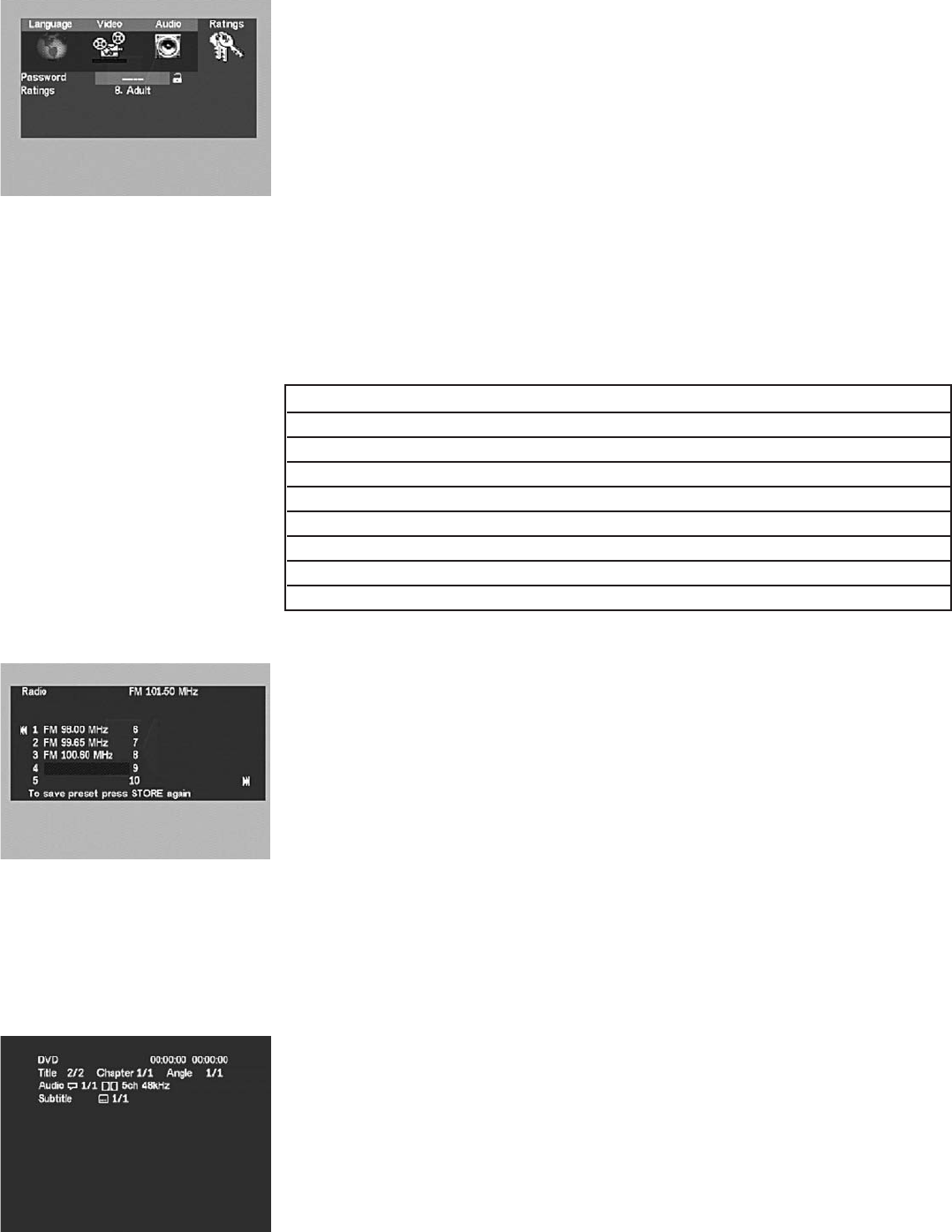
Ratings Menu
DVD discs can be published with audience rating information or with multiple versions of the video
appropriate for different audiences.The ratings menu is designed to allow parents to limit what sort
of DVD programs can be watched by other family members without the parents’ private password.
(Unfortunately, as of the publication date of this manual, many DVDs are published without rating
information and will play regardless of the parental control setting.)
Password
If the lock icon to the right is open, enter any 4-digit security code with the numeric buttons of the remote
and press SELECT.This will engage the parental controls feature and lock out others from this menu.
If the lock to the right is closed, the “Ratings” cannot be changed without first re-entering the previously set
4-digit code and pressing SELECT. (During playback of a disc with a higher rating, you will be prompted for
your password, enter the same four digits, then press SELECT.)
Write your code here for future reference: ______________________________________________
Ratings
Highlight the current rating and make changes with the left/right cursor keys.Then press the up cursor
once, enter a password, and press SELECT to lock out further changes. Press the up cursor again or press
SETTINGS or EXIT to leave the “Ratings” menu.
Rating level Name Description MPAA rating European rating
1 Child Safe Particularly suitable for children
2 Universal General audiences G U
3 PG Parental guidance PG PG
4 PG>12 Parents strongly cautioned PG-13
5 PG>15 May be suitable for mature teenagers PG-15
6 Accompanied Restricted <17s to be accompanied R
7 18+ No-one 17 and under NC-17
8 Adult Suitable for adults 18
Radio Menu
To play the radio:
Press source button repeatedly until the AM or FM radio band indicator is selected the radio and switch
from one frequency band to the other. Use the PRESET button or the navigation cursor keys to select the
desired preset radio station.
To tune the radio:
Press TUNE on the remote control to manually search or press SEEK to automatically tune the radio.
To store a preset:
The currently tuned radio station will be saved to the next available preset when you press STORE/ERASE
PRESET twice. Alternatively to save the radio station to a specific preset, between 1 and 40, navigate to a
free preset and then press STORE/ERASE PRESET twice. Highlight the “l<<” and “>>l” symbols and press
SELECT to go to the previous or next page of ten preset numbers.
To erase a preset:
The currently highlighted preset radio station will be removed if you press STORE/ERASE PRESET twice.
Status Menu
Pressing STATUS INFO once will display elapsed and remaining time information of the currently playing
DVD or CD on your TV’s screen. Press again for complete status display. Pressing a third time
will exit.
16
K7190>KIT100 Manual USA 19/4/04 4:12 pm Page 17
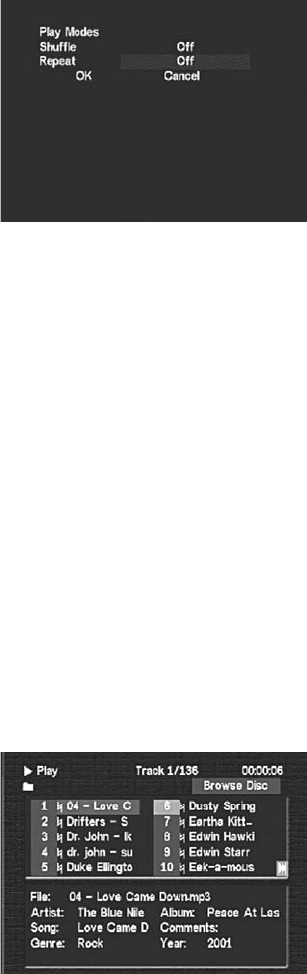
17
Shuffle/Repeat Menu
Accessed by pressing the SHUFFLE/REPEAT key on the remote control. Use the navigation cursor keys to
highlight the setting you wish to change, then press SELECT to change the setting. Once satisfied with the
settings, highlight “OK” and press SELECT once more to save the changes. (Highlight and SELECT “Cancel,”
or press SHUFFLE/REPEAT, to discard any changes and exit the SHUFFLE/REPEAT screen.) All shuffle/repeat
settings revert to “Off” whenever a disc is ejected.
Shuffle
Shuffle modifies the order in which the chapters or tracks of a disc will be played. Choose “Shuffle” to play
them in random order, or “Program” to create a custom ordered list of chapters/tracks.
Choose “on” to play the tracks of a CD or the chapters of a DVD title in random order. (A DVD ‘title’ is a
single feature, of which there may be several on a disc; the main film, in addition to any number of
bonus features.)
Program (CD only)
When “Program” is set and “OK” SELECTED, a screen appears listing all possible play positions.
(Highlight the “1”, then enter the track number that should play first; highlight the “2”, etc.)
Play Program
Highlight and SELECT “Play Program” to exit programming mode and play the programmed selections.
(To exit this screen without programming any selections, simply press “SHUFFLE/REPEAT” twice.)
Clear Program
Highlight and SELECT “Clear All” to empty the list of programmed selections and start over.
Repeat
If repeat is off the current loaded CD or DVD will play to the end of the disc and stop (this is the default
behaviour).As with shuffle, select “OK” to confirm all changes and exit the shuffle/repeat menu or select
“Cancel” to discard changes and exit the shuffle/repeat menu.
Choose “Track” to repeat the currently playing CD track (song) indefinitely.
Choose “Disc” to repeat the currently playing CD or DVD disc indefinitely.
Choose “Chapter” to repeat the currently playing DVD chapter indefinitely.
Choose “Title” to repeat the currently playing DVD title indefinitely. (A DVD “title” is a single feature,
of which there may be several on a disc; the main film, in addition to any number of bonus features.)
MP3 and JPEG Playback Menu
This allows you to create viewing programs by highlighting each number to the left of each desired file,
and pressing SELECT to highlight the filename in blue. Once all the desired songs or pictures (you cannot
include both in the same program) are highlighted blue, press PLAY to play the resulting list of songs or view
the resulting slideshow. (Once the slideshow, is complete, or the selected music begins to play, you will see a
screen entitled “Brow Prog” showing the list of files programmed to play.)
When listening to MP3 files or viewing JPEG pictures, the SKIP buttons jumps to the next/previous
file of the same type, either MP3 or picture, but not between the two.To play the other type of file,
press STOP, then highlight and SELECT or PLAY the desired file. Please note that MP3s will only play
in stereo irrespective of the surround sound mode selected in the audio menu.
File numbers
Highlight the number to the left of the desired file, and SELECT it or press PLAY to play or view that file.
Numbers are from “1” through to the total number of MP3 and JPEG files on the disc, displayed in groups of
ten. Highlight and SELECT the “|<<” and “>>|” symbols to go to the previous or next page of ten file names.
Browse Disc
Highlight and SELECT this item to change to “Create Program” mode, which facilitates playback of only
chosen MP3 audio files or JPEG picture files from the current disc.
Crea Prog
Short for “Create Program”, highlight and SELECT this item to exit programming mode and return to
“Browse Disc” mode.
Brow Prog
Highlight and SELECT “Browse Program” to change back to “Browse Disc” mode.
K7190>KIT100 Manual USA 19/4/04 4:12 pm Page 18

18
Dolby Surround
DTS Digital Surround
Macrovision
progressive scan output at 525p and 625p
dvd region codes
1. Dolby Digital
Dolby Digital is the multi-channel digital signal format developed by Dolby Laboratories. Dolby Digital consists of up to “5.1” channels – front left,
front right, centre, surround left, surround right and an additional channel exclusively reserved for additional deep bass sound effects. (The Low
Frequency Effects (LFE) channel containing bass frequencies of up to 120Hz). Unlike the analogue Dolby Pro Logic format, Dolby Digital’s channels
can all contain full range sound information, from the lowest bass, up to the highest frequencies (22kHz).The signals within each channel are
distinct from the others, allowing pinpoint sound imaging, and Dolby Digital offers tremendous dynamic range from the most powerful sound
effects to the quietest, softest sounds, free from noise and distortion.
2. Dolby Pro Logic II
Dolby Pro Logic II is a new multi-channel playback format developed by Dolby Laboratories using feedback logic steering technology and offering
improvements over conventional Dolby Pro Logic circuits. Dolby Pro Logic II can be used to decode not only sources recorded in Dolby
Surround but also regular stereo sources into five channels (front left, front right, centre, surround left and surround right) to achieve surround
sound.Whereas with conventional Dolby Pro Logic the surround channel playback frequency band was limited, Dolby Pro Logic II offers a wider
band range (20Hz to 20kHz or greater). In addition the surround channels were monoaural (the surround left and right channels were the same)
with previous Dolby Pro Logic, but with Dolby Pro Logic II they are played as stereo signals.
3. Dolby Surround
These are sources in which three or more channels of surround have been recorded as two channels using Dolby Surround encoding technology.
Dolby Surround is used for the sound tracks of movies recorded on DVDs, LDs and video cassettes to be played on VCRs, as well as for the
stereo broadcast signals of FM radio,TV, satellite broadcasts and cable TV. Decoding these signals with Dolby Pro Logic makes it possible to
achieve multi-channel surround playback.The signals can also be played on ordinary stereo equipment, in which case they provide normal stereo
sound.There are two types of DVD Dolby SURROUND recording signals. 1) 2-channel PCM stereo signals 2) 2-channel Dolby Digital signals.
The KEF Instant Theatre is manufactured under license from Dolby Laboratories.“Dolby”,“Pro Logic” and the double-D symbol are trademarks
of Dolby Laboratories.
Digital Theatre Surround (also called simply DTS) is a multi-channel digital signal format developed by Digital Theatre Systems. DTS offers the
same “5.1” playback channels as Dolby Digital (front left, front right and centre, surround left and surround right) as well as the stereo 2-channel
mode.The signals for the different channels are fully independent, eliminating the risk of deterioration of sound quality due to interference
between signals and crosstalk etc. DTS features a relatively higher bit rate as compared to Dolby Digital (1234 kbps for CDs and LDs, 1536 kbps
for DVDs) so it operates with a relatively low compression rate. Because of this the amount of data is great, and when DTS playback is used in
movie theatres, a separate CDROM synchronised with the film is played.With LDs and DVDs, there is of course no need for an extra disc;
the pictures and sound can be recorded simultaneously on the same disc, so the discs can be handled in the same way as discs with other
formats.There are also music CDs recorded in DTS.These CDs include 5.1-channel surround signals (compared to two channels on current
CDs).They do not include picture data, but they offer surround playback on CD players that are equipped with digital outputs (PCM type digital
output required). External DTS CD bitstreams coming in on the optical SPDIF audio CBL input of the KEF Instant Theatre will not be decoded by
the KEF Instant Theatre system. DTS surround playback offers the same intricate, grand sounds as a movie theatre, right in your own listening
room.“DTS” and “DTS Digital Surround” are registered trademarks of Digital Theatre Systems Inc.
The KEF Instant Theatre incorporates copyright protection technology that is protected by U.S. patents and other intellectual property rights.
Use of this copyright protection technology must be authorised by Macrovision, and is intended for home and other limited viewing uses only
unless otherwise authorised by Macrovision. Reverse engineering or disassembly is prohibited.
Consumers should note that not all high definition television sets are fully compatible with this product and may cause artefacts to be displayed in
the picture. In case of 525 or 625 progressive scan picture problems, it is recommended that you switch the connection to the ‘standard
definition’ output by setting the DVD output to progressive “off”. If there are questions regarding the TV set compatibility with this 525p and
625p DVD player, please contact our customer service centre.
The KEF Instant Theatre is shipped with a specific DVD region code as marked on the rear panel of the DVD player.This will be region “1” for
America, region “2” for Europe and region “3” for Asia.The system will only play DVDs which match this region code.
K7190>KIT100 Manual USA 19/4/04 4:12 pm Page 19

19
navigation helpguide
DVD MENU
Displays the title menu of the currently loaded DVD disc. (The DVD player must be selected first, by pressing
Source key on the remote to select the KEF Instant Theatres disc mode.) Each disc menu will be different but
typically allows you to play the disc, choosing different sound and picture formats, and going directly to any
point in the film or video. Press DVD MENU again or press EXIT to leave the menu and resume playing.
EXIT
Exits the KEF Instant Theatre’s settings menu or the DVD disc menu, and returns to the video/audio program.
Exits without saving partially completed changes. Exit will also bring up the currently playing DVD’s title menu if
one is present on the disc.This can sometimes be different to the DVD’s top menu obtained by pressing the
DVD menu button.
Navigation cursor keys
Use to move within any on-screen menu; both menus provided on DVD discs, as well as the SETTINGS,
BASS/TREBLE, SHUFFLE/REPEAT,AM/FM control, and MP3/Photo-browsing menus of your KEF Instant Theatre.
Pressing one of the (up/down/left/right) cursor keys will move the highlight to the next item in the direction of
the arrow.
In the KEF Instant Theatre settings menu, you can back out of the submenus by using either the up or left
cursor keys, as appropriate. (“On-screen” means on your TV’s screen, provided the TV’s external input (Aux in)
is properly set to view the KEF Instant Theatre DVD output.)
SELECT
After highlighting your desired menu choice using the navigation cursor keys, press the SELECT button to
confirm your choice. SELECT can change to the next choice in a list of options, as is the case in the KEF Instant
Theatre’s shuffle/repeat menu. (When browsing computer CDs containing MP3 and/or JPEG files SELECT will
play the currently highlighted file.)
BASS/ TREBLE
Displays the bass/treble control menu on the front panel display and on your TV. Use the up/down cursor keys
to switch between bass and treble, and the left/right cursor keys to adjust each control. Press BASS/TREBLE
again or wait 5 seconds to exit the menu.
SETTINGS
Pressing the SETTINGS button when watching any source except your TV will bring up the Settings menu,
which includes controls for Language,Video, Audio, and Ratings (parental control) functions. Use of this menu is
entirely optional, as the out-of-the box default settings will work fine for most customers. Press SETTINGS
again, or press EXIT at any time, to exit the settings menu. (Please note that the Settings menu is not available
during playback of JPEG pictures.)
STATUS INFO
In disc mode this will display information about the currently playing DVD or CD on your TV screen. Press
once for simple elapsed and remaining time display, press again for complete status display. Pressing a third time
will exit.
SOURCE
taking care of your system
Cleaning your DVD system
• Use only a soft, dry cloth to clean the outside surfaces of the DVD system
• Do not use any sprays near the system. Do not use any solvents, chemicals, or cleaning solutions containing alcohol, ammonia, or abrasives
• Do not allow any liquids to spill into any openings
Cleaning the speakers
• Clean the surface of your speakers with a soft, damp cloth.You can use an ammonia-free window cleaner on a soft cloth to maintain the finish
• Do not use any sprays near the speakers. Do not use any solvents, chemicals, or cleaning solutions containing alcohol, ammonia, or abrasives
• Do not allow liquids to spill into any openings
• The speaker grilles require no special care, although you may vacuum them carefully, if necessary
Cleaning discs
To minimise exposure to dust and dirt, return discs to their cases after use. Store each disc in its case, away from direct sunlight,
high temperatures, and humidity
Handle discs by their edges to prevent
fingerprints and scratches
To remove stains or fingerprints from the
surface of a disc, use a soft and dry lint-free,
cloth.Wipe in straight movements from the
centre of the disc to the outside
Do not use a circular motion to clean. Do
not use any chemical products; they can
damage the disc
Do not write on or attach labels to the
surface of a disc
K7190>KIT100 Manual USA 19/4/04 4:12 pm Page 20

20
pre-programmed remote control
DEVICE
The remote control will operate the KIT100 DVD Home Theatre System when you press the DVD
device key.The other device keys can be set to operate other equipment and are selected by pressing
the required device key.The alternative key functionality of the remote control can be seen in
“Remote control alternative keys functionality table” on page 46.
In order to record on a VCR it is necessary to press both the record (OPEN/CLOSE) and PLAY keys
at the same time.
If the batteries are replaced in the remote control within five minutes then the programmed IR codes
will be remembered. If the batteries are removed for longer the remote may need to be re-
programmed.
Quick programming the remote control
In the user manual for the equipment you wish to program, you should find a 3 or 4 digit product IR
code. If this is not given then look up the 4 digit code in the “Equipment manufactures IR codes
table” on page 39 for the brand of equipment that you have. If there are several product IR codes
then you will need to try them in turn until successful operation is achieved. Follow the quick
programming sequence below. If a key is not pressed for 10 seconds then the programming process
will stop automatically, and you will have to start again.To exit the programming mode press any
DEVICE key so that the LED turns off.
1. obtain the product IR four digit code(s) from the table
2. press and hold the SET key and the required device key (TV,VCR, SAT or CBL) together until
the LED turns on
3. enter the four-digit code for your equipment using the numerical keys, the LED will blink for
each digit, the LED should then turn off.
If the LED flashes two times, to indicate that an invalid code was entered, then repeat step 3.
4. test the remote control with your equipment and if not successful, look up the next product IR
code for your equipment's manufacturer and repeat the steps from 2.
Automatic search programming
If the products IR three or four digit code is not in the equipment manual or the “Equipment
manufactures IR codes table” on page 39, or still dose not work correctly after completing the Quick programming steps above for all the listed
codes, then you can get the remote control to automatically scroll through all the IR codes for each specific device type. Patience will be required
as it can take several minutes for the remote control to go through each of the codes for that device type. Follow and repeat the automatic
programming sequence below. If no key is pressed on the remote control for 30 seconds then the programming process will stop automatically,
and you will have to start again.
1. turn on the equipment you wish to operate with the remote control (if the equipment is a VCR then insert a tape and start playback) and
ensure that the remote control remains pointing at the equipment
2. press and hold the SET key and the required device key (TV,VCR, SAT or CBL) together until the LED turns on
3. press and release the SET key again to enter the search mode, the LED will flash fast
4. Press and hold the POWER key for 3 seconds until the LED flashes every 2 seconds.This indicating that you are in the automatic search
mode where a different IR code is transmitted automatically on each flash.
5. when your equipment turns off because it has received the correct power IR command, immediately press any key to stop the automatic
search, the LED stops flashing
6. press any device key (TV,VCR, SAT or CBL) to store the current IR code, the LED will turn off
7. turn your equipment back on, press the correct device key (TV,VCR, SAT or CBL) and test the remote control for correct functionality.
If it does not work fully then repeat the steps from 1.
8. If the remote controls LED turns off before your equipment receives a valid IR code to turn it off then repeat the above steps from 1
ensuring that the remote control is pointing at the equipment, that the equipment is switched on and that you chose the correct DEVICE
type.
Reading the stored IR code
You can see what IR code is stored for each device key. Press the relevant device key (TV,VCR, SAT or CBL).Then press and hold SET and at the
same time press digit 1, 2, 3 or 4 on the numeric keys, then release all keys. Each time you press SET and digit “1” to “4” the LED will flash the
same number of times as that digit of the IR code number.
SOURCE
KEF services
Customer service
For additional help in solving problems, follow the trouble shooting section then contact KEF®customer service or your local retailer.
Warranty
The KEF Instant Theatre system is covered by a limited non-transferable warranty. Details of the warranty are provided on the warranty card that
came with your system. Please fill out the information section on the card and return it.
Accessories
The KEF Instant Theatre system shelf speakers are compatible with the optional KEF Instant Theatre speaker floor stands.
K7190>KIT100 Manual USA 19/4/04 4:12 pm Page 21

21
trouble shooting
Error messages
NO DISC Press OPEN/CLOSE and ensure that a disc has been correctly inserted into the DVD player
BAD DISC Check that the disc is inserted correctly with the label side upwards and that it is clean
INCORRECT REGIONCheck that the DVD region number matches that on the rear of the DVD player
No power
If there is no blue standby light, no response to pressing the ON/OFF button on the remote control or the POWER button on the DVD player
• Make sure the system is switched on at the rear of the subwoofer speaker
• Check that the cable between the subwoofer and the DVD player is correctly connected at both ends and screwed tight
• Check that the power cord is connected firmly at both ends
• Unplug the power cord from the outlet for 30 seconds to allow the system to reset
No sound
• Make sure “mute” is not lit on the display – if it is then press mute on remote control
• Increase the volume level
• Check speaker cable is connected to the rear of the subwoofer and screwed tight. Check that the speaker cable is firmly pushed into
both the left and right speakers
• Check that the external connections are firmly inserted and that the correct source is chosen e.g. CBL/TV/VCR
Sound with no picture
• Check connections from the VCR and CBL source are correctly plugged into the rear of the DVD system
• Ensure the television is switched on and that the video input selection of your television is set to the correct AV input.This can be done
with the TV’s remote control,TV/VIDEO, INPUT or AUX IN buttons
• If you had a picture before but have just connected a different TV and there is now no picture, then the DVD output settings of the
DVD system may be incorrect for the new television – reset the DVD outputs to their original out-of-the-box settings (see resetting
factory defaults below)
• When using a Scart video connection to your TV you require a composite lead to view external sources connected to the KEF Instant
Theatre’s composite inputs.You require an S-video lead to view external inputs connected to the KEF Instant Theatre’s S-video inputs
Remote control not working
• Check batteries and their polarity (+ and -)
• Make sure the DVD player’s front panel is not covered and that the remote control is pointing at the DVD player
• Ensure that you press the correct device key (DVD,TV,VCR, SAT or CBL) for the equipment that you wish to operate
• A valid IR code must be programmed into the remote control before it will work with any equipment other than the KEF Instant
Theatre. See pre-programming the remote control on page 20
• If the remote control is not performing commands correctly, it may be that the wrong equipment code is programmed in.
Try repeating the Quick Programming using another code listed under your brand or start the automatic search over again to locate
the correct code
• The unit is in direct sunlight.This can interfere with IR signals
Radio does not work/or has poor reception
• Move the antennas further away from your television and other electrical equipment.The AM band is very susceptible to interference
from televisions
• Ensure the AM and FM antennas are connected
• Extend the antennas and adjust their position to improve radio reception
• Ensure AM antenna is upright
DVD or CD does not play
After pressing DVD/CD button and waiting a few seconds, LOAD should appear as the disc’s format information is read by the DVD player
• Make sure the disc is properly inserted – label side up - eject the disc and re-insert it again
• Ensure disc is not dirty or scratched – clean the disc carefully
• Check that the disc region code matches the label on the back of the DVD system
Sound is distorted
• Check speaker connections
• Reduce level from other connected sources in case of interference
Subwoofer sound too high/low
• The level of bass from the subwoofer can be adjusted using the remote control
Speech missing on the Record or Multi room output
• Stereo mode must be selected to ensure that the centre channel is mixed onto the left and right Record/Multi room outputs.
In the setting menu select Audio and change surround sound to “off” (stereo)
Resetting factory defaults
Your KEF Instant Theatre can be returned to its original out-of-the-box settings by pressing 3 buttons on the DVD players front panel at
the same time:-
Press ‘PLAY/PAUSE’ and ‘<SKIP/PRESET’ (down) and ‘<VOLUME’ (down) simultaneously to reset with TV standard set to NTSC for America
Press ‘PLAY/PAUSE’ and ‘<SKIP/PRESET’ (down) and ‘VOLUME>’ (up) simultaneously to reset with TV standard set to PAL for Europe
The system must then be powered off before all the new settings will take effect
K7190>KIT100 Manual USA 19/4/04 4:12 pm Page 22

22
glossary
Aspect ratio The shape of the rectangular picture on a TV set. It is the width of the picture relative to the height. Standard TV screens are
currently one of two standards: 4:3 (original, 4 units wide by 3 units high) and 16:9 (widescreen)
Audio CDs The KEF Instant Theatre plays audio compact discs, CD-R and CD-RW recorded compact discs
Chapter A DVD title or film is split into several chapters to allow simpler searching
Component Connection system - usually between DVD player and display device such as TV or projector - in which luminance is carried on
one cable and the blue and green colours are each carried by their own cable. Connections in this case is on a trio of phono sockets
Composite video A single connection, for example between a DVD player and a TV, in which the whole picture signal (containing luminance,
colour and synchronisation information) is carried in the PAL (Europe) or NTSC (America) formats. Usually with single phono sockets,
generally coloured yellow to distinguish it from the other connections provided
Dolby Digital Dolby Digital 5.1 is the standard means of encoding audio for DVD-Video. Dolby Digital is a trademark of Dolby Laboratories
Dolby Prologic II Enhanced version of the original Pro-Logic, provides 5.1 channels of sound from a stereo input signal
DTS DTS is a 5.1 multi-channel digital signal format developed by Digital Theater Systems. DTS is a trademark of Digital Theater Systems
DVDaudio This is a new DVD format which is not accepted on the KEF Instant Theatre DVD system although if other formats are also
present on the disc these will play
DVDvideo Digital Versatile Disc (DVD) is an audio, video and data storage system based on laser read 12 or 8cm optical discs. DVDvideo is a
standard for storing video and audio information on DVD-ROM discs based on MPEG video and audio encoding and compression.A DVD-ROM
(Read Only Memory) can only be read and can not be written to
IR An acronym for infrared.The remote control communicates to the DVD player with an infrared light beam so direct line of sight is required
for successful operation
JPEG Allows viewing of pictures saved in JPEG (Joint Photographic Expert Group) format such as that derived from digital cameras
Letterbox This describes the effect caused when video wider than 525 or 625 lines is shrunk to fit onto a TV with aspect ratio 4:3. It inserts
black areas above and below the video window so that the window typically takes up the full width of the TVs display
MP3 MPEG 1 contains a Layer 3 audio compression scheme.This Layer 3 audio compression system is commonly used for downloading music
files from the Internet to a PC or MP3 recording device. It reduces file sizes by a factor of 12 to enable faster downloads. MP3 files saved on to a
CD will be played in stereo irrespective of the surround sound mode selected in the audio menu
MPEG MPEG is a video compression standard defined by the Motion Picture Expert Group. It allows a large amount of video and audio digital
data to be stored on a disc
NTSC An acronym for National Television System Committee. It is the television picture format that is commonly used in America
NXT Flat panel which produces sounds by means of distributed modal vibrations. NXT is the trade mark of New Transducers Limited
PAL An acronym for Phase Alternate Line. It is the television picture format commonly used in Europe
PCM An acronym for Pulse Code Modulation.An uncompressed, digitally coded, audio signal used on CDs and laser discs
RDS Radio Data Signature is used on VHF FM transmissions and provides a number of facilities of great information to all listeners.
This includes enabling the station name to be displayed on the radio display, which is used in the KEF Instant Theatre. It can also alert you when
news, traffic, or specific program types are being transmitted, these are not accessible on the KEF Instant Theatre
S-video A four pin mini-DIN plug connection used to carry video signal between source and display, in which the brightness (luminance,Y)
and colour (chrominance, C) components of the signal are transmitted separately.The quality of S-video is greater than composite video
Uni-Q®In this patented KEF technology the midrange and high frequency drivers are combined in a coincident driver array with superior
stereo imaging performance due to point source acoustic radiation
Title Numbered elements of the DVD contents distinguishing different films and special features on a single disc
Track Individual music tracks recorded on CD
K7190>KIT100 Manual USA 19/4/04 4:12 pm Page 23
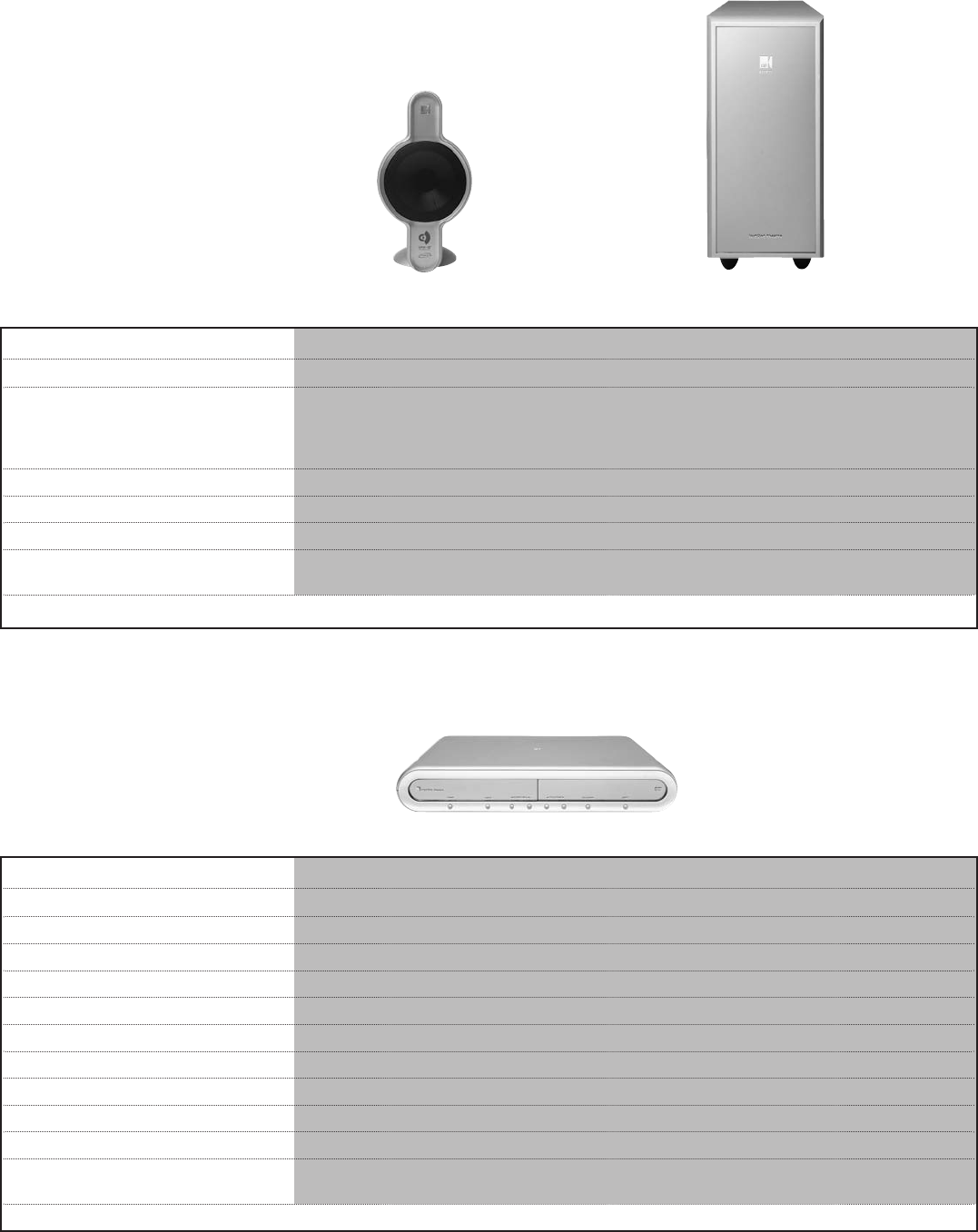
specifications
KIT100 speakers KIT100PSW subwoofer
Design two-way closed box satellite speaker sealed box powered subwoofer
Drive units 100mm (4 in.) Uni-Q array with 250mm (10 in.) long-throw unit
14mm (0.6 in.) tweeter
NXT panel with 25mm (1 in.) exciter
magnetically shielded
Cabinets die-cast aluminium
Amplifiers 5 x high power amplifier channels for the subwoofer and the main speakers
Finish Stardust silver Stardust silver
Dimensions (H x W x D) 237 x 119 x 260 mm 398 x 176 x 515 mm
9.33 x 4.7 x 10.23 in. 15.6 x 6.9 x 20.3 in.
KEF AUDIO reserve the right, in line with continuous research and development, to amend or change specifications without prior notice. E. & O.E.
23
KIT100 DVD
Playback Formats supported DVD, DVD-RW, DVD+RW, CD, CDR/RW, MP3 encoded CD
Tuner section AM/FM with RDS facility (Europe only)
Audio inputs cable/satellite, (analogue & optical digital) VCR and TV (analogue)
Audio output optical digital
Video inputs cable/satellite and VCR (S-video & composite)
Aerial inputs FM & AM (included)
Cabinet material die-cast zinc
Finish Stardust silver
Display mirror finish, blue VFD display with auto-dim function
Control infra-red remote control
Dimensions including feet 59 x 324 x 262 mm
(H x W x D) 2.32 x 12.75 x 10.31 in.
KEF AUDIO reserve the right, in line with continuous research and development, to amend or change specifications without prior notice. E. & O.E.
K7190>KIT100 Manual USA 19/4/04 4:12 pm Page 24
información sobre seguridad
PRECAUCIÓN:
A fin de evitar descargas eléctricas, introduzca completamente el enchufe en la base.
Advertencia:
No se deberá exponer este aparato eléctrico a goteos ni salpicaduras, y se deberá tener cuidado de no colocar sobre el aparato ningún objeto ni
vasija que contenga líquidos.
Producto láser de Clase 1
El reproductor de DVD de este equipo está clasificado como CLASS 1 LASER PRODUCT (Producto láser de Clase 1),
con arreglo a la normativa EN60825-1:1994 + A11. La etiqueta CLASS 1 LASER PRODUCT se encuentra en la parte
inferior de la unidad de DVD.
PRECAUCIÓN:
El uso de controles o ajustes o la realización de procedimientos distintos a los aquí especificados puede producir una exposición peligrosa a la
radiación. No se deberá ajustar o reparar el reproductor de DVD si no es por parte de personal de servicio con la cualificación adecuada.
Límites de emisiones de la Clase B
Este aparato digital de la Clase B cumple todos los requisitos de las normas canadienses para equipos generadores de interferencias.
Pilas
Deseche las pilas usadas de forma adecuada, cumpliendo con la normativa de su país. No las arroje al fuego.
Lea este manual del usuario
• Lea estas instrucciones y tenga en cuenta todas las advertencias.
• No utilice este aparato cerca del agua.
• Lea atenta y detenidamente este manual del usuario. Le ayudará a configurar y utilizar su sistema de forma adecuada y disfrutar de todas
sus características avanzadas. Guarde este manual del usuario para posteriores consultas.
• No bloquee las aberturas de ventilacion de la parte posterior del subwoofer.
• No lo instale cerca de ninguna fuente de calor como radiadores, aire acondicionado, estufas, u otros aparatos (incluyendo amplificadores)
que puedan producir calor.
• No anule el proposito de seguridad del cable de alimentacion bien sea polarizado o con tierra. La lamina ancha o el tercer contacto se
proporciona para su seguridad. Si el cable proporcionado no cabe en su enchufe, consulte a su electricista para el reemplazo del
enchufe obsoleto.
• Proteja el cable electrico y los enchufes frente a pisadas o pinchazos.
• Utilice solamente accesorios especificados por KEF.
• Desenchufe este aparato durante tormentas con aparato electrico o cuando no vaya a ser usado durante periodos de tiempo largos.
• Remita cualquier mantenimiento a un Servicio Tecnico autorizado. Se requiere mantenimiento cuando el aparato se ha danado de alguna
forma, por ejemplo cuando el cable de alimentacion o el enchufe estan danados, se ha derramado liquido o se han caido objetos dentro el
aparato, el aparato se ha expuesto a la lluvia o a humedad, no funciona normalmente, o se ha caido.
• Límpielo sólo con un trapo húmedo.
• Cuando use un carrito para transportarlo, tenga precaucion al mover ambos para evitar danos por volcado.
ADVERTENCIA
A FIN DE REDUCIR EL RIESGO DE INCENDIO O DESCARGAS ELÉCTRICAS, NO
EXPONGA ESTE APARATO A LA LLUVIA O LA HUMEDAD.
Descripción de los símbolos gráficos
La finalidad del símbolo que muestra un rayo con punta de flecha, dentro de un
triángulo equilátero, es alertar al usuario de la presencia de “tensión peligrosa”
sin aislar en el interior de la carcasa del producto y puede tener una magnitud
suficiente para constituir un riesgo de descarga eléctrica para las personas.
La finalidad del símbolo que muestra un signo de admiración dentro de un triángulo
equilátero es alertar al usuario de la presencia de instrucciones importantes sobre
funcionamiento y mantenimiento (servicio) en la documentación que acompaña
al aparato.
PRECAUCIÓN
RIESGO DE
DESCARGA
ELÉCTRICA. NO
ABRIR.
ATTENTION:POUR RÉDUIRE LE
RISQUE DE DÉCHARGE ÉLECTRIQUE, NE
RETIREZ PAS LE COUVERCLE
(OU L’ARRIÈRE). IL NE SE TROUVE
ÀL’INTÉRIEURAUCUNE PIÈCE POUVANT
ÊTRE RÉPARÉE PAR L’USAGER. S’ADRESSER
À UN RÉPARATEUR COMPÉTENT.
CLASS 1 LASER PRODUCT
KLASSE 1 LASER PRODUKT
LUOKAN 1 LASER LAITE
KLASS 1 LASER APPARAT
24
instrucciones en Español
K7190>KIT100 Manual USA 19/4/04 4:12 pm Page 25

configuración de las conexiones de vídeo
Selección del canal correcto en el TV
Las indicaciones en pantalla de KEF Instant Theatre solamente aparecerán en la pantalla de su TV si la entrada externa de éste está correctamente
sintonizada con el canal correspondiente al que está conectado el reproductor de DVD. Habitualmente, la selección de la entrada de vídeo en los
TV se efectúa pulsando el botón del control remoto del TV marcado como “TV/Vídeo”,“Entrada”,“Entrada AV” o “AUX”.
Selección de salida de DVD de componentes y progresivo
Si se utiliza la conexión de vídeo de componentes a su TV (ya sea progresivo o no), debe conectar también la conexión de vídeo compuesto para
que pueda establecer la opción de componentes mientras que la salida predeterminada del DVD es de vídeo compuesto solamente. Una vez haya
seleccionado la opción de componentes en el menú de configuración de vídeo DVD cambie la fuente de entrada de TV a componentes y, a
continuación, seleccione progresivo, si lo admite su TV.
Bucle de vídeo
El KEF Instant Theatre sólo reproduce entradas de vídeo compuesto en la salida de video compuesto y solo reproduce entradas de SVideo en la
salida de SVideo. Por lo tanto, si utiliza estas fuentes de vídeo, necesitará un cable de vídeo compuesto o SVideo.
Salidas de audio para grabación y multisala
Para poder desactivar el sonido envolvente, el modo estéreo debe estar seleccionado en el menú Audio si se utilizan las salidas izquierda y
derecha de Record/Multi-room (Grabación/Multisala) de la parte posterior del subwoofer.
25
desembalado
Desembale cuidadosamente el equipo. Guarde el material de embalaje, puesto que es la forma más segura de transportar el equipo en
caso necesario.
ADVERTENCIA:
A fin de evitar el riesgo de asfixia, mantenga las bolsas de plástico fuera del alcance de los niños.
Si cualquier parte del equipo parece dañada, no intente utilizarlo.Avise inmediatamente a un distribuidor autorizado.
Verifique que el equipo incluye las piezas indicadas (a continuación).
Nota:
Anote los números de serie de la parte inferior de la unidad de DVD y de la parte posterior del subwoofer. Copie dichos números en la tarjeta
de garantía, en el espacio facilitado a continuación.
Para su registro
Los números de serie se encuentran en la parte inferior de la unidad de DVD y en la parte posterior del módulo del subwoofer.
Número de serie de la unidad de DVD: ____________________________________________________________________________
Número de serie del módulo del subwoofer: ________________________________________________________________________
Nombre del distribuidor: ______________________________________________________________________________________
Teléfono del distribuidor: ______________________________________________________________________________________
Fecha de adquisición: __________________________________________________________________________________________
Código paterno para DVD definido por el usuario: ____________________________________________________________________
Sugerimos que guarde la factura de compra y la tarjeta de garantía con el manual del usuario.
K7190>KIT100 Manual USA 19/4/04 4:12 pm Page 26
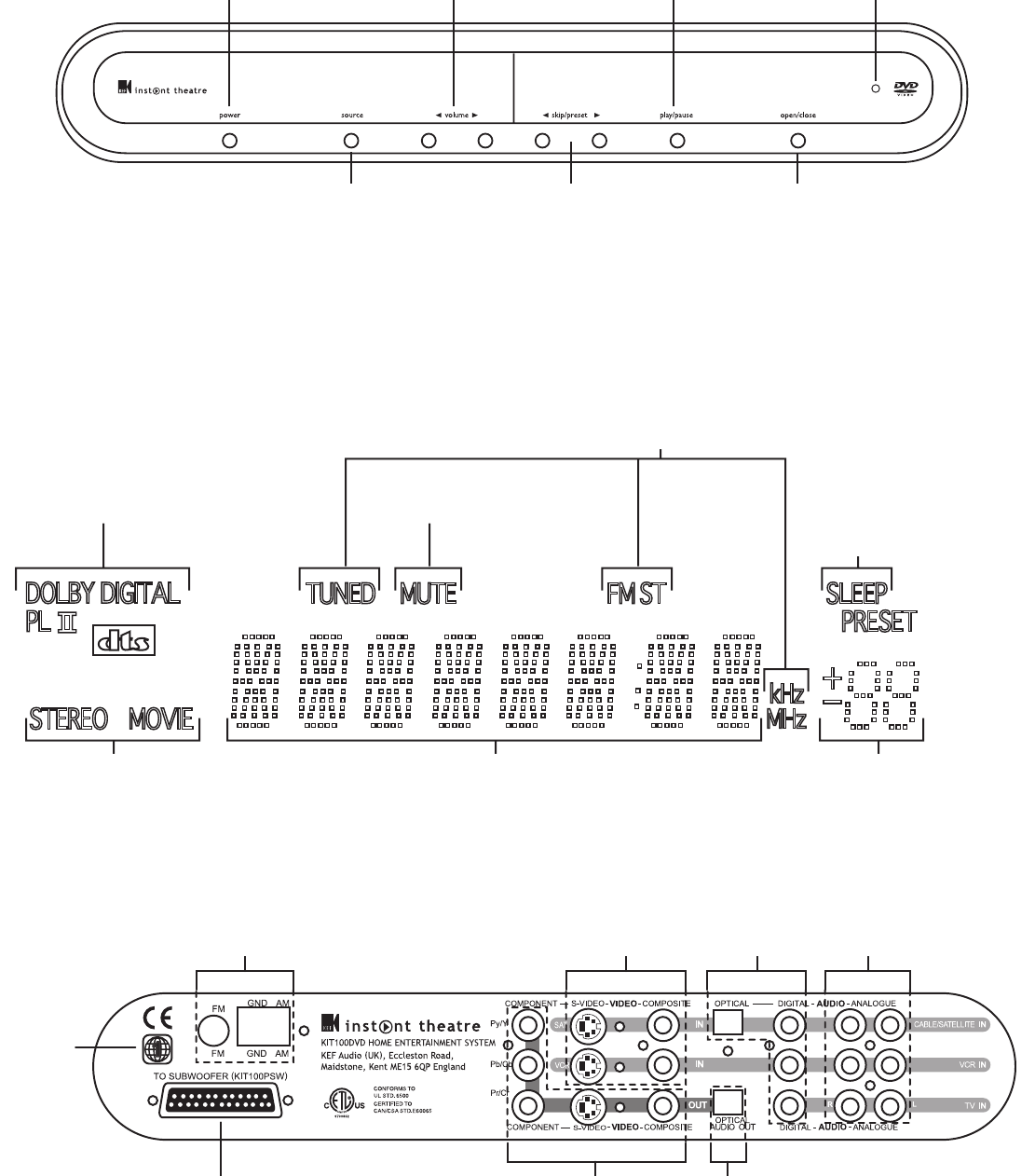
Se visualiza el número de pista del CD y el tiempo
transcurrido cuando se está reproduciendo un disco o la
frecuencia de una emisora de radio.
Número de
PRESINTONÍA
de radio
Indicador de anulación temporal
de modo acústico de salida:
ESTÉREO/PELÍCULA
Codificación de sonido envolvente
(Surround) aplicada actualmente
por el equipo:
DOLBY DIGITAL®
DOLBY PRO LOGIC II®
DTS
ANULACIÓN DE
SONIDO (MUTE)
activada
Radio SINTONIZADA, FM
estéreo y banda de frecuencias
26
Cuando la función de
desconexión programada
(SLEEP) está activada, se
visualiza el tiempo hasta la
desconexión del equipo
pantalla
panel posterior del DVD
Antenas de radio
AM y FM
Conexión al
subwoofer Salida de vídeo a
Componente,
S-Video o
Compuesto
Salida de
audio digital
Entradas de
vídeo S-Video
o compuesto
Entrada
de audio
digital
Entradas de audio
desde caja de
conexiones,
VCR y TV
Región
(código)
del
DVD
mandos del sistema de dvd
POWER
(ALIMENTACIÓN)
Permite encender y apagar el
sistema KEF Instant Theatre.
Cuando está apagado, el LED
de modalidad de espera
permanece encendido
SOURCE (ORIGEN)
Cambia a la siguiente
selección de origen con
cada pulsación
OPEN/CLOSE
(ABRIR/CERRAR)
Permite abrir y cerrar la
bandeja del disco
<> SKIP/PRESET
(SALTAR/PRESINTONÍA)
Permite seleccionar el capítulo
siguiente o anterior de un DVD,
una pista de un CD o disco
MP3, una imagen en un disco
JPEG o una presintonía de
emisora de radio
<> VOLUME
(VOLUMEN)
Permite aumentar o disminuir
el volumen del equipo.
Si el sonido está anulado,
al pulsarlo se vuelve a activar
el sonido
PLAY/PAUSE
(REPRODUCCIÓN/PAUSA)
Permite iniciar la reproducción del
DVD o CD, si hay un disco
colocado. Si ya se está
reproduciendo, el disco quedará
en pausa; púlselo de nuevo para
reanudar la reproducción
STANDBY
(EN ESPERA)
K7190>KIT100 Manual USA 19/4/04 4:12 pm Page 27
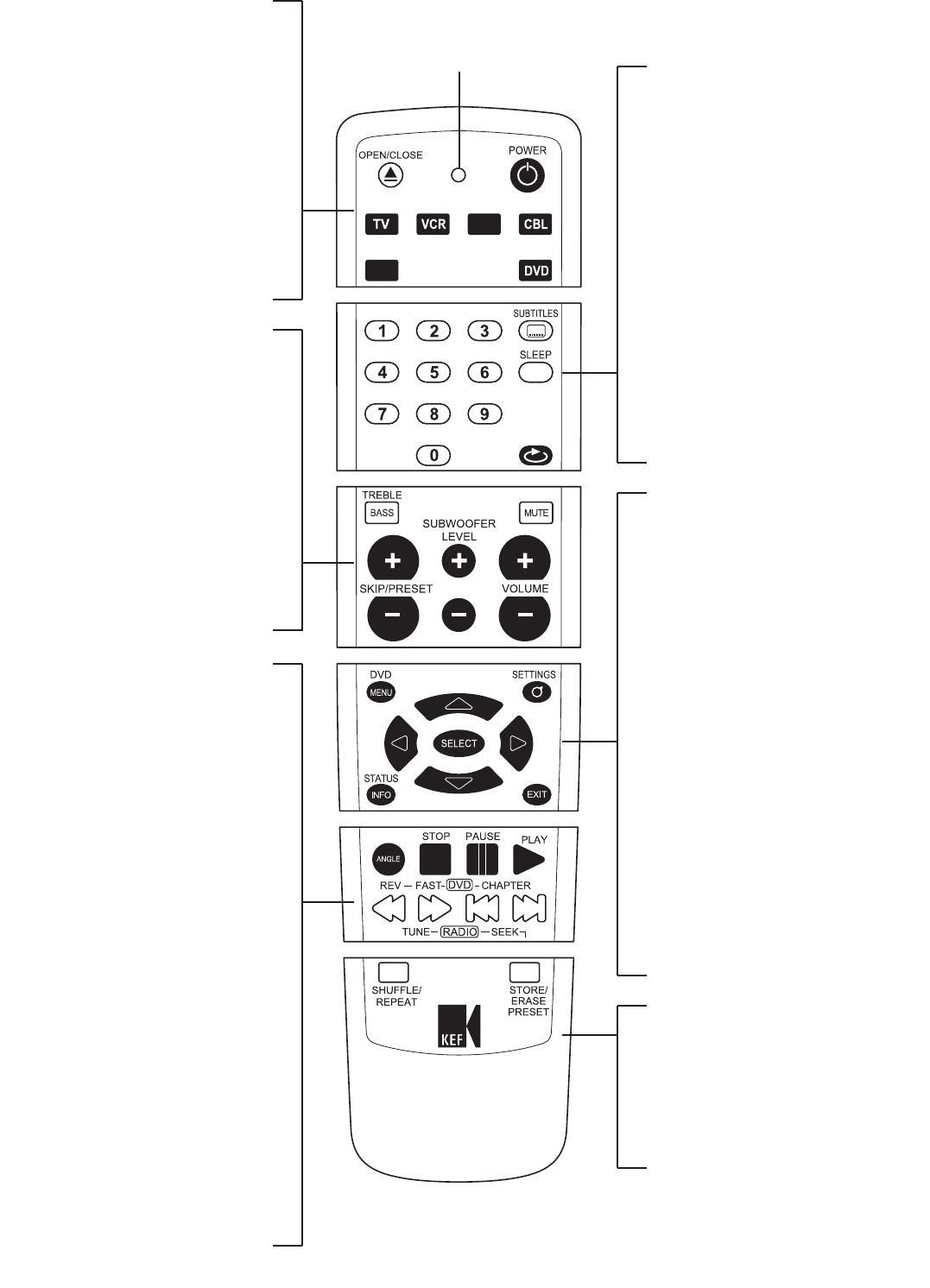
control remoto
OPEN/CLOSE (ABRIR/CERRAR)
Permite abrir y cerrar la bandeja del disco
POWER (ALIMENTACIÓN)
Enciende o apaga el equipo
DEVICE (DISPOSITIVO)
Selecciona el dispositivo que se va a controlar
con el control remoto. Por ejemplo;TV, vídeo,
televisión por satélite, televisión por cable.
Pulse la tecla del dispositivo DVD para
controlar su sistema de cine en casa de DVD
KIT100.
SET (PROGRAMACIÓN)
Se utiliza para programar el código de
producto IR correcto de modo que pueda
utilizar el control remoto en equipos
diferentes.
BASS/TREBLE (GRAVES/AGUDOS)
Muestra el menú de control de graves/agudos
MUTE (ANULACIÓN DE SONIDO)
Anula y activa el volumen del equipo
± VOLUME (± VOLUME)
Permite aumentar o disminuir el volumen
del equipo
± SUBWOOFER LEVEL
(± NIVEL SUBWOOFER)
Aumenta o disminuye el nivel de graves
del subwoofer
± SKIP/PRESET (±
SALTAR/PRESINTONÍA)
Permite seleccionar el capítulo siguiente o
anterior de un DVD, una pista de un CD o disco
MP3, una imagen en un disco JPEG o una
presintonía de emisora de radio
PLAY (REPRODUCIR)
Inicia la reproducción de un DVD o CD
PAUSE (PAUSA)
Efectúa una pausa del disco. Púlselo de nuevo
para avanzar un cuadro en el disco
STOP (PARADA)
Detiene la reproducción del disco. Púlselo de
nuevo para retroceder al inicio del disco
REV/TUNE DOWN
(REBOBINAR/SINTONIZACIÓN
DESCENDENTE)
Permite rebobinar a velocidad x2, x4, x8 o x20.
Sintonización manual descendente
de la radio
FAST/TUNE UP (AVANCE
RÁPIDO/SINTONIZACIÓN
ASCENDENTE)
Permite avanzar rápidamente a velocidad x2,
x4,x8 o x20. Sintonización manual ascendente
de la radio
CHAPTER/SEEK DOWN
(CAPÍTULO/BÚSQUEDA
DESCENDENTE)
Selecciona el capítulo, pista o imagen anterior.
Sintonización automática descendente de la radio
CHAPTER/SEEK UP
(CAPÍTULO/BÚSQUEDA
ASCENDENTE)
Selecciona el capítulo, pista o imagen siguiente.
Sintonización automática ascendente de la radio
ANGLE (ÁNGULO)
Permite cambiar el ángulo de la cámara del DVD,
si está disponible, y girar una imagen JPEG
SUBTITLES (SUBTÍTULOS)
Cambia al siguiente idioma disponible para los
subtítulos en el disco DVD
SLEEP (DESCONEXIÓN
PROGRAMADA)
Activa el temporizador de la desconexión
automática del equipo. Si se pulsa repetidamente,
se selecciona un tiempo de desconexión entre
10 y 120 minutos y temporizador desconectado
Teclado numérico
Introduzca el número del capítulo deseado del
DVD, la pista de CD o la presintonía de emisora
de radio
SOURCE (ORIGEN)
Selecciona el origen del sistema de cine en
casa de DVD KIT100. Cada vez que pulsa se
desplaza por las funciones disponibles. Disco
(reproducirá el disco DVD, CD o MP3 que se
haya insertado), radio FM, radio AM, fuente de
sonido de TV, fuente de vídeo y sonido de
vídeo y fuente de vídeo y sonido de televisión
por satélite/cable.
DVD MENU (MENÚ DVD)
Muestra el menú superior del disco DVD
cargado actualmente, si está presente
SETTINGS (CONFIGURACIÓN)
Incluye controles para Idioma,Vídeo,
Audio y Control paterno
SELECT (SELECCIONAR)
Después de seleccionar la opción de menú
deseada mediante las teclas de flecha de
navegación, pulse el botón SELECT
(SELECCIONAR) para confirmar su elección.
Teclas de flecha de navegación
Utilícelas para desplazarse por cualquiera de los
menús en pantalla
STATUS INFO
(INFORMACIÓN ESTADO)
Muestra información, en la pantalla del TV,
acerca del DVD o CD que se está reproduciendo
actualmente. Púlselo una vez para una
visualización sencilla del tiempo transcurrido y el
restante y púlselo otra vez para una visualización
completa del estado.Al pulsarlo una tercera vez,
permite salir
EXIT (SALIR)
Permite salir sin guardar los cambios
parcialmente efectuados en el menú de
configuración. Muestra el menú del título del
disco DVD, si está presente
SHUFFLE/REPEAT
(MEZCLAR/REPETIR)
Reproduce las pistas de CD, capítulos de DVD o
imágenes JPEG en orden aleatorio. Repite la pista,
capítulo, título o disco
STORE/ERASE PRESET
(GUARDAR/BORRAR
PRESINTONÍA)
Guarda o borra la emisora de radio actual
SAT
SET
DEVICE
SOURCE
27
LED DE MODO DE PROGRAMACIÓN
K7190>KIT100 Manual USA 19/4/04 4:12 pm Page 28
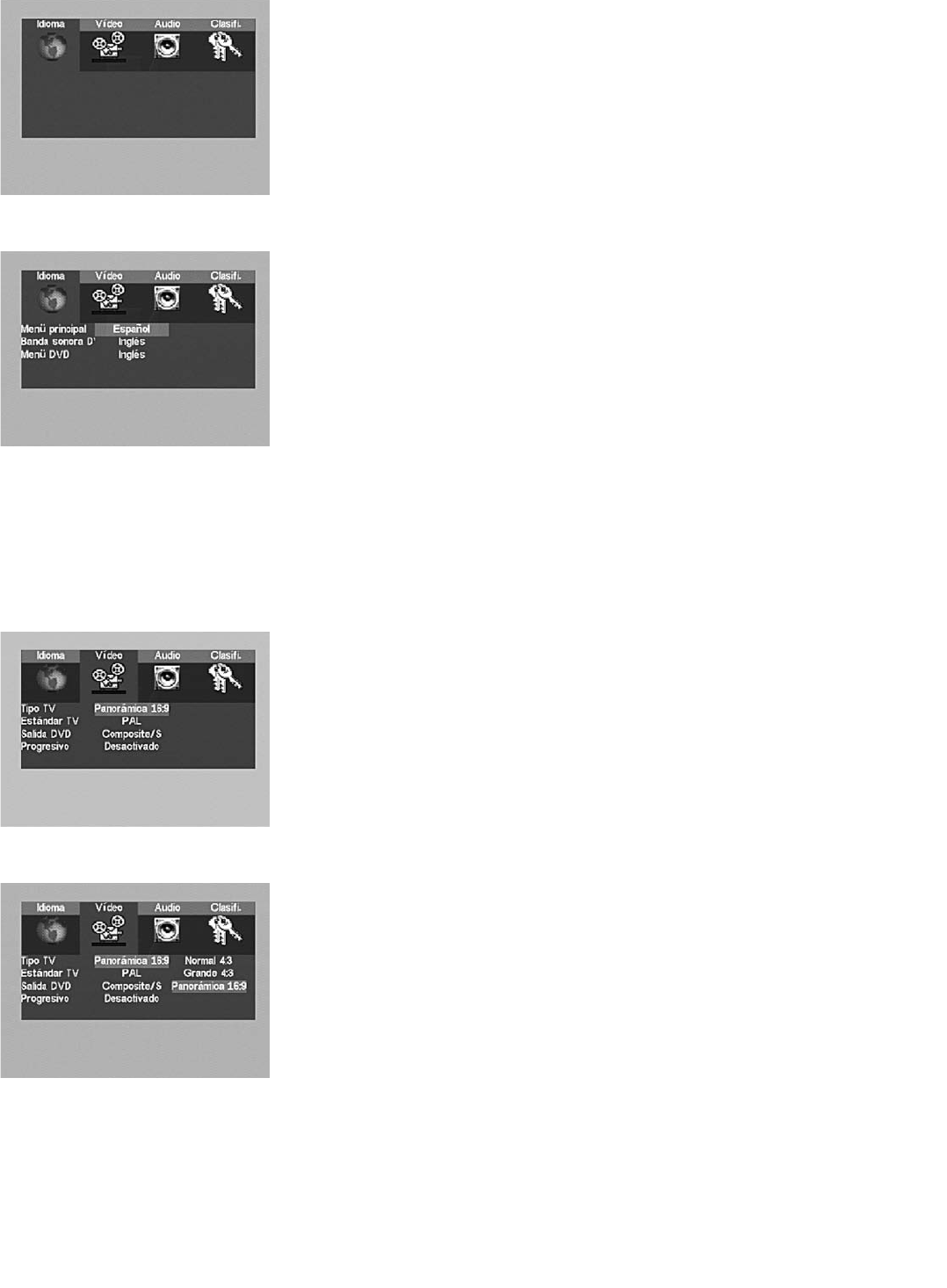
Menú de configuración
Pulse el botón SETTINGS (CONFIGURACIÓN) mientras se visualiza un vídeo desde KEF Instant
Theatre para ver el menú Configuración, siempre que la entrada AUX externa del TV esté
correctamente configurada para ver la salida de vídeo de KEF Instant Theatre. En el menú
Configuración, seleccione una categoría (Idioma,Vídeo,Audio o Calificación) mediante las teclas de
flecha de navegación izquierda/derecha y pulse SELECT (SELECCIONAR) para abrir el menú de
dicha categoría.
Dentro de cualquier menú, seleccione una categoría mediante las teclas de flecha de navegación
arriba/abajo y pulse SELECT (SELECCIONAR) para abrir las opciones de dicha categoría.
A continuación, seleccione una opción mediante las teclas de flecha de navegación arriba/abajo y pulse
SELECT (SELECCIONAR). Para retroceder en los menús, utilice las teclas de flecha de navegación
izquierda y arriba.
Menú Idioma
El menú Idioma permite cambiar el idioma de todos los menús del sistema de KEF Instant Theatre e
indicar las preferencias para el idioma de la banda sonora y los menús del DVD. (Los DVD se publican
con varios idiomas en cada disco; el disco se reproducirá en el idioma seleccionado,
si está disponible, o en el idioma predeterminado para dicho disco). En el menú Idioma,
seleccione una categoría (menú Principal, banda sonora del DVD o menú del DVD) mediante las
teclas de flecha arriba/abajo y pulse SELECT (SELECCIONAR) para abrir las opciones de
dicha categoría.
Menú Principal
Si se selecciona un idioma desde esta lista, todos los menús del sistema de KEF Instant Theatre
(incluyendo éste) se visualizarán en dicho idioma.
Banda sonora de DVD
Los discos DVD se suelen publicar con varias bandas sonoras opcionales para cada una de las
películas del disco.Al configurar el idioma de la banda sonora del DVD se utilizará dicha banda sonora
como predeterminada si está presente en el DVD. Generalmente, se puede anular temporalmente
esta preferencia en el propio menú del disco DVD.
Menú DVD
Permite configurar el idioma del menú del disco DVD si está disponible en dicho DVD.
Menú Vídeo
El menú Vídeo permite optimizar KEF Instant Theatre para utilizarlo con distintos TV y estándares de
emisión de distintos países.
Tipo de TV
Seleccione la opción que mejor describe el TV que se está utilizando.
TV estándar 4:3
Seleccione “TV estándar 4:3” para un TV con una relación de pantalla 4/3, que aparece casi tan alta
como ancha, pero es bastante pequeña. Si un DVD se publica tanto en formato de vídeo de pantalla
ancha como panorámica, esta configuración hará que se reproduzca en modo panorámico,
ampliando la parte de la imagen que contiene la acción para que ocupe toda la pantalla.
Pantalla grande 4:3
Seleccione “Pantalla grande 4:3” para un TV con una relación de pantalla 4/3, que aparece casi tan alta
como ancha, pero es bastante grande. Si un DVD se publica tanto en formato de vídeo de pantalla
ancha como panorámica, esta configuración hará que se reproduzca en modo de pantalla ancha,
que suele mostrar la imagen de la película ocupando todo el ancho de la pantalla y a lo largo de su
parte central, dejando las partes superior e inferior vacias (franjas negras).
Panorámica 16:9
Seleccione “Panorámica 16:9” para utilizarla en un TV panorámico auténtico (con la pantalla casi el
doble de ancha que de alta). Si un DVD incluye el formato panorámico, llenará completamente la
pantalla. Si un DVD se publica solamente con el formato de vídeo panorámico (TV tradicional),
esta configuración hará que se muestre en la parte central de la pantalla de TV panorámica,
con franjas negras en el espacio vacío a la izquierda y a la derecha de la imagen.
configuración del sistema
28
K7190>KIT100 Manual USA 19/4/04 4:12 pm Page 29
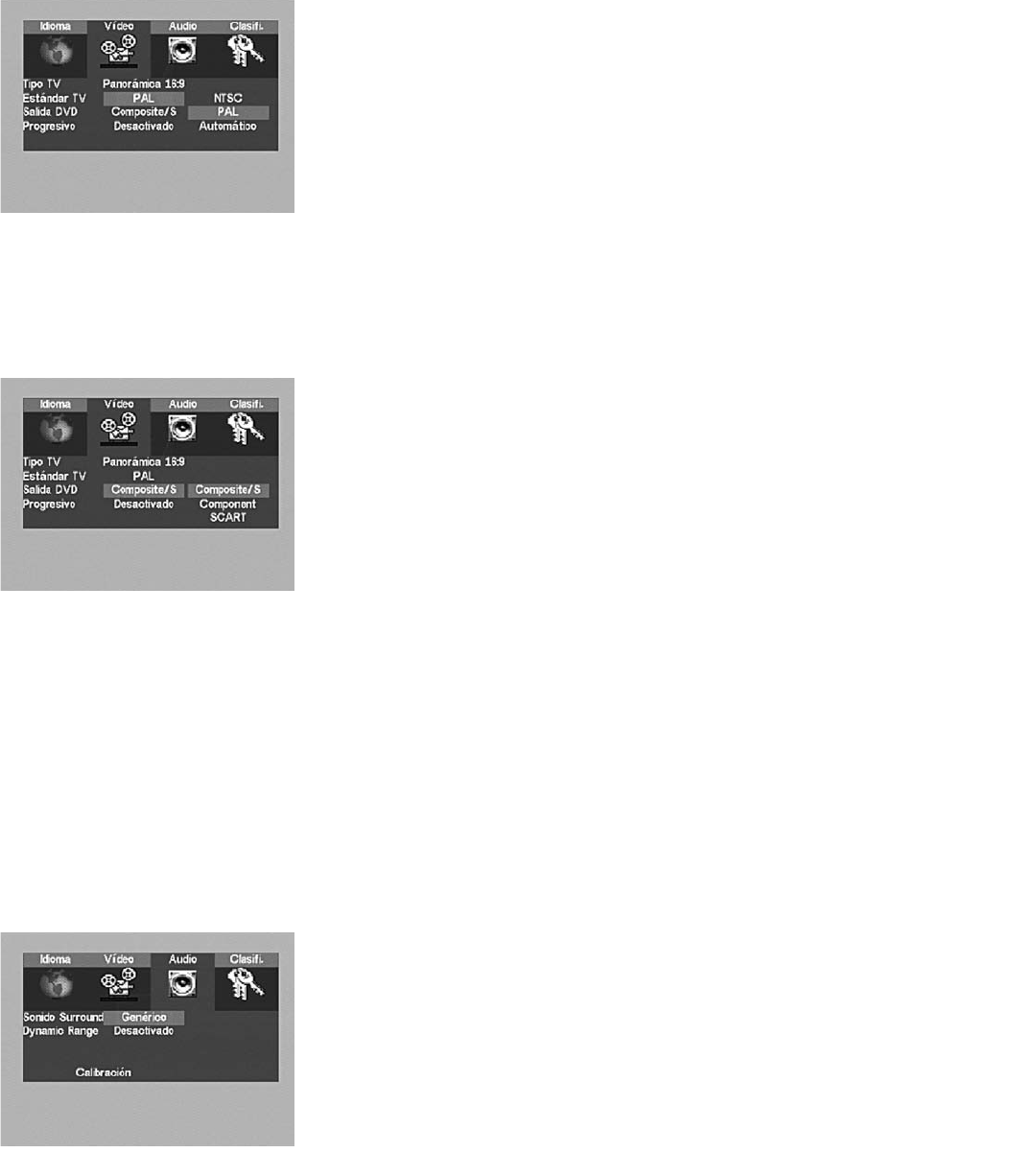
Estándar de TV
Los programas de televisión y los vídeos o DVD se emiten y publican, respectivamente, en distintos
formatos según el país. Seleccione el formato que se adapta mejor al entorno de vídeo local/emisión.
NTSC
Selecciónelo si toda la programación es en estándar NTSC. (Predeterminado para todos los equipos
KEF Instant Theatre comercializados en EE.UU.).
PAL
Selecciónelo si toda la programación es en estándar PAL. (Se trata del estándar de emisión en la
mayor parte de Europa y es el predeterminado para los equipos KEF Instant Theatre comercializados
en el Reino Unido y en Europa).
Auto
Selecciónelo si se utiliza un TV multiestándar y para la programación combinada de NTSC y PAL,
como en los países en los que los DVD pueden no estar publicados en el mismo formato.
Salida de DVD
La salida de DVD determina cuál es la salida de video, además de la de vídeo Compuesto (RCA),
que lleva las señales de vídeo del KEF Instant Theatre al TV. (Aparecerá un mensaje de solicitud al
seleccionar una nueva salida de DVD; resalte y SELECT (SELECCIONE) “SÍ” para confirmar las
modificaciones de esta configuración. De este modo se evita que configure un formato de vídeo de
salida que no se pueda visualizar en su TV).
Vídeo Compuesto/S-Video
Seleccione esta configuración si se va a conectar KEF Instant Theatre solamente a la entrada de vídeo
Compuesto (RCA) o a la entrada de S-Video del TV.
Componentes
Seleccione esta configuración si se va a conectar KEF Instant Theatre a la entrada de Componentes
(RGB) del TV. En este caso, conecte también la entrada de vídeo Compuesto, de modo que pueda ver
fuentes que no sean DVD y pueda configurar las opciones de vídeo de componentes y progresivo
mientras que la salida de DVD predeterminada es vídeo compuesto solamente.
Cuando vea un DVD, cambie la entrada del TV a “Componentes” o “RGB”. (Las salidas de vídeo para
componentes y S-Video de KEF Instant Theatre no pueden estar activas al mismo tiempo). La salida
de vídeo para componentes ofrece la mejor calidad de vídeo para televisores o monitores de plasma,
proyectores u otros televisores compatibles con vídeo para componentes.
Progresivo
Seleccione “Activado” si se utiliza la salida de vídeo de Componentes para programas de DVD con un
TV que admita “exploración progresiva”. De lo contrario, seleccione “Desactivado”. La exploración
progresiva ofrece una calidad de imagen mejorada en monitores o televisores compatibles aunque se
debe utilizar conjuntamente con la salida de DVD para componentes. La señal de salida será PAL o
NTSC progresiva según se define en el material de origen.
Menú Audio
El menú Audio permite calibrar KEF Instant Theatre para utilizar en salas con formas o mobiliario
inusuales, así como para desactivar el sonido envolvente, si así se desea. Para ajustar los graves/agudos
o el nivel de graves del subwoofer, use los botones específicos para ello en el control remoto.
29
K7190>KIT100 Manual USA 19/4/04 4:12 pm Page 30
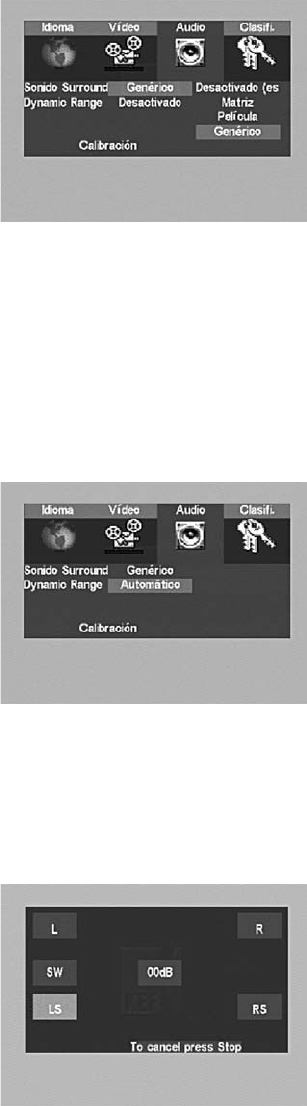
Sonido envolvente
Generalmente, el valor predeterminado “Multiuso” es adecuado para todos los usuarios,
aunque se puede escoger otra configuración para el sonido envolvente, como a continuación:
Desactivado (estéreo)
Si se escoge esta configuración se desactiva el sonido envolvente. El modo estéreo se seleccionará si
utiliza la salida “Record/Multi room” de la parte posterior del subwoofer para grabar o para colocar
un par de altavoces independientes.
Matriz
Utilice esta configuración para escuchar algo de sonido envolvente en fuentes de sistema monoaural.
Película
Utilice esta configuración para disfrutar de audio descodificado Dolby Pro Logic II, que genera efectos
envolventes distintos para películas y juegos en vídeo. Deje la opción Película desactivada si va a
escuchar música.
Multiuso
Como sugiere el nombre, esta configuración optimizará su sistema según el material del programa
que haya presente, a excepción de grabaciones monofónicas. Si el origen contiene señales Dolby
DigitalTM o DTSTM, éstas siempre se reproducirán de forma predeterminada. Otras fuentes se
reproducirán en una configuración de Prologic II seleccionada por KEF Audio para obtener una
óptima reproducción del material de una fuente analógica.
Control dinámico de rango
El control dinámico de rango comprimirá el sonido para mejorar la audición nocturna, cuando no se
desea molestar a los demás en casa.
Desactivado
El valor predeterminado de KEF Instant Theatre es DRC desactivado. No aplicará ninguna compresión
al contenido de audio Dolby Digital.
Activado
Aumentará el volumen de los sonidos débiles, como el discurso, y al mismo tiempo disminuirá el
volumen de los efectos especiales con un volumen alto, como las explosiones.
Auto
Se utilizará automáticamente el DRC a niveles de volumen inferiores a 25 en KEF Instant Theatre.
Menú Calibración
La configuración estándar ya será correcta para una sala normal. El menú de calibración permite
comprobar que los altavoces están conectados y permite ajustar los niveles individuales de los
altavoces para adaptarlos a su sala en particular. Nota: La opción de calibración solamente aparecerá
si se encuentra en “modo de disco” al pulsar SETTINGS (CONFIGURACIÓN).
Sentándose en una posición central del área de escucha/visualización, vaya al modo de disco, resalte y
SELECT (SELECCIONE) “Calibración” para iniciar el proceso de calibración acústica. El sonido se
emitirá por un canal, a continuación por el siguiente, y el siguiente, alrededor del área de
escucha/visualización. Utilice las teclas de flecha de navegación arriba/abajo para ajustar el volumen de
cualquier canal que no parezca coincidir con los demás. Cuando todos los canales suenen al mismo
volumen, pulse STOP (PARADA) o EXIT (SALIR) en el control remoto para salir del menú.
Se recomienda utilizar un medidor de Nivel de presión de sonido para medir los niveles de forma
precisa. (Aunque es posible ajustar el nivel del subwoofer durante este proceso, KEF recomienda
confirmar solamente que el subwoofer funciona, pero no que intente adaptar su nivel al de los otros
altavoces. Es preferible que se efectúen los ajustes precisos del nivel del subwoofer mediante las teclas
del control remoto durante la audición normal).
30
K7190>KIT100 Manual USA 19/4/04 4:12 pm Page 31
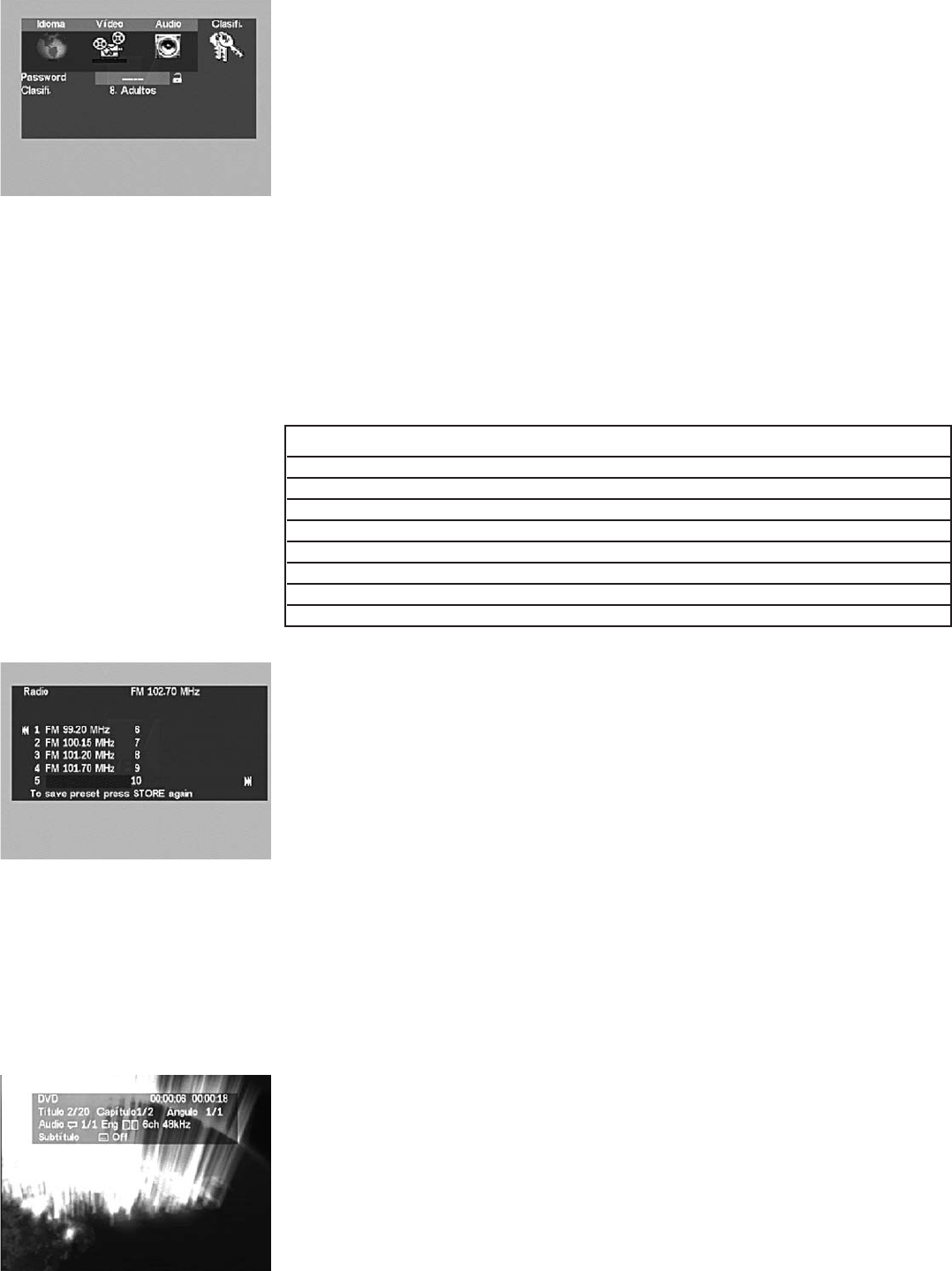
Menú Calificaciones
Los discos DVD se pueden publicar con información de calificación por parte del público o con
múltiples versiones del vídeo, apropiadas para distintos públicos. El menú de calificaciones está
pensado para permitir a los padres limitar el tipo de programas en DVD que pueden ver otros
miembros de la familia sin la contraseña privada de los padres. (Lamentablemente, en la fecha de
publicación de este manual, muchos DVD se publican sin información de calificación y se reproducirán
independientemente de la configuración del control paterno).
Contraseña
Si el icono del candado de la derecha está abierto, introduzca cualquier código de seguridad de 4
dígitos con los botones numéricos del control remoto, y pulse SELECT (SELECCIONAR). De este
modo se activará la función de control paterno y se bloqueará el acceso a este menú para los demás.
Si el candado de la derecha está cerrado, no se pueden modificar las “Calificaciones” sin volver a
introducir antes el código de 4 dígitos definido anteriormente y pulsar SELECT (SELECCIONAR).
(Durante la reproducción de un disco con una calificación superior, se le solicitará su contraseña,
introduzca los mismos cuatro dígitos y, a continuación, pulse SELECT (SELECCIONAR)).
Escriba aquí su código para futuras referencias: ________________________________________
Calificaciones
Resalte la calificación actual y efectúe los cambios con las teclas de flecha izquierda/derecha.
A continuación, pulse una vez la tecla de flecha, introduzca una contraseña y pulse SELECT
(SELECCIONAR) para bloquear cualquier cambio posterior.Vuelva a pulsar la tecla de flecha o pulse
SETTINGS (CONFIGURACIÓN) o EXIT (SALIR) para salir del menú “Calificaciones”.
Calificación Nombre Descripción Calificación Calificación
MPAA Europea
1 Apto para niños Particularmente adecuado para niños
2 Universal Todos los públicos G U
3 PG Orientación paterna PG PG
4 PG>12 Bajo advertencia paterna PG-13
5 PG>15 Puede ser apropiado para adolescentes maduros PG-15
6 Acompañados Restringidos para <17s acompañados R
7 18+ Mínimo 18 años NC-17
8 Adultos Adecuado para adultos 18
Menú Radio
Para que suene la radio:
Pulse el botón de origen varias veces hasta que se seleccione el indicador de las bandas de
frecuencias de radio AM o FM y cambie de una banda de frecuencias a otra. Utilice el botón PRESET
(PRESINTONÍA) o las teclas de cursor de navegación para seleccionar la emisora de radio
presintonizada que se desee.
Para sintonizar la radio:
Pulse TUNE (SINTONIZAR) en el mano a distancia para buscar manualmente o pulse SEEK
(BUSCAR) para sintonizar automáticamente la radio.
Para memorizar una presintonía:
La emisora de radio sintonizada actualmente se memorizará en la siguiente presintonía disponible al
pulsar STORE/ERASE PRESET (GUARDAR/BORRAR PRESINTONÍA) dos veces. Como alternativa,
para memorizar la emisora de radio en una presintonía determinada, entre 1 y 40, desplácese hasta
una presintonía libre y, a continuación, pulse dos veces STORE/ERASE PRESET
(GUARDAR/MEMORIZAR PRESINTONÍA). Resalte los símbolos “l<<” y “>>l” y pulse SELECT
(SELECCIONAR) para ir a la página siguiente o anterior de diez números de presintonía.
Para borrar una presintonía:
La emisora de radio presintonizada resaltada actualmente se borrará al pulsar dos veces
STORE/ERASE PRESET (GUARDAR/BORRAR PRESINTONÍA).
Menú Estado
Al pulsar STATUS INFO (INFORMACIÓN ESTADO) una vez, se visualizará en la pantalla del TV la
información del tiempo transcurrido y del restante del DVD o el CD que se está reproduciendo
actualmente. Púlselo otra vez para una visualización completa del estado. Si se pulsa una tercera vez,
permite salir.
31
K7190>KIT100 Manual USA 19/4/04 4:12 pm Page 32

32
Menú Mezclar/Repetir
Se accede pulsando la tecla SHUFFLE/REPEAT (MEZCLAR/REPETIR) en el control remoto.
Utilice las teclas de flecha de navegación para resaltar la configuración que desea modificar y,
a continuación, pulse SELECT (SELECCIONAR) para modificar la configuración. Una vez conforme
con la configuración, resalte “Aceptar” y pulse SELECT (SELECCIONAR) una vez más para guardar
los cambios. (Resalte y SELECT (SELECCIONE) “Cancelar”, o pulse SHUFFLE/REPEAT
(MEZCLAR/REPETIR) para rechazar cualquier cambio y salir de la pantalla SHUFFLE/REPEAT
(MEZCLAR/REPETIR)).Todos los valores de configuración de Mezclar/Repetir pasarán a
“Desactivados” siempre que se expulse un disco.
Mezclar
La mezcla modifica el orden en que se reproducen los capítulos o las pistas de un disco.
Seleccione “Mezclar” para reproducirlos en orden aleatorio, o “Programar” para crear una lista
ordenada personalizada de los capítulos/las pistas. Seleccione “Activado” para reproducir las pistas
de un CD o los capítulos de un título en DVD en orden aleatorio. (Un “título” de DVD es una
función individual de las que puede haber varias en un disco: la película principal, además de otras
funciones adicionales).
Programar (CD solamente)
Si se selecciona “Program” (programar) y “OK” (aceptar), aparece una pantalla enumerando todas las
posiciones de reproducción posibles. (Resalte el "1", introduzca el número de pista que se debe
reproducir en primer lugar, resalte el "2", etc.)
Reproducir Programa
Resalte y SELECT (SELECCIONE) “Reproducir Programa” para salir del modo de programación y
reproducir las selecciones programadas. (Para salir de esta pantalla sin programar ninguna selección,
simplemente pulse dos veces “SHUFFLE/REPEAT” (MEZCLAR/REPETIR)).
Borrar Programa
Resalte y SELECT (SELECCIONE) “Borrar Todo” para vaciar la lista de selecciones programadas y
volver a empezar.
Repetir
Si la repetición está desactivada, el CD o DVD en curso se reproducirá hasta el final del disco y se
detendrá (este es el comportamiento predeterminado).Al igual que con la mezcla aleatoria,
seleccione “Aceptar” para confirmar todos los cambios y salir del menú de mezcla/repetición o
seleccione “Cancelar” para rechazar los cambios y salir del menú de mezcla/repetición.
Seleccione “Pista” para repetir indefinidamente la pista (canción) del CD que se está
reproduciendo actualmente.
Seleccione “Disco” para repetir indefinidamente el disco CD o DVD que se está
reproduciendo actualmente.
Seleccione “Capítulo” para repetir indefinidamente el capítulo del DVD que se está
reproduciendo actualmente.
Seleccione “Título” para repetir indefinidamente el título del DVD que se está reproduciendo
actualmente. (Un “título” de DVD es una función individual de las que puede haber varias en un disco:
la película principal, además de otras funciones adicionales).
Menú Reproducción de MP3 y JPEG
Permite crear programas de visualización resaltando cada número a la izquierda de cada archivo que
se desee y pulsando SELECT (SELECCIONAR) para resaltar el nombre de archivo en azul. Una vez
que todas las canciones o imágenes (no se pueden incluir ambas cosas en el mismo programa)
están resaltadas en azul, pulse PLAY (REPRODUCIR) para reproducir la lista resultante de canciones
o ver la presentación de imágenes resultante. (Una vez finalizada la presentación de imágenes,
o cuando haya empezado a reproducirse la música seleccionada, aparecerá una pantalla titulada
“Examinar Programa” que muestra la lista de los archivos programados para la reproducción).
Cuando se están escuchando archivos MP3 o visualizando imágenes JPEG, los botones SKIP (SALTAR)
permiten saltar al archivo siguiente/anterior del mismo tipo, ya sea MP3 o de imágenes, pero no entre
ambos. Para reproducir el otro tipo de archivo, pulse STOP (DETENER) y, a continuación,
resalte SELECT (SELECCIONAR) o PLAY (REPRODUCIR) el archivo deseado.Tenga en cuenta que
los archivos MP3 solamente se reproducirán en estéreo, independientemente del modo de sonido
seleccionado en el menú de audio.
Números de archivo
Resalte el número a la izquierda del archivo deseado y SELECT (SELECCIÓNELO) o pulse PLAY
(REPRODUCIR) para ver dicho archivo. Los números van del “1” al número total de archivos MP3 y
JPEG del disco, visualizados en grupos de diez. Resalte y SELECT (SELECCIONE) los símbolos
“|<<” y “>>|” para ir a la página anterior o siguiente de diez nombres de archivo.
Examinar Disco
Resalte y SELECT (SELECCIONE) este elemento para cambiar el modo”Crear Programa”, que facilita
la reproducción de solamente los archivos de audio MP3 o de imágenes JPEG del disco actual.
Crea Prog
Abreviatura de “Crear Programa”, resalte y SELECT (SELECCIONE) este elemento para salir del
modo de programación y regresar al modo “Examinar Disco”.
Examinar Programa
Resalte y SELECT (SELECCIONE) “Examinar Programa” para pasar de nuevo al modo
“Examinar Disco”.
K7190>KIT100 Manual USA 19/4/04 4:12 pm Page 33

33
Dolby Surround
DTS Digital Surround
Macrovision
barrido progresivo a 525 y 625 líneas
códigos de región del dvd
1. Dolby Digital
Dolby Digital es el formato de señal digital multicanal desarrollado por Dolby Laboratories. Dolby Digital consta de hasta”5.1” canales –
delantero izquierdo, delantero derecho, central, envolvente izquierdo, envolvente derecho y un canal adicional reservado exclusivamente para
efectos sonoros adicionales con refuerzo de graves. (El canal de Efectos de baja frecuencia (LFE) contiene frecuencias de graves de hasta 120 Hz).
Al contrario que el formato Dolby Pro Logic, los canales de Dolby Digital puede contener todos el espectro completo de información de sonido,
desde los graves más bajos hasta las frecuencias más altas (22 kHz). Las señales de cada canal son distintas de las demás, lo que permite una
imagen de sonido muy localizada, y Dolby Digital ofrece una tremenda gama dinámica, desde los efectos de sonido más potentes hasta los sonidos
más suaves y tranquilos, sin ningún ruido ni distorsión.
2. Dolby Pro Logic II
Dolby Pro Logic II es un nuevo formato de reproducción multicanal desarrollado por Dolby Laboratories utilizando una tecnología de
retroalimentación lógica y que ofrece mejoras sobre los circuitos convencionales de Dolby Pro Logic. Dolby Pro Logic II se puede utilizar para
descodificar no solamente las fuentes grabadas en Dolby Surround, sino también fuentes estéreo normales, en cinco canales (delantero izquierdo,
delantero derecho, central, envolvente izquierdo y envolvente derecho) para obtener un sonido envolvente. Mientras que con Dolby Pro Logic
convencional la banda de frecuencias de reproducción del canal envolvente estaba limitada, Dolby Pro Logic II ofrece un rango de bandas más
amplio (20 Hz a 20 kHz o más).Además, los canales envolventes eran monoaurales (los canales envolventes izquierdo y derechos eran idénticos)
con el Dolby Pro Logic anterior, mientras que con Dolby Pro Logic II se reproducen como señales estéreo.
3. Dolby Surround
Se trata de fuentes en las que tres o más canales envolventes se han grabado como dos canales, utilizando la tecnología de codificación Dolby
Surround. Dolby Surround se utilizar para las bandas sonoras de las películas grabadas en DVD, LD y videocasetes para reproducirlos en VCR,
así como para las señales de emisión estéreo de radio FM,TV, emisiones por satélite y TV por cable. La descodificación de dichas señales
mediante Dolby Pro Logic permite obtener una reproducción envolvente multicanal. Estas señales también se pueden reproducir en equipos
estéreo normales, en cuyo caso proporcionan un sonido estéreo normal. Hay dos tipos de señales de grabación de Dolby Surround en DVD: 1)
Señales estéreo PCM en 2 canales y 2) Señales Dolby Digital en 2 canales. KEF Instant Theatre se fabrica bajo licencia de Dolby Laboratories.
Dolby, Pro Logic y el símbolo de la doble D son marcas comerciales de Dolby Laboratories.
Digital Theatre Surround (también denominado sencillamente DTS) es un formato de señal digital multicanal desarrollado por Digital Theatre
Systems. DTS ofrece los mismos canales de reproducción “5.1” que Dolby Digital (delantero izquierdo, delantero derecho y central,
envolvente izquierdo y envolvente derecho) así como el modo de 2 canales estéreo. Las señales para los distintos canales son completamente
independientes, eliminando el riesgo de deterioro de la calidad del sonido debido a las interferencias entre señales y cruces, etc.
Las características de DTS tienen una velocidad de transmisión relativamente mayores en comparación con Dolby Digital (1.234 kbps para los
CD y LD, 1.536 kbps para los DVD) de modo que funciona con una velocidad de compresión relativamente menor. Debido a ello, la cantidad de
datos es muy grande, y cuando se utiliza la reproducción DTS en salas de exhibición, se reproduce un CD-ROM aparte, sincronizado con la
película. Con los LD y DVD, no hay necesidad de ningún disco adicional: las imágenes y el sonido se graban simultáneamente en el mismo disco,
de modo que se pueden manejar del mismo modo que los discos con otros formatos.También hay CD de música grabados en DTS. Estos CD
incluyen señales envolventes de 5.1 canales (comparados con los dos canales de los CD actuales). No incluyen datos de imágenes, pero ofrecen
una reproducción envolvente en los reproductores de CD equipados con salidas digitales (se requiere una salida digital de tipo PCM)
Las corrientes de datos externas de los CD con DTS que se envían a la entrada óptica CBL de audio SPDIF de KEF Instant Theatre no las
descodificará el sistema de KEF Instant Theatre. La reproducción envolvente DTS ofrece los mismos sonidos complejos y grandiosos de una sala
de exhibición, en su propia sala. DTS y DTS Digital Surround son marcas comerciales registradas de Digital Theatre Systems Inc.
KEF Instant Theatre incorpora tecnología de protección de derechos de autor (“copyright”) protegida por patentes de EE.UU. y otros derechos
de la propiedad intelectual. El uso de esta tecnología de protección de derechos de autor debe estar autorizado por Macrovision y está
concebida para su uso doméstico y otros usos de visualización limitados, a menos que así lo autorice Macrovision. Queda prohibido el
desensamblado o copia ilegal de parte o la totalidad del software.
Los consumidores deberán tener en cuenta que no todos los aparatos de televisión de alta definición son completamente compatibles con este
producto y pueden producir una visualización incorrecta de la imagen. En el caso de problemas de imagen por barrido progresivo a 525 o 625
líneas, se recomienda cambiar la conexión a la salida de “definición estándar”, configurando la salida de DVD a barrido progresivo “desactivado”.
Si tiene alguna duda sobre la compatibilidad del aparato de TV con este reproductor de DVD a 525 o 625 líneas, póngase en contacto con
nuestro centro de atención al cliente.
KEF Instant Theatre se envía con un código de región de DVD específico, según se indica en el panel posterior del reproductor de DVD.
Dicho código será la región “1” para América, región “2” para Europa y región “3” para Asia. El equipo solamente reproducirá los DVD que
coincidan con dicho código de región.
K7190>KIT100 Manual USA 19/4/04 4:12 pm Page 34

34
manual de ayuda de navegación
cuidado del equipo
DVD MENU (MENÚ DVD)
Muestra el menú de títulos del disco DVD actualmente cargado. (Se debe seleccionar primero el reproductor
de DVD, pulsando la tecla de origen en el control remoto para seleccionar el modo de disco de KEF Instant
Theatres). El menú de cada disco será distinto, pero generalmente permite reproducir el disco, escoger distintos
formatos de sonido y de imagen e ir directamente a cualquier punto de la película o del vídeo.
Pulse de nuevo DVD MENU (MENÚ DVD) o pulse EXIT (SALIR) para abandonar el menú y reanudar la
reproducción.
EXIT (SALIR)
Permite salir del menú de configuración de KEF Instant Theatre o del menú del disco DVD y regresar al
programa de vídeo/audio. Permite salir sin guardar los cambios parcialmente realizados.También permite
acceder al menú de títulos del DVD que se está reproduciendo actualmente si hay alguno presente en el disco.
En ocasiones puede ser distinto del menú principal del DVD que aparece al pulsar el botón de menú del DVD.
Teclas de flecha de navegación
Utilícelas para desplazarse por cualquier menú en pantalla, los dos menús que se proporcionan en los discos
DVD, así como los controles SETTINGS (CONFIGURACIÓN), BASS/TREBLE (GRAVES/AGUDOS),
SHUFFLE/REPEAT (MEZCLAR/REPETIR),AM/FM y menús para examinar MP3/Fotografías de KEF Instant
Theatre. Pulsando una de las teclas de flecha (arriba/abajo/izquierda/derecha) desplazarán el resaltado al
siguiente elemento en la dirección de la flecha. En el menú de configuración de KEF Instant Theatre, se puede
retroceder de los menús secundarios utilizando cualquiera de las teclas de flecha arriba o izquierda, según
convenga. (“En pantalla” significa en la pantalla de su TV, siempre que la entrada externa del TV (entrada Aux.)
esté correctamente configurada para ver la salida de DVD de KEF Instant Theatre).
SELECT (SELECCIONAR)
Después de seleccionar la opción de menú deseada mediante las teclas de flecha de navegación, pulse el botón
SELECT (SELECCIONAR) para confirmar su elección. SELECT (SELECCIONAR) puede cambiar a la siguiente
opción de una lista de opciones, como en el caso del menú mezclar/repetir de KEF Instant Theatre. (Si se
examinan CD informáticos que contienen archivos MP3 y/o JPEG, SELECT (SELECCIONAR) reproducirá el
archivo resaltado actualmente).
BASS/TREBLE (GRAVES/AGUDOS)
Muestra el menú de control de graves/agudos en la pantalla del panel frontal y en su TV. Utilice las teclas de
flecha arriba/abajo para conmutar entre graves y agudos, y las teclas de flecha izquierda/derecha para ajustar
cada uno de los controles. Pulse de nuevo BASS/TREBLE (GRAVES/AGUDOS) o espere 5 segundos para salir
del menú.
SETTINGS (CONFIGURACIÓN)
Si se pulsa el botón SETTINGS (CONFIGURACIÓN) mientras se mira cualquier fuente excepto el TV
aparecerá el menú de configuración,
que incluye controles para las funciones de Idioma,Vídeo,Audio y Calificaciones (control paterno). El uso de
este menú es completamente opcional, puesto que la configuración predeterminada de fábrica será suficiente
para la mayoría de clientes. Pulse de nuevo SETTINGS (CONFIGURACIÓN) o pulse EXIT (SALIR) en cualquier
momento, para salir del menú de configuración. (Tenga en cuenta que el menú de configuración no está
disponible durante la reproducción de imágenes JPEG).
STATUS INFO (INFORMACIÓN ESTADO)
En modo de disco, muestra información en la pantalla del TV acerca del DVD o CD que se está reproduciendo
actualmente. Púlselo una vez para una visualización sencilla del tiempo transcurrido y el restante y púlselo otra
vez para una visualización completa del estado.Al pulsarlo una tercera vez, permite salir.
Limpieza del equipo de DVD
• Utilice un paño suave y seco para limpiar las superficies exteriores del equipo de DVD
• No utilice pulverizadores cerca del equipo. No utilice disolventes, productos químicos o limpiadores que contengan alcohol,
amoníaco o abrasivos
• No deje que penetre ningún líquido por ninguna de las aberturas
Limpieza de los altavoces
• Limpie la superficie de los altavoces con un paño suave y húmedo. Se puede utilizar un limpiacristales que no contenga amoníaco en un paño
suave para conservar el acabado
• No utilice pulverizadores cerca de los altavoces. No utilice disolventes, productos químicos o limpiadores que contengan alcohol,
amoníaco o abrasivos
• No deje que penetre ningún líquido por ninguna de las aberturas.
• Las rejillas de los altavoces no requieren cuidados especiales, aunque puede pasar el aspirador con cuidado, si es necesario
Limpieza de los discos
A fin de reducir la exposición al polvo y a la suciedad, vuelva a colocar los discos en sus fundas después de utilizarlos. Guarde cada disco en su
funda, lejos de la luz solar directa, temperaturas elevadas y humedad.
SOURCE
Coja los discos por el borde para evitar
dejar huellas y rayarlos
Para eliminar las manchas o las huellas
dactilares de la superficie de un disco, utilice
un paño suave y seco que no deje pelusa.
Límpielo con un movimiento en línea recta
desde el centro del disco a la parte exterior
No realice un movimiento circular para
limpiarlo. No utilice ningún producto
químico, ya que puede dañar el disco
No escriba ni fije etiquetas en la superficie
de un disco
K7190>KIT100 Manual USA 19/4/04 4:12 pm Page 35
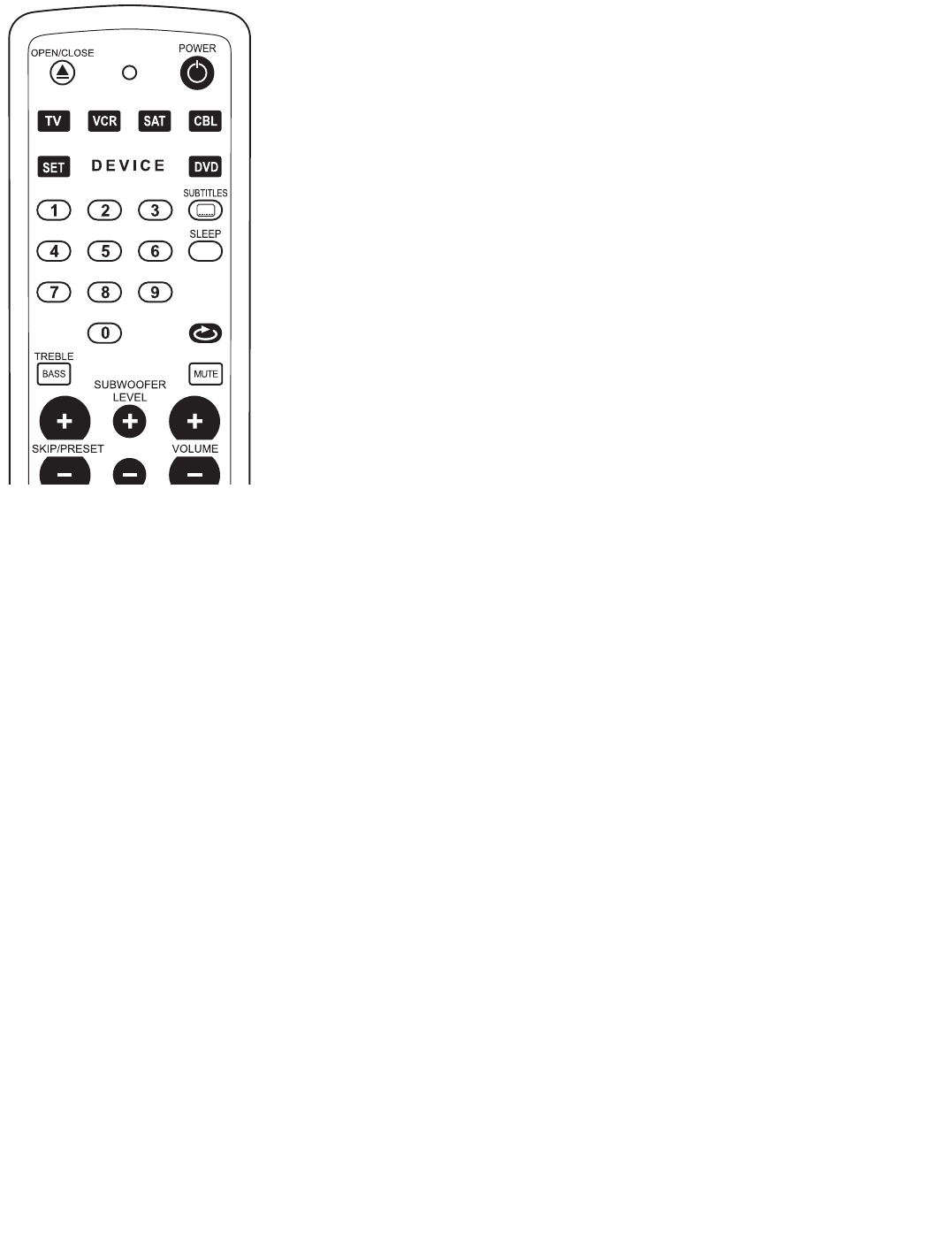
35
control remoto programado previamente
DEVICE (DISPOSITIVO)
Puede controlar el sistema de cine en casa de DVD KIT100 con el control remoto pulsando la tecla
del dispositivo. Se pueden programar las otras teclas de dispositivos para poder controlar otros
equipos y se seleccionan pulsando la tecla del dispositivo que corresponda. Las funciones alternativas
de las teclas del control remoto pueden verse en la “tabla de funciones alternativas de las teclas del
control remoto” en la página 46.
Para poder grabar un video es necesario pulsar a la vez las teclas de grabación (OPEN/CLOSE) y PLAY.
Si se sustituyen las pilas del control remoto en menos de cinco minutos, se conservarán en la memoria
los códigos IR programados. Si mantiene el control remoto sin pilas durante más tiempo necesitará
volver a programarlo.
Programación rápida del control remoto
En el manual de usuario del equipo que desee programar, deberá encontrar el código IR de producto
de 3 o 4 dígitos. Si no lo encuentra, busque el código de 4 dígitos del fabricante de su equipo, en la
“tabla de códigos IR de fabricantes de equipos” de la página 39. Si hay varios códigos IR de producto,
tendrá que probarlos uno por uno hasta conseguir dar con el correcto. Siga la secuencia de
programación rápida a continuación. Si no se pulsa ninguna tecla durante diez segundos, el proceso de
programación se detendrá automáticamente y tendrá que comenzar de nuevo. Para salir del modo de
programación, pulse cualquier tecla de dispositivo hasta que se apague la lámpara LED.
1. Obtenga el/los código(s) IR de producto de cuatro dígitos de la tabla.
2. Pulse y mantenga pulsada la tecla SET y la tecla del dispositivo que corresponda (TV,VCR (vídeo),
SAT (TV por satélite) o CBL (TV por cable)) a la vez hasta que se encienda la lámpara LED.
3. Introduzca el código de cuatro dígitos de su equipo usando las teclas numéricas. La lámpara LED
parpadeará con cada dígito y, después, se apagará. Si la lámpara LED parpadea dos veces, indicará
que se ha introducido un código no válido. En este caso, repita el paso 3.
4. Compruebe el control remoto con su equipo y si no funciona, pruebe con otro código IR de
producto del fabricante de su equipo y repita el procedimiento desde el paso 2.
Programación con búsqueda automática
Si no aparece el código IR de productos de tres o cuatro dígitos en el manual del equipo ni en la “tabla
de códigos IR de fabricantes de equipos” de la página 39 o no funciona correctamente tras completar los pasos de la programación rápida
probando con todos los códigos que le aparecen, puede hacer que el control remoto busque el código IR automáticamente con cada tipo de
dispositivo específico. Puede que tenga que esperar algunas minutos hasta que el control remoto consiga encontrar el código de cada tipo de
dispositivo. Siga y repita la secuencia de programación automática debajo. Si no se pulsa ninguna tecla en el control remoto durante treinta
segundos, el proceso de programación se detendrá automáticamente y tendrá que comenzar de nuevo.
1. Encienda el equipo que desee controlar con el control remoto (si el equipo es un vídeo, introduzca una cinta e inicie la reproducción) y
asegúrese de que el control remoto esté apuntando hacia el equipo.
2. Pulse y mantenga pulsada la tecla SET y la tecla del dispositivo que corresponda (TV,VCR (vídeo), SAT (TV por satélite) o CBL (TV por
cable)) a la vez hasta que se encienda la lámpara LED
3. Pulse y suelte la tecla SET de nuevo para introducir el modo de búsqueda. La lámpara LED parpadeará rápidamente.
4. Pulse y mantenga pulsada la tecla POWER durante 3 segundos hasta que la lámpara LED parpadee cada 2 segundos. Esto indica que se
encuentra en el modo de búsqueda automática en el que se transmite automáticamente un código IR diferente cada vez que parpadea.
5. Cuando su equipo se apague por haber recibido la orden correcta de desconexión IR, pulse inmediatamente cualquier tecla para detener la
búsqueda automática. La lámpara LED dejará de parpadear.
6. Pulse la tecla de cualquier dispositivo (TV,VCR (vídeo), SAT (TV por satélite) o CBL (TV por cable)) para almacenar el código IR actual. La
lámpara LED se apagará.
7.Vuelva a encender su equipo, pulse la tecla de dispositivo que corresponda (TV,VCR (vídeo), SAT (TV por satélite) o CBL (TV por cable)) y
compruebe si el control remoto funciona correctamente. Si no funciona perfectamente, repita el procedimiento desde el primer paso.
8. Si la lámpara LED del control remoto se apaga antes de que su equipo reciba el código IR válido para apagarse, repita la secuencia anterior
desde el paso 1, asegurándose de que el control remoto esté apuntando hacia el equipo, que el equipo esté encendido y que haya elegido el
tipo de dispositivo correcto.
Lectura del código IR almacenado
Puede ver qué código IR hay almacenado en cada tecla de dispositivo. Pulse la tecla del dispositivo que corresponda (TV,VCR (vídeo), SAT (TV
por satélite) o CBL (TV por cable)).A continuación, pulse y mantenga pulsado SET y, al mismo tiempo, pulse los dígitos 1, 2, 3 o 4 en las teclas
numéricas y, a continuación, suelte todas las teclas. Cada vez que pulse SET y un dígito del “1” al “4” la lámpara LED parpadeará el mismo número
de veces que el número del código IR.
SOURCE
KEF services
Servicio al cliente
Para obtener más ayuda en la solución de problemas, póngase en contacto con el servicio al cliente de KEF®o con el establecimiento de compra.
Garantía
El sistema KEF Instant Theatre está cubierto por una garantía limitada intransferible. En la tarjeta de garantía que se entrega con el equipo
dispone de más información sobre la misma. Rellene la sección de información de la tarjeta y envíela.
Accesorios
Los altavoces para estantes del equipo KEF Instant Theatre son compatibles con las peanas para altavoces KEF Instant Theatre.
K7190>KIT100 Manual USA 19/4/04 4:12 pm Page 36

36
solución de problemas
Mensajes de error
NO HAY DISCO Pulse OPEN/CLOSE (ABRIR/CERRAR) y asegúrese de que se ha colocado un disco correctamente en el
reproductor de DVD
DISCO INCORRECTO Compruebe que el disco se ha colocado correctamente, con la cara rotulada hacia arriba y que está limpio
REGIÓN INCORRECTA Compruebe que el número de región del DVD coincide con el de la parte posterior del reproductor
de DVD
No hay alimentación
Si no hay luz en espera de color azul, no hay respuesta al pulsar el botón ON/OFF (ENCENDIDO/APAGADO) del control remoto o el botón
POWER (ALIMENTACIÓN) del reproductor de DVD
• Asegúrese de que el equipo está encendido en la parte posterior del altavoz del subwoofer
• Compruebe que el cable entre el subwoofer y el reproductor de DVD está correctamente conectado en ambos extremos y
correctamente atornillado
• Compruebe que el cable de alimentación está firmemente conectado en ambos extremos
• Desenchufe el cable de alimentación de la toma de corriente durante 30 segundos para que el sistema se reinicie
No hay sonido
• Asegúrese de que “MUTE” (ANULACIÓN DEL SONIDO) no está encendido en la pantalla – si lo está, pulse el botón MUTE
(ANULACIÓN DEL SONIDO) en el control remoto
• Aumente el nivel del volumen
• Compruebe que el cable del altavoz está conectado a la parte posterior del subwoofer y está correctamente atornillado.
Compruebe que el cable del altavoz está firmemente colocado en los altavoces izquierdo y derecho
• Compruebe que las conexiones externas están firmemente insertadas y que se ha escogido el origen correcto, por ejemplo,
CBL/TV/VCR
Sonido sin imagen
• Compruebe que las conexiones del origen VCR y CBL están correctamente enchufadas en la parte posterior del equipo de DVD
• Asegúrese de que el televisor está conectado y que la selección de la entrada de vídeo del mismo está configurada según la entrada AV
correcta. Esto se puede hacer mediante el control remoto del TV, con los botones TV/VIDEO (TV/VÍDEO), INPUT (ENTRADA)
o AUX IN (ENTRADA AUXILIAR)
• Si antes tenía imagen pero acaba de conectar un TV distinto y ya no hay imagen, es posible que la configuración de salida de DVD del
equipo sea incorrecta para el nuevo televisor. Restablezca las salidas de DVD a su configuración original de fábrica (remítase a
Restablecimiento de los valores predeterminados de fábrica, más adelante)
• Si se utiliza una conexión de vídeo mediante Euroconector con su TV, necesitará un cable de vídeo compuesto para ver las fuentes
externas conectadas a las entradas de vídeo compuesto de KEF Instant Theatre. Necesitará un cable de S-Video para ver las entradas
externas conectadas a las entradas de S-Video de KEF Instant Theatre
El control remoto no funciona
• Compruebe las pilas y su polaridad (+ y -)
• Asegúrese de que el panel frontal del reproductor de DVD no está cubierto y que el control remoto señala hacia el reproductor
de DVD
• Asegúrese de pulsar la tecla de dispositivo correcta (DVD,TV,VCR (vídeo), SAT (TV por satélite) o CBL (TV por cable)) del equipo que
desee controlar
• Se debe programar un código IR válido en el control remoto antes de poder utilizarlo con cualquier otro equipo que no sea el KEF
Instant Theatre. Consulte la programación previa del control remoto en la página 35
• Si el control remoto no funciona correctamente, puede ser que se haya programado un código de equipo erróneo. Intente repetir la
programación rápida usando otro de los códigos del fabricante que aparecen en la lista o iniciando la búsqueda automática de nuevo
para localizar el código correcto
La radio no funciona o la recepción es de mala calidad
• Aleje las antenas del televisor u otros equipos eléctricos. La banda de AM es muy sensible a las interferencias de los televisores
• Asegúrese de que las antenas de AM y FM están conectadas
• Extienda las antenas y ajuste su posición para mejorar la recepción de radio
• Asegúrese de que la antena de AM se encuentra en posición vertical
El DVD o el CD no se reproduce
Después de pulsar el botón DVD/CD y esperar unos segundos, deberá aparecer LOAD (CARGANDO) mientras el reproductor de DVD lee la
información de formato del disco
• Asegúrese de que el disco está correctamente colocado (con la cara rotulada hacia arriba), expulse el disco y vuelva a colocarlo
• Asegúrese de que el disco no está sucio o rayado. Limpie cuidadosamente el disco
• Compruebe que el código de región del disco coincide con la etiqueta de la parte posterior del equipo de DVD
El sonido está distorsionado
• Compruebe las conexiones de los altavoces
• Reduzca el nivel de las demás fuentes conectadas en caso de interferencia
Sonido del subwoofer demasiado elevado/bajo
• El nivel de graves del subwoofer se puede ajustar mediante el control remoto
No se oye la voz en la salida de grabación o multisala
• Se debe seleccionar el modo estéreo para asegurarse de que el canal central sale mezclado por las salidas izquierda y derecha de
grabación/multisala.Al ajustar el menú, seleccione Audio y cambie el sonido envolvente a “desactivado” (estéreo)
Restablecimiento de los valores predeterminados de fábrica
Se puede volver a dejar KEF Instant Theatre en la configuración original de fábrica pulsando 3 botones del panel frontal del DVD al
mismo tiempo:
Pulse “PLAY/PAUSE” (REPRODUCIR/PAUSA) y “<SKIP/PRESET” (SALTAR/PRESINTONÍA) (abajo) y “<VOLUME” (VOLUMEN) (abajo)
simultáneamente para restablecerlo a TV estándar para NTSC para América
Pulse “PLAY/PAUSE” (REPRODUCIR/PAUSA) y “<SKIP/PRESET” (SALTAR/PRESINTONÍA) (abajo) y “<VOLUME” (VOLUMEN) (arriba)
simultáneamente para restablecerlo a TV estándar para PAL para Europa
A continuación, se debe apagar el equipo para que se aplique la nueva configuración
K7190>KIT100 Manual USA 19/4/04 4:12 pm Page 37

37
glosario
Capítulo Un título o película en DVD se divide en varios capítulos para facilitar la búsqueda
CD de audio KEF Instant Theatre reproduce discos compactos de audio y disco compactos grabados en CD-R y CD-RW
Dolby Digital Dolby Digital 5.1 es el medio estándar de codificación de audio para vídeo en DVD. Dolby Digital es una marca comercial de
Dolby Laboratories
Dolby Prologic II Versión mejorada del Pro-Logic original que ofrece 5.1 canales de sonido a partir de una señal de entrada estéreo
DTS DTS es un formato de señal digital multicanal 5.1 desarrollado por Digital Theater Systems. DTS es una marca comercial de
Digital Theater Systems
DVDaudio Se trata de un nuevo formato en DVD que no es compatible con el sistema DVD de KEF Instant Theatre DVD, aunque si también
hay otros formatos en el disco éstos sí se reproducirán
DVDvideo Digital Versatile Disc (DVD = Disco versátil digital) es un sistema de almacenamiento de audio, vídeo y datos basado en la lectura
mediante láser de discos ópticos de 12 u 8 cm. DVDvideo es un estándar para el almacenamiento de información de vídeo y audio en discos
DVD-ROM basada en la codificación y compresión de vídeo y audio en formato MPEG. Un DVD-ROM (Read Only Memory = Memoria de sólo
lectura) solamente se puede leer y no se puede grabar en él
Franjas negras Describe el efecto producido cuando se encaja una imagen de vídeo mayor de 525 o 625 líneas en un TV con una relación de
aspecto 4:3. Inserta franjas negras encima y debajo de la ventana de vídeo para que éste pueda ocupar todo el ancho de la pantalla del TV
IR Abreviatura de infrarrojos. El control remoto se comunica con el reproductor de DVD mediante un haz de luz infrarroja, de modo que se
necesita una comunicación visual directa para que funcione correctamente
JPEG Permite la visualización de imágenes grabadas en formato JPEG (Joint Photographic Expert Group = Grupo de expertos en fotografía)
como, por ejemplo, el que se obtiene con las cámaras digitales
MP3 MPEG 1 contiene un método de compresión de audio Layer 3. Este sistema de compresión de audio Layer 3 se suele utilizar para
descargar archivos de música de Internet en un ordenador o en un dispositivo de grabación MP3. Reduce el tamaño de los archivos 12 veces para
permitir descargar más rápidas. Los archivos MP3 guardados en un CD se reproducirán en estéreo independientemente del modo de sonido
envolvente seleccionado en el menú de audio.
MPEG MPEG es un estándar de compresión de vídeo definido por el Motion Picture Expert Group (Grupo de expertos en películas).
Permite guardar en un disco una gran cantidad de datos digitales de vídeo y audio.
NTSC Abreviatura de National Television System Committee (Comité del sistema de televísión nacional). Es el formato de imagen de televisión
que suele utilizarse en América
NXT Panel plano que genera sonido mediante vibraciones modales distribuidas. NXT es una marca comercial de New Transducers Limited
PAL Abreviatura de Phase Alternate Line (Línea alterna de fase). Se trata del formato de imagen de televisión que suele utilizarse en Europa
PCM Abreviatura de Pulse Code Modulation (Modulación de código de impulsos). Señal de audio sin comprimir, codificada digitalmente,
que se utiliza en CD y discos láser
Pista Pistas de música individuales grabadas en CD
RDS Radio Data Signature (Firma de datos de radio) que se utiliza en las transmisiones de FM por VHF y que ofrece varias funciones de
información para los oyentes. Incluye la posibilidad de indicar el nombre de la emisora en la pantalla de la radio, como la que se utiliza en
KEF Instant Theatre.También puede avisar cuando se emiten noticias, avisos de tráfico o tipos de programa específicos. No son accesibles en
KEF Instant Theatre
Relación de aspecto Forma de la imagen rectangular en un aparato de TV. Es la anchura de la imagen con relación a la altura. Las pantallas
de TV estándar suelen cumplir uno de estos dos estándares: 4:3 (original, 4 unidades de anchura por 3 unidades de altura) y 16:9 (panorámica)
SCART (Euroconector) Conexión de 21 terminales entre componentes de audio-vídeo que suele utilizarse en Europa.Transporta señales de
audio, vídeo y conmutación. La señal de vídeo se divide en rojo, verde y azul (RGB) para ofrecer la mejor calidad de imagen para la mayoría al
conectar el reproductor de DVD a un aparato de TV con una toma de Euroconector
S-Video Conexión de toma mini-DIN de 4 terminales que se utiliza para transportar la señal de vídeo entre el origen y la pantalla, en la que
los componentes de brillo (luminancia,Y) y color (crominancia, C) de la señal se transmiten por separado. La calidad de S-Video es superior a la
del vídeo compuesto
Título Elementos numerados del contenido de un DVD que distinguen las distintas películas y características especiales de un único disco
Uni-Q®En esta tecnología patentada por KEF, los altavoces de frecuencias medias y altas se combinan en una matriz de altavoces coincidente
con un superior rendimiento de imagen estéreo gracias a la radiación acústica de origen puntual
Vídeo compuesto Conexión única, por ejemplo entre un reproductor de DVD y un TV, en la que la señal completa de la imagen
(que contiene información sobre luminancia, color y sincronización) se transporta en los formatos PAL (Europa) o NTSC (América).
Generalmente son tomas fonográficas individuales, que suelen ser de color amarillo para distinguirlas de otras conexiones facilitadas
Video por Componentes Sistema de conexión, generalmente entre un reproductor de DVD y un dispositivo de pantalla como un TV o
proyector, en el que la luminancia se transporta en un cable y los colores azul y verde se transportan cada uno mediante su propio cable.
En este caso, las conexiones son tres tomas fonográficas
K7190>KIT100 Manual USA 19/4/04 4:12 pm Page 38

especificaciones
altavoces KIT100 subwoofer KIT100PSW
Diseño altavoz satélite en caja cerrada de dos vías subwoofer con alimentación en
caja cerrada
Unidades de altavoz matriz Uni-Q de 100mm con unidad de desplazamiento largo
altavoz de agudos de 14mm de 250mm
panel NXT con excitador de 25mm
apantallado magnéticamente
Cajas aluminio fundido
Amplificadores amplificador de 5 canales de alta potencia para el subwoofer y los altavoces principales
Acabado Plateado Plateado
Dimensiones (Al x A x P) 237 x 119 x 260 mm 398 x 176 x 515 mm
KEF AUDIO se reserva el derecho a efectuar modificaciones sin previo aviso en las especificaciones técnicas, en consonancia con su línea
continua de investigación y desarrollo.
38
DVD KIT100
Formatos de reproducción
soportados DVD, DVD-RW, DVD+RW, CD, CDR/RW, MP3 codificado como CD
Sección de sintonizador AM/FM con la función RDS (sólo en Europa)
Entradas de audio cable/satélite (analógica y óptica digital),VCR y TV (analógica)
Salida de audio digital óptica
Entradas de video cable/satélite y VCR (S-Video y señal de vídeo compuesto)
Entradas de antena FM y AM (incluidas)
Material de la caja zinc fundido
Acabado Plateado
Visualizador acabado de espejo, visualizador VFD en azul con función de atenuación automática
Control control remoto por infrarrojos
Dimensiones incluyendo las 59 x 324 x 262 mm
patas (H x W x D)
KEF AUDIO se reserva el derecho a efectuar modificaciones sin previo aviso en las especificaciones técnicas, en consonancia con su línea
continua de investigación y desarrollo.
K7190>KIT100 Manual USA 19/4/04 4:12 pm Page 39

Brand of Teletext TV
888 1277, 1301, 1302, 1303
A.R. SYSTEM 1000, 1002, 1143, 1144, 1145, 1158,
1163, 1117
ACCENT 1025, 1069, 1117, 1129
ACTION 1032, 1270
ACURA 1270
ADMIRAL 1031, 1103, 1112, 1282
AGASHI 1127, 1128, 1129, 1146
AGAZI 1282
AIKO 1003, 1004, 1037, 1103, 1032, 1188, 1270
AIM 1025, 1051, 1065, 1102, 1188, 1115, 1127,
1128, 1129, 1130, 1146, 1290
AIOSTAY 1270
AIWA 1187, 1263, 1268, 1269
AKAI 1003, 1025, 1037, 1038, 1039, 1042, 1087,
1086, 1143, 1144, 1145, 1163, 1032, 1139,
1063, 1186, 1117, 1053, 1116, 1005, 1052,
1051, 1270, 1290, 1282, 1301, 1302, 1303
AKI 1003, 1004
AKIO 2048
AKIRA 1069, 1025, 1129, 1116
AKURA 1117, 1032, 1270, 1301, 1282
ALBA 1042, 1091, 1075, 1039, 1030, 1174, 1038,
1270, 1201
ALBIRAL 1000, 1002, 1158, 1009, 1143, 1144, 1145,
1163, 1104, 1105, 1106, 1107, 1108, 1109,
1110, 1028, 1029, 1038, 1039, 1042, 1001
ALHORI 1003, 1004
AMSTRAD 1006, 1143, 1144, 1145, 1163, 1037, 1032,
1117, 1027, 1301, 1270, 1282
ANAM 1270
ANGAL 1117, 1270, 1282, 1301
ANHUA 1238, 1257, 1239, 1295
ANIS 1117
ANITECH 1145, 1163, 1041, 1032, 1025, 1143, 1144,
1117, 1270, 1282, 1301
ANSONIC 1028, 1011, 1117, 1270, 1301, 1290
ANTAREX 1270
ANTECNO 1037
AOC 1266, 1264, 1270
AOLINPIYA 1282, 1301, 1302, 1303
ARISTONA(PHILIPS) 1290
ARTHUR MARTIN 1090
ART-TECH 1270
ASA 1005, 1063, 1007, 1009, 1012, 1023, 1025,
1031, 1118, 1090, 1095, 1051, 1103, 1112
ASBERG 1041, 1123, 1143, 1144, 1145, 1163
ASTRA 1025, 1053, 1143, 1144, 1145, 1163, 1032,
1270
ASTRO SOUND 1038, 1039, 1042, 1143, 1144, 1145, 1163
ASUKA 1037, 1038, 1039, 1042, 1035
ATLANTIC 1011, 1035, 1067, 1068, 1143, 1144, 1145,
1163
ATORO 1032, 1270
AUDIOSONIC 1000, 1002, 1003, 1004, 1037, 1116, 1117,
1032, 1143, 1144, 1145, 1158, 1163, 1122,
1282
AUDIOTON 1003, 1004, 1032, 1282, 1270
AUDIOVOX 1285, 1289
AUSIND 1007, 1008, 1023
AUTOVOX 1003, 1004, 1013, 1014, 1023, 1040, 1044,
1067, 1068, 1007, 1084, 1095, 1110
AWA 1003, 1004, 1025, 1091, 1143, 1144, 1145,
1163, 1032, 1116, 1117, 1140, 1164, 1290,
1270
BAI HE HUA 1267, 1274, 1275, 1285, 1287, 1288, 1291,
1292, 1270
BAI HUA 1270, 1282, 1301, 1302, 1303
BAI LE 1266, 1270, 1276, 1277, 1278, 1279, 1280,
1281, 1290
BAIRD 1102, 1146
BANG & OLUFSEN 1025, 1103, 1143, 1144, 1145, 1163
BAOLESHI 1282, 1301, 1302, 1303
BAOSHENG 1265, 1270
BARCO 1031, 1036, 1038, 1039, 1042, 1103
BASIC LINE 1037, 1143, 1144, 1145, 1163, 1119, 1290,
1270
BAUMATIC 1117
BAUR 1025, 1031, 1036, 1069, 1116, 1129, 1143,
1144, 1145, 1163, 1099, 1032, 1146
BAZIN 1003, 1004
BCR 1005, 1031, 1096, 1042, 1058
BEIJING 1265, 1266, 1267, 1270, 1274, 1275, 1276,
1277, 1282, 1285, 1287, 1291, 1292, 1301,
1302, 1303, 1278, 1279, 1280, 1281, 1290
BEKO 1168, 1124
BEST 1122
BIFONIC 1003, 1004
BLAUPUNKT 1087, 1086, 1091, 1177, 1186, 1189, 1191,
1010, 1016, 1172, 1075, 1047, 1057, 1017,
1019
BLAUSONIC 1003, 1004
BLUE STAR 1038, 1039, 1042
BLUESKY 1127, 1128, 1129, 1146
BRANDT 1005, 1031, 1096, 1042, 1058, 1146, 1075
BRENDSTAR 1032
BRIONVEGA 1012, 1102, 1103, 1116, 1127, 1128, 1129,
1130, 1146, 1184, 1084, 1120, 1121, 1112
BRITANNIA 1143, 1144, 1145, 1163, 1003, 1004, 1043,
1049, 1014
BRUNS 1028, 1029, 1103, 1115
BSR 1006, 1182, 1032, 1015, 1018, 1020
BUSH(ATAKI) 1091, 1075, 1021, 1031, 1036, 1038, 1039,
1041, 1090, 1030, 1270, 1290, 1201
CABLETIME 1175, 1176, 1180
CAI HONG 1270
CAPEHART 1264
CAPSONIC 1117, 1143, 1144, 1145, 1163
CARREFOUR 1091
CASCADE 1270
CASIO 1143, 1144, 1145, 1163
CENTURION 1264
CENTURY 1103, 1104, 1105, 1106, 1107, 1108, 1109,
1110, 1112
CGE 1035, 1038, 1039, 1041, 1042, 1105, 1106,
1107, 1108, 1018, 1022, 1023, 1032, 1007,
1109, 1123, 1124, 1163, 1110, 1143, 1144,
1145
CGM 1143, 1144, 1145, 1163, 1037, 1032, 1117,
1080
CHAI XING 1267, 1274, 1275, 1285, 1287, 1288, 1291,
1292
CHANG FEI 1265, 1290, 1270
CHANG FENG 1265, 1282, 1301, 1302, 1303, 1293, 1294,
1275
CHANG HAI 1265, 1270
CHANG HONG 1144, 1117, 1102, 1250, 1232, 1233, 1305,
1234, 1252, 1235, 1237, 1240, 1246, 1247,
1303, 1251, 1287, 1288, 1291, 1292, 1301,
1249, 1302, 1265, 1267, 1270, 1238, 1263,
1304, 1245
CHANG HONG 1274, 1275, 1276, 1278, 1282, 1285
CHAPARRAL 1161
CHENG DU 1265, 1270
CHUN FENG 1282, 1301, 1302, 1303, 1270
CHUN SUN 1265, 1270
CIE 1037, 1032, 1290
CIMLINE 1075, 1270
CITY COM 1270
CLARIVOX 1000, 1002, 1103, 1104, 1105, 1106, 1107,
1108, 1109, 1110, 1143, 1144, 1145, 1158,
1163, 1115, 1025, 1122, 1001, 1009
CLATRONIC 1028, 1282, 1270
CLAYTON 1143, 1144, 1145, 1163
CME 1091, 1040, 1113, 1028, 1081, 1087, 1075,
1076, 1011, 1270
COMPUTRON 1025, 1143, 1144, 1145, 1163, 1032
CONCORDE 1032, 1270
CONDOR 1028, 1029, 1035, 1041, 1102, 1117, 1143,
1144, 1145, 1146, 1163, 1123, 1032, 1270
CONIC 1053
CONROWA 1264, 1282, 1301, 1302, 1303, 1256, 1261,
1262, 1293, 1294, 1296
CONTEC 1004, 1117, 1160, 1032, 1091, 1021, 1182,
1270
CONTINENTAL EDISON 1005, 1031, 1042, 1058, 1096
COSMEL 1032, 1122, 1270
COSMOS 1270
CROSLEY 1005, 1014, 1018, 1041, 1103, 1104, 1023,
1024, 1112
CROWN 1025, 1037, 1123, 1143, 1144, 1145, 1163,
1032
CRYSTAL 1143, 1144, 1145, 1163
CS ELECTRONICS 1037
CTC CLATRONIC 1003, 1004, 1028, 1029, 1037, 1041, 1104,
1105, 1106, 1107, 1108, 1109, 1143, 1144,
1145, 1163, 1042, 1039, 1117, 1123, 1038,
1270, 1301
CURTIS MATHIS 1025
CYMTIC 1000, 1002, 1003, 1004, 1038, 1039, 1042,
1158
DAEWOO 1003, 1004, 1025, 1037, 1104, 1105, 1106,
1107, 1108, 1109, 1110, 1116, 1143, 1144,
1145, 1163, 1123, 1270, 1266, 1281, 1290
DAICHI 1032
DAINICHI 1102, 1146
DANSAI 1053, 1117, 1282
DANSUI 1025, 1069, 1116, 1117, 1129, 1143, 1144,
1145, 1163, 1032
DAWA 1025, 1143, 1144, 1145, 1163
DA XI GU 1270
DAYTRON 1032, 1270, 1290, 1264
DA YU 1264, 1266, 1281, 1290
DE GRAAF 1031, 1036
DECCA 1000, 1002, 1003, 1004, 1025, 1027, 1030,
1143, 1144, 1145, 1158, 1163
DEGRAAF 1090, 1269
DENON 1055, 2135
DENVER 1143, 1144, 1145, 1032, 1270
DESMET 1000, 1002, 1035, 1038, 1039, 1042, 1143,
1144, 1145, 1158, 1163, 1032
DEWO 1119
DIAMOND 1025, 1069, 1116, 1032, 1129, 1143, 1144,
1145, 1290
DINASTY 1270
DIXI 1032, 1270
DOMEOS 1143, 1144, 1145, 1163
DONG BAO 1270, 1282, 1301, 1302, 1303
DONG DA 1270
DONG SHAN 1270, 1264
DONG DI SHI 1270
DONG HAI 1270
DORIC 1005, 1014, 1018, 1092
DST 1270
DUAL 1003, 1004, 1025, 1038, 1069, 1116, 1129,
1143, 1144, 1145, 1163, 1032, 1039, 1042,
1040, 1184
DUAL-TEC 1004, 1011, 1018, 1028, 1032, 1270
DUMONT 1009, 1028, 1029, 1041, 1102, 1103, 1143,
1144, 1145, 1146, 1163, 1123, 1007
DYNAMIC 1032
DYNISTY 1143
,
1144
,
1145
,
1163
EDAN LINE 1102, 1146, 1143, 1144, 1145, 1163
EDISON 1005, 1031, 1096, 1042, 1058
ELBE 1000, 1002, 1158, 1003, 1004, 1091, 1038,
1039, 1042, 1125, 1009, 1001, 1011
ELBIT 1143, 1144, 1145, 1163
ELCIT 1028
ELECTRO TECH 1032, 1270
ELEKTA 1117, 1032, 1282, 1270, 1290, 1301
ELEKTRONSKA 1038, 1039, 1000, 1002, 1158, 1042
ELEMIS 1143, 1144, 1145, 1163
ELIN 1143, 1144, 1145, 1163, 1003, 1004, 1032,
1051, 1005, 1063, 1270
ELITE 1075
ELLEVISION 1117
ELMAN 1006, 1038, 1039, 1042, 1028, 1029, 1018,
1032
ELTA 1117, 1270, 1301
EMERSON 1028, 1029, 1038, 1041, 1102, 1103
,
1104,
1105, 1106, 1107, 1108, 1109, 1110, 1143,
1144, 1145, 1163, 1035, 1117, 1052, 1025,
1039, 1101, 1112, 1042, 1155, 1264
ENGEL 1115, 1038, 1039, 1042
ETRON 1143, 1144, 1145, 1163, 1032, 1038, 1039,
1042, 1278, 1270
EUROCOM 1038, 1039, 1042
EURO-FEEL 1282
EUROMAN 1143, 1144, 1145, 1163, 1003, 1004, 1025,
1282
EUROPHON 1000, 1002, 1158, 1104, 1105, 1106, 1107,
1108, 1109, 1110, 1003, 1004, 1038, 1039,
1042, 1160, 1028, 1035, 1032, 1029, 1018
EXPERT 1011, 1024, 1022, 1020
FAGOR 1038, 1039, 1042
FAIRMOST 1270
FEILANG 1270
FEI LU 1265, 1270
FEI YAN 1282, 1301, 1302, 1303, 1270
FEI YUE 1265, 1267, 1292, 1274, 1275, 1285, 1287,
1288, 1291
FENNER 1143, 1144, 1145, 1163, 1032, 1025, 1119,
1171, 1290, 1270
FERGUSON 1081, 1009, 1005, 1031, 1096, 1042, 1058
FIDELIS 1143, 1144, 1145, 1163, 1003, 1004, 1032,
1025, 1053, 1270
FIDELITY 1003, 1004, 1043, 1049, 1014, 1053, 1090,
1270
FILMNET CABLECRYPT 1151, 1177
FILSAI 1032, 1003, 1004
FINLANDIA 1114, 1031, 1036, 1090
FINLUX 1007, 1008, 1009, 1012, 1024, 1025, 1033,
1118, 1123, 1165, 1023, 1095, 1063, 1014,
1018, 1000, 1002, 1158, 1005, 1028, 1029,
1032, 1051
FIRST LINE 1143, 1144, 1145, 1163, 1104, 1105, 1106,
1107, 1108, 1109, 1110, 1003, 1004, 1032,
1123, 1025, 1116, 1138, 1270, 1290
FISHER 1103, 1005, 1003, 1004, 1102, 1146, 1115,
1091, 1160, 1014, 1018, 1040, 1024, 1034,
1124, 1184, 1112, 1270
FLINT 1143, 1144, 1145, 1163
FLORIDA 1003, 1004
FORMENTI-PHOENIX 1003, 1008, 1024, 1035, 1036, 1116, 1023,
1007, 1090, 1103, 1005, 1143, 1144, 1145,
1163, 1004, 1041, 1038, 1039, 1042, 1025,
1006, 1014, 1018, 1117, 1159, 1301
FORTRESS 1103
FRABA 1143, 1144, 1145, 1163
FRANCE TELECOM 1190
remote control codes
39
K7190>KIT100 Manual USA 19/4/04 4:12 pm Page 40

FRONTECH 1090, 1031, 1036, 1032, 1006, 1053, 1270,
1282
FUJITSU 1067, 1068, 1037, 1296
FU LI 1295
FUNAI 1015, 1117, 1182, 1005, 1031, 1096, 1042,
1058, 1091, 1032, 1282, 1270, 1301
FU RI 1261, 1265, 1267, 1269, 1274, 1275, 1278,
1282, 1283, 1285, 1287, 1288, 1291, 1292,
1301, 1302
,
1303
,
1307
,
1308
FUTRONIC 1117
G.E 1264, 1266
GALACTEX 1003, 1117, 1004
GALAXISAT 1143, 1144, 1145, 1163
GALAXY 1003, 1004, 1028, 1029, 1009, 1123, 1041
GALERIA 1032
GANXIN 1265, 1267, 1238, 1274, 1275, 1285, 1287,
1288, 1289, 1291, 1292
GBC 1005, 1091, 1002, 1004, 1018, 1024, 1030,
1032, 1037, 1038, 1039, 1040, 1090, 1114,
1128, 1014, 1042, 1104, 1105, 1106, 1107,
1108, 1109, 1110, 1270, 1290
GEC 1000, 1002, 1003, 1004, 1005, 1020, 1022,
1024, 1031, 1036, 1091, 1158, 1114, 1040,
1128
GELOSO 1004, 1018, 1024, 1031, 1032, 1037, 1090,
1107, 1108, 1270, 1290
GENERAL TECHNIC 1032, 1270, 1290
GENEXXA 1090
GIANT 1143, 1144, 1145, 1163, 1003, 1004, 1025
GITEM 1143, 1144, 1145, 1163
GMG 1117, 1123, 1143, 1144, 1145, 1163, 1032,
1270, 1301
GNIDA 1104, 1105, 1106, 1107, 1108, 1109, 1110,
1144, 1145, 1163, 1143
GOLDLINE 1122
GOLDSTAR(LG) 1003, 1004, 1081, 1032, 1110, 1126, 1181,
1007, 1023, 1025, 1031, 1036, 1038, 1039,
1042, 1060, 1116, 1143, 1144, 1145, 1163,
1117, 1053, 1274, 1264, 1275, 1285, 1287,
1288, 1291, 1292, 1270, 1301, 1263, 1267
GOLDTECH 1143, 1144, 1145, 1163
GOODMANS 1025, 1038, 1039, 1042, 1143, 1144, 1145,
1163, 1032, 1052, 1091, 1081, 1075, 1290,
1282, 1270, 1201
GORENJE 1143, 1144, 1145, 1163, 1124, 1127
GPM 1288
GRAETZ 1090
GRANADA 1014, 1018, 1043, 1049, 1026, 1039, 1086,
1041, 1007, 1023, 1075, 1042, 1090, 1092,
1114, 1000, 1002, 1003, 1004, 1005, 1025,
1031, 1036, 1143, 1144, 1145, 1158, 1163,
1087, 1091, 1290
GRANDIN 1270
GREAT WALL 1117, 1257, 1265, 1266, 1267, 1270, 1238,
1274, 1275, 1282, 1285, 1281, 1280, 1279,
1301, 1302, 1303, 1276, 1277, 1278
GRENADIER 1143, 1144, 1145, 1163, 1032, 1038, 1039,
1042, 1025
GRONIC 1003, 1004, 1025, 1038, 1039, 1042, 1143,
1144, 1145, 1163
GROSLEY 1023, 1007
GRUNDIG 1003, 1007, 1010, 1023, 1041, 1044, 1045,
1047, 1048, 1050, 1059, 1067, 1068, 1116,
1143, 1144, 1145, 1017, 1019
GTT 1143, 1144, 1145, 1163, 1037, 1032, 1102,
1146, 1123
HAIER 1199, 1200
HAI HONG 1276, 1277, 1278, 1279, 1280, 1270
HAI LE 1239, 1295
HAI YAN 1265, 1267, 1274, 1275, 1282, 1285, 1287,
1288, 1291, 1292, 1301, 1302, 1303
HALIFAX 1282
HAMPTON 1003, 1004
HANIMEX 1037
HANNOVER 1123
HANSEATIC 1024, 1026, 1035, 1091, 1046, 1049, 1023,
1007, 1270
HANTAREX 1000, 1014, 1018, 1143, 1144, 1145, 1163,
1032
HCM 1003, 1004, 1037, 1032, 1038, 1039
,
1042,
1270, 1282
HEMA 1270
HEMMERMANN 1014, 1004, 1003
HEXA 1042, 1038, 1039
HIGASHI 1003, 1004
HILINE 1032, 1117, 1282
HINARI 1032, 1091, 1051, 1052, 1053, 1103, 1114,
1039, 1117, 1042, 1143, 1145, 1163, 1038,
1115, 1270, 1301
HISENSE 1192, 1193, 1194, 1195, 1196, 1197, 1198,
1256, 1261, 1262, 1264, 1268, 1269, 1293,
1294, 1270
HISHI 1032
HISONIX 1116, 1270
HITACHI 1063, 1116, 1004, 1038, 1039, 1040, 1042,
1049, 1054, 1055, 1056, 1057, 1058, 1059,
1060, 1091, 1128, 1165, 1005, 1025, 1028,
1029, 1173, 1145, 1003, 1144, 1020, 1031,
1036, 1051, 1018, 1014, 1053, 1143, 1269,
1261, 1264, 1262, 1296, 1277, 1256
HONGMEI 1258, 1265, 1267, 1270, 1271, 1274, 1275,
1282, 1285, 1287, 1288, 1291, 1292, 1301,
1302, 1303, 1263, 1304, 1305
HONGYAN 1265, 1282, 1301, 1302, 1303
HOSHAI 1037
HUA FA 1261, 1270
HUANG HAI MEI 1265, 1267, 1270, 1274, 1275, 1285, 1287,
1288, 1291, 1292
HUANG LONG 1270
HUANG SHAN 1265, 1267, 1270, 1274, 1275, 1239, 1282,
1285, 1287, 1288, 1291, 1292, 1301, 1302,
1303
HUAN YU 1265, 1267, 1269, 1274, 1275, 1282, 1285,
1287, 1288, 1291, 1292, 1301, 1302, 1303,
1263, 1304, 1305, 1290
HUA QIANG 1282, 1301, 1302, 1303
HUA RI 1261, 1282, 1301, 1302, 1303
HUODSTEJI 1239, 1257, 1238, 1295
HUSENSE 1102, 1146
HYPER VISION 1143, 1144, 1145, 1163, 1003, 1004, 1007,
1037, 1032, 1038, 1039, 1042, 1171, 1110,
1023, 1117, 1270
HYPSON 1117, 1143, 1144, 1145, 1163, 1032, 1282
IBERVISAO 1042, 1038, 1039
ICE S 1117, 1037, 1270, 1282, 1301
IEG 1003, 1004
IMPEERIAL COWN 1270
IMPERIAL 1018, 1022, 1023, 1124, 1007, 1032, 1117,
1041, 1038, 1039, 1042, 1123, 1143, 1144,
1145, 1163, 1104, 1105, 1106, 1107, 1108,
1109, 1110, 1282, 1301, 1302, 1303, 1266,
1276, 1277, 1278, 1279, 1280, 1281, 1290,
1270
INGERSOL 1270
INNO HIT 1000, 1004, 1030, 1081, 1053, 1105, 1129,
1117, 1037, 1107, 1003, 1002, 1158, 1005,
1014, 1018, 1143, 1144, 1145, 1163, 1104,
1032, 1106, 1108, 1110, 1109
INTERDISCOUNT 1143, 1144, 1145, 1163, 1099
INTERFUNK 1005, 1026, 1038, 1041, 1046, 1061, 1062,
1020, 1064, 1023, 1007, 1022, 1129, 1123,
1069, 1116, 1025, 1103, 1014, 1018
INTERVISION 1143, 1144, 1145, 1163, 1104, 1105, 1106,
1107, 1108, 1109, 1110, 1003, 1004, 1028,
1029, 1038, 1039, 1042, 1282
IRRADIO 1008, 1037, 1081, 1053, 1110, 1188, 1023,
1007, 1117, 1103, 1143, 1144, 1145, 1163,
1032, 1102, 1146, 1038, 1039, 1042, 1270
ISKRA 1000, 1002, 1158, 1003, 1004, 1028, 1029,
1038, 1039, 1042
ITC 1003, 1004, 1038, 1039, 1042
ITL 1032
ITS 1282
ITT/NOKA 1062, 1005, 1014, 1018, 1143, 1144, 1145,
1163, 1020, 1022, 1024, 1061, 1031, 1036,
1043, 1041, 1146, 1038, 1039, 1042, 1123,
1160, 1049, 1051, 1065, 1063, 1131, 1119,
1130, 1037, 1032, 1102, 1007, 1103, 1127,
1057, 1023, 1030, 1290
JANCO 1178, 1179
JET POINT 1143, 1144, 1145, 1163
JIACAILI 1270, 1282, 1301, 1302, 1303
JIA HUA 1238, 1295, 1257, 1239
JIEN 1270
JIN FENG 1257, 1265, 1272, 1273
JING TA 1267, 1270, 1274, 1275, 1285, 1287, 1288,
1291, 1292, 1301, 1302, 1303, 1263, 1304,
1305
JIN HAI 1263, 1304, 1305
JINLIPU 1032
JIN QUE 1 1239, 1282, 1301, 1302, 1303, 1270
JIN QUE 2 1265, 1270
JIN XING 1287, 1288, 1264, 1261, 1265, 1267, 1269,
1274, 1275, 1276, 1301, 1239, 1282,
1285, 1302, 1303, 1291, 1292
JOCEL 1143, 1144, 1145, 1163, 1025
JOHNSON 1003, 1004
JU HUA 1265, 1267, 1274, 1275, 1282, 1285, 1287,
1288, 1291, 1292, 1301, 1302, 1303
JUITA 1117, 1032
JVC 1091, 1139, 1103, 1132, 1133, 1138, 1066,
1259
KAIGE 1265, 1267, 1270, 1274, 1275, 1282, 1285,
1287, 1288, 1291, 1292, 1301, 1302, 1303
KAISER 1143, 1144, 1145, 1163
KAISUI 1143, 1023, 1007, 1145, 1037, 1032, 1163,
1123, 1144, 1119, 1270
KAMAR 1160
KAMBROOK 1143, 1144, 1145, 1163, 1003, 1004, 1038,
1039, 1042, 1117
KAMOSONIC 1003, 1004
KANGHONG 1256, 1305, 1304
KANGLI 1277, 1266, 1276, 1278, 1280, 1281, 1282,
1270
KANGLI 2 1267, 1270, 1274, 1275, 1285, 1287, 1288,
1291, 1292, 1265, 1276, 1277, 1278, 1279,
1280, 1260
KANGYI 1270, 1282, 1301, 1302, 1303
KAPSCH 1005, 1014, 1018, 1011, 1068
KARCHER 1116, 1119, 1129, 1036, 1007, 1023, 1025,
1032, 1037, 1160, 1028, 1029, 1143, 1144,
1145, 1163, 1003, 1004, 1031
KATA 1253, 1270
KENDO 1003, 1004, 1028, 1029, 1104, 1105, 1106,
1107, 1108, 1109, 1110, 1032, 1075, 1270
KENNEDY 1005, 1014, 1018, 1104, 1105, 1106, 1107,
1108, 1109, 1110, 1067, 1024, 1068
KENNEX 1143, 1144, 1145, 1163
KERION 1025
KIC 1003, 1160, 1004
KIMAY 1117, 1301
KITTEN 1003, 1004
KIYOGIN 1143, 1144, 1145, 1163
KLARMAX 1000, 1002, 1003, 1004, 1038, 1039, 1042,
1158
KNEISSEL 1143, 1144, 1145, 1163, 1115, 1116, 1011
KOBIC 1032
KOENIG 1005, 1014, 1018, 1035
KOERTING 1103, 1143, 1144, 1145, 1163, 1114, 1035
KOLSTER 1003, 1004, 1028, 1029, 1038, 1039, 1042,
1104, 1105, 1106, 1107, 1108, 1109, 1110,
1143, 1144, 1145, 1163, 1117, 1025, 1301
KONDA 1270
KONG QUE 1265, 1267, 1270, 1274, 1275, 1282, 1285,
1287, 1288, 1289, 1291, 1292
KONICHI 1032
KONIG 1091, 1040, 1270
KONKA 1205, 1208, 1209, 1214, 1215, 1219, 1222,
1238, 1239, 1244, 1240, 1245, 1249, 1250,
1232, 1233, 1234, 1252, 1265, 1267, 1270,
1254, 1274, 1275, 1276, 1302, 1303, 1309,
1310, 1311, 1312, 1278, 1279, 1301, 1283,
1285, 1287, 1288, 1291, 1292, 1037, 1117,
1144, 1116, 1123, 1011, 1097, 1133, 1163,
1143, 1145
KORTING 1035, 1114, 1091, 1159, 1112
KOTRON 1117
KOYODA 1270
KRONNE 1038, 1039, 1003, 1004, 1042
KUAILE 1270, 1282, 1301, 1302, 1303
KUNLUN 1257, 1265, 1272, 1273, 1282, 1266, 1290,
1288, 1287, 1270
KYOTO 1000, 1002, 1003, 1004, 1038, 1039, 1042,
1158
LAVIS 1000, 1002, 1158
LEADER 1032
LEGEND 1003, 1004, 1117, 1143, 1144, 1145, 1163,
1122
LEHUA 1265, 1267, 1270, 1274, 1275, 1285, 1287,
1288, 1291, 1292
LENCO 1028, 1029, 1143, 1145, 1163, 1032, 1003,
1037, 1136, 1170, 1171, 1144, 1270, 1290
LENOIR 1004, 1117, 1270, 1301, 1290
LEYCO 1143, 1144, 1145, 1163, 1006, 1117, 1282
LG (GOLDSTAR) 1081, 1117, 1301, 1270, 1291, 1292
LIESENKOTTER 1143, 1144, 1145, 1163
LIFE 1032
LIFETEC 1143, 1144, 1145, 1163, 1270, 1282
LIHUA 1265
LLOYDS 1005, 1014, 1018, 1008, 1003, 1004, 1032,
1160, 1117, 1270
LOEWE OPTA 1046, 1069, 1140, 1158, 1173, 1000, 1002,
1116, 1129, 1103, 1025, 1113
LOGIK 1143, 1144, 1145, 1163, 1027
LONGJIANG 1265, 1282, 1301, 1302, 1303
LUMATRON 1031, 1036, 1070, 1025, 1032, 1067, 1068,
1116, 1143, 1144, 1145
LUXOR 1005, 1041, 1042, 1049, 1060, 1071, 1072,
1073, 1074, 1146, 1131, 1023, 1007, 1010,
1025, 1102, 1051, 1014, 1018, 1125, 1003,
1004, 1031, 1036, 1063, 1081, 1017
M ELECTRONIC 1290, 1270
MAGNADYNE 1029, 1032, 1038, 1039, 1042, 1163, 1123,
1103, 1000, 1002, 1158, 1005, 1014, 1018,
1143, 1144, 1145, 1024, 1104, 1105, 1106,
1107, 1108, 1109, 1110, 1028, 1112
MAGNAFON 1000, 1002, 1003, 1004, 1005, 1007, 1008,
1009, 1014, 1018, 1023, 1028, 1029, 1035,
1143, 1144, 1145, 1158, 1160, 1163
40
K7190>KIT100 Manual USA 19/4/04 4:12 pm Page 41

MAGNAVOX 1264
MAGNEX 1117
MANCHENGFU 1270, 1281, 1264
MANDOR 1282
MANESTH 1143, 1144, 1145, 1163, 1035, 1075, 1282
MANHATTAN 1143, 1144, 1145, 1163
MARANTZ 1026, 1143, 1025, 1144, 1145, 1163
MARECH 1035
MARSHALL 1270
MARTIN 1090
MASCOT 1104, 1105, 1106, 1107, 1108, 1109, 1110
MATCH ITALIA 1143, 1144, 1145, 1163, 1117, 1270
MATSUI 1003, 1004, 1005, 1006, 1014, 1018, 1027,
1030, 1031, 1036, 1038, 1039, 1042, 1058,
1075, 1096, 1102, 1117, 1141, 1143, 1144,
1145, 1146, 1163, 1032, 1091, 1270
MATSUKA 1003, 1117, 1004
MAXAM 1032, 1117
MAXELL 1032, 1270
MAXIMAL 1051, 1103, 1038, 1039, 1042
MAXON 1270
MCE 1032, 1117
MCMICHAEL 1128, 1040
MEILE 1265, 1267, 1274, 1275, 1282, 1285, 1287,
1288, 1291, 1292, 1301, 1302, 1303, 1263,
1304, 1305
MELECTRONIC 1009, 1051, 1005, 1063, 1104, 1105, 1106,
1107, 1108, 1109, 1110, 1116, 1143, 1144,
1145, 1163, 1184, 1032, 1290
MEMOREX 1288, 1270, 1264
MEMPHIS 1122, 1270
MENGMEI 1267, 1274, 1275, 1285, 1287, 1288, 1291,
1292
MERCURY 1003, 1004, 1117, 1143, 1144, 1145, 1163,
1032, 1160
METZ 1033, 1075, 1077, 1108, 1119, 1136, 1103,
1076, 1112, 1078, 1017
MICRON 1003, 1004
MIDLAND 1278, 1281
MINERVA 1010, 1041, 1045, 1047, 1007, 1023, 1059,
1075, 1017
MITRONIC 1053
MITSUBISHI/MGA 1005, 1025, 1103, 1027, 1028, 1031, 1042,
1046, 1058, 1079, 1091, 1094, 1096, 1111,
1135, 1037, 1117, 1069, 1116, 1129, 1032,
1143, 1144, 1145, 1112, 1264, 1290, 1266,
1265, 1299
MIVAR 1000, 1002, 1003, 1004, 1007, 1023, 1080,
1156, 1185, 1081
MTC 1038, 1039, 1042
MUDAN 1257, 1306, 1265, 1267, 1270, 1272, 1273,
1239, 1282, 1285, 1287, 1288, 1291, 1292,
1301
MUDAN 1302, 1303
MULTISTANDARD 1028
MULTISYSTEM 1116
MULTITECH 1000, 1002, 1037, 1038, 1039, 1042, 1104,
1105, 1106, 1107, 1108, 1109, 1143, 1144,
1145, 1158, 1163, 1032, 1003, 1004, 1028,
1029, 1041, 1091, 1110, 1124, 1126, 1270
MURPHY 1052, 1039, 1092
NAKASHI 1143, 1144, 1145, 1163
NAMSUNC 1032
NANBAO 1270, 1305, 1282, 1301, 1302, 1303, 1263,
1304
NANSHENG 1265, 1282, 1301, 1302, 1303
NARITA 1003, 1117, 1004, 1290
NATIONAL 1087, 1086, 1007, 1257, 1238, 1272, 1273,
1277, 1278, 1279, 1280, 1281, 1295, 1239,
1266, 1276, 1270
NEC 1091, 1032, 1290, 1259, 1264, 1265, 1270,
1275, 1277, 1301, 1302, 1303
NECKERMANN 1143, 1144, 1145, 1163, 1103, 1003, 1004,
1099, 1025, 1035, 1116, 1091, 1049, 1070,
1082, 1124
NEI 1143, 1038, 1122, 1039, 1042, 1144, 1145,
1163
NEWMAR 1003, 1038, 1004, 1039, 1042
NEWTECH 1143, 1003, 1004, 1144, 1145, 1163, 1270
NEWVISION 1116, 1143, 1144, 1145
NIKKAI 1003, 1004, 1060, 1117, 1053, 1122, 1113,
1143, 1144, 1145, 1163, 1270, 1282
NIKKO 1122
NIKON 1263, 1304, 1305
NOBLEX 1091, 1032, 1160, 1053, 1290, 1270
NOBLIKO 1003, 1004, 1007, 1008, 1009, 1023, 1028,
1029, 1041, 1045, 1105, 1104, 1106, 1109,
1107, 1108, 1110
NOKIA 1007, 1023, 1052, 1057, 1103, 1127
NORDMENDE 1005, 1014, 1018, 1084, 1139, 1059, 1083,
1085, 1137, 1078
NORTEK 1143, 1144, 1145, 1163
NOVATRONIC 1116, 1117, 1143, 1144, 1145, 1163, 1032,
1290, 1270
O GENERAL 1091, 1032
OBION HONGARY 1143, 1144, 1145, 1163, 1025, 1018, 1125
OBMOND 1143, 1144, 1145, 1163
OCEANIC (ITT) 1005, 1014, 1018, 1020, 1022, 1024, 1031,
1036, 1102, 1146, 1141, 1038, 1085
OCTAL 1003, 1004
OKANO 1032, 1270
OLYMPIC 1032
ONCEAS 1004, 1003, 1032, 1104, 1105, 1106, 1107,
1108, 1109, 1110, 1270
ORAVA/OTF 1103, 1143, 1032, 1163, 1144, 1145, 1270
ORIENT 1143, 1032, 1144, 1145, 1163
ORION 1005, 1006, 1015, 1018, 1027, 1030, 1031,
1037, 1042, 1014, 1052, 1053, 1058, 1075,
1096, 1116, 1117, 1125, 1138, 1139, 1140,
1143, 1144, 1145, 1163, 1186, 1032, 1115,
1270, 1264
ORSOW'E 1000, 1002, 1158
OSAKI 1025, 1117, 1143, 1144, 1145, 1163, 1282,
1301
OSUME 1021
OTHER LINE 1000, 1002, 1158
OTHERS 1203, 1154, 1155, 1156, 1270, 1264
OTTO VERSAND 1003, 1004, 1005, 1014, 1018, 1025, 1031,
1036, 1069, 1116, 1129, 1143, 1144, 1145,
1163, 1147, 1032, 1035, 1086, 1087, 1091,
1059, 1099, 1075, 1049, 1024, 1026, 1046
PADIOTONE 1117, 1270
PAEL 1003, 1008, 1007, 1023, 1004
PALLADIUM 1025, 1148
PALSONIK 1270
PANAMA 1025, 1104, 1105, 1106, 1107, 1108, 1109,
1110, 1117, 1143, 1144, 1145, 1163, 1282,
1270
PANASHIBA 1032
PANASONIC 1001, 1003, 1004, 1005, 1014, 1018, 1025,
1035, 1037, 1038, 1039, 1042, 1053, 1059,
1086, 1087, 1088, 1117, 1141, 1143, 1144,
1145, 1163, 1172, 1264, 1270, 1273, 1306,
1257, 1268, 1269, 1272
PANAVISION 1117
PANAVOX 1005, 1014, 1018, 1143, 1144, 1145, 1163,
1032
PANDA 1257, 1265, 1267, 1270, 1272, 1273, 1274,
1275, 1278, 1282, 1285, 1287, 1288, 1291,
1292, 1301, 1302, 1303, 1263, 1304, 1305
PANORAMA 1003, 1037, 1032, 1004
PATHE CINEMA 1000, 1002, 1003, 1004, 1035, 1038, 1039,
1042, 1158, 1009, 1023, 1007, 1032
PAUSA 1270
PCM 1143, 1144, 1145, 1163
PENNEY 1264
PEONY 1204, 1025, 1069, 1116, 1129
PERDIO 1023, 1007, 1032, 1290
PHILARMONIC 1003, 1004, 1005, 1091, 1014, 1018, 1022,
1023, 1024, 1038, 1039, 1041, 1042, 1103,
1104, 1105, 1106, 1107
PHILCO 1108, 1109, 1110, 1112, 1123, 1124, 1143,
1144, 1145, 1163, 1032, 1115, 1160, 1270
PHILIPS 1003, 1004, 1005, 1007, 1023, 1025, 1026,
1031, 1042, 1058, 1060, 1064, 1096, 1103,
1112, 1116, 1117, 1123, 1128, 1142, 1143,
1144, 1145, 1163, 1166, 1173, 1190, 1040,
1290, 1288, 1291, 1292, 1267, 1274, 1275,
1285, 1287
PHONOLA 1129
PIONEER 1143, 1144, 1145, 1163, 1000, 1026, 1059
PLANET 1143, 1144, 1145, 1163
PLANTRON 1270, 1282
POLESTAR 1159
POLICOM 1028, 1076
POPPY 1270
PORTLAND 1143, 1144, 1145, 1163
PRANDONI PRINCE 1000, 1002, 1158, 1005, 1014, 1018, 1008,
1104, 1105, 1106, 1107, 1108, 1109, 1110,
1007, 1023, 1031
PRAXIS 1162
PRECISION 1053, 1032
PRIMA 1003, 1004, 1053, 1117, 1032, 1282, 1270,
1301
PRINCESS 1032, 1053
PROFEX 1032, 1041, 1270
PROFILO 1201
PROLINE 1138, 1201
PROSAT 1001
PROSONIC 1290
PROTECH 1025, 1143, 1144, 1145, 1163, 1123, 1028,
1122, 1282, 1270
PROTOKOL 1116, 1143, 1144, 1145
PROTON 1264
PYE 1143, 1025, 1116, 1144, 1145, 1163, 1290
PYMI 1270
QINDAO 1257, 1265, 1272, 1273, 1282, 1301, 1302,
1303
QINYUN 1270
QUALCRAFT 1037, 1053
QUASAR 1008, 1028, 1006, 1053, 1029
QUELLE 1004, 1005, 1007, 1008, 1009, 1010, 1012,
1025, 1026, 1027, 1041, 1044, 1045, 1046,
1061, 1110, 1165, 1023, 1031, 1096, 1042,
1058, 1059, 1095, 1052, 1117, 1091
QUESTAR 1091
RADIOLA 1173, 1005, 1031, 1096, 1042, 1058
RADIOMARELLI 1005, 1031, 1096, 1042, 1058
RADIONETTE 1005, 1014, 1018, 1020, 1022, 1024, 1025,
1052
RANK 1091, 1021
RANK/RBM 1005, 1014, 1018, 1031, 1036, 1038, 1039,
1042, 1021, 1007
RCA/PROSCAN 1153
REALISTIC 1278, 1285
RECOR 1025, 1069, 1116, 1117, 1129, 1143, 1144,
1145, 1163
REDIFFUSION 1005, 1014, 1018, 1031, 1039, 1042, 1058,
1089, 1096, 1127, 1092
REGENTE 1032
REX 1011, 1020, 1031, 1067, 1068, 1103, 1282
ROADSTAR 1143, 1144, 1145, 1163, 1037, 1032, 1053,
1119, 1270
ROBOTRON ELECTR 1103, 1115
ROTEL 1021
ROWSONIC 1003, 1004
ROYAL 1003, 1004, 1025, 1037, 1117, 1143, 1144,
1145, 1163, 1123, 1032
ROZ 1038, 1039, 1042
RTF 1103
RUNCO 1158
RUYI 1265, 1267, 1269, 1274, 1275, 1285, 1287,
1288, 1291, 1292
SABA 1000, 1002, 1005, 1014, 1018, 1031, 1042,
1058, 1059, 1146, 1072, 1090, 1096, 1112,
1137, 1103, 1078
SACCS 1009
SAIGE 1265, 1270
SAISHO 1003, 1004, 1006, 1027, 1030, 1037, 1075,
1087, 1117, 1143, 1144, 1145, 1163, 1174,
1282, 1270
SAKURA 1032
SALORA 1005, 1042, 1056, 1049, 1058, 1060, 1061,
1065, 1070, 1073, 1082, 1146, 1131, 1158,
1178, 1179, 1191, 1081, 1103, 1114, 1057,
1099, 1063, 1031, 1036, 1014, 1051, 1102,
1043
SAMBERS 1000, 1002, 1004, 1007, 1008, 1009, 1023,
1028, 1029, 1035, 1081, 1041, 1158, 1160
SAMPO 1025, 1032, 1081, 1116, 1117, 1124, 1129,
1157, 1160, 1172, 1264, 1270
SAMSUNG 1003, 1004, 1006, 1025, 1116, 1143, 1144,
1145, 1163, 1117, 1032, 1160, 1053, 1081,
1282. 1270, 1264, 1292, 1286, 1287, 1288,
1291
SANDRA COLOR 1076, 1003, 1004
SANJIAN 1282, 1301, 1302, 1303
SANYO 1093, 1094, 1005, 1091, 1092, 1014, 1018,
1052, 1146, 1102, 1103, 1115, 1124, 1032,
1055, 1270, 1262, 1256, 1261, 1268, 1269,
1282, 1284, 1301, 1302, 1303, 1259
SANYUAN 1258, 1265, 1267, 1270, 1271, 1274, 1275,
1285, 1287, 1288, 1291, 1292
SBR 1012, 1021, 1025, 1027, 1030, 1057, 1146,
1128, 1040, 1290
SCHAUB LORENZ 1117, 1270, 1290
SCHNEIDER 1005, 1007, 1011, 1014, 1018, 1023, 1024,
1031, 1032, 1034, 1036, 1038, 1040, 1103,
1096, 1184, 1188, 1003, 1004, 1143, 1144,
1145, 1163, 1042, 1058, 1025, 1037, 1039,
1053, 1141
SCHNEIDER 1290, 1270
SCOTT 1143, 1035, 1052, 1144, 1145, 1163, 1264
SEARS 1264
SEG 1028, 1029, 1041, 1104, 1105, 1106, 1107,
1108, 1109, 1110, 1143, 1144, 1145, 1163,
1058, 1038, 1039, 1042, 1116, 1005, 1031,
1091, 1096, 1282, 1270
SEIKO 1290
SELECO 1025, 1038, 1039, 1042, 1091, 1145, 1163,
1011, 1051, 1067, 1068, 1103, 1087, 1143,
1116, 1144
SENTRA 1038, 1039, 1042
SETRON 1270
SHAN CHA 1265, 1282, 1301, 1302, 1303
SHANG HAI 1265, 1267, 1270, 1238, 1274, 1275, 1282,
1285, 1287, 1288, 1291, 1292, 1301, 1302,
1303, 1263, 1304, 1305
SHAN YANG 1270
SHAO FENG 1265, 1269, 1256, 1261, 1274
41
K7190>KIT100 Manual USA 19/4/04 4:12 pm Page 42

SHARP 1091, 1147, 1149, 1167, 1021, 1037, 1048,
1059, 1095, 1169, 1270, 1258, 1271
SHENCAI 1261, 1270, 1282, 1301, 1302, 1303
SHENYANG 1265, 1270, 1294, 1293, 1282
SHERWOOD 1270
SHIVAKI 1143, 1144, 1145, 1163
SHOV 1117, 1270
SHOW 1032, 1117
SIAREM 1005, 1014, 1018, 1028, 1029, 1103, 1000,
1024, 1112
SICATEL 1038, 1039, 1042, 1001, 1009, 1021, 1059
SIDEC 1038, 1039, 1042
SIEMENS 1053, 1010
SIESTA 1183
SIGNATURE 1264
SILMA 1143, 1144, 1145, 1163, 1032, 1270
SILVER 1117, 1172, 1091, 1037, 1270, 1301
SIMPSON 1270
SINGER 1000, 1002, 1005, 1014, 1018, 1103, 1104,
1105, 1143, 1144, 1145, 1158, 1163, 1024,
1028, 1106, 1107, 1003, 1004, 1025, 1029,
1108, 1109, 1110, 1141, 1032, 1112, 1290
SINUDYNE 1005, 1006, 1015, 1024, 1025, 1028, 1031,
1042, 1014, 1058, 1096, 1018, 1143, 1148,
1183, 1163, 1030, 1116, 1144, 1138, 1145,
1075, 1029, 1037, 1103, 1270
SIREL 1000, 1002, 1158
SKY 1202
SKYWORTH 1210, 1211, 1216, 1217, 1223, 1226, 1235,
1236, 1248, 1231, 1237, 1241, 1307, 1240,
1242, 1275, 1285, 1287, 1288, 1291, 1292,
1293, 1294, 1267, 1270, 1274, 1252
SLAVA 1003, 1004
SOLAVOX 1020, 1022, 1024, 1038, 1039, 1042, 1043,
1049, 1014, 1051, 1060, 1005, 1063
SONGBA 1270
SONITRON 1003, 1004
SONOKO 1037, 1117, 1143, 1144, 1145, 1163, 1032,
1172, 1270, 1282
SONTEC 1143, 1144, 1145, 1163, 1270
SONY 1091, 1143, 1144, 1145, 1163, 1099, 1027,
1097, 1098, 1101, 1150, 1186, 1102, 1146,
1025, 1270, 1289, 1297, 1260, 1267, 1275,
1285, 1287, 1288, 1291, 1292
SOUND COLOR 1117, 1145, 1143, 1163, 1144
SOUND&VISION 1028, 1290
SOUNDESIGN 1264
SOUNDMASTER 1032, 1270
SOUNDWAVE 1117
SOWA 1270, 1264
SPECTRA 1143, 1144, 1145, 1163
SPICA 1117
STANDARD COMP 1104, 1003, 1037, 1032, 1035, 1004, 1105,
1106, 1107, 1108, 1109, 1110, 1270, 1290
STAR LITE 1032, 1025, 1270
STERN 1067, 1103, 1068, 1011
STVI 1003, 1038, 1004, 1039, 1042
SUN MOONSTAR 1005
SUNKAI 1011, 1037, 1079, 1080, 1007, 1143, 1144,
1145, 1151, 1163, 1187, 1005, 1031, 1042,
1058, 1096, 1119, 1171, 1075, 1138
SUNWATT 1025
SUPERLA 1000, 1002, 1038, 1039, 1042, 1158
SUPERSONIC 1025, 1069, 1102, 1116, 1117, 1129, 1146
SUPERTEC 1270
SUPERTECH 1037, 1143, 1144, 1145, 1163, 1032
SUPRA 1143, 1032, 1160, 1163, 1145, 1144, 1290,
1270
SUPREME 1009
SUTRON 1270
SYC LINE 1032, 1270
SYDNEY 1000, 1002, 1158
SYNCO 1264
TADISTAR 1123
TAISHAN 1265, 1270, 1290, 1281, 1280, 1279, 1278,
1277
TAIYI 1270
TALENT 1119, 1032
TANDBERG 1134, 1182, 1190, 1095, 1000, 1002, 1166,
1113
TANDY 1031, 1036, 1059
TAO WAH 1163, 1123
TASHIKO 1003, 1004, 1031, 1036, 1040, 1091
TATUNG 1000, 1003, 1004, 1014, 1018, 1025, 1002,
1027, 1030, 1173, 1270
TCL 1206, 1207, 1212, 1213, 1218, 1220, 1221,
1224, 1225, 1227, 1228, 1231, 1243, 1230,
1229, 1241, 1236, 1237, 1275, 1285, 1287,
1288, 1291, 1292, 1301, 1302, 1303, 1294,
1267, 1274, 1240, 1242
TEAK 1003, 1004, 1025, 1069, 1116, 1129, 1143,
1144, 1145, 1163, 1032
TEAM 1037, 1163
TEC 1003, 1004, 1006, 1104, 1105, 1106, 1107,
1108, 1109, 1110, 1143, 1144, 1145, 1032,
1270
TECHNICA 1037
TECHNICS 1087, 1141
TECHNILAND 1143, 1144, 1145, 1163
TECHNIMAGEN 1116, 1143, 1144, 1145
TECHNOL 1003, 1004, 1025, 1069, 1116, 1117, 1032,
1129, 1143, 1144, 1145, 1163
TECHNOVISION 1189
TECO 1270
TEDELEX 1003, 1004, 1025, 1038, 1039, 1042, 1117,
1032, 1143, 1144, 1145, 1163, 1122
TEINEL 1038, 1039, 1042, 1143, 1144, 1145, 1163
TEKNANT 1143, 1144, 1145, 1163, 1032, 1270
TELE+ 1177
TELEAVIA 1005, 1031, 1042, 1058, 1146, 1096, 1137
TELECHROM 1037
TELECOR 1011
TELEFAC 1032
,
1099
TELEFUNKEN 1059, 1146, 1104, 1105, 1106, 1107, 1108,
1109, 1110, 1137, 1139, 1099, 1160
TELEGAZI 1011, 1282
TELEOPTA 1032, 1270
TELEPOINT 1143, 1144, 1145, 1163
TELESERVICE 1152, 1175
TELESTAR 1032, 1117
TELETECH 1104, 1105, 1106, 1107, 1108, 1109, 1110,
1122, 1270
TELEVIDEON 1003, 1004, 1005, 1008, 1014, 1018, 1035,
1143, 1144, 1145, 1123
TEMPEST 1003, 1037, 1032, 1004
TENGHUA 1270
TENIEL 1144
TENSAI 1003, 1004, 1028, 1029, 1037, 1104, 1105,
1106, 1107, 1108, 1109, 1110, 1143, 1144,
1145, 1163, 1038, 1032, 1025, 1035, 1039,
1042, 1053, 1160, 1290, 1270
TESLA 1103, 1143, 1038, 1039, 1042, 1144, 1145,
1163
TETRAN 1038, 1035, 1039, 1042
THOMSON 1059, 1067, 1137, 1005, 1031, 1042, 1058,
1146, 1139, 1008
THORN FERGUSON 1000, 1002, 1003, 1004, 1005, 1014, 1018,
1020, 1022, 1024, 1025, 1069, 1143, 1144,
1145, 1158, 1172, 1091, 1102, 1146, 1099,
1100, 1137, 1001, 1009, 1031, 1051, 1063,
1116, 1055, 1081, 1042, 1058, 1096, 1117,
1043, 1049, 1129, 1038, 1039, 1270, 1301
TIANE 1258, 1265, 1271
TOBISHI 1003, 1004, 1037, 1117, 1160
TOBO 1032, 1270
TOKAI 1122, 1270
TOMITA 1003, 1004
TONG GUANG 1282, 1301, 1302, 1303
TOPVISION 1038, 1039, 1042, 1129
TOSHIBA 1003, 1004, 1021, 1025, 1028, 1029, 1069,
1007, 1091, 1101, 1102, 1113, 1116, 1129,
1117, 1119, 1256, 1261, 1262, 1268, 1269,
1270, 1277, 1278, 1280, 1282, 1301, 1302,
1303
TOWADA 1028
TRANSCONTINENTS 1000, 1002, 1143, 1144, 1145, 1158, 1163
TRANSONIC 1025, 1117, 1143, 1144, 1145, 1163, 1123
TREVI 1037, 1032, 1270
TRIAD 1143, 1025, 1144, 1145, 1163
TRILUX 1116, 1143, 1163, 1145, 1144
TRIMPH 1009, 1006
TRIVISION 1032, 1146, 1011
UHER 1068, 1011, 1012, 1023, 1028, 1029, 1032,
1034, 1035, 1036, 1067, 1007, 1159, 1184
ULTRA 1281
ULTRAVOX 1003, 1005, 1014, 1018, 1023, 1024, 1070,
1007, 1028, 1103, 1105, 1143, 1144, 1145,
1163, 1104, 1106, 1107, 1108, 1109, 1110,
1004, 1025, 1029, 1112, 1290
UNIC RADIO 1000, 1002, 1158, 1003, 1004, 1042, 1038,
1039
UNIMOR 1143, 1144, 1145, 1163
UNIVERSUM 1003, 1004, 1008, 1091, 1143, 1144, 1145,
1163, 1099, 1032, 1025, 1007, 1117, 1165,
1063, 1038, 1039, 1042, 1051, 1053, 1005,
1282
UNIVOX 1001, 1009, 1038, 1039, 1042, 1103, 1104,
1105, 1106, 1107, 1108, 1109, 1110, 1122
URANYA 1000, 1002, 1008, 1028, 1029, 1035, 1158,
1032
UTAX 1003, 1004, 1270
VANGUARD 1003, 1004, 1031, 1036, 1270
VECO 1143, 1144, 1145, 1163, 1032, 1270
VEGAVOX 1123
VESTEL FRANCE 1143, 1144, 1145, 1163
VEXA 1003, 1004, 1025, 1032, 1143, 1144, 1145,
1163, 1270
VICEROY 1003, 1117, 1004
VIDECH 1264
VIDEOLOGIC 1003, 1004, 1037
VIDEOMAC 1003, 1117, 1004
VIDEOSYSTEM 1039
VIDEOTON 1000, 1002, 1003, 1004, 1018, 1031, 1036,
1116, 1143, 1144, 1145, 1158, 1163, 1038,
1125, 1123, 1042, 1035
VIDION 1032, 1102, 1146, 1270
VISA 1091, 1081, 1270
VISION 2000 1143, 1144, 1145, 1163, 1032
VISIOREX 1000, 1002, 1158
VISTAR 1051, 1005, 1063
VORTEC 1059, 1025
VOXSON 1005, 1007, 1008, 1023, 1031, 1042, 1058,
1096, 1103, 1117, 1112
WALTHAM 1005, 1031, 1042, 1058, 1096
WARDS 1264
WARUMAIA 1281, 1266, 1290
WATSON 1005, 1006, 1014, 1018, 1025, 1035, 1117,
1143, 1144, 1145, 1163
WATTRADIO 1001, 1003, 1004, 1005, 1014, 1018, 1024,
1028, 1029, 1123, 1160
WEGA COLOR 1091, 1103
WEGAVOX 1104, 1105, 1106, 1107, 1108, 1109, 1110,
1123, 1143, 1144, 1145, 1163, 1032
WEIPAI 1270
WELTBLICK 1025, 1035, 1143, 1144, 1145, 1163
WESTON 1018, 1038, 1039, 1042
WHITE WESTINGHOUSE 1003, 1004, 1025, 1028, 1029, 1038, 1039,
1041, 1069, 1116, 1129, 1143, 1144, 1145,
1163, 1042, 1035, 1123, 1122, 1270
WINDSOR 1143, 1144, 1145, 1163
WINSTON 1143, 1037, 1032, 1144, 1145, 1163
WINTERNITZ 1032, 1171, 1290
WORLD TECH 1143, 1144, 1145, 1163
WORLDVIEW 1025, 1143, 1144, 1145, 1163, 1032
WUNWOOD 1270
XIN HAI 1270
XI HU 1265, 1267, 1274, 1275, 1282, 1285, 1287,
1288, 1291, 1292, 1301, 1302, 1303
XIA HUA 1282, 1301, 1302, 1303, 1270
XIANG YANG 1282, 1302, 1303
XIANG YU 1270, 1239
XIN FU 1270
XINAG HAI 1270, 1282, 1301, 1302, 1303
XINRISONG 1263, 1304, 1305
XUE LIAN 1267, 1274, 1275, 1285, 1287, 1288, 1291,
1292, 1263, 1304, 1305
YING GE 1267, 1270, 1274, 1275, 1285, 1287, 1288,
1291, 1292
YOKO 1003, 1004, 1032, 1116, 1117, 1143, 1144,
1145, 1163, 1270, 1282
YONG BAO 1263, 1304, 1305
YONG GU 1267, 1270, 1274, 1275, 1285, 1287, 1288,
1291, 1292
YORK 1037, 1264
YOSHITA 1025
YOTAKA 1143, 1025, 1144, 1145, 1163
YOULANASI 1265, 1267, 1274, 1275, 1285, 1287, 1288,
1291, 1292
YOUSIDA 1270, 1263, 1304, 1305
YU HANG 1270
YUMATU 1270
ZANUSSI 1067, 1005, 1031, 1096, 1042, 1058, 1068,
1025
ZENITH 1152
ZHUHAI 1270, 1290
ZOPPAS 1005, 1031, 1042, 1058, 1096
Brand of TV
ACCENT 1354
ADMIRAL 1323, 1314, 1320
AIKO 1359
AKAI 1359, 1315
ALLEGRO 1344
AMBASSADOR 1349
AMSTRAD 1349, 1371
AOC 1344, 1325, 1334, 1317, 1315, 1332, 1331
AUDINAC 1340
BAILE 1354
BEIJING 1354
BELL&HOWELL 1323, 1320, 1344
BROCSONIC 1315, 1317
CANDLE 1317
CHANG CHENG 1354
CHUN YUN 1315, 1317
CITIZEN 1317
CLAIRTONE 1325
CME 1359
CONROWA 1362
42
K7190>KIT100 Manual USA 19/4/04 4:12 pm Page 43

CONTEC 1325
CRAIG 1371, 1328, 1329, 1330, 1331
CROSLEX 1322
CROSLEY 1317
CROWN 1331
CURTIS MATHIS 1317, 1315, 1327, 1331, 1334
DAEWOO 1317, 1353, 1315, 1370, 1342, 1341
DANSAI 1359
DAXIGU 1328
DAYTRON 1361
DAYU 1315, 1317
DONG SHAN 1317, 1315
ELECTRO BAND 1325
EMERSON 1331, 1333, 1344, 1346, 1366, 1329, 1330,
1317, 1323, 1315, 1349, 1325, 1324, 1328
ETRON 1354
FISHER 1333
FUJITSU 1344
FUNAI 1371, 1331, 1344
G.E 1330, 1372, 1349, 1317, 1315
GELIN 1332
GENERAL ELECTRIC 1314, 1315, 1318, 1349
GIBRALTER 1317
GOLDSTAR(LG) 1354, 1334, 1345, 1353, 1337, 1352, 1333,
1317, 1315
GRADIENTE 1315
GRENADIER 1315
GRUNDIG 1354, 1344
HISENSE 1362
HITACHI 1354, 1315, 1317, 1324, 1338, 1344, 1366,
1362
IMPERIAL 1354
JC PENNY 1315, 1314, 1337, 1318
JEC 1359
JINXING 1317, 1315
JVC 1336, 1349
KANGLI 1354
KENWOOD 1317
KTV 1325, 1317, 1315, 1331, 1339, 1340
LUXMAN 1323
LXI(SEARS) 1314, 1315, 1322, 1333, 1327, 1317
MAGNAVOX 1322, 1317, 1333, 1347, 1350, 1315, 1344
MANCHENGFU 1317, 1315, 1332
MANESTH 1359
MARANTZ 1317
MATSUI 1359
MEILE 1325
MERCURY 1354
MITSUBISHI/MGA 1332, 1315, 1317, 1364, 1358, 1344, 1323,
1333
MOTOROLA 1323
MTC 1317, 1334, 1325
NAD 1327
NARITA 1315
NATIONAL 1354
NEC 1315, 1317, 1326, 1345, 1362, 1333
NEWWAVE 1323
NIKKAI 1359
NIKKO 1317
OLYMPIC 1361
OPTONICA 1323
ORION 1331, 1344, 1346
OTHERS 1317, 1315, 1344, 1354, 1361
OTTO VERSAND 1323
PANASONIC 1325, 1315, 1318, 1326, 1352, 1365, 1317
PHILCO 1322, 1315, 1366, 1361, 1341
PHILIPS 1315, 1322, 1317, 1347, 1357
PIONEER 1327, 1343, 1317, 1315
PORTLAND 1315, 1319
PROSCAN 1349
PROTON 1317, 1315
QUASAR 1318, 1351, 1323
RADIO SHACK 1314, 1317, 1331, 1332
RCA/PROSCAN 1314, 1315, 1316, 1317, 1318, 1319, 1348,
1349, 1372
REALISTIC 1317
RHAPSODY 1325
SAMPO 1315, 1317, 1323, 1333
SAMSUNG 1334, 1317, 1356, 1315, 1333
SANSUI 1317, 1334
SANYO 1315, 1317, 1331, 1333, 1355, 1372
SCOTT 1331, 1317, 1344, 1334
SEARS 1327, 1344, 1371
SHAO FENG 1362
SHARP 1323, 1315, 1317, 1324, 1367, 1371
SIGNATURE 1323, 1320, 1344
SONY 1340, 1313, 1330
SOUNDESIGN 1344
SOWA 1317, 1315, 1359
SQUAREVIEW 1371
SUPRA 1315
SYLVANIA 1315, 1322, 1317
SYMPHONIC 1371, 1331, 1345
SYNCO 1317, 1315, 1323
TANDY 1323
TATUNG 1332
TECHNICS 1325
TECO 1330, 1362
TEKNANT 1344
TERA 1317, 1315
THORN FERGUSON 1359
TMK 1349
TOKYO 1359
TOSHIBA 1323, 1327, 1359, 1340, 1334, 1333, 1324
TOSONIC 1325
VECTOR RESEARCH 1317
VIDECH 1315, 1317
WARDS 1315, 1317, 1324, 1344
YAMAHA 1317, 1315
ZENITH 1345, 1320, 1321
ZONGXIN 1332
Brand of VCR
ACCENT 3009
ADELSOUND 3015
ADMIRAL 3071
ADYSON 3009
AGASHI 3009
AIOSTAY 3015
AIWA 3047, 3010, 3048, 3088, 3092, 3090, 3080
AKAI 3000, 3001, 3002, 3030, 3031, 3090, 3091,
3074, 3069, 3062
ALBA 3009, 3048, 3043, 3030, 3047, 3083
ALLSTAR 3032
AMSTRAD 3083
ANITECH 3009, 3032
ANSONIC 3015
APELSOUND 3015
ARISTONA(PHILIPS) 3062
ASA 3010
ASHA 3017
ASUKA 3009, 3074
ATSUI 3015, 3014, 3048, 3047, 3090
AUDIO DYNAMIC 3034, 3062, 3079
AUDIOSONIC 3009, 3083
AUDIOVOX 3079
BAIRD 3043, 3003, 3002, 3083, 3074
BANG & OLUFSEN 3062
BASIC LINE 3009, 3048, 3083
BAUR 3013
BEAUMARK 3017
BELL&HOWELL 3074, 3084
BESTAR 3083
BLACK PANTHER LINE 3083
BLAUPUNKT 3004, 3005, 3033, 3056
BLUESTAR 3009
BONDSTEC 3009
BRANDT 3045
BRIONVEGA 3011, 3074, 3062
BROCKSONIC 3064, 3062
BRUNS 3009
BSR 3015
BUSH 3048, 3038, 3030, 3043, 3047, 3009, 3013,
3083
CANON 3057
CASIO 3031
CATHAY 3083
CGE 3019, 3074, 3062
CGM 3043
CIE 3048
CIMLINE 3048
COLORTYME 3079
COMBITECH 3047
CONDOR 3043, 3083
CRAIG 3017, 3008
CROWN 3043, 3009, 3032, 3083
CURTIS MATHIS 3053, 3080
CYBERNEX 3017
DAEWOO 3043, 3060, 3083, 3074
DANSAI 3009, 3010, 3083
DAYTRON 3083
DBX 3062, 3078, 3079
DE GRAAF 3019, 3037, 3054, 3074
DECCA 3025, 3044, 3006, 3062
DEMACOLOR 3074
DENON 3054
DEUTSCH 3009
DIMENSIA 3053
DIXI 3015
DOMLAND 3048
DUAL 3003, 3007, 3062, 3083
DUMONT 3037, 3074
DYNATRON 3010
EDAN LINE 3074
EDISON 3009
ELBE 3034, 3010, 3043, 3083
ELEKTA 3009
ELIN 3017, 3066, 3074
ELSAY 3009
ELTA 3043, 3009, 3083
EMERSON 3048, 3009, 3010, 3043, 3014, 3080, 3064,
3060, 3067, 3068, 3092, 3074, 3069, 3083,
3063
ERRES 3010
ESC 3043, 3083
ESSELTE 3009
EUMIG 3074
EXCEL 3074
FENNER 3009
FERGUSON 3000, 3045
FIDELIS 3008
FIDELITY 3009
FINLANDIA 3037, 3074, 3054
FINLUX 3006, 3008, 3028, 3002, 3037, 3019, 3010,
3009, 3074, 3054
FIRST LINE 3009, 3048, 3054, 3090
FISHER 3008, 3019, 3037, 3035, 3036, 3034, 3076,
3077, 3084, 3074
FLINT 3048
FORMENTI-PHOENIX 3010, 3074
FRONTECH 3032
FUNAI 3009, 3080, 3066
G.E 3017, 3061, 3066, 3062
GALAXISAT 3083
GALERIA 3009
GBC 3009
GEC 3009, 3006
GELOSO 3009
GENERAL ELECTRIC 3009, 3053, 3073, 3090
GO VIDEO 3089, 3081, 3082
GODMANS 3009
GOLDMEDAL 3009
GOLDSTAR(LG) 3010, 3013, 3034, 3079, 3074
GOODMANS 3027, 3043, 3017, 3009, 3048, 3038, 3090,
3083
GRADIENTE 3080
GRANADA 3054, 3062
GRANDIN 3009, 3083
GRONIC 3009
GRUNDIG 3045, 3012
HANIMEX 3047
HANSEATIC 3006, 3013, 3009, 3034, 3048, 3083
HARMAN KARDON 3034
HCM 3009, 3038, 3032
HINARI 3015, 3048, 3038, 3032, 3047, 3009, 3014,
3083
HISAWA 3048, 3047
HITACHI 3003, 3009, 3013, 3016, 3054, 3080, 3062
HMV 3062
HQ HOTEL 3060
HYPER VISION 3009
HYPSON 3048, 3083
IMPERIAL 3017, 3066, 3074
INGERSOL 3015, 3048
INNO HIT 3017, 3009, 3032, 3066, 3083
INSTANT REPLAY 3057
INTERBUY 3009
INTERFUNK 3006, 3018
INTERVISION 3034, 3048, 3009, 3083, 3090
IRRADIO 3010, 3009, 3074
ITT/NOKIA 3001, 3003, 3018, 3019, 3020, 3002, 3037,
3062
ITV 3083
JC PENNY 3054, 3053, 3074, 3062, 3078, 3079
JVC 3001, 3003, 3020, 3040, 3039, 3041, 3044,
3085, 3086, 3079, 3087
KAISUI 3009
KANSAI 3009
KARCHER 3013, 3017, 3066
KENDO 3002, 3000, 3048, 3030, 3090
KENWOOD 3019, 3034, 3085, 3062, 3078, 3079
KIC 3048
KIOTA 3048, 3031
KNEISSEL 3048, 3047, 3090
KUBA ELECTRONIC 3062
KUNYA 3062
LAVIS 3009
LENCO 3043, 3009, 3083
LENOIR 3074
LEYCO 3009
LG(GOLDSTAR) 3074
LLOYDS 3062
LOEWE OPTA 3006, 3015, 3033
LOGIK 3015, 3042, 3017, 3009, 3002, 3048
LUMATRON 3042, 3014
LUXON 3009
LUXOR 3013, 3019, 3002, 3074
LXI(SEARS) 3054, 3076, 3077, 3074, 3080
M ELECTRONIC 3034, 3009
MAGNADYNE 3062, 3074
MAGNASONIC 3019, 3074
43
K7190>KIT100 Manual USA 19/4/04 4:12 pm Page 44

MAGNAVOX 3080, 3085, 3053, 3056
MAGNIN 3017
MANESTH 3010, 3048, 3009
MARANTZ 3034, 3048, 3062, 3078, 3079
MARK 3010
MARQUANT 3009, 3032
MARTA 3010
MATSUI 3015, 3042, 3048, 3013, 3010
MAXAM 3009
MAXELL 3009
MEDION 3048
,
3090
MELECTRONIC 3074
MEMOREX 3010, 3019, 3037, 3017, 3088, 3084, 3064,
3080
MEMPHIS 3009
METZ 3005, 3022, 3033, 3056
MGNTECHNOLOGY 3017
MINERVA 3005
MINOLTA 3062, 3054, 3053
MITSNDISHI/MGA 3006, 3009, 3021, 3039, 3086
MTC 3017
MULTITECH 3009, 3043, 3069, 3080, 3065
NATIONAL 3033
NEC 3003, 3034, 3039, 3079, 3085, 3074, 3086,
3084
NECKERMANN 3001, 3003, 3006, 3013, 3014, 3017, 3019,
3066, 3074
NEI 3010
NESCO 3014
NIKKAI 3083
NOBLEX 3017
NOKIA 3019, 3002, 3037, 3054, 3083, 3066, 3074
NORDMENDE 3001, 3003, 3007, 3020, 3023, 3039, 3040,
3041, 3044, 3045, 3046, 3024, 3062
NTC 3017
OCEANIC(ITT) 3019, 3002, 3074
OKANO 3009, 3048, 3030, 3032, 3090
OLYMPIC 3057
OPTIMUS 3084, 3068
ORION 3014, 3042, 3048, 3015, 3047, 3092, 3064,
3090
ORITRON 3093
OSAKI 3010, 3009
OSUME 3038
OTTO VERSAND 3006, 3013, 3034
PALLADIUM 3002, 3015, 3034, 3048, 3030, 3062
PANASONIC 3004, 3018, 3033
PATHE CINEMA 3015
PENNEY 3034, 3036, 3017, 3076, 3079, 3057
PENTAX 3016, 3054, 3053
PERDIO 3048
PHILCO 3034, 3009, 3062, 3064, 3074, 3057, 3083
PHILIPS 3006, 3028, 3049, 3057
PHONOLA 3006
PILOT 3010
PIONEER 3006, 3039, 3049, 3069, 3057, 3062
PLAYSONIC 3074
PORTLAND 3083
PRECISION 3039
PROFEX 3009, 3032
PROFI-TRONIC 3017
PROLINE 3038
PROSONIC 3048, 3083
PROVISION 3083
QUARTA 3019, 3074
QUARTZ 3019
QUASAR 3057, 3055, 3056, 3052
QUELLE 3005, 3006, 3014, 3025, 3017, 3010, 3066,
3074
RANK ARENA 3062
RCA/PROSCAN 3054, 3057, 3058, 3059, 3060, 3061, 3091,
3085
REALISTIC 3017, 3037, 3019, 3010, 3074, 3072, 3068,
3080, 3077
REX 3003, 3020, 3040, 3062
RFT 3009
RICOH 3026
ROADSTAR 3009, 3083, 3066
ROYAL 3009, 3032
SABA 3001, 3003, 3007, 3020, 3039, 3040, 3041,
3045, 3046, 3062
SAISHO 3015, 3042, 3048, 3014, 3090
SALORA 3002, 3013, 3019, 3074
SAMBERS 3066
SAMSUNG 3017, 3000, 3060, 3061, 3065, 3074, 3066
SANSUI 3039, 3009, 3048, 3031, 3002, 3085, 3062
SANWA 3015
SANYO 3019, 3037, 3074, 3084, 3083, 3066
SAVILLE 3047, 3083
SCHAUB LORENZ 3002, 3074
SCHNEIDER 3006, 3009, 3017, 3010, 3066, 3083, 3054
SCOTT 3074, 3070, 3064, 3060, 3069, 3061, 3065,
3067
SEARS 3036, 3076, 3077, 3084
SEG 3009, 3003, 3017, 3032, 3083, 3066
SEI-SINUDYNE 3015
SELECO 3044, 3030, 3062, 3074
SENTRA 3009, 3038, 3074
SHARP 3027, 3071, 3072, 3068
SHINCO 3009
SHINTOM 3009
SHOGUN 3017
SHORAI 3015
SIEMENS 3005, 3019, 3074
SIGNATURE 3080, 3071
SINGER 3074
SINUDYNE 3015, 3048, 3006
SONOKO 3043, 3083, 3074
SONOLOR 3019
SONY 3025, 3026, 3002, 3050, 3051
SPECIAL 3010
STANDARD COMP 3083
STERN 3062, 3083
STRONG 3009
SUNKAI 3048, 3090
SUNPAK 3026
SUPRA 3009
SYLVANIA 3057, 3058, 3080
SYMPHONIC 3080
TAISHO 3015, 3048
TANDBERG 3042, 3014
TASHIKO 3009
TATUNG 3006, 3000, 3048, 3080, 3062, 3078, 3079
TEAC 3079, 3078, 3080, 3062
TEAK 3062
TEC 3009, 3019, 3083
TECHLINE 3009
TECHNICS 3033, 3057
TEDELEX 3034, 3048
TEF 3062
TEKNANT 3010
TELEFUNKEN 3001, 3003, 3007, 3020, 3039, 3040, 3041,
3046, 3045, 3017, 3062
TELERENT 3062
TELESTAR 3009
TELETECH 3009, 3032
TELEVIDEON 3019
TENOSAL 3009
TENSAI 3009, 3015, 3017, 3032
THOMSON 3001, 3003, 3007, 3020, 3039, 3044, 3045,
3062
THORN FERGUSON 3015, 3001, 3003, 3040, 3045, 3046, 3014,
3062, 3074
TMK 3014, 3017, 3063
TOKAI 3009
TONSAI 3009
TOSHIBA 3003, 3020, 3029, 3060, 3077, 3090, 3059
TOTEVISION 3017, 3010
TOWADA 3009, 3031
TTR 3062
TWINNER 3009
UHER 3015, 3003, 3017, 3066, 3062
ULTRAVOX 3083, 3074
UNIC RADIO 3009
UNITECH 3017
UNITED QUICKSTAR 3083
UNIVERSUM 3009, 3002, 3048, 3032, 3090, 3062
VECTOR RESEARCH 3034, 3079, 3060
VICTOR 3039, 3044, 3003, 3085, 3062
VIDAR 3019, 3074
VIDEO 3034
VIDEO CONCEPTS 3060, 3069
VIDEO TECHNIK 3009
VIDEOSONIC 3017
VIDION 3074
WARDS 3017, 3053, 3085
WELTBLICK 3010
WHITE WESTINGHOUSE 3010, 3019, 3064, 3074
XENON 3042, 3014
YAMAHA 3034, 3079, 3062, 3074, 3078
YAMASHI 3083
YOKO 3017, 3010, 3009, 3066
YOSHITA 3009
ZANELA 3009, 3019
ZENITH 3064, 3075, 3050, 3085
Brand of SAT
AGASHI 4039
ALBA 4020
ALLSAT 4008
AMSTRAD 4000, 4001, 4048, 4141
ANKARO 4002
APCON 4002, 4023, 4041
APOLLO 4018
ARMSTRONG 4039
ASAT 4041
ASTHON 4008, 4021
ASTRA 4001, 4021, 4010, 4039, 4041
ASTRO SOUND 4007
AUDIOTON 4008
AURA 4048
AXIS 4016
BARCOM 4002
BEST 4002, 4042
BOCA 4039
BUSH(ATAKI) 4018
CAMBRIDGE 4004
CHAPARRAL 4003, 4010
CME 4001
COLUMBUS 4027, 4014
COMMUNICADO 4016
COMTEC 4016
CONNEXIONS 4021
CONTEC 4016
COSAT 4008
CROWN 4039
DAEWOO 4041, 4044
DEWO 4016, 4041
DIGITRONA 4025
DISK EXPRESS 4002
DISTRISAT 4008
DISTRISTRAD 4008
DNT 4021, 4046, 4048
DONATEC 4002
DUAL 4041
ECHOSTAR 4005, 4008, 4021, 4022, 4003, 4014
EINHELL 4000, 4039
ELSAT 4004, 4141
ELTA 4008
EURIEULT 4023
EUROSAT 4008, 4039
EUROSKY 4039
FAGOR 4008
FAIT 4021
FENNER 4004, 4044
FIDELITY 4000, 4141
FINLUX 4024
FM 4008
FRACARRO 4006, 4002, 4027, 4009, 4044
FRANCE SATELLITE 4014
FREECOM 4044
FREESAT 4044
FTE HUMAX 4017, 4011
FUBA 4002, 4014, 4023, 4027, 4021, 4044
GALAXISAT 4008, 4016, 4002
GIUCAR RECORD 4025
GOLDBOX 4039
GRUNDIG 4007, 4018
HANTOR 4044
HIRSCHMANN 4024, 4044
HOUSTON 4008, 4141
HUTH 4008, 4016, 4039
HYPSON 4023
INTERTRONIC 4039
INTERVISION 4008
ITT/NOKIA 4026, 4018
JEEMON 4008
JOHANSON 4009, 4001, 4008
JSR 4008
JVC 4004
KATHREIN 4010, 4011, 4009, 4004, 4022, 4027, 4039
KONIG 4141
KOSMOS 4004, 4011
KREISELMEYER 4007
KYOSTAR 4015
LA SAT 4016, 4039
LAEM 4008
LENCO 4041, 4044
LENG 4001, 4009
LENNOX 4008
LOEWE OPTA 4039
LUXOR 4012, 4018, 4051
M.NET 4002
MANHATTAN 4008
MASPRO 4010, 4013, 4018, 4001
MATAV 4011
MAXAB 4028
MEDIAMARKT 4039
MEMPHIS 4003, 4016
METRONIC 4044, 4039
METZ 4007
MINERVA 4007
MITSUBISHI/MGA 4007
MORGANS 4011, 4008, 4039
MULTISTANDARD 4011
NEC 4040, 4046
NECKERMANN 4039
NEUHAUS 4008
NEUSAT 4008
NIKKO 4039
NOKIA 4018
44
K7190>KIT100 Manual USA 19/4/04 4:12 pm Page 45

NORDMENDE 4044
NORSAT 4046
OBRITECH 4044
OCTAGON 4016, 4041, 4044
OKANO 4011, 4039
OPTEX 4008, 4009, 4023
ORBITECH 4044, 4041
OSAT 4141
PACE 4018, 4006, 4141
PADIX 4021
PALCOM 4014, 4027
PALLADIUM 4039
PALSAT 4017, 4041
PANASONIC 4049
PHILIPS 4018, 4002, 4040, 4043, 4042
PHOENIX 4016
PHONOTREND 4008
PREISNER 4039
PREMIER 4008
QUELLE 4000, 4007
RADIX 4021, 4046, 4048
REDIFFUSION 4046
ROCH 4023
SAKURA 4015, 4016, 4021, 4047
SALORA 4012, 4026, 4018, 4022
SAMSUNG 4011, 4041, 4044
SAT 4141
SAT100 4001
SATCOM 4044
SATELCO 4018, 4008, 4044
SATELLITE 4047
SATPARTNER 4044
SEDEA 4044
SEEMANN 4021, 4039
SEG 4044
SELECO 4008, 4044
SIEMENS 4007
SINTRACK 4045
SKY BIRD 4008
SKYVISION 4008
SONY 4017
STRONG 4017, 4015, 4027, 4041, 4044
STS 4013
STV 4023
STVI 4023
SUMIDA 4039
SUNSTAR 4039
TAGRA 4014, 4008
TANTEC 4014, 4027
TECHNILAND 4008
TECHNISAT 4021, 4022, 4008, 4046, 4047, 4048, 4049,
4043
TECO 4039, 4041
TELECOM 4008
TELEKA 4039
TELEMAX 4010, 4050
TELEMEISTER 4016, 4021, 4046, 4048
TELEWIRE 4008, 4027
TENSAI 4041
THORN FERGUSON 4018
THUNDER MAX 4021
TONNA 4008
TRIAX 4047
TRISTAR 4017, 4041
ULTRAVOX 4008
UNIDEN 4019, 4018, 4000
UNISAT 4016, 4039
UNITOR 4002
UNIVERSUM 4007
VECTOR RESEARCH 4048
VISIOSAT 4008, 4009
VORTEC 4015, 4044
VTECH 4051
WINER 4001, 4009
WINTERNITZ 4001
WISI 4021, 4028, 4014, 4007, 4047
ZEHNDER 4011, 4004
ZWERGNASE 4039
Brand of CABLE
ABC 4057, 4053, 4062
AEON 4033
ASIAGIANT 4032
BEST 4030
CONTEC 4031
EASTERN 4037, 4038
FOCUS 4029
GENERAL INSTRUMENT 4052, 4053
HAMLIN/REGAL 4066, 4067
HITACHI 4053
JEBSEE 4029
JERROLD/G. 4062, 4053, 4054, 4055, 4066, 4052
KOKA 4033, 4035
MOVIE TIME 4034
NORAVISION 4057, 4058
NOVAPLEX 4057, 4058
OAK 4031, 4068, 4069
PANASONIC 4063, 4064, 4065
PIONEER 4061
POPULARMECHANICS 4029
RECOTON 4029
REMBRANDT 4053
SCIENTIFIC ATLANTA 4056, 4057, 4058
SIGMA 4031, 4031
SIGNATURE 4053
TAICOM 4033
TAY SHOEN 4036
TELEMEDIA 4053
TOCOM 4062
UNIVERSAL 4034
WALMART 4029
WINER 4032
WISO 4034
ZENITH 4059, 4060
ZENTEK 4029
Brand of DVD
AFREEY 6030
AIWA 6026, 6049, 6064
AKAI 6123
ALBA 6098, 6099, 6100
AMES 6138
APEX 6127, 6131
AUDIOSONIC 6046
BUSH 6098, 6099, 6100
CELESTION 6146, 6147
CLASSIC 6138
CMWELL 6034
CYBER HOME 6030
DAEWOO 6081, 6102, 6117, 6118
DANSAI 6099
DENON 6015, 6005, 6060, 6067, 6137
ELTA 6121, 6126
GOODMANS 6098, 6099, 6100
GO-VIDEO 6128
GRUNDIG 6016
HARMAN KARDON 6035
HITACHI 6019, 6020, 6021, 6007, 6061
INTEGRA 6139
IRRADIO 6018
JVC 6017, 6006, 6002, 6089, 6132
KEF 6145
KENWOOD 6045, 6052
KITEKER 6028, 6031
KLH 6009
KONKA 6135, 6136, 6141, 6107, 6108
LASONIC 6122
LENCO 6038
LOEWE OPTA 6016, 6023
LUXMAN 6021
MAGNAVOX 6002
,
6104
,
6109
MAKAMICHI 6041
MARANTZ 6053, 6023
MITSUBISHI 6105, 6050
MUSTEK 6138
NAD 6042, 6142
NAKAMICHI 6140
ONKYO 6025, 6002, 6065, 6139
ORITRON 6124, 6148, 6149(DVR), 6150, 6151, 6152
PANASONIC 6001, 6059, 6060, 6079, 6080, 6086, 6087,
6088, 6094, 6096, 6074
PHILIPS 6053, 6016, 6023, 6011, 6002, 6062, 6072,
6104, 6109
PIONEER 6019, 6047, 6003, 6051, 6070, 6073, 6085,
6106
PROFILO 6098, 6100
PROLINE 6098, 6100
RADIOSHACK 6114, 6143, 6144
RAITE 6043
RCA/PROSCAN 6004, 6114, 6116, 6143, 6144, 6120, 6153
REPLAY 6075
REVOX 6016, 6038
ROADSTAR 6036
ROTEL 6017
SAMPO 6129
SAMSUNG 6021, 6063, 6093, 6103
SANYO 6110
SCHAUB LORENZ 6016
SEG 6030, 6133
SHARP 6010
SHERWOOD 6125
SHINCO 6075, 6116, 6014
SINUDYNE 6024
SKYWORTH 6033, 6048, 6101
SONY 6044, 6000, 6076, 6077, 6078, 6082, 6083,
6084, 6092, 6066, 6068, 6069
SYLVANIA 6071, 6095, 6097
TEAC 6019
THOMSON 6012, 6022, 6154
TOSHIBA 6002, 6090, 6091, 6111, 6130, 6113
UNK 6027
WMM NETSTATION 6037, 6039, 6040
YAMAHA 6029, 6005, 6060, 6115
YAMAKAWA 6134
ZENITH 6008, 6002, 6112
Brand of CD
AIWA 8013
EMERSON 8025
FISHER 8016
HITACHI 8017
KARCHER 8021
KENWOOD 8011, 8005
LENCO 8021
MARANTZ 8020
NAKAMICHI 8021
NEC 8022
ONKYO 8014
PANASONIC 8026
PHILIPS 8023, 8020
PIONEER 8025
RADIOTONE 8021
RCA/PROSCAN 8023
SANSUI 8021, 8022
SANYO 8016
SONY 8027
TEAC 8022
YAMAHA 8012
YORX 8016
ZENITH 8013
Brand of HIFI
FISHER 8002
HITACHI 8003
KENWOOD 8001, 8004, 8005, 8006, 8007
NORDMENDE 8021
ONKYO 8008, 8009
PANASONIC 8010
SHARP 8004
Brand of AUX
DENON 8024(LD)
JVC 8018(MD)
MAGNAVOX 8024(LD)
PANASONIC 8019(MD), 8028(LD)
PIONEER 8024(LD), 8060(TAPE)
QUASAR 8028(LD)
RCA/PRROSCAN 8061(TAPE)
SONY 8015(MD), 8062(TAPE)
TECHNICS 8028(LD)
TOSHIBA 8024(LD
Brand of RVCR
AIWA 8054, 8039
CELESTION 8059
DENON 8042, 8051, 8050
FISHER 8032
HARMAN KARDON 8049
JVC 8057, 8037, 8036
KENWOOD 8040, 8035, 8034
MAGNAVOX 8038
MARANTZ 8043
NAD 8047
ONKYO 8048, 8053, 8055
ORITRON 8060, 8061
PANASONIC 8031
PHILIPS 8043
PIONEER 8046
RCA/PROSCAN 8038
SANSUI 8052
SANYO 8032
SHARP 8051, 8035
SHERWOOD 8045
SONY 8029, 8030, 8000
TEAC 8058
TECHNICS 8041, 8056, 8031
YAMAHA 8044, 8033
45
K7190>KIT100 Manual USA 19/4/04 4:12 pm Page 46

remote control alternative keys functionality table
Button on the KIT100 Alternative functions for
remote control other equipment
POWER Power
MUTE Mute
SOURCE TV/AV/VCR
SLEEP Sleep
INFO Display, OSD
SUBTITLE Nicam, subtitle
STORE PRESET Last/reverse, Radio/disc, Cancel/recall
SUBWOOFER LEVEL - Clear, Guide,Audio,AV
EXIT PIC mode, Exit
BASS Sound mode, Search
SETTINGS System, PR < >
SUBWOOFER LEVEL + PIP, 10+
CHAPTER + CH+, Freq. up
CHAPTER - CH-, Freq. down
VOLUME + VOL+
VOLUME - VOL-
Navigation UP Up, Brightness+
Navigation DOWN Down, Brightness-
Navigation LEFT Left, Colour+
Navigation RIGHT Right, Colour-
MENU Menu, Contrast+
SELECT Enter, Store, Contrast-
PLAY Play, Enlarge, Swap
PAUSE Pause,Text info, Freeze
STOP Stop,Text query, Move
REV Fast Backwards, CH-,Text next
FAST Fast Forward, CH+,Text enlarge
OPEN/CLOSE ON/OFF,Text on, record (press PLAY and OPEN at the same time)
SKIP DOWN Search Forward, Hold
SKIP UP Search Backwards,Text previous
SHUFFLE Repeat,A
ANGLE Angle,White, D
1 Video 1
2 Video 2
3AUX
4 Tuner
5CD
6 TAPE
7MD
8TV
9 PHONO
0DVD
46
K7190>KIT100 Manual USA 19/4/04 4:12 pm Page 47

surround yourself with sound not speakers
KEF AUDIO (UK)
Eccleston Road,Tovil, Maidstone, Kent, ME15 6QP UK
Telephone: +44 (0) 1622 672261 Fax: +44 (0)1622 750653
www.kef.com
KEF AMERICA
10 Timber Lane, Marlboro, New Jersey, 07746 USA.
Telephone: (1) 732 683 2356 Fax: (1) 732 683 2358
www.kefamerica.com
www.kefinstanttheatre.com
K7190>KIT100 Manual USA 19/4/04 4:12 pm Page 48
