Kenwood RC D10 User Manual To The 2526b0c7 C79f 405f Bb6f 4d3ea9ac4dfd
User Manual: Kenwood RC-D10 to the manual
Open the PDF directly: View PDF  .
.
Page Count: 41

RC-D710
CONTROL PANEL
INSTRUCTION MANUAL
PANNEAU DE CONTROLE
MODE D’EMPLOI
PANEL DE CONTROL
MANUAL DE INSTRUCCIONES
コントロールパネル
取扱説明書
© B62-2003-00 (W)
09 08 07 06 05 04 03 02 01 00
Only basic operations are explained in this instruction manual.
For a detailed explanation on the operations, refer to the PDF file
supplied on the CD-ROM.
Seules les fonctions de base sont expliquées dans ce mode
d’emploi. Pour le détail sur les autres opérations, reportez-vous au
fichier PDF à votre disposition sur le CD-ROM.
En este manual de instrucciones solamente se explican
las operaciones básicas. Si desea obtener una descripción
detallada de las operaciones, consulte el archivo PDF
correspondiente incluido en el CD-ROM.
本取扱説明書の操作説明は基本的な内容を記載しています。各機能の詳
細説明は付属CD-ROM内の取扱説明書(PDF形式)をご覧ください。

CONTROL PANEL
RC-D710
INSTRUCTION MANUAL
ENGLISH
i
THANK YOU
We are grateful you decided to purchase this RC-D710.
FEATURES
RC-D710 has the following main features:
• Has a built-in TNC which conforms to the AX.25protocol. With a portable computer,
allows you to enjoy Packet operation quite easily.
• Includes a program for dealing with data formats supported by Automatic Packet/
Position Reporting System (APRS®).
• <RC-D710 + TM-V71>
When the RC-D710 is connected to the TM-V71A/E, the available functions are the
same as the TM-D710A/E.
• <RC-D710 + PG-5J>
When the RC-D710 is connected to the DATA terminal of a transceiver via the PG-5J
(option), with the RC-D710 built-in TNC, you can use PACKET and APRS mode (Stand
Alone mode).
NOTICES TO THE USER
One or more of the following statements may be applicable:
FCC WARNING
This equipment generates or uses radio frequency energy. Changes or modifications to this
equipment may cause harmful interference unless the modifications are expressly approved in the
instruction manual. The user could lose the authority to operate this equipment if an unauthorized
change or modification is made.
INFORMATION TO THE DIGITAL DEVICE USER REQUIRED BY THE FCC
This equipment has been tested and found to comply with the limits for a Class B digital device,
pursuant to Part 15 of the FCC Rules. These limits are designed to provide reasonable protection
against harmful interference in a residential installation.
This equipment generates, uses and can generate radio frequency energy and, if not installed and
used in accordance with the instructions, may cause harmful interference to radio communications.
However, there is no guarantee that the interference will not occur in a particular installation. If
this equipment does cause harmful interference to radio or television reception, which can be
determined by turning the equipment off and on, the user is encouraged to try to correct the
interference by one or more of the following measures:
• Reorient or relocate the receiving antenna.
• Increase the separation between the equipment and receiver.
• Connect the equipment to an outlet on a circuit different from that to which the receiver is
connected.
• Consult the dealer for technical assistance.
Information on Disposal of Old Electrical and Electronic Equipment (applicable for EU
countries that have adopted separate waste collection systems)
Products with the symbol (crossed-out wheeled bin) cannot be disposed as household waste.
Old electrical and electronic equipment should be recycled at a facility capable of handling these items
and their waste byproducts. Contact your local authority for details in locating a recycle facility nearest
to you. Proper recycling and waste disposal will help conserve resources whilst preventing detrimental
effects on our health and the environment.
ii
PRECAUTIONS
Observe the following precautions to prevent fire, personal injury, and RC-D710/
transceiver damage.
• When operating mobile, do not attempt to configure the RC-D710 while driving; it is too
dangerous.
• Do not expose the RC-D710 to long periods of direct sunlight, nor place it near heating
appliances.
• Do not place the RC-D710 in excessively dusty, humid, or wet areas, nor on unstable
surfaces.
• If an abnormal odor or smoke is detected coming from the RC-D710 or transceiver,
switch the RC-D710/ transceiver power off immediately, and contact a Kenwood
service station or your dealer.
• Do not use options not specified by Kenwood.
WRITING CONVENTIONS FOLLOWED IN THIS MANUAL
The writing conventions described below have been followed to simplify
instructions and avoid unnecessary repetition.
Instruction Action
Press [KEY]. Momentarily press KEY.
Press [KEY] (1s). Press and hold KEY for 1 second or longer.
Press [KEY1], [KEY2]. Press KEY1 momentarily, release KEY1, then press
KEY2.
Press [F], [KEY]. Press the F key to enter Function mode, then press
KEY to access its secondary function.
Press [KEY] + Power ON. With the transceiver power OFF, press and hold
KEY while turning the transceiver power ON.

iii
CONTENTS
PREPARATION ................................................................................................ 1
SUPPLIED ACCESSORIES ....................................................................... 1
INSTALLATION .......................................................................................... 2
CONNECTION TO PC ................................................................................ 3
CONNECTION TO TM-V71 ........................................................................ 3
CONNECTION TO PG-5J........................................................................... 4
GETTING ACQUAINTED ................................................................................. 6
OPERATION PANEL (FRONT) <RC-D710 + TM-V71> ............................. 6
OPERATION PANEL (REAR & LEFT) ....................................................... 9
DISPLAY <RC-D710 + TM-V71> .............................................................. 10
OPERATION PANEL (FRONT) <RC-D710 + PG-5J> .............................. 12
BASIC OPERATIONS (RC-D710 + TM-V71) ................................................. 14
SWITCHING THE POWER ON/ OFF ....................................................... 14
ADJUSTING THE VOLUME ..................................................................... 14
ADJUSTING THE SQUELCH ................................................................... 14
SELECTING A BAND ............................................................................... 15
SELECTING DUAL BAND MODE/ SINGLE BAND MODE ...................... 16
SELECTING A FREQUENCY BAND........................................................ 17
SELECTING AN OPERATING MODE...................................................... 18
TRANSMITTING ....................................................................................... 19
MENU MODE ................................................................................................. 20
MENU ACCESS ....................................................................................... 20
MENU CONFIGURATION ........................................................................ 21
CHARACTER ENTRY .............................................................................. 32
MAINTENANCE ............................................................................................. 34
GENERAL INFORMATION....................................................................... 34
SERVICE .................................................................................................. 34
SERVICE NOTE ....................................................................................... 34
CLEANING ............................................................................................... 34
SPECIFICATIONS .......................................................................................... 35
iv
For a detailed explanation on the operation, refer to the PDF file supplied on the CD-
ROM.
• Titles denoted with <RC-D710 + TM-V71> are operation explanations only for
when the RC-D710 is connected to the TM-V71(A/E). Titles without this indication
include operation explanations for when connecting the RC-D710 to the PG-5J.
• In the explanations, the term "transceiver" is generally referring to the RC-D710 +
TM-V71(A/E).
Operation File name
CONTENTS 00-CONTENTS-E.pdf
OPERATING THROUGH REPEATERS
<RC-D710 + TM-V71> 01-REPEATER-E.pdf
MEMORY CHANNELS <RC-D710 + TM-V71> 02-MEMORY CHANNEL-E.pdf
PROGRAMMABLE MEMORY (PM) 03-PM CHANNEL-E.pdf
SCAN <RC-D710 + TM-V71> 04-SCAN-E.pdf
CONTINUOUS TONE CODED SQUELCH SYSTEM
(CTCSS) <RC-D710 + TM-V71> 05-CTCSS-E.pdf
DIGITAL CODED SQUELCH (DCS)
<RC-D710 + TM-V71> 06-DCS-E.pdf
DUAL TONE MULTI-FREQUENCY (DTMF)
<RC-D710 + TM-V71> 07-DTMF-E.pdf
EchoLink® <RC-D710 + TM-V71> 08-EchoLink-E.pdf
OTHER OPERATIONS 09-OTHER OPERATIONS-E.pdf
PACKET OPERATION 10-PACKET-E.pdf
APRS®11-APRS-E.pdf
RESET 12-RESET-E.pdf
VGS-1 (OPTIONAL) OPERATION
<RC-D710 + TM-V71> 13-VGS-E.pdf
CROSS-BAND/ LOCKED-BAND OPERATION
<WITH TM-V71(A) K TYPE ONLY> 14-CROSS BAND (K TYPE)-E.pdf
WIRELESS OPERATION
<WITH TM-V71(A) K TYPE ONLY> 15-WIRELESS (K TYPE)-E.pdf
WEATHER ALERT
<WITH TM-V71(A) K TYPE ONLY> 16-WEATHER ALERT (K TYPE)-E.pdf
SKY COMMAND
<WITH TM-V71(A) K TYPE ONLY> 17-SKY COMMAND (K TYPE)-E.pdf
Note: Operations file is available in PDF file format. To read the file, you must use Adobe®
Reader®.
1
PREPARATION
SUPPLIED ACCESSORIES
Item Part Number Quantity
Modular plug cable (for PANEL jack) E30-7639-XX 1
Line filter L79-1417-XX 2
Cable with a 2.5 mm (1/10") 3-conductor plug (for
GPS jack) E30-3400-XX 1
Base stand J09-0409-XX 1
• Sheet G11-4438-XX 1
Panel holder J29-0663-XX 1
• Cushion G13-2233-XX 1
Panel bracket J29-0707-XX 1
• Sheet G11-4228-XX 1
Screw set N99-2055-XX 1
Warranty Card For USA/ CANADA —— 1
For Europe —— 1
Instruction manual
English, French,
Spanish, Japanese B62-2003-XX 1
Italian, German, Dutch,
Chinese (traditional) B62-2004-XX 1
CD-ROM (For a detailed explanation on the
operation) T93-0134-XX 1
2
INSTALLATION
n Mobile Installation
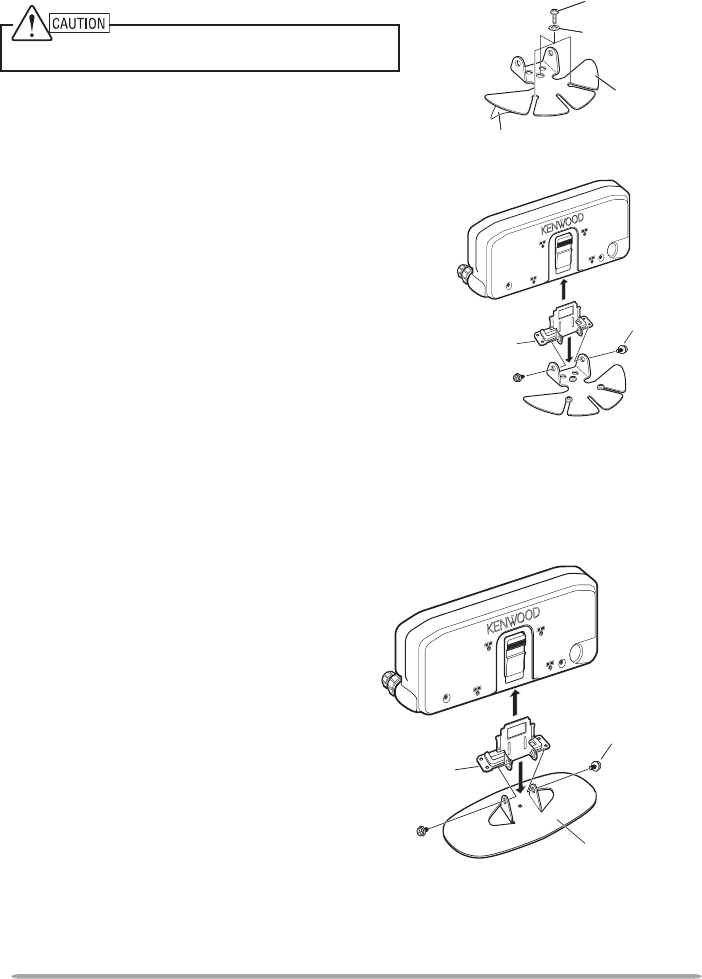
1 Clean and dry the installation location.
Do not install the bracket close to an air bag.
2 Remove the release paper from the base
of the panel bracket, then secure it in
place using the 3 supplied self-tapping
screws.
• Allow the panel to set for a while, to ensure
it remains fast. Otherwise, vibrations may
occur.
• After removing the release paper, it cannot
be reused.
3 Attach the panel holder to the panel
bracket using the 2 supplied SEMS
screws.
4 Attach the RC-D710 to the panel holder
so that it locks in place.
SEMS screw
(M4 x 10 mm)
Panel holder
Tapping screw
(4 mm x 12 mm)
Flat washer
Adhesive tape
Panel
bracket
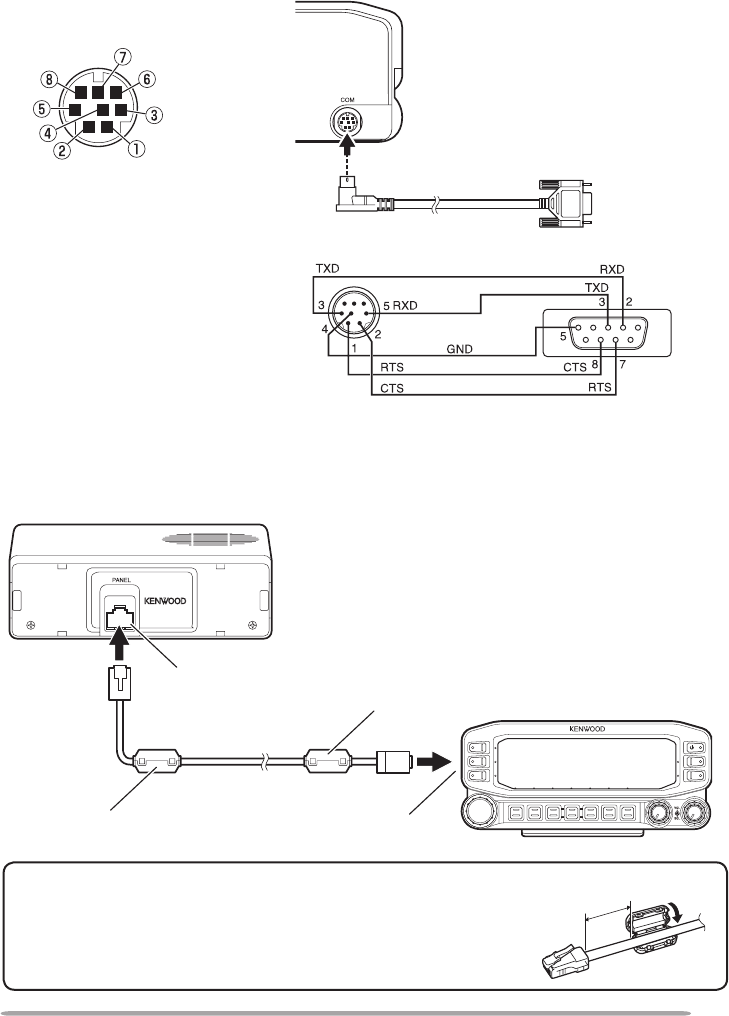
n Fixed Station
1 Attach the panel holder to the base
stand using the 2 supplied SEMS
screws.
2 Attach the RC-D710 to the panel
holder so that it locks in place.
SEMS screw (M4
x 10 mm)
Panel holder
Base stand
3
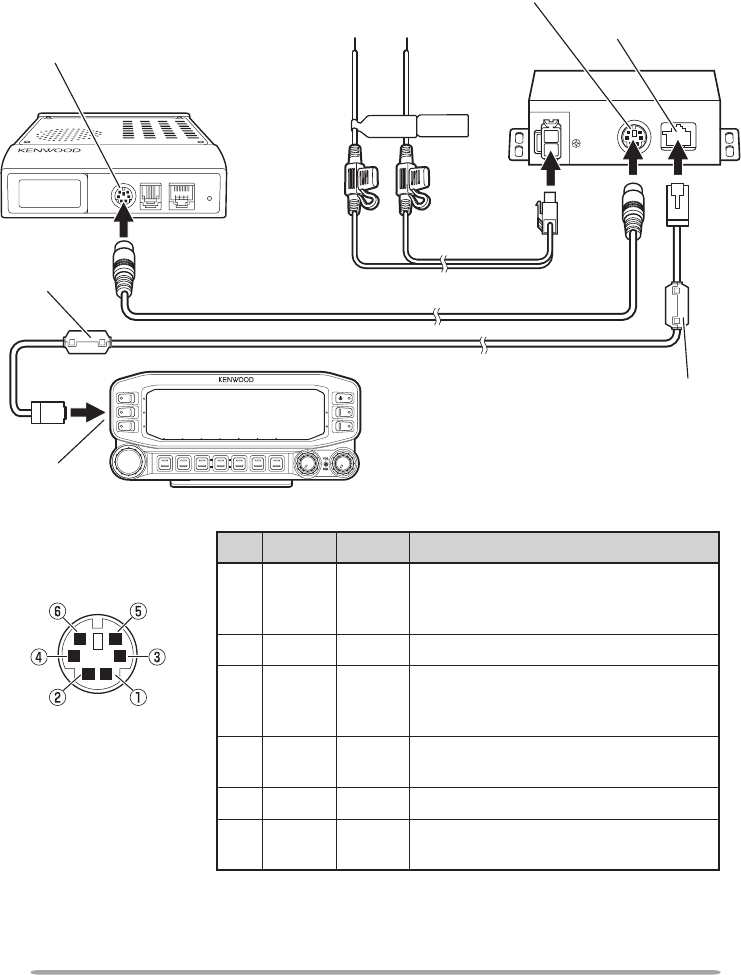
CONNECTION TO PC
Use a PG-5G (option) cable when connecting the RC-D710 to a computer D-SUB
terminal.
Panel jack
RC-D710
TM-V71
Modular plug cable
Installing the Line Filter
Install the line filter approximately 3 cm from the
connector.
Approx. 3 cm
Line filter
To PC 9-pin
D-SUB terminal
COM terminal pin
NC
NC
CTS
TXD
RTS
GND
RXD
NC
PG-5G (option)
PG-5G pin configuration (cross connection)
CONNECTION TO TM-V71
Connect the RC-D710 to the TM-V71 using the supplied cable.
Line filter Panel jack
4
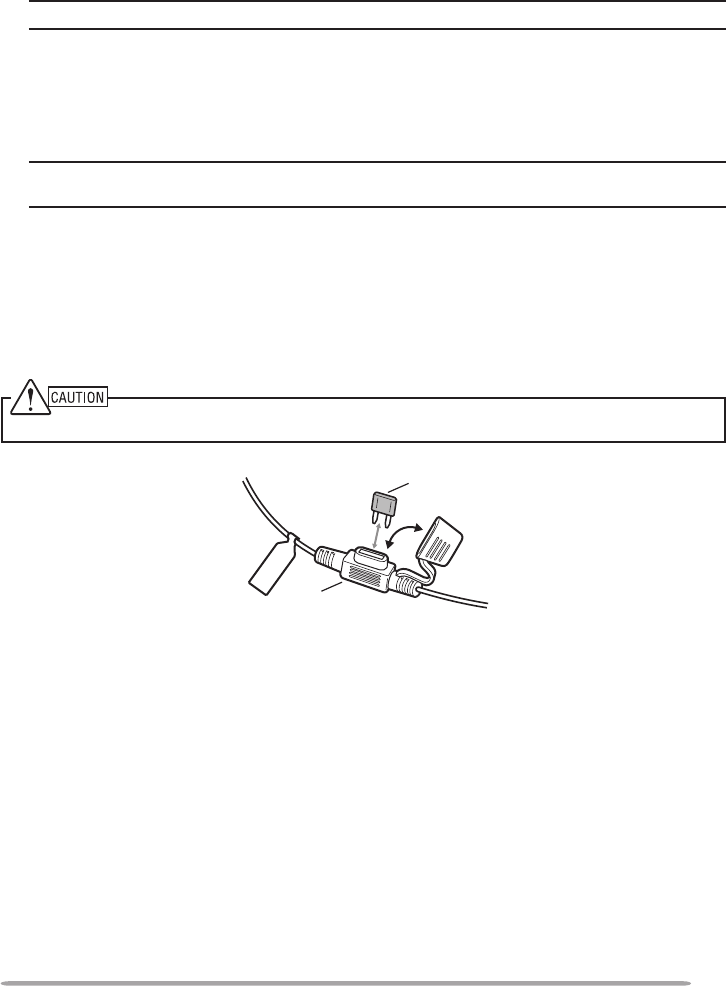
CONNECTION TO PG-5J
When using the RC-D710 with a transceiver other than the TM-V71, attach the
RC-D710 to the transceiver using the PG-5J (option).
RC-D710 Modular plug cable
Line filter
PG-5J
Black (—)
cable
Red (+)
cable
DC power cable
NC
PR9 PKS
PKD
GND
SQC
DATA terminal pin
(PG-5J)
6 pin mini-DIN cable
DATA terminal
Line filter
Panel jack
Panel jack
To 13.8 V DC power supply
or 12 V vehicle battery
DATA terminal
Transceiver
No. Name I/O Function
qPKD O TNC data output
2 Vp-p/ 10 kΩ (9600 bps data)
40 mVp-p/ 10 kΩ (1200 bps data)
wGND — GND
ePKS O Data standby control signal output
Open corrector TX : L level / RX : Hi
impedance
rPR9 I TNC data input (9600 bps)
350 mVp-p to 600 mVp-p/ 10 kΩ
tNC — No connection
ySQC I Squelch control signal input
SQL Open: H level / Close: L level
5
Fuse holder
Fuse
n Power Cable Connection (PG-5J)
Fixed Station
In order to use the PG-5J for fixed station operation, you will need a separate
13.8 V DC power supply that must be purchased separately.
Note: Do not plug the DC power supply into an AC outlet until you make all connections.
Mobile Installation
Be sure to use a 12 V vehicle battery that has sufficient current capacity. If the
current to the PG-5J is insufficient, the display may darken during transmission
or the transmit output power may drop excessively. Never connect the
transceiver to a 24 V battery.
Note: Install the PG-5J Interface Box using the included screw set in a location where it will
not interfere with driving.
n Replacing Fuses (PG-5J)
If the fuse blows, determine the cause, then correct the problem. After the
problem is resolved, replace the fuse. If newly installed fuses continue to
blow, disconnect the power cable and contact your authorized Kenwood
dealer or an authorized Kenwood service center for assistance.
Only use fuses of the specified type and rating; otherwise the PG-5J could be damaged.
6
GETTING ACQUAINTED
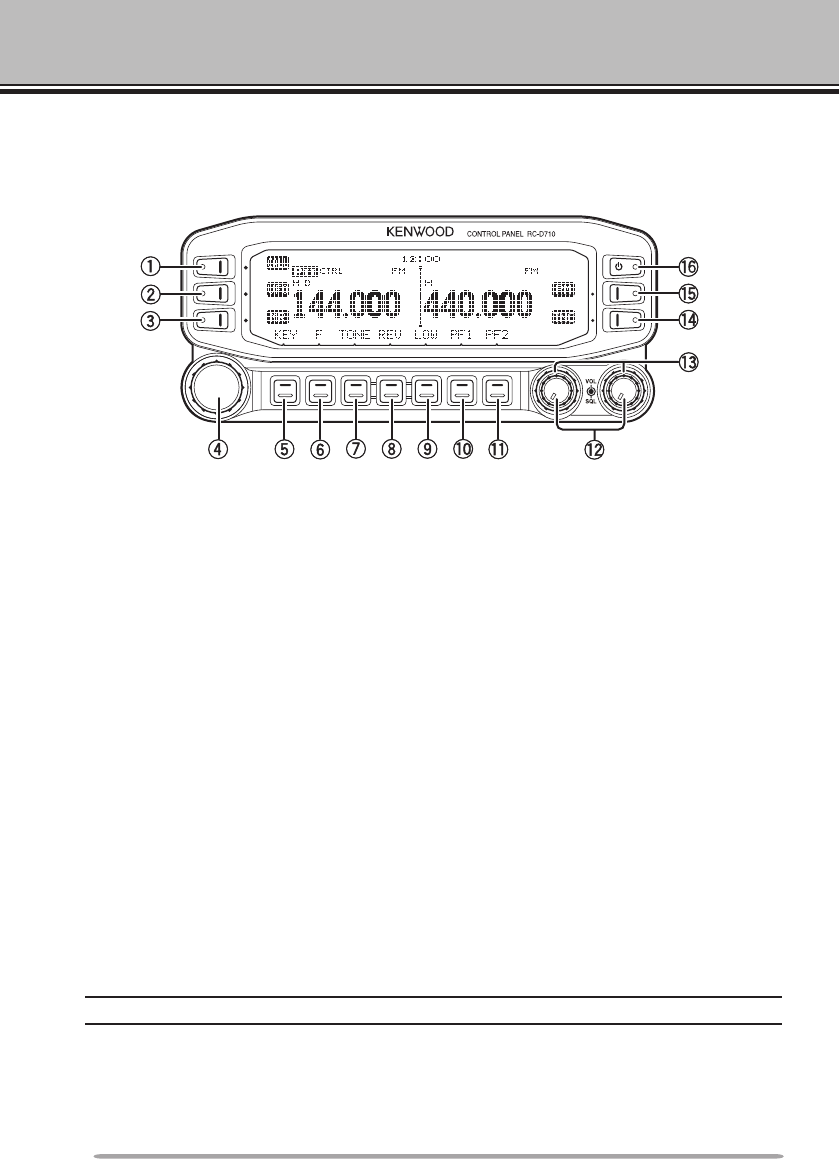
OPERATION PANEl (FRONT) <RC-D710 + TM-V71>
n IN NORMAlMODE
q CALL
Press [CALL] to select the Call channel.
Press [CALL] (1s) to start Call scan.
w VFO
Press [VFO] to enter VFO mode , then rotate the Tuning control to select an
operating frequency.
Press [VFO] (1s) to start VFO scan.
e MR
Press [MR] to enter Memory Channel mode, then rotate the Tuning control to
select a Memory channel.
Press [MR] (1s) to start Memory scan.
r Tuning Control
Rotate to select an operating frequency or Memory channel, change the scan
direction, etc.
Press the Tuning control to enter MHz mode (while in VFO or Call mode) or to
toggle the display between the channel name and frequency (while in Memory
Channel mode).
Press Tuning control (1s) to start MHz scan or Group scan.
t KEY
Press [KEY] to turn the APRS key function ON and OFF.
Note: For APRS key functions, refer to the APRS explanation.
y F
Press [F] to enter Function mode.
Press [F] (1s) to turn the transceiver key lock function ON and OFF.

7
GETTING ACQUAINTED u TONE
Press [TONE] to turn the Tone function ON.
Each time you press [TONE] to toggle the functions as follows: Tone ON >>
CTCSS ON >> DCS ON >> OFF.
i REV
Press [REV] to turn the Reverse function ON or OFF.
Press [REV] (1s) to turn the Automatic Simplex Checker ON.
o LOW
Press [LOW] to toggle the transmit output power as follows: High Power (with
TM-V71(A/E) K, E types only) –> Middle Power –> Low Power.
!0 PF1
Press [PF1] to activate its programmable function.
!1 PF2
Press [PF2] to activate its programmable function.
!2 BAND SEL (VOL) Control
Rotate the [BAND SEL] control to adjust the speaker volume.
Press the left [BAND SEL] to select the A band. Press the right [BAND SEL]
to select the B band.
Press [BAND SEL] (1s) to toggle between single and dual-band mode.
!3 SQL Control
Rotate the [SQL] control to adjust the squelch level. Clockwise opens the
squelch and counterclockwise tightens the squelch.
!4 TNC
Press [TNC] to turn built-in TNC ON and the APRS (or NAVITRA) mode ON.
Each time you press [TNC], the mode toggles as follows: APRS (or
NAVITRA) mode ON >> PACKET mode ON >> TNC OFF.
• When the built-in TNC turns on, “OPENING TNC” appears on the display.
• When “OPENING TNC” appears on the display, the mode cannot be changed.
!5 PM
Press [PM] to enters the PM (Programmable Memory) channel selection
mode.
!6
Press [ ] to turn the transceiver power ON and OFF.
8
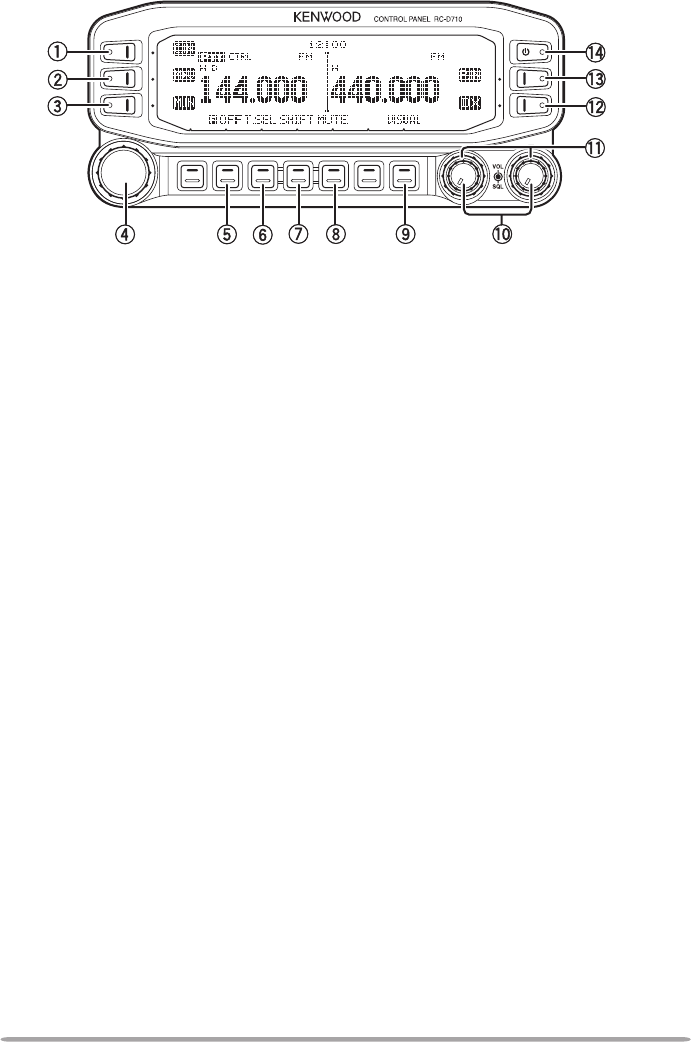
n IN FUNCTION MODE
q C.IN
Press [C.IN] to store the current operating frequency to the Call channel.
w M>V
Press [M>V] to copy the current Memory channel or Call channel to the VFO
(memory shift).
e M.IN
Select a Memory channel, then press [M.IN] to store the current operating
frequency in the Memory channel.
r Tuning Control
Press the Tuning control to enter Menu mode.
t F OFF
Press [F OFF] to return Normal mode.
y T.SEL
While Tone, CTCSS, or DCS is ON, press [T.SEL] to enter CTCSS or DCS
setup mode.
u SHIFT
Press [SHIFT] to enter Offset Direction selection mode. Each time you press
[SHIFT], the offset direction toggles as follows:
plus (+) direction –> minus (–) direction –> –7.6 MHz (with TM-V71(E) E type
only) –> OFF.
i MUTE
Press [MUTE] to turn the Mute function ON or OFF.
o VISUAL
Press [VISUAL] to turn the Visual Scan function ON and OFF.
!0 BAND SEL (VOL) Control
Rotate the [BAND SEL] control to adjust the speaker volume.
Press [BAND SEL] to select a frequency band.
9
!1 SQL Control
Rotate the [SQL] control to adjust the squelch level. Clockwise opens the
squelch and counterclockwise tightens the squelch.
!2 DX
Press [DX] to turn the DX PacketClusters Monitor ON and OFF.
!3 P.IN
Press [P.IN] to enter PM Channel registration mode.
!4
Press [ ] to turn the transceiver power ON and OFF.
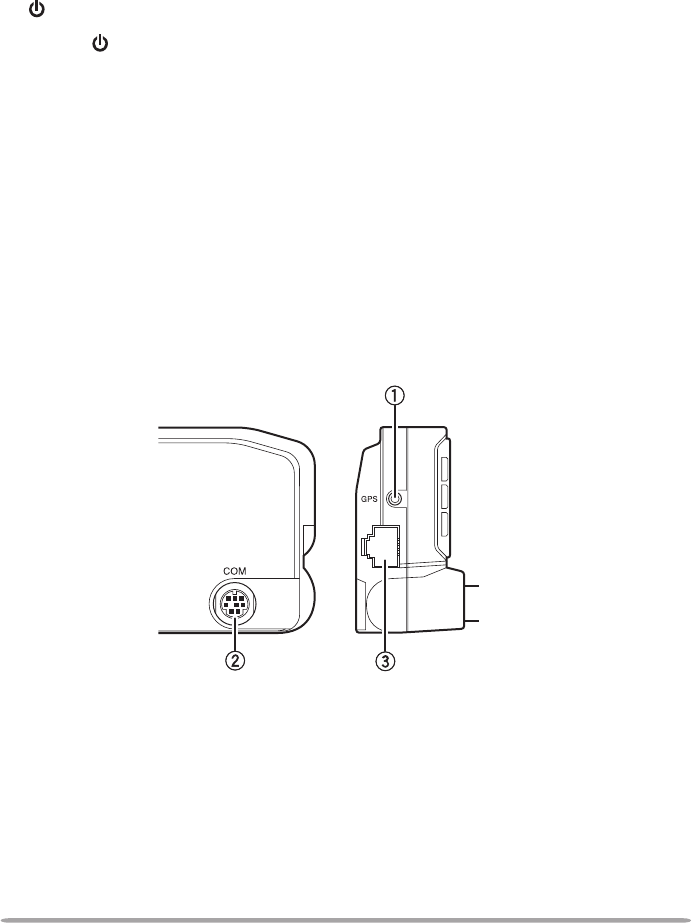
OPERATION PANEl (REAR & lEFT)
qGPS
Connect the GPS receiver or the Weather Station to this jack with using
supplied cable with a 2.5 mm (1/10") 3-conductor plug.
w COM
This terminal is for connecting to a PC. Use a PG-5G (option) cable when
connecting the built-in TNC to a computer D-SUB terminal.
e Panel jack
Connect the TM-V71 or PG-5J to this jack using the supplied Modular plug
cable.
10
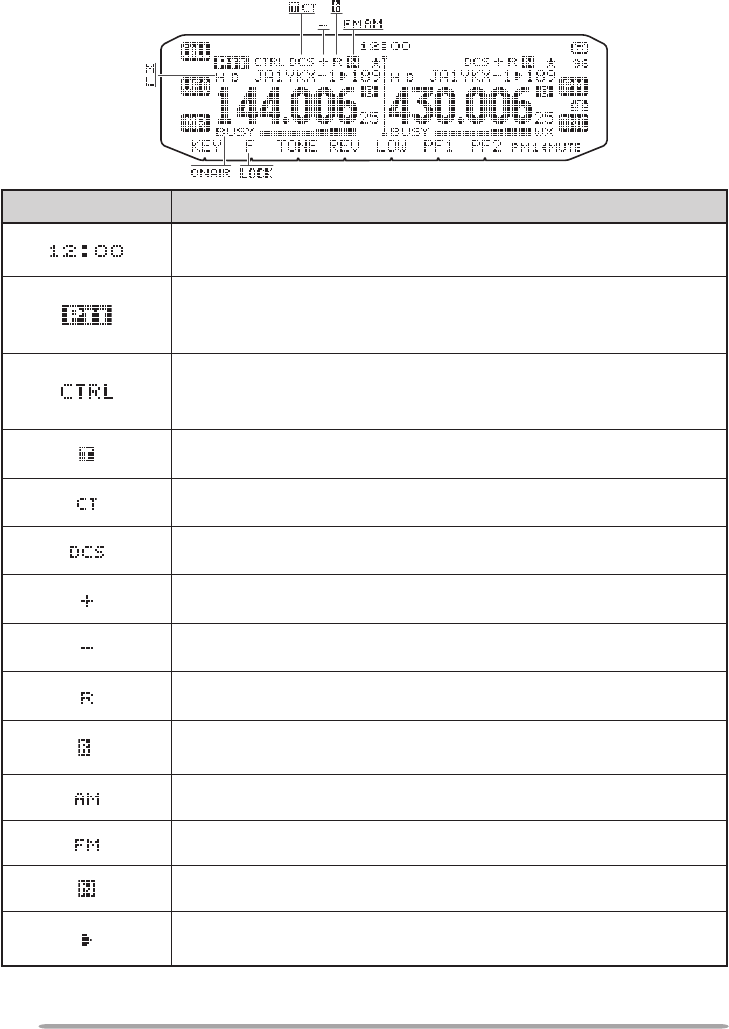
DIsPlAy <RC-D710 + TM-V71>
Indicator Description
Clock display (Setting Time: Menu 525)
Appears when there is a transmission band available.
Blinks when the cross-band repeater is ON (with TM-V71(A) K
type only).
Appears when there is an operation band available.
Blinks when the wireless remote control is ON (with TM-
V71(A) K type only).
Appears when the Tone function is ON.
Appears when the CTCSS function is ON.
Appears when the DCS function is ON.
Appears when the Shift function is set to plus.
Appears when the Shift function is set to minus.
Appears when the Reverse function is ON.
Appears when the ASC function is ON.
Blinks when the ASC function is performing an OK check.
Appears while in AM mode.
Appears while in FM mode.
Appears while in Narrow FM mode.
Appears when the selected channel is registered while in
Memory Input mode.
<A Band> <B Band>
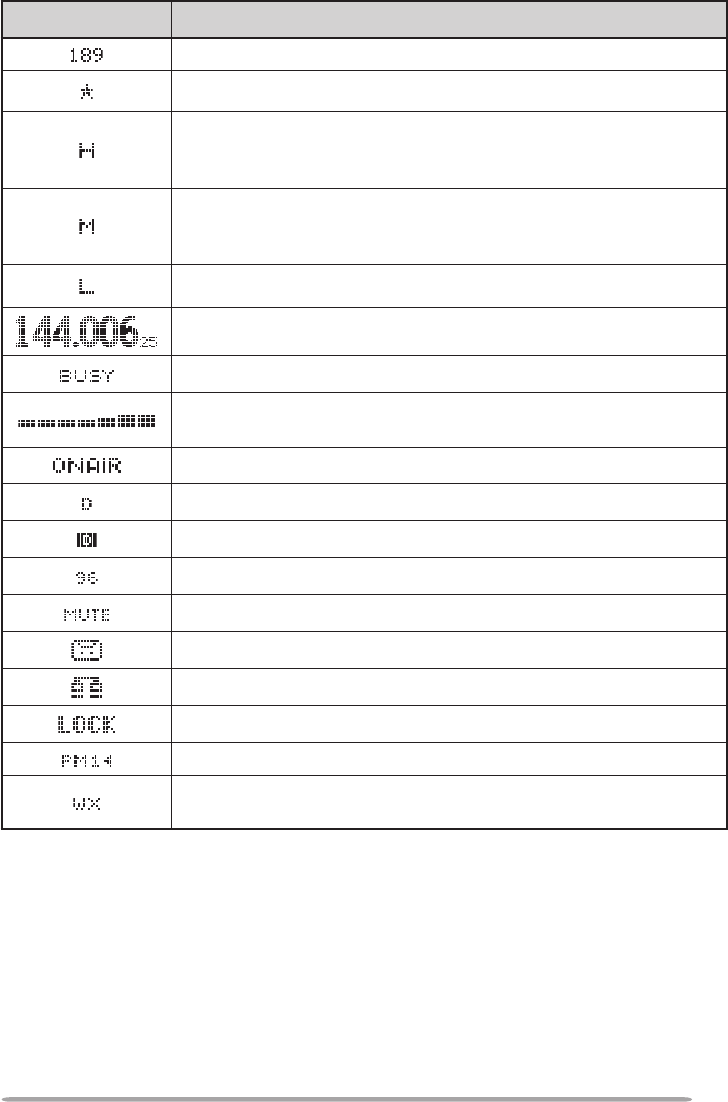
11
Indicator Description
Displays the Memory channel and Menu number.
Appears when the Memory Channel Lockout function is ON.
Appears while using High output power.
Blinks when the temperature protection circuit (transmit power
save) turns on. (with TM-V71(A/E) K, E types only)
Appears while using Middle output power.
Blinks when the temperature protection circuit (transmit power
save) turns on.
Appears while using Low output power.
Displays the operating frequency.
Appears when receiving a busy signal.
Performs as an S meter when receiving a signal and displays
the selected power level while transmitting.
Appears while transmitting.
Appears while using the External data band.
Appears while using the Internal data band.
Appears when the data terminal is set as 9600 (bps).
Appears when mute function is ON.
Appears while making a continuous recording.
Appears while in EchoLink Sysop mode.
Appears when the Key Lock function is ON.
Displays the
PM channel number.
Appears when Weather Alert is ON.
Blinks when receiving a signal. (with TM-V71(A) K type only)
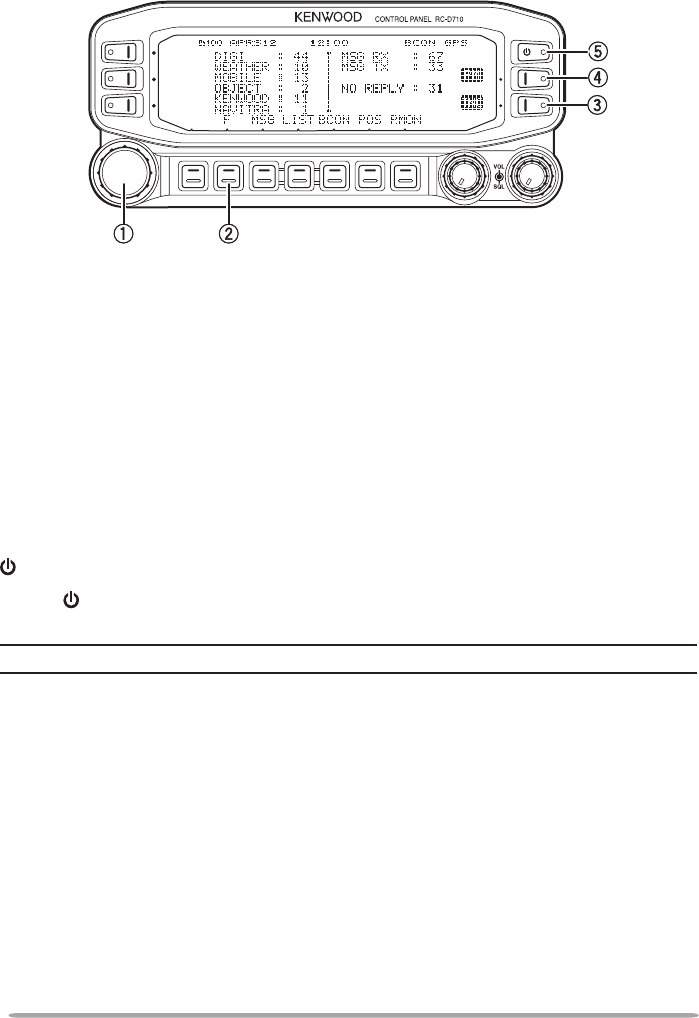
12
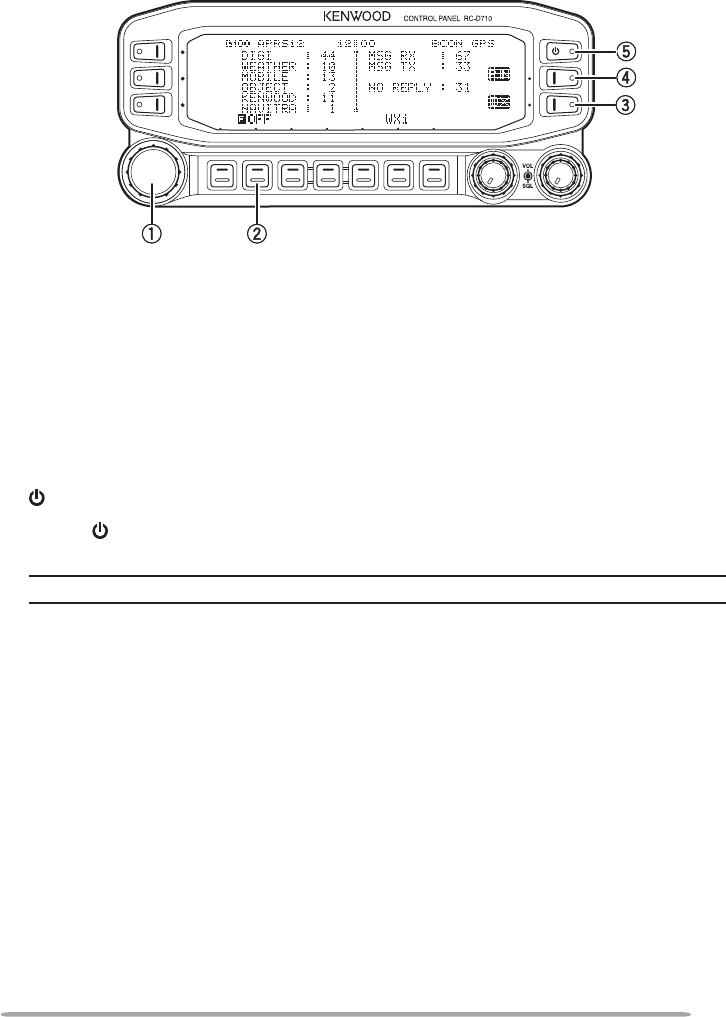
OPERATION PANEl (FRONT) <RC-D710 + PG-5J>
n IN NORMAlMODE
q Tuning Control
Press [F], then press the Tuning control to enter Menu mode.
w F
Press [F] to enter Function mode.
eTNC
Each time you press [TNC], the mode toggles between APRS (or NAVITRA)
mode ON and PACKET mode ON.
• When “OPENING TNC” appears on the display, the mode cannot be changed.
r PM
Press [PM] to enters the PM (Programmable Memory) channel selection
mode.
t
Press [ ] to turn the RC-D710 power ON and OFF.
Note: For [MSG], [LIST], [BCON], [POS], and [P.MON] keys, refer to the APRS explanation.
13
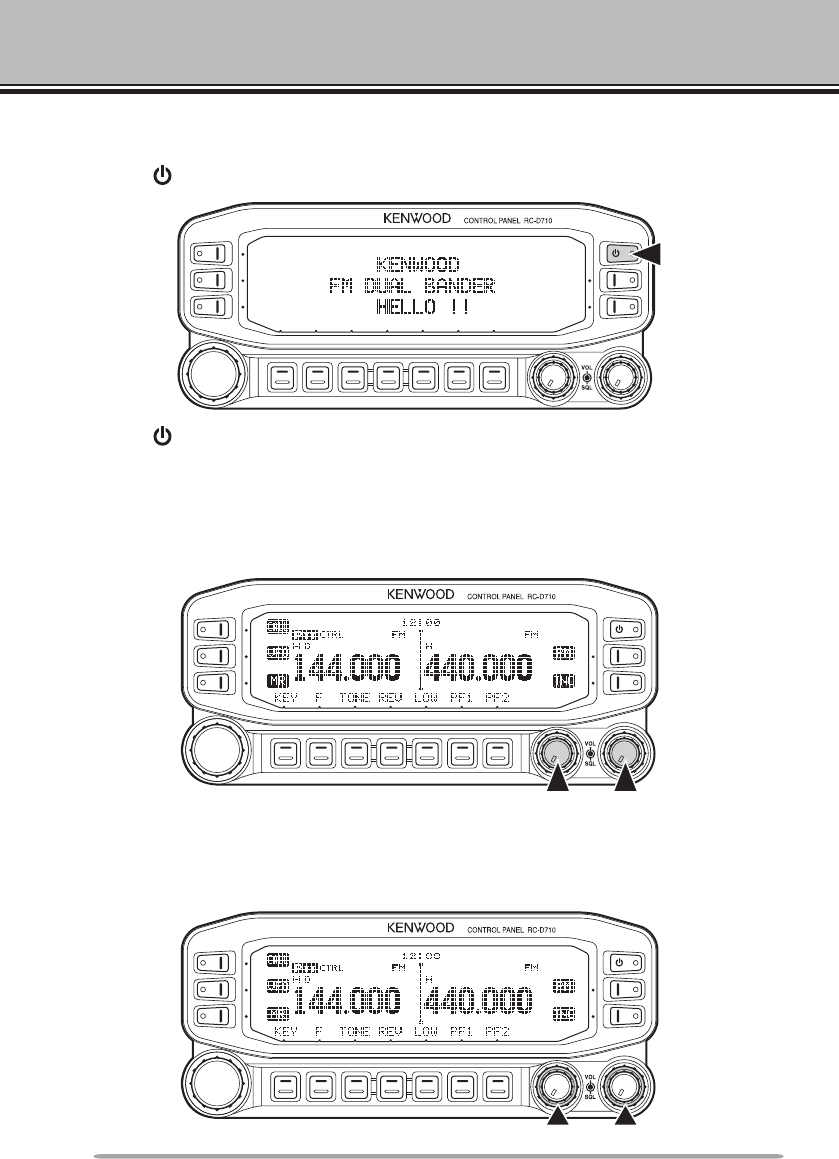
q Tuning Control
Press the Tuning control to enter Menu mode.
w F OFF
Press [F OFF] to return Normal mode.
eDX
Press [DX] to turn the DX PacketClusters Monitor ON and OFF.
r P.IN
Press [P.IN] to enter PM Channel registration mode.
t
Press [ ] to turn the RC-D710 power ON and OFF.
Note: For [WXi] key, refer to the APRS explanation.
n IN FUNCTION MODE
14
BASIC OPERATIONS (RC-D710 + TM-V71)
SWITCHING THE POWER ON/ OFF
Press the [ ] switch to switch the transceiver ON.
Press the [ ] switch again to switch the transceiver OFF.
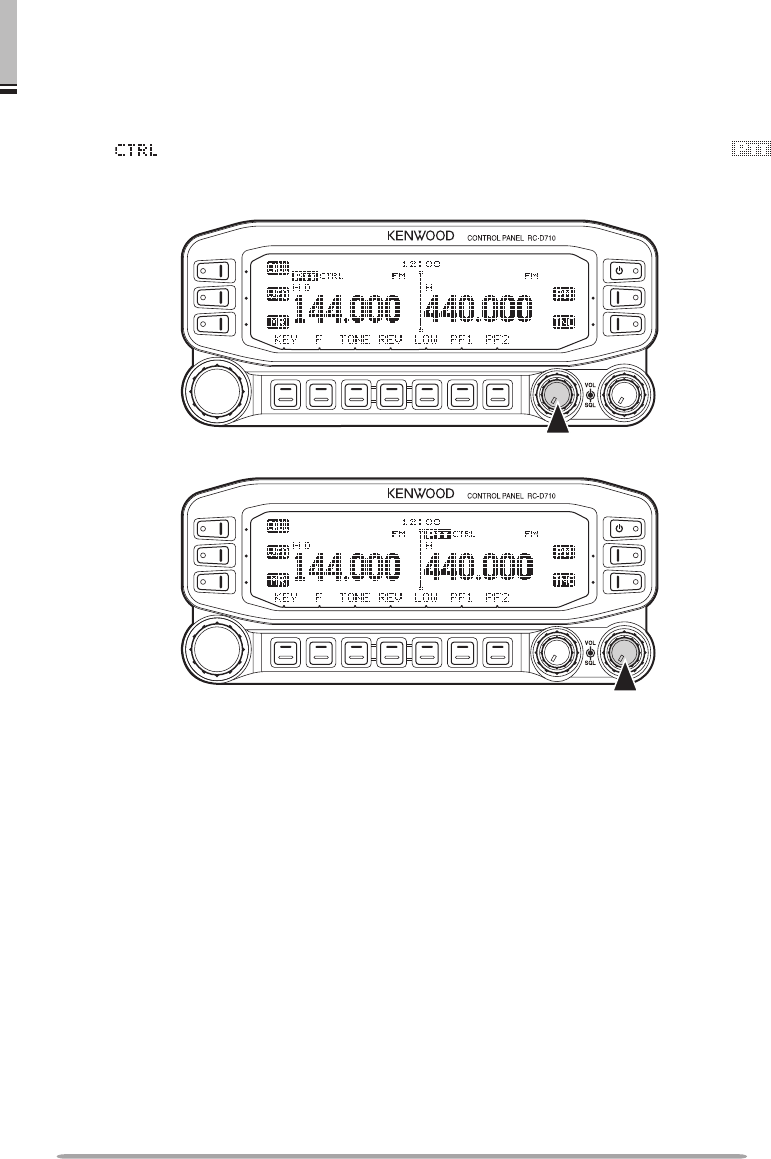
ADJUSTING THE VOLUME
Rotate the [BAND SEL] (VOL) control of your selected band clockwise to
increase the volume and counterclockwise to decrease the volume.
ADJUSTING THE SQUELCH
Rotate the [SQL] control of your selected band, when no signals are present, and
select the squelch level at which the background noise is just eliminated.
15
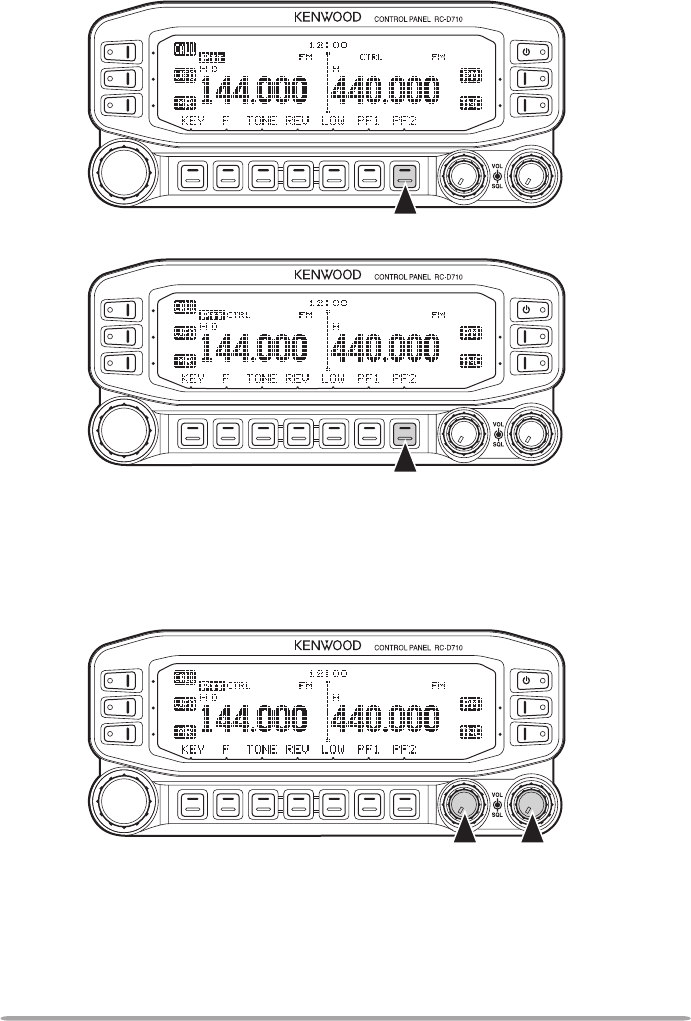
BASIC OPERATIONS (RC-D710 + TM-V71) SELECTING A BAND
Press the left [BAND SEL] control to select band A and the right [BAND SEL]
control to select band B.
• The icon appears at the top of the band on which you are operating and the
icon appears at the top of the band on which you are currently set to transmit.
Band A (left [BAND SEL] control):
Band B (right [BAND SEL] control):
16
Pressing [PF2] allows you to switch the operating band between bands A and B,
while maintaining the original band as the transmit band.
Band A is the transmit band and band B is the operating band:
Band A is both the transmit and operating band:
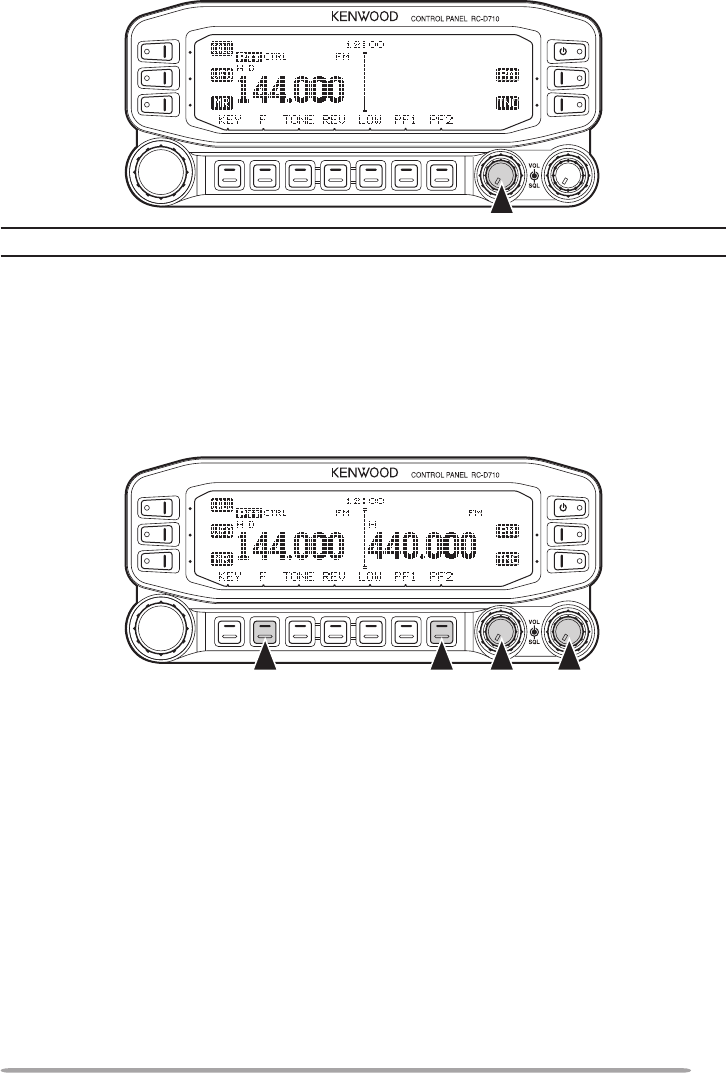
SELECTING DUAL BAND MODE/ SINGLE BAND MODE
You can switch the transceiver between dual band operation and single band
operation by pressing [BAND SEL] (1s) of your selected band.
Dual band mode:
17
Single band mode (band A only):
Note: You can also turn the center partition bar display off {Menu No. 527}.
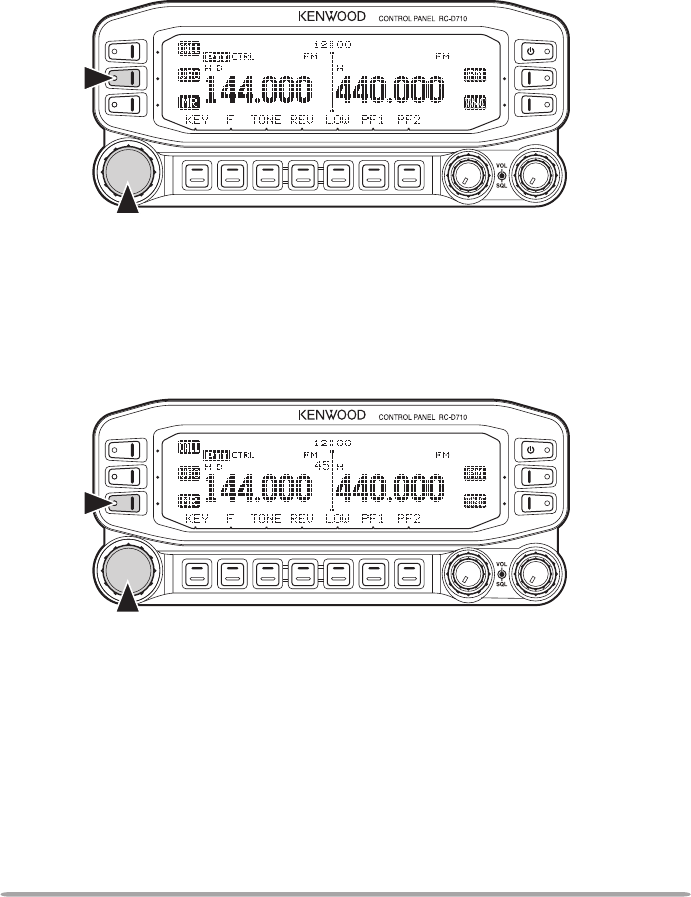
SELECTING A FREQUENCY BAND
You can change the default frequency bands for bands A and B.
1 Select band A or B by pressing the [BAND SEL] control or [PF2].
2 Press [F], [BAND SEL] of your selected band.
• Each time you press [F], [BAND SEL], you cycle to the next frequency band.
18
SELECTING AN OPERATING MODE
There are 3 operating modes available to choose from: VFO mode, Memory
Channel mode, and Call Channel mode.
■ VFO Mode
VFO mode allows you to manually change the operating frequency.
1 Press [VFO] to enter VFO mode.
2 Rotate the Tuning control to select your desired operating frequency.
■ Memory Channel Mode
Memory Channel mode allows you to quickly select a frequently used
frequency and related data which you have saved in the transceiver memory.
1 Press [MR] to enter Memory Channel mode.
2 Rotate the Tuning control to select your desired Memory channel.
19
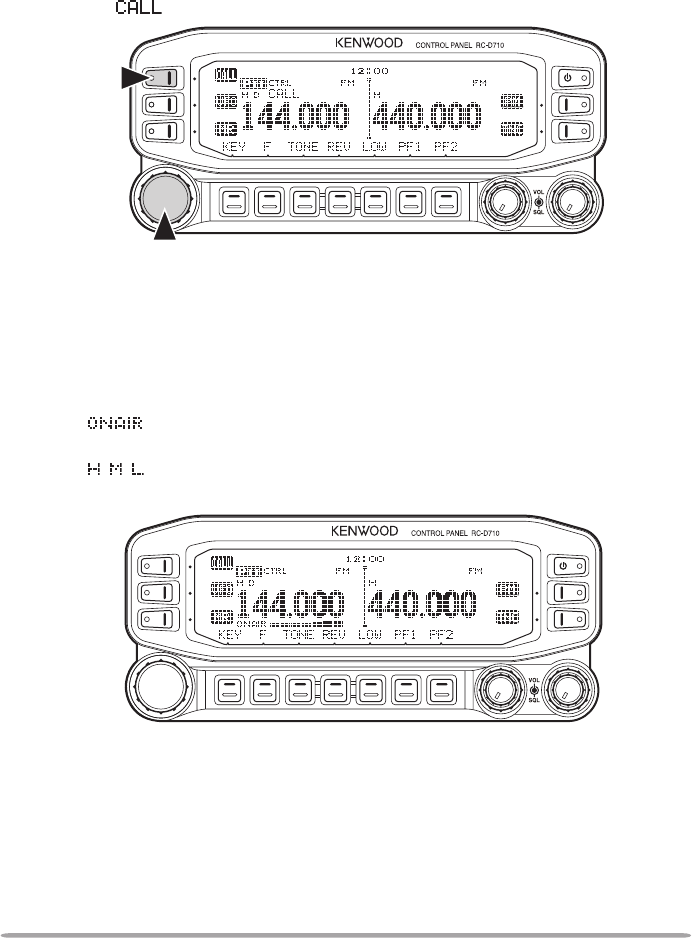
■ Call Channel Mode
Call Channel mode allows you to quickly select a preset channel to allow
immediate calls on that frequency. The Call channel can be conveniently used
as an emergency channel within your group.
1 Select your desired band (A or B).
2 Press [CALL] to enter Call Channel mode.
• The icon appears on the display.
3 Press [CALL] again to return to your previous operating frequency.
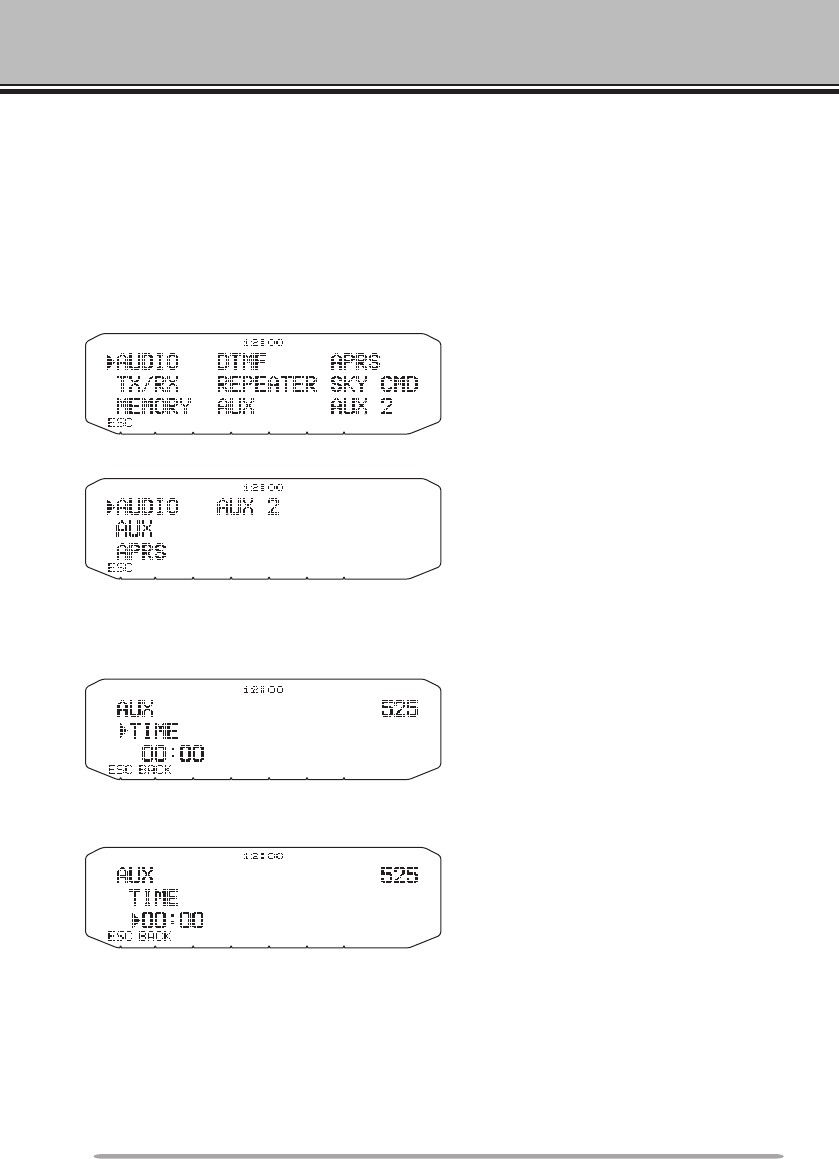
TRANSMITTING
1 Select your desired band and frequency/channel.
2 Press and hold the microphone [PTT] switch and speak into the microphone to
transmit.
• The icon and the RF power meter appear on the display for the selected
transmit band. The RF power meter shows the relative transmit output power.
• The / / icon(s) appear on the display, depending on what output power you
have selected.
3 When you finish speaking, release the [PTT] switch.
20
MENU MODE
Many functions on this RC-D710 are selected or configured through the Menu
instead of physical controls. Once you become familiar with the Menu system,
you will appreciate the versatility it offers.
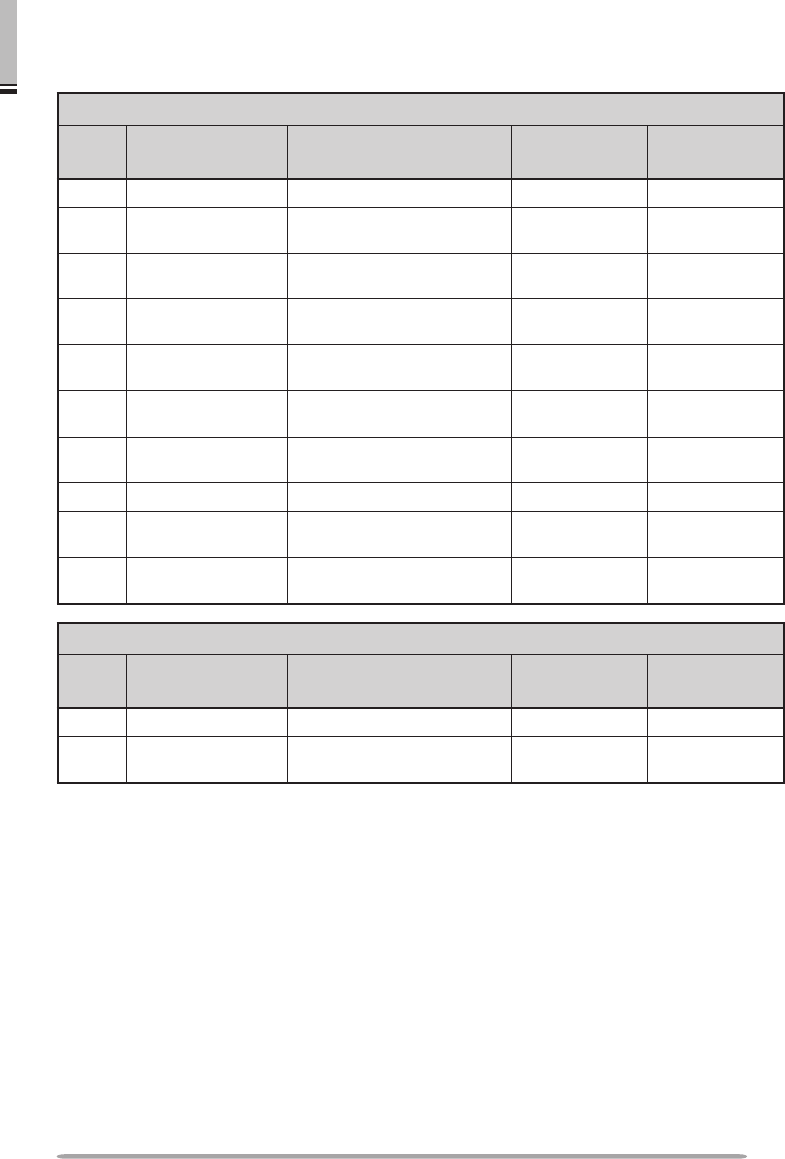
MENU ACCESS
1 Press [F], Tuning control to access the Menu.
• The setup category name appears on the display.
<RC-D710 + TM-V71>
<RC-D710 + PG-5J>
2 Rotate the Tuning control to select your desired setup category.
3 Press the Tuning control to set up the current category.
• The Menu name and number appears on the display.
4 Rotate the Tuning control to select your desired Menu.
5 Press the Tuning control to set up the current Menu.
6 Rotate the Tuning control to select your desired value for the selected Menu.
7 Press the Tuning control to set the selected value.
8 Repeat steps 2 to 7 to set up additional Menus.
• Press [ESC] at any time to exit Menu mode.
• Press [BACK] at any time to cancel the Menu setup and return to the Menu
selection.
21
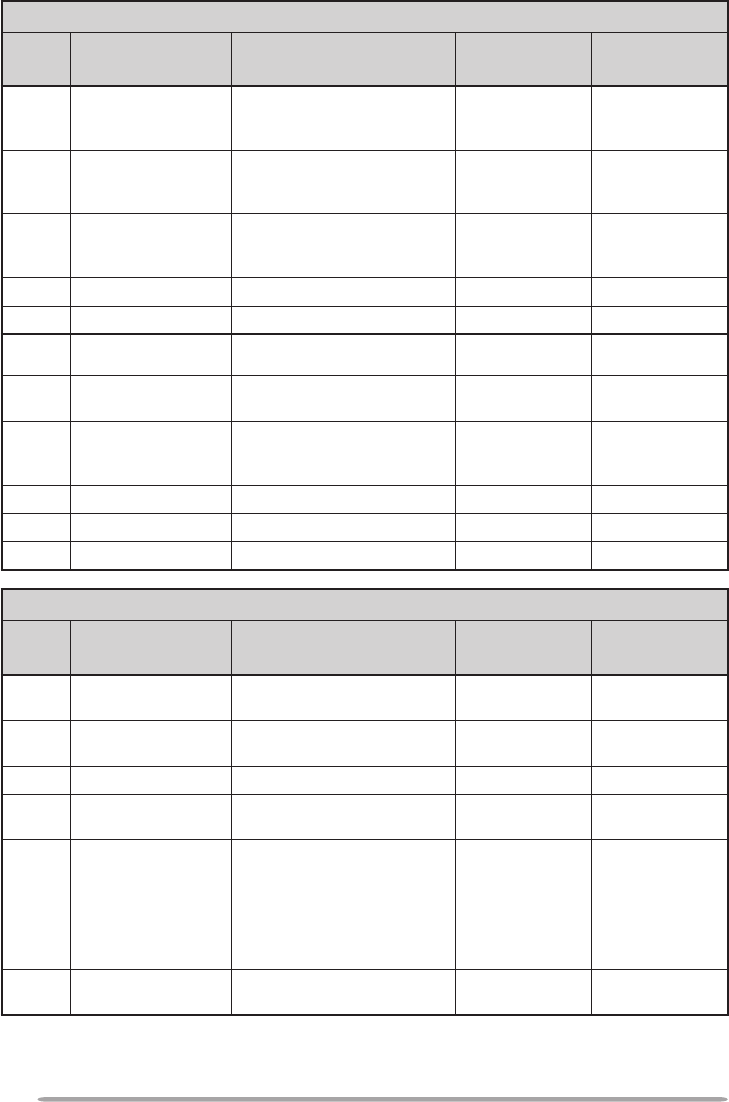
MENU MODE MENU CONFIGURATION
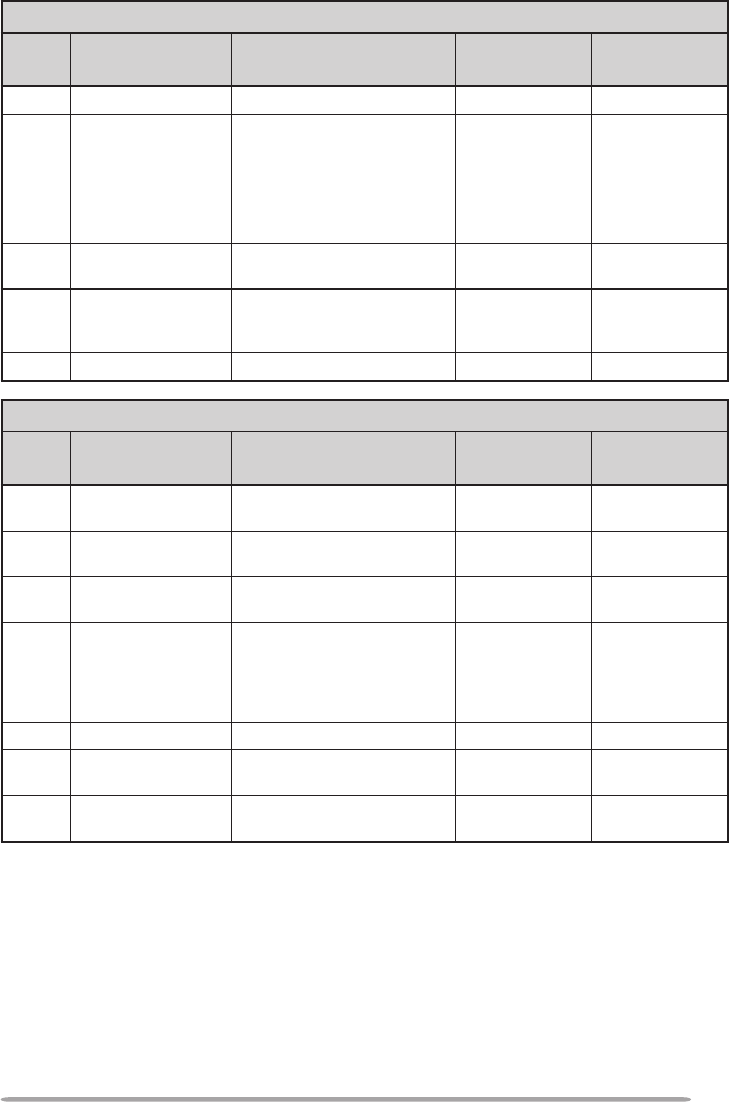
AUDIO <RC-D710 + TM-V71>
Menu
No. Display Description Setting
Values
Default
Setting
000 KEY BEEP Beep sound OFF/ ON ON
001 BEEP VOLUME Beep volume level LEVEL 1 ~
LEVEL 7 LEVEL 5
002 EXT.SPEAKER External speaker output
mode MODE 1/
MODE 2 MODE 1
003 1 ANNOUNCE Voice announcement mode OFF/ AUTO/
MANUAL AUTO
004 1 ANNOUNCE
LANGUAGE
Voice announcement
language ENGLISH/
JAPANESE ENGLISH
005 1 ANNOUNCE
VOLUME
Voice announcement
volume LEVEL 1 ~
LEVEL 7 LEVEL 5
006 1 ANNOUNCE SPEED Voice announcement
speed SPEED 0 ~
SPEED 4 SPEED 1
007 1 PLAYBACK REPEAT Recording playback repeat OFF/ ON OFF
008 1 PLAYBACK
INTERVAL
Playback repeat interval
time 0 ~ 60 s 10 s
009 1 CONTINUOUS
RECORDING Continuous recording OFF/ ON OFF
AUDIO <RC-D710 + PG-5J>
Menu
No. Display Description Setting
Values
Default
Setting
000 KEY BEEP Beep sound OFF/ ON ON
001 BEEP VOLUME Beep volume level LEVEL 1 ~
LEVEL 3 LEVEL 2
22
TX/RX <RC-D710 + TM-V71>
Menu
No. Display Description Setting
Values
Default
Setting
100 PROGRAMMABLE
VFO Programmable VFO setup Varies with
the selected
frequency band –
101 STEP Step frequency Varies with
the selected
frequency band –
102 MODULATION Modulation/demodulation
mode
Varies with
the selected
frequency band –
103 VHF AIP VHF band AIP OFF/ ON OFF
104 UHF AIP UHF band AIP OFF/ ON OFF
105 S-METER SQUELCH S-meter squelch OFF/ ON OFF
106 S-METER SQL
HANGUP TIME
S-meter squelch hang up
time OFF/ 125/ 250/
500 ms OFF
107 MUTE HANGUP
TIME Mute hang up time setup OFF/ 125/ 250/
500/ 750/ 1000
ms OFF
108 BEAT SHIFT Beat shift OFF/ ON OFF
109 TOT Time-out timer 3/ 5/ 10 min 10 min
110 2 WEATHER ALERT Weather alert OFF/ ON OFF
MEMORY <RC-D710 + TM-V71>
Menu
No. Display Description Setting
Values
Default
Setting
200 MEMORY NAME Memory name setup Up to 8
characters –
201 RECALL METHOD Memory channel recall
method ALL BANDS/
CURRENT ALL BANDS
202 LOCKOUT Memory channel lockout OFF/ ON OFF
203 GROUP LINK Memory group link
registration Up to 10 digits
(0 ~ 9) –
204 EchoLink MEMORY EchoLink memory setting
Up to 8
characters
for EchoLink
memory name
Up to 8 digits
for DTMF code
–
205 EchoLink SPEED EchoLink memory
transmission speed FAST/ SLOW FAST
23
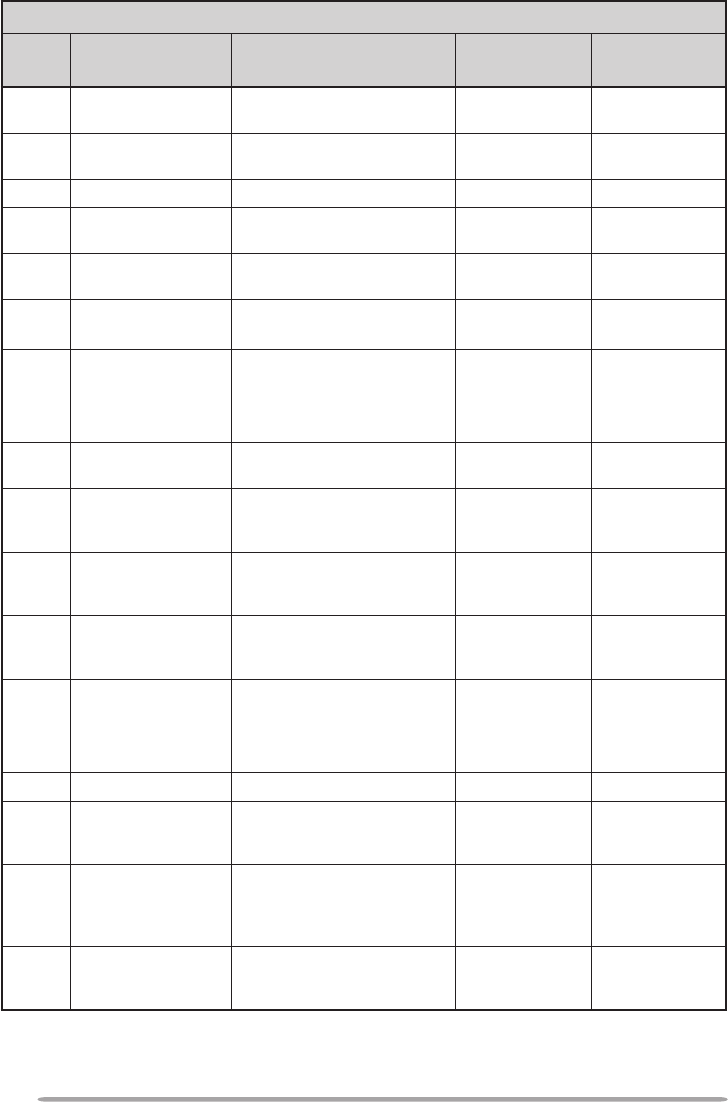
DTMF <RC-D710 + TM-V71>
Menu
No. Display Description Setting
Values
Default
Setting
300 DTMF HOLD DTMF transmission hold OFF/ ON OFF
301 DTMF MEMORY DTMF memory
Up to 8
characters for
DTMF memory
name
Up to 16 digits
for DTMF code
–
302 DTMF SPEED DTMF memory
transmission speed FAST/ SLOW FAST
303 DTMF PAUSE DTMF pause code time 100/ 250/ 500/
750/ 1000/
1500/ 2000 ms 500 ms
304 DTMF KEY LOCK DTMF key lock OFF/ ON OFF
REPEATER <RC-D710 + TM-V71>
Menu
No. Display Description Setting
Values
Default
Setting
400 OFFSET FREQUENCY Offset frequency See
explanation –
401 3 AUTO REPEATER
OFFSET Auto Repeater Offset OFF/ ON ON
402 1750 TX HOLD Transmission hold when
transmitting a 1750 Hz tone OFF/ ON OFF
403 2 REPEATER MODE Repeater mode
CROSS BAND/
LOCKED TX:
A-BAND/
LOCKED TX:
B-BAND
CROSS BAND
404 2 REPEATER TX HOLD Repeater transmission hold ON/ OFF OFF
405 2 REPEATER ID Repeater ID registration Up to 12
characters –
406 2 REPEATER ID TX Repeater ID transmission OFF/ MORSE/
VOICE OFF
24
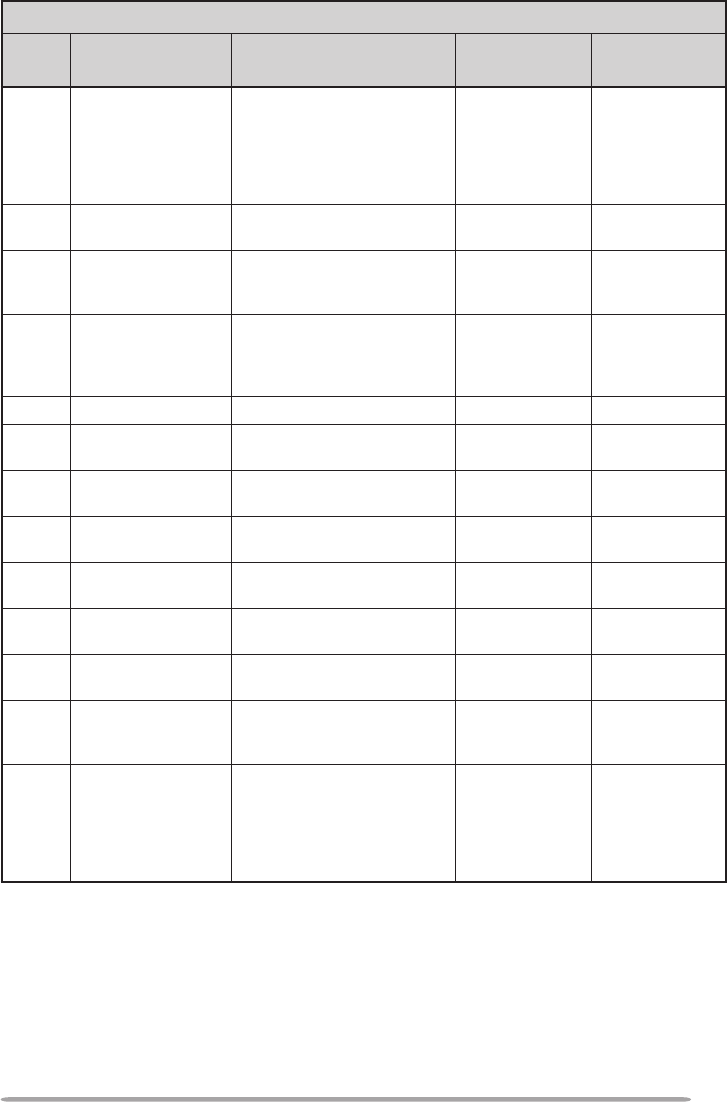
AUX <RC-D710 + TM-V71>
Menu
No. Display Description Setting
Values
Default
Setting
500 POWER ON
MESSAGE Power on message setup Up to 8
characters HELLO !!
501 BRIGHTNESS Display brightness OFF/ LEVEL 1
~ LEVEL 8 LEVEL 8
502 AUTO BRIGHTNESS Display auto brightness OFF/ ON OFF
503 BACKLIGHT COLOR Backlight color AMBER/
GREEN AMBER
504 CONTRAST Display contrast LEVEL 1 ~
LEVEL 16 LEVEL 8
505 DISPLAY REVERSE
MODE Display reverse mode POSITIVE/
NEGATIVE POSITIVE
507 PANEL PF1 PF1 key programmable
function value See
explanation
WX CH
(K type)
FRQ.BAND
(E/ M4 types)
508 PANEL PF2 PF2 key programmable
function value See
explanation CTRL
509 MIC PF1(PF)
Microphone PF1 key
programmable function
value
See
explanation A/B
510 MIC PF2(MR)
Microphone PF2 key
programmable function
value
See
explanation MR
511 MIC PF3(VFO)
Microphone PF3 key
programmable function
value
See
explanation VFO
512 MIC PF4(CALL)
Microphone PF4 key
programmable function
value
See
explanation
CALL
(K/ M4 types)
1750
(E type)
513 MIC KEY LOCK Microphone key lock OFF/ ON OFF
514 SCAN RESUME Scan resume method TIME/
CARRIER/
SEEK TIME
515 VISUAL SCAN Number of Channels for
Visual Scan
MODE 1: 31ch/
MODE 2 : 61ch/
MODE 3 : 91ch/
MODE 4 : 181ch
MODE 2 : 61ch
516 APO Auto Power Off time OFF/ 30/ 60/
90/ 120/ 180
(minutes) OFF
25
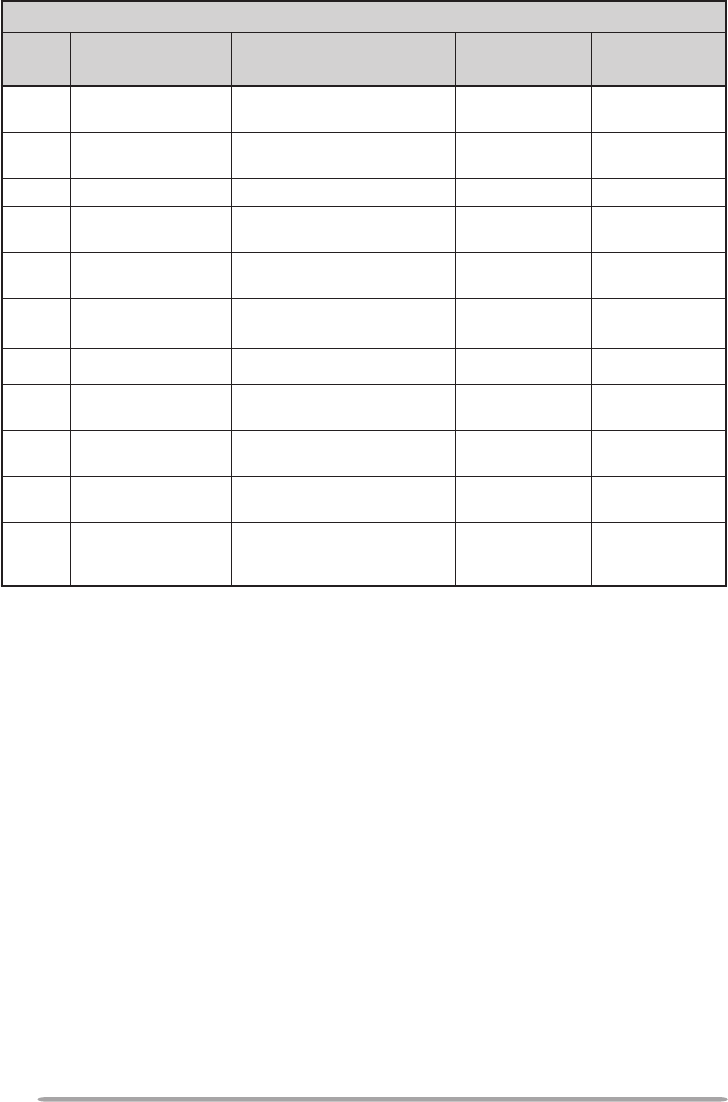
AUX <RC-D710 + TM-V71>
Menu
No. Display Description Setting
Values
Default
Setting
517 EXT. DATA BAND External TNC data band
type
A-BAND/
B-BAND/
TX:A-BAND
RX:B-BAND/
RX:A-BAND
TX:B-BAND
A-BAND
518 EXT. DATA SPEED External TNC data
communications speed 1200/ 9600 bps 1200 bps
519 PC PORT
BAUDRATE
PC terminal baud rate
speed
9600/ 19200/
38400/ 57600
bps 9600 bps
520 SQC SOURCE SQC output type
OFF/ BUSY/
SQL/ TX/
BUSY or TX/
SQL or TX
BUSY or TX
521 AUTO PM STORE Automatic PM entry OFF/ ON ON
522 2 REMOTE ID Personal Identification
Number 000 ~ 999 000
523 2 REMOTE ANSWER
BACK Answer back OFF/ ON ON
524 DATE Date See
explanation –
525 TIME Clock time See
explanation –
526 TIME ZONE Time zone UTC + 14:00 ~
UTC − 14:00 UTC
527 DISPLAY
PARTITION BAR Display partition bar OFF/ ON ON
528 COM PORT
BAUDRATE
COM terminal baud rate
speed
9600/ 19200/
38400/ 57600
bps 9600 bps
529 INT. DATA BAND
(PACKET)
Internal TNC data band
(PACKET)
A-BAND/
B-BAND/
TX:A-BAND
RX:B-BAND/
RX:A-BAND
TX:B-BAND
A-BAND
26
AUX <RC-D710 + PG-5J>
Menu
No. Display Description Setting
Values
Default
Setting
500 POWER ON
MESSAGE Power on message setup Up to 8
characters HELLO !!
501 BRIGHTNESS Display brightness OFF/ LEVEL 1
~ LEVEL 8 LEVEL 8
502 AUTO BRIGHTNESS Display auto brightness OFF/ ON OFF
503 BACKLIGHT COLOR Backlight color AMBER/
GREEN AMBER
504 CONTRAST Display contrast LEVEL 1 ~
LEVEL 16 LEVEL 8
505 DISPLAY REVERSE
MODE Display reverse mode POSITIVE/
NEGATIVE POSITIVE
521 AUTO PM STORE Automatic PM entry OFF/ ON ON
524 DATE Date See
explanation –
525 TIME Clock time See
explanation –
526 TIME ZONE Time zone UTC + 14:00 ~
UTC − 14:00 UTC
528 COM PORT
BAUDRATE
COM terminal baud rate
speed
9600/ 19200/
38400/ 57600
bps 9600 bps
27
APRS
Menu
No. Display Description Setting
Values
Default
Setting
600
BASIC SETTING
MY CALLSIGN Call sign entry Up to 9
characters NOCALL
BEACON TYPE Beacon type APRS/
NAVITRA APRS
601
INTERNAL TNC
DATA BAND
*RC-D710 +
TM-V71
Data band type
A-BAND/
B-BAND/
TX:A-BAND
RX:B-BAND/
RX:A-BAND
TX:B-BAND
A-BAND
DATA SPEED Data communications
speed 1200/ 9600 bps 1200 bps
DCD SENSE DCD sense type
D or RxD
BAND/
BOTH BAND/
IGNORE DCD
*RC-D710 +
TM-V71
D or RxD
BAND
ON/
IGNORE DCD
*RC-D710 +
PG-5J
ON
TX DELAY TX delay time 100/ 150/ 200/
300/ 400/ 500/
750/ 1000 ms 200 ms
602
GPS PORT
BAUD RATE Baud rate speed 2400/ 4800/
9600 bps 4800 bps
INPUT GPS data input type
OFF/ GPS/
WEATHER(Da
vis)/ WEATHER
(PeetBros)
OFF
OUTPUT GPS data output type OFF/
WAYPOINT/
DGPS OFF
603
WAYPOINT
FORMAT Way point format NMEA/
MAGELLAN/
KENWOOD NMEA
NAME Way point name 6-CHAR ~ 9-
CHAR 6-CHAR
OUTPUT Way point output type ALL/ LOCAL/
FILTERED ALL
28
APRS
Menu
No. Display Description Setting
Values
Default
Setting
604 COM PORT
OUTPUT COM port output OFF/ ON OFF
605
MY POSITION
NAME Name entry See
explanation −
LATITUDE Latitude entry See
explanation −
LONGITUDE Longitude entry See
explanation −
606
BEACON INFORMATION
SPEED Speed information setup OFF/ ON ON
ALTITUDE Altitude information setup OFF/ ON ON
POSITION
AMBIGUITY Position ambiguity mode OFF/ 1-DIGIT ~
4-DIGIT OFF
607
POSITION COMMENT
POSITION
COMMENT Position comment See
explanation Off Duty
608
STATUS TEXT
TEXT Status text See
explanation −
TX RATE Status text TX rate OFF/ 1/1 ~ 1/8 1/1
609
PACKET FILTER
POSITION LIMIT Position limit See
explanation OFF
TYPE Packet filter type
WHEATHER/
DIGI/ MOBILE/
OBJECT/
NAVITRA/
OTHERS
Checked all
610
STATION ICON
STATION ICON Station icon See
explanation W
(KENWOOD icon)
611
BEACON TX ALGORITHM
METHOD Method MANUAL/ PTT/
AUTO MANUAL
INITIAL INTERVAL Initial interval time 0.2/ 0.5/ 1/ 3/ 5/
10/ 20/ 30 min 3 min
DECAY ALGORITHM Decay algorithm OFF/ ON ON
PROPORTIONAL
PATHING Proportional pathing OFF/ ON ON
29
APRS
Menu
No. Display Description Setting
Values
Default
Setting
612 PACKET PATH
TYPE Packet path type See explanation
613
NETWORK
NETWORK Network Up to 9
characters APK102
614
VOICE ALERT *RC-D710 + TM-V71
VOICE ALERT Voice alert OFF/ ON OFF
CTCSS FREQUENCY CTCSS frequency See
explanation 100.0 Hz
615
WEATHER STATION
TX Weather TX OFF/ ON OFF
TX INTERVAL Weather TX interval time 5/ 10/ 30 min 5 min
616 DIGIPEAT (MY CALL)
DIGIPEAT Digipeat OFF/ ON OFF
617 UI CHECK
TIME UI check time 0 ~ 250 sec 28 sec
618
UIDIGI
UIDIGI UIDIGI See explanation
ALIASES
619
UIFLOOD
UIFLOOD
UIFLOOD See explanation
ALIASES
SUBSTITUTION
620
UITRACE
UITRACE UITRACE See explanation
ALIASES
621 USER PHRASES
USER PHRASES User phrases See explanation
622
AUTO MESSAGE REPLY
REPLY Reply message OFF/ ON OFF
TEXT Auto message reply text Up to 50
characters −
REPLY TO Reply to Up to 9
characters
30
APRS
Menu
No. Display Description Setting
Values
Default
Setting
623
GROUP FILTERING
MESSAGE Message group Up to 59
characters ALL, QST, CQ,
KWD
BLN BLN group Up to 29
characters −
624
SOUND
RX BEEP RX Beep OFF/ MESSAG
E ONLY/ MINE/
ALL NEW/ ALL ALL
SPECIAL CALL Special call Up to 9
characters −
APRS VOICE
*RC-D710 +
TM-V71
APRS voice OFF/ ON ON
625
INTERRUPT DISPLAY
DISPLAY AREA Display area
OFF/ HALF/
ENTIRE
*RC-D710 +
TM-V71
ENTIRE
OFF/ ENTIRE
*RC-D710
+PG-5J
ENTIRE
AUTO BRIGHTNESS Auto brightness OFF/ ON ON
CHANGE COLOR Change color OFF/ ON ON
626
DISPLAY UNIT 1
SPEED, DISTANCE Speed/ distance mi/h mile/ Km/h
mile/ Knots nm mi/h mile
ALTITUDE, RAIN Altitude/ rain feet/inch/ m/nm feet/inch
TEMPERATURE Temperature °F/ °C °F
627
DISPLAY UNIT 2
POSITION Position format dd°mm. mm’/
dd°mm’ ss. s” dd°mm. mm’
GRID FORMAT Grid format
MAIDENHEAD
GRID/ SAR
GRID (CONV)/
SAR GRID
(CELL)
MAIDENHEAD
GRID
628
NAVITRA GROUP
GROUP MODE Group mode OFF/ ON OFF
GROUP CODE Group code 3 characters 000
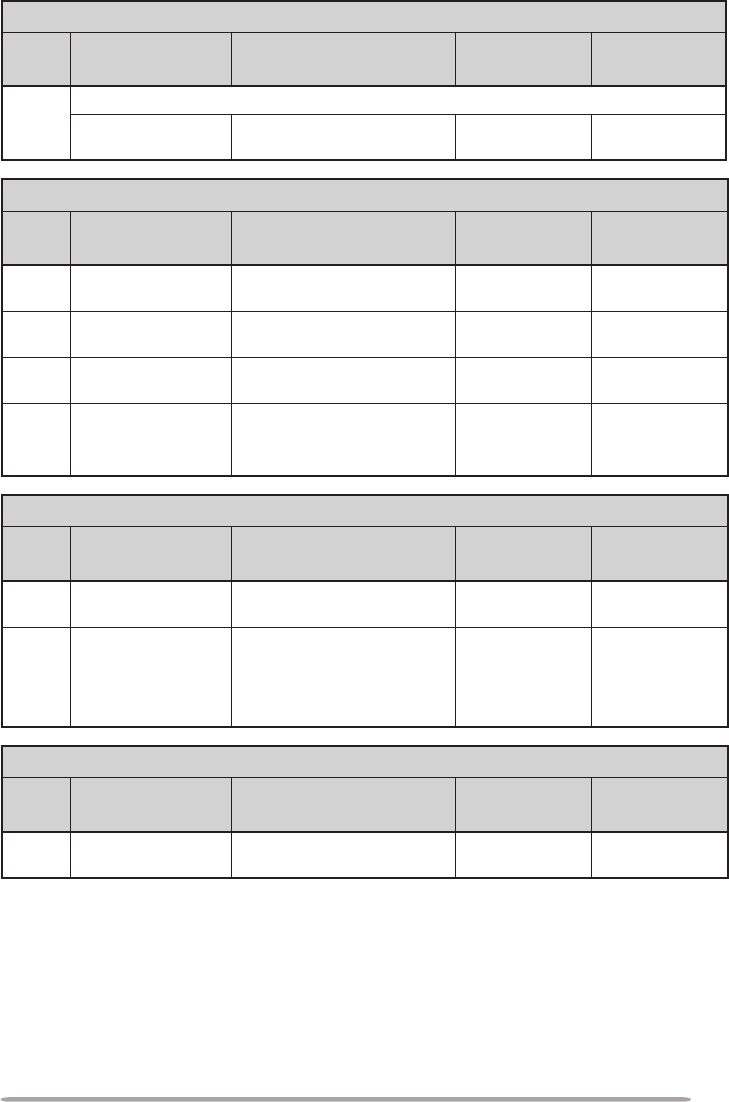
31
APRS
Menu
No. Display Description Setting
Values
Default
Setting
629
NAVITRA MESSAGE
MESSAGE Message Up to 20
characters −
SKY CMD (RC-D710 + TM-V71)
Menu
No. Display Description Setting
Values
Default
Setting
700 2 COMMANDER
CALLSIGN Commander call sign Up to 9
characters NOCALL
701 2 TRANSPORTER
CALLSIGN Transporter call sign Up to 9
characters NOCALL
702 2 TONE FREQUENCY Tone frequency See
explanation 88.5Hz
703 2 SKY COMMAND SKY command
OFF/
COMMANDER/
TRANSPORTER
OFF
AUX 2 (RC-D710 + TM-V71)
Menu
No. Display Description Setting
Values
Default
Setting
998 POWER ON
PASSWORD Power on password OFF/ ON OFF
999 RESET Reset
VFO RESET/
PARTIAL
RESET/
PM RESET/
FULL RESET
VFO RESET
AUX 2 (RC-D710 + PG-5J)
Menu
No. Display Description Setting
Values
Default
Setting
999 RESET Reset PM RESET/
FULL RESET PM RESET
1 Available only when the optional VGS-1 unit is installed in the TM-V71(A/E).
2 Available only for TM-V71(A) K type models.
3 Available only for TM-V71(A/E) K and E types models.
32
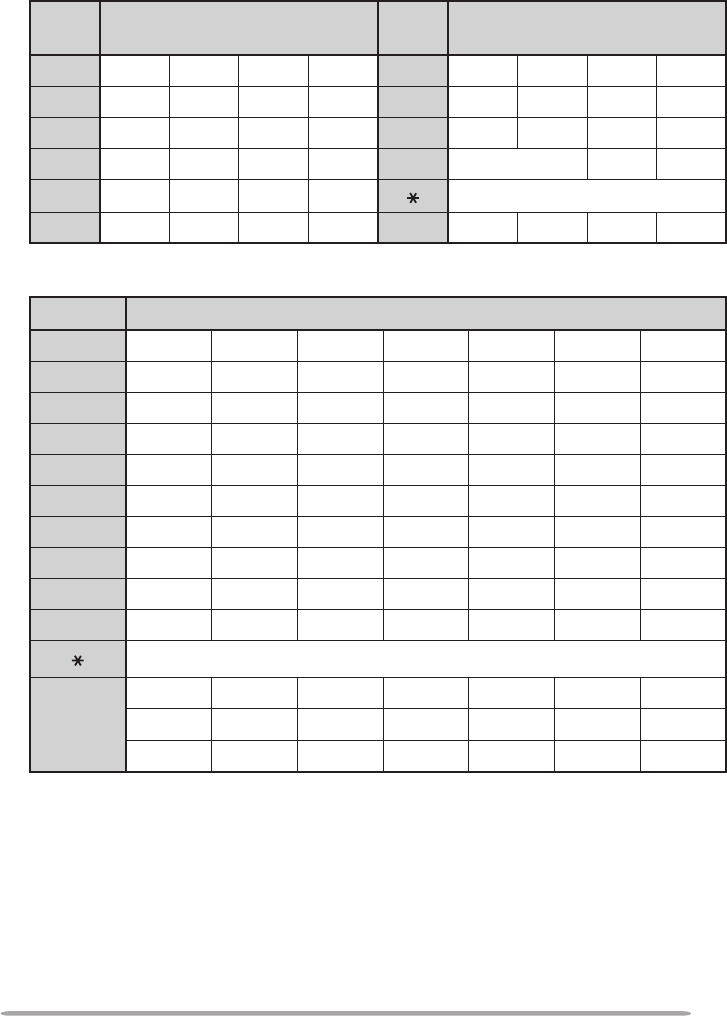
CHARACTER ENTRY
Certain menus require you to enter characters, such as the power on message
and memory names. When character entry is required, a cursor will appear on
the display.
1 Press the Tuning control.
• The cursor will blink.
2 Rotate the Tuning control to select your desired character.
3 Press the Tuning control to set the selected character.
• The cursor will move to the next digit.
• You can move the cursor to the left or right by pressing [←] or [→].
• You can insert one space by pressing [SPACE].
• You can insert a character by pressing [INS].
• You can delete the selected character by pressing [CLR].
4 Repeat steps 2 and 3 to enter the remaining characters.
• Press [ESC] at any time to exit Menu mode.
• Press [BACK] at any time to cancel the Menu setup and return to the Menu
selection.
33
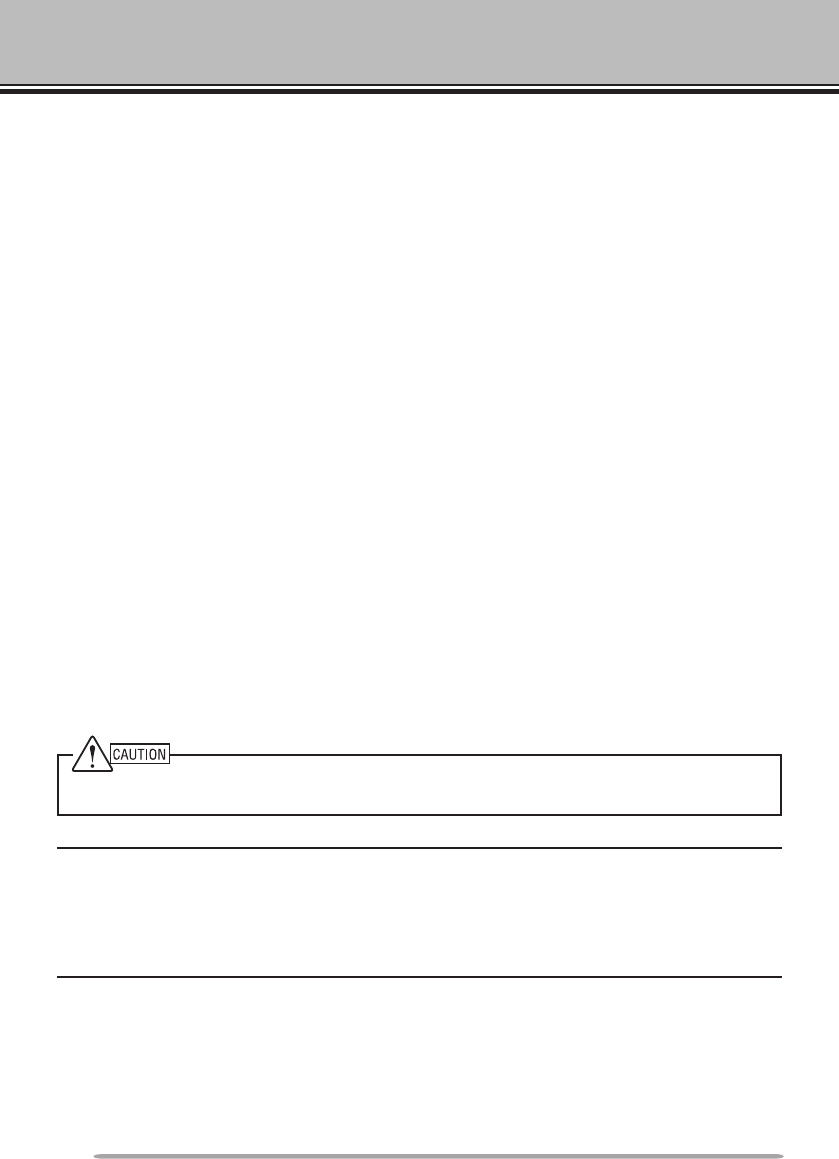
n Microphone Keypad Character Entry (with TM-V71)
The microphone keys can also be used to enter characters. Refer to the table
below for characters corresponding to microphone keys.
Key Character Display (with
each press of the key) Key Character Display (with
each press of the key)
1Q Z 1 7P R S 7
2A B C 2 8T U V 8
3D E F 3 9W X Y 9
4G H I 4 0(space) 0
5J K L 5 Not used
6M N O 6 #– / @
For a memory name, status text, and message:
Key Character Display (with each press of the key)
1q z 1 Q Z
2a b c 2 A B C
3d e f 3 D E F
4g h i 4 G H I
5j k l 5 J K L
6m n o 6 M N O
7p r s 7 P R S
8t u v 8 T U V
9w x y 9 W X Y
0(space) 0
Not used
#
? ! ’ . , – /
& # %( ) < >
; : ” @
The microphone [A] ~ [D] keys have special functions assigned to them:
[A]: Functions the same as [CLR]
[B]: Functions the same as [←]
[C]: Functions the same as [→]
[D]: Functions the same as the Tuning control
34
MAINTENANCE
GENERAL INFORMATION
This product has been factory aligned and tested to specification before shipment.
Attempting service or alignment without factory authorization can void the product
warranty.
SERVICE
When returning this product to your dealer or service center for repair, pack it in
its original box and packing material. Include a full description of the problem(s)
experienced. Include your telephone number along with your name and address
in case the service technician needs to contact you; if available, also include your
fax number and e-mail address. Don’t return accessory items unless you feel
they are directly related to the service problem.
You may return this product for service to the authorized Kenwood dealer from
whom you purchased it, or any authorized Kenwood service center. Please do
not send subassemblies or printed circuit boards; send the complete product. A
copy of the service report will be returned with the product.
SERVICE NOTE
If you desire to correspond on a technical or operational problem, please make
your note legible, short, complete, and to the point. Help us help you by providing
the following:
• Model and serial number of equipment
• Question or problem you are having
• Other equipment in your station pertaining to the problem
Do not pack the equipment in crushed newspapers for shipment! Extensive damage may result
during rough handling or shipping.
Note:
u Record the date of purchase, serial number and dealer from whom this product was purchased.
u For your own information, retain a written record of any maintenance performed on this
product.
u When claiming warranty service, please include a photocopy of the bill of sale or other
proof-of-purchase showing the date of sale.
CLEANING
To clean the case of this product, use a neutral detergent (no strong chemicals)
and a damp cloth.
SPECIFICATIONS
35
MAINTENANCE SPECIFICATIONS
Specifications are subject to change without notice due to advancements in
technology.
Supply voltage 10 V DC (9 ~ 11 V DC) <Negative ground>
Current Less than 450 mA
Operating temperature range –20°C ~ +60°C (–4°F ~ +140°F)
Dimensions
(W x H x D)
Without projections 155 x 70 x 38 mm (6.10" x 2.76" x 1.50")
With projections 156 x 71 x 56 mm (6.14" x 2.80" x 2.21")
Weight (approx.) 300 g (10.6 oz.)
To download the MCP-2A software, go to:
http://www.kenwood.com/i/products/info/amateur/software_download.html
Note: This URL may change without notice.
