King Sound Electronic and Technology KSE-081 bluetooth earbuds User Manual
King-Sound Electronic & Technology Co., Ltd bluetooth earbuds
User Manual
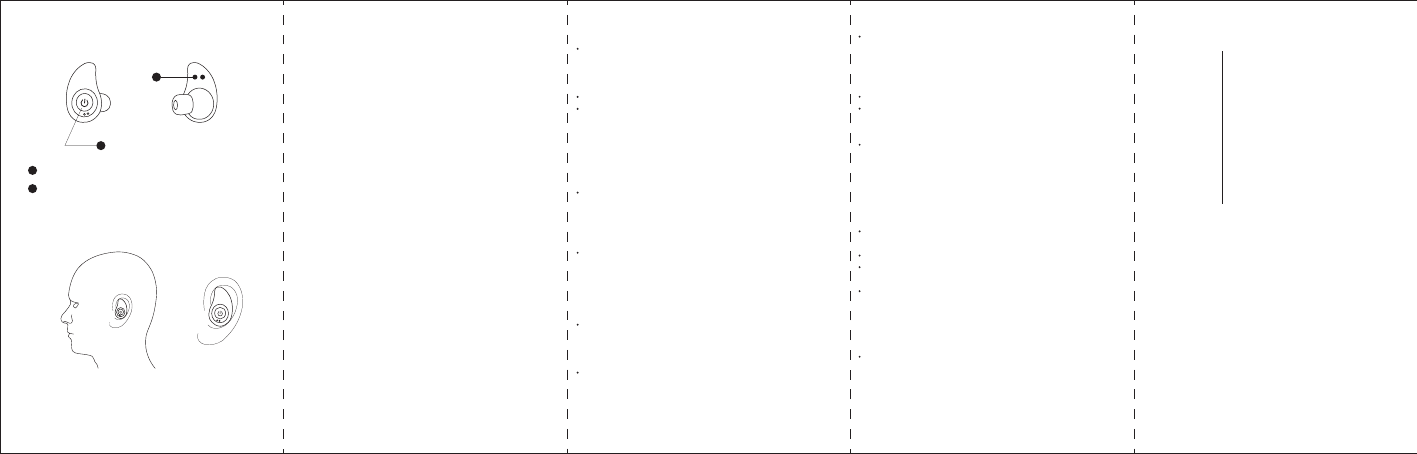
Power on/off & Play/Pause & Answer/End Call
Charging thimble port
Product/Controls Diagram
Wearing Schematic
Headphone Specification:
Frequency Response: 20Hz to 20KHz
Driver Size: 10mm
Impedence: 16oHm
Weight: 60g
Battery Information:
Built-in Bluetooth: Lithium
Input: DC 5V/50mA
Music playing time: Up to 3 Hours
Charging time: 1.5 Hours
* Approximate Playback time depends on individual use and
may be more or less than the time specified.
Bluetooth Information:
Bluetooth version: V3.0
Operation distance: 10 Meters
System Requirements: Bluetooth-capable device
Additional Connection Sources:
Power Source: Built-in rechargeable battery or via thimble port
from charging case
Charging
Put headsets in charging box and press the power button, the LED
indicator on upper-right of charging box flashing in blue, cover the
box lid, LED light will apear beneath earbuds power button to indicate
when the earbuds are charging, even while earbuds are turned off.
When charging is complete, the LED light will turn a solid blue.
Charging time is approximately 1.5 hours.
NOTE: When connected to an Apple device, the battery level will
show on your screen next to the Bluetooth icon.
Power on
Press & hold the power button on the earbuds (both left and right at
the same time) for 5 seconds to turn on the earbuds, the LED light
will flash blue & red and the earbuds will emit a tone.
NOTE:If your earbuds are already turned on, you must first power
off the earbuds before completing the above step.
After a few seconds the LED lights beneath power button will flash in
blue, left channel and right channel has connected and ready to pair
with a Bluetooth-enabled device.
Pair & Connect with a New Device
On your Bluetooth-enabled smartphone, tablet or media player,
navigate to the Bluetooth settings menu, turn on the Bluetooth feature,
and search for new devices.
After a few seconds you will see “UB-TWS09” listed.
Tap this model to select it, the LED will begin to slowly blink blue, and
the earbuds will emit a tone to indicate that it has been successfully
paired with your device.
NOTE:If your device asks for a password to connect to the earbuds,
enter “0000”
Reconnect to Bluetooth
You only need to pair your Bluetooth device with this earbuds once.
With your previously paired device’s Bluetooth turned on and in range,
power on the earbuds, it will automatically reconnect to the last Bluetooth
device they were connected to.
If you have a previously paired device that does not auto-reconnect,
navigate to the Bluetooth settings menu on your device, turn on the
Bluetooth feature, and select “UB-TWS09” from your list of paired
Bluetooth devices.
Play
Connect your device to this earbuds via Bluetooth (see “Pair & Connect
with a New Device”).
Open your favorite music app and press play.
Press the “Power” button once to play/pause music & answer/end calls,
or press it twice to skip to the next track.
All audio, including music, games, videos, and notifications will be routed
through the Earbuds.
Power off
Press and hold power button on left or right earbud for 3-5 seconds, the
earbuds will emit a descending tone to indicate that the earbuds are now
powering off.
Troubleshooting
2
2
1
1
No power Recharge your earbuds using the included battery
charging case.
Make sure your Bluetooth device has A2DP profile.
Check if both devices are paired and connected
over Bluetooth.
Restart the earbuds to reconnect your Bluetooth
device.
Music is not playing
over bluetooth
Navigate to your Bluetooth settings menu on your
Bluetooth device, tap “UB-TWS09”, and select
“Forget”. Now follow the steps to pair your device
again.
Bluetooth device will
not reconnect with
the earbuds
FCC Caution:
This device complies with part 15 of the FCC Rules. Operation is subject to the
following two conditions: (1) This device may not cause harmful interference, and (2)
this device must accept any interference received, including interference that may
cause undesired operation.
Any Changes or modifications not expressly approved by the party responsible for
compliance could void the user's authority to operate the equipment.
Note: This equipment has been tested and found to comply with the limits for a Class
B digital device, pursuant to part 15 of the FCC Rules. These limits are designed to
provide reasonable protection against harmful interference in a residential installation.
This equipment generates uses and can radiate radio frequency energy and, if not
installed and used in accordance with the instructions, may cause harmful interference
to radio communications. However, there is no guarantee that interference will not
occur in a particular installation. If this equipment does cause harmful interference to
radio or television reception, which can be determined by turning the equipment off
and on, the user is encouraged to try to correct the interference by one or more of the
following measures:
-Reorient or relocate the receiving antenna.
-Increase the separation between the equipment and receiver.
-Connect the equipment into an outlet on a circuit different from that to which the
receiver is connected.
-Consult the dealer or an experienced radio/TV technician for help.