Kingwave Technology KW2431 2.4GHz Digital Wireless cameras User Manual KW2430S 2430 2431
Kingwave Technology Co., Ltd. 2.4GHz Digital Wireless cameras KW2430S 2430 2431
User Manual
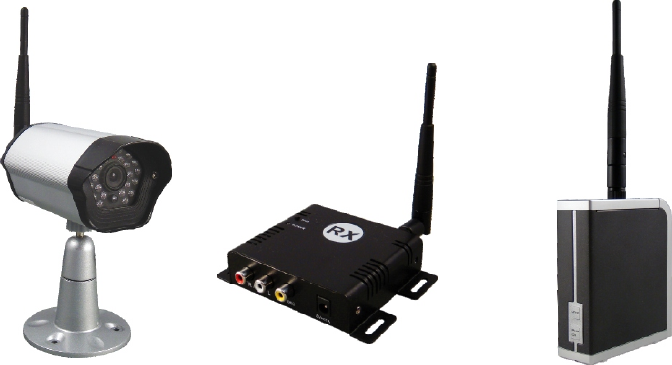
2.4GHz Digital
Transmission system
Manual
V1.1

To prevent fire or shock hazard, do not expose this device to rain or moisture.
Does not use near a bathtub, washbowl, kitchen sink, or laundry tub,
in a wet basement, or near a swimming pool.
►To avoid electrical shock, do not open this device.
►This device should be operated to use only the power supply included with it
or provided as an accessory.
►Do not overload wall outlets and extension cords as this can result in the risk
of fire or electrical shock.
►Do not attempt to service this device yourself. Refer servicing to qualified personnel
only.Reorient or relocate the receiving antenna.
►Increase the separation between the equipment and receiver.
►Connect the equipment into an outlet on a circuit different from that to which the
receiver is connected.
►Consult the dealer or an experienced radio/TV technician for help.
■ Note:
This equipment has been tested and found to comply with Part 15 of the FCC Rules,
or R&TTE CE directive. These limits are designed to provide reasonable protection
against harmful interference in a residential installation. This equipment generates,
uses and can radiate radio frequency energy, if not installed and used in accordance
with the instruction, it may cause harmful interference to radio communications.
However, there is no guarantee that interference will not occur in a particular installation.
If this equipment does cause harmful interference to radio or television reception, which
can be determined by turning the equipment off and on, the user is encouraged to try to
correct the interference by one or more of the following measures:
Important-Safety Precautions
Notice: The change or modifications not expressly approved by the party
responsible for compliance could void the user's authority to operate
the equipment.
IMPORTANT NOTE: To comply with the FCC RF exposure compliance requirements,
no change to the antenna or the device is permitted. Any
change to the antenna or the device could result in the
device exceeding the RF exposure requirement and void
user's authority to operate the device.
-1-
-2-
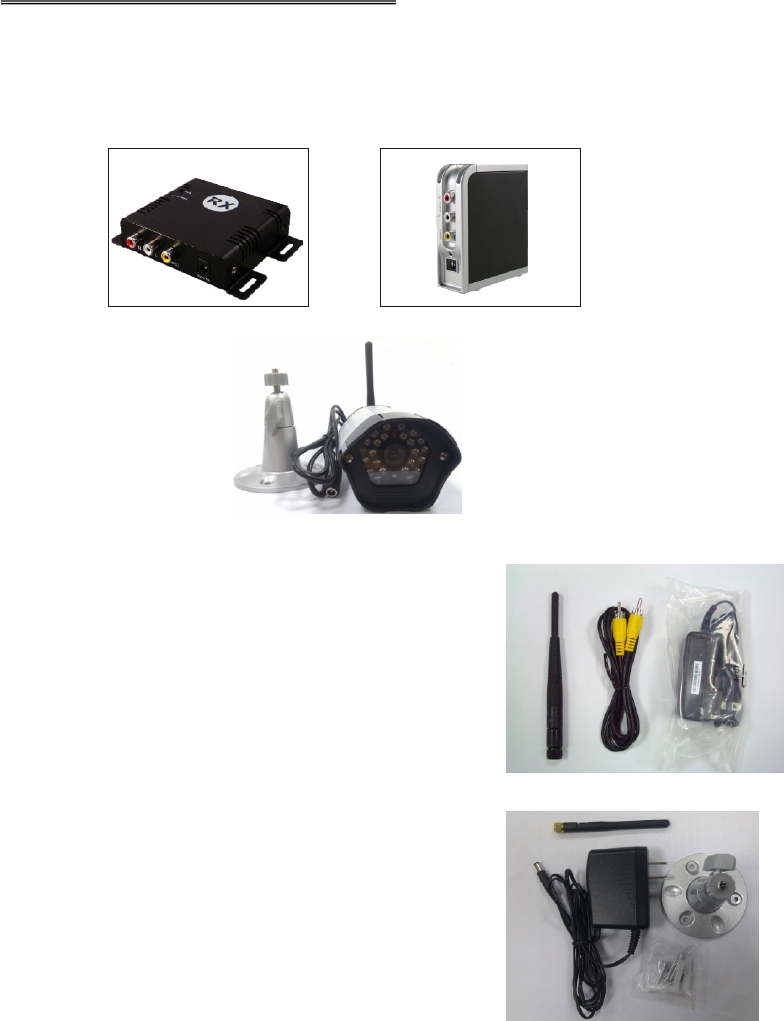
Please check the following items inside the box for 2.4Ghz Digital Video Transmission
System, and contact your dealer if anything is missing:
1. Products body
A.What is inside the Box?
and
Single Receiver x 1 4CH Multi Transmitter x 1
2. Accessory: for multi receiver or single receiver
Refer to the following photo, from left to right:
Antennas x 1
AV cables x 1(1RCA plug to 1RCA plug)
Power Adaptor x 1(100V ~ 240V AC,
DC 12V/0.5A or 5V/1.2A in Jack)
4. This user manual
3. Accessory for digital wireless camera
Refer to the following photo, from left to right:
Antennas x 1
Power Adaptor x 1(100V ~ 240V AC, DC 12V/0.5A in Jack)
Bracket with screws x 3
or
Digital wireless camera x 1

-3-
B.Introduction
Thank you for purchasing this 2.4GHz Digital transmission system. This system is a
digital wireless receiver/digital wireless CMOS camera that uses 2.4GHz Frequency
Hopping technology and GMSK modulation, and each client has an ID for paring to
protect personal privacy.
Multiple receiver can get max. 4 pcs wireless cameras KW2431 to be quad display on
one TV monitor, or connect to DVR BNC input.Single receiver can get only one.
1 pcs wireless cameras KW2431, and display on one TV monitor, or connect to DVR
BNC input.
There are over billion hopping sequences to minimize interference and deliver
consistently an excellent video and audio quality up to 150 meters away
(open site and line of sight)
Using this 2.4GHz Digital Wireless system, you can enjoy greater convenience and
security in many ways:
Safety & Security Application:
Connect a digital wireless camera as a wireless security system
Monitor your sleeping baby, playing children, the elderly, or the disabled on TV by
single or multiple receivers See who is outside the door on TV through digital wireless
CMOS camera.Monitors and records the meeting from another room.
IMPORTANT NOTE: To comply with the FCC RF exposure compliance
requirements, the antenna(s) used for this transmitter must be installed to
provide a separation distance of at least 20 cm from all persons and must not
be co-located or operating in conjunction with any other antenna or transmitter.
No change to the antenna or the device is permitted. Any change to the
antenna or the device could result in the device exceeding the RF exposure
requirements and void user’s authority to operate the device.
-4-
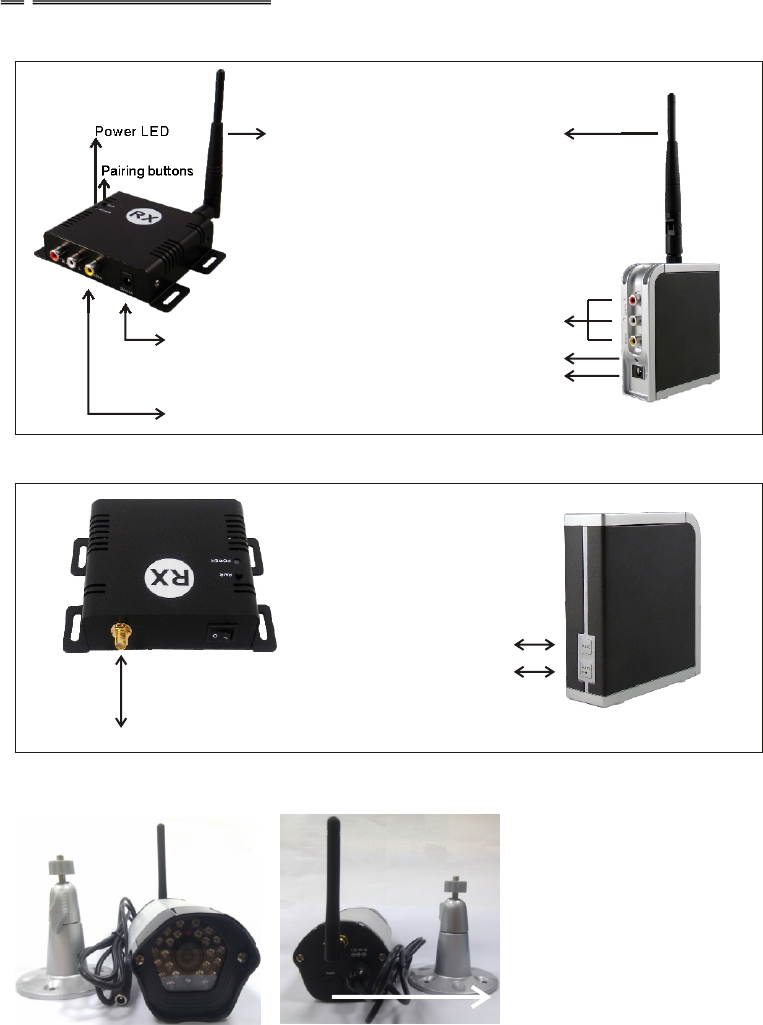
DC Jack for power adaptor
DC Jack for power adaptor
Power LED
AV Jack for Output(RX)
Antenna
Pairing buttons
Power LED Antenna
C.Product Layout
Front View
Back View
Antenna Connector
For digital wireless camera
Front view Back view
Pairing button inside
AV Jack for output(RX)
MODE
PAIR CH
-5-
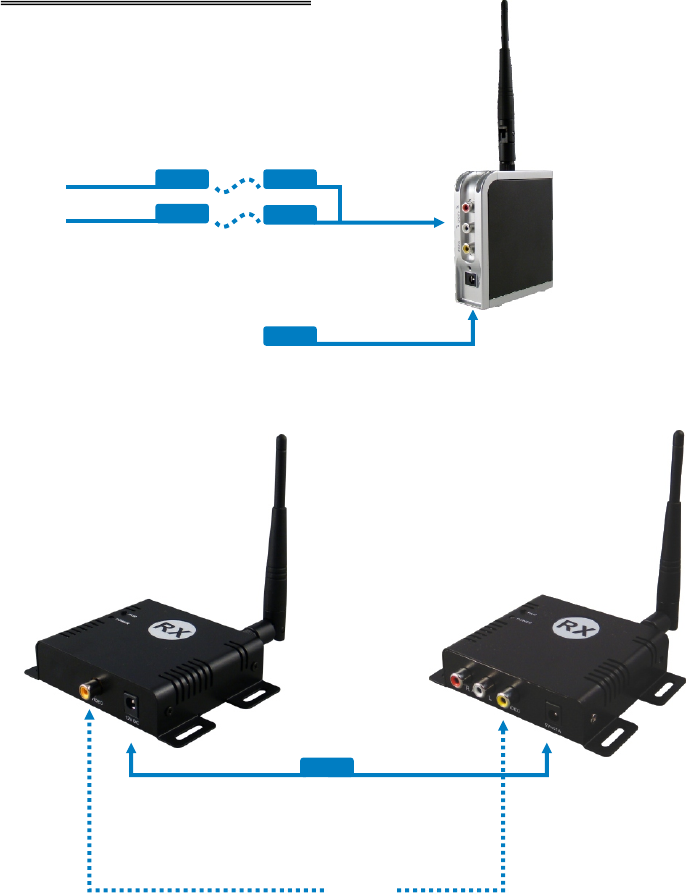
D. Multiple Receiver
TV monitor
1 x RCA (Video) cables
DC 12V or 5V Input
Video Out(4CH)
Multi Receiver
Single Receiver
TV Monitor
1 x RCA (Video) cable
DC 12 or 5V Input
DVR
Video Out
-6-
E.Pairing the digital wireless camera and receivers
When you get the digital wireless cameras or receiver, you must pair them before use it,
following the instructions as below:
1.Power on the digital wireless camera and receiver by inserting the power adaptor jack.
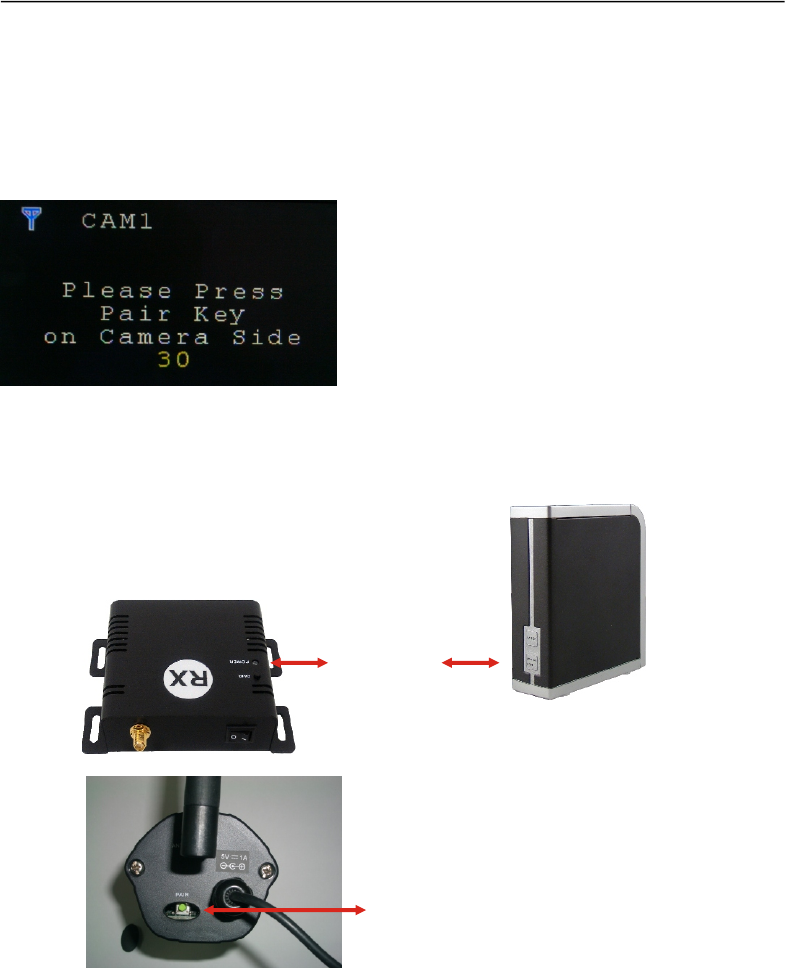
2.Press the PAIR/CH or PAIR button of receivers and not release until the power LED
begin to flash, and the monitor will reveal the picture as below, then release the
PAIR/CH button.
3.Press the PAIR button of digital wireless camera once within 30 seconds . They will
automatically link to each other by ID code after pairing finished.
4.Please don't turn off their power during the paring status.
5.When pairing successfully, the power LED for both will be lit directly (not flash)
Pairing button
Pairing button
-7-
F.
:
Operations
1.Multiple receiver:long press PAIR/CH button will get into paring mode as E; press
PAIR/CH button shortly to switch the display as CAM1 → CAM2 → CAM3 → CAM4 →
Quad mode → CAM1…… sequentially by each pressing.
2.Single receiver:long press PAIR button will get into paring mode as E; press
PAIR button shortly to switch OSD on/off.
3.Multiple receiver:long press MODE button to get into SCAN mode, it will display
CAM1 → CAM2 → CAM3 → CAM4 → CAM1…… automatically every 5 seconds,
and press PAIR/CH button to stop; press MODE button shortly to switch OSD on/off.
4. Multiple receiver:long press PAIR/CH and MODE buttons until show up“Erase All
Pairing Data” , it will clear the pairing content ,so that it would be quick when you repair
G.Use Notes
1.Be sure the digital wireless camera and the receiver were connected to the
equipment correctly (e.g. Connect the digital wireless camera, and the receiver to
the TV or DVR).
2.When DC plug is pulled out from digital wireless camera or receiver, it needs to wait
for a few seconds to insert it again.
3.Adjust antenna to decrease interference. (vertical or horizontal)
4.In most situations, one pair has a better distance up to 150 meter(open site and line
of sight). When two pairs or more are used at the same time, it can automatically jump
to different channels. But the distance between pairs, preferably greater than 2 meter far.
5.If there are some reasons cause the devise stop, you can try to pull out and insert the
power plug again and make the devise re-link.
6.It is suggested to have 10 pairs mostly operated in same location, but the pairing can
not be at the same time.
-8-
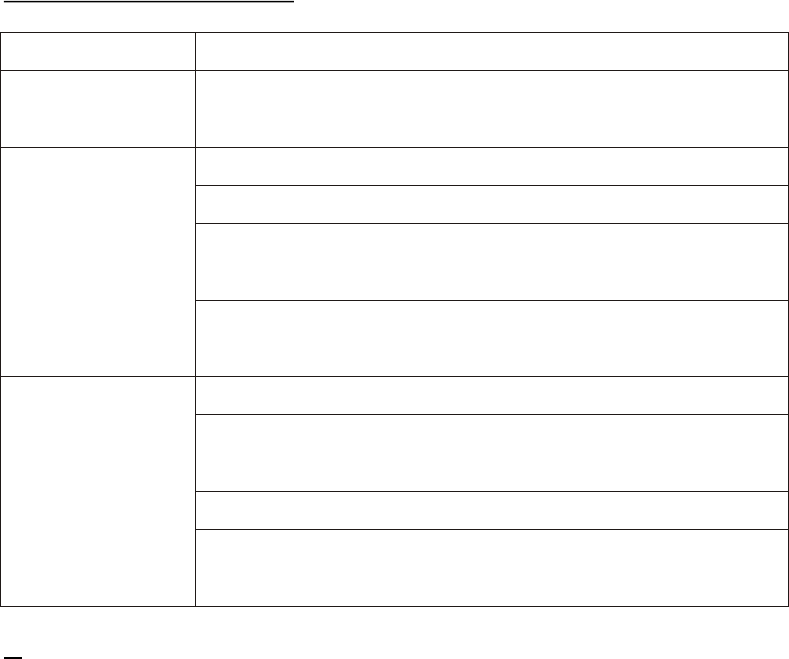
Problems Possible Solution
Monitor(RX) shows TX power off; TX/RX distance is too long, so that transmission
“No Signal” signal is weak, please check and make it right
Check all cable connections
Make sure power plugs are pushed all the way in
No picture Check if the POWER LED of the digital wireless camera and
receiver is lighting or not? Their LINK LED should be lit
If Their LINK LED should not be lit, you must re-pair their codes
following the E. instruction of the manual
Adjust receiver and digital wireless camera antenna orientation
Try to place digital wireless camera and receiver in a more close-in
Interference location
If using a microwave oven, turn it off.
Remove microwave oven or wireless router from the path between
digital wireless camera and receiver
H.Troubleshooting
Multi Receiver:
Operating Frequency Band 2.403GHz~2.478GHz
Receiver Sensitivity -85dBm min.
Video Output Level 1±0.2V p-p @ 75 ohm
Modulation GMSK
Antenna Omni-directional
Power consumption 1.0W
Power supply 5V/1.2A or 12V/0.5A
Dimension 100mm*87mm*30mm
Weight 120g
Single Receiver:
Operating Frequency Band 2.403GHz~2.478GHz
I.Specifications
Receiver Sensitivity -85dBm min.
Video Output Level 1±0.2V p-p @ 75 ohm
Modulation GMSK
Antenna Omni-directional
Power consumption 1.0W
Power supply 5V/1.2A or 12V/0.5A
Dimension 114mm*80mm*25mm
Weight 120g
Digital wireless cameras:
Operating Frequency Band 2.403GHz~2.478GHz
Maximum Transmit Power 100mW
Modulation GMSK
Antenna Omni-directional
Power consumption 1.5W
Power supply 12V/0.5A
Dimension 130mm*70mm*58mm
Weight 620g
System:
Transmission channels 40 channels auto selection
Video bit rate up to 4Mbps
Random ID code up to 4 million sets
Video resolution VGA 640 x 480 @ 30 fps
Operational range up to 150 meters (line of sight and open site)
All specification subject to change without notice
-9-