Kingwear Intelligent Technology KW01 Smart Watch User Manual user manual OK
Shenzhen Kingwear Intelligent Technology Co.,Ltd Smart Watch user manual OK
User Manual
SmartWatch
UserManual
Pleaserefertothismanualbeforeusingtheproduct
V1.0
Notes:
1.1Thecompanyreservestherighttomodifythecontentsofthismanualwithout
anyfurthernotification.Itisnormalthatsomefunctionsmayvaryincertainversions
ofsoftware.
1.2Pleasechargethisproductwiththeconfiguredchargerfornolessthan2hours
beforeusingit.
1.3Itisprohibitedtopushbuttons,slidethescreenofthewatchunderwater.
1.4ThisproductsupportsIP68rankwaterproof,notsuitablefordeepseadiving.Hot
water,teaandothercorrosiveliquidsaredestructivetothewatch,andwillnotbe
abletoenjoytheproductwarrantyandfreemaintenanceservices.
I. Modelscanbepairedwith:
Androidphones:supportOS5.0andabove
iPhone:SupportOS9.0andabove
II. MobilePhoneAPPDownload
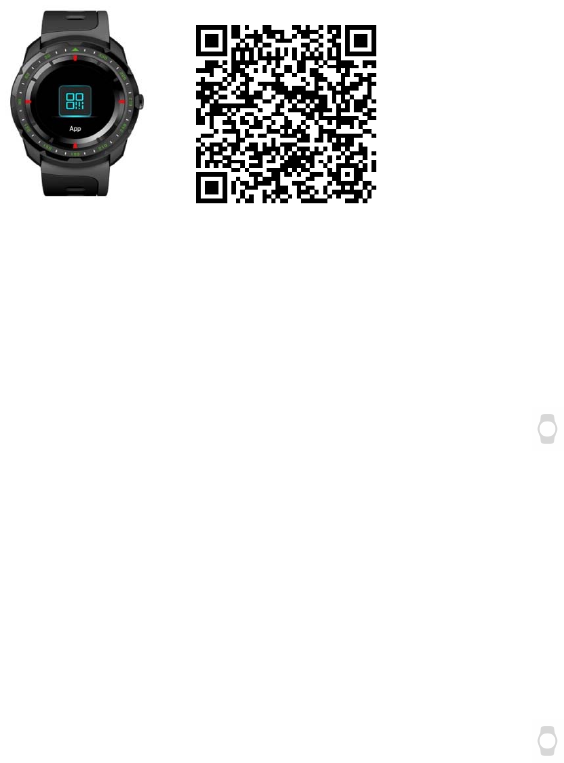
Inthewatchdisplaydialinterface,slidingfromrighttolefttoenterthefunction
menu.ClickAPPDownload(Figure1),andscantheQRcodeinthewatchwithyour
phone(Figure2),orsearch“LinkTo”onAppstoreorGoogleplaystoreanddownload
it.
(Figure1)(Figure2)
LinktoApp:
1. ConnectwithiPhone
1.1 Onthewatch,pleaseopentheBluetoothconnectionQRcodeon
Settings—LinktoAPP—iOS
1.2 Onyourphone,pleaseopenLinkToApp,clicktoselectyourdevicethen
enterQRcodescanningpage,pleasescantheQRcodeinwatchtopair.
1.3 Onyourphone,afterpaired,pleaseclick“Gosettings”toenter
Settings—Bluetooth,searchyourdevicenameandclickittoconnect.(Figure
3)
2. ConnectwithAndroidPhone
2.1 Onthewatch,pleaseopentheBluetoothconnectionQRcodeon
Settings—LinktoAPP—Android
2.2 Onyourphone,pleaseopenLinkToApp,clicktoselectyourdevicethen
enterQRcodescanningpage,pleasescantheQRcodeinwatchtoconnect.
Note:WhenBluetoothconnectionisfullycompleted,theBluetoothicononthe
watchisinhalfblueandhalfgreen(Figure4).
PleaseallowLinkTotoaccessthecontacts,calllogs,messages,notificationsand
locationinyoursmartphone,andpleaseregister/logininwithyourmailbox(orlogin
withathird‐partyApp)andkeeptheApprunninginbackground.
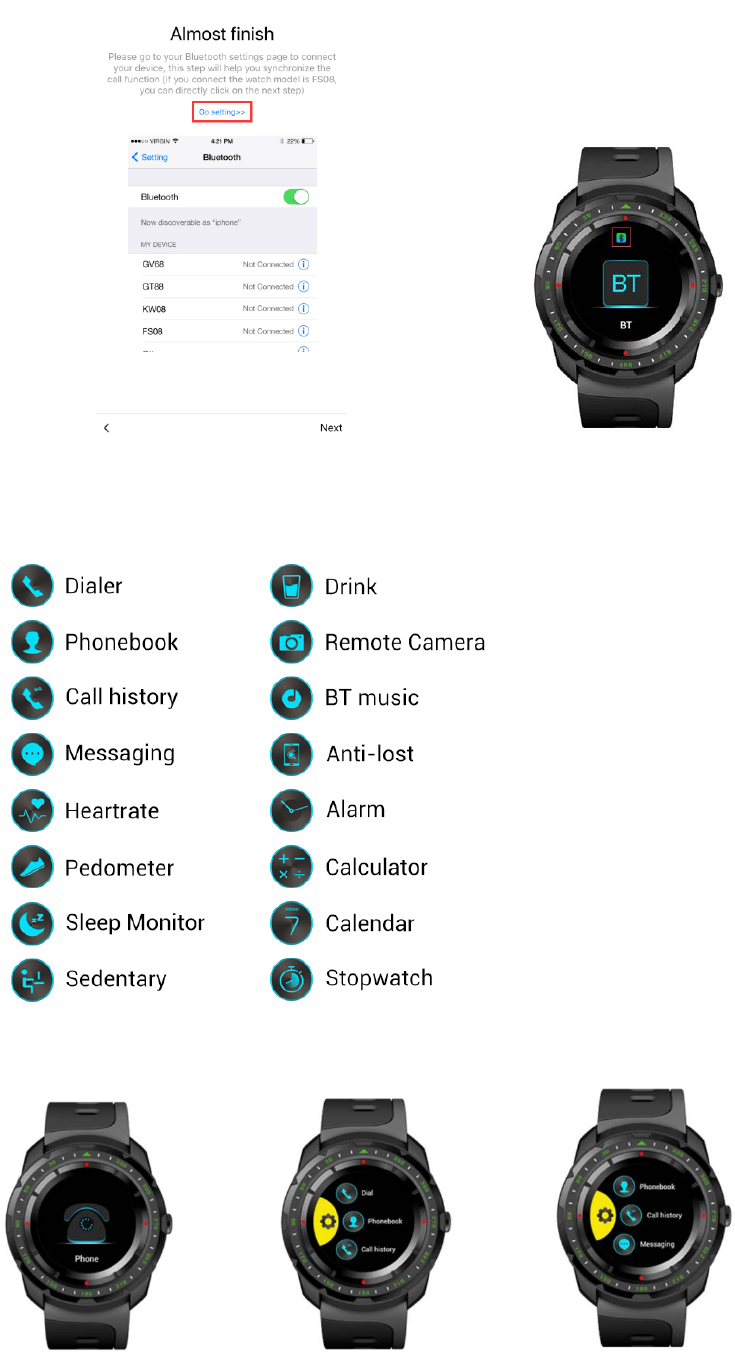
(Figure3)(Figure4)
III. MainFunctions
1. FunctionIntroduction:
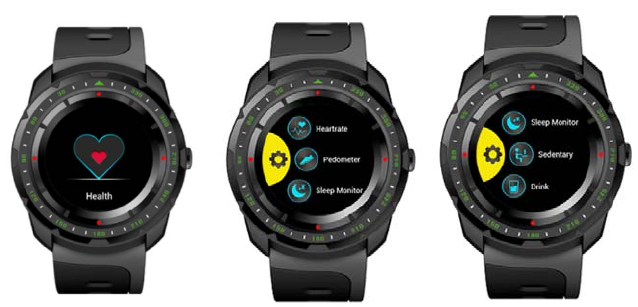
1.1. Callingfunction:
1.1.1. Dial:Whenyourwatchisconnectedwithyourphone,make
Bluetoothcallsfromyourwatch.
1.1.2. Phonebook:Whenyourwatchisconnectedwithyourphone,
contactsinyourphonecanbesyncedtoyourwatch.
1.1.3. Callhistory:Whenyourwatchisconnectedwithyourphone,call
historyinyourphonecanbesyncedtoyourwatch.
1.1.4. Messaging:WhenyourwatchisconnectedwithyourAndroidphone,
messagesinyourphonewillbeautomaticallysyncedtoyourwatch
(OnlyforAndroidOSsmartphone).
1.1.5. Answering/Rejectingcalls:Swipeverticallytoadjustthecallvolume.
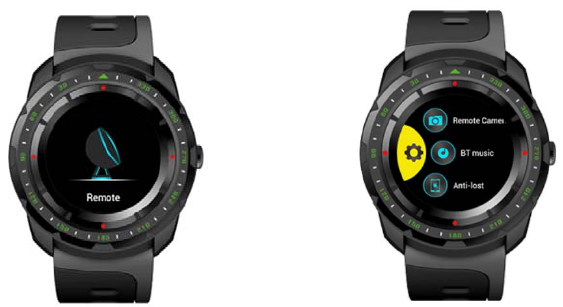
1.2. Health
ThegoaloftheHealthfeatureistositless,movemoreandgetahealthylife
style.
1.2.1. Heartrate
OntheHealthmenu,selectHeartrate.Touchthehearticontostart
measuringyourheartrate.
Ontheheartratemeasuringscreen,swipedownfromthetopto
openOptions.YoucansetMode,viewHistoryandHelphere.
Whilemeasuringyourheartrate,ensurethatthewatchisleveland
thattheheartratesensorisincontactwithyourwrist.Youmight
needtopressdownonthewatchslightlytoensureagoodcontact.
Toachieveareliablereading,makesurethatyoukeepyourwrist
level.
Note:Heartratedetectingshouldnotbeusedformedicalpurposes.
1.2.2. Pedometer
Poweronandwearyourwatch,itwillautomaticallyrecordyour
stepsandcalculatedistanceandcaloriesburned.Yourintraday
fitnessdatawillbeclearedat00:00.
Onthefitnessdatadisplayscreen,swipeupfromthebottomto
openOptions,youcansettheStatus,Goal,Gender,Height,Weight
andviewHistoryhere.
Whenyourwatchisconnectedwithyourphone,yourfitnessdatawill
real‐timesynctotheLinkToappinyourphone,oryoucanpulldown
theDatapageonLinkToapptosyncfitnessdatafromyourwatchto
yourphone.
Resetyourwatch:Settings>Reset
1.2.3. SleepMonitor
From22:00PMto08:00AM,sleepmonitorwillautomaticallyrunand
monitoryoursleepqualityandhours.
Onthesleepdatadisplayscreen,swipeupfromthebottomtoopen
Options.YoucansetStatus,viewHistoryandHelphere.
Whenyourwatchisconnectedwithyourphone,pleasepulldown
theDatepageonLinkToapptosyncsleepdatafromyourwatchto
yourphone.
1.2.4. Sedentary
Setasedentaryduration(atintervalsof30minutes,0min‐‐300mins
foroptions),yourwatchwillvibrateandringtoremindyouwhen
youhavebeenseatedforasedentaryduration.
1.2.5. Drink
Turnonthedrinkfeature,everydayfrom09:00AMto21:00PM,your
watchwillremindyoutodrinkwaterevery1houruntilyoudrinka
totalof2.5Lwater.
1.3. Remote
1.3.1. RemoteCamera
Whenyourwatchisconnectedwithyourphone,openthecameraof
yourphone,tapCaptureonyourwatchtoremotecontroltaking
photo.Photosavedinyourphone.
Tofunctionasacameraremote,yourwatchneedstobewithin
normalBluetoothrangeofyourphone(about33feetor10meters).
1.3.2. BTMusic
Youcanuseyourwatchtocontrolmusicplayingifitisconnected
withyourphone.Thisincludesadjustingvolume,togglingPlay/Pause,
skippingforwardorback,Musiconlyplaysonyourphone.
1.3.3. Anti‐lost
Whenyourwatchisconnectedwithyourphone,touchanti‐loston
yourwatch,yourphonewillgetanalert.
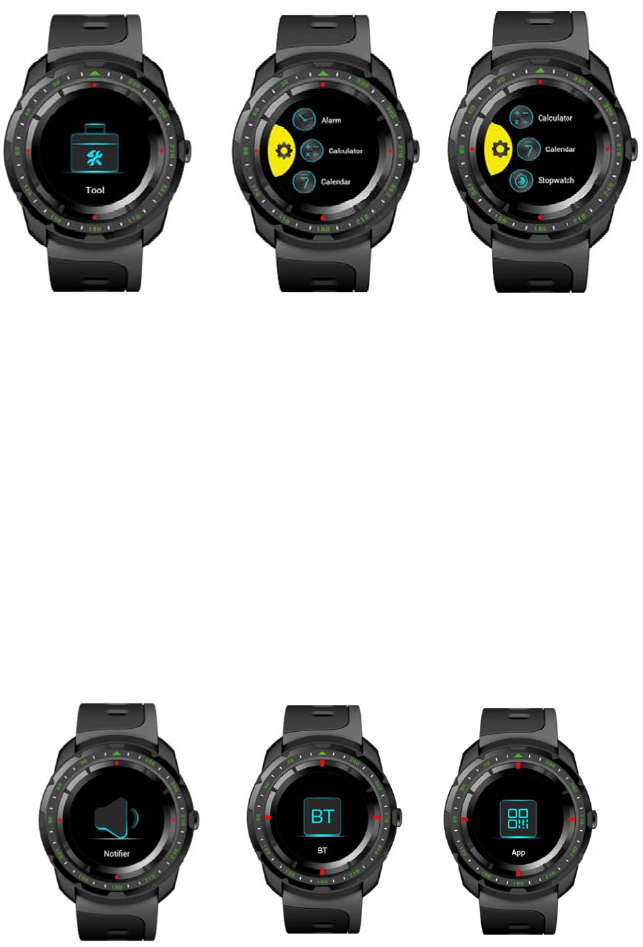
1.4. Tool
1.4.1. Alarm
Turnonthealarmfeature,setalarmtime,repeattime,alarmtone
andalerttype.Onthelastalarmdisplayscreen,swipeupfromthe
bottom,tap+toaddnewalarm.Inanalarmthatyouhaveset,
firmlypresstodeleteit.
1.4.2. Calculator
Enterdataonthekeypadtocalculate.
1.4.3. Calendar
Viewthedate,week,monthandyear.
1.4.4. Stopwatch
Timeeventswithaccuracyandease.
1.5. Notifier
Pairyourwatchwithyourphoneandgetnotificationsfromtheappsofyour
phone.Notificationsaredisplayedonyourwatchassoonastheyarrive,you
willnotmisswhatyoumatter.
Note:Onyourphone,gotosettings>Notificationstospecifywhichappsand
eventsgeneratenotifications.
1.6. Bluetooth
Searchandpairyourwatchwithothermobiledevices.
1.7. App
ScantheQRcodetoinstallLinkToApp.
1.8. Settings
1.8.1. BluetoothSettings
Onunpairedstatus,tapBTsettingstoturnon/offBluetoothandset
visibility.Onconnectedstatus,releasetheconnectionbeforeturning
offBluetooth.
1.8.2. LinktoApp
ScantheQRcodetoconnectwithLinkToApp.
1.8.3. Clock
Settheclocktype,theclocktypethatyouhaveselectedwillbe
displayedasyourwatchface.
TurnontheTimesync,whenyourwatchisconnectedwithyour
phone,timeanddatewillbereal‐timesyncedfromyourphoneto
yourwatch.TurnofftheTimesync,youcanmanuallysetthetime
andtimeformat.
1.8.4. Sound
Setalerttype:Ring,Vibrate,RingandVibrate,RingthenVibrateand
Mute.Selectringtoneandselectnotificationtonehere.
1.8.5. Volume
SetthevolumeofMultimedia,Ring,Notificationtone.
1.8.6. Display
SettheMainmenustyle,BrightnessandScreentimeout.
1.8.7. International
TurnoffAutoSync,youcanselectalanguagewhichdifferentfrom
yourconnectedphone.TurnonAutoSync,thelanguageofyour
watchwillsyncwithyourphone(thepremiseisthatyourwatchhas
thelanguageofyourphone).
1.8.8. Motion
Turnon/offfliptomuteincomingcall.
Turnon/offfliptomutealarm.
Turnon/offwake‐upgesture.
Turnon/offshaketoanswerthecall.
1.8.9. Reset
Gotosettings>Resetinyourwatch,yourwatchwillerasealldata
andrestart.
1.8.10. About
ViewtheDeviceaddress,LEaddress,Connectedservice,LE
connectedstatus,VersionandReleasetimehere.
2. Notes
2.1SomeAndroidphonesmaybeunabletoinstalltheLinkToApp,pleasesetthe
phone's"Security"as"unknownsource"toproperlyinstalltheAPP.
2.2BluetoothoftheWatch/phonemustbeturnedonandallowedtobesearched
bythesurroundingBluetoothdevices.Thewatch’sBluetoothisoffbydefaultand
needstobeturnedonmanuallyforfirstuse.
2.3WhenthephonerequeststohavethepermissionofreadingSMSrecords,taking
picturesandvideos,andobtainingtheposition,pleaseclick"Allow"tofacilitateyour
messagesynchronization,notificationreceiving,scanningQRcode,remotecamera,
recordingmotiontrackandotherfunctions.
2.4Onlyonesynchronizationsoftwarecanbeinstalledonthephone,andthe
synchronizationsoftwarerequiresloginorregisterbeforeuse.Ensurethenetworkis
working.
2.5Whenthereisaproblemwithusingthesoftware,youcanfindtheusemethodin
thepersonalcenterasfollowstoknowthecorrectuseofeachfunction:
PersonalCenter‐‐‐‐‐Settings‐‐‐‐‐Help
2.6Watchlanguageswitch,ifyouneedtoswitchtootherlanguages,pleaseturnoff
theautomaticlanguagesynchronizationfunction(itisONbydefault).
2.7Theuseofnotificationsynchronizationrequires:
2.7.1Thewatch’sBluetoothandthemobilephone’sBluetooth(LinkTo)havebeen
connectedsuccessfully,andtheBluetoothiconabovethewatchisblueandgreen.
2.7.2PhoneSettings‐Notification(allowtheappmessagetoshownotificationon
thephone).
2.7.3Allowthemessagedisplayinthemobilephonenotificationbar.
2.8SomeAndroidsmartphonesmayshutdownthesynchronizationsoftwareby
cleaninguptheapplications,andpleasekeepthesynchronizationsoftwarerunning
inthebackground.Androidphonesetbackgroundrunningmethod:openthephone
settings‐applicationmanagement‐tofindsynchronizationsoftware‐rights
management‐backgroundmanagement‐choosetoallowtheAPPtoruninthe
background(differentphones,versions,thesettingmethodmaybedifferent).
IfthesynchronizationAPPstilldoesn’twork,pleaserestartyourwatchandyour
phone,andrepeattheabovesteps.
IV. SolutionsofTroubles
Incasethere’saproblemduringtheusingofthewatch,pleasesolveitaccordingly
bythefollowingways.Iftheproblemstillexists,pleasecontacttheselleror
designatedmaintenancepersonnel.
1.Thewatchcannotbeturnedon
1.1.Pressthepowerbuttonforalongertime
1.2.Makesurethereisenoughbattery
1.3.Pleaserechargethewatchandstartitagain.
2.Thewatchshutdownautomatically
2.1. Itispossiblethatthebatteryisusedup.Pleaserechargethewatchandstart
itagain.
3.Shortbatteryperformance
3.1.Makesurethebatteryhasbeencompletelycharged.(Atleasttwohours)
3.2.Turnofftheneedlessfunctionswhicharehigh‐powerconsumptionsuchas
GPS,wake‐upgestureetc.
4.Watchcannotbecharged
4.1.Checkifthebatterycanbeused.Theperformanceofbatterymaybe
reducedafterseveralyears.
4.2.Checkifthechargerisworkingproperly,(boththeadapterandcable),ifnot,
tryanotherone.
4.3.Checktheconnectionofwatchandcableduringcharging.
V. FCCWarning
AnyChangesormodificationsnotexpresslyapprovedbythepartyresponsiblefor
compliancecouldvoidtheuser’sauthoritytooperatetheequipment.
Thisdevicecomplieswithpart15oftheFCCRules.Operationissubjecttothe
followingtwoconditions:(1)Thisdevicemaynotcauseharmfulinterference,and(2)
thisdevicemustacceptanyinterferencereceived,includinginterferencethatmay
causeundesiredoperation.
FCCRadiationExposureStatement:
ThisequipmentcomplieswithFCCradiationexposurelimitssetforthforan
uncontrolledenvironment.
Thistransmittermustnotbeco‐locatedoroperatinginconjunctionwithanyother
antennaortransmitter.
Note:ThisequipmenthasbeentestedandfoundtocomplywiththelimitsforaClass
Bdigitaldevice,pursuanttopart15oftheFCCRules.Theselimitsaredesignedto
providereasonableprotectionagainstharmfulinterferenceinaresidential
installation.Thisequipmentgeneratesusesandcanradiateradiofrequencyenergy
and,ifnotinstalledandusedinaccordancewiththeinstructions,maycauseharmful
interferencetoradiocommunications.However,thereisnoguaranteethat
interferencewillnotoccurinaparticularinstallation.Ifthisequipmentdoescause
harmfulinterferencetoradioortelevisionreception,whichcanbedeterminedby
turningtheequipmentoffandon,theuserisencouragedtotrytocorrectthe
interferencebyoneormoreofthefollowingmeasures:
—Reorientorrelocatethereceivingantenna.
—Increasetheseparationbetweentheequipmentandreceiver.
—Connecttheequipmentintoanoutletonacircuitdifferentfromthattowhichthe
receiveris
connected.
—Consultthedealeroranexperiencedradio/TVtechnicianforhelp.
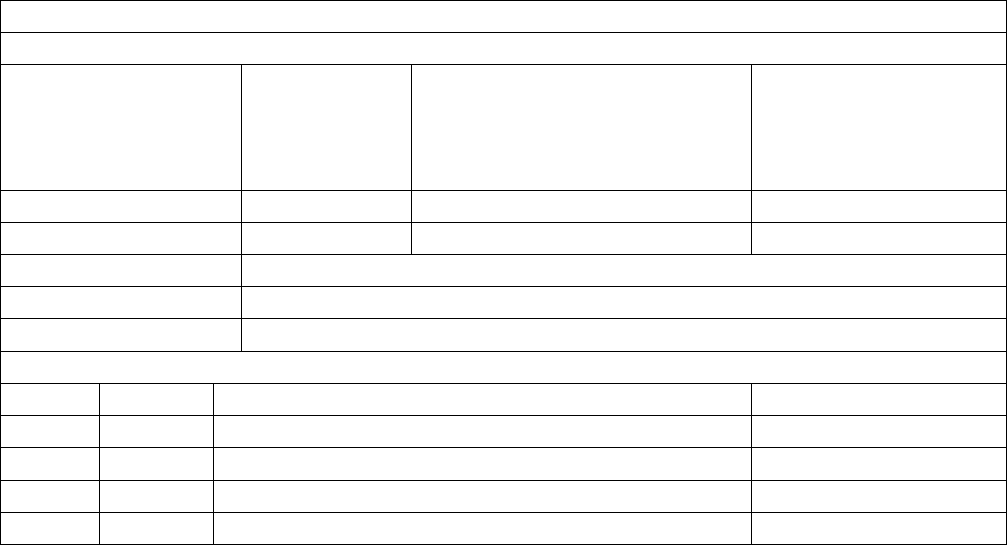
WarrantyCertificate
ClientInfo
ProductType
Vendor(Stamp)
ClientName ContactInfo
Vendor’sContact PurchaseDate
ProductIMEICode
Client’sAddress
Vendor’sAddress
WarrantyRecord
DateProblemsDiagnosis MoreInfo