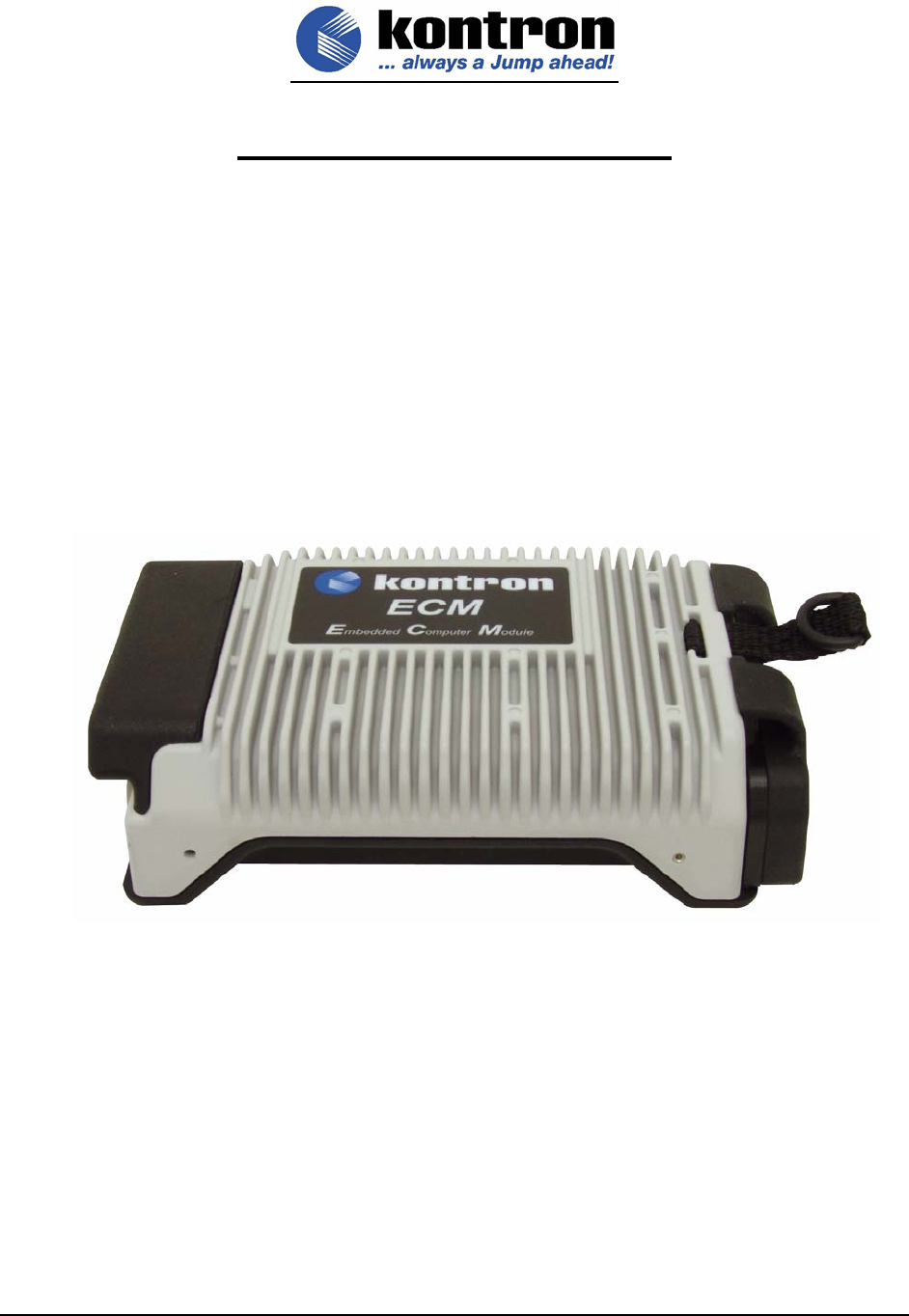
Kontron America ECM1400 ECM1400 Embedded Computer Module User Manual Manual
Kontron America Inc. ECM1400 Embedded Computer Module Manual
Manual
05/24/05
KONTRON AMERICA, INC.
MOBILE COMPUTING DIVISION
EMBEDDED COMPUTER MODULE
QUICK REFERENCE GUIDE
© Kontron America, Inc.
Mobile Computing Division
7610 Executive Drive
Eden Prairie, MN 55344
Version: 1.20
Part Number: 220-0137B

ECM Quick Reference Guide Document 220-0137B
© Kontron America, Inc. All Rights Reserved. Version 1.20
i
Table of Contents
EMBEDDED COMPUTER MODULE
1.0 DOCUMENT REVISION HISTORY ..................................................................................................3
2.0 USER INFORMATION ......................................................................................................................3
2.1 Objective.........................................................................................................................................3
2.2 Assumptions ...................................................................................................................................3
2.3 Scope..............................................................................................................................................3
2.4 About This Manual..........................................................................................................................5
2.5 Copyright Notice.............................................................................................................................5
2.6 Symbols Used In This Manual........................................................................................................5
2.7 Safety Instructions ..........................................................................................................................6
2.8 Safety Instructions for the CMOS Lithium Battery..........................................................................7
2.9 FCC Statement...............................................................................................................................7
2.10 Care and Maintenance ...................................................................................................................8
2.11 Warranty .........................................................................................................................................9
2.12 Technical Support.........................................................................................................................10
2.13 Returning Defective Merchandise ................................................................................................10
3.0 BASIC SPECIFICATIONS, ENVIROMENTALS AND CERTIFICATIONS ....................................12
3.1 SPECIFICATIONS........................................................................................................................12
3.2 Environmental Specifications .......................................................................................................13
3.3 Certifications.................................................................................................................................14
3.4 ECM Docking Connector Schematic ............................................................................................15
3.5 ECM Docking Connector Pin Out.................................................................................................16
4.0 Removable Hard Drive Module ....................................................................................................18
4.1 Description....................................................................................................................................18
5.0 BIOS................................................................................................................................................18

ECM Quick Reference Guide Document 220-0137B
© Kontron America, Inc. All Rights Reserved. Version 1.20
ii
6.0 Embedded Controller....................................................................................................................18
7.0 Operating Systems........................................................................................................................18
8.0 Dynamic Speed Stepping .............................................................................................................19
ECM Quick Reference Guide Document 220-0137B
© Kontron America, Inc. All Rights Reserved. Version 1.20
3
Embedded Computer Module
1.0 DOCUMENT REVISION HISTORY
Revision Date Edited By Changes from last revision
0.10 12/07/2004 GMA Initial Draft.
0.20 01/14/2004 GMA Feedback updates.
0.90 02/17/2004 GMA Pre-release review and updates.
1.20 05/23/05 CSF Release Updates
2.0 USER INFORMATION
2.1 Objective
This document is intended to give basic definition of the Kontron Embedded Computer Module (ECM)
base computer. The base computer alone is not a functional device and requires a docking station
designed to interface with the ECM in order for it to become functional. Depending on desired I/O and
degree of ruggedness required for the End Users application, Kontron America—Mobile Computing
Division can either supply a Development Kit for End Users to design their own interfaces or Kontron
can customize a dock.
For a technical reference guide of the Kontron Development Docking Stations, please refer to the CD
utilities disk (P/N 224-0078).
2.2 Assumptions
The reader is assumed to have already designed, or is using a Kontron America—Mobile Computing
Division pre-designed docking station to run their application.
2.3 Scope
The information presented in this guide is basic to the ECM and simply covers the pin-out of the
docking connector, the level of certification obtained and the MIL-STD testing performed on the ECM
only. Customers designing their own interfaces to the ECM are responsible for meeting required
certification and testing using the ECM and their own specific docking devices. Depending on required
certification and/or testing, the application circuits use in the ECM may not be suitable for all
applications. In particular, additional components may need to be added to these circuits in order to

ECM Quick Reference Guide Document 220-0137B
© Kontron America, Inc. All Rights Reserved. Version 1.20
4
meet specific EMI/EMC, or safety isolation requirements. Such regulatory requirements and the
techniques for meeting them vary by industry and are beyond the scope of this document.

ECM Quick Reference Guide Document 220-0137B
© Kontron America, Inc. All Rights Reserved. Version 1.20
5
2.4 About This Manual
This document provides information about products from Kontron America—Mobile Computing
Division. No warranty of suitability, purpose, or fitness is implied. While every attempt has been made
to ensure that the information in this document is accurate, the information contained within this
document is supplied “as-is” and can change without notice.
For the circuits, descriptions and tables indicated, Kontron America—Mobile Computing Division
assumes no responsibility as far as patents or rights of third parties are concerned.
2.5 Copyright Notice
Copyright © 2005 Kontron America, Inc.
All rights reserved. No part of this manual may be reproduced, transmitted, transcribed, stored in a
retrieval system, or translated into any language or computer language, in any form or by any means
(electronic, mechanical, photocopying, recording, or otherwise), without the express written permission
of Kontron America—Mobile Computing Division.
2.6 Symbols Used In This Manual
Symbol Meaning
This symbol indicates the danger of injury to the user or the risk
of damage to the product if the corresponding warning notices are
not observed.
This symbol indicates that the product or parts that may be
damaged if the corresponding warning notices are not observed.
® Windows, Windows XP Professional, Windows 2000 Professional and MS-DOS, are registered trademarks
of the Microsoft Corporation.
® IBM, PC-AT, OS/2 and PS/2 are registered trademarks of the International Business Machines Corporation.
® Intel and Pentium are registered trademarks of Intel Corporation.
® UNIX is a registered trademark and exclusively licensed from the X/Open Company Limited.
® LINUX is a registered trademark and exclusively licensed by Linus Torvalds
® Solaris is a registered trademark of Sun Microsystems, Inc.
Other product names cited in this manual may also be trademarks and are used here solely for identification purposes.
ECM Quick Reference Guide Document 220-0137B
© Kontron America, Inc. All Rights Reserved. Version 1.20
6
2.7 Safety Instructions
Please read this section carefully and observe the following instructions – and those on the computer - for your own
safety and correct use of the ECM.
Kontron built and tested the ECM computer in accordance with EN60950. In order to maintain this condition and
ensure safe operation, you must observe the instructions and warnings contained here and elsewhere in this manual.
Do not operate an ECM with wireless capability in areas
sensitive to radio interference, such as airplanes and
hospitals without turning these devices off using
Windows O/S functions.
For Operating Systems other than Windows, turn the system off to stop transmitting.
• Operate the ECM in accordance with the instructions for use.
• Make sure electrical receptacles match the regulations in your area.
• Place cables, especially the power cable, out of traffic areas where people could trip over them.
• Do not put an AC power connection in sockets shared by a number of other power users.
• Do not use an extension cable.
• Plug the power cable into a nearby socket to prevent an accidental disconnection.
• Use only the cables supplied by Kontron.
• Do not place the ECM in the proximity of heat sources or in a damp location. Make sure it has adequate
ventilation.
• Connect to ECM interface: only devices and components that meet the requirements of a SELV circuit
(security low voltage output) in accordance with EN60950.
• Lock or screw down all plugs on the connection cables to the housing.
• You may not safely operate the ECM if:
–it has visible damage or
–it no longer functions.
Shut down the computer and secure it against unintentional operation.
• Any extensions to the computer must meet legal stipulations and the device specifications.
• Only authorized Kontron technical repair personnel may perform assembly, extensions, new settings,
alterations or repairs while under warranty.
• Only use original accessories approved by Kontron.

ECM Quick Reference Guide Document 220-0137B
© Kontron America, Inc. All Rights Reserved. Version 1.20
7
2.8 Safety Instructions for the CMOS Lithium Battery
The CPU board is equipped with an internal, rechargeable CMOS lithium battery. Please refer to the “Technical Data”
section for information about battery type.
• This battery is not user-replaceable.
• Kontron shall not assume any warranty obligation if any attempt is made to replace the battery by
individuals other than those at Kontron repair facilities.
• Please observe local regulations for the disposal of the battery and the disposal information of the
battery-manufacturers.
2.9 FCC Statement
Note: This equipment has been tested and found to comply with the limits for a Class A digital device, pursuant to
part 15 of the FCC Rules. These limits are designed to provide reasonable protection against harmful interference
when the equipment is operated in a commercial environment. This equipment generates, uses, and can radiate
radio frequency energy and, if not installed and used in accordance with the instruction manual, may cause harmful
interference to radio communications. Operation of this equipment in a residential area is likely to cause harmful
interference in which case the user will be required to correct the interference at his own expense.
CANADIAN NOTICE
This digital apparatus does not exceed the Class A limits for radio noise for digital apparatus set out in the Radio
Interference Regulations of the Canadian Department of Communications.
EUROPEAN UNION NOTICE
Warning: This is a Class A product. In a domestic environment this product may cause radio interference in which
case the user may be required to take adequate measures to mitigate such interference.
CAUTION
Danger of explosion if battery is incorrectly replaced. Replace only with the same or equivalent type recommended
by the manufacturer. Dispose of used batteries according to the manufacturer’s instructions.
WARNING
Only authorized service personnel should attempt to repair this equipment. Improper repairs can create a safety
hazard.
ECM Quick Reference Guide Document 220-0137B
© Kontron America, Inc. All Rights Reserved. Version 1.20
8
ANTENNA WARNING
Warning: To comply with the FCC RF exposure compliance requirements, a separation distance of at least 20 cm (8
inches) must be maintained between the antenna of the Embedded Computer Module (ECM-1400) and all persons
and must not be co-located or operating in conjunction with any other antenna or radio transmitter.
USE ON AIRCRAFT CAUTION:
Caution: Regulations of the FCC and FAA prohibit airborne operation of radio-frequency wireless devices because
their signals could interfere with critical aircraft instruments.
2.10 Care and Maintenance
Clean all other areas of the ECM with a damp, soft cloth. You may dampen the cloth with a mild household cleaner or
simply water. If a mild household cleaner is used, wipe again with a damp cloth only and then with a dry cloth.
• Do not use strong solvents, such as benzene, thinner or
rubbing alcohol that could discolor paint or plastic.
• Do not use commercial household cleaners or cosmetics,
as they may harm the surface.
• Do not spray water, as liquid damages the computer or
causes it to work improperly.

ECM Quick Reference Guide Document 220-0137B
© Kontron America, Inc. All Rights Reserved. Version 1.20
9
2.11 Warranty
LIMITED WARRANTY
Kontron America, Inc. (KAI) warrants to the original owner that all will be free from defects in materials and/or workmanship for a
period of one (1) year from the date of shipment.
In the event of malfunction or other indication of failure attributable directly to faulty workmanship and/or materials, then, upon return
of the product with proof of date-of-shipment to Kontron America, Inc., 14118 Stowe Drive, San Diego, CA 92064, KAI will, at its
option, repair or replace said products or components, to whatever extent it will deem necessary to restore said products to proper
operating condition. For product purchased outside of the Continental United States of America, please refer to documentation
supplied with the equipment to determine proper return and/or repair location.
During the one (1) year period after the date-of-shipment, all labor and materials will be provided without charge. There shall be no
warranty for either parts or labor after the expiration of the one (1) year period from the date of shipment. Products that have been
tampered with, abused, mishandled, deliberately altered or taken apart will not be covered by this warranty agreement. This is the
Customer's sole remedy for breach of warranty
Units must be returned via Returned Material Authorization (RMA) process applicable to the country of purchase origin, freight
prepaid and insured. Units returned without proof of date-of-shipment or out-of-warranty units returned, will be repaired or replaced,
upon approval by Customer of KAI repair/replacement charge estimate, and the Customer will be charged for repair costs. If
Customer elects not to authorize repairs or replacement, a service charge may be assessed.
Products will be returned to Customer, after repair or replacement has been completed, by carrier and method chosen by KAI.
Should the Customer desire some other specific form of conveyance, or be located beyond the USA borders, then the Customer
must bear the costs of return shipment.
The responsibility for the failure of any KAI product, or component thereof, which in the discretion of KAI, shall have resulted from
accident, abuse, or misapplication of the product, shall be assumed by the Customer, and KAI shall assume no liability as a
consequence of such events under the terms of this warranty. Failure caused by penetration of any liquid or salt water, or from
regular exposure to a saltwater environment shall be the responsibility of the Customer.
While every effort on the part of KAI has been made to provide clear and accurate technical information on the application of its
products, KAI assumes no liability for any damage which may arise from the use of said technical information.
This warranty gives you specific legal rights and you may also have other rights which vary from state to state.
There are no warranties given with respect to the products of KAI other than the warranty described above.
All other express or implied warranties are hereby disclaimed, including, but not limited to, warranty of merchantability or
fitness for a particular purpose.
The warranty shall have no greater duration than the duration period for the express written warranty applicable to this product and
shall terminate automatically at the expiration of such period. No action shall be brought for breach of any implied or express
warranty after one year subsequent to the expiration of the duration period of the express written warranty.
Incidental and consequential damages caused by malfunction, defect or otherwise, and with respect to breach of any express or
implied warranty, are not the responsibility of KAI, and to the extent permitted by law, are hereby excluded both for property and for
injury damage.

ECM Quick Reference Guide Document 220-0137B
© Kontron America, Inc. All Rights Reserved. Version 1.20
10
2.12 Technical Support
If you should encounter difficulties with your application or with this product, or need guidance on setting up
your system, we are ready to assist you. Please contact our Technical Support department at the following
locations:
USA:
Technical Support are: 8:00AM to 5:00PM CST – Monday – Friday
TEL: (888) 343-5396 (Toll free in US and Canada)
(952) 974-7200
FAX: (952) 949-2791
E-mail: support@kontronmobile.com
When you call, make sure to have the following information on hand:
• unit part number (P/N),
• serial number (S/N) of the defective unit (found on the back of the unit).
Then, explain the nature of your problem to the service technician.
If you have any questions about Kontron America—Mobile Computing Division, or our products and
services, you may reach us at the aforementioned telephone numbers, by e-mail, or by writing to:
Kontron America—Mobile Computing Division
7610 Executive Drive
Eden Prairie, MN 55344 USA
2.13 Returning Defective Merchandise
Before returning any merchandise, please follow these instructions:
In the USA / North America, contact:
Kontron America Inc., Mobile Computing Division, Technical Support
Hours are: 8:00AM to 5:00PM CST– Monday – Friday
TEL: (888) 343-5396 (Toll free in US and Canada)
(952) 974-7200
FAX: (952) 949-2791
E-mail: support@kontronmobile.com
In Europe:
Contact our Service Department and request an
RMA # (Return Material Authorization) by:
Fax: (+49) 8165-77 331
E-mail: service@kontron.com

ECM Quick Reference Guide Document 220-0137B
© Kontron America, Inc. All Rights Reserved. Version 1.20
11
In Asia:
Contact your sales representative and request an
RMA # (Return Material Authorization) by:
FAX: 011-886-2-2910-3482
E-mail: sales@kontron-asia.com
In China:
Contact your sales representative and request an
RMA # (Return Material Authorization) by:
FAX: +86-21-5426-1650
E-mail: FAE@kontron.com.cn

ECM Quick Reference Guide Document 220-0137B
© Kontron America, Inc. All Rights Reserved. Version 1.20
12
BASIC SPECIFICATIONS, ENVIROMENTALS AND CERTIFICATIONS
2.14 SPECIFICATIONS
2.14.1 Processor:
• Intel® M738 Processor
• System Bus: 400MHz
• Intel® 855GME Chipset
2.14.2 Operating Systems Supported
• Windows® 2000 Professional
• Windows® XP Professional
2.14.3 RAM/CACHE
• DDR 333MHz DRAM (PC2700)
• 64MB Video DRAM
• Standard 2MB L2 CACHE
2.14.4 I/O Available via Docking Connector to a Docking Station
• Power: 12 VDC input, Class II Power Supply
• Power switch, HDD activity LED and Power LED signals
• Video: One LVDS output
• Video: One RGB analog output (Simultaneous different image, different resolution)
• Sound: AC97 compliant stereo speaker out, stereo MIC in, & Line out
• PS/2 keyboard and mouse
• Mouse/Keyboard Interface: Electronically compliant IBM PS/2
• Serial Ports: Two open COM ports.
• Parallel Port: One
• USB: Four bootable USB 2.0 Ports
• Bus: 33MHz PCI 2.0
• Smart battery interface
• Ignition switch signal for auto power on states
2.14.5 Integrated Wireless LAN Features
• Intel® Centrino Wireless Pro 2200BG 802.11b/g
• Antenna
• Software controlled radio off/on
2.14.6 Chassis Construction
• Conductive cooled cast magnesium alloy

ECM Quick Reference Guide Document 220-0137B
© Kontron America, Inc. All Rights Reserved. Version 1.20
13
2.14.7 Physical Characteristics
• Weight: w/o RHDD: 1.32lbs./.60kg (w/o hard drive)
• Size (in.): 4.32w x 6.57d x 1.90h
• Size (cm): 10.97w x 16.68d x 4.82h
2.14.8 Temperature and Power and Power Management Systems
• Temperature System
o Temperature management system will not allow system to turn on at
temperatures below -15C (5F) unless extended temperature option is
installed.
o Temperature Management system will prevent system from power-up if
temperature is above operating limit.
o Temperature override options are available through CMOS setup.
• Power and Power Management System
o ACPI Compliance
o 500ms debounce protection on power switch
o Graceful shutdown and inactivity timers.
o “Auto On” vehicle key signal for remote power on and graceful power down
2.15 Environmental Specifications
2.15.1 Temperature
• Standard Operating: -15C to 60C (5F to 140F)
• Storage: -25C to 60C (-13F to 140F)
2.15.2 Humidity
• Operating: 10-90% relative humidity, non-condensing.
• Storage: Mil-Std-810F, Method 507.4; 5-95% relative humidity, non-condensing
2.15.3 Water, Dust and Salt Fog
• Rain and blowing Rain: Mil-Std-810F Method 506.4, Procedure I
• Water Submersion: 1 meter for 1 minute, non-operating
• Sand and Dust: Mil-Std-810F, Method 510.4, Procedure I, II and III
• Salt Fog: Mil-Std-810F, Method 509.4
2.15.4 Shock and Crash Hazard
• Functional: Mil-Std-810F, Method 516.5, Procedure I
• Operational: 40Gs at 45Hz to 200Hz; 18 drops
• Non-Operational: 75Gs at 80-Hz to 2000Hz; 12 drops
• Crash Hazard: Mil-Std-810F, Method 516.5, Procedure IV

ECM Quick Reference Guide Document 220-0137B
© Kontron America, Inc. All Rights Reserved. Version 1.20
14
2.15.5 Vibration
• Mil-Std-810F, Method 514.4, Procedure I, Cat. 20, Table 514C-VII Figure 514.5C-0-1
– composite wheeled vehicle.
Hz Power Spectral Density (g2/Hz)
10 0.015
40 0.015
50 0.00015
2.15.6 Altitude
• Operational: -300m to 3000m
• Non-Operational: -400m to 15,000m
2.16 Certifications
2.16.1 EMI/EMC and Safety
• FCC Class A
• CE Class A
• ETL
• cETL
ECM Quick Reference Guide Document 220-0137B
© Kontron America, Inc. All Rights Reserved. Version 1.20
15
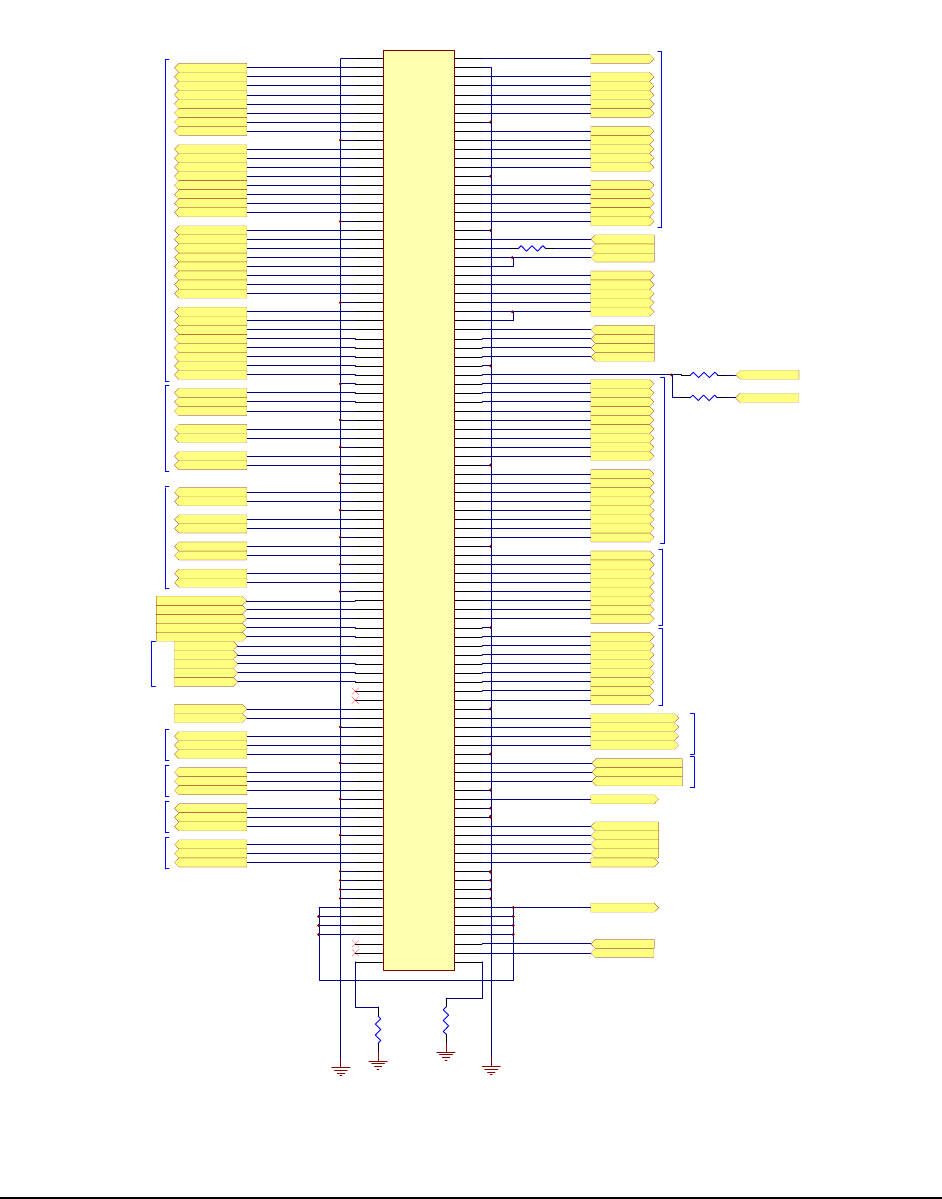
2.17 ECM Docking Connector Schematic
PCI_AD3
PCI_AD0
PCI_AD1
PCI_AD2
PCI_AD7
PCI_AD4
PCI_AD5
PCI_AD6
PCI_AD11
PCI_AD8
PCI_AD9
PCI_AD10
PCI_AD15
PCI_AD12
PCI_AD13
PCI_AD14
PCI_AD19
PCI_AD16
PCI_AD17
PCI_AD18
PCI_AD23
PCI_AD20
PCI_AD21
PCI_AD22
PCI_AD27
PCI_AD24
PCI_AD25
PCI_AD26
PCI_AD31
PCI_AD28
PCI_AD29
PCI_AD30
GND
PCICLK5
PCIINTC_3S#
PCI_REQ4#
PCI_IRDY#
PM_CLKRUN#
PCIINTD_3S#
PCI_GNT4#
PCI_PME#
PCI_PAR
PCI_FRAME#
PCI_TRDY#
PCI_SERR#
PCI_PERR#
PCI_STOP#
PCI_DEVSEL#
INT_SERIRQ
PC I_C/BE 0#
PC I_C/BE 1#
PC I_C/BE 2#
PC I_C/BE 3#
DAC_R
DAC_VSYNC
DAC_G
DAC_B
DAC_HSYNC
IO_DDC1DATA
IO_DDC1CLK
PD2_3
PD1_3
PD0_3
PD5_3
PD7_3
PD6_3
PD4_3
PD3_3
SLCT_3
PE_3
BU SY/ WAIT_3 #
ACK_3#
INI T_3#
ERR_3#
STB#/WR_3#
AFD#/DSB_3#
SLI N#/A SB_3#
LPT
SER_SOU TA2
SER_RTSA2#
SER_DTR A2#
SER_CTSA2#
SER_DSRA2#
SER_DCD A2#
SER_RIA 2#
SER_SI N A2
COM1
COM2
DO CK_K BCLK
DO CK_K BDA TA
DOCK_MSDATA
DOCK_MSCLK
MOUSE/ KEYB OAR D
MI NI PC I
MI NI PC I
CRT
LVDS_YA2P
LVDS_YA2M
LVDS_YA1M
LVDS_YA1P
LVDS_YA0P
LVDS_YA0M
LVDS_CLKAP
LVDS_CLKAM
LVDS
Docking Connector
USB_PN0
USB_PP0
USB_OC0_1#
USB_PN1
USB_PP1
USB_OC0_1#
USB_PN3
USB_PP3
USB_OC2_3#
USB_PN2
USB_PP2
USB_OC2_3#
USB 0
USB 1
USB 2
USB 3
MAIN_P OWER_ON#
DOCK_ON#
GND
BATSYS
+5VO
+3VO
PCIINTA_3S#
PCI_RST#
MI SO
SCK
MO SI
SSB
CASKET _ON#
R24
001-0000
GND
SER_SOU TA
SER_RTSA#
SER_DTR A#
SER_CTSA#
SER_DSRA#
SER_DCD A#
SER_RIA #
SER_SI N A
R28
001-0000
AC97_SD OUT
AC97_RST#
AC97_SD IN0
AC97_SY NC
AC97_BCLK
R36 001 -0101
CLK_LANPCI
PCI_LOCK#
PCI_REQ2#
PCI_GNT0#
PCI_GNT2#
PCI_REQ0#
CLK_CBPCI
PM_SUSB#
MASTER_V
BA TTERY 1
AC97
MASTER_SMB_CLK
MA STER _SMB _D AT A
SLA VE_ SMB_ DATA
SLA VE_ SMB_ CLK
SLA VE_ V
PCI_AD27
R37
001-0000
1
122
3
344
5
566
7
788
9
910 10
11
11 12 12
13
13 14 14
15
15 16 16
17
17 18 18
19
19 20 20
21
21 22 22
23
23 24 24
25
25 26 26
27
27 28 28
29
29 30 30
31
31 32 32
33
33 34 34
35
35 36 36
37
37 38 38
39
39 40 40
41
41 42 42
43
43 44 44
45
45 46 46
47
47 48 48
49
49 50 50
51
51 52 52
53
53 54 54
55
55 56 56
57
57 58 58
59
59 60 60
61
61 62 62
63
63 64 64
65
65 66 66
67
67 68 68
69
69 70 70
71
71 72 72
73
73 74 74
75
75 76 76
77
77 78 78
79
79 80 80
81
81 82 82
83
83 84 84
85
85 86 86
87
87 88 88
89
89 90 90
91
91 92 92
93
93 94 94
95
95 96 96
97
97 98 98
99
99 100 100
101
101 102 102
103
103 104 104
105
105 106 106
107
107 108 108
109
109 110 110
111
111 112 112
113
113 114 114
115
115 116 116
117
117 118 118
119
119 120 120
121
121 122 122
123
123 124 124
125
125 126 126
127
127 128 128
129
129 130 130
131
131 132 132
133
133 134 134
135
135 136 136
137
137 138 138
139
139 140 140
141
141 142 142
143
143 144 144
145
145 146 146
147
147 148 148
149
149 150 150
151
151 152 152
153
153 154 154
155
155 156 156
157
157 158 158
159
159 160 160
161
161 162 162
163
163 164 164
165
165 166 166
167
167 168 168
169
169 170 170
171
171 172 172
173
173 174 174
175
175 176 176
177
177 178 178
179
179 180 180
181
181 182 182
183
183 184 184
185
185 186 186
187
187 188 188
189
189 190 190
191
191 192 192
193
193 194 194
195
195 196 196
197
197 198 198
199
199 200 200
M1
M1 M2 M2
P2
053-0520
BA TSYS
PCI_AD0
PCI_AD1
PCI_AD2
PCI_AD3
PCI_AD4
PCI_AD5
PCI_AD6
PCI_AD7
PCI_AD8
PCI_AD9
PCI_AD10
PCI_AD11
PCI_AD12
PCI_AD13
PCI_AD14
PCI_AD15
PCI_AD16
PCI_AD17
PCI_AD18
PCI_AD19
PCI_AD20
PCI_AD21
PCI_AD22
PCI_AD23
PCI_AD24
PCI_AD25
PCI_AD26
PCI_AD27
PCI_AD28
PCI_AD29
PCI_AD30
PCI_AD31
DAC_R
DAC_G
DAC_B
DAC_HSYNC
DAC_VSYNC
IO_DDC1DATA
IO_DDC1CLK
LVDS_YA2M
LVDS_YA2P
LVDS_YA1M
LVDS_YA1P
LVDS_YA0M
LVDS_YA0P
LVDS_CLKAP
LVDS_CLKAM
PM_SUSB#
CLK_CBPCI
CLK_LANPCI
USB_PN3
USB_PP3
USB_OC2_3#
USB_PN2
USB_PP2
USB_OC2_3#
USB_PN1
USB_PP1
USB_OC0_1#
USB_PN0
USB_PP0
USB_OC0_1#
PCI_LOCK#
PCICLK5
PCIINTC_3S#
PCI_REQ4#
PCI_IRDY#
PM_CLKRUN#
PCIINTD_3S#
PCI_GNT4#
PCI_PME#
PCI_PAR
PCI_FRAME#
PCI_TRDY#
PCI_SERR#
PCI_PERR#
PCI_STOP#
PCI_DEVSEL#
INT_SERIRQ
PCI_RST#
PCI _C/BE 0#
PCI_C/BE1#
PCI_C/BE2#
PCI_C/BE3#
PD 5_3
STB#/WR_3#
AFD#/DSB_3#
PD 0_3
ERR_3#
PD 1_3
INIT_3#
PD 2_3
SLI N#/ASB_3#
PD 3_3
PD 4_3
PD 6_3
PD 7_3
ACK_3#
BU SY/W AI T_3 #
PE_3
SLCT_3
SER_SOU TA
SER_RTSA#
SER_DTRA#
SER_CTSA#
SER_DSRA#
SER_DCDA#
SER_RIA #
SER_SIN A
SER_SOU TA2
SER_RTSA2#
SER_DTRA2#
SER_CTSA2#
SER_DSRA2#
SER_DCDA2#
SER_RIA 2#
SER_SIN A2
DO CK_K BCLK
DO CK_K BDA TA
DOCK_MSDATA
DOCK_MSCLK
MASTER_SMB_CLK
MA STER _SMB _D AT A
MASTER_V
DOCK_ON#
MI SO
SCK
MO SI
SSB
CASKET_ON#
MA IN_P OWE R_ ON #
+5VO
R25
001-0000 PCIINTB_3S#
H8_LED
+3VO
SLA VE_ V
SLA VE_ SMB_ DATA
SLA VE_ SMB_ CLK
AC97_SD OUT
AC97_BCLK
AC97_SY NC
AC97_SD IN0
AC97_RST#
PCI_REQ0#
PCI_REQ2#
PCI_GNT0#
PCI_GNT2#
Figure 4.2.1 ECM Docking Connector

ECM Quick Reference Guide Document 220-0137B
© Kontron America, Inc. All Rights Reserved. Version 1.20
16
2.18 ECM Docking Connector Pin Out
Pin Signal Pin Signal
1 GND 101 GND
2 H8/REMOTE STATIC ON# 102 ACK_3#
3 PCI_AD0 103 LVDS_YA1M
4 GND 104 BUSY/WAIT_3#
5 PCI_AD1 105 LVDS_YA1P
6 INTC 106 PE_3
7 PCI_AD2 107 GND
8 PCI_REQ4# 108 SLCT_3
9 PCI_AD3 109 LVDS_YA0M
10 PCI_IRDY# 110 GND
11 PCI_AD4 111 LVDS_YA0P
12 PM_CLKRUN# 112 TSOUTA
13 PCI_AD5 113 GND
14 INTD 114 TRTSA#
15 PCI_AD6 115 LVDS_CLKAP
16 GND 116 TDTRA#
17 PCI_AD7 117 LVDS_CLKAM
18 PCI_GNT4# 118 TCTSA#
19 GND 119 GND
20 PCI_PME# 120 TDSRA#
21 PCI_AD8 121 SLAVE_V
22 PCI_PAR 122 TDCDA#
23 PCI_AD9 123 PM_SUSB#
24 PCI_FRAME# 124 TRIA#
25 PCI_AD10 125 MAINPOWERON#
26 PCI_TRDY# 126 TSINA
27 PCI_AD11 127 SLAVE_SMB_DATA
28 GND 128 GND
29 PCI_AD12 129 SLAVE_SMB_CLK
30 PCI_SERR# 130 TSOUTA2
31 PCI_AD13 131 AC97_SDOUT
32 PCI_PERR# 132 TRTSA2#
33 PCI_AD14 133 AC97_BCLK
34 PCI_STOP# 134 TDTRA2#
35 PCI_AD15 135 AC97_SDIN0
36 PCI_DEVSEL# 136 TCTSA2#
37 GND 137 AC97_SYNC
38 SERIRQ 138 TDSRA2#
39 PCI_AD16 139 AC97_RST#
40 GND 140 TDCDA2#
41 PCI_AD17 141 SCL_3(NC in ECM)

ECM Quick Reference Guide Document 220-0137B
© Kontron America, Inc. All Rights Reserved. Version 1.20
17
42 PCI_RST# 142 TRIA2#
43 PCI_AD18 143 SDA_3(NC in ECM)
44 +3VALWAYS 144 TSINA2
45 PCI_AD19 145 CLK_CBPCI
46 +5VO 146 GND
47 PCI_AD20 147 CLK_LANPCI
48 +5VO 148 DOCK_KBCLK
49 PCI_AD21 149 GND
50 PCI_C/BE0# 150 DOCK_KBDATA
51 PCI_AD22 151 USB_PN3
52 PCI_C/BE1# 152 DOCK_MSDATA
53 PCI_AD23 153 USB_PP3
54 PCI_C/BE2# 154 DOCK_MSCLK
55 GND 155 USB_OC2_3#
56 PCI_C/BE3# 156 GND
57 PCI_AD24 157 GND
58 +3VO 158 MASTER_SMB_CLK
59 PCI_AD25 159 USB_PN2
60 +3VO 160 MASTER_SMB_DATA
61 PCI_AD26 161 USB_PP2
62 PCI_GNT2# 162 MASTER_V
63 PCI_AD27 163 USB_OC2_3A#
64 PCI_GNT0# 164 GND
65 PCI_AD28 165 GND
66 PCI_REQ2# 166 GND
67 PCI_AD29 167 USB_PN1
68 PCI_REQ0# 168 GND
69 PCI_AD30 169 USB_PP1
70 GND 170 GND
71 PCI_AD31 171 USB_OC0_1#
72 INT_A/C 172 MISO
73 GND 173 GND
74 PD5_3 174 SCK
75 DAC_R 175 USB_PN0
76 STB#/WR_3# 176 MOSI
77 DAC_G 177 USB_PP0
78 AFD#/DSB_3# 178 SSB
79 DAC_B 179 USB_OC0_1#
80 PD0_3 180 CASKET_ON#
81 GND 181 GND
82 ERR_3# 182 GND
83 DAC_HSYNC 183 GND
84 PD1_3 184 GND
85 DAC_VSYNC 185 GND
86 INIT_3# 186 GND

ECM Quick Reference Guide Document 220-0137B
© Kontron America, Inc. All Rights Reserved. Version 1.20
18
87 GND 187 GND
88 PD2_3 188 GND
89 IO_DDC1DATA 189 BATSYS
90 SLIN#/ASB_3# 190 BATSYS
91 IO_DDC1CLK 191 BATSYS
92 GND 192 BATSYS
93 GND(NC in ECM) 193 BATSYS
94 PD3_3 194 BATSYS
95 GND 195 BATSYS
96 PD4_3 196 BATSYS
97 LVDS_YA2M 197 HDD_LED
98 PD6_3 198 PCI_LOCK#
99 LVDS_YA2P 199 DCINDETECT
100 PD7_3 200 H8 SYSTEM STATUS LED
M1 Resistor to GND M2 Resistor to GND
Figure 4.2.2 ECM-III Docking Connector Pin Out
3.0 Removable Hard Drive Module
3.1 Description
The removable hard drive module is ruggedized and is manufactured specifically for use in the ECM. It
allows for ease of use and replacement by the End User without having to remove the ECM from its
designated location; when software updates or changes are required. The Module can be equipped
with several different styles and sizes of storage devices, spindle or solid state, providing the 2.5” form
factor is maintained.
4.0 BIOS
The BIOS is proprietary and licensed through AMI. Modifications or changes are the sole responsibility
of the manufacturer.
5.0 Embedded Controller
The H8 Embedded Controller is provided Phoenix Multikey. Modifications or changes are the sole
responsibility of the manufacturer.
6.0 Operating Systems
Current operating systems qualified by Kontron America—Mobile Computing Division are Windows XP
Professional and Windows 2000 Professional. Other operating systems such as Solaris or Linux may be
qualified, at the Customers expense, by Kontron America—Mobile Computing Division.

ECM Quick Reference Guide Document 220-0137B
© Kontron America, Inc. All Rights Reserved. Version 1.20
19
7.0 Dynamic Speed Stepping
Although the CPU is a 1.4GHz Pentium M processor, there are several settings through the Windows
XP Power Schemes options that allow for the system to regulate processor speed based on available
power, application CPU demand and ECM utilization environment.
The following is relevant to Windows XP only. Windows 2000 does not have native support of
dynamic CPU clocking via FID.
Control of the Dothan (Pentium M (90 nm) frequency mode (FID) and voltage (VID) is supported
by Windows XP natively. Selection of the Power Scheme (control panel) will determine the
processor power policy.
Policy Behavior
None Always run in highest power/performance state. No speed step, therefore always
in the highest freq and voltage modes.
Constant Always run in lowest power/performance state. Not applicable here.
Adaptive CPU Performance and power consumption is based on CPU demand.
Degrade Always run in lowest power/performance state. Does not allow anything but
LFM, low frequency mode. Besides speed step, stop clock throttling will be used. We have seen
no power improvement when the system goes into stop clock throttling. Because of this, stop
clock throttling is still being investigated.
Power Scheme AC power Battery power
Home/Office Desktop None Adaptive
Portable/Laptop Adaptive Adaptive
Presentation Adaptive Degrade
Always on None None
Minimal power man. Adaptive Adaptive
Max Battery Adaptive Degrade
The Dothan also will enforce a thermal solution for further power saving and self-protection.