L T F Communication Equipment And Technology JW600 FreeOne User Manual

L.T.F Communication Equipment And Technology CO., LTD FreeOne

User manual

FreeOneJW600
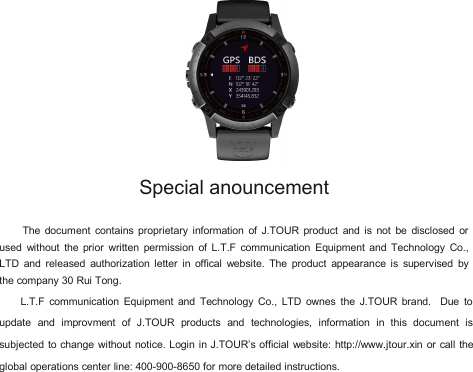
Special anouncementThe document contains proprietary information of J.TOUR product and is not be disclosed orused without the prior written permission of L.T.F communication Equipment and Technology Co.,LTD and released authorization letter in offical website. The product appearance is supervised bythe company 30 Rui Tong.L.T.F communication Equipment and Technology Co., LTD ownes the J.TOUR brand. Due toupdate and improvment of J.TOUR products and technologies, information in this document issubjected to change without notice. Login in J.TOUR’s official website: http://www.jtour.xin or call theglobal operations center line: 400-900-8650 for more detailed instructions.
Due to the user habits and compatibility with associated application, this product attached GPSglobal positioning system . GPS as a validate auxiliary for positioning results, provides the user witha comparatively accurate measurement.by the way of one satellite calculation and the otherverification
DisclaimerDue to the different circumstances and application methods, the user that wears the equipment mustpay special attention to the following instructions:1、Since the product is the sophisticated wearable device, the factors such as the user wrongoperation, external interference and devise problem may lead to the unsafe consequences. Theuser needs to master the the basic knowledge of wearing electronics and take the risk on your own.2、This product is widely used in a variety of environments and activities. User needs toconsider the safety of the installation location and operation in movements, and take the safetyresponsibility. Product manufacturers and operators does not undertake any responsibility for theabove operation..3、The product is not suitable for precise Measurement.。4、The product conforms to the FCC regulation in article 15 that describes the conditions of theClass B digital device. That means there may be mild radio communication radiation when using.User needs to adjust the position to avoid the interference by the other devices, that may lead tosignal receiving and operation inproperly. In addition, it is also important to notice whether the productwill affect the normal work of other communication devices. The above interference state is not withinthe guarantee of this product.5、The product does not refer to mapping standards in any country to set path. The results of mapscanning are based on accurate longitude and latitude by satellite positioning. Map is only as areferrence and the distance can not be estimated according to the picture ratio.
Battery WarningWithout complying with the followingguidelines, the life of the lithium battery in theequipment may be reduced and user maytake the risk of fire, chemical burn, electrolyteleakage.• Do not expose the equipment to a heatsource or at a high temperature location• Do not bore or incinerate the equipment orbattery.•Do not use in extreme enviorment•Dispose your device battery accordingto local applicable regulations and consultinglocal waste disposal department.Health Warning•Before starting or change your exerciseprogram, please be sure to consult yourdoctor. if you wear a heart preceptor or otherelectronic devices inside your body, pleaseconsult your doctor before the use of heartrate monitor belt.• The heart rate monitor belt and otherJTOUR accessories are used by consumersrather than medical device and may beinterfered by external factors, so the heartrate reading is only for reference. Thecompany will not take any responsibility forthe consequences of any error reading.
Security PrecautionALLERGIC REACTIONS OR SKIN IRRITATIONS MAY OCCUR WHENPRODUCT IS IN CONTACT WITH SKIN, EVEN THOUGH OUR PRODUCTS COMPLYWITH INDUSTRY STANDARDS. IN SUCH EVENT, STOP USE IMMEDIATELY ANDCONSULT A DOCTOR..Limited WarrantyThe products will be guaranteed for 2 years from the date of purchase. During this period, thecompany will repair or replace the parts that have problems in normal use.
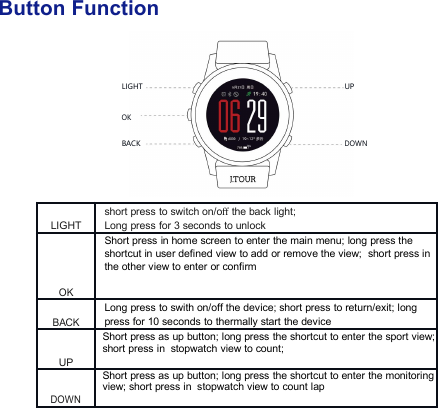
Button FunctionLIGHTUPOKBACKDOWN76%LIGHTshort press to switch on/offthe back light;Long press for 3 seconds to unlockOKShort press in home screen to enter the main menu; long press theshortcut in user defined view to add or remove the view; short press inthe other view to enter or confirmBACKLong press to swith on/off the device; short press to return/exit; longpress for 10 seconds to thermally start the deviceUPShort press as up button; long press the shortcut to enter the sport view;short press in stopwatch view to count;DOWNShort press as up button; long press the shortcut to enter the monitoringview; short press in stopwatch view to count lap
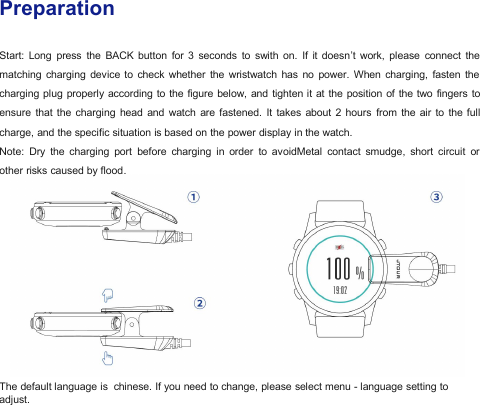
PreparationStart: Long press the BACK button for 3 seconds to swith on. If it doesn’t work, please connect thematching charging device to check whether the wristwatch has no power. When charging, fasten thecharging plug properly according to the figure below, and tighten it at the position of the two fingers toensure that the charging head and watch are fastened. It takes about 2 hours from the air to the fullcharge, and the specific situation is based on the power display in the watch.Note: Dry the charging port before charging in order to avoidMetal contact smudge, short circuit orother risks caused by flood.The default language is chinese. If you need to change, please select menu - language setting toadjust.
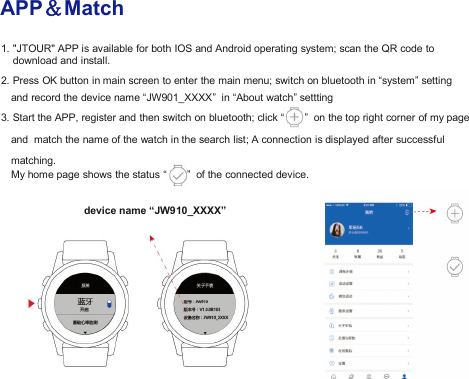
APP&Match1. "JTOUR" APP is available for both IOS and Android operating system; scan the QR code todownload and install.2. Press OK button in main screen to enter the main menu; switch on bluetooth in “system” settingand record the device name “JW901_XXXX” in “About watch” settting3. Start the APP, register and then switch on bluetooth; click “ ” on the top right corner of my pageand match the name of the watch in the search list; A connection is displayed after successfulmatching.My home page shows the status “ ” of the connected device.device name “JW910_XXXX”
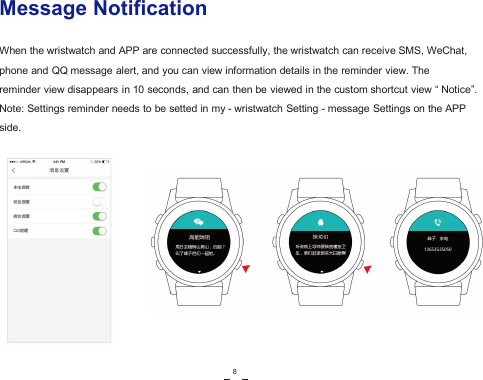
Message NotificationWhen the wristwatch and APP are connected successfully, the wristwatch can receive SMS, WeChat,phone and QQ message alert, and you can view information details in the reminder view. Thereminder view disappears in 10 seconds, and can then be viewed in the custom shortcut view “ Notice”.Note: Settings reminder needs to be setted in my - wristwatch Setting - message Settings on the APPside.8
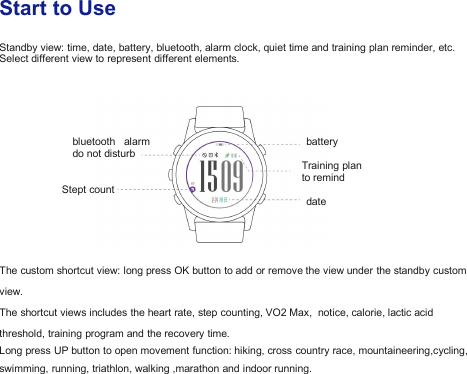
Start to UseStandby view: time, date, battery, bluetooth, alarm clock, quiet time and training plan reminder, etc.Select different view to represent different elements.bluetooth alarm batterydo not disturbTraining planto remindStept countdateThe custom shortcut view: long press OK button to add or remove the view under the standby customview.The shortcut views includes the heart rate, step counting, VO2 Max, notice, calorie, lactic acidthreshold, training program and the recovery time.Long press UP button to open movement function: hiking, cross country race, mountaineering,cycling,swimming, running, triathlon, walking ,marathon and indoor running.
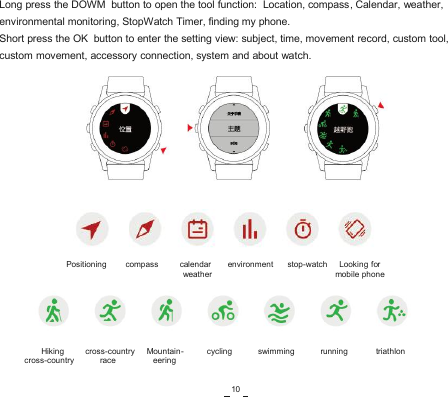
Long press the DOWM button to open the tool function: Location, compass, Calendar, weather,environmental monitoring, StopWatch Timer, finding my phone.Short press the OK button to enter the setting view: subject, time, movement record, custom tool,custom movement, accessory connection, system and about watch.Positioning compass calendar environment stop-watch Looking forweather mobile phoneHiking cross-country Mountain- cycling swimming running triathloncross-country race eering10
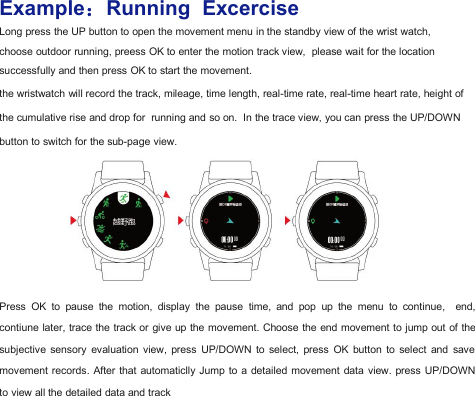
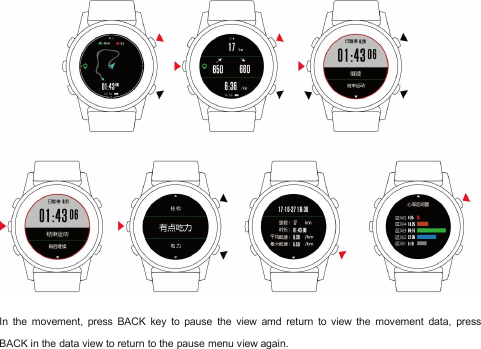
Example:Running ExcerciseLong press the UP button to open the movement menu in the standby view of the wrist watch,choose outdoor running, preess OK to enter the motion track view, please wait for the locationsuccessfully and then press OK to start the movement.the wristwatch will record the track, mileage, time length, real-time rate, real-time heart rate, height ofthe cumulative rise and drop for running and so on. In the trace view, you can press the UP/DOWNbutton to switch for the sub-page view.Press OK to pause the motion, display the pause time, and pop up the menu to continue, end,contiune later, trace the track or give up the movement. Choose the end movement to jump out of thesubjective sensory evaluation view, press UP/DOWN to select, press OK button to select and savemovement records. After that automaticlly Jump to a detailed movement data view. press UP/DOWNto view all the detailed data and track
In the movement, press BACK key to pause the view amd return to view the movement data, pressBACK in the data view to return to the pause menu view again.
FCC Warning: This  equipment  has  been  tested  and  found  to  comply  with  the  limits  for  a  Class  B digital  device,  pursuant  to  part  15  of  the  FCC  Rules.  These  limits  are  designed  to provide reasonable protection against harmful interference in a residential installation. This  equipment  generates,  uses  and  can  radiate  radio  frequency  energy  and,  if  not installed and used in accordance with the instructions, may cause harmful interference to  radio  communications.  However,  there  is  no  guarantee  that  interference  will  not occur in a particular installation. If this equipment does cause harmful interference to radio or television reception, which can be determined by turning the equipment off and on, the user is encouraged to try to correct the interference by one or more of the following measures: •  Reorient or relocate the receiving antenna. •  Increase the separation between the equipment and receiver. •  Connect the equipment into an outlet on a circuit different from that to which the receiver is connected. •  Consult the dealer or an experienced radio/TV technician for help.  Caution:  Any  changes  or  modifications  to  this  device  not  explicitly  approved  by manufacturer could void your authority to operate this equipment.  This  device  complies  with  part  15  of  the  FCC  Rules.  Operation  is  subject  to  the following two conditions: (1) This device may not cause harmful interference, and (2) this  device  must  accept  any  interference  received,  including  interference  that  may cause undesired operation.  The device has been evaluated to meet general RF exposure requirement. The device can be used in portable exposure condition without restriction.

Navigation menu