LANYA ELECTRONIC 4PR910 Bluetooth Car Kit User Manual Cyber Blue Co

LANYA ELECTRONIC CO., Ltd. Bluetooth Car Kit Cyber Blue Co

Users Manual

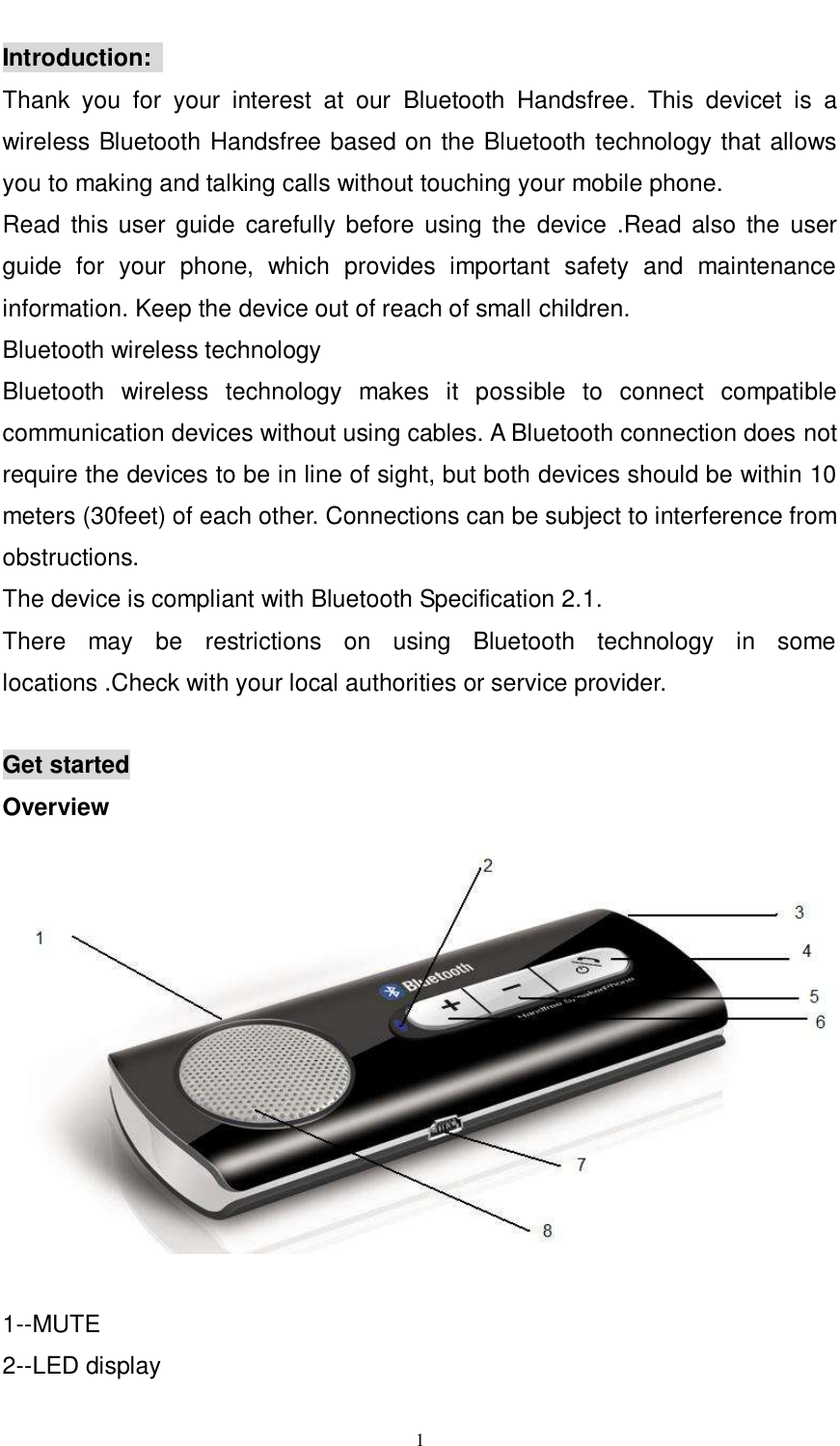
     1  Introduction:   Thank  you  for  your  interest  at  our  Bluetooth  Handsfree.  This  devicet  is  a wireless Bluetooth Handsfree based on the Bluetooth technology that allows you to making and talking calls without touching your mobile phone. Read  this user guide  carefully before  using the  device .Read  also  the  user guide  for  your  phone,  which  provides  important  safety  and  maintenance information. Keep the device out of reach of small children. Bluetooth wireless technology   Bluetooth  wireless  technology  makes  it  possible  to  connect  compatible communication devices without using cables. A Bluetooth connection does not require the devices to be in line of sight, but both devices should be within 10 meters (30feet) of each other. Connections can be subject to interference from obstructions.                             The device is compliant with Bluetooth Specification 2.1.   There  may  be  restrictions  on  using  Bluetooth  technology  in  some locations .Check with your local authorities or service provider.  Get started Overview   1--MUTE   2--LED display
     2 3-- MIC input 4--Multi-function Button (MFB) 5--Volume + button   6--Volume- button   7—Mini USB 5 PIN for the charging socket   8—speaker  Before you start using the device, you must charge the battery and pair the device with a compatible mobile phone.  Charger                       This  device  is  intended  to  use  with  the  usb  cable  that  is  included  in  the package.    Charge the battery   This  device  has  a  Rechargeable  Lithium  Polymer  Battery  3.7V,  750mAH battery.   1.  Connect the device to the PC USB port. The red indicator light is displayed during charging. If charging does not start, disconnect the USB cable, pug it again, and retry. Charging the battery fully may take up to 2-3 hours. 2.  When  the  battery  is  fully  charged,  the  red  indicator  light  turns  off. Disconnect the device from the USB port. The fully charged battery has power for up to 6 hours of talking time or up to 600 hours of standby time. However, the talking and standby time may vary when  used  with  different  mobile  phones,  products  that  use  a  Bluetooth connection, usage settings, usage styles, and environments.  Switch on and off the device To switch on, Press and hold the "MFB" multi-function button until there is a tone prompt and the blue LED flashes 5 times. The device is now on.   To switch off, press and hold the "MFB" for 4 seconds until the red LED flashes 5 times.
     3 Pair the device with a compatible phone 1.  make sure your device is switched off 2.  press and hold the "MFB" until the blue and red light flashes alternately and there is a tone prompt. The device is now in pairing state.   3.  Activate the Bluetooth feature on the phone, and set the phone to search for Bluetooth devices. See the user guide of your phone for instructions. 4.  Select the device (BCK08A) from the list of found devices. 5.  Enter the pass code 0000 to pair and connect the device to your phone. In some  phones  you  may  need  to  make  the  connection  separately  after pairing. See the user guide of your phone for details. You only need to pair the device with your phone once. If the pairing is successful, the device’s blue light will flash 3 times briefly. The device’s name appears in the phone menu where  you can view the currently paired Bluetooth devices.    Basic use   Call handling To  make  a  call,  use  your  phone  in  the  normal  way  when  the  device  is connected to your phone. And the blue LED will flash during the call.  To answer a call, press the “MFB” and the blue LED will flash during the call. To reject a call, press the “MFB” for 2 second and there is a tone prompt when there is incoming call.  To end a call, press the “MFB” one time  In standby state, press the volume + key for 2 seconds to redial last dialed telephone No. This function requires your phone supports redialing.  In standby state, press the “MFB” to start voice dialing. This function requires your mobile support voice dialing. Check the user manual of your mobile for details.  Adjust the volume
     4 Press volume+ or volume - key to increase or to decrease the volume during a call.    Mute During a call, press and hold mute button for about 2 second to mute the MIC, the same operation to withdraw from the MIC mute state.   LED indicator status:    Switch on: the blue LED flash five times.   Standby state: Blue LED flashes once every 3 second,   Connecting status: Blue LED flashes once every 3 second   Making and answering a Call: Blue LED flashes   Call: Blue lights flashing fast   Low battery warning: Red LED always on   Switch off: red LED flashes five times.   Charging state: Red LED always on and it will be off after charging completed    Main specifications:   - Bluetooth v2.1+EDR, ClassII - Operating Frequency Band: 2.4GHz ~ 2.48GHz unlicensed ISM band   - Working distance : up to 10 meters - Integrated with echo cancellation and Noise suppressor   - Built in speaker and microphone   - Battery type: Rechargeable Lithium Polymer Battery 3.7V, 750maH     - Charging time : about 2-3 hours - Talk time : about 6 hours - Standby time :    about 600 hours - Dimensions: 117.5x47x15.3mm - Pack included : User Manual, Sun visor clip.   -MUTE Support Play/pause and One song on the next song
     5 FCC Information This device complies with Part 15 of the FCC rules. Operation is subject to the following two conditions: (1) this device may not cause harmful interference, and (2) this device must accept any interference received; including interference that may cause undesired operation.  Federal Communications Commission (FCC) Statement  This Equipment has been tested and found to comply with the limits for a Class B digital device, pursuant to Part 15 of the FCC rules. These limits are designed to provide reasonable protection against harmful interference in a residential installation. This equipment generates, uses and can radiate radio frequency energy and, if not installed and used in accordance with the instructions, may cause  harmful  interference  to  radio  communications.  However,  there  is  no guarantee that interference will not occur in a particular installation.  If  this  equipment  does  cause  harmful  interference  to  radio  or television reception, which can be determined by turning the equipment off and on, the user is encouraged to try to correct the interference by one or more of the following measures:  - Reorient or relocate the receiving antenna. - Increase the separation between the equipment and receiver. - Connect the equipment into an outlet on a circuit different from that to which the receiver is connected. - Consult the dealer or an experienced radio/TV technician for help.  Warning: Changes or modifications to this unit not expressly approved by the party responsible for compliance could void the user authority to operate the equipment.  Tested to comply with FCC standard. FOR HOME OR OFFICE USE.

Navigation menu